FTD 관리자 액세스 데이터 인터페이스 변경

소개
이 문서에서는 FTD(Secure Firewall Threat Defense) 관리자 액세스 데이터 인터페이스를 변경하는 단계에 대해 설명합니다.
사전 요구 사항
요구 사항
- 기본 제품 지식
- 데이터 인터페이스에 대한 FTD 관리 및 관리에 익숙합니다.
사용되는 구성 요소
이 문서의 정보는 특정 랩 환경의 디바이스를 토대로 작성되었습니다. 이 문서에 사용된 모든 디바이스는 초기화된(기본) 컨피그레이션으로 시작되었습니다. 현재 네트워크가 작동 중인 경우 모든 명령의 잠재적인 영향을 미리 숙지하시기 바랍니다.
이 문서의 정보는 다음 소프트웨어 및 하드웨어 버전을 기반으로 합니다.
- 보안 방화벽 4200
- FTD(Secure Firewall Threat Defense) 10.0.x, 7.6.4
- FMC(Secure Firewall Management Center) 10.0.x
초기 컨피그레이션
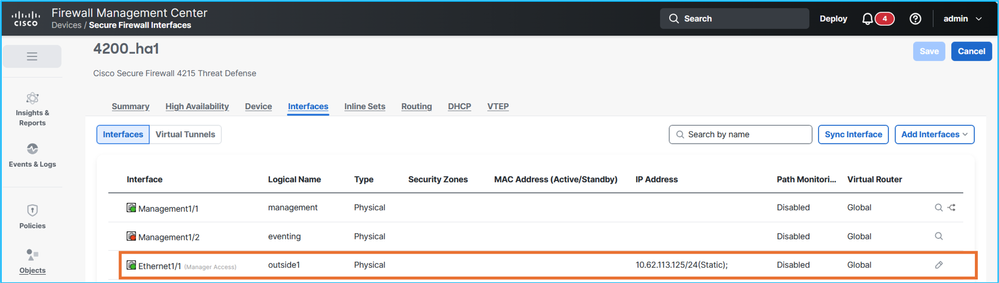
1. FMC는 액티브 및 스탠바이 IP 주소 10.62.113.125 및 10.62.113.126을 각각 사용하여 nameif outside1이라는 이름의 데이터 인터페이스 Ethernet1/1을 통해 HA(High Availability)에서 FTD를 관리합니다.
FTD CLISH 확인:
> show network management-data-interface

Physical Interface               Name of the Interface
Ethernet1/1              outside1

> show network
===============[ System Information ]===============
Hostname                  : CSF4215-3
..
DNS from router           : enabled
Management port           : 8305
IPv4 Default route
  Gateway                 : data-interfaces
…
======[ System Information - Data Interfaces ]======
DNS Servers               : 192.0.2.100
Interfaces                : Ethernet1/1

==================[ Ethernet1/1 ]===================

State                     : Enabled
Link                      : Up
Name                      : outside1
MTU                       : 1500
MAC Address               : 40:F4:9F:3D:5A:0E
----------------------[ IPv4 ]----------------------
Configuration             : Manual
Address                   : 10.62.113.125
Netmask                   : 255.255.255.0
Gateway                   : 10.62.113.1
…
2 . sftunnel 연결은 FTD HA 유닛과 FMC 간에 설정됩니다.
> sftunnel-status-brief
PEER:fmc.example.org
        SFTunnel Status:-
                Channel A: Connected
                Channel B: Connected
        Peer channel Channel-A is valid  type (CONTROL), using 'tap_nlp', connected to '198.51.100.23' via '169.254.1.3'
        Peer channel Channel-B is valid  type (EVENT), using 'tap_nlp', connected to '198.51.100.23' via '169.254.1.3'
        Registration: Completed.
        IPv4 Connection to peer 'fmc.example.org' Start Time: Fri Jul 17 08:22:31 2026 UTC
        Heartbeat Send Time:     Fri Jul 17 08:52:42 2026 UTC
        Heartbeat Received Time: Fri Jul 17 08:53:03 2026 UTC
        Last disconnect time   : Fri Jul 17 08:22:16 2026 UTC
        Last disconnect reason : Process shutdown due to stop request from PM
3. FTD는 DNS 확인을 사용하여 FMC에 연결합니다. 관리자는 FQDN(정규화된 도메인 이름)을 기반으로 하는 컨피그레이션입니다.
> show managers
Type                      : Manager
Host                      : fmc.example.org
Display name              : fmc.example.org
Version                   : 10.0.1 (Build 1)
Identifier                : 6d86efc4-c095-11f0-9244-48f1a7894b18
Registration              : Completed
Management type           : Configuration and analytics

> show network
===============[ System Information ]===============
Hostname                  : KSEC-FPR-4215-3
Domains                   : example.org
DNS Servers               : 192.0.2.100
DNS from router           : enabled
Management port           : 8305
IPv4 Default route
  Gateway                 : data-interfaces
…
DNS 서버는 outside1 인터페이스를 통해 연결할 수 있습니다.
4. sftunnel 연결은 Lina 엔진을 통해 설정됩니다.
> show conn all port 8305
26 in use, 32 most used
Inspect Snort:
        preserve-connection: 0 enabled, 0 in effect, 0 most enabled, 0 most in effect

TCP nlp_int_tap  10.62.113.125(169.254.1.3):8305 outside1  198.51.100.23:45647, idle 0:00:03, bytes 2129062, flags UIO
TCP nlp_int_tap  10.62.113.125(169.254.1.3):37141 outside1  198.51.100.23:8305, idle 0:00:04, bytes 148581, flags UxIO
컨피그레이션 단계
목표는 현재 outside1에서 대상 outside2 인터페이스로 관리자 액세스를 이동하는 것입니다. 액티브 및 스탠바이 외부2 IP 주소는 각각 10.62.114.51/24 및 10.62.114.52/24입니다.
FTD 버전 7.7.0 이상에서는 이중화 관리자 액세스 데이터 인터페이스를 지원하며, 이를 통해 둘 이상의 관리자 액세스 인터페이스를 구성하고 구축할 수 있습니다. 7.7.0 이전 버전에서는 이 기능이 지원되지 않습니다.
이러한 사실로 인해 특정 단계를 건너뛰거나 다른 작업을 포함합니다.
- FTD에 콘솔 액세스 권한을 갖는 것이 좋습니다.
- Firepower 4100/9300의 경우 SSH를 사용하여 섀시에 연결한 다음 connect module x console 명령을 사용하여 기본 FTD 콘솔에 연결할 수 있습니다. 여기서 x는 슬롯/보안 모듈 ID입니다.
- FTD를 MI(Multi-Instance) 모드로 실행하는 Firepower 4100/9300의 경우 SSH를 사용하여 섀시에 연결한 다음 connect module x telnet 명령을 사용하여 기본 FTD 콘솔에 연결할 수 있습니다. 여기서 x는 슬롯/보안 모듈 ID입니다. 그런 다음 connect ftd <ftd_id> 명령을 사용하여 FTD 인스턴스에 연결합니다.
- MI 모드의 Secure Firewall 3100/4200의 경우 SSH를 사용하여 섀시에 연결한 다음 connect ftd <identifier> 명령을 사용하여 FTD 콘솔에 연결할 수 있습니다.
- 보류 중인 정책을 배포합니다.
- FTD 및 FMC 백업을 수행하는 것이 좋습니다. FTD HA의 경우 두 유닛의 백업을 수행합니다.
- 대상 인터페이스 nameif, IP 주소, 보안 영역 및 기타 인터페이스 관련 설정을 구성합니다(해당하는 경우).
- 대상 인터페이스 대기 IP 주소를 구성합니다.
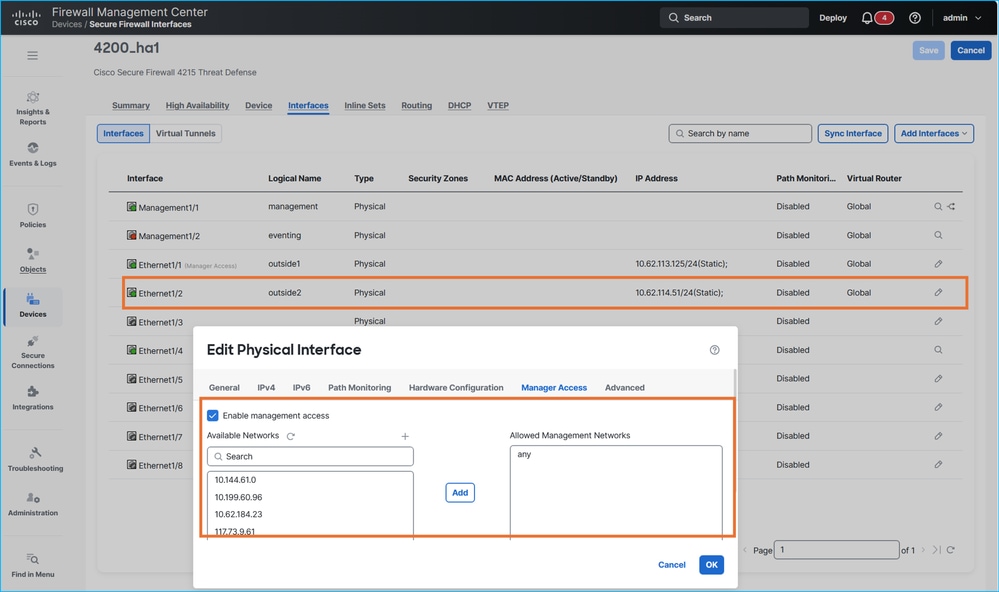
- FTD 소프트웨어 버전이 7.7.0 이상인 경우 대상 인터페이스에서 관리자 액세스를 활성화하고 필요에 따라 관리 액세스 네트워크를 조정합니다.
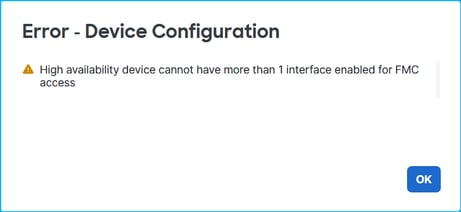
7.7.0 이전 버전의 FTD는 이중화된 관리자 액세스 데이터 인터페이스를 지원하지 않습니다. 두 번째 관리자 액세스 인터페이스를 구성하려고 하면 다음 오류 메시지가 표시됩니다.
7.7.0 이전의 FTD 버전에 대해서는 7단계와 8단계를 건너뜁니다.
7. 정책을 구축하고 FTD CLISH에서 설정을 확인합니다. 이 예에서 nameif outside2의 Ethernet1/2 인터페이스는 IP 주소가 각각 10.62.114.51 및 10.62.114.52입니다.
> show ip
System IP Addresses:
Interface                Name                   IP address      Subnet mask     Method
Ethernet1/1              outside1               10.62.113.125   255.255.255.0   manual <- source interface
Ethernet1/2              outside2               10.62.114.51    255.255.255.0   manual <- target interface
Ethernet1/4              fover                  10.9.0.21       255.255.255.0   unset
outside2 인터페이스가 sftunnel 컨피그레이션에 추가됩니다.
> show running-config sftunnel
sftunnel interface outside2 <- target interface
sftunnel interface outside1 <- source interface
sftunnel port 8305
sftunnel route-map FMC_GEN_19283746_RBD_DUAL_WAN_RMAP_91827346
추가 규칙이 NAT(Network Address Translation) 테이블에 설치되어 있지만 outside1 인터페이스의 규칙은 사용 중입니다.
> show nat detail
Manual NAT Policies Implicit (Section 0)
1 (nlp_int_tap) to (outside1) source static nlp_server__sftunnel_0.0.0.0_intf5 interface  destination static 0_0.0.0.0_5 0_0.0.0.0_5 service tcp 8305 8305
    translate_hits = 1448, untranslate_hits = 1448
    Source - Origin: 169.254.1.3/32, Translated: 10.62.113.125/24
    Destination - Origin: 0.0.0.0/0, Translated: 0.0.0.0/0
    Service - Protocol: tcp Real: 8305 Mapped: 8305
2 (nlp_int_tap) to (outside2) source static nlp_server__sftunnel_0.0.0.0_intf6 interface  destination static 0_0.0.0.0_9 0_0.0.0.0_9 service tcp 8305 8305
    translate_hits = 0, untranslate_hits = 0
    Source - Origin: 169.254.1.3/32, Translated: 10.62.114.51/24
    Destination - Origin: 0.0.0.0/0, Translated: 0.0.0.0/0
    Service - Protocol: tcp Real: 8305 Mapped: 8305
3 (nlp_int_tap) to (outside1) source static nlp_server__sftunnel_::_intf5 interface ipv6  destination static 0_::_6 0_::_6 service tcp 8305 8305
    translate_hits = 0, untranslate_hits = 0
    Source - Origin: fd00:0:0:1::3/128, Translated:
    Destination - Origin: ::/0, Translated: ::/0
    Service - Protocol: tcp Real: 8305 Mapped: 8305
4 (nlp_int_tap) to (outside2) source static nlp_server__sftunnel_::_intf6 interface ipv6  destination static 0_::_10 0_::_10 service tcp 8305 8305
    translate_hits = 0, untranslate_hits = 0
    Source - Origin: fd00:0:0:1::3/128, Translated:
    Destination - Origin: ::/0, Translated: ::/0
    Service - Protocol: tcp Real: 8305 Mapped: 8305
5 (nlp_int_tap) to (outside1) source dynamic nlp_client_0_intf5 interface
    translate_hits = 653, untranslate_hits = 0
    Source - Origin: 169.254.1.3/32, Translated: 10.62.113.125/24
6 (nlp_int_tap) to (outside2) source dynamic nlp_client_0_intf6 interface
    translate_hits = 0, untranslate_hits = 0
    Source - Origin: 169.254.1.3/32, Translated: 10.62.114.51/24
7 (nlp_int_tap) to (outside1) source dynamic nlp_client_0_ipv6_intf5 interface ipv6
    translate_hits = 0, untranslate_hits = 0
    Source - Origin: fd00:0:0:1::3/128, Translated:
8 (nlp_int_tap) to (outside2) source dynamic nlp_client_0_ipv6_intf6 interface ipv6
    translate_hits = 0, untranslate_hits = 0
    Source - Origin: fd00:0:0:1::3/128, Translated:
8. 고가용성 상태 및 인터페이스 모니터링 확인:
> show monitor-interface
        This host: Primary - Active
                Interface management (203.0.113.130): Normal (Monitored)
                Interface outside1 (10.62.113.125): Normal (Monitored)
                Interface outside2 (10.62.114.51): Normal (Monitored)
        Other host: Secondary - Standby Ready
                Interface management (203.0.113.131): Normal (Monitored)
                Interface outside1 (10.62.113.126): Normal (Monitored)
                Interface outside2 (10.62.114.52): Normal (Monitored)
9. outside2 인터페이스를 통해 FTD를 관리하려는 경우 플랫폼 설정의 SSH 액세스 섹션에서 액세스가 허용되는지 확인합니다.
10. 대상 인터페이스를 통해 DNS(도메인 이름 서버) 및 FMC에 연결할 수 있도록 필요한 사항을 변경합니다.
- FMC와 FTD 간의 연결에 DNS(Domain Name Resolution)가 필요한 경우 FTD가 대상 인터페이스를 통해 DNS 서버에 연결하는 데 사용되는 다음 홉에 연결할 수 있는지 확인합니다. 전송 경로에서도 DNS 확인이 허용되어야 합니다.
- FTD가 대상 인터페이스를 통해 FMC에 연결하기 위해 사용할 다음 홉으로 연결할 수 있는지 확인합니다.
- TCP 포트 8305를 통한 FMC와 FTD 간의 양방향 연결이 대상 인터페이스의 트랜짓 경로에서 허용되는지 확인합니다. 양방향으로 연결을 허용해야 합니다.
이 경우 IP 10.62.114.1을 대상 인터페이스에서 기본 게이트웨이로 사용해야 합니다. 다음 홉 IP 주소는 ICMP(Internet Control Message Protocol)를 사용하여 연결할 수 있습니다.
> ping 10.62.114.1
Please use 'CTRL+C' to cancel/abort...
Sending 5, 100-byte ICMP Echos to 10.62.114.1, timeout is 2 seconds:
!!!!!
Success rate is 100 percent (5/5), round-trip min/avg/max = 1/2/10 ms
ICMP가 전송 경로 또는 다음 홉에서 관리상 차단된 경우 다음 홉의 MAC(Media Access Control) 주소가 show arp 명령 출력에 표시되고 유효한지 확인합니다.
> show arp
        fover 10.9.0.22 4c01.f7e9.e111 13275
        outside1 10.62.113.1 c02c.1782.2cbf 1
        outside1 10.62.113.126 4c01.f7e9.e10e 5453
        outside2 10.62.114.1 c02c.1782.2cbf 0
        outside2 10.62.114.52 4c01.f7e9.e10f 5453
11. FTD 버전에 따라 다음 단계를 수행합니다.
- 버전 7.7.0 이상: fmc에서 소스 인터페이스(outside1)를 통한 관리자 액세스를 비활성화하고, DNS 서버에 대한 라우팅(DNS를 사용하여 FMC에 액세스하는 경우) 및 대상 인터페이스(outside2)를 통한 FMC를 포함하여 라우팅을 조정합니다. 예를 들어 특정 고정 경로를 구성하거나 대상 인터페이스를 통해 기본 게이트웨이를 구성합니다.
- 7.7.0 이전 버전: fmc에서 소스 인터페이스(outside1)를 통한 관리자 액세스를 비활성화하고, 대상 인터페이스(outside2)를 통한 관리자 액세스를 활성화하고, DNS 서버에 대한 라우팅(DNS를 사용하여 FMC에 액세스하는 경우) 및 대상 인터페이스(outside2)를 통한 FMC를 포함하여 라우팅을 조정합니다. 예를 들어 특정 고정 경로를 구성하거나 대상 인터페이스를 통해 기본 게이트웨이를 구성합니다.
12. 정책 배포
13. FTD CLI에서 다음을 확인합니다.
> show route 0.0.0.0

Routing entry for 0.0.0.0 0.0.0.0, supernet
  Known via "static", distance 1, metric 0, candidate default path
  Routing Descriptor Blocks:
  * 10.62.114.1, via outside2 <- default route over outside2
      Route metric is 0, traffic share count is 1


> show running-config sftunnel
sftunnel interface outside2 <- sftunnel is enabled only over outside2
sftunnel port 8305


> show nat detail
Manual NAT Policies Implicit (Section 0)
1 (nlp_int_tap) to (outside2) source static nlp_server__sftunnel_0.0.0.0_intf6 interface  destination static 0_0.0.0.0_9 0_0.0.0.0_9 service tcp 8305 8305
    translate_hits = 3, untranslate_hits = 3
    Source - Origin: 169.254.1.3/32, Translated: 10.62.114.51/24
    Destination - Origin: 0.0.0.0/0, Translated: 0.0.0.0/0
    Service - Protocol: tcp Real: 8305 Mapped: 8305
2 (nlp_int_tap) to (outside2) source static nlp_server__sftunnel_::_intf6 interface ipv6  destination static 0_::_10 0_::_10 service tcp 8305 8305
    translate_hits = 0, untranslate_hits = 0
    Source - Origin: fd00:0:0:1::3/128, Translated:
    Destination - Origin: ::/0, Translated: ::/0
    Service - Protocol: tcp Real: 8305 Mapped: 8305
3 (nlp_int_tap) to (outside2) source dynamic nlp_client_0_intf6 interface
    translate_hits = 407, untranslate_hits = 0
    Source - Origin: 169.254.1.3/32, Translated: 10.62.114.51/24
4 (nlp_int_tap) to (outside2) source dynamic nlp_client_0_ipv6_intf6 interface ipv6
    translate_hits = 0, untranslate_hits = 0
    Source - Origin: fd00:0:0:1::3/128, Translated:


> show conn all port 8305
31 in use, 42 most used
Inspect Snort:
        preserve-connection: 0 enabled, 0 in effect, 0 most enabled, 0 most in effect

TCP nlp_int_tap  10.62.114.51(169.254.1.3):56853 outside2  198.51.100.23:8305, idle 0:00:06, bytes 33008, flags UxIO  <- connectivity over outside2
TCP nlp_int_tap  10.62.114.51(169.254.1.3):32905 outside2  198.51.100.23:8305, idle 0:00:00, bytes 1595942, flags UxIO <- connectivity over outside2
14. 'show network' CLISH 명령의 출력에서 DNS 서버를 변경해야 하는 경우 새 DNS 서버를 구성합니다.
> configure network dns servers 192.0.2.184
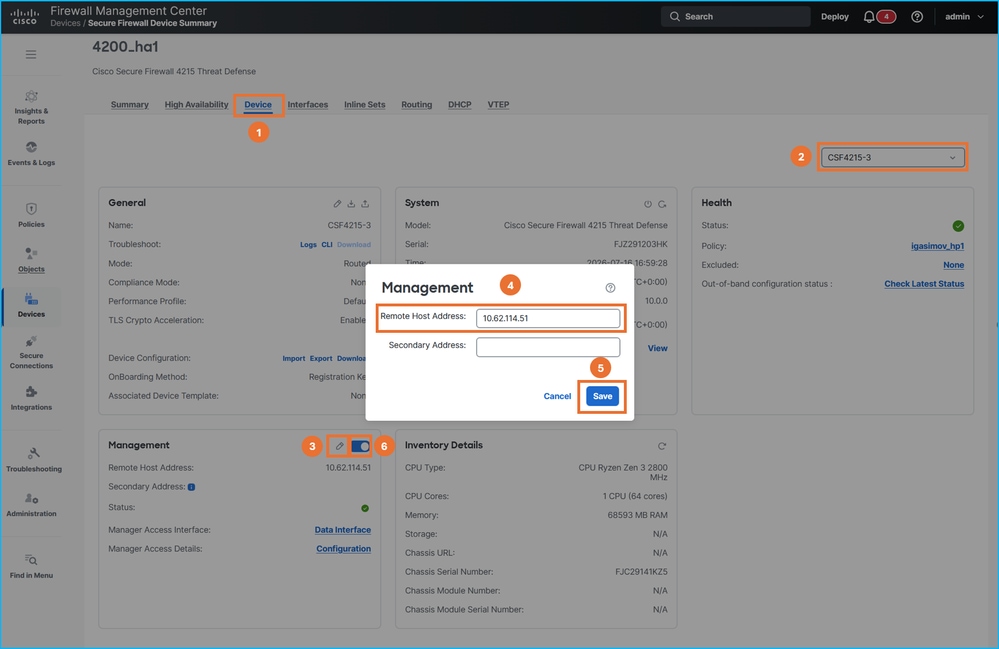
15. FMC에서 FTD 관리 IP 주소를 outside2 IP 주소로 변경한 다음 슬라이더를 사용하여 연결을 비활성화했다가 다시 활성화합니다. HA의 두 유닛에 대해 이 단계를 반복합니다.
16. 모든 FTD에서 sftunnel 연결을 확인합니다.
> sftunnel-status-brief
PEER:198.51.100.23
        SFTunnel Status:-
                Channel A: Connected
                Channel B: Connected
        Peer channel Channel-A is valid  type (CONTROL), using 'tap_nlp', connected to '198.51.100.23' via '169.254.1.3'
        Peer channel Channel-B is valid  type (EVENT), using 'tap_nlp', connected to '198.51.100.23' via '169.254.1.3'
        Registration: Completed.
        IPv4 Connection to peer '198.51.100.23' Start Time: Thu Jul 16 16:37:14 2026 UTC
        Heartbeat Send Time:     Thu Jul 16 16:38:13 2026 UTC
        Heartbeat Received Time: Thu Jul 16 16:39:13 2026 UTC
        Last disconnect time   : Thu Jul 16 16:37:11 2026 UTC
        Last disconnect reason : Both control and event channel connections with peer went down

> show conn all port 8305
32 in use, 42 most used
Inspect Snort:
        preserve-connection: 0 enabled, 0 in effect, 0 most enabled, 0 most in effect

TCP nlp_int_tap  10.62.114.51(169.254.1.3):8305 outside2  198.51.100.23:36383, idle 0:00:00, bytes 235757, flags UIO  <- new connection over different source port
TCP nlp_int_tap  10.62.114.51(169.254.1.3):8305 outside2  198.51.100.23:50963, idle 0:00:01, bytes 12319, flags UIO <- new connection over different source port
17. 플랫폼 설정의 DNS 서버를 변경해야 하는 경우 적절한 구성을 변경하고 정책을 배포합니다.
관리 연결 문제 해결
확인에 다음 명령을 사용합니다.
- show network - 관리 인터페이스의 컨피그레이션을 표시합니다.
- sftunnel-status-brief - sftunnel 연결 상태를 표시합니다.
- show run sftunnel - 방화벽 엔진(Lina)의 sftunnel 컨피그레이션을 표시합니다.
- show conn all port 8305 - Lina 엔진을 통한 sftunnel 연결을 보여줍니다.
관리 연결 문제를 해결하려면 공식 가이드의 Troubleshooting the Management Connection 섹션을 참조하십시오.
참조
개정 이력
| 개정 | 게시 날짜 | 의견 |
|---|---|---|
1.0 |
07-Aug-2026
|
최초 릴리스 |
 피드백
피드백