GRE トンネルの設定

Generic Routing Encapsulation(GRE)は、カプセル化によってあるプロトコルのパケットを別のプロトコルを介して転送する、簡易な一般的アプローチを提供するトンネリング プロトコルです。このモジュールでは、GRE トンネルの設定方法について説明します。

GRE トンネルの設定

トンネリングでは、1 つのプロトコルのパケットを別のプロトコル内に転送するメカニズムを提供します。Generic Routing Encapsulation(GRE)は、カプセル化によってあるプロトコルのパケットを別のプロトコルを介して転送する、簡易な一般的アプローチを提供するトンネリング プロトコルです。GRE は、ペイロード(外側の IP パケット内部の、宛先ネットワークに渡す必要がある内側のパケット)をカプセル化します。GRE トンネルは、トンネル送信元アドレスとトンネル宛先アドレスによって識別される 2 つのエンドポイントを持つ仮想ポイントツーポイント リンクとして動作します。トンネルのエンドポイントは、介在する IP ネットワークを通じてカプセル化パケットをルーティングすることによって、GRE トンネルを介してペイロードを送信します。途中の IP ルータは、ペイロード(内側のパケット)を解析しません。これらのルータは、GRE トンネル エンドポイントにパケットを転送する際に、外側の IP パケットだけを解析します。トンネル エンドポイントに到達すると、GRE カプセル化が削除され、ペイロードはパケットの最終的な宛先に転送されます。

GRE トンネル設定の制約事項

GRE トンネル設定時には、次の制約事項が適用されます。
  • NCS540 シリーズ ルータは最大 500 の GRE トンネルをサポートしています。

  • トンネル送信元でサポートされている一意の送信元 IP アドレスは最大 16 個のみです。

設定例

GRE トンネルを設定するには、トンネル インターフェイスを作成し、トンネルの送信元と宛先を定義します。次に、ルータ 1 とルータ 2 の間に GRE トンネルを設定する例を示します。両方のルータ上でトンネル インターフェイスを設定する必要があります。ルータ 1 のトンネル送信元 IP アドレスは、ルータ 2 のトンネル宛先 IP アドレスとして設定されます。ルータ 1 のトンネル宛先 IP アドレスは、ルータ 2 のトンネル送信元 IP アドレスとして設定されます。次の例では、2 つのルータ間のルーティング プロトコルとして OSPF が使用されています。また、BGP または IS-IS もルーティング プロトコルとして使用できます。

RP/0/RP0/CPU0:Router1# configure
RP/0/RP0/CPU0:Router1(config)#  interface tunnel-ip 30
RP/0/RP0/CPU0:Router1(config-if)# tunnel mode gre ipv4
RP/0/RP0/CPU0:Router(config-if)# ipv4 address 10.1.1.1 255.255.255.0
RP/0/RP0/CPU0:Router1(config-if)# tunnel source 192.168.1.1    
RP/0/RP0/CPU0:Router1(config-if)# tunnel destination 192.168.2.1
RP/0/RP0/CPU0:Router1(config-if)# exit
RP/0/RP0/CPU0:Router1(config)# interface Loopback 0
RP/0/RP0/CPU0:Router1(config-if)# ipv4 address 1.1.1.1 
RP/0/RP0/CPU0:Router1(config-if)# exit
RP/0/RP0/CPU0:Router1(config)# router ospf 1
RP/0/RP0/CPU0:Router1(config-ospf)# router-id 192.168.4.1
RP/0/RP0/CPU0:Router1(config-ospf)# area 0
RP/0/RP0/CPU0:Router1(config-ospf-ar)# interface tunnel-ip 30
RP/0/RP0/CPU0:Router1(config-ospf-ar)#  interface Loopback 0
RP/0/RP0/CPU0:Router1(config-ospf-ar)# commit

RP/0/RP0/CPU0:Router2# configure
RP/0/RP0/CPU0:Router2(config)#  interface tunnel-ip 30
RP/0/RP0/CPU0:Router2(config-if)# tunnel mode gre ipv4
RP/0/RP0/CPU0:Router2(config-if)# ipv4 address 10.1.1.2 255.255.255.0
RP/0/RP0/CPU0:Router2(config-if)# tunnel source 192.168.2.1 
RP/0/RP0/CPU0:Router2(config-if)# tunnel destination 192.168.1.1 
RP/0/RP0/CPU0:Router2(config-if)# exit
RP/0/RP0/CPU0:Router2(config)# interface Loopback 0
RP/0/RP0/CPU0:Router2(config-if)# ipv4 address 2.2.2.2
RP/0/RP0/CPU0:Router2(config)# router ospf 1
RP/0/RP0/CPU0:Router2(config-ospf)# router-id 192.168.3.1
RP/0/RP0/CPU0:Router2(config-ospf)# area 0
RP/0/RP0/CPU0:Router2(config-ospf-ar)# interface tunnel-ip 30
RP/0/RP0/CPU0:Router2(config-ospf-ar)# interface Loopback 0
RP/0/RP0/CPU0:Router2(config-if)# commit
IP-in-IP カプセル化解除

ネットワーク内のデータグラムのカプセル化は、宛先ホストに到達するためにパケットがたどるルートに送信元サーバで影響を与える場合など、いくつかの理由で実行されます。また、送信元サーバはカプセル化サーバとも呼ばれます。

IP-in-IP カプセル化には、既存の IP ヘッダーを介した外部 IP ヘッダーの挿入が含まれています。外部 IP ヘッダー内の送信元と宛先のアドレスは、IP-in-IP トンネルのエンド ポイントを指しています。パケットを転送するルータのループバック アドレスをネットワーク管理者が把握している場合は、IP ヘッダーのスタックを使用して、パケットを事前に決定さしたパスを介して宛先に送信します。このトンネリング メカニズムは、ほとんどのネットワーク アーキテクチャの可用性と遅延の判断に使用できます。送信元から宛先までのパス全体をヘッダーに含める必要はありませんが、パケットを送信するためのネットワークのセグメントは選択できることに注意してください。

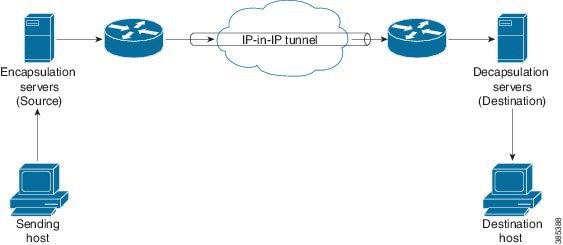
次に、基本的な IP-in-IP カプセル化とカプセル化解除のモデルを説明する図を示します。

図 1. IP-in-IP トンネルを使用した基本的なカプセル化とカプセル化解除

使用例:IP-in-IP カプセル化解除の設定

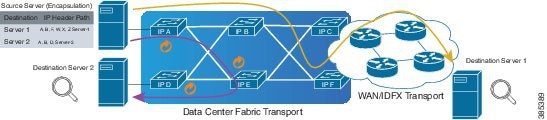
次のトポロジで、送信元から宛先までのネットワークのさまざまなセグメントに IP-in-IP カプセル化とカプセル化解除が使用されている使用例について説明します。IP-in-IP トンネルは、データセンター ファブリック ネットワークを通じてパケットのカプセル化を解除し、送信するために使用する複数のルートで構成されます。

図 2. データセンター ネットワークを通じた IP-in-IP カプセル化解除

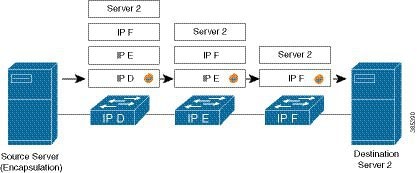
次の図に、カプセル化解除ルータを通過するときにスタック構成の IPv4 ヘッダーのカプセル化を解除する方法を示します。

図 3. IP ヘッダーのカプセル化解除

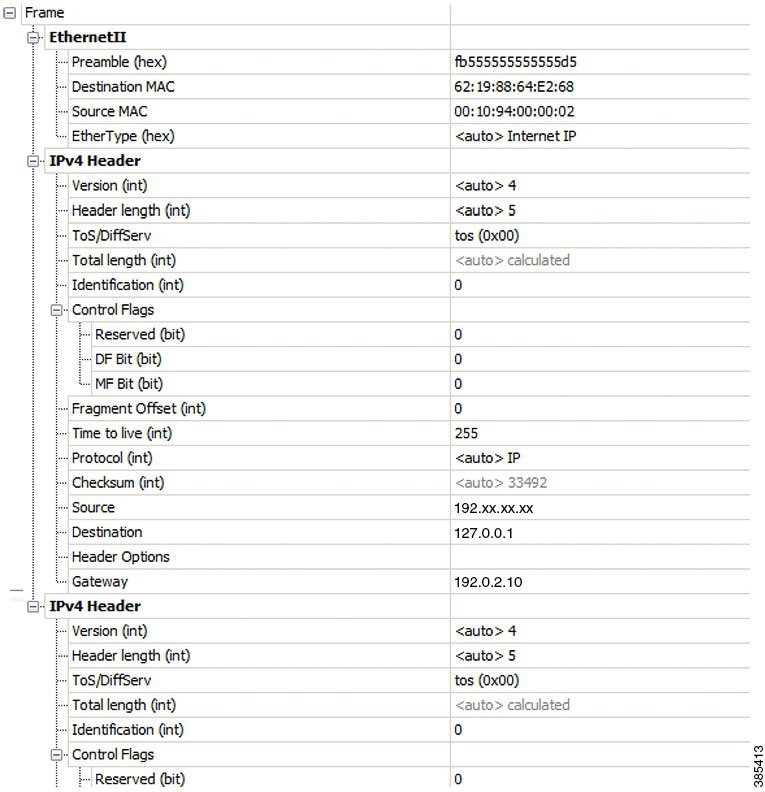
カプセル化されたパケット内のスタック構成の IP ヘッダー

カプセル化されたパケットには、元の IPv4 ヘッダー上に外部 IPv4 ヘッダーが積み重ねられています。

設定

IP-in-IP トンネルの通過時にパケットのカプセル化を解除するには、次の設定例をルータに使用します。

RP/0/RP0/CPU0:router(config)# interface tunnel-ip 10
RP/0/RP0/CPU0:router(config-if)# tunnel mode ipv4 decap 
RP/0/RP0/CPU0:router(config-if)# tunnel source loopback 0
RP/0/RP0/CPU0:router(config-if)# tunnel destination 10.10.1.2/32 
  • tunnel-ip:IP-in-IP トンネル インターフェイスを設定します。

  • ipv4 unnumbered loopback address:ループバック アドレスの場合を除き、明示的なアドレスを使用せずに IPv4 パケット処理を可能にします。

  • tunnel mode ipv4 decap:IP-in-IP カプセル化解除を有効にします。

  • tunnel source:ルータ インターフェイスに関して、IP-in-IP カプセル化解除トンネルの送信元インターフェイスを指定します。

  • tunnel destination:ルータ インターフェイスに関して、IP-in-IP カプセル化解除トンネルの宛先アドレスを指定します。

実行コンフィギュレーション

RP/0/RP0/CPU0:router# show running-config interface tunnel-ip 10
...
interface tunnel-ip 10
tunnel mode ipv4 decap
tunnel source Loopback 0
tunnel destination 10.10.1.2/32

これにより、IP-in-IP カプセル化解除の設定が完了します。

ライン レートのカプセル化を許可する単一パス GRE のカプセル化

単一パス GRE カプセル化を許可するライン レート カプセル化機能により、ライン レート GRE カプセル化トラフィックを有効にし、フロー エントロピーを有効にします。データプレーン転送パフォーマンスはライン レート全体をサポートし、追加されたカプセル化を考慮するように調整されます。RIB で宛先が使用できない場合は、GRE トンネルがダウンします。リリース 6.3.2 では GRE 単一パス トンネルを介したルーティングがサポートされていません。そのため、GRE カプセル化の対象となるトラフィックは GRE カプセル化に基づく ACL フィルタを使用して識別されます。GRE トンネルの宛先アドレスはエニー キャスト アドレスです。カスタマーは、GRE カプセル化すべてを ACL またはポリシー マップのいずれか、あるいはその両方に基づいて割り当てる必要があります。宛先には個別のアドレスか、または /28 プレフィックスも使用できます。

設定

GRE 単一パス エントロピー機能を設定するには、次のタスクを実行します。
  • GRE 単一パス

  • GRE のエントロピー(ECMP/UCMP)


/* GRE Single-Pass */

Router# configure
Router(config)# interface tunnel-ip30016
Router(config-if)# ipv4 address 216.1.1.1 255.255.255.0
Router(config-if)# ipv6 address 216:1:1::1/64
Router(config-if)# ipv6 enable
Router(config-if)# tunnel mode gre ipv4 encap
Router(config-if)# tunnel source Loopback22
Router(config-if)# tunnel destination 170.170.170.22
Router(config-if)# commit
Router(config-if)# exit

/* GRE Entropy(ECMP/UCMP)*/

ECMP (ISIS)

Router# configure
Route(config)# router isis core
Route(config)# apply-group ISIS-INTERFACE
Route(config-isis)# is-type level-2-only
Route(config-isis)# net 49.1111.0000.0000.002.00
Route(config-isis)# nsr
Route(config-isis)# log adjacency changes
Route(config-isis)# address-family ipv4 unicast
Route(config-isis-af)# metric-style wide metric 2
Route(config-isis-af)# mpls traffic-eng level-2-only
Route(config-isis-af)# mpls traffic-eng router-id Loopback0
Route(config-isis-af)# maximum-paths 5
Route(config-isis-af)# commit
!

/* UCMP(ISIS) */

Router# configure
Route(config)# router isis core
Route(config)# apply-group ISIS-INTERFACE
Route(config-isis)# is-type level-2-only
Route(config-isis)# net 49.1111.0000.0000.002.00
Route(config-isis)# nsr
Route(config-isis)# log adjacency changes
Route(config-isis)# address-family ipv4 unicast
Route(config-isis-af)# metric-style wide ucmp metric 2
Route(config-isis-af)# mpls traffic-eng level-2-only
Route(config-isis-af)# mpls traffic-eng router-id Loopback0
Route(config-isis-af)# maximum-paths 5
Route(config-isis-af)# redistribute connected
Route(config-isis-af)# commit
Route(config-isis-af)# exit
!

Router# configure
Route(config)# interface Bundle-Ether3
Route(config-if)# apply-group ISIS-INTERFACE
Route(config-if)# address-family ipv4 unicast
Route(config-af)# metric 20
Route(config-af)# commit
Route(config-af)# exit
!

Router# configure
Route(config)# interface Bundle-Ether111
Route(config-if)# apply-group ISIS-INTERFACE
Route(config-if)# address-family ipv4 unicast
Route(config-af)# metric 15
Route(config-af)# commit
Route(config-af)# exit
!

/* ECMP(OSPF) */

Router# configure
Route(config)# router ospf 3
Route(config-ospf)# nsr
Route(config-ospf)# maximum paths 5
Route(config-ospf)# address-family ipv4 unicast
Route(config-ospf-af)# area 0
Route(config-ospf-af-ar)# interface Bundle-Ether3
Route(config-ospf-af-ar-if)# exit
!
Route(config-ospf-af-ar)# interface Bundle-Ether4
Route(config-ospf-af-ar-if)# exit
!
Route(config-ospf-af-ar)# interface Bundle-Ether111
Route(config-ospf-af-ar-if)# exit
!
Route(config-ospf-af-ar)# interface Bundle-Ether112
Route(config-ospf-af-ar-if)# exit
!
Route(config-ospf-af-ar)# interface Loopback23
Route(config-ospf-af-ar-if)# exit
!
Route(config-ospf-af-ar)# interface HundredGigE0/0/1/0
Route(config-ospf-af-ar-if)# commit
Route(config-ospf-af-ar-if)# exit


/* UCMP(OSPF) */

Router# configure
Route(config)# router ospf 3
Route(config-ospf)# nsr
Route(config-ospf)# maximum paths 5
Route(config-ospf)# ucmp
Route(config-ospf)# address-family ipv4 unicast
Route(config-ospf-af)# area 0
Route(config-ospf-af-ar)# interface Bundle-Ether3 cost 2
Route(config-ospf-af-ar-if)# exit
!
Route(config-ospf-af-ar)# interface Bundle-Ether4
Route(config-ospf-af-ar-if)# exit
!
Route(config-ospf-af-ar)# interface Bundle-Ether111
Route(config-ospf-af-ar-if)# exit
!
Route(config-ospf-af-ar)# interface Bundle-Ether112 cost 2
Route(config-ospf-af-ar-if)# exit
!
Route(config-ospf-af-ar)# interface Loopback23
Route(config-ospf-af-ar-if)# exit
!
Route(config-ospf-af-ar)# interface HundredGigE0/0/1/0
Route(config-ospf-af-ar-if)# commit
Route(config-ospf-af-ar-if)# exit


/* ECMP(BGP) */
Router# configure
Route(config)# router bgp 800
Route(config-bgp)# bgp bestpath as-path multipath-relax
Route(config-bgp)# address-family ipv4 unicast
Route(config-bgp-af)# network 170.170.170.3/32
Route(config-bgp-af)# network 170.170.170.10/32
Route(config-bgp-af)# network 170.170.170.11/32
Route(config-bgp-af)# network 170.170.172.3/32
Route(config-bgp-af)# network 180.180.180.9/32
Route(config-bgp-af)# network 180.180.180.20/32
Route(config-bgp-af)# network 180.180.180.21/32
Route(config-bgp-af)# network 180.180.180.24/32
Route(config-bgp-af)# network 180.180.180.25/32
Route(config-bgp-af)# commit
!
Router# configure
Route(config)# router bgp 800
Route(config-bgp)# neighbor 4.1.1.2
Route(config-bgp-nbr)# remote-as 300
Route(config-bgp-nbr)# address-family ipv4 unicast
Route(config-bgp-nbr-af)# address-family ipv4 unicast
Route(config-bgp-nbr-af)# route-policy pass-all in
Route(config-bgp-nbr-af)# route-policy pass-all out
Route(config-bgp-nbr-af)# commit
!

/* UCMP(BGP) */

Router# configure
Route(config)# router bgp 800
Route(config-bgp)# bgp bestpath as-path multipath-relax
Route(config-bgp)# address-family ipv4 unicast
Route(config-bgp-af)# maximum-paths ebgp 5
Route(config-bgp-af)# network 180.180.180.9/32
Route(config-bgp-af)# network 180.180.180.20/32
Route(config-bgp-af)# network 180.180.180.21/32
Route(config-bgp-af)# network 180.180.180.24/32
Route(config-bgp-af)# network 180.180.180.25/32
Route(config-bgp-af)# commit
!
Router# configure
Route(config)# router bgp 800
Route(config-bgp)# neighbor 7.1.5.2
Route(config-bgp-nbr)# remote-as 4000
Route(config-bgp-nbr)# address-family ipv4 unicast
Route(config-bgp-nbr-af)# address-family ipv4 unicast
Route(config-bgp-nbr-af)# route-policy TRANSIT0_IN in
Route(config-bgp-nbr-af)# route-policy pass-all out
Route(config-bgp-nbr-af)# next-hop-self
Route(config-bgp-nbr-af)# commit
!
Router# configure
Route(config)# router bgp 800
Route(config-bgp)# 4.1.111.2
Route(config-bgp-nbr)# remote-as 4000
Route(config-bgp-nbr)# address-family ipv4 unicast
Route(config-bgp-nbr-af)# address-family ipv4 unicast
Route(config-bgp-nbr-af)# route-policy TRANSIT0_IN in
Route(config-bgp-nbr-af)# route-policy pass-all out
Route(config-bgp-nbr-af)# next-hop-self
Route(config-bgp-nbr-af)# commit
!

/* Configure roupte policy */

Router# configure
Router(config)# route-policy TRANSIT0_IN
Router(config-rpl)# if destination in (170.170.170.24/32) then
Router(config-rpl-if)# set extcommunity bandwidth (2906:1250000)
Router(config-rpl-if)# else
Router(config-rpl-else)# pass
Router(config-rpl-else)# endif
Router(config-rpl)# end-policy
!

Router# configure
Router(config)# route-policy TRANSIT1_IN
Router(config-rpl)# if destination in (170.170.170.24/32) then
Router(config-rpl-if)# set extcommunity bandwidth (2906:37500000
Router(config-rpl-if)# else
Router(config-rpl-else)# pass
Router(config-rpl-else)# endif
Router(config-rpl)# end-policy


実行コンフィギュレーション


/* GRE Single-Pass configuration */

interface tunnel-ip30016
ipv4 address 216.1.1.1 255.255.255.0
ipv6 address 216:1:1::1/64
ipv6 enable
tunnel mode gre ipv4 encap
tunnel source Loopback22
tunnel destination 170.170.170.22
!

/* GRE Entropy(ECMP/UCMP) */

ECMP (ISIS)

router isis core
apply-group ISIS-INTERFACE
is-type level-2-only
net 49.1111.0000.0000.002.00
nsr
log adjacency changes
address-family ipv4 unicast
metric-style wide
metric 2
mpls traffic-eng level-2-only
mpls traffic-eng router-id Loopback0
maximum-paths 5
!

/* UCMP(ISIS) */

router isis core
apply-group ISIS-INTERFACE
is-type level-2-only
net 49.1111.0000.0000.002.00
nsr
log adjacency changes
address-family ipv4 unicast
metric-style wide
ucmp
metric 2
mpls traffic-eng level-2-only
mpls traffic-eng router-id Loopback0
maximum-paths 5
redistribute connected
!
interface Bundle-Ether3
apply-group ISIS-INTERFACE
address-family ipv4 unicast
metric 20
!

interface Bundle-Ether111
apply-group ISIS-INTERFACE
address-family ipv4 unicast
metric 15
!

!

/* ECMP(OSPF) */

router ospf 3
nsr
maximum paths 5
address-family ipv4 unicast
area 0
interface Bundle-Ether3
!
interface Bundle-Ether4
!
interface Bundle-Ether111
!
interface Bundle-Ether112
!
interface Loopback23
!
interface HundredGigE0/0/1/0
!
!
!
/* UCMP (OSPF) */

router ospf 3
nsr
maximum paths 5
ucmp
address-family ipv4 unicast
area 0
interface Bundle-Ether3
cost 2
!
interface Bundle-Ether4
!
interface Bundle-Ether111
!
interface Bundle-Ether112
cost 2
!
interface Loopback23
!
interface HundredGigE0/0/1/0
!
!
!

/* ECMP(BGP)*/

router bgp 800
bgp bestpath as-path multipath-relax
address-family ipv4 unicast
maximum-paths ebgp 5
network 170.170.170.3/32
network 170.170.170.10/32
network 170.170.170.11/32
network 170.170.172.3/32
network 180.180.180.9/32
network 180.180.180.20/32
network 180.180.180.21/32
network 180.180.180.24/32
network 180.180.180.25/32
!
neighbor 4.1.1.2
remote-as 300
address-family ipv4 unicast
route-policy PASS-ALL in
route-policy PASS-ALL out
next-hop-self
!
!

/* UCMP(BGP) */

router bgp 800
bgp bestpath as-path multipath-relax
address-family ipv4 unicast
maximum-paths ebgp 5
network 180.180.180.9/32
network 180.180.180.20/32
network 180.180.180.21/32
network 180.180.180.24/32
network 180.180.180.25/32
!

neighbor 7.1.5.2
remote-as 4000
address-family ipv4 unicast
route-policy TRANSIT0_IN in
route-policy PASS-ALL out
next-hop-self
!
!
neighbor 4.1.111.2
remote-as 4000
address-family ipv4 unicast
route-policy TRANSIT1_IN in
route-policy PASS-ALL out
next-hop-self
!
!

/* Configure roupte policy */

route-policy TRANSIT0_IN
if destination in (170.170.170.24/32) then
set extcommunity bandwidth (2906:1250000)
else
pass
endif
end-policy
!
route-policy TRANSIT1_IN
if destination in (170.170.170.24/32) then
set extcommunity bandwidth (2906:37500000)
else
pass
endif
end-policy
!

確認

トンネル モードの GRE カプセル化が有効になっていることを確認します。

Router# show interfaces tunnel-ip 100

Sun Jul 10 15:49:04.812 VN_TIME

tunnel-ip100 is up, line protocol is up

  Interface state transitions: 2

  Hardware is Tunnel

  Internet address is Unknown

  MTU 1500 bytes, BW 100 Kbit (Max: 100 Kbit)

     reliability 255/255, txload 0/255, rxload 0/255

  Encapsulation TUNNEL_GRE,  loopback not set,

  Tunnel TOS 0

  Tunnel mode GRE IPV4,

  Keepalive is enabled, interval 10 seconds, maximum retry 3

  Tunnel source 172.16.16.1 (GigabitEthernet0_0_0_0), destination 172.16.16.2

  Tunnel TTL 100

  Last input 2d03h, output 2d04h

  Last clearing of "show interface" counters never

  5 minute input rate 0 bits/sec, 0 packets/sec

  5 minute output rate 0 bits/sec, 0 packets/sec

     689 packets input, 26212 bytes, 0 total input drops

     0 drops for unrecognized upper-level protocol

     Received 0 broadcast packets, 0 multicast packets

     3 packets output, 192 bytes, 0 total output drops

     Output 0 broadcast packets, 0 multicast packets
パケットの再循環が Recycle VoQ: 48 で実行されないことを確認します。
 Router# show tunnel ip ea summary location 0/7/CPU0

Number of tunnel updates to retry: 0
Number of tunnel updates retried: 0
Number of tunnel retries failed: 0
Platform:
Recycle VoQ: 48
          ReceivedBytes   ReceivedPackets    ReceivedKbps
          DroppedBytes    DroppedPackets     DroppedKbps

NPU 0:0      0                0                    0 
             0                0                    0
1            0                0                    0
             0                0                    0
2            0                0                    0
             0                0                    0
3            0                0                    0
             0                0                    0
... 
NPU 1:0      0		      								0   														   0
             0                0                    0
1            0                0                    0
             0                0                    0
2            0                0                    0
             0                0                    0
3            0                0                    0
             0                0                    0

NPU 2:0      0		      								0                    0
             0                0                    0
1            0                0                    0
             0                0                    0
2            0                0                    0
             0                0                    0
3            0                0                    0
             0                0                    0
トンネル モードの GRE カプセル化が有効になっていることを確認します。
Router# show interfaces tunnel-ip * brief

Thu Sep 7 00:04:39.125 PDT
Intf Intf LineP Encap MTU BW
Name     State    State   Type       (byte) (Kbps)
--------------------------------------------------------------------------------
ti30001  down     down    TUNNEL_IP   1500   100
ti30002  up       up      TUNNEL_IP   1500   100
RIB のトンネル エンドポイント ルートを確認します。
Router# show route 10.1.1.1

Routing entry for 10.0.0.0/8
Known via "static", distance 1, metric 0 (connected)
Installed Oct 2 15:50:56.755 for 00:39:24
Routing Descriptor Blocks
directly connected, via tunnel-ip109
Route metric is 0, Wt is 1
No advertising protos.
トンネル モードの GRE カプセル化が有効になっていることを確認します。
Router# show tunnel ip ea database tunnel-ip 109 location 0/0/CPU0

----- node0_0_CPU0 -----
tunnel ifhandle 0x80022cc
tunnel source 161.115.1.2
tunnel destination 162.1.1.1/32
tunnel transport vrf table id 0xe0000000
tunnel mode gre ipv4, encap
tunnel bandwidth 100 kbps
tunnel platform id 0x0
tunnel flags 0x40003400
IntfStateUp
BcStateUp
Ipv4Caps
Encap
tunnel mtu 1500
tunnel tos 0
tunnel ttl 255
tunnel adjacency flags 0x1
tunnel o/p interface handle 0x0
tunnel key 0x0, entropy length 0 (mask 0xffffffff)
tunnel QT next 0x0
tunnel platform data (nil)
Platform:
Handle: (nil)
Decap ID: 0
Decap RIF: 0
Decap Recycle Encap ID: 0x00000000
Encap RIF: 0
Encap Recycle Encap ID: 0x00000000
Encap IPv4 Encap ID: 0x4001381b
Encap IPv6 Encap ID: 0x00000000
Encap MPLS Encap ID: 0x00000000
DecFEC DecRcyLIF DecStatsId EncRcyLIF
QoS テーブルが正しく更新されていることを確認します。
Router# show controllers npu stats voq base 48 instance all location
0/0/CPU0
Asic Instance = 0
VOQ Base = 48
       ReceivedPkts    ReceivedBytes    DroppedPkts    DroppedBytes
-------------------------------------------------------------------
COS0 = 	 0 													0		 												0											 		0
COS1 = 	 0 													0		 												0											 		0
COS2 = 	 0 													0		 												0											 		0
COS3 = 	 0 													0		 												0											 		0

Asic Instance = 1
VOQ Base = 48
       ReceivedPkts    ReceivedBytes    DroppedPkts    DroppedBytes
-------------------------------------------------------------------
COS0 = 	 0 													0		 												0											 		0
COS1 = 	 0 													0		 												0											 		0
COS2 = 	 0 													0		 												0											 		0
COS3 = 	 0 													0		 												0											 		0

Asic Instance = 2
VOQ Base = 48
       ReceivedPkts    ReceivedBytes    DroppedPkts    DroppedBytes
-------------------------------------------------------------------
COS0 = 	 0 													0		 												0											 		0
COS1 = 	 0 													0		 												0											 		0
COS2 = 	 0 													0		 												0											 		0
COS3 = 	 0 													0		 												0											 		0