AP電力プロファイルの設定およびトラブルシューティング

はじめに
このドキュメントでは、Cisco Catalyst 9800ワイヤレスLANコントローラ(WLC)でのAP電源プロファイルの設定とトラブルシューティングの方法について説明します。
使用するコンポーネント
このドキュメントの情報は、次のソフトウェアとハードウェアのバージョンに基づいています。
- Cisco Catalyst 9800シリーズワイヤレスLANコントローラ
- ソフトウェアリリース17.15.4dおよび26.1.1
- C9130AXI-D
- CW9178I
- C9300-48UXM
このドキュメントの情報は、特定のラボ環境にあるデバイスに基づいて作成されたものです。このドキュメントで使用するすべてのデバイスは、クリアな(デフォルト)設定で作業を開始しています。本稼働中のネットワークでは、各コマンドによって起こる可能性がある影響を十分確認してください。
概要
アクセスポイントの省電力は、次のような電源管理機能です。
- 非アクティブ時のエネルギー消費を削減
- 柔軟なスケジューリングとポリシーに基づく省電力オペレーションをサポート
- パフォーマンスを損なうことなくネットワーク効率を最適化
電源プロファイルのタイプ
- 固定電源ポリシー
Fixed Power Policyは、APの事前定義された動作状態を定義します。 各APタイプでは、インターフェイスの状態(無線、USB、イーサネットなど)は、これらの条件の下で事前に設定されています。APでは、最初に固定電力ポリシーに基づいてインターフェイスの状態を適用してから、カレンダープロファイルで定義されている設定を検討します。
- AP電力プロファイル
AP電力プロファイルを使用すると、ユーザは、アクティブなカレンダー期間中の電力のディレーティングと動作を制御するルールの優先順位リストを定義できます。
- ルールは、APの電力要件が満たされるまで順次適用されます
- 設定は一般的で、APプロファイルレベルで適用されます
- APプロファイルがサイトタグに関連付けられている
このプロファイルは、スイッチからのPower over Ethernet(PoE)バジェットが不十分な場合のAPの動作方法を決定します。
また、グリーンAP機能もサポートしています。この機能では、APは、関連付けられたカレンダースケジュール(勤務時間後など)に基づいて低電力モードに移行します。
- カレンダープロファイル
カレンダープロファイルを使用すると、APインターフェイスのアクティビティを時間ベースで制御できます。
- アクティブまたは非アクティブのままになっているインターフェイスの設定が可能
- 定義されたタイムスケジュールに基づいて設定を適用します
これにより、手動による介入を必要とせず、省電力操作を自動化できます。

ヒント:APの省電力機能をサポートするAPの詳細については、https://www.cisco.com/c/en/us/td/docs/wireless/access_point/feature-matrix/ap-feature-matrix.htmlを参照してください。
使用例
- 省電力モード – 通常の電源プロファイル
トリラジオアクセスポイントおよびクワッドラジオアクセスポイントの導入により、すべての機能を利用するために必要な電力は、802.3atが提供できる電力を上回ることがよくあります。ただし、多くの導入では802.3btがサポートされていません。
現在、APの動作(送信電力、無線チェーン、USBポート、SFPの使用など)は、低い電力レベル(非802.3bt)で動作する場合に静的に定義され、ユーザはこれらのパラメータを制限されています。
通常の電力プロファイルでは、使用可能な電力に基づいて電力のディレーティングを制御できるので、この問題に対処できます。

注:AP省電力機能用の通常の電力プロファイルは、17.10以降でサポートされています。
- 緑/エコモードAP:省電力モード(カレンダープロファイル)
グリーンAP機能は、接続されているクライアントがない場合にAPが自動的に低電力の動作に入る省エネルギーモードを提供します。
- 有効にすると、APは使用率の低い時間帯(営業時間外など)にスリープ状態または省電力状態に移行できます
- クライアントが(設定されたしきい値に基づいて)接続しようとすると、APは自動的に省電力モードを終了し、適切な固定ポリシーに切り替わります
- すべてのクライアントが接続解除されると、APは省電力モードに戻ります
- クライアント接続を処理するAPだけが低電力モードで終了し、他のAPは影響を受けません
電力ポリシーの全体的な目標は、802.3af、802.3at、802.3bt(複数レベル)などのさまざまな電源にわたって、使用可能な電力バジェットをユーザが効率的に割り当てて管理できるようにすることです。
コンフィギュレーション

注意:AP電源プロファイルをAPに適用するには、WLCとAPクロックが同期している必要があります。
使用例1:通常の電源プロファイル
- 通常の電力プロファイルは、カレンダープロファイルとは独立して動作します
- スイッチポートは、APに適用されるプロファイルに対してディレーテッド電力を提供する必要があります
注:一度に適用できる通常の電源プロファイルは1つだけです。
次の例では、9130AXIアクセスポイントが24,000 mWの電力低下状態で動作しています。APの電力が低下しているため、カレンダープロファイルを使用しなくても、システムは自動的に標準電力プロファイルを適用します。
AP上
xo9130#show cdp inline_power

Power_Requested(mW) Power_Available(mW) Power_request-ID Power_management-ID

              30000               24000             7114                   5
標準プロファイルマッピング(CLI )
- 要件に従って電源プロファイルを設定し、標準プロファイルとして適用します。
 (config)# wireless profile power simran-regular-profile-1

 (config-wireless-power-profile)# 10 ethernet GigabitEthernet0 speed 2500Mbps

 (config-wireless-power-profile)# 20 radio 24ghz state shutdown

 (config-wireless-power-profile)# 30 radio 5ghz spatial-stream 4

 (config-wireless-power-profile)# 40 radio 5ghz state shutdown

 (config-wireless-power-profile)# exit

 (config)# ap profile powermode

(config-ap-profile)# power-profile simran-regular-profile-1

 (config-ap-profile)# end
- 標準プロファイルの表示
#show ap profile name powermode detailed | sec Power profile

           Power profile name            : simran-regular-profile-1
標準プロファイルマッピング(GUI )
- Configuration > Tags & Profiles > Power Profile
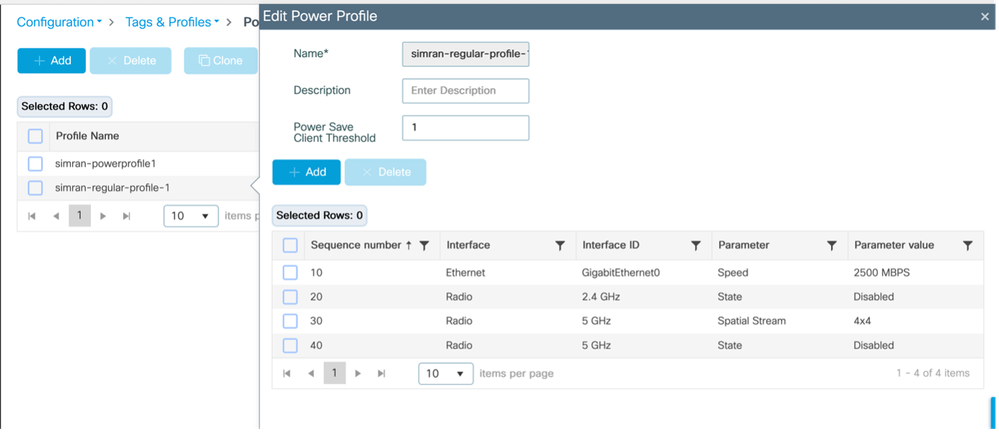
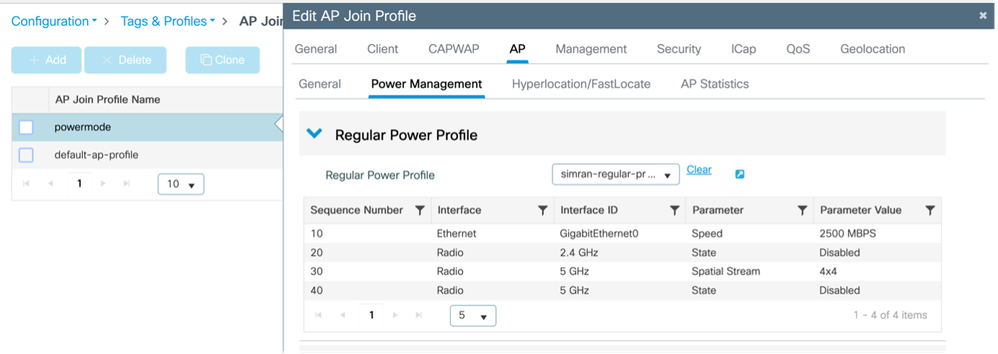
- 通常のプロファイルの適用と表示
設定>タグとプロファイル> AP加入> AP >電源管理
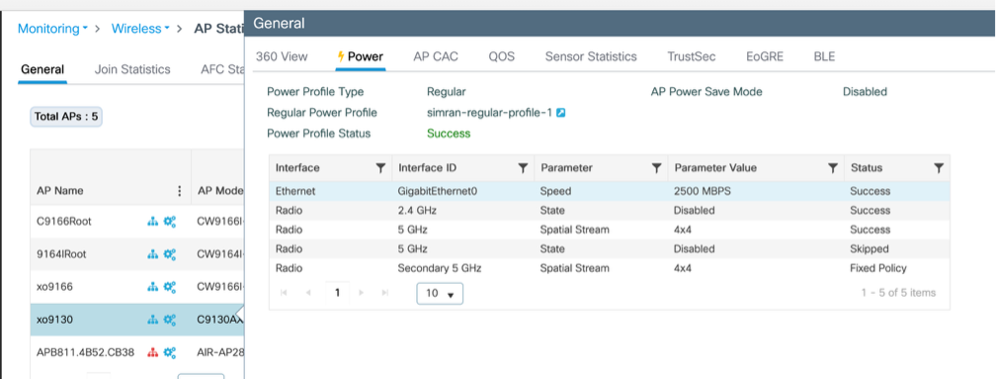
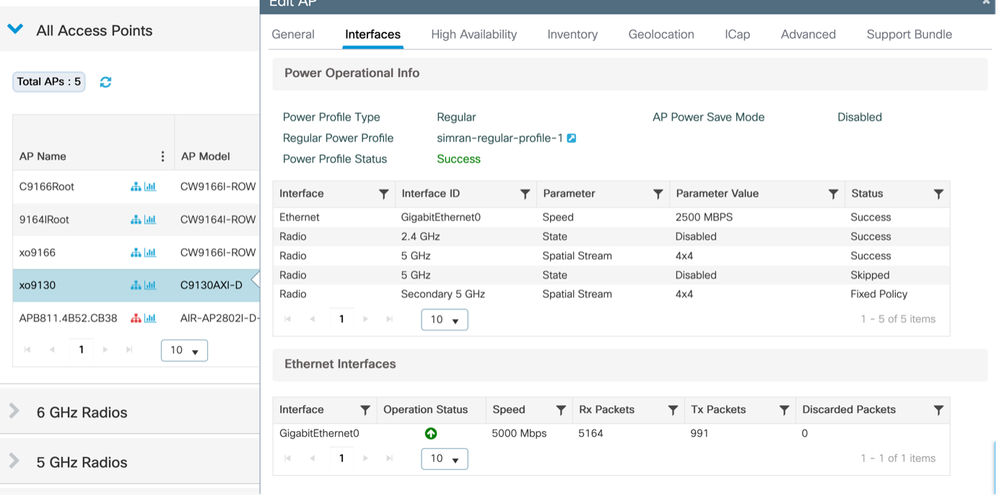
- APに適用されるプロファイルの検証
Monitoring > Wireless > AP statistics
Configuration > Wireless > Access Points > APの選択> Interfaces
使用例2:緑/エコモード(カレンダ・プロファイル)
- 複数/異なる繰り返しカレンダー電力プロファイルを適用できます。
- カレンダーのスケジュールがアクティブになると、APは省電力モードに入ります。クライアントが(設定されたしきい値に基づいて)接続すると、APは省電力モードを終了し、固定ポリシーを適用します。クライアントが切断されると、APは省電力モードに戻ります
- クライアントにサービスを提供しているAPだけが省電力モードから移行します。
例 1:
この例は、セカンダリ5GHz無線をディセーブルにし、プライマリ5GHz無線を2x2モードで動作させる電源プロファイル設定を示しています。この設定は、21:32:00 ~ 22:00:00に実行される日次スケジュールに関連付けられています。必要に応じて、同様のプロファイルを適用してさまざまなネットワークシナリオに対応できます。
カレンダープロファイルマッピング(CLI)
電力およびカレンダープロファイルの設定とマッピング
 (config)# wireless profile power simran-powerprofile1

 (config-wireless-power-profile)# 10 radio secondary-5ghz state shutdown

 (config-wireless-power-profile)# 30 radio 5ghz spatial-stream 2

 (config-wireless-power-profile)# exit

 (config)# wireless profile calender-profile name simran-calendar-daily1

 (config-calendar-profile)# recurrance daily

 (config-calendar-profile)# start 21:32:00 end 22:00:00

 (config-calendar-profile)# exit

 (config)# ap profile powermode

 (config-ap-profile)# calendar-profile simran-calendar-daily1

 (config-ap-profile-calendar)# action power-saving-mode po

 (config-ap-profile-calendar)# action power-saving-mode power-profile simran-powerprofile1

(config-ap-profile-calendar)# end
カレンダープロファイルマッピング(GUI)
電源プロファイルの設定
Configuration > Tags & Profiles > Power Profile
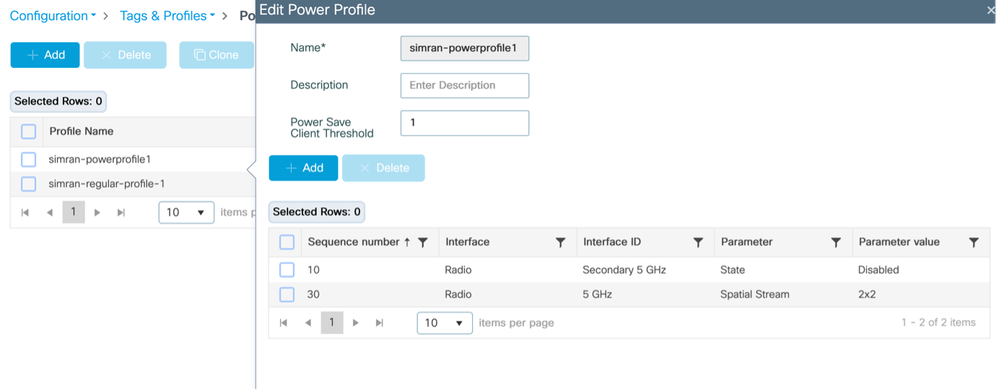
カレンダープロファイルの設定
設定>タグとプロファイル>カレンダー
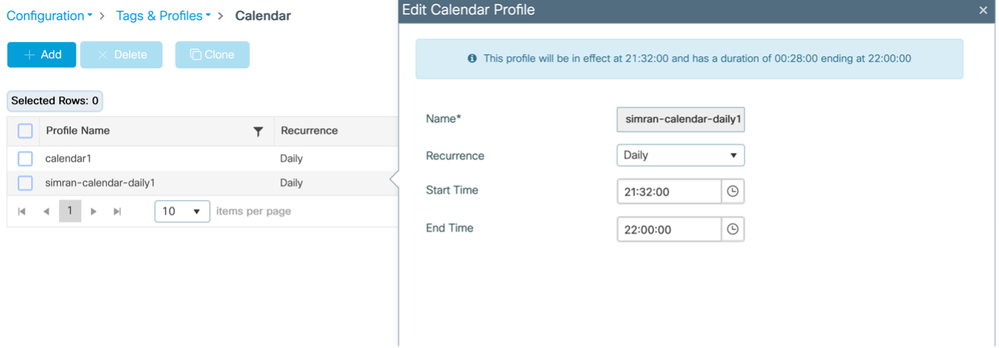
電源プロファイルとカレンダープロファイルをAP加入プロファイルにマッピングします。
Configuration > Tags & profiles > AP Join > AP join profile > AP > Power Managementの順に選択
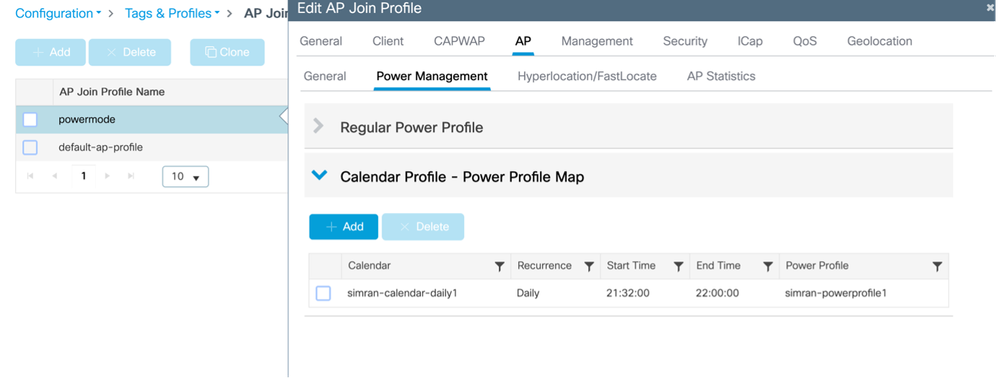
APに適用されるプロファイルの検証
Monitoring > Wireless > AP Statistics > AP > Power
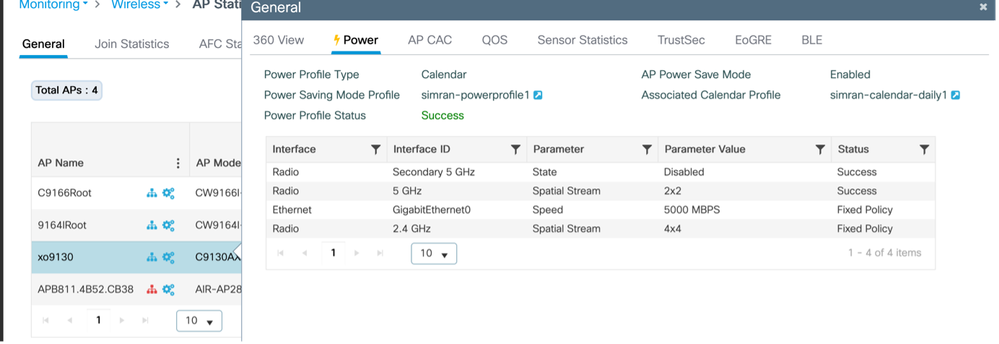
カレンダーが起動すると、APからのコンソールログが記録されます。
xo9130#[*04/13/2026 21:35:31.1536] DOT11_CFG[1]: poe_power_mode: low_pwr_mode=5, allowed_tx_ant=3, allowed_rx_ant=3

[*04/13/2026 21:35:31.1615] DOT11_DRV[1]: Stop Radio1 - Begin

[*04/13/2026 21:35:31.1634] wlan: [0:I:CMN_MLME] mlme_ext_vap_down: VAP (mon1) is down

[*04/13/2026 21:35:31.1647] DOT11_DRV[1]: Stop Radio1 - End

[*04/13/2026 21:35:31.1792] wlan: [0:I:CMN_MLME] mlme_ext_vap_down: VAP (apr1v0) is down

[*04/13/2026 21:35:31.1840] DOT11_DRV[1]: Start Radio1 - Begin

[*04/13/2026 21:35:31.1852] wlan: [7277:I:ANY] ol_ath_set_config_param: OL_ATH_PARAM_RTT_SKIP_VDEV_RESTART: value: 1

[*04/13/2026 21:35:31.1870] wlan: [0:I:ANY] ol_ath_pdev_is_multi_band_supported: 2 GHz modes: 0, 5GHz/6GHz modes: 391f9001

[*04/13/2026 21:35:31.1876] wlan: [7277:I:ANY] ieee80211_ucfg_setparam_util: rtt_enable = 0 already configured, skip configuration

[*04/13/2026 21:35:31.1880] wlan: [7277:I:ANY] ieee80211_ucfg_setparam_util: KERN_DEBUG

[*04/13/2026 21:35:31.1880]  setting the lci enble flag

[*04/13/2026 21:35:31.1896] DOT11_DRV[1]: Start Radio1 - End

[*04/13/2026 21:35:31.2121] DOT11_DRV[2]: Stop Radio2 - Begin

[*04/13/2026 21:35:31.2137] wlan: [0:I:CMN_MLME] mlme_ext_vap_down: VAP (mon2) is down

[*04/13/2026 21:35:31.2152] DOT11_DRV[2]: Stop Radio2 - End

[*04/13/2026 21:35:31.2167] wlan: [0:E:ANY] mlme_ext_vap_up: VAP (mon1) is up, vdev_id:33 pdev_id:0 psoc_id:0

[*04/13/2026 21:35:31.2200] wlan: [0:I:CMN_MLME] mlme_ext_vap_down: VAP (apr1v0) is down

[*04/13/2026 21:35:31.2202] wlan: [0:I:ANY] ol_ath_pdev_is_multi_band_supported: 2 GHz modes: 0, 5GHz/6GHz modes: 391f9001

[*04/13/2026 21:35:31.2290] wlan: [0:I:CMN_MLME] mlme_ext_vap_down: VAP (apr2v0) is down
SWITCH
#####電源プロファイルの適用前
Switch#show power inline tenGigabitEthernet 3/0/23 detail | i Meas

 Measured at the port: 11.8
#####電源プロファイルの適用後
Switch#show power inline tenGigabitEthernet 3/0/23 detail | in Meas

 Measured at the port: 10.8
# AP上でクライアントを接続(APは自動的に固定ポリシーに戻る)
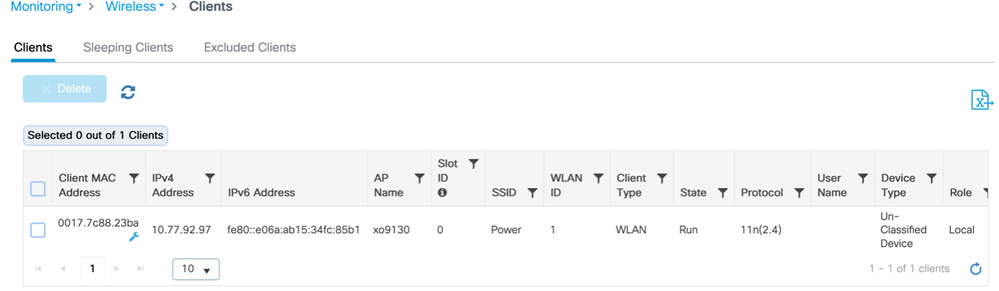
APからのログ
[*04/13/2026 21:42:27.8792] DOT11_DRV[2]: Start Radio2 - Begin

[*04/13/2026 21:42:27.8802] wlan: [7277:I:ANY] ol_ath_set_config_param: OL_ATH_PARAM_RTT_SKIP_VDEV_RESTART: value: 1

[*04/13/2026 21:42:27.8820] wlan: [0:I:ANY] ol_ath_pdev_is_multi_band_supported: 2 GHz modes: 0, 5GHz/6GHz modes: 391f9001

[*04/13/2026 21:42:27.8827] wlan: [7277:I:ANY] ieee80211_ucfg_setparam_util: rtt_enable = 0 already configured, skip configuration

[*04/13/2026 21:42:27.8828] wlan: [7277:I:ANY] ieee80211_ucfg_setparam_util: KERN_DEBUG

[*04/13/2026 21:42:27.8828]  setting the lci enble flag

[*04/13/2026 21:42:27.8841] DOT11_DRV[2]: Start Radio2 - End

[*04/13/2026 21:42:27.8854] DOT11_CFG[2]: poe_power_mode: low_pwr_mode=5, allowed_tx_ant=15, allowed_rx_ant=15

[*04/13/2026 21:42:27.8974] wlan: [0:E:ANY] mlme_ext_vap_up: VAP (mon2) is up, vdev_id:50 pdev_id:2 psoc_id:0
SWITCH
クライアントが接続された後に消費される電力(電力):
Switch#show power inline tenGigabitEthernet 3/0/23 detail | in Measu

 Measured at the port: 11.8
WLC上
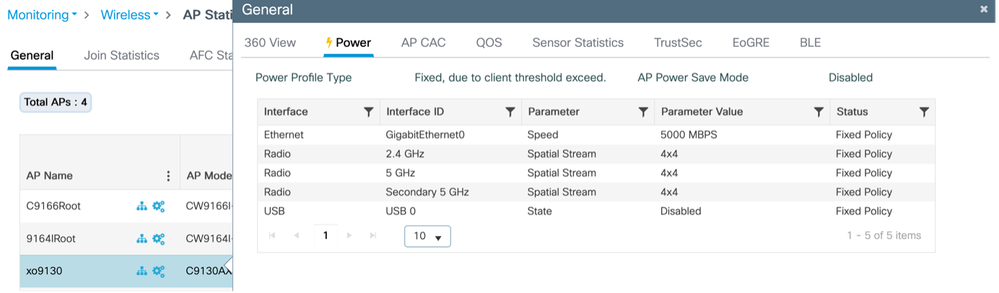
クライアントを切断すると、Apは自動的に省電力モードに切り替わります。
APから
 xo9130#[*04/13/2026 21:46:47.2003] DOT11_CFG[1]: poe_power_mode: low_pwr_mode=5, allowed_tx_ant=3, allowed_rx_ant=3

[*04/13/2026 21:46:47.2088] DOT11_DRV[1]: Stop Radio1 - Begin

[*04/13/2026 21:46:47.2106] wlan: [0:I:CMN_MLME] mlme_ext_vap_down: VAP (mon1) is down

[*04/13/2026 21:46:47.2120] DOT11_DRV[1]: Stop Radio1 - End

[*04/13/2026 21:46:47.2264] wlan: [0:I:CMN_MLME] mlme_ext_vap_down: VAP (apr1v0) is down

[*04/13/2026 21:46:47.2452] DOT11_DRV[1]: Start Radio1 - Begin

[*04/13/2026 21:46:47.2464] wlan: [7277:I:ANY] ol_ath_set_config_param: OL_ATH_PARAM_RTT_SKIP_VDEV_RESTART: value: 1

[*04/13/2026 21:46:47.2494] wlan: [0:I:ANY] ol_ath_pdev_is_multi_band_supported: 2 GHz modes: 0, 5GHz/6GHz modes: 391f9001

[*04/13/2026 21:46:47.2504] wlan: [7277:I:ANY] ieee80211_ucfg_setparam_util: rtt_enable = 0 already configured, skip configuration

[*04/13/2026 21:46:47.2506] wlan: [7277:I:ANY] ieee80211_ucfg_setparam_util: KERN_DEBUG

[*04/13/2026 21:46:47.2506]  setting the lci enble flag

[*04/13/2026 21:46:47.2522] DOT11_DRV[1]: Start Radio1 - End

[*04/13/2026 21:46:47.2637] wlan: [0:E:ANY] mlme_ext_vap_up: VAP (mon1) is up, vdev_id:33 pdev_id:0 psoc_id:0

[*04/13/2026 21:46:47.2676] wlan: [0:I:CMN_MLME] mlme_ext_vap_down: VAP (apr1v0) is down

[*04/13/2026 21:46:47.2678] wlan: [0:I:ANY] ol_ath_pdev_is_multi_band_supported: 2 GHz modes: 0, 5GHz/6GHz modes: 391f9001

[*04/13/2026 21:46:47.2729] DOT11_DRV[2]: Stop Radio2 - Begin

[*04/13/2026 21:46:47.2744] wlan: [0:I:CMN_MLME] mlme_ext_vap_down: VAP (mon2) is down

[*04/13/2026 21:46:47.2760] DOT11_DRV[2]: Stop Radio2 - End

[*04/13/2026 21:46:47.2895] wlan: [0:I:CMN_MLME] mlme_ext_vap_down: VAP (apr2v0) is down
WLC上
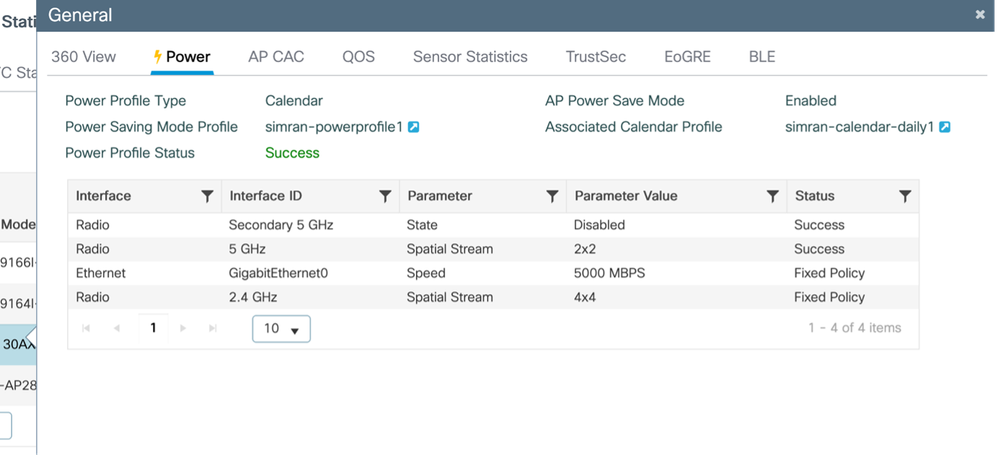
例 2:
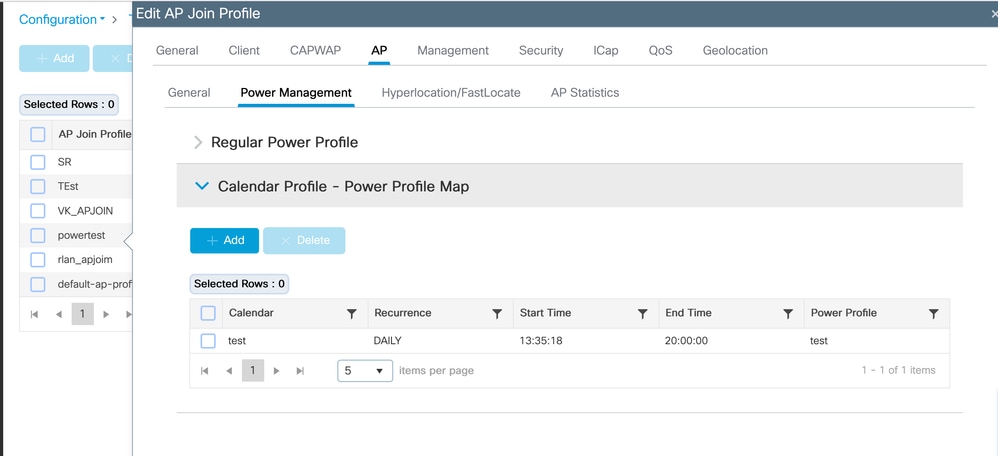
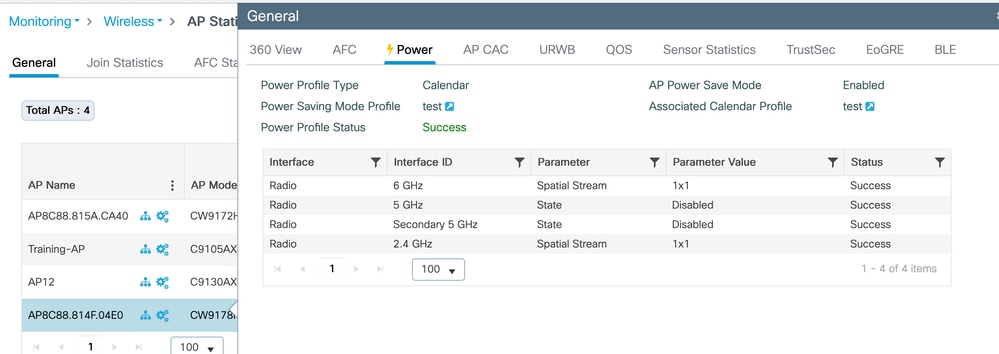
このテストでは、CW9178IアクセスポイントのAP電力とカレンダープロファイルを検証します。電力プロファイルは、1x1空間ストリーム(SS)モードで2.4GHzおよび6GHz無線を有効にしながら、両方の5GHz無線を無効にするように設定されています。この設定は、13:35:18 ~ 20:00:00の間アクティブな日次スケジュールに従います。これらのプロファイルは、必要に応じてさまざまなネットワーク要件に適応させることができます。
カレンダープロファイルマッピング(CLI)
電力およびカレンダープロファイルの設定とマッピング
(config)#wireless profile power test
(config-wireless-power-profile)#0 radio 6ghz spatial-stream 1
(config-wireless-power-profile)#10 radio 5ghz state shutdown
(config-wireless-power-profile)#20 radio secondary-5ghz state shutdown
(config-wireless-power-profile)#30 radio 24ghz spatial-stream 1
(config-wireless-power-profile)# exit
(config)# wireless profile calender-profile name test
(config-calendar-profile)# recurrance daily
(config-calendar-profile)# start 13:35:18 end 20:00:00
(config-calendar-profile)# exit
(config)# ap profile powertest
(config-ap-profile)# calendar-profile test
(config-ap-profile-calendar)# action power-saving-mode power-profile test
(config-ap-profile-calendar)# end
カレンダープロファイルマッピング(GUI)
電源プロファイルの設定
Configuration > Tags & Profiles > Power Profile
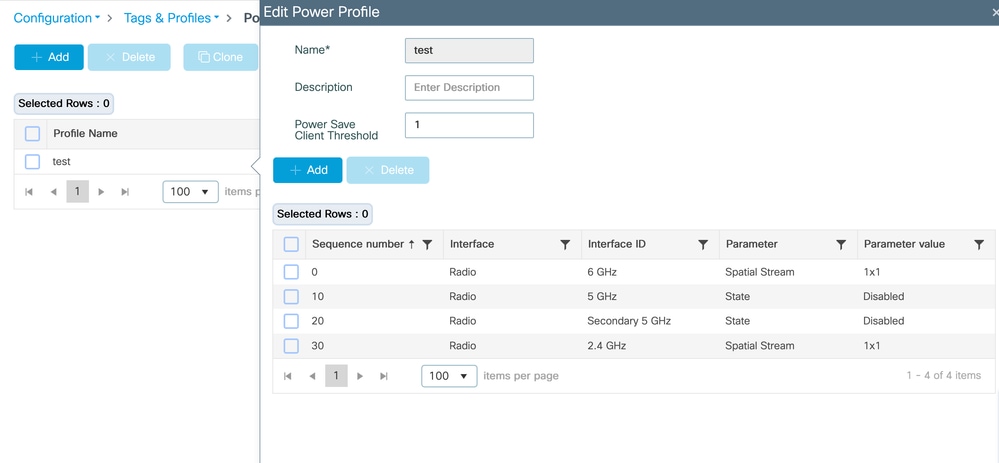
カレンダープロファイルの設定
設定>タグとプロファイル>カレンダー
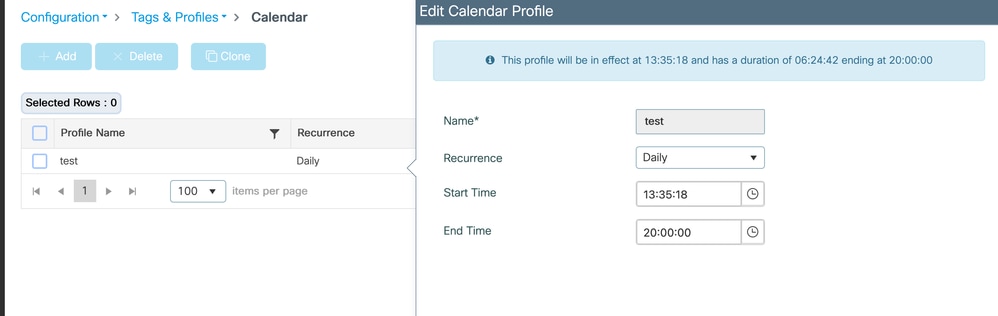
電源プロファイルとカレンダープロファイルをAP加入プロファイルにマッピングします。
Configuration > Tags & profiles > AP Join > AP join profile > AP > Power Managementの順に選択
APに適用されるプロファイルの検証
Monitoring > Wireless > AP Statistics > AP > Power
SWITCH
#####電源プロファイルの適用前
Switch#show power inline twoGigabitEthernet 1/0/2 detail | i Mea
Measured at the port(watts) (Alt-A,B): 16.5
#####電源プロファイルの適用後
Switch#show power inline twoGigabitEthernet 1/0/2 detail | in Mea
Measured at the port(watts) (Alt-A,B): 14.8
PoE割り当て電力と実際の消費電力
Catalystスイッチでは、PoE電力は、割り当て電力と実際の消費量の2つの異なる方法で追跡されます。
割り当て電力とは、IEEEクラスとCDP/LLDP電力ネゴシエーションに基づいてスイッチがデバイスに予約する電力量です。この値はPoEの予算計算に使用され、「使用済み」と表示されます。
show power inline moduleの出力に現れます。
例:
使用可能モジュール使用残り
1 525.0 315.9 209.1
ここで、315.9 Wは接続デバイス用に予約されているPoEバジェットの合計です。
たとえば、インターフェイスTw1/0/2のCW9178I APには60 Wが割り当てられています。
割り当て電力
Admin値:60.0
割り当て電力:60.0
ただし、APが実際に消費する電力は、はるかに低くなる可能性があります。
実際の消費量
ポートでの測定値:16.9 W
電源投入時以降の最大電力:18.6 W
リアルタイム消費のスイッチ全体のビューは、次のように表示できます。
show power inline police(すべてのコマンド)
例:
合計:103.8 W
つまり、315.9 Wが予約されていますが、デバイスは現在103.8 Wしか消費していません。
PoEスイッチの電力は、瞬間的な消費電力ではなく、ネゴシエートされた最大電力要件に基づいて予約されるため、この動作が予想されます。
これにより、アクセスポイントなどのデバイスは、電力を失うことなく、電力使用量を即時に増加させることができます(無線アクティビティのスパイク時など)。
AP省電力プロファイルが適用されると、一部のAPコンポーネントは縮小状態で動作するため、実際の消費量のみが減少します。
APとスイッチ間のネゴシエートされた最大電力エンベロープが変更されていないため、割り当てられた電力は変更されません。
PoEバジェットの計算では、リアルタイム消費ではなく、割り当て済み(予約済み)電力が使用されます。したがって、使用電力と測定された消費電力の差が大きくなることは正常です。
検証
ワイヤレスLANコントローラ(WLC)
- show ap profile name default-ap-profile detailed(APプロファイル名の表示)
- show ap name <ap-name> power-profileの要約
- show wireless profile power summary(ワイヤレスプロファイルの出力の概要を表示)
- show wireless profile power detailed <power-profile-name>(ワイヤレスプロファイルの出力詳細を表示します)
- show wireless profile calendar-profile summary(ワイヤレスプロファイルのカレンダとプロファイルのサマリーを表示)
アクセスポイント上
- show ap power policyの設定
- show ap power policy status(APパワーポリシーステータスの表示)
- show ap power calendar config(AP電源カレンダー設定の表示)
SWITCH
実際の消費電力を確認するには、次の手順に従います。
- show power inline gig <interface> detail |測定を含む
トラブルシューティング
AP上
#Consoleログ
#debug CAPWAPクライアントペイロード
#debug powerpolicyロギングレベルのトレース
#debug powerpolicyログレベル情報
#debug powerpolicy logging console enable
#terminalモニタ
WLC上
#RAトレース(AP Radio MAC)
#デバッグレベルのWNCDログ:
 #set platform software trace wncd <0/1/2/3> chassis active/Standby R0 ap-pwr-prof-main debug`
`#set platform software trace wncd <0/1/2/3> chassis active/Standby R0 ap-pwr-prof-db debug`
`#set platform software trace wncd <0/1/2/3> chassis active/Standby R0 ap-pwr-prof-wcnm debug`
`#set platform software trace wncd <0/1/2/3> chassis active/Standby R0 apcfg-profile-db debug`
`#set platform software trace wncd <0/1/2/3> chassis active/Standby R0 apmgr-db debug`
注:問題が再現されたら、ソフトウェアトレースレベルを「notice」に戻します。
既知の問題
- APの電源プロファイルのステータスに予期しない「Insufficient De-rating」が表示される:Cisco Bug ID CSCwf92519
- 「通常の電源プロファイル」機能は17.9ではまだサポートされていませんが、「通常の電源プロファイル」がGUIに表示されます(Cisco Bug ID: CSCwi51691

更新履歴
| 改定 | 発行日 | コメント |
|---|---|---|
2.0 |
09-Jun-2026
|
電力バジェット予約と実際の消費電力に関する説明を追加 |
1.0 |
22-May-2026
|
初版 |
 フィードバック