NX-OS搭載vPCのNexusスイッチでのアップグレードのインストール

はじめに
このドキュメントでは、Cisco NX-OSを使用したvPCでのCisco Nexus 9000スイッチのアップグレード手順について説明します。
前提条件
要件
次の項目に関する知識が推奨されます。
- Nexus NX-OS ソフトウェア
- 仮想ポートチャネル(vPC)。
- Cisco Nexusスイッチのデバイスファイルシステム、ディレクトリ、およびファイルを使用します。
- ソフトウェアダウンロードにログインします。
- この手順では中断が生じるため、メンテナンスの時間帯をスケジュールすることをお勧めします。
使用するコンポーネント
このドキュメントの情報は、次のソフトウェアとハードウェアのバージョンに基づいています。
- Cisco Nexus 9000とCisco NX-OS

注:Cisco Nexus 7000スイッチのアップグレード手順はこのドキュメントに基づいていますが、コマンドと出力は実際の環境によって異なります。詳細については、ご使用のCisco Nexusスイッチ固有のシスコの公式ガイドを参照してください。
このドキュメントの情報は、特定のラボ環境にあるデバイスに基づいて作成されたものです。このドキュメントで使用するすべてのデバイスは、クリアな(デフォルト)設定で作業を開始しています。本稼働中のネットワークでは、各コマンドによって起こる可能性がある影響を十分確認してください。
設定
ネットワーク図
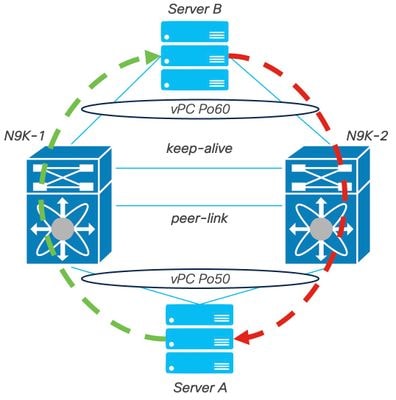 ネットワーク図
バックグラウンド情報
- 2つのN9K-C93180YC-FX-24があり、N9K-1とN9K-2にNX-OS 9.3(11)があるデータセンターのネットワーク管理者を想定します。
- サーバAとBが実稼働トラフィックを送信している。
- 目標は、両方のNexusスイッチをNX-OS 10.2(5)にアップグレードすることです。
注:アップグレードはプライマリスイッチで開始してください。プライマリスイッチを使用しない場合、セカンダリスイッチは機能的に区別されません。ただし、プライマリスイッチで開始すると、両方のデバイスが最初に設定したプライマリロールとセカンダリロールに戻ることが保証されます。 vPCでは、Nexusの一部の機能を運用上の主要な機能として理解することが重要です。
vPC動作のプライマリタスク
- FHRP設定に関係なく、ARP応答機能を維持
- 着信BPDUパケットを処理および解釈して、ネットワークの安定性を確保します。
- PIMマルチキャストトラフィックのネットワークインフラストラクチャ全体への送信を促進します。
- IGMPコントロールプレーンシグナリングを管理および処理します。
- ピアリンクの障害時に、vPCメンバーポートがシャットダウン状態に移行するのを防ぎます。
アップグレード方法
ステップ 1:Cisco Nexus 9000および3000 ISSUのサポート一覧表を開く
- Current releaseを選択します。
- Target releaseを選択します。
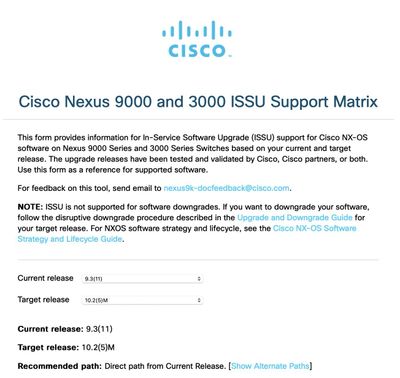 Cisco Nexus 9000および3000 ISSUのサポート一覧
注:Cisco TACでは、推奨パスとともに中断(リロード)アップグレードオプションを常に使用することを推奨しています。
注:推奨パスでは、複数のジャンプを表示できます。両方のCisco NexusスイッチにターゲットNX-OSのバージョンが設定されるまで、ホップごとに手順2 ~ 11を繰り返す必要があります。
ステップ 2使用しているCisco Nexusスイッチラインカードに応じて、推奨パスに記載されているすべてのCisco NX-OSファイルをダウンロードします。
- ソフトウェアダウンロードにログインします。
- Download and Upgradeのセクションに進み、Access Downloadsを開きます。
- Browse all > Cisco IOS and NX-OS Software > NX-OS - NX-OS Software > Switches > Data Center Switches > Select your Nexus series > Select your linecard > NX-OS System Software > Select NX-OS version to downloadの順にクリックします。
- ファイル名の上にカーソルを移動してファイルの詳細を表示し、MD5チェックサム値をコピーして、NX-OSファイルをダウンロードします。
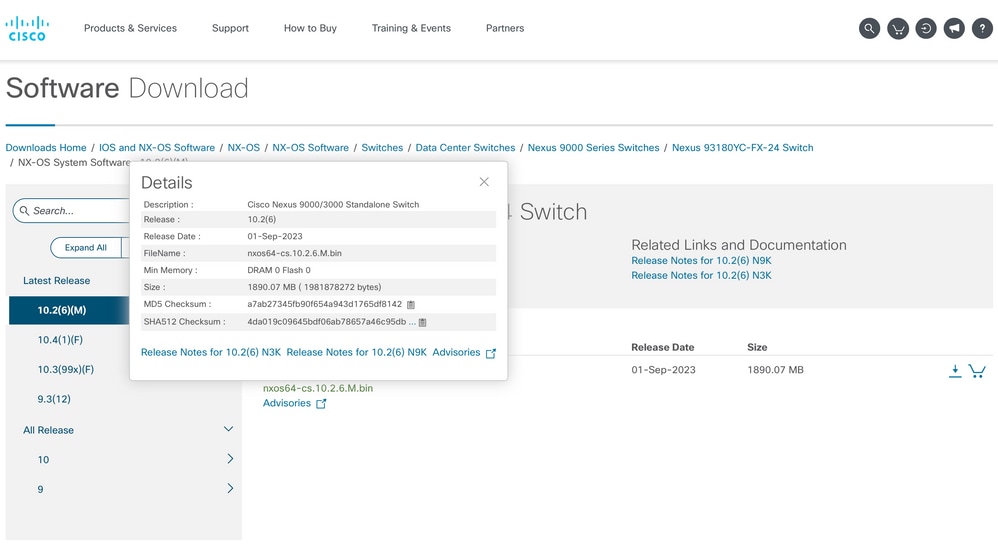 ソフトウェアのダウンロード
 - SCP、SFTP、TFTP、またはUSB経由で、vPCの両方のCisco NexusスイッチのブートフラッシュにNX-OSファイルを転送します。 最初の3つのオプションのいずれかを選択した場合は、予想されるVRFを指定して、サーバへのpingがあることを確認します。この例では、SFTPサーバのIPアドレスは192.168.9.9で、Virtual Routing Forwarding(VRF)Managementを介して到達可能です。
N9K-1(config)# ping 192.168.9.9 vrf management N9K-1(config)# copy sftp: bootflash: Enter source filename: nxos64-cs.10.2.5.M.bin Enter vrf (If no input, current vrf 'default' is considered): management Enter hostname for the sftp server: 192.168.9.9 Enter username: admin The authenticity of host ‘192.168.9.9 (192.168.9.9)' can't be established. RSA key fingerprint is SHA256:ABCDEFGHIJK. Are you sure you want to continue connecting (yes/no/[fingerprint])? yes Warning: Permanently added ‘192.168.9.9' (RSA) to the list of known hosts. Inbound-ReKey for 192.168.9.9 User Access Verification Password: cisco - ファイル転送が完了したら、dirコマンドを使用して、NX-OSファイルがブートフラッシュにあることを確認します。
- show file bootflashコマンドを使用して、NX-OSファイルからMD5チェックサムを取得します。
- この値を、ソフトウェアのダウンロードからコピーされた値と比較します。 両方の値が一致している必要があります。一致していない場合、NX-OSファイルが破損しているか、有効ではありません。
N9K-1(config)# dir | include nxos
 1978203648    Mar 31 01:36:06 2023  nxos.9.3.11.bin
 1943380992    Mar 17 09:54:16 2023  nxos64-cs.10.2.5.M.bin
Usage for bootflash://
20548902912 bytes used
96040308736 bytes free
116589211648 bytes total

N9K-1(config)# show file bootflash:nxos64-cs.10.2.5.M.bin md5sum
2f60a186cb9c2d55c90086302e51f655
ステップ 3各Cisco NexusスイッチのvPCでの動作ロールを特定します。
- show vpc roleコマンドを使用します。
N9K-1(config)# show vpc role

vPC Role status
-----------------------------------------
vPC role                        : primary
Dual Active Detection Status    : 0
vPC system-mac                  : 00:23:04:ee:be:01
vPC system-priority             : 32667
vPC local system-mac            : 44:b6:be:11:17:67
vPC local role-priority         : 32667
vPC local config role-priority  : 32667
vPC peer system-mac             : f8:a7:3a:4e:40:07
vPC peer role-priority          : 32667
vPC peer config role-priority   : 32667
N9K-2(config)# show vpc role
vPC Role status
-----------------------------------------
vPC role : secondary
Dual Active Detection Status : 0
vPC system-mac : 00:23:04:ee:be:01
vPC system-priority : 32667
vPC local system-mac : f8:a7:3a:4e:40:07
vPC local role-priority : 32667
vPC local config role-priority : 32667
vPC peer system-mac : 44:b6:be:11:17:67
vPC peer role-priority : 32667
vPC peer config role-priority : 32667ステップ 4vPCの両方のCisco NexusスイッチでCisco NX-OSの非互換性を確認します。
- show incompatibility-all nxos bootflashコマンドを使用します。
N9K-1(config)# show incompatibility-all nxos bootflash:nxos64-cs.10.2.5.M.bin
Checking incompatible configuration(s) for vdc 'N9K-1':
-------------------------------------------------------
No incompatible configurations

Checking dynamic incompatibilities:
-----------------------------------
No incompatible configurations
ステップ 5vPCで両方のCisco Nexusスイッチに対するCisco NX-OSの影響を確認します。
- show install all impact nxos bootflashコマンドを使用します。これにより、暫定診断が実行され、Cisco NX-OSのバージョンに互換性があり、インストールが可能であることを検証できます。
N9K-1(config)# show install all impact nxos bootflash:nxos64-cs.10.2.5.M.bin
Installer will perform impact only check. Please wait.

Verifying image bootflash:/nxos64-cs.10.2.5.M.bin for boot variable "nxos".
[####################] 100% -- SUCCESS

Verifying image type.
[####################] 100% -- SUCCESS

Preparing "nxos" version info using image bootflash:/nxos64-cs.10.2.5.M.bin.
[####################] 100% -- SUCCESS

Preparing "bios" version info using image bootflash:/nxos64-cs.10.2.5.M.bin.
[####################] 100% -- SUCCESS

Performing module support checks.
[####################] 100% -- SUCCESS

Notifying services about system upgrade.
[####################] 100% -- SUCCESS

Compatibility check is done:
Module  bootable          Impact  Install-type  Reason
------  --------  --------------  ------------  ------
     1       yes      disruptive         reset  default upgrade is not hitless

Images will be upgraded according to following table:
Module       Image                  Running-Version(pri:alt)           New-Version  Upg-Required
------  ----------  ----------------------------------------  --------------------
     1        nxos                                   9.3(11)                                10.2(5)           yes
     1        bios     v05.47(04/28/2022):v05.43(11/22/2020)    v05.47(04/28/2022)            no

Additional info for this installation:
--------------------------------------

Service "vpc" in vdc 1: Vpc is enabled, Please make sure both Vpc peer switches have same boot mode using 'show boot mode' and proceed
ステップ 6(オプション): vPCで両方のCisco Nexusスイッチから実行コンフィギュレーションのバックアップをエクスポートします。
N9K-1(config)# copy running-config sftp:running-config-backup
Enter vrf (If no input, current vrf 'default' is considered): default
Enter hostname for the sftp server: 192.168.9.9
Enter username: admin

The authenticity of host '192.168.9.9 (192.168.9.9)' can't be established.
RSA key fingerprint is SHA256:ABDCEFGHI.
Are you sure you want to continue connecting (yes/no/[fingerprint])? yes
Warning: Permanently added '192.168.9.9' (RSA) to the list of known hosts.
Inbound-ReKey for 192.168.9.9:22
User Access Verification
Password:
Connected to 192.168.9.9.
ステップ 7vPCプライマリロールを持つNexusスイッチにNX-OSをインストールします。
- コマンドinstall all nxos bootflashを使用します。
N9K-1(config)# install all nxos bootflash:nxos64-cs.10.2.5.M.bin
Installer will perform compatibility check first. Please wait.
Installer is forced disruptive

Verifying image bootflash:/nxos64-cs.10.2.5.M.bin for boot variable "nxos".
[####################] 100% -- SUCCESS

Verifying image type.
[####################] 100% -- SUCCESS

Preparing "nxos" version info using image bootflash:/nxos64-cs.10.2.5.M.bin.
[####################] 100% -- SUCCESS

Preparing "bios" version info using image bootflash:/nxos64-cs.10.2.5.M.bin.
[####################] 100% -- SUCCESS

Performing module support checks.
[####################] 100% -- SUCCESS

Notifying services about system upgrade.
[####################] 100% -- SUCCESS


Compatibility check is done:
Module  bootable          Impact  Install-type  Reason
------  --------  --------------  ------------  ------
     1       yes      disruptive         reset  default upgrade is not hitless


Images will be upgraded according to following table:
Module       Image                  Running-Version(pri:alt)           New-Version  Upg-Required
------  ----------  -------------------------------------------------------------
     1        nxos                                   9.3(11)                                10.2(5)           yes
     1        bios     v05.47(04/28/2022):v05.43(11/22/2020)    v05.47(04/28/2022)            no


Additional info for this installation:
--------------------------------------

Service "vpc" in vdc 1: Vpc is enabled, Please make sure both Vpc peer switches have same boot mode using 'show boot mode' and proceed


Switch will be reloaded for disruptive upgrade.
Do you want to continue with the installation (y/n)? [n] y注:エラーなく成功したことを確認してください。この後、Cisco Nexusスイッチがリブートし、インストールプロセスに数分かかる場合があります。これは、Cisco Nexusスイッチごとに異なります。
ステップ 8Cisco Nexusスイッチでステータスがアクティブになるまで待ちます。
- show moduleコマンドを使用します。
N9K-1(config)# show module
Mod Ports             Module-Type                      Model           Status
--- ----- ------------------------------------- ------------------------------
1    54   24x10/25G/32G + 6x40/100G Ethernet/FC N9K-C93180YC-FX-24    active *

Mod  Sw                       Hw    Slot
---  ----------------------- ------ ----
1    9.3(11)                  1.0    NA


Mod  MAC-Address(es)                         Serial-Num
---  --------------------------------------  ----------
1    44-b6-aa-aa-aa-aa to 44-b6-be-bb-bb-bb  ABCDEFGHIJK

Mod  Online Diag Status
---  ------------------
1    Pass

* this terminal session注:vPCのキープアライブまたはピアリンク、あるいはその両方がアップ状態ではない可能性があることに注意してください。これは、vPCのCisco Nexusスイッチが、サポートされていないCisco NX-OSの異なるバージョンを持っているためです。
ステップ 9Cisco NX-OSon vPCピアのCisco Nexusスイッチをインストールします。
N9K-2(config)# install all nxos bootflash:nxos64-cs.10.2.5.M.bin
Installer will perform compatibility check first. Please wait.
Installer is forced disruptive

Verifying image bootflash:/nxos64-cs.10.2.5.M.bin for boot variable "nxos".
[####################] 100% -- SUCCESS

Verifying image type.
[####################] 100% -- SUCCESS

Preparing "nxos" version info using image bootflash:/nxos64-cs.10.2.5.M.bin.
[####################] 100% -- SUCCESS

Preparing "bios" version info using image bootflash:/nxos64-cs.10.2.5.M.bin.
[####################] 100% -- SUCCESS

Performing module support checks.
[####################] 100% -- SUCCESS

Notifying services about system upgrade.
[####################] 100% -- SUCCESS


Compatibility check is done:
Module  bootable          Impact  Install-type  Reason
------  --------  --------------  ------------  ------
     1       yes      disruptive         reset  default upgrade is not hitless


Images will be upgraded according to following table:
Module       Image                  Running-Version(pri:alt)           New-Version  Upg-Required
------  ----------  -------------------------------------------------------------
     1        nxos                                   9.3(11)                              10.2(5)           yes
     1        bios     v05.47(04/28/2022):v05.42(06/14/2020)    v05.47(04/28/2022)            no


Additional info for this installation:
--------------------------------------

Service "vpc" in vdc 1: Vpc is enabled, Please make sure both Vpc peer switches have same boot mode using 'show boot mode' and proceed


Switch will be reloaded for disruptive upgrade.
Do you want to continue with the installation (y/n)?  [n] y
ステップ 10Cisco Nexusスイッチでステータスがアクティブになるまで待ちます。
- show moduleコマンドを使用します。
N9K-2(config)# show module
Mod Ports             Module-Type                      Model           Status
--- ----- ------------------------------------- --------------------- ---------
1    54   24x10/25G/32G + 6x40/100G Ethernet/FC N9K-C93180YC-FX-24    active *

Mod  Sw                       Hw    Slot
---  ----------------------- ------ ----
1    9.3(11)                  1.0    NA


Mod  MAC-Address(es)                         Serial-Num
---  --------------------------------------  ----------
1    f8-a7-3a-nn-nn-nn to f8-a7-3a-n1-n1-n1  98765432109

Mod  Online Diag Status
---  ------------------
1    Pass

* this terminal session
ステップ 11キープアライブ、ピアリンク、およびvPCポートチャネルがアップ状態であることを確認します。
- show vpcコマンドを使用します。
N9K-1(config)# show vpc
Legend:
                (*) - local vPC is down, forwarding via vPC peer-link

vPC domain id                     : 1
Peer status                       : peer adjacency formed ok
vPC keep-alive status             : peer is alive
Configuration consistency status  : success
Per-vlan consistency status       : success
Type-2 consistency status         : success
vPC role                          : primary
Number of vPCs configured         : 2
Peer Gateway                      : Enabled
Dual-active excluded VLANs        : -
Graceful Consistency Check        : Enabled
Auto-recovery status              : Disabled
Delay-restore status              : Timer is off.(timeout = 30s)
Delay-restore SVI status          : Timer is off.(timeout = 10s)
Operational Layer3 Peer-router    : Enabled
Virtual-peerlink mode             : Disabled

vPC Peer-link status
-----------------------------------------------------------------
id    Port   Status Active vlans
--    ----   ------ -------------------------------------------------
1     Po1    up     1

vPC status
-----------------------------------------------------------------
Id    Port          Status Consistency Reason                Active vlans
--    ------------  ------ ----------- ------  ---------------
50    Po50          up     success     success               1

60    Po60          up     success     success               1
N9K-2(config)# show vpc
Legend:
(*) - local vPC is down, forwarding via vPC peer-link
vPC domain id : 1
Peer status : peer adjacency formed ok
vPC keep-alive status : peer is alive
Configuration consistency status : success
Per-vlan consistency status : success
Type-2 consistency status : success
vPC role : secondary
Number of vPCs configured : 2
Peer Gateway : Enabled
Dual-active excluded VLANs : -
Graceful Consistency Check : Enabled
Auto-recovery status : Disabled
Delay-restore status : Timer is off.(timeout = 30s)
Delay-restore SVI status : Timer is off.(timeout = 10s)
Operational Layer3 Peer-router : Enabled
Virtual-peerlink mode : Disabled
vPC Peer-link status
---------------------------------------------------------------------
id Port Status Active vlans
-- ---- ------ -------------------------------------------------
1 Po1 up 1
vPC status
----------------------------------------------------------------------------
Id Port Status Consistency Reason Active vlans
-- ------------ ------ ----------- ------ ---------------
50 Po50 up success success 1
60 Po60 up success success 1
関連情報
更新履歴
| 改定 | 発行日 | コメント |
|---|---|---|
3.0 |
12-Jun-2026
|
再認定と更新されたフォーマット |
1.0 |
05-Oct-2023
|
初版 |
 フィードバック