EVPN VxLAN Cat9000での外部DHCPのトラブルシューティング

はじめに
このドキュメントでは、Cat9000プラットフォーム上の外部EVPN VxLAN環境のDHCP問題をトラブルシューティングする方法について説明します。
前提条件
要件
次の項目に関する知識があることが推奨されます。
- Cat9000プラットフォーム上のVirtual eXtensible LAN
- VxLAN環境でのホスト構成プロトコルの検出
- ボーダー ゲートウェイ プロトコル(BGP)
これらのトピックの詳細については、次を参照してください。
- 章:BGP EVPN VXLANファブリックCat9300でのDHCPリレーの設定
- 章:BGP EVPN VXLANファブリックCat9400でのDHCPリレーの設定
- 章:BGP EVPN VXLANファブリックCat9500でのDHCPリレーの設定
- 章:BGP EVPN VXLANファブリックCat9600でのDHCPリレーの設定
使用するコンポーネント
このドキュメントの情報は、Cisco IOS XEソフトウェアに基づくものです。
このドキュメントの情報は、特定のラボ環境にあるデバイスに基づいて作成されたものです。このドキュメントで使用するすべてのデバイスは、クリアな(デフォルト)設定で作業を開始しています。本稼働中のネットワークでは、各コマンドによって起こる可能性がある影響を十分確認してください。
ネットワーク図
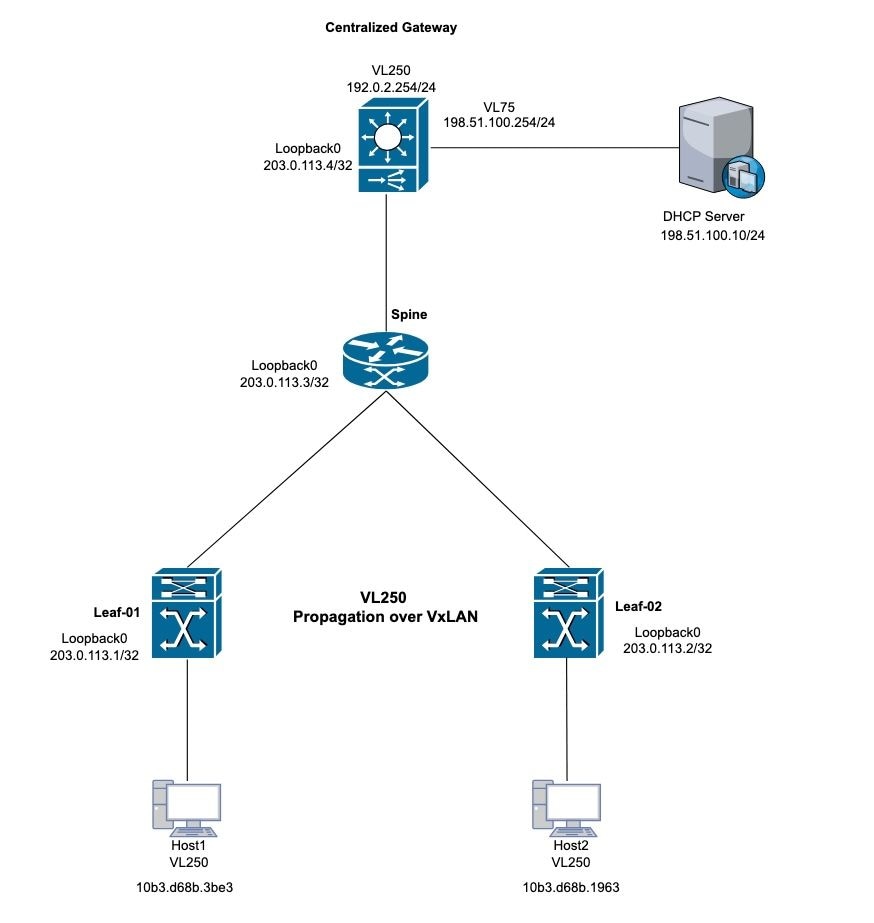 DHCP VxLANトポロジ
ケーススタディ1:外部サーバ(ファブリック内の集中型ゲートウェイ)からIPアドレスを取得できない
このトポロジでは、VLAN 250にVxLANレイヤ2を使用します。ホストには、外部DHCPサーバからのIPアドレスが必要です。
Leaf-01の検証
ステップ 1:Leaf-1で、ローカルホストのMACアドレスラーニングを確認します。
ステップ 2また、デフォルトゲートウェイのMACアドレスが判明していることを確認します。学習されたMACアドレスとデフォルトゲートウェイのIPアドレスの両方が、BGPテーブルにエントリとして正しくインストールされていることを確認します。
Leaf-1#show mac address-table address 10b3.d68b.3be3 (host mac address)
            Mac Address Table
-------------------------------------------

Vlan    Mac Address     Type     Ports
----   -----------      -------- -----
250    10b3.d68b.3be3   DYNAMIC  Twe1/0/1

Centralized-Gateway#show interface vlan 250 | include bia (remote mac address)
Hardware is Ethernet SVI, address is 3473.2db8.bee3 (bia 3473.2db8.bee3)
Leaf-1#show bgp l2vpn evpn 10b3.d68b.3be3 (local mac address)
BGP routing table entry for [2][203.0.113.1:250][0][48][10B3D68B3BE3][0][*]/20, version 3
Paths: (1 available, best #1, table evi_250)
 Advertised to update-groups:
    2
Refresh Epoch 1
Local
  0.0.0.0 (via default) from 0.0.0.0 (203.0.113.1)
    Origin incomplete, localpref 100, weight 32768, valid, sourced, local, best
    EVPN ESI: 00000000000000000000, Label1 10250
    Extended Community: RT:10:250 ENCAP:8
    Local irb vxlan vtep:
     vrf:not found, l3-vni:0
     local router mac:0000.0000.0000
     core-irb interface:(not found)
     vtep-ip:203.0.113.1
   rx pathid: 0, tx pathid: 0x0
   Updated on Oct 14 2025 22:27:32 UTC

Leaf-1#show bgp l2vpn evpn 3473.2db8.bee3 (remote mac address)
BGP routing table entry for [2][203.0.113.1:250][0][48][34732DB8BEE3][32][192.0.2.254]/24, version 9
Paths: (1 available, best #1, table evi_250)
  Flag: 0x100
  Not advertised to any peer
  Refresh Epoch 4
  Local, imported path from [2][203.0.113.4:250][0][48][34732DB8BEE3][32][192.0.2.254]/24 (global)
    203.0.113.4 (metric 3) (via default) from 203.0.113.3 (203.0.113.3)
      Origin incomplete, metric 0, localpref 100, valid, internal, best
      EVPN ESI: 00000000000000000000, Label1 10250
      Extended Community: RT:10:250 ENCAP:8 EVPN DEF GW:0:0
      Originator: 203.0.113.4, Cluster list: 203.0.113.3
      rx pathid: 0, tx pathid: 0x0
      Updated on Oct 14 2025 14:48:35 UTC
BGP routing table entry for [2][203.0.113.4:250][0][48][34732DB8BEE3][32][192.0.2.254]/24, version 8
Paths: (1 available, best #1, table EVPN-BGP-Table)
  Flag: 0x100
  Not advertised to any peer
  Refresh Epoch 4
  Local
    203.0.113.4 (metric 3) (via default) from 203.0.113.3 (203.0.113.3)
      Origin incomplete, metric 0, localpref 100, valid, internal, best
      EVPN ESI: 00000000000000000000, Label1 10250
      Extended Community: RT:10:250 ENCAP:8 EVPN DEF GW:0:0
      Originator: 203.0.113.4, Cluster list: 203.0.113.3
      rx pathid: 0, tx pathid: 0x0
      Updated on Oct 14 2025 14:48:35 UTC
ステップ 3Leaf-1とデフォルトゲートウェイ間のMACアドレスラーニングを検証します。リーフ1は、トランクポート経由でローカルMACアドレスを学習し、BGP経由でリモートMACアドレスを学習します。
Leaf-1#show l2route evpn mac
EVI         ETag  Prod    Mac Address                                          Next Hop(s) Seq Number
----- ---------- ----- -------------- ---------------------------------------------------- ----------
250            0 L2VPN 10b3.d68b.3b81                                         Twe1/0/1:250          0
250            0 L2VPN 10b3.d68b.3be3                                         Twe1/0/1:250          0 (Host local mac address)
250            0   BGP 3473.2db8.bee3                                  V:10250 203.0.113.4          0 (CGW SVI mac address)
ステップ 4L2VPN EVPNインスタンス内のLeaf-1スイッチでデフォルトゲートウェイのラーニングを確認します。
Leaf-1#show l2vpn evpn default-gateway
Valid Default Gateway Address                  EVI  VLAN  MAC Address    Source
----- --------------------------------------- ----- ----- -------------- -----------
Y     192.0.2.254                             250   250   3473.2db8.bee3 203.0.113.4
ステップ 5VxLANの観点が正しければ、DHCPに進んでトラブルシューティングします。
ステップ 6Leaf-1からDHCPゲートウェイへのDORAプロセスを確認します。Leaf-01で、ip dhcp snooping packetのデバッグを有効にし、ディスカバリでログエントリが生成されるかどうかを確認します。ログが生成されない場合は、PCに接続するインターフェイスでパケットキャプチャを有効にします。
Leaf-1#debug ip dhcp snooping packet
DHCP Snooping Packet debugging is on
Leaf-1#
*Oct 21 19:33:16.358: DHCP_SNOOPING: received new DHCP packet from input interface (TwentyFiveGigE1/0/1)
*Oct 21 19:33:16.358: DHCP Memory dump is printed for process packet
<snip>
*Oct 21 19:33:16.367: DHCP_SNOOPING: process new DHCP packet, message type: DHCPDISCOVER, input interface: Twe1/0/1, MAC da: ffff.ffff.ffff, MAC sa: 10b3.d68b.3be3, IP da: 255.255.255.255, IP sa: 0.0.0.0, DHCP ciaddr: 0.0.0.0, DHCP yiaddr: 0.0.0.0, DHCP siaddr: 0.0.0.0, DHCP giaddr: 0.0.0.0, DHCP chaddr: 10b3.d68b.3be3, efp_id: -1865499306, vlan_id: 250, bootpflag:0x32768(Broadcast)
*Oct 21 19:33:16.367: DHCP_SNOOPING: add relay information option.
*Oct 21 19:33:16.367: DHCP_SNOOPING: Encoding opt82 CID in vlan-mod-port format
*Oct 21 19:33:16.367: DHCP_SNOOPING:VxLAN : vlan_id 250 VNI 10250 mod 1 port 1
*Oct 21 19:33:16.367: DHCP_SNOOPING: Encoding opt82 RID in MAC address format
*Oct 21 19:33:16.367: DHCP_SNOOPING: binary dump of relay info option, length: 26 data:
0x52 0x18 0x1 0xC 0x1 0xA 0x0 0x8 0x0 0x0 0x28 0xA 0x1 0x1 0x0 0x0 0x2 0x8 0x0 0x6 0x4C 0x5D 0x3C 0xEB 0x43 0x40
*Oct 21 19:33:16.367: DHCPS BRIDGE PAK: vlan=250 platform_flags=1
*Oct 21 19:33:16.367: DHCP_SNOOPING: bridge packet get invalid mat entry: FFFF.FFFF.FFFF, packet is flooded to ingress VLAN: (250)
*Oct 21 19:33:16.367: DHCP_SNOOPING: L2RELAY: sent unicast packet to default gw: 3473.2db8.bee3 vlan 0 src intf TwentyFiveGigE1/0/1
*Oct 21 19:33:20.058: DHCP_SNOOPING: received new DHCP packet from input interface (TwentyFiveGigE1/0/1)
*Oct 21 19:33:20.058: DHCP Memory dump is printed for process packet
ステップ 7 debugがトリガーされない場合は、検証のためにパケットキャプチャを実行します。入力ディスカバリパケットをキャプチャするには、次の構文を使用します。
monitor capture <name> interface <int> in match ipv4 protocol udp any range 67 68 any range 67 68 start
monitor capture <name> stop
monitor capture export file flash:<name>.pcap
show monitor capture <name> buffer display-filter "eth.addr==[mac address]" detailed

注:Wiresharkフィルタ構文に従った表示フィルタ文字列をキャプチャします。
Leaf-1#monitor capture cap interface twe1/0/1 in match ipv4 protocol udp any range 67 68 any range 67 68 start
Started capture point : cap
Leaf-1#
*Oct 21 22:57:04.719: %BUFCAP-6-ENABLE: Capture Point cap enabled.
Leaf-1#
Leaf-1#monitor capture cap stop
Capture statistics collected at software:
        Capture duration - 96 seconds
        Packets received - 10
        Packets dropped - 0
        Packets oversized - 0

Bytes dropped in asic - 0

Capture buffer will exists till exported or cleared

Stopped capture point : cap

*Oct 21 22:58:40.810: %BUFCAP-6-DISABLE: Capture Point cap disabled.

Leaf-1#show monitor capture cap buffer display-filter "eth,addr==10:b3:d6:8b:3b:e3" detailed
Starting the packet display ........ Press Ctrl + Shift + 6 to exit
Frame 1: 371 bytes on wire (2968 bits), 371 bytes captured (2968 bits) on interface /tmp/epc_ws/wif_to_ts_pipe, id 0
    Interface id: 0 (/tmp/epc_ws/wif_to_ts_pipe)
        Interface name: /tmp/epc_ws/wif_to_ts_pipe
    Encapsulation type: Ethernet (1)
    Arrival Time: Oct 21, 2025 22:57:07.843851000 UTC
     [Time shift for this packet: 0.000000000 seconds]
    Epoch Time: 1761087427.843851000 seconds
  <snip>
    [Protocols in frame: eth:ethertype:vlan:ethertype:ip:udp:dhcp]
Ethernet II, Src: 10:b3:d6:8b:3b:e3 (10:b3:d6:8b:3b:e3), Dst: ff:ff:ff:ff:ff:ff (ff:ff:ff:ff:ff:ff)
   Destination: ff:ff:ff:ff:ff:ff (ff:ff:ff:ff:ff:ff)
       Address: ff:ff:ff:ff:ff:ff (ff:ff:ff:ff:ff:ff)
       .... ..1. .... .... .... .... = LG bit: Locally administered address (this is NOT the factory default)
       .... ...1 .... .... .... .... = IG bit: Group address (multicast/broadcast)
   Source: 10:b3:d6:8b:3b:e3 (10:b3:d6:8b:3b:e3)
       Address: 10:b3:d6:8b:3b:e3 (10:b3:d6:8b:3b:e3)
       .... ..0. .... .... .... .... = LG bit: Globally unique address (factory default)
       .... ...0 .... .... .... .... = IG bit: Individual address (unicast)
   Type: 802.1Q Virtual LAN (0x8100)
802.1Q Virtual LAN, PRI: 0, DEI: 0, ID: 250
    000. .... .... .... = Priority: Best Effort (default) (0)
    ...0 .... .... .... = DEI: Ineligible
    .... 0000 1111 1010 = ID: 250
Type: IPv4 (0x0800)

<snip>

User Datagram Protocol, Src Port: 68, Dst Port: 67
    Source Port: 68
    Destination Port: 67
    Length: 333
    Checksum: 0xdf55 [unverified]
    [Checksum Status: Unverified]
    [Stream index: 0]
    [Timestamps]
        [Time since first frame: 0.000000000 seconds]
        [Time since previous frame: 0.000000000 seconds]
Dynamic Host Configuration Protocol (Discover)
Message type: Boot Request (1)
Hardware type: Ethernet (0x01)
Hardware address length: 6
Hops: 0
Transaction ID: 0x3bd7aadb
Seconds elapsed: 7
Bootp flags: 0x8000, Broadcast flag (Broadcast)
    1... .... .... .... = Broadcast flag: Broadcast
    .000 0000 0000 0000 = Reserved flags: 0x0000
Client IP address: 0.0.0.0
Your (client) IP address: 0.0.0.0
Next server IP address: 0.0.0.0
Relay agent IP address: 0.0.0.0
Client MAC address: 10:b3:d6:8b:3b:e3 (10:b3:d6:8b:3b:e3)
Client hardware address padding: 00000000000000000000
Server host name not given
Boot file name not given
Magic cookie: DHCP
Option: (53) DHCP Message Type (Discover)
<snip>
ステップ 8パケットキャプチャによってVxLANパケットカプセル化を検証します。この検証にさまざまなフィルタを適用します。VxLANはUDPポート4789を採用しています。
monitor capture cap interface <outgoing interface > out match ipv4 protocol udp any any eq 4789 (Interface that is pointing to the RR or VTEP via BGP)
Leaf-1#show ip bgp all summary
For address family: L2VPN E-VPN
<snip>
Neighbor       V           AS MsgRcvd MsgSent    TblVer InQ OutQ Up/Down   State/PfxRcd
203.0.113.3     4           10    4204    4122       365   0    0 2d13h            2

Leaf-1#show ip route 203.0.113.3
Routing entry for 203.0.113.3/32
Known via "ospf 1", distance 110, metric 2, type intra area
Last update from 172.x.x.2 on TwentyFiveGigE1/0/2, 2d13h ago
Routing Descriptor Blocks:
* 172.x.x.2, from 203.0.113.3, 2d13h ago, via TwentyFiveGigE1/0/2

Leaf-1#monitor capture cap interface twe1/0/2 out match ipv4 protocol udp any any eq 4789 start
*Oct 21 23:51:07.689: %BUFCAP-6-ENABLE: Capture Point cap enabled.

Leaf-1#show monitor capture cap buffer display-filter "eth.addr==10:b3:d6:8b:3b:e3" detailed
Starting the packet display ........ Press Ctrl + Shift + 6 to exit

Frame 1: 443 bytes on wire (3544 bits), 443 bytes captured (3544 bits) on interface /tmp/epc_ws/wif_to_ts_pipe, id 0
    Interface id: 0 (/tmp/epc_ws/wif_to_ts_pipe)
        Interface name: /tmp/epc_ws/wif_to_ts_pipe
    Encapsulation type: Ethernet (1)
    Arrival Time: Oct 21, 2025 23:51:34.848693000 UTC
    [Time shift for this packet: 0.000000000 seconds]
    Epoch Time: 1761090694.848693000 seconds
   <snip>
   [Protocols in frame: eth:ethertype:ip:udp:vxlan:eth:ethertype:ip:udp:dhcp]
Ethernet II, Src: 00:00:00:00:00:00 (00:00:00:00:00:00), Dst: 00:00:00:00:00:00 (00:00:00:00:00:00)
    Destination: 00:00:00:00:00:00 (00:00:00:00:00:00)
        Address: 00:00:00:00:00:00 (00:00:00:00:00:00)
        .... ..0. .... .... .... .... = LG bit: Globally unique address (factory default)
        .... ...0 .... .... .... .... = IG bit: Individual address (unicast)
    Source: 00:00:00:00:00:00 (00:00:00:00:00:00)
        Address: 00:00:00:00:00:00 (00:00:00:00:00:00)
        .... ..0. .... .... .... .... = LG bit: Globally unique address (factory default)
        .... ...0 .... .... .... .... = IG bit: Individual address (unicast)
Type: IPv4 (0x0800)
Internet Protocol Version 4, Src: 203.0.113.1, Dst: 203.0.113.4
    0100 .... = Version: 4
    .... 0101 = Header Length: 20 bytes (5)
    Differentiated Services Field: 0x00 (DSCP: CS0, ECN: Not-ECT)
        0000 00.. = Differentiated Services Codepoint: Default (0)
        .... ..00 = Explicit Congestion Notification: Not ECN-Capable Transport (0)
<snip>
User Datagram Protocol, Src Port: 65479, Dst Port: 4789
    Source Port: 65479
    Destination Port: 4789
    Length: 409
    [Checksum: [missing]]
    [Checksum Status: Not present]
    [Stream index: 0]
    [Timestamps]
        [Time since first frame: 0.000000000 seconds]
        [Time since previous frame: 0.000000000 seconds]
Virtual eXtensible Local Area Network
Flags: 0x0800, VXLAN Network ID (VNI)
    0... .... .... .... = GBP Extension: Not defined
    .... .... .0.. .... = Don't Learn: False
    .... 1... .... .... = VXLAN Network ID (VNI): True
    .... .... .... 0... = Policy Applied: False
    .000 .000 0.00 .000 = Reserved(R): 0x0000
Group Policy ID: 0
VXLAN Network Identifier (VNI): 10250
Reserved: 0
<snip>
User Datagram Protocol, Src Port: 68, Dst Port: 67
    Source Port: 68
    Destination Port: 67
    Length: 359
    Checksum: 0x767d [unverified]
    [Checksum Status: Unverified]
    [Stream index: 1]
    [Timestamps]
         [Time since first frame: 0.000000000 seconds]
         [Time since previous frame: 0.000000000 seconds]
Dynamic Host Configuration Protocol (Discover)
    Message type: Boot Request (1)
    Hardware type: Ethernet (0x01)
    Hardware address length: 6
    Hops: 0
    Transaction ID: 0xd4c42ec1
    Seconds elapsed: 0
    Bootp flags: 0x8000, Broadcast flag (Broadcast)
        1... .... .... .... = Broadcast flag: Broadcast
        .000 0000 0000 0000 = Reserved flags: 0x0000
    Client IP address: 0.0.0.0
    Your (client) IP address: 0.0.0.0
    Next server IP address: 0.0.0.0
    Relay agent IP address: 0.0.0.0
    Client MAC address: 10:b3:d6:8b:3b:e3 (10:b3:d6:8b:3b:e3)
    Client hardware address padding: 00000000000000000000
    Server host name not given
    Boot file name not given
    Magic cookie: DHCP
集中型ゲートウェイの検証
ステップ 1:BGPおよびL2 EVPNルートで学習したホストMACアドレスを検証します(この手順は、初期リーフ検証手順を反映しています)。
Centralized-Gateway#show bgp l2vpn evpn 10b3.d68b.3be3 (remote host mac address)
BGP routing table entry for [2][203.0.113.1:250][0][48][10B3D68B3BE3][0][*]/20, version 12
Paths: (1 available, best #1, table EVPN-BGP-Table)
  Not advertised to any peer
  Refresh Epoch 1
  Local
 203.0.113.1 (metric 3) (via default) from 203.0.113.3 (203.0.113.3) (learned via RR)
  Origin incomplete, metric 0, localpref 100, valid, internal, best
  EVPN ESI: 00000000000000000000, Label1 10250
  Extended Community: RT:10:250 ENCAP:8
  Originator: 203.0.113.1, Cluster list: 203.0.113.3
  rx pathid: 0, tx pathid: 0x0
  Updated on Oct 27 2025 17:53:37 UTC
BGP routing table entry for [2][203.0.113.4:250][0][48][10B3D68B3BE3][0][*]/20, version 14
Paths: (1 available, best #1, table evi_250)
  Not advertised to any peer
  Refresh Epoch 1
  Local, imported path from [2][203.0.113.1:250][0][48][10B3D68B3BE3][0][*]/20 (global)
    203.0.113.1 (metric 3) (via default) from 203.0.113.3 (203.0.113.3)
    Origin incomplete, metric 0, localpref 100, valid, internal, best
    EVPN ESI: 00000000000000000000, Label1 10250
    Extended Community: RT:10:250 ENCAP:8
    Originator: 203.0.113.1, Cluster list: 203.0.113.3
    rx pathid: 0, tx pathid: 0x0
    Updated on Oct 27 2025 17:53:37 UTC

Centralized-Gateway#show l2route evpn mac mac-address 10b3.d68b.3be3
EVI         ETag  Prod    Mac Address                                          Next Hop(s) Seq Number
----- ---------- ----- -------------- ---------------------------------------------------- ----------
250            0   BGP 10b3.d68b.3be3                                  V:10250 203.0.113.1          0
ステップ 2集中型ゲートウェイでDHCPリレー情報とDHCPスヌーピング設定を確認します。
Centralized-Gateway#show running-config | section dhcp
ip dhcp-relay source-interface Loopback0
ip dhcp relay information option vpn
ip dhcp relay information option
ip dhcp compatibility suboption link-selection standard
ip dhcp compatibility suboption server-override standard
ip dhcp snooping vlan 250
ip dhcp snooping
ステップ 3DHCPサーバへの接続を確認し、VLAN 250インターフェイスからpingを発信します。
Centralized-Gateway#ping 198.51.100.10 source vlan 250
Type escape sequence to abort.
Sending 5, 100-byte ICMP Echos to 198.51.100.10, timeout is 2 seconds:
Packet sent with a source address of 192.0.2.254
!!!!!
Success rate is 100 percent (5/5), round-trip min/avg/max = 1/1/1 ms
ステップ 4 パケットキャプチャを実行して、リモートホストからのDiscoveryメッセージが中央のゲートウェイに到達するかどうかを検証します。
Centralized-Gateway#monitor capture cap interface vlan250 in match ipv4 protocol udp any range 67 68 any range 67 68
Centralized-Gateway#monitor capture cap start
Started capture point : cap
Centralized-Gateway#show monitor capture cap buffer display-filter "eth.addr==10:b3:d6:8b:3b:e3" detailed
Starting the packet display ........ Press Ctrl + Shift + 6 to exit

Frame 1: 401 bytes on wire (3208 bits), 401 bytes captured (3208 bits) on interface /tmp/epc_ws/wif_to_ts_pipe, id 0
    Interface id: 0 (/tmp/epc_ws/wif_to_ts_pipe)
        Interface name: /tmp/epc_ws/wif_to_ts_pipe
    Encapsulation type: Ethernet (1)
    Arrival Time: Oct 27, 2025 20:43:30.774923000 UTC
    [Time shift for this packet: 0.000000000 seconds]
    Epoch Time: 1761597810.774923000 seconds
 <snip>
    [Protocols in frame: eth:ethertype:cmd:ethertype:ip:udp:dhcp]
Ethernet II, Src: 10:b3:d6:8b:3b:e3 (10:b3:d6:8b:3b:e3), Dst: 34:73:2d:b8:be:e3 (34:73:2d:b8:be:e3)
    Destination: 34:73:2d:b8:be:e3 (34:73:2d:b8:be:e3)
        Address: 34:73:2d:b8:be:e3 (34:73:2d:b8:be:e3)
        .... ..0. .... .... .... .... = LG bit: Globally unique address (factory default)
        .... ...0 .... .... .... .... = IG bit: Individual address (unicast)
    Source: 10:b3:d6:8b:3b:e3 (10:b3:d6:8b:3b:e3)
        Address: 10:b3:d6:8b:3b:e3 (10:b3:d6:8b:3b:e3)
        .... ..0. .... .... .... .... = LG bit: Globally unique address (factory default)
        .... ...0 .... .... .... .... = IG bit: Individual address (unicast)
   Type: CiscoMetaData (0x8909)
<snip>
Internet Protocol Version 4, Src: 0.0.0.0, Dst: 255.255.255.255
    0100 .... = Version: 4
    .... 0101 = Header Length: 20 bytes (5)
    Differentiated Services Field: 0x00 (DSCP: CS0, ECN: Not-ECT)
        0000 00.. = Differentiated Services Codepoint: Default (0)
        .... ..00 = Explicit Congestion Notification: Not ECN-Capable Transport (0)
    Total Length: 379
    Identification: 0x0230 (560)
    Flags: 0x00
        0... .... = Reserved bit: Not set
        .0.. .... = Don't fragment: Not set
        ..0. .... = More fragments: Not set
    Fragment Offset: 0
    Time to Live: 255
    Protocol: UDP (17)
    Header Checksum: 0xb842 [validation disabled]
    [Header checksum status: Unverified]
    Source Address: 0.0.0.0
    Destination Address: 255.255.255.255
User Datagram Protocol, Src Port: 68, Dst Port: 67
    Source Port: 68
    Destination Port: 67
    Length: 359
    Checksum: 0x8f64 [unverified]
    [Checksum Status: Unverified]
    [Stream index: 0]
    [Timestamps]
        [Time since first frame: 0.000000000 seconds]
        [Time since previous frame: 0.000000000 seconds]
    UDP payload (351 bytes)
Dynamic Host Configuration Protocol (Discover)
    Message type: Boot Request (1)
    Hardware type: Ethernet (0x01)
    Hardware address length: 6
    Hops: 0
    Transaction ID: 0xf23af863
    Seconds elapsed: 0
    Bootp flags: 0x8000, Broadcast flag (Broadcast)
        1... .... .... .... = Broadcast flag: Broadcast
        .000 0000 0000 0000 = Reserved flags: 0x0000
    Client IP address: 0.0.0.0
    Your (client) IP address: 0.0.0.0
    Next server IP address: 0.0.0.0
    Relay agent IP address: 0.0.0.0
    Client MAC address: 10:b3:d6:8b:3b:e3 (10:b3:d6:8b:3b:e3)
    Client hardware address padding: 00000000000000000000
    Server host name not given
    Boot file name not given
    Magic cookie: DHCP
    Option: (53) DHCP Message Type (Discover)
        Length: 1
        DHCP: Discover (1)
    Option: (57) Maximum DHCP Message Size
        Length: 2
        Maximum DHCP Message Size: 1200
    Option: (61) Client identifier
        Length: 27
        Type: 0
    Client Identifier: cisco-10b3.d68b.3be3-Vl250
<snip>
ステップ 5スイッチで後続のパケットキャプチャを実行します。Discoveryの出力とOfferの入力を確認します。
Centralized-Gateway#no monitor capture cap
Centralized-Gateway#monitor capture cap interface vlan 75 both match ipv4 protocol udp any range 67 68 any range 67 68
Centralized-Gateway#monitor capture cap start
Started capture point : cap

Centralized-Gateway#monitor capture cap stop
Capture statistics collected at software:
        Capture duration - 78 seconds
        Packets received - 0
        Packets dropped - 0
        Packets oversized - 0
Bytes dropped in asic - 0
ステップ 6パケットキャプチャにパケットが表示されない場合は、DHCPデバッグに進み、プラットフォームのパケットステータスを検証します。
Centralized-Gateway#debug ip dhcp snooping packet
<snip>
*Oct 27 22:20:24.444: DHCP_SNOOPING: process new DHCP packet, message type: DHCPDISCOVER, input interface: Tu0, MAC da: 3473.2db8.bee3, MAC sa: 10b3.d68b.3be3, IP da: 255.255.255.255, IP sa: 0.0.0.0, DHCP ciaddr: 0.0.0.0, DHCP yiaddr: 0.0.0.0, DHCP siaddr: 0.0.0.0, DHCP giaddr: 0.0.0.0, DHCP chaddr: 10b3.d68b.3be3, efp_id: -1137609462, vlan_id: 250, bootpflag:0x32768(Broadcast)
*Oct 27 22:20:24.445: DHCPS BRIDGE PAK: vlan=250 platform_flags=1
*Oct 27 22:20:24.445: DHCP_SNOOPING: Packet destined to SVI Mac:3473.2db8.bee3
*Oct 27 22:20:24.445: DHCP_SNOOPING: bridge packet send packet to cpu port: Vlan250.
*Oct 27 22:20:24.445: DHCP_SNOOPING: bridge packet send packet to port: GigabitEthernet1/0/2, pak_vlan 250.
*Oct 27 22:20:27.952: DHCP_SNOOPING: received new DHCP packet from input interface (Tunnel0)
*Oct 27 22:20:27.952: DHCP Memory dump is printed for process packet.

Centralized-Gateway#debug ip dhcp server packet detail
*Oct 27 22:27:58.009: DHCPD: BOOTREQUEST from 0063.6973.636f.2d31.3062.332e.6436.3862.2e33.6265.332d.566c.3235.30 forwarded to 198.51.100.10.
*Oct 27 22:28:02.008: DHCPD: tableid for 192.0.2.254 on Vlan250 is 0
*Oct 27 22:28:02.008: DHCPD: client's VPN is .
*Oct 27 22:28:02.008: DHCPD: No option 125
*Oct 27 22:28:02.008: DHCPD: Option 124: Vendor Class Information
*Oct 27 22:28:02.008: DHCPD: Enterprise ID: 9
*Oct 27 22:28:02.008: DHCPD: Vendor-class-data-len: 13
*Oct 27 22:28:02.008: DHCPD: Data: 43393330304C2D3234502D3447
*Oct 27 22:28:02.008: DHCPD: Option 125 not present in the msg.
*Oct 27 22:28:02.008: DHCPD: Option 125 not present in the msg.
*Oct 27 22:28:02.008: DHCPD: Looking up binding using address 192.0.2.254
*Oct 27 22:28:02.008: DHCPD: setting giaddr to 192.0.2.254.
*Oct 27 22:28:02.008: DHCPD: relay information option before replacing suboptions
*Oct 27 22:28:02.008: DHCPD: 5218010c010a00080000280a01010000020800064c5d3ceb4340
*Oct 27 22:28:02.008: DHCPD: replacing suboptions in relay information option.
*Oct 27 22:28:02.008: DHCPD: relay information option content (add/replace):
*Oct 27 22:28:02.008: DHCPD: 52060504c00002fe
*Oct 27 22:28:02.008: DHCPD: giaddr changed to 203.0.113.4
ステップ 7DHCPサーバに接続するインターフェイスに、指定したコマンドが含まれていることを確認します(これにより、DHCPパケットのドロップが防止されます)。
Centralized-Gateway#sh running-config interface gi1/0/2
Building configuration...

Current configuration : 149 bytes
!
interface GigabitEthernet1/0/2
description to L2_switch
switchport trunk allowed vlan 75,250
switchport mode trunk
ip dhcp snooping trust
end
注:ip dhcp snooping trustコマンドは、レイヤ2トランクインターフェイスにのみ適用されます。
問題ソリューション
VxLANの設定は期待どおりに機能します。ただし、DHCPサーバリレーはIPアドレス203.0.113.4にDHCP応答を送信します。DHCPサーバはこのIPアドレスに到達できませんでした。この接続の欠如により、中央集中型ゲートウェイでユニキャストパケットのドロップが発生しました。
この問題を解決するには、新しいLoopback 1インターフェイスを設定し、このループバックリレーアドレスとの接続を提供するためにIPアドレスのルートを確立します。
DHCPログ:
DHCP-Server#debug ip dhcp server packet detail
DHCP server packet detail debugging is on.
*Oct 28 00:23:43.464: DHCPD: DHCPDISCOVER received from client 0063.6973.636f.2d31.3062.332e.6436.3862.2e33.6265.332d.566c.3235.30 through relay 203.0.113.4.DHCPD: Setting only requested parameters
*Oct 28 00:23:43.464: DHCPD: Option 125 not present in the msg.
*Oct 28 00:23:43.465: DHCPD: egress Interfce GigabitEthernet0/0/4.75
*Oct 28 00:23:43.465: DHCPD: unicasting BOOTREPLY for client 10b3.d68b.3be3 to relay 203.0.113.4.

DHCP-Server#ping 203.0.113.4
Type escape sequence to abort.
Sending 5, 100-byte ICMP Echos to 203.0.113.4, timeout is 2 seconds:
.....
Success rate is 0 percent (0/5)
DHCP-Server#
集中型ゲートウェイ:リレー機能の新しいループバックインターフェイスへの接続を設定します。
Centralized-Gateway#configure terminal
Enter configuration commands, one per line. End with CNTL/Z.
Centralized-Gateway(config)#interface loopback 1
Centralized-Gateway(config-if)#ip address 198.51.100.25 255.255.255.255
Centralized-Gateway(config-if)#router eigrp 1
Centralized-Gateway(config-router)#network 198.51.100.25 0.0.0.0
Centralized-Gateway(config-router)#exit
Centralized-Gateway(config)#no ip dhcp-relay source-interface Loopback0
Centralized-Gateway(config)#ip dhcp-relay source-interface Loopback1

DHCP-Server#ping 198.51.100.25
Type escape sequence to abort.
Sending 5, 100-byte ICMP Echos to 198.51.100.25, timeout is 2 seconds:
!!!!!
Success rate is 100 percent (5/5), round-trip min/avg/max = 1/2/9 ms
DHCP-Server#
ケーススタディ2:外部サーバ(ファブリック外部の集中型ゲートウェイ)からIPアドレスを取得できない
このトポロジでは、VLAN 250にVXLANレイヤ2を使用します。ホストは、ファブリックの外部にある外部DHCPサーバからIPアドレスを取得します。
 外部DHCP VxLANトポロジ
Leaf-01の検証
ステップ 1:Leaf-1で、デフォルトゲートウェイの正しいアドバタイズメントを確認します。DHCPサーバはVxLANファブリックの外部にあるため、これはIPアドレス割り当てが正しく機能するための重要な要件です。
Leaf-1#show l2vpn evpn default-gateway
Valid Default Gateway Address EVI VLAN MAC Address Source
----- --------------------------------------- ----- ----- -------------- -----------
ステップ 2上記の出力が空の場合は、DHCPのトラブルシューティングに進みます。関連するDHCPスヌーピング設定がリーフデバイスにあることを確認します。
Leaf-1#show running-config | section dhcp
ip dhcp relay information option vpn
ip dhcp relay information option
ip dhcp compatibility suboption link-selection standard
ip dhcp compatibility suboption server-override standard
ip dhcp snooping vlan 250
ip dhcp snooping
Leaf-2#show running-config | section dhcp
ip dhcp relay information option vpn
ip dhcp relay information option
ip dhcp compatibility suboption link-selection standard
ip dhcp compatibility suboption server-override standard
ip dhcp snooping vlan 250
ip dhcp snooping
ステップ 3デバイスがDHCPを使用してIPアドレスをアクティブに要求している場合は、適切なデバッグコマンドを有効にして、プラットフォーム上のパケットステータスを検証します。
*Dec 6 22:42:19.568: DHCP_SNOOPING: received new DHCP packet from input interface (TwentyFiveGigE1/0/1)
*Dec 6 22:42:19.568: DHCP Memory dump is printed for process packet
<snip>
*Dec 6 22:42:19.578: DHCP_SNOOPING: process new DHCP packet, message type: DHCPDISCOVER, input interface: Twe1/0/1, MAC da: ffff.ffff.ffff, MAC sa: 10b3.d68b.3be3, IP da: 255.255.255.255, IP sa: 0.0.0.0, DHCP ciaddr: 0.0.0.0, DHCP yiaddr: 0.0.0.0, DHCP siaddr: 0.0.0.0, DHCP giaddr: 0.0.0.0, DHCP chaddr: 10b3.d68b.3be3, efp_id: 1984524378, vlan_id: 250, bootpflag:0x32768(Broadcast)
*Dec 6 22:42:19.578: DHCP_SNOOPING: add relay information option.
*Dec 6 22:42:19.578: DHCP_SNOOPING: Encoding opt82 CID in vlan-mod-port format
*Dec 6 22:42:19.578: DHCP_SNOOPING:VxLAN : vlan_id 250 VNI 10250 mod 1 port 1
*Dec 6 22:42:19.578: DHCP_SNOOPING: Encoding opt82 RID in MAC address format
*Dec 6 22:42:19.578: DHCP_SNOOPING: binary dump of relay info option, length: 26 data:
0x52 0x18 0x1 0xC 0x1 0xA 0x0 0x8 0x0 0x0 0x28 0xA 0x1 0x1 0x0 0x0 0x2 0x8 0x0 0x6 0x4C 0x5D 0x3C 0xEB 0x43 0x40
*Dec 6 22:42:19.579: DHCPS BRIDGE PAK: vlan=250 platform_flags=1
*Dec 6 22:42:19.579: DHCP_SNOOPING: bridge packet get invalid mat entry: FFFF.FFFF.FFFF, packet is flooded to ingress VLAN: (250)
*Dec 6 22:42:19.579: DHCP_SNOOPING: L2RELAY: cannot find default gw for bd 250: src intf TwentyFiveGigE1/0/1
注:最後のデバッグメッセージは、デバイスがVLAN 250のデフォルトゲートウェイを識別できなかったことを示します。
Leaf-02の検証
Leaf-2はVxLANファブリック内のアクティブなボーダーリーフであるため、デフォルトゲートウェイに関連する情報を転送します。
ステップ 1:続いて、デフォルトゲートウェイをアドバタイズするL2VPN EVPNの機能の検証に進みます。
Leaf-2#show l2vpn evpn summary
L2VPN EVPN
EVPN Instances (excluding point-to-point): 1
VLAN Based: 1
Vlans: 1
BGP: ASN 65000, address-family l2vpn evpn configured
Router ID: 203.0.113.2
Global Replication Type: Ingress
ARP/ND Flooding Suppression: Enabled
Connectivity to Core: UP
MAC Duplication: seconds 180 limit 5
MAC Addresses: 5
Local: 3
Remote: 2
Duplicate: 0
IP Duplication: seconds 180 limit 5
IP Addresses: 2
Local: 2
Remote: 0
Duplicate: 0
Advertise Default Gateway: No
Default Gateway Addresses: 0
Local: 0
Remote: 0
Maximum number of Route Targets per EAD-ES route: 200
Multi-home aliasing: Enabled
Multi-home send proxy MAC/IP: Enabled
Multi-home device ID: 0000.5e00.0101
Global IP Local Learn: Enabled
IP local learning limits
IPv4: 4 addresses per-MAC
IPv6: 12 addresses per-MAC
IP local learning timers
Down: 10 minutes
Poll: 1 minutes
Reachable: 5 minutes
Stale: 30 minutes
Auto route-target: vni-based
Advertise Multicast: No
Global Anycast Gateway MAC: No
ステップ 2上記の出力では、リーフ2が同じVxLANファブリック内の他のリーフ1に対してデフォルトゲートウェイをアドバタイズしていないことを確認します。正しいアドバタイズメントを実行するために必要な設定に進みます。
Leaf-2(config)#l2vpn evpn
Leaf-2(config-evpn)#default-gateway advertise
ステップ 3設定を追加したら、L2VPN EVPN機能を有効にする必要があります。
Leaf-2#show l2vpn evpn summary
--snip--
Advertise Default Gateway: Yes
ステップ 4有効にしたら、デフォルトゲートウェイに対して、VxLANファブリック内の他のリーフへの適切なアドバタイズメントを設定します。
問題の解決策1
L2VPN EVPNおよびDHCPスヌーピングの設定が期待どおりに機能します。ただし、デフォルトゲートウェイアドバタイズメントは実行されません。そのため、Leaf-1に接続されたエンドデバイスは、DHCPサーバからIPアドレスを受信できません。
この問題を解決するには、アドバタイズメントを設定する必要があります。
ステップ 1: BGP経由でデフォルトゲートウェイをネットワーク上の他のリーフデバイスにアドバタイズするルートマップとともに、ACLを設定します。
Leaf-2(config)#ip access-list extended GW250
Leaf-2(config-ext-nacl)#10 permit ip host 192.0.2.254 any (permit the IP address if the GW)

Leaf-2(config)#route-map CGW
Leaf-2(config-route-map)#match ip address GW250
Leaf-2(config-route-map)#match evpn route-type 2-mac-ip
Leaf-2(config-route-map)#set extcommunity default-gw

Leaf-2(config)#router bgp 65000
Leaf-2(config-router)#address-family l2vpn evpn
Leaf-2(config-router-af)#neighbor 203.0.113.3 route-map CGW out
ステップ 2以前の設定を追加した後、Leaf-1を確認して、正しいデフォルトゲートウェイアドバタイズメントを表示します。
Leaf-1#show l2vpn evpn default-gateway
Valid Default Gateway Address                 EVI   VLAN  MAC Address    Source
----- --------------------------------------- ----- ----- -------------- -----------
  Y   192.0.2.254                             250   250   3473.2db8.bee3 203.0.113.2
注:Border VTEPでは、デフォルトゲートウェイを確認すると空の値が表示されます。中央集中型ゲートウェイはBorder VTEPに直接接続されているため、これは正常な動作です。
Leaf-2#show l2vpn evpn default-gateway
Valid Default Gateway Address EVI VLAN MAC Address Source
----- --------------------------------------- ----- ----- -------------- -----------
これで、リーフデバイスにデフォルトゲートウェイアドバタイズメントが正しく表示されました。エンドデバイスがDHCPからIPアドレスを正しく受信しているかどうかを確認します。
ホスト1の確認
ステップ 1:ホスト1で、DHCP経由でIPアドレスを要求します。
Host1#show running-config interface vlan 250
Building configuration...
Current configuration : 42 bytes
!
interface Vlan250
ip address dhcp
end
ステップ 2IPアドレスが正しく割り当てられているかどうかを確認します。
Host1#show ip interface brief | include DHCP
Vlan250   unassigned   YES    DHCP    up    up
ステップ 3デフォルトゲートウェイがボーダーリーフによって適切にアドバタイズされた後、IPアドレスが正しく割り当てられていない場合は、DHCPのトラブルシューティングに進みます。
リーフ2の検証
ステップ 1:DHCPのデバッグ、特にDHCPスヌーピングを有効にして、VXLANファブリックの外部にパケットを転送する際にデバイスがどのようにパケットを処理するかを確認します。
Leaf-2#debug ip dhcp snooping packet
DHCP Snooping Packet debugging is on
ステップ 2ホストデバイスでDHCPプロセスを再起動し、ログを確認します。
Leaf-2#debug ip dhcp snooping packet
*Dec 12 20:11:43.891: DHCP_SNOOPING: received new DHCP packet from input interface (Tunnel0)
*Dec 12 20:11:43.891: DHCP Memory dump is printed for process packet
<snip>
*Dec 12 20:11:43.902: DHCP_SNOOPING: process new DHCP packet, message type: DHCPDISCOVER, input interface: Tu0, MAC da: 3473.2db8.bee3, MAC sa: 10b3.d68b.3be3, IP da: 255.255.255.255, IP sa: 0.0.0.0, DHCP ciaddr: 0.0.0.0, DHCP yiaddr: 0.0.0.0, DHCP siaddr: 0.0.0.0, DHCP giaddr: 0.0.0.0, DHCP chaddr: 10b3.d68b.3be3, efp_id: -2136403878, vlan_id: 250, bootpflag:0x32768(Broadcast)
*Dec 12 20:11:43.902: DHCPS BRIDGE PAK: vlan=250 platform_flags=1
*Dec 12 20:11:43.902: DHCP_SNOOPING: bridge packet output port set is null, packet is dropped.
ステップ 3上記のログは、パケットがドロップされていることを示しています。このメッセージは、スイッチのDHCPスヌーピング機能が、出力ポートが無効であるために転送できないDHCPパケットを受信したことを意味します。これは通常、DHCPスヌーピングがDHCPパケットを転送するための適切な出力ポートを決定できない場合に発生します。
ステップ 4 この問題を解決するには、中央集中型ゲートウェイを指すインターフェイスを信頼できるものとして設定する必要があります。
Leaf-2(config)#interface fortyGigabitEthernet 2/0/1
Leaf-2(config-if)#ip dhcp snooping trust
ステップ 5DHCPによるIPアドレス割り当てが現在の想定どおりに動作しているかどうかを検証します。
Leaf-2#debug ip dhcp snooping packet
*Dec 12 20:33:54.156: DHCP Memory dump is printed for process packet

<snip>
*Dec 12 20:33:54.167: DHCP_SNOOPING: process new DHCP packet, message type: DHCPDISCOVER, input interface: Tu0, MAC da: 3473.2db8.bee3, MAC sa: 10b3.d68b.3be3, IP da: 255.255.255.255, IP sa: 0.0.0.0, DHCP ciaddr: 0.0.0.0, DHCP yiaddr: 0.0.0.0, DHCP siaddr: 0.0.0.0, DHCP giaddr: 0.0.0.0, DHCP chaddr: 10b3.d68b.3be3, efp_id: -2136403878, vlan_id: 250, bootpflag:0x32768(Broadcast)
*Dec 12 20:33:54.167: DHCPS BRIDGE PAK: vlan=250 platform_flags=1
*Dec 12 20:33:54.167: DHCP_SNOOPING: bridge packet send packet to port: FortyGigabitEthernet2/0/1, pak_vlan 250.
ステップ 6DHCPスヌーピングの観点からインターフェイスに信頼できるとマークが付けられるため、デバイスはDHCPDISCOVERパケットを介して物理インターフェイスを正しく識別するようになり、これを転送する必要があることが、この証拠からわかります。ただし、IPアドレスの割り当ては期待どおりに機能していません。
集中型ゲートウェイの検証
ステップ 1:これで、ボーダーリーフが適切なインターフェイスを介してDHCPパケットを転送するようになったため、IPアドレスの割り当てが引き続き失敗する場合は、標準のDHCPトラブルシューティング手順に進んでください。
Centralized-Gateway#debug ip dhcp server packet
DHCP server packet debugging is on.

*Dec 12 20:39:36.029: DHCPD: tableid for 192.0.2.254 on Vlan250 is 0
*Dec 12 20:39:36.029: DHCPD: client's VPN is .
*Dec 12 20:39:36.029: DHCPD: No option 125
*Dec 12 20:39:36.029: DHCPD: Option 124: Vendor Class Information
*Dec 12 20:39:36.029: DHCPD: Enterprise ID: 9
*Dec 12 20:39:36.029: DHCPD: Vendor-class-data-len: 13
*Dec 12 20:39:36.029: DHCPD: Data: 43393330304C2D3234502D3447
*Dec 12 20:39:36.029: DHCPD: inconsistent relay information.
*Dec 12 20:39:36.029: DHCPD: relay information option exists, but giaddr is zero
ステップ 2集中型ゲートウェイからのデバッグ出力とパケットキャプチャの結果に基づいて、giaddrフィールドがゼロに設定されている場合にデバイスがパケットを廃棄しないようにするには、追加の設定が必要です。
relay information option(RELAY INFORMATION OPTION;リレー情報オプション)が設定された状態でDHCPパケットを受信したが、ゲートウェイIPアドレス(giaddr)がすべてゼロに設定されている場合、DHCPリレーエージェントでは、デフォルトでパケットを廃棄します。この動作に対処するには、ip dhcp relay information trustedコマンドを設定します。
ステップ 3デバイスがパケットを受信していることを確認するには、パケットキャプチャを実行します。
Configure an Access-list to filter the interested traffic.
Extended IP access list dhcp
 10 permit udp any any eq 67
 20 permit udp any eq 67 any

Configure the capture.
Centralized-Gateway#monitor capture tac interface gigabitethernet1/0/1 both access-list dhcp buffer size 10
Centralized-Gateway#monitor capture cap start
Started capture point : cap

Centralized-Gateway#monitor capture cap stop
Capture statistics collected at software:
 Capture duration - 58 seconds
 Packets received - 6
 Packets dropped - 0
 Packets oversized - 0
 Bytes dropped in asic - 0

Centralized-Gateway#show monitor capture cap buffer display-filter "eth.addr==10:b3:d6:8b:3b:e3" detailed
Starting the packet display ........ Press Ctrl + Shift + 6 to exit

Frame 1: 397 bytes on wire (3176 bits), 397 bytes captured (3176 bits) on interface /tmp/epc_ws/wif_to_ts_pipe, id 0
    Interface id: 0 (/tmp/epc_ws/wif_to_ts_pipe)
        Interface name: /tmp/epc_ws/wif_to_ts_pipe
    Encapsulation type: Ethernet (1)
    Arrival Time: Dec 12, 2025 18:35:21.821468000 UTC
    [Time shift for this packet: 0.000000000 seconds]
    Epoch Time: 1765564521.821468000 seconds
    [Time delta from previous captured frame: 0.000000000 seconds]
    [Time delta from previous displayed frame: 0.000000000 seconds]
    [Time since reference or first frame: 0.000000000 seconds]
    Frame Number: 1
    Frame Length: 397 bytes (3176 bits)
    Capture Length: 397 bytes (3176 bits)
    [Frame is marked: False]
    [Frame is ignored: False]
    [Protocols in frame: eth:ethertype:vlan:ethertype:ip:udp:dhcp]
Ethernet II, Src: 10:b3:d6:8b:3b:e3 (10:b3:d6:8b:3b:e3), Dst: 34:73:2d:b8:be:e3 (34:73:2d:b8:be:e3)
    Destination: 34:73:2d:b8:be:e3 (34:73:2d:b8:be:e3)
        Address: 34:73:2d:b8:be:e3 (34:73:2d:b8:be:e3)
        .... ..0. .... .... .... .... = LG bit: Globally unique address (factory default)
        .... ...0 .... .... .... .... = IG bit: Individual address (unicast)
    Source: 10:b3:d6:8b:3b:e3 (10:b3:d6:8b:3b:e3)
        Address: 10:b3:d6:8b:3b:e3 (10:b3:d6:8b:3b:e3)
        .... ..0. .... .... .... .... = LG bit: Globally unique address (factory default)
        .... ...0 .... .... .... .... = IG bit: Individual address (unicast)
    Type: 802.1Q Virtual LAN (0x8100)
802.1Q Virtual LAN, PRI: 0, DEI: 0, ID: 250
    000. .... .... .... = Priority: Best Effort (default) (0)
    ...0 .... .... .... = DEI: Ineligible
    .... 0000 1111 1010 = ID: 250
    Type: IPv4 (0x0800)
Internet Protocol Version 4, Src: 0.0.0.0, Dst: 255.255.255.255
    0100 .... = Version: 4
    .... 0101 = Header Length: 20 bytes (5)
    Differentiated Services Field: 0x00 (DSCP: CS0, ECN: Not-ECT)
        0000 00.. = Differentiated Services Codepoint: Default (0)
        .... ..00 = Explicit Congestion Notification: Not ECN-Capable Transport (0)
    Total Length: 379
    Identification: 0x4b04 (19204)
    Flags: 0x00
        0... .... = Reserved bit: Not set
        .0.. .... = Don't fragment: Not set
        ..0. .... = More fragments: Not set
    Fragment Offset: 0
    Time to Live: 255
    Protocol: UDP (17)
    Header Checksum: 0x6f6e [validation disabled]
    [Header checksum status: Unverified]
    Source Address: 0.0.0.0
    Destination Address: 255.255.255.255
User Datagram Protocol, Src Port: 68, Dst Port: 67
    Source Port: 68
    Destination Port: 67
    Length: 359
    Checksum: 0x2ae5 [unverified]
    [Checksum Status: Unverified]
    [Stream index: 0]
    [Timestamps]
        [Time since first frame: 0.000000000 seconds]
        [Time since previous frame: 0.000000000 seconds]
    UDP payload (351 bytes)
Dynamic Host Configuration Protocol (Discover)
    Message type: Boot Request (1)
    Hardware type: Ethernet (0x01)
    Hardware address length: 6
    Hops: 0
    Transaction ID: 0xe9986585
    Seconds elapsed: 0
    Bootp flags: 0x8000, Broadcast flag (Broadcast)
        1... .... .... .... = Broadcast flag: Broadcast
        .000 0000 0000 0000 = Reserved flags: 0x0000
    Client IP address: 0.0.0.0
    Your (client) IP address: 0.0.0.0
    Next server IP address: 0.0.0.0
    Relay agent IP address: 0.0.0.0
    Client MAC address: 10:b3:d6:8b:3b:e3 (10:b3:d6:8b:3b:e3)
    Client hardware address padding: 00000000000000000000
    Server host name not given
    Boot file name not given
    Magic cookie: DHCP
    Option: (53) DHCP Message Type (Discover)
        Length: 1
        DHCP: Discover (1)
    Option: (57) Maximum DHCP Message Size
        Length: 2
        Maximum DHCP Message Size: 1200
    Option: (61) Client identifier
        Length: 27
        Type: 0
        Client Identifier: cisco-10b3.d68b.3be3-Vl250
ステップ 4上記のパケットキャプチャによると、DHCPパケットはデバイスで正しく受信されています。
問題の解決策2
ステップ 1:集中型ゲートウェイからのデバッグ出力とパケットキャプチャの結果に基づいて、giaddrフィールドがゼロに設定されている場合にデバイスがパケットを廃棄しないようにするには、追加の設定が必要です。
relay information option(RELAY INFORMATION OPTION;リレー情報オプション)が設定された状態でDHCPパケットを受信したが、ゲートウェイIPアドレス(giaddr)がすべてゼロに設定されている場合、通常、DHCPリレーエージェントはパケットを廃棄します。
この動作に対処するには、ip dhcp relay information trustedコマンドを設定します。
Centralized-Gateway(config)#interface vlan 250
Centralized-Gateway(config-if)#ip dhcp relay information trusted
ステップ 2ホスト1にIPアドレスを要求する検証に進みます。
Host1#
*Dec 12 21:32:12.659: %DHCP-6-ADDRESS_ASSIGN: Interface Vlan250 assigned DHCP address 192.0.2.1, mask 255.255.255.0, hostname Host1

Leaf-2#
*Dec 12 21:36:03.232: DHCP_SNOOPING: received new DHCP packet from input interface (Tunnel0)
<snip>
*Dec 12 21:36:03.243: DHCP_SNOOPING: process new DHCP packet, message type: DHCPDISCOVER, input interface: Tu0, MAC da: 3473.2db8.bee3, MAC sa: 10b3.d68b.3be3, IP da: 255.255.255.255, IP sa: 0.0.0.0, DHCP ciaddr: 0.0.0.0, DHCP yiaddr: 0.0.0.0, DHCP siaddr: 0.0.0.0, DHCP giaddr: 0.0.0.0, DHCP chaddr: 10b3.d68b.3be3, efp_id: -2136403878, vlan_id: 250, bootpflag:0x32768(Broadcast)
*Dec 12 21:36:03.243: DHCPS BRIDGE PAK: vlan=250 platform_flags=1
*Dec 12 21:36:03.243: DHCP_SNOOPING: bridge packet send packet to port: FortyGigabitEthernet2/0/1, pak_vlan 250.
*Dec 12 21:36:03.245: DHCP_SNOOPING: received new DHCP packet from input interface (FortyGigabitEthernet2/0/1)
<snip>
*Dec 12 21:36:03.255: DHCP_SNOOPING: process new DHCP packet, message type: DHCPOFFER, input interface: Fo2/0/1, MAC da: ffff.ffff.ffff, MAC sa: 3473.2db8.bee3, IP da: 255.255.255.255, IP sa: 192.0.2.254, DHCP ciaddr: 0.0.0.0, DHCP yiaddr: 192.0.2.1, DHCP siaddr: 0.0.0.0, DHCP giaddr: 192.0.2.254, DHCP chaddr: 10b3.d68b.3be3, efp_id: -2136403878, vlan_id: 250, bootpflag:0x32768(Broadcast)
*Dec 12 21:36:03.255: DHCP_SNOOPING: binary dump of option 82, length: 26 data:
0x52 0x18 0x1 0xC 0x1 0xA 0x0 0x8 0x0 0x0 0x28 0xA 0x1 0x1 0x0 0x0 0x2 0x8 0x0 0x6 0x4C 0x5D 0x3C 0xEB 0x43 0x40
*Dec 12 21:36:03.256: DHCP_SNOOPING: binary dump of extracted circuit id, length: 14 data:
0x1 0xC 0x1 0xA 0x0 0x8 0x0 0x0 0x28 0xA 0x1 0x1 0x0 0x0
*Dec 12 21:36:03.256: DHCP_SNOOPING: binary dump of extracted remote id, length: 10 data:
0x2 0x8 0x0 0x6 0x4C 0x5D 0x3C 0xEB 0x43 0x40
*Dec 12 21:36:03.256: actual_fmt_cid OPT82_FMT_CID_VXLAN_MOD_PORT_INTF global_opt82_fmt_rid OPT82_FMT_RID_DEFAULT_GLOBAL global_opt82_fmt_cid OPT82_FMT_CID_DEFAULT_GLOBAL cid: sub_option_length 12
*Dec 12 21:36:03.256: dhcp_snooping_platform_is_local_dhcp_packet: VXLAN-MOD-PORT opt82 vni 10250, vlan_id 250
*Dec 12 21:36:03.256: DHCP_SNOOPING: opt82 data indicates not a local packet
*Dec 12 21:36:03.256: DHCP_SNOOPING: EVPN enabled Ex GW:fabric relay can't parse option 82 data of the message,it is either in wrong format or not inserted by local switch
*Dec 12 21:36:03.256: DHCP_SNOOPING: client address lookup failed to locate client interface, retry lookup using packet mac DA: ffff.ffff.ffff
*Dec 12 21:36:03.256: DHCP_SNOOPING: lookup packet destination port failed to get mat entry for mac: 10b3.d68b.3be3 vlan_id 250
*Dec 12 21:36:03.256: DHCP_SNOOPING: L2RELAY: Ex GW unicast bridge packet to fabric: vlan id 250 from Fo2/0/1
<snip>
*Dec 12 21:36:03.401: DHCP_SNOOPING: process new DHCP packet, message type: DHCPREQUEST, input interface: Tu0, MAC da: 3473.2db8.bee3, MAC sa: 10b3.d68b.3be3, IP da: 255.255.255.255, IP sa: 0.0.0.0, DHCP ciaddr: 0.0.0.0, DHCP yiaddr: 0.0.0.0, DHCP siaddr: 0.0.0.0, DHCP giaddr: 0.0.0.0, DHCP chaddr: 10b3.d68b.3be3, efp_id: -2136403878, vlan_id: 250, bootpflag:0x32768(Broadcast)
*Dec 12 21:36:03.401: DHCPS BRIDGE PAK: vlan=250 platform_flags=1
*Dec 12 21:36:03.401: DHCP_SNOOPING: bridge packet send packet to port: FortyGigabitEthernet2/0/1, pak_vlan 250.
*Dec 12 21:36:03.402: DHCP_SNOOPING: received new DHCP packet from input interface (FortyGigabitEthernet2/0/1)
<snip>
*Dec 12 21:36:03.413: DHCP_SNOOPING: process new DHCP packet, message type: DHCPACK, input interface: Fo2/0/1, MAC da: ffff.ffff.ffff, MAC sa: 3473.2db8.bee3, IP da: 255.255.255.255, IP sa: 192.0.2.254, DHCP ciaddr: 0.0.0.0, DHCP yiaddr: 192.0.2.1, DHCP siaddr: 0.0.0.0, DHCP giaddr: 192.0.2.254, DHCP chaddr: 10b3.d68b.3be3, efp_id: -2136403878, vlan_id: 250, bootpflag:0x32768(Broadcast)
*Dec 12 21:36:03.413: DHCP_SNOOPING: binary dump of option 82, length: 26 data:
0x52 0x18 0x1 0xC 0x1 0xA 0x0 0x8 0x0 0x0 0x28 0xA 0x1 0x1 0x0 0x0 0x2 0x8 0x0 0x6 0x4C 0x5D 0x3C 0xEB 0x43 0x40
*Dec 12 21:36:03.413: DHCP_SNOOPING: binary dump of extracted circuit id, length: 14 data:
0x1 0xC 0x1 0xA 0x0 0x8 0x0 0x0 0x28 0xA 0x1 0x1 0x0 0x0
*Dec 12 21:36:03.413: DHCP_SNOOPING: binary dump of extracted remote id, length: 10 data:
0x2 0x8 0x0 0x6 0x4C 0x5D 0x3C 0xEB 0x43 0x40
*Dec 12 21:36:03.413: actual_fmt_cid OPT82_FMT_CID_VXLAN_MOD_PORT_INTF global_opt82_fmt_rid OPT82_FMT_RID_DEFAULT_GLOBAL global_opt82_fmt_cid OPT82_FMT_CID_DEFAULT_GLOBAL cid: sub_option_length 12
*Dec 12 21:36:03.413: dhcp_snooping_platform_is_local_dhcp_packet: VXLAN-MOD-PORT opt82 vni 10250, vlan_id 250
*Dec 12 21:36:03.413: DHCP_SNOOPING: opt82 data indicates not a local packet
*Dec 12 21:36:03.413: DHCP_SNOOPING: EVPN enabled Ex GW:fabric relay can't parse option 82 data of the message,it is either in wrong format or not inserted by local switch
*Dec 12 21:36:03.413: DHCP_SNOOPING: client address lookup failed to locate client interface, retry lookup using packet mac DA: ffff.ffff.ffff
*Dec 12 21:36:03.413: DHCP_SNOOPING: lookup packet destination port failed to get mat entry for mac: 10b3.d68b.3be3 vlan_id 250
*Dec 12 21:36:03.413: DHCP_SNOOPING: can't find client's destination port, packet is assumed to be not from local switch, no binding update is needed.
*Dec 12 21:36:03.413: DHCP_SNOOPING: client address lookup failed to locate client interface, retry lookup using packet mac DA: ffff.ffff.ffff
*Dec 12 21:36:03.413: DHCP_SNOOPING: lookup packet destination port failed to get mat entry for mac: 10b3.d68b.3be3 vlan_id 250
*Dec 12 21:36:03.413: DHCP_SNOOPING: L2RELAY: Ex GW unicast bridge packet to fabric: vlan id 250 from Fo2/0/1
ステップ 3IPアドレスが正しく割り当てられたため、ホスト2の観点から同じ動作を検証することが推奨されます。
Host2#
*Dec 12 21:13:03.926: %DHCP-6-ADDRESS_ASSIGN: Interface Vlan250 assigned DHCP address 192.0.2.2, mask 255.255.255.0, hostname Host2

Leaf-2#
*Dec 12 22:08:15.417: DHCP_SNOOPING: received new DHCP packet from input interface (FortyGigabitEthernet2/0/2)
<snip>
*Dec 12 22:08:15.428: DHCP_SNOOPING: process new DHCP packet, message type: DHCPDISCOVER, input interface: Fo2/0/2, MAC da: ffff.ffff.ffff, MAC sa: 10b3.d68b.1963, IP da: 255.255.255.255, IP sa: 0.0.0.0, DHCP ciaddr: 0.0.0.0, DHCP yiaddr: 0.0.0.0, DHCP siaddr: 0.0.0.0, DHCP giaddr: 0.0.0.0, DHCP chaddr: 10b3.d68b.1963, efp_id: -2136403878, vlan_id: 250, bootpflag:0x32768(Broadcast)
*Dec 12 22:08:15.428: DHCP_SNOOPING: add relay information option.
*Dec 12 22:08:15.428: DHCP_SNOOPING: Encoding opt82 CID in vlan-mod-port format
*Dec 12 22:08:15.428: DHCP_SNOOPING:VxLAN : vlan_id 250 VNI 10250 mod 2 port 2
*Dec 12 22:08:15.428: DHCP_SNOOPING: Encoding opt82 RID in MAC address format
*Dec 12 22:08:15.428: DHCP_SNOOPING: binary dump of relay info option, length: 26 data:
0x52 0x18 0x1 0xC 0x1 0xA 0x0 0x8 0x0 0x0 0x28 0xA 0x2 0x2 0x0 0x0 0x2 0x8 0x0 0x6 0x68 0x7D 0xB4 0xA8 0xAF 0x0
*Dec 12 22:08:15.428: DHCPS BRIDGE PAK: vlan=250 platform_flags=1
*Dec 12 22:08:15.428: DHCP_SNOOPING: bridge packet get invalid mat entry: FFFF.FFFF.FFFF, packet is flooded to ingress VLAN: (250)
*Dec 12 22:08:15.428: DHCP_SNOOPING: L2RELAY: cannot find default gw for bd 250: src intf FortyGigabitEthernet2/0/2
*Dec 12 22:08:15.430: DHCP_SNOOPING: received new DHCP packet from input interface (FortyGigabitEthernet2/0/1)
<snip>
*Dec 12 22:08:15.440: DHCP_SNOOPING: process new DHCP packet, message type: DHCPOFFER, input interface: Fo2/0/1, MAC da: ffff.ffff.ffff, MAC sa: 3473.2db8.bee3, IP da: 255.255.255.255, IP sa: 192.0.2.254, DHCP ciaddr: 0.0.0.0, DHCP yiaddr: 192.0.2.2, DHCP siaddr: 0.0.0.0, DHCP giaddr: 192.0.2.254, DHCP chaddr: 10b3.d68b.1963, efp_id: -2136403878, vlan_id: 250, bootpflag:0x32768(Broadcast)
*Dec 12 22:08:15.440: DHCP_SNOOPING: binary dump of option 82, length: 26 data:
0x52 0x18 0x1 0xC 0x1 0xA 0x0 0x8 0x0 0x0 0x28 0xA 0x2 0x2 0x0 0x0 0x2 0x8 0x0 0x6 0x68 0x7D 0xB4 0xA8 0xAF 0x0
*Dec 12 22:08:15.440: DHCP_SNOOPING: binary dump of extracted circuit id, length: 14 data:
0x1 0xC 0x1 0xA 0x0 0x8 0x0 0x0 0x28 0xA 0x2 0x2 0x0 0x0
*Dec 12 22:08:15.440: DHCP_SNOOPING: binary dump of extracted remote id, length: 10 data:
0x2 0x8 0x0 0x6 0x68 0x7D 0xB4 0xA8 0xAF 0x0
*Dec 12 22:08:15.440: actual_fmt_cid OPT82_FMT_CID_VXLAN_MOD_PORT_INTF global_opt82_fmt_rid OPT82_FMT_RID_DEFAULT_GLOBAL global_opt82_fmt_cid OPT82_FMT_CID_DEFAULT_GLOBAL cid: sub_option_length 12
*Dec 12 22:08:15.440: dhcp_snooping_platform_is_local_dhcp_packet: VXLAN-MOD-PORT opt82 vni 10250, vlan_id 250
*Dec 12 22:08:15.440: DHCP_SNOOPING: opt82 data indicates local packet
*Dec 12 22:08:15.440: DHCP_SNOOPING: remove relay information option.
*Dec 12 22:08:15.440: DHCP_SNOOPING opt82_fmt_cid_intf OPT82_FMT_CID_VXLAN_MOD_PORT_INTF opt82_fmt_cid_global OPT82_FMT_CID_DEFAULT_GLOBAL cid: sub_option_length 12
*Dec 12 22:08:15.440: DHCP_SNOOPING: VxLAN vlan_id 250 VNI 10250 mod 2 port 2
*Dec 12 22:08:15.440: DHCP_SNOOPING: mod 2 port 2 idb Fo2/0/2 found for 10b3.d68b.1963
*Dec 12 22:08:15.441: DHCP_SNOOPING: calling forward_dhcp_reply
*Dec 12 22:08:15.441: platform lookup dest vlan for input_if: FortyGigabitEthernet2/0/1, is NOT tunnel, if_output: NULL, if_output->vlan_id: 99999, pak->vlan_id: 250
*Dec 12 22:08:15.441: DHCP_SNOOPING opt82_fmt_cid_intf OPT82_FMT_CID_VXLAN_MOD_PORT_INTF opt82_fmt_cid_global OPT82_FMT_CID_DEFAULT_GLOBAL cid: sub_option_length 12
*Dec 12 22:08:15.441: DHCP_SNOOPING: VxLAN vlan_id 250 VNI 10250 mod 2 port 2
*Dec 12 22:08:15.441: DHCP_SNOOPING: mod 2 port 2 idb Fo2/0/2 found for 10b3.d68b.1963
*Dec 12 22:08:15.441: DHCP_SNOOPING: vlan 250 after pvlan check
<snip>
*Dec 12 22:08:15.930: DHCP_SNOOPING: process new DHCP packet, message type: DHCPREQUEST, input interface: Fo2/0/2, MAC da: ffff.ffff.ffff, MAC sa: 10b3.d68b.1963, IP da: 255.255.255.255, IP sa: 0.0.0.0, DHCP ciaddr: 0.0.0.0, DHCP yiaddr: 0.0.0.0, DHCP siaddr: 0.0.0.0, DHCP giaddr: 0.0.0.0, DHCP chaddr: 10b3.d68b.1963, efp_id: -2136403878, vlan_id: 250, bootpflag:0x32768(Broadcast)
*Dec 12 22:08:15.930: DHCP_SNOOPING: add relay information option.
*Dec 12 22:08:15.930: DHCP_SNOOPING: Encoding opt82 CID in vlan-mod-port format
*Dec 12 22:08:15.930: DHCP_SNOOPING:VxLAN : vlan_id 250 VNI 10250 mod 2 port 2
*Dec 12 22:08:15.930: DHCP_SNOOPING: Encoding opt82 RID in MAC address format
*Dec 12 22:08:15.930: DHCP_SNOOPING: binary dump of relay info option, length: 26 data:
0x52 0x18 0x1 0xC 0x1 0xA 0x0 0x8 0x0 0x0 0x28 0xA 0x2 0x2 0x0 0x0 0x2 0x8 0x0 0x6 0x68 0x7D 0xB4 0xA8 0xAF 0x0
*Dec 12 22:08:15.930: DHCPS BRIDGE PAK: vlan=250 platform_flags=1
*Dec 12 22:08:15.930: DHCP_SNOOPING: bridge packet get invalid mat entry: FFFF.FFFF.FFFF, packet is flooded to ingress VLAN: (250)
*Dec 12 22:08:15.930: DHCP_SNOOPING: L2RELAY: cannot find default gw for bd 250: src intf FortyGigabitEthernet2/0/2
*Dec 12 22:08:15.932: DHCP_SNOOPING: received new DHCP packet from input interface (FortyGigabitEthernet2/0/1)
<snip>
*Dec 12 22:08:15.940: DHCP_SNOOPING: process new DHCP packet, message type: DHCPACK, input interface: Fo2/0/1, MAC da: ffff.ffff.ffff, MAC sa: 3473.2db8.bee3, IP da: 255.255.255.255, IP sa: 192.0.2.254, DHCP ciaddr: 0.0.0.0, DHCP yiaddr: 192.0.2.2, DHCP siaddr: 0.0.0.0, DHCP giaddr: 192.0.2.254, DHCP chaddr: 10b3.d68b.1963, efp_id: -2136403878, vlan_id: 250, bootpflag:0x32768(Broadcast)
*Dec 12 22:08:15.943: DHCP_SNOOPING: binary dump of option 82, length: 26 data:
0x52 0x18 0x1 0xC 0x1 0xA 0x0 0x8 0x0 0x0 0x28 0xA 0x2 0x2 0x0 0x0 0x2 0x8 0x0 0x6 0x68 0x7D 0xB4 0xA8 0xAF 0x0
*Dec 12 22:08:15.943: DHCP_SNOOPING: binary dump of extracted circuit id, length: 14 data:
0x1 0xC 0x1 0xA 0x0 0x8 0x0 0x0 0x28 0xA 0x2 0x2 0x0 0x0
<snip>
更新履歴
| 改定 | 発行日 | コメント |
|---|---|---|
1.0 |
15-Jun-2026
|
初版 |
 フィードバック