Catalyst固定構成スイッチのパスワードの回復

概要
このドキュメントでは、レガシーのCisco Catalystレイヤ2およびレイヤ3固定構成スイッチのパスワード回復手順について説明します。
前提条件
要件
このドキュメントに特有の要件はありません。
使用するコンポーネント
このドキュメントは、2900XL/3500XL、2940、2950/2955、2960、2970、3550、3560、および3750シリーズスイッチに基づくものです。

注:このドキュメントは、前述したレガシーCisco Catalystスイッチシリーズのパスワード回復のリファレンスとして残されています。現在のCisco Catalystプラットフォームについては説明していません。
このドキュメントの情報は、特定のラボ環境にあるデバイスに基づいて作成されました。このドキュメントで使用するすべてのデバイスは、初期(デフォルト)設定の状態から起動しています。本稼働中のネットワークでは、各コマンドによって起こる可能性がある影響を十分確認してください。
表記法
ドキュメント表記の詳細は、「シスコ テクニカル ティップスの表記法」を参照してください。
背景説明
このドキュメントでは、Cisco Catalystレイヤ2固定構成スイッチ2900XL/3500XL、2940、2950/2955、2960、2970シリーズ、およびCisco Catalystレイヤ3固定構成スイッチ3550、3560、3750シリーズのパスワード回復手順について説明します。
回復手順
パスワードを回復するには、次の手順を実行します。
1. 端末エミュレーションを備えた端末またはPC(Hyper Terminalなど)をスイッチのコンソールポートに接続します。
次のターミナル設定を使用します。
-
ビット/秒(ボー):9600
-
データ ビット:8
-
パリティ:なし
-
ストップビット:1
-
フロー制御:Xon/Xoff
1. 電源ケーブルを抜きます。
2. スイッチの電源を投入し、switch:プロンプトに移動します。
シリーズスイッチ2900XL、3500XL、2940、2950、2960、2970、3550、3560、および3750の場合は、次の手順を実行します。
3. 前面パネルの左側にあるModeボタンを押したまま、電源コードをスイッチに再接続します。
| Catalyst スイッチ シリーズ |
LED の挙動と Mode ボタンの解放操作 |
|---|---|
| 2900XL、3500XL、3550 |
Port1X上のLEDが消えたら、Modeボタンを放します。 |
| 2940、2950 |
ステータス(STAT)LED が消えてから約 5 秒後に Mode ボタンを放します。Mode ボタンを放すと、SYST LED はオレンジ色で点滅します。 |
| 2960、2970 |
SYST LED がオレンジ色の点滅から緑色の点灯に変わったら、Mode ボタンを放します。Mode ボタンを放すと、SYST LED は緑色で点滅します。 |
| 3560、3750 |
SYST LED が緑色に点灯してから約 15 秒後に Mode ボタンを放します。Mode ボタンを放すと、SYST LED は緑色で点滅します。 |
Catalyst 3524XL
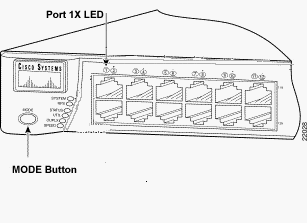 Catalyst 3524XL
Catalyst 2950-24
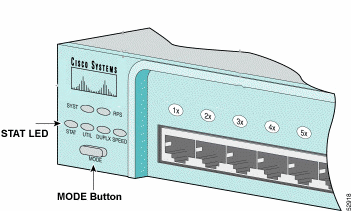 Catalyst 2950-24
2955 シリーズ スイッチのみ:
Catalyst 2955シリーズスイッチでは、パスワード回復に外部モードボタンは使用されません。その代わり、スイッチブートローダはパスワード回復の目的でブレークキー検出を使用して自動ブートシーケンスを停止します。ブレーク シーケンスは、使用している端末アプリケーションおよびオペレーティング システムによって異なります。HypertermがWindows 2000で稼働している場合は、Ctrl + Breakキーを使用します。UNIXが稼働するワークステーションでは、Ctrl+Cがブレークキーです。次の例では、2955でHypertermを使用してswitch: モードに切り替えています。
C2955 Boot Loader (C2955-HBOOT-M) Version 12.1(0.0.514), CISCO DEVELOPMENT TEST
VERSION
Compiled Fri 13-Dec-02 17:38 by madison
WS-C2955T-12 starting...
Base ethernet MAC Address: 00:0b:be:b6:ee:00
Xmodem file system is available.
Initializing Flash...
flashfs[0]: 19 files, 2 directories
flashfs[0]: 0 orphaned files, 0 orphaned directories
flashfs[0]: Total bytes: 7741440
flashfs[0]: Bytes used: 4510720
flashfs[0]: Bytes available: 3230720
flashfs[0]: flashfs fsck took 7 seconds.
...done initializing flash.
Boot Sector Filesystem (bs:) installed, fsid: 3
Parameter Block Filesystem (pb:) installed, fsid: 4

*** The system will autoboot in 15 seconds ***
Send break character to prevent autobooting.


!--- Wait until you see this message before !--- you issue the break sequence.
!--- Ctrl+Break is entered using Hyperterm.


The system has been interrupted prior to initializing the flash file system to finish
loading the operating system software:

flash_init
load_helper
boot
switch:
4. flash_init コマンドを実行します。
switch: flash_init
Initializing Flash...
flashfs[0]: 143 files, 4 directories
flashfs[0]: 0 orphaned files, 0 orphaned directories
flashfs[0]: Total bytes: 3612672
flashfs[0]: Bytes used: 2729472
flashfs[0]: Bytes available: 883200
flashfs[0]: flashfs fsck took 86 seconds
....done Initializing Flash.
Boot Sector Filesystem (bs:) installed, fsid: 3
Parameter Block Filesystem (pb:) installed, fsid: 4
switch:

!--- This output is from a 2900XL switch. Output from
!--- other switches will vary slightly.
5. load_helperコマンドを実行します。
switch: load_helper
switch:
6. dir flash:コマンドを実行します。
スイッチ ファイル システムが表示されます。
switch: dir flash:
Directory of flash:/
2    -rwx  1803357   <date>               c3500xl-c3h2s-mz.120-5.WC7.bin

!--- This is the current version of software.

4    -rwx  1131      <date>               config.text

!--- This is the configuration file.

5    -rwx  109       <date>               info
6    -rwx  389       <date>               env_vars
7    drwx  640       <date>               html
18   -rwx  109       <date>               info.ver
403968 bytes available (3208704 bytes used)
switch:

!--- This output is from a 3500XL switch. Output from
!--- other switches will vary slightly.
7.rename flash:config.text flash:config.oldと入力して、コンフィギュレーションファイルの名前を変更します。
switch: rename flash:config.text flash:config.old
switch:

!--- The config.text file contains the password
!--- definition.
8. boot コマンドを実行して、システムを起動します。
switch: boot
Loading "flash:c3500xl-c3h2s-mz.120-5.WC7.bin"...###############################
################################################################################
######################################################################
File "flash:c3500xl-c3h2s-mz.120-5.WC7.bin" uncompressed and installed, entry po
int: 0x3000
executing...

!--- Output suppressed.
!--- This output is from a 3500XL switch. Output from other switches
!--- will vary slightly.
9. プロンプトで「n」と入力し、初期設定ダイアログを中止します。
--- System Configuration Dialog ---
At any point you can enter a question mark '?' for help.
Use ctrl-c to abort configuration dialog at any prompt.
Default settings are in square brackets '[]'.
Continue with configuration dialog? [yes/no]: n

!--- Type "n" for no.

Press RETURN to get started.

!--- Press Return or Enter.

Switch>

!--- The Switch> prompt is displayed.
10. スイッチプロンプトで「en」と入力し、イネーブルモードにします。
Switch>en
Switch#
11. rename flash:config.old flash:config.text と入力して、コンフィギュレーションファイルを元の名前に変更します。
Switch#rename flash:config.old flash:config.text
Destination filename [config.text]

!--- Press Return or Enter.

Switch#
12. コンフィギュレーションファイルをメモリにコピーします。
Switch#copy flash:config.text system:running-config
Destination filename [running-config]?

!--- Press Return or Enter.

1131 bytes copied in 0.760 secs
Sw1#
コンフィギュレーション ファイルは、これでリロードされます。
13. 不明な現在のパスワードを上書きします。少なくとも 1 つの大文字、1 つの数字および 1 つの特殊文字を使用して、強力なパスワードを選択します。
Sw1#configure terminal !--- To overwrite existing secret password Sw1(config)#enable secret!--- To overwrite existing enable password Sw1(config)#enable password !--- To overwrite existing vty password Sw1(config)#line vty 0 15 Sw1(config-line)#password Sw1(config-line)#login !--- To overwrite existing console password Sw1(config-line)#line con 0 Sw1(config-line)#password
14. write memoryコマンドを使用して、実行コンフィギュレーションをコンフィギュレーションファイルに書き込みます。
Sw1#write memory
Building configuration...
[OK]
Sw1#
関連情報
更新履歴
| 改定 | 発行日 | コメント |
|---|---|---|
2.0 |
08-Oct-2026
|
スペル、文法、挿入された水平線を読みやすくするためにセクションを区切って更新しました。これは再署名です。 |
1.0 |
04-May-2014
|
初版 |
 フィードバック