概要:
このドキュメントでは、UCS Centralバージョン2.0以降のSSHホストキーの不一致が原因で発生するUCS Centralのバックアップ障害をトラブルシューティングする方法について説明します。
前提条件
要件:
このドキュメントでは、次の項目に関する知識があることを前提としています。
- Cisco UCS Central
- 基本的なLinuxコマンドの理解
使用するコンポーネント
このドキュメントの情報は、特定のラボ環境にあるデバイスに基づいて作成されたものです。このドキュメントで使用するすべてのデバイスは、クリアな(デフォルト)設定で作業を開始しています。本稼働中のネットワークでは、各コマンドによって起こる可能性がある影響を十分確認してください。
問題の説明:
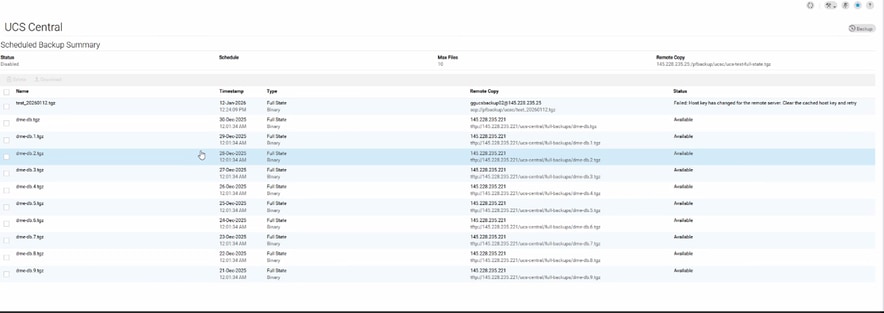
UCS Centralのバックアップ操作が失敗し、[ステータス]タブに次のエラーメッセージが表示されます。
“Host key has changed for the remote server. Clear the cached host key and retry.”
ログの証拠:
# From svc_ops_dme.log:

Jan 6 11:36:47 degtlue2100 svc_ops_dme[1597]: [EVENT][E14194351][79965][transition][internal][] [FSM:STAGE:ASYNC]: uploading data to backup server(FSM-STAGE:sam:dme:MgmtDataExporterExportData:upload)
Jan 6 11:36:47 degtlue2100 svc_ops_dme[1597]: [EVENT][E14194351][79966][transition][internal][] [FSM:STAGE:STALE-FAIL]: uploading data to backup server(FSM-STAGE:sam:dme:MgmtDataExporterExportData:upload)
Jan 6 11:36:47 degtlue2100 svc_ops_dme[1597]: [EVENT][E14194351][79968][transition][internal][] [FSM:STAGE:REMOTE-ERROR]: Result: end-point-failed Code: unspecified Message: Host key has changed for the remote server. Clear the cached host key and retry (sam:dme:MgmtDataExporterExportData:upload)     <<<<<<<
Jan 6 11:36:47 degtlue2100 svc_ops_dme[1597]: [EVENT][E14194351][79970][transition][internal][] [FSM:STAGE:FAILED]: uploading data to backup server(FSM-STAGE:sam:dme:MgmtDataExporterExportData:upload)
ソリューション:
- UCS CentralシステムへのSSHセッションを確立します。
2. インストールされているUCS Centralパッケージのバージョンを確認します。
Central-HTTS1# connect local-mgmt
Cisco UCS Central
TAC support: http://www.cisco.com/tac
Copyright (c) 2011-2025, Cisco Systems, Inc. All rights reserved.
The copyrights to certain works contained in this software are
owned by other third parties and used and distributed under
license. Certain components of this software are licensed under
the GNU General Public License (GPL) version 2.0 or the GNU
Lesser General Public License (LGPL) Version 2.1 or later version. A copy of each
such license is available at
https://opensource.org/license/gpl-2-0 and
https://opensource.org/license/lgpl-2-1
Central-HTTS1(local-mgmt)# show version

Name                Package             Version        GUI
----                -------             -------        ----
core                Base System         2.1(1a)        2.1(1a)
central-mgr         Central Manager     2.1(1a)        2.1(1a)
service-reg         Service Registry    2.1(1a)        2.1(1a)
identifier-mgr      Identifier Manager  2.1(1a)        2.1(1a)
operation-mgr       Operations Manager  2.1(1a)        2.1(1a)
resource-mgr        Resource Manager    2.1(1a)        2.1(1a)
policy-mgr          Policy Manager      2.1(1a)        2.1(1a)
stats-mgr           Statistics Manager  2.1(1a)        2.1(1a)
server-mgr          Server Manager      2.1(1a)        2.1(1a)
gch                 Generic Call Home   2.1(1a)        none
rel-key             Release Key         2.1(1a)        none

Central-HTTS1(local-mgmt)#
3. セントラルサーバーからトークンを取得します。
Central-HTTS1(local-mgmt)# show token

0HPPCXXYGVR
* 応答キージェネレータでトークンを使用します:https://cspg-releng.cisco.com/UCSPassGen.php

注:最初にUCSCのバージョンを選択します。(2.0または2.1)。 それ以外の場合、パスワードはrootユーザには機能しません。UCS Centralから取得したトークンに貼り付ける前に、パスワード生成WebサイトのDebug-Tokenフィールドから「token」という単語を削除してください。 それ以外の場合、テキストは残り、無効なパスワードを生成します。
4. ルートクレデンシャルとパスワードとして応答キーを使用して、UCS Centralへの新しいSSHセッションを開始します。
login as: root
root@ <IP Address> password:
Last login: Tue Jan 13 17:57:20 2026 from <IP Address>
5. 次のパスに移動し、「known_hosts」ファイルで影響を受けるサーバのIPアドレスを確認します。
[root@Central-HTTS1 ~]# cd /root/.ssh
[root@Central-HTTS1 .ssh]# cat known_hosts

[root@Central-HTTS1 ~]# cd /root/
anaconda-ks.cfg  .bash_profile    .cshrc           ks-pre.log       .ssh/
.bash_history    .bashrc          ks-post1.log     opt/             .tcshrc
.bash_logout     .config/         ks-post.log      original-ks.cfg  .viminfo

[root@Central-HTTS1 ~]# cd /root/.ssh/
[root@Central-HTTS1 .ssh]# ls
id_rsa  id_rsa.pub  known_hosts

[root@Central-HTTS1 .ssh]# cat known_hosts
影響を受けるサーバのIPアドレスがファイル内に存在する場合は、「vim」エディタを使用して対応するエントリを手動で削除します。
特定の行に移動し、「dd」と入力して削除します。
[root@Central-HTTS1 .ssh]# vi known_hosts
[root@Central-HTTS1 .ssh]# vi known_hosts
....
....
....
!wq     (Write and Quit  >> Saving changes and exiting)
影響を受けるIPアドレスを削除した後、ファイルを保存し、:wqを使用してエディタを終了します。
known_hostsファイルが更新されたら、UCS Centralからバックアップ操作を再試行します。
これで、バックアップは正常に完了します。

 フィードバック