以前に設定した(レガシー)Syslogサーバにログを送信するファイアウォールのトラブルシューティング

内容
お問い合わせ内容
ファイアウォールは、以前に設定された(レガシー)syslogサーバ(IPアドレス198.51.100.100)にsyslogメッセージを送信します。このIPアドレスは、ファイアウォール設定には存在しません。
環境
該当するプラットフォームは、プラットフォームモードでASAを実行するFirepower 2100です。
解決策
ステップ 1:syslogメッセージの送信元IPアドレスの確認
レガシーsyslogサーバで受信したメッセージの分析に基づくと、発信元IPアドレスはFirepowerシャーシの管理IPアドレスです。
Firepower eXtensible Operating System(FXOS)で設定されたIPアドレスは192.0.2.100です。
2026-04-27 15:22:49    User.Error    192.0.2.100    Apr 27 09:22:49 firepower FPRM: <<%FPRM-3-NTP_CONFIG_FAILED>> [F1329][major][ntp-config-failed][sys/svc-ext/datetime-svc] Ntp Configuration failed, please check the error message in Ntp host
2026-04-27 15:22:54   User.Error     192.0.2.100    Apr 27 09:22:54 firepower FPRM: <<%FPRM-3-NTP_CONFIG_FAILED>> [F1329][cleared][ntp-config-failed][sys/svc-ext/datetime-svc] Ntp Configuration failed, please check the error message in Ntp host
ステップ 2FXOS syslog設定のチェックと確認
FXOSコマンドラインインターフェイス(CLI)設定に、レガシーsyslogサーバのアドレスが含まれていない。
device # scope monitoring
device /monitoring # show configuration | i 198.51.100.100
device /monitoring # show configuration all | i 198.51.100.100
同時に、監視スコープ内のshow syslogコマンドの出力には、サーバのIPアドレスが示されます。
device # scope monitoring
device /monitoring # show syslog

console
    state: Disabled
    level: Critical

platform
    state: Enabled
    level: Information
    Name     Hostname             State    Level         Facility
    -------- -------------------- -------- ------------- --------
    Server 1 198.51.100.10        Enabled  Warnings      Local7
    Server 2 198.51.100.100       Enabled  Warnings      Local7 <---- legacy server
    Server 3 none                 Disabled Critical      Local7

sources
    faults: Enabled
    audits: Enabled
    events: Disabled
Firepower Chassis Manager(FCM)のユーザインターフェイス(UI)(User Interface(UI))> プラットフォームの設定(Platform Settings)> Syslogがsyslogサーバ設定を示さない。
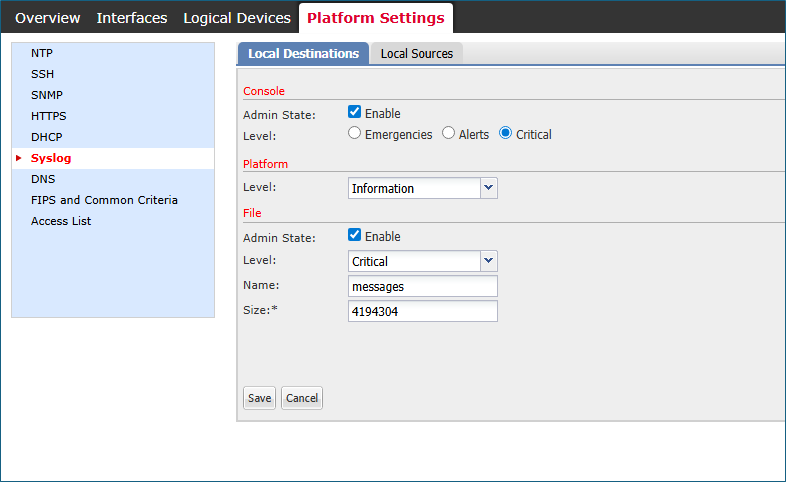 fcm_syslogs_configuration.png(すべてのバージョンのインストール)
ステップ 3Syslogサーバの変更または削除の試み
device# scope monitoring

device /monitoring # delete  <---
  snmp-trap  SNMP trap hostname or IP address
  snmp-user  SNMPv3 User

device /monitoring # set syslog  <---
  console   Console
  file      File
  platform  Platform

device /monitoring # set syslog platform <---
  level  Level
結論として、FXOS CLIもFCM UIも、198.51.100.100を含むsyslogサーバを作成、変更、または削除する方法を提供していません。
原因
次の3つのソフトウェア不具合を検討してください。
Cisco Bug ID CSCvn19025
この不具合の修正が適用されたソフトウェアバージョンでは、CLIまたはFCM UIでFXOSリモートsyslog設定を行うことができません。
Cisco Bug ID CSCvt85766
この不具合を修正すると、FXOSのshow syslogコマンドの出力から「リモート接続先」セクションが削除されます。
修正のないバージョン:
device# scope monitoring
device /monitoring # show syslog

console
    state: Enabled
    level: Critical

platform
    state: Enabled
    level: Information

file
    state: Enabled
    level: Critical
    name:  messages
    size:  4194304

remote destinations <----------------
    Name     Hostname             State    Level         Facility
    -------- -------------------- -------- ------------- --------
    Server 1 192.0.2.1            Enabled  Information   Local7
    Server 2 192.0.2.2            Enabled  Information   Local7
    Server 3 none                 Disabled Critical      Local7

sources
    faults: Enabled
    audits: Enabled
    events: Disabled
次の修正を含むバージョンには、「リモート接続先」セクションがありません。
device # scope monitoring
device /monitoring # show syslog

console
    state: Enabled
    level: Critical

platform
    state: Enabled
    level: Information
    Name     Hostname             State    Level         Facility
    -------- -------------------- -------- ------------- --------
    Server 1 192.0.2.1            Enabled  Information   Local7
    Server 2 192.0.2.2            Enabled  Information   Local7
    Server 3 none                 Disabled Critical      Local7

sources
    faults: Enabled
    audits: Enabled
    events: Disabled
リモートの宛先セクションがありませんが、syslogサーバはプラットフォームセクションに表示されます。
Cisco Bug ID CSCwu12470
Cisco Bug ID CSCvn19025の修正でバージョンをソフトウェアにアップグレードすると、リモートsyslogサーバの作成、変更、または削除をFXOS CLIまたはFCM UIで管理できなくなります。この制限は、アップグレード前に設定されたサーバにも適用されます。それにもかかわらず、ソフトウェアのアップグレード後、FXOSソフトウェアではshow syslogコマンド出力のplatformセクションにsyslogサーバが表示され、これらのサーバにsyslogメッセージが送信されます。ユーザは、既存のFXOSリモートsyslog設定を管理できません。この問題は、Cisco Bug ID CSCwu12470で追跡されています。
関連コンテンツ
Cisco Bug ID CSCvn19025
Cisco Bug ID CSCvt85766
Cisco Bug ID CSCwu12470
更新履歴
| 改定 | 発行日 | コメント |
|---|---|---|
2.0 |
19-Aug-2026
|
再認定 |
1.0 |
29-Apr-2026
|
初版 |
 フィードバック