ESAでのカスタムCAリスト証明書有効期限アラートのトラブルシューティング

はじめに
このドキュメントでは、AsyncOS 14.xへのアップグレード後のSecure Email Gateway(ESA)でのカスタムCA証明書有効期限アラートについて説明します。
概要
症状は、アップグレード中にカスタム認証局(CA)リストに追加された証明書の有効期限アラートです。カスタムリストの証明書の有効期限はシステムリストの証明書に影響しないため、影響は情報アラートに限定されます。この問題を解決するには、証明書の発行元を確認し、必要なカスタムCA証明書を置き換えるか、有効期限が切れた証明書をカスタムリストから削除します。
使用するコンポーネント
このドキュメントは、AsyncOS 14.0以降を実行するCisco Secure Email Gatewayに基づいています。
このドキュメントの情報は、特定のラボ環境にあるデバイスに基づいて作成されたものです。このドキュメントで使用するすべてのデバイスは、クリアな(デフォルト)設定で作業を開始しています。本稼働中のネットワークでは、各コマンドによって起こる可能性がある影響を十分確認してください。
バックグラウンド情報
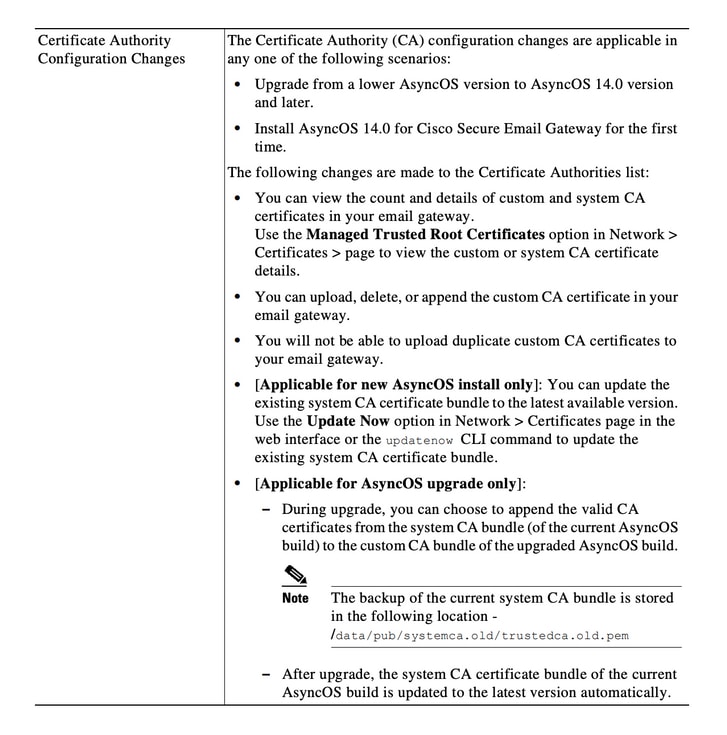
AsyncOS 14.xへのアップグレードプロセス中に、カスタムCAリストに古いシステム証明書を追加するかどうかを確認するプロンプトが表示されます。この動作は、図1に示すように、AsyncOS 14.0リリースノートにも記載されています。『Cisco Secure Email GatewayリリースノートAsyncOS 14.0』を参照してください。
画像 1.古いシステム証明書をカスタムCAリストに追加するためのアップグレードプロンプトを示すリリースノートの抜粋。
問題
AsyncOS 14.xへのアップグレード後、カスタムリストに追加された古いシステム証明書が時間の経過とともに期限切れになり、次の例のようなアラートが生成される場合があります。
26 Jun 2021 11:27:29 -0400 Your certificate CA:Root CA Generalitat Valenciana expires in 5 days (s).
これらのアラートは、アップグレード時にカスタムリストに追加された古いシステム証明書の有効期限が近づいているか、以前に使用したカスタム証明書の有効期限が近づいていることを示します。
ソリューション
カスタムリスト内の古いシステム証明書に関するアラートは情報であるため、カスタムリストから削除するか、期限切れにするかを選択できます。
この状態がサービスに影響を与えることはありませんが、アラートが望ましくない可能性があります。
現在システムリストに含まれていない、組織に必要なカスタムCA証明書のアラートが表示された場合は、CAに連絡して更新済みの証明書を入手し、Cisco Secure Email Gateway Admin Guideの証明書管理手順に従って交換してください。
システムCA証明書バンドルは、アップグレード後に自動的に更新され、その後定期的に更新されます。カスタムリスト内の証明書の有効期限は、システムリスト内の証明書には影響しません。
システムリストとカスタムリストの両方が有効になっていることを確認するには、Network > Certificates > Certificate Authorities > Edit Settingsの順に選択します。
また、同じメニューからシステムリストとカスタムリストをエクスポートしたり、必要に応じてCLIコマンドcertconfigおよびcertauthorityを使用して両方のリストの証明書を確認することもできます。
カスタムCAリストでアラートを生成する証明書を削除する場合は、管理者としてアプライアンスに対してSSH経由で次の手順を実行します。
- certconfigを実行します。
- 「certautholigity」と入力し、次に「custom」と入力します。
- deleteと入力し、アラートに一致する証明書を選択します。
- 削除を確認し、commitを実行して変更を保存します。
このCLIの例は、ワークフローを示しています。
example.com> certconfig

Choose the operation you want to perform:
- CERTIFICATE - Import, Create a request, Edit or Remove Certificate Profiles
- CERTAUTHORITY - Manage System and Customized Authorities
- CRL - Manage Certificate Revocation Lists
[]> certauthority

Certificate Authority Summary
Custom List: Enabled
System List: Enabled

Choose the operation you want to perform:
- CUSTOM - Manage Custom Certificate Authorities
- SYSTEM - Manage System Certificate Authorities
[]> custom

Choose the operation you want to perform:
- DISABLE - Disable the custom certificate authorities list
- IMPORT - Import the list of custom certificate authorties
- EXPORT - Export the list of custom certificate authorties
- DELETE - Remove a certificate from the custom certificate authorty list
- PRINT - Print the list of custom certificate authorties
- CHECK_CA_FLAG - Check CA flag in uploaded custom CA certs
[]> delete

You must enter a value from 1 to 104.
...
59. [Root CA Generalitat Valenciana] <<< Select this certificate based on the sample alert in this example
...
93. [thawte Primary Root CA]

Select the custom CA certificate you want to delete
[]> 59

Are you sure you want to delete "Root CA Generalitat Valenciana"? [N]> Y
Custom CA certificate "Root CA Generalitat Valenciana" removed

Choose the operation you want to perform:
- DISABLE - Disable the custom certificate authorities list
- IMPORT - Import the list of custom certificate authorties
- EXPORT - Export the list of custom certificate authorties
- DELETE - Remove a certificate from the custom certificate authorty list
- PRINT - Print the list of custom certificate authorties
- CHECK_CA_FLAG - Check CA flag in uploaded custom CA certs
[]> [ENTER]

Certificate Authority Summary
Custom List: Enabled
System List: Enabled
Choose the operation you want to perform:
- CUSTOM - Manage Custom Certificate Authorities
- SYSTEM - Manage System Certificate Authorities
[]> [ENTER]

Choose the operation you want to perform:
- CERTIFICATE - Import, Create a request, Edit or Remove Certificate Profiles
- CERTAUTHORITY - Manage System and Customized Authorities
- CRL - Manage Certificate Revocation Lists
[]> [ENTER]

example.com> commit
必ず最後にcommitを実行してください。
関連情報
更新履歴
| 改定 | 発行日 | コメント |
|---|---|---|
2.0 |
07-Jul-2026
|
再認定 |
1.0 |
29-Jun-2021
|
初版 |
 フィードバック