Nexusプラットフォームでのスマートライセンスの設定とトラブルシューティング

内容
はじめに
このドキュメントでは、Cisco Smart Licensing(クラウドベースのシステム)を使用して、Nexusスイッチのソフトウェアライセンスを管理する方法について説明します。
Cisco Smart Licensing とは
Cisco Smart Accountは、シスコのソフトウェアライセンス、権限、製品インスタンスに対する完全な可視性とアクセス制御を会社全体に提供するマネージドデータリポジトリです
スマートライセンスやスマートアカウントの管理を初めて利用する
シスココミュニティにアクセスし、新しい管理者向けトレーニングコースに登録してください。過去の録画トレーニングも参照できます。
- シスココミュニティ – Cisco Smart Accounts/Smart LicensingおよびCisco License Central
- スマートアカウントの作成はこちらで行えます:スマートアカウント
- スマートアカウントの管理はこちらで行えます:スマート ソフトウェア ライセンス
サポートされるCisco Nexusプラットフォーム
Nexus 3000および9000
9.3(3)より前のNX-OSバージョンでは、従来のライセンスのみがサポートされます。9.3(3)から10.1(2)までのNX-OSバージョンでは、従来のライセンスとスマートライセンスの両方がサポートされます。これについては、このドキュメントで説明します。10.1(2)以降のNX-OSバージョンは、ポリシーを使用したスマートライセンスのみをサポートします。これは、スマートライセンスとは異なります。10.1(2)よりも新しいバージョンの場合は、代わりにこのガイドを参照してください。
Nexus 7000
Smart Licensingは、NX-OS 8.0(1)以降を搭載したCisco Nexus 7000でサポートされています。
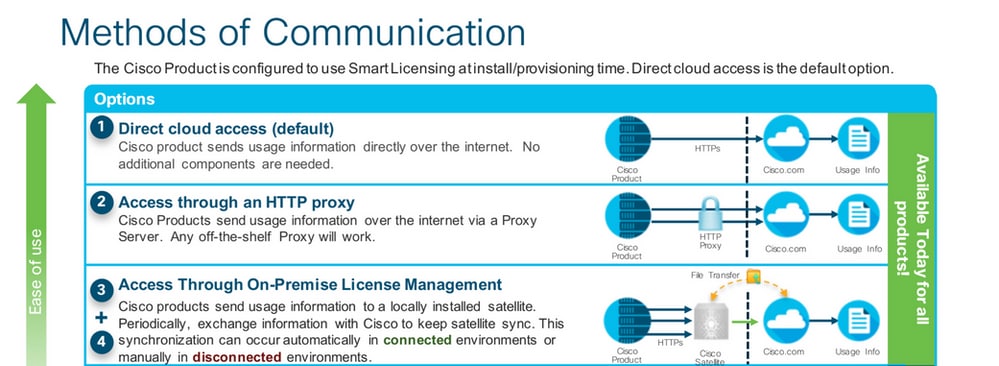
Nexusスイッチでサポートされるスマートライセンス方式
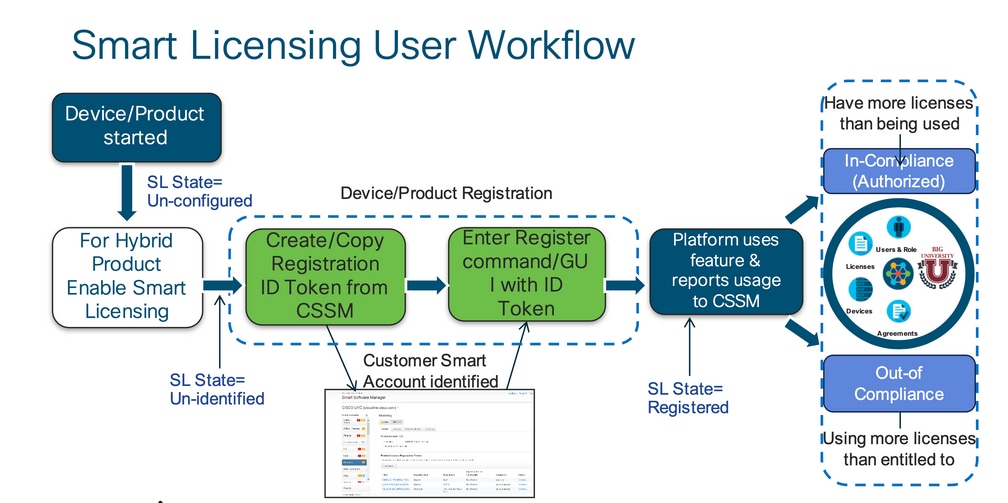
Smart Licensingユーザワークフロー
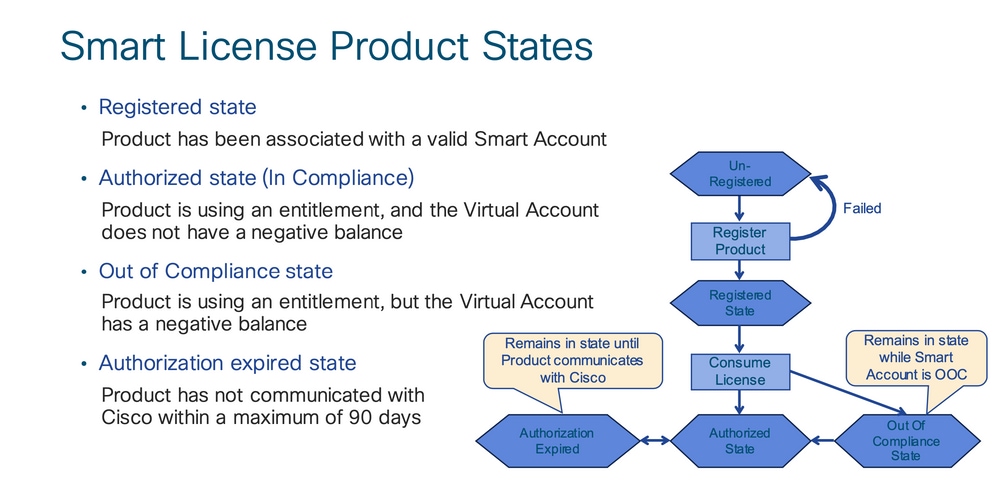
スマートライセンスの製品状態
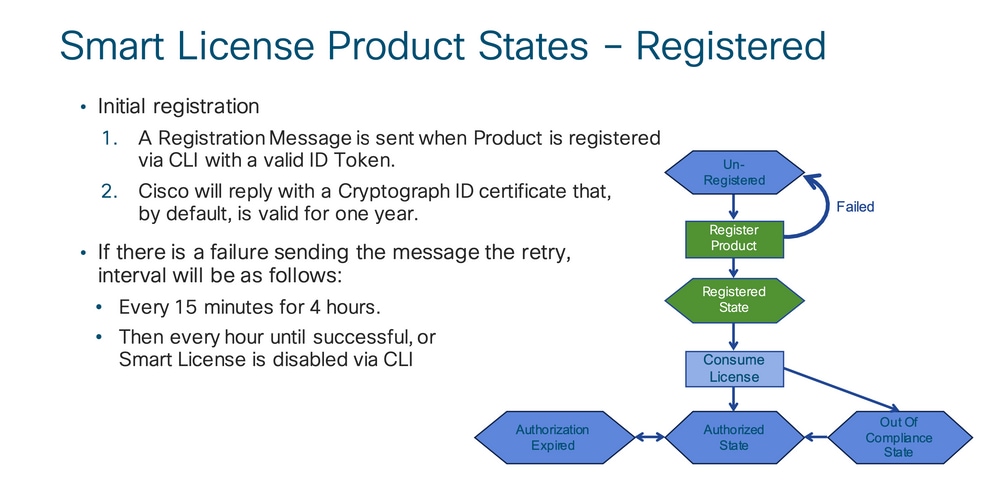
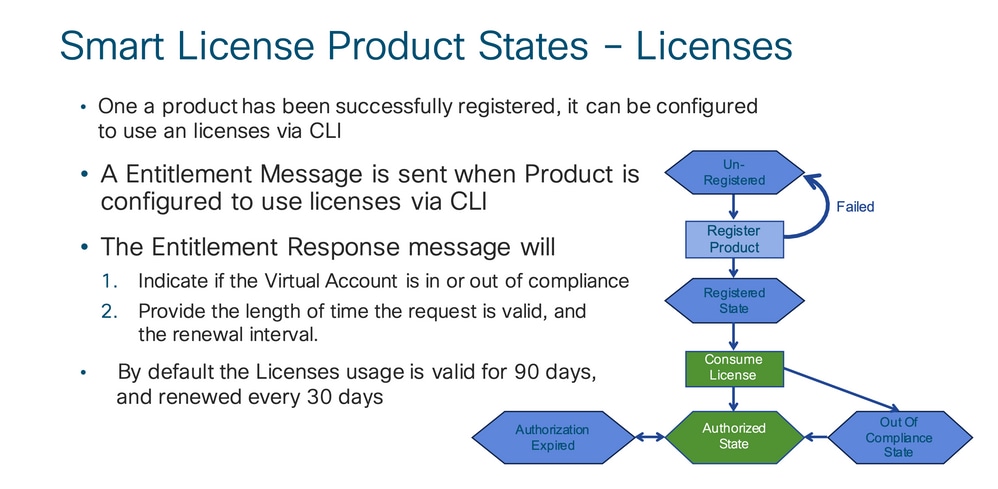
登録済み
ライセンス
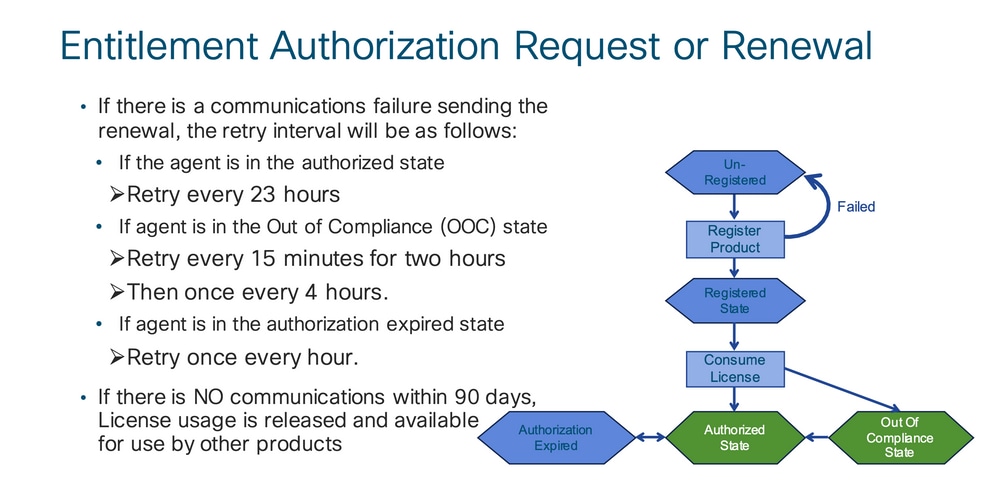
リクエストまたは更新
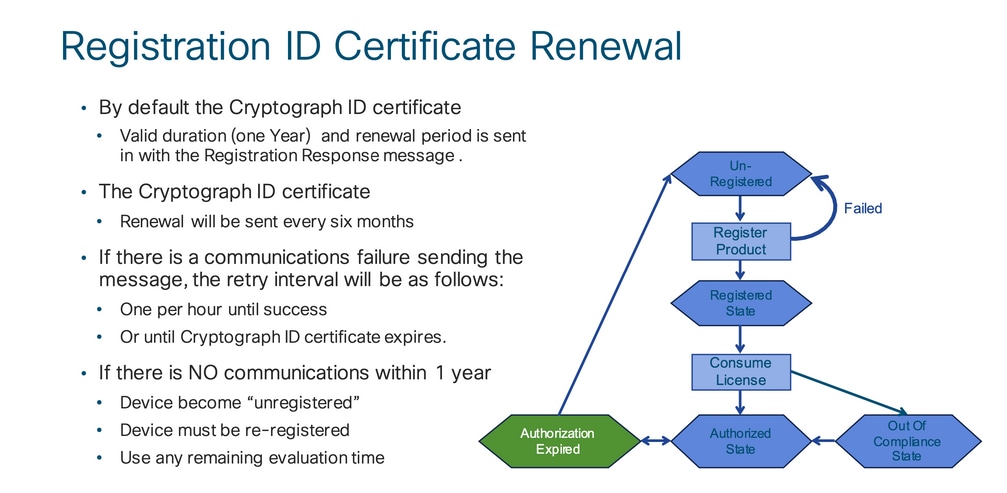
更新
登録とライセンスの状態
Smart Licensingの設定中に、シスコデバイスが状態に入る可能性のある状態は複数あります。これらの状態は、シスコデバイスのコマンドラインインターフェイス(CLI)から「show license all」または「show license status」で表示できます。
すべての状態とその意味を次に示します。
[評価(未確認)(Evaluation (Unidentified))] 状態
- これは、デバイスを最初に起動したときのデフォルトの状態です。
- この状態は通常、シスコデバイスがまだスマートライセンス用に設定されていないか、スマートアカウントに登録されていない場合に表示されます。
- この状態では、すべての機能が使用可能となっており、デバイスでライセンスレベルを自由に変更できます。
- 評価期間は、デバイスが未確認状態の場合に使用されます。この状態でデバイスがシスコとの通信を試みることはありません。
- これは90日間の使用であり、90暦日ではありません。 この期間は、期限切れになるとリセットされません。
- 権限単位ではなく、デバイス全体に対して 1 つの評価期間が設けられます。
- 90 日後に評価期間が期限切れになると、デバイスは [評価期間の期限切れ(EVAL EXPIRY)] モードになりますが、リロードしても機能的な影響や機能の中断が生じることはありません。現在のところ適用されていません。
- カウントダウン時間は再起動後も維持されます。
- 評価期間は、デバイスがまだシスコに登録されておらず、シスコのバックエンドから次の 2 つのメッセージを受信していない場合に使用されます。
- 登録要求に対する成功応答
- 権限承認要求に対する成功応答
[登録済み(Registered)] 状態
- これは、登録が正常に完了した後の正常な状態です。
- シスコデバイスは、Cisco スマートアカウントと正常に通信することが可能になり登録できています。
- デバイスは、将来の通信に使用される1年間有効なID証明書を受け取ります。
- デバイスは、デバイスで使用されているライセンスの権限を認可する要求をCSSMに送信します。
- CSSMの応答に基づいて、デバイスは承認またはコンプライアンス違反と入力します
- ID 証明書は 1 年後に期限切れになります。6ヵ月後、ソフトウェアエージェントプロセスが証明書の更新を試行します。エージェントがCisco Smart Software Managerと通信できない場合、有効期限(1年)までID証明書の更新を試行し続けます。 1年が経過すると、エージェントはUnidentified状態に戻り、評価期間を有効にしようとします。CSSMは、データベースから製品インスタンスを削除します。
[承認済み(Authorized)] 状態
- これは、デバイスが権限付与を使用し、コンプライアンス(負のバランスなし)を満たしている場合に予期される状態です。
- CSSMの仮想アカウントには、デバイスライセンスの使用を許可する正しいタイプと数のライセンスがありました。
- デバイスは、30 日後に承認を更新するための新しい要求を CSSM に送信します。
- (正常に更新されなかった場合)[承認の期限切れ(Authorization Expired)] 状態に移行してから 90 日の期間が設けられます。
コンプライアンス違反状態
- これは、デバイスが権限を使用し、コンプライアンス(負のバランス)ではない状態です。
- この状態は、シスコデバイスの登録先である対応するバーチャルアカウントに使用可能なライセンスがない場合に、Cisco スマートアカウントで表示されます。
- コンプライアンス/承認済みの状態に入るには、正しい数とタイプのライセンスをスマートアカウントに追加する必要があります。
- この状態になると、デバイスは自動的に許可更新要求を毎日送信します。
- ライセンスと機能は引き続き使用でき、機能への影響はありません。
[承認の期限切れ(Authorization Expired)] 状態
- これは、デバイスの使用権限が90日以上関連付けられているCiscoスマートアカウントと通信できない状態です。
- これは通常、シスコデバイスがインターネットにアクセスできなくなったか、最初の登録の後に tools.cisco.com に接続できない場合に表示されます。
- スマートライセンスのオンライン方式では、この状態にならないようにするために、シスコデバイスが少なくとも 90 日に 1 回通信する必要があります。
- CSSMは90日間の通信がないため、このデバイスのすべての使用中ライセンスをプールに返します。
- この状態にある間、デバイスは登録期間(ID証明書)が期限切れになるまで、1時間ごとにシスコに連絡して権限付与の承認を更新しようとします。
- ライセンスと機能は引き続き使用でき、機能への影響はありません。
- ソフトウェアエージェントがシスコとの通信を再確立し、許可要求を受信すると、正常に応答して確立状態の1つに入る処理を行います。
NexusおよびConfigでサポートされる方式
方法1(ダイレクトクラウドアクセス)
基本設定:
switch# show run callhome


!Command: show running-config callhome

!Running configuration last done at: Wed Jun 22 16:14:37 2022

!Time: Wed Jun 22 16:16:28 2022


version 9.3(4) Bios:version 07.67

callhome

  email-contact sch-smart-licensing@cisco.com

  destination-profile CiscoTAC-1 transport-method http

  destination-profile CiscoTAC-1 index 1 http https://tools.cisco.com/its/service/oddce/services/DDCEService

transport http use-vrf management

 enable


Switch# license smart register idtoken XXXX (force)

Initiated device registration with backend. run show license status, for registration status


switch# show license status

Smart Licensing is ENABLED


Registration:

  Status: REGISTERED

  Smart Account: ldap_user_test

  Virtual Account: Default

  Export-Controlled Functionality: Allowed

  Initial Registration: SUCCEEDED on Jun 22 16:15:41 2022 UTC

  Last Renewal Attempt: None

  Next Renewal Attempt: Dec 19 16:15:41 2022 UTC

  Registration Expires: Jun 22 16:13:53 2023 UTC


License Authorization:

  Status: AUTHORIZED on Jun 22 16:15:44 2022 UTC


  Last Communication Attempt: SUCCEEDED on Jun 22 16:15:44 2022 UTC

  Next Communication Attempt: Jul 22 16:15:43 2022 UTC

  Communication Deadline: Sep 20 16:12:55 2022 UTC


Smart License Conversion:

  Automatic Conversion Enabled: False

 Status: Not started
方法2(HTTPプロキシ経由のアクセス)
switch# show run callhome


version 9.3(4) Bios:version 07.67


call home

email-contact sch-smart-licensing@cisco.com

destination-profile CiscoTAC-1 transport-method http

destination-profile CiscoTAC-1 index 1 http https://tools.cisco.com/its/service/oddce/services/DDCEService

transport http proxy server X.X.X.X port 80

transport http use-vrf management

transport http proxy enable


Switch# license smart register idtoken XXXX (force)
Initiated device registration with backend. run show license status, for registration status
方法3(オンプレミス – オンライン)
switch# show run callhome


version 9.3(4) Bios:version 07.67

callhome

  email-contact sch-smart-licensing@cisco.com

  destination-profile CiscoTAC-1 transport-method http

  destination-profile CiscoTAC-1 index 1 http https://10.106.41.xx/Transportgateway/services/DeviceRequestHandlerend

  transport http use-vrf management

  enable


Switch# license smart register idtoken XXXX (force)

Initiated device registration with backend. run show license status, for registration status
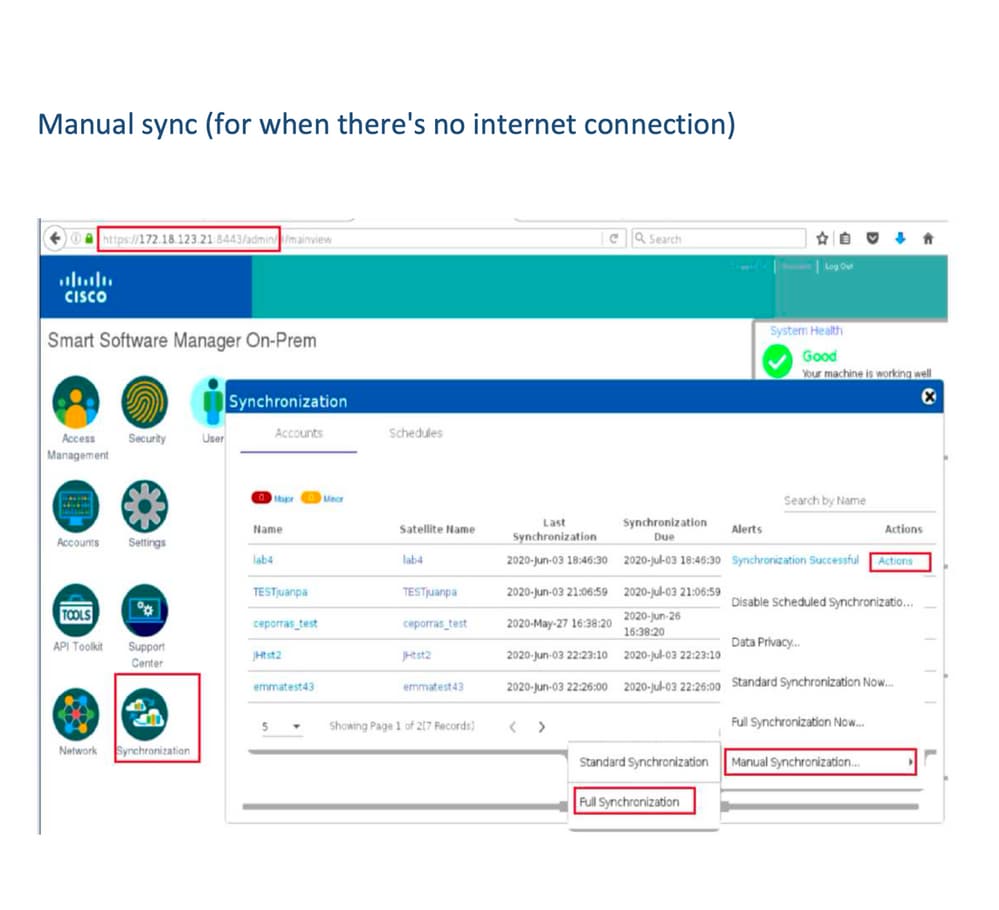
方法4(オンプレミス – オフライン)
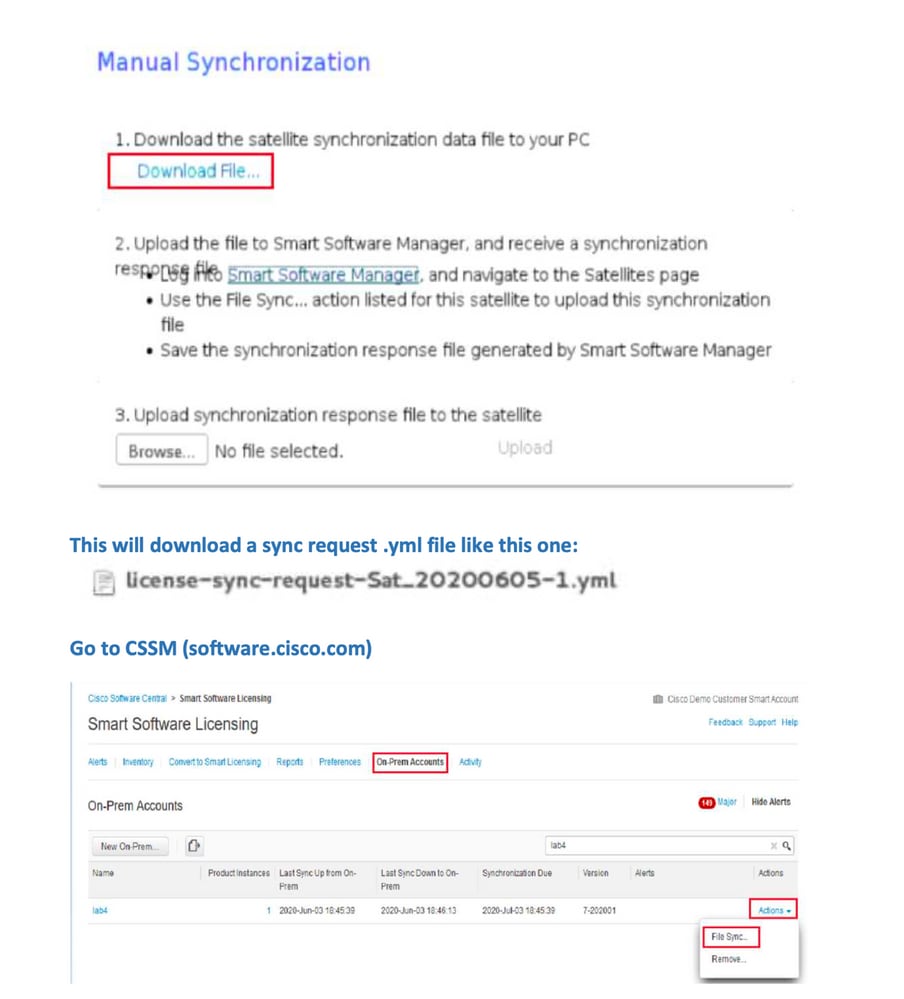
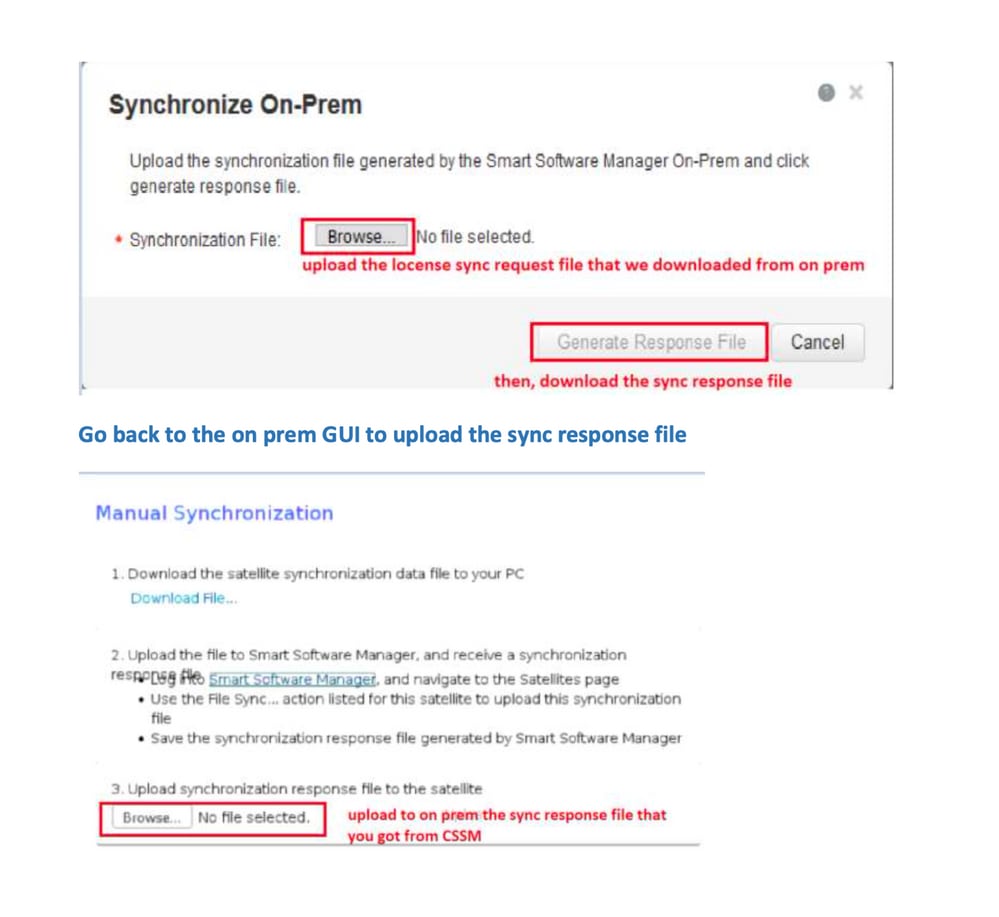
IDトークンとは
製品をスマートアカウントと仮想アカウントに安全に登録するために使用されます。
IDトークンは、製品の登録時にIDを確立するために使用される組織識別子です。
CSSMからのIDトークンの生成方法
https://software.cisco.com/software/csws/ws/platform/home?locale=en_US#
ライセンスの管理 – >インベントリ – >一般 – >新しいトークン – >トークンの作成
トラブルシュート
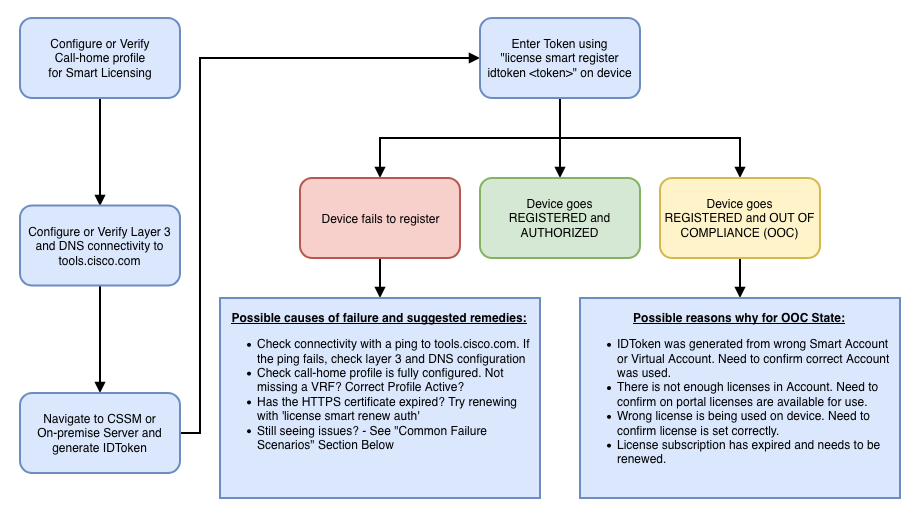
シスコデバイスをスマートライセンス対応ソフトウェアバージョンに移行する際は、このフローチャートを3つの方法(ダイレクトクラウドアクセス、HTTPSプロキシ、およびCisco Smart Software Manager On-prem)すべての一般的なガイドとして使用できます。
ワークフロー
既知の問題
- N9K-C9348GC-FXPをスマートライセンスに登録する際の問題。
1. エラー – Call Home HTTPを送信できない
[+] Call Homeの設定
Switch# show running-config callhome

version 9.3(5) Bios:version 07.68
callhome
email-contact abc@example.com
phone-contact +919XXXXXXXXX
streetaddress ST3, RD 4, Bangalore
destination-profile CiscoTAC-1 transport-method http
destination-profile CiscoTAC-1 index 1 http http://tools.cisco.com/its/service/oddce/services/DDCEService
transport http use-vrf management
[+] tools.cisco.comへの到達可能性を確認。
DC-DMZ(config)# ping tools.cisco.com vrf management
PING tools.cisco.com (72.163.4.38): 56 data bytes
64 bytes from 72.163.4.38: icmp_seq=0 ttl=232 time=237.581 ms
64 bytes from 72.163.4.38: icmp_seq=1 ttl=232 time=237.859 ms
64 bytes from 72.163.4.38: icmp_seq=2 ttl=232 time=237.562 ms
64 bytes from 72.163.4.38: icmp_seq=3 ttl=232 time=237.413 ms
64 bytes from 72.163.4.38: icmp_seq=4 ttl=232 time=237.995 ms

DC-DMZ(config)# telnet tools.cisco.com 443 vrf management
Trying 2001:420:1101:5::a...
Trying 72.163.4.38...
Connected to tools.cisco.com.
Escape character is '^]'.
^CConnection closed by foreign host.
+ HTTP送信元インターフェイスはインターフェイスvlan 27に設定され、mgmt0に変更されました。
2. エラー – SCHサーバからの応答データを解析できない
++ HTTPはシスコのバックエンドに到達するためのサポート対象外となり、HTTPSのみがサポートされます。現在の設定を削除し、HTTPSを使用するように宛先アドレスを更新。
Previous config

destination-profile CiscoTAC-1 transport-method http
destination-profile CiscoTAC-1 index 1 http http://tools.cisco.com/its/service/oddce/services/DDCEService
transport http use-vrf management
enable
New config added

(config)#callhome
(config-callhome)#enable
(config-callhome)# destination-profile CiscoTAC-1 transport-method http
(config-callhome no destination-profile CiscoTAC-1 index 1 http http://tools.cisco.com/its/service/oddce/services/DDCEService
(config-callhome destination-profile CiscoTAC-1 http https://tools.cisco.com/its/service/oddce/services/DDCEService
3. エラー – Call Home HTTPメッセージを送信できない(Call HomeとのIPC接続を確立できない – Quo VadisルートCA)
https://www.cisco.com/c/en/us/support/docs/field-notices/721/fn72115.html
4. エラー – DNS応答の欠如によるCallHome MTSメッセージのスタック
更新履歴
| 改定 | 発行日 | コメント |
|---|---|---|
5.0 |
26-May-2026
|
再認定、Central Licensingへのリンクが変更され、2つのヘッダーがあります。 |
4.0 |
05-Dec-2024
|
再認定、固定ヘッダー、リンク、機械翻訳、SEO、スタイル。 |
3.0 |
11-Oct-2023
|
初期リリースの再公開 |
2.0 |
17-Mar-2023
|
メソッドの更新 |
1.0 |
18-Jul-2022
|
初版 |
 フィードバック