はじめに
このドキュメントでは、Cisco IoT FND PostgreSQL OVAをインストールし、VMware ESXiでFNDリリース5.0.0以降のリリースにアップグレードする方法について説明します。
前提条件
VMware ESXi 7.x以降
Cisco IoT Field Network Director(FND)PostgreSQL Open Virtual Appliance(OVA)リリース5.0.0以降
VM要件:
メモリ:24 GB
vCPU:4
ディスク:450 GB以上
使用するコンポーネント
このドキュメントの情報は、特定のラボ環境にあるデバイスに基づいて作成されたものです。このドキュメントで使用するすべてのデバイスは、クリアな(デフォルト)設定で作業を開始しています。本稼働中のネットワークでは、各コマンドによって起こる可能性がある影響を十分確認してください。
Cisco IoT FND PostgreSQL OVAの導入
VMware ESXiバージョン7.xまたは8.0バージョンを実行しているOpen Virtual Appliance(OVA)ソフトウェアを使用して、Cisco IoT FNDリリース5.x.x以降のリリースをインストールする際のガイドラインを次に示します。
ステップ1:シスコソフトウェアダウンロード(登録ユーザ専用)からOVAをダウンロードします
シスコのソフトウェアページからOVAファイルをダウンロードする:ここをクリック
ステップ2:VMware vSphere Clientにログインして、ESXiサーバにOVAを導入します。
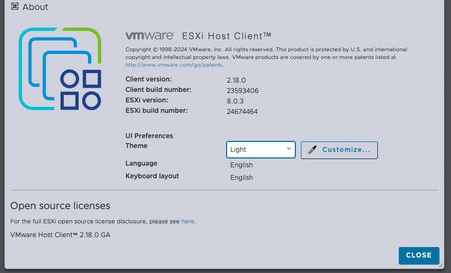
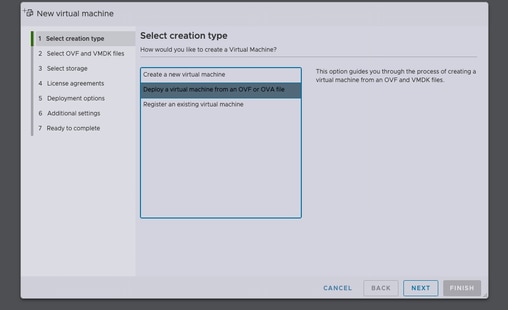
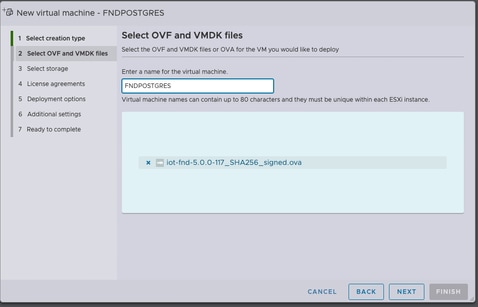
データストアを選択した後、プロビジョニングタイプを選択し、自動的に電源オンオプションを有効にします。これにより、導入プロセスの完了後に仮想マシンの電源がオンになります。[Next] をクリックします。
注意事項
シックプロビジョニング
シンプロビジョニング
[完了]をクリックする前に、選択内容を確認してください。
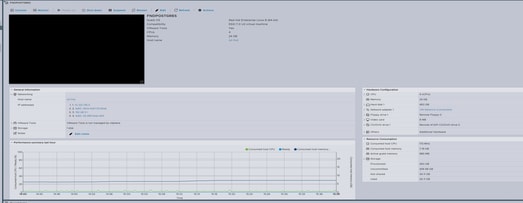
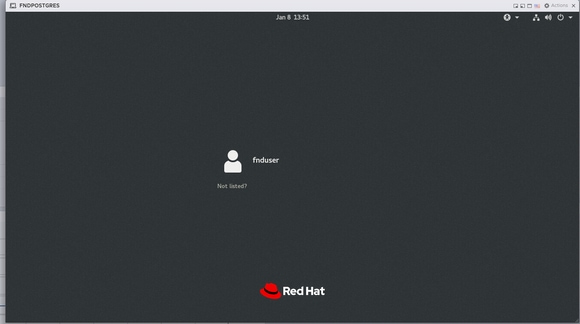
ステップ3:クレデンシャルを使用してログインします。
OVAの導入が完了し、Linuxの起動画面が表示されたら、次のデフォルトのクレデンシャルを使用します。
SSHアクセス
-
ユーザ名:fnduser
-
パスワード:C!sco123
GUI アクセス
ステップ4:ネットワークの設定
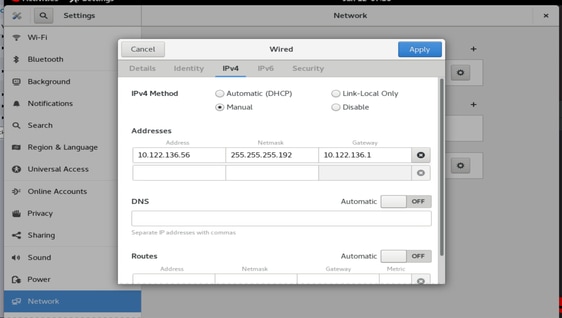
ネットワークの設定手順を実行します。
-
固定IPアドレスを割り当てるか、IPアドレスを割り当てるためにDHCPサーバが使用できることを確認します。
-
ホストVMで有効で到達可能なDNSサーバを設定します。
-
IPの設定が完了したら、ネットワークサービスを再起動します。
Cisco IoT FNDのリリース5.0から5.1へのアップグレード
ステップ1:アップグレードパッケージのダウンロード
Cisco Software Download(登録ユーザ専用)ページからアップグレードパッケージをダウンロードします。ここをクリック
ファイル名:CISCO-IOTFND-VPI-K9-UPGRADE-SCRIPTS-5.1.0-155.zip
手順2:アップグレード前のチェックの実行
アップグレードに進む前に、Cisco IoT FNDサービスの健全性と動作ステータスを確認します。
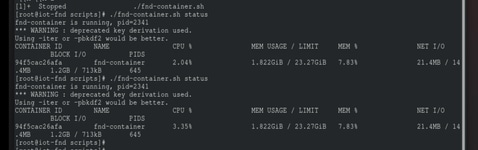
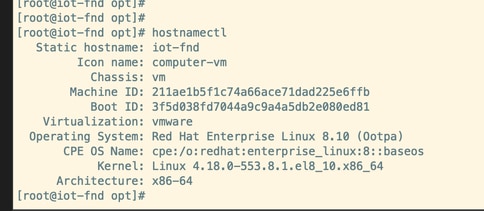
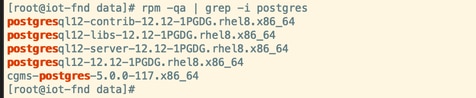
ステップ3:アップグレードRPMを/optディレクトリにコピーします。

ステップ4:upgradeコマンドの実行
例:
rpm -Uvh upgrade-ova—<リリース>-<ビルド番号>.rpm
[root@iot-fnd opt]# rpm -Uvh upgrade-ova-5.1.0-155.rpm

warning: upgrade-ova-5.1.0-155.rpm: Header V4 RSA/SHA256 Signature, key ID a5a10227: NOKEY

Verifying...                          ################################# [100%]

Preparing...                          ################################# [100%]

Updating / installing...

   1:upgrade-ova-5.1.0-155            ################################# [100%]

Deleting /var/lib/docker/volumes/fogd_data/_data/dist/appmgr/extensions/fnd/dependencies...

Deletion complete.


Started installer in background. Please check ~/rpm.log in few minutes for details.

[root@iot-fnd opt]#

Mon Jan 12 13:38:02 EST 2026 Background installer started

Mon Jan 12 13:38:02 EST 2026 Please wait until the 'RPM installation completed' message is logged


Mon Jan 12 13:38:02 EST 2026 Upgrading cgms-postgres-5.1.0-155.x86_64.rpm

Verifying...                          ########################################

Preparing...                          ########################################

Updating / installing...

cgms-postgres-5.1.0-155               ########################################

Cleaning up / removing...

cgms-postgres-5.0.0-117               ########################################


Mon Jan 12 13:38:22 EST 2026 Upgrading cgms-influx-5.1.0-155.x86_64.rpm

Verifying...                          ########################################

Preparing...                          ########################################

Updating / installing...

cgms-influx-5.1.0-155                 ########################################

Cleaning up / removing...

cgms-influx-5.0.0-117                 ########################################


Mon Jan 12 13:38:28 EST 2026 monit-5.33.0-1.el7 already installed on non-RHEL 9 system

Mon Jan 12 13:38:36 EST 2026 Stopping PostgreSQL services

Mon Jan 12 13:39:37 EST 2026 Upgrading Postgresql 16.7

Mon Jan 12 13:39:38 EST 2026 Using RHEL 8.x Installing PostgreSQL 16.7 libraries

warning: postgresql16-libs-16.7-1PGDG.rhel8.x86_64.rpm: Header V4 RSA/SHA256 Signature, key ID 08b40d20: NOKEY

Verifying...                          ########################################

Preparing...                          ########################################

Updating / installing...

postgresql16-libs-16.7-1PGDG.rhel8    ########################################

postgresql16-16.7-1PGDG.rhel8         ########################################

postgresql16-server-16.7-1PGDG.rhel8  ########################################

postgresql16-contrib-16.7-1PGDG.rhel8 ########################################


Mon Jan 12 13:39:42 EST 2026 Migrating DB data to Postgresql 16.7

Initializing database ... OK


Created symlink /etc/systemd/system/multi-user.target.wants/postgresql-16.service → /usr/lib/systemd/system/postgresql-16.service.

Performing Consistency Checks

-----------------------------

Checking cluster versions                                     ok

Checking database user is the install user                    ok

Checking database connection settings                         ok

Checking for prepared transactions                            ok

Checking for system-defined composite types in user tables    ok

Checking for reg* data types in user tables                   ok

Checking for contrib/isn with bigint-passing mismatch         ok

Checking for incompatible "aclitem" data type in user tables  ok

Checking for user-defined encoding conversions                ok

Checking for user-defined postfix operators                   ok

Checking for incompatible polymorphic functions               ok

Creating dump of global objects                               ok

Creating dump of database schemas                             ok

Checking for presence of required libraries                   ok

Checking database user is the install user                    ok

Checking for prepared transactions                            ok

Checking for new cluster tablespace directories               ok


If pg_upgrade fails after this point, you must re-initdb the

new cluster before continuing.


Performing Upgrade

------------------

Setting locale and encoding for new cluster                   ok

Analyzing all rows in the new cluster                         ok

Freezing all rows in the new cluster                          ok

Deleting files from new pg_xact                               ok

Copying old pg_xact to new server                             ok

Setting oldest XID for new cluster                            ok

Setting next transaction ID and epoch for new cluster         ok

Deleting files from new pg_multixact/offsets                  ok

Copying old pg_multixact/offsets to new server                ok

Deleting files from new pg_multixact/members                  ok

Copying old pg_multixact/members to new server                ok

Setting next multixact ID and offset for new cluster          ok

Resetting WAL archives                                        ok

Setting frozenxid and minmxid counters in new cluster         ok

Restoring global objects in the new cluster                   ok

Restoring database schemas in the new cluster                 ok

Copying user relation files                                   ok

Setting next OID for new cluster                              ok

Sync data directory to disk                                   ok

Creating script to delete old cluster                         ok

Checking for extension updates                                ok


Upgrade Complete

----------------

Optimizer statistics are not transferred by pg_upgrade.

Once you start the new server, consider running:

    /usr/pgsql-16/bin/vacuumdb --all --analyze-in-stages

Running this script will delete the old cluster's data files:

    ./delete_old_cluster.sh

Starting new PostgreSQL server...

waiting for server to start.... done

server started

Setting password encryption method to 'scram-sha-256'...

ALTER ROLE

ALTER ROLE

Stopping new PostgreSQL server...

waiting for server to shut down.... done

server stopped

Upgrade and password config completed.

Mon Jan 12 13:40:05 EST 2026 Data migration completed

Removed /etc/systemd/system/multi-user.target.wants/postgresql-12.service.

Reinitializing monit daemon

Mon Jan 12 13:40:53 EST 2026 Deleting postgres 12

Updating Subscription Management repositories.

Unable to read consumer identity


This system is not registered with an entitlement server. You can use subscription-manager to register.


Dependencies resolved.

================================================================================

 Package                 Arch      Version               Repository        Size

================================================================================

Removing:

 postgresql12            x86_64    12.12-1PGDG.rhel8     @@commandline    8.6 M

 postgresql12-contrib    x86_64    12.12-1PGDG.rhel8     @@commandline    2.3 M

 postgresql12-libs       x86_64    12.12-1PGDG.rhel8     @@commandline    1.5 M

 postgresql12-server     x86_64    12.12-1PGDG.rhel8     @@commandline     21 M


Transaction Summary

================================================================================

Remove  4 Packages


Freed space: 33 M

Running transaction check

Transaction check succeeded.

Running transaction test

Transaction test succeeded.

Running transaction

  Preparing        :                                                        1/1

  Running scriptlet: postgresql12-contrib-12.12-1PGDG.rhel8.x86_64          1/1

  Erasing          : postgresql12-contrib-12.12-1PGDG.rhel8.x86_64          1/4

  Running scriptlet: postgresql12-server-12.12-1PGDG.rhel8.x86_64           2/4

  Erasing          : postgresql12-server-12.12-1PGDG.rhel8.x86_64           2/4

  Running scriptlet: postgresql12-server-12.12-1PGDG.rhel8.x86_64           2/4

  Erasing          : postgresql12-12.12-1PGDG.rhel8.x86_64                  3/4

  Running scriptlet: postgresql12-12.12-1PGDG.rhel8.x86_64                  3/4

  Erasing          : postgresql12-libs-12.12-1PGDG.rhel8.x86_64             4/4

  Running scriptlet: postgresql12-libs-12.12-1PGDG.rhel8.x86_64             4/4

  Verifying        : postgresql12-12.12-1PGDG.rhel8.x86_64                  1/4

  Verifying        : postgresql12-contrib-12.12-1PGDG.rhel8.x86_64          2/4

  Verifying        : postgresql12-libs-12.12-1PGDG.rhel8.x86_64             3/4

  Verifying        : postgresql12-server-12.12-1PGDG.rhel8.x86_64           4/4

Installed products updated.

Removed:

  postgresql12-12.12-1PGDG.rhel8.x86_64

  postgresql12-contrib-12.12-1PGDG.rhel8.x86_64

  postgresql12-libs-12.12-1PGDG.rhel8.x86_64

  postgresql12-server-12.12-1PGDG.rhel8.x86_64

Complete!

Mon Jan 12 13:41:00 EST 2026 Using PostgreSQL version 16 for configuration path.
setting idle_in_transaction_session_timeout to 3h
set idle_in_transaction_session_timeout to 3h
Mon Jan 12 13:41:01 EST 2026 Already running influxdb 1.8.3
Mon Jan 12 13:41:04 EST 2026 Already running docker-ce 19.03.15
Mon Jan 12 13:41:04 EST 2026 Restarting services
Mon Jan 12 13:41:34 EST 2026 RPM installation completed

Cisco IoT FND on OVA upgrade is complete.

 フィードバック