Dynamic ARP Functionality for PC and PV

Feature Summary and Revision History

Summary Data

Table 1. Summary Data
Applicable Product(s) or Functional Area PCF
Applicable Platform(s) SMI
Feature Default Setting Enabled – Always-on
Related Documentation Not Applicable

Revision History

Table 2. Revision History
Revision Details Release
First introduced. 2021.04.0

Feature Description

PCF supports the dynamic ARP feature to send the same Priority-Level value in the dedicated bearers as that of the default bearer.

The dynamic ARP functionality is extended to Preemption Capability (PC) and Preemption Vulnerability (PV).

The PC parameter defines whether a bearer with a lower priority level can be dropped to free up the required resources.

The PV parameter defines whether a bearer is applicable for such dropping by a preemption capable bearer with a higher priority value.

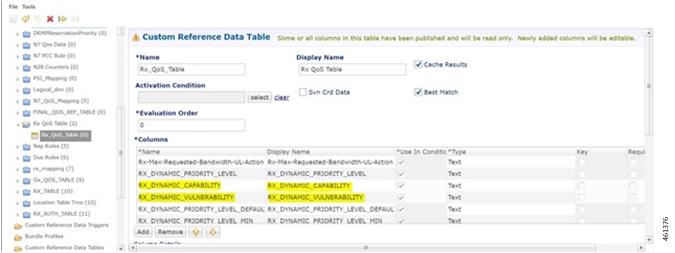
To support this functionality, add two new columns, Rx_Dynamic_Vulnerability and Rx_Dynamic_Capability to the Rx_QoS_Table.

How it Works

This section describes how this feature works.

For a WPS user, the default bearer ARP value includes a Priority-Level value with PC set to enabled and PV set to disabled.

In case, when a non-WPS user calls a WPS user, the dynamic ARP attribute in the Rx_QoS_Table initiates the PCF to set the Priority-Level value in the dedicated bearer rules to match that of the default bearer value. But the PVI/PCI values sent in the dedicated bearer rules use the enforced values from the Rx_QoS_Table (typically PVI enabled, PCI disabled).

For WPS user, if dynamic ARP attribute for PVI and PCI is set to "D", then the PVI and PCI values will be mirrored from the default bearer instead using the configured Rx QoS Table values.

Configuring CRD Table and RxSTGConfiguration AVP

Configuring CRD table and RxSTGConfiguration AVP involves the following steps:

Adding Rx_Dynamic_Capability and Rx_Dynamic_Vulnerability

To add Rx_Dynamic_Capability and Rx_Dynamic_Vulnerability columns to the Rx_QoS CRD table, use the following steps:

  1. Log in to Policy Builder.

  2. Click the Reference Data tab, and from the left pane click Custom Reference Data Tables to view the options.

  3. On the left pane, expand the Search Table Groups folder.

  4. Expand the Rx_QoS_Table sub folder of Search Table Groups and click the.Rx_QoS_Table

  5. Go to the *Columns field and click the Add.

  6. Add the column Name and Display Name as RX_DYNAMIC_CAPABILITY and RX_DYNAMIC_VULNERABILITY.

Figure 1. Adding Rx_Dynamic_Capability and Rx_Dynamic_Vulnerability

Configuring RxSTGConfiguration AVP

This section describes the parameters that can be configured for RxSTGConfiguration.

The RxSTGConfiguration service configuration supports the following output AVPs that allow the dynamic value expression.

Before setting the service parameters, ensure that you create a use case template and add a service for this configuration. For details, see Configuring the Use Case Template and Adding a Service, on page 230.

The following table describes the RxSTGConfiguration service parameter.

Table 3. RxSTGConfiguration ParameterD
Parameters Description

Dynamic-QoS-ARP-Pre-Emption-Capability

If the value is configured as "D" then the feature is enabled for PC. If the value is configured with any other value except "D" or is empty then the feature is disabled for PC.

Dynamic-QoS-ARP-Pre-Emption-Vulnerability

If the value is configured as "D" then the feature is enabled for PV. If the value is configured with any other value except "D" or is empty then the feature is disabled for PV.

OAM Support

Bulk Statistics Support

The following statistics are supported for the dynamic ARP functionality for PC and PV feature.


Note

The following values apply to all the statistics:

  • Unit - Int64

  • Type - Counter

  • Nodes - Service


  • qos_rule_pc_total - Indicates the number of N7/Rx rule installs (per qci/Media Type) provisioned with dynamic QoS PCI.

    The following labels are defined for this metric:

    • Interface

      • N7

      • Rx

    • type

      • default_qos_pc

      • dynamic_qos_pc

    • identifier

      • qci

      • media-type

    • arp_pc

  • qos_rule_pv_total - Indicates the number of N7/Rx rule installs (per qci/Media Type) provisioned with dynamic QoS PVI.

    The following labels are defined for this metric:

    • Interface

      • N7

      • Rx

    • type

      • default_qos_pv

      • dynamic_qos_pv

    • identifier

      • qci

      • media-type

    • arp_pv

Modified Stats

Table 4. Modified Stats

Old Stats

New Stats

Description

qos_rule_total

qos_rule_pl_total

Indicates the number of N7/Rx rule installs (per qci/Media Type) provisioned with dynamic QoS PL.

The following labels are defined for this metric:

  • Interface

    • N7

    • Rx

  • type

    • default_qos_pl

    • dynamic_qos_pl

  • identifier

    • qci

    • media-type

  • arp_pl