VM Expressway Activation Process
After you install the Cisco Expressway VM, you can use this procedure to activate your Cisco Expressway software. Ifyou're using the service setup wizard, you can ignore this topic. The wizard guides you through completing this configuration.
Procedure
| Step 1 |
You will have received your Product Authorization Keys (PAKs) via email. The Expressway software can be downloaded from https://software.cisco.com/download/navigator.html. |
| Step 2 |
After the VM software is installed, retrieve the 8 character serial number from the Option keys page () or from the bottom right-hand corner of the web interface. 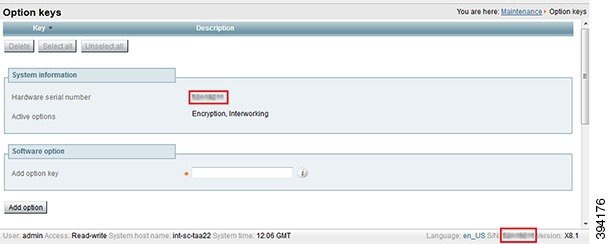 |
| Step 3 |
Register your software and feature PAKs at the customer licensing portal to retrieve Option keys:
You will shortly receive an email containing option keys. |
| Step 4 |
Enter your Option keys on the Option keys page () on the Expressway web interface. |
| Step 5 |
Restart the Expressway (). Only one restart is required after the option keys have been entered. |
 Feedback