Force Upgrade Option in DHCP
When enabled, force upgrade option will upgrade the current image in the following scenario:
-
Current image on the device is not the same as the image configured in DHCP config.
-
The safe image on the device is the same as the image configured in DHCP but declared as INVALID.
The following table describes the iNode image upgrade behaviour for both force upgrade and normal download scenarios based on iNode DHCP configuration file :
|
Active image (running) |
Secondary/Safe image |
Safe ImageValid |
Normal Download |
Force Download |
|---|---|---|---|---|
|
Different from DHCP config |
Same as DHCP config |
Yes |
Switch to Safe image |
Download & Switch |
|
Different from DHCP config |
Same as DHCP config |
No |
Stay in Current image |
Download & Switch |
|
Different from DHCP config |
Different from DHCP config |
Yes |
Download & Switch |
Download & Switch |
|
Different from DHCP config |
Different from DHCP config |
No |
Download & Switch |
Download & Switch |
|
Same as DHCP config |
Same as DHCP config |
Yes |
No Action |
No Action |
|
Same as DHCP config |
Same as DHCP config |
No |
No Action |
No Action |
|
Same as DHCP config |
Different from DHCP config |
Yes |
No Action |
No Action |
|
Same as DHCP config |
Different from DHCP config |
No |
No Action |
No Action |
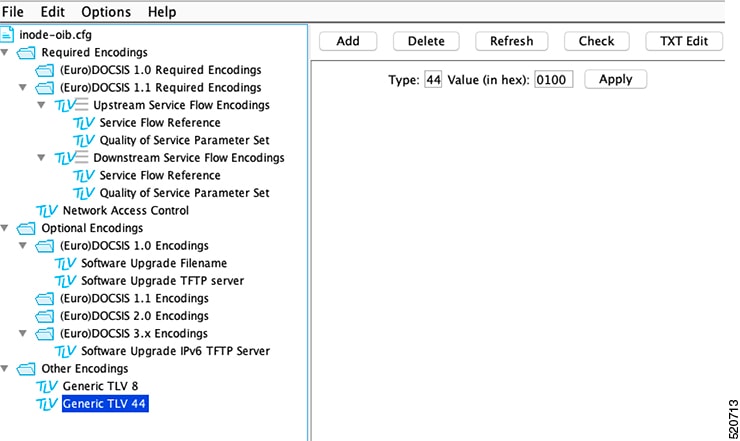
For software upgrade, specific DHCP options are used to provide the iNode with the IP address of the TFTP server, Vendor identification, and image version information. The force download is one of these DHCP options. Force upgrade option can be enabled by configuring the following value: TLV 44: Sub type = 01 (Force Upgrade) length = 0x00.
The following figure shows how the contents of the configuration file is displayed using the Excentis DOCSIS Config File Editor. In this example, an IPv4 TFTP server address is also shown but it is not necessary for IPv6.
 Feedback