- Preface
- New and Changed Information
- Overview
- Configuring Fibre Channel Interfaces
- Configuring Fibre Channel Domain Parameters
- Configuring N Port Virtualization
- Configuring FCoE NPV
- Configuring VSAN Trunking
- Configuring SAN Port Channels
- Configuring and Managing VSANs
- Configuring and Managing Zones
- Distributing Device Alias Services
- Configuring Fibre Channel Routing Services and Protocols
- Managing FLOGI, Name Server, FDMI, and RSCN Databases
- Discovering SCSI Targets
- Configuring iSCSI TLV
- Advanced Fibre Channel Features
- Configuring FC-SP and DHCHAP
- Configuring Port Security
- Configuring Fabric Binding
- Configuring Fabric Configuration Servers
- Configuring Port Tracking
- Index
Cisco Nexus 5500 Series NX-OS SAN Switching Configuration Guide, Release 6.x
Bias-Free Language
The documentation set for this product strives to use bias-free language. For the purposes of this documentation set, bias-free is defined as language that does not imply discrimination based on age, disability, gender, racial identity, ethnic identity, sexual orientation, socioeconomic status, and intersectionality. Exceptions may be present in the documentation due to language that is hardcoded in the user interfaces of the product software, language used based on RFP documentation, or language that is used by a referenced third-party product. Learn more about how Cisco is using Inclusive Language.
- Updated:
- July 30, 2013
Chapter: Configuring Port Security
- Configuring Port Security
- Information About Port Security
- Configuring Port Security
- Enabling Port Security
- Port Security Activation
- Auto-Learning
- Port Security Manual Configuration
- Port Security Configuration Distribution
- Merging the Port Security Database
- Database Interaction
- Displaying Port Security Configuration
- Default Settings for Port Security
Configuring Port Security
This chapter describes how to configure port security.
This chapter includes the following sections:
Configuring Port Security
Cisco SAN switches provide port security features that reject intrusion attempts and report these intrusions to the administrator.
 Note | Port security is supported on virtual Fibre Channel ports and physical Fibre Channel ports. |
- Information About Port Security
- Configuring Port Security
- Enabling Port Security
- Port Security Activation
- Auto-Learning
- Port Security Manual Configuration
- Port Security Configuration Distribution
- Merging the Port Security Database
- Database Interaction
- Displaying Port Security Configuration
- Default Settings for Port Security
Information About Port Security
Typically, any Fibre Channel device in a SAN can attach to any SAN switch port and access SAN services based on zone membership. Port security features prevent unauthorized access to a switch port, using the following methods:
-
Login requests from unauthorized Fibre Channel devices (N ports) and switches (xE ports) are rejected.
-
All intrusion attempts are reported to the SAN administrator through system messages.
-
Configuration distribution uses the CFS infrastructure, and is limited to those switches that are CFS capable. Distribution is disabled by default.
-
Configuring the port security policy requires the Storage Protocol Services license.
Note | Port security is supported on virtual Fibre Channel ports and physical Fibre Channel ports. |
Port Security Enforcement
To enforce port security, configure the devices and switch port interfaces through which each device or switch is connected, and activate the configuration.
-
Use the port world wide name (pWWN) or the node world wide name (nWWN) to specify the N port connection for each device.
-
Use the switch world wide name (sWWN) to specify the xE port connection for each switch.
Each N and xE port can be configured to restrict a single port or a range of ports.
Enforcement of port security policies are done on every activation and when the port tries to come up.
The port security feature uses two databases to accept and implement configuration changes.
-
Configuration database—All configuration changes are stored in the configuration database.
-
Active database—The database currently enforced by the fabric. The port security feature requires all devices connecting to a switch to be part of the port security active database. The software uses this active database to enforce authorization.
Auto-Learning
You can instruct the switch to automatically learn (auto-learn) the port security configurations over a specified period. This feature allows the switch to automatically learn about devices and switches that connect to it. Use this feature when you activate the port security feature for the first time beacuse it saves tedious manual configuration for each port. You must configure auto-learning per VSAN basis. If enabled, devices and switches that are allowed to connect to the switch are automatically learned, even if you have not configured any port access.
When auto-learning is enabled, learning occurs only for the devices or interfaces that were not already logged into the switch. Learned entries on a port are cleaned up after you shut down that port if auto-learning is still enabled.
Learning does not override the existing configured port security policies. For example, if an interface is configured to allow a specific pWWN, auto-learning does not add a new entry to allow any other pWWN on that interface. All other pWWNs are blocked even in auto-learning mode.
No entries are learned for a port in the shutdown state.
When you activate the port security feature, auto-learning is also automatically enabled.
Note | If you enable auto-learning before activating port security, you cannot activate port security until auto-learning is disabled. |
Port Security Activation
By default, the port security feature is not activated.
When you activate the port security feature, the following operations occur:
-
Auto-learning is also automatically enabled, which means the following:
-
All the devices that are already logged in are learned and are added to the active database.
-
All entries in the configured database are copied to the active database.
After the database is activated, subsequent device login is subject to the activated port bound WWN pairs, excluding the auto-learned entries. You must disable auto-learning before the auto-learned entries become activated.
When you activate the port security feature, auto-learning is also automatically enabled. You can choose to activate the port security feature and disable auto-learning.
If a port is shut down because of a denied login attempt, and you subsequently configure the database to allow that login, the port does not come up automatically. You must explicitly enter the no shutdown command to bring that port back online.
Configuring Port Security
Configuring Port Security with Auto-Learning and CFS Distribution
You can configure port security using auto-learning and CFS distribution.
Configuring Port Security with Auto-Learning without CFS
You can configure port security using auto-learning without Cisco Fabric Services (CFS).
Configuring Port Security with Manual Database Configuration
You can configure port security and manually configure the port security database.
Enabling Port Security
You can enable port security.
By default, the port security feature is disabled.
Port Security Activation
Activating Port Security
You can activate port security.
Database Activation Rejection
Database activation is rejected in the following cases:
-
Missing or conflicting entries exist in the configuration database but not in the active database.
-
The auto-learning feature was enabled before the activation. To reactivate a database in this state, disable auto-learning.
-
The exact security is not configured for each port channel member.
-
The configured database is empty but the active database is not.
If the database activation is rejected due to one or more conflicts listed in the previous section, you may decide to proceed by forcing the port security activation.
Forcing Port Security Activation
You can forcefully activate the port security database.
Database Reactivation
You can reactivate the port security database.
Auto-Learning
About Enabling Auto-Learning
The state of the auto-learning configuration depends on the state of the port security feature:
-
If the port security feature is not activated, auto-learning is disabled by default.
-
If the port security feature is activated, auto-learning is enabled by default (unless you explicitly disabled this option).
 Tip | If auto-learning is enabled on a VSAN, you can only activate the database for that VSAN by using the force option. |
Enabling Auto-Learning
You can enable auto-learning.
The state of the auto-learning configuration depends on the state of the port security feature:
-
If the port security feature is not activated, auto-learning is disabled by default.
-
If the port security feature is activated, auto-learning is enabled by default (unless you explicitly disabled this option).
Tip | If auto-learning is enabled on a VSAN, you can only activate the database for that VSAN by using the force option. |
Disabling Auto-Learning
You can disable auto-learning.
Auto-Learning Device Authorization
The following table summarizes the authorized connection conditions for device requests.
|
Condition |
Device (pWWN, nWWN, sWWN) |
Requests Connection to |
Authorization |
|---|---|---|---|
|
1 |
Configured with one or more switch ports |
A configured switch port |
Permitted |
|
2 |
Any other switch port |
Denied |
|
|
3 |
Not configured |
A switch port that is not configured |
Permitted if auto-learning enabled |
|
4 |
Denied if auto-learning disabled |
||
|
5 |
Configured or not configured |
A switch port that allows any device |
Permitted |
|
6 |
Configured to log in to any switch port |
Any port on the switch |
Permitted |
|
7 |
Not configured |
A port configured with some other device |
Denied |
Authorization Scenario
Assume that the port security feature is activated and the following conditions are specified in the active database:
-
A pWWN (P1) is allowed access through interface fc2/1 (F1).
-
A pWWN (P2) is allowed access through interface fc2/2 (F1).
-
A nWWN (N1) is allowed access through interface fc2/2 (F2).
-
Any WWN is allowed access through interface vfc3/1 (F3).
-
A nWWN (N3) is allowed access through any interface.
-
A pWWN (P3) is allowed access through interface fc2/4 (F4).
-
A sWWN (S1) is allowed access through interface fc3/1-3 (F10 to F13).
-
A pWWN (P10) is allowed access through interface vfc4/1 (F11).
The following table summarizes the port security authorization results for this active database.
|
Device Connection Request |
Authorization |
Condition |
Reason |
|---|---|---|---|
|
P1, N2, F1 |
Permitted |
1 |
No conflict. |
|
P2, N2, F1 |
Permitted |
1 |
No conflict. |
|
P3, N2, F1 |
Denied |
2 |
F1 is bound to P1/P2. |
|
P1, N3, F1 |
Permitted |
6 |
Wildcard match for N3. |
|
P1, N1, F3 |
Permitted |
5 |
Wildcard match for F3. |
|
P1, N4, F5 |
Denied |
2 |
P1 is bound to F1. |
|
P5, N1, F5 |
Denied |
2 |
N1 is only allowed on F2. |
|
P3, N3, F4 |
Permitted |
1 |
No conflict. |
|
S1, F10 |
Permitted |
1 |
No conflict. |
|
S2, F11 |
Denied |
7 |
P10 is bound to F11. |
|
P4, N4, F5 (auto-learning on) |
Permitted |
3 |
No conflict. |
|
P4, N4, F5 (auto-learning off) |
Denied |
4 |
No match. |
|
S3, F5 (auto-learning on) |
Permitted |
3 |
No conflict. |
|
S3, F5 (auto-learning off) |
Denied |
4 |
No match. |
|
P1, N1, F6 (auto-learning on) |
Denied |
2 |
P1 is bound to F1. |
|
P5, N5, F1 (auto-learning on) |
Denied |
7 |
Only P1 and P2 bound to F1. |
|
S3, F4 (auto-learning on) |
Denied |
7 |
P3 paired with F4. |
|
S1, F3 (auto-learning on) |
Permitted |
5 |
No conflict. |
|
P5, N3, F3 |
Permitted |
6 |
Wildcard ( * ) match for F3 and N3. |
|
P7, N3, F9 |
Permitted |
6 |
Wildcard ( * ) match for N3. |
Port Security Manual Configuration
You can manually configure port security.
WWN Identification Guidelines
The WWN Identification has the following configuration guidelines and limitations:
-
Identify switch ports by the interface or by the fWWN.
-
Identify devices by the pWWN or by the nWWN.
-
If an N port is allowed to log in to a SAN switch port F, that N port can only log in through the specified F port.
-
If an N port’s nWWN is bound to an F port WWN, all pWWNs in the N port are implicitly paired with the F port.
-
TE port checking is done on each VSAN in the allowed VSAN list of the VSAN trunk port.
-
You must configure all port channel xE ports with the same set of WWNs in the same SAN port channel.
-
E port security is implemented in the port VSAN of the E port. In this case, the sWWN is used to secure authorization checks.
-
Once activated, you can modify the configuration database without any effect on the active database.
-
By saving the running configuration, you save the configuration database and activated entries in the active database. Learned entries in the active database are not saved.
Adding Authorized Port Pairs
After identifying the WWN pairs that need to be bound, you can add those pairs to the port security database.
Tip | Remote switch binding can be specified at the local switch. To specify the remote interfaces, you can use either the fWWN or sWWN-interface combination. |
EXAMPLES
This example shows how to enter the port security database mode for VSAN 2:
switch(config)# port-security database vsan 2
This example shows how to configure the specified sWWN to only log in through SAN port channel 5:
switch(config-port-security)# swwn 20:01:33:11:00:2a:4a:66 interface san-port-channel 5
This example shows how to configure the specified pWWN to log in through the specified interface in the specified switch:
switch(config-port-security)# pwwn 20:11:33:11:00:2a:4a:66 swwn 20:00:00:0c:85:90:3e:80 interface vfc 32
This example shows how to configure any WWN to log in through the specified interface in any switch:
switch(config-port-security)# any-wwn interface vfc 32
Port Security Configuration Distribution
The port security feature uses the Cisco Fabric Services (CFS) infrastructure to enable efficient database management, provide a single point of configuration for the entire fabric in the VSAN, and enforce the port security policies throughout the fabric.
For additional information, refer to Using Cisco Fabric Services in the System Management Configuration Guide for your device.
- Enabling Port Security Distribution
- Locking the Fabric
- Committing the Changes
- Discarding the Changes
- Activation and Auto-Learning Configuration Distribution
Enabling Port Security Distribution
You can enable port security distribution.
| Command or Action | Purpose | |
|---|---|---|
| Step 1 | configure terminal
Example: switch# configure terminal switch(config)# |
Enters global configuration mode. |
| Step 2 |
port-security distribute
Example: switch(config)# port-security distribute |
Enables distribution. |
| Step 3 |
no port-security distribute
Example: switch(config)# no port-security distribute |
Disables distribution. |
Locking the Fabric
The first action that modifies the existing configuration creates the pending database and locks the feature in the VSAN. Once you lock the fabric, the following situations apply:
Committing the Changes
You can commit the port security configuration changes for the specified VSAN.
If you commit the changes made to the configurations, the configurations in the pending database are distributed to other switches. On a successful commit, the configuration change is applied throughout the fabric and the lock is released.
| Command or Action | Purpose |
|---|
Discarding the Changes
You can discard the port security configuration changes for the specified VSAN.
If you discard (abort) the changes made to the pending database, the configuration remains unaffected and the lock is released.
| Command or Action | Purpose | |
|---|---|---|
| Step 1 | configure terminal
Example: switch# configure terminal switch(config)# |
Enters global configuration mode. |
| Step 2 |
port-security abort vsan
vsan-id
Example: switch(config)# port-security abort vsan 35 |
Discards the port security changes in the specified VSAN and clears the pending configuration database. |
Activation and Auto-Learning Configuration Distribution
Activation and auto-learning configurations in distributed mode are remembered as actions to be performed when you commit the changes in the pending database.
Learned entries are temporary and do not have any role in determining if a login is authorized or not. As such, learned entries do not participate in distribution. When you disable learning and commit the changes in the pending database, the learned entries become static entries in the active database and are distributed to all switches in the fabric. After the commit, the active database on all switches are identical and learning can be disabled.
If the pending database contains more than one activation and auto-learning configuration when you commit the changes, the activation and auto-learning changes are consolidated and the resulting operation may change (see the following table).
|
Scenario |
Actions |
Distribution = OFF |
Distribution = ON |
|---|---|---|---|
|
A and B exist in the configuration database, activation is not done and devices C and D are logged in. |
1. You activate the port security database and enable auto-learning. |
configuration database = {A,B} active database = {A,B, C1, D*} |
configuration database = {A,B} active database = {null} pending database = {A,B + activation to be enabled} |
|
2. A new entry E is added to the configuration database. |
configuration database = {A,B, E} active database = {A,B, C*, D*} |
configuration database = {A,B} active database = {null} pending database = {A,B, E + activation to be enabled} |
|
|
3. You issue a commit. |
Not applicable |
configuration database = {A,B, E} active database = {A,B, E, C*, D*} pending database = empty |
|
|
A and B exist in the configuration database, activation is not done, and devices C and D are logged in. |
1. You activate the port security database and enable auto-learning. |
configuration database = {A,B} active database = {A,B, C*, D*} |
configuration database = {A,B} active database = {null} pending database = {A,B + activation to be enabled} |
|
2. You disable learning. |
configuration database = {A,B} active database = {A,B, C, D} |
configuration database = {A,B} active database = {null} pending database = {A,B + activation to be enabled +learning to be disabled} |
|
|
3. You issue a commit. |
Not applicable |
configuration database = {A,B} active database = {A,B} and devices C and D are logged out. This is equal to an activation with auto-learning disabled. pending database = empty |
Merging the Port Security Database
A database merge refers to a union of the configuration database and static (unlearned) entries in the active database.
When merging the database between two fabrics, follow these guidelines:
-
Verify that the activation status and the auto-learning status is the same in both fabrics.
-
Verify that the combined number of configurations for each VSAN in both databases does not exceed 2000.
 Caution | If you do not follow these two conditions, the merge will fail. The next distribution forcefully synchronizes the databases and the activation states in the fabric. |
For additional information, refer to CFS Merge Support in the Series System Management Configuration Guide for your device.
Database Interaction
The following table lists the differences and interaction between the active and configuration databases.
|
Active Database |
Configuration Database |
|---|---|
|
Read-only. |
Read-write. |
|
Saving the configuration only saves the activated entries. Learned entries are not saved. |
Saving the configuration saves all the entries in the configuration database. |
|
Once activated, all devices that have already logged into the VSAN are also learned and added to the active database. |
Once activated, the configuration database can be modified without any effect on the active database. |
|
You can overwrite the active database with the configured database by activating the port security database. Forcing an activation may violate the entries already configured in the active database. |
You can overwrite the configuration database with the active database. |
Note | You can overwrite the configuration database with the active database using the port-security database copy vsan command. The port-security database diff active vsan command lists the differences between the active database and the configuration database. |
The following figure shows various scenarios of the active database and the configuration database status based on port security configurations.
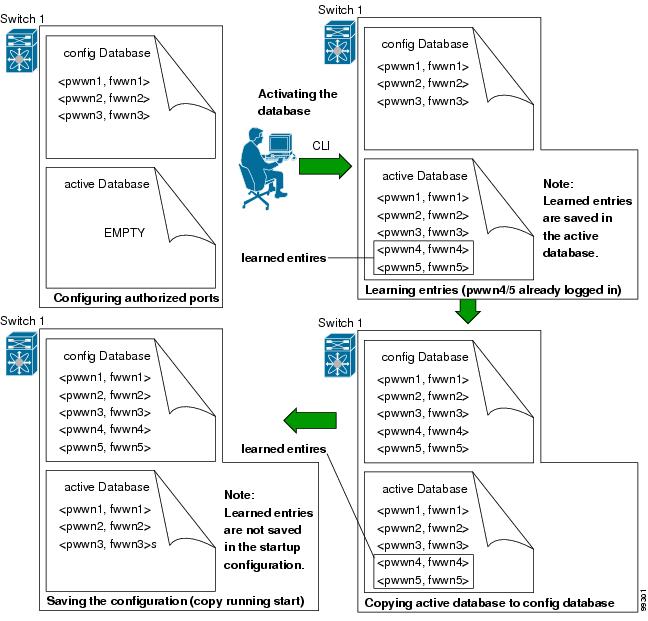
- Database Scenarios
- Copying the Port Security Database
- Deleting the Port Security Database
- Clearing the Port Security Database
Database Scenarios
the following figure illustrates various scenarios showing the active database and the configuration database status based on port security configurations.
Copying the Port Security Database
Tip | We recommend that you copy the active database to the config database after disabling auto-learning. This action ensures that the configuration database is in synchronization with the active database. If distribution is enabled, this command creates a temporary copy (and a fabric lock) of the configuration database. If you lock the fabric, you must commit the changes to the configuration databases in all the switches. |
Use the port-security database copy vsan command to copy from the active to the configured database. If the active database is empty, this command is not accepted.
switch# port-security database copy vsan 1
Use the port-security database diff active vsan command to view the differences between the active database and the configuration database. This command can be used when resolving conflicts.
switch# port-security database diff active vsan 1
Use the port-security database diff config vsan command to obtain information on the differences between the configuration database and the active database:
switch# port-security database diff config vsan 1
Deleting the Port Security Database
Tip | If the distribution is enabled, the deletion creates a copy of the database. You must enter the port-security commit command to actually delete the database. |
Use the no port-security database vsan command in configuration mode to delete the configured database for a specified VSAN:
switch(config)# no port-security database vsan 1
Clearing the Port Security Database
Use the clear port-security statistics vsan command to clear all existing statistics from the port security database for a specified VSAN.
switch# clear port-security statistics vsan 1
Use the clear port-security database auto-learn interface command to clear any learned entries in the active database for a specified interface within a VSAN:
switch# clear port-security database auto-learn interface fc2/1 vsan 1
Use the clear port-security database auto-learn vsan command to clear any learned entries in the active database for the entire VSAN:
switch# clear port-security database auto-learn vsan 1
Note | The clear port-security database auto-learn and clear port-security statistics commands are only relevant to the local switch and do not acquire locks. Also, learned entries are only local to the switch and do not participate in distribution. |
Use the port-security clear vsan command to clear the pending session in the VSAN from any switch in the VSAN:
switch# clear port-security session vsan 5
Displaying Port Security Configuration
The show port-security database commands display the configured port security information. You can optionally specify a fWWN and a VSAN, or an interface and a VSAN in the show port-security command to view the output of the activated port security.
Access information for each port can be individually displayed. If you specify the fWWN or interface options, all devices that are paired in the active database (at that point) with the given fWWN or the interface are displayed.
The following example shows how to display the port security configuration database:
switch# show port-security database
The following example shows how to display the port security configuration database for VSAN 1:
switch# show port-security database vsan 1
The following example shows how to display the activated database:
switch# show port-security database active
The following example shows how to display difference between the temporary configuration database and the configuration database:
switch# show port-security pending-diff vsan 1
The following example shows how to display the configured fWWN port security in VSAN 1:
switch# show port-security database fwwn 20:01:00:05:30:00:95:de vsan 1
20:00:00:0c:88:00:4a:e2(swwn)
The following example shows how to display the port security statistics:
switch# show port-security statistics
The following example shows how to verify the status of the active database and the auto-learning configuration:
switch# show port-security status
Default Settings for Port Security
The following table lists the default settings for all port security features in any switch.
|
Parameters |
Default |
||
|---|---|---|---|
|
Auto-learn |
Enabled if port security is enabled. |
||
|
Port security |
Disabled. |
||
|
Distribution |
Disabled.
|
 Feedback