- Preface
- New and Changed Information
- Cisco Dynamic Fabric Automation
- Fabric Control Segment
- BGP Control Plane
- Cable Management
- XMPP Client Configuration
- Multi-tenancy
- Segment ID Support for DHCP Relay
- Tenant Configuration
- Auto-Configuration
- Auto-Configuration of Layer-3 DCI
- Unicast Forwarding
- Multicast Forwarding
- Multi-Mobility Domain Auto-Configuration
- Dynamic Virtual Port
- Appendix
Multi-Mobility Domain Auto-Configuration
Multi-Mobility Domain
 Note | This chapter is applicable only for multi-tenancy lite version as multi-tenancy full version already supports multi-mobility. |
The multi-mobility domain chapter describes the characteristics of DFA multi-mobility domain, mobility domain and detectable range, auto-configuration flow on a switch, per-port VLAN auto-configuration, VPC+ and per-port VLAN translation, and per-port VLAN translation and FEX.
Information About Multi-Mobility Domain
A mobility domain defines a unique Layer-2 name space (for example, the VLAN domain and range), which can be represented by a virtual machine manager or data center definition.
A mobility domain is configured using the fabric database mobility-domain name command in a leaf switch.
This global mobility domain is used as a key to retrieve the DFA auto-configuration profile for a dot1q based host/tenant from the remote repository (LDAP). The lookup is dot1q VLAN ID and mobility domain. This is a switch global configuration, hence a leaf switch can only belong to a single mobility domain.
A given dot1q VLAN ID can be associated only to a single mobility domain that is the same dot1q VLAN ID cannot be used for different hosts/tenants belonging to different customer on a leaf switch. To overcome this situation, DFA multi-mobility domain feature introduces the flexibility to have the following:
-
Reuse of a same dot1q VLAN ID on different hosts (VMs) on a leaf switch, which might belong to different customers while segregating the traffic for these VLAN IDs using the VLAN translation feature.
Note | This feature is only applicable to dot1q packet-instantiated auto-configuration, but not applicable to VDP control plane-instantiated auto-configuration. |
This feature is supported only on Cisco Nexus 5600 Platform Switches and Cisco Nexus 6000 Series Switches.
- Understanding Multi-Mobility Domain
- Mobility Domain Detectable Range
- DFA Per-Port VLAN Auto-Configuration
- Stitching of Multi-Mobility Domain (Special Case)
- VPC and Per-Port VLAN Translation
- Per-Port VLAN Translation and FEX
Understanding Multi-Mobility Domain
-
The multi-mobility domain feature allows configurations of multiple mobility domains on a leaf switch and ports are made members of one of the mobility domain. A port can belong to one mobility domain (MD) at any time.
-
A set of dot1q VLAN IDs is also defined in a leaf switch, which can be reused and are subject to the VLAN translation for the mobility domains. This set of VLAN ID is referred to as the translation VLAN range. The other VLAN IDs have global significance (no translation) across the mobility domains.
-
The VLAN IDs, which are not part of translation VLAN range, have global significance (no translation) across the mobility domains.
-
DFA auto-configuration with VLAN translation is triggered for VLAN ID in the translation range using the following lookup key: incoming dot1q VLAN ID + interface mobility domain. Hence, if required, there has to be a unique DFA auto-configuration remote DB (LDAP) entry for each VLAN ID in the translation range per mobility domain.
-
A VLAN translation involves a pair of VLANs: the incoming dot1q tag on the wire, which we will refer to as the from VLAN, and the translated VLAN, which we will refer to as the to VLAN.
-
The to VLAN is picked from the DFA Dynamic Server VLAN Pool during the auto-configuration.
-
The VLAN translation is unique to a mobility domain and will be applied to all ports belonging to the mobility domain during the auto-configuration. The appropriate switchport VLAN mapping <from> <to> CLIs will be generated on the ports.
-
A special mobility domain, called the global mobility domain, has to be provisioned on the switch before other mobility domain can be provisioned and is mandatory in case other mobility domain has to be provisioned. This mobility domain has these characteristics: -
VLAN IDs, which are not in the translation range, can be auto-configured from any interface/port regardless of the mobility domain the interface/port belongs to. There is a single DFA auto-configuration entry for the global VLAN ID in the remote database (LDAP). This entry is looked up using global VLAN ID + global mobility domain.
-
The maximum number of mobility domains that can be supported is 96 per switch.
Mobility Domain Detectable Range
-
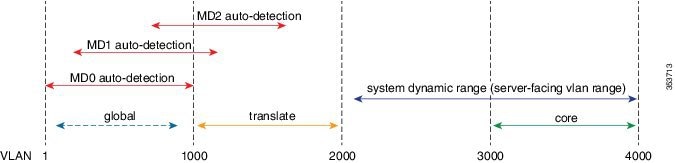
You must specify the set of detectable VLANs during mobility domain configuration and it must be a subset of the (4K - DFA Dynamic System VLAN range). -
The figure below shows the relationships of the new configurations and the mobility domain detectable ranges.
Note | VLAN IDs used are only for illustration. MD0 is the global mobility domain. |
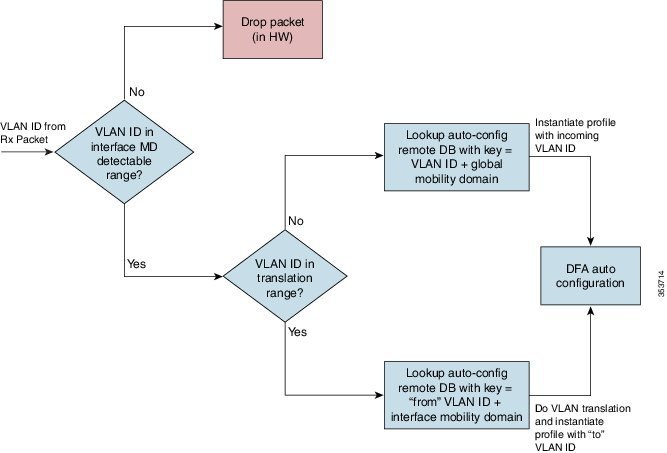
The DFA auto-configuration flow summary on switch is shown below.
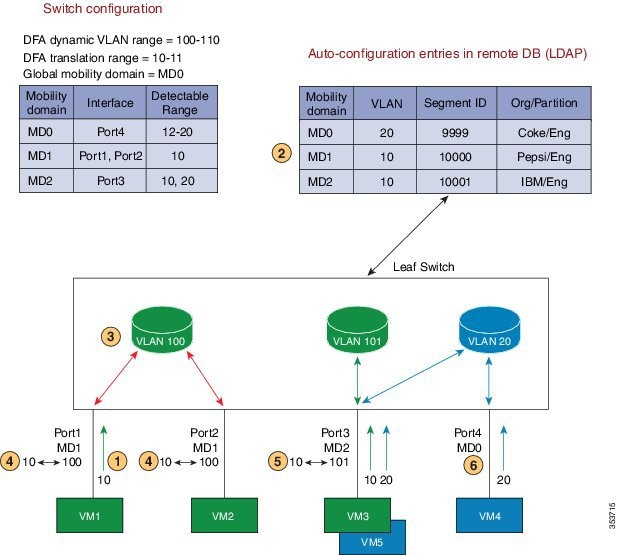
DFA Per-Port VLAN Auto-Configuration
-
Packet arrives on interface.
-
Lookup VLAN 10 + MD1 in remote DB.
-
Determine the "to" VLAN to use for translation. Pick free VLAN from system dynamic VLAN range.
-
Program VLAN translation (switchport VLAN mapping 10-100) on all interfaces of the mobility domain.
-
Similar process as above for VLAN 10 packet arriving on MD2 interface. Note that the "to" VLAN is different, to provide the traffic segregation.
-
Auto-configuration of a global VLAN 20. VLAN is available on all interfaces, except on MD1, where it is not a part of the detectable range.
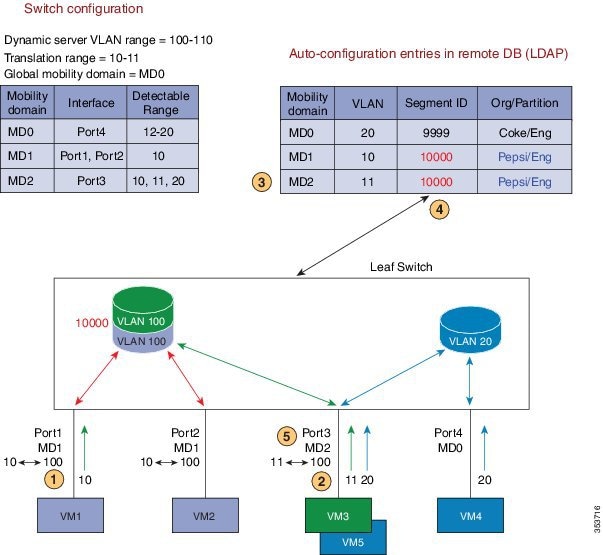
Stitching of Multi-Mobility Domain (Special Case)
-
For VLAN 10 packet arriving on MD1 interface similar process as in previous example and "to" VLAN is 100 for MD1.
-
Packet arrives on interface.
-
Lookup VLAN 11 + MD2 in remote database (DB).
-
The "to" VLAN already exist in the local database (DB) for the retrieved Cisco Virtual Network Identifier (VNI).
-
Program VLAN translation (switchport vlan mapping 11 100) on all interfaces of the mobility domain.
VPC and Per-Port VLAN Translation
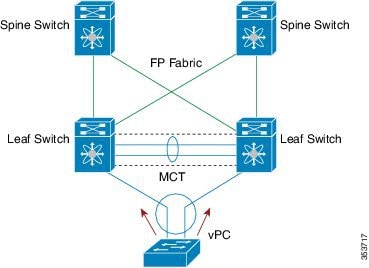
Per-Port VLAN Translation and FEX
-
Fabric Extender (FEX) HW/SW design requires the same VLAN translations for all Host Interfaces (HIF) belonging to the FEX module. -
The obvious conclusion is that entire FEX module can only belong to one mobility domain.
-
The mobility domain can be configured on HIF (and HIF PO) interfaces only. The last successful HIF mobility domain configuration determines the mobility domain for the entire FEX module. -
All HIFs that are not configured with the same mobility domain as the FEX module mobility domain are error-disabled with status/reason = Mobility-DomainMismatch
-
The HIFs are automatically recovered from the error-disabling when the mobility domain configuration is made consistent with the FEX module
-
-
-
The VLAN translation CLIs are not generated for the HIF interfaces after the auto-configuration, but instead are programmed for the FEX NIF interfaces/PO.
Configuring Multi-Mobility Domain Auto-Configuration
- Configuring Translate Eligible VLANs
- Configuring Mobility Domain
- Configuring Per Port Mobility Domain
- Verifying Per Port VLAN Mapping
Configuring Translate Eligible VLANs
2.
[no] system fabric translate-vlans
vlan-range
3.
copy running-config startup-config
4.
show running-config all
DETAILED STEPS
Configuring Mobility Domain
2.
[no] system fabric global-mobility-domain detectable-vlans
{<vlan-id-or-range>
| default}
3.
[no] system fabric mobility-domain
md-name detectable-vlans{<vlan-id-or-range>
| default}
4.
show global-mobility-domain
5.
show mobility-domain
<md-name>
6.
copy running-config startup-config
DETAILED STEPS
This example shows how to display the global mobility domain information:
switch# show global-mobility-domain

Detectable VLANs: 200-998,3503
Translate VLANs:
Interfaces: Eth1/9 Eth1/10 Eth1/11 Eth1/12 Eth1/14 Eth1/15 Eth1/16 Eth1/17 Eth1/18 Eth1/19 Eth1/20 Eth1/21 Eth1/22 Eth1/23 Eth1/24 Eth1/25
Eth1/26 Eth1/27 Eth1/28 Eth1/29 Eth1/30 Eth1/31 Eth1/32 Eth1/33 Eth1/34 Eth1/35 Eth1/36 Eth1/37 Eth1/38 Eth1/41 Eth1/42 Eth1/43 Eth1/44
Eth1/45 Eth1/46 Eth1/48
This example shows how to display the other mobility domain information:
switch# show mobility-domain md2

Detectable VLANVLANs: 1,100-110,500,1000-1008
Translate VLANVLANs: 100-110,1001-1008
Interfaces: Po5 Po11 Po12 Po13 Po14 Po15 Po20 Po21 Eth1/1 Eth1/2 Eth1/3 Eth1/4 Eth1/5 Eth1/6 Eth1/7 Eth1/8 Eth1/13 Eth101/1/2 Eth101/1/10
Configuring Per Port Mobility Domain
2.
interface ethernet
slot/chassis
4.
[no] switchport mobility-domain
<md-name>
5.
copy running-config startup-config
DETAILED STEPS
| Command or Action | Purpose | |
|---|---|---|
| Step 1 | configure terminal
Example: switch# configure terminal | |
| Step 2 | interface ethernet
slot/chassis
Example: switch(config)# interface ethernet 1/1 | |
| Step 3 | switchport mode trunk
Example: switch(config-if)# switchport mode trunk | |
| Step 4 | [no] switchport mobility-domain
<md-name>
Example: switch(config)# switchport mobility-domain md2 |
Configures mobility domain on an interface. |
| Step 5 | copy running-config startup-config
Example: switch(config)# copy running-config startup-config |
(Optional) Saves the change persistently through reboots and restarts by copying the running configuration to the startup configuration. |
Verifying Per Port VLAN Mapping
1. show running-config interface ethernet slot/chassis.
DETAILED STEPS
| Command or Action | Purpose |
|---|
Show Commands - vpc + related
This example shows the port-channel configuration:
switch# show running-config interface po5

!Command: show running-config interface port-channel5
!Time: Mon Dec  8 02:34:01 2014

version 7.1(0)N1(1)

interface port-channel5
  switchport mode trunk
  switchport vlan mapping 101 3000
  switchport mobility-domain md1
  vpc 5
This example shows how to check the interface MD and its corresponding detectable range:
switch# show vpc consistency-parameters int port-channel 5

Legend:
        Type 1 : vPC will be suspended in case of mismatch
Name                        Type  Local Value            Peer Value
-------------               ----  ---------------------- -----------------------
Shut Lan                    1     No                     No
STP Port Type               1     Default                Default
STP Port Guard              1     None                   None
STP MST Simulate PVST       1     Default                Default
mode                        1     on                     on
Speed                       1     1000 Mb/s              1000 Mb/s
Duplex                      1     full                   full
Port Mode                   1     trunk                  trunk
Native VLAN                 1     1                      1
MTU                         1     1500                   1500
Admin port mode             1     trunk                  trunk
Detectable VLANs            1     20-100                 20-100
Mobility Domain             1     MD1                    MD1
vPC+ Switch-id              1     50                     50
vPC card type               1     Empty                  Empty
Allowed VLANs               -     1                      1
Local suspended VLANs       -     -                      -
This example shows how to check the interface mobility domain configuration related consistency for VPC interface:
switch# show vpc brief

[snip]
Per-VLAN consistency status   : failed
Type-2 consistency status     : success
vPC role                      : secondary
Number of vPCs configured     : 4
[snip]
vPC Peer-link status
---------------------------------------------------------------------
id   Port   Status Active VLANs
--   ----   ------ --------------------------------------------------
1    Po24   up     1,2130
vPC status
---------------------------------------------------------------------------
id     Port        Status Consistency Reason       Active VLANs vPC+ Attrib
--     ----------  ------ ----------- ------       ------------ -----------
[snip]
5    Po5           down*  failed      Mobility     -            DF: No, FP
                                      domain                    MAC: 50.0.0
                                      related
                                      inconsistency
 Feedback