Cisco APIC Layer 4 to Layer 7 Device Package Development Guide, Release 1.1(1j)
Bias-Free Language
The documentation set for this product strives to use bias-free language. For the purposes of this documentation set, bias-free is defined as language that does not imply discrimination based on age, disability, gender, racial identity, ethnic identity, sexual orientation, socioeconomic status, and intersectionality. Exceptions may be present in the documentation due to language that is hardcoded in the user interfaces of the product software, language used based on RFP documentation, or language that is used by a referenced third-party product. Learn more about how Cisco is using Inclusive Language.
- Updated:
- June 3, 2015
Chapter: Overview
Overview
- About Service Integration with the Application Policy Infrastructure Controller
- About the Device Package Architecture
- About the Debug Logs
- About IPv6 Support
- About Route Peering
About Service Integration with the Application Policy Infrastructure Controller
The Application Policy Infrastructure Controller (APIC) automates the insertion and provisioning of network services, such as Secure Sockets Layer (SSL) offload, server load balancing (SLB), Web Application Firewalls (WAFs), and traditional firewalls. The network services are rendered by service appliances, such as Application Delivery Controllers (ADCs) and firewalls. A service appliance can perform one or more service function.
The APIC enables you to define a service graph. Each node in the service graph represents a network function. A graph defines set of service functions that are based on user-defined policies. A service appliance (device) performs a service function within the graph. One or more service appliances can render the services that are required by a graph. One or more service functions can be performed by a single service device.
-
DeviceModel.xml—The device package must contain a single XML file called DeviceModel.xml that is the device specification. The device specification is an XML file that provides a hierarchical description of the device, including the configuration of each function, and is mapped to a set of managed objects on the APIC. The device specification defines the following: -
DeviceScript.py—The device package must contain a single Python file called DeviceScript.py. You should define the APIs for interfacing between the APIC and the device in this Python file. The device specification XML file associates the device script to this Python file.
The device script manages communication between the APIC and the device. It defines the mapping between APIC events and the function calls representing device interactions, converting calls from a generic API to device-specific calls.
When you upload a device package to the APIC, the APIC creates a hierarchy of managed objects representing the device and validates the device script interface.
-
Additional files and directories that contain Python or text files. The device package can include any supporting Python libraries for interfacing and configuring the device. The supporting Python files can be split across multiple directories. The package can also include any supporting text files. A device package can contain supporting Python egg files.
-
images directory—The device package must contain the images directory, and the directory must contain a single file named vendor_name.gif. The image size must be 28 pixels x 28 pixels.
The following example shows a listing of a package zip file from the vendor named Insieme:
bash-4.1$ unzip -l insiemeDevicePackage.zip
Archive:  insiemeDevicePackage.zip
  Length      Date    Time    Name
---------  ---------- -----   ----
   309597  03-17-2014 17:39   DeviceModel.xml
     1597  03-17-2014 17:39   DeviceScript.py
        0  01-30-2014 15:36   common/
     1919  02-06-2014 11:35   common/deviceInterface.py
        0  01-30-2014 15:36   feature/
    21919  02-06-2014 11:35   feature/functionCommon.py
     6485  10-31-2013 06:32   feature/function2.py
     7747  10-31-2013 06:32   feature/function1.py
        0  10-31-2013 06:32   feature/__init__.py
        0  01-30-2014 15:36   lib/
     1919  02-06-2014 11:35   lib/
        0  01-30-2014 15:36   util/
    21919  02-06-2014 11:35   util/logging.py
        0  10-31-2013 06:32   parser/configParser.py
        0  02-12-2014 10:07   images/
     1380  02-12-2014 10:07   images/insieme.gif
The following figure describes the relationship between a device package and the APIC.

About the Device Package Architecture
The following figure shows the Application Policy Infrastructure Controller (APIC) service automation and insertion architecture through the device package.
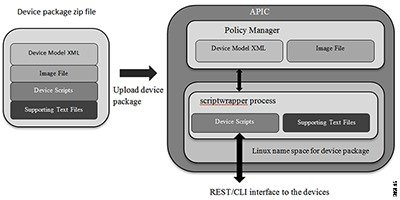
When you upload a device package through the GUI or northbound APIC interface, the APIC creates a namespace for each unique device package. The content of the device package is unzipped and copied to the namespace. The file structure created for a device package namespace is as follows:
root@apic1:/# ls
bin  dbin  dev  etc  fwk  install images lib  lib64  logs  pipe  sbin  tmp  usr util

root@apic1:/install# ls
DeviceScript.py DeviceSpecification.xml feature common images  lib  util.py
The contents of the device package are copied under the install directory.
The APIC parses the device model. The managed objects that are defined in the XML file are added to the APIC's managed object tree that is maintained by the Policy Manager.
The Python scripts that are defined in the device package are launched within a script wrapper process in the name space. The access to the file system is restricted. Python scripts can create temporary files under /tmp and can access any text files that were bundled as part of the device package. However, you should not create Python scripts that create or store any persistent data in a file.
The logs are written to two files: the debug.log and the periodic.log. Any configuration API event logs are written to the debug.log and any periodic poll API logs are written to the periodic.log. The logging framework is similar to the python logging framework.
The log files are accessible by logging in to the APIC as the fabric administrator. The log files are located in /data/devicescript/<vendorname-model-pkgversion>/logs.
Multiple versions of a device package with different major version numbers can coexist on the APIC, because each device package version runs in its own namespace. You can select a specific version for managing a set of devices.
About the Debug Logs
The Application Policy Infrastructure Controller (APIC) maintains log files that you can use to debug a device script. The log files are saved in the following directories:
You must have administrator privileges to access these directories.
About IPv6 Support
You can use the IPv6 communications protocol instead of the IPv4 protocol. Enabling IPv6 does not impact the APIs between the Application Policy Infrastructure Controller (APIC) and Layer 4 to Layer 7 service device package. You must model configuring IPv6 features through the APIC and enable IPv6 data path on the devices. The dictionary format for conveying the IPv6 configuration is identical to the IPv4 dictionary format.
 Note | The management connectivity between the device and the APIC continues to be IPv4. Devices are still managed through IPv4 network. IPv6 is only enabled for user data traffic. IPv6 for management connectivity to the device is not supported. |
About Route Peering
The Application Policy Infrastructure Controller (APIC) supports the following protocols between the fabric and the Layer 4 to Layer 7 service devices:
The APIC provides native support for configuring Open Shortest Path First (OSPF) and Border Gateway Protocol (BGP) parameters. You do not need to model the OSPF and BGP configuration in your device model. The OSPF and BGP configuration is passed to the device script in a service API callout as part of the configuration dictionary along with other function configurations.
 Feedback