Cisco EPN Manager 6.1 High Availability Installation

This chapter provides information about Cisco EPN Manager in a high availability environment:

High Availability Overview

The Cisco EPN Manager high availability (HA) system ensures continued system operation in case of failure. HA uses a pair of linked, synchronized Cisco EPN Manager servers to minimize or eliminate the impact of application or hardware failures that may take place on either server.

The following figure shows the main components and process flows for a high availability deployment.
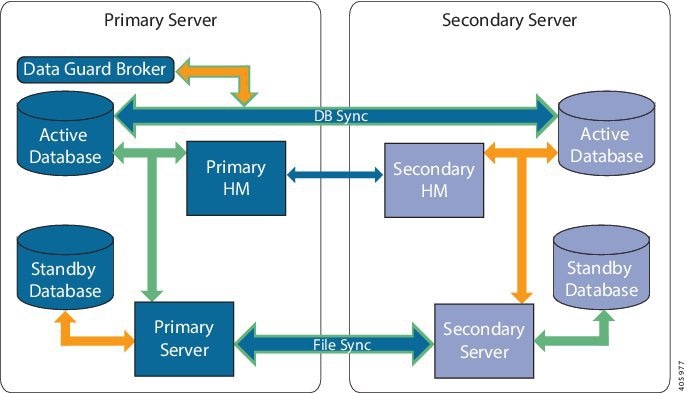
A high availability deployment consists of a primary and a secondary server with Health Monitor (HM) instances (running as application processes) on both servers. When the primary server fails (due to a problem or because it is manually stopped), the secondary server takes over and manages the network while you restore access to the primary server. If the deployment is configured for automatic failover, the secondary server takes over the active role within two to three minutes after the primary server failure.

When issues on the primary server are resolved and the server is in a running state, it remains in standby mode and begins syncing its data with the active secondary server. When failback is triggered, the primary server again takes over the active role. This role switching between the primary and secondary servers generally takes approximately two to three minutes unless the primary server was reinstalled after failure, in which case it would take longer (based on the size of your setup).

For more information about HA, see the High Availability sections in the Cisco Evolved Programmable Network Manager User and Administrator Guide.

High Availability Deployment Considerations

High Availability Deployment Models

Cisco EPN Manager supports the following High Availability (HA) deployment models.

HA Deployment Model

Primary and Secondary Server Location

Example:

Local

On the same subnet (Layer 2 proximity)

Servers located in same data center

Campus

Different subnets connected via LAN

Servers located in same campus, city, state, or province

Remote

Different subnets connected via WAN

Servers are geographically dispersed

Consider the following factors when deciding whether to use the Local, Campus, or Remote HA deployment model:

  • Exposure to disaster—The more distributed the deployment model, the less risk to the business as a result of a natural disaster. Remote HA deployments are least likely to be affected by natural disaster, allowing for a less complex and costly business continuity model. Local HA deployments are most vulnerable to disaster because of server co-location.
  • Whether you can use a virtual IP address—Only Local HA deployments can use virtual IP addresses. A virtual IP address is a single IP address that will always point to the active server, even after a failover and failback. It also allows both the primary and secondary servers to share a common management IP address.
  • Bandwidth/latency—Bandwidth would be highest and latency would be lowest in Local HA deployments because the primary and secondary servers are connected by short network links that have high bandwidth and low latency. Campus HA deployments may have lower bandwidth and higher latency than Local HA deployments. Remote HA deployments have the least bandwidth and the highest latency.
  • Administration—HA administration is simplest for Local HA deployments, with increasing complexity for Campus and Remote HA deployments. Remote HA deployments will require administrative remedying.
  • Configuration of device event forwarding—Configuring event forwarding can be simplest with Local HA deployments because you can use a virtual IP address, and then configure your devices to forward events to that single virtual IP address. Without a virtual IP address, you must configure your devices to forward events to both the primary and secondary servers.

For more details about HA, see the Cisco Evolved Programmable Network Manager User and Administrator Guide.

Understand High Availability Limitations

The Cisco EPN Manager HA system is subject to the following limiting factors (this applies to all HA deployment models):

  • The HA system requires a minimum of 500 Mbps (Mega bit per second) or higher of network bandwidth to handle HA operations. These operations include (but are not restricted to) HA registration, database and file synchronization, and triggering failback. Because Cisco EPN Manager uses a single physical port for all its networking needs, there can be occurrences of insufficient bandwidth which in turn will affect HA performance.
  • The HA system requires low latency (maximum 100 ms, preferably under 70 ms.) across network links between the primary and secondary servers. Irrespective of the physical proximity of these two servers, high latency on these links can affect how Cisco EPN Manager maintains sessions between the primary and secondary servers. This is because larger databases require more synchronization transactions which require lower latency and higher bandwidth. If you are managing a relatively small network using Cisco EPN Manager, your database would be smaller and therefore, HA might work with a higher network latency and less bandwidth.
  • HA performance is always sensitive to the network throughput delivered by the network that connects the primary and secondary servers. This restriction applies (to some degree) to all of the deployment models. For example, in a geographically dispersed deployment, a Remote HA deployment is more likely to have problems due to low bandwidth and high latency. However, if Local and Campus HA deployments are not properly configured, they are highly susceptible to problems with latency that result from bandwidth limitations on high-usage networks.

For assistance in determining whether your network is suitable for any of the HA variations, please contact your Cisco representative.

Consider Whether You Can Use Virtual Addresses

Using virtual IP addresses in a Local HA deployment setup gives your users the ability to connect to the active server using a single IP address or web URL without having to know which server is actually active. Virtual IP addresses also allow both servers to share a common management IP address. During normal operation, the virtual IP address points to the primary server. If a failover occurs, the virtual IP address automatically points to the secondary server. When failback occurs, the virtual IP address automatically switches back to the primary server.

To use a virtual IP addresses, the following IP addresses must be on the same subnet:
  • The virtual IP address

  • The IP addresses of the primary and secondary servers

  • The IP address of the gateway configured on both primary and secondary servers

The following example illustrates how virtual, primary, and secondary IP addresses should be assigned with respect to each other. If the primary and secondary servers have the following IP address assignments within the given subnet, the virtual IP address for both servers can be assigned as follows:

  • Subnet mask: 255.255.255.224 (/32)
  • Primary server IP address: 10.10.101.1
  • Secondary server IP address: 10.10.101.2
  • Virtual IP address: 10.10.101.[3-30] e.g., 10.10.101.3. Note that the virtual IP address can be any of a range of addresses that are valid for the given subnet mask.

If you do not use a virtual IP address, you must configure your devices to forward events to both the primary and secondary servers (for example, by forwarding them to a given subnet or range of IP addresses that includes both the primary and secondary server). To reduce (or eliminate) the chance of losing data, you must configure device event forwarding before a failover occurs. You do not need to make any changes to the secondary server during installation; simply provision the primary and secondary servers with their individual IP addresses.

Whether your HA deployment uses a single IP address or not, users should always connect to the Cisco EPN Manager web GUI using the active server IP address/URL.