Log In and Out as the Linux CLI Users

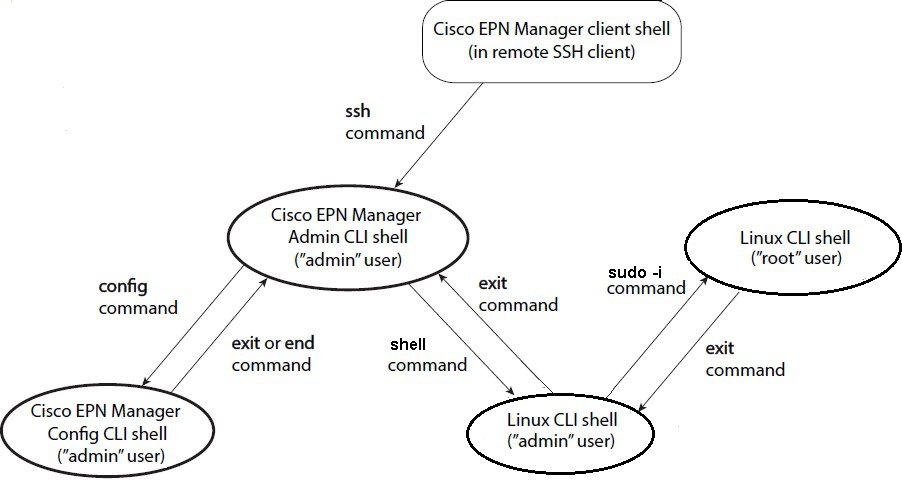
The Linux CLI has two shell users: One with administrative access (Linux CLI admin user), and another with root access (Linux CLI root user). The following diagram illustrates the flow for logging in and out as the various CLI users.

To log in as the Linux CLI root user, you will have to transition from being the Cisco EPN Manager CLI admin user to the Linux CLI root user. The following procedure gives you the exact steps you must follow to log in as these users. For more information on these users, refer to the Cisco Evolved Programmable Network Manager User and Administrator Guide.

Before You Begin

If the Linux CLI user is disabled, re-enable it. Refer to the user management procedures in the Cisco Evolved Programmable Network Manager User and Administrator Guide.

Procedure


Step 1

To log in as the Linux CLI root user:

  1. Start an SSH session with the Cisco EPN Manager server and log in as the Cisco EPN Manager CLI admin user.
  2. As the Cisco EPN Manager CLI admin user, log in as the Linux CLI admin user:
    
    shell
    Enter shell access password: 
    password
    
  3. Log in as the Linux CLI root user:
    
    sudo -i
    

    By default, the Linux CLI shell prompt is the same for the Linux CLI admin and root user. You can use the whoami command to check the current user.

Step 2

To exit:

  1. Log out as the Linux CLI root user.
    
    exit
    

    You are now logged in as the Linux CLI admin user.

  2. Log out as the Linux CLI admin user:
    
    exit
    

    You are now logged in as the Cisco EPN Manager CLI admin user.


What to do next

For security purposes, disable the Linux CLI users. Refer to the user management procedures in the Cisco Evolved Programmable Network Manager User and Administrator Guide.

Copy Files From a Client Machine to the Cisco EPN Manager Server

Before You Begin

You can use SCP, FTP, or SFTP protocols to retrieve files from the client machine. Make sure the required protocol is enabled on your client machine and the required ports are open (see Ports Used by Cisco EPN Manager).

This procedure explains how to copy files from your client machine to the Cisco EPN Manager server.

Procedure


Step 1

Start an SSH session with the Cisco EPN Manager server and log in as the Cisco EPN Manager CLI admin user.

Step 2

Log in as the Linux CLI admin user (see Log In and Out as the Linux CLI Users).

Step 3

From the Cisco EPN Manager server, retrieve the file from the client machine. You can use SCP, FTP, or SFTP. This example uses the scp command, which has the following syntax:


scpclientUsername@clientIP:/fullpath-to-file-on-client
/server-directory

Where:

  • clientUsername is your username on the client machine
  • clientIP is the IP address of the client machine
  • fullpath-to-file-on-client is the full path to the file on the client machine that you want to copy to the server
  • server-directory is the path to the directory on the server to which you want to copy the file

In the following example, a file named myfile located in the /temp directory on the client machine is being copied to the /localdisk/defaultRepo on the Cisco EPN Manager server.


scp joesmith@123.456.789.101:/temp/myfile /localdisk/defaultRepo
Step 4

Log out as the Linux CLI admin user as described in Log In and Out as the Linux CLI Users.


Synchronize the Hardware and NTP Clock

This procedure synchronizes the hardware clock with the NTP clock using the hwclock command.

Procedure


Step 1

Log in as the Linux CLI root user as described in Log In and Out as the Linux CLI Users.

Step 2

Check the NTP service status and ensure that NTP has obtained a stable time reference using the following commands. The following includes examples of the output you should see.

  1. Ensure that ntpd is running.
    
    service ntpd status
     ntpd (pid 3290) is running...
    
  2. If ntpd (pid 3290) is not running, start it using the following command:
    
    service ntpd start
    

    (Repeat Step a to ensure it is running.)

  3. Ensure that NTP is receiving time from an NTP server.
    
    ntpstat
     synchronised to NTP server (10.116.133.175) at stratum 3    time correct to within 62 ms    polling server every 1024 s
    

If you do not see output similar to this, then NTP synchronization has not yet occurred. Wait a few minutes and run ntpstat again. If synchronization does not happen within 10 minutes, contact your system administrator or Cisco support.

Step 3

Synchronize the hardware clock with NTP using the following command:


hwclock --systohc --debug
  
You should see output similar to the following:
hwclock from util-linux-ng 2.17.2
Using /dev interface to clock.
Last drift adjustment done at 1470117750 seconds after 1969
Last calibration done at 1470117750 seconds after 1969
Hardware clock is on local time
Assuming hardware clock is kept in local time.
Waiting for clock tick...
...got clock tick
Time read from Hardware Clock: 2016/08/02 16:03:30
Hw clock time : 2016/08/02 16:03:30 = 1470117810 seconds since 1969
1470117810.500000 is close enough to 1470117810.500000 (0.000000 < 0.001000)
Set RTC to 1470117810 (1470117810 + 0; refsystime = 1470117810.000000)
Setting Hardware Clock to 16:03:30 = 1470117810 seconds since 1969
ioctl(RTC_SET_TIME) was successful.
Not adjusting drift factor because it has been less than a day since the last calibration.
root$

Step 4

Verify that the hardware clock is synchronized with NTP.


 echo "hwclock is: $(hwclock --show)" ; echo "linux clock is: $(date)";

Check the output and ensure that the two clocks are synchronized (to at least within a few seconds of each other):


Hwclock is: Tue 26 Jul 2016  06:11:40  PM AEST   -0.391028 secondslinux clock is: Tue Jul 26  18:11:40  AEST 2016
Step 5

As the Linux CLI admin user, restart the Cisco EPN Manager services.

  • If you are logged in as the Linux CLI root user, switch to the Linux CLI admin user.
    
    exit
    
  • Switch to the Cisco EPN Manager CLI admin user.
    
    exit
    
  • Stop and restart the Cisco EPN Manager services.
    
    ncs stop
    ncs start
    

Log Into the Cisco EPN Manager Web GUI

Follow these steps to log into the Cisco EPN Manager web GUI:

Procedure

Procedure


Step 1

On a client machine, launch one of the supported browsers (see Web Client Requirements).

Step 2

In the browser’s address line, enter https://serverIP, where serverIP is the IP address of the server on which you installed Cisco EPN Manager. The login window is displayed.

When a client accesses the Cisco EPN Manager web GUI for the first time, the browser may display a warning that the site is untrusted. When this happens, follow the prompts to add a security exception and download the self-signed certificate from the Cisco EPN Manager server. After you complete this procedure, the browser will accept the Cisco EPN Manager server as a trusted site in all future login attempts.

Step 3

Enter the web GUI root username and password, as specified during the installation.

If any licensing problems occur, a message appears in an alert box. If you have an evaluation license, the number of days until the license expires is shown. You are also alerted about any expired licenses. (You have the option to go directly to the Administration > Licenses and Software Updates > Licenses page to address these problems.) For more information about licenses, refer to the Cisco Evolved Programmable Network Manager User and Administrator Guide .

Step 4

Click Login to log in to the Cisco EPN Manager web GUI. The home page appears and you can now use the web GUI. For information about the dashboards and dashlets, refer to the Cisco Evolved Programmable Network Manager User and Administrator Guide .

Step 5

For increased security, perform these steps:

  1. Change the password for the web GUI root user by choosing Administration > Users > Roles & AAA > Change Password.

  2. Create at least one Cisco EPN Manager web GUI user that has Admin or Super User privileges, then disable the web GUI root user. For information on disabling this user, refer to the user management topics in the Cisco Evolved Programmable Network Manager User and Administrator Guide .

  3. If you have not done so already, disable the Linux CLI users. Refer to the Cisco Evolved Programmable Network Manager User and Administrator Guide .


What to do next

Perform setup tasks for server, user, fault, and web GUI management. For a detailed list of tasks, see the beginning of the administration section of the Cisco Evolved Programmable Network Manager User and Administrator Guide .

For information on Cisco EPN Manager user interfaces and user types, Cisco Evolved Programmable Network Manager User and Administrator Guide .

Time Zones Supported by

This table lists the available values for the system time zone.

Africa/Abidjan

America/St_Johns

Etc/GMT+6

Africa/Accra

America/St_Kitts

Etc/GMT+7

Africa/Addis_Ababa

America/St_Lucia

Etc/GMT+8

Africa/Algiers

America/St_Thomas

Etc/GMT+9

Africa/Asmara

America/St_Vincent

Etc/GMT0

Africa/Asmera

America/Swift_Current

Etc/GMT-0

Africa/Bamako

America/Tegucigalpa

Etc/GMT-1

Africa/Bangui

America/Thule

Etc/GMT-10

Africa/Banjul

America/Thunder_Bay

Etc/GMT-11

Africa/Bissau

America/Tijuana

Etc/GMT-12

Africa/Blantyre

America/Toronto

Etc/GMT-13

Africa/Brazzaville

America/Tortola

Etc/GMT-14

Africa/Bujumbura

America/Vancouver

Etc/GMT-2

Africa/Cairo

America/Virgin

Etc/GMT-3

Africa/Casablanca

America/Whitehorse

Etc/GMT-4

Africa/Ceuta

America/Winnipeg

Etc/GMT-5

Africa/Conakry

America/Yakutat

Etc/GMT-6

Africa/Dakar

America/Yellowknife

Etc/GMT-7

Africa/Dar_es_Salaam

Antarctica/Casey

Etc/GMT-8

Africa/Djibouti

Antarctica/Davis

Etc/GMT-9

Africa/Douala

Antarctica/DumontDUrville

Etc/Greenwich

Africa/El_Aaiun

Antarctica/Mawson

Etc/UCT

Africa/Freetown

Antarctica/McMurdo

Etc/Universal

Africa/Gaborone

Antarctica/Palmer

Etc/UTC

Africa/Harare

Antarctica/Rothera

Etc/Zulu

Africa/Johannesburg

Antarctica/South_Pole

Europe/Amsterdam

Africa/Kampala

Antarctica/Syowa

Europe/Andorra

Africa/Khartoum

Antarctica/Vostok

Europe/Athens

Africa/Kigali

Arctic/Longyearbyen

Europe/Belfast

Africa/Kinshasa

Asia/Aden

Europe/Belgrade

Africa/Lagos

Asia/Almaty

Europe/Berlin

Africa/Libreville

Asia/Amman

Europe/Bratislava

Africa/Lome

Asia/Anadyr

Europe/Brussels

Africa/Luanda

Asia/Aqtau

Europe/Bucharest

Africa/Lubumbashi

Asia/Aqtobe

Europe/Budapest

Africa/Lusaka

Asia/Ashgabat

Europe/Chisinau

Africa/Malabo

Asia/Ashkhabad

Europe/Copenhagen

Africa/Maputo

Asia/Baghdad

Europe/Dublin

Africa/Maseru

Asia/Bahrain

Europe/Gibraltar

Africa/Mbabane

Asia/Baku

Europe/Guernsey

Africa/Mogadishu

Asia/Bangkok

Europe/Helsinki

Africa/Monrovia

Asia/Beirut

Europe/Isle_of_Man

Africa/Nairobi

Asia/Bishkek

Europe/Istanbul

Africa/Ndjamena

Asia/Brunei

Europe/Jersey

Africa/Niamey

Asia/Calcutta

Europe/Kaliningrad

Africa/Nouakchott

Asia/Choibalsan

Europe/Kiev

Africa/Ouagadougou

Asia/Chongqing

Europe/Lisbon

Africa/Porto-Novo

Asia/Chungking

Europe/Ljubljana

Africa/Sao_Tome

Asia/Colombo

Europe/London

Africa/Timbuktu

Asia/Dacca

Europe/Luxembourg

Africa/Tripoli

Asia/Damascus

Europe/Madrid

Africa/Tunis

Asia/Dhaka

Europe/Malta

Africa/Windhoek

Asia/Dili

Europe/Mariehamn

America/Adak

Asia/Dubai

Europe/Minsk

America/Anchorage

Asia/Dushanbe

Europe/Monaco

America/Anguilla

Asia/Gaza

Europe/Moscow

America/Antigua

Asia/Harbin

Europe/Nicosia

America/Araguaina

Asia/Ho_Chi_Minh

Europe/Oslo

America/Argentina/

Asia/Hong_Kong

Europe/Paris

America/Argentina/

Asia/Hovd

Europe/Podgorica

America/Argentina/Catamarca

Asia/Irkutsk

Europe/Prague

America/Argentina/Cordoba

Asia/Istanbul

Europe/Riga

America/Argentina/Jujuy

Asia/Jakarta

Europe/Rome

America/Argentina/La_Rioja

Asia/Jayapura

Europe/Samara

America/Argentina/Mendoza

Asia/Jerusalem

Europe/San_Marino

America/Argentina/Rio_Gallegos

Asia/Kabul

Europe/Sarajevo

America/Argentina/Salta

Asia/Kamchatka

Europe/Simferopol

America/Argentina/San_Juan

Asia/Karachi

Europe/Skopje

America/Argentina/San_Luis

Asia/Kashgar

Europe/Sofia

America/Argentina/Tucuman

Asia/Kathmandu

Europe/Stockholm

America/Argentina/Ushuaia

Asia/Katmandu

Europe/Tallinn

America/Aruba

Asia/Kolkata

Europe/Tirane

America/Asuncion

Asia/Krasnoyarsk

Europe/Tiraspol

America/Atikokan

Asia/Kuala_Lumpur

Europe/Uzhgorod

America/Atka

Asia/Kuching

Europe/Vaduz

America/Bahia

Asia/Kuwait

Europe/Vatican

America/Barbados

Asia/Macao

Europe/Vienna

America/Belem

Asia/Macau

Europe/Vilnius

America/Belize

Asia/Magadan

Europe/Volgograd

America/Blanc-Sablon

Asia/Makassar

Europe/Warsaw

America/Boa_Vista

Asia/Manila

Europe/Zagreb

America/Bogota

Asia/Muscat

Europe/Zaporozhye

America/Boise

Asia/Nicosia

Europe/Zurich

America/Buenos_Aires

Asia/Novosibirsk

Factory

America/Cambridge_Bay

Asia/Omsk

GB

America/Campo_Grande

Asia/Oral

GB-Eire

America/Cancun

Asia/Phnom_Penh

GMT

America/Caracas

Asia/Pontianak

GMT+0

America/Catamarca

Asia/Pyongyang

GMT0

America/Cayenne

Asia/Qatar

GMT-0

America/Cayman

Asia/Qyzylorda

Greenwich

America/Chicago

Asia/Rangoon

Hongkong

America/Chihuahua

Asia/Riyadh

HST

America/Coral_Harbour

Asia/Riyadh87

Iceland

America/Cordoba

Asia/Riyadh88

Indian/Antananarivo

America/Costa_Rica

Asia/Riyadh89

Indian/Chagos

America/Cuiaba

Asia/Saigon

Indian/Christmas

America/Curacao

Asia/Sakhalin

Indian/Cocos

America/Danmarkshavn

Asia/Samarkand

Indian/Comoro

America/Dawson

Asia/Seoul

Indian/Kerguelen

America/Dawson_Creek

Asia/Shanghai

Indian/Mahe

America/Denver

Asia/Singapore

Indian/Maldives

America/Detroit

Asia/Taipei

Indian/Mauritius

America/Dominica

Asia/Tashkent

Indian/Mayotte

America/Edmonton

Asia/Tbilisi

Indian/Reunion

America/Eirunepe

Asia/Tehran

Iran

America/El_Salvador

Asia/Tel_Aviv

Israel

America/Ensenada

Asia/Thimbu

Jamaica

America/Fort_Wayne

Asia/Thimphu

Japan

America/Fortaleza

Asia/Tokyo

Kwajalein

America/Glace_Bay

Asia/Ujung_Pandang

Libya

America/Godthab

Asia/Ulaanbaatar

MET

America/Goose_Bay

Asia/Ulan_Bator

Mexico/BajaNorte

America/Grand_Turk

Asia/Urumqi

Mexico/BajaSur

America/Grenada

Asia/Vientiane

Mexico/General

America/Guadeloupe

Asia/Vladivostok

Mideast/Riyadh87

America/Guatemala

Asia/Yakutsk

Mideast/Riyadh88

America/Guayaquil

Asia/Yekaterinburg

Mideast/Riyadh89

America/Guyana

Asia/Yerevan

MST

America/Halifax

Atlantic/Azores

MST7MDT

America/Havana

Atlantic/Bermuda

Navajo

America/Hermosillo

Atlantic/Canary

New_Salem

America/Indiana/Indianapolis

Atlantic/Cape_Verde

NZ

America/Indiana/Knox

Atlantic/Faeroe

NZ-CHAT

America/Indiana/Marengo

Atlantic/Faroe

Pacific/Apia

America/Indiana/Petersburg

Atlantic/Jan_Mayen

Pacific/Auckland

America/Indiana/Tell_City

Atlantic/Madeira

Pacific/Chatham

America/Indiana/Vevay

Atlantic/Reykjavik

Pacific/Easter

America/Indiana/Vincennes

Atlantic/South_Georgia

Pacific/Efate

America/Indiana/Winamac

Atlantic/St_Helena

Pacific/Enderbury

America/Indianapolis

Atlantic/Stanley

Pacific/Fakaofo

America/Inuvik

Australia/ACT

Pacific/Fiji

America/Iqaluit

Australia/Adelaide

Pacific/Funafuti

America/Jamaica

Australia/Brisbane

Pacific/Galapagos

America/Jujuy

Australia/Broken_Hill

Pacific/Gambier

America/Juneau

Australia/Canberra

Pacific/Guadalcanal

America/Kentucky/Louisville

Australia/Currie

Pacific/Guam

America/Kentucky/Monticello

Australia/Darwin

Pacific/Honolulu

America/Knox_IN

Australia/Eucla

Pacific/Johnston

America/La_Paz

Australia/Hobart

Pacific/Kiritimati

America/Lima

Australia/LHI

Pacific/Kosrae

America/Los_Angeles

Australia/Lindeman

Pacific/Kwajalein

America/Louisville

Australia/Lord_Howe

Pacific/Majuro

America/Maceio

Australia/Melbourne

Pacific/Marquesas

America/Managua

Australia/North

Pacific/Midway

America/Manaus

Australia/NSW

Pacific/Nauru

America/Marigot

Australia/Perth

Pacific/Niue

America/Martinique

Australia/Queensland

Pacific/Norfolk

America/Mazatlan

Australia/South

Pacific/Noumea

America/Mendoza

Australia/Sydney

Pacific/Pago_Pago

America/Menominee

Australia/Tasmania

Pacific/Palau

America/Merida

Australia/Victoria

Pacific/Pitcairn

America/Mexico_City

Australia/West

Pacific/Ponape

America/Miquelon

Australia/Yancowinna

Pacific/Port_Moresby

America/Moncton

Brazil/Acre

Pacific/Rarotong

America/Monterrey

Brazil/DeNoronha

Pacific/Saipan

America/Montevideo

Brazil/East

Pacific/Samoa

America/Montreal

Brazil/West

Pacific/Tahiti

America/Montserrat

Buenos_Aires

Pacific/Tarawa

America/Nassau

Canada/Atlantic

Pacific/Tongatapu

America/New_York

Canada/Central

Pacific/Truk

America/Nipigon

Canada/Eastern

Pacific/Wake

America/Nome

Canada/East-Saskatchewan

Pacific/Wallis

America/Noronha

Canada/Mountain

Pacific/Yap

America/North_Dakota/

Canada/Newfoundland

Poland

America/North_Dakota/Center

Canada/Pacific

Portugal

America/Panama

Canada/Saskatchewan

PRC

America/Pangnirtung

Canada/Yukon

PST8PDT

America/Paramaribo

CET

ROC

America/Phoenix

Chile/Continental

ROK

America/Port_of_Spain

Chile/EasterIsland

Singapore

America/Port-au-Prince

ComodRivadavia

Turkey

America/Porto_Acre

CST6CDT

UCT

America/Porto_Velho

Cuba

Universal

America/Puerto_Rico

EET

US/Alaska

America/Rainy_River

Egypt

US/Aleutian

America/Rankin_Inlet

Eire

US/Arizona

America/Recife

EST

US/Central

America/Regina

EST5EDT

US/Eastern

America/Resolute

Etc/GMT

US/East-Indiana

America/Rio_Branco

Etc/GMT+0

US/Hawaii

America/Rosario

Etc/GMT+1

US/Indiana-Starke

America/Santarem

Etc/GMT+10

US/Michigan

America/Santiago

Etc/GMT+11

US/Mountain

America/Santo_Domingo

Etc/GMT+12

US/Pacific

America/Sao_Paulo

Etc/GMT+2

US/Samoa

America/Scoresbysund

Etc/GMT+3

UTC

America/Shiprock

Etc/GMT+4

WET

America/St_Barthelemy

Etc/GMT+5

W-SU

Zulu