Configuring AAA for VPDNs
Available Languages
Table Of Contents
Prerequisites for Configuring AAA for VPDNs
Information About AAA for VPDNs
VPDN Tunnel Authorization Search Order
VPDN Tunnel Lookup Based on Domain Name
VPDN Tunnel Lookup Based on L2TP Domain Screening
VPDN Tunnel Lookup Based on DNIS Information
VPDN Tunnel Lookup Based on Both Domain Name and DNIS Information
VPDN Tunnel Lookup Based on the Multihop Hostname
L2TP Domain Screening, Rules Based
L2TP Tunnel Authentication, Rules Based
VPDN Authorization for Directed Request Users
Domain Name Prefix and Suffix Stripping
RADIUS Tunnel Accounting for L2TP VPDNs
VPDN-Specific Remote RADIUS AAA Server Configurations
Shell-Based Authentication of VPDN Users
How to Configure AAA for VPDNs
Enabling VPDN on the NAS and the Tunnel Server
Configuring the VPDN Tunnel Authorization Search Order
Configuring L2TP Domain Screening
Configuring L2TP Domain Screening with Global Preauthentication
L2TP Domain Screening with Global Preauthentication: Example
Configuring L2TP Domain Screening with per-VPDN Group Preauthentication
Configuring L2TP Domain Screening, Rules Based
Configuring L2TP Domain Screening, Rules Based: Example
Configuring per-User VPDN on the NAS
Configuring Global per-User VPDN
Configuring per-User VPDN for a VPDN Group
Configuring AAA on the NAS and the Tunnel Server
Configuring Remote AAA for VPDNs
Configuring the NAS for Remote AAA for Dial-In VPDNs
Configuring the Tunnel Terminator for Remote RADIUS AAA for L2TP Tunnels
Verifying and Troubleshooting Remote AAA Configurations
Verifying that the VPDN Tunnel Is Up
Verifying the Remote RADIUS AAA Server Configuration
Verifying the Remote TACACS+ AAA Server Configuration on the NAS
Verifying the Remote TACACS+ AAA Server Configuration on the Tunnel Server
Verifying L2TP Tunnel Establishment, PPP Negotiations, and Authentication with the Remote Client
Configuring Directed Request Authorization of VPDN Users
Configuring Directed Request Authorization of VPDN Users on the Tunnel Server
Configuring Directed Request Authorization of VPDN Users on the NAS
Configuring Domain Name Prefix and Suffix Stripping
Configuring VPDN Tunnel Authentication
Configuring VPDN Tunnel Authentication Using the Hostname
Configuring VPDN Tunnel Authentication Using the Local Name
Configuring VPDN Tunnel Authentication Using the L2TP Tunnel Password
Disabling VPDN Tunnel Authentication for L2TP Tunnels
Configuring RADIUS Tunnel Accounting for L2TP VPDNs
Configuring Authentication of L2TP Tunnels at the Tunnel Terminator Remote RADIUS AAA Server
Configuring DNS Name Support on the NAS Remote RADIUS AAA Server
Configuring L2TP Tunnel Server Load Balancing and Failover on the NAS Remote RADIUS AAA Server
Configuring L2TP Tunnel Server Load Balancing and Failover Using the Cisco Proprietary VSA
Configuring Tunnel Assignments on the NAS Remote RADIUS AAA Server
Configuring User Profiles on the ARS RADIUS Server for L2TP Tunnel Connection Speed Labeling
Disabling L2TP Tunnel Connection Speed Labeling on the Tunnel Server
Configuring L2TP Tunnel Connection Speed Labeling on the Tunnel Server
Configuring L2TP Tunnel Connection Speed Labeling for a Tunnel Switch
Configuring Secure Tunnel Authentication Names on the NAS Remote RADIUS AAA Server
Configuring the NAS for Shell-Based Authentication of VPDN Users
Configuration Examples for AAA for VPDNs
Configuring the VPDN Tunnel Authorization Search Order: Examples
Configuring per-User VPDN on the NAS: Examples
Configuring AAA on the NAS and the Tunnel Server: Examples
Configuring Remote AAA for VPDNs on the L2TP Tunnel Terminator: Examples
Configuring Directed Request Authorization of VPDN Users: Examples
Configuring Domain Name Prefix and Suffix Stripping: Examples
Configuring VPDN Tunnel Authentication: Examples
L2TP Domain Screening: Examples
L2TP Domain Screening with Global Preauthentication: Example
L2TP Domain Screening with per-VPDN Group Preauthentication: Example
Configuring RADIUS Tunnel Accounting on a NAS: Example
Configuring RADIUS Tunnel Accounting on a Tunnel Server: Example
Configuring DNS Name Support on the NAS Remote RADIUS AAA Server: Example
Configuring L2TP Tunnel Server Load Balancing and Failover Using the Cisco Proprietary VSA: Examples
Configuring Tunnel Assignments on the NAS RADIUS AAA Server: Example
Configuring L2TP Tunnel Connection Speed Labeling: Examples
Configuring Secure Authentication Names: Example
Configuring Shell-Based Authentication of VPDN Users: Examples
Feature Information for AAA for VPDNs
Configuring AAA for VPDNs
This module describes how to configure authentication, authorization, and accounting (AAA) for Virtual Private Dialup Networks (VPDNs).
Module History
This module was first published on September 26, 2005, and last updated on November 20, 2006.
Finding Feature Information in This Module
Your Cisco IOS software release may not support all features. To find information about feature support and configuration, use the "Feature Information for AAA for VPDNs" section.
Contents
•
Prerequisites for Configuring AAA for VPDNs
•
•
•
Prerequisites for Configuring AAA for VPDNs
•
•
•
•
•
You can configure virtual private dialup network (VPDN) preauthentication to occur globally or per VPDN group. For global VPDN preauthentication, authentication and authorization should be done using an authentication server. For per-VPDN group-level preauthentication, authentication and authorization should be done locally.
Information About AAA for VPDNs
Before configuring AAA for VPDNs, you should understand the following concepts:
•
•
•
•
•
•
VPDN Tunnel Authorization Search Order
When a call to a network access server (NAS) is to be tunneled to a tunnel server, the NAS must identify which tunnel server to forward the call to. The router can authorize users and select the outgoing tunnel based on the domain portion of the username, the Dialed Number Identification Service (DNIS) number, the multihop hostname, or any combination of these three parameters in a specified order. The default search order for VPDN tunnel authorization is to first search by DNIS, then by domain.
The following sections contain information on VPDN tunnel lookup criteria:
•
•
•
•
•
VPDN Tunnel Lookup Based on Domain Name
When a NAS is configured to forward VPDN calls on the basis of the user domain name, the user must use a username of the form username@domain. The NAS then compares the user domain name to the domain names it is configured to search for. When the NAS finds a match, it forwards the user call to the proper tunnel server.
VPDN Tunnel Lookup Based on L2TP Domain Screening
You can modify the domain portion of the username seamlessly when you enter into a Virtual Private Network (VPN) service. The L2TP Domain Screening feature ensures that the appropriate domain has been screened before access is allowed to an L2TP tunnel for the user session.
For additional information on configuring L2TP Domain Screening tunnel authentication into a VPN, refer to the "L2TP Domain Screening" section.
VPDN Tunnel Lookup Based on DNIS Information
When a NAS is configured to forward VPDN calls on the basis of the user DNIS information, the NAS identifies the user DNIS information, which is provided on ISDN lines, and then forwards the call to the proper tunnel server.
The ability to select a tunnel on the basis of DNIS information provides additional flexibility to network service providers that offer VPDN services and to the companies that use the services. Instead of using only the domain name for tunnel selection, the NAS can use dialed number information for tunnel selection.
With this feature, a company—which might have only one domain name—can provide multiple specific phone numbers for users to dial in to the NAS at the service provider point of presence (POP). The service provider can select the tunnel to the appropriate services or portion of the company network on the basis of the dialed number.
VPDN Tunnel Lookup Based on Both Domain Name and DNIS Information
When a service provider has multiple AAA servers configured, VPDN tunnel authorization searches based on domain name can be time consuming and might cause the client session to time out.
To provide more flexibility, service providers can configure the NAS to perform tunnel authorization searches by domain name only, by DNIS only, or by both in a specified order.
VPDN Tunnel Lookup Based on the Multihop Hostname
If a device will function as a multihop tunnel switch, tunnel authorization searches may be performed based on the multihop hostname. Configuring a multihop hostname on a tunnel switch allows authorization searches to be based on the identity of the peer device that initiated the tunnel. The multihop hostname can be the hostname of the remote peer that initiated the ingress tunnel, or the tunnel ID associated with the ingress tunnel.
A multihop tunnel switch can be configured to perform authorization searches by multihop hostname only, by domain name only, by DNIS only, or by any combination of these searches in a specified order.
L2TP Domain Screening
The Layer 2 Tunnel Protocol (L2TP) Domain Screening feature provides a flexible mechanism for controlling session access to an L2TP tunnel. This feature provides the ability to modify the domain portion of the username seamlessly when a subscriber enters into a virtual private network (VPN) service. The L2TP Domain Screening feature allows per-user L2TP tunnel setup by combining the following two features:
•
•
These two commands work together in the L2TP Domain Screening feature to make sure that the appropriate domain has been screened before access is allowed to an L2TP tunnel for the user session.
With Cisco Software Release 12.2(31)SB2 or higher, you can modify the domain portion of the username seamlessly when you enter into a VPN service. The L2TP Domain Screening, Rules Based feature allows per-user L2TP tunnel setup by creating customized Policy Manager match rules. For more information on the L2TP Domain Screening, Rules Based, see L2TP Domain Screening, Rules Based.
L2TP Tunnel Authentication
Figure 11 shows the general process flow for tunnel authentication. In this case, the vpdn authen-before-forward process is called if necessary to authenticate the username and domain name to find the correct L2TP tunnel for the session. If no authentication is required, the tunnel match for the domain name is found for the session. In either case, the original username with the original domain is used for session authentication at the L2TP network server.
Figure 11 Normal Tunnel Authentication Without VPN Service
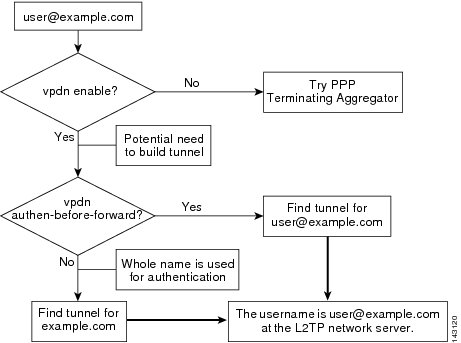
In Figure 12, the same authentication flow proceeds, this time with the VPN service applied to the configuration. Just as before, if the vpdn authen-before-forward process determines that the session must be locally authenticated before being placed into the correct tunnel, authentication proceeds as normal. However, with the vpn service statement applied, the session is placed into the appropriate tunnel for the VPN domain.
Figure 12 Normal Tunnel Authentication with VPN Service Configured
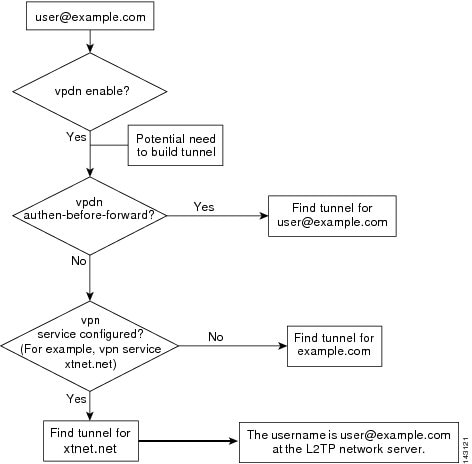
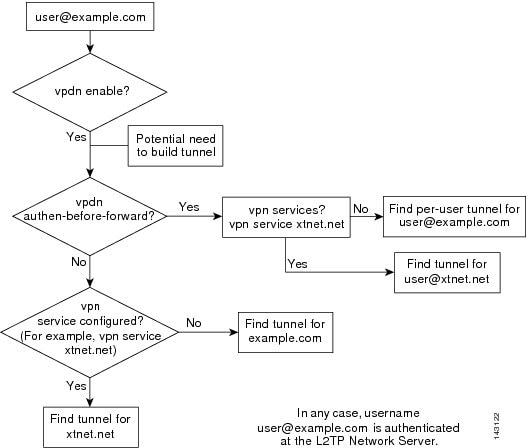
Figure 13 shows the full VPN service application flow. If local authentication at the LAC is required and a VPN service is configured, a local authentication is done with the username provided and the domain of the VPN service provider. This step returns the necessary L2TP tunnel for this VPN session. If VPN service is not configured, local authentication is provided on the username and domain name provided by the subscriber.
If the session does not require local authentication but there is a configured VPN service, the session is placed into the L2TP tunnel for the VPN service provider. Otherwise, the session will be placed into the tunnel for the specified domain name.
In any of these scenarios, the username and domain name for the subscriber session stay the same at the L2TP network server (LNS). This allows a wholesale provider to dedicate a service provider for providing all VPN services to its subscribers without the need for complex configuration for each VPN.
The vpn service command binds a physical incoming interface to a certain tunnel. The result is that no matter what username or domain is presented, the user is always forwarded to the specified tunnel configured by the vpn service command.
Figure 13 New Operation with VPN Service
L2TP Domain Screening, Rules Based
With Cisco Software Release 12.2(31)SB2 or later releases, you can modify the domain portion of the username seamlessly when you enter into a VPN service. The L2TP Domain Screening, Rules Based feature allows per-user L2TP tunnel setup by creating customized Policy Manager match rules. The L2TP Domain Screening, Rules Based feature allows you to construct rules to customize specific policy behavior. You can use the following commands to construct specific policy behavior.
•
•
•
These commands work together in the L2TP Domain Screening, Rules Based feature to make sure that the appropriate domain has been screened before access is allowed to an L2TP tunnel for the user session.
L2TP Tunnel Authentication, Rules Based
Figure 14 shows the general process flow for tunnel authentication, rules based.
Figure 14
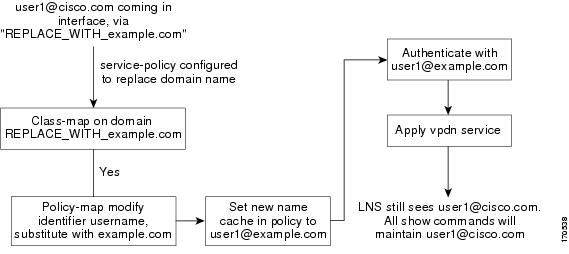
Normal Tunnel Authentication, Rules Based
For all users with service policy "REPLACE_WITH_abc.com, this configuration, following a policy-map session-start event, replaces the domain field of username with abc.com, with the new domain name cached in policy manager. Users authenticate based on username@abc.com, and the per-user profile is retrieved as authorization data. Finally, service abc applies to the user.
Per-User VPDN AAA
If remote AAA is used for VPDN, the NAS that receives the call from a user forwards information about that user to its remote AAA server. With basic VPDN, the NAS sends the user domain name when performing authentication based on domain name or the telephone number the user dialed in from when performing authentication based on DNIS.
When per-user VPDN is configured, the entire structured username is sent to a RADIUS AAA server the first time the router contacts the AAA server. This enables Cisco IOS software to customize tunnel attributes for individual users that use a common domain name or DNIS.
Without VPDN per-user configuration, Cisco IOS software sends only the domain name or DNIS to determine VPDN tunnel attribute information. Then, if no VPDN tunnel attributes are returned, Cisco IOS software sends the entire username string.
VPDN Authorization for Directed Request Users
Directed requests allow users logging in to a NAS to select a RADIUS server for authorization. With directed requests enabled, only the portion of the username before the "@" symbol is sent to the host specified after the "@" symbol. Using directed requests, authorization requests can be directed to any of the configured servers, and only the username is sent to the specified server.
Domain Name Prefix and Suffix Stripping
When a user connects to a NAS configured to use a remote server for AAA, the NAS forwards the username to the remote AAA server. Some RADIUS or TACACS+ servers require the username to be in a particular format, which may be different from the format of the full username. For example, the remote AAA server may require the username to be in the format user@domain.com, but the full username could be prefix/user@domain.com@suffix. Configuring domain name stripping allows the NAS to strip incompatible portions from the full username before forwarding the reformatted username to the remote AAA server.
Beginning in Cisco IOS Release 12.2(13)T, the NAS can be configured to strip generic suffixes from the full username using the suffix delimiter character @. Any portion of the full username that follows the first delimiter that is parsed will be stripped.
Beginning in Cisco IOS Release 12.3(4)T, the NAS can be configured to use a different character or set of characters as the suffix delimiter.
Beginning in Cisco IOS Release 12.4(4)T, the NAS can be configured to strip both suffixes and prefixes from the full username. The NAS can also be configured to strip only specified suffixes instead of performing generic suffix stripping.
VPDN Tunnel Authentication
VPDN tunnel authentication enables routers to authenticate the other tunnel endpoint before establishing a VPDN tunnel. VPDN tunnel authentication is required for Layer 2 Forwarding (L2F) tunnels, and optional for Layer 2 Tunneling Protocol (L2TP) tunnels.
For additional information on configuring VPDN tunnel authentication for client-initiated VPDN tunneling deployments, refer to the "Configuring VPDN Tunnel Authentication" section.
VPDN tunnel authentication can be performed in the following ways:
•
•
•
For L2TP tunnels only, a remote RADIUS AAA server can be used to perform VPDN tunnel authentication on the VPDN tunnel terminator as follows:
•
•
For detailed information on configuring remote RADIUS or TACACS+ servers, refer to the Cisco IOS Security Configuration Guide, Release 12.4.
RADIUS Tunnel Accounting for L2TP VPDNs
RADIUS tunnel accounting for VPDNs is supported by RFC 2867, which introduces six new RADIUS accounting types beginning in Cisco IOS 12.3(4)T. Without RADIUS tunnel accounting support, VPDN with network accounting will not report all possible attributes to the accounting record file. RADIUS tunnel accounting support allows users to determine tunnel-link status changes. Because all possible attributes can be displayed, users can better verify accounting records with their Internet service providers (ISPs).
VPDN-Specific Remote RADIUS AAA Server Configurations
The following RADIUS attributes are specific to VPDN configurations. For detailed information on configuring remote RADIUS or TACACS+ servers, refer to the Cisco IOS Security Configuration Guide, Release 12.4.
VPDN-specific RADIUS attributes provide the following functionality:
•
•
•
•
•
Shell-Based Authentication of VPDN Users
The NAS and tunnel server can be configured to perform shell-based authentication of VPDN users. Shell-based authentication of VPDN users provides terminal services (shell login or exec login) for VPDN users to support rollout of wholesale dial networks. Authentication of users occurs via shell or exec login at the NAS before PPP starts and the tunnel is established.
A character-mode login dialog is provided before PPP starts, and the login dialog supports schemes such as token-card synchronization and initialization, challenge-based password, and so on. After a user is authenticated in this way, the connection changes from character mode to PPP mode to connect the user to the desired destination. The AAA server that authenticates the login user can be selected based on the dialed DNIS or the domain-name part of the username.
VPDN profiles can be kept by a Resource Pool Manager Server (RPMS), RADIUS-based AAA server, or on the NAS.
How to Configure AAA for VPDNs
To configure AAA for VPDNs, perform the following tasks:
•
•
•
•
•
•
•
•
•
•
•
•
•
•
•
•
•
•
Enabling VPDN on the NAS and the Tunnel Server
Before performing any VPDN configuration tasks, you must enable VPDN on the NAS and the tunnel server. If you are deploying a multihop VPDN tunnel switching architecture, VPDN must be enabled on the tunnel switch as well.
Perform this task on all required devices to enable VPDN.
SUMMARY STEPS
1.
2.
3.
DETAILED STEPS
What to Do Next
You may perform the optional task in the "Configuring the VPDN Tunnel Authorization Search Order" section.
•
•
Configuring the VPDN Tunnel Authorization Search Order
The default search order for VPDN tunnel authorization is to first search by DNIS, then by domain.
Perform this task on the NAS or the tunnel switch to configure the VPDN tunnel authorization search order if you prefer to use an order other than the default order.
Prerequisites
You must perform the task in the "Enabling VPDN on the NAS and the Tunnel Server" section.
Restrictions
•
•
SUMMARY STEPS
1.
2.
3.
DETAILED STEPS
What to Do Next
•
•
Configuring L2TP Domain Screening
To configure L2TP Domain Screening, enable VPN service and VPDN preauthentication on the LAC. You can enable VPDN preauthentication globally or for specific VPDN groups.
This section contains the following procedures:
•
•
•
Configuring L2TP Domain Screening with Global Preauthentication
To configure L2TP Domain Screening with global preauthentication, enable VPN service and enable VPDN preauthorization globally. RADIUS authentication and authorization are required for per-user tunnels.
SUMMARY STEPS
1.
2.
3.
4.
5.
6.
7.
8.
9.
10.
11.
12.
13.
14.
15.
16.
DETAILED STEPS
L2TP Domain Screening with Global Preauthentication: Example
Global preauthentication for L2TP domain screening requires RADIUS authentication and authorization. Each user must have a RADIUS user profile that enables per-user L2TP tunneling.
The following example shows a user profile for user-1@example.net; the IP address in the profile is the LNS interface connected to the LAC.
[ /Radius/UserLists/Default/user-1@example.net ]Name = user_1@xnet.netDescription = TESTPassword = <encrypted>Enabled = TRUEcisco-avpair = vpdn:tunnel-type=l2tpcisco-avpair = vpdn:l2tp-tunnel-password=tunnelcisco-avpair = vpdn:l2tp-hello-interval=60cisco-avpair = vpdn:ip-addresses=10.1.1.1cisco-avpair = vpdn:tunnel-id=LAC1-1Framed-protocol = PPPService-Type = OutboundConfiguring L2TP Domain Screening with per-VPDN Group Preauthentication
To configure L2TP Domain Screening with per-VPDN group preauthentication, enable VPN service and enable VPDN preauthentication by specific VPDN group.
SUMMARY STEPS
1.
2.
3.
4.
5.
6.
7.
8.
9.
10.
11.
12.
13.
14.
15.
16.
17.
18.
19.
20.
21.
22.
DETAILED STEPS
Configuring L2TP Domain Screening, Rules Based
To configue domain screening, rules based, proceed with the following steps.
SUMMARY STEPS
1.
2.
3.
4.
5.
6.
7.
8.
9.
Note that if you specify the default method list for any of the control policy actions, the default list will not appear in the output of the show running-config command. For example, if you configure the following command:
Router(config-control-policymap-class-control)# 1 authenticate aaa list defaultthe following will display in the output for the show running-config command:
1 authenticateNamed method lists will display in the show running-config command output.
DETAILED STEPS
Configuring L2TP Domain Screening, Rules Based: Example
The following examples shows a policy map configuration for L2TP domain screening, rules based:
policy-map type control REPLACE_WITH_example.comclass type control always event session-start1 collect identifier unauthenticated-username2 set NEWNAME identifier unauthenticated-username3 substitute NEWNAME "(.*@).*" "\1example.com"4 authenticate variable NEWNAME aaa list EXAMPLE5 service-policy type service name examplepolicy-map type service abcservice vpdn group 1bba-group pppoe globalvirtual-template 1!interface Virtual-Template1service-policy type control REPLACE_WITH_example.comConfiguring per-User VPDN on the NAS
If remote AAA is used for VPDN, the NAS that receives the call from a user forwards information about that user to its remote AAA server. With basic VPDN, the NAS sends the user domain name when performing authentication based on domain name or the telephone number the user dialed in from when performing authentication based on DNIS.
When per-user VPDN is configured, the entire structured username is sent to a RADIUS AAA server the first time the router contacts the AAA server. This enables Cisco IOS software to customize tunnel attributes for individual users that use a common domain name or DNIS.
Without VPDN per-user configuration, Cisco IOS software sends only the domain name or DNIS to determine VPDN tunnel attribute information. Then, if no VPDN tunnel attributes are returned, Cisco IOS software sends the entire username string.
Per-user VPDN can be configured globally, or for individual VPDN groups. The VPDN group configuration will take precedence over the global configuration.
Perform one of the following tasks on the NAS to configure per-user VPDN:
•
•
Prerequisites
The NAS remote RADIUS server must be configured for AAA. For more information on configuring remote RADIUS AAA servers refer to the Cisco IOS Security Configuration Guide, Release 12.4.
Restrictions
•
•
Configuring Global per-User VPDN
Configuring per-user VPDN on a NAS causes the NAS to send the entire structured username of the user to a RADIUS AAA server the first time the NAS contacts the AAA server. Per-user VPDN can be configured globally, or for individual VPDN groups. Configuring per-user VPDN globally will apply per-user VPDN to all request-dialin VPDN groups configured on the NAS.
Perform this task on the NAS to configure global per-user VPDN.
SUMMARY STEPS
1.
2.
3.
DETAILED STEPS
What to Do Next
You may perform the optional task in the "Configuring AAA on the NAS and the Tunnel Server" section.
Configuring per-User VPDN for a VPDN Group
Configuring per-user VPDN on a NAS causes the NAS to send the entire structured username of the user to a RADIUS AAA server the first time the NAS contacts the AAA server. Per-user VPDN can be configured globally, or for individual VPDN groups. Configuring per-user VPDN at the VPDN group level will apply per-user VPDN only to calls associated with that specific VPDN group
Perform this task on the NAS to configure per-user VPDN for a specific VPDN group.
SUMMARY STEPS
1.
2.
3.
4.
5.
6.
7.
DETAILED STEPS
What to Do Next
•
•
Configuring AAA on the NAS and the Tunnel Server
For NAS-initiated dial-in VPDN tunneling and L2TP dial-out tunneling deployments, perform this task on the NAS and the tunnel server.
For client-initiated dial-in VPDN tunneling, perform this task on the tunnel server.
Prerequisites
You must perform the task in the "Enabling VPDN on the NAS and the Tunnel Server" section.
SUMMARY STEPS
1.
2.
3.
4.
5.
6.
7.
DETAILED STEPS
What to Do Next
•
•
Configuring Remote AAA for VPDNs
A remote RADIUS or TACACS+ AAA server can be used for tunnel authentication. For detailed information on configuring remote RADIUS or TACACS+ servers, refer to the Cisco IOS Security Configuration Guide, Release 12.4.
Remote AAA authentication can be configured on the NAS or the tunnel server in the following ways:
Dial-In Configurations
•
•
Dial-Out Configurations
•
Perform one of the following tasks to configure remote AAA for VPDNs:
•
•
Configuring the NAS for Remote AAA for Dial-In VPDNs
Perform this task to configure the NAS to use a remote RADIUS or TACACS+ server for tunnel authentication. This task applies only to dial-in VPDN configurations.
Prerequisites
•
•
SUMMARY STEPS
1.
2.
3.
or
tacacs-server host {host-name | host-ip-address} [key string] [nat] [port [integer]] [single-connection] [timeout [integer]]4.
or
aaa group server tacacs+ group-name5.
or
server ip-addressDETAILED STEPS
Step 1
enable
Example:Router> enable
Enables privileged EXEC mode.
•
Step 2
configure terminal
Example:Router# configure terminal
Enters global configuration mode.
Step 3
radius-server host {hostname | ip-address} [auth-port port-number] [acct-port port-number] [timeout seconds] [retransmit retries] [key string] [alias {hostname | ip-address}]
or
tacacs-server host {host-name | host-ip-address} [key string] [nat] [port [integer]] [single-connection] [timeout [integer]]
Example:Router(config)# radius-server host 10.1.1.1
or
Example:Router(config)# tacacs-server host 10.2.2.2
Specifies a RADIUS server host.
Note
or
Specifies a TACACS+ host.
Step 4
aaa group server radius group-name
or
aaa group server tacacs+ group-name
Example:Router(config)# aaa group server radius group1
or
Router(config)# aaa group server tacacs+ group7
(Optional) Groups different RADIUS server hosts into distinct lists and distinct methods and enters RADIUS server group configuration mode.
or
(Optional) Groups different TACACS+ server hosts into distinct lists and distinct methods and enters RADIUS server group configuration mode.
Step 5
server ip-address [auth-port port-number] [acct-port port-number]
or
server ip-address
Example:Router(config-sg-radius)# server 10.1.1.1 auth-port 1000 acct-port 1646
or
Router(config-sg-radius)# server 10.2.2.2
(Optional) Configures the IP address of the RADIUS server for the group server.
or
(Optional) Configures the IP address of the TACACS+ server for the group server.
Note
What to Do Next
•
•
Configuring the Tunnel Terminator for Remote RADIUS AAA for L2TP Tunnels
You may configure the device that terminates the L2TP VPDN tunnel to perform remote RADIUS AAA. Without this functionality, the tunnel terminator can only perform L2TP authentication locally. Local authentication requires that data about the corresponding tunnel endpoint be configured within a VPDN group. This mechanism does not scale well because the information stored in the VPDN groups on each device must be updated independently.
Remote RADIUS authentication allows users to store configurations on the RADIUS server, avoiding the need to store information locally. New information can be added to the RADIUS server as needed, and a group of tunnel terminators can access a common database on the RADIUS server.
Perform this task to configure remote RADIUS AAA for L2TP tunnels on the tunnel terminator. This task can be performed on the tunnel server for dial-in VPDN tunnels, or on the NAS for dial-out VPDN tunnels.
Prerequisites
•
•
•
SUMMARY STEPS
1.
2.
3.
4.
5.
6.
7.
8.
9.
DETAILED STEPS
What to Do Next
•
•
•
Verifying and Troubleshooting Remote AAA Configurations
Perform the tasks in this section to verify remote RADIUS AAA configurations.
•
•
•
•
•
Verifying that the VPDN Tunnel Is Up
Perform this task to verify that the VPDN tunnel is up.
SUMMARY STEPS
1.
2.
DETAILED STEPS
Step 1
Enter this command to enable privileged EXEC mode. Enter your password if prompted:
Router> enableStep 2
Enter this command to display information about active VPDN tunnels. At least one tunnel and one session must be set up.
Router# show vpdn tunnelL2TP Tunnel and Session Information Total tunnels 1 sessions 1LocID RemID Remote Name State Remote Address Port Sessions VPDN Group4571 61568 csidtw13 est 10.0.195.4 1701 1 ?LocID RemID TunID Intf Username State Last Chg4 11 4571 Vi4.1 csidtw9@cisco.com est 00:02:29%No active L2F tunnels%No active PPTP tunnels%No active PPPoE tunnels
Verifying the Remote RADIUS AAA Server Configuration
Perform this task to verify that the remote AAA authorization server is configured on the tunnel endpoint and that the tunnel endpoint can receive attributes 90 and 69 from the RADIUS server.
In this example the steps are performed on the tunnel server, which is performing remote RADIUS AAA as a tunnel terminator. These steps can also be performed on the NAS when remote RADIUS AAA is being performed on the NAS as a tunnel initiator for dial-in VPDNs or as a tunnel terminator for dial-out VPDNs.
SUMMARY STEPS
1.
2.
3.
DETAILED STEPS
Step 1
Enter this command to enable privileged EXEC mode. Enter your password if prompted:
Router> enableStep 2
Enter this command on the tunnel server to display RADIUS debugging messages.
Step 3
Enter this command on the tunnel server to display the contents of the standard system logging message buffer. Ensure that "access-accept" is in the output and that attributes 90 and 69 can be seen in the RADIUS reply, as shown in bold.
Router# show logging00:32:56: RADIUS: Received from id 21645/5 172.19.192.50:1645, Access-Accept, len 8100:32:56: RADIUS: authenticator 73 2B 1B C2 33 71 93 19 - 62 AC 3E BE 0D 13 14 8500:32:56: RADIUS: Service-Type [6] 6 Outbound [5]00:32:56: RADIUS: Tunnel-Type [64] 6 00:L2TP [3]00:32:56: RADIUS: Tunnel-Medium-Type [65] 6 00:IPv4 [1]00:32:56: RADIUS: Tunnel-Client-Auth-I[90] 6 00:"csidtw13"00:32:56: RADIUS: Tunnel-Password [69] 8 *00:32:56: RADIUS: Vendor, Cisco [26] 2900:32:56: RADIUS: Cisco AVpair [1] 23 "vpdn:vpdn-vtemplate=1"
Verifying the Remote TACACS+ AAA Server Configuration on the NAS
Perform this task on the NAS to verify that the remote TACACS+ AAA server is properly configured.
Prerequisites
Enable the following debug commands before performing this task:
•
•
•
•
•
•
•
•
•
•
SUMMARY STEPS
1.
2.
3.
DETAILED STEPS
Step 1
Enter this command to enable privileged EXEC mode. Enter your password if prompted:
Router> enableStep 2
Enter this command to display information about the types of debugging that are enabled for your router.
Router# show debuggingGeneral OS:AAA Authentication debugging is onAAA Authorization debugging is onAAA Accounting debugging is onVPN:L2X protocol events debugging is onL2X protocol errors debugging is onVPDN events debugging is onVPDN errors debugging is onVTEMPLATE:Virtual Template debugging is on!Step 3
The following example shows complete debug output from the NAS for successful VPDN tunnel establishment using remote TACACS+ AAA authentication at the NAS:
Jan 30 12:17:09: As1 AAA/AUTHOR/FSM: (0): LCP succeeds trivially20:03:18: %LINK-3-UPDOWN: Interface Async1, changed state to upJan 30 12:17:09: As1 VPDN: Looking for tunnel -- rtp.cisco.com --Jan 30 12:17:09: AAA: parse name=Async1 idb type=10 tty=1Jan 30 12:17:09: AAA: name=Async1 flags=0x11 type=4 shelf=0 slot=0 adapter=0port=1 channel=0Jan 30 12:17:09: AAA/AUTHEN: create_user (0x278B90) user='rtp.cisco.com'ruser=''port='Async1' rem_addr='' authen_type=NONE service=LOGIN priv=0Jan 30 12:17:09: AAA/AUTHOR/VPDN (898425447): Port='Async1' list='default'service=NETJan 30 12:17:09: AAA/AUTHOR/VPDN: (898425447) user='rtp.cisco.com'Jan 30 12:17:09: AAA/AUTHOR/VPDN: (898425447) send AV service=pppJan 30 12:17:09: AAA/AUTHOR/VPDN: (898425447) send AV protocol=vpdnJan 30 12:17:09: AAA/AUTHOR/VPDN (898425447) found list "default"Jan 30 12:17:09: AAA/AUTHOR/VPDN: (898425447) Method=TACACS+Jan 30 12:17:09: AAA/AUTHOR/TAC+: (898425447): user=rtp.cisco.comJan 30 12:17:09: AAA/AUTHOR/TAC+: (898425447): send AV service=pppJan 30 12:17:09: AAA/AUTHOR/TAC+: (898425447): send AV protocol=vpdnJan 30 12:17:09: TAC+: (898425447): received author response status = PASS_ADDJan 30 12:17:09: AAA/AUTHOR (898425447): Post authorization status = PASS_ADDJan 30 12:17:09: AAA/AUTHOR/VPDN: Processing AV service=pppJan 30 12:17:09: AAA/AUTHOR/VPDN: Processing AV protocol=vpdnJan 30 12:17:09: AAA/AUTHOR/VPDN: Processing AV tunnel-type=l2tpJan 30 12:17:09: AAA/AUTHOR/VPDN: Processing AV tunnel-id=rtp_tunnelJan 30 12:17:09: AAA/AUTHOR/VPDN: Processing AV ip-addresses=10.31.1.56Jan 30 12:17:09: As1 VPDN: Get tunnel info for rtp.cisco.com with NASrtp_tunnel, IP 10.31.1.56Jan 30 12:17:09: AAA/AUTHEN: free_user (0x278B90) user='rtp.cisco.com' ruser=''port='Async1' rem_addr='' authen_type=NONE service=LOGIN priv=0Jan 30 12:17:09: As1 VPDN: Forward to address 10.31.1.56Jan 30 12:17:09: As1 VPDN: Forwarding...Jan 30 12:17:09: AAA: parse name=Async1 idb type=10 tty=1Jan 30 12:17:09: AAA: name=Async1 flags=0x11 type=4 shelf=0 slot=0 adapter=0port=1 channel=0Jan 30 12:17:09: AAA/AUTHEN: create_user (0x22CDEC) user='user1@rtp.cisco.com'ruser='' port='Async1' rem_addr='async' authen_type=CHAPservice=PPP priv=1Jan 30 12:17:09: As1 VPDN: Bind interface direction=1Jan 30 12:17:09: Tnl/Cl 74/1 L2TP: Session FS enabledJan 30 12:17:09: Tnl/Cl 74/1 L2TP: Session state change from idle towait-for-tunnelJan 30 12:17:09: As1 74/1 L2TP: Create sessionJan 30 12:17:09: Tnl 74 L2TP: SM State idleJan 30 12:17:09: Tnl 74 L2TP: O SCCRQJan 30 12:17:09: Tnl 74 L2TP: Tunnel state change from idle to wait-ctl-replyJan 30 12:17:09: Tnl 74 L2TP: SM State wait-ctl-replyJan 30 12:17:09: As1 VPDN: user1@rtp.cisco.com is forwardedJan 30 12:17:10: Tnl 74 L2TP: I SCCRP from ABCDEJan 30 12:17:10: Tnl 74 L2TP: Got a challenge from remote peer, ABCDEJan 30 12:17:10: AAA: parse name= idb type=-1 tty=-1Jan 30 12:17:10: AAA/AUTHEN: create_user (0x23232C) user='rtp_tunnel'ruser='' port=''rem_addr='' authen_type=CHAP service=PPP priv=1Jan 30 12:17:10: AAA/AUTHEN/START (1598999635): port='' list='default'action=SENDAUTH service=PPPJan 30 12:17:10: AAA/AUTHEN/START (1598999635): found list defaultJan 30 12:17:10: AAA/AUTHEN (1598999635): status = UNKNOWNJan 30 12:17:10: AAA/AUTHEN/START (1598999635): Method=TACACS+Jan 30 12:17:10: TAC+: send AUTHEN/START packet ver=193 id=1598999635Jan 30 12:17:10: TAC+: ver=192 id=1598999635 received AUTHEN status = ERRORJan 30 12:17:10: AAA: parse name= idb type=-1 tty=-1Jan 30 12:17:10: AAA/AUTHEN: create_user (0x232470) user='rtp_tunnel'ruser='' port=''rem_addr='' authen_type=CHAP service=PPP priv=1Jan 30 12:17:10: TAC+: ver=192 id=3400389836 received AUTHEN status = PASSJan 30 12:17:10: AAA/AUTHEN: free_user (0x232470) user='rtp_tunnel'ruser='' port=''rem_addr='' authen_type=CHAP service=PPP priv=1Jan 30 12:17:10: AAA/AUTHEN (1598999635): status = PASSJan 30 12:17:10: AAA/AUTHEN: free_user (0x23232C) user='rtp_tunnel'ruser='' port=''rem_addr='' authen_type=CHAP service=PPP priv=1Jan 30 12:17:10: Tnl 74 L2TP: Got a response from remote peer, ABCDEJan 30 12:17:10: AAA: parse name= idb type=-1 tty=-1Jan 30 12:17:10: AAA/AUTHEN: create_user (0x22FBA4) user='rtp_tunnel'ruser='' port=''rem_addr='' authen_type=CHAP service=PPP priv=1Jan 30 12:17:10: AAA/AUTHEN/START (2964849625): port='' list='default'action=SENDAUTH service=PPPJan 30 12:17:10: AAA/AUTHEN/START (2964849625): found list defaultJan 30 12:17:10: AAA/AUTHEN (2964849625): status = UNKNOWNJan 30 12:17:10: AAA/AUTHEN/START (2964849625): Method=TACACS+Jan 30 12:17:10: TAC+: send AUTHEN/START packet ver=193 id=296484962520:03:20: %LINEPROTO-5-UPDOWN: Line protocol on Interface Async1,changed state to upJan 30 12:17:11: TAC+: ver=192 id=2964849625 received AUTHEN status = ERRORJan 30 12:17:11: AAA: parse name= idb type=-1 tty=-1Jan 30 12:17:11: AAA/AUTHEN: create_user (0x22FC8C) user='rtp_tunnel'ruser='' port=''rem_addr='' authen_type=CHAP service=PPP priv=1Jan 30 12:17:11: As1 74/1 L2TP: Discarding data packet because tunnelis not openJan 30 12:17:11: As1 74/1 L2TP: Discarding data packet because tunnelis not openJan 30 12:17:11: TAC+: ver=192 id=1474818051 received AUTHEN status = PASSJan 30 12:17:11: AAA/AUTHEN: free_user (0x22FC8C) user='rtp_tunnel'ruser='' port=''rem_addr='' authen_type=CHAP service=PPP priv=1Jan 30 12:17:11: AAA/AUTHEN (2964849625): status = PASSJan 30 12:17:11: AAA/AUTHEN: free_user (0x22FBA4) user='rtp_tunnel'ruser='' port=''rem_addr='' authen_type=CHAP service=PPP priv=1Jan 30 12:17:11: Tnl 74 L2TP: Tunnel Authentication successJan 30 12:17:11: Tnl 74 L2TP: Tunnel state change from wait-ctl-reply toestablishedJan 30 12:17:11: Tnl 74 L2TP: O SCCCN to ABCDE tnlid 56Jan 30 12:17:11: Tnl 74 L2TP: SM State establishedJan 30 12:17:11: As1 74/1 L2TP: O ICRQ to ABCDE 56/0Jan 30 12:17:11: As1 74/1 L2TP: Session state change from wait-for-tunnelto wait-replyJan 30 12:17:11: Tnl 74 L2TP: Dropping old CM, Ns 0, expected 1Jan 30 12:17:11: As1 74/1 L2TP: O ICCN to ABCDE 56/1Jan 30 12:17:11: As1 74/1 L2TP: Session state change from wait-reply toestablished
Verifying the Remote TACACS+ AAA Server Configuration on the Tunnel Server
Perform this task on the tunnel server to verify that the remote TACACS+ AAA server is properly configured.
Prerequisites
Enable the following debug commands before performing this task:
•
•
•
•
•
•
•
•
•
SUMMARY STEPS
1.
2.
3.
DETAILED STEPS
Step 1
Enter this command to enable privileged EXEC mode. Enter your password if prompted:
Router> enableStep 2
Enter this command to display information about the types of debugging that are enabled for your router.
Router# show debuggingGeneral OS:AAA Authentication debugging is onAAA Authorization debugging is onAAA Accounting debugging is onVPN:L2X protocol events debugging is onL2X protocol errors debugging is onVPDN events debugging is onVPDN errors debugging is onVTEMPLATE:Virtual Template debugging is onStep 3
The following example shows complete debug output from the tunnel server for successful VPDN tunnel establishment using remote TACACS+ AAA authentication at the NAS:
Jan 30 12:17:09: L2TP: I SCCRQ from rtp_tunnel tnl 74Jan 30 12:17:09: Tnl 56 L2TP: New tunnel created for remotertp_tunnel, address 10.31.1.144Jan 30 12:17:09: Tnl 56 L2TP: Got a challenge in SCCRQ, rtp_tunnelJan 30 12:17:09: AAA: parse name= idb type=-1 tty=-1Jan 30 12:17:09: AAA/AUTHEN: create_user (0x21F6D0) user='ABCDE'ruser='' port=''rem_addr='' authen_type=CHAP service=PPP priv=1Jan 30 12:17:09: AAA/AUTHEN/START (3194595626): port='' list='default'action=SENDAUTH service=PPPJan 30 12:17:09: AAA/AUTHEN/START (3194595626): found list defaultJan 30 12:17:09: AAA/AUTHEN (3194595626): status = UNKNOWNJan 30 12:17:09: AAA/AUTHEN/START (3194595626): Method=TACACS+Jan 30 12:17:09: TAC+: send AUTHEN/START packet ver=193 id=3194595626Jan 30 12:17:09: TAC+: ver=192 id=3194595626 received AUTHEN status = ERRORJan 30 12:17:09: AAA: parse name= idb type=-1 tty=-1Jan 30 12:17:09: AAA/AUTHEN: create_user (0x2281AC) user='ABCDE'ruser='' port=''rem_addr='' authen_type=CHAP service=PPP priv=1Jan 30 12:17:09: TAC+: ver=192 id=3639011179 received AUTHEN status = PASSJan 30 12:17:09: AAA/AUTHEN: free_user (0x2281AC) user='ABCDE' ruser='' port=''rem_addr='' authen_type=CHAP service=PPP priv=1Jan 30 12:17:09: AAA/AUTHEN (3194595626): status = PASSJan 30 12:17:09: AAA/AUTHEN: free_user (0x21F6D0) user='ABCDE' ruser='' port=''rem_addr='' authen_type=CHAP service=PPP priv=1Jan 30 12:17:09: Tnl 56 L2TP: O SCCRP to rtp_tunnel tnlid 74Jan 30 12:17:09: Tnl 56 L2TP: Tunnel state change from idle towait-ctl-replyJan 30 12:17:10: Tnl 56 L2TP: O Resend SCCRP, flg TLF, ver 2, len 152,tnl 74, cl 0, ns 0, nr 1Jan 30 12:17:10: Tnl 56 L2TP: I SCCCN from rtp_tunnel tnl 74Jan 30 12:17:10: Tnl 56 L2TP: Got a Challenge Response in SCCCN from rtp_tunnelJan 30 12:17:10: AAA: parse name= idb type=-1 tty=-1Jan 30 12:17:10: AAA/AUTHEN: create_user (0x227F3C) user='ABCDE'ruser='' port=''rem_addr='' authen_type=CHAP service=PPP priv=1Jan 30 12:17:10: AAA/AUTHEN/STARTTranslating "rtp.cisco.com"(4117701992): port='' list='default' action=SENDAUTH service=PPPJan 30 12:17:10: AAA/AUTHEN/START (4117701992): found list defaultJan 30 12:17:10: AAA/AUTHEN (4117701992): status = UNKNOWNJan 30 12:17:10: AAA/AUTHEN/START (4117701992): Method=TACACS+Jan 30 12:17:10: TAC+: send AUTHEN/START packet ver=193 id=4117701992Jan 30 12:17:11: TAC+: ver=192 id=4117701992 received AUTHEN status = ERRORJan 30 12:17:11: AAA: parse name= idb type=-1 tty=-1Jan 30 12:17:11: AAA/AUTHEN: create_user (0x228E68) user='ABCDE' ruser='' port=''rem_addr='' authen_type=CHAP service=PPP priv=1Jan 30 12:17:11: TAC+: ver=192 id=2827432721 received AUTHEN status = PASSJan 30 12:17:11: AAA/AUTHEN: free_user (0x228E68) user='ABCDE' ruser='' port=''rem_addr='' authen_type=CHAP service=PPP priv=1Jan 30 12:17:11: AAA/AUTHEN (4117701992): status = PASSJan 30 12:17:11: AAA/AUTHEN: free_user (0x227F3C) user='ABCDE' ruser='' port=''rem_addr='' authen_type=CHAP service=PPP priv=1Jan 30 12:17:11: Tnl 56 L2TP: Tunnel Authentication successJan 30 12:17:11: Tnl 56 L2TP: Tunnel state change from wait-ctl-replyto establishedJan 30 12:17:11: Tnl 56 L2TP: SM State establishedJan 30 12:17:11: Tnl 56 L2TP: I ICRQ from rtp_tunnel tnl 74Jan 30 12:17:11: Tnl/Cl 56/1 L2TP: Session FS enabledJan 30 12:17:11: Tnl/Cl 56/1 L2TP: Session state change from idle towait-for-tunnelJan 30 12:17:11: Tnl/Cl 56/1 L2TP: New session createdJan 30 12:17:11: Tnl/Cl 56/1 L2TP: O ICRP to rtp_tunnel 74/1Jan 30 12:17:11: Tnl/Cl 56/1 L2TP: Session state change from wait-for-tunnelto wait-connectJan 30 12:17:11: Tnl/Cl 56/1 L2TP: I ICCN from rtp_tunnel tnl 74, cl 1Jan 30 12:17:11: Tnl/Cl 56/1 L2TP: Session state change from wait-connectto establishedJan 30 12:17:11: Vi1 VTEMPLATE: Reuse Vi1, recycle queue size 0Jan 30 12:17:11: Vi1 VTEMPLATE: Hardware address 00e0.1e68.942cJan 30 12:17:11: Vi1 VPDN: Virtual interface created for user1@rtp.cisco.comJan 30 12:17:11: Vi1 VPDN: Set to Async interfaceJan 30 12:17:11: Vi1 VPDN: Clone from Vtemplate 1 filterPPP=0 blockingJan 30 12:17:11: Vi1 VTEMPLATE: Has a new cloneblk vtemplate, now it has vtemplateJan 30 12:17:11: Vi1 VTEMPLATE: ************* CLONE VACCESS1 *****************Jan 30 12:17:11: Vi1 VTEMPLATE: Clone from Virtual-Template1
Verifying L2TP Tunnel Establishment, PPP Negotiations, and Authentication with the Remote Client
Perform this task to verify that the L2TP tunnel has been established and that the tunnel server can perform PPP negotiation and authentication with the remote client.
In this example the steps are performed on the tunnel server, which is performing remote AAA as a tunnel terminator. These steps can also be performed on the NAS when remote AAA is being performed on the NAS as a tunnel initiator for dial-in VPDNs or as a tunnel terminator for dial-out VPDNs.
SUMMARY STEPS
1.
2.
3.
4.
DETAILED STEPS
Step 1
Enter this command to enable privileged EXEC mode. Enter your password if prompted:
Router> enableStep 2
Enter this command on the tunnel server to display PPP negotiation debugging messages.
Step 3
Enter this command on the tunnel server to display PPP authentication debugging messages.
Step 4
Enter this command on the tunnel server to display the contents of the standard system logging message buffer. Observe that the tunnel server receives a PPP Challenge Handshake Authentication Protocol (CHAP) challenge and then sends a PPP CHAP "SUCCESS" to the client.
00:38:50: ppp3 PPP: Received LOGIN Response from AAA = PASS00:38:50: ppp3 PPP: Phase is FORWARDING, Attempting Forward00:38:50: Vi4.1 Tnl/Sn4571/4 L2TP: Session state change from wait-for-service-selection to established00:38:50: Vi4.1 PPP: Phase is AUTHENTICATING, Authenticated User00:38:50: Vi4.1 CHAP: O SUCCESS id 1 len 4After PPP authentication is successful, observe from the debug output that PPP negotiation has started, that the tunnel server has received Link Control Protocol (LCP) IP Control Protocol (IPCP) packets, and that negotiation is successful.
00:38:50: Vi4.1 IPCP: State is Open00:38:50: Vi4.1 IPCP: Install route to 10.1.1.4
Configuring Directed Request Authorization of VPDN Users
Directed requests allow users logging in to a NAS to select a remote AAA server for authentication. With directed requests enabled, only the portion of the username before the "@" symbol is sent to the host specified after the "@" symbol. Using directed requests, you can direct an authentication request to any of the configured remote AAA servers, and only the username is sent to the specified server.
Directed request authorization of VPDN users can be configured on the NAS or on the tunnel server. The directed request configuration is performed on the device that ultimately performs the authentication. Directed requests are most commonly configured on the tunnel server.
Perform one of the following tasks to enable directed request authorization of VPDN users.
•
•
Configuring Directed Request Authorization of VPDN Users on the Tunnel Server
Perform this task on the tunnel server to configure directed request authorization of VPDN users when the tunnel server performs authentication.
Prerequisites
•
•
•
SUMMARY STEPS
1.
2.
3.
4.
or
tacacs-server directed-request [restricted] [no-truncate]5.
DETAILED STEPS
Step 1
enable
Example:Router> enable
Enables privileged EXEC mode.
•
Step 2
configure terminal
Example:Router# configure terminal
Enters global configuration mode.
Step 3
ip host {name | tmodem-telephone-number} [tcp-port-number] address1 [address2...address8]
Example:Router(config)# ip host website.com 10.3.3.3
Specifies or modifies the hostname for the network server.
Note
Step 4
radius-server directed-request [restricted]
or
tacacs-server directed-request [restricted] [no-truncate]
Example:Router(config)# radius-server directed-request
or
Router(config)# tacacs-server directed-request
Allows users logging in to a NAS to select a RADIUS server for authentication.
or
Allows users logging in to a NAS to select a TACACS+ server for authentication.
Step 5
vpdn authorize directed-request
Example:Router(config)# vpdn authorize directed-request
Enables VPDN authorization for directed request users.
What to Do Next
You must perform the process in the "Configuring VPDN Tunnel Authentication" section.
Configuring Directed Request Authorization of VPDN Users on the NAS
Perform this task on the NAS to configure directed request authorization of VPDN users when the NAS performs authentication.
Prerequisites
•
•
•
You must perform the task in the "Configuring Remote AAA for VPDNs" section.
SUMMARY STEPS
1.
2.
3.
4.
or
tacacs-server directed-request [restricted] [no-truncate]5.
DETAILED STEPS
Step 1
enable
Example:Router> enable
Enables privileged EXEC mode.
•
Step 2
configure terminal
Example:Router# configure terminal
Enters global configuration mode.
Step 3
ip host {name | tmodem-telephone-number} [tcp-port-number] address1 [address2...address8]
Example:Router(config)# ip host website.com 10.3.3.3
Specifies or modifies the hostname for the network server.
Note
Step 4
radius-server directed-request [restricted]
or
tacacs-server directed-request [restricted] [no-truncate]
Example:Router(config)# radius-server directed-request
or
Router(config)# tacacs-server directed-request
Allows users logging in to a NAS to select a RADIUS server for authentication.
or
Allows users logging in to a NAS to select a TACACS+ server for authentication.
Step 5
vpdn authorize directed-request
Example:Router(config)# vpdn authorize directed-request
Enables VPDN authorization for directed request users.
What to Do Next
You must perform the process in the "Configuring VPDN Tunnel Authentication" section.
Configuring Domain Name Prefix and Suffix Stripping
When a user connects to a NAS configured to use a remote server for AAA, the NAS forwards the username to the remote AAA server. Some RADIUS or TACACS+ servers require the username to be in a particular format, which may be different from the format of the full username. For example, the remote AAA server may require the username to be in the format user@example.com, but the full username could be prefix/user@example.com@suffix. Configuring domain name stripping allows the NAS to strip incompatible portions from the full username before forwarding the reformatted username to the remote AAA server.
A single set of stripping rules can be configured globally. An independent set of stripping rules can be configured for each Virtual Private Network (VPN) routing and forwarding (VRF) instance.
Global stripping rules are applied to all usernames, and per-VRF rules are applied only to usernames associated with the specified VRF. If a per-VRF rule is configured, it will take precedence over the global rule for usernames associated with that VRF.
The interactions between the different types of domain stripping configurations are as follows:
•
•
•
•
•
For detailed examples of the interactions between different types of domain stripping configurations, see the "Configuring Domain Name Prefix and Suffix Stripping: Examples" section.
Perform this task on the NAS to configure a set of global or per-VRF stripping rules.
Prerequisites
•
•
•
•
•
SUMMARY STEPS
1.
2.
3.
or
tacacs-server domain-stripping [right-to-left] [prefix-delimiter character [character2...character7]] [delimiter character [character2...character7]] [vrf vrf-name]4.
or
tacacs-server domain-stripping strip-suffix suffix [vrf vrf-name]
DETAILED STEPS
Step 1
enable
Example:Router> enable
Enables privileged EXEC mode.
•
Step 2
configure terminal
Example:Router# configure terminal
Enters global configuration mode.
Step 3
radius-server domain-stripping [right-to-left] [prefix-delimiter character [character2...character7]] [delimiter character [character2...character7]] [vrf vrf-name]
ortacacs-server domain-stripping [right-to-left] [prefix-delimiter character [character2...character7]] [delimiter character [character2...character7]] [vrf vrf-name]
Example:Router(config)# radius-server domain-stripping prefix-delimiter #%&\\ delimiter @/
or
Example:Router(config)# tacacs-server domain-stripping prefix-delimiter %\$ vrf myvrf
(Optional) Configures a router to strip suffixes, or both suffixes and prefixes, from the username before forwarding the username to the RADIUS server.
or
(Optional) Configures a router to strip suffixes, or both suffixes and prefixes, from the username before forwarding the username to the TACACS+ server.
•
Note
•
Note
•
•
Step 4
radius-server domain-stripping strip-suffix suffix [vrf vrf-name]
ortacacs-server domain-stripping strip-suffix suffix [vrf vrf-name]
Example:Router(config)# radius-server domain-stripping strip-suffix cisco.com
or
Example:Router(config)# tacacs-server domain-stripping strip-suffix cisco.net vrf myvrf
(Optional) Configures a router to strip a specific suffix from the username before forwarding the username to the RADIUS server.
or
(Optional) Configures a router to strip a specific suffix from the username before forwarding the username to the TACACS+ server.
•
Note
•
Note
What to Do Next
For detailed examples of the interactions between different types of domain stripping configurations, see the "Configuring Domain Name Prefix and Suffix Stripping: Examples" section.
You must perform the task in the "Configuring VPDN Tunnel Authentication" section.
Configuring VPDN Tunnel Authentication
VPDN tunnel authentication enables routers to authenticate the other tunnel endpoint before establishing a VPDN tunnel. VPDN tunnel authentication is required for L2F tunnels; it is optional but highly recommended for L2TP, L2TPv3, and PPTP tunnels.
By default, the router will use the hostname as the tunnel name in VPDN tunnel authentication. If a local name is configured under a VPDN group, the router will use the local name when negotiating authentication for tunnels belonging to that VPDN group.
For NAS-initiated VPDN deployments and dial-out VPDN deployments, tunnel authentication requires that a single shared secret be configured on both the NAS and the tunnel server. The password can be configured using the hostname or local name for L2F tunnels. For L2TP tunnels, the password can be configured using the hostname, the local name, or the L2TP tunnel password.
For client-initiated VPDN tunneling deployments, tunnel authentication requires that a single shared secret be configured on both the client and the tunnel server. The available authentication configuration options depend on the tunneling protocol being used.
For L2TPv3 client-initiated VPDN tunnels, the shared secret can be configured on the local peer router and the tunnel server in either of the following ways:
•
•
For L2TP client-initiated VPDN tunnels, the shared secret can be configured on the tunnel server using the hostname, the local name, or the L2TP tunnel password as described the process documented in this section. The shared secret can be configured on the local peer router in either of the following ways:
•
•
For PPTP client-initiated VPDN tunnels, authentication parameters may be configured using the hostname or the local name as described in the process documented in this section.

Note
To configure VPDN tunnel authentication, you must perform one of the following tasks on the NAS and the tunnel server as required. You need not choose the same method to configure the secret on the NAS and the tunnel server. However, the configured password must be the same on both devices.
•
•
•
VPDN tunnel authentication is optional for L2TP tunnels. Perform the following task on the NAS and the tunnel server if you want to disable VPDN tunnel authentication:
•
Prerequisites
AAA must be enabled. To enable AAA, perform the task in the "Configuring AAA on the NAS and the Tunnel Server" section.
Configuring VPDN Tunnel Authentication Using the Hostname
Perform this task on the NAS or tunnel server to configure VPDN tunnel authentication using the hostname.
SUMMARY STEPS
1.
2.
3.
4.
DETAILED STEPS
What to Do Next
•
•
•
•
Configuring VPDN Tunnel Authentication Using the Local Name
Perform this task on the NAS or tunnel server to configure VPDN tunnel authentication using the local name.
SUMMARY STEPS
1.
2.
3.
4.
5.
6.
DETAILED STEPS
What to Do Next
•
•
•
•
Configuring VPDN Tunnel Authentication Using the L2TP Tunnel Password
Perform this task on the NAS or tunnel server to configure VPDN tunnel authentication using the L2TP tunnel password. This task can be used only for VPDN tunnel authentication of L2TP tunnels.
SUMMARY STEPS
1.
2.
3.
4.
5.
6.
7.
DETAILED STEPS
What to Do Next
•
•
•
•
Disabling VPDN Tunnel Authentication for L2TP Tunnels
Perform this task to disable VPDN tunnel authentication for L2TP tunnels. You must perform this task on both the NAS and the tunnel server to disable VPDN tunnel authentication.
ISUMMARY STEPS
1.
2.
3.
4.
DETAILED STEPS
What to Do Next
•
•
Configuring RADIUS Tunnel Accounting for L2TP VPDNs
RADIUS tunnel accounting for VPDNs is supported by RFC 2867, which introduces six new RADIUS accounting types beginning in Cisco IOS Release 12.3(4)T. The new RADIUS tunnel accounting types are used with the RADIUS accounting attribute Acct-Status-Type (attribute 40), which indicates whether an accounting request marks the beginning of user service (start) or the end (stop).
Without RADIUS tunnel accounting support, VPDN with network accounting will not report all possible attributes to the accounting record file. RADIUS tunnel accounting support allows users to determine tunnel-link status changes. Because all possible attributes can be displayed, users can better verify accounting records with their ISPs.
Enabling tunnel type accounting records allows the router to send tunnel and tunnel-link accounting records to the RADIUS server. The two types of accounting records allow the identification of VPDN tunneling events as described in the following sections.
Tunnel-Type Accounting Records
AAA sends Tunnel-Start, Tunnel-Stop, or Tunnel-Reject accounting records to the RADIUS server to identify the following events:
•
•
Tunnel-Link-Type Accounting Records
AAA sends Tunnel-Link-Start, Tunnel-Link-Stop, or Tunnel-Link-Reject accounting records to the RADIUS server to identify the following events:
•
•
Perform this task to configure a NAS or tunnel server to send tunnel and tunnel-link accounting records to the remote RADIUS server.
Prerequisites
•
•
•
•
Restrictions
RADIUS tunnel accounting is supported only for VPDNs using the L2TP protocol.
SUMMARY STEPS
1.
2.
3.
4.
5.
DETAILED STEPS
What to Do Next
You may configure any of the VPDN-specific remote RADIUS AAA attributes.
Configuring Authentication of L2TP Tunnels at the Tunnel Terminator Remote RADIUS AAA Server
For L2TP tunnels, you may configure the device that terminates the VPDN tunnel to perform remote RADIUS AAA. A remote RADIUS AAA server can be used to perform VPDN tunnel authentication on the tunnel terminator as follows:
•
•
Perform this task on the remote RADIUS AAA server to configure the RADIUS server to authenticate VPDN tunnels at the device that terminates the tunnel.
Prerequisites
•
•
•
Restrictions
This task applies only when the device that terminates the VPDN tunnel is performing remote RADIUS AAA. To configure the tunnel terminator to perform remote RADIUS AAA, perform the task in the "Configuring the Tunnel Terminator for Remote RADIUS AAA for L2TP Tunnels" section.
SUMMARY STEPS
1.
2.
3.
4.
DETAILED STEPS
Step 1
service type = Outbound
Example:service type = Outbound
Specifies the service type.
Step 2
tunnel-type = protocol
Example:tunnel-type = l2tp
Specifies the tunneling protocol.
Note
Step 3
Cisco:Cisco-Avpair = vpdn:dout-dialer = NAS-dialer-number
Example:Cisco:Cisco-Avpair = vpdn:dout-dialer = 2
Specifies which dialer to use on the NAS for dial-out configuration.
Note
Step 4
Cisco:Cisco-Avpair = vpdn:vpdn-vtemplate = vtemplate-number
Example:Cisco:Cisco-Avpair = vpdn:vpdn-vtemplate = 1
Specifies the virtual template number to use on the tunnel server for dial-in configuration.
Note
Note
What to Do Next
You may configure any of the other VPDN-specific remote RADIUS AAA attributes.
Configuring DNS Name Support on the NAS Remote RADIUS AAA Server
NAS remote AAA servers can resolve DNS names and translate them into IP addresses. The server will first look up the name in its name cache. If the name is not in the name cache, the server will resolve the name by using a DNS server.
Perform this task on the NAS remote RADIUS AAA server.
Prerequisites
The RADIUS server must be configured for AAA.
SUMMARY STEPS
1.
2.
3.
DETAILED STEPS
What to Do Next
You may configure any of the other VPDN-specific remote RADIUS AAA attributes.
Configuring L2TP Tunnel Server Load Balancing and Failover on the NAS Remote RADIUS AAA Server
Perform one of the following tasks on the NAS remote RADIUS AAA server to configure tunnel server load balancing and failover:
Releases Prior to Cisco IOS Release 12.2(4)T
•
Cisco IOS Release 12.2(4)T and Later Releases
Configuring L2TP Tunnel Server Load Balancing and Failover Using the Cisco Proprietary VSA
Until Cisco IOS Release 12.2(4)T, load balancing and failover functionality for L2TP tunnel servers was provided by the Cisco proprietary Vendor Specific Attribute (VSA). A specially formatted string would be transported within a Cisco VSA "vpdn:ip-addresses" string from the RADIUS server to a NAS for the purpose of tunnel server load balancing and failover. For example, 10.0.0.1 10.0.0.2 10.0.0.3/10.0.0.4 10.0.0.5 would be interpreted as IP addresses 10.0.0.1, 10.0.0.2, and 10.0.0.3 for the first group for load balancing. New sessions are projected to these three addresses based on the least-load-first algorithm. This algorithm uses its local knowledge to select a tunnel server that has the least load to initiate the new session. In this example, the addresses 10.0.0.4 and 10.0.0.5 in the second group have a lower priority and are applicable only when all tunnel servers specified in the first group fail to respond to the new connection request, thereby making 10.0.0.4 and 10.0.0.5 the failover addresses.
Perform this task on the NAS remote RADIUS server to assign tunnel server priorities for load balancing and failover.
Prerequisites
•
SUMMARY STEPS
1.
DETAILED STEPS
What to Do Next
You may configure any of the other VPDN-specific remote RADIUS AAA attributes.
Configuring L2TP Tunnel Server Load Balancing and Failover Using the RADIUS Tunnel Preference Attribute
In a multivendor network environment, using a VSA on a RADIUS server can cause interoperability issues among NASs manufactured by different vendors. Even though some RADIUS server implementations can send VSAs that the requesting NAS can understand, the user still must maintain different VSAs for the same purpose in a single-service profile.
A consensus regarding the tunnel attributes that are to be used in a multivendor network environment is defined in RFC 2868. In RFC 2868, Tunnel-Server-Endpoint specifies the address to which the NAS should initiate a new session. If multiple Tunnel-Server-Endpoint attributes are defined in one tagged attribute group, they are interpreted as equal-cost load-balancing tunnel servers.
In Cisco IOS Release 12.2(4)T and later releases, the Tunnel-Preference attribute defined in RFC 2868 can be used to form load balancing and failover tunnel server groups. When the Tunnel-Preference values of different tagged attribute groups are the same, the Tunnel-Server-Endpoint of those attribute groups is considered to have the same priority unless otherwise specified. When the Tunnel-Preference values of some attribute groups are higher (they have a lower preference) than other attribute groups, their Tunnel-Server-Endpoint attributes will have higher priority values. When an attribute group has a higher priority value, that attribute group will be used for failover in case the attribute groups with lower priority values are unavailable for the connections.
Note
The RADIUS Tunnel-Preference attribute is useful for large multivendor networks that use VPDN Layer 2 tunnels over WAN links such as ATM and Ethernet, such as the configuration shown in Figure 15.
Figure 15 Typical Load Balancing and Failover in a Multivendor Network
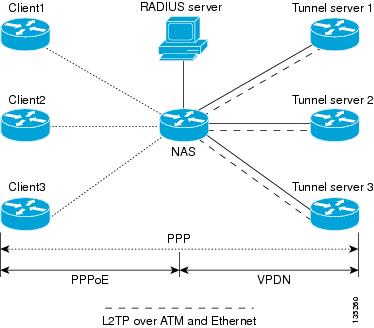
In the configuration shown in Figure 15, the NAS uses tunnel profiles downloaded from the RADIUS server to establish load balancing and failover priorities for VPDN Layer 2 tunnels. The Point-to-Point over Ethernet (PPPoE) protocol is used as the client to generate PPP sessions.
When multiple tunnel servers of the same priority are configured, the NAS will select the tunnel server with the lowest number of active sessions. If several tunnel servers have the same number of active sessions, the NAS must use a tie-breaking mechanism to determine which to select.
In Cisco IOS releases prior to 12.4(4)T, the NAS uses a round-robin selection as the tie-breaking mechanism. Because each NAS is aware only of its own session load, multiple NASs using the same round-robin algorithm may unevenly distribute sessions across the tunnel servers (session bunching). Each NAS selects the same tunnel server in the case of a tie because the round-robin tie-breaking mechanism always resolves to the same tunnel server. Session bunching is especially prominent when there is a very low number of sessions on each NAS.
Beginning in Cisco IOS Release 12.4(4)T, the NAS uses a new tie-breaking algorithm. A random selection is made among all peer tunnel servers carrying the same session load. This improved algorithm results in a more even distribution of sessions across tunnel servers, reducing the occurrence of session bunching.
Perform this task on the NAS remote RADIUS server to assign a priority value to each tunnel server for load balancing and failover.
Prerequisites
•
•
•
Restrictions
•
•
•
SUMMARY STEPS
1.
2.
DETAILED STEPS
What to Do Next
•
•
Configuring Tunnel Assignments on the NAS Remote RADIUS AAA Server
Tunnel assignments allow the grouping of users from different per-user or domain RADIUS profiles into the same active tunnel. This functionality prevents the establishment of duplicate tunnels when the tunnel type, tunnel endpoints, and tunnel assignment ID are identical.
Perform this task on the NAS remote RADIUS AAA server for each user and domain that you want to group into the same tunnel.
Prerequisites
•
•
SUMMARY STEPS
1.
or
user.domain.com Password = "secret" Service-Type = Outbound
2.
3.
4.
DETAILED STEPS
What to Do Next
You may configure any of the other VPDN-specific remote RADIUS AAA attributes.
Configuring L2TP Tunnel Connection Speed Labeling on the Remote ARS RADIUS AAA Server and the Tunnel Server
Tunnel connection speed labeling allows L2TP sessions to be accepted or denied based on the allowed connection speed that is configured on the Cisco Access Registrar (ARS) RADIUS server for that user. The administrator can configure an ARS RADIUS server to authorize users based on their Service Level Agreement (SLA). Tunnel connection speed information is forwarded to the ARS RADIUS server by default.
Prerequisites
You must be running Cisco IOS Release 12.3(4)T or a later release.
Restrictions
•
•
Perform the following tasks to configure tunnel connection speed labeling:
•
•
•
•
Configuring User Profiles on the ARS RADIUS Server for L2TP Tunnel Connection Speed Labeling
By default, the L2TP tunnel server will forward connection speed information to the AR RADIUS server for authentication. For the AR RADIUS server to perform authentication based on tunnel connection speed information, the user profiles on the ARS RADIUS server must be configured with the allowed connection speed.
Perform this task on the ARS RADIUS server to configure connection speed information in user profiles.
Prerequisites
•
•
SUMMARY STEPS
1.
2.
DETAILED STEPS
What to Do Next
•
•
•
Disabling L2TP Tunnel Connection Speed Labeling on the Tunnel Server
By default, the L2TP tunnel server will forward connection speed information to the RADIUS server for authentication. To disable authentication based on connection speeds, you must choose to not include RADIUS attribute 77 in the access request.
Perform this task on the tunnel server to disable authentication based on connection speeds.
Prerequisites
•
•
SUMMARY STEPS
1.
2.
3.
DETAILED STEPS
What to Do Next
You may configure any of the other VPDN-specific remote RADIUS AAA attributes.
Configuring L2TP Tunnel Connection Speed Labeling on the Tunnel Server
Perform this task on the L2TP tunnel server to enable authentication based on connection speeds if it has been previously disabled.
Prerequisites
•
•
SUMMARY STEPS
1.
2.
3.
DETAILED STEPS
What to Do Next
You may configure any of the other VPDN-specific remote RADIUS AAA attributes.
Configuring L2TP Tunnel Connection Speed Labeling for a Tunnel Switch
Perform this task on the tunnel switch to enable L2TP tunnel connection speed labeling for a tunnel switch node. This configuration allows the access request to be sent to the RADIUS server before the tunnel switch forwards the session to the next hop.
Prerequisites
•
•
SUMMARY STEPS
1.
2.
3.
DETAILED STEPS
What to Do Next
You may configure any of the other VPDN-specific remote RADIUS AAA attributes.
Configuring Secure Tunnel Authentication Names on the NAS Remote RADIUS AAA Server
The NAS AAA server can be configured with authentication names other than the default names for the NAS and the NAS AAA server, providing a higher level of security during VPDN tunnel establishment.
RADIUS tunnel authentication name attributes allows you to specify a name other than the default name for the tunnel initiator and for the tunnel terminator. These authentication names are specified using RADIUS tunnel attributes 90 and 91.
Perform this task on the remote RADIUS AAA server. This task applies to NAS-initiated tunnels using either L2TP or L2F.
Prerequisites
•
•
•
SUMMARY STEPS
1.
or
user.example.com Password = "secret" Service-Type = Outbound
2.
3.
DETAILED STEPS
What to Do Next
You may configure any of the other VPDN-specific remote RADIUS AAA attributes.
Configuring the NAS for Shell-Based Authentication of VPDN Users
Shell-based authentication of VPDN users provides terminal services (shell login or exec login) for VPDN users. With shell-based authentication enabled, when clients dial in to the NAS, authentication occurs in character mode. Once authentication is complete, PPP starts and a tunnel is established based on either DNIS or domain.
Enabling shell-based authentication of VPDN users provides the following capabilities:
•
•
For the NAS to perform shell-based VPDN authentication, it must be configured for AAA, PPP must be configured to bypass authentication, and DNIS must be enabled.
Perform this task to configure the NAS for shell-based authentication of VPDN users.
Prerequisites
•
•
•
•
•
•
•
•
•
•
•
Restrictions
•
•
•
•
•
•
•
•
•
•
SUMMARY STEPS
1.
2.
3.
4.
DETAILED STEPS
What to Do Next
See the "Configuring Shell-Based Authentication of VPDN Users: Examples" section for detailed examples of shell-based authentication of VPDN users configurations.
Configuration Examples for AAA for VPDNs
This section contains the following configuration examples:
•
•
•
•
•
•
•
•
•
•
•
•
•
•
•
•
Configuring the VPDN Tunnel Authorization Search Order: Examples
The following configuration example enables VPDN and configures a tunnel authorization search order that will be used instead of the default search order of DNIS number, then domain.
vpdn enablevpdn search-order domain dnisThe following example enables VPDN and multihop, and configures a tunnel authorization search order of multihop hostname first, then domain, then DNIS number. This configuration is used only on a tunnel switch.
vpdn enablevpdn multihopvpdn search-order multihop-hostname domain dnisConfiguring per-User VPDN on the NAS: Examples
The following example enables VPDN and configures global per-user VPDN on the NAS for all dial-in VPDN tunnels. The first time the NAS contacts the remote RADIUS AAA server, the entire structured username will be sent rather than just the domain name or DNIS number.
vpdn enablevpdn authen-before-forwardThe following example enables VPDN and configures per-user VPDN on the NAS for dial-in VPDN tunnels belonging to the VPDN group named cisco1. The first time the NAS contacts the remote RADIUS AAA server, the entire structured username will be sent rather than just the domain name or DNIS number.
vpdn enablevpdn-group cisco1request-dialinprotocol l2tpexitauthen-before-forwardConfiguring AAA on the NAS and the Tunnel Server: Examples
The following example enables VPDN and local authentication and authorization on the NAS or the tunnel server:
vpdn enable!aaa new-modelaaa authentication login default localaaa authentication ppp default localaaa authorization network default localThe following examples enables VPDN and configures the NAS and the tunnel server for dial-in VPDN tunnels when remote RADIUS AAA authentication occurs at the NAS:
NAS Configuration
vpdn enable!aaa new-modelaaa authentication login default radiusaaa authentication ppp default radiusaaa authorization network default radiusaaa accounting network default start-stop radiusradius-server host 10.1.1.1 auth-port 1939 acct-port 1443vpdn aaa untaggedTunnel Server Configuration
vpdn enable!aaa new-modelaaa authentication login default radiusaaa authentication ppp default radiusaaa authorization network default radiusaaa accounting network default start-stop radiusvpdn aaa attribute nas-ip-address vpdn-nasvpdn aaa untaggedThe Basic TACACS+ Configuration Example document provides a basic configuration of TACACS+ for user dialup authentication to a NAS.
Configuring Remote AAA for VPDNs on the L2TP Tunnel Terminator: Examples
The following example enables VPDN and configures the NAS and the tunnel server for dial-in VPDN tunnels with remote RADIUS AAA authentication occurring at the tunnel server. A sample RADIUS user profile for the remote RADIUS AAA server is also shown.
NAS Configuration
vpdn enable!aaa new-modelaaa authentication login default radiusaaa authentication ppp default radiusaaa authorization network default radiusaaa accounting network default start-stop radiusradius-server host 10.1.1.1 auth-port 1939 acct-port 1443vpdn aaa untaggedTunnel Server Configuration
vpdn enable!aaa new-modelaaa authentication login default radiusaaa authentication ppp default radiusaaa authorization network default mymethodlist group myvpdngroupradius-server host 10.2.2.2 auth-port 1939 acct-port 1443aaa group server radius myvpdngroupserver 10.2.2.2 auth-port 1939 acct-port 1443!vpdn tunnel authorization network mymethodlistvpdn tunnel authorization virtual-template 1RADIUS User Profile
csidtw13 Password = "cisco"Service-Type = Outbound,Tunnel-Type = :0:L2TP,Tunnel-Medium-Type = :0:IP,Tunnel-Client-Auth-ID = :0:"csidtw13",Tunnel-Password = :0:"cisco"Cisco:Cisco-Avpair = "vpdn:vpdn-vtemplate=1"Configuring Directed Request Authorization of VPDN Users: Examples
The following example enables VPDN and configures remote RADIUS AAA with VPDN authentication of directed request users on the tunnel server:
vpdn enable!aaa new-modelaaa authentication login default radiusaaa authentication ppp default radiusaaa authorization network default mymethodlist group myvpdngroupradius-server host 10.3.3.3 auth-port 1939 acct-port 1443aaa group server radius myvpdngroupserver 10.3.3.3 auth-port 1939 acct-port 1443!ip host website.com 10.3.3.3radius-server directed-requestvpdn authorize directed-requestThe following example enables VPDN and configures per-user VPDN, remote TACACS+ AAA, and VPDN authentication of directed request users on the NAS:
vpdn enablevpdn-group 1request-dialinprotocol l2tpdomain website.com!initiate-to 10.3.3.3local name local1authen-before-forward!aaa new-modelaaa authentication login default tacacsaaa authentication ppp default tacacsaaa authorization network default mymethod group mygroupradius-server host 10.4.4.4 auth-port 1201 acct-port 1450aaa group server tacacs mygroupserver 10.3.3.3 auth-port 1201 acct-port 1450!ip host website.com 10.3.3.3radius-server directed-requestvpdn authorize directed-requestConfiguring Domain Name Prefix and Suffix Stripping: Examples
The following example configures the router to parse the username from right to left and sets the valid suffix delimiter characters as @, \, and $. If the full username is cisco/user@cisco.com$cisco.net, the username "cisco/user@cisco.com" will be forwarded to the RADIUS server because the $ character is the first valid delimiter encountered by the NAS when parsing the username from right to left.
radius-server domain-stripping right-to-left delimiter @\$The following example configures the router to strip the domain name from usernames only for users associated with the VRF instance named abc. The default suffix delimiter @ will be used for generic suffix stripping.
radius-server domain-stripping vrf abcThe following example enables prefix stripping using the character / as the prefix delimiter. The default suffix delimiter character @ will be used for generic suffix stripping. If the full username is cisco/user@cisco.com, the username "user" will be forwarded to the TACACS+ server.
tacacs-server domain-stripping prefix-delimiter /The following example enables prefix stripping, specifies the character / as the prefix delimiter, and specifies the character # as the suffix delimiter. If the full username is cisco/user@cisco.com#cisco.net, the username "user@cisco.com" will be forwarded to the RADIUS server.
radius-server domain-stripping prefix-delimiter / delimiter #The following example enables prefix stripping, configures the character / as the prefix delimiter, configures the characters $, @, and # as suffix delimiters, and configures per-suffix stripping of the suffix cisco.com. If the full username is cisco/user@cisco.com, the username "user" will be forwarded to the TACACS+ server. If the full username is cisco/user@cisco.com#cisco.com, the username "user@cisco.com" will be forwarded.
tacacs-server domain-stripping prefix-delimiter / delimiter $@#tacacs-server domain-stripping strip-suffix cisco.comThe following example configures the router to parse the username from right to left and enables suffix stripping for usernames with the suffix cisco.com. If the full username is cisco/user@cisco.net@cisco.com, the username "cisco/user@cisco.net" will be forwarded to the RADIUS server. If the full username is cisco/user@cisco.com@cisco.net, the full username will be forwarded.
radius-server domain-stripping right-to-leftradius-server domain-stripping strip-suffix cisco.comThe following example configures a set of global stripping rules that will strip the suffix cisco.com using the delimiter @, and a different set of stripping rules for usernames associated with the VRF named myvrf:
radius-server domain-stripping strip-suffix cisco.com!radius-server domain-stripping prefix-delimiter # vrf myvrfradius-server domain-stripping strip-suffix cisco.net vrf myvrfConfiguring VPDN Tunnel Authentication: Examples
The following example configures VPDN tunnel authentication using the hostname on a NAS and the local name on the tunnel server. Note that the secret password configured for each device matches.
NAS Configuration
hostname NAS1username tunnelserver1 password supersecretTunnel Server Configuration
vpdn-group 1local name tunnelserver1exitusername NAS1 password supersecretThe following example configures VPDN tunnel authentication using the local name on the NAS and the L2TP tunnel password on the tunnel server. Note that the secret password configured for each device matches.
NAS Configuration
vpdn-group 2local name NAS6!username tunnelserver12 password verysecretTunnel Server Configuration
vpdn-group 4l2tp tunnel password verysecretlocal name tunnelserver12exitusername NAS6 password verysecretThe following example configures VPDN tunnel authentication using the L2TP tunnel password on both the NAS and the tunnel server. Note that the secret password configured for each device matches.
NAS Configuration
vpdn-group l2tpl2tp tunnel password rathersecretTunnel Server Configuration
vpdn-group 46l2tp tunnel password rathersecretL2TP Domain Screening: Examples
This section provides the following configuration examples:
•
•
L2TP Domain Screening with Global Preauthentication: Example
The following partial sample configuration shows the L2TP Domain Screening feature with global preauthentication.
Router# show running-config!...hostname esr1-client...aaa new-model!aaa authentication login mylist enable lineaaa authentication ppp default group radiusaaa authorization network default group radius!aaa nas port extendedaaa session-id commonip subnet-zerono ip gratuitous-arpsip host example-2 10.0.0.253!vpdn enablevpdn authen-before-forwardvpdn ip udp ignore checksumvpdn search-order domain!vpdn-group 1accept-dialinprotocol pppoevirtual-template 1pppoe limit per-mac 2pppoe limit per-vc 2pppoe limit per-vlan 2pppoe limit max-sessions 2!ppp hold-queue 80000no virtual-template snmp!...!interface Loopback1no ip address!interface FastEthernet0/0/0ip address 10.5.11.7 255.255.0.0speed 100full-duplexhold-queue 4096 inhold-queue 4096 out!interface GigabitEthernet1/0/0no ip addressnegotiation auto!!interface ATM4/0/0.101 multipointatm pppatm passiverange pvc 52/101 52/101encapsulation aal5autoppp Virtual-Template1!pvc-in-range 52/101vpn service znet.net1 replace-authen-domain!!interface ATM5/0/0no ip addressno ip mroute-cacheno atm pxf queuingatm clock INTERNALno atm auto-configurationno atm ilmi-keepaliveno atm address-registrationno atm ilmi-enable!interface ATM5/0/0.101 multipointatm pppatm passiverange pvc 51/101 51/101encapsulation aal5autoppp Virtual-Template1!pvc-in-range 51/101vpn service znet.net1 replace-authen-domain!!...radius-server attribute nas-port format dradius-server host 10.5.6.100 auth-port 1645 acct-port 1646radius-server retransmit 4radius-server timeout 15radius-server key cisco!control-plane!call admission limit 90!...!endL2TP Domain Screening with per-VPDN Group Preauthentication: Example
The following partial sample configuration shows the L2TP Domain Screening feature with per-VPDN group preauthentication.
Router# show running-config!...hostname esr1-client...aaa new-model!!aaa authentication login mylist enable lineaaa authentication ppp default localaaa authorization network default local!aaa nas port extendedaaa session-id commonip subnet-zerono ip gratuitous-arpsip host example-2 10.0.0.253!!vpdn enablevpdn ip udp ignore checksumvpdn search-order domain!vpdn-group 1accept-dialinprotocol pppoevirtual-template 1pppoe limit per-mac 2pppoe limit per-vc 2pppoe limit per-vlan 2pppoe limit max-sessions 2!!vpdn-group LAC_1request-dialinprotocol l2tpdomain znet.net1initiate-to ip 10.1.1.1local name LAC1-1authen-before-forwardl2tp tunnel password 0 tunnel!ppp hold-queue 80000no virtual-template snmpusername LAC1-1 nopasswordusername LNS1-1 nopasswordusername user-1-1@znet.net1 password 0 sanfran_1_1...!interface ATM4/0/0.101 multipointatm pppatm passiverange pvc 52/101 52/101encapsulation aal5autoppp Virtual-Template1!pvc-in-range 52/101vpn service znet.net1 replace-authen-domain!!interface ATM5/0/0no ip addressno ip mroute-cacheno atm pxf queuingatm clock INTERNALno atm auto-configurationno atm ilmi-keepaliveno atm address-registrationno atm ilmi-enable!interface ATM5/0/0.101 multipointatm pppatm passiverange pvc 51/101 51/101encapsulation aal5autoppp Virtual-Template1!pvc-in-range 51/101vpn service znet.net1 replace-authen-domain!...radius-server attribute nas-port format d!control-plane!call admission limit 90!...endConfiguring RADIUS Tunnel Accounting on a NAS: Example
The following example configures a NAS for remote AAA, configures a dial-in VPDN deployment, and enables the sending of tunnel and tunnel-link accounting records to the RADIUS server:
aaa new-model!aaa authentication ppp default group radiusaaa authorization network default localaaa accounting network m1 start-stop group radiusaaa accounting network m2 stop-only group radiusaaa session-id commonenable secret 5 $1$IDjH$iL7puCja1RMlyOM.JAeuf/enable password secret!username ISP-LAC password 0 tunnelpass!resource-pool disable!ip subnet-zeroip cefno ip domain-lookupip host myhost 172.16.1.129!vpdn enablevpdn tunnel accounting network m1vpdn session accounting network m1vpdn search-order domain dnis!vpdn-group 1request-dialinprotocol l2tpdomain cisco.cominitiate-to ip 10.1.26.71local name ISP-LAC!isdn switch-type primary-5ess!fax interface-type fax-mailmta receive maximum-recipients 0!controller T1 7/4framing esflinecode b8zspri-group timeslots 1-24!interface FastEthernet0/0ip address 10.1.27.74 255.255.255.0no ip mroute-cacheduplex halfspeed autono cdp enable!interface FastEthernet0/1no ip addressno ip mroute-cacheshutdownduplex autospeed autono cdp enable!interface Serial7/4:23ip address 10.0.0.2 255.255.255.0encapsulation pppdialer string 2000dialer-group 1isdn switch-type primary-5essppp authentication chap!interface Group-Async0no ip addressshutdowngroup-range 1/00 3/107!ip default-gateway 10.1.27.254ip classlessip route 0.0.0.0 0.0.0.0 10.1.27.254no ip http serverip pim bidir-enable!dialer-list 1 protocol ip permitno cdp run!radius-server host 172.19.192.26 auth-port 1645 acct-port 1646 key rad123radius-server retransmit 3call rsvp-syncConfiguring RADIUS Tunnel Accounting on a Tunnel Server: Example
The following example configures a tunnel server for remote AAA, configures a dial-in VPDN deployment, and enables the sending of tunnel and tunnel-link accounting records to the RADIUS server:
aaa new-model!aaa accounting network m1 start-stop group radiusaaa accounting network m2 stop-only group radiusaaa session-id commonenable secret 5 $1$ftf.$wE6Q5Yv6hmQiwL9pizPCg1!username ENT_LNS password 0 tunnelpassusername user1@cisco.com password 0 labusername user2@cisco.com password 0 lab!spe 1/0 1/7firmware location system:/ucode/mica_port_firmware!spe 2/0 2/9firmware location system:/ucode/mica_port_firmware!resource-pool disableclock timezone est 2!ip subnet-zerono ip domain-lookupip host CALLGEN-SECURITY-V2 10.24.80.28 10.47.0.0ip host myhost 172.16.1.129!vpdn enablevpdn tunnel accounting network m1vpdn session accounting network m1!vpdn-group 1accept-dialinprotocol l2tpvirtual-template 1terminate-from hostname ISP_NASlocal name ENT_TS!isdn switch-type primary-5ess!fax interface-type modemmta receive maximum-recipients 0!interface Loopback0ip address 10.0.0.101 255.255.255.0!interface Loopback1ip address 10.0.0.201 255.255.255.0!interface Ethernet0ip address 10.1.26.71 255.255.255.0no ip mroute-cacheno cdp enable!interface Virtual-Template1ip unnumbered Loopback0peer default ip address pool vpdn-pool1ppp authentication chap!interface Virtual-Template2ip unnumbered Loopback1peer default ip address pool vpdn-pool2ppp authentication chap!interface FastEthernet0no ip addressno ip mroute-cacheshutdownduplex autospeed autono cdp enable!ip local pool vpdn-pool1 10.0.0.2 10.0.0.200ip local pool vpdn-pool2 10.0.0.1 10.0.0.100ip default-gateway 10.1.26.254ip classlessip route 0.0.0.0 0.0.0.0 10.1.26.254ip route 10.1.1.2 255.255.255.255 10.1.26.254no ip http serverip pim bidir-enable!dialer-list 1 protocol ip permitno cdp run!radius-server host 172.16.192.80 auth-port 1645 acct-port 1646 key rad123radius-server retransmit 3call rsvp-syncConfiguring DNS Name Support on the NAS Remote RADIUS AAA Server: Example
The following AV pair instructs the RADIUS server to resolve the DNS name cisco and tunnel calls to the appropriate IP addresses:
9,1="vpdn:ip-addresses = cisco"Configuring L2TP Tunnel Server Load Balancing and Failover Using the Cisco Proprietary VSA: Examples
The following example shows a RADIUS profile that will equally balance the load between three tunnel servers:
user = cisco.comprofile_id = 29profile_cycle = 7radius=Ciscocheck_items=2=ciscoreply_attributes= {9,1="vpdn:l2tp-tunnel-password=cisco123"9,1="vpdn:tunnel-type=l2tp"9,1="vpdn:ip-addresses=172.16.171.11 172.16.171.12 172.16.171.13"9,1="vpdn:tunnel-id=tunnel"}}}The following example shows a RADIUS profile that will equally balance calls between 172.16.171.11 and 172.16.171.12. If both of those tunnel servers are unavailable, the RADIUS server will tunnel calls to 172.16.171.13.
user = cisco.comprofile_id = 29profile_cycle = 7radius=Ciscocheck_items=2=ciscoreply_attributes= {9,1="vpdn:l2tp-tunnel-password=cisco123"9,1="vpdn:tunnel-type=l2tp"9,1="vpdn:ip-addresses=172.16.171.11 172.16.171.12/172.16.171.13"9,1="vpdn:tunnel-id=tunnel"}Configuring L2TP Tunnel Server Load Balancing and Failover using the RADIUS Tunnel Preference Attribute: Example
The following RADIUS configuration specifies four tunnel server profiles with different priority values specified in the Tunnel-Preference attribute field. The NAS will preferentially initiate L2TP tunnels to the tunnel server with the lowest configured priority value. If two tunnel server profiles have the same priority value configured, they will be considered equal and load balancing will occur between them.
net3 Password = "cisco" Service-Type = OutboundTunnel-Type = :0:L2TP,Tunnel-Medium-Type = :0:IP,Tunnel-Server-Endpoint = :0:"10.1.3.1",Tunnel-Assignment-Id = :0:"1",Tunnel-Preference = :0:1,Tunnel-Password = :0:"secret"Tunnel-Type = :1:L2TP,Tunnel-Medium-Type = :1:IP,Tunnel-Server-Endpoint = :1:"10.1.5.1",Tunnel-Assignment-Id = :1:"1",Tunnel-Preference = :1:1,Tunnel-Password = :1:"secret"Tunnel-Type = :2:L2TP,Tunnel-Medium-Type = :2:IP,Tunnel-Server-Endpoint = :2:"10.1.4.1",Tunnel-Assignment-Id = :2:"1",Tunnel-Preference = :2:1,Tunnel-Password = :2:"secret"Tunnel-Type = :3:L2TP,Tunnel-Medium-Type = :3:IP,Tunnel-Server-Endpoint = :3:"10.1.6.1",Tunnel-Assignment-Id = :3:"1",Tunnel-Preference = :3:1,Tunnel-Password = :3:"secret"Configuring Tunnel Assignments on the NAS RADIUS AAA Server: Example
The following examples configure the RADIUS server to group sessions in a tunnel:
Per-User Configuration
user@cisco.com Password = "cisco" Service-Type = Outbound,tunnel-type = :1:L2TP,tunnel-server-endpoint = :1:"10.14.10.54",tunnel-assignment-Id = :1:"router"client@cisco.com Password = "cisco" Service-Type = Outbound,tunnel-type = :1:L2TP,tunnel-server-endpoint = :1:"10.14.10.54",tunnel-assignment-Id = :1:"router"Domain Configuration
eng.cisco.com Password = "cisco" Service-Type = Outbound,tunnel-type = :1:L2TP,tunnel-server-endpoint = :1:"10.14.10.54",tunnel-assignment-Id = :1:"router"sales.cisco.com Password = "cisco" Service-Type = Outbound,tunnel-type = :1:L2TP,tunnel-server-endpoint = :1:"10.14.10.54",tunnel-assignment-Id = :1:"router"Configuring L2TP Tunnel Connection Speed Labeling: Examples
The following example shows an ARS RADIUS server profile configuration for three users of the service cisco.com. Each user has a different configuration for allowable connection speeds.
# cisco.com/# Name = cisco.com# Description = Domain# Password = <encrypted># AllowNullPassword = FALSE# Enabled = TRUE# Group~ =# BaseProfile~ =# AuthenticationScript~ =# AuthorizationScript~ =# UserDefined1 =# Attributes/# cisco-avpair = vpdn:tunnel-id=aaa_lac# cisco-avpair = vpdn:tunnel-type=l2tp# cisco-avpair = vpdn:ip-addresses=10.1.1.3# cisco-avpair = vpdn:l2tp-tunnel-password=lab# service-type = outbound# CheckItems/# Euser1@cisco.com/# Name = Euser1@cisco.com# Description = PPPoE-Only-Tx-Accept# Password = <encrypted># AllowNullPassword = FALSE# Enabled = TRUE# Group~ =# BaseProfile~ =# AuthenticationScript~ =# AuthorizationScript~ =# UserDefined1 = TX:102400000# Attributes/# CheckItems/## Euser11@cisco.com/# Name = Euser11@cisco.com# Description = PPPoE-Range-RX-Accept# Password = <encrypted># AllowNullPassword = FALSE# Enabled = TRUE# Group~ =# BaseProfile~ =# AuthenticationScript~ =# AuthorizationScript~ =# UserDefined1 = RX:96000000-200000000# Attributes/# CheckItems/## Euser8@cisco.com/# Name = Euser8@cisco.com# Description = PPPoE-Both-TXRX-Reject# Password = <encrypted># AllowNullPassword = FALSE# Enabled = TRUE# Group~ =# BaseProfile~ =# AuthenticationScript~ =# AuthorizationScript~ =# UserDefined1 = TX:5600000:RX:64000000# Attributes/# CheckItems/The following example configures the .tcl script to be the OutgoingScript of the service that has been created:
Name = check-infoDescription =Type = localIncomingScript~ =OutgoingScript~ = checkConnect-InfoOutagePolicy~ = RejectAllOutageScript~ =UserList = dialin-usersConnection speed information is forwarded by the tunnel server to the RADIUS AAA server for authentication by default. The following example disables the forwarding of connection speed information to the RADIUS AAA server:
Router(config)# no radius-server attribute 77 include-in-access-reqThe following example enables the forwarding of connection speed information to the RADIUS AAA server from the tunnel server if it has been previously disabled:
Router(config)# radius-server attribute 77 include-in-access-req
The following example enables the forwarding of connection speed information to the RADIUS AAA server from a tunnel switch before the session is forwarded to the next hop:
Router(config)# vpdn authen-before-forwardConfiguring Secure Authentication Names: Example
The following is an example of a RADIUS user profile that includes RADIUS tunneling attributes 90 and 91. This entry supports two tunnels, one for L2F and the other for L2TP. The tag entries with :1 support L2F tunnels, and the tag entries with :2 support L2TP tunnels.
cisco.com Password = "cisco", Service-Type = OutboundService-Type = Outbound,Tunnel-Type = :1:L2F,Tunnel-Medium-Type = :1:IP,Tunnel-Client-Endpoint = :1:"10.0.0.2",Tunnel-Server-Endpoint = :1:"10.0.0.3",Tunnel-Client-Auth-Id = :1:"l2f-cli-auth-id",Tunnel-Server-Auth-Id = :1:"l2f-svr-auth-id",Tunnel-Assignment-Id = :1:"l2f-assignment-id",Cisco-Avpair = "vpdn:nas-password=l2f-cli-pass",Cisco-Avpair = "vpdn:gw-password=l2f-svr-pass",Tunnel-Preference = :1:1,Tunnel-Type = :2:L2TP,Tunnel-Medium-Type = :2:IP,Tunnel-Client-Endpoint = :2:"10.0.0.2",Tunnel-Server-Endpoint = :2:"10.0.0.3",Tunnel-Client-Auth-Id = :2:"l2tp-cli-auth-id",Tunnel-Server-Auth-Id = :2:"l2tp-svr-auth-id",Tunnel-Assignment-Id = :2:"l2tp-assignment-id",Cisco-Avpair = "vpdn:l2tp-tunnel-password=l2tp-tnl-pass",Tunnel-Preference = :2:2Configuring Shell-Based Authentication of VPDN Users: Examples
The following example configures dial-in lines 1 through 8 on the NAS to support shell-based authentication of VPDN users:
line 1 8!assuming all logins on lines 1-8 is to be authenticated at 172.69.71.85login authentication ExceVPDN-Loginautoselect during-loginautocommand pppmodem InOuttransport input alltransport output nonestopbits 1speed 115200The following example configures a NAS for shell-based authentication of VPDN users based on DNIS information:
vpdn enablevpdn search-order dnis!aaa new-modelaaa authentication login Exec-VPDN-login group Exec-VPDN-Login-Serversaaa authentication ppp Exec-VPDN-ppp if-needed group Exec-VPDN-Login-Serversaaa authorization network default group Exec-VPDN-Login-Serversaaa authorization network no_author none!!The following configuration creates a RADIUS server group named Exec-VPDN-Login Servers.radius-server host 172.69.69.72 auth-port 1645 acct-port 1646aaa group server radius Exec-VPDN-Login-Serversserver 171.69.69.72 auth-port 1645 acct-port 1646!!The following configuration maps DNIS 7777 to the RADIUS server group named !Exec-VPDN-Login Servers. Authentication requests from users at DNIS 7777 will be !forwarded to the RADIUS server at 10.1.10.1.aaa dnis map enableaaa dnis map 7777 authentication ppp group ExecVPDN-Login-Serversaaa dnis map 7777 authentication login group ExecVPDN-Login-ServersThe following example uses the global RADIUS server definition list for PPP authentication on the NAS if authentication is needed:
aaa authentication ppp ExecVPDN-ppp if-needed group radius!PPP config for line 1int async 1ip unnumbered e0encap pppasync mode interactiveppp authentication pap ExecVPDN-pppThe following example configures the tunnel server to accept VPDN tunnels without performing PPP authentication:
vpdn-group 1accept-dialinprotocol l2tpvirtual-template 1terminate-from hostname host1_no_authenl2tp tunnel authenticationl2tp password no_authen_secretlocal name host2_no_authen!interface Virtual-Template1ip unnumbered Ethernet0/0no keepaliveppp authorization no_author!The following example configures the tunnel server to accept VPDN tunnels with PPP authentication enabled:
vpdn-group 2accept-dialinprotocol l2tpvirtual-template 2terminate-from hostname authen_onl2tp tunnel authenticationl2tp password no_authen_secretlocal name host2_autne_on!interface Virtual-Template1ip unnumbered Ethernet0/0no keepaliveppp authentication papWhere to Go Next
Depending on the type of VPDN deployment you are configuring, you should perform the tasks in one of the following modules:
•
•
•
•
Additional References
The following sections provide references related to configuring AAA for VPDNs.
Related Documents
VPDN technology overview
VPDN commands: complete command syntax, command mode, defaults, usage guidelines, and examples
Cisco IOS VPDN Command Reference, Release 12.4
Information about configuring AAA
"Authentication, Authorization, and Accounting (AAA)" part of the Cisco IOS Security Configuration Guide, Release 12.4
Layer 2 Tunnel Protocol
Layer 2 Tunnel Protocol feature module
Information about configuring RADIUS and TACACS
"Security Server Protocols" part of the Cisco IOS Security Configuration Guide, Release 12.4
Security commands: complete command syntax, command mode, defaults, usage guidelines, and examples
Cisco IOS Security Command Reference, Release 12.4
Information about RPMS
"Configuring Resource Pool Management" chapter of the Cisco IOS Dial Technologies Configuration Guide, Release 12.4
Dial Technologies commands: complete command syntax, command mode, defaults, usage guidelines, and examples
Cisco IOS Dial Technologies Command Reference, Release 12.4
Standards
MIBs
RFCs
RFC 2867
RADIUS Accounting Modifications for Tunnel Protocol Support
RFC 2868
RADIUS Tunnel Authentication Attributes
Technical Assistance
Feature Information for AAA for VPDNs
Table 5 lists the features in this module and provides links to specific configuration information. Only features that were introduced or modified in Cisco IOS Releases 12.2(1) or later appear in the table.
Not all commands may be available in your Cisco IOS software release. For details on when support for specific commands was introduced, see the command reference documents.
If you are looking for information on a feature in this technology that is not documented here, see the "VPDN Features Roadmap."
Cisco IOS software images are specific to a Cisco IOS software release, a feature set, and a platform. Use Cisco Feature Navigator to find information about platform support and Cisco IOS software image support. Access Cisco Feature Navigator at http://www.cisco.com/go/fn. You must have an account on Cisco.com. If you do not have an account or have forgotten your username or password, click Cancel at the login dialog box and follow the instructions that appear.
Table 5 Feature Information for AAA for VPDNs
L2TP Domain Screening, Rules Based
12.2(31)SB2
This feature allows per-user L2TP tunnel setup by creating customized Policy Manager match rules.
The following sections provide information about this feature:
•
•
The L2TP Domain Screening, Rules Based feature allows per-user L2TP tunnel setup by creating customized Policy Manager match rules by combining the following three features:
•
•
•
These three commands work together to allows you to construct rules to customize specific policy behavior to allow an L2TP tunnel setup by creating customized Policy Manager match rules.
L2TP Tunnel Selection Load Balancing with Random Algorithm
12.2(31)SB2
This feature allows the NAS to use a new tie-breaking algorithm and is transparent to any user. A random selection is made among all peer tunnel servers carrying the same session load. This improved algorithm results in a more even distribution of sessions across tunnel servers, reducing the occurrence of session bunching.
L2TP Domain Screening
12.2(28)SB
This feature introduces the ability to modify the domain portion of the username seamlessly when you enter into a Virtual Private Network (VPN) service.
The following sections provide information about this feature:
•
The L2TP Domain Screening feature allows per-user L2TP tunnel setup by combining the following two features:
•
•
These two commands work together to make sure that the appropriate domain has been screened before access is allowed to an L2TP tunnel for the user session.
L2TP Tunnel Connection Speed Labeling
12.3(4)T
This feature introduces the ability to accept or deny an L2TP session based on the allowed connection speed that is configured on the Cisco ARS RADIUS server for that user. The RADIUS server can authorize users based on their SLA.
The following sections provide information about this feature:
•
No commands were introduced or modified by this feature.
RADIUS Attribute 82: Tunnel Assignment ID
12.2(4)T
This feature allows the L2TP NAS to group users from different per-user or domain RADIUS profiles into the same active tunnel if the tunnel endpoints, tunnel type, and Tunnel-Assignment-ID are identical.
The following sections provide information about this feature:
•
•
No commands were introduced or modified by this feature.
RADIUS Tunnel Attribute Extensions
12.2(13)T
This feature introduces RADIUS attribute 90 and RADIUS attribute 91. Both attributes help support the provision of compulsory tunneling in VPDNs by allowing the user to specify authentication names for the NAS and the RADIUS server.
The following sections provide information about this feature:
•
•
No commands were introduced or modified by this feature.
RADIUS Tunnel Preference for Load Balancing and Fail-Over
12.2(4)T
12.2(11)TThis feature provides industry-standard load balancing and failover functionality for multi-vendor networks. Support for Cisco access server platforms was introduced in Cisco IOS Release 12.2(11)T.
The following sections provide information about this feature:
•
RFC-2867 RADIUS Tunnel Accounting
12.3(4)T
This feature introduces six new RADIUS accounting types that are used with the RADIUS accounting attribute Acct-Status-Type (attribute 40), which indicates whether an accounting request marks the beginning of user service (start) or the end (stop).
The following sections provide information about this feature:
•
•
The following commands were introduced or modified by this feature: aaa accounting, vpdn session accounting network, vpdn tunnel accounting network.
Shell-Based Authentication of VPDN Users
12.2(2)T
This feature provides terminal services for VPDN users to support rollout of wholesale dial networks.
The following sections provide information about this feature:
•
•
The following command was modified by this feature: aaa dnis map authentication group.
Tunnel Authentication via RADIUS on Tunnel Terminator
12.3(4)T
This feature allows the L2TP tunnel server to perform remote authentication and authorization with RADIUS on incoming L2TP NAS dial-in connection requests. This feature also allows the L2TP NAS to perform remote authentication and authorization with RADIUS on incoming L2TP tunnel server dial-out connection requests.
The following sections provide information about this feature:
•
•
•
The following commands were introduced by this feature: vpdn tunnel authorization network, vpdn tunnel authorization password, vpdn tunnel authorization virtual-template.

© 2006 Cisco Systems, Inc. All rights reserved.
 Feedback