High Availability Configuration Guide, Cisco IOS XE 16 (Cisco ASR 900 Series)
Bias-Free Language
The documentation set for this product strives to use bias-free language. For the purposes of this documentation set, bias-free is defined as language that does not imply discrimination based on age, disability, gender, racial identity, ethnic identity, sexual orientation, socioeconomic status, and intersectionality. Exceptions may be present in the documentation due to language that is hardcoded in the user interfaces of the product software, language used based on RFP documentation, or language that is used by a referenced third-party product. Learn more about how Cisco is using Inclusive Language.
The Stateful Switchover (SSO) feature works with Nonstop Forwarding (NSF) in Cisco software to minimize the amount of time
a network is unavailable to its users following a switchover. The primary objective of SSO is to improve the availability
of networks constructed with Cisco routers. SSO performs the following functions:
Maintains stateful protocol and application information to retain user session information during a switchover.
Enables line cards to continue to forward network traffic with no loss of sessions, providing improved network availability.
Provides a faster switchover relative to high system availability.
Prerequisites for Stateful Switchover
General Prerequisites
Both RSPs
must be running the same version of Cisco software.
Before copying a
file to flash memory, be sure that ample space is available in flash memory.
Compare the size of the file you are copying to the amount of available flash
memory shown. If the space available is less than the space required by the
file you will copy, the copy process will not continue and an error message
similar to the following will be displayed:
%Error copying tftp://image@server/tftpboot/filelocation/imagename (Not enough space on device).
For Nonstop
Forwarding (NSF) support, neighbor routers must be running NSF-enabled images,
though SSO need not be configured on the neighbor device.
SNMP for Stateful
Switchover Prerequisites
SNMP must be configured. See the
Configuring SNMP Support module of Cisco IOS XE Network Management
Configuration Guide for configuration information. There are no configuration
tasks for SNMP for SSO.
Restrictions for Stateful Switchover
General Restrictions for
SSO
Only SSO mode is supported.
Configuration
changes made through SNMP may not be automatically configured on the standby RP
after a switchover occurs.
The Hot Standby
Routing Protocol (HSRP) is not supported with Cisco Nonstop Forwarding with
Stateful Switchover. Do not use HSRP with Cisco Nonstop Forwarding with
Stateful Switchover.
Enhanced Object
Tracking (EOT) is not stateful switchover-aware and cannot be used with HSRP,
Virtual Router Redundancy Protocol (VRRP), or Gateway Load Balancing Protocol
(GLBP) in SSO mode.
Multicast is not
SSO-aware and restarts after switchover; therefore, multicast tables and data
structures are cleared upon switchover.
Configuration Mode
Restrictions
The configuration
registers on both RPs must be set the same for the networking device to behave
the same when either RP is rebooted.
During the
startup (bulk) synchronization, configuration changes are not allowed. Before
making any configuration changes, wait for a message similar to the following:
%HA-5-MODE:Operating mode is sso, configured mode is sso.
We recommend a wait time of 10-15 minutes after receiving the "Bulk Sync succeeded" message before performing any configuration
on the RSP3 module.
%HA-6-STANDBY_READY: Standby RP in slot n
 is operational in SSO mode
Switchover Process Restrictions
If the router is configured for SSO mode, and the active RP fails before the standby is ready to switch over, the router will
recover through a full system reset.
Cisco ASR 903 Series
Aggregation Services Routers Restrictions
Only SSO mode is supported on Cisco ASR 903 Aggregation Services
routers.
All licenses are synced to the standby RSP, when evaluation or permanent licenses are installed on a HA system. However,
when a new RSP is inserted in a standby system for HA, the standby RSP resets once before it reaches standby hot state.
Erasing router configuration using write erase command does not work in standby router in HA system when it is applied from an active router or when accessed from telnet.
SNMP for Stateful
Switchover Restrictions
Statistics and counter values
will not be synchronized from the active to the standby RP.
Only the MIBs listed in the
SSO MIB Support section are synchronized between the active and the standby
RPs.
SNMP requests can fail
during the switchover process, that is, while the standby RP is taking over as
the active RP. Data in the unsynchronized MIBs may be out of synchronization,
and the information in these MIBs can be lost on a switchover.
Synchronization of SNMP data
between RPs is available only when the networking device is operating in SSO
mode.
Information About Stateful Switchover
SSO Overview
SSO provides
protection for network edge devices with dual RPs that represent a single point
of failure in the network design, and where an outage might result in loss of
service for customers.
In Cisco networking
devices that support dual RPs, SSO takes advantage of RP redundancy to increase
network availability. The feature establishes one of the RPs as the active
processor while the other RP is designated as the standby processor, and then
synchronizing critical state information between them. Following an initial
synchronization between the two processors, SSO dynamically maintains RP state
information between them.
A switchover from the
active to the standby processor occurs when the active RP fails, is removed
from the networking device, or is manually taken down for maintenance.
SSO is used with the
Cisco Nonstop Forwarding (NSF) feature. Cisco NSF allows for the forwarding of
data packets to continue along known routes while the routing protocol
information is being restored following a switchover. With Cisco NSF, peer
networking devices do not experience routing flaps, thereby reducing loss of
service outages for customers.
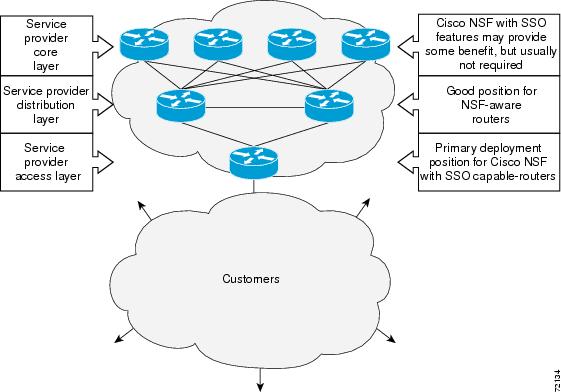
The figure below
illustrates how SSO is typically deployed in service provider networks. In this
example, Cisco NSF with SSO is primarily at the access layer (edge) of the
service provider network. A fault at this point could result in loss of service
for enterprise customers requiring access to the service provider network.
Figure 1. Cisco NSF with SSO Network
Deployment: Service Provider Networks
For Cisco NSF
protocols that require neighboring devices to participate in Cisco NSF, Cisco
NSF-aware software images must be installed on those neighboring distribution
layer devices. Additional network availability benefits might be achieved by
applying Cisco NSF and SSO features at the core layer of your network; however,
consult your network design engineers to evaluate your specific site
requirements.
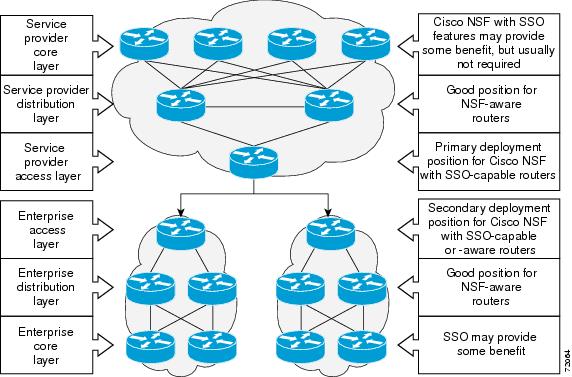
Additional levels of
availability may be gained by deploying Cisco NSF with SSO at other points in
the network where a single point of failure exists. The figure below
illustrates an optional deployment strategy that applies Cisco NSF with SSO at
the enterprise network access layer. In this example, each access point in the
enterprise network represents another single point of failure in the network
design. In the event of a switchover or a planned software upgrade, enterprise
customer sessions would continue uninterrupted through the network.
Figure 2. Cisco NSF with SSO Network
Deployment: Enterprise Networks
Redundancy Modes
Stateful Switchover
Mode
SSO supports synchronization of line card, protocol,
and application state information between RPs for supported features and
protocols (a hot standby).
Route Processor Synchronization
In networking devices running SSO, both RPs must be running the same configuration so that the standby RP is always ready
to assume control if the active RP fails.
To achieve the benefits of SSO, synchronize the configuration information from the active RP to the standby RP at startup
and whenever changes to the active RP configuration occur. This synchronization occurs in two separate phases:
While the standby RP is booting, the configuration information is synchronized in bulk from the active RP to the standby
RP.
When configuration or state changes occur, an incremental synchronization is conducted from the active RP to the standby
RP.
Bulk Synchronization During Initialization
When a system with SSO is initialized, the active RP performs a chassis discovery (discovery of the number and type of line
cards and fabric cards, if available, in the system) and parses the startup configuration file.
The active RP then synchronizes this data to the standby RP and instructs the standby RP to complete its initialization.
This method ensures that both RPs contain the same configuration information.
Even though the standby RP is fully initialized, it interacts only with the active RP to receive incremental changes to the
configuration files as they occur. Executing CLI commands on the standby RP is not supported.
During system startup, the startup configuration file is copied from the active RP to the standby RP. Any existing startup
configuration file on the standby RP is overwritten. The startup configuration is a text file stored in the NVRAM of the RP.
It is synchronized whenever you perform the following operations:
The command
copysystem:running-confignvram:startup-config is used.
The command
copyrunning-configstartup-config is used.
The command
writememory is used.
The command
copyfilenamenvram:startup-config is used.
SNMP SET of MIB variable ccCopyEntry in CISCO_CONFIG_COPY MIB is used.
System configuration is saved using the
reload command.
System configuration is saved following entry of a forced switchover command.
Incremental Synchronization
After both RPs are fully initialized, any further changes to the running configuration or active RP states are synchronized
to the standby RP as they occur. Active RP states are updated as a result of processing protocol information, external events
(such as the interface becoming up or down), or user configuration commands (using Cisco IOS commands or Simple Network Management
Protocol [SNMP]) or other internal events.
Changes to the running configuration are synchronized from the active RP to the standby RP. In effect, the command is run
on both the active and the standby RP.
Configuration changes caused by an SNMP set operation are synchronized on a case-by-case basis. Only two SNMP configuration
set operations are supported:
shutandno-shut (of an interface)
linkup/downtrapenable/disable
Routing and forwarding information is synchronized to the standby RP:
State changes for SSO-aware protocols (ATM, Frame Relay, PPP, High-Level Data Link Control [HDLC]) or applications (SNMP)
are synchronized to the standby RP.
Cisco Express Forwarding (CEF) updates to the Forwarding Information Base (FIB) are synchronized to the standby RP.
Chassis state changes are synchronized to the standby RP. Changes to the chassis state due to line card insertion or removal
are synchronized to the standby RP.
Changes to the line card states are synchronized to the standby RP. Line card state information is initially obtained during
bulk synchronization of the standby RP. Following bulk synchronization, line card events, such as whether the interface is
up or down, received at the active processor are synchronized to the standby RP.
The various counters and statistics maintained in the active RP are not synchronized because they may change often and because
the degree of synchronization they require is substantial. The volume of information associated with statistics makes synchronizing
them impractical.
Not synchronizing counters and statistics between RPs may create problems for external network management systems that monitor
this information.
Switchover Operation
Switchover Conditions
An automatic or manual switchover may occur under the following conditions:
A fault condition that causes the active RP to crash or reboot--automatic switchover
The active RP is declared dead (not responding)--automatic switchover
The command is invoked--manual switchover
The user can force the switchover from the active RP to the standby RP by using a CLI command. This manual procedure allows
for a graceful or controlled shutdown of the active RP and switchover to the standby RP. This graceful shutdown allows critical
cleanup to occur.
Note
This procedure should not be confused with the graceful shutdown procedure for routing protocols in core routers--they are
separate mechanisms.
Caution
The SSO feature introduces a number of new command and command changes, including commands to manually cause a switchover.
The
reload command does not cause a switchover. The
reload command causes a full reload of the box, removing all table entries, resetting all line cards, and interrupting nonstop forwarding.
Switchover
Time
Switchover time is only a few seconds on the
router. Packets that are switched or routed by the ASIC are not impacted by the RP
switchover. However, if packets are punted to the RP for further processing, switching
and routing will be impacted. The length of time can be due to a number of factors
including the time needed for the previously active processor to obtain crash
information, load code and microcode, and synchronize configurations between processors
and line protocols and Cisco NSF-supported protocols.
Core Dump Operation
In networking devices that support SSO, the newly active primary processor runs the core dump operation after the switchover
has taken place. Not having to wait for dump operations effectively decreases the switchover time between processors.
Following the switchover, the newly active RP will wait for a period of time for the core dump to complete before attempting
to reload the formerly active RP. The time period is configurable. For example, on some platforms an hour or more may be required
for the formerly active RP to perform a coredump, and it might not be site policy to wait that much time before resetting
and reloading the formerly active RP. In the event that the core dump does not complete within the time period provided, the
standby is reset and reloaded regardless of whether it is still performing a core dump.
The core dump process adds the slot number to the core dump file to identify which processor generated the file content.
Note
Core dumps are generally useful only to your technical support representative. The core dump file, which is a very large binary
file, must be transferred using the TFTP, FTP, or remote copy protocol (rcp) server and subsequently interpreted by a Cisco
Technical Assistance Center (TAC) representative that has access to source code and detailed memory maps.
SSO-Aware Protocols and Applications
SSO-supported line protocols and applications must be SSO-aware. A feature or protocol is SSO-aware if it maintains, either
partially or completely, undisturbed operation through an RP switchover. State information for SSO-aware protocols and applications
is synchronized from active to standby to achieve stateful switchover for those protocols and applications.
The dynamically created state of SSO-unaware protocols and applications is lost on switchover and must be reinitialized and
restarted on switchover.
SSO-aware applications are either platform-independent, such as in the case of line protocols or platform-dependent (such
as line card drivers). Enhancements to the routing protocols (Cisco Express Forwarding, Open Shortest Path First, and Border
Gateway Protocol [BGP]) have been made in the SSO feature to prevent loss of peer adjacency through a switchover; these enhancements
are platform-independent.
Line Protocols
SSO-aware line protocols synchronize session state information between the active and standby RPs to keep session information
current for a particular interface. In the event of a switchover, session information need not be renegotiated with the peer.
During a switchover, SSO-aware protocols also check the line card state to learn if it matches the session state information.
SSO-aware protocols use the line card interface to exchange messages with network peers in an effort to maintain network connectivity.
ATM Stateful
Switchover
With stateful
switchover, ATM dynamic state information is synchronized between the active RP
and standby RP. Thus when the active RP fails, the standby RP can take over
without spending excessive time relearning the dynamic state information, and
forwarding devices can continue to forward packets with only a few seconds of
interruption (less on some platforms).
Note
ATM SSO is not
configurable and runs by default on networking devices configured with ATM and
Redundancy Mode SSO.
Note
ATM SSO is
not supported on the ASR 900 RSP3 Module in Cisco IOS Release
3.16.
Permanent Virtual
Circuits
For ATM to support
forwarding during and after switchover, ATM permanent virtual circuits (PVCs)
must remain up not only within the networking device, but also within the ATM
network.
In an ATM network,
all traffic to or from an ATM interface is prefaced with a virtual path
identifier (VPI) and virtual channel identifier (VCI). A VPI-VCI pair is
considered a single virtual circuit. Each virtual circuit is a private
connection to another node on the ATM network. In ATM SSO, the VPI-VCI pair is
associated with a virtual circuit descriptor (VCD). ATM SSO uses VCD
information in synchronizing VPI-VCI information to the standby RP.
Each virtual
circuit is treated as a point-to-point or point-to-multipoint mechanism to
another networking device or host and can support bidirectional traffic. On
point-to-point subinterfaces, or when static mappings are configured, Inverse
Address Resolution Protocol (ARP) need not run. In cases where dynamic address
mapping is used, an Inverse ARP protocol exchange determines the protocol
address to VPI-VCI mapping for the PVC. This process occurs as soon as the PVC
on a multipoint subinterface makes the transition to active. If that process
fails for some reason, the remote networking device may drop the Inverse ARP
request if it has not yet seen the PVC transition to active. Inverse ARP runs
every 60 seconds to relearn the dynamic address mapping information for the
active RP.
Note
Permanent Virtual Circuits are
not supported on the ASR 900 RSP3 Module in Cisco IOS Release
3.16.
PPP and Multilink PPP
Stateful Switchover
With stateful
switchover, specific PPP state information is synchronized between the active
RP and standby RP. Thus when the active RP fails, the standby RP can take over
without spending excessive time renegotiating the setup of a given link. As
long as the physical link remains up, forwarding devices can continue to
forward packets with only a few seconds of interruption (less on some
platforms). Single-link PPP and Multilink PPP (MLP) sessions are maintained
during RP switchover for IP connections only.
PPP and MLP support
many Layer 3 protocols such as IPX and IP. Only IP links are supported in SSO.
Links supporting non IP traffic will momentarily renegotiate and resume
forwarding following a switchover. IP links will forward IP traffic without
renegotiation.
A key factor in
maintaining PPP session integrity during a switchover is the use of keepalive
messages. This keepalive mechanism provides an exchange of information between
peer interfaces to verify data and link integrity. Depending on the platform
and configuration, the time required for switchover to the standby RP might
exceed the keepalive timeout period. PPP keepalive messages are started when
the physical link is first brought up. By default, keepalive messages are sent
at 10-second intervals from one PPP interface to the other PPP peer.
If five consecutive
keepalive replies are not received, the PPP link would be taken down on the
newly active RP. Caution should be used when changing the keepalive interval
duration to any value less than the default setting.
Only in extremely
rare circumstances could the RP switchover time exceed the default 50-second
keepalive duration. In the unlikely event this time is exceeded, the PPP links
would renegotiate with the peers and resume IP traffic forwarding.
Note
PPP and MLP are not
configurable and run by default on networking devices configured with SSO.
Note
PPP and MLP are
not supported on the ASR 900 RSP3 Module in Cisco IOS XE Release
3.16.
HDLC Stateful
Switchover
With stateful
switchover, High-Level Data Link Control (HDLC) synchronizes the line protocol
state information. Additionally, the periodic timer is restarted for interfaces
that use keepalive messages to verify link integrity. Link state information is
synchronized between the active RP and standby RP. The line protocols that were
up before the switchover remain up afterward as long as the physical interface
remains up. Line protocols that were down remain down.
A key factor in
maintaining HDLC link integrity during a switchover is the use of keepalive
messages. This keepalive mechanism provides an exchange of information between
peer interfaces to verify data is flowing. HDLC keepalive messages are started
when the physical link is first brought up. By default, keepalive messages are
sent at 10-second intervals from one HDLC interface to the other.
HDLC waits at least
three keepalive intervals without receiving keepalive messages, sequence number
errors, or a combination of both before it declares a line protocol down. If
the line protocol is down, SSO cannot support continuous forwarding of user
session information in the event of a switchover.
Note
HDLC is not
configurable and runs by default on networking devices configured with SSO.
Note
HDLC is
not supported on the A900 RSP3 Module in Cisco IOS XE Release
3.16.
Quality of Service
The modular QoS CLI (MQS)-based QoS feature maintains a database of various objects created by the user, such as those used
to specify traffic classes, actions for those classes in traffic policies, and attachments of those policies to different
traffic points such as interfaces. With SSO, QoS synchronizes that database between the primary and secondary RP.
IPv6 Support for Stateful Switchover
IPv6 neighbor discovery supports SSO using Cisco Express Forwarding. When switchover occurs, the Cisco Express Forwarding
adjacency state, which is checkpointed, is used to reconstruct the neighbor discovery cache.
Line Card Drivers
Platform-specific line card device drivers are bundled with the Cisco software image for SSO and are correct for a specific
image, meaning they are designed to be SSO-aware.
Line cards used with the SSO feature periodically generate status events that are forwarded to the active RP. Information
includes the line up or down status, and the alarm status. This information helps SSO support bulk synchronization after standby
RP initialization and support state reconciliation and verification after a switchover.
Line cards used with the SSO feature also have the following requirements:
Line cards must not reset during switchover.
Line cards must not be reconfigured.
Subscriber sessions may not be lost.
Note
The standby RP communicates only with the active RP, never with the line cards. This function helps to ensure that the active
and standby RP always have the same information.
Routing Protocols and Nonstop
Forwarding
Cisco nonstop
forwarding (NSF) works with SSO to minimize the amount of time a network is
unavailable to its users following a switchover. When a networking device
restarts, all routing peers of that device usually detect that the device went
down and then came back up. This down-to-up transition results in what is
called a “routing flap,” which could spread across multiple routing domains.
Routing flaps caused by routing restarts create routing instabilities, which
are detrimental to the overall network performance. Cisco NSF helps to suppress
routing flaps, thus improving network stability.
Cisco NSF allows for
the forwarding of data packets to continue along known routes while the routing
protocol information is being restored following a switchover. With Cisco NSF,
peer networking devices do not experience routing flaps. Data traffic is
forwarded through intelligent line cards while the standby RP assumes control
from the failed active RP during a switchover. The ability of line cards to
remain up through a switchover and to be kept current with the FIB on the
active RP is key to Cisco NSF operation.
A key element of
Cisco NSF is packet forwarding. In Cisco networking devices, packet forwarding
is provided by Cisco Express Forwarding. Cisco Express Forwarding maintains the
FIB, and uses the FIB information that was current at the time of the
switchover to continue forwarding packets during a switchover. This feature
eliminates downtime during the switchover.
Cisco NSF supports
the BGP, IS-IS, and OSPF routing protocols. In general, these routing protocols
must be SSO-aware to detect a switchover and recover state information
(converge) from peer devices. Each protocol depends on Cisco Express Forwarding
to continue forwarding packets during switchover while the routing protocols
rebuild the Routing Information Base (RIB) tables.
Network Management
Network management support for SSO is provided through the synchronization of specific SNMP data between the active and standby
RPs. From a network management perspective, this functionality helps to provide an uninterrupted management interface to the
network administrator.
Note
Synchronization of SNMP data between RPs is available only when the networking device is operating in SSO mode.
Enhanced SNMP
Support for High Availability
SNMP for Stateful
Switchover Overview
The SNMP and stateful switchover
feature helps to improve the availability of networks made up of Cisco
networking devices. Using SSO, a networking device with redundant RPs will
continue forwarding traffic, continue operating as a routing protocol peer, and
remain manageable under a set of circumstances that ordinarily would cause an
interruption in service.
The SSO feature allows one of the processors on the networking device to
operate as the active RP, which passes the necessary system, routing, and
application state information to the standby RP. Upon switchover, the standby
RP quickly assumes the role of active RP. The goal of SNMP network management
with SSO functionality is to provide an uninterrupted management interface to
the end user during and after a switchover.
SNMP network management with SSO functionality ensures an uninterrupted
management interface to the end user. The network administrator can
differentiate a switchover from a system restart based on the notification type
(for example, ciscoRFSwactNotif for switchover and coldStart or warmStart for
system restarts). Uninterrupted service also includes synchronizing the SNMP
configuration and data from core MIBs such as IF-MIB and ENTITY-MIB to the
standby RP.
Network Management
for SSO
Network management support for SSO is
provided through the synchronization of specific SNMP data between the active
and standby RPs. From a network management perspective, this synchronization
helps to provide an uninterrupted management interface to the network
administrator.
Synchronization of SNMP data between RPs is available only when the
networking device is operating in SSO mode.
Uninterrupted
Service Using SSO
When a networking device uses SSO,
the network management engine of the standby RP should be indistinguishable
from the network management engine of the active RP. A network management
system (NMS) should not interpret a switchover to mean that a new device has
come up.
The sysUpTime MIB object reports the system uptime. To prevent a
switchover from being flagged as a restart, this object is synchronized between
the active and the standby RPs. As a result, no coldStart or warmStart traps
will be generated as a result of the switchover--the ciscoRFSwactNotif
notification is used to signal a switchover.
Communication with
the NMS
Counters and
Statistics
The various counters and statistics
maintained in the RP are not synchronized because they may change often and the
degree of synchronization they require is substantial. They also are not
critical to the system operation. Because of this lack of synchronization,
counter objects experience a discontinuity after a switchover. The
cRFStatusFailoverTime will be the value of sysUpTime when any one or more of
the counters experiences a discontinuity.
Switchover
Notification
The ciscoRFSwactNotif notification
informs the NMS about a switchover. This notification provides information
regarding the unit ID of the originator of the notification, the newly active
redundant unit, the sysUptime data, and reason codes for why a switchover has
occurred. The NMS can then use the ciscoRFSwactNotif notification to
resynchronize the counter statistics values, if necessary.
Traps
Only notifications generated on the
active RP are sent to the notification destination. None of the notifications
generated on the standby RP are sent to the notification destination.
Furthermore, notifications can be lost if they were generated on the active RP
before a switchover. The NMS should be aware of these constraints.
SSO MIB
Support
The CISCO-RF-MIB provides
configuration control and status for the redundancy facility (RF) subsystem.
MIBs that are not listed in this section do not synchronize data between
the redundant units. MIB synchronization for SSO only occurs when the system is
in SSO mode.
All the objects in the following MIBs that contain SNMP configuration
data are synchronized between the active and standby RPs:
SNMP-FRAMEWORK-MIB
SNMP-TARGET-MIB
SNMP-USM-MIB
SNMP-VACM-MIB
SNMPv2-MIB
The following core MIBs support SSO:
ENTITY-MIB—After a
switchover, there will be no change in the data reported by the ENTITY-MIB
object. This lack of change is result of the entPhysicalIndex and its
associated objects being synchronized between the active and the standby RPs.
The associated objects of the entPhysicalIndex are as follows:
entPhysicalAlias
entPhysicalSerialNum
entPhysicalAssetID
entLastChangeTime
IF-MIB—The ifIndex is synchronized between the active and standby
RPs, along with the ifNumber, ifTableLastChange, ifAdminStatus,
ifLinkUpDownTrapEnable, ifAlias, ifLastChange, and ifStackLastChange objects.
The following infrastructure MIBs support SSO:
Community MIB
Notification MIB
Notification log MIB
Field-replaceable unit (FRU) control MIB
CISCO-ENHANCED-MEMPOOL-MIB
CISCO-RF-MIB
Modifications for SSO Support
New
cRFHistorySwitchOverTable Table in CISCO-RF-MIB for SSO Support
The cRFHistorySwitchOverTable tracks
the history of switchovers that have occurred since system initialization. New
objects that have been added as part of this table are as follows:
cRFHistoryPrevActiveUnitId--A
read-only object that indicates the active RP that went down. The value of this
object is the unique ID of the active RP that has gone down. The ID can be the
slot ID, the physical or logical entity ID, or a unique ID assigned by the RF.
cRFHistoryCurrActiveUnitId--A read-only object that indicates the
standby RP that took over as the active RP. The value of this object is the
unique ID of the active RP. The ID can be the slot ID, the physical or logical
entity ID, or a unique ID assigned by the RF.
cRFHistorySwitchOverReason--A read-only object that indicates the
reason for the switchover. The reasons for the switchover from the active RP to
the standby RP can be any of the following:
unsupported—This feature is unsupported.
none—No switchover has occurred.
notKnown—The reason is unknown.
userInitiated—A safe, manual switchover was initiated by the
user.
userForced—A manual switchover was forced by the user.
Preconditions, warnings, and safety
checks were ignored.
activeUnitFailed—An active RP fault caused an automatic
switchover.
activeUnitRemoved—The active RP was removed, which caused an
automatic switchover.
cRFHistorySwactTime—A read-only object that indicates the date
and time the switchover occurred. The value of this object is a time stamp with
the date and time the switchover occurred.
New Objects in
CISCO-RF-MIB for SSO Support
The object added to the new
cRFHistory subgroup are as follows:
cRFHistoryTableMaxLength--A
read-write object that indicates the maximum number of entries permissible in
the history table. The value of this object is an integer that is more than 0.
A value of 0 results in no history being maintained.
cRFHistoryColdStarts--A read-only object that indicates the number
of system cold starts including the number of system cold starts due to
switchover fault and the number of manual restarts.
cRFHistoryStandByAvailTime--A read-only object that indicates the
cumulative time that a standby redundant unit has been available since the last
system initialization.
Two objects related to switchover status have also been added:
cRFStatusFailoverTime--A read-only object that indicates the
sysUpTime value when the primary redundant unit took over as active. The value
of this object is 0 until the first switchover.
cRFStatusPeerStandByEntryTime--A read-only object that indicates the
sysUpTime value when the peer redundant unit entered the standbyHot state. The
value of this object is 0 on system initialization.
How to Configure Stateful Switchover
Copying an Image
onto an RP
To copy an image
onto the active and standby RPs, follow these steps:
Procedure
Command or Action
Purpose
Step 1
enable
Example:
Router> enable
Enables
privileged EXEC mode.
Enter your
password if prompted.
Step 2
copytftpbootflash:filename
Example:
Router# copy tftp bootflash:image1.bin
Copies a Cisco
software image onto the flash device of the active RP.
Step 3
copytftpstby-bootflash:filename
Example:
Router# copy tftp stby-bootflash:image1.bin
Copies a Cisco
software image onto the flash device of the standby RP.
Step 4
exit
Example:
Router# exit
Exits to user
EXEC mode.
Setting the
Configuration Register and Boot Variables
To set the
configuration register value and boot variables, follow these steps:
Procedure
Command or Action
Purpose
Step 1
enable
Example:
Router> enable
Enables
privileged EXEC mode.
Enter your
password if prompted.
Step 2
showversion
Example:
Router# show version
Obtains the
current configuration register setting.
Specifies the
filename of stored image in flash memory or on a TFTP server.
Step 6
config-registervalue
Example:
Router(config)# config-register 0x2102
Modifies the
existing configuration register setting to reflect the way in which you want to
load a system image.
Step 7
exit
Example:
Router(config)# exit
Exits global
configuration mode and returns the router to privileged EXEC mode.
Step 8
copyrunning-configstartup-config
Example:
Router# copy running-config startup-config
Saves the
configuration changes to the startup configuration file.
Step 9
reload
Example:
Router# reload
Reboots both
RPs on the device to ensure that changes to the configuration take effect.
Configuring
SSO
Before you begin
Image to be used by active or standby RP at initialization must be
available on the local flash device.
Procedure
Command or Action
Purpose
Step 1
enable
Example:
Router> enable
Enables privileged EXEC mode.
Enter your password if prompted.
Step 2
configureterminal
Example:
Router# configure terminal
Enters global configuration mode.
Step 3
redundancy
Example:
Router(config)# redundancy
Enters redundancy configuration mode.
Step 4
modesso
Example:
Router(config)# mode sso
Sets the redundancy configuration mode to SSO on both the active
and standby RP.
Note
After configuring SSO mode, the standby RP will automatically
reset.
Step 5
end
Example:
Router(config-red)# end
Exits redundancy configuration mode and returns the router to
privileged EXEC mode.
Step 6
copyrunning-configstartup-config
Example:
Router# copy running-config startup-config
Saves the configuration changes to the startup configuration
file.
Verifying SSO Configuration
Procedure
Command or Action
Purpose
Step 1
enable
Example:
Router> enable
Enables privileged EXEC mode.
Enter your password if prompted.
Step 2
showredundancy [clients |
counters |
history |
switchoverhistory |
states]
Example:
Router# show redundancy
Displays SSO configuration information.
Step 3
showredundancystates
Example:
Router# show redundancy states
Verifies that the device is running in SSO mode.
Troubleshooting Stateful
Switchover
The standby RP was
reset, but there are no messages describing what happened--To display a log of
SSO events and clues as to why a switchover or other event occurred, enter the
showredundancyhistory command on the newly active RP.
The show
redundancy states command shows an operating mode that is different than what
is configured on the networking device--On certain platforms the output of the
showredundancystates command displays the actual operating
redundancy mode running on the device, and not the configured mode as set by
the platform. The operating mode of the system can change depending on system
events. For example, SSO requires that both RPs on the networking device be
running the same software image; if the images are different, the device will
not operate in SSO mode, regardless of its configuration.
Reloading the
device disrupts SSO operation--The SSO feature introduces a number of commands,
including commands to manually cause a switchover. The reload command is not an
SSO command. This command causes a full reload of the box, removing all table
entries, resetting all line cards, and thereby interrupting network traffic
forwarding. To avoid reloading the box unintentionally, use the
redundancyforce-switchover command.
During a software upgrade,
the networking device appears to be in a mode other than SSO--During the
software upgrade process, the show redundancy command indicates that the device
is running in a mode other than SSO.
This is normal
behavior. Until the FSU procedure is complete, each RP will be running a
different software version.
You can enter ROM
monitor mode by restarting the router and then pressing the Break key or
issuing a
sendbreak command from a telnet session during the
first 60 seconds of startup.The send break function can be useful for
experienced users or for users under the direction of a Cisco Technical
Assistance Center (TAC) representative to recover from certain system problems
or to evaluate the cause of system problems.
Troubleshooting SSO
Procedure
Command or Action
Purpose
Step 1
enable
Example:
Router> enable
Enables
privileged EXEC mode.
Enter your
password if prompted.
Step 2
crashdump-timeout[mm |
hh:mm]
Example:
router(config-red)# crashdump-timeout
Set the longest
time that the newly active RP will wait before reloading the formerly active
RP.
Step 3
debugatmha-error
Example:
Router# debug atm ha-error
Debugs ATM HA
errors on the networking device.
Step 4
debugatmha-events
Example:
Router# debug atm ha-events
Debugs ATM HA
events on the networking device.
Step 5
debugatmha-state
Example:
Router# debug atm ha-state
Debugs ATM
high-availability state information on the networking device.
showredundancy [clients |
counters |
debug-log |
handover |
history |
switchoverhistory |
states |
inter-device]
Example:
Router# show redundancy
Displays the
redundancy configuration mode of the RP. Also displays information about the
number of switchovers, system uptime, processor uptime, and redundancy state,
and reasons for any switchovers.
Step 10
showversion
Example:
Router# show version
Displays
image information for each RP.
Troubleshooting SNMP
for Stateful Switchover
Procedure
Command or Action
Purpose
Step 1
enable
Example:
Router> enable
Enables privileged EXEC mode.
Enter your password if prompted.
Step 2
showredundancyhistory
Example:
Router# show redundancy history
Displays switchover history.
Step 3
showredundancyswitchoverhistory
Example:
Router# show redundancy switchover history
Displays switchover history details.
Step 4
debugsnmpsync
Example:
Router# debug snmp sync
Displays information about SNMP synchronization and faults in
synchronization.


 Feedback