Cisco Service Control Mobile Solution Guide, Release 3.6.x
Bias-Free Language
The documentation set for this product strives to use bias-free language. For the purposes of this documentation set, bias-free is defined as language that does not imply discrimination based on age, disability, gender, racial identity, ethnic identity, sexual orientation, socioeconomic status, and intersectionality. Exceptions may be present in the documentation due to language that is hardcoded in the user interfaces of the product software, language used based on RFP documentation, or language that is used by a referenced third-party product. Learn more about how Cisco is using Inclusive Language.
- Updated:
- August 29, 2011
Chapter: Capturing and Reporting Subscriber Attributes
Capturing and Reporting Subscriber Attributes
Introduction
Vendor Specific Attributes (VSA) are RADIUS or Diameter attributes that are sent mostly in mobile environments. They can be captured from the traffic processed by the SCE and then reported to the billing server. They can also be sent to the Collection Manager in various RDRs to be used to generate a number of common mobile reports.
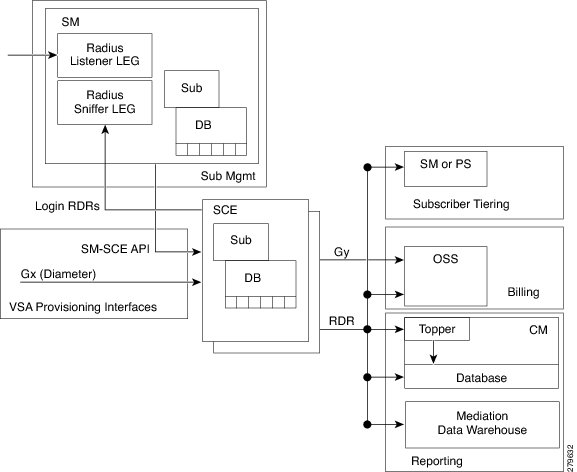
Figure 6-1 shows a high level diagram of the Cisco Service Control mobile solution including capturing and reporting subscriber attributes.
Figure 6-1 System Block Diagram
Capturing Subscriber Attributes
VSAs can be captured by either of the following entities :
• SCE platform
•RADIUS Login Event Generator (LEG)
Only the VSAs that you select are captured. You can choose which attributes are relevant, and store and process only those attributes. You can select a maximum of 20 attributes from the list of available VSAs. The list of attributes to capture can be modified while the system is running.
The following data structures are used to capture and store VSAs:
•Dictionary table—A table that contains all the supported attributes, with the following information for each attribute:
–Attribute name
–Protocol (RADIUS/Diameter/GTP-C)
–Input type
–Type used in the database (usually the same as input type)
–Attribute ID
–VSA (yes/no)
–Vendor ID (if used by VSA)
The local attribute table reads the attribute details from this table.
•Local attribute table—A global table (for all the subscribers and all the packages) that holds all the details for the selected attributes and parameters.
The Gx interface , Gy interface, and the subscriber database use this table to obtain information for each configured attribute.
•Subscriber attribute database— A table of captured attributes per subscriber. A subscriber attribute database is maintained in both the SCE and the SM. Information captured by either entity is provisioned from that entity to the other entity so that the subscriber attribute database is always current in both the SCE and the SM.
Constraints and Limitations
•Only one session per subscriber is supported. A subscriber with multiple Access Point Names (APN) or multiple devices used at the same time can be separated into separate subscribers by adding the APN or device into the subscriber ID.
•Scale limitations—When supporting VSAs, the system would support approximately 256K subscribers per SCE platform.
•Up to 20 subscriber attributes can be selected.

Note By default, the SCE platform converts the 3GPP-SGSN-Address-Code-6 VSA sent by Gx to 3GPP-SGSN-Address VSA. Therefore, when using the SGSN address, both these attributes should be selected. The same behavior applies to the GGSN address VSA pair (3GPP-GGSN-Address-Code-7 and 3GPP-GGSN-Address).
Capturing Subscriber Attributes Using the SCE
Capturing Subscriber Attributes
Attributes are received only from the Gx interface. The attributes selected by the CLI command are stored in the local attribute table and also copied to the SM. Any time one of these attributes is input for a subscriber by Gx, it is stored in the subscriber database for that subscriber.
When an attribute is deleted from the attribute table, all the entries for that attribute are also removed from the subscriber database.
Transmitting Subscriber Attributes
Attributes are transmitted only on the Gy interface. Three modes of output are supported:
•Always—Output the subscriber attributes on all the messages.
•On-change—Output the subscriber attributes any time a change is detected in at least one of the attributes.
•On-initial (default)—Output the subscriber attributes only on the first Gy message.
Subscriber Attribute CLI Commands
Table 6-1 lists the CLI commands used to configure and monitor the capture and sending of subscriber attributes.
Example for showing the VSA dictionary:
show sub-attribute dictionary
     VSA name                                 Vendor-ID  Attr-ID  Data Type Protocol
Interfaces
----------------------------------------------------------------------------------------
Acct-Multi-Session-ID - 50 UTF8String Radius
Acct-Session-ID - 44 UTF8String Radius
Acct-Session-Time - 46 Uint32 Radius
Called-Station-ID - 30 OCTETString Radius
Calling-Station-ID - 31 OCTETString Radius
Class - 25 OCTETString Radius
CUI - 89 UTF8String Diameter
Framed-IP-Address - 8 Address Radius
NAS-Identifier - 32 OCTETString Radius
NAS-IP-Address - 4 Address Radius
NAS-Port-Type - 61 Uint32 Radius
User-Name - 1 OCTETString Radius
3GPP-Charging-Characteristics 10415 13 UTF8String Diameter
3GPP-Charging-Gateway-Address 10415 4 Address Diameter
3GPP-Charging-ID 10415 2 Uint32 Diameter
3GPP-GGSN-Address-Code-7 10415 7 Address Diameter
3GPP-GGSN-Address 10415 847 Address Diameter
3GPP-GGSN-MCC-MNC 10415 9 UTF8String Diameter
3GPP-GPRS-Negotiated-QoS-Profile 10415 5 UTF8String Diameter
3GPP-IMEISV 10415 20 UTF8String Diameter
3GPP-IMSI 10415 1 UTF8String Diameter
3GPP-MS-Timezone 10415 23 OCTETString Diameter
3GPP-NSAPI 10415 10 UTF8String Diameter
3GPP-PDP-Type 10415 3 Uint32 Diameter
3GPP-RAT-Type 10415 21 OCTETString Diameter
3GPP-Selection-Mode 10415 12 UTF8String Diameter
3GPP-SGSN-Address-Code-6 10415 6 Address Diameter
3GPP-SGSN-Address 10415 1228 Address Diameter
3GPP-SGSN-MCC-MNC 10415 18 UTF8String Diameter
3GPP-User-Location-Info 10415 22 OCTETString Diameter
WiMax-Active-Time 24757 39 Uint32 Diameter
WiMax-BSID 24757 46 UTF8String Diameter
Example for selecting a VSA to capture and then showing the attribute configuration.
sub-attribute add-attribute 3GPP-Charging-Characteristics
do show sub-attribute configuration
VSA name Vendor-ID Attr-ID Data Type Protocol Interfaces
-----------------------------------------------------------------------------------------
3GPP-Charging-Characteristics 10415 13 UTF8String Diameter Gx
Capturing Subscriber Attributes Using the RADIUS LEG
A LEG usually listens to signaling data and provisions subscriber-based attributes. The SCE supports RADIUS Listener and Sniffer LEGs. The subscriber attributes are configurable and customizable in the SM. The LEGs are responsible for providing the configured data to the SM and the SM provisions the data to the SCE platform.
RADIUS Sniffer LEG
Capturing subscriber attributes using the RADIUS sniffer LEG works as follows:
1. The user configures the set of subscriber attributes to extract (up to 20), which are provisioned to the RADIUS sniffer module in the SCE.
2. When the SCE detects a RADIUS accounting message, it extracts the attributes from the message and sends it to the SM in the RADIUS/Login RDR.
3. The RADIUS Sniffer LEG in the SM receives the RADIUS RDR and stores the attribute values in its local database.
4. The SM updates the subscriber attribute table in the SCE with the subscriber attributes learned.
Note The RADIUS sniffer module can be in a different SCE platform from the one that processes the traffic.
Radius Listener LEG
Capturing subscriber attributes using the RADIUS listener LEG works as follows:
1. The user configures the set of subscriber attributes to extract (up to 20).
2. The RADIUS Listener LEG listens to RADIUS accounting messages received in the SM and extracts the attributes configured.
3. The RADIUS Listener LEG in the SM stores the attribute values in its local database.
4. The SM updates the subscriber attribute table in the SCE with the subscriber attributes learned.
Configuring the Attributes to Be Captured
You specify which subscriber attributes to capture by editing the relevant configuration file:
•RADIUS Listener LEG configuration file is at sm-inst-dir/sm/server/root/config/p3sm.cfg
•RADIUS Sniffer LEG configuration file is at sm-inst-dir/sm/server/root/config/rad_snif.cfg
Note For more information about configuring the RADIUS LEGs, see the Cisco SCMS SM LEGs User Guide.
For each attribute you want the LEG to capture, add a section to the appropriate configuration file, as follows:
[Radius.Field.Attribute_name]
radius_attribute = <ID> [(<radius_attribute_vendor_id>, <radius_sub_attribute>)]
radius_attribute_type = <type>
This example shows how to edit the configuration file to add the 3GPP-SGSN-Address (VSA) attribute:
[Radius.Field.3GPP-SGSN-Address]
radius_attribute = 26(10415;6)
radius_attribute_type = integer
Provisioning the SCE with SM Subscriber Attributes
When the SM (RADIUS LEG) captures the subscriber attributes, it provisions them to the SM over the SM-SCE API. The SM provides a list of attributes with the following information for each attribute:
•Attribute code. If attribute is a VSA, this is the VSA code.
•Flags. One bit indicates whether this is a VSA.
•Attribute vendor id (if attribute is a VSA).
•Attribute-type
•Attribute length
•Attribute value
If the SM attribute definition (type, size and so on) does not match the SCE attribute definition, the attribute is discarded and an appropriate error message is sent.
Note The SCE copies into its local database only the attributes from the 20 attributes configured in the SCE and present in the SCE database, regardless of what attributes are defined to be reported in the RDRs.
Generating Mobile Reports
Subscriber attributes that have been captured by either the SCE or the SM can be used to generate mobile reports. The subscriber attributes are appended to the RDRs and sent to the CM, where the reports are generated.
Use a mediation data warehouse device for full flexibility and long period granular data.
Appending Subscriber Attributes to SCE RDRs
SCE provides subscriber attributes as part of the following RDRs:
•Subscriber Usage RDR (TAG: 4042321920)
•HTTP Transaction Usage RDR (TAG: 4042323004)
•Video Transaction Usage RDR (TAG: 4042323072)
You can enable or disable reporting subscriber attributes in these RDRs either from the SCA BB console or by a CLI command.
General Information:
•The SCE reports in the RDRs only the attributes which exist in its local database.
•If an attribute defined for the RDR is not in the database, the attribute is appended to the RDR with a NULL value.
•The attributes structure in the RDR is constant, with each attribute always at the same location, and appearing in the order that they appear in Table 6-3.
•The format of the attributes in the RDR is the same as the "type" specified in the RADIUS attribute (integer or string).
Control Field
A control field is defined in the RDR providing the following information:
•Indicating that subscriber attributes are appended
•SPECIFYING which of the attributes in the message are valid
The control field comes after the original RDR parameters and before the first VSA data.
Each bit in the control field corresponds to one of the subscriber attributes listed in Table 6-3. Bit "0" corresponds to Acct-Multi-Session-ID, bit "1" corresponds to Acct-Session-ID, and bit "10" corresponds to WiMax-BSID.
Value "0" means that the data is not present and value "1" means that the data of corresponding VSA is present and valid. (See the control fields in the two examples in Examples: Reporting Subscriber Attributes in RDRs Enabled)
Configuring Reporting Subscriber Attributes in RDRs from the SCE
Examples: Reporting Subscriber Attributes in RDRs Enabled
Subscriber usage RDR with all 11 VSA fields presented:
#4042321920:
rdrParty // Subscriber ID
10 // Package ID
1 // Service Usage counter ID
0 // Breach State
1 // Reason
60 // Configured Duration
60 // Duration
1275330073 // End Time
100 // Upstream Volume
100 // DownStream Volume
5 // Sessions
5 // Seconds
1 // Up VLink
1 // Down VLink
2047 // Control Field (0b11111111111 - all fields are valid)
Subscriber1 // Acct-Multi-Session-ID (bit 0)
lkjhgfdsa // Acct-Session-ID (bit 1)
10.1.2.3 // Framed IP Address (bit 2)
abcdefg // Called Station ID (bit 3)
000000000000 // 3GPP-IMEISV (bit 4)
000000100000 // 3GPP-IMSI (bit 5)
700300100050 // 3GPP-RAT-Type (bit 6)
10.1.1.1 // 3GPP-SGSG-Address (bit 7)
mhutexcfvkli // 3GPP-SGSN-MCC-MNC (bit 8)
abc // 3GPP-User-Location-Info (bit 9)
3p3p3 // WiMax-BSID (bit 10)
Subscriber usage RDR with partial VSA fields presented:
#4042321920:
rdrParty // Subscriber ID
10 // Package ID
1 // Service Usage counter ID
0 // Breach State
1 // Reason
60 // Configured Duration
60 // Duration
1275330073 // End Time
100 // Upstream Volume
100 // DownStream Volume
5 // Sessions
5 // Seconds
1 // Up VLink
1 // Down VLink
1017           // Control Field (0b01111111001 - Acct-Session-ID, Framed IP Address, and
				 WiMax-BSID are not valid)
Subscriber1 // Acct-Multi-Session-ID (bit 0)
// Acct-Session-ID (bit 1)
0 // Framed IP Address (bit 2)
abcdefg // Called Station ID (bit 3)
000000000000 // 3GPP-IMEISV (bit 4)
000000100000 // 3GPP-IMSI (bit 5)
700300100050 // 3GPP-RAT-Type (bit 6)
10.1.1.1 // 3GPP-SGSG-Address (bit 7)
mhutexcfvkli // 3GPP-SGSN-MCC-MNC (bit 8)
abc // 3GPP-User-Location-Info (bit 9)
// WiMax-BSID (bit 10)
Configuring Reporting Subscriber Attributes in RDRs from the SCA BB Console
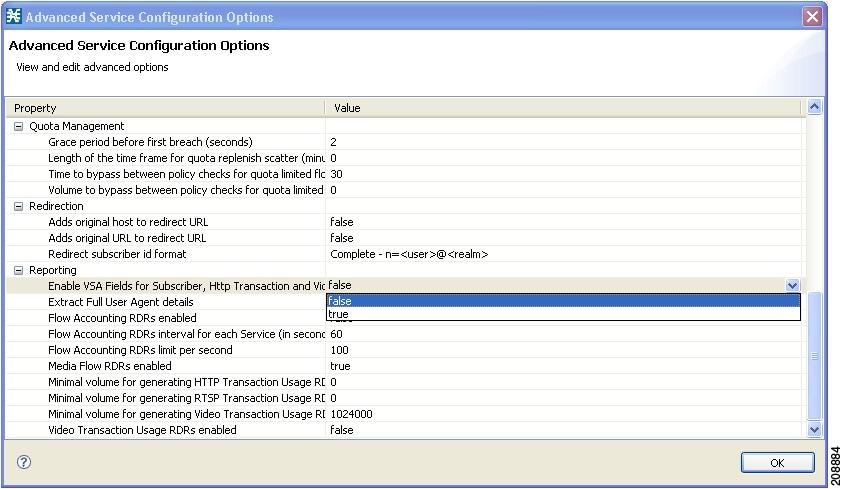
You can enable appending VSA fields in RDRs from the SCA BB console.
Step 1 Choose Configuration > Policies > System Settings > Advanced Options.
Step 2 Click Advanced Service Configuration Options..
Step 3 Scroll down to the Reporting section.
Step 4 Set the value of `Enable VSA Fields for Subscriber, Http Transaction and Video Transaction RDRs' (first line) to `True'. (See Figure 6-2.)
Figure 6-2 Enabling VSA Fields in RDRs
Step 5 Click OK.
Step 6 Click OK in the System Settings dialog box.
Supported Mobile Reports
The following information is derived from specific attributes sent to the CM in RDRs and used to generate mobile reports:
•Device type:
–RADIUS device type—Located as part of the 3GPP-IMEI (RADIUS attribute 20)
–Diameter device type—Encoded in the User-Equipment-Info AVP (code 458)
•APN—Mapped from the RADIUS/Diameter Called-Station-ID field
•User location—Mapped from 3GPP-User-Location-Information
•Network type—Mapped from 3GPP-RAT-Type
Based on the above attributes, the common mobile reports are generated in the CM/Reporter (see Table 6-5). Examples of some of the reports it is possible to generate are displayed in Mobile Report Examples.
|
|
|
|
|
Device Type Distribution (IMEI) |
Device Type (IMEI) |
Number of unique subscribers per device type |
Time window, Top devices |
Usage per device type |
Device Type (IMEI) |
Total usage per device |
Time window, Top usage |
Application usage for specific device |
Time |
Application usage |
Time window |
Network Type |
Total usage per network |
Time window, Top networks |
|
Application usage for specific network type |
Time |
Application usage |
Time window |
Usage per APN |
APN Name |
Total usage per APN |
Time window, Top APNs |
Time |
Application usage |
Time window |
|
Number of subscribers per location |
Time |
Number of subscribers |
Time based |
Usage per location |
Location ID |
Total usage for location |
Time based, |
Usage per SGSN |
SGSN |
Total usage for SGSN type |
Time based, |
Mobile Report Examples
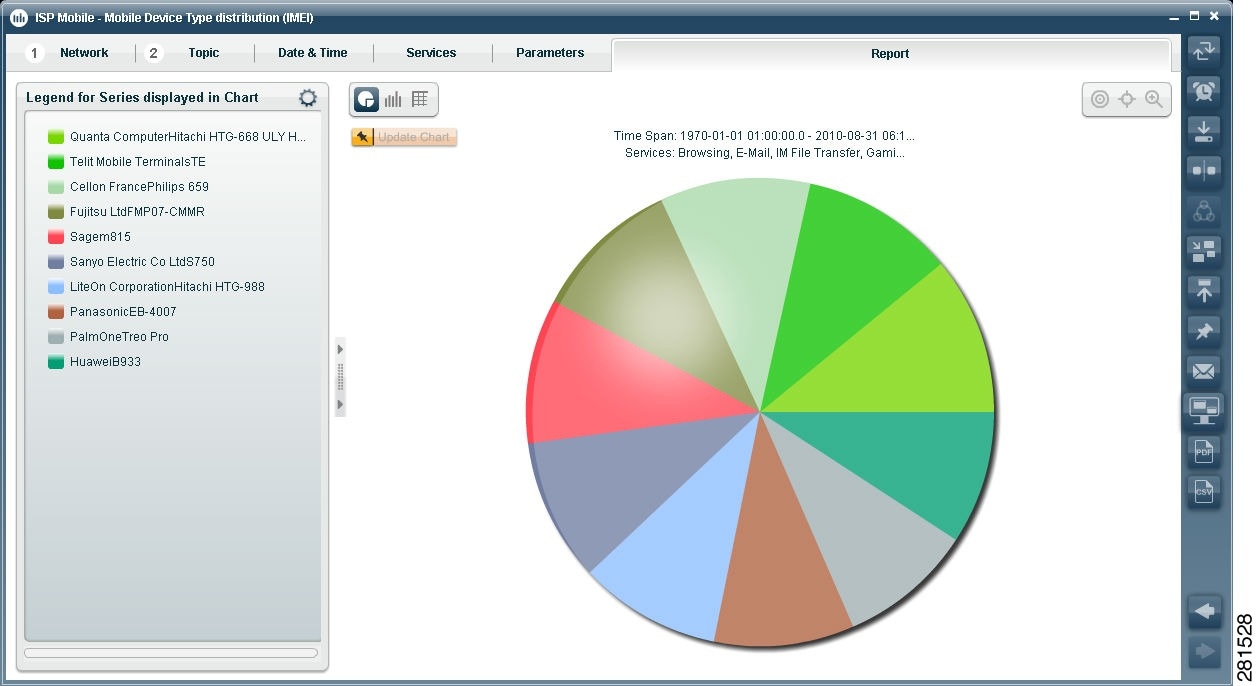
Device Type Distribution
Figure 6-3 Device Type Distribution by Unique Subscribers (bar)
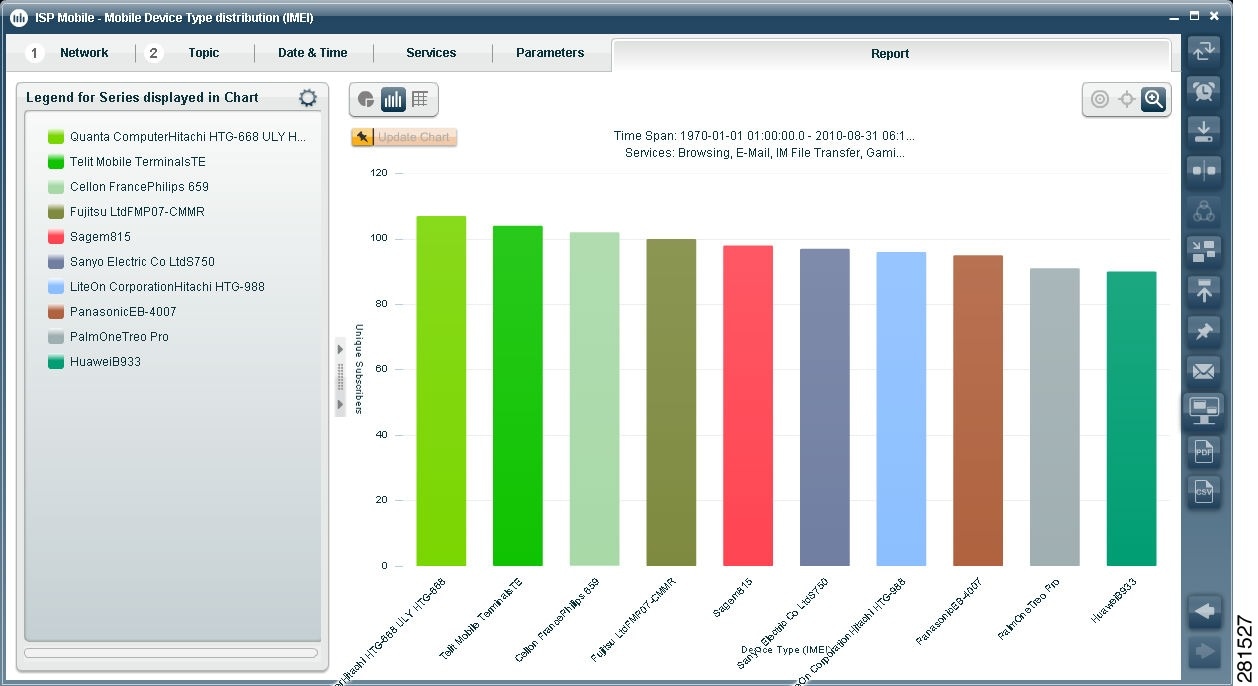
Figure 6-4 Device Type Distribution by Unique Subscribers (pie)
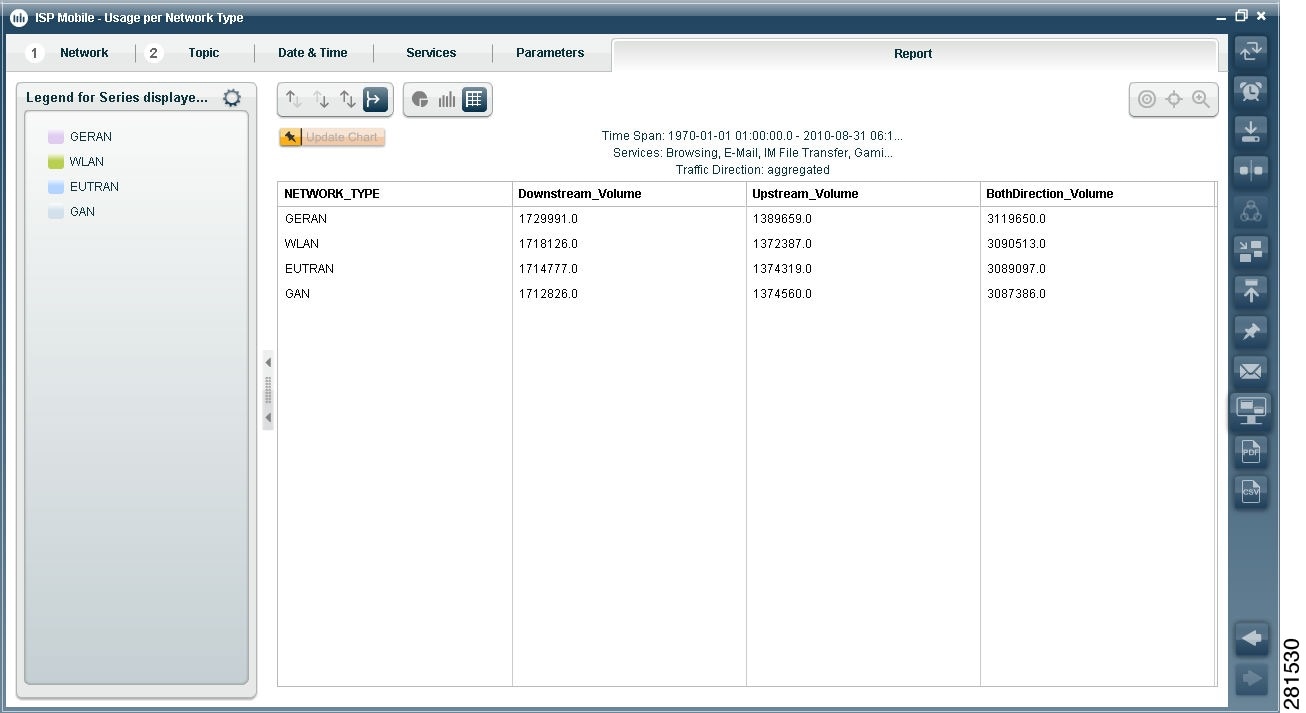
Usage Per Network Type
Figure 6-5 Usage per Network Type (bar)
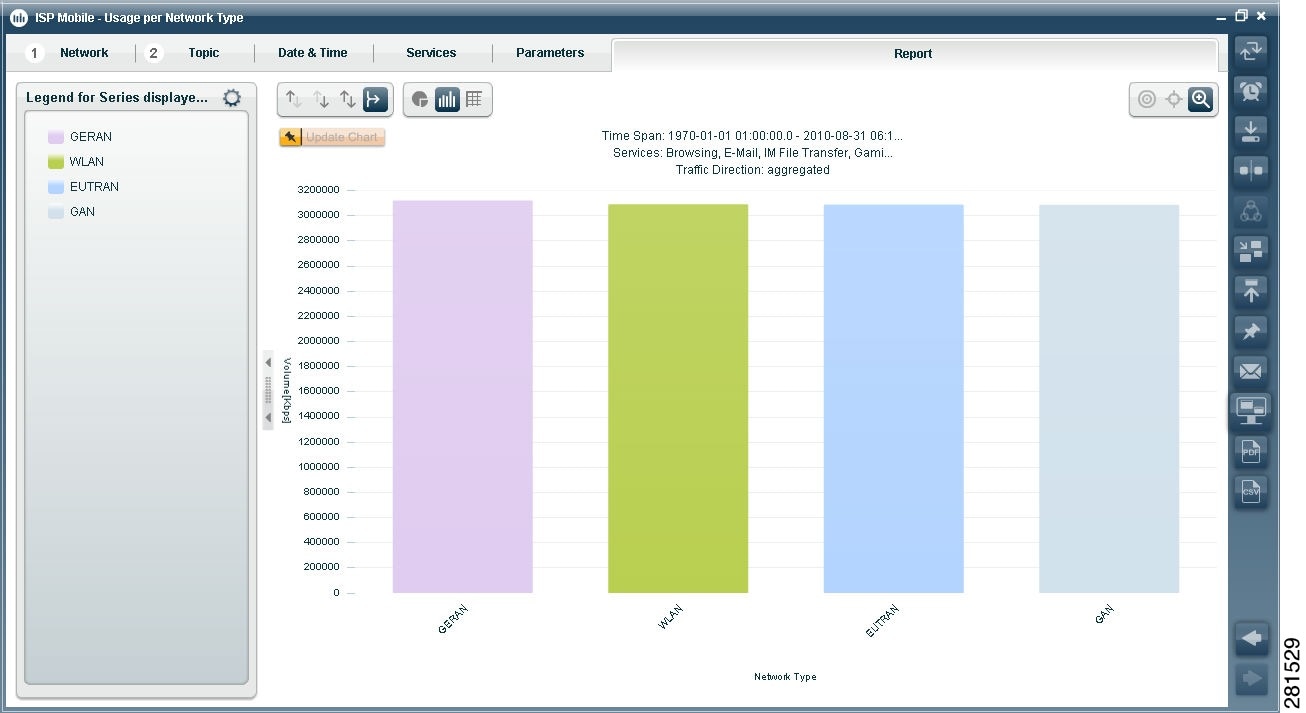
Figure 6-6 Usage per Network Type (table)
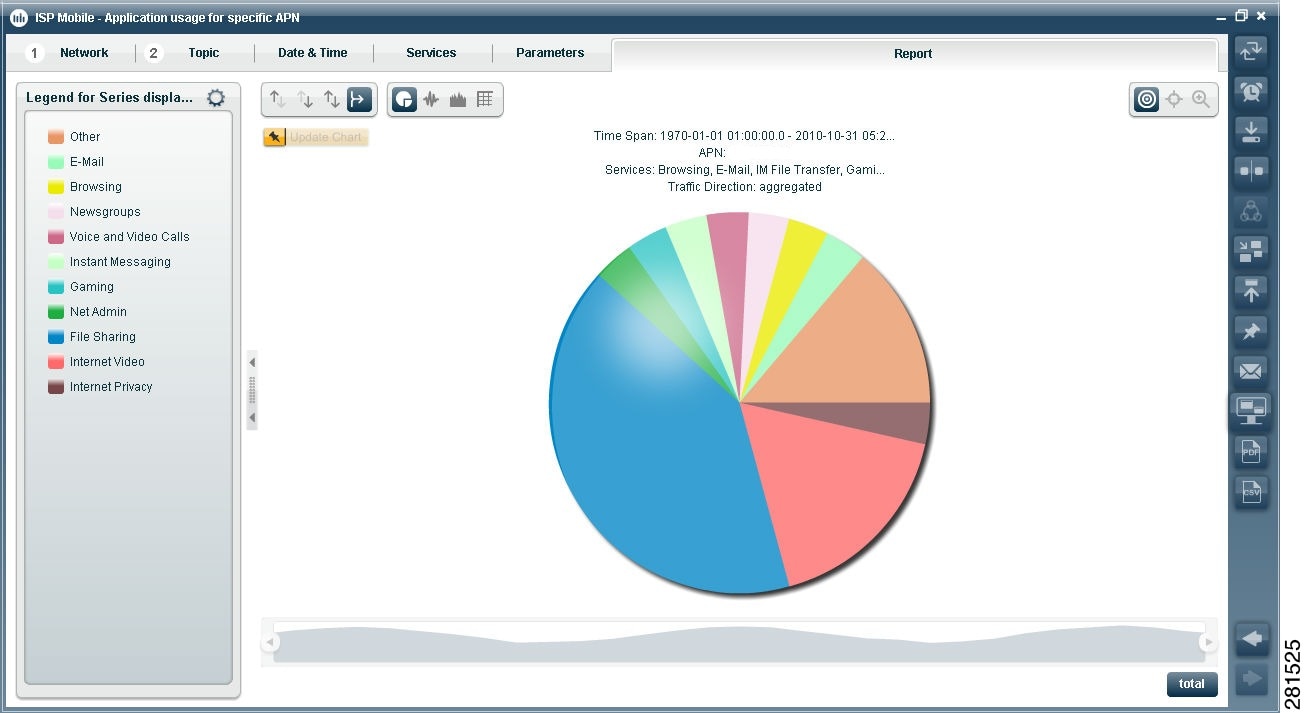
Application Usage for Specific APN
Figure 6-7 Application Usage for Specific APN (stacked area)
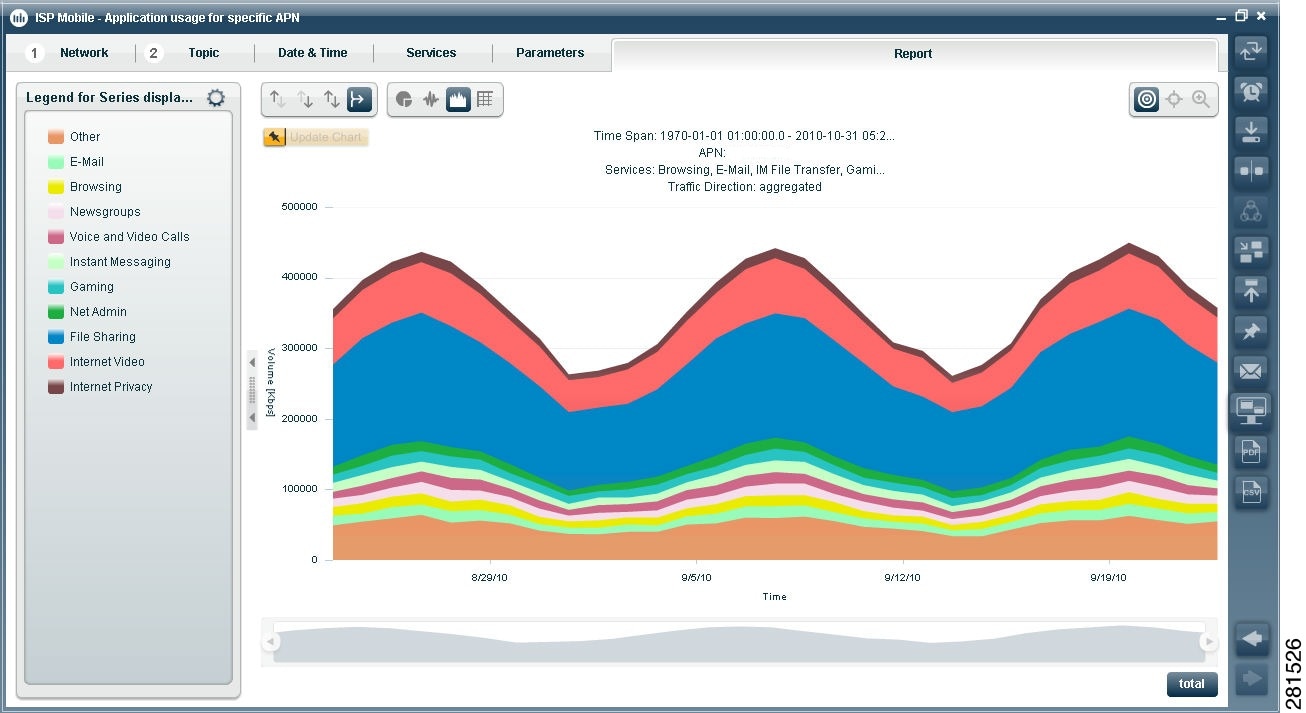
Figure 6-8 Application Usage for Specific APN (pie)
 Feedback