Catalyst SD-WAN AppQoE DRE - Topology, Configuration, Verification
Available Languages
Contents
Introduction
This document describes how to create and configure a setup for Data Redundancy Elimination (DRE) optimization.
Background Information
This document aims to serve as a starting point for guidance on how to create and configure a setup for DRE which is part of an Integrated Application Quality of Experience (AppQoE) Solution, offering an End-to-End Consistent Policy Framework and Monitoring, for a Multitude of Deployment Use Cases.
Building blocks of AppQoE Solution:
- Forward Error Correction (FEC) and Packet Duplication (PD): Addresses Packet Loss issues. See TechZone blog for FEC.
- TCP optimization: Addresses WAN latency issues. See TechZone article for a single-sided TCP Opt Use Case.
- DRE optimization: Addresses Low Bandwidth issues. Typically DRE Optimization is used together with TCP Optimization.
Existing CCO DRE documentation does not contain a full end-to-end process description. This document provides a step-by-step end-to-end description of the DRE solution.
A deep technical explanation of DRE functionality is out of the scope of this article. If you want to learn more about technical details and DRE functionality, please use this documentation.
DRE Optimization
DRE is a dual-sided solution that removes redundant data by caching previously seen patterns. Combined with the Lempel–Ziv–Welch (LZW) algorithm, which provides compression to reduce the amount of data over WAN, the DRE feature offers a fully secure and integrated solution with Unified Threat Defense (UTD) and Secure Sockets Layer (SSL) proxy.
It is Application and Protocol agnostic and is a Cloud-ready solution which offers around 60-90% WAN traffic reduction.
Different deployment scenarios are supported to achieve a scalable solution.
- The integrated solution provides a one-box solution for deploying branch services, termed as an Integrated Service node (ISN).
- External Service Nodes (ESN) are decoupled from intercepting edge routers or Service Controller (SC) in External Service Node deployment, typically at Data Centers and Hubs. Redirection of flows based on application traffic is achieved using a Data Policy.
Control Connections

Note: The ESN does not form any control connection with the Controller (formerly known as vSmart). The ESN has a control connection to the SD-WAN Manager.
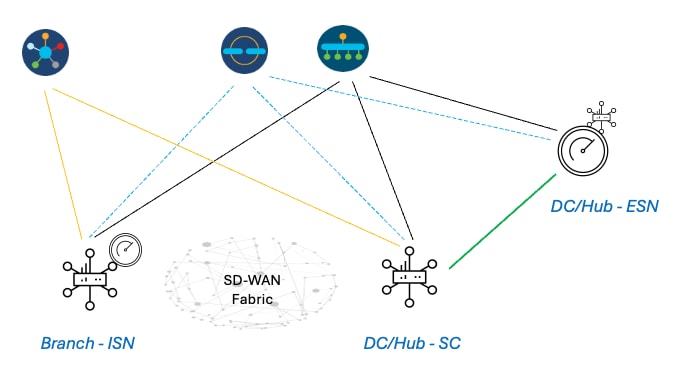
Steps to Build an AppQoE DRE Setup with ISN and ESN
1. System (Interfaces and Hardware) and Topology
1.1. Topology and Interfaces
The ESN requires these interfaces:
- A VPN0 Interface connectivity to the Controllers (Manager and Validator (transient)).
Connectivity from ESN to Controllers can be directly or via SC. The recommendation is via SC since this avoids the need for an additional WAN circuit on the ESN.
- Another VPN0 Interface for connectivity to the Service Controller.
- Optional: A VPN512 Management interface.
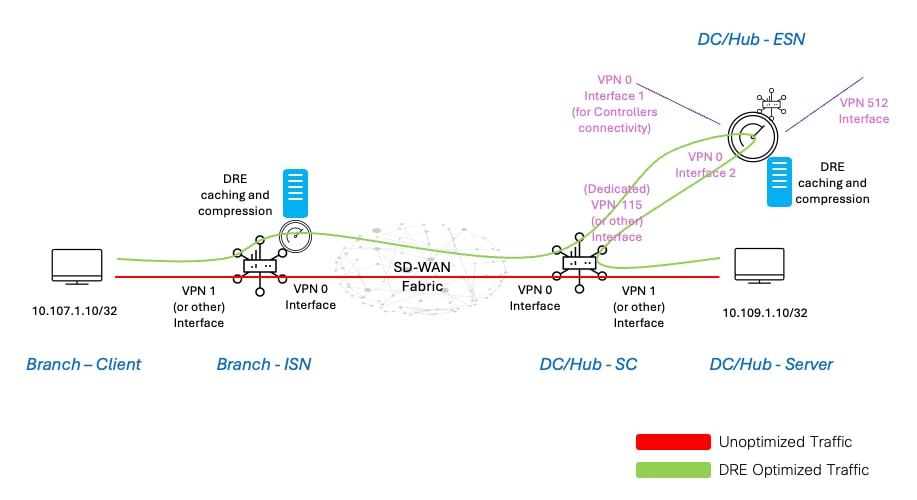
1.2. Disk Requirement
For a lab setup, a 150GB disk is good enough, for the DRE optimization to work.
This holds good only for functional verification in a lab environment, and is not meant for production. For accurate disk and other recommendations, check this CCO link.
Note: This additional disk requirement is only for the ISN and ESN. It is not required on SC.
1.3. Adding Devices to SD-WAN Fabric
- Using templates (available from 20.6/17.6 onwards): AppQoe Feature template which can be specified in the Device Template as an Additional Template.
- Using Configuration Groups (available from 20.14/17.14 onwards): AppQoE Feature parcel available in Service/LAN profile in Configuration Group.
1.4. C8000v Details
If you are using c8kv, ensure to enable app-heavy CPU profile configuration. This is an useful article.
2. Branch: AppQoE ISN Configuration
Create an AppQoE feature template (using templates as shown here) for the device model.
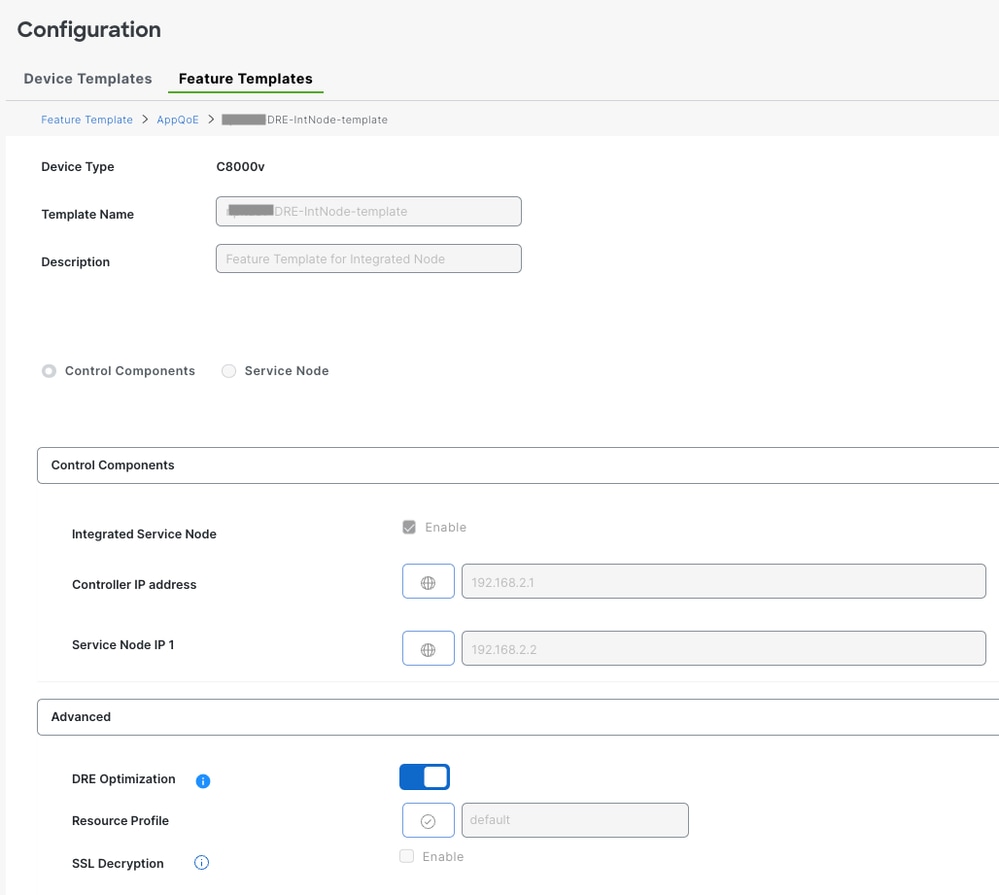
Then, specify this feature template in the device template.
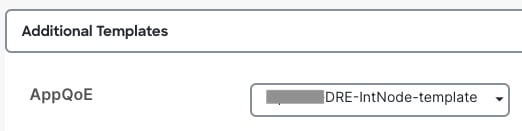
3. DC/Hub: AppQoE ESN Configuration
Create an AppQoE Feature Template for the device model.
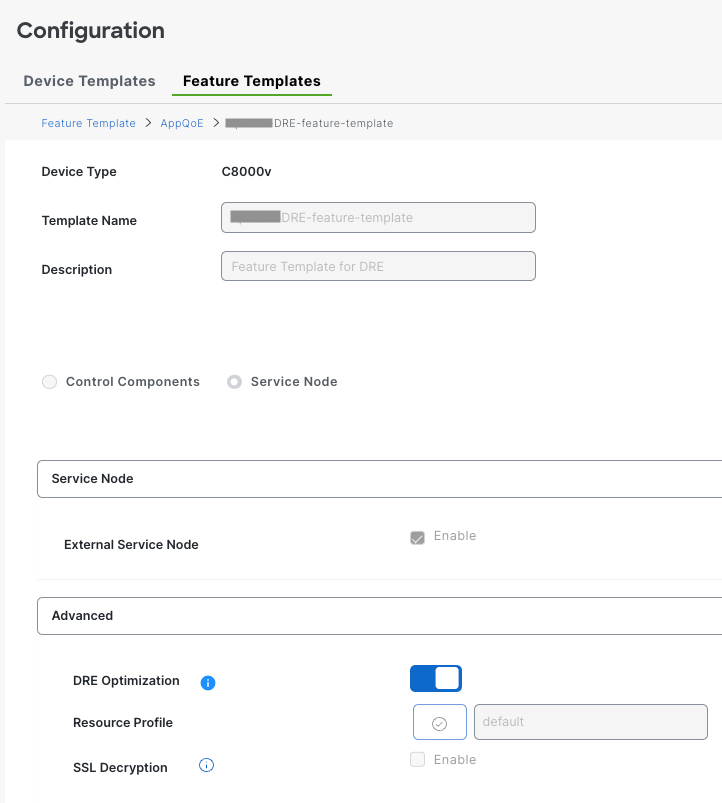
Then, specify this feature template in the device template.
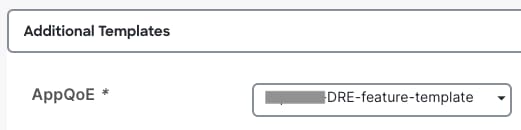
4. DC/Hub: AppQoE SC Configuration
Create an AppQoE feature template for the device model.
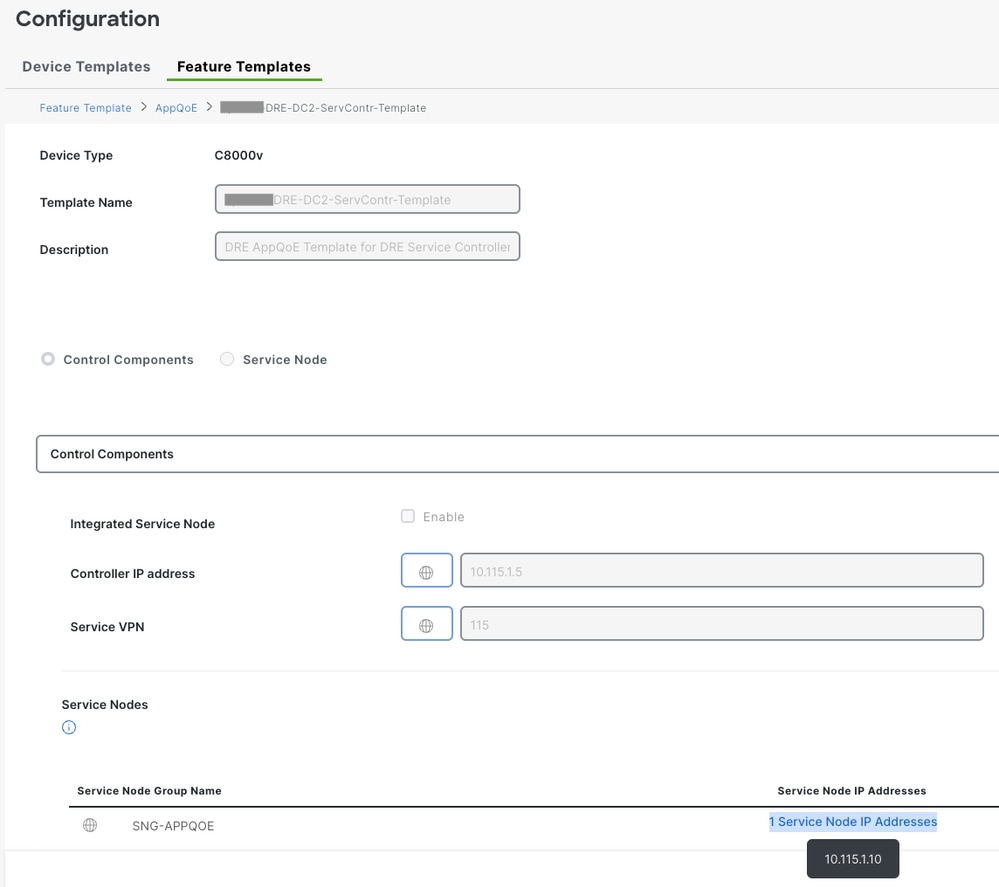
Then, specify this feature template in the device template.
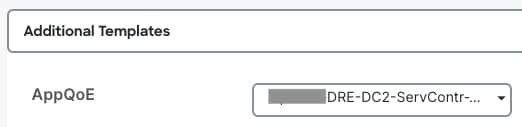
5. Centralized Traffic Data Policy
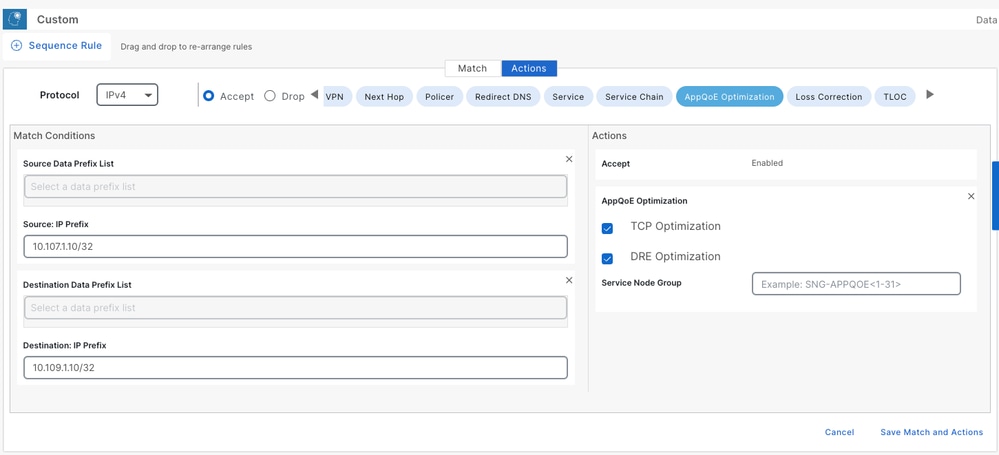
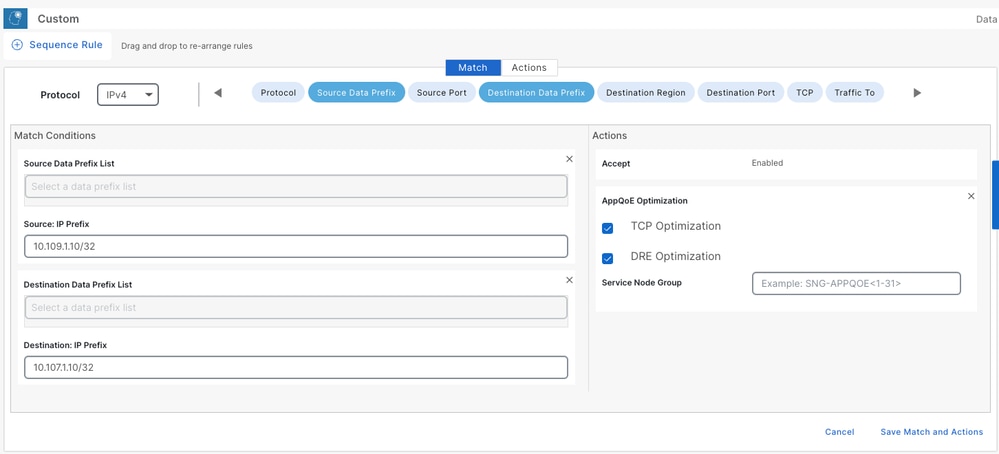
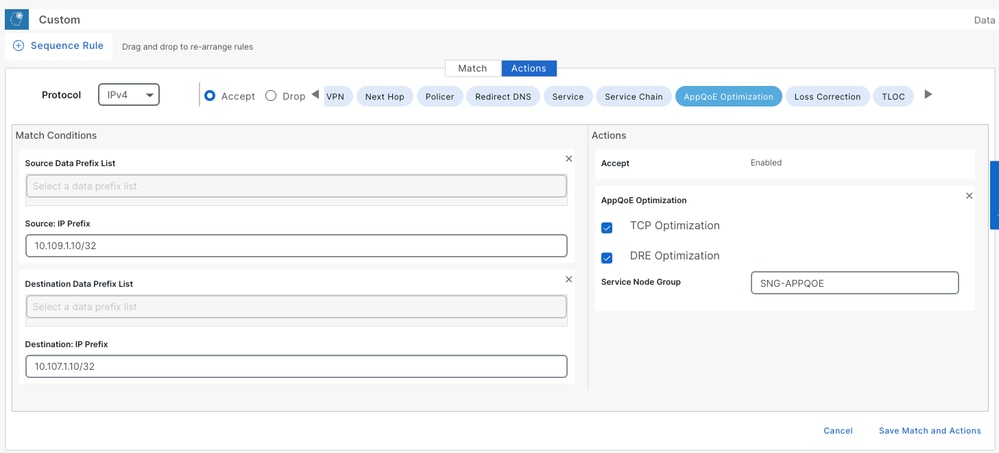
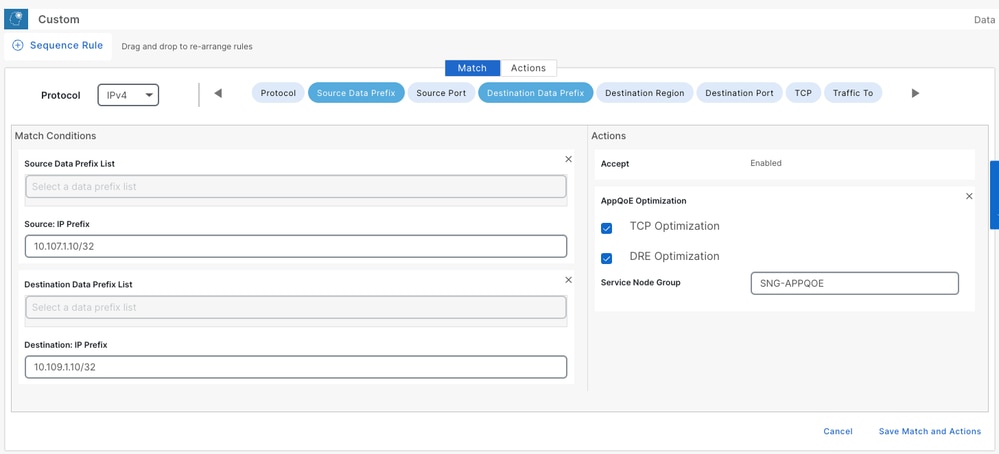
- Two different policies are required: one for the Internal Service Node (ISN) and the second for the Service Controller (SC).
- The Policy direction must be 'All' for both.
- The Service-node-group must be blank for ISN and specified for the SC.
- DRE optimization is typically used along with TCP optimization. When DRE is enabled, it enables TCP optimization as well.
In this example, a Web Client on a Branch location is defined and a Web Server on the DC site, you can adjust it for your traffic of interest accordingly.
A. Branch ISN
UI - Template
Sequence 1 - from Client 10.107.1.10 to Server 10.109.1.10:
Sequence 2 - from Server back to Client:
CLI:
ISN# show sdwan policy from-vsmart

from-vsmart data-policy _CorpVPN_DRE-data-policy-ISN-2
 direction all
 vpn-list CorpVPN
  sequence 1
   match
    source-ip 10.107.1.10/32
    destination-ip 10.109.1.10/32
   action accept
    tcp-optimization
    dre-optimization
  sequence 11
   match
    source-ip 10.109.1.10/32
    destination-ip 10.107.1.10/32
   action accept
    tcp-optimization
    dre-optimization
  default-action accept

from-vsmart lists vpn-list CorpVPN
 vpn 1
B. DC/Hub SC
UI - Template
Sequence 1 -
Sequence 2 -
CLI:
SC# show sdwan policy from-vsmart

from-vsmart data-policy _CorpVPN_DRE-data-policy-SC_ESN-2
 direction all
 vpn-list CorpVPN
  sequence 1
   match
    source-ip 10.107.1.10/32
    destination-ip 10.109.1.10/32
   action accept
    tcp-optimization
    dre-optimization
    service-node-group SNG-APPQOE
  sequence 11
   match
    source-ip 10.109.1.10/32
    destination-ip 10.107.1.10/32
   action accept
    tcp-optimization
    dre-optimization
    service-node-group SNG-APPQOE
  default-action accept

from-vsmart lists vpn-list CorpVPN
 vpn 1
Verification - CLI
Branch ISN
ISN# show sdwan appqoe dreopt status
DRE ID : 52:54:dd:2a:74:d7-018eafaa99e1-f9ff51aa DRE uptime : 04:10:59:59 Health status : GREEN Health status change reason : None Last health status change time : 04:10:59:59 Last health status notification sent time : 1 second DRE cache status : Active Disk cache usage : 2% Disk latency : 25 ms Active alarms: None Configuration: Profile type : S Maximum connections : 750 Maximum fanout : 35 Disk size : 60 GB Memory size : 2048 MB CPU cores : 1 Disk encryption : ON
 ISN# show sdwan appqoe flow active T:TCP, S:SSL, U:UTD, D:DRE Flow ID VPN ID Source IP Port Destination IP Port Tx Bytes Rx Bytes Services -------------------------------------------------------------------------------------------------------------- 54382538667 1 10.107.1.10 55340 10.109.1.10 80 263663268 640416 TD
 ISN# show sdwan appqoe dreopt statistics Total connections : 4 Max concurrent connections : 1 Current active connections : 1 Total connection resets : 0 Total original bytes : 3570 MB Total optimized bytes : 1633 MB Overall reduction ratio : 54% Disk size used : 2% Cache details: Cache status : Active Cache Size : 59132 MB Cache used : 2% Oldest data in cache : 01:22:02:49 Replaced(last hour): size : 0 MB
DC/Hub SC
SC# show service-insertion type appqoe service-node-group Service Node Group name : SNG-APPQOE Service Context : appqoe/1 Member Service Node count : 1 Service Node (SN) : 10.115.1.10 Auto discovered : No SN belongs to SNG : SNG-APPQOE Current status of SN : Alive System IP : 10.1.90.2 Site ID : 90 Time current status was reached : Sat Apr 6 07:26:16 2024 Cluster protocol VPATH version : 2 (Bitmap recvd: 3) Cluster protocol incarnation number : 1 Cluster protocol last sent sequence number : 1714282683 Cluster protocol last received sequence number: 1931795 Cluster protocol last received ack number : 1714282682 Health Markers: AO Load State tcp GREEN 0% ssl RED/NOT AVAILABLE dre GREEN 0% http RED/NOT AVAILABLE utd chnl RED/NOT AVAILABLEDC/Hub ESN
ESN# show sdwan appqoe dreopt status DRE ID : 52:54:dd:c3:40:17-018eb15f4fc3-49ee2d0f DRE uptime : 04:11:28:50 Health status : GREEN Health status change reason : None Last health status change time : 04:11:28:50 Last health status notification sent time : 1 second DRE cache status : Active Disk cache usage : 2% Disk latency : 10 ms Active alarms: None Configuration: Profile type : S Maximum connections : 750 Maximum fanout : 35 Disk size : 60 GB Memory size : 2048 MB CPU cores : 1 Disk encryption : ON ESN# show sdwan appqoe flow active T:TCP, S:SSL, U:UTD, D:DRE Flow ID VPN ID Source IP Port Destination IP Port Tx Bytes Rx Bytes Services -------------------------------------------------------------------------------------------------------------- 20022800299 1 10.107.1.10 55340 10.109.1.10 80 2998777 1074725760 TD

 ESN# show sdwan appqoe dreopt statistics Total connections : 4 Max concurrent connections : 1 Current active connections : 1 Total connection resets : 0 Total original bytes : 4294 MB Total optimized bytes : 1634 MB Overall reduction ratio : 61% Disk size used : 2% Cache details: Cache status : Active Cache Size : 59132 MB Cache used : 2% Oldest data in cache : 01:22:04:08 Replaced(last hour): size : 0 MB
Verification - Dashboard
In order to view the AppQoE DRE data in the SD-WAN Manager Device dashboard, ensure that:
- Controllers and Devices time is synchronized by configuring Network Time Protocol (NTP). You can also use the
Clock setcommand to set the clock manually. - Add these CLIs to the Device configuration (ISN/SC/ESN):
policy ip visibility features multi-sn enable
policy ip visibility features dre enable
policy ip visibility features sslproxy enable - (for SSL traffic)
Note: On-demand troubleshooting must be enabled in order to view these dashboards. Note that the dashboard screens shown here do not show real-time information.
In order to get the latest data, you can navigate to Tools > On Demand Troubleshooting, choose the appropriate Device and 'DPI' as Data Type and retrieve the DPI statistics for the last 3 hours as shown here:
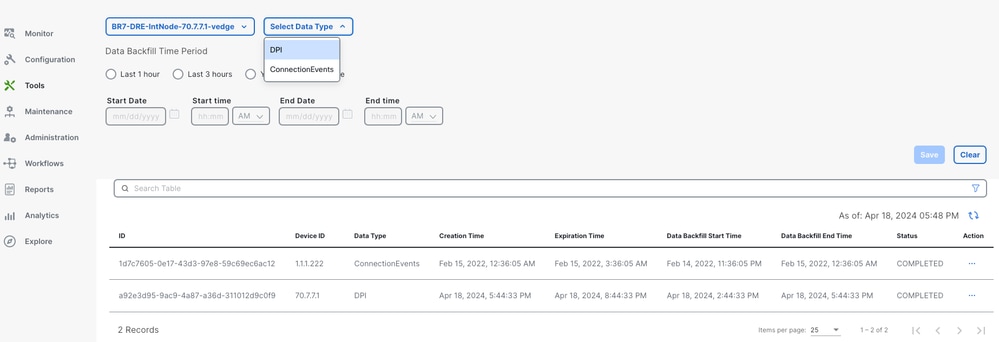
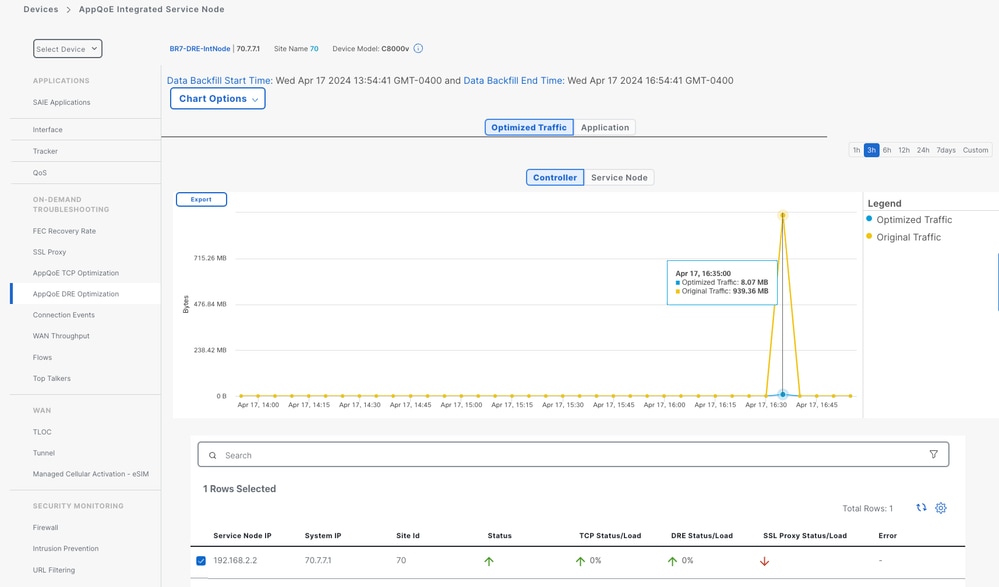
Branch ISN
Approximately 900MB of data was downloaded (3 x 200MB files and 3 x 100MB files) - Original Traffic (YELLOW).
The optimization resulted in only 8.07MB of traffic sent over the WAN, around 90% bandwidth usage reduction - Optimized Traffic (BLUE).
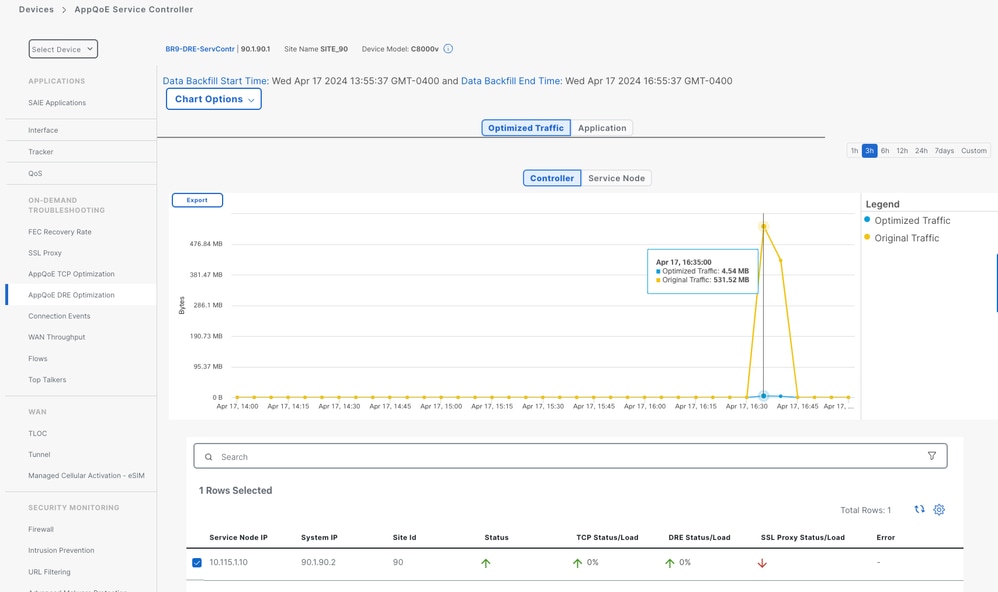
DC/Hub SC
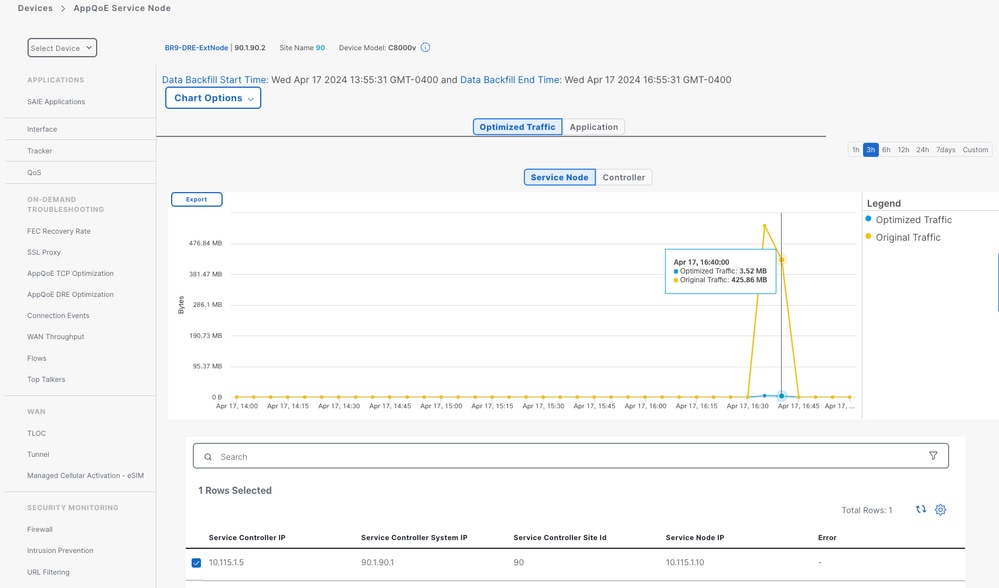
If there are multiple ESNs, then the Controller tab shows the cumulative data and the Service Nodetab shows the individual ESN data.
DC/Hub ESN
LOAD Calculation

Example:
For example, Max sessions supported for TCP optimization is = 40000.
(Max sessions value can be found from the show sdwan appqoe rm-resources CLI output on the service node).
Note the Max sessions value is device specific.
40000/16 = 2500, size of each block.
If the current number of sessions are, say 3000, then it falls in the second block.
LOAD = (2/16) x 100 = 12% (without decimals).
Same for DRE and SSL proxy. Corresponding Max sessions values are considered in the calculation.
Router#show sdwan appqoe rm-resources

==========================================================
              RM Resources
==========================================================

RM Global Resources :

 Max Services Memory (KB)    : 12221390

 Available System Memory(KB) : 0

 Used Services Memory (KB)   : 24442780

 Used Services Memory (%)    : 0

 System Memory Status        : GREEN

 Num sessions Status         : GREEN

 Overall HTX health Status   : GREEN


Registered Service Resources :

TCP Resources:

 Max Sessions                : 40000

Used Sessions               : 0

 Memory Per Session          : 64

SSL Resources:

 Max Sessions                : 40000

Used Sessions               : 0

 Memory Per Session          : 50

DRE Resources:

 Max Sessions                : 22000

 Used Sessions               : 0

 Memory Per Session          : 50

HTTP Resources:

 Max Sessions                : 0

 Used Sessions               : 0

 Memory Per Session          : 0
When the number of current connections reach around 95% of the Max sessions, the Service Node is marked as FULL (Yellow status) and AppQoE is by-passed for new flows, for this service node.
Performance and Scale
2. Cisco 8000 Series Secure Routers SD-WAN TCP Optimization & DRE Performance and Scale
FAQ
Q: A file transfer application uses SOAP over HTTP, with WS-Security (WSS) applied at the message level.
Can DRE still be effective in this scenario, or is message-level encryption via WSS fundamentally incompatible with it?
A: WS Security does not use TLS level encryption. Therefore, it does not work with DRE.
Revision History
| Revision | Publish Date | Comments |
|---|---|---|
2.0 |
13-Aug-2025
|
Added - LOAD value calculation, FAQ, Link to Performance and Scale document. |
1.0 |
30-Apr-2024
|
Initial Release |
 Feedback
Contact Cisco
- Open a Support Case

- (Requires a Cisco Service Contract)