Understand Smart Licensing Support Using Smart Transport
Available Languages
Introduction
This document describes information on Support Smart Licensing using Smart Transport.
Prerequisites
Requirements
Cisco recommends that you have knowledge of these topics:
- Smart Licensing Using Call Home
- Adaptive Security Appliance (ASA)
- Firepower eXtensible Operating System (FXOS)
Components Used
The information in this document is based on these software and hardware versions:
- Cisco Security Manager 4.29
- Firepower 1000/3100/4200/4112/41x5/9300
- Firepower eXtensible Operating System Version FXOS 2.16
- Adaptive Security Appliance Version 9.22 and ASDM 7.22.1
- Adaptive Security Appliance Virtual (Supported Since ASA 9.20)
The information in this document was created from the devices in a specific lab environment. All of the devices used in this document started with a cleared (default) configuration. If your network is live, ensure that you understand the potential impact of any command.
Problem
Call Home is the current default type for Smart Licensing to communicate to Cisco Smart Software Manager (CSSM) Server. Call Home has these issues:
- Call Home as a transport is moving to End of Life (EOL)
- Call Home introduces additional hop in the communication, which adds an extra point of failure
Information
Overview of Smart Transport:
- Smart Transport assists in removing the dependency on Call Home when communicating with Cisco Smart Software Manager (CSSM) Server.
- Smart Transport was already supported on ASAv from an earlier release. Now, it is added for hardware platforms.
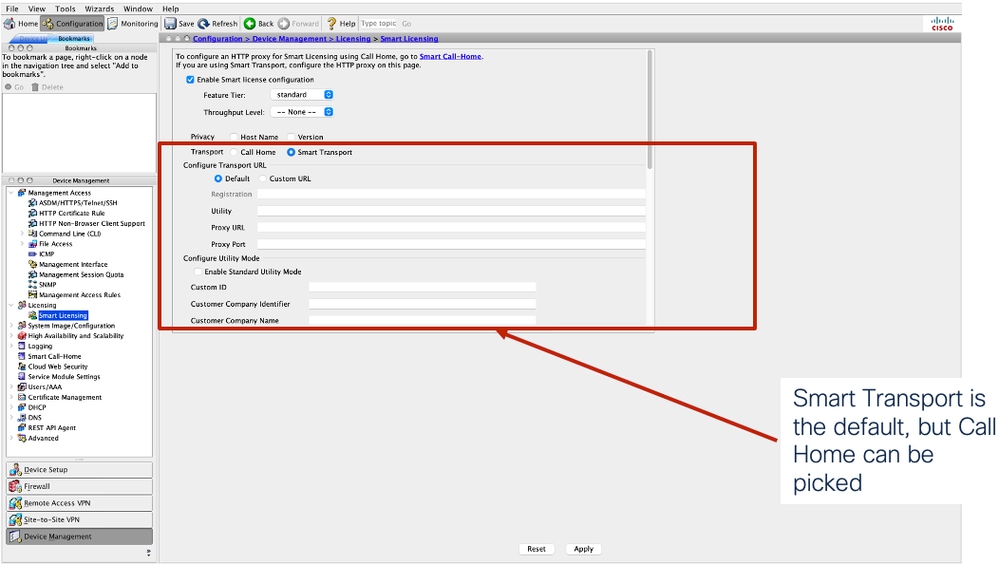
- Smart Transport is the default type:
- The smart agent supports the registration of both Call Home and Smart Transport types.
- If you prefer to switch back to Call Home, you can.
Configure
Configure Smart Transport through ASA CLI
Register smart token as shown on Licensing page.
ciscoasa(config)# license smart register idtoken ?
exec mode commands/options:
WORD < 256 char Enter the ID token
Configure Smart Transport Type
ciscoasa(config)# license smart
ciscoasa(config-smart-lic)# transport type smart
ciscoasa(config-smart-lic)# transport url [default|utility]
ciscoasa(config-smart-lic)# transport proxy <proxy server url>
Firepower 9300/4100 FXOS CLI
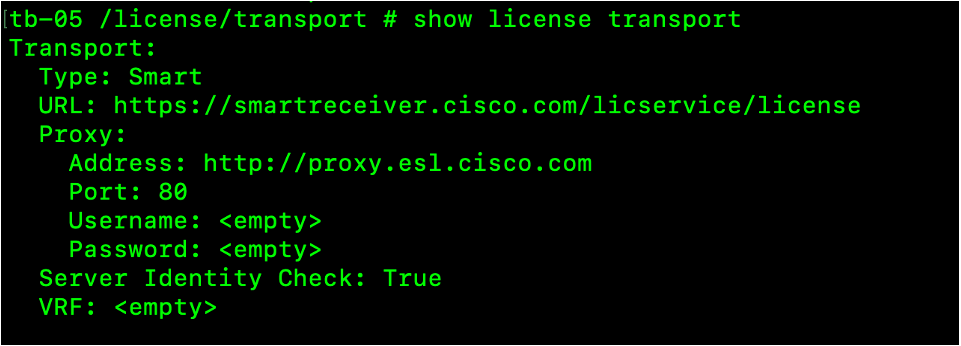
Smart transport becomes the default after FXOS is upgraded to version 2.16. Use CLI to switch to Call Home, if desired. The same CLI can set the transport type to smart as well.
tb-05 /license/transport # set transport
callhome Callhome
smart Smart
tb-05 /license/transport # set transport smart
tb-05 /license/transport # set transport-url https://smartreceiver.cisco.com/licservice/license
Configure proxy settings:
tb-05 /license/transport# set http-proxy-server-url <url>
tb-05 /license/transport# set http-proxy-server-port <port>
tb-05 /license/transport# set http-proxy-server-enable {on | off}
Verify
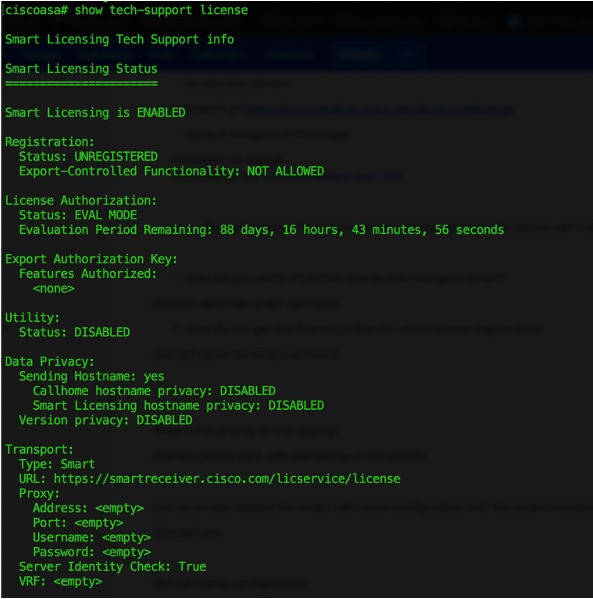
Check Transport the Type through ASA CLI and ASDM
ciscoasa# show tech-support license
ASDM
Check the Configuration through FXOS CLI
Troubleshoot
1. Verify Smart License Settings
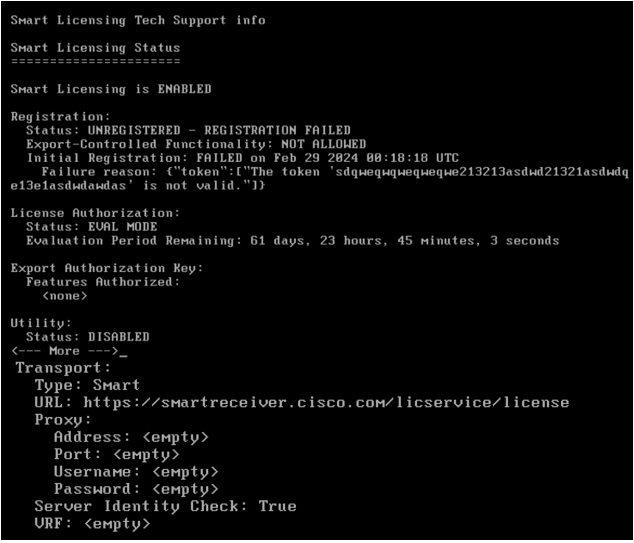
The troubleshooting steps are the same as the other Smart Licensing troubleshooting steps. Invalid token, or other reasons can cause failed registration. The failure reason can be found from the registration section of the CLI output. The transport settings can be found from the Transport section.
ciscoasa# show tech-support license
2. Verify Connectivity
Incorrect route, DNS, and other configurations can cause connection failure to the configured Cisco Smart Software Manager (CSSM). For example, check the connectivity when the default URL is configured. The next screenshot shows a positive case.
# ping smartreceiver.cisco.com
A proxy server is required when the device is not directly connected to an external CSSM. The end user can enable logs for debugging purposes.
ciscoasa(config)# debug http 1
3. CSSM Communication Error
PISyslog: Error - %SMART_LIC-3-AGENT_REG_FAILED:Smart Agent for Licensing Registration with the Cisco Smart Software Manager (CSSM) failed: Communication message send error
The error from agentlog indicates CSSM communication error. Please check the next slide for how to check more logs.

4. Enable Debugs and Check Logs
ciscoasa# debug license agent all
ciscoasa(config)# debug license 10
ciscoasa(config)# debug http 1
Check agentlog
ciscoasa # more disk0:/smart-log/agentlog
Collect the log file for further investigation.
5. Troubleshooting Firepower 9300/4100
Check the transport settings from the output of the CLI.
4125-06 /license # show license techsupport
Enable debugs:
/license/licdebug # debug enable all
Then, collect the tech support after enabling debugging:
4125-06# connect local-mgmt
4125-06(local-mgmt)# show tech-support chassis 1 detail
Related Information
- CLI Book 1: Cisco Secure Firewall ASA General Operations CLI Configuration Guide, 9.20
- Troubleshoot ASA Smart License on FXOS Firepower Appliances
Revision History
| Revision | Publish Date | Comments |
|---|---|---|
2.0 |
15-Oct-2026
|
Updated spelling, grammar, spacing, inserted horizontal lines to separate sections for readability. |
1.0 |
24-Mar-2025
|
Initial Release |

 Feedback
Contact Cisco
- Open a Support Case

- (Requires a Cisco Service Contract)