Field Notice: FN - 63476 - Certain Catalyst 3560G and 3750G Switches Do Not Support Some Older IOS Versions - Software Upgrade Recommended
Available Languages
Notice
THIS FIELD NOTICE IS PROVIDED ON AN "AS IS" BASIS AND DOES NOT IMPLY ANY KIND OF GUARANTEE OR WARRANTY, INCLUDING THE WARRANTY OF MERCHANTABILITY. YOUR USE OF THE INFORMATION ON THE FIELD NOTICE OR MATERIALS LINKED FROM THE FIELD NOTICE IS AT YOUR OWN RISK. CISCO RESERVES THE RIGHT TO CHANGE OR UPDATE THIS FIELD NOTICE AT ANY TIME.
Revision History
| Revision | Publish Date | Comments |
|---|---|---|
1.0 |
08-Dec-11 |
Initial Release |
10.0 |
12-Oct-17 |
Migration to new field notice system |
10.1 |
30-May-18 |
Fixed Broken Image Links |
Products Affected
| Affected Product ID | Comments |
|---|---|
WS-C3560G-24PS-E |
|
WS-C3560G-24PS-S |
|
WS-C3560G-24TS-E |
|
WS-C3560G-24TS-S |
|
WS-C3560G-48PS-E |
|
WS-C3560G-48PS-S |
|
WS-C3560G-48TS-E |
|
WS-C3560G-48TS-S |
|
WS-C3750G-24PS-E |
|
WS-C3750G-24PS-S |
|
WS-C3750G-24PS-S-1 |
|
WS-C3750G-24TS-E1U |
|
WS-C3750G-24TS-S1U |
|
WS-C3750G-48PS-E |
|
WS-C3750G-48PS-S |
|
WS-C3750G-48TS-E |
|
WS-C3750G-48TS-S |
Defect Information
| Defect ID | Headline |
|---|---|
| CSCtv22044 | Some 3560G/3750G do not support old versions of IOS |
Problem Description
Due to hardware changes in the flash component of the Cisco Catalyst 3560G and 3750G switches, some older Cisco IOS® versions are not supported on the affected hardware.
Background
Due to supply constraints, Cisco was required to migrate to new flash components on its Catalyst 3560G and 3750G switches. The switches, with the new flash, are compatible back to the 12.2(35)SE IOS release.
Problem Symptom
The affected Catalyst 3560G and 3750G switches are unable to use IOS versions prior to the 12.2(35)SE release. If a Cisco IOS version prior to 12.2(35)SE is used on an affected 3560G or 3750G switch, the following error messages will be displayed during the boot process:
intel_28f256j3_16x_write_bytes: command sequence error

flashfs[1]: writing to flash handle 0x254D8A0, device 0, offset 0x1600000, length 0x208: Operation Failed

flashfs[1]: sector ptr: {0xB0, 0xE7}

flash:/c3750_ucode_image.tar: No space left on device
In addition to displaying the above error messages, when the boot process is complete, the switch will appear to be running properly. However, the flash will be inaccessible and, therefore, the switch will not be operational (see the following two sample outputs below).
3560#dir

Directory of flash:/

%Error opening flash:/ (Device or resource busy)

32514048 bytes total (16258560 bytes free)
OR
3560#wr mem

Building configuration...

nv_done: unable to open "flash:/config.text.new"

nv_done: unable to open "flash:/private-config.text.new"

nv_done: unable to open "flash:/multiple-fs.new"[OK]
Workaround/Solution
Any Catalyst 3560G or 3750G switches within the Affected Serial Number Range provided in the table below are affected. For the affected 3560G and 3750G switches, IOS versions prior to 12.2(35)SE cannot be used. The recommendation is to upgrade to 12.2(55)SE4 and above.
| Affected PIDs | Affected Serial Number Range |
|---|---|
| WS-C3560G-24PS-E | FOC1536X198 and above |
| WS-C3560G-24PS-S | FOC1528372B to FOC15283737 FOC1539V3RD and above |
| WS-C3560G-24TS-E | FOC1539Z2PH and above |
| WS-C3560G-24TS-S | FOC152816W3 to FOC152816X1 FOC1534X4NW and above |
| WS-C3560G-48PS-E | FOC1537X3AD and above |
| WS-C3560G-48PS-S | FOC1528370C to FOC1528371E FOC1537X3ML and above |
| WS-C3560G-48TS-E | FOC1537V1C4 and above |
| WS-C3560G-48TS-S | FOC152816XF to FOC152816YA FOC1536X1ZR and above |
| WS-C3750G-24PS-E | FOC1545Z19A and above |
| WS-C3750G-24PS-S | FOC1531Y3TV to FOC1534Y3FU FOC1545X1N8 and above |
| WS-C3750G-24PS-S-1 | FOC1545X1N8 and above |
| WS-C3750G-24TS-E1U | FOC1542Y25R and above |
| WS-C3750G-24TS-S1U | FOC1530Y03Y to FOC1534Y3FZ FOC1542V3HF and above |
| WS-C3750G-48PS-E | FOC1542Y33J and above |
| WS-C3750G-48PS-S | FOC1532Y316 to FOC1532Y31G FOC1541V35G and above |
| WS-C3750G-48TS-E | FOC1542X1KD and above |
| WS-C3750G-48TS-S | FOC1534Y24E to FOC1534Y24G FOC1541V412 and above |
If a non-supported IOS software image is installed on an affected Catalyst 3560G or 3750G switch, then please follow the "Recovering from a Software Failure" guidelines in the Catalyst 3560 Software Configuration Guide or Catalyst 3750 Software Configuration Guide on Cisco.com. Once a supported version of IOS is re-installed on the switch, it will operate normally.
How To Identify Affected Products
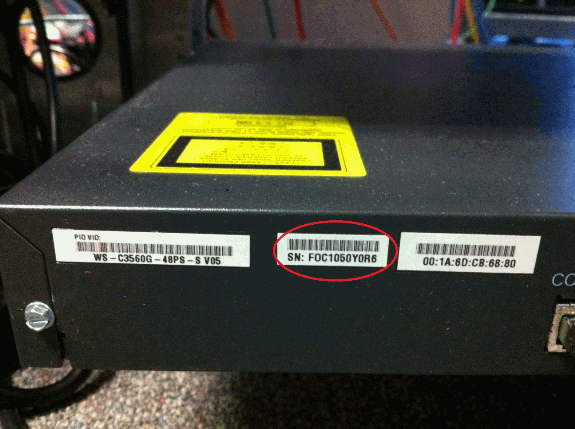
There are two methods to obtain the serial number of a Catalyst 3560G and 3750G switch.
- Use the show version command.
3560-G#show version | include System serial

System serial number : FOC1048Y5N6
- Physical inspection of the device. The serial number label is near the console port (see the label circled in red in the image below).
For More Information
If you require further assistance, or if you have any further questions regarding this field notice, please contact the Cisco Systems Technical Assistance Center (TAC) by one of the following methods:
Receive Email Notification For New Field Notices
Cisco Notification Service—Set up a profile to receive email updates about reliability, safety, network security, and end-of-sale issues for the Cisco products you specify.
 Feedback
Unleash the Power of TAC's Virtual Assistance