Introduction
This document explains how to configure and view the local database size on the Wireless LAN Controller (WLC).
Prerequisites
Requirements
Cisco recommends that you have knowledge of these topics:
Components Used
The information in this document is based on these software and hardware versions:
The information in this document was created from the devices in a specific lab environment.
All of the devices used in this document started with a cleared (default) configuration. If your network is live, make sure that you understand the potential impact of any command.
Database Size on the WLC
The local database on the WLC stores entries for these items:
-
Local management users (including lobby ambassadors)
-
Local network users (including guest users)
-
MAC filter entries
-
Exclusion list entries
-
Access point authorization list entries
The local user database is limited to a maximum of 12000 entries. The valid range is 512 to 12000, and the default setting is 12000. Together they cannot exceed the configured maximum value.
Configure
Configurations
The database size can be configured using the WLC CLI or the GUI.
In order to configure the local database using the CLI, enter this command:
config database size
Examples:
(Cisco Controller) >config database size ?

<count>        Enter the maximum number of entries (512-12000).

Please save the configuration and reset the system ("reset system") for the change to take effect.
In order to configure the database using the GUI, navigate to theSecurity > Generalpage on the WLC. You can configure the database size as shown here:
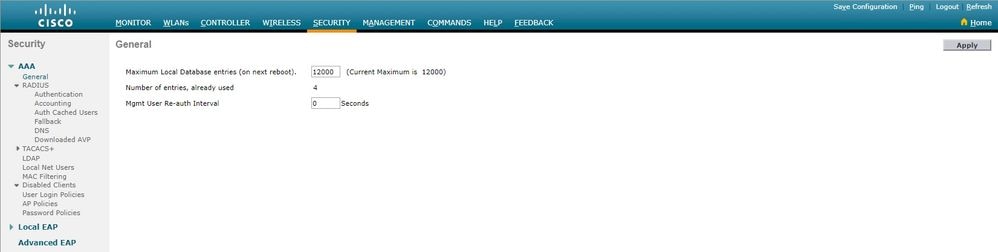
Once you configure the database size using the controller CLI or GUI, you need to reboot the controller for the configuration to take effect.
Verify
The show data summary command lists the number of current database entries and the number of database entries after reboot.
This command has no arguments or keywords. This command has no defaults. This command was introduced in version 4.1.
Examples:
(Cisco Controller) >show database summary

Maximum Database Entries......................... 12000
Maximum Database Entries On Next Reboot.......... 12000
Database Contents
    MAC Filter Entries........................... 1
    Exclusion List Entries....................... 0
    AP Authorization List Entries................ 1
    Management Users............................. 1
    Local Network Users.......................... 1
        Local Users.............................. 1
        Guest Users.............................. 0
    Total........................................ 4
In order to view the number of MAC filters configured, use theshow macfilter summarycommand.
(Cisco Controller) >show macfilter summary

MAC Filter RADIUS Compatibility mode............. Cisco ACS
MAC Filter Delimiter............................. None
MAC Filter Entries............................... 1

Local Mac Filter Table

MAC Address WLAN Id IP Addr Description
----------------------- -------------- --------------- --------------------------------
f8:0b:cb:e4:7f:40 Any unknown
In order to view the number of local netusers configured, use theshow netuser summarycommand.
(Cisco Controller) >show netuser summary

Maximum logins allowed for a given user name..... Unlimited


User Name WLAN Id User Type Lifetime Description
------------------------ -------- --------- ------------------------------ --------------------------------
testuser Any Permanent N/A
Troubleshoot
When the maximum configured database size is reached, you might receive any one of these errors when trying to add users to the local database:
-
When attempting to add a MAC address to a long MAC filter list, the error messageError in creating MAC filtermight be seen.
-
When adding a large number of users to the local database, a point can be reached where some user entries are silently ignored.
-
Similarly, a point can be reached while adding SSCs for APs, where no more entries can be added, and the "Authorization entry does not exist in Controller's AP Authorization List." messages are seen.

 Feedback