PIX/ASA 8.0: Use LDAP Authentication to Assign a Group Policy at Login

Available Languages
Bias-Free Language
The documentation set for this product strives to use bias-free language. For the purposes of this documentation set, bias-free is defined as language that does not imply discrimination based on age, disability, gender, racial identity, ethnic identity, sexual orientation, socioeconomic status, and intersectionality. Exceptions may be present in the documentation due to language that is hardcoded in the user interfaces of the product software, language used based on RFP documentation, or language that is used by a referenced third-party product. Learn more about how Cisco is using Inclusive Language.
Contents
Introduction
This document describes how to use Lightweight Directory Access Protocol (LDAP) authentication in order to assign a group policy at login. Frequently, administrators want to provide VPN users with different access permissions or WebVPN content. On the Adaptive Security Appliance (ASA) this is regularly achieved through the assignment of different group policies to different users. When LDAP authentication is in use, this can be achieved automatically with an LDAP attribute map.
In order to use LDAP to assign a group policy to a user, you need to configure a map that maps an LDAP attribute, such as the Active Directory (AD) attribute memberOf, to the IETF-Radius-Class attribute that is understood by the ASA. Once the attribute mapping is established, you must map the attribute value configured on the LDAP server to the name of a group policy on the ASA.
Note: The memberOf attribute corresponds to the group that the user is a a part of in the Active Directory. It is possible for a user to be a member of more than one group in the Active Directory. This causes multiple memberOf attributes to be sent by the server, but the ASA can only match one attribute to one group policy.
Prerequisites
Requirements
This document requires that a working LDAP authentication setup is already configured on the ASA. Refer to Configure LDAP Authentication for WebVPN Users in order to learn how to set up a basic LDAP authentication configuration on the ASA.
Components Used
The information in this document is based on the PIX/ASA 8.0.
The information in this document was created from the devices in a specific lab environment. All of the devices used in this document started with a cleared (default) configuration. If your network is live, make sure that you understand the potential impact of any command.
Background Information
In this example, the AD/LDAP attribute memberOf is mapped to the ASA attribute CVPN3000-Radius-IETF-Class. The class attribute is used in order to assign group policies on the ASA. This is the general process that the ASA completes when it authenticates users with LDAP:
-
The user initiates a connection to the ASA.
-
The ASA is configured to authenticate that user with the Microsoft AD/LDAP server.
-
The ASA binds to the LDAP server with the credentials configured on the ASA (admin in this case), and looks up the provided username.
-
If the username is found, the ASA attempts to bind to the LDAP server with the credentials that the user provides at login.
-
If the second bind is successful, the ASA processes the users attributes, which includes memberOf.
-
The memberOf attribute is mapped to CVPN3000-Radius-IETF-Class by the configured LDAP Attibute map.
-
The value that indicates membership in the Employees group is mapped to ExamplePolicy1.
-
The value that indicates membership in the Contractors group is mapped to ExamplePolicy2.
-
-
The newly assigned CVPN3000-Radius-IETF-Class attribute is examined and a group policy determination is made.
-
The ExamplePolicy1 value causes the ExamplePolicy1 group policy to be assigned to the user.
-
The ExamplePolicy2 value causes the ExamplePolicy2 group policy to be assigned to the user.
-
Configure
Configure the ASA
In this section, you are presented with the information to configure the ASA to assign a group policy to users based on their LDAP attributes.
ASDM
Complete these steps in the Adaptive Security Device Manager (ASDM) in order to configure the LDAP map on the ASA.
-
Navigate to Configuration > Remote Access VPN > AAA Setup > LDAP Attribute Map.
-
Click Add.
-
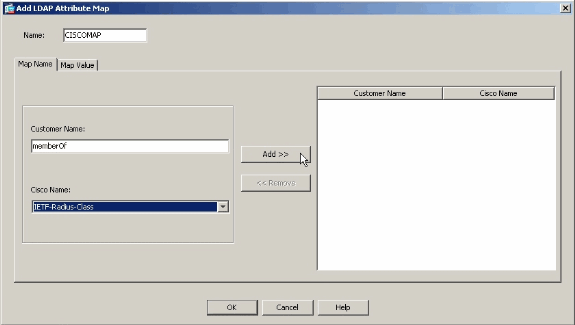
Name the map.
-
Create a mapping between an LDAP attribute and the IETF-Radius-Class attribute on the ASA. In this example, the Customer Name is the memberOf attribute in Active Directory. It is mapped to the Cisco Name of IETF-Radius-Class. Click Add.
Note: Attribute names and values are case sensitive.
Note: If you do not know the exact attribute names or spellings that are provided by the LDAP server, it can be helpful to examine the debugs before you create the map. See the Verify section for more information on how to identify LDAP attributes with debugs.
-
After you add the attribute mapping, click the Map Value tab, and click Add in order to create a value mapping. Add as many value mappings as required, and click OK when finished.
-
Customer Value - the attribute value from the LDAP server
-
Cisco Value - the name of the group policy on the ASA
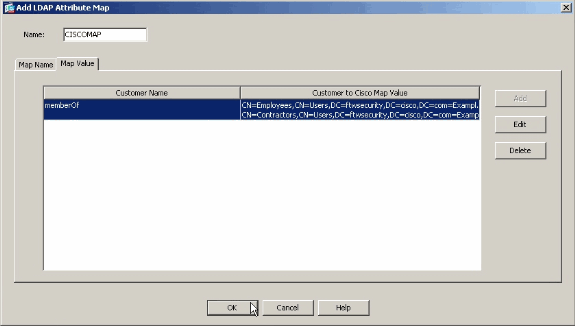
In this example, the CN=Employees,CN=Users,DC=ftwsecurity,DC=cisco,DC=com memberOf value is mapped to ExamplePolicy1 and the CN=Contractors,CN=Users,DC=ftwsecurity,DC=cisco,DC=com memberOf value is mapped to ExamplePolicy2.
Complete LDAP Attribute Map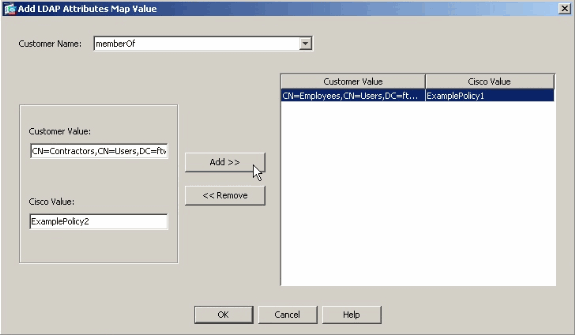
-
-
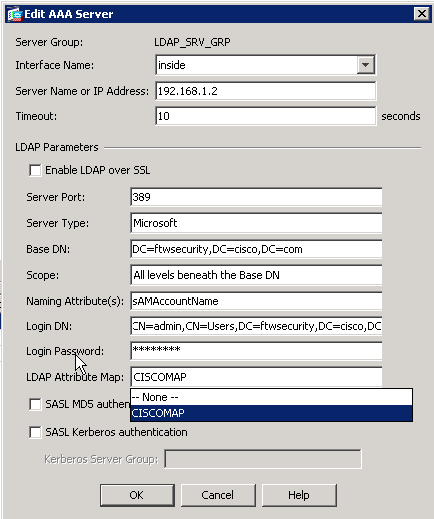
Once you create the map, it must be assigned to the Authentication, Authorization, and Accounting (AAA) server that is configured for LDAP authentication. Choose AAA Server Groups from the left pane.
-
Select your AAA server that is configured for LDAP, and click Edit.
-
At the bottom of the window that appears, locate the LDAP Attribute Map drop-down list. Choose the list that you just created. Click OK when finished.
CLI
Complete these steps in the CLI in order to configure the LDAP map on the ASA.
ciscoasa#configure terminal


!--- Create the LDAP Attribute Map.

ciscoasa(config)#ldap attribute-map CISCOMAP
ciscoasa(config-ldap-attribute-map)#map-name memberOf IETF-Radius-Class
ciscoasa(config-ldap-attribute-map)#map-value memberOf CN=Employees,CN=Users,
   DC=ftwsecurity,DC=cisco,DC=com ExamplePolicy1
ciscoasa(config-ldap-attribute-map)#map-value memberOf CN=Contractors,CN=Users,
   DC=ftwsecurity,DC=cisco,DC=com ExamplePolicy2
ciscoasa(config-ldap-attribute-map)#exit


!--- Assign the map to the LDAP AAA server.

ciscoasa(config)#aaa-server LDAP_SRV_GRP (inside) host 192.168.1.2
ciscoasa(config-aaa-server-host)#ldap-attribute-map CISCOMAP
Configure a NOACCESS group-policy
You can create a NOACCESS group-policy in order to deny the VPN connection when the user is not part of any of the LDAP groups. This configuration snippet is shown for your reference:
group-policy NOACCESS internal
group-policy NOACCESS attributes
 vpn-simultaneous-logins 0
 vpn-tunnel-protocol IPSec webvpn
You need to apply this group policy as a default group policy to the tunnel-group. So that users who get a mapping from the LDAP attribute map, for example those who belong to a desired LDAP group, are able to get their desired group policies and users who do not get any mapping, for example those who do not belong to any of the desired LDAP groups, are able to get NOACCESS group-policy from the tunnel-group, which blocks the access for them.
Note: Refer to ASA/PIX: Mapping VPN Clients to VPN Group Policies Through LDAP Configuration Example for more information on how to create different LDAP attribute mappings that denies access to some users.
Configure the Active Directory or Other LDAP Server
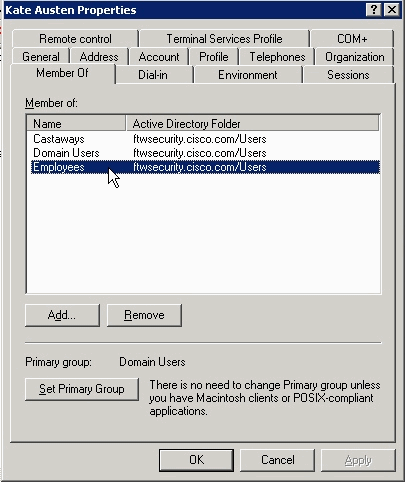
The only configuration required on the Active Directory or other LDAP server relates to the attributes of the user. In this example, the user Kate Austen is a member of the Employees group in AD:
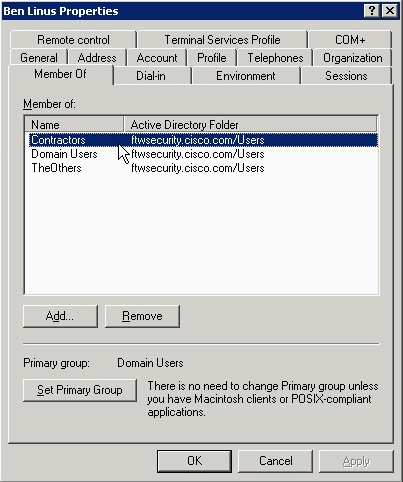
Ben Linus is a member of the Contractors group:
Verify
Use this section in order to verify your configuration.
Login
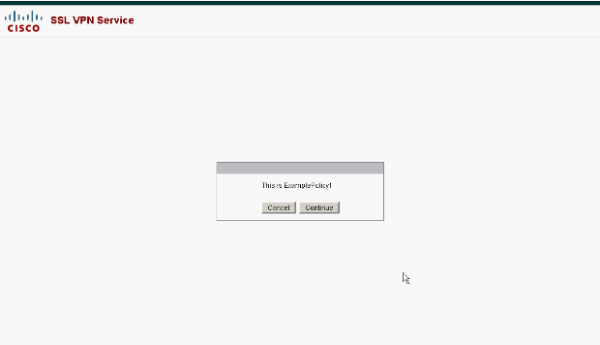
In order to verify the success of your configuration, log in as a user who is supposed to have a group policy assigned with the LDAP attribute map. In this example, a banner is configured for each group policy. The screenshot shows that the user kate logs in successfully and has ExamplePolicy1 applied, because she is a member of the Employees group.
Debug the LDAP Transaction
In order to verify that the LDAP mapping occurs, or to get more information on what attributes the LDAP server sends, issue the debug ldap 255 command at the ASA command line, and then attempt authentication.
In this debug, the user kate is assigned the group policy ExamplePolicy1 because she is a member of the Employees group. This debug also shows that kate is a member of the Castaways group, but that attribute is not mapped, so it is ignored.
ciscoasa#debug ldap 255
debug ldap  enabled at level 255
ciscoasa#
[105] Session Start
[105] New request Session, context 0xd5481808, reqType = 1
[105] Fiber started
[105] Creating LDAP context with uri=ldap://192.168.1.2:389
[105] Connect to LDAP server: ldap://192.168.1.2:389, status = Successful
[105] defaultNamingContext: value = DC=ftwsecurity,DC=cisco,DC=com
[105] supportedLDAPVersion: value = 3
[105] supportedLDAPVersion: value = 2
[105] supportedSASLMechanisms: value = GSSAPI
[105] supportedSASLMechanisms: value = GSS-SPNEGO
[105] supportedSASLMechanisms: value = EXTERNAL
[105] supportedSASLMechanisms: value = DIGEST-MD5
[105] Binding as administrator
[105] Performing Simple authentication for admin to 192.168.1.2
[105] LDAP Search:
        Base DN = [dc=ftwsecurity, dc=cisco, dc=com]
        Filter  = [sAMAccountName=kate]
        Scope   = [SUBTREE]
[105] User DN = [CN=Kate Austen,CN=Users,DC=ftwsecurity,DC=cisco,DC=com]
[105] Talking to Active Directory server 192.168.1.2
[105] Reading password policy for kate, dn:CN=Kate Austen,CN=Users,
   DC=ftwsecurity,DC=cisco,DC=com
[105] Read bad password count 0
[105] Binding as user
[105] Performing Simple authentication for kate to 192.168.1.2
[105] Checking password policy for user kate
[105] Binding as administrator
[105] Performing Simple authentication for admin to 192.168.1.2
[105] Authentication successful for kate to 192.168.1.2
[105] Retrieving user attributes from server 192.168.1.2
[105] Retrieved Attributes:
[105]   objectClass: value = top
[105]   objectClass: value = person
[105]   objectClass: value = organizationalPerson
[105]   objectClass: value = user
[105]   cn: value = Kate Austen
[105]   sn: value = Austen
[105]   givenName: value = Kate
[105]   distinguishedName: value = CN=Kate Austen,CN=Users,DC=ftwsecurity,
   DC=cisco,DC=com
[105]   instanceType: value = 4
[105]   whenCreated: value = 20070815155224.0Z
[105]   whenChanged: value = 20070815195813.0Z
[105]   displayName: value = Kate Austen
[105]   uSNCreated: value = 16430
[105]   memberOf: value = CN=Castaways,CN=Users,DC=ftwsecurity,DC=cisco,DC=com
[105]           mapped to IETF-Radius-Class: value = CN=Castaways,CN=Users,
   DC=ftwsecurity,DC=cisco,DC=com
[105]   memberOf: value = CN=Employees,CN=Users,DC=ftwsecurity,DC=cisco,DC=com
[105]           mapped to IETF-Radius-Class: value = ExamplePolicy1
[105]   uSNChanged: value = 20500
[105]   name: value = Kate Austen
[105]   objectGUID: value = ..z...yC.q0.....
[105]   userAccountControl: value = 66048
[105]   badPwdCount: value = 0
[105]   codePage: value = 0
[105]   countryCode: value = 0
[105]   badPasswordTime: value = 128316837694687500
[105]   lastLogoff: value = 0
[105]   lastLogon: value = 128316837785000000
[105]   pwdLastSet: value = 128316667442656250
[105]   primaryGroupID: value = 513
[105]   objectSid: value = ............Q..p..*.p?E.Z...
[105]   accountExpires: value = 9223372036854775807
[105]   logonCount: value = 0
[105]   sAMAccountName: value = kate
[105]   sAMAccountType: value = 805306368
[105]   userPrincipalName: value = kate@ftwsecurity.cisco.com
[105]   objectCategory: value = CN=Person,CN=Schema,CN=Configuration,
   DC=ftwsecurity,DC=cisco,DC=com
[105]   dSCorePropagationData: value = 20070815195237.0Z
[105]   dSCorePropagationData: value = 20070815195237.0Z
[105]   dSCorePropagationData: value = 20070815195237.0Z
[105]   dSCorePropagationData: value = 16010108151056.0Z
[105] Fiber exit Tx=685 bytes Rx=2690 bytes, status=1
[105] Session End
In this debug, the user ben is assigned the ExamplePolicy2 group policy because he is a member of the Contractors group. This debug also shows that ben is member of the TheOthers group, but that attribute is not mapped, so it is ignored.
ciscoasa#debug ldap 255
debug ldap  enabled at level 255
ciscoasa#
[106] Session Start
[106] New request Session, context 0xd5481808, reqType = 1
[106] Fiber started
[106] Creating LDAP context with uri=ldap://192.168.1.2:389
[106] Connect to LDAP server: ldap://192.168.1.2:389, status = Successful
[106] defaultNamingContext: value = DC=ftwsecurity,DC=cisco,DC=com
[106] supportedLDAPVersion: value = 3
[106] supportedLDAPVersion: value = 2
[106] supportedSASLMechanisms: value = GSSAPI
[106] supportedSASLMechanisms: value = GSS-SPNEGO
[106] supportedSASLMechanisms: value = EXTERNAL
[106] supportedSASLMechanisms: value = DIGEST-MD5
[106] Binding as administrator
[106] Performing Simple authentication for admin to 192.168.1.2
[106] LDAP Search:
        Base DN = [dc=ftwsecurity, dc=cisco, dc=com]
        Filter  = [sAMAccountName=ben]
        Scope   = [SUBTREE]
[106] User DN = [CN=Ben Linus,CN=Users,DC=ftwsecurity,DC=cisco,DC=com]
[106] Talking to Active Directory server 192.168.1.2
[106] Reading password policy for ben, dn:CN=Ben Linus,CN=Users,DC=ftwsecurity,
   DC=cisco,DC=com
[106] Read bad password count 0
[106] Binding as user
[106] Performing Simple authentication for ben to 192.168.1.2
[106] Checking password policy for user ben
[106] Binding as administrator
[106] Performing Simple authentication for admin to 192.168.1.2
[106] Authentication successful for ben to 192.168.1.2
[106] Retrieving user attributes from server 192.168.1.2
[106] Retrieved Attributes:
[106]   objectClass: value = top
[106]   objectClass: value = person
[106]   objectClass: value = organizationalPerson
[106]   objectClass: value = user
[106]   cn: value = Ben Linus
[106]   sn: value = Linus
[106]   givenName: value = Ben
[106]   distinguishedName: value = CN=Ben Linus,CN=Users,DC=ftwsecurity,
   DC=cisco,DC=com
[106]   instanceType: value = 4
[106]   whenCreated: value = 20070815160840.0Z
[106]   whenChanged: value = 20070815195243.0Z
[106]   displayName: value = Ben Linus
[106]   uSNCreated: value = 16463
[106]   memberOf: value = CN=TheOthers,CN=Users,DC=ftwsecurity,DC=cisco,DC=com
[106]           mapped to IETF-Radius-Class: value = CN=TheOthers,CN=Users,
DC=ftwsecurity,DC=cisco,DC=com
[106]  memberOf: value = CN=Contractors,CN=Users,DC=ftwsecurity,DC=cisco,DC=com
[106]           mapped to IETF-Radius-Class: value = ExamplePolicy2
[106]   uSNChanged: value = 20499
[106]   name: value = Ben Linus
[106]   objectGUID: value = ..j...5@.z.|...n
[106]   userAccountControl: value = 66048
[106]   badPwdCount: value = 0
[106]   codePage: value = 0
[106]   countryCode: value = 0
[106]   badPasswordTime: value = 0
[106]   lastLogoff: value = 0
[106]   lastLogon: value = 0
[106]   pwdLastSet: value = 128316677201718750
[106]   primaryGroupID: value = 513
[106]   objectSid: value = ............Q..p..*.p?E.^...
[106]   accountExpires: value = 9223372036854775807
[106]   logonCount: value = 0
[106]   sAMAccountName: value = ben
[106]   sAMAccountType: value = 805306368
[106]   userPrincipalName: value = ben@ftwsecurity.cisco.com
[106]   objectCategory: value = CN=Person,CN=Schema,CN=Configuration,
   DC=ftwsecurity,DC=cisco,DC=com
[106]   dSCorePropagationData: value = 20070815195243.0Z
[106]   dSCorePropagationData: value = 20070815195243.0Z
[106]   dSCorePropagationData: value = 20070815195243.0Z
[106]   dSCorePropagationData: value = 16010108151056.0Z
[106] Fiber exit Tx=680 bytes Rx=2642 bytes, status=1
[106] Session End
Troubleshoot
Use this section in order to troubleshoot your configuration.
Attribute Names and Values are Case-Sensitive
Attribute names and values are case-sensitive. If your mapping does not occur properly, be certain that you use the correct spelling and capitalization in your LDAP attribute map for both the Cisco and LDAP attribute names and values.
ASA is Not Able to Authenticate Users from the LDAP Server
The ASA is not able to authenticate users from the LDAP server. Here are the debugs:
ldap 255 output:[1555805] Session Start[1555805] New request Session, context 0xcd66c028, reqType = 1[1555805] Fiber started[1555805] Creating LDAP context with uri=ldaps://172.30.74.70:636[1555805] Connect to LDAP server: ldaps://172.30.74.70:636, status = Successful[1555805] supportedLDAPVersion: value = 3[1555805] supportedLDAPVersion: value = 2[1555805] Binding as administrator[1555805] Performing Simple authentication for sysservices to 172.30.74.70[1555805] Simple authentication for sysservices returned code (49) Invalid credentials[1555805] Failed to bind as administrator returned code (-1) Can't contact LDAP server[1555805] Fiber exit Tx=222 bytes Rx=605 bytes, status=-2[1555805] Session End
As for the debugs, either the LDAP Login DN format is incorrect or the password is incorrect so verify both in order to resolve the issue.
Revision History
| Revision | Publish Date | Comments |
|---|---|---|
1.0 |
29-Aug-2007
|
Initial Release |
Contributed by Cisco Engineers
 Feedback
Contact Cisco
- Open a Support Case

- (Requires a Cisco Service Contract)