Introduction
This document describes VPN filters in detail and applies to LAN-to-LAN (L2L), the Cisco VPN Client, and the Cisco Secure Client.
Prerequisites
Requirements
Cisco recommends that you have knowledge of these topics:
- L2L VPN tunnels configuration
- VPN Client Remote Access (RA) configuration
- AnyConnect RA configuration
Components Used
The information in this document is based on the Cisco 5500-X Series/Cisco Firepower Series Adaptive Security Appliance (ASA) Version 9.1x.
The information in this document was created from the devices in a specific lab environment. All of the devices used in this document started with a cleared (default) configuration. If your network is live, ensure that you understand the potential impact of any command.
Background Information
Filters consist of rules that determine whether to allow or reject tunneled data packets that come through the security appliance, based on criteria such as source address, destination address, and protocol. You configure Access Control Lists (ACLs) in order to permit or deny various types of traffic. The filter can be configured on the group policy, username attributes, or Dynamic Access Policy (DAP).
DAP supersedes the value configured under both username attributes and group policy. The username attribute value supersedes the group policy value in case DAP does not assign any filter.
The sysopt connection permit-vpn command allows all the traffic that enters the security appliance through a VPN tunnel to bypass interface access lists. Group policy and per-user authorization access lists still apply to the traffic.
A vpn-filter is applied to postdecrypted traffic after it exits a tunnel and to preencrypted traffic before it enters a tunnel. An ACL that is used for a vpn-filter must NOT also be used for an interface access-group.
When a vpn-filter is applied to a group-policy that governs Remote Access VPN client connections, the ACL must be configured with the client assigned IP addresses in the src_ip position of the ACL and the local network in the dest_ip position of the ACL. When a vpn-filter is applied to a group-policy that governs a L2L VPN connection, the ACL must be configured with the remote network in the src_ip position of the ACL and the local network in the dest_ip position of the ACL.
Configure
VPN filters must be configured in inbound direction although rules are still applied bidirectionally.
Example 1. vpn-filter with SecureClient or VPN Client
Assume that the client-assigned IP address is 10.10.10.1/24 and the local network is 192.168.1.0/24.
This Access Control Entry (ACE) allows the AnyConnect client to Telnet to the local network:
access-list vpnfilt-ra permit tcp
10.10.10.1 255.255.255.255 192.168.1.0 255.255.255.0 eq 23
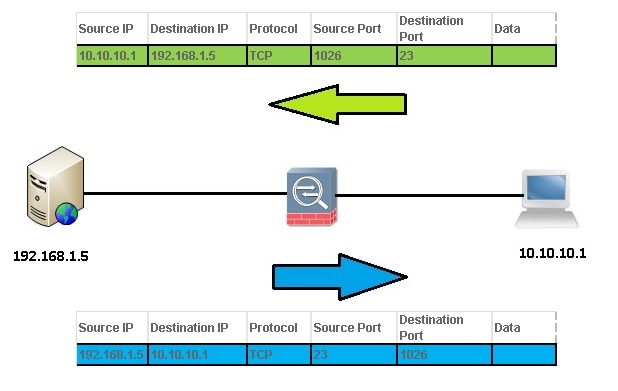
Note: The ACE access-list vpnfilt-ra permit tcp 10.10.10.1 255.255.255.255 192.168.1.0 255.255.255.0 eq 23 also allows the local network to initiate a connection to the RA client on any TCP port if it uses a source port of 23.
This ACE allows the local network to Telnet to the Secure client:
access-list vpnfilt-ra permit tcp 10.10.10.1 255.255.255.255
eq 23 192.168.1.0 255.255.255.0
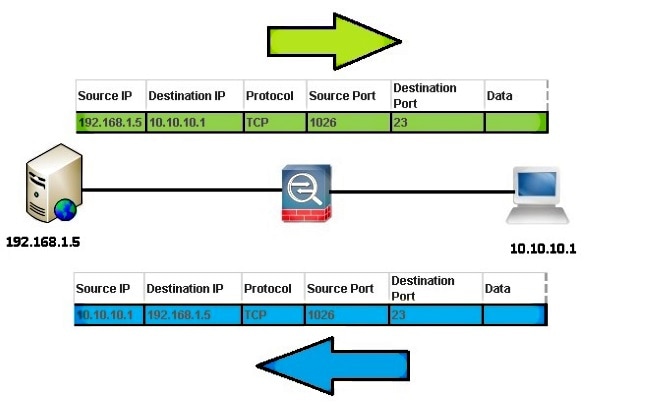
Note: The ACE access-list vpnfilt-ra permit tcp 10.10.10.1 255.255.255.255 eq 23 192.168.1.0 255.255.255.0 also allows the RA client to initiate a connection to the local network on any TCP port if it uses a source port of 23.
Caution: The vpn-filter feature allows for traffic to be filtered in the inbound direction only and the outbound rule is automatically compiled. Therefore, when you create an Internet Control Message Protocol (ICMP) access-list, do not specify the ICMP type in the access-list formatting if you want directional filters.
Example 2. vpn-filter with L2L VPN Connection
Assume that the remote network is 10.0.0.0/24 and the local network is 192.168.1.0/24.
This ACE allows the remote network to Telnet to the local network:
access-list vpnfilt-l2l permit tcp 10.0.0.0 255.255.255.0 192.168.1.0
255.255.255.0 eq 23
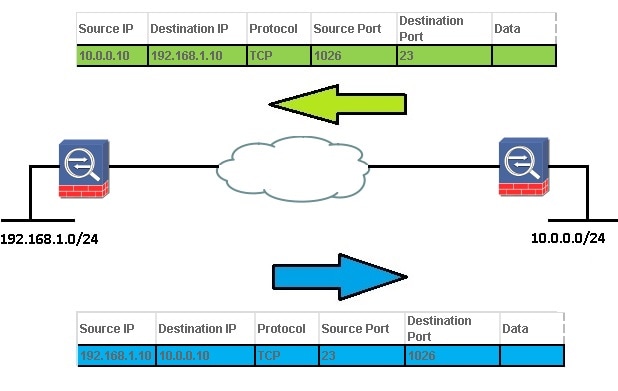
Note: The ACE access-list vpnfilt-l2l permit tcp 10.0.0.0 255.255.255.0 192.168.1.0 255.255.255.0 eq 23 also allows the local network to initiate a connection to the remote network on any TCP port if it uses a source port of 23.
This ACE allows the local network to Telnet to the remote network:
access-list vpnfilt-l2l permit tcp 10.0.0.0 255.255.255.0 eq 23
192.168.1.0 255.255.255.0
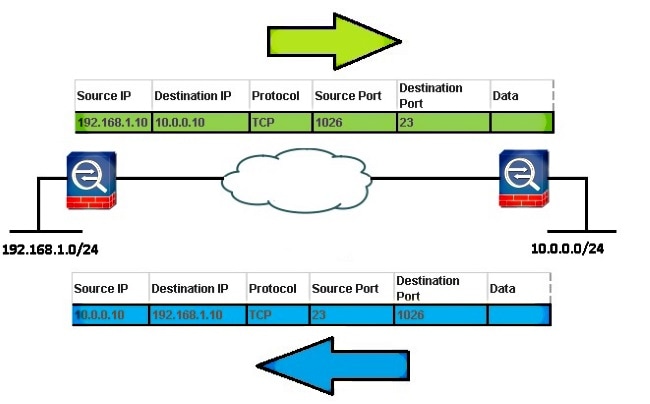
Note: The ACE access-list vpnfilt-l2l permit tcp 10.0.0.0 255.255.255.0 eq 23 192.168.1.0 255.255.255.0 also allows the remote network to initiate a connection to the local network on any TCP port if it uses a source port of 23.
Caution: The vpn-filter feature allows for traffic to be filtered in the inbound direction only and the outbound rule is automatically compiled. Therefore, when you create an ICMP access-list, do not specify the ICMP type in the access-list formatting if you want directional filters.
VPN Filters and per-user-override access-groups
VPN traffic is not filtered by interface ACLs. The command no sysopt connection permit-vpn can be used in order to change the default behavior. In this case, two ACLs can be applied to user traffic: the interface ACL is checked first and then the vpn-filter.
The per-user-override keyword (for inbound ACLs only) allows dynamic user ACLs that are downloaded for user authorization in order to override the ACL assigned to the interface. For example, if the interface ACL denies all traffic from 10.0.0.0, but the dynamic ACL permits all traffic from 10.0.0.0, then the dynamic ACL overrides the interface ACL for that user and traffic is permitted.
Examples (when no sysopt connection permit-vpn is configured):
- no per-user-override, no vpn-filter - traffic is matched against the interface ACL
- no per-user-override, vpn-filter - traffic is matched first against the interface ACL, then against the vpn-filter
- per-user-override, vpn-filter - traffic is matched against the vpn-filter only
Verify
Use this section in order to confirm that your configuration works properly.
- show asp table filter [access-list <acl-name>] [hits]
In order to debug the accelerated security path filter tables, use the show asp table filter command in privileged EXEC mode. When a filter has been applied to a VPN tunnel, the filter rules are installed into the filter table. If the tunnel has a filter specified, then the filter table is checked prior to encryption and after decryption in order to determine whether the inner packet must be permitted or denied.
 USAGE
 show asp table filter [access-list <acl-name>] [hits]
 SYNTAX <acl-name>      Show installed filter for access-list <acl-name>
 hits            Show filter rules which have non-zero hits values
- clear asp table filter [access-list <acl-name>]
This command clears the hit counters for the ASP filter table entries.
 USAGE
 clear asp table filter [access-list <acl-name>]
 SYNTAX
 <acl-name>      Clear hit counters only for specified access-list <acl-name>
Troubleshoot
This section provides information you can use in order to troubleshoot your configuration.
Note: Refer to Important Information on Debug Commands before you use debug commands.
- debug acl filter
This command enables VPN filter debugging. It can be used to help troubleshoot installations/removal of the VPN filters into the ASP Filter table. For the Example 1. vpn-filter with AnyConnect or VPN Client.
Debug output when user1 connects:
 ACL FILTER INFO: first reference to inbound filter vpnfilt-ra(2): Installing
 rule into NP.
 ACL FILTER INFO: first reference to outbound filter vpnfilt-ra(2): Installing
 rule into NP.
Debug output when user2 connects (after user1 and the same filter):
 ACL FILTER INFO: adding another reference to outbound filter vpnfilt-ra(2): refCnt=2
 ACL FILTER INFO: adding another reference to inbound filter vpnfilt-ra(2): refCnt=2
Debug output when user2 disconnects:
 ACL FILTER INFO: removing a reference from inbound filter vpnfilt-ra(2): remaining
 refCnt=1
 ACL FILTER INFO: removing a reference from outbound filter vpnfilt-ra(2): remaining
 refCnt=1
Debug output when user1 disconnects:
 ACL FILTER INFO: releasing last reference from inbound filter vpnfilt-ra(2): Removing
 rule into NP.
 ACL FILTER INFO: releasing last reference from outbound filter vpnfilt-ra(2): Removing
rule into NP.
- show asp table
Here is the output of show asp table filter prior to when user1 connects. Only the implicit deny rules are installed for IPv4 and IPv6 in both in and out directions.
 Global Filter Table:
 in  id=0xd616ef20, priority=11, domain=vpn-user, deny=true
         hits=0, user_data=0xd613ea60, filter_id=0x0(-implicit deny-), protocol=0
         src ip=0.0.0.0, mask=0.0.0.0, port=0
         dst ip=0.0.0.0, mask=0.0.0.0, port=0
 in  id=0xd616f420, priority=11, domain=vpn-user, deny=true
         hits=0, user_data=0xd615ef70, filter_id=0x0(-implicit deny-), protocol=0
         src ip=::/0, port=0
         dst ip=::/0, port=0
 out id=0xd616f1a0, priority=11, domain=vpn-user, deny=true
         hits=0, user_data=0xd614d900, filter_id=0x0(-implicit deny-), protocol=0
         src ip=0.0.0.0, mask=0.0.0.0, port=0
         dst ip=0.0.0.0, mask=0.0.0.0, port=0
 out id=0xd616f6d0, priority=11, domain=vpn-user, deny=true
         hits=0, user_data=0xd6161638, filter_id=0x0(-implicit deny-), protocol=0
         src ip=::/0, port=0
         dst ip=::/0, port=0

 Feedback