Understanding 4-Port and 8-Port Async/Sync Network Modules
Available Languages
Contents
Introduction
This document describes 4-port and 8-port async/sync network modules.
The 4-port (NM-4A/S) and 8-port (NM-8A/S) asynchronous/synchronous (async/sync) network modules provide async connectivity with speeds up to 115.2 kbps, and sync connectivity with speeds up to 128 kbps. These modules use the 60-pin "5-in-1" cables, similar to those used on the Cisco 2500 and Cisco 7000 series routers.
Figure 1 – Asynchronous/Synchronous Network Module 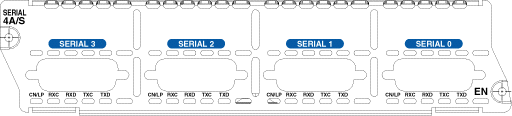
Prerequisites
Requirements
There are no specific requirements for this document.
Components Used
Refer to the Platform Support section.
The information in this document was created from the devices in a specific lab environment. All of the devices used in this document started with a cleared (default) configuration. If your network is live, make sure that you understand the potential impact of any command.
Conventions
For more information on document conventions, refer to the Cisco Technical Tips Conventions.
Product Numbers
This section explains what the product numbers stand for.
-
NM-4A/S—Four Port Async/Sync Network Module
-
NM-8A/S—Eight Port Async/Sync Network Module
Features
Here are the features of the 4-port (NM-4A/S) and 8-port (NM-8A/S) asynchronous/synchronous (async/sync) network module:
-
It has four or eight async/sync ports.
-
It uses Cisco 60-pin "5-in-1" connectors (same as Cisco 2500 and Cisco 7000).
-
It uses the same cabling as Cisco 2500 and Cisco 7000.
-
The maximum speed is 115.2 kbps for async, 128 kbps for the sync external clock, and 125 kbps for the internal clock.
Platform Support
This table lists the platforms supported:
| Cisco IOS® Software Support | Cisco 2600, 2600XM | Cisco 3620, 3640 | Cisco 3631 | Cisco 3660 | Cisco 2691, 3725, 3745 |
|---|---|---|---|---|---|
| NM-4A/S | all Cisco IOS versions | all Cisco IOS versions | all Cisco IOS versions | all Cisco IOS versions | all Cisco IOS versions |
| NM-8A/S | all Cisco IOS versions | all Cisco IOS versions | all Cisco IOS versions | all Cisco IOS versions | all Cisco IOS versions |
Note: The Cisco IOS software releases provided are typically the minimum version required to support the platform, module, or feature in question. Use the Software Advisor (registered customers only) to choose appropriate software for your network device, match software features to Cisco IOS and CatOS releases, compare IOS releases, or find out which software releases support your hardware.
Configuration
On the 4- and 8-port async/sync network modules, the interfaces are addressed as interface serial <slot>/<unit>. The units are numbered from right to left, and bottom to top.
The default setting for these modules is synchronous. To configure the modules for async communication use the physical-layer async command. Here is a section of an async configuration:
maui-soho-01(config)#interface Serial 2/0
maui-soho-01(config-if)#physical-layer async

!--- Places the interface in asynchronous mode. !--- Continue to configure this Serial interface as you would configure !--- an Async Interface.

maui-soho-01(config-if)#ip add 10.0.0.1 255.255.255.0
maui-soho-01(config-if)#async mode interactive
maui-soho-01(config-if)#async default routing
maui-soho-01(config-if)#dialer in-band
maui-soho-01(config-if)#dialer map ip 10.0.0.2 name maui-nas-01 broadcast 5551111

!--- These commands are part of a broader DDR configuration.
To connect a modem to this interface, refer to Configuring Dialout using a Modem on the AUX Port. This document uses the AUX port. However, the configuration is very similar.
To map the interface number to a line number, first multiply the slot number by 32, then add the unit number, and add 1: line number = (<slot> * 32) + <unit> + 1.
Use the command physical-layer sync or no physical-layer async to revert to the default sync mode. To configure the interface for normal serial operation, refer to Configuring Serial Interfaces.
 Feedback