Installation Guide for Cisco Directional Antenna (AIR-ANT-SE-WiFI-D)
Available Languages
Table of Contents
Cisco Aironet Directional Antenna (AIR-ANT-SE-WiFi-D)
Installating and Using the Antenna
Obtaining Documentation and Submitting a Service Request
Cisco Aironet Directional Antenna (AIR-ANT-SE-WiFi-D)
This document describes the Cisco Directional Antenna (AIR-ANT-SE-WiFi-D) and provides instructions for mounting it. The antenna operates in the 2.4-GHz and 5-GHz frequency bands and is designed for use with Cisco Spectrum Expert spectrum analyzer software. The antenna connects to the Cisco Spectrum Expert adapter card (hereafter referred to as the card). The antenna’s directional qualities provide focused RF detection in a given direction. The antenna can be useful with all ISMS mobile features, but is especially useful in locating and identifying RF devices.
System Requirements
This antenna is designed for use with the Cisco Spectrum Expert application only. The antenna is not designed for use with access points.
Installation Notes
The antenna is designed to connect to a dedicated antenna port on a Cisco Spectrum Expert adapter card. No special tools are required to install the antenna.
Installating and Using the Antenna
To provide mobility and take advantage of the antenna’s directional characteristics, the antenna is typically connected to a laptop computer as shown in Figure 1.
Figure 1 Typical Antenna Installation on a Laptop Computer

. Follow these steps to assemble the antenna and install it on a laptop computer.
Step 1 Verify that the contents of the directional antenna kit are complete as shown in Figure 2.
Figure 2 Directional Antenna Kit Contents

Step 2 Slide the antenna and mast into the mounting base as shown in Fig 3.
Figure 3 Installing the Antenna and Mast in the Mounting Base
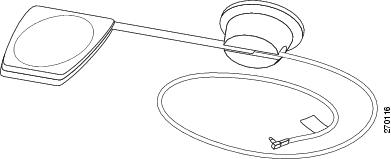
Step 3 Attach a Velcro pad to the mounting base.
Step 4 Attach the other Velcro pad on the laptop computer cover where you intend to mount the antenna.
Step 5 Attach the assembled antenna to the Velcro pad on your laptop computer cover as shown in Figure 1.

Note Before completing the following steps, you must have installed and configured Cisco Spectrum Expert software and the Specrum Expert card on your laptop. The card should be inserted in a PCMCIA slot before you continue the installation.
Step 6 Connect the antenna cable to the card as shown in Figure 4.
Figure 4 Connecting the Antenna Cable to the Sensor Card

Step 7 Boot your laptop computer and start the Cisco Spectrum Expert software.
Step 8 To find the direction of a signal on the frequency band selected, slowly rotate the antenna mast to obtain a maximum level on the spectrum display. Figure 5 shows the directional properties of the antenna.
Figure 5 Using the Directional Antenna

Step 9 Refer to your Cisco Spectrum Expert software documentation for information about detecting, locating, and identifying signals.
Obtaining Documentation and Submitting a Service Request
For information on obtaining documentation, using the Cisco Bug Search Tool (BST), submitting a service request, and gathering additional information, see What’s New in Cisco Product Documentation at: http://www.cisco.com/c/en/us/td/docs/general/whatsnew/whatsnew.html.
Subscribe to What’s New in Cisco Product Documentation, which lists all new and revised Cisco technical documentation as an RSS feed and delivers content directly to your desktop using a reader application. The RSS feeds are a free service.
Cisco and the Cisco logo are trademarks or registered trademarks of Cisco and/or its affiliates in the U.S. and other countries. To view a list of Cisco trademarks, go to this URL: www.cisco.com/go/trademarks. Third-party trademarks mentioned are the property of their respective owners. The use of the word partner does not imply a partnership relationship between Cisco and any other company. (1110R)
Any Internet Protocol (IP) addresses and phone numbers used in this document are not intended to be actual addresses and phone numbers. Any examples, command display output, network topology diagrams, and other figures included in the document are shown for illustrative purposes only. Any use of actual IP addresses or phone numbers in illustrative content is unintentional and coincidental.
 Feedback
Contact Cisco
- Open a Support Case

- (Requires a Cisco Service Contract)