Cisco Aironet 2.4-Ghz Articulated Dipole Antenna (AIR-ANT2422DW-R)
Available Languages
Table of Contents
Cisco Aironet 2.4-Ghz Articulated Dipole Antenna (AIR-ANT2422DW-R)
Obtaining Documentation and Submitting a Service Request
Overview
This document outlines the specifications and description of the 2.2-dBi articulating dipole antenna. This antenna operates in the 2.4- 2.5-GHz band and is designed for use with Cisco Aironet radio products utilizing an RP-TNC connector.
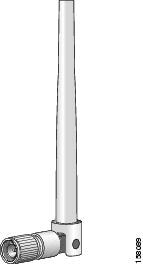
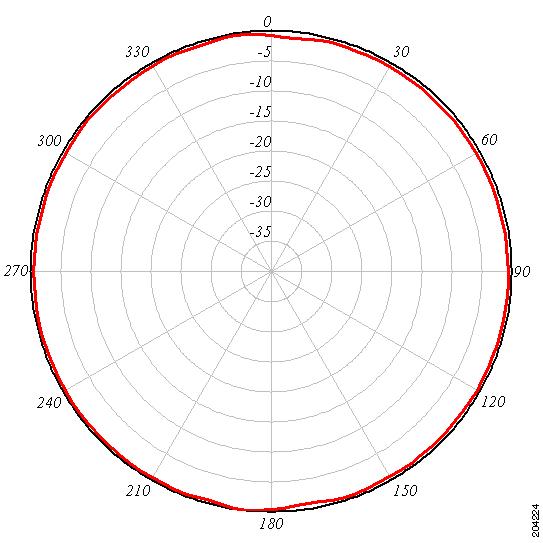
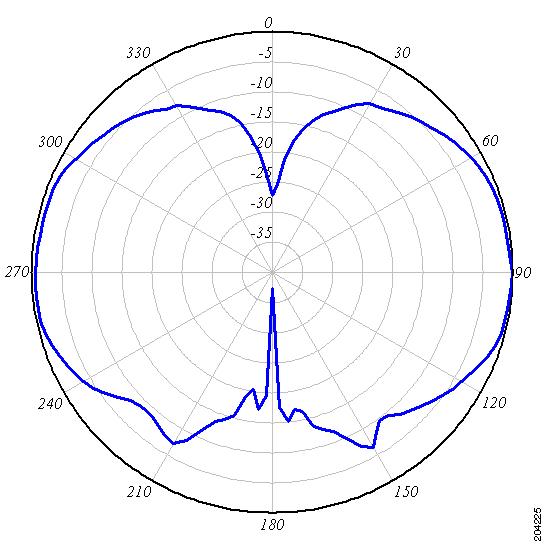
System Requirements
This antenna is compatible with any 2.4-GHz Cisco Aironet device with an RP-TNC connector.
Features
The antenna has an articulated base that can be rotated 360 degrees at the connection point and from 0 to 90 degrees at its knuckle. The articulated base is shown in the following illustration.
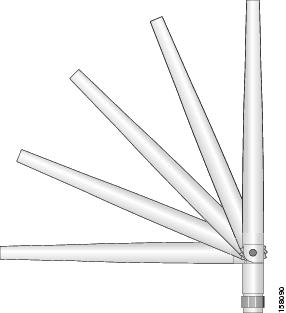
Installing the Antenna

 This antenna operates in the 2.4-GHz frequency range. Do not connect it to 5-GHz antenna connectors, which are identified by a blue dot. Connecting this antenna to a 5-GHz connector will degrade radio performance and could damage the radio.
Follow these steps to connect the antenna to an access point.
Step 1 Align the antenna connector with the RP-TNC connector on the access point.
Step 2 Engage the antenna connector threads with the RP-TNC connector.
Step 3 Tighten the antenna hand tight.
Step 4 Adjust the antenna’s articulated mount to the desired position.
Obtaining Documentation and Submitting a Service Request
For information on obtaining documentation, using the Cisco Bug Search Tool (BST), submitting a service request, and gathering additional information, see What’s New in Cisco Product Documentation at: http://www.cisco.com/c/en/us/td/docs/general/whatsnew/whatsnew.html.
Subscribe to What’s New in Cisco Product Documentation, which lists all new and revised Cisco technical documentation as an RSS feed and delivers content directly to your desktop using a reader application. The RSS feeds are a free service.
Cisco and the Cisco logo are trademarks or registered trademarks of Cisco and/or its affiliates in the U.S. and other countries. To view a list of Cisco trademarks, go to this URL: www.cisco.com/go/trademarks. Third-party trademarks mentioned are the property of their respective owners. The use of the word partner does not imply a partnership relationship between Cisco and any other company. (1110R)
Any Internet Protocol (IP) addresses and phone numbers used in this document are not intended to be actual addresses and phone numbers. Any examples, command display output, network topology diagrams, and other figures included in the document are shown for illustrative purposes only. Any use of actual IP addresses or phone numbers in illustrative content is unintentional and coincidental.
 Feedback
Contact Cisco
- Open a Support Case

- (Requires a Cisco Service Contract)