Planning for Cisco Unified Presence Integration with Microsoft Exchange
Available Languages
Table Of Contents
Planning for Cisco Unified Presence Integration with Microsoft Exchange
Microsoft Exchange Calendaring States on Cisco Unified Presence
Windows Security Policy Settings
SAN and Wildcard Certificate Compatibility - Pre Release 8.6(4)
About Cisco Unified Presence Integration with Microsoft Exchange 2003 and 2007 - over WebDAV
Overview of Exchange Integration over the WebDAV Interface
Administrative Roles and Permissions in Exchange 2003 and 2007
Known Issues with this Integration
Overview of Exchange Integration over the EWS Interface
Administrative Roles and Permissions in Exchange Server 2007 and 2010
Presence Gateway Configuration for Microsoft Exchange Server 2007 and 2010 Integrations
Known Issues with this Integration
Prerequisite Configuration Tasks
Planning for Cisco Unified Presence Integration with Microsoft Exchange
Revised: November 30, 2012
•
Microsoft Exchange Calendaring States on Cisco Unified Presence
•
•
•
•
Microsoft Exchange Calendaring States on Cisco Unified Presence
Microsoft Exchange integration with Cisco Unified Presence allows users to incorporate their calendar/meeting status in Microsoft Outlook into their availability status on Cisco Unified Presence. The table below shows the reachability mappings, and how Cisco Unified Presence correlates the status of meetings (as shown in Microsoft Outlook calendar) in the availability status of users on Cisco Unified Presence.
Table 1-1 Aggregated Availability State Based on Calendar State
Free/Tentative
Available
Busy
Idle/Busy
Out-of-Office1
Away2
Away
1 Microsoft Oulook 2003 and 2007
2 Microsoft Outlook 2010
Presence Gateway Options
You must configure a Microsoft Exchange server (Microsoft Outlook) as a presence gateway for calendaring information exchange. The Exchange gateway enables the Cisco Unified Presence server to reflect the availability information (calendar/meeting status) in the availability status of the user on a per-user basis.
When you configure the presence gateway, you can use one of the following values to connect with the Microsoft Exchange server:
•
•
Windows Security Policy Settings
Cisco Unified Presence integration with Exchange supports various authentication methods including Windows Integrated authentication (NTLM).

Note
Some Windows network security policies allow NTLMv2 authentication only, which will prevent the integration between Cisco Unified Presence and Exchange from functioning (both WebDAV and EWS). You must verify that NTLMv2 authentication is not enabled on each Windows server running Exchange. If NTLMv2 authentication is enabled, disable the setting and reboot the server to properly apply the new security setting.
Complete the following procedure to verify the current value of NTLM authentication and if necessary, to disable NTLMv2 authentication.
Step 1
Step 2
Step 3
Step 4
Step 5
a.
b.
Step 6
Certificate Support
Cisco Unified Presence uses X.509 certificates for secure authentication in calendaring integration with Microsoft Exchange.
From Release 8.6(4) onwards, Cisco Unified Presence supports SAN (Subject Alternative Name) and wildcard certificates, along with standard certificates. For information about certificate compatibility for Cisco Unified Presence Release 8.6(3) and earlier, see SAN and Wildcard Certificate Compatibility - Pre Release 8.6(4).
SAN certificates allow multiple hostnames and IP addresses to be protected by a single certificate, by specifying a list of host names and/or IP addresses in the X509v3 Subject Alternative Name field.
Note
Wildcard certificates allow a domain and unlimited sub-domains to be protected by specifying an asterisk (*) in the domain name. Names may contain the wildcard character * which is considered to match any single domain name component. For example, *.a.com matches foo.a.com but not bar.foo.a.com.
Note
SAN and Wildcard Certificate Compatibility - Pre Release 8.6(4)
Cisco Unified Presence uses X.509 certificates for secure authentication in calendaring integration with Microsoft Exchange. Cisco Unified Presence only supports standard certificates (no Subject Alternative Name field or wildcard entries); however, it is still possible to use SAN and/or Wildcard certificates for WebDAV and EWS calendaring integrations with Microsoft Exchange.
Note
Table 1-2 lists and describes the certificate types that Cisco Unified Presence supports for calendaring integration with Microsoft Exchange.
Table 1-2
Cisco Unified Presence SAN and Wildcard Certificates—Backwards Compatibility
About Cisco Unified Presence Integration with Microsoft Exchange 2003 and 2007 - over WebDAV
•
•
•
Overview of Exchange Integration over the WebDAV Interface
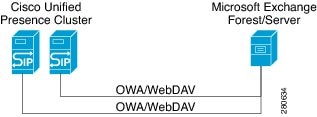
Microsoft Exchange server (2003 and 2007 versions) support WebDav-based calendar integration.Figure 1 shows how the Microsoft Exchange server (2003 and 2007 versions) integrates with Cisco Unified Presence using the Outlook Web Access (OWA) protocol, over a WebDAV interface exposed by the Exchange server.
Cisco Unified Presence can only communicate with a single WebDav front-end Exchange server. The Exchange front-end server communicates with multiple Exchange back-end servers that you configure during the Webdav setup. Microsoft Exchange communicates with Cisco Unified Presence via a Presence Gateway configured for the Exchange server on Cisco Unified Presence.
Figure 1 Microsoft Exchange Integration with Cisco Unified Presence Architecture
Administrative Roles and Permissions in Exchange 2003 and 2007
By default in Microsoft Exchange 2003 and 2007, administrators are denied permission to sign into a user mailbox on the Exchange server. In order for Cisco Unified Presence to connect to mailbox stores on the Exchange server and query end-user calendaring data, it requires an Exchange account with special permissions, referred to as a 'receive-as' account.
What To Do Next
Known Issues with this Integration
See the Troubleshooting section of this guide to learn about issues that are known to impact WebDAV integrations. See Issues Known to Impact Microsoft Exchange Integrations.
About Cisco Unified Presence Integration with Microsoft Exchange 2007 and 2010 - over Exchange Web Services (EWS)
•
•
•
•
Overview of Exchange Integration over the EWS Interface
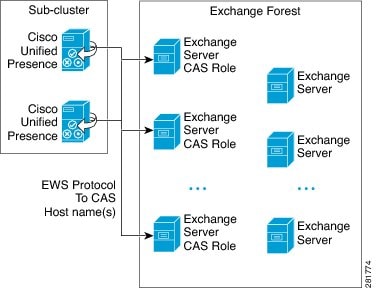
In addition to WebDAV integration, Microsoft Exchange 2007 introduces Exchange Web Services (EWS) for calendaring integration using a SOAP-like interface to the Exchange server. For Microsoft Exchange 2010, WebDAV is no longer supported and customers can only use EWS for calendaring integration.
Note
Administrative Roles and Permissions in Exchange Server 2007 and 2010
Just as WebDAV access requires a special account to enable access to all users accounts, EWS requires a similar capability. EWS manages this capability by assigning a "role" to a designated account. This role has the impersonation permission.
Microsoft Exchange Server 2007
For a caller to access the email account of another user on an Exchange 2007 server, the EWS integration requires an account with Impersonation permissions. The caller impersonates a given user account using the permissions that are associated with the impersonated account instead of the permissions that are associated with the account of the caller.
The impersonated account must be granted the ms-Exch-EPI-Impersonation right on the Client Access Server (CAS) running Exchange 2007. This gives the caller the permission to impersonate a user email account using the CAS server. In addition, the caller must be granted the ms-Exch-EPI-MayImpersonate right on either the mailbox database or on the individual user objects in the directory.
Note that the Access Control List (ACL) for an individual user takes precedence over the mailbox database setting so that you can allow a caller access to all mailboxes in the database but if required, deny access on certain mailboxes in that database.
Microsoft Exchange Server 2010
Microsoft Exchange Server 2010 uses Role-Based Access Control (RBAC) to assign permissions to impersonation accounts and allow users to perform tasks specific to their function in the organization. Depending on whether the user is an administrator or super user, or an end-user, there are two primary methods to apply RBAC permissions:
•
•
Note
Presence Gateway Configuration for Microsoft Exchange Server 2007 and 2010 Integrations
To support a large number of users (with EWS calendar integration enabled), Cisco Unified Presence must distribute the load of EWS traffic among multiple CAS servers. Cisco Unified Presence can connect to a number of CAS servers via EWS, and it uses this round robin strategy to support the traffic load that it encounters:
•
•
•
•
Note
When configuring your EWS presence gateway for Exchange integration in Cisco Unified Presence Administration, note the following:
•
•
•
•
What To Do Next
Known Issues with this Integration
Any issues that are known to impact EWS integrations are documented in the Troubleshooting section of this guide.
See Issues Known to Impact Microsoft Exchange Integrations.
Prerequisite Configuration Tasks
Before you configure Microsoft Exchange integration with Cisco Unified Presence, consult the compatiblity matrix below and make sure that you have installed and configured the required components for this integration:
Table 1-3 Compatibility Matrix
Related Topics
Use the Cisco Unified Presence User Options pages to configure calendaring states on client applications.
Getting More Information
Cisco Unified Presence Documentation
http://www.cisco.com/en/US/products/ps6837/tsd_products_support_series_home.html
Cisco Unified Communications Manager Documentation
http://www.cisco.com/en/US/products/sw/voicesw/ps556/tsd_products_support_series_home.html
Microsoft Exchange 2003 Documentation
http://technet.microsoft.com/en-us/library/bb123872.aspx
Microsoft Exchange 2007 Documentation
http://technet.microsoft.com/en-us/library/bb124558(EXCHG.80).aspx
•
http://technet.microsoft.com/en-us/library/aa998867(EXCHG.80).aspx
Microsoft Exchange 2010 Documentation
http://technet.microsoft.com/en-us/library/bb124558.aspx
Microsoft Active Directory Documentation
http://www.microsoft.com/windowsserver2008/en/us/ad-main.aspx
 Feedback
Contact Cisco
- Open a Support Case

- (Requires a Cisco Service Contract)
This Document Applies to These Products
- Collaboration Endpoints - Retired Products
- Conferencing - Retired Products
- Contact Center - Retired Products
- Optical Networking - Retired Products
- Routers - Retired Products
- Security - Retired Products
- Servers - Unified Computing (UCS) Retired Products
- Storage Networking Retired Products
- Switches - Retired Products
- Video - Retired Products
- Wireless - Retired Products