

-
Cisco Unified Communications SRND Based on Cisco Unified CallManager 4.x
-
Preface
-
Introduction
-
IP Telephony Deployment Models
-
Network Infrastructure
-
Gateways
-
Cisco Unified CallManager Trunks
-
Media Resources
-
Music on Hold
-
Call Processing
-
Call Admission Control
-
Dial Plan
-
Emergency Services
-
Third-Party Voicemail Design
-
Cisco Unity
-
Cisco Unity Express
-
Cisco Unified MeetingPlace Integration
-
Cisco Unified MeetingPlace Express
-
IP Video Telephony
-
LDAP Directory Integration
-
IP Telephony Migration Options
-
Voice Security
-
IP Telephony Endpoints
-
Device Mobility
-
Recommended Hardware and Software Combinations
-
Glossary
-
Index
-


Table Of Contents
LAN Design for High Availability
Impairments to IP Communications if QoS is Not Employed
Resource Reservation Protocol (RSVP)
Provisioning for Bearer Traffic
Additional Considerations for Bearer Traffic with RSVP
Provisioning for Call Control Traffic with Centralized Call Processing
Provisioning for Call Control Traffic with Distributed Call Processing
Wireless Infrastructure Considerations
Wireless AP Configuration and Design
Network Infrastructure
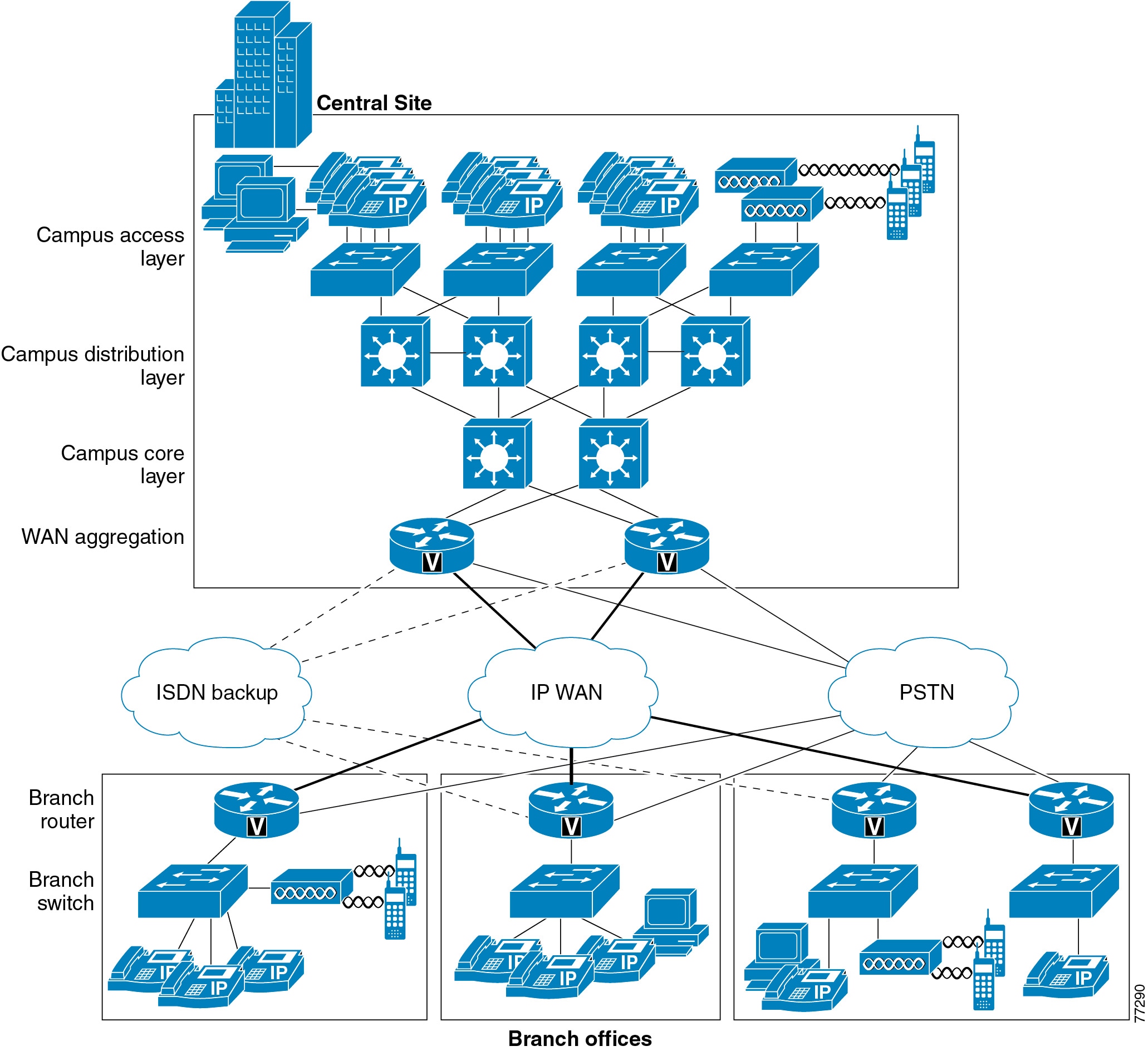
This chapter describes the requirements of the network infrastructure needed to build an IP telephony system in an enterprise environment. Figure 3-1 illustrates the roles of the various devices that form the network infrastructure, and Table 3-1 summarizes the features required to support each of these roles.
IP telephony places strict requirements on IP packet loss, packet delay, and delay variation (or jitter). Therefore, you need to enable most of the Quality of Service (QoS) mechanisms available on Cisco switches and routers throughout the network. For the same reasons, redundant devices and network links that provide quick convergence after network failures or topology changes are also important to ensure a highly available infrastructure
The following sections describe the network infrastructure features as they relate to:
Figure 3-1 Typical Campus Network Infrastructure
LAN Infrastructure
Campus LAN infrastructure design is extremely important for proper IP telephony operation on a converged network. Proper LAN infrastructure design requires following basic configuration and design best practices for deploying a highly available network. Further, proper LAN infrastructure design requires deploying end-to-end QoS on the network. The following sections discuss these requirements:
•
LAN Design for High Availability
LAN Design for High Availability
Properly designing a LAN requires building a robust and redundant network from the top down. By structuring the LAN as a layered model (see Figure 3-1) and developing the LAN infrastructure one step of the model at a time, you can build a highly available, fault tolerant, and redundant network. Once these layers have been designed properly, you can add network services such as DHCP and TFTP to provide additional network functionality. The following sections examine the infrastructure layers and network services:
For more information on campus design, refer to the Gigabit Campus Network Design white paper at
http://www.cisco.com/warp/public/cc/so/neso/lnso/cpso/gcnd_wp.pdf
Campus Access Layer
The access layer of the Campus LAN includes the portion of the network from the desktop port(s) to the wiring closet switch.
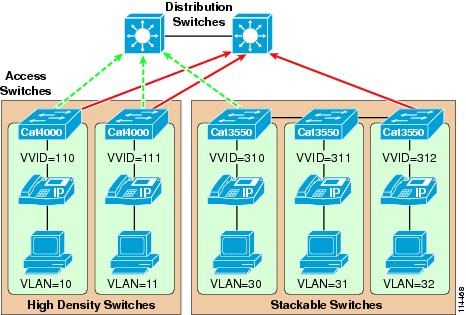
Proper access layer design starts with assigning a single IP subnet per virtual LAN (VLAN). Typically, a VLAN should not span multiple wiring closet switches; that is, a VLAN should have presence in one and only one access layer switch (see Figure 3-2). This practice eliminates topological loops at Layer 2, thus avoiding temporary flow interruptions due to Spanning Tree convergence. However, with the introduction of standards-based IEEE 802.1w Rapid Spanning Tree Protocol (RSTP) and 802.1s Multiple Instance Spanning Tree Protocol (MISTP), Spanning Tree can converge at much higher rates. More importantly, confining a VLAN to a single access layer switch also serves to limit the size of the broadcast domain. There is the potential for large numbers of devices within a single VLAN or broadcast domain to generate large amounts of broadcast traffic periodically, which can be problematic. A good rule of thumb is to limit the number of devices per VLAN to about 512, which is equivalent to two Class C subnets (that is, a 23-bit subnet masked Class C address). Typical access layer switches include the stackable Cisco Catalyst 2950, 3500XL, 3550, and 3750, as well as the Cisco 3560 and the larger, higher-density Catalyst 4000 and 6000 switches.
Figure 3-2 Access Layer Switches and VLANs for Voice and Data
When you deploy voice, Cisco recommends that you enable two VLANs at the access layer: a native VLAN for data traffic (VLANs 10, 11, 30, 31, and 32 in Figure 3-2) and a voice VLAN under Cisco IOS or Auxiliary VLAN under CatOS for voice traffic (represented by VVIDs 110, 111, 310, 311, and 312 in Figure 3-2).
Separate voice and data VLANs are recommended for the following reasons:
•
Private addressing of phones on the voice or auxiliary VLAN ensures address conservation and ensures that phones are not accessible directly via public networks. PCs and servers are typically addressed with publicly routed subnet addresses; however, voice endpoints should be addressed using RFC 1918 private subnet addresses.
•
QoS trust boundaries can be extended to voice devices without extending these trust boundaries and, in turn, QoS features to PCs and other data devices.
•
VLAN access control, 802.1Q, and 802.1p tagging can provide protection for voice devices from malicious internal and external network attacks such as worms, denial of service (DoS) attacks, and attempts by data devices to gain access to priority queues via packet tagging.
•
Separate VLANs for voice and data devices at the access layer provide ease of management and simplified QoS configuration.
To provide high-quality voice and to take advantage of the full voice feature set, access layer switches should provide support for:
•
•
•
•
•
Spanning Tree Protocol (STP)
To minimize convergence times and maximize fault tolerance at Layer 2, enable the following STP features:
•
Enable PortFast on all access ports. The phones, PCs, or servers connected to these ports do not forward bridge protocol data units (BPDUs) that could affect STP operation. PortFast ensures that the phone or PC, when connected to the port, is able to begin receiving and transmitting traffic immediately without having to wait for STP to converge.
•
Enable root guard or BPDU guard on all access ports to prevent the introduction of a rogue switch that might attempt to become the Spanning Tree root, thereby causing STP re-convergence events and potentially interrupting network traffic flows. Ports that are set to errdisable state by BPDU guard must either be re-enabled manually or the switch must be configured to re-enable ports automatically from the errdisable state after a configured period of time.
•
Enable these features where appropriate to ensure that, when changes occur on the Layer 2 network, STP converges as rapidly as possible to provide high availability. When using stackable switches such as the Catalyst 2950, 3550, or 3750, enable Cross-Stack UplinkFast (CSUF) to provide fast failover and convergence if a switch in the stack fails.
•
Enable this feature to reduce convergence and downtime on the network when link failures or misbehaviors occur, thus ensuring minimal interruption of network service. UDLD detects, and takes out of service, links where traffic is flowing in only one direction. This feature prevents defective links from being mistakenly considered as part of the network topology by the Spanning Tree and routing protocols.
Note
Campus Distribution Layer
The distribution layer of the Campus LAN includes the portion of the network from the wiring closet switches to the next-hop switch, and it is the first Layer-2-to-Layer-3 traversal in the LAN. Distribution layer switches typically include Layer 3-enabled Catalyst 4000 and 6000 switches and the Catalyst 3750 for smaller deployments.
At the distribution layer, it is important to provide redundancy to ensure high availability, including redundant links between the distribution layer switches (or routers) and the access layer switches. To avoid creating topological loops at Layer 2, use Layer 3 links for the connections between redundant Distribution switches when possible.
Hot Standby Router Protocol (HSRP)
HSRP should also be enabled at the distribution layer to ensure that all routers are made redundant and that, in the event of a failure, another router can take over. HSRP configuration should incorporate the following:
•
The standby track command indicates that the HSRP should monitor a particular interface(s). If the interface goes down, then the HSRP priority of the box is reduced, typically forcing a failover to another device. This command is used in conjunction with the standby preempt command.
•
This command ensures that, when a device's priority becomes higher than all the other HSRP-configured devices in the standby group, that device will take over as the active Layer 3 router for the HSRP standby address.
HSRP should also be configured in such a way as to load-balance traffic between both HSRP routers. To provide load balancing, configure each HSRP device as the active HSRP router for one VLAN or interface, and configure the standby router for another VLAN or interface. Evenly distributing active and standby VLANs between both HSRP devices ensures load-balancing. Devices on one VLAN use the active HSRP device as their default gateway, and devices on another VLAN use the same HSRP device as a standby default gateway only if the other HSRP device fails. This type of configuration prevents all network traffic from being sent to a single active router and enables other HSRP devices to help carry the load.
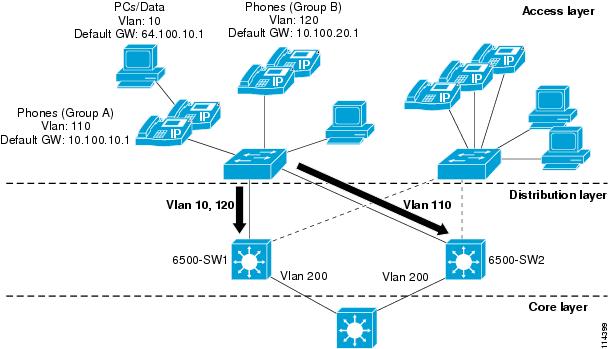
Figure 3-3 shows an example of an HSRP-enabled network. In this figure, the two Catalyst 6500 switches (6500-SW1 and 6500-SW2) have been configured with multiple VLAN interfaces. Assuming that there are no link failures in the network, 6500-SW1 is the standby HSRP router for VLAN 110 (the voice VLAN for Group A phones) and is the active HSRP router for VLAN 10 (the data VLAN) and for VLAN 120 (the voice VLAN for Group B phones). 6500-SW2 is configured in reverse; it is the active HSRP router for VLAN 110 and the standby HSRP router for VLAN 10 and VLAN 120. As configured, both switches are actively in use, and the load can be distributed between the two by evenly distributing all Layer 2 VLANs between them. Each switch is also configured to track its local VLAN 200 interface and, in the event of a VLAN 200 link failure, the other switch will preempt and become the active router for all VLANs. Likewise, if either switch fails, the other switch will handle the traffic for all three VLANs.
The PCs and phones at the access layer in Figure 3-3 have been configured with default gateways that correspond to the HSRP addresses for each of the HSRP groups. Devices in voice VLANs 110 and 120 are pointing to 10.100.10.1 and 10.100.20.1, respectively, as the default gateways, which correspond to the HSRP addresses for the VLAN 110 and 120 interfaces on both switches. Devices in data VLAN 10 are pointing to 64.100.10.1 as the default gateway, which corresponds to the HSRP address of the VLAN 10 interface on both switches. Note that, while traffic flowing from the access layer to the distribution layer will be distributed between the two switches (as long as there are no failures), no mechanism exists to ensure distribution on the return path. Traffic returning from the core layer and destined for the access layer will follow the shortest and/or least costly routed path.
Figure 3-3 HSRP Network Configuration Example with Standby Preempt and Standby Track
Example 3-1 and Example 3-2 list the configurations for the two Catalyst 6500 switches shown in Figure 3-3.
Example 3-1 Configuration for 6500-SW1
interface Vlan 10description Data VLAN 10ip address 64.100.10.11 255.255.255.0standby preemptstandby ip 64.100.10.1standby track Vlan 200interface Vlan110description Voice VLAN 110ip address 10.100.10.11 255.255.255.0standby preemptstandby ip 10.100.10.1standby track Vlan 200standby priority 95interface Vlan120description Voice VLAN 120ip address 10.100.20.11 255.255.255.0standby preemptstandby ip 10.100.20.1standby track Vlan 200Example 3-2 Configuration for 6500-SW2
interface Vlan 10description Data VLAN 10ip address 64.100.10.12 255.255.255.0standby preemptstandby ip 64.100.10.1standby track Vlan 200standby priority 95interface Vlan110description Voice VLAN 110ip address 10.100.10.12 255.255.255.0standby preemptstandby ip 10.100.10.1standby track Vlan 200interface Vlan120description Voice VLAN 120ip address 10.100.20.11 255.255.255.0standby preemptstandby ip 10.100.20.1standby track Vlan 200standby priority 95How quickly HSRP converges when a failure occurs depends on how the HSRP hello and hold timers are configured. By default, these timers are set to 3 and 10 seconds respectively, which means that an hello packet will be sent between the HSRP standby group devices every 3 seconds and that the standby device will become active when an hello packet has not been received for 10 seconds. You can lower these timer settings to speed up the failover or preemption; however, to avoid increased CPU usage and unnecessary standby state flapping, do not set the hello timer below one (1) second or the hold timer below 4 seconds. Note that, if you are using the HSRP tracking mechanism and the tracked link fails, then the failover or preemption occurs immediately regardless of the hello and hold timers.
Routing Protocols
Configure Layer 3 routing protocols, such as Open Shortest Path First (OSPF) and Enhanced Interior Gateway Routing Protocol (EIGRP), at the distribution layer to ensure fast convergence, load balancing, and fault tolerance. Use parameters such as routing protocol timers, path or link costs, and address summaries to optimize and control convergence times as well as to distribute traffic across multiple paths and devices. Cisco also recommends using the passive-interface command to prevent routing neighbor adjacencies via the access layer. These adjacencies are typically unnecessary, and they create extra CPU overhead and increased memory utilization because the routing protocol keeps track of them. By using the passive-interface command on all interfaces facing the access layer, you prevent routing updates from being sent out on these interfaces and, therefore, neighbor adjacencies are not formed.
Campus Core Layer
The core layer of the Campus LAN includes the portion of the network from the distribution routers or Layer 3 switches to one or more high-end core Layer 3 switches or routers. Layer 3-capable Catalyst 6000 switches are the typical core layer devices, and these core switches can provide connectivity between numerous campus distribution layers.
At the core layer, it is again very important to provide the following types of redundancy to ensure high availability:
•
Redundancy here ensures that traffic can be rerouted around downed or malfunctioning links.
•
Redundancy here ensures that, in the event of a device failure, another device in the network can continue performing tasks that the failed device was doing.
•
This type of redundancy ensures that multiple power supplies and Supervisor engines are available within a device so that the device can continue to function in the event that one of these components fails.
Routing protocols at the core layer should again be configured and optimized for path redundancy and fast convergence. There should be no STP in the core because network connectivity should be routed at Layer 3. Finally, each link between the core and distribution devices should belong to its own VLAN or subnet and be configured using a 30-bit subnet mask.
Data Center and Server Farm
Typically, Cisco Unified CallManager cluster servers, including media resource servers, reside in a data center or server farm environment. In addition, centralized gateways and centralized hardware media resources such as conference bridges, DSP or transcoder farms, and media termination points are located in the data center or server farm. Because these servers and resources are critical to voice networks, Cisco recommends distributing all Cisco Unified CallManager cluster servers, centralized voice gateways, and centralized hardware resources between multiple physical switches and, if possible, multiple physical locations within the campus. This distribution of resources ensures that, given a hardware failure (such as a switch or switch line card failure), at least some servers in the cluster will still be available to provide telephony services. In addition, some gateways and hardware resources will still be available to provide access to the PSTN and to provide auxiliary services. Besides being physically distributed, these servers, gateways, and hardware resources should be distributed among separate VLANs or subnets so that, if a broadcast storm or denial of service attack occurs on a particular VLAN, not all voice connectivity and services will be disrupted.
Network Services
The deployment of an IP Communications system requires the coordinated design of a well structured, highly available, and resilient network infrastructure as well as an integrated set of network services including Domain Name System (DNS), Dynamic Host Configuration Protocol (DHCP), Trivial File Transfer Protocol (TFTP), and Network Time Protocol (NTP).
Domain Name System (DNS)
DNS enables the mapping of host names and network services to IP addresses within a network or networks. DNS server(s) deployed within a network provide a database that maps network services to hostnames and, in turn, hostnames to IP addresses. Devices on the network can query the DNS server and receive IP addresses for other devices in the network, thereby facilitating communication between network devices.
Relying on DNS, however, can be problematic. If the DNS server becomes unavailable and a network device is relying on that server to provide a hostname-to-IP-address mapping, communication can and will fail. For this reason, do not rely on DNS for communication between Cisco Unified CallManager and the IP telephony endpoints.
Configure Cisco Unified CallManager(s), gateways, and endpoint devices to use IP addresses rather than hostnames. Cisco does not recommend configuration of DNS parameters such as DNS server addresses, hostnames, and domain names. Likewise, configuring HOSTS files is discouraged because the administration of these files in a large IP telephony network with thousands of endpoints and servers can be extremely time-consuming and inefficient. If you eliminate DNS configuration within the IP telephony network, telephony devices and applications do not have to rely on the DNS server.
You must, however, configure the LMHOSTS file. This file provides a mechanism for resolving or mapping server hostnames or NetBios names to IP addresses. The LMHOSTS file must contain a list of server names and corresponding IP address. There should be an entry for every server within the cluster as well as an entry with 127.0.0.1 localhost (loopback entry). You should copy this file to every server in the cluster. The LMHOSTS file is located in the directory path C:\WINNT\system32\drivers\etc. Example 3-3 shows a typical LMHOSTS file for a cluster with six servers.
Example 3-3 LMHOSTS File
127.0.0.1 localhost ! The local host entry64.101.1.7 ccm1-hq-164.101.2.7 ccm1-hq-264.101.1.8 ccm1-hq-364.101.2.8 ccm1-hq-464.101.1.21 ccm1-moh-164.101.2.21 ccm1-moh-2There are some situations in which configuring and using DNS might be unavoidable. For example, if Network Address Translation (NAT) is required for communication between the IP phones and Cisco Unified CallManager in the telephony network, DNS is required to ensure proper mapping of NAT translated addresses to network host devices. Likewise, some IP telephony disaster recovery network configurations rely on DNS to ensure proper failover of the network during failure scenarios by mapping hostnames to secondary backup site IP addresses.
If either of these two situations exists and DNS must be configured, you must deploy DNS servers in a redundant fashion so that a single DNS server failure will not prevent network communication between IP telephony devices. By providing DNS server redundancy in the event of a single DNS server failure, you ensure that devices relying on DNS to communicate on the network can still receive hostname-to-IP-address mappings from a backup or secondary DNS server.
Note
Dynamic Host Configuration Protocol (DHCP)
DHCP is used by hosts on the network to obtain initial configuration information, including IP address, subnet mask, default gateway, and TFTP server address. DHCP eases the administrative burden of manually configuring each host with an IP address and other configuration information. DHCP also provides automatic reconfiguration of network configuration when devices are moved between subnets. The configuration information is provided by a DHCP server located in the network, which responds to DHCP requests from DHCP-capable clients.
You should configure IP Communications endpoints to use DHCP to simplify deployment of these devices. Any RFC 2131 compliant DHCP server can be used to provide configuration information to IP Communications network devices. When deploying IP telephony devices in an existing data-only network, all you have to do is add DHCP voice scopes to an existing DHCP server for these new voice devices. Because IP telephony devices are configured to use and rely on a DHCP server for IP configuration information, you must deploy DHCP servers in a redundant fashion. At least two DHCP servers should be deployed within the telephony network such that, if one of the servers fails, the other can continue to answer DHCP client requests. You should also ensure that DHCP server(s) are configured with enough IP subnet addresses to handle all DHCP-reliant clients within the network.
DHCP Option 150
IP telephony endpoints can be configured to rely on DHCP Option 150 to identify the source of telephony configuration information, available from a server running the Trivial File Transfer Protocol (TFTP).
In the simplest configuration, where a single TFTP server is offering service to all deployed endpoints, Option 150 is delivered as a single IP address pointing to the system's designated TFTP server. The DHCP scope can also deliver two IP addresses under Option 150, for deployments where there are two TFTP servers within the same cluster. The phone would use the second address if it fails to contact the primary TFTP server, thus providing redundancy. To achieve both redundancy and load sharing between the TFTP servers, you can configure Option 150 to provide the two TFTP server addresses in reverse order for half of the DHCP scopes.
Note
Cisco highly recommends using a direct IP address (that is, not relying on a DNS service) for Option 150 because doing so eliminates dependencies on DNS service availability during the phone boot-up and registration process.
Note
DHCP Lease Times
Configure DHCP lease times as appropriate for the network environment. Given a fairly static network in which PCs and telephony devices remain in the same place for long periods of time, Cisco recommends longer DHCP lease times (for example, one week). Shorter lease times require more frequent renewal of the DHCP configuration and increase the amount of DHCP traffic on the network. Conversely, networks that incorporate large numbers of mobile devices, such as laptops and wireless telephony devices, should be configured with shorter DHCP lease times (for example, one day) to prevent depletion of DHCP-managed subnet addresses. Mobile devices typically use IP addresses for short increments of time and then might not request a DHCP renewal or new address for a long period of time. Longer lease times will tie up these IP addresses and prevent them from being reassigned even when they are no longer being used.
Cisco Unified IP Phones adhere to the conditions of the DHCP lease duration as specified in the DHCP server's scope configuration. Once half the lease time has expired since the last successful DHCP server acknowledgment, the IP phone will request a lease renewal. This DHCP client Request, once acknowledged by the DHCP server, will allow the IP phone to retain use of the IP scope (that is, the IP address, default gateway, subnet mask, DNS server (optional), and TFTP server (optional)) for another lease period. If the DHCP server becomes unavailable, an IP phone will not be able to renew its DHCP lease, and as soon as the lease expires, it will relinquish its IP configuration and will thus become unregistered from Cisco Unified CallManager until a DHCP server can grant it another valid scope.
In centralized call processing deployments, if a remote site is configured to use a centralized DHCP server (through the use of a DHCP relay agent such as the IP Helper Address in Cisco IOS) and if connectivity to the central site is severed, IP phones within the branch will not be able to renew their DHCP scope leases. In this situation, branch IP phones are at risk of seeing their DHCP lease expire, thus losing the use of their IP address, which would lead to service interruption. Given the fact that phones attempt to renew their leases at half the lease time, DHCP lease expiration can occur as soon as half the lease time since the DHCP server became unreachable. For example, if the lease time of a DHCP scope is set to 4 days and a WAN failure causes the DHCP server to be unavailable to the phones in a branch, those phones will be unable to renew their leases at half the lease time (in this case, 2 days). The IP phones could stop functioning as early as 2 days after the WAN failure, unless the WAN comes back up and the DHCP server is available before that time. If the WAN connectivity failure persists, all phones see their DHCP scope expire after a maximum of 4 days from the WAN failure.
This situation can be mitigated by one of the following methods:
•
This method would give the system administrator a minimum of half the lease time to remedy any DHCP reachability problem. Long lease durations also have the effect of reducing the frequency of network traffic associated with lease renewals.
•
This approach is immune to WAN connectivity interruption. One effect of such an approach is to decentralize the management of IP addresses, requiring incremental configuration efforts in each branch. (See DHCP Network Deployments, for more information.)
DHCP Network Deployments
There are two options for deploying DHCP functionality within an IP telephony network:
•
Typically, for a single-site campus IP telephony deployment, the DHCP server should be installed at a central location within the campus. As mentioned previously, redundant DHCP servers should be deployed. If the IP telephony deployment also incorporates remote branch telephony sites, as in a centralized multisite Cisco Unified CallManager deployment, a centralized server can be used to provide DHCP service to devices in the remote sites. This type of deployment requires that you configure the ip helper-address on the branch router interface. Keep in mind that, if redundant DHCP servers are deployed at the central site, both servers' IP addresses must be configured as ip helper-address. Also note that, if branch-side telephony devices rely on a centralized DHCP server and the WAN link between the two sites fails, devices at the branch site will be unable to send DHCP requests or receive DHCP responses.
Note
•
When configuring DHCP for use in a centralized multisite Cisco Unified CallManager deployment, you can use a centralized DHCP server to provide DHCP service to centrally located devices. Remote devices could receive DHCP service from a locally installed server or from the Cisco IOS router at the remote site. This type of deployment ensures that DHCP services are available to remote telephony devices even during WAN failures. Example 3-4 lists the basic Cisco IOS DHCP server configuration commands.
Example 3-4 Cisco IOS DHCP Server Configuration Commands
! Activate DHCP Service on the IOS Deviceservice dhcp! Specify any IP Address or IP Address Range to be excluded from the DHCP poolip dhcp excluded-address <ip-address>|<ip-address-low> <ip-address-high>! Specify the name of this specific DHCP pool, the subnet and mask for this! pool, the default gateway and up to four TFTPip dhcp pool <dhcp-pool name>network <ip-subnet> <mask>default-router <default-gateway-ip>option 150 ip <tftp-server-ip-1> ...! Note: IP phones use only the first two addresses supplied in the option 150! field even if more than two are configured.Cisco Unified CallManager DHCP Sever (Standalone versus Co-Resident Server)
Typically DHCP servers are dedicated machine(s) in most network infrastructures, and they run in conjunction with the DNS and Windows Internet Naming Service (WINS) services used by that network. In some instances, given a small Cisco Unified CallManager deployment with no more than 1000 devices registering to the cluster, you may run DHCP on a Cisco Unified CallManager server to support those devices. However, if the server experiences high CPU load, you should move DHCP to a standalone server. If more than 1000 devices are registered to the cluster, DHCP must not be run on a Cisco Unified CallManager server and must be run on a dedicated or standalone server(s).
Trivial File Transfer Protocol (TFTP)
Within a Cisco Unified CallManager system, endpoints (such as IP phones running the SCCP protocol) rely on a TFTP-based process to acquire configuration information. The endpoints request a configuration file whose name is based on the requester's MAC address (for example, for an IP phone with MAC address ABCDEF123456, the file name would be SEPABCDEF123456.cnf.xml). The configuration file includes the version of software that the phone must run and a list of Cisco Unified CallManager servers with which the phone should register.
If the configuration file instructs the phone to run a software file other than the one it currently uses, the phone will request the new version of software from the TFTP server. The phone goes through this process once per software upgrade.
Centralized call processing deployments require remote phones to download configuration files and phone software through the branch's WAN link. When scheduled maintenance involves the downloading of new software, download times are a function of the number of phones requiring upgrades, the file size, and the WAN link's bandwidth and traffic utilization.
For example, in Cisco Unified CallManager Release 4.2, the size of a phone configuration file is approximately 3250 bytes, and the combined size of the required software load files (P00308000300.loads, P00308000300.sbn, and P00308000300.sb2) for a Cisco Unified IP Phone 7960 is 830,845 bytes. If a branch has a WAN bandwidth of 256 Kbps available to download the software, a single phone would require about 26 seconds to download new software during an upgrade. If that same branch has 10 phones requiring the new software, the download process would take about 4.5 minutes.
Multi-Cluster Campus TFTP Services
In multi-cluster systems, it is possible to have a single subnet or VLAN containing phones from multiple clusters. In this situation, the TFTP server whose address is provided to all phones in the subnet or VLAN must answer the file transfer requests made by each phone, regardless of which cluster contains the phone. Therefore, this centralized TFTP server must have access to files created and managed by other clusters.
To provide this file access, each cluster's TFTP server must be configured to create and manage configuration files on the centralized TFTP server's drive. Perform the configuration by using the alternate file location entry under each TFTP server's configuration (with the exception of the centralized TFTP server).
With Cisco Unified CallManager Release 3.2 and later, Cisco TFTP servers cache the IP phone configuration files in RAM by default. For those files to be written to a centralized TFTP server, you must disable (turn off) file caching by setting the following service parameters as indicated on each TFTP server configured to write to the centralized TFTP server:
•
•
If the TFTP server receives a request for a file that it does not have (such as a configuration file created and maintained by the TFTP server of a different cluster), it will search for that file in a list of alternate file locations. The centralized TFTP server must be configured to search through the subdirectories associated with the other clusters.
Example 3-5 Alternate TFTP FIle Locations
A large campus system is deployed using three clusters, and each cluster contains a TFTP server. TFTP1, the TFTP server for Cluster1, is configured as the centralized TFTP server for the campus. The other clusters and TFTP servers are named in sequence as TFTP2 for Cluster2 and TFTP3 for Cluster3. In all subnets, the DHCP scope provides TFTP1's IP address as Option 150.
First, TFTP2 and TFTP3 are configured to write their configuration files to TFTP1's drive, each in a different subdirectory, as follows:
•
•
Second, TFTP1 is configured to search in the alternate file locations as follows:
•
•
Note
Cisco recommends that you use Universal Naming Convention (UNC) paths (in the format \\<IP_address>\<Full_path_to_folder>) to point a TFTP server to alternate file locations. Cisco does not recommend creating non-default NT "shares" or using DNS names. Also, ensure that all clusters meet the proper login ID, password, and security privileges (workgroup, domain, or directory-based) for the Cisco TFTP service.
TFTP Server Redundancy
Option 150 allows up to two IP addresses to be returned to phones as part of the DHCP scope. The phone tries the first address in the list, and it tries the subsequent address only if it cannot establish communications with the first TFTP server. This address list provides a redundancy mechanism that enables phones to obtain TFTP services from another server even if their primary TFTP server has failed.
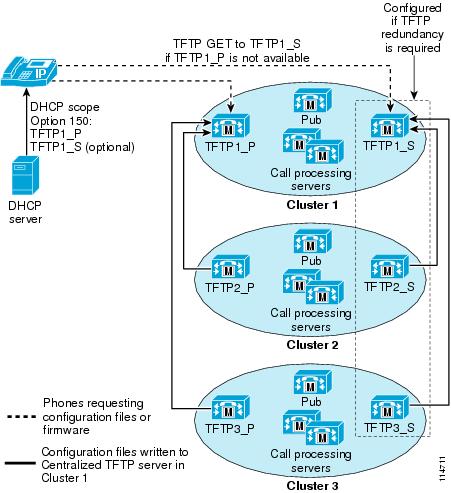
As illustrated in Figure 3-4, two TFTP servers can be configured in a cluster, and each can create and manage separate lists of the same configuration files. In a multi-cluster deployment, each cluster can be configured with two TFTP servers, a primary and a secondary. The primary TFTP servers can be configured to write files to a centralized primary TFTP server; likewise, the secondary TFTP servers can be configured to write files to a centralized secondary TFTP server. This creates two separate groups (primary and secondary) of TFTP servers configured to ensure redundancy, each with a member serving as the centralized server.
Example 3-6 TFTP Server Redundancy
If we wanted to provide TFTP redundancy for the case described in Example 3-5, we could configure each cluster with two TFTP servers. All primary TFTP servers would be configured to write their configuration files to TFTP1_P, while all the secondary TFTP servers would write theirs to TFTP1_S, as follows:
•
•
•
•
Both TFTP1_P and TFTP1_S must be configured as in Example 3-5 to search through the list of alternate file locations.
Figure 3-4 TFTP Server Redundancy with Centralized TFTP Servers for All Clusters
TFTP Load Sharing
The preceding sections explain how to use one TFTP server at a time to service phones from multiple clusters. For this approach, Cisco recommends that you grant different ordered lists of TFTP servers to different subnets to allow for load balancing. For example:
•
•
Under normal operations, a phone in subnet 10.1.1.0/24 will request TFTP services from TFTP1_P, while a phone in subnet 10.1.2.0/24 will request TFTP services from TFTP1_S. If TFTP1_P fails, then phones from both subnets will request TFTP services from TFTP1_S.
Load balancing avoids having a single TFTP server hot spot, where all phones from multiple clusters rely on the same server for service. TFTP load balancing is especially important when phone software loads are transferred, such as during a Cisco Unified CallManager upgrade, because more files of larger size are being transferred, thus imposing a bigger load on the TFTP server.
Network Time Protocol (NTP)
NTP allows network devices to synchronize their clocks to a network time server or network-capable clock. NTP is critical for ensuring that all devices in a network have the same time. When troubleshooting or managing a telephony network, it is crucial to synchronize the time stamps within all error and security logs, traces, and system reports on devices throughout the network. This synchronization enables administrators to recreate network activities and behaviors based on a common timeline. Billing records and call detail records (CDRs) also require accurate synchronized time.
Cisco Unified CallManager NTP Time Synchronization
Time synchronization is especially critical on Cisco Unified CallManager servers. You should configure automatic NTP time synchronization on all Cisco Unified CallManager servers within the network by performing the following steps:
Step 1
The NTP.conf file is located in the C:\WINNT\ directory. The file must be configured with a list of one or more NTP Time servers that can be queried for the time. The file can also be configured to receive NTP Time server updates via NTP broadcasts on the local LAN segment. There must be a broadcast-capable NTP Time server available for Cisco Unified CallManager to receive the time via broadcast messages. Example 3-7 illustrates both methods of configuring the NTP.conf file.
Step 2
Under the Services application in Microsoft Windows on each Cisco Unified CallManager server, configure the NTP Service to start automatically at system boot-up.
Step 3
Note
Example 3-7 NTP.conf Configuration Files
server 64.100.21.254server 64.200.40.10driftfile %windir%\ntp.driftOr
broadcastclientdriftfile %windir%\ntp.driftThe driftfile referenced in Example 3-7 is automatically updated via the NTP Service, based on information in the NTP messages received from the NTP Time server.
Note
Cisco IOS and CatOS NTP Time Synchronization
Time synchronization is also important for other devices within the network. Cisco IOS routers and Catalyst switches should be configured to synchronize their time with the rest of the network devices via NTP. This is critical for ensuring that debug, syslog, and console log messages are time-stamped appropriately. Troubleshooting telephony network issues is simplified when a clear timeline can be drawn for events that occur on devices throughout the network.
Example 3-8 illustrates the configuration of NTP time synchronization on Cisco IOS and CatOS devices.
Example 3-8 Cisco IOS and CatOS NTP Configuration
Cisco IOS configuration:
ntp server 64.100.21.254CatOS configuration:
set ntp server 64.100.21.254set ntp client enableTo ensure proper NTP time synchronization on routers and switches, it might be necessary to configure time zones using the clock timezone command (in Cisco IOS) and/or the set timezone command (in CatOS).
Power over Ethernet (PoE)
PoE (or inline power) is 48 Volt DC power provided over standard Ethernet unshielded twisted-pair (UTP) cable. Instead of using wall power, IP phones and other inline powered devices (PDs) such as the Aironet Wireless Access Points can receive power provided by inline power-capable Catalyst Ethernet switches or other inline power source equipment (PSE). Inline power is enabled by default on all inline power-capable Catalyst switches.
Deploying inline power-capable switches with uninterrupted power supplies (UPS) ensures that IP phones continue to receive power during power failure situations. Provided the rest of the telephony network is available during these periods of power failure, then IP phones should be able to continue making and receiving calls. You should deploy inline power-capable switches at the campus access layer within wiring closets to provide inline-powered Ethernet ports for IP phones, thus eliminating the need for wall power.
Cisco PoE is delivered on the same wire pairs used for data connectivity (pins 1, 2, 3, and 6). If existing access switch ports are not capable of inline power, you can use a power patch panel to inject power into the cabling. (In this case pins 4, 5, 7, and 8 are used.) Additionally, power injectors may be used for specific deployment needs.
Caution
In addition to Cisco PoE inline power, Cisco now supports the IEEE 802.3af PoE standard. Currently, only some access switches and phones comply with 802.3af. Over time, all phones and switches will support 802.3af PoE. The Catalyst 6500, 4500, and 3750 are currently capable of supporting 802.3af. For information about which Cisco Unified IP Phones support the 802.3af PoE standard, see the Endpoint Features Summary, page 21-35.
Category 3 Cabling
The use of Category 3 cabling is supported for IP Communications under the following conditions:
•
This setting requires hard-coding the upstream switch port, the phone switch and PC ports, and the PC NIC port to 10 Mb, full-duplex. No ports should be set to AUTO negotiate. If desired, you can hard-code the phone's PC port to 10 Mb half-duplex, thereby forcing the PC's NIC to negotiate to 10 Mb half-duplex (assuming the PC's NIC is configured to AUTO negotiate). This configuration is acceptable as long as the uplink between the phone and the upstream switch port is set to 10 Mb full-duplex.
•
Because these phones support only 10 Mb Ethernet and their ports cannot be manually configured, the upstream switch port should be set to either AUTO negotiate or 10 Mb, half-duplex. In both cases, these phones will negotiate to 10 Mb, half-duplex.
•
If you leave these phones with the default switch port configuration of AUTO negotiate and configure the upstream switch port to 10 Mb, half-duplex, these phones will revert to 10Mb, half-duplex.
Note
IBM Type 1A and 2A Cabling
The use of IBM Cabling System (ICS) or Token Ring shielded twisted-pair type 1A or 2A cabling is supported for IP Communications under the following conditions:
•
•
Note
Running data over the network is not always a sufficient test of the quality of the cable plant because some non-compliance issues might not be apparent. Therefore, customers might want to perform a cable plant survey to verify that their type 1A and 2A cabling installation is compliant with Ethernet standards.
For more information about the use of IBM cabling, refer to the Product Bulletin Shielded Twisted-Pair Cabling Support for Cisco Fast Ethernet Products, available at
LAN Quality of Service (QoS)
Until recently, quality of service was not an issue in the enterprise campus due to the asynchronous nature of data traffic and the ability of network devices to tolerate buffer overflow and packet loss. However, with new applications such as voice and video, which are sensitive to packet loss and delay, buffers and not bandwidth are the key QoS issue in the enterprise campus.
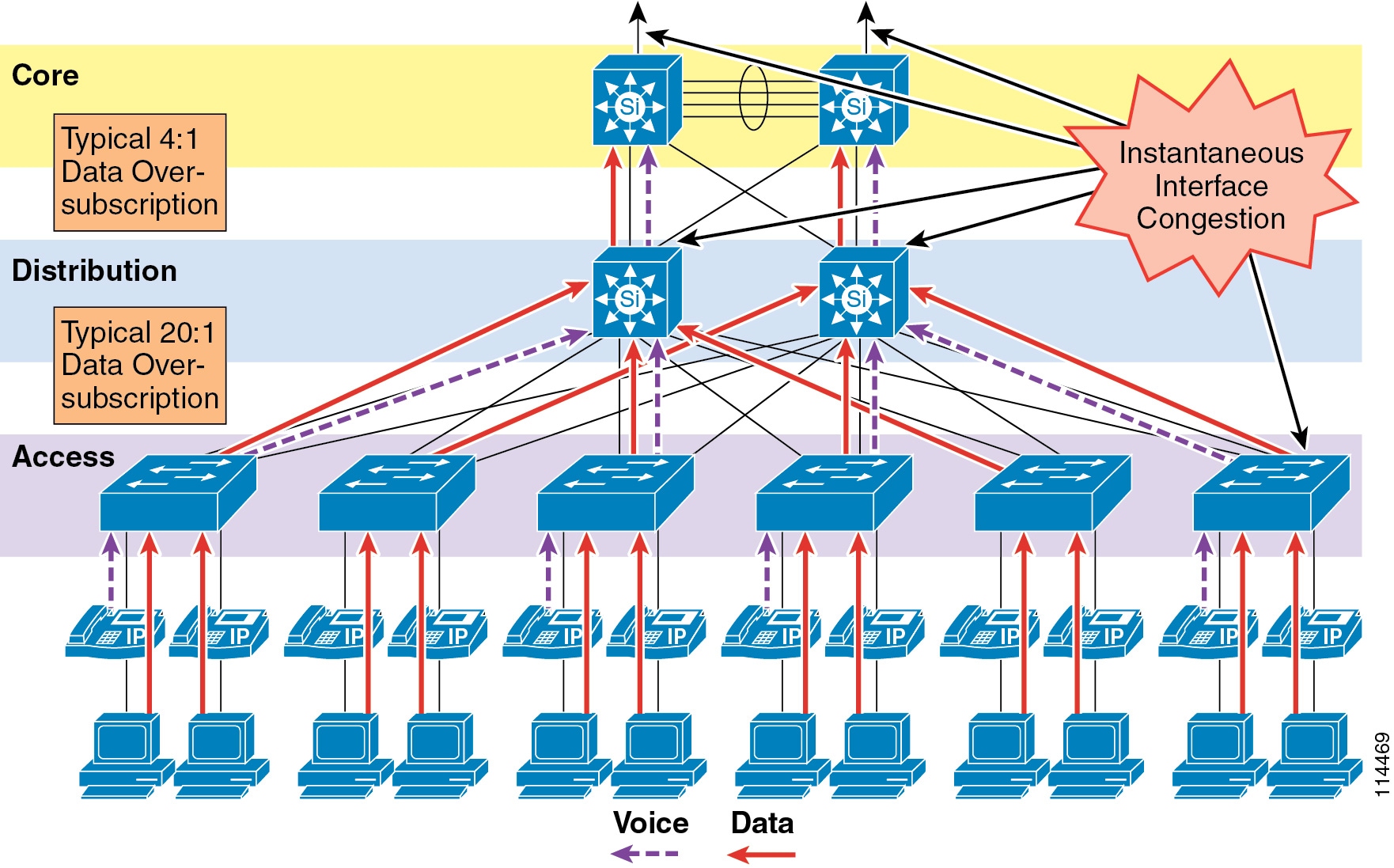
Figure 3-5 illustrates the typical oversubscription that occurs in LAN infrastructures.
Figure 3-5 Data Traffic Oversubscription in the LAN
This oversubscription, coupled with individual traffic volumes and the cumulative effects of multiple independent traffic sources, can result in the egress interface buffers becoming full instantaneously, thus causing additional packets to drop when they attempt to enter the egress buffer. The fact that campus switches use hardware-based buffers, which compared to the interface speed are much smaller than those found on WAN interfaces in routers, merely increases the potential for even short-lived traffic bursts to cause buffer overflow and dropped packets.
Applications such as file sharing (both peer-to-peer and server-based), remote networked storage, network-based backup software, and emails with large attachments, can create conditions where network congestion occurs more frequently and/or for longer durations. Some of the negative effects of recent worm attacks have been an overwhelming volume of network traffic (both unicast and broadcast-storm based), increasing network congestion. If no buffer management policy is in place, loss, delay, and jitter performance of the LAN may be affected for all traffic.
Another situation to consider is the effect of failures of redundant network elements, which cause topology changes. For example, if a distribution switch fails, all traffic flows will be reestablished through the remaining distribution switch. Prior to the failure, the load balancing design shared the load between two switches, but after the failure all flows are concentrated in a single switch, potentially causing egress buffer conditions that normally would not be present.
For applications such as voice, this packet loss and delay results in severe voice quality degradation. Therefore, QoS tools are required to manage these buffers and to minimize packet loss, delay, and delay variation (jitter).
The following types of QoS tools are needed from end to end on the network to manage traffic and ensure voice quality:
•
Classification involves the marking of packets with a specific priority denoting a requirement for class of service (CoS) from the network. The point at which these packet markings are trusted or not trusted is considered the trust boundary. Trust is typically extended to voice devices (phones) and not to data devices (PCs).
•
Interface queuing or scheduling involves assigning packets to one of several queues based on classification for expedited treatment throughout the network.
•
Provisioning involves accurately calculating the required bandwidth for all applications plus element overhead.
The following sections discuss the use of these QoS mechanisms in a campus environment:
•
Traffic Classification
It has always been an integral part of the Cisco network design architecture to classify or mark traffic as close to the edge of the network as possible. Traffic classification is an entrance criterion for access into the various queuing schemes used within the campus switches and WAN interfaces. The IP phone marks its voice control signaling and voice RTP streams at the source, and it adheres to the values presented in Table 3-2. As such, the IP phone can and should classify traffic flows.
Table 3-2 lists the traffic classification requirements for the LAN infrastructure.
Table 3-2 Traffic Classification Guidelines for Various Types of Network Traffic
Routing
6
CS6
48
6
Voice Real-Time Transport Protocol (RTP)
5
EF
46
5
Videoconferencing
4
AF41
34
4
Streaming video
4
CS4
32
4
Call signaling1
3
CS3 (currently)
AF31 (previously)
24 (currently)
26 (previously)
3
Transactional data
2
AF21
18
2
Network management
2
CS2
16
2
Scavenger
1
CS1
8
1
Best effort
0
0
0
0
1 The recommended DSCP/PHB marking for call control signaling traffic has been changed from 26/AF31 to 24/CS3. A marking migration is planned within Cisco to reflect this change, however many products still mark signaling traffic as 26/AF31. Therefore, in the interim, Cisco recommends that both AF31 and CS3 be reserved for call signaling.
For more information about traffic classification, refer to the Enterprise QoS Solution Reference Network Design (SRND), available at
Traffic Classification for Video Telephony
The main classes of interest for IP Video Telephony are:
•
Voice is classified as CoS 5 (IP Precedence 5, PHB EF, or DSCP 46).
•
Videoconferencing is classified as CoS 4 (IP Precedence 4, PHB AF41, or DSCP 34).
•
Call signaling for voice and videoconferencing is now classified as CoS 3 (IP Precedence 3, PHB CS3, or DSCP 24) but was previously classified as PHB AF31 or DSCP 26.
Cisco highly recommends these classifications as best practices in a Cisco Unified Communications network.
The voice component of a call can be classified in one of two ways, depending on the type of call in progress. A voice-only (or normal) telephone call would have the media classified as CoS 5 (IP Precedence 5 or PHB EF), while the audio channel of a video conference would have the media classified as CoS 4 (IP Precedence 4 or PHB AF41). All the Cisco IP Video Telephony products adhere to the Cisco Corporate QoS Baseline standard, which requires that the audio and video channels of a video call both be marked as CoS 4 (IP Precedence 4 or PHB AF41). The reasons for this recommendation include, but are not limited to, the following:
•
•
The signaling class is applicable to all voice signaling protocols (such as SCCP, MGCP, and so on) as well as video signaling protocols (such as SCCP, H.225, RAS, CAST, and so on). These protocols are discussed in more detail in the section on Software-Based Endpoints, page 21-7.
Given the recommended classes, the first step is decide where the packets will be classified (that is, which device will be the first to mark the traffic with its QoS classification). There are essentially two places to mark or classify traffic:
•
•
Interface Queuing
After packets have been marked with the appropriate tag at Layer 2 (CoS) and Layer 3 (DSCP or PHB), it is important to configure the network to schedule or queue traffic based on this classification, so as to provide each class of traffic with the service it needs from the network. By enabling QoS on campus switches, you can configure all voice traffic to use separate queues, thus virtually eliminating the possibility of dropped voice packets when an interface buffer fills instantaneously.
Although network management tools may show that the campus network is not congested, QoS tools are still required to guarantee voice quality. Network management tools show only the average congestion over a sample time span. While useful, this average does not show the congestion peaks on a campus interface.
Transmit interface buffers within a campus tend to congest in small, finite intervals as a result of the bursty nature of network traffic. When this congestion occurs, any packets destined for that transmit interface are dropped. The only way to prevent dropped voice traffic is to configure multiple queues on campus switches. For this reason, Cisco recommends always using a switch that has at least two output queues on each port and the ability to send packets to these queues based on QoS Layer 2 and/or Layer 3 classification. Cisco Catalyst 6000, 4000, 3750, 35XX, and 2950 switches all support two or more output queues per port.
Bandwidth Provisioning
In the campus LAN, bandwidth provisioning recommendations can be summarized by the motto, Over provision and under subscribe. This motto implies careful planning of the LAN infrastructure so that the available bandwidth is always considerably higher than the load and there is no steady-state congestion over the LAN links.
The addition of voice traffic onto a converged network does not represent a significant increase in overall network traffic load; the bandwidth provisioning is still driven by the demands of the data traffic requirements. The design goal is to avoid extensive data traffic congestion on any link that will be traversed by telephony signaling or media flows. Contrasting the bandwidth requirements of a single G.711 voice call (approximately 86 kbps) to the raw bandwidth of a FastEthernet link (100 Mbps) indicates that voice is not a source of traffic that causes network congestion in the LAN, but rather it is a traffic flow to be protected from LAN network congestion.
Impairments to IP Communications if QoS is Not Employed
If QoS is not deployed, packet drops and excessive delay and jitter can occur, leading to impairments of the telephony services. When media packets are subjected to drops, delay, and jitter, the user-perceivable effects include clicking sound, harsh-sounding voice, extended periods of silence, and echo.
When signaling packets are subjected to the same conditions, user-perceivable impairments include unresponsiveness to user input (such as delay to dial tone), continued ringing upon answer, and double dialing of digits due to the user's belief that the first attempt was not effective (thus requiring hang-up and redial). More extreme cases can include endpoint re-initialization, call termination, and the spurious activation of SRST functionality at branch offices (leading to interruption of gateway calls).
These effects apply to all deployment models. However, single-site (campus) deployments tend to be less likely to experience the conditions caused by sustained link interruptions because the larger quantity of bandwidth typically deployed in LAN environments (minimum links of 100 Mbps) allows for some residual bandwidth to be available for the IP Communications system.
In any WAN-based deployment model, traffic congestion is more likely to produce sustained and/or more frequent link interruptions because the available bandwidth is much less than in a LAN (typically less than 2 Mbps), so the link is more easily saturated. The effects of link interruptions impact the users, whether or not the voice media traverses the packet network.
WAN Infrastructure
Proper WAN infrastructure design is also extremely important for proper IP telephony operation on a converged network. Proper infrastructure design requires following basic configuration and design best practices for deploying a WAN that is as highly available as possible and that provides guaranteed throughput. Furthermore, proper WAN infrastructure design requires deploying end-to-end QoS on all WAN links. The following sections discuss these requirements:
•
WAN Design and Configuration
Properly designing a WAN requires building fault-tolerant network links and planning for the possibility that these links might become unavailable. By carefully choosing WAN topologies, provisioning the required bandwidth, and approaching the WAN infrastructure as another layer in the network topology, you can built a fault-tolerant and redundant network. The following sections examine the required infrastructure layers and network services:
Deployment Considerations
WAN deployments for voice networks may be hub-and-spoke or an arbitrary topology. A hub-and-spoke topology consists of a central hub site and multiple remote spoke sites connected into the central hub site. In this scenario, each remote or spoke site is one WAN-link hop away from the central or hub site and two WAN-link hops away from all other spoke sites. An arbitrary topology may contain multiple WAN links and any number of hops between the sites. In this scenario there may be many different paths to the same site or there may be different links used for communication with some sites compared to other sites. The simplest example is three sites, each with a WAN link to the other two sites, forming a triangle. In that case there are two potential paths between each site to each other site.
Topology-unaware call admission control requires the WAN to be hub-and-spoke, or a spoke-less hub in the case of MPLS VPN. This topology ensures that call admission control, provided by Cisco Unified CallManager's locations or a gatekeeper, works properly in keeping track of the bandwidth available between any two sites in the WAN. In addition, multiple hub-and-spoke deployments can be interconnected via WAN links.
Topology-aware call admission control may be used with either hub-and-spoke or an arbitrary WAN topology. This form of call admission control requires parts of the WAN infrastructure to support Resource Reservation Protocol (RSVP). For details, see Resource Reservation Protocol (RSVP), and Call Admission Control, page 9-1.
For more information about centralized and distributed multisite deployment models as well as Multiprotocol Label Switching (MPLS) implications for these deployment models, see the chapter on IP Telephony Deployment Models, page 2-1.
WAN links should, when possible, be made redundant to provide higher levels of fault tolerance. Redundant WAN links provided by different service providers or located in different physical ingress/egress points within the network can ensure backup bandwidth and connectivity in the event that a single link fails. In non-failure scenarios, these redundant links may be used to provide additional bandwidth and offer load balancing of traffic on a per-flow basis over multiple paths and equipment within the WAN. Topology-unaware call admission control normally requires redundant paths to be over-provisioned and under-subscribed to allow for failures that reduce the available bandwidth between sites without the call admission control mechanism being aware of those failures or the reduction in bandwidth. Topology-aware call admission control is able to adjust dynamically to many of the topology changes and allows for efficient use of the total available bandwidth.
Voice and data should remain converged at the WAN, just as they are converged at the LAN. QoS provisioning and queuing mechanisms are typically available in a WAN environment to ensure that voice and data can interoperate on the same WAN links. Attempts to separate and forward voice and data over different links can be problematic in many instances because the failure of one link typically forces all traffic over a single link, thus diminishing throughput for each type of traffic and in most cases reducing the quality of voice. Furthermore, maintaining separate network links or devices makes troubleshooting and management difficult at best.
Because of the potential for WAN links to fail or to become oversubscribed, Cisco recommends deploying non-centralized resources as appropriate at sites on the other side of the WAN. Specifically, media resources, DHCP servers, voice gateways, and call processing applications such as Survivable Remote Site Telephony (SRST) and Cisco Unified CallManager Express (CME) should be deployed at non-central sites when and if appropriate, depending on the site size and how critical these functions are to that site. Keep in mind that de-centralizing voice applications and devices can increase the complexity of network deployments, the complexity of managing these resources throughout the enterprise, and the overall cost of a the network solution; however, these factors can be mitigated by the fact that the resources will be available during a WAN link failure.
When deploying voice in a WAN environment, Cisco recommends that you use the lower-bandwidth G.729 codec for any voice calls that will traverse WAN links because this practice will provide bandwidth savings on these lower-speed links. Furthermore, media resources such as MoH should be configured to use multicast transport mechanism when possible because this practice will provide additional bandwidth savings.
Finally, recommendation G.114 of the International Telecommunication Union (ITU) states that the one-way delay in a voice network should be less than or equal to 150 milliseconds. It is important to keep this in mind when implementing low-speed WAN links within a network. Topologies, technologies, and physical distance should be considered for WAN links so that one-way delay is kept at or below this 150-millisecond recommendation. For deployments that use clustering over the WAN, the one-way delay for signaling traffic between clusters should not exceed 20 milliseconds (see Clustering Over the IP WAN, page 2-17).
Guaranteed Bandwidth
Because voice is typically deemed a critical network application, it is imperative that bearer and signaling voice traffic always reaches its destination. For this reason, it is important to choice a WAN topology and link type that can provide guaranteed dedicated bandwidth. The following WAN link technologies can provide guaranteed dedicated bandwidth:
•
•
•
•
•
•
These link technologies, when deployed in a dedicated fashion or when deployed in a private network, can provide guaranteed traffic throughput. All of these WAN link technologies can be provisioned at specific speeds or bandwidth sizes. In addition, these link technologies have built-in mechanisms that help guarantee throughput of network traffic even at low link speeds. Features such as traffic shaping, fragmentation and packet interleaving, and committed information rates (CIR) can help ensure that packets are not dropped in the WAN, that all packets are given access at regular intervals to the WAN link, and that enough bandwidth is available for all network traffic attempting to traverse these links.
Best-Effort Bandwidth
There are some WAN topologies that are unable to provide guaranteed dedicated bandwidth to ensure that network traffic will reach its destination, even when that traffic is critical. These topologies are extremely problematic for voice traffic, not only because they provide no mechanisms to provision guaranteed network throughput, but also because they provide no traffic shaping, packet fragmentation and interleaving, queuing mechanisms, or end-to-end QoS to ensure that critical traffic such as voice will be given preferential treatment.
The following WAN network topologies and link types are examples of this kind of best-effort bandwidth technology:
•
•
•
•
•
In most cases, none of these link types can provide the guaranteed network connectivity and bandwidth required for critical voice and voice applications. However, these technologies might be suitable for personal or telecommuter-type network deployments. At times, these topologies can provide highly available network connectivity and adequate network throughput; but at other times, these topologies can become unavailable for extended periods of time, can be throttled to speeds that render network throughput unacceptable for real-time applications such as voice, or can cause extensive packet losses and require repeated retransmissions. In other words, these links and topologies are unable to provide guaranteed bandwidth, and when traffic is sent on these links, it is sent best-effort with no guarantee that it will reach its destination. For this reason, Cisco recommends that you do not use best-effort WAN topologies for voice-enabled networks that require enterprise-class voice services and quality.
Note
WAN Quality of Service (QoS)
Before placing voice and video traffic on a network, it is important to ensure that there is adequate bandwidth for all required applications. Once this bandwidth has been provisioned, voice priority queuing must be performed on all interfaces. This queuing is required to reduce jitter and possible packet loss if a burst of traffic oversubscribes a buffer. This queuing requirement is similar to the one for the LAN infrastructure.
Next, the WAN typically requires additional mechanisms such as traffic shaping to ensure that WAN links are not sent more traffic than they can handle, which could cause dropped packets.
Finally, link efficiency techniques can be applied to WAN paths. For example, link fragmentation and interleaving (LFI) can be used to prevent small voice packets from being queued behind large data packets, which could lead to unacceptable delays on low-speed links.
The goal of these QoS mechanisms is to ensure reliable, high-quality voice by reducing delay, packet loss, and jitter for the voice traffic. Table 3-3 lists the QoS features and tools required for the WAN infrastructure to achieve this goal.
The following sections highlight some of the most important features and techniques to consider when designing a WAN to support both voice and data traffic:
Traffic Prioritization
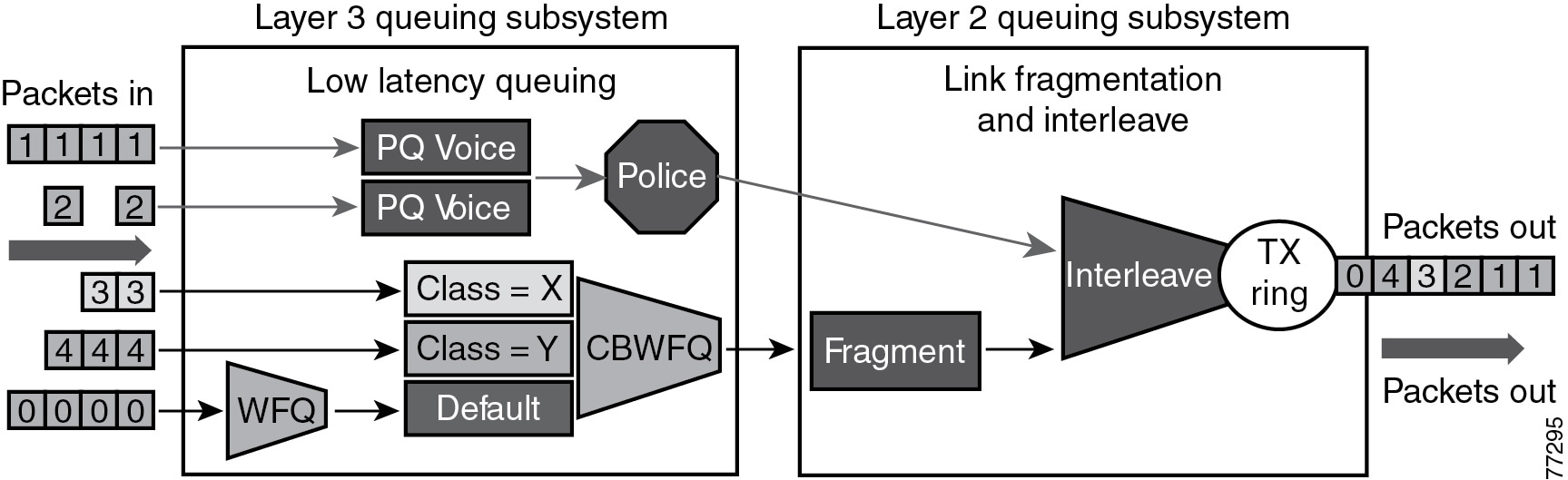
In choosing from among the many available prioritization schemes, the major factors to consider include the type of traffic involved and the type of media on the WAN. For multi-service traffic over an IP WAN, Cisco recommends low-latency queuing (LLQ) for all links. This method supports up to 64 traffic classes, with the ability to specify, for example, priority queuing behavior for voice and interactive video, minimum bandwidth class-based weighted fair queuing for voice control traffic, additional minimum bandwidth weighted fair queues for mission critical data, and a default best-effort queue for all other traffic types.
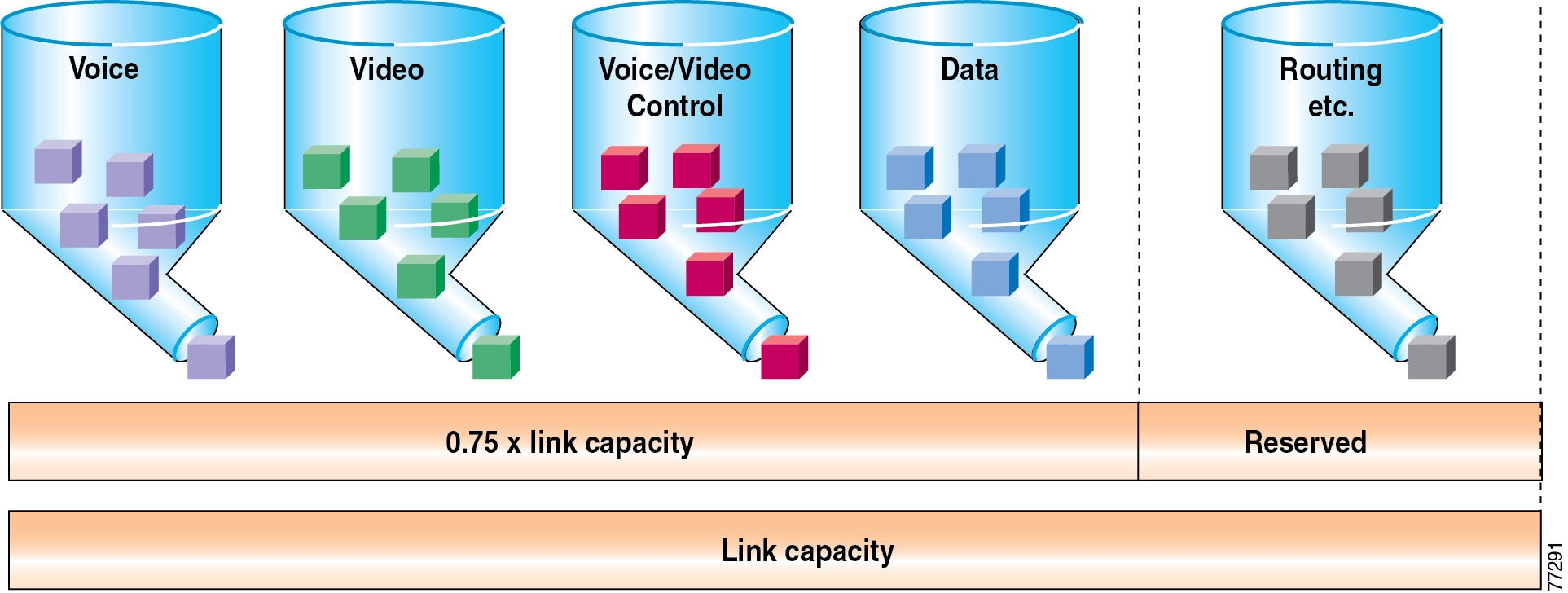
Figure 3-6 shows an example prioritization scheme.
Figure 3-6 Optimized Queuing for VoIP over the WAN
Cisco recommends the following prioritization criteria for LLQ:
•
•
Note
•
Note
•
•
Link Efficiency Techniques
The following link efficiency techniques improve the quality and efficiency of low-speed WAN links.
Compressed Real-Time Transport Protocol (cRTP)
You can increase link efficiency by using Compressed Real-Time Transport Protocol (cRTP). This protocol compresses a 40-byte IP, User Datagram Protocol (UDP), and RTP header into approximately two to four bytes. cRTP operates on a per-hop basis. Use cRTP on a particular link only if that link meets all of the following conditions:
•
•
•
If the link fails to meet any one of the preceding conditions, then cRTP is not effective and you should not use it on that link. Another important parameter to consider before using cRTP is router CPU utilization, which is adversely affected by compression and decompression operations.
cRTP on ATM and Frame Relay Service Inter-Working (SIW) links requires the use of Multilink Point-to-Point Protocol (MLP).
Note that cRTP compression occurs as the final step before a packet leaves the egress interface; that is, after LLQ class-based queueing has occurred. Beginning in Cisco IOS Release 12.(2)2T and later, cRTP provides a feedback mechanism to the LLQ class-based queueing mechanism that allows the bandwidth in the voice class to be configured based on the compressed packet value. With Cisco IOS releases prior to 12.(2)2T, this mechanism is not in place, so the LLQ is unaware of the compressed bandwidth and, therefore, the voice class bandwidth has to be provisioned as if no compression is taking place. Table 3-4 shows an example of the difference in voice class bandwidth configuration given a 512-kbps link with G.729 codec and a requirement for 10 calls.
Note that Table 3-4 assumes 24 kbps for non-cRTP G.729 calls and 10 kbps for cRTP G.729 calls. These bandwidth numbers are based on voice payload and IP/UDP/RTP headers only. They do not take into consideration Layer 2 header bandwidth. However, actual bandwidth provisioning should also include Layer 2 header bandwidth based on the type WAN link used.
Table 3-4 LLQ Voice Class Bandwidth Requirements for 10 Calls with 512 kbps Link Bandwidth and G.729 Codec
Prior to 12.2(2)T
240 kbps
240 kbps1
12.2(2)T or later
240 kbps
100 kbps
1 140 kbps of unnecessary bandwidth must be configured in the LLQ voice class.
It should also be noted that, beginning in Cisco IOS Release 12.2(13)T, cRTP can be configured as part of the voice class with the Class-Based cRTP feature. This option allows cRTP to be specified within a class, attached to an interface via a service policy. This new feature provides compression statistics and bandwidth status via the show policy interface command, which can be very helpful in determining the offered rate on an interface service policy class given the fact that cRTP is compressing the IP/RTP headers.
For additional recommendations about using cRTP with a Voice and Video Enabled IPSec VPN (V3PN), refer to the V3PN documentation available at
Link Fragmentation and Interleaving (LFI)
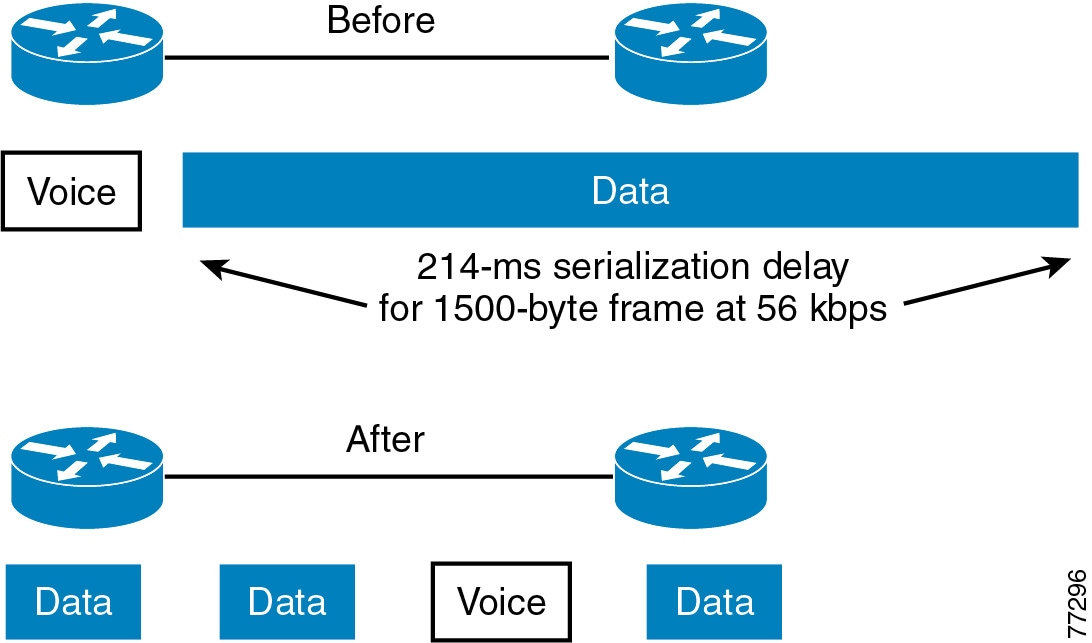
For low-speed links (less than 768 kbps), use of link fragmentation and interleaving (LFI) mechanisms is required for acceptable voice quality. This technique limits jitter by preventing voice traffic from being delayed behind large data frames, as illustrated in Figure 3-7. The two techniques that exist for this purpose are Multilink Point-to-Point Protocol (MLP) LFI (for Leased Lines, ATM, and SIW) and FRF.12 for Frame Relay.
Figure 3-7 Link Fragmentation and Interleaving (LFI)
Voice-Adaptive Fragmentation (VAF)
In addition to the LFI mechanisms mentioned above, voice-adaptive fragmentation (VAF) is another LFI mechanism for Frame Relay links. VAF uses FRF.12 Frame Relay LFI; however, once configured, fragmentation occurs only when traffic is present in the LLQ priority queue or when H.323 signaling packets are detected on the interface. This method ensures that, when voice traffic is being sent on the WAN interface, large packets are fragmented and interleaved. However, when voice traffic is not present on the WAN link, traffic is forwarded across the link unfragmented, thus reducing the overhead required for fragmentation.
VAF is typically used in combination with voice-adaptive traffic shaping (see Voice-Adaptive Traffic Shaping (VATS)). VAF is an optional LFI tool, and you should exercise care when enabling it because there is a slight delay between the time when voice activity is detected and the time when the LFI mechanism engages. In addition, a configurable deactivation timer (default of 30 seconds) must expire after the last voice packet is detected and before VAF is deactivated, so during that time LFI will occur unnecessarily. VAF is available in Cisco IOS Release 12.2(15)T and later.
Traffic Shaping
Traffic shaping is required for multiple-access, non-broadcast media such as ATM and Frame Relay, where the physical access speed varies between two endpoints and several branch sites are typically aggregated to a single router interface at the central site.
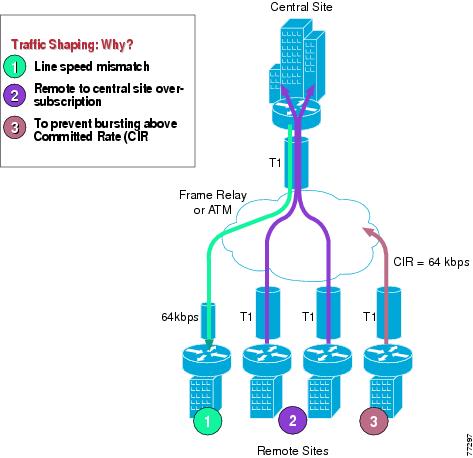
Figure 3-8 illustrates the main reasons why traffic shaping is needed when transporting voice and data on the same IP WAN.
Figure 3-8 Traffic Shaping with Frame Relay and ATM
Figure 3-8 shows three different scenarios:
1.
While the central-site interface is typically a high-speed one (such as T1 or higher), smaller remote branch interfaces may have significantly lower line speeds, such as 64 kbps. If data is sent at full rate from the central site to a slow-speed remote site, the interface at the remote site might become congested and degrade voice performance.
2.
It is common practice in Frame Relay or ATM networks to oversubscribe bandwidth when aggregating many remote sites to a single central site. For example, there may be multiple remote sites that connect to the WAN with a T1 interface, yet the central site has only a single T1 interface. While this configuration allows the deployment to benefit from statistical multiplexing, the router interface at the central site can become congested during traffic bursts, thus degrading voice quality.
3.
Another common configuration is to allow traffic bursts above the CIR, which represents the rate that the service provider has guaranteed to transport across its network with no loss and low delay. For example, a remote site with a T1 interface might have a CIR of only 64 kbps. When more than 64 kbps worth of traffic is sent across the WAN, the provider marks the additional traffic as "discard eligible." If congestion occurs in the provider network, this traffic will be dropped with no regard to traffic classification, possibly having a negative affect on voice quality.
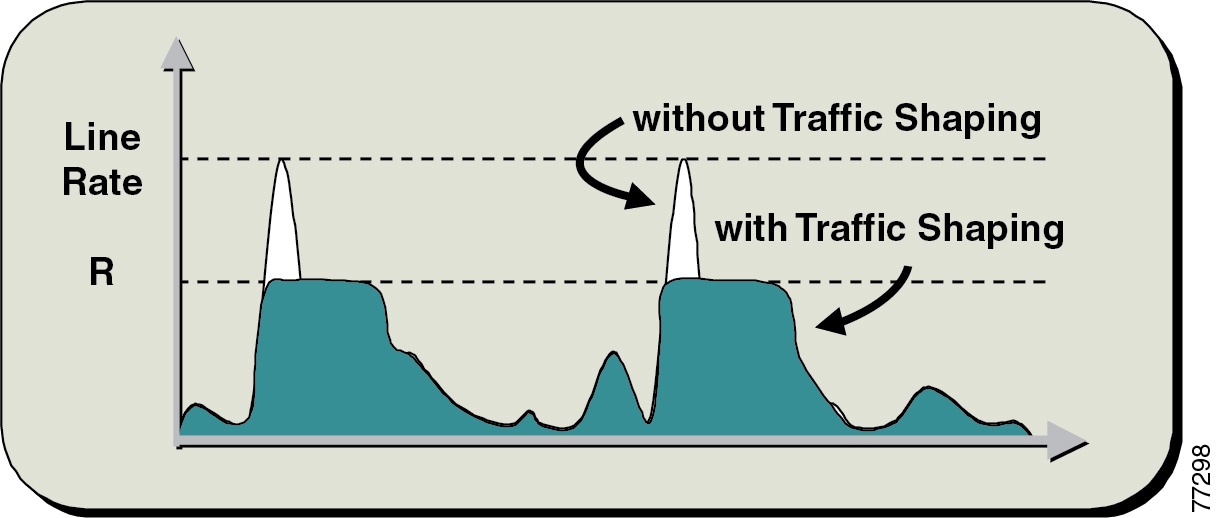
Traffic shaping provides a solution to these issues by limiting the traffic sent out an interface to a rate lower than the line rate, thus ensuring that no congestion occurs on either end of the WAN. Figure 3-9 illustrates this mechanism with a generic example, where R is the rate with traffic shaping applied.
Figure 3-9 Traffic Shaping Mechanism
Voice-Adaptive Traffic Shaping (VATS)
VATS is an optional dynamic mechanism that shapes traffic on Frame Relay permanent virtual circuits (PVCs) at different rates based on whether voice is being sent across the WAN. The presence of traffic in the LLQ voice priority queue or the detection of H.323 signaling on the link causes VATS to engage. Typically, Frame Relay shapes traffic to the guaranteed bandwidth or CIR of the PVC at all times. However, because these PVCs are typically allowed to burst above the CIR (up to line speed), traffic shaping keeps traffic from using the additional bandwidth that might be present in the WAN. With VATS enabled on Frame Relay PVCs, WAN interfaces are able to send at CIR when voice traffic is present on the link. However, when voice is not present, non-voice traffic is able to burst up to line speed and take advantage of the additional bandwidth that might be present in the WAN.
When VATS is used in combination with voice-adaptive fragmentation (VAF) (see Link Fragmentation and Interleaving (LFI)), all non-voice traffic is fragmented and all traffic is shaped to the CIR of the WAN link when voice activity is detected on the interface.
As with VAF, exercise care when enabling VATS because activation can have an adverse effect on non-voice traffic. When voice is present on the link, data applications will experience decreased throughput because they are throttled back to well below CIR. This behavior will likely result in packet drops and delays for non-voice traffic. Furthermore, after voice traffic is no longer detected, the deactivation timer (default of 30 seconds) must expire before traffic can burst back to line speed. It is important, when using VATS, to set end-user expectations and make them aware that data applications will experience slowdowns on a regular basis due to the presence of voice calls across the WAN. VATS is available in Cisco IOS Release 12.2(15)T and later.
For more information on the Voice-Adaptive Traffic Shaping and Fragmentation features and how to configure them, refer to the documentation at
http://www.cisco.com/en/US/products/sw/iosswrel/ps1839/products_feature_guide09186a00801541c6.html
Resource Reservation Protocol (RSVP)
The Resource Reservation Protocol (RSVP) is the first significant industry-standard protocol for dynamically setting up end-to-end QoS across a heterogeneous network. RSVP, which runs over IP, was first introduced by the IETF in RFC 2205, and it enables an application to reserve network bandwidth dynamically. Using RSVP, applications can request a certain level of QoS for a data flow across a network. Because of its distributed and dynamic nature, RSVP is capable of reserving bandwidth across any network topology, therefore it can be used to provide topology-aware call admission control for voice and video calls.
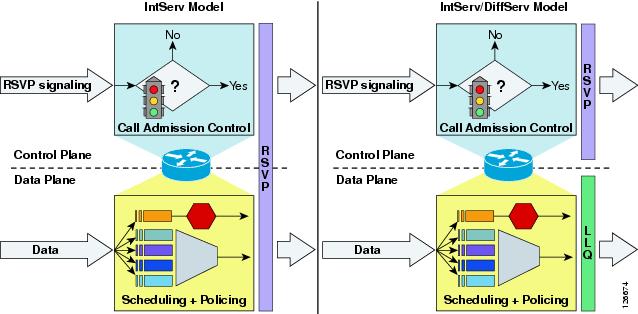
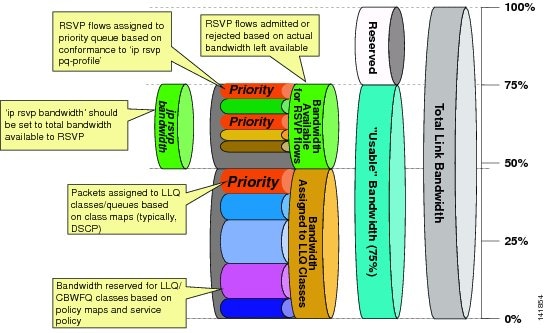
This section focuses on the RSVP protocol principles and its interactions with the WAN infrastructure, specifically the QoS aspects, while the motivation and the mechanisms for call admission control based on RSVP are described in the chapter on Call Admission Control, page 9-1.
This section covers the following specific topics:
RSVP Principles
RSVP performs resource reservation for a given data flow across a network by defining signaling messages that are exchanged between the source and destination devices for the data flow and that are processed by intermediate routers along the path. The RSVP signaling messages are IP packets with the protocol number in the IP header set to 46, and they are routed through the network according to the existing routing protocols.
Not all routers on the path are required to support RSVP because the protocol is designed to operate transparently across RSVP-unaware nodes. On each RSVP-enabled router, the RSVP process intercepts the signaling messages and interacts with the QoS manager for the router interfaces involved in the data flow in order to "reserve" bandwidth resources. When the available resources are not sufficient for the data flow anywhere along the path, the routers signals the failure back to the application that originated the reservation request.
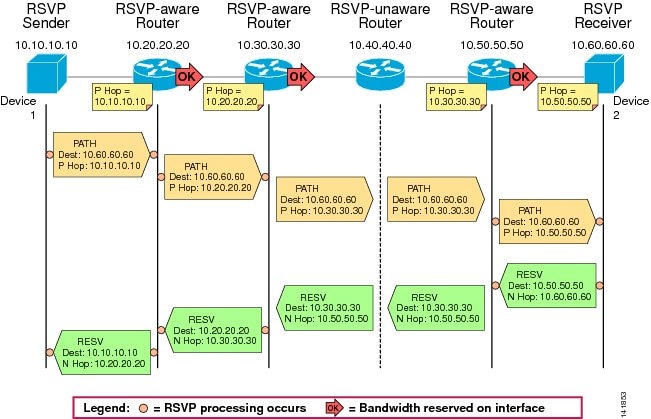
The principles of RSVP signaling can be explained by using the example shown in Figure 3-10. In this diagram, an application wishes to reserve network resources for a data stream flowing from Device 1, whose IP address is 10.10.10.10, to Device 2, whose IP address is 10.60.60.60.
Figure 3-10 Example of RSVP Path and Resv Message Flow
The following steps describe the RSVP signaling process for the example in Figure 3-10:
1.
–
–
–
2.
3.
4.
5.
6.
–
–
7.
–
–
8.
9.
10.
11.
This example shows how the two main RSVP signaling messages, Path and Resv, travel across the network to establish reservations. Several other messages are defined in the RSVP standard to address error situations, reservation failures, and release of resources. In particular, the ResvErr message is used to signal failure to reserve the requested resources due to either policy control or admission control somewhere along the network. If, for example, admission control had failed at node 10.50.50.50 in Figure 3-10, this node would have sent a ResvErr message back to Device 2, specifying the cause of the failure, and the application would have been notified.
Another important aspect of the RSVP protocol is that it adopts a soft-state approach, which means that for each session both the path state and the reservation state along the network need to be refreshed periodically by the application by sending identical Path and Resv messages. If a router does not receive refresh messages for a given session for a certain period of time, it deletes the corresponding state and releases the resources reserved. This allows RSVP to react dynamically to network topology changes or routing changes due to link failures. The reservations simply start flowing along the new routes based on the routing protocol decisions, and the reservations along the old routes time-out and are eventually deleted.
Note
RSVP and QoS in WAN Routers
RSVP has been supported in Cisco routers for many years, however most configurations recommended in this document are based on the RSVP Scalability Enhancements feature, which was first introduced in Cisco IOS Release 12.2(2)T.
By issuing the following Cisco IOS command in interface configuration mode on each Cisco IOS router interface, you can enable RSVP and define the maximum amount of bandwidth that it can control:
ip rsvp bandwidth [interface-kbps] [single-flow-kbps]The interface-kbps parameter specifies the upper limit of bandwidth that RSVP can reserve on the given interface, while the single-flow-kbps parameter provides an upper bandwidth limit for each individual reservation (so that flows with higher bandwidth requests will be rejected even if there is bandwidth available on the interface).
Note
Within Cisco IOS, RSVP can be configured to operate according to two different models: the Integrated Services (IntServ) model, described in RFC 2210, or the Integrated Services/Differentiated Services (IntServ/DiffServ) model, described in RFC 2998. Both RFC documents are available on the IETF website at
Figure 3-11 shows the difference between these two approaches from the perspective of a Cisco IOS router.
Figure 3-11 The Two RSVP Operation Models: IntServ and IntServ/DiffServ
The IntServ Model
As shown on the left side of Figure 3-11, RSVP in the IntServ model involves both the control plane and the data plane. In the control plane, RSVP admits or denies the reservation request. In the data plane, it classifies the data packets, polices them based on the traffic description contained in the RSVP messages, and queues them in the appropriate queue. The classification that RSVP performs is based on the 5-tuple consisting of the source IP address, source port, destination IP address, destination port, and protocol number. In this model, all data packets transiting through the router must be intercepted by RSVP so that RSVP can inspect the 5-tuple and look for a match among the established reservations. If a match is found, the packets are scheduled and policed by RSVP according to the reservation's traffic specification.
As shown in Figure 3-12, when you combine the IntServ model with Low Latency Queuing (LLQ), the usable bandwidth is divided between RSVP and the predefined LLQ queues. RSVP controls the entrance criteria to the RSVP reserved bandwidth, while policy maps control the entrance criteria for the predefined queues.
Figure 3-12 Combining the IntServ Model with LLQ
To use the IntServ operation model on a Cisco IOS router, use the following commands in interface configuration mode:
ip rsvp resource-provider wfq [interface | pvc]no ip rsvp data-packet classificationWhen these commands are active, RSVP admits or rejects new reservations, not only based on the upper bandwidth limit defined within the ip rsvp bandwidth command, but also based on the actual bandwidth resources available. For example, if there are LLQ classes with bandwidth statements, these amounts are deducted from the bandwidth pool that can be assigned to RSVP reservations. While LLQ classes statically allocate bandwidth at configuration time, RSVP does not allocate any amount until a reservation request is received. Therefore, it is important to ensure that an appropriate percentage of the available interface bandwidth is not allocated to LLQ classes, so that it can be used by RSVP as reservation requests are received.
Because the total maximum bandwidth that can be assigned to QoS mechanisms on a link is equal to 75% of the link speed, if you want to reserve 33% of the link bandwidth for RSVP-admitted flows, you have to make sure that the bandwidth assigned to LLQ classes does not exceed (75 - 33) = 42% of the link bandwidth.
Because RSVP is in control of assigning packets to the various queues within this model, it is possible to define a mechanism for RSVP to know whether or not to place flows in the Priority Queue (PQ) by using the following Cisco IOS command in interface configuration mode:
ip rsvp pq-profile [r [b [p-to-r]]]RSVP uses the parameters r, b, and p-to-r to determine if the flow being signaled for is a voice flow that needs PQ treatment. These parameters represent the following values:
•
•
•
If the traffic characteristics specified by the RSVP messages for a certain flow are less than or equal to the parameters in the command, then RSVP will direct the flow into the PQ. If no parameters are provided with the command, the following values, representing the largest of the commonly used voice codecs (G.711), are used as default:
•
•
•
The IntServ/DiffServ Model
As shown on the right side of Figure 3-11, RSVP in the IntServ/DiffServ model involves only the control plane performing admission control but does not involve the data plane. This means that the call admission control function is separate from the scheduling and policing functions, which can be performed by the Low Latency Queuing (LLQ) algorithm according to predefined class maps, policy maps, and service policies.
With the IntServ/DiffServ model, it is therefore possible to add RSVP call admission control to a network that is already using a Differentiated Services approach to QoS. RSVP admits or rejects calls based on a preconfigured bandwidth amount, but the actual scheduling is based on the pre-existing LLQ criteria such as the DSCP value of each packet.
The entire usable bandwidth (75% of the link speed) can be assigned to LLQ classes, as shown in Figure 3-13, as it normally is today. The policy maps define the traffic that is admitted into each queue. RSVP is typically configured to admit flows up to the amount of bandwidth defined for priority traffic, but keep in mind that RSVP in this model does not adjust the scheduling, so any traffic admitted by RSVP in excess of the predefined priority queue may be dropped or remapped to other lower-priority queues.
If all applications that send priority traffic are RSVP-enabled, you may configure the RSVP bandwidth to match the size of the priority queue. If, on the other hand, there are non-RSVP applications that also need to send priority traffic (such as Cisco Unified CallManager static locations or a gatekeeper), as shown in Figure 3-13, the priority queue is divided into priority traffic that is controlled by non-RSVP mechanisms and priority traffic that is controlled by RSVP. The combined non-RSVP and RSVP admission control mechanisms must not use more bandwidth than is allocated to ensure that the priority queue is never over-subscribed.
Figure 3-13 LLQ Bandwidth Allocation with RSVP
To use the IntServ/DiffServ operation model on a Cisco IOS router, use the following commands in interface configuration mode:
ip rsvp resource-provider noneip rsvp data-packet classification noneWhen these commands are active, RSVP admits or rejects new reservations uniquely based on the upper bandwidth limits defined within the ip rsvp bandwidth command, independently from the actual bandwidth resources available on the interface. Once admitted, the RSVP flows are subject to the same scheduling rules as all other non-RSVP traffic (for example, LLQ class and policy maps). Therefore, it is important to ensure that the RSVP-enabled traffic is marked with the appropriate DSCP value and that the bandwidth of the corresponding PQ or CBWFQ queues is provisioned to accommodate both RSVP-enabled traffic and all other traffic.
In this operating model, the ip rsvp pq-profile command is inactive because RSVP does not control the scheduling function.
RSVP Application ID
An application identity (app-id) is an RSVP object that can be inserted into the policy element of an RSVP message. This object is described in RFC 2872. This policy object helps to identify the application and associate it with the RSVP reservation request, thus allowing routers along the path to make appropriate decisions based on the application information.
The need for an app-id arises because RSVP is used to support multiple applications such as voice and video.
Without using an app-id, there is only one bandwidth value that is configurable per interface in RSVP. RSVP will admit requests until this bandwidth limit is reached. It does not differentiate between the requests and is not aware of the type of application for which the bandwidth is requested. As a result of this, it is quite possible for RSVP to exhaust the allowed bandwidth by admitting requests representing just one type of application, thus causing all subsequent requests to be rejected due to unavailable bandwidth. In this way, a few video calls could prevent all or most of the voice calls from being admitted. For example, if an organization allocates 1000 units to RSVP, RSVP might exhaust a majority of this amount by admitting two 384-kbps video calls, thus leaving very little bandwidth for voice calls.
The solution to this problem is to configure separate bandwidth limits for individual applications or classes of traffic. Limiting bandwidth per application requires that an RSVP local policy matching the application bandwidth limit be applied to the router interface and that each reservation request flag the application to which it belongs so that it may be admitted against the appropriate bandwidth limit.
The app-id is not a single piece of information but multiple variable-length strings. As is described in RFC 2872, the object may include the following attributes:
•
•
•
•
For example:
•
•
•
•
How Cisco Unified CallManager Uses the Application ID
To support RSVP Application ID functionality, Cisco Unified CallManager has two cluster-wide service parameters that define the Application ID used to tag audio and video call reservations using RSVP:
•
•
It is possible to change these service parameters, but Cisco recommend that you leave them at their default values unless you require the ability to differentiate one cluster's reservations from another using the same link.
How Voice Calls are Tagged
When a voice call is made between locations with an RSVP policy, the resulting reservations for the audio stream will be tagged with the RSVP Audio Application ID.
How Video Calls are Tagged
When a video call is made between locations with an RSVP policy, the resulting reservations for the audio stream will be tagged with the RSVP Audio Application ID and the reservations for the video stream will be tagged with the RSVP Video Application ID.
Application ID Call Admission Control Model
As mentioned in the chapter on Call Admission Control, page 9-1, the call admission control model supported by Application ID differs from the one supported by "static" locations. Because the audio stream of a video call is marked with the RSVP Audio Application ID, it is possible to guarantee a minimum number of voice calls and allow them to take over the entire available bandwidth. Video calls are allowed up to a certain maximum bandwidth but may be denied when the entire bandwidth is consumed by voice calls that were established first.
RSVP Design Best Practices
When deploying RSVP in the IP WAN in conjunction with Cisco Unified CallManager, observe the following design best practices:
•
–
–
•
•
•
•
•
•
•
•
•
•
Bandwidth Provisioning
Properly provisioning the network bandwidth is a major component of designing a successful IP network. You can calculate the required bandwidth by adding the bandwidth requirements for each major application (for example, voice, video, and data). This sum then represents the minimum bandwidth requirement for any given link, and it should not exceed approximately 75% of the total available bandwidth for the link. This 75% rule assumes that some bandwidth is required for overhead traffic, such as routing and Layer 2 keep-alives. Figure 3-14 illustrates this bandwidth provisioning process.
Figure 3-14 Link Bandwidth Provisioning
In addition to using no more than 75% of the total available bandwidth for data, voice, and video, the total bandwidth configured for all LLQ priority queues should typically not exceed 33% of the total link bandwidth. Provisioning more than 33% of the available bandwidth for the priority queue can be problematic for a number of reasons. First, provisioning more than 33% of the bandwidth for voice can result in increased CPU usage. Because each voice call will send 50 packets per second (with 20 ms samples), provisioning for large numbers of calls in the priority queue can lead to high CPU levels due to high packet rates. In addition, if more than one type of traffic is provisioned in the priority queue (for example, voice and video), this configuration defeats the purpose of enabling QoS because the priority queue essentially becomes a first-in, first-out (FIFO) queue. A larger percentage of reserved priority bandwidth effectively dampens the QoS effects by making more of the link bandwidth FIFO. Finally, allocating more than 33% of the available bandwidth can effectively starve any data queues that are provisioned. Obviously, for very slow links (less than 192 kbps), the recommendation to provision no more than 33% of the link bandwidth for the priority queue(s) might be unrealistic because a single call could require more than 33% of the link bandwidth. In these situations, and in situations where specific business needs cannot be met while holding to this recommendation, it may be necessary to exceed the 33% rule.
From a traffic standpoint, an IP telephony call consists of two parts:
•
•
Bandwidth provisioning should include not only the bearer traffic but also the call control traffic. In fact, in multisite WAN deployments, the call control traffic (as well as the bearer traffic) must traverse the WAN, and failure to allocate sufficient bandwidth for it can adversely affect the user experience.
The next three sub-sections describe the bandwidth provisioning recommendations for the following types of traffic:
•
•
•
Provisioning for Bearer Traffic
The section describes bandwidth provisioning for the following types of traffic:
Voice Bearer Traffic
As illustrated in Figure 3-15, a voice-over-IP (VoIP) packet consists of the payload, IP header, User Datagram Protocol (UDP) header, Real-Time Transport Protocol (RTP) header, and Layer 2 Link header. At the default packetization rate of 20 ms, VoIP packets have a 160-byte payload for G.711 or a 20-byte payload for G.729. When Secure Real-Time Transport Protocol (SRTP) encryption is used, the payload for each packet is increased by 4 bytes. At the default packetization rate of 20 ms, SRTP VoIP packets have a 164-byte payload for G.711 or a 24-byte payload for G.729. The IP header is 20 bytes, the UDP header is 8 bytes, and the RTP header is 12 bytes. The link header varies in size according to the Layer 2 media used.
Figure 3-15 Typical VoIP Packet
The bandwidth consumed by VoIP streams is calculated by adding the packet payload and all headers (in bits), then multiplying by the packet rate per second (default of 50 packets per second). Table 3-5 details the bandwidth per VoIP flow at a default packet rate of 50 packets per second (pps). Table 3-5 does not include Layer 2 header overhead and does not take into account any possible compression schemes, such as compressed Real-Time Transport Protocol (cRTP). You can use the Service Parameters menu in Cisco Unified CallManager Administration to adjust the packet rate.
Table 3-5 lists the bandwidth consumed by the voice payload and IP header only, at a default packet rate of 50 packets per second (pps) and at a rate of 33.3 pps for both non-encrypted and encrypted payloads.
A more accurate method for provisioning is to include the Layer 2 headers in the bandwidth calculations. Table 3-6 lists the amount of bandwidth consumed by voice traffic when the Layer 2 headers are included in the calculations.
While it is possible to configure the sampling rate above 30 ms, doing so usually results in very poor voice quality. As illustrated in Figure 3-16, as sampling size increases, the number of packets per second decreases, resulting in a smaller impact to the CPU of the device. Likewise, as the sample size increases, IP header overhead is lower because the payload per packet is larger. However, as sample size increases, so does packetization delay, resulting in higher end-to-end delay for voice traffic. The trade-off between packetization delay and packets per second must be considered when configuring sample size. While this trade-off is optimized at 20 ms, 30 ms sample sizes still provide a reasonable ratio of delay to packets per second; however, with 40 ms sample sizes, the packetization delay becomes too high.
Figure 3-16 Voice Sample Size: Packets per Second vs. Packetization Delay
Video Bearer Traffic
For audio, it is relatively easy to calculate a percentage of overhead per packet given the sample size of each packet. For video, however, it is nearly impossible to calculate an exact percentage of overhead because the payload varies depending upon how much motion is present in the video (that is, how many pixels changed since the last frame).
To resolve this inability to calculate the exact overhead ratio for video, Cisco recommends that you add 20% to the call speed regardless of which type of Layer-2 medium the packets are traversing. The additional 20% gives plenty of headroom to allow for the differences between Ethernet, ATM, Frame Relay, PPP, HDLC, and other transport protocols, as well as some cushion for the bursty nature of video traffic. (See Table 3-7.)
Note that the values in Table 3-7 represent the maximum burst speed of the call, with some additional amount for a cushion. The average speed of the call is typically much less than these values. The concepts of media channels and bandwidth usage are critical to understanding what values to use when configuring call admission control.
Additional Considerations for Bearer Traffic with RSVP
RSVP was built to support requesting a Quality of Service (QoS) for any traffic flow, not just voice or video, across a wide range of Layer 2 technologies. To accomplish this, RSVP must be able to describe in detail the traffic flow for which it is requesting QoS so that the intermediate routers can make admittance decisions correctly.
The RSVP Sender generates Path messages containing the stream's bandwidth requirements, in the form of a traffic specification (Tspec). The Tspec, as described in RFC 2210, contains the following attributes to describe the traffic flow in detail:
•
•
•
•
•
Calculating RSVP Bandwidth Values for Use with Cisco Unified CallManager
At the time Cisco Unified CallManager instructs the Cisco RSVP Agent to make the initial reservation for the call flow, the endpoints that are involved in the call have not fully exchanged their codec capabilities. Without this information, Cisco Unified CallManager must rely on the region settings to determine how to describe the traffic flow. The size of the traffic flow is a function of two things, the codec bit-rate and the sampling rate (or packets per second). The region settings contain the codec but do not describe the sampling rate. The preferred sampling rates for G.729 and G.711 audio codecs are defined in the following clusterwide service parameters:
•
•
However, the codec sampling rate is negotiated for every call and might not be the preferred setting because it is not supported on one or more of the endpoints. To avoid having to increase the reservation size once the capabilities are fully exchanged, possibly causing a post-ring failure, this initial reservation is for the worst-case scenario, or the smallest packet size, of that codec. Once media capabilities have been exchanged between the endpoints, then the reservation is revised to the correct bandwidth allocation. In most cases, the default sampling rate is used, resulting in the reservation being reduced.
Note
Voice Bearer Traffic
Inter-region call with audio codec set to G729:
•
•
Inter-region call with audio codec set to G711:
•
•
Video Bearer Traffic
As with the audio stream, the initial reservation for the video stream will rely on the region settings because the endpoint codec capabilities will not be fully negotiated at the time of the reservation. The region settings for video calls include the bandwidth for the audio stream. (See IP Video Telephony, page 17-1, for more information.) Because the audio stream has its own reservation, the final reservation for the video stream will be the region setting minus the audio codec bit-rate. However, because these codecs have not been fully negotiated, the video stream reservation will be for the worst-case scenario, which assumes no audio stream. Once media capabilities have been exchanged between the endpoints, then the reservation will be revised to the correct bandwidth allocation.
Because video is inherently bursty, it is necessary to add some overhead to the stream requirements. (See Video Bearer Traffic, for more information.) Cisco Unified CallManager uses the stream bandwidth to determine how to calculate the overhead, as follows:
•
•
Inter-region video call, with G.729 audio codec and video setting of 384 kbps:
•
•
Inter-region video call, with G.711 audio codec and video setting of 384 kbps:
•
•
Configuration Recommendation
Because the initial reservation will be larger than the actual packet flow, over-provisioning the RSVP and LLQ bandwidth is required to ensure that the desired number of calls can complete.
When provisioning the RSVP bandwidth value for N calls, Cisco recommends that the Nth value be the worst-case bandwidth to ensure that the Nth call gets admitted.
For example:
•
(3 * 24) + 40 = 112 kbps
•
(3 * 80) + 96 = 336 kbps
•
(3 * (384 - 8) + 384) * 1.07 = 1618 kbps
•
(3 * (384 - 64) + 384) * 1.07 = 1438 kbps
Configuring Cisco IOS Application ID Support
RSVP Application ID feature support was introduced in Cisco IOS Release 12.4(6)T, and that is the minimum release required for the following examples.
Combined Priority Queue
To utilize the functionality allowed in Cisco Unified CallManager's implementation of Application ID support (that is, allowing voice calls to consume all the bandwidth available in the priority queue), we must modify the previous recommendations that voice and video priority queues be kept separate. (See Application ID Call Admission Control Model.) To use this functionality, you should combine both the voice and video match criteria into one class-map. Because the requirements are to match either voice traffic or video traffic, be sure to make the class-map match criteria match-any instead of match-all, as follows:
class-map match-any IPC-RTPmatch ip dscp efmatch ip dscp af41 af42Configure the priority queue to support both the voice and video traffic. The following example configuration allocates 33% of the link bandwidth to the priority queue:
policy-map Voice-Policyclass IPC-RTPpriority percent 33Mapping Application ID to RSVP Policy Identities
The RSVP Local Policy provides the mechanism for controlling a reservation based on an Application ID. Application IDs are mapped to RSVP Local Policies through the ip rsvp policy identity command. RSVP Local Policy identities are defined globally and are available to each interface for policy enforcement. Each identity can have one policy locator defined to match an Application ID.
To give the user as much flexibility as possible in matching application policy locators to local policies, the RSVP local policy command line interface (CLI) accepts application ID match criteria in the form of Unix-style regular expressions for the policy locator. Regular expressions are already used in the CLI for existing Cisco IOS components such as Border Gateway Protocol (BGP). Refer to the follow documentation for more information on how regular expressions are used in Cisco IOS:
•
•
http://www.cisco.com/warp/public/459/26.html
•
http://www.cisco.com/en/US/products/sw/iosswrel/ps5207/products_feature_guide09186a00801d3b21.html
RSVP Policy Identities for Matching the Default Cisco Unified CallManager Application IDs
ip rsvp policy identity rsvp-video policy-locator .*VideoStream.*ip rsvp policy identity rsvp-voice policy-locator .*AudioStream.*Interface RSVP Local Policies
Whether configuring Application ID support or not, for an interface to support RSVP, you must configure the ip rsvp bandwidth <value> command on that interface. This value cannot be exceeded by any one RSVP reservation or the sum of RSVP reservations on that interface, regardless of Application ID support. In fact, if a reservation passes the local policy check, it still must pass the interface RSVP bandwidth check before it is reserved.
Local policies based on Application ID are applied to an interface using the ip rsvp policy local identity command.
For reservations that match its policy locator value, a local policy has the ability to perform the following functions:
•
•
•
•
For example, to limit the amount of video bandwidth to 384 kbps on a Serial T1, use the following commands:
interface Serial0/0/1:0ip rsvp bandwidth 506ip rsvp policy local identity rsvp-videomaximum bandwidth group 384forward allThere is also a catch-all local policy called the default local policy. This local policy will match any RSVP reservation that did not match the other RSVP local policies configured on the link. The default local policy can be used to match reservations that are not tagged with an Application ID or reservations that are tagged with an Application ID that you want to treat as untagged traffic.
Example
The following example supports both voice and video calls using the model discussed in How Cisco Unified CallManager Uses the Application ID. The voice calls are guaranteed 352 kbps of bandwidth while video calls are limited to 154 kbps of bandwidth. Voice calls can use all of the available RSVP bandwidth.
interface Serial0/0/1:0ip address 10.2.101.5 255.255.255.252service-policy output Voice-Policyip rsvp bandwidth 506ip rsvp data-packet classification noneip rsvp resource-provider noneip rsvp policy local identity rsvp-voicemaximum bandwidth group 506forward allip rsvp policy local identity rsvp-videomaximum bandwidth group 154forward allip rsvp policy local defaultno accept all ! Will not show in the configurationno forward all ! Will not show in the configurationIn this example, if an RSVP reservation is received that does not have an Application ID or its Application ID does not match the two configured options, the reservation will fail. This configuration works if RSVP traffic originates only from Cisco RSVP Agents controlled by Cisco Unified CallManager. However, if there is intercluster RSVP traffic via an IP-IP gateway or if RSVP messages from a controller other than Cisco Unified CallManager are traversing this link, then the default local policy should be configured to accept and forward the reservations and a maximum bandwidth value should be configured on the policy. Note that it is possible to oversubscribe the RSVP bandwidth via the use of multiple RSVP local policies (if the sum of the policies is greater than the RSVP interface bandwidth), but reservations then become first-come, first-serve.
Provisioning for Call Control Traffic with Centralized Call Processing
In a centralized call processing deployment, the Cisco Unified CallManager cluster and the applications (such as voicemail) are located at the central site, while several remote sites are connected through an IP WAN. The remote sites rely on the centralized Cisco Unified CallManagers to handle their call processing.
The following considerations apply to this deployment model:
•
•
As a consequence, the area where you must provision bandwidth for control traffic lies between the branch routers and the WAN aggregation router at the central site.
The control traffic that traverses the WAN in this scenario can be split into two categories:
•
•
To obtain an estimate of the generated call control traffic, it is therefore necessary to make some assumptions regarding the average number of calls per hour made by each branch IP phone. In the interest of simplicity, the calculations in this section assume an average of 10 calls per hour per phone.
Note
Given the assumptions made, and initially considering the case of a remote branch with no signaling encryption configured, the recommended bandwidth needed for call control traffic can be obtained from the following formula:
Equation 1: Recommended Bandwidth Needed for SCCP Control Traffic without Signaling Encryption.
Bandwidth (bps) = 265 * (Number of IP phones and gateways in the branch)
Equation 1 and all other formulas within this section include a 25% over-provisioning factor. Control traffic has a bursty nature, with peaks of high activity followed by periods of low activity. For this reason, assigning just the minimum bandwidth required to a control traffic queue can result in undesired effects such as buffering delays and, potentially, packet drops during periods of high activity. The default queue depth for a Class-Based Weighted Fair Queuing (CBWFQ) queue in Cisco IOS equals 64 packets. The bandwidth assigned to this queue determines its servicing rate. Assuming that the bandwidth configured is the average bandwidth consumed by this type of traffic, it is clear that, during the periods of high activity, the servicing rate will not be sufficient to "drain" all the incoming packets out of the queue, thus causing them to be buffered. Note that, if the 64-packet limit is reached, any subsequent packets are either assigned to the best-effort queue or are dropped. It is therefore advisable to introduce this 25% over-provisioning factor to absorb and smooth the variations in the traffic pattern and to minimize the risk of a temporary buffer overrun. This method is equivalent to increasing the servicing rate of the queue.
If encryption is configured, the recommended bandwidth is affected because encryption increases the size of signaling packets exchanged between Cisco Unified CallManager and the endpoints. The following formula takes into account the impact of signaling encryption:
Equation 2: Recommended Bandwidth Needed for SCCP Control Traffic with Signaling Encryption.
Bandwidth with signaling encryption (bps) = 415 * (Number of IP phones and gateways in the branch)
If we now take into account the fact that the smallest bandwidth that can be assigned to a queue on a Cisco IOS router is 8 kbps, we can summarize the values of minimum and recommended bandwidth for various branch office sizes, as shown in Table 3-8.
Note
Advanced Formulas
The previous formulas presented in this section assume an average call rate per phone of 10 calls per hour. However, this rate might not correspond to your deployment if the call patterns are significantly different (for example, with call center agents at the branches). To calculate call control bandwidth requirements in these cases, use the following formulas, which contain an additional variable (CH) that represents the average calls per hour per phone:
Equation 3: Recommended Bandwidth Needed for SCCP Control Traffic for a Branch with No Signaling Encryption.
Bandwidth (bps) = (53 + 21 * CH) * (Number of IP phones and gateways in the branch)
Equation 4: Recommended Bandwidth Needed for SCCP Control Traffic for a Remote Branch with Signaling Encryption.
Bandwidth with signaling encryption (bps) = (73.5 + 33.9 * CH) * (Number of IP phones and gateways in the branch)
Note
Considerations for Shared Line Appearances
Calls placed to shared line appearances, or calls sent to line groups using the Broadcast distribution algorithm, have two net effects on the bandwidth consumed by the system:
•
CHS = CHL * (Number line appearances) / (Number of lines)
Where CHS is the shared-line calls per hour to be used in Equations 3 and 4, and CHL is the calls-per-hour rating of the line. For example, if a site is configured with 5 lines making an average of 6 calls per hour but 2 of those lines are shared across 4 different phones, then:
Number of lines = 5
Number of line appearances = (2 lines appear on 4 phones, and 3 lines appear on only one phone) = (2*4) + 3 = 11 line appearances
CHL = 6
CHS = 6 * (11 / 5) = 13.2
•
This traffic may overwhelm the queue depth of the central site's WAN router. By default, the queue depth available for each of the classes of traffic in Cisco IOS is 64. In order to prevent any packets from being dropped before they are queued for the WAN interface, you must ensure that the signaling queue's depth is sized to hold all the packets from at least one full shared-line event for each shared-line phone. Avoiding drops is paramount in ensuring that the call does not create a race condition where dropped packets are retransmitted, causing system response times to suffer.
Therefore, the quantity of packets required to operate shared-line phones in Cisco Unified CallManager 4.x is 14 packets per shared-line phone.
For example, in Cisco Unified CallManager 4.1 with 5 phones sharing the same line, the queue depth for the signaling class of traffic must be adjusted to a minimum of 70. Table 3-9 provides recommended queue depths based on the quantity of shared line appearances within a branch site.
Table 3-9 Recommended Queue Depth per Branch Site
5
70
10
140
15
210
20
280
25
350
When using a Layer 2 WAN technology such as Frame Relay, you must make this adjustment on the circuit corresponding to the branch where the shared-line phones are located.
If you are using a Layer 3 WAN technology such as MPLS, there might be a single signaling queue servicing multiple branches. In this case, you must make an adjustment for the total of all branches serviced. For example, with Cisco Unified CallManager 4.1, if 10 branches each require 5 phones sharing a line, the central site's WAN router must be adjusted to have a signaling queue depth of 700.
Provisioning for Call Control Traffic with Distributed Call Processing
In distributed call processing deployments, several sites are connected through an IP WAN. Each site contains a Cisco Unified CallManager cluster and can follow either the single-site model or the centralized call processing model. A gatekeeper may be used for call admission control between sites.
The following considerations apply to this deployment model:
•
•
Therefore, bandwidth for control traffic must be provisioned on the WAN links between Cisco Unified CallManagers as well as between each Cisco Unified CallManager and the gatekeeper. Because the topology is limited to hub-and-spoke, with the gatekeeper typically located at the hub, the WAN link that connects each site to the other sites usually coincides with the link that connects the site to the gatekeeper.
The control traffic that traverses the WAN belongs to one of the following categories:
•
•
–
–
Because the total amount of control traffic depends on the number of calls that are set up and torn down at any given time, it is necessary to make some assumptions about the call patterns and the link utilization. The WAN links that connect each of the spoke sites to the hub site are normally provisioned to accommodate different types of traffic (for example, data, voice, and video). Using a traditional telephony analogy, we can view the portion of the WAN link that has been provisioned for voice as a number of virtual tie lines.
Assuming an average call duration of 2 minutes and 100 percent utilization of each virtual tie line, we can deduce that each tie line carries a volume of 30 calls per hour. This assumption allows us to obtain the following formula that expresses the recommended bandwidth for call control traffic as a function of the number of virtual tie lines.
Equation 5: Recommended Bandwidth Based on Number of Virtual Tie Lines.
Recommended Bandwidth (bps) = 116 * (Number of virtual tie lines)
If we take into account the fact that 8 kbps is the smallest bandwidth that can be assigned to a queue on a Cisco IOS router, we can deduce that a minimum queue size of 8 kbps can accommodate the call control traffic generated by up to 70 virtual tie lines. This amount should be sufficient for most large enterprise deployments.
Wireless LAN Infrastructure
Wireless LAN infrastructure design becomes important when IP telephony is added to the wireless LAN (WLAN) portions of a converged network. With the addition of wireless IP telephony endpoints such as the Cisco Unified Wireless IP Phone 7920, voice traffic has moved onto the WLAN and is now converged with the existing data traffic there. Just as with wired LAN and wired WAN infrastructure, the addition of voice in the WLAN requires following basic configuration and design best-practices for deploying a highly available network. In addition, proper WLAN infrastructure design requires understanding and deploying QoS on the wireless network to ensure end-to-end voice quality on the entire network. The following sections discuss these requirements:
•
•
For more information about WLAN design, refer to the Cisco Wireless LAN SRND guide, available at
For more information about the Cisco Wireless IP Phone 7920, refer to the Cisco Unified Wireless IP Phone 7920 Design and Deployment Guide, available at
WLAN Design and Configuration
Properly designing a WLAN requires, first and foremost, ensuring that the existing wired network is deployed in a highly available, fault-tolerant and redundant manner. Next, an understanding of wireless technology is required. Finally, by configuring and deploying wireless access points (APs) and wireless telephony endpoints in an effective way, you can build a flexible, secure, redundant, and highly scalable network.
The following sections examine the WLAN infrastructure layers and network services:
•
•
Wireless Infrastructure Considerations
The following sections provide guidelines and best practices for designing the WLAN infrastructure:
VLANs
Just as with a wired LAN infrastructure, when deploying voice in a wireless LAN, you should enable at least two virtual LANs (VLANs) at the Access Layer. The Access Layer in a wireless LAN environment includes the access point (AP) and the first-hop access switch. On the AP and access switch, you should configure both a native VLAN for data traffic and a voice VLAN (under Cisco IOS) or Auxiliary VLAN (under CatOS) for voice traffic. This voice/auxiliary VLAN should be separate from all the other wired voice VLANs in the network. In addition, as with voice endpoints on wired LANs, wireless voice endpoints should be addressed using RFC 1918 private subnet addresses. When deploying a wireless infrastructure, Cisco also recommends configuring a separate management VLAN for the management of WLAN APs. This management VLAN should not have a WLAN appearance; that is, it should not have an associated service set identifier (SSID) and it should not be directly accessible from the WLAN.
Roaming
Another very important consideration for wireless infrastructure is wireless endpoint roaming. When wireless devices roam at Layer 2, they keep their IP address and network configuration. For this reason, roaming can occur fairly quickly (in 100 to 400 ms). All that is required is re-authentication, if Cisco LEAP or Extensible Authentication Protocol (EAP) is used, and the passing of Inter-Access Point Protocol (IAPP) messages between the last AP and the new AP to indicate that the endpoint has roamed. Layer 2 roaming is typically unnoticeable to the end user.
When devices roam at Layer 3, they move from one AP to another AP across native VLAN boundaries. The Cisco Catalyst 6500 Series Wireless LAN Services Module (WLSM) allows the Cisco Wireless IP Phone 7920 to roam at Layer 3 while still maintaining an active call. The Cisco Wireless IP Phone 7920 can roam at Layer 3 using Static WEP or Cisco Centralized Key Management (Cisco CKM) protocols. Cisco CKM enables the Cisco Wireless IP Phone 7920 to achieve full Layer 3 mobility while using either WEP 128 or TKIP encryption. Seamless Layer 3 roaming occurs only when the client is roaming within the same mobility group. For details about the Cisco WLSM and Layer 3 roaming, refer to the product documentation available at
If you are using 802.1x authentication in the wireless LAN, Cisco CKM is recommended to minimize roaming downtime. Whether roaming at Layer 2 or Layer 3, device downtime decreases from 300-400 ms to 100 ms or less. Cisco CKM also takes some of the load off the Access Control Server (ACS) by reducing the number of authentication requests that must be sent to the ACS.
Note
Wireless Channels
Wireless endpoints and APs communicate via radios on particular channels. When communicating on one channel, wireless endpoints typically are unaware of traffic and communication occurring on other non-overlapping channels.
Optimal channel configuration for 2.4 GHz 802.11b requires a minimum of five-channel separation between configured channels to prevent interference or overlap between channels. In North America, with allowable channels of 1 to 11, channels 1, 6, and 11 are the three usable non-overlapping channels for APs and wireless endpoint devices. However, in Europe where the allowable channels are 1 to 13, multiple combinations of five-channel separation are possible. Multiple combinations of five-channel separation are also possible in Japan, where the allowable channels are 1 to 14.
AP coverage should be deployed so that no (or minimal) overlap occurs between APs configured with the same channel. Same channel overlap should typically occur at 19 dBm separation. However, proper AP deployment and coverage on non-overlapping channels require a minimum overlap of 15% to 20%. This amount of overlap ensures smooth roaming for wireless endpoints as they move between AP coverage cells. Overlap of less than 15% to 20% can result in slower roaming times and poor voice quality.
Deploying wireless devices in a multi-story building such as an office high-rise or hospital introduces a third dimension to wireless AP and channel coverage planning. The 2.4 GHz wave form of 802.11b can pass through floors and ceilings as well as walls. For this reason, not only is it important to consider overlapping cells or channels on the same floor, but it is also necessary to consider channel overlap between adjacent floors. With only three channels, proper overlap can be achieved only through careful three-dimensional planning.
Note
Wireless Interference
Interference sources within a wireless environment can severely limit endpoint connectivity and channel coverage. In addition, objects and obstructions can cause signal reflection and multipath distortion. Multipath distortion occurs when traffic or signaling travels in more than one direction from the source to the destination. Typically, some of the traffic arrives at the destination before the rest of the traffic, which can result in delay and bit errors in some cases. You can reduce the affects of multipath distortion by eliminating or reducing interference sources and obstructions, and by using diversity antennas so that only a single antenna is receiving traffic at any one time. Interference sources should be identified during the site survey and, if possible, eliminated. At the very least, interference impact should be alleviated by proper AP placement and the use of location-appropriate directional or omni-directional diversity radio antennas.
Possible interference sources include:
•
•
•
•
Multicast on the WLAN
Cisco does not recommend forwarding multicast traffic on a WLAN with voice devices because of the following reasons:
•
When devices such as the Cisco Unified Wireless IP Phone 7920 go into power-save mode, an AP buffers all multicast packets until the next active interval for these devices. This buffering causes packet delay and affects all devices associated with the AP even if they are not in power-save mode. This condition can be extremely problematic for real-time multicast applications such as music on hold and streaming video.
•
AP and wireless endpoint devices use acknowledgements on the link layer to ensure reliable delivery. When packets are not received or acknowledged, they are retransmitted. This retransmission does not occur for multicast traffic on the WLAN. Given that wireless networks have a higher instance of bit error than wired networks, this lack of retransmission results in a larger number of lost packets when compared to a wired LAN.
Before enabling multicast applications on the wireless network, Cisco recommends testing these applications to ensure that performance and behavior are acceptable.
For additional considerations with multicast traffic, see Music on Hold, page 7-1.
Wireless AP Configuration and Design
Proper AP selection, deployment, and configuration are essential to ensure that the wireless network handles voice traffic in a way that provides high-quality voice to the end users.
AP Selection
Cisco recommends the following APs for deploying wireless voice:
•
•
•
•
•
•
•
For these APs, Cisco IOS Release 12.3(4) JA or later is recommended.
AP Deployment
When deploying Cisco access points (APs), do not associate more than 15 to 25 devices to a single AP at any given time. This number will vary depending on usage profiles. The number of devices on an AP affects the amount of time each device has access to the medium. As the number of devices increases, the traffic contention increases. Associating more than 15 to 25 devices to an AP can result in poor AP performance and slower response times for associated devices.
While there is no specific mechanism to ensure that no more than 25 devices are associated to a single AP, system administrators can manage device-to-AP ratios by conducting periodic site surveys and analyzing user and device traffic patterns. If additional devices and users are added to the network in a particular area, additional site surveys should be conducted to determine whether additional APs are required to handle the number of endpoints that need to access the network.
AP Configuration
When deploying wireless voice, observe the following specific AP configuration requirements:
•
ARP caching is required on the AP because it enables the AP to answer ARP requests for the wireless endpoint devices without requiring the endpoint to leave power-save or idle mode. This feature results in extended battery life for the wireless endpoint devices.
•
When possible, the transmit power on the AP and the voice endpoints should match. Matching transmit power on the AP and voice endpoints helps eliminate the possibility of one-way audio traffic. If the transmit power configuration on the APs must vary, the transmit power on all voice endpoints should be configured to match the AP with the highest transmit power.
Note
•
Configuring the maximum 11 Mbps data rate ensures the best level of throughput for voice devices and the largest number of active calls per AP.
•
To control wireless network channels and eliminate channel overlap, it is important to configure a channel number manually on each AP based on its location.
•
SSIDs enable endpoints to select the wireless VLAN they will use for sending and receiving traffic. These wireless VLANs and SSIDs map to wired VLANs. For voice endpoints, this mapping ensures priority queuing treatment and access to the voice VLAN on the wired network.
•
This feature ensures that the AP will provide QoS Basic Service Set (QBSS) information elements in beacons. The QBSS element provides an estimate of the channel utilization on the AP, and Cisco wireless voice devices use it to help make roaming decisions and to reject call attempts when loads are too high. Beginning with Cisco IOS Release 12.3(7)JA, the AP also provides 802.11e clear channel assessment (CCA) QBSS in beacons. The CCA-based QBSS values reflect true channel utilization.
•
Configure a voice policy and a data policy with default classifications for the respective VLANs to ensure that voice traffic is given priority queuing treatment. (See Interface Queuing, for more information).
Wireless Security
Another important consideration for a wireless infrastructure is security. Wireless endpoints, including wireless phones, can connect to the wireless network using one of the following security mechanisms:
•
A standards-based security protocol that first requires the establishment of an authenticated tunnel between the wireless client and an Authentication, Authorization, and Accounting (AAA) server using a Protected Access Credential (PAC). Next the wireless endpoint authenticates across the tunnel using a user name and password to authenticate with the network via 802.1X. Once this authentication occurs, traffic to and from the wireless device is encrypted using TKIP or WEP. Using the 802.1X authentication method requires an EAP-compliant Remote Authentication Dial-In User Service (RADIUS) authentication server such as the Cisco Secure Access Control Server (ACS), which provides access to a user database for authenticating the wireless devices.
•
A standards-based security protocol requires the wireless endpoint to provide a user name and password to authenticate with the network. Once this authentication occurs using either 802.1X or Pre-Shared Key (PSK), traffic to and from the wireless device is encrypted using Temporal Key Integrity Protocol (TKIP). Using the 802.1X authentication method requires an EAP-compliant Remote Authentication Dial-In User Service (RADIUS) authentication server such as the Cisco Secure Access Control Server (ACS), which provides access to a user database for authenticating the wireless devices.
•
Cisco LEAP requires the wireless endpoint to provide a user name and password to authenticate with the network. Once this authentication occurs, a dynamic key is generated, and traffic to and from the wireless device is encrypted. This method requires an EAP-compliant Remote Authentication Dial-In User Service (RADIUS) authentication server such as the Cisco Secure Access Control Server (ACS), which provides access to a user database for authenticating the wireless devices.
•
Static WEP requires the exchange of a statically configured 40-bit or 128-bit character key between the wireless endpoint and the AP. If the keys match, the wireless device is given access to the network. Be aware that there are known weaknesses in the WEP encryption algorithm. These weaknesses, coupled with the complexity of configuring and maintaining static keys, can make this security mechanism undesirable in many cases.
Authentication and ACS Deployment Models
Extensible Authentication Protocol (EAP) is the preferred method of wireless device authentication (especially voice devices) because it provides the most secure and robust mechanism for access to the network and voice VLAN(s). Because an EAP-compliant RADIUS server is required, Cisco recommends the use of Cisco Secure ACS for Windows Server Version 3.1 or later.
When deploying EAP-FAST, WPA, or Cisco LEAP for wireless authentication and encryption, carefully consider the placement of the ACS within the network, and select one of the following ACS deployment models:
•
ACS server or servers are located in a centralized place within the network and are used to authenticate all wireless devices and users within the network.
•
In networks where remote locations are separated from the central site by low-speed or congested WAN links, an ACS server can be located at the remote site and remote wireless devices or users can be authenticated by this server locally, thus eliminating the potential for delayed authentication via a centralized ACS across the WAN link.
•
In networks where remote locations are separated from a central site by low-speed WAN links, local wireless devices can authenticate against local Cisco IOS APs. APs running Cisco IOS Release 12.2(11)JA or later can authenticate users and devices locally without relying on an external ACS. A single AP can support up to 50 users with this functionality. This feature can be used in lieu of a centralized or local ACS, or in the case of a WAN or ACS failure in which the remote site users are unable to contact a local ACS or the central site ACS.
When choosing a deployment model for the ACS, it is imperative to make authentication services redundant so that the ACS does not become a single point of failure when wireless devices attempt to access the network. For this reason, each ACS server should replicate its database to a secondary server. Furthermore, it is always a good idea to provide a local ACS or an on-AP RADIUS server at remote sites to ensure that remote wireless devices can still authenticate in the event of a WAN failure.
In addition to ACS server placement, it is also important to consider the implications of user database location in relation to the ACS server. Because the ACS server must access the user database to authenticate wireless devices, the location of the user database affects the amount of time the authentication will take. If the user database is a Microsoft Active Directory (AD) server located on the network, the ACS must send an authentication request to the AD server and wait for a response. To ensure the fastest response times for wireless voice endpoints attempting to authenticate to the network, Cisco recommends defining users locally on the ACS server. Remote databases have unknown response times and can adversely affect authentication times.
WLAN Quality of Service (QoS)
Just as QoS is necessary for LAN and WAN wired network infrastructure in order to ensure high voice quality, QoS is also require for wireless LAN infrastructure. Because of the bursty nature of data traffic and the fact that real-time traffic such as voice is sensitive to packet loss and delay, QoS tools are required to manage wireless LAN buffers, limit radio contention, and minimize packet loss, delay, and delay variation.
However, unlike most wired networks, wireless networks are a shared medium, and wireless endpoints do not have dedicated bandwidth for sending and receiving traffic. While wireless endpoints can mark traffic with 802.1p CoS, DSCP, and PHB, the shared nature of the wireless network means limited admission control and access to the network for these endpoints.
Wireless QoS involves the following main areas of configuration:
Traffic Classification
As with wired network infrastructure, it is important to classify or mark pertinent wireless traffic as close to the edge of the network as possible. Because traffic marking is an entrance criterion for queuing schemes throughout the wired and wireless network, marking should be done at the wireless endpoint device whenever possible. Marking or classification by wireless network devices should be identical to that for wired network devices, as indicated in Table 3-2.
In accordance with traffic classification guidelines for wired networks, the Cisco Wireless IP Phone 7920 marks voice media traffic or RTP traffic with DSCP 46 (or PHB EF) and voice signaling traffic (SCCP) with DSCP 24 (or PHB CS3). Once this traffic is marked, it can be given priority or better than best-effort treatment and queuing throughout the network. All wireless voice devices should be capable of marking traffic in this manner. All other traffic on the wireless network should be marked as best-effort or with some intermediary classification as outlined in wired network marking guidelines.
Interface Queuing
Once marking has occurred, it is necessary to enable the wired network APs and devices to provide QoS queuing so that voice traffic types are given separate queues to reduce the chances of this traffic being dropped or delayed as it traversed the wireless LAN. Queuing on the wireless network occurs in two directions, upstream and downstream. Upstream queuing concerns traffic traveling from the wireless endpoint up to the AP and from the AP up to the wired network. Downstream queuing concerns traffic traveling from the wired network to the AP and down to the wireless endpoint.
Unfortunately, there is little upstream queuing available in a wireless network. While wireless devices such as the Cisco Wireless IP Phone 7920 can provide queuing upstream as the packets leave the device, there is no mechanism in place to provide queuing among all clients on the wireless LAN because wireless networks are a shared medium. Therefore, although voice media packets might receive priority treatment leaving the wireless endpoint, these packets must contend with all the other packets that other wireless devices may be attempting to send. For this reason, it is extremely important to follow the guideline of no more than 15 to 25 wireless clients per AP. Going beyond the upper limit of this guideline can result in additional voice packet delay and jitter.
As for downstream QoS, Cisco APs currently provide up to eight queues for downstream traffic being sent to wireless clients. The entrance criterion for these queues can be based on a number of factors including DSCP, access control lists (ACLs), and VLAN. Although eight queues are available, Cisco recommends using only two queues when deploying wireless voice. All voice media and signaling traffic should be placed in the highest-priority queue, and all other traffic should be placed in the best-effort queue. This ensure the best possible queuing treatment for voice traffic.
To set up this two-queue configuration, create two QoS policies on the AP. Name one policy voice and configure it with the class of service Voice <10 ms Latency (6) as the Default Classification for all packets on the Vlan. Name the other policy data and configure it with the class of service Best Effort (0) as the Default Classification for all packets on the Vlan. Then assign the data policy to the incoming and outgoing radio interface for the data VLAN(s), and assign the voice policy to the incoming and outgoing radio interfaces for the voice VLAN(s). With the QoS policies applied at the VLAN level, the AP is not forced to examine every packet coming in or going out to determine the type of queuing it should receive. This configuration ensures that all voice media and signaling are given priority queuing treatment in a downstream direction.
Bandwidth Provisioning
Another QoS requirement for wireless networking is the appropriate provisioning of bandwidth. Bandwidth provisioning involves the bandwidth between the wired and wireless networks as well as the number of simultaneous voice calls that an AP can handle. Wireless APs typically connect to the wired network via a 100 Mbps link to an Access Layer switch port. While the ingress Ethernet port on the AP can receive traffic at 100 Mbps, the maximum throughput on an 802.11b wireless network is 11 Mbps. After taking into account the half-duplex nature of the wireless medium and the overhead of wireless headers, the practical throughput on the 802.11b wireless network is about 7 Mbps. This mismatch in throughput between the wired and wireless network can result in packet drops when traffic bursts occur in the network.
Rather than allowing traffic bursts to send excessive traffic toward the AP only to have it dropped by the AP, it is a good idea to rate-limit or police this traffic to a rate that the wireless network can handle. Forcing the AP to drop excessive traffic causes increased CPU utilization and congestion at the AP. Instead, limiting the traffic rate to 7 Mbps on the link between the wired Access Layer switch and the wireless AP ensures that traffic is dropped at the Access Layer switch, thus removing the burden from the AP. For more information on rate-limiting traffic sent to the AP, see the QoS recommendations in the section on the Cisco Unified Wireless IP Phone 7920, page 21-30. Note that, depending on the wireless network deployment, the practical throughput might be less than 7 Mbps, especially if more than the recommended number of devices are associated to a single AP.
Based on wireless voice network testing, Cisco has determined that a single 802.11b wireless AP can support up to seven (7) active G.711 voice streams or eight (8) active G.729 voice streams.
Note
If these limits are exceeded, voice quality will suffer and voice calls might be dropped. While there is no true call admission control mechanism or method for provisioning wireless bandwidth for voice traffic, the Cisco Wireless IP Phone 7920 can provide a simplified version of call admission control or bandwidth provisioning based on channel utilization information received from APs on the network. This information can be sent by the AP to the phone via a beacon that includes the QoS Basic Service Set (QBSS). The higher the QBSS element value, the higher the channel utilization and the less likely the channel and AP can provide sufficient bandwidth for additional wireless voice devices. If the QBSS element value is above the maximum threshold, then any calls attempted by the wireless IP phone will be rejected with a "Network Busy" message. In addition, the wireless IP phone considers the QBSS element in its roaming algorithm and will not roam to an AP that is sending beacons with a QBSS element above the maximum threshold.
Note
The QBSS information element is sent by the AP only if QoS Element for Wireless Phones has been enable on the AP. (Refer to Wireless AP Configuration and Design.)