

-
Cisco Unified Communications SRND Based on Cisco Unified CallManager 4.x
-
Preface
-
Introduction
-
IP Telephony Deployment Models
-
Network Infrastructure
-
Gateways
-
Cisco Unified CallManager Trunks
-
Media Resources
-
Music on Hold
-
Call Processing
-
Call Admission Control
-
Dial Plan
-
Emergency Services
-
Third-Party Voicemail Design
-
Cisco Unity
-
Cisco Unity Express
-
Cisco Unified MeetingPlace Integration
-
Cisco Unified MeetingPlace Express
-
IP Video Telephony
-
LDAP Directory Integration
-
IP Telephony Migration Options
-
Voice Security
-
IP Telephony Endpoints
-
Device Mobility
-
Recommended Hardware and Software Combinations
-
Glossary
-
Index
-


Table Of Contents
Cisco Access Digital Trunk Gateways
Gateway Protocols and Core Feature Requirements
Cisco Unified CallManager Redundancy
Site-Specific Gateway Requirements
Gateway Support for Fax Pass-Through and Cisco Fax Relay
Gateway Support for Modem Pass-Through
Supported Platforms and Features
Gateway Combinations and Interoperability of Features
Feature Support Between Similar Gateways
Gateway Configuration Examples
Cisco IOS Gateway Configuration
Cisco Unified CallManager Configuration for Cisco IOS Gateways
Clock Sourcing for Fax and Modem Pass-Through
Loose Gateway Controlled with Named Service Event (NSE)
Gateway Controlled with Capability Exchange Through H.245 or Session Description Protocol (SDP)
Call-Agent-Controlled T.38 with H.323 Annex D
Routing Inbound Calls from the PSTN
Routing Outbound Calls to the PSTN
Automated Alternate Routing (AAR)
ISDN B-Channel Binding, Rollover, and Busy Out
Configuring the Gateways in Cisco Unified CallManager
Voice Gateways Bearer Capabilities
Gateways
Gateways provide a number of methods for connecting an IP telephony network to the Public Switched Telephone Network (PSTN), a legacy PBX, or key systems. Gateways range from specialized, entry-level and stand-alone voice gateways to high-end, feature-rich integrated router and Cisco Catalyst gateways.
This chapter explains important factors to consider when selecting a Cisco gateway to provide the appropriate protocol and feature support for your IP Telephony network. The main topics discussed in this chapter include:
Understanding Cisco Gateways
Cisco access gateways allow Cisco Unified CallManager to communicate with non-IP telecommunications devices. There are two types of Cisco access gateways, analog and digital.
Cisco Access Analog Gateways
There are two categories of Cisco access analog gateways, trunk gateways and station gateways.
•
Access analog station gateways
Analog station gateways connect Cisco Unified CallManager to Plain Old Telephone Service (POTS) analog telephones, interactive voice response (IVR) systems, fax machines, and voice mail systems. Station gateways provide Foreign Exchange Station (FXS) ports.
•
Analog trunk gateways connect Cisco Unified CallManager to PSTN central office (CO) or PBX trunks. Trunk gateways provide Foreign Exchange Office (FXO) ports for access to the PSTN, PBXs, or key systems, and E&M (recEive and transMit, or ear and mouth) ports for analog trunk connection to a legacy PBX. Whenever possible, use digital gateways to minimize any answer and disconnect supervision issues. Analog Direct Inward Dialing (DID) and Centralized Automatic Message Accounting (CAMA) are also available for PSTN connectivity.
Cisco Access Digital Trunk Gateways
A Cisco access digital trunk gateway connects Cisco Unified CallManager to the PSTN or to a PBX via digital trunks such as Primary Rate Interface (PRI), Basic Rate Interface (BRI), or T1 Channel Associated Signaling (CAS). Digital T1 PRI trunks may also be use to connect to certain legacy voice mail systems.
Gateway Selection
When selecting an IP telephony gateway, consider the following factors:
•
•
Core Feature Requirements
Gateways used in IP telephony applications must meet the following core feature requirements:
•
DTMF relay capability, specifically out-of-band DTMF, separates DTMF digits from the voice stream and sends them as signaling indications through the gateway protocol (H.323, SCCP, MGCP, or SIP) signaling channel instead of as part of the voice stream or bearer traffic. Out-of-band DTMF is required when using a low bit-rate codec for voice compression because the potential exists for DTMF signal loss or distortion.
•
Supplementary services are typically basic telephony functions such as hold, transfer, and conferencing.
•
Fax over IP enables interoperability of traditional analog fax machines with IP telephony networks. The fax image is converted from an analog signal and is carried as digital data over the packet network. For more information, see Fax and Modem Support
•
Cisco Unified Communications is based on a distributed model for high availability. Cisco Unified CallManager clusters provide for Cisco Unified CallManager redundancy. The gateways must support the ability to "re-home" to a secondary Cisco Unified CallManager in the event that a primary Cisco Unified CallManager fails. Redundancy differs from call survivability in the event of a Cisco Unified CallManager or network failure.
Refer to the gateway product documentation to verify that any IP Telephony gateway you select for an enterprise deployment can support the preceding core requirements. Additionally, every IP Telephony implementation has its own site-specific feature requirements, such as analog or digital access, DID, and capacity requirements (see Site-Specific Gateway Requirements).
Gateway Protocols
Cisco Unified CallManager (Release 3.1 and later) supports the following gateway protocols:
•
•
Cisco Unified CallManager Release 4.0 and later supports Session Initiation Protocol (SIP) on the trunk side. The SIP trunk implementation has been enhanced in Cisco Unified CallManager Release 5.0 to support more features.
Cisco Unified IP Phones use Skinny Client Control Protocol (SCCP), which is a lighter-weight protocol. SCCP uses a master/slave model, while H.323 is a peer-to-peer model. MGCP also follows a master/slave model.
Protocol selection depends on site-specific requirements and the installed base of equipment. For example, most remote branch locations have Cisco 2600XM, 2800, 3700, or 3800 Series routers installed. These routers support H.323 and MGCP 0.1 with Cisco IOS Release 12.2.11(T) and Cisco Unified CallManager Release 3.1 or later. For gateway configuration, MGCP might be preferred to H.323 due to simpler configuration. On the other hand, H.323 might be preferred over MGCP because of the robustness of the interfaces supported.
Simplified Message Desk Interface (SMDI) is a standard for integrating voice mail systems to PBXs or Centrex systems. Connecting to a voice mail system via SMDI and using either analog FXS or digital T1 PRI would require either SCCP or MGCP protocol because H.323 devices do not identify the specific line being used from a group of ports. Use of H.323 gateways for this purpose means the Cisco Message Interface cannot correctly correlate the SMDI information with the actual port or channel being used for an incoming call.
In addition, the Cisco Unified CallManager deployment model being used can influence gateway protocol selection. (Refer to the chapter on IP Telephony Deployment Models, page 2-1.)
Table 4-1 shows which gateways support a given protocol. Each of these protocols follows a slightly different methodology to provide support for the core gateway requirements. Gateway Protocols and Core Feature Requirements, describes how each protocol provides these feature requirements.
Table 4-1 Supported Gateway Protocols and Cisco Unified Communications Gateways
Cisco 3800
Yes, beginning with Cisco IOS Release 12.3.11T
Yes, beginning with Cisco IOS Release 12.3.11T
Yes, beginning with Cisco IOS Release 12.3.11T
Yes, SIP trunk
Cisco 2800
Yes, beginning with Cisco IOS Release 12.3.8T4
Yes, beginning with Cisco IOS Release 12.3.8T4
Yes, beginning with Cisco IOS Release 12.3.8T4
Yes, SIP trunk
Cisco 3700
Yes
Supported with:
•
•
•
Yes
DSP farm in Cisco IOS Release 12.2.13T
Yes, SIP trunk
Communication Media Module (CMM)
Yes
Supported with:
•
•
•
Yes
No
Yes
Catalyst 6000
WS-X6608-x1 Gateway Module and
FXS Module WS-X6624Yes
Supported with:
•
•
•
•
No
No
No
VG224
Yes, FXS only.
Also supports conferencing and transcoding for VG224 beginning with Cisco IOS Release 12.3(T).
Yes, FXS only
Yes, beginning with Cisco IOS Release 12.4(2)T
Yes, SIP trunk
VG248
No
No
Yes1
No
Cisco ATA 188
Yes, FXS only
Yes, FXS only
Yes, FXS only
Yes, third-party SIP phone
Cisco AS5350
Cisco AS5400
No
Yes
No
Yes, SIP trunk
Cisco AS5850
No
Yes
No
Yes, SIP trunk
Cisco 5300
No
Yes
No
Yes, SIP trunk
Cisco 3640 and 3660
Yes
Supported with:
•
•
•
Yes
DSP farm in Cisco IOS Release 12.2.13T
Yes, SIP trunk
Cisco 2600 and 2600XM2
Yes
Supported with:
•
•
•
Yes
DSP farm in Cisco IOS Release 12.2.13T
Yes, SIP trunk
Cisco 1751 and 1760
Yes
Yes
Yes, conferencing and transcoding
Yes, SIP trunk
VG2003
Yes
Supported with:
•
•
•
Yes
Yes (DSP farm)
No
Cisco 7200
No
Yes
No
Yes, SIP trunk
Catalyst 4000 WS-X4604-GWY Gateway Module
Yes
Yes
No
No
Cisco ICS7750-MRP
No
Yes
No
No
Cisco ICS7750-ASI
No
Yes
No
No
DE-30+, DT-24+4
Yes
No
No
No
Cisco 827-V44
No
Yes, supported for FXS
No
No
1 The VG248 is not a true gateway in that it uses Skinny Client Control Protocol (SCCP) instead of H.323, MGCP, or SIP.
2 For IP Telephony applications, use Cisco 2800 Series Routers. For memory considerations for the Cisco 2600 routers, see the Product Bulletin at /en/US/products/hw/routers/ps259/prod_bulletin09186a0080088755.html
3 The VG200 is no longer available for purchase and has been replaced by the Cisco 2800 Router. Existing models of the VG200 can still be used in an IP Telephony deployment.
4 These models have reached end of life.
Note
Gateway Protocols and Core Feature Requirements
This section describes how each protocol (SCCP, H.323, MGCP, and SIP) supports the following gateway feature requirements:
•
DTMF Relay
Dual-Tone Multifrequency (DTMF) is a signaling method that uses specific pairs of frequencies within the voice band for signals. A 64 kbps pulse code modulation (PCM) voice channel can carry these signals without difficulty. However, when using a low bite-rate codec for voice compression, the potential exists for DTMF signal loss or distortion. An out-of-band signaling method for carrying DTMF tones across a Voice over IP (VoIP) infrastructure provides an elegant solution for these codec-induced symptoms.
SCCP Gateways
The SCCP gateways, such as the Cisco VG248, carry DTMF signals out-of-band using Transmission Control Protocol (TCP) port 2002. Out-of-band DTMF is the default gateway configuration mode for the VG248.
H.323 Gateways
The H.323 gateways, such as the Cisco 3700 series products, can communicate with Cisco Unified CallManager using the enhanced H.245 capability for exchanging DTMF signals out-of-band. The following is an example out-of-band DTMF configuration on a Cisco IOS gateway:
dial-peer voice 100 voipdestination-pattern 555....session target ipv4:10.1.1.1CODEC g729ar8dtmf-relay h245-alphanumericpreference 0MGCP Gateway
The Cisco IOS-based VG224, 2600XM, 2800, 3700, and 3800 platforms use MGCP for Cisco Unified CallManager communication. Within the MGCP protocol is the concept of packages. The MGCP gateway loads the DTMF package upon start-up. The MGCP gateway sends symbols over the control channel to represent any DTMF tones it receives. Cisco Unified CallManager then interprets these signals and passes on the DTMF signals, out-of-band, to the signaling endpoint. The global configuration command for DTMF relay is:
mgcp dtmf-relay CODEC all mode out-of-bandYou must enter additional configuration parameters in the Cisco Unified CallManager MGCP gateway configuration interface.
The Catalyst 6000, DE-30+, and DT-24+ all support MGCP with Cisco Unified CallManager Release 3.1 and later. DTMF relay is enabled by default and does not need additional configuration.
SIP Gateway
The Cisco IOS-based VG224, 2600XM, 2800, 3700, 3800 platforms can use SIP for Cisco Unified CallManager communication. They support various methods for DTMF, but only the following two methods can be used to communicate with Cisco Unified CallManager:
•
•
The following example shows a configuration for NTE:
dial-peer voice 100 voipdestination-pattern 555....session target ipv4:10.1.1.1session protocol sipv2dtmf-relay rtp-nteThe following example shows a configuration for UN:
dial-peer voice 100 voipdestination-pattern 555....session target ipv4:10.1.1.1session protocol sipv2dtmf-relay sip-notifyFor more details on DTMF method selection, see the chapter on Media Resources, page 6-1.
Supplementary Services
Supplementary services provide user functions such as hold, transfer, and conferencing. These are considered fundamental requirements of any voice installation. Each gateway evaluated for use in an IP telephony network should provide support for supplementary services natively, without the use of a software media termination point (MTP).
SCCP Gateways
The Cisco VG224, VG248, and ATA 188 gateways provide full supplementary service support. The SCCP gateways use the Gateway-to-Cisco Unified CallManager signaling channel and SCCP to exchange call control parameters.
H.323 Gateways
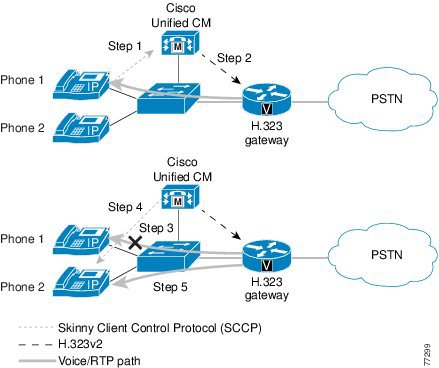
H.323v2 implements Open/Close LogicalChannel and the emptyCapabilitySet features. The use of H.323v2 by H.323 gateways, beginning in Cisco IOS Release 12.0(7)T and Cisco Unified CallManager Release 3.0 and later, eliminates the requirement for an MTP to provide supplementary services. With Cisco Unified CallManager Release 3.1 and later, a transcoder is allocated dynamically only if required during a call to provide access to G.711-only devices while still maintaining a G.729 stream across the WAN. Full support for H.323v2 is available in Cisco IOS Release 12.1.1T.
Once an H.323v2 call is set up between a Cisco IOS gateway and an IP phone, using the Cisco Unified CallManager as an H.323 proxy, the IP phone can request to modify the bearer connection. Because the Real-Time Transport Protocol (RTP) stream is directly connected to the IP phone from the Cisco IOS gateway, a supported voice codec can be negotiated.
Figure 4-1 and the following steps illustrate a call transfer between two IP phones:
1.
2.
3.
4.
5.
Figure 4-1 H.323 Gateway Supplementary Service Support
MGCP Gateway
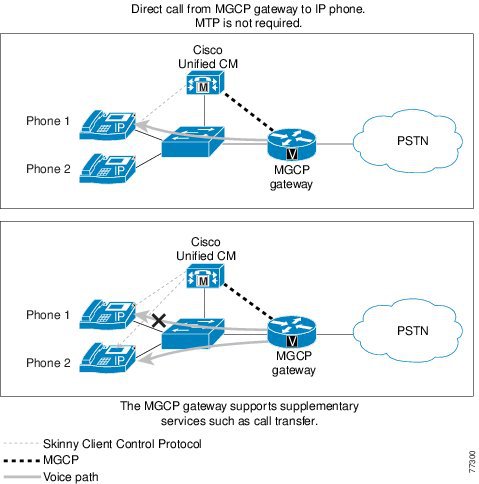
The MGCP gateways provide full support for the hold, transfer, and conference features through the MGCP protocol. Because MGCP is a master/slave protocol with Cisco Unified CallManager controlling all session intelligence, Cisco Unified CallManager can easily manipulate MGCP gateway voice connections. If an IP telephony endpoint (for example, an IP phone) needs to modify the session (for example, transfer the call to another endpoint), the endpoint would notify Cisco Unified CallManager using SCCP. Cisco Unified CallManager then informs the MGCP gateway, using the MGCP User Datagram Protocol (UDP) control connection, to terminate the current RTP stream associated with the Session ID and to start a new media session with the new endpoint information. Figure 4-2 illustrates the protocols exchanged between the MGCP gateway, endpoints, and Cisco Unified CallManager.
Figure 4-2 MGCP Gateway Supplementary Service Support
SIP Gateway
The Cisco Unified CallManager SIP trunk interface to Cisco IOS SIP gateways supports supplementary services such as hold, blind transfer, and attended transfer. The support for supplementary services is achieved via SIP methods such as INVITE and REFER. For more details, refer to the following documentation:
•
•
Cisco Unified CallManager Redundancy
An integral piece of the IP telephony architecture is the provisioning of low-cost, distributed PC-based systems to replace expensive and proprietary legacy PBX systems. This distributed design lends itself to the robust fault tolerant architecture of clustered Cisco Unified CallManagers. Even in its most simplistic form (a two-system cluster), a secondary Cisco Unified CallManager should be able to pick up control of all gateways initially managed by the primary Cisco Unified CallManager.
SCCP Gateways
Upon boot-up, the Cisco VG224, VG248, and ATA 188 gateways are provisioned with Cisco Unified CallManager server information. When these gateways initialize, a list of Cisco Unified CallManagers is downloaded to the gateways. This list is prioritized into a primary Cisco Unified CallManager and secondary Cisco Unified CallManager. In the event that the primary Cisco Unified CallManager becomes unreachable, the gateway registers with the secondary Cisco Unified CallManager.
H.323 Gateways
Using several enhancements to the dial-peer and voice class command sets in Cisco IOS Release 12.1(2)T, Cisco H.323 gateways support redundant Cisco Unified CallManagers. A new command, H.225 tcp timeout <seconds>, has been added. This command tracks the time it takes for the H.323 gateway to establish an H.225 control connection for H.323 call setup. If the H.323 gateway cannot establish an H.225 connection to the primary Cisco Unified CallManager, it tries a second Cisco Unified CallManager defined in another dial-peer statement. The H.323 gateway shifts to the dial-peer statement with next highest preference setting. The following commands allow you to configure Cisco Unified CallManager redundancy for a H.323 gateway:
dial-peer voice 101 voipdestination-pattern 1111session target ipv4:10.1.1.101preference 0voice class h323 1dial-peer voice 102 voipdestination-pattern 1111session target ipv4:10.1.1.102preference 1voice class h323 1voice class h323 1h225 tcp timeout <1-30 sec>MGCP Gateway
MGCP gateways also have the ability to fail over to a secondary Cisco Unified CallManager in the event of communication loss with the primary Cisco Unified CallManager. When the failover occurs, active calls are preserved.
Within the MGCP gateway configuration file, the primary Cisco Unified CallManager is identified using the call-agent <hostname> command, and a list of secondary Cisco Unified CallManager is added using the ccm-manager redundant-host command. Keepalives with the primary Cisco Unified CallManager are through the MGCP application-level keepalive mechanism, whereby the MGCP gateway sends an empty MGCP notify (NTFY) message to Cisco Unified CallManager and waits for an acknowledgement. Keepalive with the backup Cisco Unified CallManagers is through the TCP keepalive mechanism.
If the primary Cisco Unified CallManager becomes available at a later time, the MGCP gateway can "re-home," or switch back to the original Cisco Unified CallManager. This re-homing can occur either immediately, after a configurable amount of time, or only when all connected sessions have been released. This is enabled through the following global configuration commands:
ccm-manager redundant-host <hostname1 | ipaddress1 > <hostname2 | ipaddress2>[no] call-manager redundancy switchback [immediate|graceful|delay <delay_time>]SIP Gateway
Redundancy with Cisco IOS SIP gateways can be achieved similarly to H.323. If the SIP gateway cannot establish a connection to the primary Cisco Unified CallManager, it tries a second Cisco Unified CallManager defined under another dial-peer statement with a higher preference.
By default the Cisco IOS SIP gateway transmits the SIP INVITE request 6 times to the Cisco Unified CallManager IP address configured under the dial-peer. If the SIP gateway does not receive a response from that Cisco Unified CallManager, it will try to contact the Cisco Unified CallManager configured under the other dial-peer with a higher preference.
Cisco IOS SIP gateways wait for the SIP 100 response to an INVITE for a period of 500 ms. By default, it can take up to 3 seconds for the Cisco IOS SIP gateway to reach the backup Cisco Unified CallManager. You can change the SIP INVITE retry attempts under the sip-ua configuration by using the command retry invite <number>. You can also change the period that the Cisco IOS SIP gateway waits for a SIP 100 response to a SIP INVITE request by using the command timers trying <time> under the sip-ua configuration.
One other way to speed up the failover to the backup Cisco Unified CallManager is to configure the command monitor probe icmp-ping under the dial-peer statement. If Cisco Unified CallManager does not respond to an Internet Control Message Protocol (ICMP) echo message (ping), the dial-peer will be shut down. This command is useful only when the Cisco Unified CallManager is not reachable. ICMP echo messages are sent every 10 seconds.
The following commands enable you to configure Cisco Unified CallManager redundancy on a Cisco IOS SIP gateway:
sip-uaretry invite <number>timers trying <time>dial-peer voice 101 voipdestination-pattern 2...session target ipv4:10.1.1.101preference 0monitor probe icmp-pingsession protocol sipv2dial-peer voice 102 voipdestination-pattern 2...session target ipv4:10.1.1.102preference 1monitor probe icmp-pingsession protocol sipv2Call Survivability
Prior to Cisco Unified CallManager 4.2, call survivability was available only with MGCP gateways. If the signaling component of a call disappeared, the media connection was preserved until call termination, thereby allowing completion of the call.
Cisco Unified CallManager 4.2 introduces a new H.323 feature called quiet clear. In addition, Cisco IOS Release 12.4(4)XC introduces H.323 VoIP call preservation enhancements for WAN link failures. Both Cisco Unified CallManager and the H.323 gateway must be configured appropriately in order to allow call survivability.
For details on configuring the H.323 gateway, refer to the Cisco IOS H.323 Configuration Guide, available at
Site-Specific Gateway Requirements
Each IP Telephony implementation has its own site-specific requirements. The following questions can help you with IP Telephony gateway selection:
•
•
•
•
–
–
–
–
–
•
•
•
•
•
•
•
•
•
•
•
Note
Note
Cisco Unified Communications gateways are able to inter-operate with most major PBX vendors, and they are EIA/TIA-464B compliant.
The site-specific and core gateway requirements are a good start to help narrow the possible choices. Once you have defined the required features, you can make a gateway selection for each of the pertinent configurations, whether they are single-site enterprise deployments of various sizes and complexities or multisite enterprise deployments.
The following tables summarize the features and interface types supported by the various Cisco gateway models.
Note
http://www.cisco.com/en/US/products/sw/voicesw/ps556/prod_software_versions_comparison.htmlCisco Analog Gateways
Table 4-2 lists supported interface types for Cisco analog gateways using H.323 or Session Initiation Protocol (SIP), and Table 4-3 lists supported interface types for Cisco analog gateways using Media Gateway Control Protocol (MGCP).
Table 4-2 Supported Analog H.323 and SIP Features
3800 Series
Yes
Yes
Yes
Yes
Yes
Yes
2800 Series
Yes
Yes
Yes
Yes
Yes
Yes
3700 Series
Yes
Yes
Yes
Yes
Yes
Yes
Communication Media Module (CMM) 24FXS
Yes
N/A
N/A
N/A
N/A
N/A
CMM-6T1/E1
N/A
N/A
N/A
N/A
N/A
N/A
6608 and 6624
N/A
N/A
N/A
N/A
N/A
N/A
VG224
Yes
N/A
N/A
N/A
N/A
N/A
VG248
No
No
No
No
No
No
Analog Telephone Adapter (ATA)
Yes
No
No
No
No
No
3600 Series
Yes
Yes
Yes
Yes
Yes
12.2.11T
2600 Series
Yes
Yes
Yes
Yes
Yes
12.2.11T
1751 and 1760
Yes
Yes
Yes
Yes
Yes
Yes
VG200
Yes
Yes
Yes
No
Yes
No
7x00 family
N/A
N/A
N/A
N/A
N/A
N/A
ICS 7750
Yes
Yes
Yes
Yes
Yes
No
Catalyst 4000 Access Gateway Module (AGM)
Yes
Yes
No
No
No
No
827-4V1
Yes
No
No
No
No
No
1 This model has reached end of life.
Table 4-3 Supported Analog MGCP Features
3800 Series
Yes
Yes
No
Yes
No
No
2800 Series
Yes
Yes
No
Yes
No
No
3700 Series
Yes
Yes
No
Yes
No
No
Communication Media Module (CMM) 24FXS
Yes
N/A
N/A
N/A
N/A
N/A
CMM-6T1/E1
N/A
N/A
N/A
N/A
N/A
N/A
6608 and 6624
Yes
No
No
No
No
No
VG224
Yes
No
No
No
No
No
VG248
No
No
No
No
No
No
Analog Telephone Adapter (ATA)
Yes
N/A
N/A
N/A
N/A
N/A
3600 Series
Yes
Yes
No
Yes
No
No
2600 Series
Yes
Yes
No
Yes
No
No
1751 and 1760
Yes
Yes
No
Yes
No
No
VG200
Yes
Yes
No
Yes
No
No
7x00 family
N/A
N/A
N/A
N/A
N/A
N/A
ICS 7750
Yes
Yes
No
No
No
No
Catalyst 4000 Access Gateway Module (AGM)
Yes
Yes
No
No
No
No
827-4V1
No
No
N/A
N/A
N/A
N/A
1 This model has reached end of life.
Cisco Digital Gateways
Table 4-4 through Table 4-7 list supported interface types for Cisco digital gateways using H.323 or Session Initiation Protocol (SIP). Table 4-8 lists supported interface types for Cisco digital gateways using Media Gateway Control Protocol (MGCP).
Table 4-4 Supported Digital H.323 and SIP Features for BRI, T1 CAS, T1 FGB, T1 FGD, and T1 QSIG
3800 Series
Yes
Yes
Yes
No
Yes
No
Yes
Yes
2800 Series
Yes
Yes
Yes
No
Yes
No
Yes
Yes
3700 Series
Yes
Yes
Yes
No
Yes
No
Yes
Yes
Communication Media Module (CMM) 24FXS
N/A
N/A
N/A
N/A
N/A
N/A
N/A
N/A
CMM-6T1/E1
N/A
N/A
N/A
N/A
Yes
No
No
Yes
6608 and 6624
N/A
N/A
N/A
N/A
No
No
No
No
VG224
N/A
N/A
N/A
N/A
N/A
N/A
N/A
N/A
VG248
No
No
No
No
No
No
No
No
Analog Telephone Adapter (ATA)
No
No
No
No
No
No
No
No
3600 Series
Yes
Yes
Yes
No
Yes
No
Yes
Yes
2600 Series
Yes
Yes
Yes
No
Yes
No
Yes
Yes
1751 and 1760
No
Yes
Yes
No
Yes
No
No
Yes
VG200
Yes
Yes
No
No
Yes
No
Yes
No
7x00 family
N/A
N/A
N/A
N/A
Yes
No
Yes
Yes
ICS 7750
Yes
Yes
No
No
Yes
No
Yes
No
Catalyst 4000 Access Gateway Module (AGM)
Yes
No
Yes
No
Yes
No
Yes
Yes
827-4V1
No
No
No
No
No
No
No
No
1 This model has reached end of life.
Table 4-5 Supported Digital H.323 and SIP Features for T1 PRI SL-1, 4ESS, and 5ESS
3800 Series
Yes
Future
Yes
Yes
Yes
Yes
2800 Series
Yes
Future
Yes
Yes
Yes
Yes
3700 Series
Yes
Future
Yes
Future
Yes
Future
Communication Media Module (CMM) 24FXS
N/A
N/A
N/A
N/A
N/A
N/A
CMM-6T1/E1
Yes
Yes
Yes
Yes
Yes
Yes
6608 and 6624
No
No
No
No
No
No
VG224
N/A
N/A
N/A
N/A
N/A
N/A
VG248
No
No
No
No
No
No
Analog Telephone Adapter (ATA)
No
No
No
No
No
No
3600 Series
Yes
Future
Yes
Yes
Yes
Yes
2600 Series
Yes
Future
Yes
Yes
Yes
Yes
1751 and 1760
Yes
Future
Yes
Future
Yes
Future
VG200
Yes
No
Yes
No
Yes
No
7x00 family
Yes
Future
Yes
Future
Yes
Future
ICS 7750
Yes
No
Yes
No
Yes
No
Catalyst 4000 Access Gateway Module (AGM)
Yes
Future
Yes
Future
Yes
Future
827-4V1
No
No
No
No
No
No
1 This model has reached end of life.
Table 4-6 Supported Digital H.323 and SIP Features for T1 PRI NI2, NFAS, and Network Specific Facilities (NSF) Service
3800 Series
Yes
Yes
Yes
Yes
Yes
Yes
2800 Series
Yes
Yes
Yes
Yes
Yes
Yes
3700 Series
Yes
Yes
Yes
Yes
Yes
Yes
Communication Media Module (CMM) 24FXS
N/A
N/A
N/A
N/A
N/A
N/A
CMM-6T1/E1
Yes
Yes
Yes
Future
Future
No
6608 and 6624
No
No
No
No
No
No
VG224
N/A
N/A
N/A
N/A
N/A
N/A
VG248
No
No
No
No
No
No
Analog Telephone Adapter (ATA)
No
No
No
No
No
No
3600 Series
Yes
Yes
Yes
Yes
Yes
Yes
2600 Series
Yes
Yes
Yes
Yes
Yes
Yes
1751 and 1760
Yes
Yes
No
No
No
No
VG200
Yes
Yes
No
No
No
No
7x00 family
Yes
Yes
No
No
No
No
ICS 7750
Yes
Yes
Yes
Yes
Yes
No
Catalyst 4000 Access Gateway Module (AGM)
Yes
Yes
Future
Future
Future
Future
827-4V1
No
No
No
No
No
No
1 This model has reached end of life.
Table 4-7 Supported Digital H.323 and SIP Features for E1 and J1
3800 Series
Yes
Yes
Yes
Yes
Yes
Yes
Yes
2800 Series
Yes
Yes
Yes
Yes
Yes
Yes
Yes
3700 Series
Yes
Yes
Yes
Yes
Yes
Yes
Yes
Communication Media Module (CMM) 24FXS
N/A
N/A
N/A
N/A
N/A
N/A
N/A
CMM-6T1/E1
No
No
Yes
Yes
Yes
Yes
N/A
6608 and 6624
No
No
No
No
No
No
No
VG224
N/A
N/A
N/A
N/A
N/A
N/A
N/A
VG248
No
No
No
No
No
No
No
Analog Telephone Adapter (ATA)
No
No
No
No
No
No
No
3600 Series
Yes
Yes
Yes
Yes
Yes
Yes
Yes
2600 Series
Yes
Yes
Yes
Yes
Yes
Yes
Yes
1751 and 1760
No
No
Yes
Yes
Yes
Yes
No
VG200
No
Yes
Yes
Yes
Yes
No
Yes
7x00 family
Yes
No
Yes
Yes
Yes
Yes
No
ICS 7750
No
No
Yes
Yes
Yes
No
No
Catalyst 4000 Access Gateway Module (AGM)
No
No
Yes
Yes
Yes
Yes
No
827-4V1
No
No
No
No
No
No
No
1 This model has reached end of life.
Table 4-8 Supported Digital MGCP Features
3800 Series
12.4(2)T
Yes2
Yes2
Yes2
Yes2
Yes2
2800 Series
12.4(2)T
Yes2
Yes2
Yes2
Yes2
Yes2
3700 Series
12.4(2)T
Yes2
Yes2
Yes2
Yes2
Yes2
Communication Media Module (CMM) 24FXS
N/A
N/A
N/A
N/A
N/A
N/A
CMM-6T1/E1
N/A
Yes
Yes
Yes
Yes
Yes
6608
N/A
Yes
Yes
Yes
Yes
Yes
6624
N/A
N/A
N/A
N/A
N/A
N/A
VG224
N/A
N/A
N/A
N/A
N/A
N/A
VG248
N/A
N/A
N/A
N/A
N/A
N/A
Analog Telephone Adapter (ATA)
N/A
N/A
N/A
N/A
N/A
N/A
3600 Series
12.4(2)T
Yes2
Yes2
Yes2
Yes2
Yes2
2600 Series
12.4(2)T
Yes2
Yes2
Yes2
Yes2
Yes2
1751 and 1760
12.3(14)T
Yes
Yes
Yes
Yes
Yes
VG200
No
Yes
Yes
Yes
Yes
Yes
7x00 family
N/A
No
No
No
No
No
ICS 7750
12.3.7T
Yes
Yes
Yes
Yes
Yes
Catalyst 4000 Access Gateway Module (AGM)
No
Yes
Yes
Yes
Yes
Yes
827-4V3
N/A
N/A
N/A
N/A
N/A
N/A
1 Cisco IOS Release 12.4(2)T supports BRI MGCP with the following hardware: NM-HDV2, NM-HD-XX and on-board H-WIC slots. BRI MGCP is also supported on older Cisco IOS releases with NM-1V/2V hardware.
2 AIM-VOICE-30 modules require Cisco IOS Release 12.2.13T to support MGCP.
3 This model has reached end of life.
QSIG Support
QSIG is a suite of international standards designed to provide flexibility in connecting PBX equipment to a corporate network. Among its other features, QSIG provides an open, standards-based method for interconnecting PBX equipment from different vendors.
ECMA QSIG is currently supported in H.323 gateways in PBX-to-PBX mode. The H.323 gateways provide full QSIG feature transparency for QSIG information elements. Basic call setup and teardown are supported using H.323 QSIG gateways, as summarized in Table 4-9.
For more information on QSIG support on Cisco IOS gateways, refer to
Prior to Cisco Unified CallManager Release 3.3, basic PRI functionality is all that is provided whenever a PBX is connected to a gateway using QSIG via H.323 and calls are made between phones on the PBX and IP phones attached to the Cisco Unified CallManager. This basic functionality, which includes only the Calling Line Identifier (CLID) and Direct Inward Dialed (DID) number, is provided by the gateway terminating the QSIG protocol rather than by Cisco Unified CallManager.
For Cisco Unified CallManager to support QSIG functionality, QSIG must be back-hauled directly to Cisco Unified CallManager. This support is provided in Cisco Unified CallManager Release 3.3 and later, in conjunction with MGCP gateways such as the Catalyst 6608, 2600XM Series, and 3640/60 Series.
Fax and Modem Support
This section describes the fax and modem support available with Cisco Unified CallManager and Cisco voice gateways. This section first presents brief overviews of fax and modem support on Cisco voice gateways, followed by a listing of supported platforms and example configuration files.
Gateway Support for Fax Pass-Through and Cisco Fax Relay
Fax over IP enables interoperability of traditional analog fax machines with IP Telephony networks. The fax image is converted from an analog signal and is carried as digital data over the packet network.
In its original form, fax data is digital. However, to transmit across a traditional PSTN, it is modulated and converted to analog. Fax over IP reverses this analog conversion, transmitting digital data over the packet network and then reconverting the digital data to analog for the receiving fax machine.
Most Cisco voice gateways currently support two methods to transmit fax traffic across the IP network:
•
•
Cisco Fax Relay mode is the preferred method to transmit fax traffic. However, if a specific gateway does not support Cisco fax relay, it supports fax pass-through.
Best Practices
The following recommendations and guidelines can assist you in best implementing fax support on Cisco voice gateways:
•
–
–
–
For detailed information about implementing QoS in a Cisco Unified Communications network, refer to the Cisco Network Infrastructure Enterprise Quality of Service Design guide, available at
•
–
–
•
The only non-IOS gateway that does not support Cisco Fax Relay is the Cisco Digital Access DT-24/DE-30+. If you connect this gateway to a Cisco IOS gateway, you should configure both gateways to use fax pass-through mode.
•
•
•
•
Gateway Support for Modem Pass-Through
In general, there are two mechanisms for supporting modem sessions over an IP network using voice gateways:
•
•
Currently, both modem relay and modem pass-through are supported on Cisco voice gateways.
Modem pass-through is the transport of modem signals through a packet network using pulse code modulation (PCM) encoded packets and a G.711 codec. Modem pass-through requires the ability of the gateways to discriminate between modem signals and voice signals and take appropriate action. When the gateway detects the modem signal, it disables the following services:
•
•
In modem pass-through mode, the gateways do not distinguish a modem call from a voice call. The communication between the two modems is carried in-band in its entirety over a "voice" call. The modem traffic is transparently carried over a QoS-enabled IP infrastructure, and at no point is the data demodulated within the IP network.
Modem upspeed is similar to pass-through in the sense that the modem call is carried in-band over the "voice" call. The difference is that the gateways are, to some extent, aware of the modem call when the upspeed feature is used. Although relay mechanisms are not employed, the gateways do recognize the modem tone, automatically change the "voice" codec to G.711 (the upspeed portion), and turn off VAD and echo cancellation (EC) for the duration of the call.
Currently, this upspeed feature is not supported on any Cisco IOS platform except the Cisco AS5300 via Cisco IOS Release 12.1.3T. For Cisco 2600XM, 3700, VG224, and Catalyst 4000 Access Gateway Module (AGM) platforms, the modem upspeed feature will be supported in a future Cisco IOS release. For these platforms, you can configure no vad on the dial peer until the modem upspeed feature becomes available.
The modem upspeed feature is also supported on the Catalyst 6000 gateway modules.
Best Practices
Observe the following recommended best practices to ensure optimum performance of modem traffic transported over an IP infrastructure:
•
–
–
–
For more information, refer to the Cisco Network Infrastructure Enterprise Quality of Service Design guide, available at
•
•
•
•
•
V.90 Support
Currently, Cisco equipment supports only V.34 modems. Although V.90 modems will function on existing hardware, and speeds higher than V.34 speeds can be achieved, full V.90 support cannot be guaranteed.
Supported Platforms and Features
The following Cisco platforms support fax and modem features:
Analog Gateways
Cisco IOS Gateways:
•
•
•
•
•
•
•
•
Non-IOS Gateways:
•
•
•
Digital Gateways
Cisco IOS Gateways:
•
•
•
•
•
•
•
•
•
•
Non-IOS Gateways:
•
Note
Platform Protocol Support
Common call control protocols used today in enterprise solutions include H.323, Session Initiation Protocol (SIP), Media Gateway Control Protocol (MGCP), and Skinny Client Control Protocol (SCCP). Not all Cisco voice platforms support all of these protocols or all of the fax and modem features, thus raising interoperability issues. Additional interoperability issues occur when mixing Cisco IOS gateways, such as the Cisco 2600XM or the Cisco 3700 Series, with non-IOS gateways such as the VG248. This section lists the combinations of gateways that provide support for interoperability of fax, modem, and protocol features.
At a high level, Cisco IOS Release 12.3(1) - Load 47 on the Cisco 6608 and Load 41 on the Cisco 6624 - and Release 1.2.1 on the VG248 do support interoperability of Cisco fax relay, modem pass-through, and voice features. Prior to Cisco IOS Release 12.2(11)T1, only voice and Cisco fax relay were supported between Cisco IOS and non-IOS voice platforms because incompatibility of the pass-through Named Service Event (NSE) scheme prevented modem pass-through from interoperating.
Some of the common combinations of protocols in a network include MGCP and H.323, SCCP and H.323, and SCCP and MGCP. Common voice gateways included the Cisco VG224, VG248, 2600XM, 2800, 3700, 3800, 5300, and Catalyst 6000.
Table 4-10 lists the protocol combinations that currently support fax and modem interoperability.
Note
Gateway Combinations and Interoperability of Features
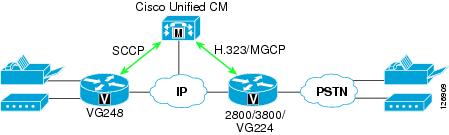
The most frequent questions about fax and modem interoperability arise from combining a Cisco IOS gateway (such as a Cisco 2800 or 3800) with a non-IOS gateway (such as a Cisco VG248), as illustrated in Figure 4-3.
Figure 4-3 Configuration Combining a Cisco IOS and Non-IOS Gateway
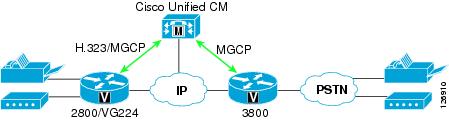
The second most common source of questions about fax and modem interoperability arise in configurations using only Cisco IOS gateways, as illustrated in Figure 4-4.
Figure 4-4 Configuration Using Only Cisco IOS Gateways
The answer is basically the same for both scenarios: Prior to Cisco IOS Load 47 on the 6608 and Release 1.2.1 on the VG248, only voice and Cisco fax relay are supported, while fax and modem pass-through are not supported because of NSE incompatibility. With Cisco IOS Load 47 or later on the 6608, Load 41 or later on the 6624, and Release 1.2.1 on the VG248, all three platforms can interoperate with Cisco IOS gateways for voice, Cisco fax relay, and modem pass-through, regardless of call control protocol. The NSE pass-through scheme is independent of call control protocol because it operates in the bearer path instead of the signaling path.
Feature Support Between Similar Gateways
Table 4-11 lists the fax and modem features supported between gateways of the same general type, such as between the Cisco VG248 and 6608, between 2600XM and 3700, or between 2600XM and AS5300. In these cases, as long as both platforms support a given feature, those platforms will interoperate.
Gateway Configuration Examples
This section provides listings of example gateway configurations for fax and modem support.
Cisco IOS Gateway Configuration
H.323
!! Cisco fax relay is ON by default!(except for 5350/5400, where Cisco fax relay is not supported)!dial-peer voice 1000 voipdestination-pattern 1Tsession target ipv4:10.10.10.1modem passthrough mode nse codec g711ulaw!!MGCP
!ccm-manager mgcpmgcpmgcp call-agent 10.10.10.1 service-type mgcp version 0.1mgcp modem passthrough voip mode nsemgcp fax t38 inhibit!dial-peer voice 100 potsapplication mgcpappport 1/0/0!Cisco VG248 Configuration
-----------------------------------------------------------| Cisco VG248 (VGC10d8002407) |----- -----------------------------------------------------| Advanced settings ||-----------------------------------------------------|| Allow last good configuration (enabled) || SRST policy (disabled) || SRST provider () || Call preservation (enabled: no timeout) || Media receive timeout (disabled) || Busy out off hook ports (disabled) || DTMF tone dur ------------------------ 100ms) || Echo cancelli| Passthrough signalling |e: use DSP) || Passthrough s|------------------------|) || Hook flash ti| legacy | default>) || Hook flash re| IOS mode | || Fax relay max ------------------------ 14400 bps) || Fax relay playout delay (default: 300) |-----------------------------------------------------------------------------------------------------------------------------------------------------------------| Cisco VG248 (VGC10d8002407) |----- -----------------------------------------------------| Advanced settings ||-----------------------------------------------------|| Allow last good configuration (enabled) || SRST policy (disabled) || SRST provider () || Call preservation (enabled: no timeout) || Media receive timeout (disabled) || Busy out off hook ports (disabled) || DTMF tone duration (default: 100ms) || Echo cancelling policy (alternate: use DSP) || Passthrough signalling (IOS mode) || Hook flash timer (<country default>) || Hook flash reject period (none) || Fax relay maximum speed (default: 14400 bps) || Fax relay playout delay (default: 300) |------------------------------------------------------------------------------------------------------Cisco Unified CallManager Configuration for Cisco IOS Gateways
Perform the following steps in Cisco Unified CallManager to configure it for the Cisco IOS gateways (such as the Cisco 6608 and 6624).
Step 1
Step 2
Step 3
Step 4
Step 5
Step 6
This configuration supports voice, Cisco fax relay, and modem pass-through between Cisco VG248, 6608, 6624, and IOS gateways, with the exception of Cisco AS5350 and AS540 gateways (which do not support Cisco fax relay). The configuration also supports a V.34 modem connection in pass-through mode. V.90 modem connections are not guaranteed but are possible, depending on amount of network jitter and clock sync.
Clock Sourcing for Fax and Modem Pass-Through
The clock signal plays a critical role in enabling fax and modem pass-through to work correctly. The gateway clock must synchronize with the PSTN clock, where Stratum clocking is provided. Without this clock synchronization, fax and (especially) modem pass-through will not work. To synchronize the clocks correctly, enter the following configuration in the T1 controller. (In this example, the T1 controller is the voice gateway that connects to the PSTN.)
!controller T1 0framing esflinecode b8zsclock source linechannel-group 1 timeslots 1-24 speed 64!Also enter this configuration in all other interfaces connected to the PSTN.
T.38 Fax Relay
T.38 fax relay is not supported on Cisco ATA 188, VG248, 6608, and 6624 gateways, but it is supported on most of the high-performance Cisco IOS voice platforms such as the Cisco 2800 and 3800 Series Routers. When operating in either H.323 or SIP mode, these platforms do not support MGCP.
You can configure T.38 fax relay in any of the following ways:
•
•
•
Loose Gateway Controlled with Named Service Event (NSE)
This configuration uses static T.38 configuration on the dial-peer, as illustrated in the following Cisco IOS gateway configuration example:
H.323
!dial-peer voice 1000 voipdestination-pattern 1Tsession target ipv4:10.10.10.1modem passthrough mode nse codec g711ulawfax protocol t38!!MGCP
!ccm-manage mgcpmgcpmgcp call-agent 10.10.10.1 service-type mgcp version 0.1mgcp modem passthrough voip mode nseno mgcp fax t38 inhibit!dial-peer voice 100 potsapplication mgcpappport 1/0/0!!Gateway Controlled with Capability Exchange Through H.245 or Session Description Protocol (SDP)
The following characteristics apply to this method of configuring T.38 fax relay:
•
•
•
–
–
–
The following example illustrates this type of configuration:
H.323
!dial-peer voice 1000 voipdestination-pattern 1Tsession target ipv4:10.10.10.1modem passthrough mode nse codec g711ulaw!! To enable T.38 fax relay and fall back to Cisco fax relay when! T.38 fax negotiation fails. This is the default case.fax protocol t38 fallback cisco!dial-peer voice 1001 voipdestination-pattern 2Tsession target ipv4:10.10.10.2modem passthrough mode nse codec g711ulaw!! To enable T.38 fax relay and fall back to fax passthrough when! T.38 fax negotiation fails.fax protocol t38 nse fallback pass-through!dial-peer voice 1002 voipdestination-pattern 3Tsession target ipv4:10.10.10.3modem passthrough mode nse codec g711ulaw!! This CLI is needed when talking to MGCP endpoint where CA/GK! doesn't support T.38 fax relay such as CCM.fax protocol t38 nse force fallback none!!MGCP
!ccm-manage mgcpmgcpmgcp call-agent 10.10.10.1 service-type mgcp version 0.1mgcp modem passthrough voip mode nseno mgcp fax t38 inhibit!! This CLI is needed when CA doesn't support T.38 fax relaymgcp fax t38 gateway force!dial-peer voice 100 potsapplication mgcpappport 1/0/0!!In topologies that employ the Cisco VG248 and 6608 or 6624, use the following Cisco IOS commands:
fax protocol t38 [nse [force]] fallback [cisco | none]modem passthrough nse codec {g711ulaw|g711alaw}These two commands enable Cisco IOS gateways to interoperate with the VG248 for Cisco fax relay and modem pass-through as well as with other Cisco IOS gateways for T.38 fax relay and modem pass-through.
Call-Agent-Controlled T.38 with H.323 Annex D
The following characteristics apply to this method of configuring T.38 fax relay:
•
•
•
•
•
The following example illustrates this type of configuration:
H.323
!dial-peer voice 1000 voipdestination-pattern 1Tsession target ipv4:10.10.10.1modem passthrough mode nse codec g711ulaw!! To enable T.38 fax relay.fax protocol t38!!MGCP
!ccm-manager mgcpmgcpmgcp call-agent 10.10.10.1 service-type mgcp version 0.1!! T.38 fax relay is ON by default. HOWEVER, Unified CM doesn't! support CA controlled mode. This is the configuration for! talking to BTS.!dial-peer voice 100 potsapplication mgcpappport 1/0/0!Gateways for Video Telephony
Cisco offers voice gateway functionality in a variety of forms, such as standalone devices, modules that integrate into Cisco IOS Routers, or line cards that integrate into Cisco Catalyst Ethernet Switches. These gateways support multiple VoIP protocols (such as H.323, MGCP, SIP, and SCCP), multiple port interface types (such as FXS, FXO, E&M, T1/E1-CAS, T1/E1-PRI, ISDN BRI, and so on), and a myriad of advanced VoIP features. They also offer a rich set of management and troubleshooting interfaces. However, Cisco Voice Gateways do not support the H.320 protocol suite or the H.26x family of video codecs and, therefore, cannot be used for video calls. For this reason, Cisco offers a separate family of video-capable gateways under the IP/VC 3500 Series portfolio.
The IP/VC gateways, while excellent for video calls, do not support all of the features that Cisco Voice Gateways offer. The IP/VC gateways have the following characteristics:
•
•
•
•
•
•
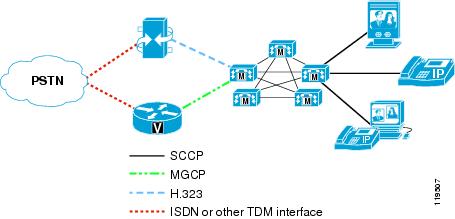
As a result of these differences in the products, Cisco Unified Videoconferencing 3500 Series gateways are not recommended as replacements for Cisco Voice Gateways. IP Telephony customers who want to add video to their communications environment should purchase both types of gateways and use the Cisco Voice Gateways for all voice calls and use the Cisco Unified Videoconferencing 3500 Series gateways for video calls only. The customer might also have to procure separate voice and video circuits from their PSTN service provider, depending on which model of Cisco IOS Gateway they are deploying. For example, you cannot have a single T1-PRI circuit from the Central Office (CO) and share that line for both voice and video calls. In the previous generation of H.320 videoconferencing, these lines were often shared, as depicted in Figure 4-5. With IP Video Telephony, PSTN lines can no longer be shared due to the need for separate voice and video gateways, as depicted in Figure 4-6.
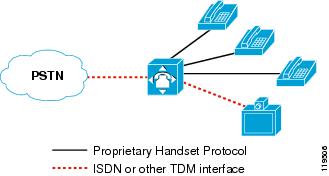
Figure 4-5 Traditional PBX Sharing PSTN Lines Between Voice and H.320 Videoconferencing
Figure 4-6 Cisco Unified CallManager System with Separate PSTN Lines for Voice and IP Video Telephony
With separate voice and video gateways, the route plans must also be separate for both inbound and outbound calls. For inbound calls, there is no way to have a single Direct Inward Dial (DID) extension for a user who wants to be able to receive both voice and video calls. Typically, each user will already have a DID for voice calls. When you introduce video into the scenario, users will have to be dialed some other way, such as via a second DID number or by dialing the main number of the video gateway and then entering the users video extension when prompted by the Interactive Voice Response (IVR). For outbound calls, there is no way to have a single PSTN access code for both voice and video calls. Typically, users will already have a well-known access code for voice (such as 9 in most US enterprises), but when you introduce video into the scenario, they will have to dial some other access code to place outbound video calls.
Another consideration for deploying two types of gateways is the placement of those gateways. Typically, enterprises have many PSTN gateway resources consolidated at their central site(s), and each branch office has some local gateway resources as well. For instance, Cisco Catalyst 6500 gateways may be deployed at the central site with several T1/E1 circuits connected to them, while Cisco Integrated Services Routers (ISRs) may be deployed at each branch office with either analog or digital trunks to the local CO. When video is introduced into this scenario, the customer must also determine the number of PSTN circuits they will need for video and where the video gateways will be placed. For instance, will they deploy only a few IP/VC 3500 Series gateways at the central site, or will they also deploy them at each branch office?
Finally, consider how calls will be routed across the IP network to a remote gateway for the purpose of providing toll bypass, and how calls will be re-routed over the PSTN in the event that the IP network is unavailable or does not have enough bandwidth to complete the call. More specifically, do you want to invoke automated alternate routing (AAR) for video calls?
Routing Inbound Calls from the PSTN
Use one of the following methods to route inbound calls from the PSTN:
•
•
Note
The following example illustrates the second method:
A user has a Cisco Unified IP Phone 7960 attached to a PC running Cisco Unified Video Advantage. The extension of the IP Phone is 51212, and the fully qualified DID number is 1-408-555-1212. To reach the user from the PSTN for a voice-only call, people simply dial the DID number. The CO sends calls to that DID number through T1-PRI circuit(s) connected to a Cisco Voice Gateway. When the call is received by the gateway, Cisco Unified CallManager knows that the gateway is capable of audio only, so it negotiates only a single audio channel for that call. Conversely, for people to reach the user from the PSTN for a video call, they must dial the main number of the video gateway and then enter the user's extension. For example, they might dial 1-408-555-1000. The CO would send calls to that number through the T1-PRI circuit(s) connected to a Cisco Unified Videoconferencing 3500 Series video gateway. When the call is received by the gateway, an IVR prompt asks the caller to enter the extension of the person they are trying to reach. When the caller enters the extension via DTMF tones, Cisco Unified CallManager knows that the gateway is capable of video, so it negotiates both audio and video channels for that call.
Gateway Digit Manipulation
The Cisco Unified Videoconferencing 3500 Series Gateways cannot manipulate digits for calls received from the PSTN. It takes the exact number of digits passed to it in the Q.931 Called Party Number field and sends them all to Cisco Unified CallManager. Therefore, Cisco Unified CallManager must manipulate the digits in order to match the directory number (DN) of the destination device. For instance, if the circuit from the CO switch to the gateway is configured to pass 10 digits but the extension of the called party is only five digits, Cisco Unified CallManager must strip off the leading five digits before attempting to find a matching DN. You can implement this digit manipulation in one of the following ways:
•
This method enables you to instruct Cisco Unified CallManager to pay attention to only the least-significant N digits of the called number. For example, setting the Significant Digits to 5 will cause Cisco Unified CallManager to ignore all but the last 5 digits of the called number. This is the easiest approach, but it affects all calls received from that gateway. Thus, if you have variable-length extension numbers, this is not the recommended approach.
•
This method enables Cisco Unified CallManager to match calls to the full number of digits received, to modify the called number, and then to continue performing digit analysis on the resulting modified number. This approach is slightly more complex than the preceding method, but it is more flexible and enables you to use a finer granularity for matching calls and for specifying how they will be modified.
Routing Outbound Calls to the PSTN
Use one of the following methods to route outbound calls to the PSTN:
•
•
Gateway Service Prefixes
The Cisco Unified Videoconferencing Gateways use service prefixes to define the speed for outbound calls. When you configure a service prefix in the gateway, you must choose one of the following speeds:
•
•
•
•
•
•
Note
Calls from an IP endpoint toward the PSTN must include the service prefix at the beginning of the called number in order for the gateway to decide which service to use for the call. Optionally, you can configure the default prefix to be used for calls that do not include a service prefix at the beginning of the number. This method can become quite complex because users will have to remember which prefix to dial for the speed of the call they wish to make, and you would have to configure multiple route patterns in Cisco Unified CallManager (one for each speed). Fortunately, the Auto speed enables you to minimize this effort. If the majority of your calls are made using 64 kbps per channel (for example, 128 kbps, 384 kbps, 512 kbps, 768 kbps, and so on), you could use the Auto service in that case. You would then need to create only one other service for the rare case in which someone makes a call using 56 kbps per channel (for example, 112 kbps, 336 kbps, and so on).
Cisco recommends that you always use a # character in your service prefixes because the gateway recognizes the # as an end-of-dialing character. By placing this character in the service prefix, you block people from attempting to use the gateway for toll fraud by dialing the main number of the gateway, reaching the IVR, and then dialing out to an off-net number. The # can either be at the beginning (recommended) or the end of the service prefix. For example, if your access code to reach the PSTN is 8 for video calls, Cisco recommends that you configure the service prefix as #8 or 8#. Or, if you have two service prefixes as described above, you might use #80 for the Auto 64-kbps service and #81 for the Auto 56-kbps service.
The ramification of using a service prefix is that Cisco Unified CallManager must prepend the service prefix to the called number when sending calls to the IP/VC gateway. Because forcing users to dial the # would not be very user-friendly, Cisco recommends that you configure Cisco Unified CallManager to prepend the # to the dialed number. For example, if the access code to dial a video call to the PSTN is 8, you could configure a route pattern as 8.@ in Cisco Unified CallManager, and in the route pattern configuration you would configure the called number translation rule to prepend #8 whenever that route pattern is dialed. Or, if you have two service prefixes as described above, you might use 80.@ for the Auto 64-kbps service (prefixing # to the called number) and 81.@ for the Auto 56-kbps service (prefixing # to the called number).
Automated Alternate Routing (AAR)
When the IP network does not have enough bandwidth available to process a call, Cisco Unified CallManager uses its call admission control mechanism to determine what to do with the call. As described in the chapter on IP Video Telephony, page 17-1, Cisco Unified CallManager performs one of the following actions with the call, depending on how you have configured it:
•
•
•
The first two options are covered in the chapter on IP Video Telephony, page 17-1, and this section covers the AAR option.
To provide AAR for voice or video calls, you must configure the calling and called devices as members of an AAR group and configure an External Phone Number Mask for the called device. The External Phone Number Mask designates the fully qualified E.164 address for the user's extension, and the AAR group indicates what digits should be prepended to the External Phone Number Mask of the called device in order for the call to route successfully over the PSTN.
For example, assume that user A is in the San Jose AAR group and user B is in the San Francisco AAR group. User B's extension is 51212, and the External Phone Number Mask is 6505551212. The AAR groups are configured to prepend 91 for calls between the San Jose and San Francisco AAR groups. Thus, if user A dials 51212 and there is not enough bandwidth available to process the call over the IP WAN between those two sites, Cisco Unified CallManager will take user B's External Phone Number Mask of 6505551212, prepend 91 to it, and generate a new call to 916505551212 using the AAR calling search space for user A.
This same logic applies to video calls as well, with one additional step in the process. For video-capable devices, there is field called Retry Video Call as Audio. As described in the chapter on IP Video Telephony, page 17-1, if this option is enabled (checked), Cisco Unified CallManager does not perform AAR but retries the same call (that is, the call to 51212) as a voice-only call instead. If this option is disabled (unchecked), Cisco Unified CallManager performs AAR. By default, all video-capable devices in Cisco Unified CallManager have the Retry Video Call as Audio option enabled (checked). Therefore, to provide AAR for video calls, you must disable (uncheck) the Retry Video Call as Audio option. Additionally, if a call admission control policy based on Resource Reservation Protocol (RSVP) is being used between locations, the RSVP policy must be set to Mandatory for both the audio and video streams.
Furthermore, Cisco Unified CallManager looks at only the called device to determine whether the Retry Video Call as Audio option is enabled or disabled. So in the scenario above, user B's phone would have to have the Retry Video Call as Audio option disabled in order for the AAR process to take place.
Finally, devices can belong to only one AAR group. Because the AAR groups determine which digits to prepend, AAR groups also influence which gateway will be used for the rerouted call. Depending on your choice of configuration for outbound call routing to the PSTN, as discussed in the previous section, video calls that are rerouted by AAR might go out a voice gateway instead of a video gateway. Therefore, carefully construct the AAR groups and the AAR calling search spaces to ensure that the correct digits are prepended and that the correct calling search space is used for AAR calls.
While these considerations can make AAR quite complex to configure in a large enterprise environment, AAR is easier to implement when the endpoints are strictly of one type or the other (such as IP Phones for audio-only calls and systems such as the Tandberg T-1000 dedicated for video calls). When endpoints are capable of both audio and video calls (such as Cisco Unified Video Advantage or a Cisco IP Video Phone 7985G), the configuration of AAR can quickly become unwieldy. Therefore, Cisco recommends that large enterprise customers who have a mixture of voice and video endpoints give careful thought to the importance of AAR for each user, and use AAR only for select video devices such as dedicated videoconference rooms or executive video systems. Table 4-12 lists scenarios when it is appropriate to use AAR with various device types.
Least-Cost Routing
Least-cost routing (LCR) and tail-end hop-off (TEHO) are very popular in VoIP networks and can be used successfully for video calls as well. In general, both terms refer to a way of configuring the call routing rules so that calls to a long-distance number are routed over the IP network to the gateway closest to the destination, in an effort to reduce toll charges. (For Cisco Unified CallManager Release 4.1, LCR basically means the same thing as TEHO.) Cisco Unified CallManager supports this feature through its rich set of digit analysis and digit manipulation capabilities, including:
•
•
•
•
Configuring LCR for video calls is somewhat more complicated than for voice calls, for the following reasons:
•
•
With respect to dedicated gateways, the logic behind why you might or might not decide to use LCR for video calls is very similar to that explained in the section on Automated Alternate Routing (AAR). Due to the need to have different types of gateways for voice and video, it can become quite complex to configure all the necessary partitions, calling search spaces, translation patterns, route patterns, route filters, route lists, and route groups needed for LCR to route voice calls out one gateway and video calls out another.
With respect to bandwidth requirements, the decision to use LCR depends on whether or not you have enough available bandwidth on your IP network to support LCR for video calls to/from a given location. If the current bandwidth is not sufficient, then you have to determine whether the benefits of video calls are worth the cost of either upgrading your IP network to make room for video calls or deploying local gateways and routing calls over the PSTN. For example, suppose you have a central site with a branch office connected to it via a 1.544-Mbps T1 Frame Relay circuit. The branch office has twenty video-enabled users in it. A 1.544-Mbps T1 circuit can handle at most about four 384-kbps video calls. Would it really make sense in this case to route video calls up to the central site in order to save on toll charges? Depending on the number of calls you want to support, you might have to upgrade your 1.544-Mbps T1 circuit to something faster. Is video an important enough application to justify the additional monthly charges for this upgrade? If not, it might make more sense to deploy an IP/VC video gateway at the branch office and not bother with LCR. However, placing local IP/VC gateways at each branch office is not inexpensive either, so ultimately you must decide how important video-to-PSTN calls are to your business. If video is not critical, perhaps it is not worth upgrading the bandwidth or buying video gateways but, instead, using the Retry Video Call as Audio feature to reroute video calls as voice-only calls if they exceed the available bandwidth. Once a call is downgraded to voice-only, local gateway resources and bandwidth to perform LCR become more affordable and easier to configure.
ISDN B-Channel Binding, Rollover, and Busy Out
H.320 video uses multiple ISDN channels bound together to achieve the speeds needed to pass full-motion video. One of the problems with this bonding mechanism is that, when an inbound ISDN video call is received, the gateway does not know how many channels will be requested for that call until after it accepts the call and the source device indicates how many additional channels are required. If there are not enough B-Channels to satisfy the request, the call is disconnected. Therefore, careful traffic engineering is required to minimize the possibility that this situation will occur. Essentially, you want to ensure that there are always enough B-Channels available to handle the next call that might come in.
This B-Channel issue occurs in two cases:
•
•
Inbound Calls
For inbound calls, consider the following scenario:
A company has a Cisco 3526 IP/VC Gateway with an ISDN PRI circuit connecting it to a central office (CO) switch. The ISDN PRI circuit in this case offers 23 B-Channels. A video call is received from the PSTN at 384 kbps. This call takes six B-Channels, leaving 17 available. A second and third 384-kbps call are received on the line while the first one is still active. These each take an additional six channels, leaving five channels available. When the fourth 384-kbps call is received, the gateway will answer the call but, recognizing that it does not have enough B-Channels available (it only has five left but the call requires six), it will disconnect (by sending a Q.931 RELEASE COMPLETE with "16: Normal Call Clearing" as the reason). The caller attempting to make the fourth call will not know why the call failed and might redial the number repeatedly, trying to make the call work.
On Cisco Unified Videoconferencing gateways, you can minimize your chances of running into this issue by configuring the gateway to send a request to the CO to busy-out the remaining B-Channels (in this example, five channels) whenever the gateway reaches a certain threshold of utilization (configured as a percentage of total bandwidth).
In addition, you can have the CO provision multiple ISDN circuits in a trunk group. When the first circuit reaches the busy-out threshold, calls will roll over to the next PRI in the group. The Cisco 3540 IP/VC Gateway offers two ISDN PRI connections and supports bonding channels across both ports. For example, port 1 might have only five channels available while port 2 is sitting idle and, therefore, has 23 channels available. By taking the five channels from port 1 and one channel from port 2 and bonding them together, the fourth 384-kbps call can succeed. This leaves 22 channels available on controller 2, and at some point additional inbound calls would reach the busy-out threshold again. At that point the remaining channels on port 2 will be busied out, and all further inbound calls will be rejected with cause code "Network Congestion." Cisco Unified Videoconferencing gateways cannot bound channels across different gateways or across different Cisco 3540 gateway models in the same Cisco 3544 chassis, so two ports is the maximum that you can bond together. The CO switch can still roll calls over to a third or forth PRI in the trunk group (most COs support trunk groups of up to 6 circuits), but you cannot bond channels between PRI number one and PRI number three, for example, as you can between PRI number one and PRI number two.
The busy-out logic described above depends on the assumption that all calls take place at the same speed. Suppose, for example, that two 384-kbps calls are active on a port and a 128-kbps call came in. This call would take only two channels, using a total of 14 channels for the three calls (6+6+2 = 14) and leaving nine channels available on the circuit. However, if the busy-out threshold is set at 18 channels (assuming that all calls would take place at 384-kbps), only four channels are still available under this busy-out threshold. If another 384 kbps call comes in at this point, the call will fail because the remaining four channels are not enough to support the call. Also, because the busy-out threshold of 18 channels has not been reached yet (only 14 channels are used), the circuit is not busied out and calls will not roll over to the next circuit. This condition will persist until one of the existing calls is disconnected. To avoid such situations, it is important to try to standardize on a single call speed for all calls.
Outbound Calls
Outbound calls encounter the same potential situations as inbound calls, but the way in which the busy-out occurs is different. The Cisco 3500 Series IP/VC Gateways support messages called Resource Availability Indicator and Resource Availability Confirm (RAI/RAC). The RAI/RAC messages are defined under the H.225 RAS specification and are used by the gateways to tell the gatekeeper that they are full and to no longer route any more calls to them. When the gateway reaches the busy-out threshold, it sends an RAI message with a status of True to the gatekeeper. True means "Do not send me any more calls;" False means "I am available." The gateway sends an RAI=False as soon as it is no longer at its busy-out threshold. The busy-out threshold for outbound calls is separate from the busy-out threshold for inbound calls, and you can configure them differently so that inbound calls will roll over to the next available circuit but outbound calls will still be accepted, or vice versa. For example, you could configure the RAI threshold to 12 channels but the ISDN busy-out threshold to 18 channels. When two 384 kbps are active, outbound calls will roll over to the next available gateway, but a third 384-kbps inbound call could still be received. An equally efficient method of achieving outbound call busy-out failover is to use Cisco Unified CallManager's route group and route list construct, as described in the following section, instead of the RAI/RAC method.
Configuring the Gateways in Cisco Unified CallManager
You can configure an IP/VC gateway in either of the following ways in Cisco Unified CallManager:
•
•
If you have only one gateway, it is probably easier to configure it directly in Cisco Unified CallManager instead of going through a trunk to get to it. If you have multiple gateways for load balancing and redundancy, you can either configure them all in Cisco Unified CallManager and place them into a route group(s) and route list, or configure an H.225 trunk to the gatekeeper and rely on RAI/RAC between the gateways and the gatekeeper to tell Cisco Unified CallManager which gateway it should send a given call to.
For inbound calls from the PSTN to Cisco Unified CallManager, the Cisco Unified Videoconferencing gateways can either register with a gatekeeper or be configured with the IP addresses of up to three Cisco Unified CallManager servers to which they should send all inbound call requests. This method is known as peer-to-peer mode. Either way, the goal is have all inbound calls received by the gateways sent to Cisco Unified CallManager so that Cisco Unified CallManager can decide how to route the calls. See Gatekeepers, page 17-19, for more details on how to configure the gatekeeper to route calls from the gateways to Cisco Unified CallManager.
Call Signaling Port Numbers
By default, the Cisco Unified Videoconferencing Gateways listen on TCP port 2720 instead of the well-known port 1720. However, also by default, Cisco Unified CallManager sends H.323 calls to port 1720. You can change the port that the gateway listens on or you can change the port that Cisco Unified CallManager sends to in the H.323 gateway device configuration in Cisco Unified CallManager. Either way, both sides have to match in order for outbound calls to the gateway to succeed.
In the inbound direction, when configured to operate in peer-to-peer mode, the Cisco Unified Videoconferencing Gateways will send the call to Cisco Unified CallManager on port 1720. When configured to register with a gatekeeper, Cisco Unified CallManager uses a randomly generated port number for all gatekeeper-controlled trunks. This method enables Cisco Unified CallManager to have multiple trunks to the same gatekeeper. This port number is included in the Registration Request (RRQ) from Cisco Unified CallManager to the gatekeeper, so the inbound H.225 setup message from the gateway to Cisco Unified CallManager will be sent to this port number. However, if the gateway is configured directly in Cisco Unified CallManager as an H.323 gateway device, Cisco Unified CallManager will ignore the fact that the call came in on the TCP port of the H.225 trunk and will instead match the source IP address to the H.323 gateway device configured in its database. If it does not find a matching device, Cisco Unified CallManager will treat the call as if it came in on the trunk.
In the outbound direction, if Cisco Unified CallManager uses a gatekeeper-controlled H.225 trunk to reach the gateway, the gatekeeper will tell Cisco Unified CallManager which TCP port to use to reach the gateway. If the gateway is configured in Cisco Unified CallManager as an H.323 gateway device (that is, peer-to-peer mode), then Cisco Unified CallManager must be configured to send calls either to port 2720 (default) or to 1720 (if the listening port on the gateway has been modified).
Call Signaling Timers
Due to the delay inherent in H.320 bonding, video calls can take longer to complete than voice calls. Several timers in Cisco Unified CallManager are tuned, by default, to make voice calls process as fast as possible, and they can cause video calls to fail. Therefore, you must modify the following timers from their default values in order to support H.320 gateway calls:
•
•
•
Cisco recommends that you increase each of these timers to 25 by modifying them under the Service Parameters in Cisco Unified CallManager Administration. Note that these are cluster-wide service parameters, so they will affect calls to all types of H.323 devices, including voice calls to existing H.323 Cisco Voice Gateways.
Voice Gateways Bearer Capabilities
H.323 calls use the H.225/Q.931 Bearer Capabilities Information Element (bearer-caps) to indicate what type of call is being made. A voice-only call has its bearer-caps set to "speech" or "3.1 KHz Audio," while a video call has its bearer-caps set to "Unrestricted Digital Information." Cisco voice gateways, some legacy PBXs, and most cellular carriers do not support Unrestricted Digital Information bearer-caps. Therefore, calls to a voice gateway might fail if Cisco Unified CallManager attempts the call as a video call.
Cisco Unified CallManager decides which bearer-caps to set, based on the following factors:
•
•
For example, consider a network in which a video-capable device (such as a Cisco Unified IP Phone with a VT Advantage client associated to it) is configured in the same region as a Cisco voice gateway. When the user dials 9 to access an outside line, Cisco Unified CallManager determines that the calling device is video-capable and that the region is set to allow 384 kbps of video bandwidth. Cisco Unified CallManager then sets the bearer-caps to Unrestricted Digital Information for that call. But because the call is to a Cisco voice gateway, the gateway rejects the call with the cause code "Incompatible Destination." This problem will occur in any network that uses H.323 voice gateways and that has IP Phones associated with Cisco Unified Video Advantage. From the user's perspective, things will appear to work fine before installing Cisco Unified Video Advantage, but calls to the PSTN will fail as soon as the user plugs a PC running Cisco Unified Video Advantage into the IP Phone.
This situation exists only on calls to H.323 voice gateways. If the Cisco voice gateway uses MGCP to communicate with Cisco Unified CallManager, the problem will not occur because Cisco Unified CallManager does not support video on its MGCP protocol stack and because, in MGCP mode, Cisco Unified CallManager has complete control over the D-Channel signaling to the PSTN. Likewise, if the Cisco voice gateway uses SIP to communicate with Cisco Unified CallManager, the problem will not occur then either because Cisco Unified CallManager does not support video on its SIP protocol stack, but even if it did, the gateway would simply need to ignore the video capabilities passed in Cisco Unified CallManager's outgoing Session Description Protocol (SDP) advertisement.
To prevent this situation, configure the bearer-caps on all Cisco H.323 voice gateways by using the bearer-caps command under the voice-port configuration mode, as illustrated in the following example:
gateway#configure terminalgateway(config)#voice-port 1/0:23gateway(config-voiceport)#bearer-caps speech