Cisco Nexus 7000 Series NX-OS Release Notes, Release 6.1
Available Languages
Table of Contents
Cisco Nexus 7000 Series NX-OS Release Notes, Release 6.1
Integrating F2 Series Modules Into a Cisco Nexus 7000 Series System
Migrating to M2 Series Modules
Upgrade/Downgrade Paths and Caveats
Supported Upgrade and Downgrade Paths
New Hardware in Cisco NX-OS Release 6.1(1)
New Hardware in Cisco NX-OS Release 6.1(2)
New Hardware in Cisco NX-OS Release 6.1(3)
New Hardware in Cisco NX-OS Release 6.1(4)
New Hardware in Cisco NX-OS Release 6.1(5)
Cisco NX-OS Release 6.1(1) Software Features
Cisco NX-OS Release 6.1(2) Software Features
DCSP-to-Queue on the Enhanced F2 Series Modules
vPC+ For Cisco Nexus 2000 Fabric Extender Server Ports
FabricPath on F2 Series Modules
Cisco NX-OS Release 6.1(3) Software Features
Four Queue Support for F2 Series Modules
Improved Load Balancing and Traffic Distribution Across Port-Channel Member Links
Deny ACE Support for VACL, PBR, and QoS
Minimum Links on the FEX Fabric Port Channel
PowerOn Auto Provisioning Template Script
New Cisco MAC Address for BPDUs Sent on vPCs
FabricPath Port-Channel Limit Command for vPC+
Cisco NX-OS Release 6.1(4) Software Features
Cisco NX-OS Release 6.1(5) Software Features
Fabric Module Migration Errors
Proxy Limitation for the N7K-F132XP-15 Module
SVI Statistics on an F2 Series Module
Standby Supervisor Can Reset with Feature-Set Operation
Unfair Traffic Distribution for Flood Traffic
BFD Not Supported on the MTI Interface
Open Caveats—Cisco NX-OS Release 6.1
Resolved Caveats—Cisco NX-OS Release 6.1(5a)
Resolved Caveats—Cisco NX-OS Release 6.1(5)
Resolved Caveats—Cisco NX-OS Release 6.1(4a)
Resolved Caveats—Cisco NX-OS Release 6.1(4)
Resolved Caveats—Cisco NX-OS Release 6.1(3)
Resolved Caveats—Cisco NX-OS Release 6.1(2)
Resolved Caveats—Cisco NX-OS Release 6.1(1)
Obtaining Documentation and Submitting a Service Request
Cisco Nexus 7000 Series NX-OS Release Notes, Release 6.1
Part Number: OL-26854-06 E0
Current Release: 6.1(5a)
This document describes the features, caveats, and limitations for Cisco NX-OS software for use on the Cisco Nexus 7000 Series devices. Use this document in combination with documents listed in the “Related Documentation” section.

Note Release notes are sometimes updated with new information about restrictions and caveats. See the following website for the most recent version of the Cisco Nexus 7000 Series NX-OS Release Notes, Release 6.x Release Notes:
http://www.cisco.com/c/en/us/support/switches/nexus-7000-series-switches/products-release-notes-list.html
Table 1 shows the online change history for this document.
Updated Table 6 , Supported ISSU and ISSD Paths . |
|||
Moved CSCub96561 to the “Open Caveats—Cisco NX-OS Release 6.1” section. |
|||
Added a footnote to Table 6 and Table 7 about an IPFIB errors caveat in the “Upgrade or Downgrade Caveats” section. |
|||
Added CSCuc86223 to the “Resolved Caveats—Cisco NX-OS Release 6.1(3)” section. |
|||
Updated the description of the Result Bundle Hash Load Balancing and Distribution feature in the “Cisco NX-OS Release 6.1(3) Software Features” section. |
|||
Added CSCud48236 to the “Resolved Caveats—Cisco NX-OS Release 6.1(3)” section. |
|||
|
|||
Added CSCua92618 to the “Resolved Caveats—Cisco NX-OS Release 6.1(3)” section. |
|||
Added CSCud41785 to the “Resolved Caveats—Cisco NX-OS Release 6.1(4)” section. |
|||
|
|||
Updated the description of CSCub47799 in the “Open Caveats—Cisco NX-OS Release 6.1” section. |
|||
|
|||
Added a caveat about Increased TCAM Usage for Handling Fragmented Packets in QoS ACL entries to the “Upgrade/Downgrade Paths and Caveats” section. |
|||
Updated the LISP caveats in the “Upgrade or Downgrade Caveats” section. |
|||
Added CSCub25410 to the “Open Caveats—Cisco NX-OS Release 6.1” section. |
|||
Updated the “Upgrade or Downgrade Caveats” section to add steps for performing an upgrade from a supported ISSU and ISSD release to a Cisco NX-OX 6.x.x release. |
|||
Updated the “Resolved Caveats—Cisco NX-OS Release 6.1(5)” section. |
Introduction
The Cisco NX-OS software for the Cisco Nexus 7000 Series devices fulfills the routing, switching, and storage networking requirements of data centers and provides an Extensible Markup Language (XML) interface and a command-line interface (CLI) similar to Cisco IOS software.
System Requirements
This section includes the following topics:
- Memory Requirements
- Supported Device Hardware
- Integrating F2 Series Modules Into a Cisco Nexus 7000 Series System
Memory Requirements
Note The information in this section applies only if you have a Cisco Nexus 7000 Series system with a Supervisor 1 module with 4 GB of memory. If your system has a Supervisor 1 with 8 GB of memory, or a Supervisor 2 or Supervisor 2E module, you do not need the information in this section because a memory upgrade is not needed.
Cisco NX-OS software may require 8 GB of memory, depending on the software version you use and the software features you enable.
An 8 GB supervisor memory upgrade kit, N7K-SUP1-8GBUPG=, allows for growth in the features and capabilities that can be delivered in existing Cisco Nexus 7000 Series Supervisor 1 modules. The memory upgrade kit is supported on Cisco Nexus 7000 Series systems running Cisco NX-OS Release 5.1 or later releases. Instructions for upgrading to the new memory are available in the “Upgrading Memory for Supervisor Modules” section of the Cisco Nexus 7000 Series Hardware Installation and Reference Guide.
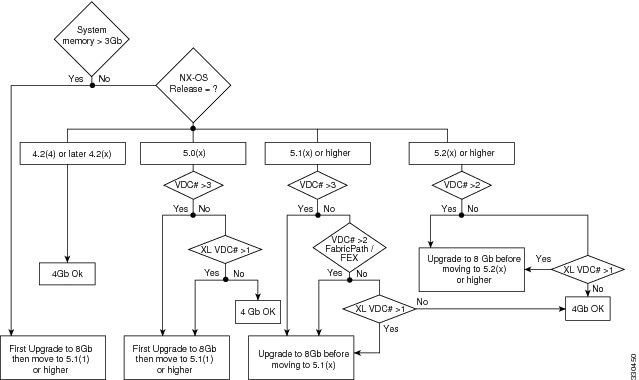
The following guidelines can help you determine whether or not to upgrade an existing supervisor module:
- When the system memory usage exceeds 3 GB (75 percent of total memory), we recommend that you upgrade the memory to 8 GB. Use the show system resources command from any VDC context to check the system memory usage:
- If you create more than one VDC with XL mode enabled, or if you have more than two VDCs, 8 GB of memory is required.
For additional guidance about whether or not to upgrade a supervisor module to 8 GB of memory, see Figure 1.
Figure 1 Supervisor Memory Upgrade Decision Flowchart
When you insert a supervisor module into a Cisco Nexus 7000 Series switch running Cisco NX-OS Release 5.1(x) or a later release, be aware that one of the following syslog messages will display, depending on the software version and the amount of memory for the supervisor module:
- If you are running Cisco NX-OS Release 5.1(1) or a later release and you have an 8-GB supervisor as the active supervisor and you insert a 4-GB supervisor module as the standby, it will be powered down. A severity 2 syslog message indicates that the memory amounts should be equivalent between the active and the standby supervisor:
- If you are running Cisco NX-OS Release 5.1(2) or a later release and you insert a 8-GB supervisor module as the standby, a severity 4 syslog message appears.
In this situation, you have the option to remove the extra memory or do a switchover and upgrade the memory in the 4-GB supervisor.
Supported Device Hardware
The Cisco NX-OS software supports the Cisco Nexus 7000 Series chassis. You can find detailed information about supported hardware in the Cisco Nexus 7000 Series Hardware Installation and Reference Guide .
Table 2 shows the hardware supported by Cisco NX-OS Release, 6 x, Release 5.x and Release 4.x software.
Table 3 shows the FEX modules supported by Cisco Nexus 7000 Series I/O modules.
Table 4 shows the transceiver devices supported by each release.
For a list of minimum recommended Cisco NX-OS software releases for use with Cisco Nexus 7000 Series devices, see the document Minimum Recommended Cisco NX-OS Releases for Cisco Nexus 7000 Series Switches.
6.0-kW DC power supply unit (cable included) |
||
Enhanced 48-port 1/10 Gigabit Ethernet SFP+ I/O module (F2 Series) |
||
8-port 10-Gigabit Ethernet I/O module XL1 |
||
32-port 10-Gigabit Ethernet SFP+ I/O module XL 1 |
||
48-port 1-Gigabit Ethernet I/O module XL 1 |
||
48-port 10/100/1000 Ethernet I/O module XL 1 |
||
Note The Cisco Nexus 7000 Enhanced F2 Series 48-port 1/10 GBase-T RJ45 Module (N7K-F248XT-25E) does not support Cisco Nexus 2000 Fabric Extender modules.
SFP-10G-ZR 3 |
|||
CWDM-SFP-xxxx2 |
|||
DWDM-SFP10G-xx.xx 1 |
|||
DWDM-SFP-xxxx 1 |
|||
SFP-10G-ZR 3 |
|||
CWDM-SFP-xxxx3 |
|||
DWDM-SFP10G-xx.xx 1 |
|||
DWDM-SFP-xxxx 1 |
|||
SFP-10G-ER4 |
|||
SFP-10G-ZR 3 |
|||
DWDM-SFP10G-xx.xx 1 |
|||
SFP-10G-SR5 |
|||
SFP-10G-LR 4 |
|||
SFP-10G-LRM 4 |
|||
SFP-H10GB-CUxM 4 |
|||
DWDM-X2-xx.xx= 1 |
|||
CWDM-SFP-xxxx 1 |
|||
DWDM-SFP-xxxx 1 |
|||
DWDM-SFP-xxxx 1 |
|||
CWDM-SFP-xxxx 1 |
|||
SFP-H10GB-ACUxM 3 |
|||
SFP-10G-ZR 3 |
|||
SFP-H10GB-CUxM 3 |
|||
SFP-10G-ZR 3 |
|||
SFP-H10GB-CUxM 3 |
|||
DWDM-SFP10G-xx.xx 1 |
|||
|
2.For a complete list of supported optical transceivers of this type, go to the Cisco Transceiver Module Compatibility Information page. 3.For a complete list of supported optical transceivers of this type, go to the Cisco Transceiver Module Compatibility Information page. |
Integrating F2 Series Modules Into a Cisco Nexus 7000 Series System
The Cisco Nexus 7000 48-port 1/10 Gigabit Ethernet SFP+ I/O module (F2 Series) module is a low-latency, high-performance, high-density module that offers most Layer 2 and Layer 3 functions of Cisco NX-OS software. When integrating the F2 Series module into a Cisco Nexus 7000 Series system, observe the following guidelines:
- An F2 Series module requires its own F2 Series module VDC. This VDC is restricted to the F2 Series module; M1 and F1 ports cannot be in the F2 Series module VDC. The default VDC can also be configured as an F2 Series module VDC.
- If you boot up an unconfigured Cisco Nexus 7000 Series device that contains only F2 Series modules, then the default VDC is automatically configured as an F2 Series module VDC.
- When configuring a vPC peer link on an F2 Series module, you must have an F2 Series module on either side of the vPC peer link. Only identical I/O modules on either side of a vPC peer link are supported. Using different I/O modules on either side of a vPC peer link is not supported.
The preceding considerations also apply to the Enhanced F2-Series modules: Cisco Nexus 7000 Enhanced F2 Series 48-port 1/10 Gigabit Ethernet SFP+ I/O module (N7K-F248XP-25E) and Cisco Nexus 7000 Enhanced F2 Series 48-port 1/10 GBase-T RJ45 module (N7K-F248XT-25E).
Some software features are not available on the F2 Series modules in Cisco NX-OS Release 6.x. See Table 5 for a list of features that have hardware and software support on the F2 Series and Enhanced F2 Series modules.
Migrating to M2 Series Modules
When preparing to migrate from an M1 Series module or an F2 Series to an M2 Series module, observe these guidelines:
- The M2 Series modules interoperate with M1 Series and F1 Series modules in the same VDC.
- The M2 Series modules work with Fabric 1 and Fabric 2 modules and they work with both Supervisor 1 and Supervisor 2 modules.
- The migration procedure is disruptive.
To ensure an error-free migration, we recommend that you follow these steps to install an M2 Series module:
1. Remove the module to be replaced.
2. Enter the write erase command to erase the startup configuration.
3. Insert the M2 Series module.
4. Enter the copy running-config startup-config command to copy the configuration to the switch.
Note Follow the safety precautions and installation instructions in the Cisco Nexus 7000 Series Hardware Installation and Reference Guide when replacing an I/O module.
Upgrade/Downgrade Paths and Caveats
This section includes information about upgrading or downgrading Cisco NX-OS software on Cisco Nexus 7000 Series devices. It includes the following sections:
Supported Upgrade and Downgrade Paths
Note Before you upgrade or downgrade your Cisco NX-OS software, we recommend that you read the complete list of caveats in this section to understand how an upgrade or downgrade might affect your network, depending on the features that you have configured.
Do not change any configuration settings or network settings during a software upgrade. Any changes in the network settings may cause a disruptive upgrade.
Refer to Table 6 for the nondisruptive upgrade (ISSU) path to, and nondisruptive downgrade (ISSD) path from Cisco NX-OS Release 6.1(x). Releases that are not listed for a particular release train do not support a direct ISSU or ISSD to the current release.
Unless otherwise noted, all releases within the same release train are ISSU and ISSD compatible to releases within the same train. In addition, all releases of Cisco NX-OS Release 6.1(x) software are ISSU and ISSD compatible will all releases of Cisco NX-OS Release 6.0(x).
If you are running a Cisco NX-OS release earlier than Release 5.2, you can perform an ISSU in multiple steps. Table 7 lists the supported multistep ISSU paths.
5.2(7)6 |
||
|
6.Before performing an ISSU to NX-OS Release 5.2(7), see the IPFIB Errors caveat in this section. |
Upgrade or Downgrade Caveats
A software upgrade or downgrade can be impacted by the following features or hardware:
- To perform an ISSU to Release 6.x.x from one of the ISSU supported releases listed in the Supported ISSU and ISSD Paths ( Table 6 ) table, follow these steps:
1. Enter the show running-config aclmgr inactive-if-config command for all VDCs.
2. Enter the clear inactive-config acl command for all VDCs.
3. If the configuration includes any mac packet-classify configurations on any interface, remove all of the configurations by using the no mac packet-classify command.
When you upgrade Cisco NX-OS software by changing boot variables and reloading the device, make sure to save the FEX HIF configuration to the startup configuration, as well as another location (such as bootflash or an external server). Once the upgrade to a new release is complete, and the FEX is fully online and associated, reapply the FEX HIF configuration.
Note During the process of Cisco Fabric Extender (FEX) modules getting connected to a Cisco Nexus 7000 Series switch, if the switch is manually upgraded or downgraded, FEX host interfaces (HIFs) lose the configuration. To avoid it, if you are manually upgrading the vPC system, you must save the FEX HIF (FEX host interfaces connected to hosts) configurations to both the startup configuration file and to an external device before starting the reload, and reapply the configuration once the FEX module is fully online.
Before performing an ISSU to Cisco NX-OS Release 6.1(3), disable IPv6 Policy Based Routing (PBR). Failure to disable IPv6 PBR prior to the upgrade might result in a failure of the ACLQOS process when an IP route is cleared following the ISSU.
When a specific sequence of events occur prior to an ISSU from Cisco NX-OS Release 6.1(1) to Release 6.1(2), on a Cisco Nexus 7000 Series device with both F1 Series and M2 Series modules installed, the M2 Series module fails when it reloads after the upgrade. The following ordered sequence of events lead to the failure of the M2 Series module:
1. A 40 G CFP transceiver (CFP-40G-SR4 or CFP-40G-LR4) is inserted in a port on the 2-port 100-Gigabit Ethernet I/O module XL (M2 Series) that is installed in a Cisco Nexus 7000 Series device running Cisco NX-OS Release 6.1(1).
2. The M2 Series module reloads or the entire chassis reloads.
3. The ISSU from Cisco NX-OS Release 6.1(1) to Release 6.1(2) occurs.
If this problem occurs, reload the F1 Series module following the upgrade to Cisco NX-OS Release 6.1(2). The M2 Series will then come online.
ISSD is not supported when vPC+ for FEX server facing ports is enabled. If you are using this feature, you should disable it prior to an ISSD from Cisco NX-OS Release 6.1(2) by removing vPC+ from FEX server facing ports.
When downgrading from Cisco NX-OS Release 6.1(2) to an earlier release, first power down all modules that are unsupported in the downgrade image. Then purge the configuration of the unsupported modules using the purge module module_number running-config command.
Cisco NX-OS Release 6.1(1) supports an increased number of OSPF process instances per VDC. See the Cisco Nexus 7000 Series NX-OS Verified Scalability Guide for the latest verified number.
If you have more than four OSPF v2 or more than four OSPF v3 process instances configured and you downgrade to an earlier release, you must remove instances 5 and higher. Use the following command to match an OSPF v2 process tag with an OSPF process instance:
Use the show system internal sysmgr service name ospfv3 command to match an OSPF v3 process tag with an OSPF v3 process instance.
Before you perform an ISSU or an ISSD between specific releases, you must first remove QoS policies and ACLs from interfaces that are in the down state. See Table 8 to determine which release combinations are impacted.
If you do not remove the QoS policies and ACLs, the installer process aborts the upgrade or downgrade process, and a message similar to the following is displayed:
Note The automatic clear inactive-config qos command that clears an inactive configuration will delete the port channel policies even if one of the ports in a port channel has inactive policies.
Guidelines for manual policy removal: during a manual removal, when the interface is part of a port channel, remove the policy map or access list from the port channel or remove the interface from the port channel before performing the ISSU or ISSD. For all other interface types, remove the policy map or access list from the interface.
The default Control Plane Policing (CoPP) policy does not change when you upgrade the Cisco NX-OS software.
If you downgrade from Cisco NX-OS Release 6.0(1) without using ISSD to a release earlier than NX-OS Release 5.2(1), the CoPP configuration is lost, and a CoPP policy is no longer attached to the control plane.
Any features introduced in a release must be disabled before downgrading to a release that does not support those features.
If you enable the AES password encryption feature and a master encryption key in Cisco NX-OS Release 6.0(1), you must decrypt all type-6 passwords, disable the AES password encryption feature, and delete the master key before downgrading.
ISSU, stateful switchover (SSO), and graceful restart are not supported when aggressive failure detection timers are used for any Layer 3 protocols. Starting in Cisco NX-OS Release 5.2(3a), the First Hop Redundancy Protocol (FHRP) with aggressive timers has been validated for SSO or ISSU using the extended hold timer feature. Other protocols such as OSPF have been validated with aggressive timers without SSO or ISSU support. For additional information on aggressive timer support and extended hold timers for FHRP, see the Cisco Nexus 7000 Series NX-OS Unicast Routing Configuration Guide.
BFD for static routes does not support a stateful switchover (SSO) or an ISSU. When you perform an ISSU or an SSO, a small amount of packet loss can result in flows that follow static routes protected by BFD.
– If you have LISP configured on a Cisco Nexus 7000 Series device, you must remove the configuration before an ISSU. Enter the no lisp feature command to individually unconfigure the LISP commands. Then enter the no feature lisp command. After the ISSU completes, enter the feature lisp command to reenable LISP and then reconfigure it
– If you perform an ISSU from Cisco NX-OS Release 5.2(3a) or Release 5.2(4) to Release 6.1(2), and LISP was enabled prior to the upgrade, you must enter the clear ip route command and clear the LISP map cache following the upgrade to allow LISP to work in Release 6.1(2).
During an upgrade to Cisco NX-OS Release 5.2(7) or a later release, the following error messages might appear:
In addition, the ipfib process might fail.
This issue can be triggered when the following sequence of events occur:
– You perform an ISSU to Cisco NX-OS Release 5.2(1), Release 5.2(3a), Release 5.2(4), or Release 5.2(5) release from an earlier 5.0(x) or 5.1(x) release and you have not reloaded the switch.
– You make configuration changes in the 5.2(x) release running on the Cisco Nexus 7000 Series system.
– You perform an ISSU to NX-OS Release 5.2(7) or a later release.
To work around this issue, follow these steps:
1. Prior to the upgrade, execute the following commands to avoid the issue:
a. Enter the feature lisp command.
b. Enter the ip lisp etr command for all VRFs, followed by the no ip lisp etr command.
c. Enter the no feature lisp command.
2. If you experience this issue, reload the affected modules on your Cisco Nexus 7000 Series system.
Note The Transport Services Package license is required to enable LISP. If you do not have this license, you can enable the grace period for it. If you cannot enable the grace period, perform an ISSU and reload the affected modules.
You should perform these steps even if you are not using LISP because the issue can occur even if LISP is not running.
Due to an optimization in handling of fragmented packets in QoS ACL entries in Cisco NX-OS Release 5.2(9), Release 6.1(3), and later releases, TCAM usage might increase once the system is reloaded with the new software release. Once the new version boots, any ACL entry that references Layer 4 information will use an extra TCAM entry so that it can match on fragmented packets and that will cause TCAM usage to increase. This increase is not seen during an ISSU upgrade, until the system or module is reloaded at some point after the ISSU upgrade is complete.
Any upgrade from an image that is earlier than Cisco NX-OS Release 5.2(1) to an image that is Cisco NX-OS Release 5.2(1) or later in an OTV network is disruptive. A software image upgrade from Cisco NX-OS Release 5.2(1) or later to Cisco NX-OS Release 6.0(1) is not disruptive.
Any upgrade from an image that is earlier than Cisco NX-OS Release 6.2(2) to an image that is Cisco NX-OS Release 6.2(2) or later in an OTV network is disruptive. When you upgrade from any previous release, the OTV overlay needs to be shut down for ISSU to operate.
For more details, see the “Preparing OTV for ISSU to Cisco NX-OS 5.2(1) or Later Releases in a Dual-Homed Site” section in the Cisco Nexus 7000 Series NX-OS OTV Configuration Guide.
CMP Images
Cisco NX-OS Release 6.1(1) includes a new image for the connectivity management processor (CMP) on the Supervisor 1 module. The CMP is upgraded to Release 6.1(1) on successful ISSU to Cisco NX-OS to Release 6.1(1). When the ISSU completes, you should reload the CMP image on the active and standby Supervisor 1 modules.
The Supervisor 2 and Supervisor 2 Enhanced modules do not have a CMP. Therefore, Cisco NX-OS Release 6.1(1) does not include a CMP image for the Supervisor 2 or Supervisor 2 Enhanced module.
For additional information about the CMP, see the Cisco Nexus 7000 Series Connectivity Management Processor Configuration Guide.
EPLD Images
Cisco NX-OS Release 6.1(4) includes new EPLD images, but it is not necessary to upgrade existing EPLD images to use Cisco NX-OS Release 6.1(4).
Cisco NX-OS Release 6.1(3) includes an EPLD image for M2 Series modules that have XL tables. For instructions about upgrading to this EPLD image, see the Cisco Nexus 7000 Series FPGA/EPLD Upgrade Release Notes, Release 6.1.
The new hardware introduced in Cisco NX-OS Release 6.1(1) and Release 6.1(2) includes new EPLD images. It is not necessary to upgrade existing EPLD images to use Cisco NX-OS Release 6.1(1) or Release 6.1(2). However, if you plan to migrate from a Supervisor 1 to a Supervisor 2 or Supervisor 2E module, and you have a Fabric 2 module in your system, you must upgrade the EPLD image on the Fabric 2 module. For instructions about upgrading EPLD images, see the Cisco Nexus 7000 Series FPGA/EPLD Upgrade Release Notes, Release 6.1.
For additional information about migrating from a Supervisor 1 module to a Supervisor 2 or Supervisor 2E module, see the Cisco Nexus 7000 Series Hardware Installation and Reference Guide.
New Hardware
This section briefly describes the new hardware introduced in Cisco NX-OS Release 6.1. For detailed information about the new hardware, see the Cisco Nexus 7000 Series Hardware Installation and Reference Guide.
This section includes the following topics:
- New Hardware in Cisco NX-OS Release 6.1(1)
- New Hardware in Cisco NX-OS Release 6.1(2)
- New Hardware in Cisco NX-OS Release 6.1(3)
- New Hardware in Cisco NX-OS Release 6.1(4)
- New Hardware in Cisco NX-OS Release 6.1(5)
New Hardware in Cisco NX-OS Release 6.1(1)
Cisco NX-OS Release 6.1(1) introduces new hardware that is described in the following sections:
M2 Series Modules
The Cisco Nexus 7000 M2 Series Modules are the next generation of highly scalable, high-performance modules that offer up to 240 G bandwidth per slot. There are three Cisco Nexus 7000 M2 Series modules in the M series module family:
- The 24-port 10-Gigabit Ethernet I/O M2 Series module XL (N7K-M224XP-23L) provides 240 Gb of bandwidth and up to 384 nonblocking 10-G ports per chassis. This module also supports the Cisco Nexus 2000 Fabric Extender (FEX) modules.
- The 6-port 40-Gigabit Ethernet I/O M2 Series module XL (N7K-M206FQ-23L) provides 240 Gb of bandwidth and up to 96 nonblocking 40-G ports per chassis.
- The 2-port 100-Gigabit Ethernet I/O M2 Series module XL (N7K-M202CF-22L) provides 200 Gb of bandwidth and up to 32 nonblocking 100-G ports per chassis.
The M2 Series modules work with Fabric 1 and Fabric 2 modules and they work with both Supervisor 1 and Supervisor 2 modules. The M2 Series modules interoperate with M1 Series and F1 Series modules in the same VDC.
With the exception of LISP, the M2 Series modules support all the features of the M1 Series modules.
For additional information about the M2 Series modules, see the Cisco Nexus 7000 Series Hardware Installation and Reference Guide.
Supervisor 2 Modules
Cisco NX-OS Release 6.1 introduces a new generation of supervisor modules that offer increased scalability and an enhanced user experience.
- The Supervisor 2 module (N7K-SUP2) has a quad core CPU and 12 GB of RAM.
- The Supervisor 2 Enhanced (2E) (N7K-SUP2E) module has a dual quad core CPU and 32 GB of RAM and provides increased software scale such as an increased number of VDCs and connected FEX modules.
Note For verified scale information for all supervisor modules, see the Cisco Nexus 7000 Series NX-OS Verified Scalability Guide.
The Supervisor 2 or Supervisor 2E is required to deploy FCoE on the 48-port 1/10-Gigabit Ethernet SFP+ F2 series I/O module (N7K-F248XP-25).
All Cisco Nexus 7000 Series I/O modules are compatible with the Supervisor 2 and Supervisor 2E modules and both the Fabric 1 and Fabric 2 modules support the Supervisor 2 module.
The Supervisor 2 and Supervisor 2 Enhanced modules do not have a connectivity management processor (CMP).
Note A Supervisor 1 and a Supervisor 2 or Supervisor 2E module cannot be installed in a Cisco Nexus 7000 Series chassis at the same time.
For more information about the Supervisor 2 and Supervisor 2E modules, including instructions on how to migrate from a Supervisor 1 module to a Supervisor 2 or Supervisor 2E module, see the Cisco Nexus 7000 Series Hardware Installation and Reference Guide.
FEX Modules
Cisco NX-OS Release 6.1(1) supports the following Fabric Extender (FEX) modules on Cisco Nexus 7000 Series systems with the Supervisor 1, Supervisor 2, or Supervisor 2E modules:
Cisco NX-OS Release 6.1(1) also supports the following reverse airflow fans and power supplies for fabric extender modules:
For additional information, see the Cisco Nexus 2000 Series Hardware Installation Guide.
New Hardware in Cisco NX-OS Release 6.1(2)
Cisco NX-OS Release 6.1(2) introduces new hardware that is described in the following section:
Cisco Nexus 7004 Switch
The Cisco Nexus 7004 switch (N7K-C7004) is a four-slot chassis that holds two supervisor modules and two I/O modules. Unlike other Cisco Nexus 7000 Series devices, the Cisco Nexus 7004 does not have fabric modules.
The Cisco Nexus 7004 switch supports the following modules: all XL versions of M1series modules, M2 series modules, and F2 series modules. It does not support the F1 series module or non-XL M1 series modules. In addition, the Cisco Nexus 7004 switch supports both the Supervisor 2 and 2E modules. It does not support the Supervisor 1 module.
The Cisco Nexus 7004 switch supports the same features as all Cisco Nexus 7000 Series switch chassis, including but not limited to FEX, ISSU, vPC, FabricPath, OTV, LISP, VDC, CoPP, NetFlow, and MPLS.
Energy efficiency can be achieved with the Cisco Nexus 7004 switch through its 3KW AC power supplies, the independent variable-speed fan system, and the lack of fabric modules.
For additional information, see the Cisco Nexus 7000 Series Hardware Installation and Reference Guide.
Enhanced F2 Series Modules
Two enhanced F2 Series modules are available:
- Cisco Nexus 7000 Enhanced F2-Series 48-port 1/10 Gigabit Ethernet SFP+ I/O module (N7K-F248XP-25E)
- Cisco Nexus 7000 Enhanced F2-Series 48 Port 1/10 GBase-T RJ45 Module (N7K-F248XT-25E)
These modules support all of the features of the standard F2-series modules, and they function like an F2-series module with Layer 2 and Layer 3 enabled. The enhanced F2-series module hardware is capable of interoperability with M2-series modules and the XL versions of M1 series modules. This capability will be enabled in a later software release. The enhanced F2-series modules also support IPv6 DSCP-to-Queue mapping. In addition, the enhanced F2-Series modules interoperate with standard F2-Series modules in the same system or VDC.
In addition, the Cisco Nexus 7000 Enhanced F2-Series 48 Port 1/10 GBase-T RJ45 Module supports 10 GBase-T, which is a standard that provides 10 Gbps connections over unshielded or shielded twisted-pair cables over distances of up to 330 feet (110 meters). This module offers low power consumption, low latency, full Layer 2 and Layer 3 support, and Energy Efficient Ethernet (EEE) to help save power.
For additional information about the Cisco Nexus 7000 Series Hardware Installation and Reference Guide.
New Software Features
This section briefly describes the new features introduced in Cisco NX-OS Release 6.1 software. For detailed information about the features listed, see the documents listed in the “Related Documentation” section. The “New and Changed Information” section in each of these books provides a detailed list of all new features and includes links to the feature description or new command.
This section includes the following topics:
- Cisco NX-OS Release 6.1(1) Software Features
- Cisco NX-OS Release 6.1(2) Software Features
- Cisco NX-OS Release 6.1(3) Software Features
- Cisco NX-OS Release 6.1(4) Software Features
- Cisco NX-OS Release 6.1(5) Software Features
Cisco NX-OS Release 6.1(1) Software Features
Cisco NX-OS Release 6.1(1) includes the features described in the following sections:
Virtual Device Context
Cisco NX-OS Release 6.1 introduces a new type of VDC that provides fault isolation for switch-wide administrative functions. The new VDC is called the admin VDC. You can enable the admin VDC at initial system bootup through a setup script. However, creation of the admin VDC is optional; it is not required. The admin VDC is used for administrative functions only.
The admin VDC is supported on Supervisor 2 and Supervisor 2E modules only. When an admin VDC is enabled, only the mgmt0 port is allocated to the admin VDC. A license is not required to enable the admin VDC.
For detailed information about creating the admin VDC and guidelines for using it, see the Cisco Nexus 7000 Series Virtual Device Context Configuration Guide.
In Cisco NX-OS Release 6.1(1), you can configure CPU shares per VDC. This features requires the Supervisor 2 or Supervisor 2E module.
The Supervisor 2E module increments the number of supported VDCs to eight, plus the admin VDC. This feature requires the N7K-VDC1K9 license.
IP Service Level Agreement
IP Service Level Agreement (SLA) is network performance-monitoring software that allows users to do service level monitoring, troubleshooting, and resource planning. In Cisco NX-OS Release 6.1(1), the IP SLA sender or responder support the following features: UDP jitter, UDP echo, TCP connect, SNMP, and reaction threshold traps. IP SLA does not require a license.
For additional information about the IP SLA feature, see the Cisco Nexus 7000 Series IP SLA Configuration Guide.
FCoE Support
The 48-port 1/10-Gigabit Ethernet SFP+ F2 series I/O module (N7K-F248XP-25) supports FCoE, and requires either the Supervisor 2 or Supervisor 2E module, and the N7K-FCOEF248XP license.
FEX Scalability
With the Supervisor 2E module, Cisco NX-OS Release 6.1(1) supports an increased number of FEX modules. See the Cisco Nexus 7000 Series Verified Scalability Guide.
Additional New Functionality
Cisco NX-OS Release 6.1(1) adds support for the following features:
- BGP add path capability
- ERSPAN on F2 Series modules
- FabricPath traceroute PONG
- IS-IS for v6 single topology
- Online diagnostics including the SnakeLoopback and RewriteEngineLoopback test on F2 Series modules
- OSPF flexible distance manipulation
- PVLAN on F2 Series modules
- QoS DSCP to queue mapping for IPv4 on F2 Series modules
- RBACL
- Cisco Nexus 4000 FCoE Initialization Protocol (FIP) snooping
For additional information about these features, see the Cisco Nexus 7000 Series Switches Configuration Guides.
Cisco NX-OS Release 6.1(2) Software Features
Cisco NX-OS Release 6.1(2) includes the features described in the following topics:
Power on Auto Provisioning
Power on Auto Provisioning (PoAP) makes possible automatic provisioning and self deployment of switches. PoAP simplifies switch configuration and helps to minimize operational costs.
For additional information about the PoAP feature, see the Cisco Nexus 7000 Series Fundamentals Configuration Guide.
Python Scripting
Python scripting provides programmatic access to Cisco NX-OS and allows you to gather network intelligence. Python is a very powerful programming language that includes standard libraries and it is highly scalable. Python is integrated with PoAP.
For additional information about Python scripting, see the Cisco Nexus 7000 Series Fundamentals Configuration Guide .
DCSP-to-Queue on the Enhanced F2 Series Modules
The new enhanced F2 series modules support IPv4 and IPv6 packets for DSCP-to-queue on ingress ports. With this feature, you can match traffic that is received on Layer 3 and access ports.
For additional information about DSCP-to-queue for IPv6, see the Cisco Nexus 7000 Series QoS Configuration Guide.
vPC+ For Cisco Nexus 2000 Fabric Extender Server Ports
vPC+ is now supported on FEX server ports. This capability enables an active-active host port vPC to a FabricPath cloud.
For additional information about vPC+ on FEX, see the Cisco Nexus 7000 Series FabricPath Configuration Guide .
FabricPath on F2 Series Modules
Cisco NX-OS Release 6.1(2) includes a new command that makes it possible for FabricPath core ports on specified modules or port groups to no longer learn MAC addressees in VLANs where no switch virtual interface (SVI) exists.
The no hardware fabricpath mac-learning module module [ port-group port-group-list ] command can be entered only on the default VDC or admin VDC. It affects the specified modules or port groups regardless of VDC membership.
Use this command for modules or port groups that have only FabricPath core ports (or unused or shutdown ports). Do not use the command on port groups that have CE edge ports or any other type of port.
For VLANs with SVIs configured (even on port groups where the command is applied), and for port groups where the command has not been applied, the F2 Series module still learns source MAC (SMAC) addresses from broadcast frames.
Using this command on port groups that have only FabricPath core ports does not affect forwarding behavior because FabricPath core ports do not use the MAC address table to perform forwarding.
For additional information on using FabricPath on F2 Series modules, see the Cisco Nexus 7000 Series FabricPath Configuration Guide.
Sampled NetFlow
Sampled NetFlow is available on F2 Series modules. Sampling is available on ingress ports only.
For additional information about NetFlow sampling, see the Cisco Nexus 7000 Series System Management Configuration Guide.
Cisco NX-OS Release 6.1(3) Software Features
Cisco NX-OS Release 6.1(3) includes the features described in the following topics:
- Four Queue Support for F2 Series Modules
- Improved Load Balancing and Traffic Distribution Across Port-Channel Member Links
- Deny ACE Support for VACL, PBR, and QoS
- QoS MIB Support
- Minimum Links on the FEX Fabric Port Channel
- Smart Zoning
- 100G-SR10 Optics Support
- PowerOn Auto Provisioning Template Script
- New Cisco MAC Address for BPDUs Sent on vPCs
- FabricPath Port-Channel Limit Command for vPC+
Four Queue Support for F2 Series Modules
Cisco NX-OS Release 6.1(3) increases ingress buffer support from two queues to four queues on F2 Series modules. For more information, see the Cisco Nexus 7000 Series NX-OS QoS Configuration Guide.
Improved Load Balancing and Traffic Distribution Across Port-Channel Member Links
Improved load balancing for port channels is available on Cisco Nexus 7000 M2 and M1 Series I/O XL modules, and on F2 Series modules through the new modulo mode. If you plan to use modulo mode on an M2 Series module, see CSCue43842.
For more information, see the Cisco Nexus 7000 Series NX-OS Interfaces Configuration Guide.
Deny ACE Support for VACL, PBR, and QoS
Beginning with Cisco NX-OS Release 6.1(3), you can configure the device to support deny access control entries (ACEs) in a sequence for the following sequence-based features: VLAN ACL (VACL), policy-based routing (PBR), and QoS. For more information, see the Cisco Nexus 7000 Series NX-OS Security Configuration Guide.
QoS MIB Support
QoS MIB support for F2 Series modules is available in Cisco NX-OS Release 6.1(3). For more information, see the Cisco Nexus 7000 Series NX-OS MIB Quick Reference.
Minimum Links on the FEX Fabric Port Channel
Beginning with Cisco NX-OS Release 6.1(3), you can configure a minimum number of links for the FEX fabric port channel so that when a certain number of FEX fabric port-channel member ports go down, the host-facing interfaces of the FEX are suspended. For more information, see the Cisco Nexus 2000 NX-OS Fabric Extender Software Configuration Guide.
Smart Zoning
Smart zoning supports zoning among more devices by reducing the number of zoning entries that needs to be programmed by considering device type information without increasing the size of the zone set. Smart zoning enables you to select the host, target, or both as the end device type. For more information, see the Cisco Nexus 7000 Series NX-OS SAN Switching Configuration Guide.
100G-SR10 Optics Support
Cisco NX-OS Release 6.1(3) adds 100G-SR10 optics support for the M2 Series 2-port 100-Gigabit Ethernet I/O module (N7K-M202CF-22L).
PowerOn Auto Provisioning Template Script
A new template configuration script is available for PowerOn Auto Provisioning (PoAP). For more information, see the Cisco Nexus 7000 Series NX-OS Fundamentals Configuration Guide.
New Cisco MAC Address for BPDUs Sent on vPCs
Cisco NX-OS Release 6.1(3) enables STP to use the new Cisco MAC address 00:26:0b:xx:xx:xx as the source address of BPDUs generated on vPC ports. For more information, see the Cisco Nexus 7000 Series NX-OS Layer 2 Switching Configuration Guide.
FabricPath Port-Channel Limit Command for vPC+
Cisco NX-OS Release 6.1(3) provides support for more than 244 vPC+ port channels for VDCs that have an F2 Series module. For more information, see the Cisco Nexus 7000 Series NX-OS FabricPath Configuration Guide.
Cisco NX-OS Release 6.1(4) Software Features
Cisco NX-OS Release 6.1(4) includes bug fixes and the following enhancements:
- Support for the QSFP-40GE-LR4 optical transceiver on the M2 Series 6-port, 40-Gigabit Ethernet I/O module XL (N7K-M206FQ-23L).
- Enhancements have been made to the following MIBs:
– CISCO-SWITCH-RATE-LIMITER-MIB for information from the show hardware rate-limit command
– CISCO-SWITCH-HARDWARE-CAPACITY-MIB for information associated with MAC address table utilization and forwarding engine utilization, and information from the show hardware capacity interface command
– CISCO-HARDWARE-IP-VERIFY-MIB for information from the show hardware forwarding ip verify command
Licensing
Cisco NX-OS Release 6.1(1) includes the following changes to Cisco NX-OS software licenses:
– N7K-ADV1K9—Enables four VDCs. This is an existing license.
– N7K-VDC1K9—Enables support for eight VDCs on the Cisco Nexus 7000 Series Supervisor 2E module. This is a new license. One license is needed per chassis. A separate license is not required for each supervisor module.
- N7K-FCOEF248XP—Supports Fibre Channel over Ethernet (FCoE) for the 48-port 1/10-Gigabit Ethernet SFP+ F2 series I/O module. This is a new license.
- Cisco TrustSec (CTS) is now included in the base Cisco NX-OS software that comes with the purchase of a Cisco Nexus 7000 Series system. Previously, CTS required the Advanced Services Package license, N7K-ADV1K9.
Cisco NX-OS Release 6.1(2) includes the following new license:
- N7K-C7004-XL—Enables M Series modules to increase the forwarding information base (FIB) capacity to one million.
For additional information, see the Cisco NX-OS Licensing Guide.
MIBs
Cisco NX-OS Release 6.1(1) supports a subset of the following MIBs:
Cisco NX-OS Release 6.1(3) supports the QoS MIB on F2 Series modules.
Limitations
This section describes the limitations in Cisco NX-OS Release 6.1 for the Cisco Nexus 7000 Series devices. It includes the following sections:
- DHCP Snooping with vPC+ FEX
- Fabric Module Migration Errors
- Proxy Limitation for the N7K-F132XP-15 Module
- Storage VDC Interfaces
- PONG in a vPC Environment
- SVI Statistics on an F2 Series Module
- LISP Traffic
- Role-Based Access Control
- Standby Supervisor Can Reset with Feature-Set Operation
- Unfair Traffic Distribution for Flood Traffic
- BFD Not Supported on the MTI Interface
- QoS Traffic Shaping
Fabric Module Migration Errors
When you remove a Fabric 1 module and replace it with a Fabric 2 module, errors might occur. On rare occasions, 1 to 10 packets can drop during the fabric module migration process.
To avoid this situation, enter the out-of-service xbar command before you remove each Fabric1 module.
Once the Fabric 1 module is out of service, remove it and insert the Fabric 2 module.
Proxy Limitation for the N7K-F132XP-15 Module
When the 6-port 40-Gigabit Ethernet I/O module XL (M2 Series) (N7K-M206FQ-23L) acts as a proxy for more than 90 G traffic from the 32-port 10-Gigabit Ethernet I/O module XL (N7K-F132XP-15), packet drops can occur. You might experience this issue if ports are over-subscribed on the N7K-F132XP-15 F1 Series module.
Storage VDC Interfaces
In Cisco NX-OS Release 6.1(1), a Cisco Nexus 7000 Series device with the Supervisor 2 or Supervisor 2E module supports interfaces from the same module series, either F1 or F2, in the storage VDC for FCoE. A combination of interfaces from an F1 Series module and an F2 Series module is not supported in the storage VDC.
PONG in a vPC Environment
There are two situations where PONG is not supported in a vPC environment:
– In a vPC environment, a PONG to an access switch or from an access switch might fail. To work around this issue, use the interface option while executing a PONG from an access switch to a vPC peer. The interface can be one that does not need to go over the peer link, such as an interface that is directly connected to the primary switch.
– When FabricPath is enabled and there are two parallel links on an F2 Series module, PONG might fail. To work around this issue, form a port channel with the two links as members.
SVI Statistics on an F2 Series Module
F2 Series I/O modules do not support per-VLAN statistics. Therefore, the show interface command will not display per-VLAN Rx/Tx counters or statistics for switch virtual interfaces (SVIs).
LISP Traffic
A Layer 3 link is required between aggregation switches when deploying LISP host mobility on redundant xTRs that are part of a vPC. In rare (but possible) scenarios, failure to deploy this Layer 3 link might result in traffic being moved to the CPU and potentially dropped by the CoPP rate limiters.
Role-Based Access Control
- Beginning with Cisco NX-OS Release 5.2, you can configure role-based access control (RBAC) in the Cisco Nexus 7000 storage VDC using Cisco NX-OS CLI commands. You cannot configure RBAC in the Cisco Nexus 7000 storage VDC using Cisco DCNM. Note that RBAC in the storage VDC is RBAC for the Cisco Nexus 7000 Series devices, which is different from that for the Cisco MDS 9500 Series switches.
- RBAC CLI scripts used in Cisco MDS 9500 Series switches cannot be applied to the storage VDC configured for a Cisco Nexus 7000 Series device.
- You cannot distribute the RBAC configuration between a Cisco MDS 9500 Series switch and the storage VDC configured for a Cisco Nexus 7000 Series device. To prevent this distribution, make sure to assign RBAC in Cisco MDS and the Cisco Nexus 7000 storage VDC to different CFS regions.
Standby Supervisor Can Reset with Feature-Set Operation
The standby supervisor might reload when a feature-set operation (install, uninstall, enable, or disable) is performed, if the HA state of the standby supervisor is not “HA standby” at the time of the feature-set operation. To prevent the reload, ensure that the state of the standby supervisor is “HA standby.” To check the HA state for the specific VDC where the feature-set operation is performed, enter the show system redundancy ha status command on the active supervisor.
A reload of the standby supervisor has no operational impact because the active supervisor is not affected.
In addition, if you perform a feature-set operation while modules are in the process of coming up, then those modules will be power cycled. Modules that are up and in the “ok” state are not power cycled when you perform a feature set operation.
Unfair Traffic Distribution for Flood Traffic
Uneven load balancing of flood traffic occurs when you have a seven-member port channel. This behavior is expected and it occurs on all M Series and F Series modules. In addition, M Series modules do not support Result Bundle Hash (RBH) distribution for multicast traffic.
BFD Not Supported on the MTI Interface
If bidirectional forwarding detection (BFD) on protocol independent multicast (PIM) is configured together with MPLS multicast VPN (MVPN), the following error might appear:
2012 Jan 3 15:16:35 dc3_sw2-dc3_sw2-2 %PIM-3-BFD_REMOVE_FAIL: pim [22512] Session remove request for neighbor 11.0.3.1 on interface Ethernet2/17 failed (not enough memory)
This error is benign. To avoid the error, disable BFD on the multicast tunnel interface (MTI) interface.
Caveats
This section includes the following topics:
- Open Caveats—Cisco NX-OS Release 6.1
- Resolved Caveats—Cisco NX-OS Release 6.1(5a)
- Resolved Caveats—Cisco NX-OS Release 6.1(5)
- Resolved Caveats—Cisco NX-OS Release 6.1(4a)
- Resolved Caveats—Cisco NX-OS Release 6.1(4)
- Resolved Caveats—Cisco NX-OS Release 6.1(3)
- Resolved Caveats—Cisco NX-OS Release 6.1(2)
- Resolved Caveats—Cisco NX-OS Release 6.1(1)
Note Release note information is sometimes updated after the product Release Notes document is published. Use the Cisco Bug Toolkit to see the most up-to-date release note information for any caveat listed in this document.
Open Caveats—Cisco NX-OS Release 6.1
Symptom : A Web Cache Control Protocol (WCCP) redirect configuration on an interface is not removed when TCAM programming fails due to an unsupported combination of features.
Conditions : This symptom might be seen when Bank Chaining (Hardware Resource Pooling) is enabled and a WCCP configuration is applied after a RACL configuration. This issue might result in a SBADDFAIL syslog that indicates an unsupported feature combination. The WCCP configuration on the interface is not removed when the error occurs and the WCCP redirect is not programmed in the TCAM.
Workaround : Remove the WCCP redirect from the interface. When this operation is done, the SBDELFAIL syslog will appear. Ignore the syslog message and remove the RACL configuration from the interface and reapply the WCCP redirect on the interface. TCAM programming should work.
Symptom : If the netstack process fails, existing BGP sessions might flap and routes might be relearned, which could cause traffic loss.
Conditions : This symptom might be seen only when the netstack process fails or terminates ungracefully.
Symptom : Connectivity loss for 5-10 seconds after vPC peer-link is brought back online.
Conditions : This symptom might be seen with the following conditions:
– vPC peer-link is brought down, the operational primary Cisco Nexus 7000 Series device continues forwarding traffic on its vPCs.
– vPC peer-link is brought back up, traffic hashing through operational secondary Cisco Nexus 7000 Series device may see connectivity loss.
– Issue has been seen only with a large number (greater than 30) of vPCs configured.
Symptom : Applying a large egress ACL to an interface might cause BFD flaps.
Conditions : This symptom might be seen when a large egress ACL is applied to, or removed from an unrelated Layer 3 physical interface or SVI.
Symptom : SNMP fails when cfcRequestEntryStatus is set to active.
Condition : This symptom might be seen when the cfcRequestEntryStatus field in a table in the CISCO-FTP-CLIENT-MIB is set to a value of one.
Symptom : Reloading a switch with many BFD sessions can leave a few port-channel member ports in an error-disabled state on the connected switches.
Conditions : This symptom might be seen when there is a heavy BFD and ACL Manager interaction, with many sessions going up or down, and the ACL manager process on the supervisor module can get busy processing BFD-related ACL requests. At the same time, if one or more port-channel members are trying to come up, they fail to be part of that port channel and potentially leave them in a suspended state on the local and remote end.
Workaround : Enter the shut and no shut commands on the member ports of the suspended port-channel members to bring them back up.
Symptom : OSPFv3 advertises the local prefix even though the address is a duplicate in the network.
Conditions : This symptom might be seen when OSPFv3 forms an IPv6 neighbor, even though the local address is a duplicate in the network. This can result in a black hole of traffic to the local IPv6 address.
Workaround : Reconfigure the local address with a unique IPv6 address.
Symptom : A vulnerability exists in the ARP code of the Cisco Nexus 7000 Series device that might allow an unauthenticated adjacent attacker to trigger the restart of the adjmgr process. This problem might lead to packet drops and potentially trigger the reload of the affected device.
An attacker might be able to trigger this behavior by flooding the affected device with ARP packets. The attacker might need to be in the same subnet in order to execute the attack
Conditions : This symptom could be triggered by a flood executed in an adjacent network (such as in the same layer).
Workaround : There is no workaround for this issue. However, we recommend that you implement hardening measures as per this guide:
http://www.cisco.com/en/US/prod/collateral/switches/ps9441/ps9402/guide_c07-665160.html
Symptom : Packet drops are seen when an FcoE port generates pause frame under congestion.
Conditions : This problem occurs when the distance between Cisco Nexus 7000 Series devices is about 20 km and congestion is present and in_discards can be seen. It also occurs with 10 km on FCoE + F132 card.
Symptom : When bundled CTS links into a Layer 3 port channel with a Cisco Catalyst 3000 Series switch, the interface(s) reauthenticate every 30 seconds which causes the port channel to bounce and eventually go into suspend state. If the port channel is removed, the CTS links stay up.
Conditions : The symptom might be seen when bundled CTS links into a Layer 3 port channel with a Cisco Catalyst 3000 Series switch.
Symptom : Some of the dynamically learned MAC addresses might point to the wrong interface.
Conditions : This symptom might be seen in an unstable Layer 2 topology that could be caused by a Layer 2 loop or any event where a peer link can drop traffic which results in a mac-sync across a vPC peer to be out of sync.
Workaround : Enter the clear mac address dynamic command for a specific MAC address or VLAN where the issue is seen. This command clears the MAC address and correctly relearns the MAC address across peers.
Symptom : Flooded traffic may not reach all FabricPath switches in a network where FabricPath is deployed.
Conditions : This symptom might be seen if FabricPath is included in the flood outgoing interfaces list and it is moved to a port channel.
Workaround : Enter the shut command on the FabricPath member port and ensure that it is not a member of an outgoing flood list before adding it to a port channel. Enter the s how l2 mroute flood vlan vlan-id command to verify that the member port is not a part of the flood outgoing interface list.
Symptom : Flow control cannot be configured on a port-channel interface after an ISSU. The following error is displayed:
switch(config)# interface port-channel 5
switch(config-if)# flowcontrol receive on
ERROR: port-channel5: no such pss key
Conditions : This symptom might be seen following an ISSU from Cisco NX-OS Release 6.0(1) to Release 6.0(2).
Workaround : Remove the port channel and create it again.
Symptom : A Cisco Nexus 2000 Series FEX does not copy the core files to the Cisco Nexus 7000 Series device following a failure, but continues to try to copy the files.
Conditions : This symptom might be seen when a Cisco Nexus 2000 Series FEX is connected to a nondefault VDC that fails.
Workaround : Contact Cisco TAC to manually copy the core files.
Symptom : A port becomes error-disabled during an ISSU, but is not reinitialized after the ISSU.
Conditions : This symptom might be seen when a port tries to come up at about the same time as the module is completing the upgrade.
Workaround : Enter the shut command followed by the no shut command on the port.
Symptom : A Label Distribution Protocol (LDP) session periodically goes down after the clear ip route command is entered.
Conditions : This symptom might be seen after entering the clear ip route command on a Cisco Nexus 7000 Series VDC.
Symptom : After an upgrade from the 32-port 10-Gigabit Ethernet SFP+ I/O module (N7K-M132XP-12) to the 48-port 1/10 Gigabit Ethernet SFP+ I/O F2 Series module (N7K-F248XP-25), ports cannot be bundled into port channels because they incorrectly show up as rate mode shared. F2 Series modules do not support rate-mode shared. The following message appears in the switch log:
Conditions : The symptom might be seen when the upgrade procedure follows these steps:
1. Load the configuration on a Cisco Nexus 7000 Series device with only M132 modules and port channels created on rate-mode shared 10-G interfaces.
2. Remove N7K-M132XP-12 modules and replace with the N7K-F248XP-25 modules.
3. Set the existing M1 Series VDC to an F2 Series only VDC and reload the VDC without saving the configuration. (The startup configuration still shows interface and port channel configurations.)
Workaround : If there is an error, follow these steps to restore service:
1. On the F2 Series VDC default configuration, if the F2 Series interfaces show as shared, move them to a separate F2 VDC.
3. Readd the interfaces back to the F2 Series VDC.
Symptom : The NPACL process fails after 128,000 ACLs are configured on the egress of an interface.
Conditions : This symptom might be seen when a very large number of ACLs are configured.
Workaround : None. To avoid this issue, keep the ACL configuration to 64,000 ACLs or less.
Symptom : An entry cannot be added to an existing route map. The following error displays:
Conditions : This symptom might be seen on a Cisco Nexus 7000 Series device running Cisco NX-OS Release 5.2(3a).
Symptom : An SNMP walk on ciscoCBQosMIB 64-bit counter objects can be very slow.
Conditions : This symptom is mostly seen when QoS values are read from CISCO-CLASS-BASED-QOS-MIB or when a full SNMP walk is performed.
Workaround : Retrieve OIDs with option -t 20 and the MIB walk can take approximately10 minutes. In addition, use SNMP version 2.
Symptom : Performing an ISSU from Cisco NX-OS Release 5.2.4 that includes a MAC packet classify configuration to any Cisco NX-OS Release 6.X.X and a VDC reload will cause an ACLQOS crash.
Conditions : This symptom might be seen when you perform an ISSU from Cisco NX-OS Release 5.2.4 to any Cisco NX-OS Release 6.x.x and you have a MAC packet classify and a VDC reload.
Workaround : Remove the MAC packet classify before the ISSU and reapply after the ISSU is complete.
Symptom : After migrating to the admin VDC, a line card port that was configured with the snmp-server source-interface command is still present.
Conditions : This symptom might be seen when an snmp-server source interface was configured on a line card port before the migration to the admin VDC.
Workaround : Remove the configuration by entering the no snmp-server source-interface command and reconfigure the source interface if needed.
Symptom : A VTP type-2 consistency status failure occurs.
Conditions : This symptom might be seen when VTP type-2 parameters are received by MCECM when the MCT comes up. The MCECM may not sync VTP parameters to the peer switch, which causes a VTP type-2 consistency status failure.
Workaround : To work around this issue, follow these steps:
1. Remove the VTP parameter that is not synced to the peer switch and reconfigure it.
2. Verify that the VTP parameters are in sync by using the show vpc consistency-parameters global command.
Symptom : After a reload of a Cisco Nexus 7000 Series device with MPLS enabled, an LDP neighbor might be missing.
Conditions : This symptom might be seen when a Cisco Nexus 7000 Series device has MPLS enabled and has port-channel interfaces in the MPLS core to devices other than Cisco Nexus 7000 Series devices.
Symptom : When the MPLS traffic engineering feature is enabled in more than 6 VDCs, the mpls_te process fails, which causes a supervisor switchover and reload.
Conditions : This symptom might be seen in a single supervisor setup with a Supervisor 2 module.
Symptom : %WCCP-1-SBADDFAIL: Unable to add WCCP subblock on interface Vlan200: Error string: Verify failed in LC.
Also, a programming failure on the port-channel.
Conditions : This symptom might be seen while a redirect-list attached to WCCP groups when a policy is attached to a port-channel interface or a VLAN having WCCP policy attached to port-channel interface.
Workaround : Perform a feature restart using no feature wccp and feature wccp.
Symptom : Some FEX vPC+s do not come up after a switch reload in a scale setup.
Conditions : This symptom might be seen in a scale setup with approximately1000 VLANs when a switch reload is performed with a saved configuration and the configuration has port channels in access mode (but not in trunk mode). As a result, some of the VLANs might fail to come up on set of interfaces.
Workaround : Flap the port channel. In addition, configure port channels in trunk mode.
Symptom : When there are two switches (switch 1 and switch 2) connected back-to-back and FabricPath is enabled, PONG works correctly when using the destination switch ID. However, PONG fails if PONG messages are sent from switch 1 to switch 2 using a static MAC address as the source and destination. PONG works correctly if PONG messages are sent from switch 2 to switch 1 using a static MAC address.
Conditions : This symptom might be seen only on an F1 Series module with FabricPath enabled. It occurs only when a static MAC address is used and the PONG message is sent from switch1 to switch 2.
Workaround : Send the PONG message first from switch 2 to switch 1 and then send the PONG message from switch 1 to switch 2.
Symptom : One or more switches in a fabric experience a reload or a zone process failure following a certain sequence of actions on an enhanced device-alias entry.
Conditions : This symptom might be seen in the following Cisco NX-OS releases on the following platforms:
– Cisco MDS 9000 switches running Cisco NX-OS Release 5.2(6), Release 5.2(6a), Release 5.2(6b), Release 5.2(8), Release 5.2(8a), or Release 6.2(1).
– Cisco Nexus 7000 Series switches running Cisco NX-OS Release 6.1(3) or Release 6.1(4).
In addition, both of the following conditions must be true:
– The device-alias is set to enhanced mode with the device-alias mode enhanced command.
– Multiple commands are entered using the same device-alias name before a commit, or a named device-alias is not online at the time the commit is performed.
The issue occurs in both basic zone mode and enhanced zone mode.
Workaround : This issue can be avoided by grouping together device-alias commands of the same type and committing the changes before starting the next type of command. You must enter the device-alias commit command after each and every like type of device-alias action. For example:
– Clear commands: clear the device-alias database and immediately enter the device-alias commit command after you delete or clear the entries.
– Delete commands: enter any device-alias delete commands and immediately enter the device-alias commit command.
– Rename commands: rename any device-aliases to new temporary names and immediately enter the device-alias commit command. Rename the temporary names to final names and immediately enter the device-alias commit command.
Note Multiple device-alias commands of the same type, such as delete, rename, or add, can be included in the same batch if all the affected device-alias names are unique.
The following workaround examples show how to release Alias2, and rename Alias1 to Alias2.
Workaround example 1: Alias1 is changed to Alias2. Alias2 is still an active device and is changed to Alias3.
Workaround example 2: Alias1 is changed to Alias2 and Alias2 is no longer required or active:
Symptom : A vPC peer link failure causes traffic to silently drop.
Conditions : This symptom might be seen when a failure of the vPC peer link leads to an xTR not having any connectivity to the site, yet the xTR continues to be reachable in the core. ITRs will continue to encapsulate traffic to the isolated ETR and this traffic will be dropped.
Workaround Scripts can be written to track the state of the peer link and remove the RLOC address from the routing process so that traffic is no longer sent to the isolated ETR.
Symptom : When a F2 Series module is removed and reinserted on a Cisco Nexus 7000 Series device that is running Cisco NX-OS 6.1(1) and has a Supervisor 1 module, for 5 to 20 seconds the HSRP virtual MAC of the local SVI is programmed with an unknown LTL index of 0x0ffff, which could cause a brief packet loss.
Conditions : This symptom might be seen when the F2 Series module has FabricPath and vPC+ configured on it.
Symptom : The status management bus (SMB) gold test fails 20 times and stops running after writing a syslog message. After fixing the fan and replacing it, the SMB gold test does not restart on it own, and it needs to be started manually.
Conditions : This symptom might be seen when the fan fails in a Cisco Nexus 7004 switch.
Workaround : After fixing and replacing the fan, enter the diagnostic monitor module supervisor test SystemMgmtBus command to restart the gold monitor test for the fan.
Symptom : A vPC peer switch in a hybrid topology blocks the non-vPC MST instances in the non- vPC trunk link between the vPC peers.
Conditions : This symptom might be seen when there are two port channels between a Cisco Nexus 7000 Series device. One is a vPC peer link that allows only the vPC VLANs and the second port channel allows only non-vPC VLANs.
Symptom : All virtual Fibre Channel interfaces (VFCs) go down at the same time due to missing FIP keepalive messages.
Conditions : This symptom might be seen when a FIP keepalive message is sent but not processed.
Workaround : Change the FIP keepalive period to 60 seconds, as shown in the following example:
Symptom : A port on a 6-port 40-Gigabit Ethernet M2 Series I/O module XL (N7K-M206FQ-23L) comes up in a port channel with the speed configured at 100,000.
Conditions : This symptom might be seen in a port channel that has the speed configured at 100,000 and that has one port with a 2-port 100-Gigabit Ethernet M2 Series I/O module XL (N7K-M202CF-22L) inserted and another one with a 6-port 40-Gigabit Ethernet M2 Series I/O module XL (N7K-M206FQ-23L) inserted. The port with N7K-M206FQ-23L inserted comes up and the port with the N7K-M202CF-22L inserted stays down.
Workaround : Do not bundle ports on the 2-port 100-Gigabit Ethernet M2 Series I/O module XL (N7K-M202CF-22L) with different types of transceivers in the same port channel.
Symptom : On two Cisco Nexus 7000 Series devices in a vPC with two FEXs in a FEX Straight-Through topology, a vPC host or server that connects to two FEXs might lose its MAC address entry on one of the switches. The output from the show mac address-table address command shows the correct entry on one switch, but it will be missing on the other.
Conditions : This symptom might be seen in a topology setup as described, and the affected host has to be in a vPC toward two separate FEXs.
Workaround : Clear the affected MAC entry on the device with the correct entry. This action clears the issue for some time.
Symptom : DHCP packets are dropped on a Cisco Nexus 7000 Series device with DHCP snooping enabled when clients and servers are connected on an F2 Series module, a FEX vPC+ is enabled, or an enhanced vPC+ setup.
Conditions : This symptom might be seen when the following conditions exist:
– The client and server are connected on an F2 Series module.
– Enhanced vPC+ is enabled, or the client or server is configured with a FEX vPC+.
Symptom : Following a system switchover, copying to bootflash on the supervisor module does not work.
Conditions : This symptom might be seen under normal operating conditions for a Cisco Nexus 7000 Series device.
Symptom : A packet loss might exceed 4 seconds.
Conditions : This symptom might be seen when a port channel is split between two M2 Series modules and one of the modules is reloaded or powered off.
Symptom : The ipqosmgr process crashes if any F Series modules reload after you enter the clear qos policies 8e-4q4q command.
Conditions : This symptom might be seen when you enter the clear qos policies 8e-4q4q command and create user-defined 8e-4q4q network-qos policy maps without using the qos copy command. The user-defined 8e-4q4q network-qos policy maps might have been created before or after you entered the clear qos policies 8e-4q4q command.
Workaround : Clear all user-defined 8e-4q4q network-qos policy maps before entering the clear qos policies 8e-4q4q command. After you enter the clear qos policies 8e-4q4q command, do not create or attach user-defined 8e-4q4q network-qos policy maps to the system QoS.
Symptom : Supervisor-bound traffic from multiple F2E Series module forwarding engines can be dropped.
Conditions : A heavy load of supervisor-bound traffic and cumulative traffic from multiple F2E forwarding engines destined to the supervisor can contribute to drops.
Workaround : Protocol configuration and topology changes might improve or eliminate the condition. For example, tune CoPP policies to drop noncontrol-plane supervisor-bound traffic more aggressively to prevent drops.
Symptom : IPv6 pings do not work on a Cisco Nexus 7000 Series device with F2 Series modules that is running Cisco NX-OS Release 6.0(2).
Conditions : This symptom might be seen when optimized multicast flooding is configured on a few VLANs. The problem starts after the forced deletion of a neighbor.
Workaround : Initiate a IPv6 ping towards the Cisco Nexus 7000 Series device.
Symptom : On a Cisco Nexus 7000 Series device, deleting the route in the prefix list that is called in the import map for VRF also deletes the route on another VRF.
Conditions : This symptom might be seen in a topology with two routers configured for VRF.
Symptom : A hardware failure on the supervisor module did not trigger a switchover.
Conditions : This symptom might be seen when the supervisor experiences a hardware issue, and there might be multiple symptoms such as traffic silently disappearing or a failure of routing protocols.
Workaround : Enter the system switchover command to manually switch over to the standby supervisor.
Symptom : The standby supervisor remains in the power-up state after a switchover.
Conditions : This symptom might be seen under the following conditions:
– There are five VDCs, including the management VDC, and there is a large FabricPath network (18 FabricPath neighbors).
– After a system switchover, the standby supervisor remains in the powered-up state.
– Both supervisor modules will be up normally by power off/power on or system read.
Symptom : Reloading a Cisco Nexus 7000 Series device that is the HSRP active caused the private-VLAN host communication to stop. Even after the Cisco Nexus 7000 Series device comes back online, the communication does not begin.
Conditions : This symptom might be seen when two Cisco Nexus 7000 Series devices are in a vPC and other connected devices are also in the vPC. One of the Cisco Nexus 7000 Series devices is the root of STP and HSRP active.
Workaround: Enter the ip redirect command on the SVI interface of the second Cisco Nexus 7000 Series device that became the current HSRP active.
Symptom : The adjacency manager (AM) and the Layer 2 feature manager (L2FM) become overloaded due to Generic Attribute Registration Protocol (GARP) storm messages.
Conditions : This symptom might be seen when there are continuous host movements that cause MAC address changes and GARP storms.
Symptom : A port does not forward FabricPath traffic as expected if the switchport trunk allowed vlan none command is configured on the interface.
Conditions : This symptom might be seen when a port is configured for FabricPath and the switchport trunk allowed vlan none command is also present in the configuration.
Workaround : Remove the switchport trunk allowed vlan none command from the configuration.
Symptom : Unfair load balancing occurs with M2 Series modules under certain conditions.
Conditions : This symptom might be seen if the m1xl module type has not been enabled.
Workaround : Enable the m1xl module type with the system module-type command and reenable the hash module scheme as follows:
1. Enter the system module-type m1xl m2xl command. You can enter other module types, but you must enter m1xl.
2. Enter the no port-channel load-balance hash-modulo command.
3. Enter the port-channel load-balance hash-modulo command.
Symptom : If a port flaps during an ISSU, the port is error disabled and it stays error disabled even after the ISSU completes.
Conditions : This symptom might be seen only if a port flaps while an ISSU is in progress.
Workaround : Enter the shut command followed by the no shut command to bring up the error-disabled port.
Symptom : Memory that leaks is tagged as follows:
Conditions : This symptom might be seen when adding and removing object-group entries.
Workaround : The only workaround is to not use object groups. For example, the following configuration can change as follows:
Symptom : Object tracking shows a switchport interface to be “UP” when the link state is down. For example, object tracking shows a port-channel switchport to be “UP” when there are no member ports.
Conditions : This symptom might be seen when you configure the interface as a switchport interface and administratively bring up the interface when the link state is down. For example, administratively bring up a port channel without any member ports.
Note that this issue affects any interface configured with the “switchport” option.
Workaround : Remove and re-add the tracking configuration line which tracks the interface. Or, for port channel interfaces, add member ports and remove them to trigger object tracking to show the right state.
Symptom : A non-vPC VLAN on a dedicated Layer 2 trunk across vPC peers goes into an STP blocking state when the peer switch is enabled.
Conditions : This symptom might be seen when the peer switch is enabled.
The STP priority is the same for the non-vPC VLANs as required by the peer switch recommendation.
Workaround : Use a different global root priority for the non-vPC VLAN, assuming a pseudo-configuration is not in use for the non-vPC VLAN. If a pseudo-configuration is in use, use a different root priority under the pseudo-configuration for the non-vPC VLAN.
Symptom : An F2 Series module fails because of the “clp_mac” process. The error message “CLM_CFG_PARITY_ERR” can be seen in the core file.
Conditions : This symptom might be seen following a port configuration register parity error.
Symptom : Multicast or broadcast messages such as ARP or HSRP hello, cannot be flooded through a private VLAN.
Conditions : This symptom might be seen if you execute one of the following operations:
– Remove some of the secondary VLANs from a vPC trunk when a private VLAN, MST, or vPC is configured.
– Delete some of the secondary VLANs.
Workaround : Reconfigure the removed secondary VLANs as a trunk again, or reconfigure the deleted secondary VLANs again.
Symptom : A next-hop filter is set to block BGP using the default route as the next hop, but when the specific route is gone, 0/0 is used as the next hop after the second hop, which causes traffic to silently disappear.
Conditions : This symptom might be seen on a Cisco Nexus 7000 Series device that is running Cisco NX-OS Release 6.1(4).
Symptom : On a Cisco Nexus 7000 Series device when you enable the grace period for VDC creation on Cisco NX-OS Release 6.1(3) or 6.1(4) before either VDC_LICENSES or ADVANCED are installed, the VDC will be associated with the VDC_LICENSES license with a grace period. If you install a LAN_ADVANCED license to unlock VDCs 2-4, the grace period will still count down and expire which results in VDC deletion.
To check whether you will be affected by this license issue or not, use the following command:
In this example, VDC_LICENSES is not installed and the grace period is in use. VDCs are associated with this license. LAN_ADVANCED is installed but not in use. VDC_LICENSES license will expire and the VDC will be removed when that occurs. You need to contact customer support before license expires.
In this example, LAN_ADVANCED is installed and in use. VDC_LICENSES is not installed and not in use. There will not be any license issue.
In this example, VDC_LICENSES is installed and in use. LAN_ADVANCED is not installed and not in use. There will not be any license issue.
Note For Cisco NX-OS Release 6.1(2) and 6.1(1), the VDC may be created on VDC_LICENSES instead of LAN_ADVANCED when no permanent licenses are installed. The same command can be used to check what licenses are installed and which license are in use. If VDCs are created on temporary license instead of installed permanent licenses, there will be VDC expire issue.
Note 6.2(x) user: Cisco NX-OS Release 6.2(x) does not have this issue. It may affect 6.2(x) user only if upgraded from a 6.1(x) version with this issue (i.e.: VDCs will be associated with a temporary license instead of a permanent license. The permanent license will be shown as unused). To fix this issue in 6.2(x), uninstall the permanent license (command: clear license) and reinstall back (command: install license). After the permanent license is installed, VDCs will be associated with that license.
Conditions : The symptoms are as follows:
1. Grace period enabled for extra VDC creation in Cisco NX-OS Release 6.1(3)/4.
2. Create a VDC with no license installed.
3. LAN_ADVANCED license installed later.
Note If VDC_LICENSES is installed instead of LAN_ADVANCED, there will not be any license issue. VDCs will be associated with VDC_LICENSES which will not expire.
Note For Cisco NX-OS Release 6.1(2) and 6.1(1), a VDC may be created on VDC_LICENSES instead of LAN_ADVANCED when no permanent licenses are installed. You need to check which licenses are installed and which licenses are in use.
Workaround : There are the following workarounds:
1. Backup the configuration for all VDCs.
2. Install the LAN_ADVANCED license.
3. Delete all VDCs but the default.
4. Re-create the VDCs and apply VDC configurations back.
1. Install the LAN_ADVANCED license.
Once workaround 1 and 2 are applied, VDCs will be associated with the permanent license and will not expire.
Workaround 3 (workaround for 6.2(x) user):
Cisco NX-OS Release 6.2(x) does not have this issue. It will only affect 6.2(x) if you upgraded from a 6.1(x) version with this issue. To fix this issue in 6.2(x), uninstall the permanent license (command: clear license) and reinstall back (command: install license). After the permanent license is installed, the VDCs will be associated with the permanent license.
Symptom : The Cisco Nexus 7000 Series devices operates normally before it unexpectedly writes out an ACLQOS core which also causes the line cards to go into power down state.
Conditions : This symptom might be seen on a Cisco Nexus 7000 Series device running 5.2(5) code which was previously operating normally.
Symptom : Collecting “show tech-support lacp all” causes ports with lacp rate-fast configuration (local or partner) to flap.
Conditions : This symptom might be seen when collecting “show tech-support lacp all”.
Symptom : A pltfm_config crash followed by a switchover when show run is issued on default VDC.
Conditions : This symptom might be seen after multiple ISSUs to 6.1.x. The crash is seen only when show run is issued from the default VDC.
Symptom : Unable to add inherit command:
Conditions : This symptom might be seen with the following conditions:
– Hardware: Cisco Nexus 7009 (9 Slot) Chassis (“Supervisor Module-1X”)
– Software: Cisco NX-OS Release 6.0(4) to 6.2(1)
The inherit command on Cisco Nexus 7000 Series device is not working with TACACS authorization enabled.
Workaround : Remove TACACS authorization commands
Symptom : Cisco Nexus 7000 Series device running Cisco NX-OS Release 6.1(1) rebooted due netstack hap reset.
Reset reason for Supervisor-module 6 (from Supervisor in slot 6):
Symptom : Supervisor crash due to “snmpd” hap reset when you poll object ciscoMvpnMrouteMdtGrpAddrType (OID 1.3.6.1.4.1.9.10.113.1.4.1.1.6) under CISCO-MVPN-MIB
Conditions : This symptom might be seen on a Cisco Nexus 7000 Series switch running Cisco NX-OS Release 6.2(2).
Workaround : Configure a role with the following RBAC rules and associate it with the defined snmp-server community on the switch:
This would block any polling to the affected OID and avoid the crash.
Symptom : When you try to configure pre-bestpath cost using the route-map for community ID 127 or higher, the switch will change the cost value to “4294967295”, irrespective of what cost you try to enter.
Conditions : This symptom might be seen when the community ID is higher than 127 and you try and change the cost using the route-map.
Symptom : All broadcast and link local multicast is lost across the OTV circuit. For example:
ARP cannot be completed across OTV; HSRP peers go active/active as their hellos use link local multicast.
This occurs during packet OTV packet decapsulation due to a missing label in hardware.
Conditions : This symptom might be seen under the following sequence of events:
1. Overlay is up and extending at least one VLAN.
2. Configure “layer-2 multicast lookup mac” under one of the extended VLANs.
3. Bounce the overlay (any event that causes the overlay to go down such as a join interface failure, internal interface failure, manual shut/no shut, etc...).
1. Send a single non-link local or reserved multicast frame (i.e., not in the 224.0.0.0/24 subnet). The creation of the OTV mroute will automatically update the missing label in hardware.
2. Delete and recreate the affected VLAN.
3. Remove “layer-2 multicast lookup mac” from the extended VLANs and then shut/no shut the overlay
Symptom : Incorrect STP interface state on CE interfaces, after a supervisor switchover.
*LOOP_Inc and FWD & *LOOP_Inc & BKN state after second switchover.
Conditions : This symptom might be seen with an ISSU from Cisco NX-OS Release 6.1(2) to 6.2(2). Chassis/VDC should have both, CE as well as FP interfaces. VLAN should be FP.
Workaround : Perform a shut/no shut on the interface.
Symptom : On a Cisco Nexus 7000 Series device, VTP,CDP packets are not passing through L2VPN.
Conditions : This symptom might be seen when configuring L2VPN on a Cisco Nexus 7000 Series device.
Symptom : Packets with unicast IP and multicast MAC are being duplicated on the destination interface which can cause performance issues to the application.
Conditions : This symptom might be seen on using MS NLB Option 2: Static ARP + MAC-based L2 Multicast Lookups + Static Joins + IP Multicast MAC.
Workaround : Use unicast mode.
Further Problem Description : Packets that are copied to the CPU must meet the following:
– Packet needs to be inter-VLAN routed.
– Multicast L2 lookup is MAC based.
– You have either an IGMP static entry for the “group” or received a “join” entry.
Symptom : Cisco Nexus switch crashes after switchport configuration.
Conditions : This symptom might be seen while configuring switchport on an interface of a non default VDC.
Symptom : Cisco Nexus 7000 Series FEXs might crash with below errors without save core dump:
Conditions : This symptom might be seen under normal operation but signal 9 might be related to a memory leak.
Symptom : A Cisco Nexus switch may experience a crash in the “ipqosmgr” process when SNMP tries to poll the interface QoS statistics. This may be a continuation of bug CSCuj75984.
This is likely tied to polling the cbqos-mib in particular, since this MIB specifically causes the Cisco Nexus to access data related to its interface QoS statistics, which is the action that causes this crash.
Conditions : This symptom might be seen with SNMP polling cbqos-mib.
Workaround : Assign the SNMP server to a user role that blocks the cbqos-mib but allows access to all other MIBs. For example:
To verify this is working as expected, use SNMP walk or any other tool to try to read the blocked MIB. “X.X.X.X” is the IP of the switch's management interface in the below example:
Symptom : Monitorc crash service on line cards due to memory leak.
Conditions : This symptom might be seen on M2 line cards.
Symptom : MPLS tunnel takes too long to go down. Setup:
Conditions : This symptom might be seen with the following setup:
Resolved Caveats—Cisco NX-OS Release 6.1(5a)
Symptom : Cisco NX-OS contains a version of Bash that is affected by vulnerabilities.
Common Vulnerability and Exposures (CVE) IDs:
Conditions : Occurs when the user triggers this vulnerability via specific use of environmental variables while logging into the switch via SSH. The condition requires the user to log in successfully and authenticate via SSH to trigger this vulnerability
Resolved Caveats—Cisco NX-OS Release 6.1(5)
Symptom : Traffic destined to CPU is flooded instead of being punted. This causes additional symptoms such as ARP i incomplete and L3 routed traffic is not routed correctly.
Conditions : You might see this issue when the interface VLAN MAC address is not programmed in the hardware.
Workaround : This issue is resolved.
Additional Notes on this issue: After you complete an ISSU to a fixed release (Release 6.1(5) and later releases), you must reload the F2 and F2e Series modules to make the fix applicable. If you do not reload the F2 and F2e Series modules, you might continue to see this problem.
Symptom : When you enable the grace period for VDC creation on your Cisco Nexus 7000 Series switch before either the VDC_LICENSES or ADVANCED are installed, the VDC is associated with the VDC_LICENSES license with the grace period. Even if you install a LAN_ADVANCED license to unlock VDCs 2 to 4, the grace period continues to count down to the expiry and the VDC is deleted.
Use the show license usage command to determine if you will be affected by this license issue.
The following sample output of the show license usage command shows that the VDC_LICENSES is not installed and is in use with a grace period. VDCs are associated with this license. The LAN_ADVANCED license is installed but not in use. The VDC_LICENSES license will expire and the VDC will be removed after the license expires. You must contact customer support before license expires.
The following sample output of the show license usage command shows that the LAN_ADVANCED is installed and in use and that the VDC_LICENSES is not installed and not in use. There are no licensing issues with this scenario.
The following sample output of the show license usage command shows that the VDC_LICENSES is installed and in use and that the LAN_ADVANCED license is not installed and not in use. There are no licensing issues with this scenario.
Conditions : For Release 6.1(3) or Release 6.1(4), this issue might be seen when the Grace Period is enabled for extra VDC creation, you create VDCs with no license installed, and a LAN_ADVANCED license is installed later.
For Release 6.1(2) and 6.1(1), the VDC can be created on the VDC_LICENSES instead of the LAN_ADVANCED license when no permanent licenses are installed. Check to verify which licenses are installed and which licenses are in use. If the VDCs are created on a temporary license instead of on an installed permanent licenses, there will be VDC-expire issue.
You might also see this issue if you perform an upgrade from Release 6.1(x) with this issue, to Release 6.2(x). To resolve this issue in Release 6.2(x), use the clear license command to uninstall the permanent license and then use the install license command to reinstall the license. After the permanent license is installed, the VDCs are associated with the permanent license.
Workaround : This issue is resolved.
Symptom : HSRP hello packets are missing between HSRP peers, causing HSRP on the active to report loss of standby while the standby erroneously transitions to the active state. When this happens a hardware rate limiter drop counter increments.
Conditions : This issue might be seen when there are large numbers of configured HSRP groups and an SSO switchover occurs or when you bring up interfaces that can cause a significant number of HSRP groups to become enabled at the same instant, causing HSRP hello packets to be sent in synchronized short bursts.
Workaround : This issue is resolved.
Symptom : Connectivity is lost between the Cisco Nexus 7000 Series switch and the servers. The ARP entry for the server in the HSRP standby switch is incorrect and it is pointing the server IP to the VMAC of the switch virtual interface (SVI) rather than to the MAC address of the host.
Conditions : This issue might be seen if there are two Cisco Nexus 7000 Series switches in a VPC pair and Local Proxy ARP is enabled on the SVI and HSRP is configured on the SVI. The first switch (HSRP standby) sends an ARP request to a host in the VLAN. The other switch (HSRP-active) already has the complete ARP entry for that host. The standby switch receives two responses: the actual host responds with the own host mac and the HSRP-active switch replies to broadcast ARP requests for the host IP with virtual MAC. If the ARP response from the host (actual MAC address) reaches the standby HSRP switch before the ARP response from the active switch,. the e standby updates its ARP table with the virtual MAC address (from the latest ARP response from active switch with the HSRP VMAC as sender). This breaks the communication for the hosts connected through the VPC.
Workaround : This issue is resolved.
Symptom : After a SUP switchover or an ISSU, the log file can be truncated and part of the Log file can be lost or the file can be out of order/discontinuous.
Conditions : You might see this issue after a SUP switchover or after you perform an ISSU.
Workaround : This issue is resolved.
Symptom : Object tracking shows a switchport interface to be "UP" when the link state is down or when there are no member ports
Conditions : This issue might be seen when you administratively bring up a port channel without any member ports. This issue can affect any interface that is configured with the switchport option.
Workaround : This issue is resolved.
Symptom : Issuing the show tech-support lacp all command causes ports with a LACP rate-fast configuration (local or partner) to flap.
Conditions : You might see this if you use the show tech-support lacp all command.
Resolved Caveats—Cisco NX-OS Release 6.1(4a)
Symptom : When an Overlay Transport Virtualization (OTV) VDC is directly connected to a FabricPath VDC by VPC+, you may see occasional traffic flooding and traffic blackholing after MAC move.
Condition : This symptom might be seen when an OTV VDC is back-to-back connected to a FabricPath VDC by VPC+ channels. Both VDCs must reside on the same device. This only happens in case of VPC+ channels. This issue affects all releases prior Cisco NX-OS Release 6.1(4a).
Workaround : Connect OTV VDCs by non VPC channels.
Symptom : The private VLAN feature appears to be enabled when it is not. The service returns an error and the feature shows as enabled.
Conditions : This symptom might be seen on Cisco Nexus 7000 Series devices running Cisco NX-OS Release 6.0(3).
Workaround : This issue is resolved.
Symptom : When you try to add an area as a not-so-stubby area (NSSA), an snmpd process crashes. For both Open Shortest Path First version 2 (OSPFv2) and OSPFv3 traps, the source router ID is set to the router ID of the default virtual routing and forwarding (VRF) for the traps sent from the non default VRF.
Conditions : This symptom might be seen on a Cisco Nexus 7000 Series device that is running Cisco NX-OS Release 6.1(4).
Workaround : This issue is resolved.
Symptom : IEEE 802.3 frames, such as Class II logical link control driver (LLC2) or Systems Network Architecture (SNA), are dropped by the end host because they were delivered out of order.
Conditions : This symptom might be seen when the IEEE 802.3 traffic is received on an F2 Series module (N7K-F248XP-25 and N7K-F248XP-25E, respectively) and must be transmitted to an egress interface that is a port channel.
IEEE 802.3 frames (that are still used by some legacy software applications) differ from Ethernet II frames in the meaning of the Ether Type field, which for an IEEE 802.3 frame is interpreted as the frame's length. IEEE 802.3 frames with different lengths are hashed into different member links in a port channel, which might occasionally result in packets reaching the destination out of order.
Further Problem Description: When LLC2 /SNA packets arrive out of order, frame rejects (FRMR), disconnects (DISC), and the loss of the session can result.
Workaround : This issue is resolved.
Symptom : After an in-service software upgrade (ISSU) from Release 4.2.6 to 4.2.8, the datapath retains stale hardware values. After the upgrade, one port loses the dedicated mode information and sets itself for over subscribed mode, which breaks the path between ASICs. The show running-config output might look like this example:
Conditions : This problem might occur after an in service software upgrade (ISSU) from Release 4.2.6 to 4.2.8.
Workaround : This issue is resolved.
Symptom : Proxy ARP may respond to an Address Resolution Protocol (ARP) request from a source network that differs from the receiving interface network.
Conditions : This symptom might be seen when proxy ARP is enabled on an interface, and an ARP request arrives with a different IP source network. When /32 route is installed for this network on the interface, a routing issue is created.
Workaround : Configure a /32 static route for the hosts to outweigh the AD of 250 that the Adjacency Manager uses on its /32 routes.
Symptom : MAC address flapping and a high Layer 2 FM CPU overload occur.
Conditions : This issue might be seen when a port-channel member port goes from individual mode back to being a member port, and the programming of the switch ID (SWID) and sub-switch ID (SSWID) by the Ethernet port manager (EthPM) process does not occur.
Workaround : This issue is resolved.
Symptom : During the installation of a Fabric Extender (FEX), Cisco Nexus 7000 Series devices sometimes reboot with the following errors:
Conditions : This problem sometimes occurs when the configuration contains a large number of VLANs.
Workaround : This issue is resolved.
Symptom : CPU usage exceeds allocations for virtual device contexts (VDCs).
Conditions : This problem occurs when processes are not assigned to the proper VDC-based control group (cgroup).
Workaround : This issue is resolved.
Symptom : Enhanced Interior Gateway Routing Protocol (EIGRP) neighbor flapping occurs due to EIGRP stuck-in-active.
Conditions : This symptom might be seen in a topology of three triangles that share the same link between Cisco Nexus 7000 Series devices that are running Cisco NS-OS Release 6.1(2).
Workaround : This issue is resolved.
Symptom : Egress unicast traffic is polarized on the Fabric Extender (FEX) host interface (HIF) port channel.
Conditions : This problem occurs when an FEX is single-attached to Cisco Nexus 7000 series F2 modules.
Workaround : This issue is resolved.
Symptom : The SNMP process on a Cisco Nexus 7000 series device unexpectedly writes a core file.
Conditions : This problem occurs during normal operation on Cisco Nexus 7000 series devices when SNMP polling vlanTrunkPortVlansXmitJoined in the CISCO-VTP-MIB.
Workaround : This issue is resolved.
Symptom : A Cisco Nexus 7000 Series device might not use the statically configured MAC address as the source MAC address when routing traffic.
Conditions : This symptom might be seen after an ISSU upgrade.
Workaround : This issue is resolved.
Symptom : A memory leak occurs in the SNMPD process when multiple OIDs are polled in one packet, and some errors occur.
Conditions : This problem occurs each time an SNMP poll is done to more than one OID which generates an error.
Workaround : This issue is resolved.
Symptom : Ports sometimes reset when a service policy is applied on a port with traffic on it. These messages appear in the syslog:
Conditions : This problem occurs when a service policy with no buffers configured in the default queue is applied on a port.
Workaround : This issue is resolved.
Symptom : ARP queries sent from a N7K-F248XP-25 to an N2K-C2224TP-1GE might be sent out on the wrong VLAN, which causes a loss of connectivity for some hosts.
Conditions : This problem might occur on a Cisco Nexus 7000 Series device after an upgrade to 6.1(3) that required a reload.
Workaround : This issue is resolved.
Symptom : The Fabric Extender (FEX) port receives duplicate Layer 3 multicast traffic.
Conditions : This problem occurs on Cisco Nexus 7000 Series devices on which the FEX is connected through a port channel with two or more M2 modules as members or a single M2 line card with port members on a different port ASIC.
Workaround : This issue is resolved.
Symptom : A Cisco Nexus 7000 Series device might experience SNMP timeouts when using bulk Get requests.
Conditions : This symptom might be seen with Bridge and Entity MIBs, especially when FEX modules are in use.
Workaround : This issue is resolved.
Symptom : A Cisco Nexus 7000 Series device running Cisco NX-OS Release 6.1(2) sometimes experiences an SPM service crash after a policy is appliced on many interfaces in a single command.
Conditions : This problem might be seen on Cisco Nexus 7000 Series devices that are running the supervisor 1 module.
Workaround : This issue is resolved.
Symptom : Cisco Nexus 7000 series devices, with M1 modules only or in mixed chassis, may enter internal loop conditions across virtual device contexts (VDCs) that saturate all interswitch links and affect all services on the switch, causing a network outage.
Conditions : This issue might be seen on Cisco Nexus 7000 Series devices with M1 series modules.
Workaround : This issue is resolved.
Symptom : Traffic flowing to an end host fails when a member link in a fabric port channel goes down.
Conditions : This symptom might be seen only when a fabric port channel uses ports from the same ASIC.
Workaround : This issue is resolved.
Symptom : An OSPF ADJ stuck in LOADING message appears on a Cisco Nexus 7000 Series device.
Conditions : This symptom might be seen when the Cisco Nexus 7000 Series device receives a Type-10 LSA with an unsupported link type of Sub TLV.
Workaround : This issue is resolved.
Symptom : When applying a policy map to VLANs in the VLAN configuration using the no-stats keyword, the VLANs with a prior policy-map configuration are not updated to the new configuration.
The following error might appear:
Conditions : This problem occurs when you configure a VLAN policy map using the no-stats keyword to a VLAN range in which some VLANs already have a policy map configured.
Workaround : This issue is resolved.
Symptom : After you enter the wccp redirect exclude-in command, Web Cache Communication Protocol (WCCP) traffic passing through the Cisco Nexus 7000 Series device might be silently discarded or dropped.
Conditions : This condition occurs when you use the redirect exclude-in feature to enable a WCCP bypass.
Workaround : This issue is resolved.
Symptom : After a switchover, the Xbar driver attempts to gain access to the Xbars in the system. If this fails, the show logging log syslogs might contain the following error message:
If the Xbar is not failed by software, reloads of any modules might result in failures when they try to come online.
Conditions : This problem occurs on Cisco Nexus 7710 and 7718 devices as well as any 7004, 7009, 7010, and 7018 devices that are running the supervisor 2 module.
Workaround : This issue is resolved.
Symptom : A valid Enhanced Interior Gateway Routing Protocol (EIGRP) path is marked as inaccessible and not used.
Conditions : This problem might occur when the Cisco Nexus 7000 Series device learns the best path through a query from the next hop which is filtered using a distribute list.
Workaround : This issue is resolved.
Symptom : Increased quality of service (QoS) ternary content addressable memory (TCAM) usage or possibly log messages similar to this message have occurred:
However, there are legitimate scenarios when this message can occur, so this message alone is not an indication that the problem is occurring.
Conditions : This problem occurs when the following conditions exist:
– An F2 module and an FEX are attached
– Ports on the FEX are configured as trunk ports
– The service policy applied to VLANs, with the same VLANs carried on the FEX trunk ports mentioned above
– The no-stats keyword is configured for the service policy that enables label sharing, as in this example:
– You add VLANs to the above trunk interfaces at different times and configure multiple trunks in a single command as in the example below:
– This problem can also be seen during a reload or bootup of the module or chassis.
Workaround : This issue is resolved.
Symptom : Traffic that is sent from sources on which the Cisco Locator/ID Separation Protocol (LISP) is not enabled to external networks always uses the default route and is copied to the CPU.
Conditions : This problem occurs when the LISP router is configured with some LISP endpoint-ID networks and some non-LISP networks.
Workaround : This issue is resolved.
Symptom : The multi-channel manager (MCM) process on a Cisco Nexus 7000 Series device might crash and restart.
Conditions : This problem can occur when you enter the show system internal mcm info [brief] command when several VLANs are configured.
Workaround : This issue is resolved.
Symptom : The crossbar spine experiences hardware device errors; for example, when the PCIe link to Xbar is noisy, the PCIe links fail to link train. This problem results in PCIE access failure in new standby supervisors.
Conditions : This issue can occur on multiple switchovers.
Workaround : This issue is resolved.
Symptom : Cisco Nexus 7000 Series devices experience a 4-byte memory leak per OID queried with an SNMP get next.
Conditions : An SNMP get next query causes a 4-byte memory leak on these OIDs:
– enterprises.9.9.91.1.1.1.1.1.301364014
– enterprises.9.9.91.1.1.1.1.2.301364014
– enterprises.9.9.91.1.1.1.1.3.301364014
– enterprises.9.9.91.1.1.1.1.4.301364014
– enterprises.9.9.91.1.1.1.1.5.301364014
– enterprises.9.9.91.1.1.1.1.6.301364014
– enterprises.9.9.91.1.1.1.1.7.301364014
– enterprises.9.9.91.1.2.1.1.2.301364014.4
– enterprises.9.9.91.1.2.1.1.3.301364014.4
– enterprises.9.9.91.1.2.1.1.4.301364014.4
– enterprises.9.9.91.1.2.1.1.5.301364014.4
– enterprises.9.9.91.1.2.1.1.6.301364014.4
Workaround : This issue is resolved.
Symptom : When you conduct an snmpwalk of the ipAddrTable, tcpConnTable, and ipNetToMediaTable MIBs, the length of IP address is included as part of the instance. The length should not be added because the IP address query does not call for the length prefix.
Conditions : This problem sometimes occurs when you configure snmp-server on the Cisco Nexus 7000 Series device.
Workaround : This issue is resolved.
Symptom : Cisco Nexus 7000 series devices might suffer a memory leak.
Conditions : This issue might be seen on Cisco Nexus 7000 Series devices when you execute an SNMP get on.enterprises.9.9.91.1.2.1.1.5.301351694.2.
Workaround : This issue is resolved.
Symptom : Entering the show tech-support lacp all command sometimes causes port flaps.
Conditions : This problem occurs when you enter the show tech-support lacp all command on Cisco Nexus 7000 Series devices.
Workaround : This issue is resolved.
Symptom : The show ip bgp summary command, or any other show ip bgp command, does not produce any result. The parser hangs for 20 to 30 seconds and then recovers.
Conditions : This problem occurs when you enter a clear line in the middle of a large CLI output which is stalled at the -------more------ prompt.
Workaround : This issue is resolved.
Symptom : Cisco Nexus 7000 M2-Series Ethernet Modules enter the error-disable/failure state and display this error:
Conditions : Multiple ports are spanned for both ingress and egress directions and those packets are sent to multiple ports using multicast Local Target Logic (LTL).
Workaround : This issue is resolved.
Symptom : The show install epld status command returns “Could not pull epld logs from plog.”
Conditions : This problem sometimes occurs under these conditions:
Upgrade the active supervisor PMFPGA. After the supervisor resets itself and boots up, enter the show install epld status command.
Workaround : This issue is resolved.
Symptom : A MAC address assigned to a virtual port channel (PC + SWID.LID) is assigned instead to a local PC+ interface.
Conditions : This problem occurs in PC+/FP environments.
Workaround : This issue is resolved.
Symptom : Several defunct (“zombie”) TACACS processes remain present on Cisco Nexus 7000 Series devices.
Conditions : This problem might occur when DNS is enabled on the device but no valid DNS servers are configured.
Workaround : This issue is resolved.
Symptom : Traffic is forwarded to incorrect destination virtual port channel plus channels. This problem can appear after a reload of the Cisco Nexus 7000 Series device or interface flaps. Various ports can be affected.
Conditions : This problem occurs on Cisco Nexus 7000 Series devices configured in the virtual port channel plus domain, and or with FabricPath enabled. It can also occur when “Swid/Subswitchid/vdc” is incorrectly programmed into the switch table.
Workaround : This issue is resolved.
Symptom : The xbar_driver_usd process on a module leaks memory, causing the module to reboot. After three occurrences of running out of memory and rebooting, the module remains powered off.
Conditions : This issue might be seen on Cisco Nexus 7000 Series devices when you conduct SNMP polling ciscoSwitchFabricMIB with SNMP; when you enter commands beginning with show hardware fabric-utilization internal snmp; and when you walk ciscoSwitchFabricMIB 1,000 to 2,000 times, which uses all 100 MB of available memory for the xbar_driver_usd process.
Workaround : This issue is resolved.
Symptom : A Cisco Nexus 7000 Series device sometimes drops multicast packets when OI is added to S,G.
Conditions : The drops might occur when the system is adding an OI to an S,G with a high number of S,Gs already in the system.
Workaround : This issue is resolved.
Symptom : The Open Shortest Path First (OSPF) process sometimes crashes when you are configuring redistribution when the route map is configured for “set distance.”
Conditions : The OSPF process crash occurs when the route map, used for redistribution, has the “set distance” clause configured.
Workaround : This issue is resolved.
Symptom : When you are reloading F2 or F2E modules with Fabric Extenders (FEXes), forwarding broadcast traffic through FabricPath VLANs sometimes fails.
Conditions : This problem occurs when FabricPath VLANs are used for FEX ports in setups without a virtual port channel (vPC) configuration.
Workaround : This issue is resolved.
Symptom : A secure shell (SSH) connection is established with a logical interface (port channel) that is down.
Conditions : This problem occurs when the SSH packet causes an ICMP redirect message to be sent, and the incoming and outgoing port are the same.
Workaround : This issue is resolved.
Symptom : In Cisco NS-OS Release 6.1(4), the table index 1.3.6.1.4.1.9.9.109.1.1.1.1.6.1 does not work for polling the MIB for the active supervisor.
Conditions : The table index is hard coded to 1 while fetching CISCO-PROCESS-MIB for cpmTotalTable.
Workaround : This issue is resolved.
Symptom : On Cisco Nexus 7000 Series devices running Cisco NX-OS Release 5.2(5), the supervisor sometimes restarts when the ipqosmgr module crashes.
Conditions : This problem occurs on Cisco Nexus 7000 Series devices running Cisco NX-OS Release 5.2(5).
Workaround : This issue is resolved.
Symptom : Some Type-3 link-state advertisements (LSAs) incorrectly have a /0 subnet mask. If the Type-1 LSAs that correspond to the incorrect Type-3 LSAs are removed, the affected LSA will remain and be refreshed as long as the router that originated them is online. These LSAs will continue to incorrectly advertise the max-metric if the max-metric feature was set to include summary LSAs.
Conditions : This symptom might be seen on Cisco Nexus 7000 Series devices when rebooting or upgrading the code on an Area Border Router (ABR) that has any max-metric configuration in Open Shortest Path First (OSPF). This problem is rare, and it is less common on upgrades.
Workaround : This issue is resolved.
Symptom : Cisco Nexus 7000 Series devices report the following errors, and the VSH process crashes:
Conditions : When AAA authorization is enabled, the show commands sometimes cause a memory leak, which leads to CLI-4-WARN_OUT_OF_MEMORY errors and causes the VSH process to crash.
Workaround : This issue is resolved.
Symptom : The TrustSec link bounces if another TrustSec link is shut.
Conditions : This problem occurs on Cisco Nexus 7000 Series devices when both links are connected to ports that belong to the same ASIC.
Workaround : This issue is resolved.
Symptom : On a Cisco Nexus 7000 Series device running Cisco NX-OS Release 6.2(2), broadcast frames coming from the peer link might not be forwarded to host ports on a Cisco Nexus 2000 Series Fabric Extender. This leads to incomplete ARP entries where the fabric extender is not connected.
Conditions : This symptom might be seen on Cisco Nexus 7000 Series devices using module type N7K-F248XP-25 or N7K-F248XP-25E after the module or the chassis reloads. However, after a nondisruptive ISSU, you will not see this issue until the module reloads.
Resolved Caveats—Cisco NX-OS Release 6.1(4)
Symptom : FCS/CRC exceptions should be logged in log file. Currently they are displayed in the exception log.
Workaround : This issue is resolved.
Symptom : When BGP aggregation is configured, after all individual routes withdraw, it takes 10 to 20 seconds for Cisco NX-OS software to withdraw the aggregation routes, which causes a long convergence time.
Conditions : This symptom might be seen because of the fixed 20-second periodic cleanup processing time.
Workaround : This enhancement request to accelerate the cleanup process to improve the convergence time is resolved.
Symptom : Unicast traffic silently disappears when one of the switches in the aggregation layer is brought up after a reload.
Conditions : This symptom might be seen under the following conditions:
– The unit under test (UUT) is advertising type 3, 4, 5, and 7 LSAs to its neighbors.
– UUT is reloaded and it received a copy of an old self-originated LSA for which the route lookup fails. UUT does not take any corrective action for the LSA due to the route lookup failure.
– The neighbor keeps the copy of the old LSA, which causes the traffic to silently disappear.
Workaround : This issue is resolved.
Symptom : A BGP neighbor password gets enforced or disabled only after a BGP process restart.
Conditions : This symptom might be seen when you assign a BGP neighbor password to an established connection and do a reset with the clear ip bgp * command. The password is not enforced.
Workaround : This issue is resolved.
Symptom : A BGP path is multipath-enabled even though it has a higher or lower IGP metric than the current best path.
Conditions : This symptom might be seen when double recursion is used. For example, the prefix points to a next hop that is also learned through BGP, which requires another recursive lookup to resolve the outgoing interface.
Workaround : This issue is resolved.
Symptom : On F2 and F2E Series modules, the ingress Control Plane Policing (CoPP) policy enforces DC3.COS and DC3.ACOS based on a user-supplied CoPP policy or the default CoPP policy. The DC3.ACOS field is used on the Supervisor 2 egress datapath to assign the output queue. However, in a subset of packets that are bound for the supervisor that use the CAP1 mechanism, the Decision Engine (DE) driven DC3.ACOS value is overwritten to zero (0), which violates the CoPP driven DC3.ACOS assignment. As a result, all CAP1 mechanism driven frames that are bound for the supervisor go to the default queue.
Conditions : This symptom might be seen on a Cisco Nexus 7000 Series switch with F2 or F2E Series modules that have control traffic.
Workaround : This issue is resolved.
Symptom : The following message might appear on a Cisco Nexus 7000 Series device with F2 Series modules:
After this log appears, it is possible that the FIB TCAM might freeze, and no new prefixes can be inserted.
Conditions : This symptom might be seen when the FIB capacity is near the upper advertised limit of the F2 Series module, even if only for a brief period of time
Workaround : This issue is resolved.
Symptom : Cisco NX-OS software resets a line card due to an error in handling a parity interrupt.
Conditions : This symptom might be seen when all of the following errors appear:
– SYSMGR-SLOT8-2-SERVICE_CRASHED: Service "lamira_usd" (PID 1944) hasn't caught signal 6 (core will be saved)
– The show logging onboard mod 2 exception-log command shows this output:
Or the command shows this output:
– Enter the show logging onboard internal lamira command on the line card, and the output should show either of the following messages:
Workaround : This issue is resolved.
Symptom : All I/O modules fail to synchronize to a single fabric module, which causes the modules to reset instead of the fabric module being powered down.
Conditions : This symptom might be seen under normal operating conditions for a Cisco Nexus 7000 Series device.
Workaround : This issue is resolved.
Symptom : Intermittent MAC address flaps occur, but there is no impact to production.
Conditions : This symptom might be seen following an upgrade to Cisco NX-OS Release 6.1(2) and is triggered by DHCP offer packets.
Workaround : This issue is resolved.
Symptom : When you enter any of the following commands, the IFTMC process on an F2 Series module goes into an infinite loop.
– show tech-support monitor erspan
– show system internal iftmc info vlan x
You can verify the problem by entering the following commands:
switch# show process | grep IFTMC
An R state in the output indicates the existence of the problem.
Conditions : This symptom might be seen when any port flap causes a timeout.
Workaround : This issue is resolved.
Symptom : An SNMP response can be slow on a Cisco Nexus 7000 Series device, but it is especially slow for ciscoCBQosMIB.
Conditions : This symptom might be seen with the CISCO-CLASS-BASED-QOS-MIB.
Workaround : This issue is resolved.
Symptom : The BGP process fails because of constant “Socket (43/-1) accept: Bad file descriptor” errors.
Conditions : This symptom might be seen under normal operating conditions for a Cisco Nexus 7000 Series device.
Workaround : This issue is resolved.
Symptom : The jumbo MTU size on a Cisco Nexus 7000 Series device cannot be changed.
Conditions : This symptom might be seen in a configuration that includes a Supervisor 2 module, an M2 Series module, and an M1 Series module. There are no F1 Series or F2 Series modules. You might see the issue when you do either of the following:
– Create a VDC and change the jumbo MTU, with no interface allocated to it.
– Create a VDC with M2 Series interfaces and change the jumbo mtu.
Workaround : This issue is resolved.
Symptom : Setting vlanTrunkPortVlansEnabled for ports that are a member of a trunk port channel does not return an error in SNMP.
Conditions : This symptom might be seen in SNMP when you set vlanTrunkPortVlansEnabled for ports that are member of a trunk port channel.
Resolved Caveats—Cisco NX-OS Release 6.1(3)
Symptom : A Cisco Nexus 7000 Series device that is running NX-OS Release 5.2(5) might fail because of the TACACS+ process.
Conditions : This symptom might be seen when TACACS+ is used for AAA.
Workaround : This issue is resolved.
Symptom : Counters show incorrect values for “service group clients and service group routers” in the output of the show ip wccp command.
Conditions : This symptom might be seen when the cache engine connected interface was shut and the show ip wccp command does not clear the count for the cache engine that is down.
Workaround : This issue is resolved.
Symptom : While configuring a jumbo MTU, the following error message appears:
Conditions : This symptom might be seen under the following conditions:
– The chassis does not have any F-series module installed.
– There is an empty port channel in a random sequence of configurations that include adding or removing members of the port channel, and various commands such as the software monitor command or software mode access command are entered.
– Configuring a system jumbo MTU is in progress.
Workaround : This issue is resolved.
Symptom : A Cisco Nexus 7000 Series device might report memory allocation failure errors such as the following:
Conditions : This symptom might be seen on a Cisco Nexus 7000 Series device running Cisco NX-OS Release 5.2(x) or Release 6.0(x) software, and the Cisco Nexus 7000 Series device is the PIM RP device.
Workaround : This issue is resolved.
Symptom : Input/CRC errors appear on the host interface on a Cisco Nexus 2232TM FEX. A RCV error appears in the output of the show interface counter error command.
Conditions : This symptom might be seen on a Cisco Nexus 2232TM Fabric Extender.
Workaround : This issue is resolved.
Symptom : The errdisable recovery feature does not recover port-channel member ports in a Cisco Nexus 7000 Series device.
Conditions : This symptom might be seen on a Cisco Nexus 7000 Series device running Cisco NX-OS Release 5.2(5) on a port-channel interface.
Workaround : This issue is resolved.
Symptom : The default-information originate configuration in the OSPF process is inconsistent with the actual OSPF behavior.
Conditions : This symptom might be seen under normal operating conditions for a Cisco Nexus 7000 Series device.
Workaround : This issue is resolved.
Symptom : The links and port channel on the 8-port 10-Gigabit Ethernet I/O module XL (N7K-M108X2-12L) are affected by input errors caused by short frames received on the module.
Conditions : This symptom might be seen when Cisco TrustSec (CTS), either cts manual or cts dot1x, is configured on the interface.
Workaround : This issue is resolved.
Note If you upgrade the switch to Cisco NX-OS Release 6.1(3) through an ISSU, you must enter the shut command followed by the no shut command on the affected ports for the fix for this issue to take effect.
Symptom : After an ISSU or a supervisor switchover, a Cisco Nexus 7000 Series device might send back a VTP packet on the same vPC from which it ingressed. In a Data Center Interconnect (DCI) topology, this packet return can cause a storm of VTP packets between the Cisco Nexus 7000 Series devices.
Conditions : This symptom might be seen when Cisco Nexus 7000 Series devices are configured in VTP transparent mode.
Workaround : This issue is resolved.
Symptom : A Cisco Nexus 7000 Series device fails when a Cisco Nexus 2000 FEX module is connected to it.
Conditions : This symptom might be seen when the switch is running Cisco NX-OS Release 5.2(5) and a community VLAN is present in the configuration.
Workaround : This issue is resolved.
Symptom : Configuration information is missing after a software upgrade.
Conditions : This symptom might be seen following a Cisco NX-OS software upgrade, either nondisruptive (ISSU) or disruptive.
Workaround : This issue is resolved.
Symptom : A CoPP service has a memory leak that relates to the drop threshold logs. When the leak occurs, the following output is observed:
The numbers keep rising every 5 minutes and also every time a show running-config command is entered, but not every time a syslog message is generated.
Conditions : This symptom might be seen on a Cisco Nexus 7000 Series device that is running Cisco NX-OS Release 5.2(3a) where the CoPP policy has been modified by adding drop threshold logs.
Workaround : This issue is resolved.
Symptom : A supervisor module in a Cisco Nexus 7000 Series device with dual supervisors might exhibit a error due to a inband driver link failure that can take up to 60 seconds to fail over and might cause interruption to service, disruption to the network, or links to fail. After the supervisor recovers, the following information can be seen in the onboard logs:
Conditions : This symptom might be seen when the interrupt handler is not correctly resetting the supervisor after the fatal error is detected.
Workaround : This issue is resolved.
Symptom : A storm-control violation system does not generate log messages:
Conditions : This symptom might be seen when storm-control occurs on a Cisco Nexus 48-port 1/10 Gigabit Ethernet SFP+ I/O F2 Series module (N7K-F248XP-25). Other modules do have this issue.
Workaround : This issue is resolved.
Symptom : A BGP keepalive packet is not generated at the configured interval once it starts retransmission.
Conditions : This symptom might be seen when the packet starts retransmission.
Workaround : This issue is resolved.
Symptom : During an ISSU, some modules fail to upgrade due to an SPM timeout in the UPGRADE_DONE_SEQ sequence.
Conditions : This symptom might be seen when there are a large numbers of VLANs or port channels (especially VLANs over port channels) and many line cards or FEX modules.
Workaround : This issue is resolved.
Symptom : On a Cisco Nexus 7000 Series device that is running Cisco NX-OS Release 6.1(2), you might see the following error messages:
Conditions : This symptom might be seen when you create a new port channel.
Workaround : This issue is resolved.
Symptom : ERSPAN packets are lost one way when traffic arrives through a vPC peer link.
Conditions : This symptom might be seen when Cisco Nexus 7000 Series devices are in a vPC and traffic that needs to be spanned should go over the peer link. In addition, the ERSPAN destination should be reachable through any vPC that is present in the switch.
Workaround : This issue is resolved.
Symptom : When a Cisco Nexus 7000 Series device is configured as a DHCP relay agent, the DHCP ACK packet for the DHCP inform packet is directed to IP 0.0.0.0, even though it should be directed to the client IP address.
Conditions : This symptom might be seen on a Cisco Nexus 7000 Series device that is configured as a DHCP relay agent. The switch is running Cisco NX-OS Release 6.1(1).
Workaround : This issue is resolved.
Symptom : A VLAN is not present in hardware on an F2 Series module.
– MAC addresses for the affected VLAN are not learned by the affected forwarding engine (FE).
– Traffic received on the port channel is dropped on the affected VLAN.
Conditions : This symptom might be seen only on F2 Series modules following an ISSU from Cisco NX-OS Release 6.0(x) to Release 6.1(1) or Release 6.1(2).
Workaround : This issue is resolved.
Symptom : When several peer templates have a common peer session, and the peer session is modified, the BGP adjacencies using the peer templates will shut down and remain in this state.
Conditions : This symptom might be seen when BGP neighbors are configured with peer templates that have a common peer session. When the peer session is deleted, all BGP adjacencies that use peer templates with the common peer session go to a shutdown (Admin) state. Once a peer template is modified to remove the peer session, the BGP adjacency will remain in an idle state.
Workaround : This issue is resolved.
Symptom : The BGP process fails on a Cisco Nexus 7000 Series device after configuring default-originate in the peer-template.
Conditions : This symptom might be seen under normal operating conditions for a Cisco Nexus 7000 Series device.
Workaround : This issue is resolved.
Symptom : Cisco NX-OS software is not marking community redistributing when connected to BGP under VRF
Conditions : This symptom might be seen when BGP community or extended community is set on redistribution (direct to BGP) for VRF.
Workaround : This issue is resolved.
Symptom : A rollback on a Cisco FEX fabric port fails after the default interface command is entered for the interface
Conditions : This symptom might be seen when you checkpoint the configuration and enter the default interface command on the Cisco FEX fabric ports. The command does not clean up all the commands. When a rollback to the checkpoint occurs, the rollback fails as the cleanup was not complete during default interface command.
Workaround : This issue is resolved.
Symptom : In a mixed ASM (PIM Sparse Mode) and PIM-Bidir environment, ASM (S,G) entries fail to be created.
Conditions : This symptom might be seen when a static BiDir RP mapping is a supernet of the ASM RP configuration. If the ASM group is not a subnet of the Bidir group, this issue cannot occur.
Workaround : This issue is resolved.
Symptom : TACACS+ services can hang when a child process hangs.
Conditions : This symptom might be seen with TACACS+ authentication when internal DNS requests are done. The default limit for these processes is 13. If the child process hangs, then no more child processes can be created which results in TACACS+ authentication failures.
Workaround : This issue is resolved.
Symptom : A Cisco Nexus 7000 Series device might unexpectedly reload. The logs on the switch show several cores for the res_mgr process prior to the hap reset:
(core will be saved).
Conditions : This symptom might be seen if you have a large number of VLAN or VRF ranges and their representation in a string takes more than 512 characters.
Workaround : This issue is resolved.
Symptom : The MTS queue gets stuck with Netstack and syslogd processes.
Conditions : This symptom might be seen on a switch running Cisco NX-OS Release 5.2(3a).
Workaround : This issue is resolved.
Symptom : A Cisco Nexus 7000 Series device might fail during configuration.
Conditions : This symptom might be seen when configuring default-information originate for OSPF.
Workaround : This issue is resolved.
Symptom : There is a delay of 7 seconds from the time that BFD goes down and an IS-IS session ends.
Conditions : This symptom might be seen when the shutdown command is entered on the remote switch interface.
Workaround : This issue is resolved.
Symptom : An OSPF dead timer not maintained across a reload.
Conditions : This symptom might be seen for the following reason. The default timers for Ethernet interfaces on a Cisco Nexus 7000 Series device are hello of 10 seconds and dead-timer of 4x10 = 40 seconds. When configuring a hello timer other than 10 seconds, the dead-timer automatically adjusts to 4 times the newly configured hello timer. If a user needs to combine a nondefault hello timer with the default 40-second dead timer, this new value does not show up in the running configuration. The dead timer of 40 seconds is applied within the OSPF process. On a reload, this value is removed from the OSPF process which will prevent adjacencies from coming up.
Workaround : This issue is resolved.
Symptom : Traffic loss can occur when a Cisco Nexus 7000 Series device is not able to advertise IS-IS routes to its IS-IS neighbors.
Conditions : This symptom might be seen after any of the following events:
– Entering the reload module command to perform a supervisor switchover.
– Entering the system switchover command to perform a supervisor switchover.
– Entering the clear isis adj * vrf command to clear the IS-IS adjacency.
Workaround : This issue is resolved.
Symptom : The SPM process failed with 16 neighbors in a FabricPath environment.
Conditions : This symptom might be seen when 16 Cisco Nexus 5548 switches are connected to a Cisco Nexus 7000 Series device. The following messages appear after the SPM process failure:
Following the SPM process failure, there is a supervisor switchover and the interface configuration is removed.
Workaround : This issue is resolved.
Symptom : On a Cisco Nexus 7000 Series device, if an interface index is queried that is higher than the number of ports on the specific line card, there is a chance that MTS memory can be held indefinitely by SNMPD and eventually exhaust MTS resources. In a dual supervisor environment, SNMPD will core and a HAP reset will occur. In a single supervisor environment, a core should be saved and the system will fail or reboot.
Conditions : This symptom might be seen if a high-density line card is replaced in the same slot with a lower-density line card, and the management station continues to try and poll the nonexistent higher ports.
Workaround : This issue is resolved.
Symptom : On a Cisco Nexus 7000 Series device, if an interface index is queried that is higher than the number of ports on the specific line card, there is a chance that MTS memory can be held indefinitely by SNMPD and eventually exhaust MTS resources. In a dual supervisor environment, SNMPD will core and a HAP reset will occur. In a single supervisor environment, a core should be saved and the system will fail or reboot.
Conditions : This symptom might be seen if a high-density line card is replaced in the same slot with a lower-density line card, and the management station continues to try and poll the nonexistent higher ports.
Workaround : This issue is resolved.
Symptom : The ipqosmgr process might fail and cause a supervisor switchover. In a switch with a single supervisor, the switch might reload if the network QoS template is applied and the Link Layer Discovery Protocol (LLDP) service is used.
Conditions : This symptom might be seen on a switch running Cisco NX-OS Release 6.1(1) or 6.1(2) if the user template includes “match protocol iscsi” in the no-drop class and it is used in combination with the LLDP service and at least one of the interface is up, which activates the LLDP service.
Workaround : This issue is resolved.
Symptom : An Intra-Area summary route is not readvertised if a summary route exists.
Conditions : This symptom might be seen for the following reason. A Cisco Nexus 7000 Series device has an OSPF Intra-Area for prefix X/24 and receives an Inter-Area prefix for X/16. When the switch loses the Intra-Area for subnet X/24, it returns to service, but it does not send an LSA update for the X/24 prefix. As a result, the rest of the network never reinstalls the X/24 prefix.
Workaround : This issue is resolved.
Symptom : On a Cisco Nexus 7000 Series device, MPLS assigns the same label for multiple prefixes (IPv4 and IPv6).
Conditions : This symptom might be seen on a Cisco Nexus 7000 Series device with multiple MPLS virtual routing and forwarding (VRF) instances.
Workaround : This issue is resolved.
Symptom : A FEX interface continues to send and receive traffic even when it is suspended by LACP.
Conditions : This symptom might be seen when a FEX is connected to a Cisco Nexus 7000 Series device on an F2 Series module.
Workaround : This issue is resolved.
Symptom : A Cisco Nexus 7000 Series device that has two F2 Series modules will delete the MAC address of the end hosts or servers that it is learning from its Cisco Nexus 7000 Series peer switch.
Conditions : The Cisco Nexus 7000 Series peer switch should learn the MAC address through an orphan port.
Workaround : This issue is resolved.
Symptom : AAA accounting does not send a stop record and the external AAA server does not reflect a stop record when a TELNET or SSH session times out due to inactivity. If the session is manually closed by the user, the stop record is correctly displayed.
Conditions : This symptom might be seen when the Cisco Nexus 7000 Series device is configured for AAA accounting.
Resolved Caveats—Cisco NX-OS Release 6.1(2)
Symptom : Unicast MAC addresses are learned in FabricPath core switches during a broadcast ARP on a setup with an F2 Series module.
Conditions : This symptom might be seen on an F2 Series module when Unicast MAC addresses are learned from a broadcast ARP that results in MAC addresses being learned suboptimally in the MAC address table. Further Unicast re-ARP messages should take care of MAC addresses being removed on FabricPath core switches. This issue only occurs in switches with F2 Series modules.
Workaround : This issue is resolved. The new no hardware fabricpath mac-learning module-number port-group command can be used to selectively disable MAC learning on a module or port group.
Symptom : A long VLAN name and VTP server mode can coexist.
Conditions : This symptom might be seen when you copy a backup vlan.dat file and then enter the copy running-config startup-config command and do a restart.
Workaround : This issue is resolved.
Symptom : An snmp walk starting at OID tcp.16 fails.
Conditions : This symptom might be seen under normal operating conditions for a Cisco Nexus 7000 Series device.
Workaround : This issue is resolved.
Symptom : In a vPC+ setup, if the switch ID on one of the peer switches is changed, the adjacency of the other peer points to null instead of a valid GPC.
Conditions : This symptom might be seen because of a race condition that occurs when the Layer 2 process sends a GPC update (about the changed switch ID) over the peer before getting a GPC up message.
Workaround : This issue is resolved.
Symptom : A BGP process fails due to constant BGP socket open and close state changes.
Conditions : This symptom might be seen if there are several idle peers over a period of time due to excessive churn of the Netstack client for BGP sockets. Newly provisioned BGP sessions fail to come up and display the following error:
Workaround : This issue is resolved.
Symptom : When the copy startup-config running-config command completes, some of the configurations, including the fex associate configuration do not get applied to the running configuration. As a result, FEX modules do not come online.
Conditions : This symptom might be seen in the following scenario:
– The system is stable and has a FEX configuration.
– The copy running-config startup-config command is entered.
– Feature-set FEX is disabled so that all the FEX modules go offline.
– The copy startup-config running-config command is entered.
– The FEXs that were supposed to be saved in the startup configuration (in the second bullet), do not come online.
Workaround : This issue is resolved.
Symptom : An EPLD upgrade on the 32-port 10-Gigabit Ethernet SFP+ I/O module XL (N7K-M132XP-12L) might fail when the module has the forwarding engine with the part number 73-12326-06. In a parallel EPLD upgrade, the EPLD upgrade on other modules is not affected; however, in a serial EPLD upgrade, other modules are affected as a result of this failure.
Conditions : This symptom might be seen on the 32-port 10-Gigabit Ethernet SFP+ I/O module XL (N7K-M132XP-12L) with the forwarding engine that has the part number 73-12326-06.
Workaround : This issue is resolved.
Symptom : The MFDM process on a FEX fails and restarts. In addition, a destination virtual interface (DVIF) that does not belong to any FEX interface might not be cleaned up properly.
Conditions : This symptom might be seen if the number of DVIFs exceeds the resource limit.
Workaround : This issue is resolved.
Symptom : A memory leak occurs whenever a port is error-disabled and flapped.
Conditions : This symptom might be seen when a port goes into error-disabled mode and is recovered by flapping.
Workaround : This issue is resolved.
Symptom : During a VDC reload, the mcastfwd process might fail.
Conditions : This symptom might be seen when a VDC reloads.
Workaround : This issue is resolved.
Symptom : FCoE traffic might be disrupted after an I/O module reloads. This disruption is caused by zone or IVR entries not being programmed on the Ethernet member ports that are in the up state on the recently reloaded modules.
Conditions : The symptom might be seen when the following steps are executed on the zone server:
1. Create an Ethernet port channel P, including members from multiple I/O modules.
2. Create F mode VFC V and bind (implicitly or explicitly) to the port channel P.
3. Bring up the port-channel members.
4. Bring up the VFC and let the FLOGI occur over the VFC.
5. After the FLOGI occurs, reload one of the modules that has a member from the port channel P. This member should have been already in the up state.
6. After the module comes up and the member port is also up, the zone entries will not be programmed on the member port. This situation can cause traffic disruption.
The same conditions can trigger IVR rewrite information to disappear from the E/F ports depending on the configuration, which can cause possible FCoE traffic disruption with IVR.
Workaround : This issue is resolved.
Symptom : After configuring the fabricpath multicast load-balance command in a vPC+ setup, ingress multicast packets on M1 Series and M2 Series modules and egress packets on F1 Series modules can be silently dropped.
Conditions : This symptom might be seen after the fabricpath multicast load-balance command is applied.
Workaround : This issue is resolved.
Symptom : The ACLQoS process fails during ISSU or switchover on a switch that is running Cisco NX-OS Release 6.1(x).
Conditions : This symptom might be seen when the ACLQoS process continuously does polling of ACL statistics to avoid wraparound of 32-bit statistics counters. As soon as an ISSU or switchover is triggered, the polling is supposed to stop, but the ACLQoS process is stopping later. If the ACLQoS process still tries to read statistics, the software failure can occur.
Workaround : This issue is resolved.
Symptom : Ingress traffic to FabricPath core ports and the peer link silently disappear.
Conditions : This symptom might be seen in a setup with M1 Series modules and F1 Series modules following a reboot on one of the vPC pair.
Workaround ; This issue is resolved.
Symptom : An Embedded Event Manager (EEM) policy that is configured based on an SNMP OID is not triggered. This behavior can be checked with the show event manager history events command.
Conditions : This symptom might be seen after an ISSU to Cisco NX-OS Release 6.1(1) from an earlier release where SNMP OID-based EEM applets are configured. The issue can also occur rarely with a newly configured SNMP-based EEM applet in Cisco NX-OS Release 6.1(1).
Workaround : This issue is resolved.
Symptom : When an ISSU to Cisco NX-OS Release 6.1(2) is performed from any earlier release on F2 Series modules, the VLAN number is not programmed because the VLAN number was never programmed in the hardware in releases earlier than Cisco NX-OS Release 6.1(2).
Conditions : This symptom might be seen when a MAC address access list is configured and an ISSU to Cisco NX-OS Release 6.1(2) occurs.
Workaround : This issue is resolved.
Symptom : A Cisco Nexus 7000 Series device does not redirect traffic if a new VLAN is added to a WCCP policy on an XL module.
Conditions : This symptom might be seen when new ports, VLANs, or a port channel are added to the existing running WCCP policy on an interface. New VLANs or ports do not have the WCCP policy applied for new members that were added.
Workaround : This issue is resolved.
Symptom : An incorrect Layer 3 forwarding entry exists when using PVLANs on F2 Series modules.
Conditions : This symptom might be seen when a primary VLAN has a SVI and both the primary VLAN and the secondary VLAN are the allowed VLAN in a port channel. The SVI egress LIF is incorrectly programmed with the secondary VLAN. As a result, routed packets are tagged with the secondary VLAN instead of the primary VLAN.
Workaround : This issue is resolved.
Symptom: When the show lldp entry command is entered, the following inconsistencies are seen:
– A non-ASCII character is appended to the system name when sysDesc is enabled on a Linux server running lldp.
– An escape sequence is printed at the user prompt when portDesc TLV is enabled on a Linux server running lldpad. In some cases, help text will be printed at the --More-- prompt.
Conditions : This symptom might be seen when some or all of the following conditions exist:
– Linux servers are connected to a Cisco Nexus 7000 Series device.
– lldpad is configured to enable tx of sysDesc TLV
– lldpad is configured to enable tx of portDesc TLV
Workaround : This issue is resolved.
Symptom : MAC address move messages appear for FEX vPC+ legs on the vPC secondary device.
Conditions : This symptom might be seen in a vPC+ setup with two F2 Series VDCs. This setup has both non-FEX and FEX vPCs. When all the vPC legs are up, the no port-channel limit command is entered on both peers.
Resolved Caveats—Cisco NX-OS Release 6.1(1)
Symptom : After a supervisor failover on a Cisco Nexus 7000 Series device, the switch fails to recognize power supply 4. The show environment power command does not show the module 4 power supply, but does show an actual output value:
Conditions : This symptom might be seen following a supervisor switchover.
Workaround : This issue is resolved.
Symptom : On a Cisco Nexus 7000 Series device running vPC, the HSRP gateway MAC address might be removed from the peer link after a peer-link flap.
Conditions : The issue might be seen during the recovery phase of the vPC peer link and can be triggered by a loop condition that results in excessive traffic on the peer link. Under rare conditions, if the HSRP hellos are looped, it can result in the HSRP MAC address getting installed on the wrong port and remaining there after the loop is broken and the peer link is restored.
Workaround : This issue is resolved.
Symptom : The internal queue overflowed after the copy running-config startup-config command was entered. A syslog can be seen in the output of the show logging command on the supervisor module.
Conditions : This symptom might be seen when a large number of processes exit or fail.
Workaround : This issue is resolved.
Symptom : Policies such as ACL, QoS, and PBR for FEX interfaces are not cleaned from connecting modules when the FEX fabric ports are moved to another VDC. If those ports are moved back later to the same VDC and configured as a fabric port, or some other ports in same module are configured to be fabric ports, the FEX module might not come online (using those ports), or the relevant policies might not be enforced.
Conditions : This symptom might be seen when FEX fabric ports are moved to any other VDC.
Workaround : This issue is resolved.
Symptom : A Cisco Fabric Services (CFS) sessionless commit can cause TACACS to fail.
Conditions : This symptom might be seen on a Cisco Nexus 7000 Series device that is running Cisco NX-OS Release 5.1(4) or an earlier release, if TACACS or RADIUS CFS is enabled and a CFS sessionless commit occurs.
Workaround : This issue is resolved.
Symptom : VSH failed when collecting the output of the show tech command.
Conditions : This symptom might be seen when OBFL logging for stats is enabled in Cisco NX-OS Release 4.2(8) and Release 5.2(x) releases. An ISSU or ISSD to an image without OBFL logging enabled can cause OBFL to display a CLI to query the driver with an out-of-range, undefined counter ID, which can cause VSH to fail.
Workaround : This issue is resolved.
Symptom : The copy running-config startup-config command is supposed to display an error if a VDC global configuration change is pending.
Conditions : This symptom might be seen under normal operating conditions for a Cisco Nexus 7000 Series device.
Workaround : This issue is resolved.
Symptom : Memory usage of the system manager goes up by approximately 100 KB upon a VDC reload.
Conditions : The symptom is not seen with every VDC reload and the triggers for it are unknown.
Workaround : This issue is resolved.
Symptom : The SNMPD process dumps core if you set the managementDomainName with a zero-length string in the CISCO-VTP-MIB.
Conditions : This symptom might be seen because the value in the SNMP SET operation is set to a zero-length string.
Workaround : This issue is resolved.
Symptom : Configuring a Cisco IOS device connected to a Cisco Nexus 7000 Series device using unsupported ISL encapsulation causes the ISL frames to flood to a VLAN.
Conditions : This symptom might be seen when this misconfiguration occurs.
Workaround : This issue is resolved.
Symptom : The PPM process fails on command updates or other port-profile operations.
Conditions : This symptom might be seen when there is a startup configuration of port profiles where the interfaces have some override commands in the database.
Workaround : This issue is resolved.
Symptom : Memory leaks occur when port-security dynamic MAC addresses are aged out and then relearned.
Conditions : This symptom might be seen only for port-security dynamic MAC addresses. (It is not seen with static and sticky MAC addresses.) There are two types of aging: absolute and inactive. For the absolute timer, the MAC addresses are aged out after the specified number of minutes (aging time). For the inactivity timer, the MAC addresses are aged out if they are inactive for the specified aging time. If there is still traffic after the MAC addresses are aged out, then they are relearned. In this case, memory leaks occur.
Workaround : This issue is resolved.
Symptom : The output of the show fex transceiver command or the show interface ethernet transceiver fex-fabric command has incorrect information. It shows an SFP is present but not supported.
Conditions : This symptom might be seen in Cisco NX-OS Release 5.2(3a) and Release 6.0(1).
Workaround : This issue is resolved.
Symptom: An OSPFv3 instance has some interfaces that remain in the down state after the copy file running-configuration command is executed.
Conditions: This symptom might be seen when there are no IPv4 addresses configured on the switch. As a result, OSPFv3 cannot choose a router ID from the system.
Workaround : This issue is resolved.
Symptom : All channels are in the suspended state after a reload and the vPC delay restore expired.
Conditions : This symptom might be seen when there is fast continuous flapping of some interfaces and only after a reload of the vPC or the vPC is configured for the first time.
Workaround : This issue is resolved.
Symptom : HSRP MAC address flaps occur in OTV sites.
Starting in Cisco NX-OS Release 5.1(x), GARP and Unicast ARP packets with the source IP (SIP) address or the source MAC (SMAC) address as the virtual IP (VIP) address or the virtual MAC (VMAC) address in the ARP header use the VDC MAC address instead of the virtual MAC (VMAC) address as the source MAC address in the Layer 2 header.
Assume an OTV is configured between two data centers, one on the north side and the other on the south side. The north side receives an ARP request to a Layer 2 broadcast address and generates a Unicast ARP reply to a host that is on the south to provide the GW IP MAC address. Because this packet originates with the SMAC of the VDC MAC address in the Ethernet header, the HSRP filter misses it and sends it through the OTV cloud. When the south side recieves this packet, the information is populated in the ND-Cache of the south side. As a result, any further ARP requests that it sees get a response from the ARP-ND-Cache. This packet has HSRP in the Ethernet header as an HSRP MAC address, which causes the HSRP MAC address to flap.
Conditions : This symptom might be seen in Cisco NX-OS Release 5.1(x), Release 5.2(1), Release 5.2(2), and Release 6.1(1). It is resolved in Cisco NX-OS Release 5.2(3) and Release 6.1(1).
Workaround : This issue is resolved.
Symptom : If Unicast Reverse Path Forwarding (uPRF) is enabled on a Layer 3 interface and the mode of the port is changed to switchport and then changed back to Layer 3 interface, then the uRPF configuration is still present on the interface. On configuring Layer 3 again on the port, there is no uRPF configuration on the port and no configuration should be there also in the hardware.
Condition : This symptom might be seen when the stale configuration is present in the hardware only when the transition of the ports is as described in the Symptom.
Workaround : This issue is resolved.
Symptom : VRRP is stuck in INIT state. VMAC is not allocated.
Conditions : This symptom might be seen after a switch reload.
Workaround : This issue is resolved.
Symptom : If medium p2p is configured on a Layer 3 port channel, you cannot enter into configuration mode for individual interfaces in the port channel. As a result, you cannot apply interface descriptions, shut down interfaces, or remove interfaces from the bundle.
Conditions : This symptom might be seen for an interface that is part of a port channel that is configured with medium p2p.
Workaround : This issue is resolved.
Symptom : When a peer link is brought up, VLANs 2047 to 4094 are suspended because they are not allowed in the vPC peer, even though those VLANs are allowed and correctly configured on the vPC peer device. As a result, 6- to10-second packet drops can occur in VLANs 2047 to 4094.
Conditions : This symptom might be seen if there are more than 2049 VLANs created and allowed on the vPC peer link. It is not necessary to have those VLANs in one range or started from number one. This symptom can occur when the total count of VLANs is more than 2049.
Workaround : This issue is resolved.
Symptom : When an F2 Series module port is configured to operate at 1-G port rate, changing the CoS to queue mapping on an oversubscribed port might cause the ports to go to a hardware failure state.
Conditions : This symptom might be seen when the CoS to queue mapping on an oversubscribed port with both credited (known unicast traffic) and uncredited traffic (multicast, broadcast, or unknown unicast traffic) is changed. The result can be a fatal exception and ports are marked as a hardware failure.
Workaround : This issue is resolved.
Symptom : When polling at a sustained rate on a Cisco Nexus 7000 Series device, certain objects from the BRIDGE-MIB might cause a relatively high CPU usage for SNMPD for some time after polling and might cause new requests to time out. On releases earlier than Cisco NX-OS Release 5.2, this polling might cause internal messages for interprocess communications to be queued and might affect other services.
Conditions : This symptom might be seen when there is a large amount of SNMP access to the device against the BRIDGE-MIB.
Workaround : This issue is resolved.
Symptom : OSPF does not automatically recalculate redistributed routes for database selection when route changes occur manually (such as removing static routes), or when routes are removed on neighboring devices into dynamic routing protocols (such as EIGRP). As a result, an outage could occur due to lack of a route.
Conditions : This symptom might be seen when identical routes exist.
OSPF requires unique link state IDs when inserting routes into the OSPF database. When OSPF chooses between two routes with different masks (such as 192.168.1.0/24 and 192.168.1.0/32) with identical link state IDs (that is,192.168.1.0) before inserting the routes into the database with identical parameters (such as Advertising Router), the Cisco NX-OS software selects the route with the longest match (/32). In this scenario when the /32 route is removed, OSPF will not automatically recalculate the routes and insert the /24 into the OSPF database and advertise it to neighboring routers.
Workaround : This issue is resolved.
Symptom : There are insufficient TCAM entries in a bank.
Conditions : This symptom might be seen only when bank chaining is enabled. When very large policies that belong to multiple classes (such as IPv4, IPv6, and so on) are applied on the same interface, they fill up the entire TCAM part of a single session, which exposes this issue.
Workaround : This issue is resolved.
Symptom : A vPC fails and comes back up.
Conditions : This symptom might be seen in a rare race condition when a role priority is changed and the peer link is flapped. There is no functional impact, however, because the running configuration is restored and traffic flow continues as expected.
Workaround : This issue is resolved.
Symptom : A Cisco Nexus 7000 Series device that is running NX-OS Release 4.2(6) with an access-list deny setting with the log option might report the egress interface in the log entry instead of the ingress interface.
Conditions : This symptom might be seen under normal operating conditions for a Cisco Nexus 7000 Series device.
Workaround : This issue is resolved.
Symptom : After a supervisor switchover, OSPF neighbors are down on the Cisco Nexus 7000 Series device.
Conditions : This symptom might be seen if the OSPF neighbor uses an MD5 password with 16 characters. (The length for an unencrypted password is 16 characters.)
Workaround : This issue is resolved.
Symptom : The NTP process fails on a Cisco Nexus 7000 Series device that is running a release earlier than Cisco NX-OS Release 5.2(5).
Conditions : This symptom occurs very rarely. It is a memory corruption issue that occurs when there is a change in the system clock.
Workaround : This issue is resolved.
Symptom : The Telnet server might stop accepting connections.
Conditions : This symptom might be seen if scripts are run on a regular basis that connect to the Cisco Nexus 7000 Series device using Telnet.
Workaround : This issue is resolved.
Symptom : The LDP process may fail on a device running NX-OS.
Conditions : This symptom might be seen when the MPLS feature is enabled, and hold time is configured in the MPLS LDP configuration.
Workaround : This issue is resolved.
Symptom : All control packets are not being processed with one of the vPC peers. As a result, the following symptoms occur:
– STP became root on both of the vPC switches and the peer-link went to *BA, vPC_PL_Inc state.
– ARP cannot be solved with routed ports and the mgmt 0 port.
– Routing protocol neighbors went down.
Conditions : This symptom might be seen in a vPC setup that consists of nondefault VDCs.
Workaround : This issue is resolved.
Symptom : The show tech detail command never completes and has to be terminated by pressing CTRL-C.
Conditions : This symptom might be seen when a VRRP configuration is present and active when the show tech detail command is entered.
Workaround : This issue is resolved.
Symptom : Queries are sent to the EIGRP stub router when they should not be sent.
Conditions : This symptom might be seen when a router is configured as the stub router, and the partner router is told that the router is now the stub, and should therefore not send queries for failed routes to the router. However, even with the stub configured, the EIGRP neighbor still sends the query.
– One router must be configured as the stub.
– EIGRP must be configured with authentication.
Workaround : This issue is resolved.
Symptom : Following a failover to the standby RP, the configured bgp remote-as for some peers goes bad. (It reverts to a previous configuration.)
Conditions : This symptom might be seen when the remote-as is changed, and the neighbor ip_address remote as_remote command has children.
Workaround ; This issue is resolved.
Symptom : Traffic sourced from the CPU out of the inband may stop forwarding if a virtual queue index (VQI) on the active supervisor is locked.
Conditions : This symptom might be seen following an upgrade from Cisco NX-OS Release 6.0(1) to Release 6.0(4) on an F2 Series module.
Workaround : This issue is resolved.
Symptom : Messages and Transactional Services (MTS) buffers fill up and the ETHPM process takes a long time to drain its MTS queue.
Conditions : This symptom might be seen when VLANs are created one at a time.
Workaround : This issue is resolved.
Symptom : On a Cisco Nexus 7000 Series device that is running NX-OS Release 5.2(3a), a FEX port might stop learning MAC addresses after port security with static secure MAC address configurations is removed.
Conditions : This symptom might be seen on a FEX managed by a Cisco Nexus 7000 Series device with port security enabled and static secure MAC addresses are configured.
Workaround : This issue is resolved.
Symptom : The VLAN Manager service fails due to conflicting configurations in the VTP dat file and startup configuration file.
Conditions : This symptom might be seen on a Cisco Nexus 7000 Series device running Cisco NX-OS Release 6.0(2).
Workaround : This issue is resolved.
Symptom : An MST boundary port that previously was in Altn BLK state moves to Desg FWD state after a supervisor switchover that results in a spanning-tree loop.
Conditions : This symptom might be seen on a Cisco Nexus 7000 Series device that is running Cisco NX-OS Release 6.0(2).
Workaround : This issue is resolved.
Symptom : Connected routes are incorrectly installed in a topology table.
Conditions : This symptom might be seen following this sequence of steps:
1. Configure a passive interface.
2. Configure a default metric.
3. Enter the shut command on the interface.
4. Enter the no default-metric command.
At this point, the topology table will have the connected route even though it is not in the RIB.
Workaround : This issue is resolved.
Symptom : The diag_port_lb service fails during an ISSU or system switchover.
Conditions : This symptom might be seen in rare situations during a switchover or ISSU.
Workaround : This issue is resolved.
Symptom : A memory leak occurs in the VHS library.
Conditions : This symptom might be seen when you open multiple SSH sessions and log in to the device through TACACS.
Workaround : This issue is resolved.
Symptom : When tacac+ source-interface configuration is present, Small memory leak is seen in libipconf for each tacacs+ authentication and authorization request
Conditions : This can occur only if tacacs+ source-interface configuration is present.
Workaround : Disabling and enabling tacacs+ service will recover the memory that is leaked.
Symptom : Layer 2 multicast traffic can be sent to ports that are not in the IP IGMP snooping table.
Conditions : This symptom might be seen after multiple IGMP join or leave statements on the 32-port 10-Gigabit Ethernet SFP+ I/O module XL (N7K-M132XP-12L) when ports are used in shared mode.
Workaround : This issue is resolved.
Symptom : In Cisco NX-OS Release 5.2(x) and Release 6.0(x), the maximum label value in the mpls label range command was incorrect. The maximum label is 471804. During an ISSU to Cisco NX-OS Release 6.1(1) or a later release, the mpls label range command will change any values that are higher than 471804. If the whole range for dynamic or static labels is completely out of range, mpls label range will be reset to the default values.
Conditions : This symptom might be seen when the mpls label range command is configured with a value higher than 471805. During ISSU, the maximum values will be capped at 471805. If the range is completely out of range, the label range will be reset to default values.
Workaround : This issue is resolved.
Symptom : IDS check counters increment for Layer 2 forwarded frames. Although the counters increment, those frames actually get forwarded and transmitted out from the egress port.
Conditions : This symptom might be seen with Layer 2 forwarded frames that hit one of the IDS checks. For example, a Layer 2 forwarded frame with an IP address that is all zeroes is forwarded but is counted as if it was dropped by the IDS check.
Workaround : This issue is resolved.
Symptom : A Cisco Nexus 7000 Series device with M1 or F2 Series I/O modules might experience ports stuck in the initializing state following a switch reload. After some time, the port may become error-disabled due to a sequence timeout. The following errors are displayed for the affected interfaces:
If the peer keep alive is affected, the peer link and vPCs will remain down.
Conditions : This symptom might be seen following a switch reload.
Workaround : This issue is resolved.
Symptom : Occasionally, users are unable to authenticate and logs report that all servers are unreachable:
Conditions : This symptom might be seen on a Cisco Nexus 7000 Series device running Cisco NX-OS Release 5.2(3a). The servers can be pinged, but the switch is unable to authenticate with the AAA servers. This is not a connectivity issue with the AAA servers.
Workaround : This issue is resolved.
Symptom : A device that is running Cisco NX-OS Release 5.2(3) might experience a reset in the ipqosmgr process.
Conditions : This symptom might be seen when the ipqosmgr process resets on its own.
Workaround : This issue is resolved.
Symptom : An ISSU from Cisco NX-OS Release 4.2(4) to Cisco NX-OS Release 4.2(8) failed. As a result, some modules were running Release 4.2(4) and others were running Release 4.2(8), which caused packets to be software switched.
Conditions : This symptom was seen because an interface configured for CTS did not have a valid neighbor at the other end, which caused the ISSU to fail.
Before starting the ISSU upgrade one of the interfaces had the following configuration:
Because the other CTS peer was not configured properly, CTS was not working, which caused ISSU to abort the upgrade.
Workaround : This issue is resolved.
Symptom : During a message storm, the Messages and Transactional Services (MTS) buffer memory is depleted, which can lead to process failures on a Cisco Nexus 7000 Series device.
Conditions : This symptom might be seen when an MTS process is unable to keep up with the amount of messages required to sync between modules in the switch. The buffer queue fills up which depletes the memory.
Workaround : This issue is resolved.
Symptom : After an F1 Series module is powered down and replaced by a different module and a port channel is brought down, the following message appears:
Conditions : This symptom might be seen when there are port channel sharing members between modules, and the target set is not cleaned up when the module is powered off and then replaced.
Workaround : This issue is resolved.
Symptom : Packets are destined for the router MAC address of one node of two Cisco Nexus 7000 Series devices that are set up for vPC. The peer link is on a F1 module. M1 modules are in the system. The peer gateway that arrives on the peer may be policed heavily by control-plane policing after it is received from the peer link. This situation may lead to random connectivity being issued to any number of hosts when an ARP refresh occurs, which causes some replies to be dropped and the ARP entry to be flushed.
Conditions : This symptom might be seen in the following scenario. There are two Cisco Nexus 7000 Series devices: switch1 and switch2. They are configured for vPC and the peer link is on the F1 Series module, M1 Series modules are present in both switches, and the peer-gateway configured.
When switch2 sends an ARP request for a host and the reply packet hashes to switch1 on a vPC port channel, the destination MAC address of switch2 on switch1 has a gateway bit set because of the peer gateway. The gateway bit is sent to software for encapsulation and forwarded across the peer link to switch2. Because the encapsulated packet uses the same destination MAC address as the original destination, when the packet arrives at switch2, it is sent to an M1 Series module because the MAC address has the gateway bit set and is subject to CoPP. These packets are classified under the Layer 2 default class and may be dropped if there is other unwanted Layer 2 traffic in the network.
Workaround : This issue is resolved.
Symptom : A redistributed static default route is stuck in the EIGRP topology table after removal.
Condition : This symptom was seen when a static default route was misconfigured as follows:
Workaround : This issue is resolved.
Symptom : The test cable-diagnostics tdr interface command on an interface might cause a failure. An error message like the following might appear:
The output of the show cores command might have a vsh process-name core file.
Conditions : This symptom might be seen under normal operating conditions for a Cisco Nexus 7000 Series device.
Workaround : This issue is resolved.
Symptom : ARP requests and other Layer 2 traffic with a broadcast destination address are not flooded to all ports on the same VLAN. The following message appears in the device logs:
Conditions : This symptom might be seen upon receipt of a Layer 2 frame with a broadcast source address (FFFF.FFFF.FFFF). The F2 Series module learns this address and adds it to its hardware table. Having this entry in the hardware table, Layer 2 traffic with a broadcast destination address (such as ARP requests) is dropped on the Cisco Nexus 7000 Series device because the ingress controller fails to flood it to the broadcast domain.
Workaround : This issue is resolved.
Symptom : The syslog message resulting from a MAC address full condition did not appear in the syslog logfile.
Conditions : This symptom might be seen when a lot of group entries are inserted in the MAC address table. There might be MAC address table collisions, at which point the insertion fails. In such a condition, a syslog message is expected to be recorded in the logfile, but it was not because the severity level of the syslog message was previously set at two.
Workaround : This issue is resolved.
Symptom : On a Cisco Nexus 7000 Series device running NX-OS Release 6.0(3), IP PIM join packets are dropped on an F2 Series module VDC after being moved to the CPU.
Conditions : This symptom might be seen on an F2 Series VDC.
Workaround : This issue is resolved.
Symptom : The show policy-map type control-plane expand command does not show additional class-map information.
Conditions : This symptom might be seen when CoPP is configured.
Workaround : This issue is resolved.
Symptom : A Cisco Nexus 7000 Series device stops including IP TLVs in an ISIS LSP after an upgrade and switchover.
Conditions : This symptom might be seen after an upgrade and switchover on the switch. The redistribute direct route-map command for IPV4 or IPV6 AFs or both is added and removed. There are no match statements with match interface conditions.
Workaround : This issue is resolved.
Symptom : The values for the INPUT_SNMP and OUTPUT_SNMP fields are incorrect.
Conditions : This might be seen when NetFlow version 5 is configured for NetFlow data export.
Workaround : This issue is resolved.
Symptom : The TACACS service fails.
Conditions : This symptom might be seen on a Cisco Nexus 7009 switch that is running NX-OS Release 6.0.2
Workaround : This issue is resolved.
Symptom : If you change the logging level of the ELTM component, it does not appear in the output of the show running-configuration command and the configuration is not saved after a switch reload.
Conditions : This symptom might be seen under normal operating conditions for a Cisco Nexus 7000 Series device.
Workaround : This issue is resolved.
Symptom : OSPF neighbors are not brought down even when there is a mismatch of hello intervals.
Conditions : This symptom might be seen when an OSPF neighbor sends hello packets with a mismatched hello interval.
Workaround : This issue is resolved.
Symptom : Static routes that are redistributed on the Cisco Nexus 7000 Series device into OSPF might not appear in the routing tables of OSPF neighbors because the forwarding address is not updated after route changes have occurred within the network.
Conditions : This symptom might be seen if the source Cisco Nexus 7000 Series device is redistributing static routes that have available paths through SVI interfaces and other Layer 3 interfaces. There is a timing issue where OSPF learns of the reachability through the Layer 3 interfaces, however, the preferred path to the network destination is through an SVI interface. After a reload of the source Cisco Nexus 7000 Series device, OSPF installs the forwarding address of valid Layer 3 interfaces while the SVI is still initializing. After the SVI is fully operational, OSPF is not updated of this change in state.
Workaround : This issue is resolved.
Symptom : In a PIM register-policy configuration, the following error message appears:
Conditions : This symptom might be seen when a switch reloads.
The switch is configured for VRF. With VRF for PIM, the ip pim register-policy command points to a route map.
Workaround : This issue is resolved.
Symptom : The output of the show fex detail command is missing the serial number of the FEX.
Conditions : This symptom might be seen after an ISSU to Cisco NX-OS Release 6.1(1).
Workaround : This issue is resolved.
Symptom : An ISSU might fail after the image download to the FEX. This symptom applies to a FEX running Cisco NX-OS Release 5.2(4) and earlier releases. Cisco NX-OS Release 6.0 and later releases do not have this symptom.
Conditions : This symptom might be seen when there more FEX modules in a VDC.
Workaround : This issue is resolved.
Symptom : Following an ISSU from Cisco NX-OS Release 5.2(x) to Release 6.0(x), configuration corruption occurred. The following messages appeared in the output of the show startup-configuration command:
Conditions : This symptom might be seen on a Cisco Nexus 7000 Series device following an ISSU.
Workaround : This issue is resolved.
Symptom : In a vPC+ setup, a vPC process might fail after vPC VLANs are changed to FabricPath mode. The failure does not occur in a vPC only setup.
Conditions : This symptom might be triggered by the following events:
– Converting an existing vPC setup to vPC+ setup
– Executing a fabricpath multicast loadbalance command
– Changing VLAN mode from CE to FabricPath in a vPC+ setup
Workaround : This issue is resolved.
Symptom : A Cisco Nexus 7000 Series device might not copy *,G outgoing interfaces to S,G. As a result, traffic can be silently dropped for the affected routes.
Conditions : This symptom might be seen under normal operating conditions for a Cisco Nexus 7000 Series device.
Workaround : This issue is resolved.
Symptom : A Cisco Nexus 2000 Series FEX module might fail when it receives a PDU larger than it expects.
Conditions : This symptom might be seen when on a Cisco Nexus 2000 Series FEX is connected to a Cisco Nexus 7000 Series device. It is not seen when a Cisco Nexus 2000 Series FEX is connected to Cisco Nexus 5000 Series switch.
Workaround : This issue is resolved.
Symptom : A Cisco Nexus 7000 Series device might not copy *,G outgoing interfaces to S,G. As a result, traffic can be silently dropped for the affected routes.
Conditions : This symptom might be seen under normal operating conditions for a Cisco Nexus 7000 Series device.
Workaround : This issue is resolved.
Symptom : After an ISSU or supervisor switchover, the following error might appear:
Conditions : This symptom might be seen following an ISSU or supervisor switchover.
Workaround : This issue resolved.
Symptom : OTV fails to advertise the MAC address after that particular MAC address has been moved to another site.
Conditions : This symptom might be seen in the following situation. A MAC address was local to site A. Now the MAC address has been moved to site B. The OTV VDC at site B correctly learns the MAC address on a local port channel or local interface; however, it again points to the overlay interface. Site A never learns this MAC address on the overlay interface.
Workaround : This issue is resolved.
Symptom : Stale static route information may remain in the RIB when BFD to the static route goes into a down state.
Conditions : This symptom might be seen after a Cisco Nexus 7000 Series device reloads. BFD does not work correctly.
Workaround : This issue is resolved.
Symptom : When using VRF other than the management VRF to send SNMP traps, if the management port is down but not administratively down, all trap packets will be queued forever if the alarm for turning the mgmt port on failed to run.
Conditions : This symptom might be seen an SNMP trap uses nonmanagement port or VRF.
Workaround : This issue is resolved.
Symptom : Hardware resources are not freed when the default VDC is migrated to the Ethernet VDC, which results in the default VDC being converted to the admin VDC.
Conditions : The VLAN manager is not involved during VDC migration and therefore does not get an opportunity to free hardware resources.
Workaround : This issue is resolved.
Symptom : On a Cisco Nexus 7000 Series device (PE), a VRF route that points to next-hop is on a remote PE under VRF blue, loopback 10. When it is pinged from a Cisco Nexus 7000 Series device, it works, but when the traffic goes through the Cisco Nexus 7000 Series device, it fails. On the packet capture, the Cisco Nexus 7000 Series device puts two labels, 3 and 18 (VPN), for the failing one. But when pinged from a Cisco Nexus 7000 Series device, 18 (vpn), is the only label that is correct because both PEs are directly connected.
Conditions : This symptom might be seen in the following setup:
On the Cisco Nexus 7000 Series device for VRF blue:
The output of the show for vrf blue ipv4 route 0.0.0.0/0 command, displays PUSH2 18.
Workaround : This issue is resolved.
Symptom : The PortLoopback test fails after a monitor port is reset to the default configuration.
Conditions : This symptom might be seen after a port is configured as a monitor port and uses the default interface to reset.
Workaround : This issue is resolved.
Symptom : In vPC+ configuration with multiple 48-port 1/10 Gigabit Ethernet SFP+ I/O F2 Series modules (N7K-F248XP-25) in the chassis, when one of the F2 Series modules is reloaded, hardware programming on the reloaded module might be corrupted, which can cause incoming traffic to the module to be incorrectly forwarded.
Conditions : This symptom might be seen in a vPC+ setup using multiple N7K-F248XP-25 I/O modules when one of them is reloaded.
Workaround : This issue is resolved.
Symptom : The PIM process might fail if a Layer 2 loop exists.
Conditions : This symptom might be seen is a Layer 2 loop is introduced.
Workaround : This issue is resolved.
Symptom : After a PIM process failure, an mroute is stuck in a pending state with traffic loss.
Conditions : This symptom might be seen after a PIM process failure.
Workaround : This issue is resolved.
Symptom : An MPLS traffic engineering configuration never comes back after a rollback of the no feature mpls traffic-eng command.
Conditions ; This symptom might be seen under normal operating conditions of a Cisco Nexus 7000 Series device.
Workaround : This issue is resolved.
Symptom : A 20- to 60-second packet loss is seen in an MVPN scenario when switching from the default to data MDT.
Conditions : This symptom might be seen when the data MDT is configured on the PE router.
Workaround : This issue is resolved.
Symptom : While upgrading from Cisco NX-OS Release 5.2(1) to Release 5.2(5), the modules started failing when the switch was being upgraded.
Conditions : This symptom might be seen during a Cisco NX-OS software upgrade when a LISP configuration is present.
Workaround : This issue is resolved.
Symptom : On the 8-port 10-Gigabit Ethernet I/O module XL (N7K-M108X2-12L), when an interface is configured to carry the VLAN tag as well as the CMD header for SGT propagation, the CMD header appears ahead of the VLAN tag in every packet sent. Similarly, for every packet received, the CMD header is expected to be ahead of the VLAN tag. This behavior means that the N7K-M108X2-12L module will not be able to pass traffic with other modules that place the VLAN tag ahead of the CMD header in their packets.
Conditions : This symptom might be seen when the interface is configured such that packets are VLAN tagged and carry the CMD header, such as when cts manual is configured for a Layer 2 trunk port or for an Layer 3 subinterface.
Workaround : This issue is resolved.
Symptom : Under rare conditions, the SNMPD process might cause high CPU utilization even without SNMP polling.
Conditions : This symptom might be seen when the SNMPD process consumes the maximum allowed amount of memory and no more memory can be allocated for received packet processing.
Workaround : This issue is resolved.
Symptom : During an ISSU or ISSD, due to potential differences in the SAPs used by services in either release of Cisco NX-OS, the System Manager might fail in rare circumstances due to a broken pipe. The behavior should be to ignore any SAPs on the active supervisor that are not valid in the release of Cisco NX-OS running on the standby supervisor.
Conditions : This symptom might be seen when an ISSU or SSD is performed between releases that have differences in SAP mappings used by MTS to allow intercommunication between services.
Workaround : This issue is resolved.
Symptom : When an ERSPAN enabled interface is flapping, there is a memory leak of around 1000 bytes for each flap. The ELTM process in the supervisor module will generate a core file and then come back online.
Conditions : This symptom might be seen when an ERSPAN enabled interface is flapping.
Workaround : This issue is resolved.
Symptom : This SA message with encapsulated data is sent with a wrong checksum, which causes the receiver MSDP peer to drop it. This packet will never be processed (decapsulated) and sent across to the downstream neighbors by the receiving MSDP peer.
Conditions : This symptom might be seen in Cisco NX-OS Release 6.0(2).
Workaround : This issue is resolved.
Symptom : After a module is removed or inserted, all port-channel members may no longer have a BFD session.
Conditions : This symptom might be seen when a Layer 3 port channel is configured with BFD per link.
Related Documentation
Cisco NX-OS documentation is available at the following URL:
http://www.cisco.com/c/en/us/support/ios-nx-os-software/nx-os-software/tsd-products-support-series-home.html
The Release Notes for upgrading the FPGA/EPLD is available at the following URL:
http://www.cisco.com/en/US/docs/switches/datacenter/sw/4_1/epld/epld_rn.html
Cisco NX-OS includes the following documents:
NX-OS Configuration Guides
Cisco Nexus 2000 Series Fabric Extender Software Configuration Guide
Cisco Nexus 7000 Series NX-OS Configuration Examples
Cisco Nexus 7000 Series NX-OS FabricPath Configuration Guide
Configuring Feature Set for FabricPath
Cisco Nexus 7000 Series NX-OS Fundamentals Configuration Guide
Cisco Nexus 7000 Series NX-OS High Availability and Redundancy Guide
Cisco Nexus 7000 Series NX-OS Interfaces Configuration Guide
Cisco Nexus 7000 Series NX-OS IP SLAs Configuration Guide
Cisco Nexus 7000 Series NX-OS Layer 2 Switching Configuration Guide
Cisco Nexus 7000 Series NX-OS LISP Configuration Guide
Cisco Nexus 7000 Series NX-OS MPLS Configuration Guide
Cisco Nexus 7000 Series NX-OS Multicast Routing Configuration Guide
Cisco Nexus 7000 Series NX-OS OTV Configuration Guide
Cisco Nexus 7000 Series OTV Quick Start Guide
Cisco Nexus 7000 Series NX-OS Quality of Service Configuration Guide
Cisco Nexus 7000 Series NX-OS SAN Switching Configuration Guide
Cisco Nexus 7000 Series NX-OS Security Configuration Guide
Cisco Nexus 7000 Series NX-OS System Management Configuration Guide
Cisco Nexus 7000 Series NX-OS Unicast Routing Configuration Guide
Cisco Nexus 7000 Series NX-OS Verified Scalability Guide
Cisco Nexus 7000 Series NX-OS Virtual Device Context Configuration Guide
Cisco Nexus 7000 Series NX-OS Virtual Device Context Quick Start
Cisco NX-OS FCoE Configuration Guide for Cisco Nexus 7000 and Cisco MDS 9500
NX-OS Command References
Cisco Nexus 7000 Series NX-OS Command Reference Master Index
Cisco Nexus 7000 Series NX-OS FabricPath Command Reference
Cisco Nexus 7000 Series NX-OS Fundamentals Command Reference
Cisco Nexus 7000 Series NX-OS High Availability Command Reference
Cisco Nexus 7000 Series NX-OS Interfaces Command Reference
Cisco Nexus 7000 Series NX-OS IP SLAs Command Reference
Cisco Nexus 7000 Series NX-OS Layer 2 Switching Command Reference
Cisco Nexus 7000 Series NX-OS LISP Command Reference
Cisco Nexus 7000 Series NX-OS MPLS Command Reference
Cisco Nexus 7000 Series NX-OS Multicast Routing Command Reference
Cisco Nexus 7000 Series NX-OS OTV Command Reference
Cisco Nexus 7000 Series NX-OS Quality of Service Command Reference
Cisco Nexus 7000 Series NX-OS SAN Switching Command Reference
Cisco Nexus 7000 Series NX-OS Security Command Reference
Cisco Nexus 7000 Series NX-OS System Management Command Reference
Cisco Nexus 7000 Series NX-OS Unicast Routing Command Reference
Cisco Nexus 7000 Series NX-OS Virtual Device Context Command Reference
Cisco NX-OS FCoE Command Reference for Cisco Nexus 7000 and Cisco MDS 9500
Obtaining Documentation and Submitting a Service Request
For information on obtaining documentation, submitting a service request, and gathering additional information, see the monthly What’s New in Cisco Product Documentation, which also lists all new and revised Cisco technical documentation, at:
http://www.cisco.com/en/US/docs/general/whatsnew/whatsnew.html
Subscribe to the What’s New in Cisco Product Documentation as a Really Simple Syndication (RSS) feed and set content to be delivered directly to your desktop using a reader application. The RSS feeds are a free service and Cisco currently supports RSS version 2.0.
Cisco and the Cisco logo are trademarks or registered trademarks of Cisco and/or its affiliates in the U.S. and other countries. To view a list of Cisco trademarks, go to this URL: www.cisco.com/go/trademarks. Third-party trademarks mentioned are the property of their respective owners. The use of the word partner does not imply a partnership relationship between Cisco and any other company. (1110R)
 Feedback
Contact Cisco
- Open a Support Case

- (Requires a Cisco Service Contract)