Guest

Design Zone for Branch

Deploying IPv6 in Branch Networks

Table Of Contents

Deploying IPv6 in Branch Networks

Contents

Introduction

Scope

Branch Deployment Overview

Single-Tier Profile

Solution Requirements

Tested Components

Dual-Tier Profile

Solution Requirements

Tested Components

Multi-Tier Profile

Solution Requirements

Tested Components

General Considerations

Addressing

Physical Connectivity

VLANs

Routing

High Availability

QoS

Security

Multicast

Management

Scalability and Performance

Single-Tier Implementation

Network Topology

WAN Configuration

LAN Configuration

IPSec and Manual Tunnel Configuration

Routing

Security

QoS

Multicast

Dual-Tier Implementation

Network Topology

WAN Configuration

LAN Configuration

Routing

Security

QoS

Multicast

Conclusion

Future Work

References

Recommended Reading

Cisco-Specific Links

Microsoft IPv6 Links

IPv6 Industry Links

Enterprise Design Architecture Reference

Configuration Examples

Single-Tier Profile

2800-br1-1

7206 VPN Configurations for Single-Tier Profile

7206-1

7206-2

Dual-Tier Profile

2800-br2-1

2800-br2-2

3560-br2-1


Deploying IPv6 in Branch Networks


This document is intended to guide customers in their planning or deployment of IPv6 in branch networks. This document is not meant to introduce you to branch design fundamentals and best practices, IPv6, transition mechanisms, or IPv4 and IPv6 feature comparisons. The user must be familiar with the Cisco branch design best practices recommendations and the basics of IPv6 and associated transition mechanisms. For information about the enterprise design architecture, refer to the following documents:

Enterprise Branch Architecture Design Overview

http://www.cisco.com/en/US/docs/solutions/Enterprise/Branch/EnBrOver.html

Enterprise Branch Security Design Guide

http://www.cisco.com/en/US/docs/solutions/Enterprise/Branch/E_B_SDC1.html

Contents

Introduction

This document requires a basic understanding of Cisco branch design. This prerequisite knowledge can be acquired through many documents and training opportunities that are available through Cisco Systems, Inc. and through the networking industry at large. Recommended Reading contains resources for these areas of interest.

Scope

This document provides a brief overview of the various branch IPv6 deployment profiles and general deployment considerations. This document also covers the implementation details for each branch profile individually.

In addition to configurations shown in the general considerations and implementation sections, the full configurations for each branch device can be found in Configuration Examples. This document focuses on the branch-side of the WAN, but the basic configurations used on the HQ WAN routers are shown, for reference, in Configuration Examples. These configurations were used for testing only and are not necessarily the recommended WAN router configurations the customer should use. A future document that covers IPv6 deployments in the enterprise WAN edge is planned. Updates to this document and new IPv6-related documents can be found at http://www.cisco.com/en/US/products/ps6553/products_ios_technology_home.html.

Branch Deployment Overview

This section provides a high-level overview of the two mostly commonly deployed Cisco branch profiles to provide a basic understanding of how IPv6 can be integrated into these two branch profiles.

The branch IPv6 deployment profiles that are described in this section:

Single-Tier Profile

Dual-Tier Profile

Multi-Tier Profile


Note Only a high-level overview is provided for the multi-tier profile in this section; it is not discussed in the general considerations or implementation sections of this document. The IPv6 component of the multi-tier profile will be tested and documented in future branch design guides.


Single-Tier Profile

The single-tier branch profile is a fully integrated solution. The requirements for LAN and WAN connectivity and security are met by a single Integrated Services Router (ISR). Figure 1 shows a high-level view of the single-tier branch profile.

Figure 1 Single-Tier Profile
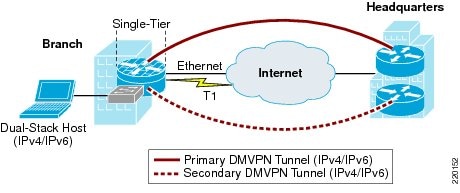
In the single-tier profile described in this document, a single ISR is used to provide WAN connectivity via a T1 to an Internet Service Provider (ISP). This T1 is used as the primary link to the headquarters (HQ) site. For WAN redundancy, a backup connection is made via Asymmetric Digital Subscriber Line (ADSL). The single-tier uses what is often referred to as the "Internet Deployment Model."

IPv4 connectivity to the HQ site is provided by IPv4 IPSec using Dynamic Multi-Point Virtual Private Network (DMVPN) technologies. IPv6 connectivity to the HQ site is provided by using manually configured tunnels (IPv6-in-IPv4) that are protected by IPv4 IPSec. The DMVPN and manually configured tunnels traverse the T1 link as the primary path and establish backup tunnels over the ADSL link. In the single-tier profile described in this document, IPv6 connectivity via the IPSec-protected manually configured tunnels is required because DMVPN does not yet support IPv6. When DMVPN supports IPv6 within the design, then no additional tunnel configurations are required and IPv4/IPv6 (dual-stack) is supported within the same DMVPN design.

All traffic leaving the branch traverses the VPN connections to the HQ, including the Internet bound traffic. Generally, Cisco does not recommend the use of split-tunneling at the branch site. If the customer requires split-tunneling, then Cisco recommends a careful analysis and testing of the routing and the security implications of such a deployment.


Note While it not covered in this document, it is also possible to establish native IPv6 IPSec tunnels from the ISR to the HQ site if the ISPs offers IPv6 support to the branch and HQ sites. In this document it is assumed that no IPv6 services are offered from the ISP to the branch site. More information on IPv6 IPSec configurations and support can be found at http://www.cisco.com/en/US/docs/ios/12_2t/ipv6/v6_ipsec.html.


LAN connectivity is provided by an integrated switch module (EtherSwitch Service Module). Dual-stack (running both IPv4 TCP/IP stack and IPv6 TCP/IP stack) is used on the VLAN interfaces at the branch.

In addition to all of the security policies in place at the HQ, local security for both IPv4 and IPv6 is provided by a common set of infrastructure security features and configurations in addition to the use of the Cisco IOS Firewall. QoS for IPv4 and IPv6 is integrated into a single policy.

The obvious disadvantage of the single-tier profile is the lack of router and switch redundancy. There is redundancy for the link to the Internet and the VPN connections to HQ. However, because there is a single integrated switch and single router, if either component fails then the site is completely disconnected from HQ. The dual-tier profile is the solution for customers requiring complete redundancy for all components (switches, routers, and HQ connections).

Solution Requirements

The solution requirements for the single-tier profile are:

IPv6 support on the Operating System (OS) of the host machines in the branch

IPv6/IPv4 dual-stack support on the Cisco ISR router

MLD-snooping support on the LAN switch - Integrated Network module (required if using IPv6 multicast)

Manually configured tunnel (IPv6-in-IPv4) support on the Cisco ISR router

Cisco IOS release and feature set that supports the Cisco IOS Firewall

Cisco IOS release and feature set that supports IPSec and DMVPN

Tested Components

Table 1 lists the components that were used and tested in the single-tier profile.

Table 1 Single Tier Profile Components 

Role
Hardware
Software

Router/firewall

Integrated Services router: 2800 Series and 3800 Series

Advanced Enterprise Services 12.4.(6)T2

Switch

EtherSwitch Service Module- NME-X-23ES-1G-P

Advanced IP Services 12.2(25)SEE

Host devices

Various laptops: IBM, HP, and Apple

Microsoft Windows XP SP2, Vista RC1, Apple Mac OS X 10.4.7, and Red Hat Enterprise Linux WS


Dual-Tier Profile

The dual-tier profile separates the routing and switching roles in the branch. Figure 2 shows a high-level view of the dual-tier profile.

Figure 2 Dual-Tier Profile

There are three primary differences between the single-tier and dual-tier profile:

Redundancy

Scalability

WAN transport

Redundancy—The dual-tier separates the LAN (switch) and WAN (router) components to offer fault-tolerance. A single switch or multiple switches can be used to provide LAN access in the branch. There are two WAN routers that are redundantly connected to the Frame Relay cloud, in addition to being redundantly connected to the LAN switch.

Scalability—The dual-tier scales better because the single-tier is pretty much an "everything but the kitchen sink" approach. In other words, every network role required in the branch is performed by the ISR. This is great for cost and manageability, but can limit availability and scalability. The larger the branch and the more services enabled on the ISR, the higher the risk gets for over-extending the performance capabilities of the ISR. This can be alleviated by using a more powerful ISR model, but this does not help with the fault-tolerance requirement. If additional LAN switches are needed at the branch then the Catalyst switches can be used together using the Cisco StackWise topology.

WAN Transport —The WAN connections in the dual-tier model described in this document use Frame Relay instead of the Internet with IPSec VPN. IPv6 is fully supported over Frame Relay in Cisco IOS and therefore there is no need to run tunnels of any kind between the branch and HQ. This is a great advantage for deployment and management because dual-stack is used all the way from the hosts in the branch LAN across the WAN and into the HQ network. This greatly eases the operational aspects of deploying IPv6 in the branch because no special tunnel considerations (such as availability, security, QoS, and multicast) need to be made. The dual-tier uses what is often referred to as the "private WAN model."

Security for the dual-tier is the same as the single-tier with the exception that both routers in the dual-tier provide security services and that no IPSec tunnels are used. The majority of branch deployments today use the dual-tier profile.

Solution Requirements

The solution requirements for the dual-tier profile are:

IPv6 support on the Operating System (OS) of the host machines in the branch

IPv6/IPv4 dual-stack support on the Cisco ISR routers

MLD-snooping support on the LAN switches (required if using IPv6 multicast)

Tested Components

The components that were used and tested in the dual-tier profile are listed in Table 2.

Table 2 Dual Tier Profile Components

Role
Hardware
Software

Router

Integrated Services router: 2800 Series and 3800 Series

Advanced Enterprise Services 12.4.(6)T2

Switch

Catalyst 3750

Advanced IP Services 12.2(25)SEE

Host devices

Various laptops: IBM, HP, and Apple

Microsoft Windows XP SP2, Vista RC1, Apple Mac OS X 10.4.7, and Red Hat Enterprise Linux WS


Multi-Tier Profile

As previously mentioned, the multi-tier profile is covered only at a high-level and is not covered in the implementation section. Future work is planned for testing and documenting IPv6 in the multi-tier profile. It is described here for completeness and to prompt you to think about some of the design aspects of IPv6 in a multi-tier type deployment.

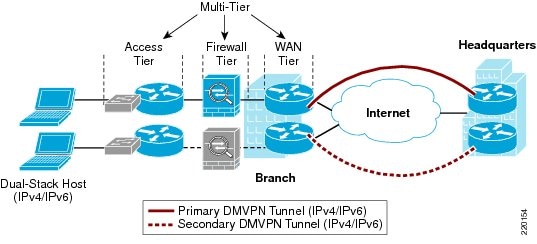
Figure 3 shows a high-level view of the multi-tier profile.

Figure 3 Multi-Tier Profile

Figure 3 shows how the tiers or roles are distributed. Several changes are evident with the multi-tier vs. the dual-tier:

WAN Tier—Connections to HQ are now over MPLS vs. Frame Relay. This is not required, but shown as an alternative.

Firewall Tier—Firewall services are now separated from the WAN routers. The Cisco ASA 5500 series is shown here and is providing stateful firewall services for both IPv4 and IPv6. The second ASA (shown in the figure as (subdued) grey) is in stateful failover mode. In a stateful failover configuration, only one ASA is active at a time.

Access Tier—The access tier is used for internal service and VLAN termination for the LAN tier. The access tier is like a campus distribution layer in many ways.

LAN Tier—The LAN tier is the same as with the dual-tier LAN switch. There are just more of them to account for the larger scale requirements that are most likely found in a larger branch.

Solution Requirements

The solution requirements for the multi-tier profile are:

IPv6 support on the Operating System (OS) of the host machines in the branch

IPv6/IPv4 dual-stack support on the Cisco ISR routers

MLD-snooping support on the LAN switches (required if using IPv6 multicast)

Cisco ASA Software version 7.0 and later

Tested Components

Testing and documentation is planned for IPv6 in a multi-tier profile. For updates, periodically refer to http://www.cisco.com/en/US/products/ps6553/products_ios_technology_home.html.

General Considerations

There are some general considerations that apply to both deployment profiles described in the implementation sections of this document. This section describes the general considerations to take into account when deploying IPv6 in a branch network, regardless of the deployment profile being used. If a specific consideration should be understood, then the specific profile is called out, along with the consideration for that profile. Also, the specific configurations for any profile-specific considerations can be found in that profile's implementation section.

Both branch IPv6 profiles described in this document leverage the existing Cisco branch network design best practices as the foundation for all aspects of the deployment. The IPv6 components of the profiles are deployed in the same way as IPv4 whenever possible. When the same or similar features are not available for IPv6 as for IPv4, alternatives are used. In some cases, no alternatives are available and a reference for where to track feature support is given.

It is critical to understand the Cisco branch best practices recommendations before deploying the IPv6 in the branch profiles described in this document. The Cisco branch design best practice documents can be found under the "Branch Office" and "WAN" sections at http://www.cisco.com/en/US/netsol/ns742/networking_solutions_program_category_home.html.


Note The applicable commands in each section below are in red text.


Addressing

As previously mentioned, this document is not an introductory document and does not describe the basics of IPv6 addressing. However, it is important to describe a few addressing considerations for the network devices.

In most cases, the use of a /64 prefix on point-to-point (P2P) links is just fine. IPv6 was designed to have a large address space and even with the poor address management in place, the customer should not experience address constraints.

Some network administrators think that a /64 prefix for P2P links is a waste of time. There has been quite a bit of discussion within the IPv6 community about the practice of using longer prefixes for P2P links. For those network administrators who want to more tightly control the address space, then it is safe to use a /126 prefix on P2P links in much the same was as /30 is used with IPv4.

RFC 3627 describes the reasons why the use of a /127 prefix is harmful and should be discouraged. For more information, refer to http://www.ietf.org/rfc/rfc3627.txt.

In general, Cisco recommends using either a /64 or /126 on P2P links. There are efforts underway within the IETF to better document the address assignment guidelines for varying address types and prefix links. IETF work within the IPv6 operations working group can be tracked at http://www.ietf.org/html.charters/v6ops-charter.html.

The P2P configurations shown in this document use /64 prefixes. The assignment of user IPv6 addresses in the single and dual-tier profiles is done by advertising an IPv6 prefix (via an RA) on the router sub-interface for the VLAN where PCs are located. The options for DNS server and domain name are assigned using DHCP for IPv6. All other VLANs use stateless autoconfiguration alone with no use of options. More information can be found on IPv6 addressing services at the following URL: http://www.cisco.com/en/US/products/ps6441/products_installation_and_configuration_guides_list.html.

Physical Connectivity

Considerations for physical connectivity with IPv6 are the same as with IPv4 plus three additional elements:

One important factor for deployment of any new technology, protocol, or application is to ensure that there is a sufficient amount of bandwidth for both existing and new traffic. This issue is especially true with the branch because in many cases the connections to the WAN are low-speed links and the reliance on QoS to solve bandwidth problems goes only so far. Bandwidth requirements for IPv6 are outside the scope of this document because there are many variables to account for and should therefore be considered in a case-by-case analysis.

Understanding how IPv6 deals with Maximum Transmission Unit (MTU) on a link. This document is not meant to be an introductory document for basic IPv6 protocol operation or specifications, so Cisco recommends that you refer to the following links for more information on MTU and fragmentation in IPv6. A good starting point for understanding MTU and Path MTU Discovery (PMTUD) for IPv6 is with RFC 2460 and RFC 1981 at http://www.ietf.org/rfc/rfc2460.txt, http://www.ietf.org/rfc/rfc1981.txt.

Another aspect of MTU relates to the branch single-tier profile. When IPSec is used with GRE or manual tunnels it is important to account for how to adjust the MTU value on the routers to ensure that the router is not forced to perform fragmentation of the IPv4 traffic due to the IPSec header and the additional tunnel overhead. More information on this can be found in any of the IPSec design guides at http://www.cisco.com/en/US/tech/tk583/tk372/tech_design_guides_list.html.

IPv6 over Wireless LANs—IPv6 should operate correctly over WLAN Access Points in much the same way as IPv6 operates over Layer-2 switches. However, there are considerations to IPv6 with WLAN environments such as managing WLAN devices (APs and controllers) via IPv6 and controlling IPv6 traffic via AP or controller-based QoS, VLANs and ACLs. IPv6 must be supported on the AP and/or controller devices in order to take advantage of these more intelligent services on the WLAN devices.

It is important to point out that Cisco supports the use of IPv6-enabled hosts that are directly attached to Cisco IP phones ports. These IP phone ports are switch ports and operate in much the same way as plugging the host directly into a Catalyst Layer 2 switch.

In addition to the previous considerations, Cisco recommends that a thorough analysis of the existing traffic profiles, memory and CPU use on both the hosts and network equipment and also the Service Level Agreement (SLA) language be completed prior to implementing any of the IPv6 models described in this document.

VLANs

VLAN considerations for IPv6 are the same as for IPv4. When dual-stack configurations are used then both IPv4 and IPv6 traverse the same VLAN. The use of Private VLANs is not included in any of the deployment profiles described in this document and it was not tested. The use of Private VLANs will be included in future IPv6 documents.

The use of IPv6 on data VLANs that are trunked along with Voice VLANs (behind IP phones) is fully supported. For the current VLAN design recommendations, refer to the Cisco branch-LAN design best practice documents at http://www.cisco.com/en/US/netsol/ns816/networking_solutions_program_home.html.

Routing

Choosing an IGP to run in the campus network is based on a variety of factors; platform capabilities, IT staff expertise and the size of network are just a few. In this document the IGP for both IPv4 and IPv6 is EIGRP. OSPFv2 for IPv4 and OSPFv3 for IPv6 can be used also.

As previously mentioned, every effort to implement the current Cisco branch design best practices has been made. Both the IPv4 and IPv6 IGPs have been tuned according to the current best practices for the branch. It should be one of the top priorities of any network design to ensure that the IGPs are tuned to provide a stable, scalable and fast converging routing protocol.

The implementation sections show the EIGRP tuning in accordance with the current Cisco branch recommendations.

EIGRP has been configured to provide authentication for both IPv4 and IPv6 adjacencies and updates.

High Availability

There are many aspects of High-Availability (HA) that are not applicable to or are outside the scope of this document. Many of the HA requirements and recommendations are met by leveraging the existing Cisco branch design best practices. The primary HA components described in this document are:

Redundant WAN connections—In the single-tier profile, the primary WAN connection is a T1 to the ISP and the secondary is an ADSL connection to another ISP. However, both of these links come from only one ISR router (branch router). In the dual-tier profile, each of the two branch ISR routers has a Frame Relay connection to the Private WAN.

Redundant routing and forwarding paths—This is accomplished by leveraging EIGRP for IPv4 and IPv6. In some cases, Equal Cost Multi-Path (ECMP) is used and in other cases (IPSec GRE and manual tunnels), one path is preferred over another, but the secondary path is available for redundancy.

High-availability of the first-hop gateways—This level of HA applies only to the dual-tier profile (single-tier has only one router). HSRPv2 for IPv4 and IPv6 is used to provide first-hop gateway redundancy in the dual-tier. Cisco also supports GLBP for IPv4 and IPv6.

QoS

Cisco recommends that QoS policies be implemented application or service-dependent instead of protocol (IPv4 or IPv6) dependent. Basically, if the existing QoS policy has specific classification, policing, and queuing for an application then that policy should treat the IPv4 and IPv6 traffic for that application equally.

The key consideration as far as Modular QoS CLI (MQC) is concerned is the removal of the ip keyword in the QoS match and set statements when IPv6 QoS is required. Modification in the QoS syntax to support IPv6 and IPv4 allows for a new configuration criteria (see Table 3).

Table 3 Qos Syntax Modifications

IPv4-Only QoS Syntax
IPv4/IPv6 QoS Syntax

match ip dscp

match dscp

match ip precedence

match precedence

set ip dscp

set dscp

set ip precedence

set precedence


There are QoS features that work for both IPv6 and IPv4, and require no modification to the CLI (such as WRED, policing, and WRR).

The implementation section for each profile does not go into great detail on QoS configuration as far as the definition of classes for certain applications, the associated mapping of DSCP values, and the bandwidth and queuing recommendations. The section, Configuration Examples contains the full configurations for IPv4 and IPv6 QoS used in the single and dual-tier profiles.

Cisco has an extensive collection of QoS recommendations for the branch and you are encouraged to seek guidance from the CCO documentation and also the Cisco Press book "End-to-End QoS Network Design." Refer to Recommended Reading to find out more about Cisco branch QoS recommendations and Cisco Press books.

Security

Many of the common threats and attacks on existing IPv4 campus networks also apply to IPv6. Unauthorized access, spoofing, routing attacks, viruses, worms, DoS, and man-in-the-middle attacks are just a few that plague both IPv4 and IPv6.

There are many new threats with IPv6 that do not exist with IPv4 or they operate differently from IPv4. There are inherent differences in how IPv6 handles neighbor and router advertisement and discovery, headers, and even fragmentation. Based on all of these variables and possibilities, IPv6 security is a very involved topic in general and detailed security recommendations and configurations are outside the scope of this document. There are numerous efforts both within Cisco and the industry to identify, understand, and resolve IPv6 security threats. This document points out some possible areas to address within the branch and gives basic examples of how to provide protection of IPv6 dual-stack and tunneled traffic.


Note The examples given in this document are not meant to be recommendations or guidelines, but rather points to stimulate a careful analysis of existent security policies and their extension to cover IPv6 in the campus.


General security considerations for network device protection that apply to both branch profiles are as follows:

Make reconnaissance more difficult through proper address planning for campus switches:

Addressing of branch network devices (switches and router) should be well thought out and planned. Common recommendations are to devise an addressing plan so that the 64-bit interface-ID of the router is a value that is random across all of the devices. An example of a bad interface-ID for a device would be if VLAN 2 had an address of 2001:db8:cafe:2::1/64 and VLAN 3 had an address of 2001:db8:cafe:3::1/64 where ::1 is the interface-ID of the router. This is easily guessed and allows for an attacker to quickly understand the common addressing for the branch infrastructure devices. A better choice would be to randomize the interface-ID of all of the network devices in the branch. Using the previous VLAN 2 and VLAN 3 examples, a new address can be constructed by using an address like 2001:db8:cafe:2::a010:f1a1 for VLAN 2 and 2001:db8:cafe:3::c801:167a for VLAN 3 where "a010:f1a1" is the interface-ID of VLAN 2 for the router.

The addressing consideration described here introduces real operational challenges. For the sake of easing operational management of the network devices and addressing, you should balance the security aspects of randomizing the interface-IDs with the ability to deploy and manage the devices via the randomized addresses.

Controlling management access to the branch routers and switches:

All of the branch routers and switches for each profile have configurations in place to provide management access protection to the devices. All routers have loopback interfaces configured for management and routing purposes. The IPv6 address for the loopback interfaces uses the previously mentioned addressing approach of avoiding well-known interface-ID values. In this example the interface-ID is using "::bad1:a001."

interface Loopback0
ipv6 address 2001:DB8:CAFE:1000::BAD1:A001/128
no ipv6 redirects

To more tightly restrict access to a particular switch/router via IPv6, an ACL is used to permit access to the management interface (line vty) by way of the loopback interface. The permitted source network is from the enterprise IPv6 prefix. To make ACL generation more scalable for a wide range of network devices, the ACL definition can permit the entire enterprise prefix as the primary method for controlling management access to the device instead of filtering to a specific interface on the device. The IPv6 prefix used in this enterprise site (for example only) is 2001:db8:cafe::/48.

ipv6 access-list MGMT-IN
remark Permit MGMT only to Loopback0
permit tcp 2001:DB8:CAFE::/48 host 2001:DB8:CAFE:1000::BAD1:A001
deny ipv6 any any log-input
!
line vty 0 4
session-timeout 3 
access-class MGMT-IN-v4 in
password 7 08334D400E1C17
ipv6 access-class MGMT-IN in										#Apply IPv6 ACL to restrict access
logging synchronous
login local
exec prompt timestamp
transport input ssh										#Accept access to VTY via SSH

Controlling access via HTTP—At the time of writing this document, Cisco IOS does not support the use of IPv6 HTTP ACLs to control access to the device. This is very important because switches and routers that currently use "ip http access-class" ACLs for IPv4 do not have the same level of protection for IPv6. This means that subnets or users who were previously denied access via HTTP/HTTPS for IPv4 now have access to the switch or router via IPv6.

Control Plane Policing (CoPP)—CoPP protects the router by preventing DoS or unnecessary traffic from negatively impacting CPU resources. Priority is given to important control plane/management traffic. The configuration of CoPP is based on a wide variety of factors and no single deployment recommendation can be made as the specifics of the policy are determined on a case-by-case basis.

More information on CoPP can be found at http://www.cisco.com/en/US/docs/ios/12_3t/12_3t4/feature/guide/gtrtlimt.html.

Controlling ingress traffic from the branch LAN—Filter which prefixes are allowed to source traffic. This is most commonly done on ingress on the LAN or sub-interface on the branch router. Controlling IPv6 traffic based on source prefix can help protect the network against basic spoofing.

The following example shows a basic ACL for the dual-tier profile - applied ingress on a branch router's LAN interface:

ipv6 access-list DATA_LAN-v6
remark PERMIT ICMPv6 PACKETS FROM HOSTS WITH PREFIX 2001:DB8:CAFE:2100::/64
permit icmp 2001:DB8:CAFE:2100::/64 any
remark PERMIT IPv6 PACKETS FROM HOSTS WITH PREFIX 2001:DB8:CAFE:2100::64
permit ipv6 2001:DB8:CAFE:2100::/64 any
remark PERMIT ALL ICMPv6 PACKETS SOURCED BY HOSTS USING THE LINK-LOCAL PREFIX
permit icmp FE80::/10 any
remark PERMIT HSRPv2 FOR IPv6 FROM OTHER BRANCH ROUTER ON LAN SEGMENT
permit udp any any eq 2029
remark PERMIT DHCPv6 ALL-DHCP-AGENTS REQUESTS FROM HOSTS
permit udp any eq 546 any eq 547
remark PERMIT ALL PIM (103) MESSAGES FROM OTHER BRANCH ROUTER ON LAN SEGMENT
permit 103 FE80::/10 any
remark DENY ALL OTHER IPv6 PACKETS AND LOG
deny ipv6 any any log-input 
!
interface FastEthernet0/0.100
 description DATA VLAN for PCs
 ipv6 traffic-filter DATA_LAN-v6 in

Caution Cisco IOS IPv6 ACLs contain implicit permit entries for IPv6 neighbor discovery. If deny ipv6 any any is configured, then the implicit neighbor discovery entries are overridden. It is important that if a manually configured catch-all deny statement is used for logging purposes then the following two permit entries must be added back in: permit icmp any any nd-na and permit icmp any any nd-ns.

In the previous DATA_LAN-v6 example, a more permissive entry (permit icmp FE80::/16 any) is made to account for the neighbor discovery requirement and any other ICMPv6 services that are needed on the interface. This is a wide-open ACL entry that is permitting all ICMPv6 traffic, which is probably not a great idea because there are many known and unknown ICMPv6-based threats that need to be considered. There are RFCs, drafts, and IPv6 deployment books that specifically describe the various ICMPv6 types that should and should not be blocked. Refer to Recommended Reading for links to the IETF and Cisco Press book that describes the filtering of ICMPv6 packets.

IPv6 Stateful Firewall Services—Firewalls provide a stateful security inspection for IPv6 traffic entering or leaving a branch network. At the time of writing this document, the Cisco IOS Firewall for IPv6 has fewer features than that of IPv4. Specifically, Advanced Application Inspection and Control does not yet support IPv6.

Blocking the use of Microsoft Teredo—Teredo is used to provide IPv6 support to hosts that are located behind Network Address Translation (NAT) gateways. Teredo introduces several security issues that need to be thoroughly understood. Until well-defined security recommendations can be made for Teredo in branch networks, you might want to ensure that Teredo is disabled on Microsoft Windows XP SP2 and that Vista is configured to disable Teredo at the branch. As a backup precaution, you might want to consider configuring ACLs (this can be done at the branch router or further upstream, such as at the border routers) to block UDP port 3544 in order to prevent Teredo from establishing a tunnel outside of the enterprise network. Information on Teredo can be found at http://www.microsoft.com/technet/network/ipv6/teredo.mspx.

Disabling unused services—Many services, such as HTTP server, are supported for IPv4 and IPv6. Enabling or disabling these services generally applies to both protocols. Refer to References for the most common router and switch services that should be disabled.

More information on IPv6 security can be found in References. Also, IPv6 ACL and firewall configuration details can be found at http://www.cisco.com/en/US/docs/ios/12_2t/ipv6/v6_tffw.html.

Multicast

IPv6 multicast is an important service for any enterprise network design. One of the most important factors to IPv6 multicast deployment is to ensure that host/group control is handled properly in the branch LAN. Multicast Listener Discovery (MLD) in IPv6 is the equivalent to Internet Group Management Protocol (IGMP) in IPv4. Both are used for host multicast group membership control. MLD-snooping is the ability to control the distribution of multicast traffic only to the ports that have listeners. Without it, multicast traffic meant for only a single receiver (or group of receivers) would be flooded to all ports on the branch LAN switch belonging to the same VLAN. In the branch LAN it is important that the switches support MLD-snooping for MLD version 1 and/or version 2.


Note At the time of writing this document, there were very few host implementations of MLDv2. Various Linux and BSD implementations support MLDv2 as does Microsoft Windows Vista. MLDv2 is important in PIM-SSM-based deployments. The use of MLDv2 with PIM-SSM is an excellent design combination for a wide variety of IPv6 multicast deployments.


Today, Cisco IOS supports the following PIM implementations: PIM-SM, PIM-BSR, PIM-SSM, Bidirectional PIM, Embedded-RP, and Multiprotocol BGP for the IPv6 Multicast Address Family.

In this document, IPv6 multicast-enabled applications are supported in both branch profiles. The multicast-enabled applications tested in this design are: Windows Media Services and VLC (VideoLAN Media client) using Embedded-RP and PIM-SSM groups. The multicast sources are running on Microsoft Windows Server 2003, Longhorn and Red Hat 4.0 servers located in the HQ data center.

There are several documents on CCO and within the industry that describe IPv6 multicast in detail. Other than generic references to the commands that are used to enable IPv6 multicast and requirements for Embedded-RP definition, no other configuration notes are made in this document. For more information, refer to the following URLs:

Cisco IPv6 Multicast:

http://www.cisco.com/en/US/technologies/tk648/tk828/tk363/technologies_white_paper0900aecd8014d6dd.html.

Cisco IOS IPv6 Multicast Configuration:

http://www.cisco.com/en/US/tech/tk828/technologies_white_paper09186a0080203f7a.shtml

Management

Management for IPv6 is under development and has a long way to go. Many of the traditional management tools used today also support IPv6. In this document the only considerations for management of the branch network are related to basic control of management services (Telnet, SSH, and SNMP). All of the IPv6-enabled devices in the two branch profiles described are manageable over IPv6 via the previously mentioned services except SNMP. At the time of writing this document, the Catalyst switches described (Integrated switch module and 3750) do not yet support SNMP over IPv6 transport. However, the management of IPv6-specific MIBs/Traps/Informs is supported on the Catalyst platforms using SNMP transport over IPv4. All Cisco ISRs support SNMP over IPv6 transport.

The deployment of SNMP for IPv6 is the same as with IPv4. In the branch profiles described in this paper SNMPv3 (AuthNoPriv) is used to provide polling capabilities for the Cisco NMS servers located in the HQ data center. Here is an example of the SNMPv3 configuration used in the branch routers in this document:

snmp-server contact John Doe - ipv6rocks@cisco.com
snmp-server group IPv6-ADMIN v3 auth write v1default
snmp-server user jdoe IPv6-ADMIN v3 auth md5 cisco1234

If information needs to be sent to a Cisco NMS server then an SNMP host can be defined. The host can be defined to send SNMP information over IPv4 and/or IPv6:

snmp-server host 2001:DB8:CAFE:11:2E0:81FF:FE2C:9332 version 3 auth jdoe

Another area of management that you must thoroughly research is that of address management. Anyone who analyzed IPv6 even at an elementary level understands the size and potential complexity of deploying and managing the IPv6 address space. The process of assigning large hexadecimal addresses to many network devices should, at some point, be automated or at least made more user-friendly than it is today. There are several efforts underway within the industry to provide recommendations and solutions to the address management issues. Cisco is in the forefront of this effort.

Today, one way to help with the deployment of address prefixes on a Cisco ISR is through the use of the general prefix feature. The general prefix feature allows the customer to define a prefix or prefixes in the global configuration of the router with a user-friendly name. That user-friendly name can be used on a per-interface basis to replace the usual IPv6 prefix definition on the interface. Following is an example of how to use the general prefix feature:

Define the general prefix:

2801-br1-1(config)# ipv6 general-prefix ESE-BR-1 2001:DB8:CAFE::/48

Configure the general prefix named "ESE-BR-1" on a per-interface basis:

2801-br1-1(config-if)# ipv6 address ESE-BR-1 ::1100:0:0:BAD1:A001/64

Verify that the general prefix was correctly assigned to the interface:

2801-br1-1# show ipv6 interface g1/0.100
GigabitEthernet1/0.100 is up, line protocol is up
  IPv6 is enabled, link-local address is FE80::217:94FF:FE90:2829 
  No Virtual link-local address(es):
  Description: DATA VLAN for Computers
  Global unicast address(es):
    2001:DB8:CAFE:1100::BAD1:A001, subnet is 2001:DB8:CAFE:1100::/64

More information on the general prefix feature can be found at the Cisco IOS IPv6 documentation page at http://www.cisco.com/en/US/docs/ios/ipv6/configuration/guide/ip6-roadmap.html.

Cisco supports the management of IPv6-enabled network devices via a variety of Network Management Products to include DNS, DHCPv6, device management and monitoring and also network management, troubleshooting and reporting. More information on the various Cisco Network Management solutions can be found at http://www.cisco.com/en/US/netsol/ns742/networking_solutions_program_category_home.html.

Scalability and Performance

This document is not meant to analyze scalability and performance information for the various platforms tested. The coverage of scale and performance is more focused on general considerations when planning and deploying IPv6 in the branch vs. a platform-specific view.

In general, you should understand the link, memory, and CPU use of the existing branch network devices. If any of these aspects are already stressed then adding IPv6 or any new technology, feature or protocol into the design is a recipe for disaster.

Scalability and Performance considerations for the branch network devices:

It is common to see in IPv6 implementations a change in traffic utilization ratios on the branch network links. As IPv6 is deployed, IPv4 traffic utilization is very often reduced as users leverage IPv6 as the transport for applications that were historically IPv4-only. There is often a slight increase in overall network utilization which usually derives from control traffic for routing and also tunnel overhead (single-tier) when manually configured tunnels are used.

ARP/Neighbor cache: One of the primary scalability considerations is that of running two protocols on the router. The branch LAN router has to track both IPv4 and IPv6 neighbor information. Similar to ARP in IPv4, neighbor cache exists for IPv6. The primary consideration here is that with IPv4 there is usually a 1-to-1 mapping of IPv4 address-to-MAC address, but with IPv6 the host can have several mappings for multiple IPv6 addresses, such as link-local, unique-local, and multiple Global addresses), to a single MAC address in the routers neighbor cache. Following is an example of ARP and neighbor cache entries on a Cisco ISR located in the branch for a host with the MAC address of "0014.c2e1.e679."

ARP entry for the host in the branch:

Internet  10.124.2.4           2   0014.c2e1.e679  ARPA   FastEthernet0/0.100

IPv6 Neighbor Cache entry for the host in the branch:

IPv6 Address 	Age Link-layer Addr State Interface
2001:DB8:CAFE:2100:DDD6:5CC5:3178:F038      	0 0014.c2e1.e679  REACH Fa0/0.100
FE80::D48A:B1B6:8861:812C                  	 0 0014.c2e1.e679  DELAY Fa0/0.100 

The IPv6 neighbor cache shows that there are two entries listed for the host. The first address is a global IPv6 address (optional) that is assigned by DHCP for IPv6 (could also be statically defined or assigned via stateless autoconfiguration) and the second address is the link-local address (mandatory) generated by the host. The number of entries can decrease to a minimum of one (link-local address) to a multitude of entries for a single host depending on the address types used on the host.

It is important to understand the neighbor table capabilities of the branch network devices being used to ensure that the tables are not being filled during regular network operation. Additional testing is planned to understand if recommendations should be made to adjust timers to age entries out faster, rate-limit neighbor advertisements and to better protect the branch routers against DoS from IPv6 neighbor discovery-based attacks.

Another consideration is with IPv6 multicast. As previously mentioned, it is important to ensure that MLD-Snooping is supported in the branch LAN switch when IPv6 multicast is used to ensure that IPv6 multicast frames at Layer 2 are not flooded to all of the ports.

Routing/forwarding—It is very important to understand the routing and forwarding capabilities of the branch routers. If the existing branch router is already running at high CPU and memory utilization rates for the handling of IPv4 routing tables and updates, then it is a bad idea to add IPv6 to the existing router.

ACL processing—It is imperative that the deployment of ACLs be carefully planned. IPv6 ACLs in the branch routers are used for QoS (classification and marking of ingress packets from the access layer), for security (controlling DoS, snooping and unauthorized access for ingress traffic in the access layer) and for a combination of QoS + Security to protect the control plane of the router from attack. The router can also provide Cisco IOS stateful firewalling services, IDS/IPS and voice services for IPv4 and new services for IPv6. Advanced services that are added to the branch router should support both IPv4 and IPv6. Performance will be impacted with all of these added services plus the newly enabled IPv6 configuration.

Single-Tier Implementation

This section focuses on the configuration of a single-tier deployment profile. The configurations are broken down into specific areas, such as WAN and LAN connectivity, IPSec, routing, and security. IPv4 configurations are shown when the deployment of IPv6 is dependent upon IPv4 for access, such as with manual tunnels with IPv4 IPSec. The full configuration for the single-tier router and switch can be found in Configuration Examples.

IPv4/IPv6 and IPSec tunnel configurations for the HQ routers are provided in Configuration Examples for reference only and are not explained in this document.

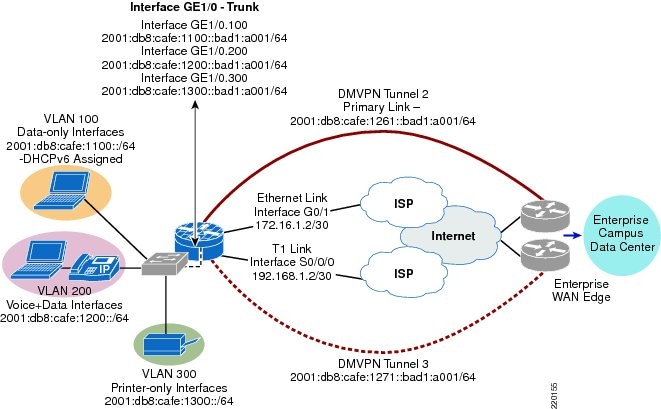
Network Topology

Figure 4 serves as a reference for all of the configurations for the single-tier profile. The figure shows the interface and addressing layout for the branch router and integrated switch. IPv4 addressing is shown only when IPv4 is required for connectivity for IPv6 (manual tunnels).

Figure 4 Single-Tier Profile - Interface/Addressing Layout

A single router (2800-br1-1) is used with an integrated switch (sw-br1-1) to provide WAN and LAN connectivity for the three VLANs in the branch.

WAN—The WAN consists of two connections: a T1 to one ISP and a ADSL link to another ISP, which is used for redundancy (the ADSL link in this document is actually a PPPoE link over one of the GigabitEthernet interfaces on the router). The tunnels used for connectivity over the Internet to the HQ site are as follows.

Tunnel 1 is used as the primary DMVPN tunnel for IPv4-only traffic

Tunnel 2 is used as the backup DMVPN tunnel for IPv4-only traffic

Tunnel 3 is used as the primary manual tunnel (IPv6-in-IPv4) for IPv6-only traffic

Tunnel 4 is used as the backup manual tunnel for IPv6-only traffic

All of the tunnels use IPv4 IPSec for tunnel protection.

LAN—The LAN portion of the single-tier uses an EtherSwitch Service Module. There are three VLANs in use in the single-tier profile:

VLAN 100—Used as the PC data VLAN. IPv4 addressing is provided by a local DHCP pool on the router. IPv6 addressing is provided by the branch router using the prefix assigned to the router sub-interface and DNS/domain name are provided by a local DHCP pool for IPv6.

VLAN 200—Used as the voice VLAN. IPv4 addressing is provided by a local DHCP pool on the router to include any voice-specific options (TFTP server). IPv6 addressing is provided by stateless autoconfiguration. IPv6 is enabled for planning purposes because there are no IPv6-enabled IP phones in this design yet.

VLAN 300 —Used as the printer VLAN. IPv4 addressing is provided by a local DHCP pool on the router. The Hewlett Packard Jet Direct cards located in the branch automatically receives an IPv6 address from the router interface via stateless autoconfiguration.


Note The EtherSwitch Service Module is basically a Catalyst 3750 that is on a module in the router. The single-tier profile was also tested with an external Catalyst 3750 just to ensure that no design issues where found.


WAN Configuration

The WAN configurations are not specific to IPv6, but are used to provide the underlying transport for the encrypted manual tunnels between the branch and HQ routers. The full WAN configuration for 2800-br1-1 are shown in Configuration Examples.

2800-br1-1

interface Serial0/0/0
 description to T1 Link Provider (PRIMARY)
 ip address 172.16.1.2 255.255.255.252
!
interface GigabitEthernet0/0
 description PPPoE for Backup
 pppoe enable
 pppoe-client dial-pool-number 1
 !
interface Virtual-Template1 
 no ip address
!
interface Dialer1
 description PPPoE to BB provider (BACKUP)
 ip address negotiated
 ip mtu 1400
 encapsulation ppp
 load-interval 30
 dialer pool 1
 dialer-group 1
 no cdp enable
 ppp authentication chap callin
 ppp chap hostname 2800-br1-1@cisco.com
 ppp chap password 7 095E4F071E0005 
! 
dialer-list 1 protocol ip permit

LAN Configuration

The LAN IPv6 configurations for 2800-br1-1 and sw-br1-1 follow. The configurations show the internal switch links between the router and the EtherSwitch module and also the interface and VLAN configurations on the switch itself. Also, the DHCP for IPv6 configuration is shown. The IPv6 DHCP pool is used for VLAN 100 (data-only).


Note On the Cisco Catalyst 3750, 3560 and EtherSwitch platforms it is required to enable the correct Switch Database Management (SDM) template to allow the TCAM to be used for different purposes. The sw-br1-1 switch has been configured (reload required) with the "dual-ipv4-and-ipv6" SDM template using the sdm prefer dual-ipv4-and-ipv6 default command.


For more information about the SDM prefer command and associated templates, refer to the following URL:
http://www.cisco.com/en/US/docs/switches/lan/catalyst3750/software/release/12.2_25_see/configuration/guide/swsdm.html.

2800-br1-1

ipv6 unicast-routing															#Globally enable IPv6 Unicast Routing
ipv6 cef															#Globally enable IPv6 CEF
!
ipv6 dhcp pool DATA_VISTA															#DHCP for IPv6 pool name
dns-server 2001:DB8:CAFE:10:20D:9DFF:FE93:B25D															#Primary IPv6 DNS server at HQ
 dns-server 2001:DB8:CAFE:10:51A1:5B1:4A85:B3DA															#Secondary IPv6 DNS server at HQ
 domain-name cisco.com															#DNS domain name passed to client

!
interface GigabitEthernet1/0
 description to INTERNAL SW-BR1-1
 ip address 1.1.1.1 255.255.255.0
!
interface GigabitEthernet1/0.100
 description DATA VLAN for Computers
 encapsulation dot1Q 100
 ipv6 address 2001:DB8:CAFE:1100::BAD1:A001/64													#Define the router IPv6 address 
													#for VLAN100. Prefix used by 
													#hosts in stateless
													#autoconfiguration
ipv6 nd other-config-flag													#Set flag in RA to instruct host 
													#how to obtain "other" 
													#information such as domain name 
													#and DNS server
ipv6 dhcp server DATA_VISTA													#Enables DHCP for IPv6 on this nterface

!
interface GigabitEthernet1/0.200
 description to Voice VLAN for IP Phones
 encapsulation dot1Q 200
 ipv6 address 2001:DB8:CAFE:1200::BAD1:A001/64
!
interface GigabitEthernet1/0.300
 description to Printer VLAN
 encapsulation dot1Q 300
 ipv6 address 2001:DB8:CAFE:1300::BAD1:A001/64
!

sw-br1-1

vtp domain ese_branch
vtp mode transparent
!
spanning-tree mode rapid-pvst
spanning-tree loopguard default
spanning-tree portfast bpduguard default
spanning-tree extend system-id
!
vlan internal allocation policy ascending
!
vlan 100
 name DATA
!
vlan 200
 name VOICE
!
vlan 300
 name PRINTERS
!
interface FastEthernet1/0/2
 description TRUNK to 2800-br1-1
 switchport trunk encapsulation dot1q
 switchport trunk allowed vlan 100,200,300
 switchport mode trunk
 load-interval 30
! 
interface FastEthernet1/0/3
 description PHONE + PC
 switchport access vlan 100
 switchport mode access
 switchport voice vlan 200
 load-interval 30
 spanning-tree portfast
 spanning-tree bpduguard enable
!
interface Vlan100
 description VLAN100 for PCs and Switch management
 ip address 10.124.1.126 255.255.255.128
 ipv6 address 2001:DB8:CAFE:1100::BAD2:F126/64																#IPv6 address used for mgmt on
																#sw-br1-1

IPSec and Manual Tunnel Configuration

The single-tier profile uses DMVPN for IPv4 (refer to Configuration Examples) and IPv4 IPSec to protect the manual tunnels for IPv6. When DMVPN or other dynamic VPN models (for example, VTI) support IPv6, the configurations can be combined to allow IPv4 and IPv6 within the same tunnel. This can be accomplished today using GRE, but not when doing multipoint GRE (mGRE).

The primary tunnel (Tunnel3) for IPv6 uses static-crypto maps. Both sides of the tunnel (branch and HQ) have statically defined public IPv4 addresses that are used for tunnel sources.

The secondary tunnel (Tunnel4) for IPv6 uses a static-crypto map on the branch and a dynamic crypto-map at the HQ router. The reason for this is because the branch backup tunnel uses the dialer1 interface when the primary T1 fails. The dialer1 interface receives an IPv4 address dynamically from the broadband provider in the same way ADSL/Cable subscribers do. Because of the dynamic address on the dialer, there is no way for the HQ VPN router to statically define a public IPv4 address for the branch router when using the dialer1 interface. Dynamic crypto maps solve the issue with the dynamically assigned address on the branch router's dialer1 interface.


Note This document does not describe how dynamic crypto maps work because they are applied to the HQ head-end VPN router, which is not described in this document, and they are not specific to IPv6. Configuration Examples shows the HQ head-end VPN router configurations for both the primary and secondary tunnels as they apply to the IPv6 and IPSec tunnel aspects of the branch design.


Refer to the Cisco IOS IPSec documentation and the "WAN IPSec VPN Design Guide" for more information on the IPSec command definitions.

Cisco IOS IPSec documentation: http://www.cisco.com/en/US/products/ps6635/products_ios_protocol_group_home.html

Cisco IPSec VPN design guides: http://www.cisco.com/en/US/tech/tk583/tk372/tech_design_guides_list.html

2800-br1-1

crypto isakmp policy 1													#Create ISAKMP policy
 encr 3des													#Encryption method
 authentication pre-share													#Pre-shared keys (passwords) used
crypto isakmp key CISCO address 172.17.1.3													#Pre-shared key of "CISCO" used with 
													#peer address of primary HQ IPSec 
													#VPN router
crypto isakmp key SYSTEMS address 172.17.1.4													#Pre-shared key of "SYSTEMS used 
													#with peer address of secondary HQ 
													#IPSec VPN router. The HQ router 
													#uses a null address for the key 
													#address because of the dialer1 
													#address assignment
crypto isakmp keepalive 10													#Dead Peer Detection (DPD) enabled
!
!
crypto ipsec transform-set HE1 esp-3des esp-sha-hmac 	#IPSec transform set that will
														 #be offered during negotiation
															#to support ESP/3DES and
													 		#integrity algorithm (user-
															#defined)
crypto ipsec transform-set HE2 esp-3des esp-sha-hmac 
!
!
crypto map IPv6-HE1 local-address Serial0/0/0														#Local source peer interface	
crypto map IPv6-HE1 1 ipsec-isakmp 	
set peer 172.17.1.3														#Set IPSec peer as primary HQ IPSec 
														#VPN router
 set transform-set HE1 	
 match address VPN-TO-HE1		 												#ACL that matches protocol 41 from 
														#branch to HQ IPSEC VPN router	
!
crypto map IPv6-HE2 local-address Loopback0
crypto map IPv6-HE2 1 ipsec-isakmp 
 set peer 172.17.1.4
 set transform-set HE2 
 match address VPN-TO-HE2
!
interface Tunnel3
 description IPv6 tunnel to HQ Head-end 1																	#Primary tunnel for IPv6
 no ip address
 load-interval 30
 ipv6 address 2001:DB8:CAFE:1261::BAD1:A001/64																	#IPv6 address for manual tunnel
 ipv6 mtu 1400																	#Lower MTU to account for tunnel 
																	#and IPSec overhead - Neither are  
																	#detected when host performs 
																	#PMTUD for IPv6
 tunnel source Serial0/0/0																	#T1 interface is tunnel source
 tunnel destination 172.17.1.3																	#Destination is primary HQ IPSec 
																	#router
tunnel mode ipv6ip																	#Tunnel mode is IPv6-in-IPv4 
																	#(Protocol 41)
!

interface Tunnel4
 description IPv6 tunnel to HQ Head-end 2																	#Secondary tunnel for IPv6
 no ip address
 load-interval 30
 ipv6 address 2001:DB8:CAFE:1271::BAD1:A001/64
 ipv6 mtu 1400
 tunnel source Loopback0																#Loopback used as source instead
																#of dialer1 because the dialer is
																#DHCP- assigned
tunnel destination 172.17.1.4																#Destination is secondary HQ
																#IPSec router
 tunnel mode ipv6ip
!
interface Loopback0																#Loopback used as source for
																#Tunnel4
 ip address 10.124.100.1 255.255.255.255

interface Serial0/0/0																#S0/0/0 used as source for
																#Tunnel3
 description to T1 Link Provider (PRIMARY)
 crypto map IPv6-HE1																#Apply IPSec VPN policy S0/0/0
!
interface Dialer1
 description PPPoE to BB provider (BACKUP)	
 crypto map IPv6-HE2																#Apply IPSec VPN policy to
																#Dialer1
!
!
ip access-list extended VPN-TO-HE1																#ACL for crypto-map to primary HE
permit 41 host 172.16.1.2 host 172.17.1.3																#Permit protocol 41 (IPv6) from 
																#S0/0/0 to primary HQ IPSec VPN 
																#router
ip access-list extended VPN-TO-HE2																#ACL for crypto-map to secondary
																#HE
permit 41 host 10.124.100.1 host 172.17.1.4																#Permit protocol 41 from Lo0 
																#(tunnel4 source) to secondary HQ  
																#IPSec VPN router

Routing

The IPv6 routing configuration for the single-tier profile is straightforward. The existing IPv4 routing configuration (static routes) for the ISP links are used to support the two manual tunnels for IPv6. EIGRP for IPv6 is used within the two manual tunnels and also the LAN interfaces to provide routing information to/from the HQ site and within the branch. The branch router is configured as an EIGRP stub router.

EIGRP Route Authentication (MD5)is used to protect the EIGRP routing updates. For more information on configuring EIGRP for IPv6, refer to the Cisco IOS IPv6 routing configuration page at http://www.cisco.com/en/US/products/ps6350/products_installation_and_configuration_guides_list.html.

2800-br1-1

ipv6 unicast-routing												#Enable IPv6 unicast routing (reminder only 
												#this was enabled in the previous LAN 
												#configuration section) 
!
key chain ESE												#Enable EIGRP Authentication key chain
 key 1
  key-string 7 111B180B101719
!
interface Tunnel3
 description IPv6 tunnel to HQ Head-end 1
 delay 500												#Manually adjust delay - This tunnel 
												#is primary
 ipv6 eigrp 1												#Enable EIGRP for IPv6 on tunnel
 ipv6 hold-time eigrp 1 35												#Adjust the hold time for EIGRP
 ipv6 authentication mode eigrp 1 md5												#Authentication type of MD5
 ipv6 authentication key-chain eigrp 1 ESE												#Enables authentication of EIGRP for 
												#IPv6 packets using key-chain "ESE"
!
interface Tunnel4
 description IPv6 tunnel to HQ Head-end 2
 delay 2000												#Adjust delay - This tunnel is 
												#secondary
 ipv6 eigrp 1
 ipv6 hold-time eigrp 1 35
 ipv6 authentication mode eigrp 1 md5
 ipv6 authentication key-chain eigrp 1 ESE
! 
interface Loopback0
 ipv6 eigrp 1
interface GigabitEthernet1/0.100
 description DATA VLAN for Computers
 encapsulation dot1Q 100
 ipv6 eigrp 1
!
interface GigabitEthernet1/0.200
 description to Voice VLAN for IP Phones
 encapsulation dot1Q 200
 ipv6 eigrp 1
!
interface GigabitEthernet1/0.300
 description to Printer VLAN
 encapsulation dot1Q 300
 ipv6 eigrp 1
!
ipv6 router eigrp 1													#Router configuration mode - process 1
 router-id 10.124.100.1 
 stub connected summary													#This branch is a stub
 no shutdown													#Process is shutdown by default - 
													#enable it
passive-interface GigabitEthernet1/0.100													#Do not attempt adjacencies out any 
													#interfaces except Tunnel3 and 4
 passive-interface GigabitEthernet1/0.200
 passive-interface GigabitEthernet1/0.300
 passive-interface Loopback0
!
ip route 0.0.0.0 0.0.0.0 Serial0/0/0													#Primary IPv4 static route used for 
														#DMVPN and encrypted manual tunnels 
ip route 0.0.0.0 0.0.0.0 Dialer1 200														#Backup IPv4 static route

sw-1-br1

ipv6 route ::/0 Vlan100 FE80::217:94FF:FE90:2829														#Default route out VLAN100 to the
														#link-local address of the 2800-
														#br1-1 VLAN100 interface

Security

The security configurations for IPv6 in the single-tier profile are very similar to the IPv4 configurations (refer to Configuration Examples). The focus of the security configuration for IPv6 is to protect the infrastructure (router and switch) and offer an additional line of defense for the branch site via an IPv6 stateful firewall.

The profiles described in this document are protected by a comprehensive security policy and design at the HQ site. However, the single-tier does use the Internet as a means of WAN connectivity and it is important to provide basic security at the local branch router in case of an Internet-based attack via the branch ISP links.


Note As previously mentioned, in this document there are no IPv6-enabled links directly to the ISP from the branch. All IPv6 connectivity is provided by the HQ site via the IPv4 IPSec tunnels. Future branch and WAN documents will describe native IPv6 IPSec connectivity in environments where the ISP offers IPv6 access services to the branch.


Figure 5 shows the placement of the various ACLs used in the single-tier profile.

Figure 5 Single-Tier Profile - Security ACL Placement

The ACL and IOS IPv6 firewall policies are applied to various interfaces in the single-tier profile. The ACL placement is summarized here:

The T1 and ADSL link use IPv4-based ACLs (refer to Configuration Examples for configurations) to permit packets used to establish the IPSec VPN tunnels between the enterprise HQ and the branch router and ICMP packets used for troubleshooting.

Tunnels 3 and 4 have IOS IPv6 firewall inspect policies applied on egress (outbound) towards the enterprise HQ site. These policies allow hosts at the branch site to establish outbound connections. Ingress (inbound) ACLs are used to deny outside initiated traffic and are also used by the firewall as a modification point for any established egress state entries. Basically, if a host at the branch establishes an outbound connection, the firewall enters that information into a state table and modifies the ingress ACL to permit traffic back in to the host only if it matches the state information. If it does not match, the packets are dropped. The configuration of the firewall entries on the tunnel interfaces is not a requirement. Many customers use very sophisticated security designs at the HQ site to protect both HQ and branch hosts. The use of an IOS IPv6 firewall in this profile is just another security layer for added protection.

Branch LAN interfaces can have an ingress ACL to permit traffic from the VLAN interfaces based on source prefix or even specific applications. This is optional. The LAN ACL configuration shown in the general security section of this document is an example of such an ACL.

Control access to the management plane of the branch router and switch. Narrow the access type to SSH and also create an ACL to allow management of the router and switch only from IPv6 prefixes within the HQ. The ACL can be more tightly defined to allow access only for a specific management prefix.

The following single-tier profile configurations are for the 2800-br1-1 router and sw-br1-1 switch.

2800-br1-1

ipv6 inspect one-minute high 2000
ipv6 inspect hashtable-size 2039
ipv6 inspect tcp max-incomplete host 100 block-time 0
ipv6 inspect name v6FW tcp														#Inspection profile for TCP,ICMP,FTP & UDP
ipv6 inspect name v6FW icmp
ipv6 inspect name v6FW ftp
ipv6 inspect name v6FW udp
!
interface Tunnel3
 ipv6 traffic-filter INET-WAN-v6 in														#ACL used by IOS FW for dynamic entries
 no ipv6 redirects
 no ipv6 unreachables
 ipv6 inspect v6FW out													#Apply firewall inspection for egress
													#traffic
 ipv6 virtual-reassembly													#Used by firewall to create dynamic ACLs and 
													#protect against various fragmentation
													#attacks
!
interface Tunnel4
 ipv6 traffic-filter INET-WAN-v6 in
 no ipv6 redirects
 no ipv6 unreachables
 ipv6 inspect v6FW out
 ipv6 virtual-reassembly
!
interface GigabitEthernet1/0.100
ipv6 traffic-filter DATA_LAN-v6 in												 #Filter permitted traffic coming from 
												 #VLANs - OPTIONAL
 no ipv6 redirects
 no ipv6 unreachables
 ipv6 virtual-reassembly
!
no ip http server
!
ipv6 access-list MGMT-IN											#Management ACL - Permit management access
											#for cafe::/48 prefix only to the router's
											#loopback
 remark permit mgmt only to loopback
 permit tcp 2001:DB8:CAFE::/48 host 2001:DB8:CAFE:1000::BAD1:A001
 deny ipv6 any any log-input
!
ipv6 access-list DATA_LAN-v6
remark PERMIT ICMPv6 PACKETS FROM HOSTS WITH PREFIX 2001:DB8:CAFE:1100::/64
permit icmp 2001:DB8:CAFE:1100::/64 any
remark PERMIT IPv6 PACKETS FROM HOSTS WITH PREFIX 2001:DB8:CAFE:1100::64
permit ipv6 2001:DB8:CAFE:1100::/64 any
remark PERMIT ALL ICMPv6 PACKETS SOURCED BY HOSTS USING THE LINK-LOCAL PREFIX
permit icmp FE80::/10 any
remark PERMIT DHCPv6 ALL-DHCP-AGENTS REQUESTS FROM HOSTS
permit udp any eq 546 any eq 547
remark DENY ALL OTHER IPv6 PACKETS AND LOG
deny ipv6 any any log-input 
!
ipv6 access-list INET-WAN-v6
 remark PERMIT EIGRP for IPv6
 permit 88 any any
 remark PERMIT PIM for IPv6
 permit 103 any any
 remark PERMIT ALL ICMPv6 PACKETS SOURCED USING THE LINK-LOCAL PREFIX
 permit icmp FE80::/10 any
 remark PERMIT SSH TO LOCAL LOOPBACK
 permit tcp any host 2001:DB8:CAFE:1000::BAD1:A001 eq 22
 remark PERMIT ALL ICMPv6 PACKETS TO LOCAL LOOPBACK
 permit icmp any host 2001:DB8:CAFE:1000::BAD1:A001
 remark PERMIT ALL ICMPv6 PACKETS TO TUNNEL3
 permit icmp any host 2001:DB8:CAFE:1261::BAD1:A001
 remark PERMIT ALL ICMPv6 PACKETS TO TUNNEL4
 permit icmp any host 2001:DB8:CAFE:1271::BAD1:A001
 remark PERMIT ALL ICMPv6 PACKETS TO DATA VLAN
 permit icmp any 2001:DB8:CAFE:1100::/64
 remark PERMIT ALL ICMPv6 PACKETS TO VOICE VLAN
 permit icmp any 2001:DB8:CAFE:1200::/64
 remark PERMIT ALL ICMPv6 PACKETS TO PRINTER VLAN
 permit icmp any 2001:DB8:CAFE:1300::/64
 remark PERMIT ALL IPv6 PACKETS TO DATA VLAN
 permit ipv6 any 2001:DB8:CAFE:1100::/64
 remark PERMIT ALL IPv6 PACKETS TO VOICE VLAN
 permit ipv6 any 2001:DB8:CAFE:1200::/64
 remark PERMIT ALL IPv6 PACKETS TO PRINTER VLAN
 permit ipv6 any 2001:DB8:CAFE:1300::/64
 deny ipv6 any any log

banner login ^C
Unauthorized access to this device and/or network is prohibited.
^C
line vty 0 4
 ipv6 access-class MGMT-IN in												#Apply management ACL
 transport input ssh												#Allow only SSH 
sw-br1-1
interface Vlan100
 ipv6 address 2001:DB8:CAFE:1100::BAD2:F126/64
!
ipv6 access-list MGMT-IN												#Management ACL - Permit management access
												#for cafe::/48 prefix only to the switch 
												#VLAN100 interface
 permit tcp 2001:DB8:CAFE::/48 host 2001:DB8:CAFE:1100::BAD2:F126
 deny ipv6 any any log-input
!
banner login ^C
Unauthorized access to this device and/or network is prohibited.
^C
!
line vty 0 4
 ipv6 access-class MGMT-IN in
 transport input ssh

QoS

The QoS configurations for the single-tier profile are mostly the same for IPv4 and IPv6. In the single-tier branch profile, Network-Based Application Recognition (NBAR) is configured for IPv4 applications. At the time of writing this document, NBAR does not support IPv6 applications, but support for IPv6 is planned. Because of the lack of NBAR awareness of IPv6, ACLs are used to statically define the application type and map the ACL match to a class-map used for setting the appropriate DCSP value.

The following configurations are meant to show where the QoS policies are applied for IPv6 and any specific match/set modifications. The configuration is not annotated because the commands and policy definitions follow Cisco QoS recommended values and are outside the scope of this document. Configuration Examples includes the full QoS configurations for all routers and switches. The Cisco QoS Design Guide can be found at the following URL: http://www.cisco.com/en/US/docs/solutions/Enterprise/WAN_and_MAN/QoS_SRND/QoS-SRND-Book.html.

2800-br1-1

class-map match-any BRANCH-BULK-DATA
 match access-group name BULK-DATA-APPS
 match access-group name BULK-DATA-APPS-V6
!
class-map match-any BRANCH-TRANSACTIONAL-DATA
 match protocol citrix
 match protocol ldap
 match protocol sqlnet
 match protocol http url "*cisco.com"
 match protocol custom-01
 match access-group name BRANCH-TRANSACTIONAL-V6
class-map match-any BRANCH-MISSION-CRITICAL
 match access-group name MISSION-CRITICAL-SERVERS
 match access-group name MISSION-CRITICAL-V6
class-map match-any BRANCH-NET-MGMT
 match protocol snmp
 match protocol syslog
 match protocol telnet
 match protocol nfs
 match protocol dns
 match protocol icmp
 match protocol tftp
 match access-group name BRANCH-NET-MGMT-V6
class-map match-any BRANCH-SCAVENGER
 match protocol napster
 match protocol gnutella
 match protocol fasttrack
 match protocol kazaa2
 match access-group name BRANCH-SCAVENGER-V6
!
policy-map BRANCH-WAN-EDGE
 class NET-MGMT
  bandwidth percent 2
 class MISSION-CRITICAL-DATA
  bandwidth percent 15
  random-detect dscp-based
 class TRANSACTIONAL-DATA
  bandwidth percent 12
  random-detect dscp-based
 class BULK-DATA
  bandwidth percent 4
  random-detect dscp-based
 class SCAVENGER
bandwidth percent 1
!
policy-map BRANCH-LAN-EDGE-IN
 class BRANCH-MISSION-CRITICAL
  set dscp 25
 class BRANCH-TRANSACTIONAL-DATA
  set dscp af21
 class BRANCH-NET-MGMT
  set dscp cs2
 class BRANCH-BULK-DATA
  set dscp af11
 class BRANCH-SCAVENGER
  set dscp cs1
 class WORMS
   drop
 class class-default
set dscp default
!
interface GigabitEthernet0/0
 description PPPoE for Backup
 max-reserved-bandwidth 100												#Overrides the default 75% BW limit.
												#Required when the total sum of all QoS BW
												#statements exceeds 75%
 service-policy output BRANCH-WAN-EDGE
!
interface GigabitEthernet1/0.100
 description DATA VLAN for Computers
 service-policy input BRANCH-LAN-EDGE-IN		
 service-policy output BRANCH-LAN-EDGE-OUT
!
interface GigabitEthernet1/0.200
 description to Voice VLAN for IP Phones
 service-policy output BRANCH-LAN-EDGE-OUT
!
interface GigabitEthernet1/0.300
 description to Printer VLAN
 service-policy input BRANCH-LAN-EDGE-IN
 service-policy output BRANCH-LAN-EDGE-OUT
!
interface Serial0/0/0
 description to T1 Link Provider (PRIMARY)
 max-reserved-bandwidth 100
 service-policy output BRANCH-WAN-EDGE
!
interface Virtual-Template1 
 max-reserved-bandwidth 100
 service-policy output BRANCH-WAN-EDGE
!
interface Dialer1
 description PPPoE to BB provider (BACKUP)
 max-reserved-bandwidth 100
 service-policy output BRANCH-WAN-EDGE
!
ipv6 access-list BULK-DATA-APPS-V6
 permit tcp any any eq ftp
 permit tcp any any eq ftp-data
 permit tcp any any eq pop3
 permit tcp any any eq 143
!
ipv6 access-list BRANCH-TRANSACTIONAL-V6
 remark Microsoft RDP traffic-mark dscp af21
 permit tcp any any eq 3389
 permit udp any any eq 3389
!
ipv6 access-list MISSION-CRITICAL-V6
 remark Data-Center traffic-mark dscp 25
 permit ipv6 any 2001:DB8:CAFE:10::/64
 permit ipv6 any 2001:DB8:CAFE:11::/64
!
ipv6 access-list BRANCH-SCAVENGER-V6
 remark Gnutella, Kazaa, Doom, iTunes traffic-mark dscp cs1
 permit tcp any any range 6346 6347
 permit udp any any range 6346 6347
 permit tcp any any eq 1214
 permit tcp any any eq 666
 permit udp any any eq 666
 permit tcp any any eq 3689
 permit udp any any eq 3689
!
ipv6 access-list BRANCH-NET-MGMT-V6
 remark Common management traffic plus vmware console-mark dscp cs2 
 permit udp any any eq syslog
 permit udp any any eq snmp
 permit tcp any any eq telnet
 permit tcp any any eq 22
 permit tcp any any eq 2049
 permit udp any any eq 2049
 permit tcp any any eq domain
 permit udp any any eq tftp
 permit tcp any any eq 902

Multicast

The configuration for IPv6 multicast in the single-tier profile is quite simple. IPv6 multicast design is outside the scope of this document and there are many options that can be selected for PIM, multicast availability and security. In this document, only basic configurations are shown for IPv6 multicast on the 2800-br1-1 router and sw-br1-1 switch. The configurations allow for PIM-SSM or Embedded-RP to be used. The IPv6 multicast streams originate in the data center at the HQ site.

sw-br1-1

ipv6 mld snooping									#Globally enable MLD snooping (see following note)

2800-br1-1

ipv6 multicast-routing									#Globally enable IPv6 multicast routing

The first thing to be aware of is the lack of CLI input required to enable IPv6 multicast when using PIM-SSM or Embedded-RP. If PIM-SSM is used exclusively then the only thing required to enable is "ipv6 multicast-routing" globally which automatically enables PIM on all IPv6-enabled interfaces. This is a dramatic difference from what is required with IPv4 multicast.


Note If PIM-SSM is used then the host is required to use MLDv2 and the branch switch should support MLDv2-Snooping. If the host or switch do not support MLDv2, a feature within Cisco IOS can be used to map MLDv1 reports to MLDv2 reports at the branch router. This is called SSM-Mapping. For more information, see the following URL: http://www.cisco.com/en/US/docs/ios/12_3t/12_3t2/feature/guide/gtssmma.html.

SSM-Mapping is not required in this document because the switches fully support MLDv2-Snooping.


In the previous example, the Layer-2 switch (sw-br1-1) needs to have IPv6 multicast awareness in order to control the distribution of multicast traffic only on ports that are actively listening. This is accomplished by enabling MLD-Snooping. With MLD-Snooping enabled on the switch and with IPv6 multicast routing enabled on the branch router it can be seen that sw-br1-1 can see 2800-br1-1as a locally attached multicast router.

sw-br1-1# show ipv6 mld snooping mrouter
Vlan    ports
----    -----
 100    Gi1/0/2(dynamic)
 200	  	Gi1/0/2(dynamic)	
 300	 	Gi1/0/2(dynamic)

When a group is active on the branch switch, information about the group can be displayed:

sw-br1-1# show ipv6 mld snooping address
Vlan      Group          Type        Version     Port List
-------------------------------------------------------------
100       FF35::1111      mld         v2         Gi1/0/2

On 2800-br1-1, information about PIM, multicast route, RPF and groups can be viewed in much the same was as with IPv4. Here is the output of an active group using PIM-SSM (FF35::1111). This stream is coming in from the HQ data center and going out the VLAN100 (2800-br1-1 G1/0.100) interface:

2800-br1-1# show ipv6 mroute									#show ipv6 pim topology can also be used

Multicast Routing Table
Flags: D - Dense, S - Sparse, B - Bidir Group, s - SSM Group, 
       C - Connected, L - Local, I - Received Source Specific Host Report,
       P - Pruned, R - RP-bit set, F - Register flag, T - SPT-bit set,
       J - Join SPT 
Timers: Uptime/Expires
Interface state: Interface, State

(2001:DB8:CAFE:11:2E0:81FF:FE2C:9332, FF35::1111), 00:01:28/00:03:10, flags: sTI
  Incoming interface: Tunnel3
  RPF nbr: FE80::230:F2FF:FE15:9C1B
  Immediate Outgoing interface list:
    GigabitEthernet1/0.100, Forward, 00:01:28/00:03:02

Dual-Tier Implementation

This section focuses on the configuration of the dual-tier profile. The configurations are broken down into specific areas, such as WAN and LAN connectivity, routing, and security. Unlike the single-tier profile, tunneling is not used in the dual-tier profile so the IPv4 configurations and addressing are not shown for any interfaces. The full configuration of the dual-tier routers and switch can be found in Configuration Examples.

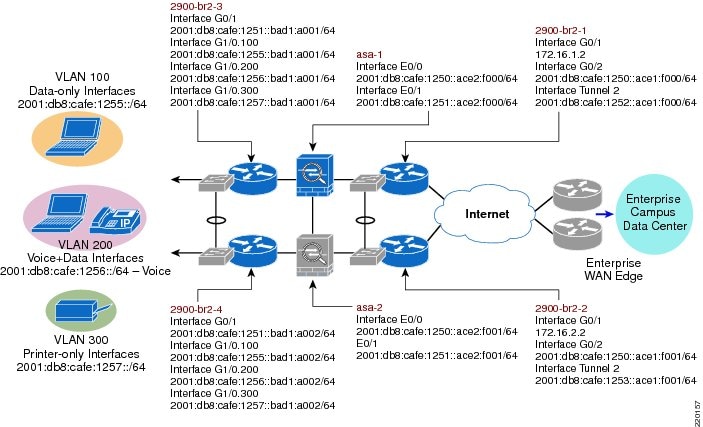
Network Topology

Figure 6 serves as a reference for all of the configurations described in the dual-tier profile. It shows the interface and IPv6 addressing layout for the two branch routers and Catalyst switch.

Figure 6 Dual-Tier Profile - Interface/Addressing Layout

Two branch routers (2800-br2-1 and 2800-br2-2) are used with a Catalyst 3560 switch (3560-br2-1) to provide WAN and LAN connectivity for the three VLANs in the branch.

WAN—The WAN consists of a single Frame Relay connection from each of the two branch routers. Unlike the single-tier profile, no tunnels are used in the dual-tier profile. The serial interfaces on the branch routers are enabled for dual-stack operation and do not have any dependency on IPv4 to pass IPv6 packets across the WAN. This is the optimal scenario vs. running tunnels.

LAN—The LAN portion of the dual-tier uses a Catalyst 3560 switch. If additional switches are required for the branch, they can either be trunked to the router or the StackWise technology can be used. There are three VLANs in use in the dual-tier profile:

VLAN 100—Used as the PC data VLAN. IPv4 addressing is provided by a local DHCP pool on the router. IPv6 addressing is provided by the branch router using the prefix assigned to the router sub-interface. DNS/domain name are provided by a local DHCP pool for IPv6.

VLAN 200—Used as the voice VLAN. IPv4 addressing is provided by a local DHCP pool on the router to include any voice-specific options (TFTP server). IPv6 addressing is provided by stateless autoconfiguration. IPv6 is enabled for planning purposes as there are no IPv6-enabled IP phones in this design yet.

VLAN 300—Used as the printer VLAN. IPv4 addressing is provided by a local DHCP pool on the router. The Hewlett Packard Jet Direct cards located in the branch automatically receive an IPv6 address from the router interface via stateless autoconfiguration.

WAN Configuration

The following WAN configurations are for IPv6 only. The full WAN configurations for both branch routers is shown in Configuration Examples.

2800-br2-1

interface Serial0/1/0
 encapsulation frame-relay
!
interface Serial0/1/0.17 point-to-point
 description TO FRAME-RELAY PROVIDER
 ipv6 address 2001:DB8:CAFE:1262::BAD1:1010/64
 frame-relay interface-dlci 17   
2800-br2-2
interface Serial0/2/0
 encapsulation frame-relay
!
interface Serial0/2/0.18 point-to-point
 description TO FRAME-RELAY PROVIDER
 ipv6 address 2001:DB8:CAFE:1272::BAD1:1020/64
 frame-relay interface-dlci 18   

LAN Configuration

The following LAN IPv6 configurations are for 2800-br2-1, 2800-br2-2 and 3560-br2-. The configurations show the trunk links between the routers and the Catalyst 3560 switch and also the interface and VLAN configurations on the switch itself. Also, the DHCP for IPv6 configuration is shown. The IPv6 DHCP pool is used for VLAN 100 (data-only).

HSRPv2 for IPv6 is used between the 2800-br2-1 and 2800-br2-2 routers. 2800-br2-1 is configured to be the active HSRP router. 2800-br2-1 tracks the serial interfaces for HSRP. In the event that the serial link goes down, the router triggers HSRP to switch to standby mode. GLBP for IPv6 is also supported and can be used instead of HSRP. Refer to the Cisco IOS documentation library for more on both HSRP and GLBP for IPv6. One important note on troubleshooting and monitoring HSRP is if "debug standby" commands are enabled, both IPv4 and IPv6 output is shown. This can be bad if the standby hello timers are set to low values and the debug is being output to the console.

In order to optimize the bandwidth utilization of the uplinks, some network administrators like to alternate which router is HSRP active for each VLAN. For instance, the 2800-br2-1 router can be HSRP active for the data (VLAN100) and printer (VLAN300) VLANs and standby for the voice (VLAN200) VLAN. 2800-br2-2 would be HSRP active for the voice (VLAN200) VLAN and standby for VLAN 100 and 300. This works fine and is fully supported with IPv6 as well as IPv4. In the following LAN configuration, the 2800-br1-1 is HSRP active for all three VLANs.

One thing to note is that in the dual-tier profile, many customers deploy the Cisco IOS Firewall for an additional layer of security. If the Cisco IOS Firewall is used, it is important to ensure that non-asymmetrical routing is used. This is important because the upstream packets cause a dynamic ACL to be generated to allow for return traffic. If the return traffic comes back through the second branch router (due to load-balancing), no dynamic ACL exists for the session and the packet is dropped. It is a common best practice to configure the HSRP active interface to have a higher routing preference than that of the standby routers interface for the same prefix. This can be accomplished by lowering the delay on the active router's interface (for example, delay 500). In the dual-tier profile described in this document the Cisco IOS Firewall is not used.


Note On the Catalyst 3750, 3560 and EtherSwitch platforms it is required to enable the correct Switch Database Management (SDM) template to allow the TCAM to be used for different purposes. The 3560-br2-1 switch has been configured (reload required) with the "dual-ipv4-and-ipv6" SDM template using the sdm prefer dual-ipv4-and-ipv6 default command. For more information on the sdm prefer command and associated templates, refer to http://www.cisco.com/en/US/docs/switches/lan/catalyst3750/software/release/12.2_25_see/configuration/guide/swsdm.html.


2800-br2-1

ipv6 unicast-routing														#Globally enable IPv6 Unicast Routing
ipv6 cef															#Globally enable IPv6 CEF
!
ipv6 dhcp pool DATA_VISTA															#DHCP for IPv6 pool name
 dns-server 2001:DB8:CAFE:10:20D:9DFF:FE93:B25D																#Primary IPv6 DNS server at HQ
 dns-server 2001:DB8:CAFE:10:51A1:5B1:4A85:B3DA																#Secondary IPv6 DNS server at HQ
 domain-name cisco.com															#DNS domain name passed to client
!
interface FastEthernet0/0.100
 description DATA VLAN for PCs
 encapsulation dot1Q 100
 ipv6 address 2001:DB8:CAFE:2100::BAD1:1010/64															#Define the router IPv6 address 
															#for VLAN100
ipv6 nd other-config-flag															#Set flag in RA to instruct host 
															#how to obtain "other" 
															#information such as domain name
															#and DNS server
ipv6 dhcp server DATA_VISTA															#Enables DHCP for IPv6 on this 
															#interface
standby version 2															#Enable HSRPv2 - required for 
															#IPv6 support
standby 201 ipv6 autoconfig															#HSRP standby address is auto-
															#generated by IOS
standby 201 priority 120															#Increase priority to force this 
															#router to be "active" router	
standby 201 preempt delay minimum 30															#Delay going to active from 
															#standby state for 30 seconds 
															#(allows for device/routing 
															#stability before becoming 
															#active)
standby 201 authentication ese															#Enable HSRPv2 authentication for 
															#group 201
 standby 201 track Serial0/1/0.17 90															#Track the frame-relay link.
!
interface FastEthernet0/0.200
 description Voice VLAN for IP Phones
 encapsulation dot1Q 200
 ipv6 address 2001:DB8:CAFE:2200::BAD1:1010/64
 standby version 2
 standby 202 ipv6 autoconfig
 standby 202 priority 120
 standby 202 preempt delay minimum 30
 standby 202 authentication ese
 standby 202 track Serial0/1/0.17 90
!
interface FastEthernet0/0.300
 description PRINTER VLAN
 encapsulation dot1Q 300
 ipv6 address 2001:DB8:CAFE:2300::BAD1:1010/64
 standby version 2
 standby 203 ipv6 autoconfig
 standby 203 priority 120
 standby 203 preempt delay minimum 30
 standby 203 authentication ese
 standby 203 track Serial0/1/0.17 90

2800-br2-2

ipv6 unicast-routing	
ipv6 cef
!
ipv6 dhcp pool DATA_VISTA	
prefix-delegation 2001:DB8:CAFE:2100::/64 00030001000F8F373B70	
 dns-server 2001:DB8:CAFE:10:20D:9DFF:FE93:B25D	
 dns-server 2001:DB8:CAFE:10:51A1:5B1:4A85:B3DA	
 domain-name cisco.com	
!
interface FastEthernet0/0.100
 description DATA VLAN for Computers
 encapsulation dot1Q 100
 ipv6 address 2001:DB8:CAFE:2100::BAD1:1020/64
 ipv6 nd other-config-flag
 ipv6 dhcp server DATA_VISTA
 standby version 2
 standby 201 ipv6 autoconfig
 standby 201 preempt
 standby 201 authentication ese
!
interface FastEthernet0/0.200
 description to Voice VLAN for IP Phones
 encapsulation dot1Q 200
 ipv6 address 2001:DB8:CAFE:2200::BAD1:1020/64
 standby version 2
 standby 202 ipv6 autoconfig
 standby 202 preempt
 standby 202 authentication ese
!
interface FastEthernet0/0.300
 description to Printer VLAN
 encapsulation dot1Q 300
 ipv6 address 2001:DB8:CAFE:2300::BAD1:1020/64
 standby version 2
 standby 203 ipv6 autoconfig
 standby 203 preempt
 standby 203 authentication ese

3560-br2-1

vtp domain ese_branch
vtp mode transparent
!
spanning-tree mode rapid-pvst
spanning-tree loopguard default
spanning-tree portfast bpduguard default
no spanning-tree optimize bpdu transmission
spanning-tree extend system-id
!
vlan internal allocation policy ascending
!
vlan 100
 name DATA
!
vlan 200
 name VOICE
!
vlan 300
 name PRINTERS
! 
interface FastEthernet0/1
 description to 2800-br2-1 TRUNK
 switchport trunk encapsulation dot1q
 switchport trunk allowed vlan 100,200,300
 switchport mode trunk
 load-interval 30
!
interface FastEthernet0/2
 description to 2800-br2-2 TRUNK
 switchport trunk encapsulation dot1q
 switchport trunk allowed vlan 100,200,300
 switchport mode trunk
 load-interval 30
!
interface FastEthernet0/4
 description phone with PC connected to phone
 switchport access vlan 100
 switchport mode access
 switchport voice vlan 200
 load-interval 30
 spanning-tree portfast
 spanning-tree bpduguard enable
!
interface Vlan100
 description VLAN100 for PCs and Switch management
 ipv6 address 2001:DB8:CAFE:2100::BAD2:F126/64																#IPv6 address used for mgmt on
																#3560-br2-1

Routing

EIGRP for IPv6 is used on both Frame Relay links to the HQ site and also on all LAN interfaces.

2800-br2-1

ipv6 unicast-routing											#Enable IPv6 unicast routing (reminder only - 
											#this was enabled in the previous LAN
											#configuration section) 
!
key chain ESE											#Enable EIGRP Authentication key chain
 key 1
  key-string 7 04490A0808245E
!
interface Loopback0
 ip address 10.124.102.1 255.255.255.255
 ipv6 address 2001:DB8:CAFE:2000::BAD1:1010/128
 ipv6 eigrp 1													#Enable EIGRP for IPv6 on interface
!
interface FastEthernet0/0.100
 description DATA VLAN for PCs
 ipv6 eigrp 1
!
interface FastEthernet0/0.200
 description Voice VLAN for IP Phones
 ipv6 eigrp 1
!
interface FastEthernet0/0.300
 description PRINTER VLAN
 ipv6 eigrp 1
!
interface Serial0/1/0.17 point-to-point
 description TO FRAME-RELAY PROVIDER
 ipv6 eigrp 1
 ipv6 hold-time eigrp 1 35													#Adjust the hold time for EIGRP
 ipv6 authentication mode eigrp 1 md5													#Authentication type of MD5
 ipv6 authentication key-chain eigrp 1 ESE													#Enables authentication of EIGRP for
													#IPv6 packets using key-chain "ESE"
!
ipv6 router eigrp 1													#Router configuration mode - process 1
 router-id 10.124.102.1													#Set RID - Loopback0 
 stub connected summary													#This branch is a stub
 no shutdown													#Process is shutdown by default - 
													#enable it
 passive-interface FastEthernet0/0.100													#Do not attempt adjacencies out any
													#interfaces except S0/1/0.17 ("passive-
													#interface default" can be used also
 passive-interface FastEthernet0/0.200
 passive-interface FastEthernet0/0.300
 passive-interface Loopback0

2800-br2-2


ipv6 unicast-routing	 
!
key chain ESE	
 key 1
  key-string 7 04490A0808245E
!
interface Loopback0
 ip address 10.124.102.2 255.255.255.255
 ipv6 address 2001:DB8:CAFE:2000::BAD1:1020/128
 ipv6 eigrp 1	
!
interface FastEthernet0/0.100
 description DATA VLAN for PCs
 ipv6 eigrp 1
!
interface FastEthernet0/0.200
 description Voice VLAN for IP Phones
 ipv6 eigrp 1
!
interface FastEthernet0/0.300
 description PRINTER VLAN
 ipv6 eigrp 1
!
interface Serial0/2/0.18 point-to-point
 description TO FRAME-RELAY PROVIDER
 ipv6 eigrp 1
 ipv6 hold-time eigrp 1 35	
 ipv6 authentication mode eigrp 1 md5	
 ipv6 authentication key-chain eigrp 1 ESE	
!
ipv6 router eigrp 1	
 router-id 10.124.102.2	
 stub connected summary	
 no shutdown	
 passive-interface FastEthernet0/0.100	
 passive-interface FastEthernet0/0.200
 passive-interface FastEthernet0/0.300
 passive-interface Loopback0

3560-br2-1

ipv6 route ::/0 Vlan100 FE80::5:73FF:FEA0:C9														#Default route out VLAN100 to the 
														#HSRP VIP address used on 2800-	
														#br2-1 and 2800-br2-2

The output for the show standby command on 2800-br2-1 follows. The standby address for the VLAN100 interface used by both branch routers is indicated by the arrow.

FastEthernet0/0.100 - Group 201 (version 2)
  State is Active
    2 state changes, last state change 02:34:56
 Virtual IP address is FE80::5:73FF:FEA0:C9
  Active virtual MAC address is 0005.73a0.00c9
    Local virtual MAC address is 0005.73a0.00c9 (v2 IPv6 default)
  Hello time 3 sec, hold time 10 sec
    Next hello sent in 2.872 secs
 Authentication text "ese"
  Preemption enabled, delay min 30 secs
  Active router is local
  Standby router is FE80::20F:8FFF:FE37:3B70, priority 100 (expires in 8.548 sec)
  Priority 120 (configured 120)
    Track interface Serial0/1/0.17 state Up decrement 90
  IP redundancy name is "hsrp-Fa0/0.100-201" (default)

Security

The focus of the security configuration for IPv6 is to protect the infrastructure (router and switch). The profiles described in this document are protected by a comprehensive security policy and design at the HQ site. In addition to the security elements at the HQ, the following considerations are made for the dual-tier profile:

WAN—In this document, the Frame Relay based private WAN is considered trusted from a traffic isolation point of view. Because of this the dual-tier profile does not have a Cisco IOS Firewall configured for IPv6. If you require the use of the Cisco IOS Firewall as an additional line of protection (worm or other threat defense) then the configurations shown in the single-tier profile can be used to understand the basic flow of the firewall configuration for IPv6.

LAN —Branch LAN interfaces can have an ingress ACL to permit traffic from the VLAN interfaces based on source prefix or even specific applications. This is optional. The LAN ACL configuration shown in the general security section of this document is an example of such an ACL.

Control access to the management plane of the branch routers and switch. Narrow the access type to SSH and also create an ACL to allow management of the routers and switch only from IPv6 prefixes within the HQ. The ACL can be more tightly defined to allow access only for a specific management prefix.

2800-br2-1

interface FastEthernet0/0.100
 description DATA VLAN for PCs
 ipv6 traffic-filter DATA_LAN-v6 in												#Filter permitted traffic coming from 
												#VLANs - OPTIONAL
 no ipv6 redirects
 no ipv6 unreachables
!
interface Serial0/1/0.17 point-to-point
 description TO FRAME-RELAY PROVIDER
 no ipv6 redirects
 no ipv6 unreachables
!
no ip http server
!
ipv6 access-list MGMT-IN												#Management ACL - Permit management access 
												#for cafe::/48 prefix only to the router's
												#loopback
 remark permit mgmt only to loopback
 permit tcp 2001:DB8:CAFE::/48 host 2001:DB8:CAFE:2000::BAD1:1010
 deny ipv6 any any log-input
!
ipv6 access-list DATA_LAN-v6
remark PERMIT ICMPv6 PACKETS FROM HOSTS WITH PREFIX 2001:DB8:CAFE:2100::/64
permit icmp 2001:DB8:CAFE:2100::/64 any
remark PERMIT IPv6 PACKETS FROM HOSTS WITH PREFIX 2001:DB8:CAFE:2100::64
permit ipv6 2001:DB8:CAFE:2100::/64 any
remark PERMIT ALL ICMPv6 PACKETS SOURCED BY HOSTS USING THE LINK-LOCAL PREFIX
permit icmp FE80::/10 any
remark PERMIT DHCPv6 ALL-DHCP-AGENTS REQUESTS FROM HOSTS
permit udp any eq 546 any eq 547
remark PERMIT ALL PIM PACKETS FROM OTHER BRANCH ROUTER
permit 103 FE80::/16 any
remark DENY ALL OTHER IPv6 PACKETS AND LOG
deny ipv6 any any log-input 
!
banner login ^C
Unauthorized access to this device and/or network is prohibited.
^C
line vty 0 4
 ipv6 access-class MGMT-IN in														#Apply management ACL
 transport input ssh														#Allow only SSH 

2800-br2-2

interface FastEthernet0/0.100
 description DATA VLAN for PCs
 ipv6 traffic-filter DATA_LAN-v6 in
 no ipv6 redirects
 no ipv6 unreachables
!
interface Serial0/2/0.18 point-to-point
 description TO FRAME-RELAY PROVIDER
 no ipv6 redirects
 no ipv6 unreachables 
!
no ip http server
!
ipv6 access-list MGMT-IN	
 remark permit mgmt only to loopback
 permit tcp 2001:DB8:CAFE::/48 host 2001:DB8:CAFE:2000::BAD1:1020
 deny ipv6 any any log-input
!
ipv6 access-list DATA_LAN-v6
remark PERMIT ICMPv6 PACKETS FROM HOSTS WITH PREFIX 2001:DB8:CAFE:2100::/64
permit icmp 2001:DB8:CAFE:2100::/64 any
remark PERMIT IPv6 PACKETS FROM HOSTS WITH PREFIX 2001:DB8:CAFE:2100::64
permit ipv6 2001:DB8:CAFE:2100::/64 any
remark PERMIT ALL ICMPv6 PACKETS SOURCED BY HOSTS USING THE LINK-LOCAL PREFIX
permit icmp FE80::/10 any
remark PERMIT DHCPv6 ALL-DHCP-AGENTS REQUESTS FROM HOSTS
permit udp any eq 546 any eq 547
remark PERMIT ALL PIM PACKETS FROM OTHER BRANCH ROUTER
permit 103 FE80::/16 any
remark DENY ALL OTHER IPv6 PACKETS AND LOG
deny ipv6 any any log-input 
!
banner login ^C
Unauthorized access to this device and/or network is prohibited.
^C
line vty 0 4
 ipv6 access-class MGMT-IN in	
 transport input ssh	

3560-br2-1.

interface Vlan100
 ipv6 address 2001:DB8:CAFE:2100::BAD2:F126/64
!
ipv6 access-list MGMT-IN
 permit tcp 2001:DB8:CAFE::/48 host 2001:DB8:CAFE:2100::BAD2:F126
 deny ipv6 any any log-input
!
banner login ^C
Unauthorized access to this device and/or network is prohibited.
^C
!
line vty 0 4
 ipv6 access-class MGMT-IN in
 transport input ssh

QoS

The QoS configurations for the dual-tier profile are exactly the same as for the single-tier profile except for where the QoS policies are applied at the interface level. In the dual-tier profile a Frame Relay link is used. The following configuration shows the QoS layout for the serial interface with Frame Relay.

Refer to the single-tier profile QoS section for the policy examples. The following configurations are meant to show what interfaces have QoS policies applied.

2800-br2-1

interface FastEthernet0/0.100
 description DATA VLAN for PCs
 service-policy input BRANCH-LAN-EDGE-IN
 service-policy output BRANCH-LAN-EDGE-OUT
!
interface FastEthernet0/0.200
 description Voice VLAN for IP Phones
 service-policy output BRANCH-LAN-EDGE-OUT
!
interface FastEthernet0/0.300
 description PRINTER VLAN
 service-policy input BRANCH-LAN-EDGE-IN
 service-policy output BRANCH-LAN-EDGE-OUT
!
interface Serial0/1/0.17 point-to-point
 description TO FRAME-RELAY PROVIDER
 frame-relay interface-dlci 17   
  class QOS-BR2-MAP												#Binds the map-class to the FR DLCI
!
map-class frame-relay QOS-BR2-MAP
 service-policy output WAN-EDGE-FRTS												#Attaches nested MQC policies to map-class
!
policy-map WAN-EDGE-FRTS
 class class-default
 shape average 1460000 14600 0												#Enabled MQC-Based FRTS
 service-policy BRANCH-WAN-EDGE												#Queues packets headed to the shaper

2800-br2-2

interface FastEthernet0/0.100
 description DATA VLAN for PCs
 service-policy input BRANCH-LAN-EDGE-IN
 service-policy output BRANCH-LAN-EDGE-OUT
!
interface FastEthernet0/0.200
 description Voice VLAN for IP Phones
 service-policy output BRANCH-LAN-EDGE-OUT
!
interface FastEthernet0/0.300
 description PRINTER VLAN
 service-policy input BRANCH-LAN-EDGE-IN
 service-policy output BRANCH-LAN-EDGE-OUT
!
interface Serial0/2/0.18 point-to-point
 description TO FRAME-RELAY PROVIDER
 frame-relay interface-dlci 18   
  class QOS-BR2-MAP
!
map-class frame-relay QOS-BR2-MAP
 service-policy output WAN-EDGE-FRTS
!
policy-map WAN-EDGE-FRTS
 class class-default
  shape average 1460000 14600 0
  service-policy BRANCH-WAN-EDGE

Multicast

The configuration for IPv6 multicast in the dual-tier profile is exactly the same as in the single-tier profile. Refer to the IPv6 multicast configuration in the single-tier implementation section for details. Configuration Examples contains the IPv6 multicast configuration for all dual-tier profile devices.

Conclusion

This document describes how to deploy IPv6 in the branch network. The branch profiles described were the single-tier and dual-tier. The configurations were mostly based on the existing Cisco branch design best practices. The profiles described are certainly not the only ways to deploy IPv6 in this environment, but they provide options that can be leveraged based on the branch environment.

Future Work

This document is one of several in a series that are focused on providing basic IPv6 implementation guidance for enterprise customers. Similar documents will be published, analyzing the deployment of IPv6 in the campus, WAN, data center, and enterprise edge.

This document is a "living document" and changes will be made to it as features mature. It is the goal, however, to fully integrate IPv6 into all enterprise architecture design guides where IPv6 will become another baseline component. This provides a single reference location to learn the latest design best practices for every area of the enterprise instead of reading about one technology or design after another in completely separate papers. Enterprise architecture design guides can be found at http://www.cisco.com/en/US/netsol/ns742/networking_solutions_program_category_home.html.

References

There have been many notes and disclaimers in this document that describe the need to fully understand the technology and protocol aspects of IPv6. There are many design considerations associated with the implementation of IPv6 to include, security, QoS, availability, management, IT training and application support.

This section provides additional resources for IPv6, Cisco design recommendations, products and solutions, and industry activity.

Recommended Reading

This section lists references that provide more information on the topics covered in this document.

Cisco-Specific Links

This section provides links that are specific to Cisco Systems, Inc.

Cisco IPv6—http://www.cisco.com/en/US/products/ps6553/products_ios_technology_home.html.

Cisco SRND WAN guides— http://www.cisco.com/en/US/netsol/ns817/networking_solutions_program_home.html

Cisco IOS IPv6 Configuration Guide, Release 12.4— http://www.cisco.com/en/US/docs/ios/ipv6/configuration/guide/12_4/ipv6_12_4_book.html

Catalyst 3750 Switch Software Configuration Guide, 12.2(25)SEE— http://www.cisco.com/univercd/cc/td/doc/product/lan/cat3750/12225see/scg/index.htm

Enterprise QoS SRNDhttp://www.cisco.com/en/US/docs/solutions/Enterprise/WAN_and_MAN/QoS_SRND/QoS-SRND-Book.html

Cisco IOS IPv6 Traffic Filter configurations— http://www.cisco.com/en/US/docs/ios/12_2t/ipv6/v6_tffw.html

Configuring Security for VPNs with IPSechttp://www.cisco.com/en/US/docs/ios/security/configuration/guide/sec_cfg_vpn_ipsec.html

Securing Cisco routers online training and documentation— http://www.cisco.com/web/about/security/security_services/ciag/workforce_development/securing_cisco_lan_switches.html

Microsoft IPv6 Links

This section provides links that are specific to Microsoft Corporation.

Microsoft IPv6 home—http://www.microsoft.com/technet/itsolutions/network/ipv6/default.mspx

Microsoft TechNet - Teredo Overview— http://www.microsoft.com/technet/network/ipv6/teredo.mspx

IPv6 Industry Links

Deploying IPv6 Networks by Ciprian P. Popoviciu, Eric Levy-Abegnoli, Patrick Grossetete (ISBN-10:1-58705-210-5; ISBN-13:978-1-58705-210-1)— http://www.ciscopress.com/bookstore/product.asp?isbn=1587052105&rl=1

National Security Agency - Security for IPv6 on Cisco Routershttp://www.nsa.gov/notices/notic00004.cfm?Address=/snac/routers/I33-002R-06.pdf

IETF IPv6 Ops working group—http://www.ietf.org/html.charters/v6ops-charter.html

go6 IPv6 Portal - IPv6 Knowledge Center—http://wiki.go6.net/index.php?title=Main_Page

6NET - Large-Scale International IPv6 Pilot Network—http://www.6net.org/

Internet Protocol, Version 6 (IPv6) specification—http://www.ietf.org/rfc/rfc2460.txt

Neighbor Discovery for IPv6http://www.ietf.org/rfc/rfc2461.txt

IPv6 Stateless Address Autoconfigurationhttp://www.ietf.org/rfc/rfc2462.txt

Transmission of IPv6 Packets over Ethernet Networkshttp://www.ietf.org/rfc/rfc2464.txt

Transition Mechanisms for IPv6 Hosts and Routershttp://www.ietf.org/rfc/rfc2893.txt

Privacy Extensions for Stateless Address Autoconfiguration in IPv6http://www.ietf.org/rfc/rfc3041.txt

IPv6 Addressing Architecturehttp://www.ietf.org/rfc/rfc4291.txt

Internet Control Message Protocol (ICMPv6) for Internet Protocol Version 6 (IPv6) specification— http://www.ietf.org/rfc/rfc4443.txt

North American IPv6 Task Force - IPv6 Security Technology paper— http://www.ipv6forum.org/dl/white/NAv6TF_Security_Report.pdf

Enterprise Design Architecture Reference

For information about the enterprise design architecture, refer to the following documents:

Enterprise Branch Architecture Design Overview

http://www.cisco.com/en/US/docs/solutions/Enterprise/Branch/EnBrOver.html

Enterprise Branch Security Design Guide

http://www.cisco.com/en/US/docs/solutions/Enterprise/Branch/E_B_SDC1.html

Configuration Examples

This section contains the full configurations of the routers and switches used in the single-tier and dual-tier profiles. Some configurations are shown only once as their configuration is identical across all profiles in this paper. To reduce the page count, unused or shutdown interfaces are removed from the configurations.

Single-Tier Profile

This section provides configuration examples for the single-tier profile.

2800-br1-1

version 12.4
no service pad
service tcp-keepalives-in
service tcp-keepalives-out
service timestamps debug datetime msec localtime show-timezone
service timestamps log datetime msec localtime show-timezone
service password-encryption
!
hostname 2800-br1-1
!
boot-start-marker
boot system flash:c2800nm-adventerprisek9-mz.124-6.T2.bin
boot-end-marker
!
security authentication failure rate 3 log
logging count
logging buffered 8192 debugging
logging rate-limit 5
enable secret 5 $1$ezo2$g3aYrFW2Zeq.kLYRvva4u0
!
no aaa new-model
!
resource policy
!
clock timezone mst -7
no network-clock-participate wic 0 
no ip source-route
!
ip nbar port-map custom-03 tcp 5554 9996 
ip nbar port-map custom-02 udp 1434 
ip nbar port-map custom-01 tcp 3200 3201 3202 3203 3600 
ip nbar port-map netbios udp 135 137 138 139 445 
ip nbar port-map netbios tcp 137 139 445 
ip cef
ip dhcp relay information trust-all
no ip dhcp use vrf connected
!
ip dhcp pool DATA_LAN
   network 10.124.1.0 255.255.255.128
   dns-server 10.121.10.7 
   default-router 10.124.1.1 
   domain-name cisco.com
!
ip dhcp pool VOICE_LAN
   network 10.125.1.0 255.255.255.0
   dns-server 10.121.10.7 
   default-router 10.125.1.1 
   option 150 ip 10.121.10.7 
   domain-name cisco.com
!
ip dhcp pool PRINTER_LAN
   network 10.124.1.128 255.255.255.128
   dns-server 10.121.10.7 
   default-router 10.124.1.129 
!
ip ftp source-interface Loopback0
ip ftp username cisco
ip ftp password 7 071D2042490C0B
no ip bootp server
no ip domain lookup
ip domain name cisco.com
ip multicast-routing 
ip ssh time-out 60
ip ssh authentication-retries 2
ip ssh source-interface Loopback0
no ip port-map telnet port tcp 23 description Telnet
ip inspect one-minute high 2000
ip inspect tcp max-incomplete host 100 block-time 0
ip inspect name FW appfw APPFW
ip inspect name FW tcp router-traffic
ip inspect name FW udp router-traffic
ip inspect name FW dns
ip inspect name FW icmp
ip inspect name FW kazaa
ip inspect name FW netbios-dgm
ip inspect name FW netbios-ns
ip inspect name FW netbios-ssn
ip inspect name FW ssh
ip inspect name FW telnet alert on
ip inspect name FW http java-list 10 alert on
ip inspect name FW https
ip inspect name FW ftp
ip inspect name FW parameter max-sessions 1000
ip ips sdf location flash://sdmips.sdf
ip ips deny-action ips-interface
ip ips notify SDEE
ip ips signature 1107 0 disable
ip ips signature 2000 0 disable
ip ips signature 2001 0 disable
ip ips name ceb
login block-for 30 attempts 3 within 200
login delay 2
vpdn enable
!
appfw policy-name APPFW
  application http
    port-misuse default action allow alarm
    request-method rfc default action allow alarm
    timeout 60
  application im yahoo
    service default action allow alarm
  application im msn
    server deny name msn.cisco.com
    timeout 60
    alert on
  application im aol
 service text-chat action allow alarm
!
ipv6 unicast-routing
ipv6 cef
ipv6 inspect one-minute high 2000
ipv6 inspect hashtable-size 2039
ipv6 inspect tcp max-incomplete host 100 block-time 0
ipv6 inspect name v6FW tcp
ipv6 inspect name v6FW icmp
ipv6 inspect name v6FW ftp
ipv6 inspect name v6FW udp
ipv6 dhcp pool DATA_VISTA
 dns-server 2001:DB8:CAFE:10:20D:9DFF:FE93:B25D
 dns-server 2001:DB8:CAFE:10:51A1:5B1:4A85:B3DA
 domain-name cisco.com
!
ipv6 multicast-routing
!
voice-card 0
 no dspfarm
!
!
key chain ESE
 key 1
  key-string 7 111B180B101719
!
crypto pki trustpoint TP-self-signed-1729957883
 enrollment selfsigned
 subject-name cn=IOS-Self-Signed-Certificate-1729957883
 revocation-check none
 rsakeypair TP-self-signed-1729957883
!
 crypto pki certificate chain TP-self-signed-1729957883
 certificate self-signed 01
  3082024C 308201B5 A0030201 02020101 300D0609 2A864886 F70D0101 04050030 
  31312F30 2D060355 04031326 494F532D 53656C66 2D536967 6E65642D 43657274 
  69666963 6174652D 31373239 39353738 3833301E 170D3036 30363134 31353432 
  33375A17 0D323030 31303130 30303030 305A3031 312F302D 06035504 03132649 
  4F532D53 656C662D 5369676E 65642D43 65727469 66696361 74652D31 37323939 
  35373838 3330819F 300D0609 2A864886 F70D0101 01050003 818D0030 81890281 
  8100D428 80941683 0170D8DE 030D2C3C 33A07D6F 6CD1C01F E5356009 24ED5755 
  D7485842 1C02DB49 A2A51B2B 5A68D212 898A916A A3458FA1 38E6994C F5715130 
  35AB574D FC8A0C23 6E397EDB 4AAE2A38 1A2CC8D5 547B3745 83D11BCE 69E7F491 
  090137C4 EA5863C0 2ABB64AF F985967A 2B170738 F4BF28B6 56009BA5 BEEC7C1E 
  94350203 010001A3 74307230 0F060355 1D130101 FF040530 030101FF 301F0603 
  551D1104 18301682 14323835 312D6272 312D312E 63697363 6F2E636F 6D301F06 
  03551D23 04183016 801497B3 EB034DE7 C5481685 6DF51BA1 9C26CFD4 DA17301D 
  0603551D 0E041604 1497B3EB 034DE7C5 4816856D F51BA19C 26CFD4DA 17300D06 
  092A8648 86F70D01 01040500 03818100 92D03B85 6E53F61E 3FD536AD 0B5C2C94 
  25E6A607 DD31170F 236B50F3 8A77685A 548164EC 022D262A EC26695F A26584EB 
  469EA2AE 52878DA3 18A35708 BE9A1184 59D65E6B 652D8B6F E4392602 2E82F88F 
  B57277C5 C4DE7908 82844EEA 06D079C1 B8190635 3268AEE8 A196FB1A A606C35C 
  484DC275 D0F47913 1157FC30 BAFEAE13
  quit
username cisco privilege 15 secret 5 $1$4ycA$NSpAnrOgeAIKX/jdDEsfB0
!
class-map match-any BRANCH-BULK-DATA
 match access-group name BULK-DATA-APPS
 match access-group name BULK-DATA-APPS-V6
class-map match-all SQL-SLAMMER
 match protocol custom-02
 match packet length min 404 max 404
class-map match-all BULK-DATA
 match  dscp af11  af12 
class-map match-all INTERACTIVE-VIDEO
 match  dscp af41  af42 
class-map match-any CALL-SIGNALLING
 match  dscp cs3 
 match  dscp af31 
class-map match-any BRANCH-TRANSACTIONAL-DATA
 match protocol citrix
 match protocol ldap
 match protocol sqlnet
 match protocol http url "*cisco.com"
 match protocol custom-01
 match access-group name BRANCH-TRANSACTIONAL-V6
class-map match-any BRANCH-MISSION-CRITICAL
 match access-group name MISSION-CRITICAL-SERVERS
 match access-group name MISSION-CRITICAL-V6
class-map match-any WORMS
 match protocol http url "*.ida*"
 match protocol http url "*cmd.exe*"
 match protocol http url "*root.exe*"
 match protocol http url "*readme.eml*"
 match class-map SQL-SLAMMER
 match protocol exchange
 match protocol netbios
 match protocol custom-03
class-map match-all VOICE
 match  dscp ef 
class-map match-all MISSION-CRITICAL-DATA
 match  dscp 25 
class-map match-any BRANCH-NET-MGMT
 match protocol snmp
 match protocol syslog
 match protocol telnet
 match protocol nfs
 match protocol dns
 match protocol icmp
 match protocol tftp
 match access-group name BRANCH-NET-MGMT-V6
class-map match-all ROUTING
 match  dscp cs6 
class-map match-all SCAVENGER
 match  dscp cs1 
class-map match-all NET-MGMT
 match  dscp cs2 
class-map match-any BRANCH-SCAVENGER
match protocol napster
 match protocol gnutella
 match protocol fasttrack
 match protocol kazaa2
 match access-group name BRANCH-SCAVENGER-V6
class-map match-all TRANSACTIONAL-DATA
 match  dscp af21  af22 
!
policy-map BRANCH-LAN-EDGE-OUT
 class class-default
  set cos dscp
policy-map BRANCH-WAN-EDGE
 class VOICE
  priority percent 18
 class INTERACTIVE-VIDEO
  priority percent 15
 class CALL-SIGNALLING
  bandwidth percent 5
 class ROUTING
  bandwidth percent 3
 class NET-MGMT
  bandwidth percent 2
 class MISSION-CRITICAL-DATA
  bandwidth percent 15
  random-detect dscp-based
 class TRANSACTIONAL-DATA
  bandwidth percent 12
  random-detect dscp-based
 class BULK-DATA
  bandwidth percent 4
  random-detect dscp-based
 class SCAVENGER
  bandwidth percent 1
 class class-default
  bandwidth percent 25
  random-detect
policy-map BRANCH-LAN-EDGE-IN
 class BRANCH-MISSION-CRITICAL
  set dscp 25
 class BRANCH-TRANSACTIONAL-DATA
  set dscp af21
 class BRANCH-NET-MGMT
  set dscp cs2
 class BRANCH-BULK-DATA
  set dscp af11
 class BRANCH-SCAVENGER
  set dscp cs1
 class WORMS
   drop
 class class-default
  set dscp default
!
crypto isakmp policy 1
 encr 3des
 authentication pre-share
crypto isakmp key CISCO address 172.17.1.3
crypto isakmp key SYSTEMS address 172.17.1.4
crypto isakmp key SYSTEMS address 0.0.0.0 0.0.0.0
crypto isakmp keepalive 10
!
crypto ipsec transform-set brb esp-3des esp-sha-hmac 
crypto ipsec transform-set brb-back esp-3des esp-sha-hmac 
crypto ipsec transform-set HE1 esp-3des esp-sha-hmac 
crypto ipsec transform-set HE2 esp-3des esp-sha-hmac 
!
crypto ipsec profile dmvpn
 set security-association lifetime seconds 300
 set transform-set brb 
!
crypto ipsec profile dmvpn-back
 set security-association lifetime seconds 300
 set transform-set brb-back 
!
crypto map IPv6-HE1 local-address Serial0/0/0
crypto map IPv6-HE1 1 ipsec-isakmp 
 set peer 172.17.1.3
 set transform-set HE1 
 match address VPN-TO-HE1
!
crypto map IPv6-HE2 local-address Loopback0
crypto map IPv6-HE2 1 ipsec-isakmp 
 set peer 172.17.1.4
 set transform-set HE2 
 match address VPN-TO-HE2
!
interface Tunnel1
 description DMVPN to HQ Head-end 1
 ip address 10.126.1.2 255.255.255.0
 ip access-group INET in
 no ip redirects
 no ip unreachables
 no ip proxy-arp
 ip mtu 1400
 ip hold-time eigrp 10 35
 no ip next-hop-self eigrp 10
 ip pim nbma-mode
 ip pim sparse-mode
 ip nhrp authentication secret
 ip nhrp map multicast dynamic
 ip nhrp map multicast 172.17.1.3
 ip nhrp map 10.126.1.1 172.17.1.3
 ip nhrp network-id 10203
 ip nhrp nhs 10.126.1.1
 ip inspect FW out
 ip ips ceb in
 ip virtual-reassembly
 ip route-cache flow
 no ip split-horizon eigrp 10
 load-interval 30
 delay 500
 no ipv6 mfib forwarding
 no clns route-cache
 tunnel source 172.16.1.2
 tunnel mode gre multipoint
 tunnel key 123
 tunnel protection ipsec profile dmvpn
!
interface Tunnel2
 description DMVPN to HQ Head-end 2
 ip address 10.127.1.2 255.255.255.0
 ip access-group INET-BACK in
 no ip unreachables
 no ip proxy-arp
 ip mtu 1400
 ip hold-time eigrp 10 35
 no ip next-hop-self eigrp 10
 ip pim nbma-mode
 ip pim sparse-mode
 ip nhrp authentication secret
 ip nhrp map multicast dynamic
 ip nhrp map multicast 172.17.1.4
 ip nhrp map 10.127.1.1 172.17.1.4
 ip nhrp network-id 30201
 ip nhrp nhs 10.127.1.1
 ip inspect FW out
 ip ips ceb in
 ip virtual-reassembly
 ip route-cache flow
 no ip split-horizon eigrp 10
 load-interval 30
 delay 2000
 no clns route-cache
 tunnel source Dialer1
 tunnel destination 172.17.1.4
 tunnel key 321
 tunnel protection ipsec profile dmvpn-back
!
interface Tunnel3
 description IPv6 tunnel to HQ Head-end 1
 no ip address
 load-interval 30
 delay 500
 ipv6 address 2001:DB8:CAFE:1261::BAD1:A001/64
 ipv6 traffic-filter INET-WAN-v6 in
 ipv6 mtu 1400
 no ipv6 redirects
 no ipv6 unreachables
 ipv6 eigrp 1
 ipv6 hold-time eigrp 1 35
 ipv6 authentication mode eigrp 1 md5
 ipv6 authentication key-chain eigrp 1 ESE
 ipv6 inspect v6FW out
 ipv6 virtual-reassembly
 tunnel source Serial0/0/0
tunnel destination 172.17.1.3
 tunnel mode ipv6ip
!
interface Tunnel4
 description IPv6 tunnel to HQ Head-end 2
 no ip address
 load-interval 30
 delay 2000
 ipv6 address 2001:DB8:CAFE:1271::BAD1:A001/64
 ipv6 traffic-filter INET-WAN-v6 in
 ipv6 mtu 1400
 no ipv6 redirects
 no ipv6 unreachables
 ipv6 eigrp 1
 ipv6 hold-time eigrp 1 35
 ipv6 authentication mode eigrp 1 md5
 ipv6 authentication key-chain eigrp 1 ESE
 ipv6 inspect v6FW out
 ipv6 virtual-reassembly
 tunnel source Loopback0
 tunnel destination 172.17.1.4
 tunnel mode ipv6ip
!
interface Null0
 no ip unreachables
!
interface Loopback0
 ip address 10.124.100.1 255.255.255.255
 no ip redirects
 no ip unreachables
 no ip proxy-arp
 ip virtual-reassembly
 ip route-cache flow
 ipv6 address 2001:DB8:CAFE:1000::BAD1:A001/128
 no ipv6 redirects
 no ipv6 unreachables
 ipv6 eigrp 1
 ipv6 virtual-reassembly
!
interface GigabitEthernet0/0
 description PPPoE for Backup
 no ip address
 no ip redirects
 no ip unreachables
 no ip proxy-arp
 ip ips ceb in
 ip virtual-reassembly
 load-interval 30
 duplex half
 speed 10
 pppoe enable
 pppoe-client dial-pool-number 1
 max-reserved-bandwidth 100
 service-policy output BRANCH-WAN-EDGE
!
interface GigabitEthernet1/0
 description to INTERNAL SW-BR1-1
 ip address 1.1.1.1 255.255.255.0
 no ip redirects
 no ip unreachables
 no ip proxy-arp
 ip route-cache flow
 duplex auto
 speed auto
!
interface GigabitEthernet1/0.100
 description DATA VLAN for Computers
 encapsulation dot1Q 100
 ip address 10.124.1.1 255.255.255.128
 ip access-group LANout in
 no ip redirects
 no ip unreachables
 no ip proxy-arp
 ip flow ingress
 ip ips ceb in
 ip virtual-reassembly
 ip policy route-map no_split
 no snmp trap link-status
 ipv6 address 2001:DB8:CAFE:1100::BAD1:A001/64
 ipv6 traffic-filter DATA_LAN-v6 in
 no ipv6 redirects
 no ipv6 unreachables
 ipv6 nd other-config-flag
 ipv6 eigrp 1
 ipv6 dhcp server DATA_VISTA
 ipv6 virtual-reassembly
 service-policy input BRANCH-LAN-EDGE-IN
 service-policy output BRANCH-LAN-EDGE-OUT
!
interface GigabitEthernet1/0.200
 description to Voice VLAN for IP Phones
 encapsulation dot1Q 200
 ip address 10.125.1.1 255.255.255.0
 ip access-group VOICEout in
 no ip redirects
 no ip unreachables
 no ip proxy-arp
 ip flow ingress
 ip ips ceb in
 ip virtual-reassembly
 ip policy route-map no_split
 no snmp trap link-status
 ipv6 address 2001:DB8:CAFE:1200::BAD1:A001/64
 ipv6 traffic-filter VOICE_LAN-v6 in
 no ipv6 redirects
 no ipv6 unreachables
 ipv6 eigrp 1
 ipv6 virtual-reassembly
 service-policy output BRANCH-LAN-EDGE-OUT
!
interface GigabitEthernet1/0.300
 description to Printer VLAN
 encapsulation dot1Q 300
 ip address 10.124.1.129 255.255.255.128
 ip access-group PRINTERout in
 no ip redirects
 no ip unreachables
 no ip proxy-arp
 ip flow ingress
 ip ips ceb in
 ip virtual-reassembly
 ip policy route-map no_split
 no snmp trap link-status
ipv6 address 2001:DB8:CAFE:1300::BAD1:A001/64
 ipv6 traffic-filter PRINTER_LAN-v6 in
 no ipv6 redirects
 no ipv6 unreachables
 ipv6 eigrp 1
 ipv6 virtual-reassembly
 service-policy input BRANCH-LAN-EDGE-IN
 service-policy output BRANCH-LAN-EDGE-OUT
!
interface Serial0/0/0
 description to T1 Link Provider (PRIMARY)
 ip address 172.16.1.2 255.255.255.252
 ip access-group WAN-link in
 ip verify unicast reverse-path
 no ip redirects
 no ip unreachables
 no ip proxy-arp
 ip nbar protocol-discovery
 ip ips ceb in
 ip virtual-reassembly
 ip route-cache flow
 load-interval 30
 no ipv6 mfib forwarding
 clock rate 2016000
 dce-terminal-timing-enable
 crypto map IPv6-HE1
 max-reserved-bandwidth 100
 service-policy output BRANCH-WAN-EDGE
!
interface Virtual-Template1 
 no ip address
 max-reserved-bandwidth 100
 service-policy output BRANCH-WAN-EDGE
!
interface Dialer1
 description PPPoE to BB provider
 ip address negotiated
 ip verify unicast reverse-path
 no ip redirects
 no ip unreachables
 no ip proxy-arp
 ip mtu 1400
 ip nbar protocol-discovery
 ip ips ceb in
 ip virtual-reassembly
 encapsulation ppp
 ip route-cache flow
 load-interval 30
 dialer pool 1
 dialer-group 1
 no cdp enable
 ppp authentication chap callin
 ppp chap hostname 2800-br1-1@cisco.com
 ppp chap password 7 095E4F071E0005
 crypto map IPv6-HE2
 max-reserved-bandwidth 100
 service-policy output BRANCH-WAN-EDGE
!
router eigrp 10
 passive-interface GigabitEthernet0/1.100
 passive-interface GigabitEthernet0/1.200
 passive-interface GigabitEthernet0/1.300
 network 10.0.0.0
 no auto-summary
 eigrp stub connected summary
!
ip route 0.0.0.0 0.0.0.0 Serial0/0/0
ip route 0.0.0.0 0.0.0.0 Dialer1 200
!
no ip http server
!
ip access-list extended BULK-DATA-APPS
 permit tcp any any eq ftp
 permit tcp any any eq ftp-data
 permit tcp any any eq pop3
 permit tcp any any eq 143
ip access-list extended INET
 permit eigrp any any
 permit icmp any 10.126.1.0 0.0.0.255
 permit icmp any 10.126.1.0 0.0.0.255 packet-too-big
 permit icmp any 10.126.1.0 0.0.0.255 unreachable
 permit icmp any 10.126.1.0 0.0.0.255 echo-reply
 permit icmp any 10.126.1.0 0.0.0.255 time-exceeded
 permit icmp any 10.124.100.0 0.0.0.255
 permit icmp any 10.124.100.0 0.0.0.255 packet-too-big
 permit icmp any 10.124.100.0 0.0.0.255 unreachable
 permit icmp any 10.124.100.0 0.0.0.255 echo-reply
 permit icmp any 10.124.100.0 0.0.0.255 time-exceeded
 permit icmp any 10.124.1.0 0.0.0.255
 permit icmp any 10.124.1.0 0.0.0.255 packet-too-big
 permit icmp any 10.124.1.0 0.0.0.255 unreachable
 permit icmp any 10.124.1.0 0.0.0.255 echo-reply
 permit icmp any 10.124.1.0 0.0.0.255 time-exceeded
 permit icmp any 10.125.1.0 0.0.0.127
 permit icmp any 10.125.1.0 0.0.0.127 packet-too-big
 permit icmp any 10.125.1.0 0.0.0.127 unreachable
 permit icmp any 10.125.1.0 0.0.0.127 echo-reply
 permit icmp any 10.125.1.0 0.0.0.127 time-exceeded
 permit udp any host 10.124.100.1 eq ntp
 permit tcp any host 10.124.100.1 eq telnet
 permit tcp any host 10.124.100.1 eq 22
 permit ip any 10.125.1.0 0.0.0.255
 permit ip any 10.124.1.0 0.0.0.255
 permit ip any 10.126.1.0 0.0.0.255
 deny   ip host 255.255.255.255 any
 deny   ip any any log
ip access-list extended INET-BACK
 permit eigrp any any
 permit icmp any 10.127.1.0 0.0.0.255
 permit icmp any 10.127.1.0 0.0.0.255 packet-too-big
 permit icmp any 10.127.1.0 0.0.0.255 unreachable
 permit icmp any 10.127.1.0 0.0.0.255 echo-reply
 permit icmp any 10.127.1.0 0.0.0.255 time-exceeded
 permit icmp any 10.124.100.0 0.0.0.255
 permit icmp any 10.124.100.0 0.0.0.255 packet-too-big
 permit icmp any 10.124.100.0 0.0.0.255 unreachable
 permit icmp any 10.124.100.0 0.0.0.255 echo-reply
 permit icmp any 10.124.100.0 0.0.0.255 time-exceeded
 permit icmp any 10.124.1.0 0.0.0.255
 permit icmp any 10.124.1.0 0.0.0.255 packet-too-big
 permit icmp any 10.124.1.0 0.0.0.255 unreachable
 permit icmp any 10.124.1.0 0.0.0.255 echo-reply
 permit icmp any 10.124.1.0 0.0.0.255 time-exceeded
 permit icmp any 10.125.1.0 0.0.0.127
 permit icmp any 10.125.1.0 0.0.0.127 packet-too-big
 permit icmp any 10.125.1.0 0.0.0.127 unreachable
 permit icmp any 10.125.1.0 0.0.0.127 echo-reply
 permit icmp any 10.125.1.0 0.0.0.127 time-exceeded
 permit udp any host 10.124.100.1 eq ntp
 permit tcp any host 10.124.100.1 eq telnet
 permit tcp any host 10.124.100.1 eq 22
 permit ip any 10.125.1.0 0.0.0.255
 permit ip any 10.124.1.0 0.0.0.255
 permit ip any 10.127.1.0 0.0.0.255
 deny   ip host 255.255.255.255 any
 deny   ip any any log
ip access-list extended LANout
 permit udp host 0.0.0.0 host 255.255.255.255
 permit ip 10.124.1.0 0.0.0.127 any
 deny   ip any any log
ip access-list extended MGMT-IN-v4
 permit tcp 10.120.0.0 0.0.255.255 any
 permit tcp 10.121.0.0 0.0.255.255 any
 permit tcp 10.122.0.0 0.0.255.255 any
 deny   ip any any log-input
ip access-list extended MISSION-CRITICAL-SERVERS
 permit ip any 10.121.10.0 0.0.0.255
 permit ip any 10.121.11.0 0.0.0.255
 permit ip any 10.121.12.0 0.0.0.255
ip access-list extended PPPoE-BACK
 permit esp any any
 permit gre any any
 permit udp host 172.17.1.4 any eq isakmp
 permit icmp host 172.17.1.4 any
 permit icmp host 172.17.1.4 any packet-too-big
 permit icmp host 172.17.1.4 any unreachable
 permit icmp any any echo-reply
 permit icmp any any time-exceeded
 deny   tcp any any
 deny   udp any any
 deny   ip host 255.255.255.255 any
 deny   ip any any
ip access-list extended PRINTERout
 permit udp host 0.0.0.0 host 255.255.255.255
 permit ip 10.124.1.128 0.0.0.127 any
 deny   ip any any
ip access-list extended VOICEout
 permit udp host 0.0.0.0 host 255.255.255.255
 permit ip 10.125.1.0 0.0.0.127 any
 deny   ip any any
ip access-list extended VPN-TO-HE1
 permit 41 host 172.16.1.2 host 172.17.1.3
ip access-list extended VPN-TO-HE2
 permit 41 host 10.124.100.1 host 172.17.1.4
ip access-list extended WAN-link
 permit esp any any
 permit gre any any
 permit udp any host 172.16.1.2 eq isakmp
 permit icmp any host 172.16.1.2
 permit icmp any host 172.16.1.2 packet-too-big
 permit icmp any host 172.16.1.2 unreachable
 permit udp any host 10.124.100.1 eq isakmp
 permit icmp any host 10.124.100.1
 permit icmp any host 10.124.100.1 packet-too-big
 permit icmp any host 10.124.100.1 unreachable
 permit icmp any any echo-reply
 permit icmp any any time-exceeded
 deny   tcp any any
 deny   udp any any
 deny   ip host 255.255.255.255 any
 deny   ip any any
ip access-list extended WAN_TRAFFIC
 deny   ip any 10.124.1.0 0.0.0.255
 deny   ip any 10.125.1.0 0.0.0.127
 permit ip any any
!
access-list 10 permit 10.126.1.0
access-list 10 permit 172.16.1.0
dialer-list 1 protocol ip permit
!
ipv6 router eigrp 1
 router-id 10.124.100.1
 stub connected summary
 no shutdown
 passive-interface GigabitEthernet1/0.100
 passive-interface GigabitEthernet1/0.200
 passive-interface GigabitEthernet1/0.300
 passive-interface Loopback0
!
route-map no_split permit 10
 match ip address WAN_TRAFFIC
 set ip next-hop 172.17.100.3 172.17.100.4
!
ipv6 access-list MGMT-IN
 remark permit mgmt only to loopback
 permit tcp 2001:DB8:CAFE::/48 host 2001:DB8:CAFE:1000::BAD1:A001
 deny ipv6 any any log-input
!
ipv6 access-list DATA_LAN-v6
remark PERMIT ICMPv6 PACKETS FROM HOSTS WITH PREFIX 2001:DB8:CAFE:1100::/64
permit icmp 2001:DB8:CAFE:1100::/64 any
remark PERMIT IPv6 PACKETS FROM HOSTS WITH PREFIX 2001:DB8:CAFE:1100::64
permit ipv6 2001:DB8:CAFE:1100::/64 any
remark PERMIT ALL ICMPv6 PACKETS SOURCED BY HOSTS USING THE LINK-LOCAL PREFIX
permit icmp FE80::/10 any
remark PERMIT DHCPv6 ALL-DHCP-AGENTS REQUESTS FROM HOSTS
permit udp any eq 546 any eq 547
remark DENY ALL OTHER IPv6 PACKETS AND LOG
deny ipv6 any any log-input 
!
ipv6 access-list VOICE_LAN-v6
remark PERMIT ICMPv6 PACKETS FROM HOSTS WITH PREFIX 2001:DB8:CAFE:1200::/64
permit icmp 2001:DB8:CAFE:1200::/64 any
remark PERMIT IPv6 PACKETS FROM HOSTS WITH PREFIX 2001:DB8:CAFE:1200::64
permit ipv6 2001:DB8:CAFE:1200::/64 any
remark PERMIT ALL ICMPv6 PACKETS SOURCED BY HOSTS USING THE LINK-LOCAL PREFIX
permit icmp FE80::/10 any
remark PERMIT DHCPv6 ALL-DHCP-AGENTS REQUESTS FROM HOSTS
permit udp any eq 546 any eq 547
remark DENY ALL OTHER IPv6 PACKETS AND LOG
deny ipv6 any any log-input 
!
ipv6 access-list PRINTER_LAN-v6
remark PERMIT ICMPv6 PACKETS FROM HOSTS WITH PREFIX CAFE:1300::/64
permit icmp 2001:DB8:CAFE:1300::/64 any
remark PERMIT IPv6 PACKETS FROM HOSTS WITH PREFIX CAFE:1300::64
permit ipv6 2001:DB8:CAFE:1300::/64 any
remark PERMIT ALL ICMPv6 PACKETS SOURCED BY HOSTS USING THE LINK-LOCAL PREFIX
permit icmp FE80::/10 any
remark PERMIT DHCPv6 ALL-DHCP-AGENTS REQUESTS FROM HOSTS
permit udp any eq 546 any eq 547
remark DENY ALL OTHER IPv6 PACKETS AND LOG
deny ipv6 any any log-input 
!
ipv6 access-list INET-WAN-v6
 remark PERMIT EIGRP for IPv6
 permit 88 any any
 remark PERMIT PIM for IPv6
 permit 103 any any
 remark PERMIT ALL ICMPv6 PACKETS SOURCED USING THE LINK-LOCAL PREFIX
 permit icmp FE80::/10 any
 remark PERMIT SSH TO LOCAL LOOPBACK
 permit tcp any host 2001:DB8:CAFE:1000::BAD1:A001 eq 22
 remark PERMIT ALL ICMPv6 PACKETS TO LOCAL LOOPBACK
 permit icmp any host 2001:DB8:CAFE:1000::BAD1:A001
 remark PERMIT ALL ICMPv6 PACKETS TO TUNNEL3
 permit icmp any host 2001:DB8:CAFE:1261::BAD1:A001
 remark PERMIT ALL ICMPv6 PACKETS TO TUNNEL4
 permit icmp any host 2001:DB8:CAFE:1271::BAD1:A001
 remark PERMIT ALL ICMPv6 PACKETS TO DATA VLAN
 permit icmp any 2001:DB8:CAFE:1100::/64
 remark PERMIT ALL ICMPv6 PACKETS TO VOICE VLAN
 permit icmp any 2001:DB8:CAFE:1200::/64
 remark PERMIT ALL ICMPv6 PACKETS TO PRINTER VLAN
 permit icmp any 2001:DB8:CAFE:1300::/64
 remark PERMIT ALL IPv6 PACKETS TO DATA VLAN
 permit ipv6 any 2001:DB8:CAFE:1100::/64
 remark PERMIT ALL IPv6 PACKETS TO VOICE VLAN
 permit ipv6 any 2001:DB8:CAFE:1200::/64
 remark PERMIT ALL IPv6 PACKETS TO PRINTER VLAN
 permit ipv6 any 2001:DB8:CAFE:1300::/64
 deny ipv6 any any log
!
ipv6 access-list BULK-DATA-APPS-V6
 permit tcp any any eq ftp
 permit tcp any any eq ftp-data
 permit tcp any any eq pop3
 permit tcp any any eq 143
!
ipv6 access-list BRANCH-TRANSACTIONAL-V6
 remark Microsoft RDP traffic-mark dscp af21
 permit tcp any any eq 3389
 permit udp any any eq 3389
!
ipv6 access-list MISSION-CRITICAL-V6
 remark Data-Center traffic-mark dscp 25
 permit ipv6 any 2001:DB8:CAFE:10::/64
 permit ipv6 any 2001:DB8:CAFE:11::/64
!
ipv6 access-list BRANCH-SCAVENGER-V6
 remark Gnutella, Kazaa, Doom, iTunes traffic-mark dscp cs1
 permit tcp any any range 6346 6347
 permit udp any any range 6346 6347
 permit tcp any any eq 1214
 permit tcp any any eq 666
 permit udp any any eq 666
 permit tcp any any eq 3689
 permit udp any any eq 3689
!
ipv6 access-list BRANCH-NET-MGMT-V6
 remark Common management traffic plus vmware console-mark dscp cs2 
 permit udp any any eq syslog
 permit udp any any eq snmp
 permit tcp any any eq telnet
 permit tcp any any eq 22
 permit tcp any any eq 2049
 permit udp any any eq 2049
 permit tcp any any eq domain
 permit icmp any any
 permit udp any any eq tftp
 permit tcp any any eq 902
!
control-plane
!
banner login ^C
Unauthorized access to this device and/or network is prohibited.
^C
!
line con 0
 session-timeout 3 
 password 7 021405550C031D
 logging synchronous
 login local
 transport output none
line aux 0
 session-timeout 3
 login local
line vty 0 4
 session-timeout 3
 access-class MGMT-IN-v4 in
 privilege level 15
 password 7 15000A02032F39
 ipv6 access-class MGMT-IN in
 login local
 exec prompt timestamp
 transport input ssh
 transport output all
line vty 5 15
 session-timeout 3
 access-class MGMT-IN-v4 in
 privilege level 15
 ipv6 access-class MGMT-IN in
 login local
 transport input ssh
!
scheduler allocate 20000 1000
ntp clock-period 17179952
ntp server 172.17.100.3
!
webvpn context Default_context
 ssl authenticate verify all
!
 no inservice
!
end

sw-br1-1
version 12.2
no service pad
service tcp-keepalives-in
service tcp-keepalives-out
service timestamps debug datetime msec localtime show-timezone
service timestamps log datetime msec localtime show-timezone
service password-encryption
service sequence-numbers
!
hostname sw-br1-1
!
logging count
logging buffered 8192 debugging
logging rate-limit 5
no logging console
enable secret 5 $1$QP5H$2MrLruxrlLtWr5Av7kJr..
!
username cisco password 7 15000A02032F39
no aaa new-model
clock timezone mst -7
!
vtp domain ese_branch
vtp mode transparent
ip subnet-zero
ip routing
no ip domain-lookup
ip domain-name cisco.com
ip dhcp smart-relay
!
ip dhcp snooping vlan 100,300
ip dhcp snooping database flash:dhcp.txt
ip dhcp snooping database timeout 10
ip dhcp snooping
ip ftp source-interface Vlan100
ip ftp username shmcfarl
ip ftp password 7 08334D400E1C17
ip ssh time-out 60
ip ssh authentication-retries 2
ip arp inspection vlan 100,200,300
ip arp inspection validate src-mac 
ip arp inspection log-buffer entries 100
ip arp inspection log-buffer logs 20 interval 120
login block-for 30 attempts 3 within 200
login delay 2
ipv6 mld snooping
!
mls qos map policed-dscp  0 10 18 24 25 34 to 8
mls qos map cos-dscp 0 8 16 24 32 46 48 56
mls qos srr-queue output cos-map queue 1 threshold 3  5
mls qos srr-queue output cos-map queue 2 threshold 1  2 4
mls qos srr-queue output cos-map queue 2 threshold 2  3
mls qos srr-queue output cos-map queue 2 threshold 3  6 7
mls qos srr-queue output cos-map queue 3 threshold 3  0
mls qos srr-queue output cos-map queue 4 threshold 3  1
mls qos srr-queue output dscp-map queue 1 threshold 3  46
mls qos srr-queue output dscp-map queue 2 threshold 1  16 18 20 22 25 32 34 36
mls qos srr-queue output dscp-map queue 2 threshold 1  38
mls qos srr-queue output dscp-map queue 2 threshold 2  24 26
mls qos srr-queue output dscp-map queue 2 threshold 3  48 56
mls qos srr-queue output dscp-map queue 3 threshold 3  0
mls qos srr-queue output dscp-map queue 4 threshold 1  8
mls qos srr-queue output dscp-map queue 4 threshold 3  10 12 14
mls qos queue-set output 1 threshold 2 70 80 100 100
mls qos queue-set output 1 threshold 4 40 100 100 100
mls qos
!
crypto pki trustpoint TP-self-signed-1526307456
 enrollment selfsigned
 subject-name cn=IOS-Self-Signed-Certificate-1526307456
 revocation-check none
 rsakeypair TP-self-signed-1526307456
!
!
crypto ca certificate chain TP-self-signed-1526307456
 certificate self-signed 01
  30820296 308201FF A0030201 02020101 300D0609 2A864886 F70D0101 04050030 
  56312F30 2D060355 04031326 494F532D 53656C66 2D536967 6E65642D 43657274 
  69666963 6174652D 31353236 33303734 35363123 30210609 2A864886 F70D0109 
  02161433 3735302D 6272312D 312E6369 73636F2E 636F6D30 1E170D39 33303331 
  38323134 3134355A 170D3230 30313031 30303030 30305A30 56312F30 2D060355 
  04031326 494F532D 53656C66 2D536967 6E65642D 43657274 69666963 6174652D 
  31353236 33303734 35363123 30210609 2A864886 F70D0109 02161433 3735302D 
  6272312D 312E6369 73636F2E 636F6D30 819F300D 06092A86 4886F70D 01010105 
  0003818D 00308189 02818100 ADC25240 DC815D60 CBBA6018 44FDD27B 45EF2AD8 
  0F94DF03 19300913 B54A5166 06CCE023 1C68F289 886C275D F65360BF 715FC1E3 
  960C00B3 E83D12D2 99610A5F C5592CEE 0445B2B3 DD3D2CE3 B4781F2E 6CD2F8FF 
  F83ADB25 3379A92F E84FFD92 8A3F8309 6DE6868F 74227CDD 4703E13C 7149E5D5 
  7FC4E7A2 6C648937 014AB545 02030100 01A37430 72300F06 03551D13 0101FF04 
  05300301 01FF301F 0603551D 11041830 16821433 3735302D 6272312D 312E6369 
  73636F2E 636F6D30 1F060355 1D230418 30168014 8AE28F7E 81F0F656 892AE117 
  BCF64E27 3D019CB3 301D0603 551D0E04 1604148A E28F7E81 F0F65689 2AE117BC 
  F64E273D 019CB330 0D06092A 864886F7 0D010104 05000381 81000E0D 5A24A796 
  5E78A05B 2023622E 508BD657 8DF56A5F 89671B36 F05231BE A8CE35E3 DD87E668 
  B27DBA5C 98E82419 2512CCDE C118EAC4 B73D12FF BBE53D2B 20CE42A1 8D5682F4 
  FF1D788D 731254E3 55484C63 69FB2B39 781F75F0 C01D3373 DACFB86B E9948967 
  8A545231 9917C72B 1E2754CB EF93926C B264803E 2722306C C749
  quit
!
errdisable recovery cause link-flap
errdisable recovery interval 60
no file verify auto
!
spanning-tree mode rapid-pvst
spanning-tree loopguard default
spanning-tree portfast bpduguard default
spanning-tree extend system-id
!
vlan internal allocation policy ascending
!
vlan 100
 name DATA
!
vlan 200
 name VOICE
!
vlan 300
 name PRINTERS
!
class-map match-all DVLAN-PC-VIDEO
  match access-group name DVLAN-PC-VIDEO
class-map match-all VVLAN-voice
  match access-group name VVLAN-voice
class-map match-all VVLAN-any
  match access-group name VVLAN-any
class-map match-all DVLAN-Transactional-Data
  match access-group name DVLAN-Transactional-Data
class-map match-all DVLAN-Mission-Critical-Data
  match access-group name DVLAN-Mission-Critical-Data
class-map match-all DVLAN-Bulk-Data
  match access-group name DVLAN-Bulk-Data
class-map match-all VVLAN-call-signalling
  match access-group name VVLAN-call-signalling
!
policy-map ipphone+pc
  class VVLAN-voice
   set dscp ef
    police 128000 8000 exceed-action drop
  class VVLAN-call-signalling
   set dscp cs3
    police 32000 8000 exceed-action policed-dscp-transmit
  class VVLAN-any
   set dscp default
    police 32000 8000 exceed-action policed-dscp-transmit
  class DVLAN-PC-VIDEO
   set dscp af41
    police 48000 8000 exceed-action policed-dscp-transmit
  class DVLAN-Mission-Critical-Data
   set dscp 25
    police 5000000 8000 exceed-action policed-dscp-transmit
  class DVLAN-Transactional-Data
   set dscp af21
    police 5000000 8000 exceed-action policed-dscp-transmit
  class DVLAN-Bulk-Data
  set dscp af11
    police 5000000 8000 exceed-action policed-dscp-transmit
!
interface FastEthernet1/0/2
 description TRUNK to 2800-br1-1
 switchport trunk encapsulation dot1q
 switchport trunk allowed vlan 100,200,300
 switchport mode trunk
 switchport port-security aging time 10
 ip arp inspection trust
 load-interval 30
 srr-queue bandwidth share 1 70 25 5
 srr-queue bandwidth shape  3  0  0  0 
 priority-queue out 
 mls qos trust dscp
 ip dhcp snooping limit rate 10
 ip dhcp snooping trust
!
interface FastEthernet1/0/3
 description PHONE + PC
 switchport access vlan 100
 switchport mode access
 switchport voice vlan 200
 switchport port-security maximum 2
 switchport port-security
 switchport port-security aging time 2
 switchport port-security violation restrict
 switchport port-security aging type inactivity
 ip arp inspection limit rate 100
 load-interval 30
 srr-queue bandwidth share 1 70 25 5
 srr-queue bandwidth shape  3  0  0  0 
 priority-queue out 
 mls qos trust device cisco-phone
 spanning-tree portfast
 spanning-tree bpduguard enable
 ip verify source
 ip dhcp snooping limit rate 100
!
interface Vlan100
 description VLAN100 for PCs and Switch management
 ip address 10.124.1.126 255.255.255.128
 no ip redirects
 no ip unreachables
 no ip proxy-arp
 ipv6 address 2001:DB8:CAFE:1100::BAD2:F126/64
 no ipv6 redirects
 no ipv6 unreachables

!
!
ip classless
no ip http server
!
ip access-list extended DVLAN-Bulk-Data
 permit tcp any any eq 143
 permit tcp any any eq 220
ip access-list extended DVLAN-Mission-Critical-Data
 permit tcp any any range 3200 3203
 permit tcp any any eq 3600
 permit tcp any any range 2000 2002
ip access-list extended DVLAN-PC-VIDEO
 permit udp any any range 16384 32767
ip access-list extended DVLAN-Transactional-Data
 permit tcp any any eq 1352
ip access-list extended MGMT-IN-v4
 permit tcp 10.120.0.0 0.0.255.255 any
 permit tcp 10.121.0.0 0.0.255.255 any
 permit tcp 10.122.0.0 0.0.255.255 any
 permit tcp 10.124.1.0 0.0.0.255 any
 permit tcp 10.124.100.0 0.0.0.255 any
 deny   ip any any log-input
ip access-list extended VVLAN-any
 permit ip 10.125.1.0 0.0.0.255 any
ip access-list extended VVLAN-call-signalling
 permit tcp 10.125.1.0 0.0.0.255 any range 2000 2002 dscp af31
 permit tcp 10.125.1.0 0.0.0.255 any range 2000 2002 dscp cs3
ip access-list extended VVLAN-voice
 permit udp 10.125.1.0 0.0.0.255 any range 16384 32767 dscp ef
!
ipv6 route ::/0 Vlan100 FE80::217:94FF:FE90:2829
!
ipv6 access-list MGMT-IN
 permit tcp 2001:DB8:CAFE::/48 host 2001:DB8:CAFE:1100::BAD2:F126
 deny ipv6 any any log-input
!
control-plane
!
banner login ^C
Unauthorized access to this device and/or network is prohibited.
^C
!
line con 0
 session-timeout 3 
 password 7 021405550C031D
 logging synchronous
 login local
 transport output none
line vty 0 4
 session-timeout 3
 access-class MGMT-IN-v4 in
 password 7 021405550C031D
 ipv6 access-class MGMT-IN in
 logging synchronous
 login local
 exec prompt timestamp
 transport input ssh
line vty 5 15
 session-timeout 3
 access-class MGMT-IN-v4 in
 password 7 0101070A5C0E14
 ipv6 access-class MGMT-IN in
 login local
 exec prompt timestamp
 transport input ssh
!
end

7206 VPN Configurations for Single-Tier Profile


Note This section is provided for reference only.


7206-1

crypto isakmp policy 1
 encr 3des
 authentication pre-share
!
crypto isakmp policy 2
 encr 3des
 authentication pre-share
crypto isakmp key CISCO address 172.16.1.2
crypto isakmp key SYSTEMS address 0.0.0.0 0.0.0.0
crypto isakmp keepalive 10
!
crypto ipsec transform-set brb esp-3des esp-sha-hmac 
crypto ipsec transform-set STRONG esp-3des esp-sha-hmac 
!
crypto ipsec profile dmvpn
 set security-association lifetime seconds 300
 set transform-set brb 
!
!
crypto map STATIC-MAP-BR1 local-address GigabitEthernet0/1
crypto map STATIC-MAP-BR1 2 ipsec-isakmp 
 set peer 172.16.1.2
 set transform-set STRONG 
 set pfs group2
 match address VPN-TO-BR1
!
interface Tunnel1
 ip address 10.126.1.1 255.255.255.0
 no ip redirects
 ip mtu 1400
 no ip next-hop-self eigrp 10
 ip pim dr-priority 10000
 ip nhrp authentication secret
 ip nhrp map multicast dynamic
 ip nhrp network-id 10203
 no ip split-horizon eigrp 10
 delay 500
 tunnel source GigabitEthernet0/1
 tunnel mode gre multipoint
 tunnel key 123
 tunnel protection ipsec profile dmvpn
!
interface Tunnel3
 description to VPN to BR1
 no ip address
 delay 500
 ipv6 address 2001:DB8:CAFE:1261::ACE1:F000/64
 ipv6 mtu 1400
 ipv6 eigrp 1
 ipv6 hold-time eigrp 1 35
 ipv6 authentication mode eigrp 1 md5
 ipv6 authentication key-chain eigrp 1 ESE
 tunnel source GigabitEthernet0/1
 tunnel destination 172.16.1.2
 tunnel mode ipv6ip
!
interface Loopback0
 ip address 172.17.100.3 255.255.255.255
!
interface GigabitEthernet0/1
 description to 7304-1/2 ISP
 ip address 172.17.1.3 255.255.255.0
 duplex auto
 speed auto
 media-type rj45
 no negotiation auto
 crypto map STATIC-MAP-BR1
!
router eigrp 10
 redistribute static
 network 10.0.0.0
 no auto-summary
!
ip access-list extended VPN-TO-BR1
 permit 41 host 172.17.1.3 host 172.16.1.2
!
ipv6 router eigrp 1
 no shutdown
 distribute-list prefix-list DEFAULT out Tunnel3
 redistribute static
!
ipv6 prefix-list DEFAULT seq 5 permit ::/0

7206-2

crypto isakmp policy 1
 encr 3des
 authentication pre-share
crypto isakmp key SYSTEMS address 0.0.0.0 0.0.0.0
crypto isakmp keepalive 10
!
!
crypto ipsec transform-set BRB-BACK esp-3des esp-sha-hmac 
crypto ipsec transform-set BR1-V6-BACK esp-3des esp-sha-hmac 
!
crypto ipsec profile DMVPN
 set security-association lifetime seconds 120
 set transform-set BRB-BACK 
!
crypto dynamic-map DYNO 10
 set transform-set BR1-V6-BACK 
 match address VPN-TO-BR1v6
!
crypto map dynamic-map 10 ipsec-isakmp dynamic DYNO 
!
interface Tunnel1
 ip address 10.127.1.1 255.255.255.0
 no ip redirects
 ip mtu 1400
 no ip next-hop-self eigrp 10
 ip pim dr-priority 10000
 ip nhrp authentication secret
 ip nhrp map multicast dynamic
 ip nhrp network-id 30201
 no ip split-horizon eigrp 10
 delay 2000
 tunnel source GigabitEthernet0/1
 tunnel mode gre multipoint
 tunnel key 321
 tunnel protection ipsec profile DMVPN
!
interface Tunnel2
 description IPv6 to BR1 VPN
 no ip address
 delay 2000
 ipv6 address 2001:DB8:CAFE:1271::FFFF/64
 ipv6 mtu 1400
 ipv6 eigrp 1
 ipv6 hold-time eigrp 1 35
 ipv6 authentication mode eigrp 1 md5
 ipv6 authentication key-chain eigrp 1 ESE
 tunnel source GigabitEthernet0/1
 tunnel destination 10.124.100.1
 tunnel mode ipv6ip
!
interface Loopback0
 ip address 172.17.100.4 255.255.255.255
!
interface GigabitEthernet0/1
 description to 7304-1/2 ISP
 ip address 172.17.1.4 255.255.255.0
 duplex auto
 speed auto
 media-type rj45
 no negotiation auto
 crypto map dynamic-map
!
router eigrp 10
 redistribute static
 network 10.0.0.0
 distribute-list BR1-BACK out GigabitEthernet0/2
 distribute-list BR1-BACK out Tunnel1
 no auto-summary
!
ip access-list standard BR1-BACK
 deny   10.124.100.1
 permit any
!
ip access-list extended VPN-TO-BR1v6
 permit 41 host 172.17.1.4 host 10.124.100.1
!
ipv6 router eigrp 1
 no shutdown
 distribute-list prefix-list DEFAULT out Tunnel2
 redistribute static
!
ipv6 prefix-list DEFAULT seq 5 permit ::/0

Dual-Tier Profile

This section provides configuration examples for the dual-tier profile.

2800-br2-1

version 12.4
no service pad
service tcp-keepalives-in
service tcp-keepalives-out
service timestamps debug datetime msec localtime show-timezone
service timestamps log datetime msec localtime show-timezone
service password-encryption
service sequence-numbers
!
hostname 2800-br2-1
!
boot-start-marker
boot system flash:c2801-adventerprisek9-mz.124-9.T.bin
boot-end-marker
!
security authentication failure rate 3 log
logging count
logging buffered 8192 debugging
logging rate-limit 5
no logging console
enable secret 5 $1$2Z9T$IB1McBi.bL1bzXSUnC0BQ0
!
no aaa new-model
!
resource policy
!
clock timezone mst -7
no ip source-route
ip cef
!
!
ip nbar port-map custom-03 tcp 5554 9996 
ip nbar port-map custom-02 udp 1434 
ip nbar port-map custom-01 tcp 3200 3201 3202 3203 3600 
ip nbar port-map netbios udp 135 137 138 139 445 
ip nbar port-map netbios tcp 137 139 445 
ip dhcp relay information trust-all
no ip dhcp use vrf connected
!
ip dhcp pool DATA_LAN
 network 10.124.2.0 255.255.255.128
   dns-server 10.121.10.7 
   default-router 10.124.2.1 
   domain-name cisco.com
!
ip dhcp pool VOICE_LAN
   network 10.125.2.0 255.255.255.0
   dns-server 10.121.10.7 
   default-router 10.125.2.1 
   option 150 ip 10.121.10.7 
   domain-name cisco.com
!
ip dhcp pool PRINTER_LAN
   network 10.124.2.128 255.255.255.128
   dns-server 10.121.10.7 
   default-router 10.124.2.129 
!
ip ftp source-interface FastEthernet0/1
ip ftp username cisco
ip ftp password 7 104D000A0618
no ip bootp server
no ip domain lookup
ip domain name cisco.com
ip multicast-routing 
ip ssh time-out 60
ip ssh authentication-retries 2
ip ssh source-interface FastEthernet0/1
login block-for 30 attempts 3 within 200
login delay 2
ipv6 unicast-routing
ipv6 cef
ipv6 dhcp pool DATA_VISTA
 dns-server 2001:DB8:CAFE:10:20D:9DFF:FE93:B25D
 dns-server 2001:DB8:CAFE:10:51A1:5B1:4A85:B3DA
 domain-name cisco.com
!
ipv6 multicast-routing
!
voice-card 0
!
key chain ESE
 key 1
  key-string 7 04490A0808245E
!
crypto pki trustpoint TP-self-signed-2525156842
 enrollment selfsigned
 subject-name cn=IOS-Self-Signed-Certificate-2525156842
 revocation-check none
 rsakeypair TP-self-signed-2525156842
!
crypto pki certificate chain TP-self-signed-2525156842
 certificate self-signed 01
  3082024C 308201B5 A0030201 02020101 300D0609 2A864886 F70D0101 04050030 
  31312F30 2D060355 04031326 494F532D 53656C66 2D536967 6E65642D 43657274 
  69666963 6174652D 32353235 31353638 3432301E 170D3036 30373036 31373333 
  30375A17 0D323030 31303130 30303030 305A3031 312F302D 06035504 03132649 
  4F532D53 656C662D 5369676E 65642D43 65727469 66696361 74652D32 35323531 
  35363834 3230819F 300D0609 2A864886 F70D0101 01050003 818D0030 81890281 
  8100CC4D BB3D0B65 93A1B38F 92FB7F23 5F5B37C4 8DE04BDA BAF6D89B 5E5CCDBE 
  A08447BA 0AF75EBE EDD2181F 1BA30448 A4E2AA6F 93E71235 FD3A220E 948120C0 
  BAFA03DA 0368CBB6 C9260DE2 BF118FEE 24C5C09F FB51267C 756C4D9B C9F3EE05 
  E8A8EFC3 61F3D318 61994198 30C7E26C 49DF60AE ADFE980C 6A2EC257 4940B018 
  61390203 010001A3 74307230 0F060355 1D130101 FF040530 030101FF 301F0603 
  551D1104 18301682 14323830 312D6272 322D312E 63697363 6F2E636F 6D301F06 
  03551D23 04183016 80142819 D80AF17B E5C3D667 18E283AF 61089A66 3370301D 
  0603551D 0E041604 142819D8 0AF17BE5 C3D66718 E283AF61 089A6633 70300D06 
  092A8648 86F70D01 01040500 03818100 1364BA90 747BF961 9FAA286F 4DCCCF58 
  03EFAA0F 394352F6 86FBA797 8849D048 EA252F3F C3D4CDA3 E0FEA4C0 C537CE44 
  5DB08E2D 176FFC8D 26D124AB F9B34FE4 61D753B8 241E17A1 A59974D2 4D7FC267 
  979A7DFB 10CC4C61 82A7F53B E1D7328B 670D940E 58E33140 97103B60 5F430C32 
  E616F9E8 85D0D5E9 0AAF403E EED5680F
  quit
username cisco privilege 15 secret 5 $1$2on7$TSSIMoo25tSj5./ycyEav0
!
class-map match-any BRANCH-BULK-DATA
 match access-group name BULK-DATA-APPS
 match access-group name BULK-DATA-APPS-V6
class-map match-all SQL-SLAMMER
 match protocol custom-02
 match packet length min 404 max 404
class-map match-all BULK-DATA
 match  dscp af11  af12 
class-map match-all INTERACTIVE-VIDEO
 match  dscp af41  af42 
class-map match-any CALL-SIGNALLING
 match  dscp cs3 
 match  dscp af31 
class-map match-any BRANCH-TRANSACTIONAL-DATA
 match protocol citrix
 match protocol ldap
 match protocol sqlnet
 match protocol http url "*cisco.com"
 match protocol custom-01
 match access-group name BRANCH-TRANSACTIONAL-V6
class-map match-any BRANCH-MISSION-CRITICAL
 match access-group name MISSION-CRITICAL-SERVERS
 match access-group name MISSION-CRITICAL-V6
class-map match-any WORMS
 match protocol http url "*.ida*"
 match protocol http url "*cmd.exe*"
 match protocol http url "*root.exe*"
 match protocol http url "*readme.eml*"
 match class-map SQL-SLAMMER
 match protocol exchange
 match protocol netbios
 match protocol custom-03
class-map match-all VOICE
 match  dscp ef 
class-map match-all MISSION-CRITICAL-DATA
 match  dscp 25 
class-map match-any BRANCH-NET-MGMT
 match protocol snmp
 match protocol syslog
 match protocol telnet
 match protocol nfs
 match protocol dns
 match protocol icmp
 match protocol tftp
 match access-group name BRANCH-NET-MGMT-V6
class-map match-all ROUTING
 match  dscp cs6 
class-map match-all SCAVENGER
 match  dscp cs1 
class-map match-all NET-MGMT
 match  dscp cs2 
class-map match-any BRANCH-SCAVENGER
 match protocol napster
 match protocol gnutella
 match protocol fasttrack
 match protocol kazaa2
 match access-group name BRANCH-SCAVENGER-V6
class-map match-all TRANSACTIONAL-DATA
 match  dscp af21  af22 
!
policy-map BRANCH-LAN-EDGE-OUT
 class class-default
  set cos dscp
policy-map BRANCH-WAN-EDGE
 class VOICE
  priority percent 18
 class INTERACTIVE-VIDEO
  priority percent 15
 class CALL-SIGNALLING
  bandwidth percent 5
 class ROUTING
  bandwidth percent 3
 class NET-MGMT
  bandwidth percent 2
 class MISSION-CRITICAL-DATA
  bandwidth percent 15
  random-detect dscp-based
 class TRANSACTIONAL-DATA
  bandwidth percent 12
  random-detect dscp-based
 class BULK-DATA
  bandwidth percent 4
  random-detect dscp-based
 class SCAVENGER
  bandwidth percent 1
 class class-default
  bandwidth percent 25
  random-detect
policy-map WAN-EDGE-FRTS
 class class-default
  shape average 1460000 14600 0
  service-policy BRANCH-WAN-EDGE
policy-map BRANCH-LAN-EDGE-IN
 class BRANCH-MISSION-CRITICAL
  set dscp 25
 class BRANCH-TRANSACTIONAL-DATA
  set dscp af21
 class BRANCH-NET-MGMT
  set dscp cs2
 class BRANCH-BULK-DATA
  set dscp af11
 class BRANCH-SCAVENGER
  set dscp cs1
 class WORMS
   drop
 class class-default
  set dscp default
!
interface Null0
 no ip unreachables
!
interface Loopback0
 ip address 10.124.102.1 255.255.255.255
 no ip redirects
 no ip unreachables
 no ip proxy-arp
 ip route-cache flow
 ipv6 address 2001:DB8:CAFE:2000::BAD1:1010/128
 no ipv6 redirects
 no ipv6 unreachables
 ipv6 eigrp 1
!
interface FastEthernet0/0.100
 description DATA VLAN for PCs
 encapsulation dot1Q 100
 ip address 10.124.2.2 255.255.255.128
 ip access-group DATA_LAN in
 no ip redirects
 no ip unreachables
 no ip proxy-arp
 ipv6 address 2001:DB8:CAFE:2100::BAD1:1010/64
 ipv6 traffic-filter DATA_LAN-v6 in
 no ipv6 redirects
 no ipv6 unreachables
 ipv6 nd other-config-flag
 ipv6 dhcp server DATA_VISTA
 ipv6 eigrp 1
 standby version 2
 standby 101 ip 10.124.2.1
 standby 101 priority 120
 standby 101 preempt delay minimum 30
 standby 101 authentication ese
 standby 101 track Serial0/1/0.17 90
 standby 201 ipv6 autoconfig
 standby 201 priority 120
 standby 201 preempt delay minimum 30
 standby 201 authentication ese
 standby 201 track Serial0/1/0.17 90
 service-policy input BRANCH-LAN-EDGE-IN
 service-policy output BRANCH-LAN-EDGE-OUT
!
interface FastEthernet0/0.200
 description Voice VLAN for IP Phones
 encapsulation dot1Q 200
 ip address 10.125.2.2 255.255.255.0
 ip access-group VOICE_LAN in
 no ip redirects
 no ip unreachables
 no ip proxy-arp
 ipv6 address 2001:DB8:CAFE:2200::BAD1:1010/64
 ipv6 traffic-filter VOICE_LAN-v6 in
 no ipv6 redirects
 no ipv6 unreachables
 ipv6 eigrp 1
 standby version 2
 standby 102 ip 10.125.2.1
 standby 102 priority 120
 standby 102 preempt delay minimum 30
 standby 102 authentication ese
 standby 102 track Serial0/1/0.17 90
 standby 202 ipv6 autoconfig
 standby 202 priority 120
 standby 202 preempt delay minimum 30
 standby 202 authentication ese
 standby 202 track Serial0/1/0.17 90
 service-policy output BRANCH-LAN-EDGE-OUT
!
interface FastEthernet0/0.300
 description PRINTER VLAN
 encapsulation dot1Q 300
 ip address 10.124.2.130 255.255.255.128
 ip access-group PRINTER_LAN in
 no ip redirects
 no ip unreachables
no ip proxy-arp
 ipv6 address 2001:DB8:CAFE:2300::BAD1:1010/64
 ipv6 traffic-filter PRINTER_LAN-v6 in
 no ipv6 redirects
 no ipv6 unreachables
 ipv6 eigrp 1
 standby version 2
 standby 103 ip 10.124.2.129
 standby 103 priority 120
 standby 103 preempt delay minimum 30
 standby 103 authentication ese
 standby 103 track Serial0/1/0.17 90
 standby 203 ipv6 autoconfig
 standby 203 priority 120
 standby 203 preempt delay minimum 30
 standby 203 authentication ese
 standby 203 track Serial0/1/0.17 90
 service-policy input BRANCH-LAN-EDGE-IN
 service-policy output BRANCH-LAN-EDGE-OUT
!
interface Serial0/1/0
 no ip address
 no ip redirects
 no ip unreachables
 no ip proxy-arp
 encapsulation frame-relay
 ip route-cache flow
 no ipv6 mfib forwarding
 no keepalive
 max-reserved-bandwidth 100
!
interface Serial0/1/0.17 point-to-point
 description TO FRAME-RELAY PROVIDER
 ip address 10.126.2.2 255.255.255.252
 no ip redirects
 no ip unreachables
 no ip proxy-arp
 ip nbar protocol-discovery
 ipv6 address 2001:DB8:CAFE:1262::BAD1:1010/64
 ipv6 eigrp 1
 ipv6 hold-time eigrp 1 35
 ipv6 authentication mode eigrp 1 md5
 ipv6 authentication key-chain eigrp 1 ESE
 frame-relay interface-dlci 17   
  class QOS-BR2-MAP
!
router eigrp 10
 passive-interface FastEthernet0/0.100
 passive-interface FastEthernet0/0.200
 passive-interface FastEthernet0/0.300
 network 10.0.0.0
 no auto-summary
 eigrp stub connected summary
!
no ip http server
!
ip access-list extended BULK-DATA-APPS
 permit tcp any any eq ftp
 permit tcp any any eq ftp-data
 permit tcp any any eq pop3
 permit tcp any any eq 143
ip access-list extended DATA_LAN
 permit udp host 0.0.0.0 host 255.255.255.255
 permit ip 10.124.2.0 0.0.0.127 any
 deny   ip any any log
ip access-list extended MGMT-IN-v4
 permit tcp 10.120.0.0 0.0.255.255 any
 permit tcp 10.121.0.0 0.0.255.255 any 
 permit tcp 10.122.0.0 0.0.255.255 any 
 deny   ip any any log-input
ip access-list extended MISSION-CRITICAL-SERVERS
 permit ip any 10.121.10.0 0.0.0.255
 permit ip any 10.121.11.0 0.0.0.255
 permit ip any 10.121.12.0 0.0.0.255
ip access-list extended PRINTER_LAN
 permit udp host 0.0.0.0 host 255.255.255.255
 permit ip 10.124.2.128 0.0.0.127 any
 deny   ip any any log
ip access-list extended VOICE_LAN
 permit udp host 0.0.0.0 host 255.255.255.255
 permit ip 10.125.2.0 0.0.0.255 any
 deny   ip any any log
!
!
map-class frame-relay QOS-BR2-MAP
 service-policy output WAN-EDGE-FRTS
access-list 25 permit 10.121.10.0 0.0.0.255
ipv6 router eigrp 1
 router-id 10.124.102.1	
 stub connected summary
 no shutdown
 passive-interface FastEthernet0/0.100
 passive-interface FastEthernet0/0.200
 passive-interface FastEthernet0/0.300
 passive-interface Loopback0
!
ipv6 access-list DATA_LAN-v6
remark PERMIT ICMPv6 PACKETS FROM HOSTS WITH PREFIX 2001:DB8:CAFE:2100::/64
permit icmp 2001:DB8:CAFE:2100::/64 any
remark PERMIT IPv6 PACKETS FROM HOSTS WITH PREFIX 2001:DB8:CAFE:2100::64
permit ipv6 2001:DB8:CAFE:2100::/64 any
remark PERMIT ALL ICMPv6 PACKETS SOURCED BY HOSTS USING THE LINK-LOCAL PREFIX
permit icmp FE80::/10 any
remark PERMIT DHCPv6 ALL-DHCP-AGENTS REQUESTS FROM HOSTS
permit udp any eq 546 any eq 547
remark PERMIT ALL PIM PACKETS FROM OTHER BRANCH ROUTER
permit 103 FE80::/16 any
remark DENY ALL OTHER IPv6 PACKETS AND LOG
deny ipv6 any any log-input 
!
ipv6 access-list VOICE_LAN-v6
remark PERMIT ICMPv6 PACKETS FROM HOSTS WITH PREFIX 2001:DB8:CAFE:2200::/64
permit icmp 2001:DB8:CAFE:2200::/64 any
remark PERMIT IPv6 PACKETS FROM HOSTS WITH PREFIX 2001:DB8:CAFE:2200::64
permit ipv6 2001:DB8:CAFE:2200::/64 any
remark PERMIT ALL ICMPv6 PACKETS SOURCED BY HOSTS USING THE LINK-LOCAL PREFIX
permit icmp FE80::/10 any
remark DENY ALL OTHER IPv6 PACKETS AND LOG
deny ipv6 any any log-input 

!
ipv6 access-list PRINTER_LAN-v6
remark PERMIT ICMPv6 PACKETS FROM HOSTS WITH PREFIX CAFE:2300::/64
permit icmp 2001:DB8:CAFE:2300::/64 any
remark PERMIT IPv6 PACKETS FROM HOSTS WITH PREFIX CAFE:2300::64
permit ipv6 2001:DB8:CAFE:2300::/64 any
remark PERMIT ALL ICMPv6 PACKETS SOURCED BY HOSTS USING THE LINK-LOCAL PREFIX
permit icmp FE80::/10 any
remark DENY ALL OTHER IPv6 PACKETS AND LOG
deny ipv6 any any log-input 
!
ipv6 access-list MGMT-IN
 remark permit mgmt only to loopback
 permit tcp 2001:DB8:CAFE::/48 host 2001:DB8:CAFE:2000::BAD1:1010
 deny ipv6 any any log-input
!
ipv6 access-list BULK-DATA-APPS-V6
 permit tcp any any eq ftp
 permit tcp any any eq ftp-data
 permit tcp any any eq pop3
 permit tcp any any eq 143
!
ipv6 access-list BRANCH-TRANSACTIONAL-V6
 remark Microsoft RDP traffic-mark dscp af21
 permit tcp any any eq 3389
 permit udp any any eq 3389
!
ipv6 access-list MISSION-CRITICAL-V6
 remark Data-Center traffic-mark dscp 25
 permit ipv6 any 2001:DB8:CAFE:10::/64
 permit ipv6 any 2001:DB8:CAFE:11::/64
!
ipv6 access-list BRANCH-SCAVENGER-V6
 remark Gnutella, Kazaa, Doom, iTunes traffic-mark dscp cs1
 permit tcp any any range 6346 6347
 permit udp any any range 6346 6347
 permit tcp any any eq 1214
 permit tcp any any eq 666
 permit udp any any eq 666
 permit tcp any any eq 3689
 permit udp any any eq 3689
!
ipv6 access-list BRANCH-NET-MGMT-V6
 remark Common management traffic plus vmware console-mark dscp cs2 
 permit udp any any eq syslog
 permit udp any any eq snmp
 permit tcp any any eq telnet
 permit tcp any any eq 22
 permit tcp any any eq 2049
 permit udp any any eq 2049
 permit tcp any any eq domain
 permit icmp any any
 permit udp any any eq tftp
 permit tcp any any eq 902
!
control-plane
!
banner login ^C
Unauthorized access to this device and/or network is prohibited.
^C
!
line con 0
 session-timeout 3 
 password 7 021405550C031D
 logging synchronous
 login local	
 transport output none
line aux 0
 login local
line vty 0 4
 session-timeout 3
 access-class MGMT-IN-v4 in
 privilege level 15
 password 7 08334D400E1C17
 ipv6 access-class MGMT-IN in
 login local
 exec prompt timestamp
 transport input ssh
!
scheduler allocate 20000 1000
ntp clock-period 17180046
ntp server 172.17.100.3
!
webvpn context Default_context
 ssl authenticate verify all
 !
 no inservice
!
!
webvpn context dummy
 ssl authenticate verify all
 !
 no inservice
!
end

2800-br2-2

version 12.4
no service pad
service tcp-keepalives-in
service tcp-keepalives-out
service timestamps debug datetime msec localtime show-timezone
service timestamps log datetime msec localtime show-timezone
service password-encryption
service sequence-numbers
!
hostname 2800-br2-2
!
boot-start-marker
boot-end-marker
!
security authentication failure rate 3 log
logging count
logging buffered 8192 debugging
logging rate-limit 5
no logging console
enable secret 5 $1$2fsF$NMxkOn/sjTUDao8zNrHAG.
!
no aaa new-model
!
resource policy
!
clock timezone mst -7
no ip source-route
!
ip nbar port-map custom-03 tcp 5554 9996 
ip nbar port-map custom-02 udp 1434 
ip nbar port-map custom-01 tcp 3200 3201 3202 3203 3600 
ip nbar port-map netbios udp 135 137 138 139 445 
ip nbar port-map netbios tcp 137 139 445 
ip cef
ip dhcp relay information trust-all
no ip dhcp use vrf connected
!
ip dhcp pool DATA_LAN
   network 10.124.2.0 255.255.255.128
   dns-server 10.121.10.7 
   default-router 10.124.2.1 
   domain-name cisco.com
!
ip dhcp pool VOICE_LAN
   network 10.125.2.0 255.255.255.0
   dns-server 10.121.10.7 
   default-router 10.125.2.1 
   option 150 ip 10.121.10.7 
   domain-name cisco.com
!
ip dhcp pool PRINTER_LAN
   network 10.124.2.128 255.255.255.128
   dns-server 10.121.10.7 
   default-router 10.124.2.129 
!
ip ftp source-interface FastEthernet0/1
ip ftp username cisco
ip ftp password 7 104D000A0618
no ip bootp server
no ip domain lookup
ip domain name cisco.com
ip ssh time-out 60
ip ssh authentication-retries 2
ip ssh source-interface FastEthernet0/1
login block-for 30 attempts 3 within 200
login delay 2
ipv6 unicast-routing
ipv6 cef
ipv6 dhcp pool DATA_VISTA
 dns-server 2001:DB8:CAFE:10:20D:9DFF:FE93:B25D
 dns-server 2001:DB8:CAFE:10:51A1:5B1:4A85:B3DA
 domain-name cisco.com
!
ipv6 multicast-routing
!
voice-card 0
 no dspfarm
!
key chain ESE
 key 1
  key-string 7 04490A0808245E
!
crypto pki trustpoint TP-self-signed-1654346828
 enrollment selfsigned
 subject-name cn=IOS-Self-Signed-Certificate-1654346828
 revocation-check none
 rsakeypair TP-self-signed-1654346828
!
crypto pki certificate chain TP-self-signed-1654346828
 certificate self-signed 01
  3082024C 308201B5 A0030201 02020101 300D0609 2A864886 F70D0101 04050030 
  31312F30 2D060355 04031326 494F532D 53656C66 2D536967 6E65642D 43657274 
  69666963 6174652D 31363534 33343638 3238301E 170D3036 30373130 31383039 
  35325A17 0D323030 31303130 30303030 305A3031 312F302D 06035504 03132649 
  4F532D53 656C662D 5369676E 65642D43 65727469 66696361 74652D31 36353433 
  34363832 3830819F 300D0609 2A864886 F70D0101 01050003 818D0030 81890281 
  8100B0B6 8F0E2383 4BC3B2BD EEF10B2C A9A30936 06B0A7A0 4ADF5C79 553BF2F6 
  1221FE21 80163367 EB75F1A5 3F310B43 5C1B6B03 B477AD5E 6CD7F630 1A06AE27 
  0F5B4089 54C08AD8 8866720B 2B9D16C0 D9C41113 1FA53640 45E54D38 F9E8F4FD 
  7654EB2F 6279435A C4AC028E F7AF7F51 4752D813 69B2F231 2101291C 5934DEFB 
  5ED50203 010001A3 74307230 0F060355 1D130101 FF040530 030101FF 301F0603 
  551D1104 18301682 14323831 312D6272 322D322E 63697363 6F2E636F 6D301F06 
  03551D23 04183016 80142905 DF055BFA FE526B72 E5231250 BB168532 6291301D 
  0603551D 0E041604 142905DF 055BFAFE 526B72E5 231250BB 16853262 91300D06 
  092A8648 86F70D01 01040500 03818100 A0FF1536 9779B5D7 181BADED D3394F8E 
  0FDEF0EB C8313736 75ED2CBE 993665D8 752EB46E 7F8FE7F5 F34022BE 86D53461 
  3A7F30D0 3617AA66 9166069D 3488674D 7EBB7551 7E7181CC 00EFD17B 27872412 
  BFB24FDD A9CD971D E4F3DF29 4574A132 9FE2A085 91871CFA 2E56FCB5 6050AEED 
  124009D4 B90FC6DA 237F6A1D 90D1CE93
  quit
username cisco privilege 15 secret 5 $1$2on7$TSSIMoo25tSj5./ycyEav0
!
class-map match-any BRANCH-BULK-DATA
 match access-group name BULK-DATA-APPS
 match access-group name BULK-DATA-APPS-V6
class-map match-all SQL-SLAMMER
 match protocol custom-02
 match packet length min 404 max 404
class-map match-all BULK-DATA
 match  dscp af11  af12 
class-map match-all INTERACTIVE-VIDEO
 match  dscp af41  af42 
class-map match-any CALL-SIGNALLING
 match  dscp cs3 
 match  dscp af31 
class-map match-any BRANCH-TRANSACTIONAL-DATA
 match protocol citrix
 match protocol ldap
 match protocol sqlnet
 match protocol http url "*cisco.com"
 match protocol custom-01
 match access-group name BRANCH-TRANSACTIONAL-V6
class-map match-any BRANCH-MISSION-CRITICAL
 match access-group name MISSION-CRITICAL-SERVERS
 match access-group name MISSION-CRITICAL-V6
class-map match-any WORMS
 match protocol http url "*.ida*"
 match protocol http url "*cmd.exe*"
 match protocol http url "*root.exe*"
 match protocol http url "*readme.eml*"
 match class-map SQL-SLAMMER
 match protocol exchange
 match protocol netbios
 match protocol custom-03
class-map match-all VOICE
 match  dscp ef 
class-map match-all MISSION-CRITICAL-DATA
 match  dscp 25 
class-map match-any BRANCH-NET-MGMT
 match protocol snmp
 match protocol syslog
 match protocol telnet
 match protocol nfs
 match protocol dns
 match protocol icmp
 match protocol tftp
 match access-group name BRANCH-NET-MGMT-V6
class-map match-all ROUTING
 match  dscp cs6 
class-map match-all SCAVENGER
 match  dscp cs1 
class-map match-all NET-MGMT
 match  dscp cs2 
class-map match-any BRANCH-SCAVENGER
 match protocol napster
 match protocol gnutella
 match protocol fasttrack
 match protocol kazaa2
 match access-group name BRANCH-SCAVENGER-V6
class-map match-all TRANSACTIONAL-DATA
 match  dscp af21  af22 
!
policy-map BRANCH-LAN-EDGE-OUT
 class class-default
  set cos dscp
policy-map BRANCH-WAN-EDGE
 class VOICE
  priority percent 18
 class INTERACTIVE-VIDEO
  priority percent 15
 class CALL-SIGNALLING
  bandwidth percent 5
 class ROUTING
  bandwidth percent 3
 class NET-MGMT
  bandwidth percent 2
 class MISSION-CRITICAL-DATA
  bandwidth percent 15
  random-detect dscp-based
 class TRANSACTIONAL-DATA
  bandwidth percent 12
  random-detect dscp-based
 class BULK-DATA
  bandwidth percent 4
  random-detect dscp-based
 class SCAVENGER
  bandwidth percent 1
 class class-default
  bandwidth percent 25
  random-detect
policy-map WAN-EDGE-FRTS
 class class-default
  shape average 1460000 14600 0
  service-policy BRANCH-WAN-EDGE
policy-map BRANCH-LAN-EDGE-IN
 class BRANCH-MISSION-CRITICAL
  set dscp 25
 class BRANCH-TRANSACTIONAL-DATA
  set dscp af21
 class BRANCH-NET-MGMT
  set dscp cs2
 class BRANCH-BULK-DATA
  set dscp af11
 class BRANCH-SCAVENGER
  set dscp cs1
 class WORMS
   drop
 class class-default
  set dscp default
!
interface Null0
 no ip unreachables
!
interface Loopback0
 ip address 10.124.102.2 255.255.255.255
 no ip redirects
 no ip unreachables
 no ip proxy-arp
 ipv6 address 2001:DB8:CAFE:2000::BAD1:1020/128
 no ipv6 redirects
 no ipv6 unreachables
 ipv6 eigrp 1
!
interface FastEthernet0/0.100
 description DATA VLAN for Computers
 encapsulation dot1Q 100
 ip address 10.124.2.3 255.255.255.128
 ip access-group DATA_LAN in
 no ip redirects
 no ip unreachables
 no ip proxy-arp
 ipv6 address 2001:DB8:CAFE:2100::BAD1:1020/64
 ipv6 traffic-filter DATA_LAN-v6 in
 no ipv6 redirects
 ipv6 nd other-config-flag
 ipv6 eigrp 1
 standby version 2
 standby 101 ip 10.124.2.1
 standby 101 preempt
 standby 101 authentication ese
 standby 201 ipv6 autoconfig
 standby 201 preempt
 standby 201 authentication ese
 service-policy input BRANCH-LAN-EDGE-IN
 service-policy output BRANCH-LAN-EDGE-OUT
!
interface FastEthernet0/0.200
 description to Voice VLAN for IP Phones
 encapsulation dot1Q 200
 ip address 10.125.2.3 255.255.255.0
 ip access-group VOICE_LAN in
 no ip redirects
 no ip unreachables
 no ip proxy-arp
 ipv6 address 2001:DB8:CAFE:2200::BAD1:1020/64
 ipv6 traffic-filter VOICE_LAN-v6 in
 no ipv6 redirects
 ipv6 eigrp 1
 standby version 2
 standby 102 ip 10.125.2.1
 standby 102 preempt
 standby 102 authentication ese
 standby 202 ipv6 autoconfig
 standby 202 preempt
 standby 202 authentication ese
 service-policy output BRANCH-LAN-EDGE-OUT
!
interface FastEthernet0/0.300
 description to Printer VLAN
 encapsulation dot1Q 300
 ip address 10.124.2.131 255.255.255.128
 ip access-group PRINTER_LAN in
 no ip redirects
 no ip unreachables
 no ip proxy-arp
 ipv6 address 2001:DB8:CAFE:2300::BAD1:1020/64
 ipv6 traffic-filter PRINTER_LAN-v6 in
 no ipv6 redirects
 ipv6 eigrp 1
 standby version 2
 standby 103 ip 10.124.2.129
 standby 103 preempt
 standby 103 authentication ese
 standby 203 ipv6 autoconfig
 standby 203 preempt
 standby 203 authentication ese
 service-policy input BRANCH-LAN-EDGE-IN
 service-policy output BRANCH-LAN-EDGE-OUT
!
interface Serial0/2/0
 no ip address
 no ip redirects
 no ip unreachables
 no ip proxy-arp
 encapsulation frame-relay
 ip route-cache flow
 no ipv6 mfib forwarding
 no keepalive
 max-reserved-bandwidth 100
!
interface Serial0/2/0.18 point-to-point
 description TO FRAME-RELAY PROVIDER
 ip address 10.127.2.2 255.255.255.252
 ipv6 address 2001:DB8:CAFE:1272::BAD1:1020/64
 ipv6 eigrp 1
 ipv6 hold-time eigrp 1 35
 ipv6 authentication mode eigrp 1 md5
 ipv6 authentication key-chain eigrp 1 ESE
 frame-relay interface-dlci 18   
  class QOS-BR2-MAP
!
router eigrp 10
 passive-interface FastEthernet0/0.100
 passive-interface FastEthernet0/0.200
 passive-interface FastEthernet0/0.300
 network 10.0.0.0
 no auto-summary
 eigrp stub connected summary
!
no ip http server
!
ip access-list extended BULK-DATA-APPS
 permit tcp any any eq ftp
 permit tcp any any eq ftp-data
 permit tcp any any eq pop3
 permit tcp any any eq 143
ip access-list extended DATA_LAN
 permit udp host 0.0.0.0 host 255.255.255.255
 permit ip 10.124.2.0 0.0.0.127 any
 deny   ip any any log
ip access-list extended MGMT-IN-v4
 permit tcp 10.120.0.0 0.0.255.255 any 
 permit tcp 10.121.0.0 0.0.255.255 any
 permit tcp 10.122.0.0 0.0.255.255 any 
 deny   ip any any log-input
ip access-list extended MISSION-CRITICAL-SERVERS
 permit ip any 10.121.10.0 0.0.0.255
 permit ip any 10.121.11.0 0.0.0.255
 permit ip any 10.121.12.0 0.0.0.255
ip access-list extended PRINTER_LAN
 permit udp host 0.0.0.0 host 255.255.255.255
 permit ip 10.124.2.128 0.0.0.127 any
 deny   ip any any log
ip access-list extended VOICE_LAN
 permit udp host 0.0.0.0 host 255.255.255.255
 permit ip 10.125.2.0 0.0.0.255 any
 deny   ip any any log
!
!
map-class frame-relay QOS-BR2-MAP
 service-policy output WAN-EDGE-FRTS
access-list 25 permit 10.121.10.0 0.0.0.255
!
ipv6 router eigrp 1
 router-id 10.124.102.2
 stub connected summary
 no shutdown
 passive-interface FastEthernet0/0.100
 passive-interface FastEthernet0/0.200
 passive-interface FastEthernet0/0.300
 passive-interface Loopback0
!
ipv6 access-list DATA_LAN-v6
remark PERMIT ICMPv6 PACKETS FROM HOSTS WITH PREFIX 2001:DB8:CAFE:2100::/64
permit icmp 2001:DB8:CAFE:2100::/64 any
remark PERMIT IPv6 PACKETS FROM HOSTS WITH PREFIX 2001:DB8:CAFE:2100::64
permit ipv6 2001:DB8:CAFE:2100::/64 any
remark PERMIT ALL ICMPv6 PACKETS SOURCED BY HOSTS USING THE LINK-LOCAL PREFIX
permit icmp FE80::/10 any
remark PERMIT DHCPv6 ALL-DHCP-AGENTS REQUESTS FROM HOSTS
permit udp any eq 546 any eq 547
remark PERMIT ALL PIM PACKETS FROM OTHER BRANCH ROUTER
permit 103 FE80::/16 any
remark DENY ALL OTHER IPv6 PACKETS AND LOG
deny ipv6 any any log-input 
!
ipv6 access-list VOICE_LAN-v6
remark PERMIT ICMPv6 PACKETS FROM HOSTS WITH PREFIX 2001:DB8:CAFE:2200::/64
permit icmp 2001:DB8:CAFE:2200::/64 any
remark PERMIT IPv6 PACKETS FROM HOSTS WITH PREFIX 2001:DB8:CAFE:2200::64
permit ipv6 2001:DB8:CAFE:2200::/64 any
remark PERMIT ALL ICMPv6 PACKETS SOURCED BY HOSTS USING THE LINK-LOCAL PREFIX
permit icmp FE80::/10 any
remark DENY ALL OTHER IPv6 PACKETS AND LOG
deny ipv6 any any log-input 

!
ipv6 access-list PRINTER_LAN-v6
remark PERMIT ICMPv6 PACKETS FROM HOSTS WITH PREFIX 2001:DB8:CAFE:2300::/64
permit icmp 2001:DB8:CAFE:2300::/64 any
remark PERMIT IPv6 PACKETS FROM HOSTS WITH PREFIX 2001:DB8:CAFE:2300::64
permit ipv6 2001:DB8:CAFE:2300::/64 any
remark PERMIT ALL ICMPv6 PACKETS SOURCED BY HOSTS USING THE LINK-LOCAL PREFIX
permit icmp FE80::/10 any
remark DENY ALL OTHER IPv6 PACKETS AND LOG
deny ipv6 any any log-input 
!
!
ipv6 access-list MGMT-IN
 remark permit mgmt only to loopback
 permit tcp 2001:DB8:CAFE::/48 host 2001:DB8:CAFE:2000::BAD1:1020
 deny ipv6 any any log-input
!
ipv6 access-list BULK-DATA-APPS-V6
 permit tcp any any eq ftp
 permit tcp any any eq ftp-data
 permit tcp any any eq pop3
 permit tcp any any eq 143
!
ipv6 access-list BRANCH-TRANSACTIONAL-V6
 remark Microsoft RDP traffic-mark dscp af21
 permit tcp any any eq 3389
 permit udp any any eq 3389
!
ipv6 access-list MISSION-CRITICAL-V6
 remark Data-Center traffic-mark dscp 25
 permit ipv6 any 2001:DB8:CAFE:10::/64
 permit ipv6 any 2001:DB8:CAFE:11::/64
!
ipv6 access-list BRANCH-SCAVENGER-V6
 remark Gnutella, Kazaa, Doom, iTunes traffic-mark dscp cs1
 permit tcp any any range 6346 6347
 permit udp any any range 6346 6347
 permit tcp any any eq 1214
 permit tcp any any eq 666
 permit udp any any eq 666
 permit tcp any any eq 3689
 permit udp any any eq 3689
!
ipv6 access-list BRANCH-NET-MGMT-V6
 remark Common management traffic plus vmware console-mark dscp cs2 
 permit udp any any eq syslog
 permit udp any any eq snmp
 permit tcp any any eq telnet
 permit tcp any any eq 22
 permit tcp any any eq 2049
 permit udp any any eq 2049
 permit tcp any any eq domain
 permit icmp any any
 permit udp any any eq tftp
 permit tcp any any eq 902
!
control-plane
!
banner login ^C
Unauthorized access to this device and/or network is prohibited.
^C
!
line con 0
 session-timeout 3 
 password 7 021405550C031D
 logging synchronous
 login local	
 transport output none
line aux 0
 login local
line vty 0 4
 session-timeout 3
 access-class MGMT-IN-v4 in
 privilege level 15
 password 7 105C0817021200
 ipv6 access-class MGMT-IN in
 logging synchronous
 login local
 exec prompt timestamp
 transport input telnet ssh
!
scheduler allocate 20000 1000
ntp clock-period 17180078
ntp server 172.17.100.3
!
webvpn context Default_context
 ssl authenticate verify all
 !
 no inservice
!
!
webvpn context dummy
 ssl authenticate verify all
 !
 no inservice
!
!
end

3560-br2-1

version 12.2
no service pad
service tcp-keepalives-in
service tcp-keepalives-out
service timestamps debug datetime msec localtime show-timezone
service timestamps log datetime msec localtime show-timezone
service password-encryption
service sequence-numbers
!
hostname 3560-br2-1
!
logging count
logging buffered 8192 debugging
logging rate-limit 5
no logging console
enable secret 5 $1$Zh7/$YXJse1q1kWuYdRbANfYZn.
!
username cisco privilege 15 secret 5 $1$2on7$TSSIMoo25tSj5./ycyEav0
no aaa new-model
clock timezone mst -7
vtp domain ese_branch
vtp mode transparent
ip subnet-zero
ip routing
no ip domain-lookup
ip domain-name cisco.com
ip dhcp smart-relay
!
ip dhcp snooping vlan 100,300
ip dhcp snooping database flash:dhcp.txt
ip dhcp snooping database timeout 10
ip dhcp snooping
ip ftp source-interface FastEthernet0/24
ip ftp username shmcfarl
ip ftp password 7 105C0817021200
ip ssh time-out 60
ip ssh authentication-retries 2
ip ssh source-interface FastEthernet0/24
ip arp inspection vlan 100,200,300
ip arp inspection validate src-mac 
ip arp inspection log-buffer entries 100
ip arp inspection log-buffer logs 20 interval 120
login block-for 30 attempts 3 within 200
login delay 2
ipv6 mld snooping
!
mls qos map policed-dscp  0 10 18 24 25 34 to 8
mls qos map cos-dscp 0 8 16 24 32 46 48 56
mls qos srr-queue output cos-map queue 1 threshold 3  5
mls qos srr-queue output cos-map queue 2 threshold 1  2 4
mls qos srr-queue output cos-map queue 2 threshold 2  3
mls qos srr-queue output cos-map queue 2 threshold 3  6 7
mls qos srr-queue output cos-map queue 3 threshold 3  0
mls qos srr-queue output cos-map queue 4 threshold 3  1
mls qos srr-queue output dscp-map queue 1 threshold 3  46
mls qos srr-queue output dscp-map queue 2 threshold 1  16 18 20 22 25 32 34 36
mls qos srr-queue output dscp-map queue 2 threshold 1  38
mls qos srr-queue output dscp-map queue 2 threshold 2  24 26
mls qos srr-queue output dscp-map queue 2 threshold 3  48 56
mls qos srr-queue output dscp-map queue 3 threshold 3  0
mls qos srr-queue output dscp-map queue 4 threshold 1  8
mls qos srr-queue output dscp-map queue 4 threshold 3  10 12 14
mls qos queue-set output 1 threshold 2 70 80 100 100
mls qos queue-set output 1 threshold 4 40 100 100 100
mls qos
!
crypto pki trustpoint TP-self-signed-3651489792
 enrollment selfsigned
 subject-name cn=IOS-Self-Signed-Certificate-3651489792
 revocation-check none
 rsakeypair TP-self-signed-3651489792
!
!
crypto ca certificate chain TP-self-signed-3651489792
 certificate self-signed 01
  30820296 308201FF A0030201 02020101 300D0609 2A864886 F70D0101 04050030 
  56312F30 2D060355 04031326 494F532D 53656C66 2D536967 6E65642D 43657274 
  69666963 6174652D 33363531 34383937 39323123 30210609 2A864886 F70D0109 
  02161433 3536302D 6272322D 312E6369 73636F2E 636F6D30 1E170D39 33303330 
  39303234 3634355A 170D3230 30313031 30303030 30305A30 56312F30 2D060355 
  04031326 494F532D 53656C66 2D536967 6E65642D 43657274 69666963 6174652D 
  33363531 34383937 39323123 30210609 2A864886 F70D0109 02161433 3536302D 
  6272322D 312E6369 73636F2E 636F6D30 819F300D 06092A86 4886F70D 01010105 
  0003818D 00308189 02818100 A198301A 7E8F977E 67FA0647 B34AD8E4 27314936 
  E138C6DB D5485567 3603A196 13878DA4 DC244BB5 D3C8C482 D5AA0BB9 9222DE65 
  D3B0E54B 47455B3A F7898664 A49D078F 7D96C2F1 06B10AA1 44AB2AA5 D560CE67 
  E211B0B2 3BCA80BC E08B542E 10F649F0 80E88837 6DBA6C23 A9664AEB DD4750A3 
  DF41B639 727766A4 49C5BE73 02030100 01A37430 72300F06 03551D13 0101FF04 
  05300301 01FF301F 0603551D 11041830 16821433 3536302D 6272322D 312E6369 
  73636F2E 636F6D30 1F060355 1D230418 30168014 DB539092 6F3293DD E467CA33 
  6C20C150 E7FE1D31 301D0603 551D0E04 160414DB 5390926F 3293DDE4 67CA336C 
  20C150E7 FE1D3130 0D06092A 864886F7 0D010104 05000381 810011FC F98E50AD 
  17C9C2E3 B67F1337 AD9F357F B83183A2 252CF44E EAA2922B AE76122B 649732FB 
  307FDC7A 163EEF9D 5B13F7D4 AF76C6CB E828CDA7 373BDE27 5BA65E44 CB2ABC44 
  114D1249 3D3B9E0E E8997F12 7BCFCDF2 BA7B6072 042A1F05 28A63EF1 298E07BF 
  D8B6B2AF 95058FDB 5A8FA6CE D0620F5E 1B8220CD D5E550C9 B6F5
  quit
!
!
errdisable recovery cause link-flap
errdisable recovery interval 60
no file verify auto
!
spanning-tree mode rapid-pvst
spanning-tree loopguard default
spanning-tree portfast bpduguard default
no spanning-tree optimize bpdu transmission
spanning-tree extend system-id
!
vlan internal allocation policy ascending
!
vlan 100
 name DATA
!
vlan 200
 name VOICE
!
vlan 300
 name PRINTER
!
class-map match-all DVLAN-PC-VIDEO
  match access-group name DVLAN-PC-VIDEO
class-map match-all VVLAN-voice
  match access-group name VVLAN-voice
class-map match-all VVLAN-any
  match access-group name VVLAN-any
class-map match-all DVLAN-Transactional-Data
  match access-group name DVLAN-Transactional-Data
class-map match-all DVLAN-Mission-Critical-Data
  match access-group name DVLAN-Mission-Critical-Data
class-map match-all DVLAN-Bulk-Data
  match access-group name DVLAN-Bulk-Data
class-map match-all VVLAN-call-signalling
  match access-group name VVLAN-call-signalling
!
policy-map IPPHONE+PC
  class VVLAN-voice
   set dscp ef
    police 128000 8000 exceed-action drop
  class VVLAN-call-signalling
   set dscp cs3
    police 32000 8000 exceed-action policed-dscp-transmit
  class VVLAN-any
   set dscp default
    police 32000 8000 exceed-action policed-dscp-transmit
  class DVLAN-PC-VIDEO
   set dscp af41
    police 48000 8000 exceed-action policed-dscp-transmit
  class DVLAN-Mission-Critical-Data
   set dscp 25
    police 5000000 8000 exceed-action policed-dscp-transmit
  class DVLAN-Transactional-Data
   set dscp af21
    police 5000000 8000 exceed-action policed-dscp-transmit
  class DVLAN-Bulk-Data
   set dscp af11
    police 5000000 8000 exceed-action policed-dscp-transmit
!
interface FastEthernet0/1
 description to 2800-br2-1 TRUNK
 switchport trunk encapsulation dot1q
 switchport trunk allowed vlan 100,200,300
 switchport mode trunk
 switchport port-security aging time 10
 ip arp inspection trust
 load-interval 30
 srr-queue bandwidth share 1 70 25 5
 srr-queue bandwidth shape  3  0  0  0 
 priority-queue out 
 mls qos trust dscp
 ip dhcp snooping limit rate 10
 ip dhcp snooping trust
!
interface FastEthernet0/2
 description to 2800-br2-2 TRUNK
 switchport trunk encapsulation dot1q
 switchport trunk allowed vlan 100,200,300
 switchport mode trunk
 switchport port-security aging time 10
 ip arp inspection trust
 load-interval 30
 srr-queue bandwidth share 1 70 25 5
 srr-queue bandwidth shape  3  0  0  0 
 priority-queue out
 mls qos trust dscp 
 ip dhcp snooping limit rate 10
 ip dhcp snooping trust
!
interface FastEthernet0/4
 description phone with PC connected to phone
 switchport access vlan 100
 switchport mode access
 switchport voice vlan 200
 switchport port-security maximum 2
 switchport port-security
 switchport port-security aging time 2
 switchport port-security violation restrict
 switchport port-security aging type inactivity
 ip arp inspection limit rate 100
 load-interval 30
 srr-queue bandwidth share 1 70 25 5
 srr-queue bandwidth shape  3  0  0  0 
 priority-queue out 
 mls qos trust device cisco-phone
 spanning-tree portfast
 spanning-tree bpduguard enable
 ip verify source
 ip dhcp snooping limit rate 100
!
interface Vlan100
 description VLAN100 for PCs and Switch management
 ip address 10.124.2.126 255.255.255.128
 no ip redirects
 no ip unreachables
 no ip proxy-arp
 ipv6 address 2001:DB8:CAFE:2100::BAD2:F126/64
 no ipv6 redirects
 no ipv6 unreachables
!
ip classless
no ip http server
!
ip access-list extended DVLAN-Bulk-Data
 permit tcp any any eq 143
 permit tcp any any eq 220
ip access-list extended DVLAN-Mission-Critical-Data
 permit tcp any any range 3200 3203
 permit tcp any any eq 3600
 permit tcp any any range 2000 2002
ip access-list extended DVLAN-PC-VIDEO
 permit udp any any range 16384 32767
ip access-list extended DVLAN-Transactional-Data
 permit tcp any any eq 1352
ip access-list extended MGMT-IN-v4
 permit tcp 10.120.0.0 0.0.255.255 any log-input
 permit tcp 10.121.0.0 0.0.255.255 any log-input
 permit tcp 10.122.0.0 0.0.255.255 any log-input
 permit tcp 10.124.2.0 0.0.0.255 any log-input
 permit tcp 10.124.102.0 0.0.0.255 any log-input
 deny   ip any any log-input
ip access-list extended VVLAN-any
 permit ip 10.125.2.0 0.0.0.255 any
ip access-list extended VVLAN-call-signalling
 permit tcp 10.125.2.0 0.0.0.255 any range 2000 2002 dscp af31
 permit tcp 10.125.2.0 0.0.0.255 any range 2000 2002 dscp cs3
ip access-list extended VVLAN-voice
 permit udp 10.125.2.0 0.0.0.255 any range 16384 32767 dscp ef
!
ipv6 route ::/0 Vlan100 FE80::5:73FF:FEA0:C9
!
!
ipv6 access-list MGMT-IN
 permit tcp 2001:DB8:CAFE::/48 host 2001:DB8:CAFE:2100::BAD2:F126
 deny ipv6 any any log-input
!
control-plane
!
banner login ^C
Unauthorized access to this device and/or network is prohibited.
^C
!
line con 0
 session-timeout 3 
 password 7 021405550C031D
 logging synchronous
 login local
 transport output none
line vty 0 4
 session-timeout 3
 access-class MGMT-IN-v4 in
 password 7 071D2042490C0B
 ipv6 access-class MGMT-IN in
 logging synchronous
 login local
 exec prompt timestamp
 transport input ssh
line vty 5 15
 session-timeout 3
 access-class MGMT-IN-v4 in
 password 7 105C0817021200
 ipv6 access-class MGMT-IN in
 login local
 exec prompt timestamp
 transport input ssh