Table Of Contents
Performance Monitoring
5.1 Threshold Performance Monitoring
5.2 Intermediate Path Performance Monitoring
5.3 Pointer Justification Count Performance Monitoring
5.4 Performance Monitoring Parameter Definitions
5.5 Performance Monitoring for Electrical Cards
5.5.1 EC1-12 Card Performance Monitoring Parameters
5.5.2 DS1/E1-56 Card Performance Monitoring Parameters
5.5.3 DS1-14 and DS1N-14 Card Performance Monitoring Parameters
5.5.4 DS3-12 and DS3N-12 Card Performance Monitoring Parameters
5.5.5 DS3-12E and DS3N-12E Card Performance Monitoring Parameters
5.5.6 DS3i-N-12 Card Performance Monitoring Parameters
5.5.7 DS3XM-6 Card Performance Monitoring Parameters
5.5.8 DS3XM-12 Card Performance Monitoring Parameters
5.5.9 DS3/EC1-48 Card Performance Monitoring Parameters
5.6 Performance Monitoring for Ethernet Cards
5.6.1 E-Series Ethernet Card Performance Monitoring Parameters
5.6.2 G-Series Ethernet Card Performance Monitoring Parameters
5.6.3 ML-Series Ethernet Card Performance Monitoring Parameters
5.6.4 CE-Series Ethernet Card Performance Monitoring Parameters
5.7 Performance Monitoring for Optical Cards
5.8 Performance Monitoring for Multirate Cards
5.9 Performance Monitoring for Transponder and Muxponder Cards
5.9.1 MXP_MR_2.5G/MXPP_MR_2.5G Payload Statistics Window
5.9.2 MXP_MR_2.5G/MXPP_MR_2.5G Payload Utilization Window
5.9.3 MXP_MR_2.5G/MXPP_MR_2.5G Payload History Window
5.10 Performance Monitoring for Storage Access Networking Cards
5.10.1 FC_MR-4 Statistics Window
5.10.2 FC_MR-4 Utilization Window
5.10.3 FC_MR-4 History Window
5.11 Performance Monitoring for DWDM Cards
5.11.1 Optical Service Channel Card Performance Monitoring Parameters
Performance Monitoring
Performance monitoring (PM) parameters are used by service providers to gather, store, set thresholds for, and report performance data for early detection of problems. In this chapter, PM parameters and concepts are defined for electrical cards, Ethernet cards, optical cards, multirate cards, storage access networking (SAN) cards, and dense wavelength division multiplexing (DWDM) cards in the Cisco ONS 15454.
For information about enabling and viewing PM values, refer to the Cisco ONS 15454 Procedure Guide.
Chapter topics include:
•
Threshold Performance Monitoring
•
Intermediate Path Performance Monitoring
•
Pointer Justification Count Performance Monitoring
•
Performance Monitoring Parameter Definitions
•
Performance Monitoring for Electrical Cards
•
Performance Monitoring for Ethernet Cards
•
Performance Monitoring for Optical Cards
•
Performance Monitoring for Multirate Cards
•
Performance Monitoring for Transponder and Muxponder Cards
•
Performance Monitoring for Storage Access Networking Cards
•
Performance Monitoring for DWDM Cards
Note
For additional information regarding PM parameters, refer to Telcordia documents GR-1230-CORE, GR-820-CORE, GR-499-CORE, and GR-253-CORE and the ANSI T1.231 document entitled Digital Hierarchy - Layer 1 In-Service Digital Transmission Performance Monitoring.
5.1 Threshold Performance Monitoring
Thresholds are used to set error levels for each PM parameter. You can set individual PM threshold values from the Cisco Transport Controller (CTC) card view Provisioning tab. For procedures on provisioning card thresholds, such as line, path, and SONET thresholds, refer to the Cisco ONS 15454 Procedure Guide.
During the accumulation cycle, if the current value of a PM parameter reaches or exceeds its corresponding threshold value, a threshold crossing alert (TCA) is generated by the node and displayed by CTC. TCAs provide early detection of performance degradation. When a threshold is crossed, the node continues to count the errors during a given accumulation period. If zero is entered as the threshold value, generation of TCAs is disabled, but performance monitoring continues.

Note
Due to limitations of memory and the number of TCAs generated by different platforms, you can manually add/modify the following two properties to the platform property file (CTC.INI for Windows and .ctcrc for UNIX) to fit the need:ctc.15xxx.node.tr.lowater=yyy (where xxx is platform and yyy is the number of the lowater mark. The default lowater mark is 25.)
ctc.15xxx.node.tr.hiwater=yyy (where xxx is platform and yyy is the number of the hiwater mark. The default hiwater mark is 50.)
If the number of the incoming TCA is greater than the hiwater mark, it will keep the latest lowater mark and discard older ones.
Change the threshold if the default value does not satisfy your error monitoring needs. For example, customers with a critical DS-1 installed for 911 calls must guarantee the best quality of service on the line; therefore, they lower all thresholds so that the slightest error raises a TCA.
5.2 Intermediate Path Performance Monitoring
Intermediate path performance monitoring (IPPM) allows transparent monitoring of a constituent channel of an incoming transmission signal by a node that does not terminate that channel. Many large networks only use line terminating equipment (LTE), not path terminating equipment (PTE). Table 5-1 shows ONS 15454 cards that are considered LTE.
Table 5-1 ONS 15454 Line Terminating Equipment
ONS 15454 Electrical LTE
|
EC1-12 card
|
ONS 15454 Optical LTE
|
OC3 IR 4/STM1 SH 1310
|
OC3 IR/STM1 SH 1310-8
|
OC12 IR/STM4 SH1310
|
OC12 LR/STM4 LH1310
|
OC12 LR/STM4 LH 1550
|
OC12 IR/STM4 SH 1310-4
|
OC48 IR 13101
|
OC48 LR 1550
|
OC48 IR/STM16 SH AS 13101
|
OC48 LR/STM16 LH AS 1550
|
OC48 ELR/STM16 EH 100 GHz
|
OC48 ELR 200 GHz
|
OC192 SR/STM64 IO 1310
|
OC192 IR/STM64 SH 1550
|
OC192 LR/STM64 LH 1550
|
OC192 LR/STM64 LH ITU 15xx.xx
|
TXP_MR_10G
|
MXP_2.5G_10G
|
MXP_MR_2.5G
|
MXPP_MR_2.5G
|
ONS 15454 Software R3.0 and higher allows LTE cards to monitor near-end PM data on individual synchronous transport signal (STS) payloads by enabling IPPM. After enabling IPPM provisioning on the line card, service providers can monitor large amounts of STS traffic through intermediate nodes, thus making troubleshooting and maintenance activities more efficient.
IPPM occurs only on STS paths that have IPPM enabled, and TCAs are raised only for PM parameters on the IPPM enabled paths. The monitored IPPM parameters are STS CV-P, STS ES-P, STS SES-P, STS UAS-P, and STS FC-P.
Note
Far-end IPPM is not supported by all OC-N cards. It is supported by OC3-4 and EC-1 cards. However, SONET path PMs can be monitored by logging into the far-end node directly.
The ONS 15454 performs IPPM by examining the overhead in the monitored path and by reading all of the near-end path PM values in the incoming direction of transmission. The IPPM process allows the path signal to pass bidirectionally through the node completely unaltered.
See Table 5-2 for detailed information and definitions of specific IPPM parameters.
5.3 Pointer Justification Count Performance Monitoring
Pointers are used to compensate for frequency and phase variations. Pointer justification counts indicate timing errors on SONET networks. When a network is out of synchronization, jitter and wander occur on the transported signal. Excessive wander can cause terminating equipment to slip.
Slips cause different effects in service. Voice service has intermittent audible clicks. Compressed voice technology has short transmission errors or dropped calls. Fax machines lose scanned lines or experience dropped calls. Digital video transmission has distorted pictures or frozen frames. Encryption service loses the encryption key, causing data to be transmitted again.
Pointers provide a way to align the phase variations in STS and VT payloads. The STS payload pointer is located in the H1 and H2 bytes of the line overhead. Clocking differences are measured by the offset in bytes from the pointer to the first byte of the STS synchronous payload envelope (SPE) called the J1 byte. Clocking differences that exceed the normal range of 0 to 782 can cause data loss.
There are positive (PPJC) and negative (NPJC) pointer justification count parameters. PPJC is a count of path-detected (PPJC-PDET-P) or path-generated (PPJC-PGEN-P) positive pointer justifications. NPJC is a count of path-detected (NPJC-PDET-P) or path-generated (NPJC-PGEN-P) negative pointer justifications depending on the specific PM name. PJCDIFF is the absolute value of the difference between the total number of detected pointer justification counts and the total number of generated pointer justification counts. PJCS-PDET-P is a count of the one-second intervals containing one or more PPJC-PDET or NPJC-PDET. PJCS-PGEN-P is a count of the one-second intervals containing one or more PPJC-PGEN or NPJC-PGEN.
A consistent pointer justification count indicates clock synchronization problems between nodes. A difference between the counts means that the node transmitting the original pointer justification has timing variations with the node detecting and transmitting this count. Positive pointer adjustments occur when the frame rate of the SPE is too slow in relation to the rate of the STS-1.
You must enable PPJC and NPJC performance monitoring parameters for LTE cards. See Table 5-1 for a list of Cisco ONS 15454 LTE cards. In CTC, the count fields for PPJC and NPJC PMs appear white and blank unless they are enabled on the card view Provisioning tab.
See Table 5-2 for detailed information and definitions of specific pointer justification count PM parameters.
5.4 Performance Monitoring Parameter Definitions
Table 5-2 gives definitions for each type of PM parameter found in this chapter.
Table 5-2 Performance Monitoring Parameters
Parameter
|
Definition
|
AISS-P
|
AIS Seconds Path (AISS-P) is a count of one-second intervals containing one or more alarm indication signal (AIS) defects.
|
BBE-PM
|
Path Monitoring Background Block Errors (BBE-PM) indicates the number of background block errors recorded in the optical transport network (OTN) path during the PM time interval.
|
BBE-SM
|
Section Monitoring Background Block Errors (BBE-SM) indicates the number of background block errors recorded in the OTN section during the PM time interval.
|
BBER-PM
|
Path Monitoring Background Block Errors Ratio (BBER-PM) indicates the background block errors ratio recorded in the OTN path during the PM time interval.
|
BBER-SM
|
Section Monitoring Background Block Errors Ratio (BBER-SM) indicates the background block errors ratio recorded in the OTN section during the PM time interval.
|
BIT-EC
|
Bit Errors Corrected (BIT-EC) indicated the number of bit errors corrected in the DWDM trunk line during the PM time interval.
|
CSS
|
Controlled Slip Seconds (CSS) indicates the count of the seconds when at least one or more controlled slips have occurred.
|
CSS-P
|
Controlled Slip Seconds Path (CSS-P) indicates the count of the seconds when at least one or more controlled slips have occurred.
|
CVCP-P
|
Code Violation CP-bit Path (CVCP-P) is a count of CP-bit parity errors occurring in the accumulation period.
|
CVCP-PFE
|
Code Violation CP-bit Path (CVCP-PFE) is a parameter that is counted when the three far-end block error (FEBE) bits in an M-frame are not all collectively set to 1.
|
CGV
|
Code Group Violations (CGV) is a count of received code groups that do not contain a start or end delimiter.
|
CV-L
|
Line Code Violation (CV-L) indicates the number of coding violations occurring on the line. This parameter is a count of bipolar violations (BPVs) and excessive zeros (EXZs) occurring over the accumulation period.
|
CV-P
|
Near-End STS Path Coding Violations (CV-P) is a count of BIP errors detected at the STS path layer (that is, using the B3 byte). Up to eight BIP errors can be detected per frame; each error increments the current CV-P second register.
|
CV-PFE
|
Far-End STS Path Coding Violations (CV-PFE) is a count of BIP errors detected at the STS path layer (that is, using the B3 byte). Up to eight BIP errors can be detected per frame; each error increments the current CV-PFE second register.
|
CVP-P
|
Code Violation Path (CVP-P) is a code violation parameter for M23 applications. CVP-P is a count of P-bit parity errors occurring in the accumulation period.
|
CV-S
|
Section Coding Violation (CV-S) is a count of bit interleaved parity (BIP) errors detected at the section layer (that is, using the B1 byte in the incoming SONET signal). Up to eight section BIP errors can be detected per STS-N frame; each error increments the current CV-S second register.
|
CV-V
|
Code Violation VT Layer (CV-V) is a count of the BIP errors detected at the VT path layer. Up to two BIP errors can be detected per VT superframe, with each error incrementing the current CV-V second register.
|
DCG
|
Data Code Groups (DCG) is a count of received data code groups that do not contain ordered sets.
|
ESA-P
|
Path Errored Seconds-A (ESA-P) is the count of 1-second intervals with exactly one CRC-6 error and no AIS or severely errored framing (SEF) defects.
|
ESB-P
|
Path Errored Seconds-B (Rx ESB-P) is a count of 1-second intervals with between 2 and 319 CRC-6 errors and no AIS or SEF.
|
ESCP-P
|
Errored Seconds CP-bit Path (ESCP-P) is a count of seconds containing one or more CP-bit parity errors, one or more SEF defects, or one or more AIS defects. ESCP-P is defined for the C-bit parity application.
|
ESCP-PFE
|
Far-End Errored Seconds CP-bit Path (ESCP-PFE) is a count of one-second intervals containing one or more M-frames with the three FEBE bits not all collectively set to 1 or one or more far-end SEF/AIS defects.
|
ES-L
|
Line Errored Seconds (ES-L) is a count of the seconds containing one or more anomalies (BPV + EXZ) and/or defects (that is, loss of signal) on the line.
|
ES-NP
|
|
ES-P
|
Near-End STS Path Errored Seconds (ES-P) is a count of the seconds when at least one STS path BIP error was detected. An AIS Path (AIS-P) defect (or a lower-layer, traffic-related, near-end defect) or a Loss of Pointer Path (LOP-P) defect can also cause an ES-P.
|
ES-PFE
|
Far-End STS Path Errored Seconds (ES-PFE) is a count of the seconds when at least one STS path BIP error was detected. An AIS-P defect (or a lower-layer, traffic-related, far-end defect) or an LOP-P defect can also cause an STS ES-PFE.
|
ES-PM
|
Path Monitoring Errored Seconds (ES-PM) indicates the errored seconds recorded in the OTN path during the PM time interval.
|
ESP-P
|
Errored Seconds Path (ESP-P) is a count of seconds containing one or more P-bit parity errors, one or more SEF defects, or one or more AIS defects.
|
ESR-PM
|
Path Monitoring Errored Seconds Ratio (ESR-PM) indicates the errored seconds ratio recorded in the OTN path during the PM time interval.
|
ESR-SM
|
Section Monitoring Errored Seconds Ratio (ESR-SM) indicates the errored seconds ratio recorded in the OTN section during the PM time interval.
|
ES-S
|
Section Errored Seconds (ES-S) is a count of the number of seconds when at least one section-layer BIP error was detected or an SEF or loss of signal (LOS) defect was present.
|
ES-SM
|
Section Monitoring Errored Seconds (ES-SM) indicates the errored seconds recorded in the OTN section during the PM time interval.
|
ES-V
|
Errored Seconds VT Layer (ES-V) is a count of the seconds when at least one VT Path BIP error was detected. An AIS Virtual Tributary (VT) (AIS-V) defect (or a lower-layer, traffic-related, near-end defect) or an LOP VT (LOP-V) defect can also cause an ES-V.
|
FC-L
|
Line Failure Count (FC-L) is a count of the number of near-end line failure events. A failure event begins when an AIS Line (AIS-L) failure is declared or when a lower-layer, traffic-related, near-end failure is declared. This failure event ends when the failure is cleared. A failure event that begins in one period and ends in another period is counted only in the period where it begins.
|
FC-P
|
Near-End STS Path Failure Counts (FC-P) is a count of the number of near-end STS path failure events. A failure event begins when an AIS-P failure, an LOP-P failure, a UNEQ-P failure, or a Section Trace Identifier Mismatch Path (TIM-P) failure is declared. A failure event also begins if the STS PTE that is monitoring the path supports Three-Bit (Enhanced) Remote Failure Indication Path Connectivity (ERFI-P-CONN) for that path. The failure event ends when these failures are cleared.
|
FC-PFE
|
Far-End STS Path Failure Counts (FC-PFE) is a count of the number of near-end STS path failure events. A failure event begins when an AIS-P failure, an LOP-P failure, a UNEQ-P failure, or a TIM-P failure is declared. A failure event also begins if the STS PTE that is monitoring the path supports ERFI-P-CONN for that path. The failure event ends when these failures are cleared.
|
FC-PM
|
Path Monitoring Failure Counts (FC-PM) indicates the failure counts recorded in the OTN path during the PM time interval.
|
FC-SM
|
Section Monitoring Failure Counts (FC-SM) indicates the failure counts recorded in the OTN section during the PM time interval.
|
IOS
|
Idle Ordered Sets (IOS) is a count of received packets containing idle ordered sets.
|
IPC
|
Invalid Packets (IPC) is the count of received packets that contain errored data code groups that have start and end delimiters.
|
LBCL-MIN
|
Laser Bias Current Line—Minimum (LBCL-MIN) is the minimum percentage of laser bias current.
|
LBCL-AVG
|
Laser Bias Current Line—Average (LBCL-AVG) is the average percentage of laser bias current.
|
LBCL-MAX
|
Laser Bias Current Line—Maximum (LBCL-MAX) is the maximum percentage of laser bias current.
|
LOFC
|
Loss of Frame Count (LOFC)
|
LOSS-L
|
Line Loss of Signal (LOSS-L) is a count of one-second intervals containing one or more LOS defects.
|
NIOS
|
Non-Idle Ordered Sets (NIOS) is a count of received packets containing non-idle ordered sets.
|
NPJC-PDET-P
|
Negative Pointer Justification Count, STS Path Detected (NPJC-PDET-P) is a count of the negative pointer justifications detected on a particular path in an incoming SONET signal.
|
NPJC-PGEN-P
|
Negative Pointer Justification Count, STS Path Generated (NPJC-PGEN-P) is a count of the negative pointer justifications generated for a particular path to reconcile the frequency of the SPE with the local clock.
|
OPR
|
Optical Power Received (OPR) is the measure of average optical power received as a percentage of the nominal OPR.
|
OPR-AVG
|
Average Receive Optical Power (dBm)
|
OPR-MAX
|
Maximum Receive Optical Power (dBm)
|
OPR-MIN
|
Minimum Receive Optical Power (dBm)
|
OPT
|
Optical Power Transmitted (OPT) is the measure of average optical power transmitted as a percentage of the nominal OPT.
|
OPT-AVG
|
Average Transmit Optical Power (dBm)
|
OPT-MAX
|
Maximum Transmit Optical Power (dBm)
|
OPT-MIN
|
Minimum Transmit Optical Power (dBm)
|
OPWR-AVG
|
Optical Power - Average (OPWR-AVG) is the measure of average optical power on the unidirectional port.
|
OPWR-MAX
|
Optical Power - Maximum (OPWR-MAX) is the measure of maximum value of optical power on the unidirectional port.
|
OPWR-MIN
|
Optical Power - Minimum (OPWR-MIN) is the measure of minimum value of optical power on the unidirectional port.
|
PJCDIFF-P
|
Pointer Justification Count Difference, STS Path (PJCDIFF-P) is the absolute value of the difference between the total number of detected pointer justification counts and the total number of generated pointer justification counts. That is, PJCDiff-P is equal to (PPJC-PGEN-P - NPJC-PGEN-P) - (PPJC-PDET-P - NPJC-PDET-P).
|
PJNEG
|
Pointer Justification Negative (PJNEG)
|
PJPOS
|
Pointer Justification Positive (PJPOS)
|
PPJC-PDET-P
|
Positive Pointer Justification Count, STS Path Detected (PPJC-PDET-P) is a count of the positive pointer justifications detected on a particular path in an incoming SONET signal.
|
PPJC-PGEN-P
|
Positive Pointer Justification Count, STS Path Generated (PPJC-PGEN-P) is a count of the positive pointer justifications generated for a particular path to reconcile the frequency of the SPE with the local clock.
|
PJCS-PDET-P
|
Pointer Justification Count Seconds, STS Path Detect (NPJCS-PDET-P) is a count of the one-second intervals containing one or more PPJC-PDET or NPJC-PDET.
|
PJCS-PGEN-P
|
Pointer Justification Count Seconds, STS Path Generate (PJCS-PGEN-P) is a count of the one-second intervals containing one or more PPJC-PGEN or NPJC-PGEN.
|
PSC
|
In a 1 + 1 protection scheme for a working card, Protection Switching Count (PSC) is a count of the number of times service switches from a working card to a protection card plus the number of times service switches back to the working card.
For a protection card, PSC is a count of the number of times service switches to a working card from a protection card plus the number of times service switches back to the protection card. The PSC PM parameter is only applicable if revertive line-level protection switching is used.
|
PSC-R
|
In a four-fiber bidirectional line switched ring (BLSR), Protection Switching Count-Ring (PSC-R) is a count of the number of times service switches from a working line to a protection line plus the number of times it switches back to a working line. A count is only incremented if ring switching is used.
|
PSC-S
|
In a four-fiber BLSR, Protection Switching Count-Span (PSC-S) is a count of the number of times service switches from a working line to a protection line plus the number of times it switches back to the working line. A count is only incremented if span switching is used.
|
PSC-W
|
For a working line in a two-fiber BLSR, Protection Switching Count-Working (PSC-W) is a count of the number of times traffic switches away from the working capacity in the failed line and back to the working capacity after the failure is cleared. PSC-W increments on the failed working line and PSC increments on the active protect line.
For a working line in a four-fiber BLSR, PSC-W is a count of the number of times service switches from a working line to a protection line plus the number of times it switches back to the working line. PSC-W increments on the failed line and PSC-R or PSC-S increments on the active protect line.
|
PSD
|
Protection Switching Duration (PSD) applies to the length of time, in seconds, that service is carried on another line. For a working line, PSD is a count of the number of seconds that service was carried on the protection line.
For the protection line, PSD is a count of the seconds that the line was used to carry service. The PSD PM is only applicable if revertive line-level protection switching is used.
|
PSD-R
|
In a four-fiber BLSR, Protection Switching Duration-Ring (PSD-R) is a count of the seconds that the protection line was used to carry service. A count is only incremented if ring switching is used.
|
PSD-S
|
In a four-fiber BLSR, Protection Switching Duration-Span (PSD-S) is a count of the seconds that the protection line was used to carry service. A count is only incremented if span switching is used.
|
SASCP-P
|
SEF/AIS Seconds CP-bit Path (SASCP-P) is a count of one-second intervals containing one or more SEFs or one or more AIS defects on the path.
|
SASP
|
SEF/AIS Seconds (SASP) is a count of one-second intervals containing one or more SEFs or one or more AIS defects on the path.
|
SASP-P
|
SEF/AIS Seconds Path (SASP-P) is a count of one-second intervals containing one or more SEFs or one or more AIS defects on the path.
|
SEF-S
|
Severely Errored Framing Seconds (SEFS-S) is a count of the seconds when an SEF defect was present. An SEF defect is expected to be present during most seconds when an LOS or loss of frame (LOF) defect is present. However, there can be situations when the SEFS-S parameter is only incremented based on the presence of the SEF defect.
|
SESCP-P
|
Severely Errored Seconds CP-bit Path (SESCP-P) is a count of seconds containing more than 44 CP-bit parity errors, one or more SEF defects, or one or more AIS defects.
|
SESCP-PFE
|
Severely Errored Seconds CP-bit Path (SESCP-PFE) is a count of one-second intervals containing one or more far-end SEF/AIS defects, or one or more 44 M-frames with the three FEBE bits not all collectively set to 1.
|
SES-L
|
Line Severely Errored Seconds (SES-L) is a count of the seconds containing more than a particular quantity of anomalies (BPV + EXZ > 44) and/or defects on the line.
|
SES-P
|
Near-End STS Path Severely Errored Seconds (SES-P) is a count of the seconds when K (2400) or more STS path BIP errors were detected. An AIS-P defect (or a lower-layer, traffic-related, near-end defect) or an LOP-P defect can also cause an SES-P.
|
SES-PFE
|
Far-End STS Path Severely Errored Seconds (SES-PFE) is a count of the seconds when K (2400) or more STS path BIP errors were detected. An AIS-P defect (or a lower-layer, traffic-related, far-end defect) or an LOP-P defect can also cause an SES-PFE.
|
SES-PM
|
Path Monitoring Severely Errored Seconds (SES-PM) indicates the severely errored seconds recorded in the OTN path during the PM time interval.
|
SESP-P
|
Severely Errored Seconds Path (SESP-P) is a count of seconds containing more than 44 P-bit parity violations, one or more SEF defects, or one or more AIS defects.
|
SES-S
|
Section Severely Errored Seconds (SES-S) is a count of the seconds when K (see Telcordia GR-253 for value) or more section-layer BIP errors were detected or an SEF or LOS defect was present.
|
SES-SM
|
Section Monitoring Severely Errored Seconds (SES-SM) indicates the severely errored seconds recorded in the OTN section during the PM time interval.
|
SESR-PM
|
Path Monitoring Severely Errored Seconds Ratio (SESR-PM) indicates the severely errored seconds ratio recorded in the OTN path during the PM time interval.
|
SESR-SM
|
Section Monitoring Severely Errored Seconds Ratio (SESR-SM) indicates the severely errored seconds ratio recorded in the OTN section during the PM time interval.
|
SES-V
|
Severely Errored Seconds VT Layer (SES-V) is a count of seconds when K (600) or more VT Path BIP errors were detected. An AIS-V defect (or a lower-layer, traffic-related, near-end defect) or an LOP-V defect can also cause SES-V.
|
UAS-L
|
Line Unavailable Seconds (UAS-L) is a count of the seconds when the line is unavailable. A line becomes unavailable when ten consecutive seconds occur that qualify as SES-Ls, and it continues to be unavailable until ten consecutive seconds occur that do not qualify as SES-Ls.
|
UASCP-P
|
Unavailable Seconds CP-bit Path (UASCP-P) is a count of one-second intervals when the DS-3 path is unavailable. A DS-3 path becomes unavailable when ten consecutive SESCP-Ps occur. The ten SESCP-Ps are included in unavailable time. After the DS-3 path becomes unavailable, it becomes available again when ten consecutive seconds with no SESCP-Ps occur. The ten seconds with no SESCP-Ps are excluded from unavailable time.
|
UASCP-PFE
|
Unavailable Seconds CP-bit Path (UASCP-PFE) is a count of one-second intervals when the DS-3 path becomes unavailable. A DS-3 path becomes unavailable when ten consecutive far-end CP-bit SESs occur. The ten CP-bit SESs are included in unavailable time. After the DS-3 path becomes unavailable, it becomes available again when ten consecutive seconds occur with no CP-bit SESs. The ten seconds with no CP-bit SESs are excluded from unavailable time.
|
UAS-P
|
Near-End STS Path Unavailable Seconds (UAS-P) is a count of the seconds when the STS path was unavailable. An STS path becomes unavailable when ten consecutive seconds occur that qualify as SES-Ps, and continues to be unavailable until ten consecutive seconds occur that do not qualify as SES-Ps.
|
UAS-PFE
|
Far-End STS Path Unavailable Seconds (UAS-PFE) is a count of the seconds when the STS path was unavailable. An STS path becomes unavailable when ten consecutive seconds occur that qualify as SES-PFEs, and continues to be unavailable until ten consecutive seconds occur that do not qualify as SES-PFEs.
|
UAS-PM
|
Path Monitoring Unavailable Seconds (UAS-PM) indicates the unavailable seconds recorded in the OTN path during the PM time interval.
|
UASP-P
|
Unavailable Seconds Path (UASP-P) is a count of one-second intervals when the DS-3 path is unavailable. A DS-3 path becomes unavailable when ten consecutive SESP-Ps occur. The ten SESP-Ps are included in unavailable time. After the DS-3 path becomes unavailable, it becomes available again when ten consecutive seconds with no SESP-Ps occur. The ten seconds with no SESP-Ps are excluded from unavailable time.
|
UAS-SM
|
Section Monitoring Unavailable Seconds (UAS-SM) indicates the unavailable seconds recorded in the OTN section during the PM time interval.
|
UAS-V
|
Unavailable Seconds VT Layer (UAS-V) is a count of the seconds when the VT path was unavailable. A VT path becomes unavailable when ten consecutive seconds occur that qualify as SES-Vs, and it continues to be unavailable until ten consecutive seconds occur that do not qualify as SES-Vs.
|
UNC-WORDS
|
Uncorrectable Words (UNC-WORDS) is the number of uncorrectable words detected in the DWDM trunk line during the PM time interval.
|
VPC
|
Valid Packets (VPC) is a count of received packets that contain non-errored data code groups that have start and end delimiters.
|
5.5 Performance Monitoring for Electrical Cards
The following sections define PM parameters for the EC1-12, DS1/E1-56, DS1-14, DS1N-14, DS3-12, DS3-12E, DS3N-12, DS3N-12E, DS3i-N-12, DS3XM-6, DS3XM-12, and DS3/EC1-48 cards.
5.5.1 EC1-12 Card Performance Monitoring Parameters
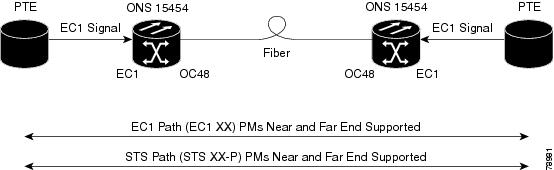
Figure 5-1 shows signal types that support near-end and far-end PMs. Figure 5-2 shows where overhead bytes detected on the application specific integrated circuits (ASICs) produce PM parameters for the EC1-12 card.
Figure 5-1 Monitored Signal Types for the EC1-12 Card
Note
The XX in Figure 5-1 represents all PMs listed in Table 5-3 with the given prefix and/or suffix.
Figure 5-2 PM Read Points on the EC1-12 Card
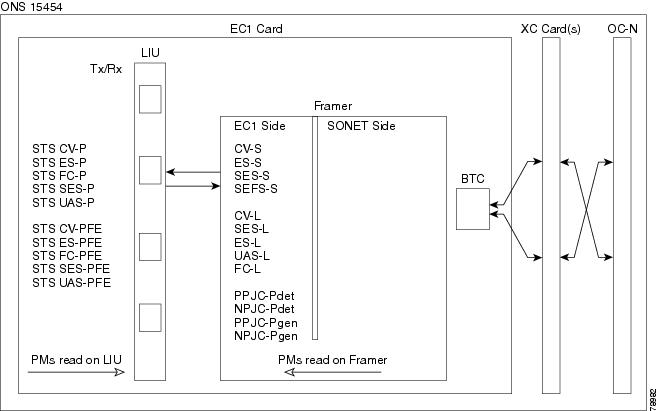
Table 5-3 lists the PM parameters for the EC1-12 cards.
Table 5-3 EC1-12 Card PMs
Section (NE)
|
Line (NE)
|
STS Path (NE)
|
Line (FE)
|
STS Path (FE)
|
CV-S ES-S SES-S SEF-S
|
CV-L ES-L SES-L UAS-L FC-L
|
CV-P ES-P SES-P UAS-P FC-P PPJC-PDET-P NPJC-PDET-P PPJC-PGEN-P NPJC-PGEN-P PJCS-PDET-P PJCS-PGEN-P PJC-DIFF-P
|
CV-LFE ES-LFE SES-LFE UAS-LFE FC-LFE
|
CV-PFE ES-PFE SES-PFE UAS-PFE FC-PFE
|
5.5.2 DS1/E1-56 Card Performance Monitoring Parameters
Figure 5-3 shows signal types that support near-end and far-end PMs. Figure 5-4 shows where overhead bytes detected on the ASICs produce PM parameters for the DS1/E1-56 card.
Figure 5-3 Monitored Signal Types for the DS1/E1-56 Card
Figure 5-4 PM Read Points on the DS1/E1-56 Card
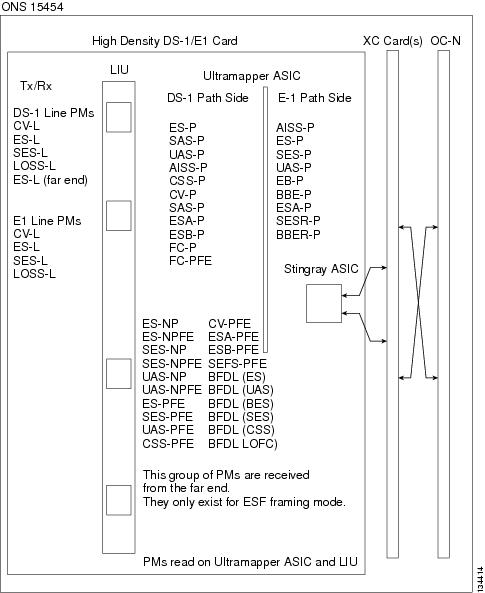
Table 5-4 lists the PM parameters for the DS1/E1-56 card.
Table 5-4 DS1/E1-56 Card PMs
Line (NE)
|
Line (FE)
|
Rx Path (NE)
|
Tx Path (NE)
|
STS Path (NE)
|
Rx Path (FE)
|
STS Path (FE)
|
Network Path
|
BFDL (FE)
|
CV-L ES-L SES-L LOSS-L
|
CV-L ES-L
|
AISS-P CV-P ES-P SES-P SAS-P UAS-P CSS-P ESA-P ESB-P SEFS-P
|
AISS-P CV-P ES-P SES-P UAS-P BBER-P SESR-P ESR-P
|
CV-P ES-P SES-P UAS-P FC-P
|
ES-PFE ESA-PFE ESB-PFE CV-PFE CSS-PFE SEFS-PFE SES-PFE UAS-PFE
|
CV-PFE ES-PFE SES-PFE UAS-PFE FC-PFE
|
ES-NP ES-NPFE SES-NP SES-NPFEUAS-NP UAS-NPFE
|
CSS ES SES BES UAS LOFC
|
5.5.3 DS1-14 and DS1N-14 Card Performance Monitoring Parameters
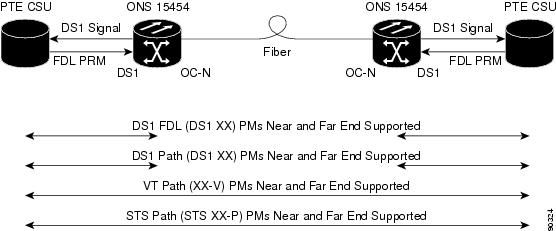
Figure 5-5 shows the signal types that support near-end and far-end PMs.
Figure 5-5 Monitored Signal Types for the DS1-14 and DS1N-14 Cards
Note
The XX in Figure 5-5 represents all PMs listed in Table 5-5 with the given prefix and/or suffix.
Figure 5-6 shows where overhead bytes detected on the ASICs produce PM parameters for the DS1-14 and DS1N-14 cards.
Figure 5-6 PM Read Points on the DS1-14 and DS1N-14 Cards
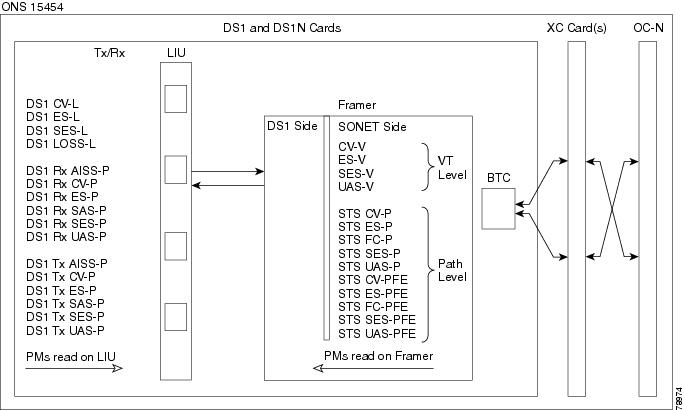
Table 5-5 describes the PM parameters for the DS1-14 and DS1N-14 cards.
Table 5-5 DS1-14 and DS1N-14 Card PMs
Line (NE)
|
Line (FE)
|
Rx Path (NE)
|
Tx Path (NE)
|
VT Path (NE)
|
STS Path (NE)
|
Rx Path (FE)
|
VT Path (FE)
|
STS Path (FE)
|
CV-L ES-L SES-L LOSS-L
|
CV-L ES-L
|
AISS-P CV-P ES-P SAS-P SES-P UAS-P CSS-P ESA-P ESB-P SEFS-P
|
AISS-P CV-P ES-P SAS-P SES-P UAS-P
|
CV-V ES-V SES-V UAS-V
|
CV-P ES-P SES-P UAS-P FC-P
|
ES-PFE ESA-PFE ES-B-PFE CV-PFE CSS-PFE SEFS-PFE SES-PFE UAS-PFE
|
CV-VFE ES-VFE SES-VFE UAS-VFE
|
CV-PFE ES-PFE SES-PFE UAS-PFE FC-PFE
|
Note
Far-end DS1 performance monitoring values are valid only when the DS1 line is set to extended super frame (ESF).
5.5.3.1 DS-1 Facility Data Link Performance Monitoring
Facility Data Link (FDL) performance monitoring enables an ONS 15454 DS1N-14 card to calculate and report DS-1 error rate performance measured at both the near-end and far-end of the FDL. The far-end information is reported as received on the FDL in a performance report message (PRM) from an intelligent channel service unit (CSU).
To monitor DS-1 FDL PM values, the DS-1 must be set to use ESF format and the FDL must be connected to an intelligent CSU. For procedures for provisioning ESF on the DS1N-14 card, refer to the Cisco ONS 15454 Procedure Guide.
The monitored DS-1 FDL PM parameters are CV-PFE, ES-PFE, ESA-PFE, ESB-PFE, SES-PFE, SEFS-PFE, CSS-PFE, UAS-PFE, FC-PFE, and ES-LFE. See Table 5-2 for detailed information and definitions of specific FDL DS1 PM parameters.
5.5.4 DS3-12 and DS3N-12 Card Performance Monitoring Parameters
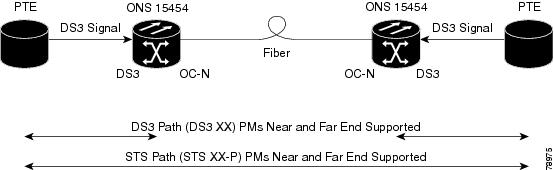
Figure 5-7 shows the signal types that support near-end and far-end PMs. Figure 5-8 shows where overhead bytes detected on the ASICs produce PM parameters for the DS3-12 and DS3N-12 cards.
Figure 5-7 Monitored Signal Types for the DS3-12 and DS3N-12 Cards
Note
The XX in Figure 5-7 represents all PMs listed in Table 5-6 with the given prefix and/or suffix.
Figure 5-8 PM Read Points on the DS3-12 and DS3N-12 Cards
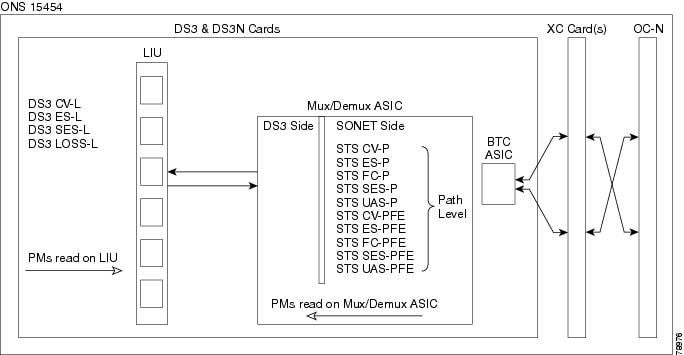
The PM parameters for the DS3-12 and DS3N-12 cards are described in Table 5-6.
Table 5-6 DS3-12 and DS3N-12 Card PMs
Line (NE)
|
STS Path (NE)
|
STS Path (FE)
|
CV-L ES-L SES-L LOSS-L
|
CV-P ES-P SES-P UAS-P FC-P
|
CV-PFE ES-PFE SES-PFE UAS-PFE FC-PFE
|
5.5.5 DS3-12E and DS3N-12E Card Performance Monitoring Parameters
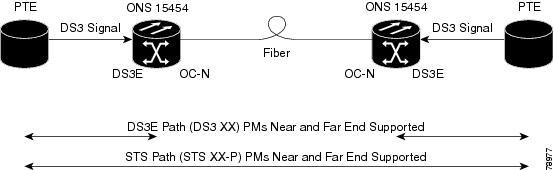
Figure 5-9 shows the signal types that support near-end and far-end PMs.
Figure 5-9 Monitored Signal Types for the DS3-12E and DS3N-12E Cards
Note
The XX in Figure 5-9 represents all PMs listed in Table 5-7 with the given prefix and/or suffix.
Figure 5-10 shows where overhead bytes detected on the ASICs produce PM parameters for the DS3-12E and DS3N-12E cards.
Figure 5-10 PM Read Points on the DS3-12E and DS3N-12E Cards
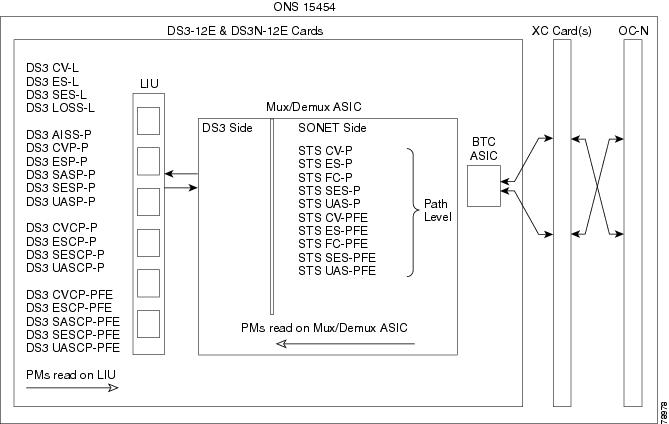
Table 5-7 describes the PM parameters for the DS3-12E and DS3N-12E cards.
Table 5-7 DS3-12E and DS3N-12E Card PMs
Line (NE)
|
Path (NE)
|
STS Path (NE)
|
|
STS Path (FE)
|
CV-L ES-L SES-L LOSS-L
|
AISS-P CV-P ES-P SAS-P2 SES-P UAS-P CVCP-P ESCP-P SASCP-P SESCP-P UASCP-P
|
CV-P ES-P SES-P UAS-P FC-P
|
CVCP-PFE ESCP-PFE SASCP-P SESCP-PFE UASCP-PFE
|
CV-PFE ES-PFE SES-PFE UAS-PFE FC-PFE
|
5.5.6 DS3i-N-12 Card Performance Monitoring Parameters
Figure 5-11 shows the signal types that support near-end and far-end PMs.
Figure 5-11 Monitored Signal Types for the DS3i-N-12 Cards
Note
The XX in Figure 5-11 represents all PMs listed in Table 5-8 with the given prefix and/or suffix.
Figure 5-12 shows where overhead bytes detected on the ASICs produce PM parameters for the DS3i-N-12 cards.
Figure 5-12 PM Read Points on the DS3i-N-12 Cards
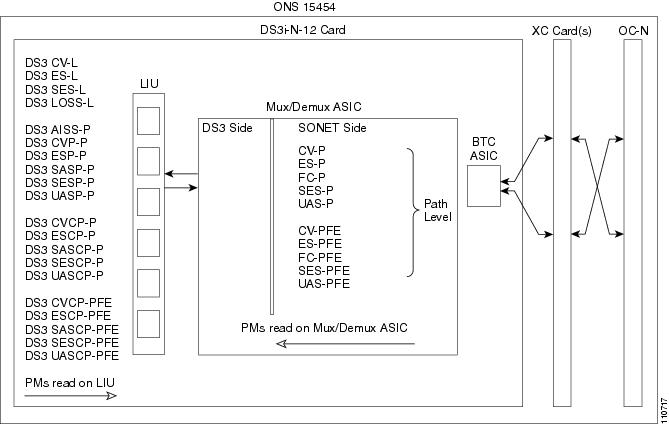
Table 5-8 describes the PM parameters for the DS3i-N-12 card.
Table 5-8 DS3i-N-12 Card PMs
Line (NE)
|
Path (NE)
|
STS Path (NE)
|
|
STS Path (FE)
|
CV-L ES-L SES-L LOSS-L
|
AISSP-P CVP-P ESP-P SASP-P2 SESP-P UASP-P CVCP-P ESCP-P SASCP-P SESCP-P UASCP-P
|
CV-P ES-P SES-P UAS-P FC-P
|
CVCP-PFE ESCP-PFE SASCP-PFE SESCP-PFE UASCP-PFE
|
CV-PFE ES-PFE SES-PFE UAS-PFE FC-PFE
|
5.5.7 DS3XM-6 Card Performance Monitoring Parameters
Figure 5-13 shows the signal types that support near-end and far-end PMs.
Figure 5-13 Monitored Signal Types for the DS3XM-6 Card
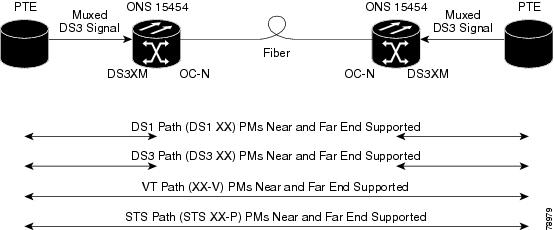
Note
The XX in Figure 5-13 represents all PMs listed in Table 5-9 with the given prefix and/or suffix.
Figure 5-14 shows where the overhead bytes detected on the ASICs produce PM parameters for the DS3XM-6 card.
Figure 5-14 PM Read Points on the DS3XM-6 Card
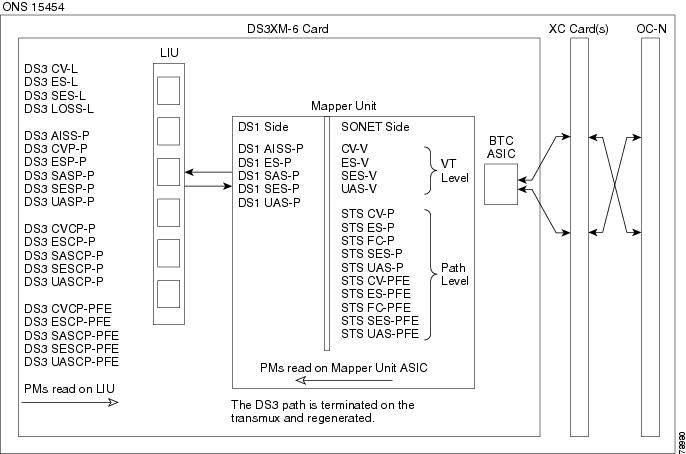
Table 5-9 lists the PM parameters for the DS3XM-6 cards.
Table 5-9 DS3XM-6 Card PMs
DS3 Line (NE)
|
|
DS1 Path (NE)
|
VT Path (NE)
|
STS Path (NE)
|
|
VT Path (FE)
|
STS Path (FE)
|
CV-L ES-L SES-L LOSS-L
|
AISS-P CVP-P ESP-P SASP-P2 SESP-P UASP-P ESCP-P SASCP-P SESCP-P UASCP-P CVCP-P
|
AISS-P ES-P SAS-P2 SES-P UAS-P
|
CV-V ES-V SES-V UAS-V
|
CV-P ES-P SES-P UAS-P FC-P
|
CVCP-PFE ESCP-PFE SASCP-PFE SESCP-PFE UASCP-PFE
|
CV-VFE ES-VFE SES-VFE UAS-VFE
|
CV-PFE ES-PFE SES-PFE UAS-PFE FC-PFE
|
5.5.8 DS3XM-12 Card Performance Monitoring Parameters
Figure 5-15 shows the signal types that support near-end and far-end PMs.
Figure 5-15 Monitored Signal Types for the DS3XM-12 Card
Note
The XX in Figure 5-15 represents all PMs listed in Table 5-10 with the given prefix and/or suffix.
Figure 5-16 shows where the overhead bytes detected on the ASICs produce PM parameters for the DS3XM-12 card.
Figure 5-16 PM Read Points on the DS3XM-12 Card
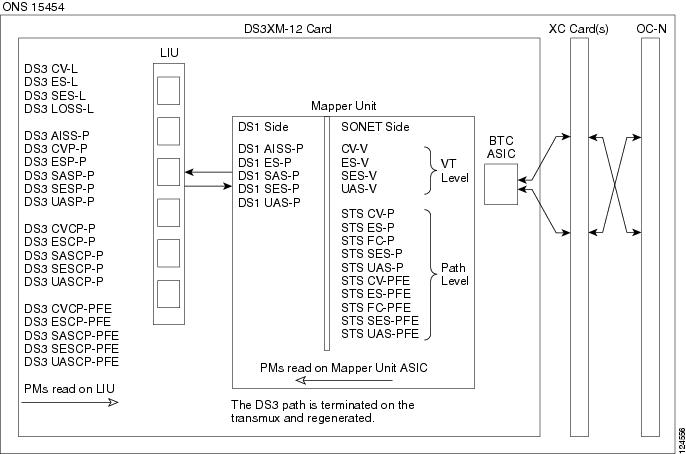
Table 5-10 lists the PM parameters for the DS3XM-12 cards.
Table 5-10 DS3XM-12 Card PMs
DS3 Line (NE)
|
|
DS1 Path (NE)
|
VT Path (NE)
|
STS Path (NE)
|
|
VT Path (FE)
|
STS Path (FE)
|
BFDL (FE)
|
CV-L ES-L SES-L LOSS-L
|
AISS-P CV-P ES-P SAS-P2 SES-P UAS-P ESCP-P SESCP-P UASCP-P CVCP-P
|
AISS-P CV-P ES-P FC-P SAS-P2 SES-P UAS-P CSS-P ESA-P ESB-P SEFS-P
|
CV-V ES-V SES-V UAS-V
|
CV-P ES-P SES-P UAS-P FC-P
|
CVCP-PFE ESCP-PFE SASCP-PFE SESCP-PFE UASCP-PFE
|
CV-VFE ES-VFE SES-VFE UAS-VFE
|
CV-PFE ES-PFE SES-PFE UAS-PFE FC-PFE
|
CSS ES SES BES UAS LOFC
|
5.5.9 DS3/EC1-48 Card Performance Monitoring Parameters
Figure 5-17 shows the signal types that support near-end and far-end PMs.
Figure 5-17 Monitored Signal Types for the DS3/ EC1-48 Card
Note
The XX in Figure 5-17 represents all PMs listed in Table 5-11 with the given prefix and/or suffix.
Figure 5-18 shows where the overhead bytes detected on the ASICs produce PM parameters for the DS3-EC1-48 card.
Figure 5-18 PM Read Points on the DS3/EC1-48 Card
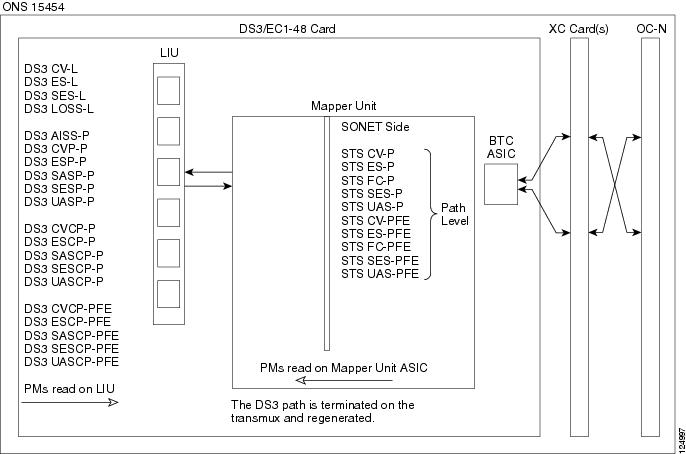
Table 5-11 lists the PM parameters for the DS3/EC1-48 cards.
Table 5-11 DS3/EC1-48 Card PMs
DS3 Line (NE)
|
|
STS Path (NE)
|
|
STS Path (FE)
|
CV-L ES-L SES-L LOSS-L
|
AISS-P CVP-P ESP-P SASP-P2 SESP-P UASP-P ESCP-P SASCP-P SESCP-P UASCP-P CVCP-P
|
CV-P ES-P SES-P UAS-P FC-P
|
CVCP-PFE ESCP-PFE SASCP-PFE SESCP-PFE UASCP-PFE
|
CV-PFE ES-PFE SES-PFE UAS-PFE FC-PFE
|
5.6 Performance Monitoring for Ethernet Cards
The following sections define PM parameters and definitions for the ONS 15454 E-Series, G-Series, ML-Series, and CE100T-8 Ethernet cards.
5.6.1 E-Series Ethernet Card Performance Monitoring Parameters
CTC provides Ethernet performance information, including line-level parameters, port bandwidth consumption, and historical Ethernet statistics. The E-Series Ethernet performance information is divided into the Statistics, Utilization, and History tabbed windows within the card view Performance tab window.
5.6.1.1 E-Series Ethernet Statistics Window
The Ethernet Statistics window lists Ethernet parameters at the line level. The Statistics window provides buttons to change the statistical values shown. The Baseline button resets the displayed statistics values to zero. The Refresh button manually refreshes statistics. Auto-Refresh sets a time interval at which automatic refresh occurs.
Table 5-12 defines the E-Series Ethernet card statistics parameters.
Table 5-12 E-Series Ethernet Statistics Parameters
Parameter
|
Definition
|
Link Status
|
Indicates whether link integrity is present; up means present, and down means not present.
|
Rx Packets
|
Number of packets received since the last counter reset.
|
Rx Bytes
|
Number of bytes received since the last counter reset.
|
Tx Packets
|
Number of packets transmitted since the last counter reset.
|
Tx Bytes
|
Number of bytes transmitted since the last counter reset.
|
Rx Total Errors
|
Total number of receive errors.
|
Rx FCS
|
Number of packets with a frame check sequence (FCS) error. FCS errors indicate frame corruption during transmission.
|
Rx Alignment
|
Number of packets with alignment errors; alignment errors are received incomplete frames.
|
Rx Runts
|
Measures undersized packets with bad cyclic redundancy check (CRC) errors.
|
Rx Shorts
|
Measures undersized packets with good CRC errors.
|
Rx Oversized + Jabbers
|
Measures oversized packets and jabbers. Size is greater than 1522 errors regardless of CRC errors.
|
Tx Collisions
|
Number of transmit packets that are collisions; the port and the attached device transmitting at the same time causes collisions.
|
Tx Late Collisions
|
Number of frames that were not transmitted since they encountered a collision outside of the normal collision window (late collision events should occur only rarely).
|
Tx Excessive Collisions
|
Number of transmissions that are consecutive collisions.
|
Tx Deferred
|
Number of transmitted packets deferred.
|
5.6.1.2 E-Series Ethernet Utilization Window
The Utilization window shows the percentage of transmit (Tx) and receive (Rx) line bandwidth used by the Ethernet ports during consecutive time segments. The Mode field displays the real-time mode status, such as 100 Full, which is the mode setting configured on the E-Series port. However, if the E-Series port is set to autonegotiate the mode (Auto), this field shows the result of the link negotiation between the E-Series and the peer Ethernet device attached directly to the E-Series port.
The Utilization window provides an Interval drop-down list that enables you to set time intervals of 1 minute, 15 minutes, 1 hour, and 1 day. Line utilization is calculated with the following formulas:
Rx = (inOctets + inPkts * 20) * 8 / 100% interval * maxBaseRate
Tx = (outOctets + outPkts * 20) * 8 / 100% interval * maxBaseRate
The interval is defined in seconds. The maxBaseRate is defined by raw bits per second in one direction for the Ethernet port (that is, 1 Gbps). The maxBaseRate for E-Series Ethernet cards is shown in Table 5-13.
Table 5-13 maxBaseRate for STS Circuits
STS
|
maxBaseRate
|
STS-1
|
51840000
|
STS-3c
|
155000000
|
STS-6c
|
311000000
|
STS-12c
|
622000000
|
Note
Line utilization numbers express the average of ingress and egress traffic as a percentage of capacity.
Note
The E-Series Ethernet card is a Layer 2 device or switch and supports Trunk Utilization statistics. The Trunk Utilization statistics are similar to the Line Utilization statistics, but shows the percentage of circuit bandwidth used rather than the percentage of line bandwidth used. The Trunk Utilization statistics are accessed through the card view Maintenance tab.
5.6.1.3 E-Series Ethernet History Window
The Ethernet History window lists past Ethernet statistics for the previous time intervals. Depending on the selected time interval, the History window displays the statistics for each port for the number of previous time intervals as shown in Table 5-14. The parameters are defined in Table 5-12.
Table 5-14 Ethernet History Statistics per Time Interval
Time Interval
|
Number of Previous Intervals Displayed
|
1 minute
|
60
|
15 minutes
|
32
|
1 hour
|
24
|
1 day (24 hours)
|
7
|
5.6.2 G-Series Ethernet Card Performance Monitoring Parameters
CTC provides Ethernet performance information, including line-level parameters, port bandwidth consumption, and historical Ethernet statistics. The G-Series Ethernet performance information is divided into the Statistics, Utilization, and History tabbed windows within the card view Performance tab window.
5.6.2.1 G-Series Ethernet Statistics Window
The Ethernet Statistics window lists Ethernet parameters at the line level. The Statistics window provides buttons to change the statistical values shown. The Baseline button resets the displayed statistics values to zero. The Refresh button manually refreshes statistics. Auto-Refresh sets a time interval at which automatic refresh occurs. The G-Series Statistics window also has a Clear button. The Clear button sets the values on the card to zero, but does not reset the G-Series card.
Table 5-15 defines the G-Series Ethernet card statistics parameters.
Table 5-15 G-Series Ethernet Statistics Parameters
Parameter
|
Definition
|
Time Last Cleared
|
A time stamp indicating the last time statistics were reset.
|
Link Status
|
Indicates whether the Ethernet link is receiving a valid Ethernet signal (carrier) from the attached Ethernet device; up means present, and down means not present.
|
Rx Packets
|
Number of packets received since the last counter reset.
|
Rx Bytes
|
Number of bytes received since the last counter reset.
|
Tx Packets
|
Number of packets transmitted since the last counter reset.
|
Tx Bytes
|
Number of bytes transmitted since the last counter reset.
|
Rx Total Errors
|
Total number of receive errors.
|
Rx FCS
|
Number of packets with a FCS error. FCS errors indicate frame corruption during transmission.
|
Rx Alignment
|
Number of packets with received incomplete frames.
|
Rx Runts
|
Measures undersized packets with bad CRC errors.
|
Rx Shorts
|
Measures undersized packets with good CRC errors.
|
Rx Jabbers
|
The total number of frames received that exceed the 1548-byte maximum and contain CRC errors.
|
Rx Giants
|
Number of packets received that are greater than 1530 bytes in length.
|
Rx Pause Frames
|
Number of received Ethernet IEEE 802.3z pause frames.
|
Tx Pause Frames
|
Number of transmitted IEEE 802.3z pause frames.
|
Rx Pkts Dropped Internal Congestion
|
Number of received packets dropped due to overflow in G-Series frame buffer.
|
Tx Pkts Dropped Internal Congestion
|
Number of transmit queue drops due to drops in the G-Series frame buffer.
|
HDLC Errors
|
High-level data link control (HDLC) errors received from SONET/SDH (see Note).
|
Rx Unicast Packets
|
Number of unicast packets received since the last counter reset.
|
Tx Unicast Packets
|
Number of unicast packets transmitted.
|
Rx Multicast Packets
|
Number of multicast packets received since the last counter reset.
|
Tx Multicast Packets
|
Number of multicast packets transmitted.
|
Rx Broadcast Packets
|
Number of broadcast packets received since the last counter reset.
|
Tx Broadcast Packets
|
Number or broadcast packets transmitted.
|

Note
Do not use the HDLC errors counter to count the number of frames dropped because of HDLC errors, because each frame can fragment into several smaller frames during HDLC error conditions and spurious HDLC frames can be generated. If HDLC error counters are incrementing when no SONET path problems should be present, it might indicate a problem with the quality of the SONET path. For example, a SONET protection switch generates a set of HDLC errors. However, the actual values of these counters are less significant than the fact that they are changing.
5.6.2.2 G-Series Ethernet Utilization Window
The Utilization window shows the percentage of Tx and Rx line bandwidth used by the Ethernet ports during consecutive time segments. The Mode field displays the real-time mode status, such as 100 Full, which is the mode setting configured on the G-Series port. However, if the G-Series port is set to autonegotiate the mode (Auto), this field shows the result of the link negotiation between the G-Series and the peer Ethernet device attached directly to the G-Series port.
The Utilization window provides an Interval drop-down list that enables you to set time intervals of 1 minute, 15 minutes, 1 hour, and 1 day. Line utilization is calculated with the following formulas:
Rx = (inOctets + inPkts * 20) * 8 / 100% interval * maxBaseRate
Tx = (outOctets + outPkts * 20) * 8 / 100% interval * maxBaseRate
The interval is defined in seconds. The maxBaseRate is defined by raw bits per second in one direction for the Ethernet port (that is, 1 Gbps). The maxBaseRate for G-Series Ethernet cards is shown in Table 5-13.
Note
Line utilization numbers express the average of ingress and egress traffic as a percentage of capacity.
Note
Unlike the E-Series, the G-Series card does not have a display of Trunk Utilization statistics, because the G-Series card is not a Layer 2 device or switch.
5.6.2.3 G-Series Ethernet History Window
The Ethernet History window lists past Ethernet statistics for the previous time intervals. Depending on the selected time interval, the History window displays the statistics for each port for the number of previous time intervals as shown in Table 5-14. The listed parameters are defined in Table 5-15.
5.6.3 ML-Series Ethernet Card Performance Monitoring Parameters
CTC provides Ethernet performance information for line-level parameters and historical Ethernet statistics. The ML-Series Ethernet performance information is divided into the Ether Ports and Packet-over-SONET (POS) Ports tabbed windows within the card view Performance tab window.
5.6.3.1 ML-Series Ether Ports Window
Table 5-16 defines the ML-Series Ethernet card Ether Ports PM parameters.
Table 5-16 ML-Series Ether Ports PM Parameters
Parameter
|
Definition
|
ifInOctets
|
Number of bytes received since the last counter reset.
|
rxTotalPackets
|
Number of packets received.
|
ifInUcastPkts
|
Number of unicast packets received since the last counter reset.
|
ifInMulticast Pkts
|
Number of multicast packets received since the last counter reset.
|
ifInBroadcast Pkts
|
Number of broadcast packets received since the last counter reset.
|
ifInDiscards
|
The number of inbound packets that were chosen to be discarded even though no errors had been detected to prevent their being deliverable to a higher-layer protocol. One possible reason for discarding such a packet could be to free up buffer space.
|
ifOutOctets
|
Number of bytes transmitted since the last counter reset.
|
txTotalPkts
|
Number of transmitted packets.
|
ifOutUcast Pkts
|
Number of unicast packets transmitted.
|
ifOutMulticast Pkts
|
Number of multicast packets transmitted.
|
ifOutBroadcast Pkts
|
Number or broadcast packets transmitted.
|
dot3StatsAlignmentErrors
|
A count of frames received on a particular interface that are not an integral number of octets in length and do not pass the FCS check.
|
dot3StatsFCSErrors
|
A count of frames received on a particular interface that are an integral number of octets in length but do not pass the FCS check.
|
etherStatsUndersizePkts
|
The total number of packets received that were less than 64 octets long (excluding framing bits, but including FCS octets) and were otherwise well formed.
|
etherStatsOversizePkts
|
The total number of packets received that were longer than 1518 octets (excluding framing bits, but including FCS octets) and were otherwise well formed. Note that for tagged interfaces, this number becomes 1522 bytes.
|
etherStatsJabbers
|
The total number of packets received that were longer than 1518 octets (excluding framing bits, but including FCS octets), and had either a bad FCS with an integral number of octets (FCS Error) or a bad FCS with a nonintegral number of octets (Alignment Error).
|
etherStatsCollissions
|
Number of transmit packets that are collisions; the port and the attached device transmitting at the same time caused collisions.
|
etherStatsDropEvents
|
Number of received frames dropped at the port level.
|
rx PauseFrames
|
Number of received Ethernet 802.3z pause frames.
|
mediaIndStatsOversize Dropped
|
Number of received oversized packages that are dropped.
|
mediaIndStatsTxFrames TooLong
|
Number of received frames that are too long. The maximum is the programmed max frame size (for virtual SAN [VSAN] support); if the maximum frame size is set to default, then the maximum is a 2112 byte payload plus the 36 byte header, which is a total of 2148 bytes.
|
5.6.3.2 ML-Series POS Ports Window
In the ML-Series POS Ports window, the parameters displayed depend on the framing mode employed by the ML-Series card. The two framing modes for the POS port on the ML-Series card are HDLC and frame-mapped generic framing procedure (GFP-F). For more information on provisioning a framing mode, refer to Cisco ONS 15454 Procedure Guide.
Table 5-17 defines the ML-Series Ethernet card POS Ports HDLC parameters. Table 5-18 defines the ML-Series Ethernet card POS Ports GFP-F parameters.
Table 5-17 ML-Series POS Ports Parameters for HDLC Mode
Parameter
|
Definition
|
ifInOctets
|
Number of bytes received since the last counter reset.
|
rxTotalPkts
|
Number of packets received.
|
ifOutOctets
|
Number of bytes transmitted since the last counter reset.
|
tx TotalPkts
|
Number of transmitted packets.
|
etherStatsDropEvents
|
Number of received frames dropped at the port level.
|
rxPktsDropped Internal Congestion
|
Number of received packets dropped due to overflow in frame buffer.
|
mediaIndStatsRxFramesTruncated
|
Number of received frames with a length of 36 bytes or less.
|
mediaIndStatsRxFramesTooLong
|
Number of received frames that are too long. the maximum is the programmed maximum frame size (for VSAN support); if the maximum frame size is set to default, then the maximum is the 2112 byte payload plus the 36 byte header, which is a total of 2148 bytes.
|
mediaIndStatsRxFramesBadCRC
|
Number of received frames with CRC errors.
|
mediaIndStatsRxShort Pkts
|
Number of received packets that are too small.
|
hdlcInOctets
|
Number of bytes received (from the SONET/SDH path) prior to the bytes undergoing HLDC decapsulation by the policy engine.
|
hdlcRxAborts
|
Number of received packets aborted on input.
|
hdlcOutOctets
|
Number of bytes transmitted (to the SONET/SDH path) after the bytes undergoing HLDC encapsulation by the policy engine.
|
Table 5-18 ML-Series POS Ports Parameters for GFP-F Mode
Parameter
|
Meaning
|
etherStatsDropEvents
|
Number of received frames dropped at the port level.
|
rx PktsDroppedInternal Congestion
|
Number of received packets dropped due to overflow in the frame buffer.
|
gfpStatsRxFrame
|
Number of received GFP frames.
|
gfpStatsTxFrame
|
Number of transmitted GFP frames.
|
gfpStatsRxOctets
|
Number of GFP bytes received.
|
gfpStatsTxOctets
|
Number of GFP bytes transmitted.
|
gfpStatsRxSBitErrors
|
Sum of all the single bit errors. In the GFP CORE HDR at the GFP-T receiver, these are correctable.
|
gfpStatsRxMBitErrors
|
Sum of all the multiple bit errors. In the GFP CORE HDR at the GFP-T receiver, these are uncorrectable.
|
gfpStatsRxTypeInvalid
|
Number of receive packets dropped due to Client Data Frame UPI errors.
|
gfpStatsRxCRCErrors
|
Number of packets received with a payload FCS error.
|
gfpStatsLFDRaised
|
Count of core HEC CRC multiple bit errors.
Note This count is only of eHec multiple bit errors when in frame. This can be looked at as a count of when the state machine goes out of frame.
|
gfpStatsCSFRaised
|
Number of GFP Client signal fail frames detected at the GFP-T receiver.
|
mediaIndStatsRxFrames Truncated
|
Number of received frames that are too long. The maximum is the programmed maximum frame size (for VSAN support); if the maximum frame size is set to default, then the maximum is the 2112 byte payload plus the 36 byte header, which is a total of 2148 bytes.
|
mediaIndStatsRxFramesToo Long
|
Number of received frames with CRC error.s
|
mediaIndStatsRxShortPkts
|
Number of received packets that are too small.
|
5.6.4 CE-Series Ethernet Card Performance Monitoring Parameters
CTC provides Ethernet performance information, including line-level parameters, port bandwidth consumption, and historical Ethernet statistics. The CE-Series card Ethernet performance information is divided into Ether Ports and POS Ports tabbed windows within the card view Performance tab window.
5.6.4.1 CE-Series Card Ether Port Statistics Window
The Ethernet Ether Ports Statistics window lists Ethernet parameters at the line level. The Statistics window provides buttons to change the statistical values shown. The Baseline button resets the displayed statistics values to zero. The Refresh button manually refreshes statistics. Auto-Refresh sets a time interval at which automatic refresh occurs. The CE-Series Statistics window also has a Clear button. The Clear button sets the values on the card to zero, but does not reset the CE-Series card.
During each automatic cycle, whether auto-refreshed or manually refreshed (using the Refresh button), statistics are added cumulatively and are not immediately adjusted to equal total received packets until testing ends. To see the final PM count totals, allow a few moments for the PM window statistics to finish testing and update fully. PM counts are also listed in the CE-Series card Performance > History window.
Table 5-19 defines the CE-Series card Ethernet port parameters.
Table 5-19 CE-Series Ether Port PM Parameters
Parameter
|
Definition
|
Time Last Cleared
|
A time stamp indicating the last time statistics were reset.
|
Link Status
|
Indicates whether the Ethernet link is receiving a valid Ethernet signal (carrier) from the attached Ethernet device; up means present, and down means not present.
|
ifInOctets
|
Number of bytes received since the last counter reset.
|
rxTotalPkts
|
Number of received packets.
|
ifInUcastPkts
|
Number of unicast packets received since the last counter reset.
|
ifInMulticastPkts
|
Number of multicast packets received since the last counter reset.
|
ifInBroadcastPkts
|
Number of broadcast packets received since the last counter reset.
|
ifInDiscards
|
The number of inbound packets that were chosen to be discarded even though no errors had been detected to prevent their being deliverable to a higher-layer protocol. One possible reason for discarding such a packet could be to free buffer space.
|
ifInErrors
|
The number of inbound packets (or transmission units) that contained errors preventing them from being deliverable to a higher-layer protocol.
|
ifOutOctets
|
Number of bytes transmitted since the last counter reset.
|
txTotalPkts
|
Number of transmitted packets.
|
ifOutUcastPkts
|
Number of unicast packets transmitted.
|
ifOutMulticastPkts
|
Number of multicast packets transmitted.
|
ifOutBroadcastPkts
|
Number of broadcast packets transmitted.
|
dot3StatsAlignment Errors
|
A count of frames received on a particular interface that are not an integral number of octets in length and do not pass the FCS check.
|
dot3StatsFCSErrors
|
A count of frames received on a particular interface that are an integral number of octets in length but do not pass the FCS check.
|
dot3StatsSingleCollisionFrames
|
A count of successfully transmitted frames on a particular interface for which transmission is inhibited by exactly on collision.
|
dot3StatsFrameTooLong
|
A count of frames received on a particular interface that exceed the maximum permitted frame size.
|
etherStatsUndersizePkts
|
The total number of packets received that were less than 64 octets long (excluding framing bits, but including FCS octets) and were otherwise well formed.
|
etherStatsFragments
|
The total number of packets received that were less than 64 octets in length (excluding framing bits but including FCS octets) and had either a bad FCS with an integral number of octets (FCS Error) or a bad FCS with a nonintegral number of octets (Alignment Error).
Note It is entirely normal for etherStatsFragments to increment. This is because it counts both runts (which are normal occurrences due to collisions) and noise hits.
|
etherStatsPkts64Octets
|
The total number of packets (including bad packets) received that were 64 octets in length (excluding framing bits but including FCS octets).
|
etherStatsPkts65to127 Octets
|
The total number of packets (including bad packets) received that were between 65 and 127 octets in length inclusive (excluding framing bits but including FCS octets).
|
etherStatsPkts128to255 Octets
|
The total number of packets (including bad packets) received that were between 128 and 255 octets in length inclusive (excluding framing bits but including FCS octets).
|
etherStatsPkts256to511 Octets
|
The total number of packets (including bad packets) received that were between 256 and 511 octets in length inclusive (excluding framing bits but including FCS octets).
|
etherStatsPkts512to1023Octets
|
The total number of packets (including bad packets) received that were between 512 and 1023 octets in length inclusive (excluding framing bits but including FCS octets).
|
etherStatsPkts1024to1518Octets
|
The total number of packets (including bad packets) received that were between 1024 and 1518 octets in length inclusive (excluding framing bits but including FCS octets).
|
etherStatsBroadcastPkts
|
The total number of good packets received that were directed to the broadcast address. Note that this does not include multicast packets.
|
etherStatsMulticastPkts
|
The total number of good packets received that were directed to a multicast address. Note that this number does not include packets directed to the broadcast address.
|
etherStatsOversizePkts
|
The total number of packets received that were longer than 1518 octets (excluding framing bits, but including FCS octets) and were otherwise well formed. Note that for tagged interfaces, this number becomes 1522 bytes.
|
etherStatsJabbers
|
The total number of packets received that were longer than 1518 octets (excluding framing bits, but including FCS octets), and had either a bad FCS with an integral number of octets (FCS Error) or a bad FCS with a nonintegral number of octets (Alignment Error).
|
etherStatsOctets
|
The total number of octets of data (including those in bad packets) received on the network (excluding framing bits but including FCS octets
|
etherStatsCollisions
|
Number of transmit packets that are collisions; the port and the attached device transmitting at the same time caused collisions.
|
etherStatsCRCAlign Errors
|
The total number of packets received that had a length (excluding framing bits, but including FCS octets) of between 64 and 1518 octets, inclusive, but had either a bad FCS with an integral number of octets (FCS Error) or a bad FCS with a nonintegral number of octets (Alignment Error).
|
etherStatsDropEvents
|
Number of received frames dropped at the port level.
|
5.6.4.2 CE-Series Card Ether Ports Utilization Window
The Ether Ports Utilization window shows the percentage of Tx and Rx line bandwidth used by the Ethernet ports during consecutive time segments. The Utilization window provides an Interval drop-down list that enables you to set time intervals of 1 minute, 15 minutes, 1 hour, and 1 day. Line utilization is calculated with the following formulas:
Rx = (inOctets + inPkts * 20) * 8 / 100% interval * maxBaseRate
Tx = (outOctets + outPkts * 20) * 8 / 100% interval * maxBaseRate
The interval is defined in seconds. The maxBaseRate is defined by raw bits per second in one direction for the Ethernet port (that is, 1 Gbps). The maxBaseRate for CE-Series Ethernet cards is shown in Table 5-13.
Note
Line utilization numbers express the average of ingress and egress traffic as a percentage of capacity.
5.6.4.3 CE-Series Card Ether Ports History Window
The Ethernet Ether Ports History window lists past Ethernet statistics for the previous time intervals. Depending on the selected time interval, the History window displays the statistics for each port for the number of previous time intervals as shown in Table 5-14. The listed parameters are defined in Table 5-15.
5.6.4.4 CE-Series Card POS Ports Statistics Parameters
The Ethernet POS Ports statistics window lists Ethernet POS parameters at the line level. Table 5-20 defines the CE-Series Ethernet card POS Ports parameters.
Table 5-20 CE-Series Card POS Ports Parameters
Parameter
|
Definition
|
Time Last Cleared
|
A time stamp indicating the last time that statistics were reset.
|
Link Status
|
Indicates whether the Ethernet link is receiving a valid Ethernet signal (carrier) from the attached Ethernet device; up means present, and down means not present.
|
ifInOctets
|
Number of bytes received since the last counter reset.
|
rxTotalPkts
|
Number of received packets.
|
ifInDiscards
|
The number of inbound packets that were chosen to be discarded even though no errors had been detected to prevent their being deliverable to a higher-layer protocol. One possible reason for discarding such a packet could be to free buffer space.
|
ifInErrors
|
The number of inbound packets (or transmission units) that contained errors preventing them from being deliverable to a higher-layer protocol.
|
ifOutOctets
|
Number of bytes transmitted since the last counter reset.
|
txTotalPkts
|
Number of transmitted packets.
|
ifOutOversizePkts
|
Packets greater than 1518 bytes transmitted out a port.
|
gfpStatsRxSBitErrors
|
Sum of all the single bit errors. In the GFP CORE HDR at the GFP-T receiver, these are correctable.
|
gfpStatsRxMBitErrors
|
Sum of all the multiple bit errors. In the GFP CORE HDR at the GFP-T receiver, these are uncorrectable.
|
gfpStatsRxTypeInvalid
|
Number of receive packets dropped due to Client Data Frame UPI errors.
|
gfpStatsRxCRCErrors
|
Number of packets received with a payload FCS error.
|
gfpStatsRxCIDInvalid
|
Number of packets with invalid CID.
|
gfpStatsCSFRaised
|
Number of GFP Client signal fail frames detected at the GFP-T receiver.
|
ifInPayloadCrcErrors
|
Received payload CRC errors.
|
ifOutPayloadCrcErrors
|
Transmitted payload CRC errors.
|
5.6.4.5 CE-Series Card POS Ports Utilization Window
The POS Ports Utilization window shows the percentage of Tx and Rx line bandwidth used by the POS ports during consecutive time segments. The Utilization window provides an Interval drop-down list that enables you to set time intervals of 1 minute, 15 minutes, 1 hour, and 1 day. Line utilization is calculated with the following formulas:
Rx = (inOctets * 8) / (interval * maxBaseRate)
Tx = (outOctets * 8) / (interval * maxBaseRate)
The interval is defined in seconds. The maxBaseRate is defined by raw bits per second in one direction for the Ethernet port (that is, 1 Gbps). The maxBaseRate for CE-Series cards is shown in Table 5-13.
Note
Line utilization numbers express the average of ingress and egress traffic as a percentage of capacity.
5.6.4.6 CE-Series Card Ether Ports History Window
The Ethernet POS Ports History window lists past Ethernet POS ports statistics for the previous time intervals. Depending on the selected time interval, the History window displays the statistics for each port for the number of previous time intervals as shown in Table 5-14. The listed parameters are defined in Table 5-19.
5.7 Performance Monitoring for Optical Cards
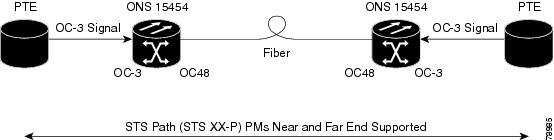
This section lists PM parameters for ONS 15454 optical cards, including the OC-3, OC-12, OC-48, and OC-192 cards. Figure 5-19 shows the signal types that support near-end and far-end PMs.
Figure 5-19 Monitored Signal Types for the OC-3 Cards
Note
The XX in Figure 5-19 represents all PMs listed in Table 5-21, Table 5-22, and Table 5-23 with the given prefix and/or suffix.
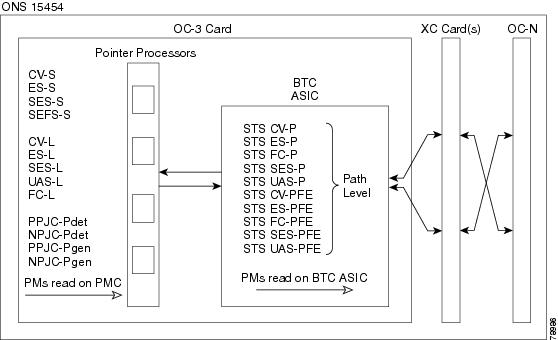
Figure 5-20 shows where overhead bytes detected on the ASICs produce PM parameters for the OC3 IR 4 SH 1310 and OC3 IR SH 1310-8 cards.
Figure 5-20 PM Read Points on the OC-3 Cards
Note
For PM locations relating to protection switch counts, see the Telcordia GR-253-CORE document.
Table 5-21 and Table 5-22 list the PM parameters for OC-3 cards.
Table 5-21 OC-3 Card PMs
Section (NE)
|
Line (NE)
|
STS Path (NE)
|
Line (FE)
|
|
CV-S ES-S SES-S SEF-S
|
CV-L ES-L SES-L UAS-L FC-L PSC (1+1) PSD (1+1)
|
CV-P ES-P SES-P UAS-P FC-P PPJC-PDET NPJC-PDET PPJC-PGEN NPJC-PGEN PPJC-PDET-P PPJC-PGEN-P PJC-DIFF
|
CV-LFE ES-LFE SES-LFE UAS-LFE FC-LFE
|
CV-PFE ES-PFE SES-PFE UAS-PFE FC-PFE
|
Table 5-22 OC3-8 Card PMs
Section (NE)
|
Line (NE)
|
Physical Layer (NE)
|
STS Path (NE)
|
Line (FE)
|
STS Path (FE)
|
CV-S ES-S SES-S SEF-S
|
CV-L ES-L SES-L UAS-L FC-L PSC (1+1) PSD (1+1)
|
LBCL OPT OPR
|
CV-P ES-P SES-P UAS-P FC-P PPJC-PDET-P NPJC-PDET-P PPJC-PGEN-P NPJC-PGEN-P PJCS-PDET-P PJCS-PGEN-P PJC-DIFF-P
|
CV-LFE ES-LFE SES-LFE UAS-LFE FC-LFE
|
CV-PFE ES-PFE SES-PFE UAS-PFE FC-PFE
|
Table 5-23 lists the PM parameters for OC-12, OC-48, and OC-192 cards.
Table 5-23 OC-12, OC-48, OC-192 Card PMs
Section (NE)
|
Line (NE)
|
STS Path (NE)
|
Line (FE)
|
CV-S ES-S SES-S SEF-S
|
CV-L ES-L SES--L UASL FC-L PSC (1+1, 2F BLSR) PSD (1+1, 2F BLSR) PSC-W (4F BLSR) PSD-W (4F BLSR) PSC-S (4F BLSR) PSD-S (4F BLSR) PSC-R (4F BLSR) PSD-R (4F BLSR)
|
CV-P ES-P SES-P UAS-P FC-P PPJC-PDET-P NPJC-PDET-P PPJC-PGEN-P NPJC-PGEN-P PJCS-PGEN-P PJCS-PDET-P PJC-DIFF-P
|
CV-L ES-L SES-L UAS-L FC-L
|
5.8 Performance Monitoring for Multirate Cards
This section lists PM parameters for the optical mutirate card, also known as the MRC-12 card.
Figure 5-21 shows where overhead bytes detected on the ASICs produce PM parameters for the MRC-12 card.
Figure 5-21 PM Read Points for the MRC-12 Card
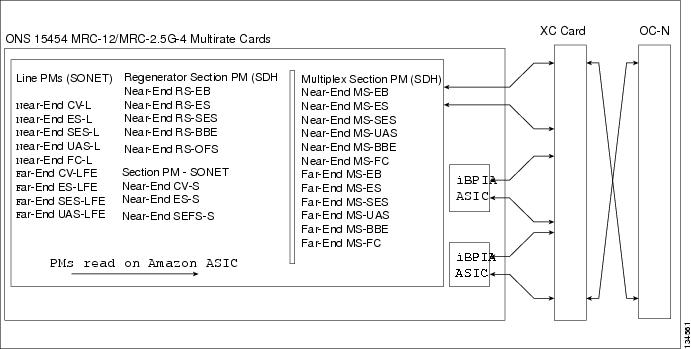
Table 5-24 lists the PM parameters for MRC-12 cards.
Table 5-24 MRC-12 Card PMs
Section (NE)
|
Line (NE)
|
Line (FE)
|
CV-S ES-S SEF-S
|
CV-L ES-L SES-L UASL FC-L
|
CV-L ES-L SES-L UAS-L FC-L
|
5.9 Performance Monitoring for Transponder and Muxponder Cards
This section lists PM parameters for transponder cards (TXP_MR_10G, TXP_MR_2.5G, TXPP_MR_2.5G, and TXP_MR_10E), and muxponder cards (MXP_2.5G_10G, MXP_25G_10E, MXP_MR_2.5G, and MXPP_MR_2.5G).
The MXP_MR_2.5G and MXPP_MR_2.5G cards also have payload performance information, divided into Statistics, Utilization, History, and SONET PM tabbed windows within the card view Performance tab Payload PM window. See the "MXP_MR_2.5G/MXPP_MR_2.5G Payload Statistics Window" section, the "MXP_MR_2.5G/MXPP_MR_2.5G Payload Utilization Window" section, and the "MXP_MR_2.5G/MXPP_MR_2.5G Payload History Window" section for payload PM information for MXP_MR_2.5G and MXPP_MR_2.5G cards.
Figure 5-22 shows the signal types that support near-end and far-end PMs for the TXP_MR_10G card. The signal types for the remaining transponder and muxponder cards are similar to the TXP_MR_10G card.
Figure 5-22 Monitored Signal Types
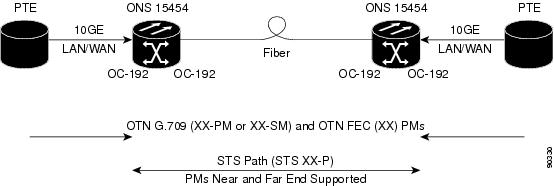
Note
The XX in Figure 5-22 represents all PMs listed in Table 5-25 with the given prefix and/or suffix.
Figure 5-23 shows where overhead bytes detected on the ASICs produce PM parameters for the TXP_MR_10G card. The remaining transponder and muxponder cards perform similarly to this illustration.
Figure 5-23 PM Read Points for TXP_MR_10G Card
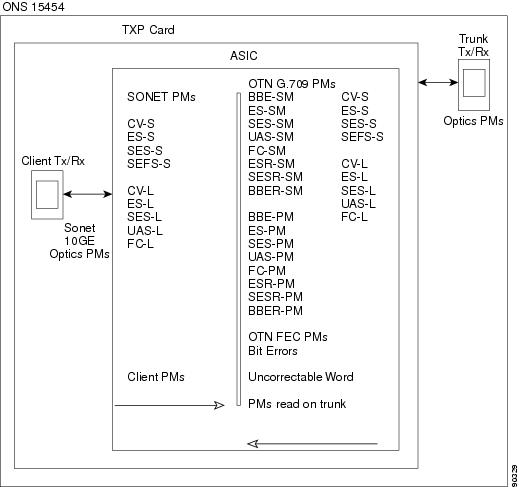
Table 5-25 describes the PM parameters for the TXP_MR_10G, TXP_MR_2.5G, TXPP_MR_2.5G, TXP_MR_10E, MXP_2.5G_10G, MXP_2.5G_10E, MXP_MR_2.5G, and MXPP_MR_2.5G cards.
Table 5-25 Muxponder and Transponder Card PMs
SONET Layer Far-End (FE)1 , 2
|
SONET Layer Near-End (NE)1, 2
|
|
|
|
|
CV-L ES-L SES-L UAS-L FC-L
|
CV-S CV-L ES-S ES-L SES-S SES-L SEF-S UAS-L FC-L
|
ES-PM ES-SM ESR-PM ESR-SM SES-PM SES-SM SESR-PM SESR-SM UAS-PM UAS-SM BBE-PM BBE-SM BBER-PM BBER-SM FC-PM FC-SM
|
LBC OPT OPR
|
CGV DCG IOS IPC NIOS VPC
|
BIT-EC UNC-WORDS
|
5.9.1 MXP_MR_2.5G/MXPP_MR_2.5G Payload Statistics Window
The Payload PM Statistics window lists parameters at the line level. The Statistics window provides buttons to change the statistical values shown. The Baseline button resets the displayed statistics values to zero. The Refresh button manually refreshes statistics. Auto-Refresh sets a time interval at which automatic refresh occurs. The Statistics window also has a Clear button. The Clear button sets the values on the card to zero. All counters on the card are cleared. Table 5-26 defines the MXP_MR_2.5G and MXPP_MR_2.5G card statistics parameters.
Table 5-26 MXP_MR_2.5G/MXPP_MR_2.5G Statistics PMs
Parameter
|
Definition
|
8b/10b Errors
|
A count of 10b errors received by the serial/deserializer (serdes 8b/10b).
|
Running Disparity Count
|
A count of errors that affect the disparity of the received data stream.
|
Invalid CRC Error
|
A count of invalid CRCs.
|
Rx Frames
|
A count of the number of frames received without errors.
|
Tx Frames
|
A count of the number of transmitted frames.
|
Tx Bytes
|
A count of the number of bytes transmitted from the frame since the last counter reset.
|
Rx Link Reset (Only for FC Mode)
|
A count of the received link resets.
|
5.9.2 MXP_MR_2.5G/MXPP_MR_2.5G Payload Utilization Window
The Payload PM Utilization window shows the percentage of Tx and Rx line bandwidth used by the ports during consecutive time segments. The Utilization window provides an Interval drop-down list that enables you to set time intervals of 1 minute, 15 minutes, 1 hour, and 1 day. Line utilization is calculated with the following formulas:
Rx = (inOctets + inPkts * 20) * 8 / 100% interval * maxBaseRate
Tx = (outOctets + outPkts * 20) * 8 / 100% interval * maxBaseRate
The interval is defined in seconds. The maxBaseRate is defined by raw bits per second in one direction for the port (that is, 1 Gbps). The maxBaseRate for MXP_MR_2.5G and MXPP_MR_2.5G cards is shown in Table 5-13.
Note
Line utilization numbers express the average of ingress and egress traffic as a percentage of capacity.
5.9.3 MXP_MR_2.5G/MXPP_MR_2.5G Payload History Window
The Payload PM History window lists past statistics for the previous time intervals. Depending on the selected time interval, the History window displays the statistics for each port for the number of previous time intervals as shown in Table 5-14. The listed parameters are defined in Table 5-26.
5.10 Performance Monitoring for Storage Access Networking Cards
The following sections define PM parameters and definitions for the SAN card, also known as the FC_MR-4 or Fibre Channel card.
CTC provides FC_MR-4 performance information, including line-level parameters, port bandwidth consumption, and historical statistics. The FC_MR-4 card performance information is divided into the Statistics, Utilization, and History tabbed windows within the card view Performance tab window.
5.10.1 FC_MR-4 Statistics Window
The Statistics window lists parameters at the line level. The Statistics window provides buttons to change the statistical values shown. The Baseline button resets the displayed statistics values to zero. The Refresh button manually refreshes statistics. Auto-Refresh sets a time interval at which automatic refresh occurs. The Statistics window also has a Clear button. The Clear button sets the values on the card to zero. All counters on the card are cleared. Table 5-27 defines the FC_MR-4 card statistics parameters.
Table 5-27 FC_MR-4 Statistics Parameters
Parameter
|
Definition
|
Time Last Cleared
|
A time stamp indicating the last time statistics were reset.
|
Link Status
|
Indicates whether the Fibre Channel link is receiving a valid Fibre Channel signal (carrier) from the attached Fibre Channel device; up means present, and down means not present.
|
Rx Frames
|
A count of the number of Fibre Channel frames received without errors.
|
Rx Bytes
|
A count of the number of bytes received without error for the Fibre Channel payload.
|
Tx Frames
|
A count of the number of transmitted Fibre Channel frames.
|
Tx Bytes
|
A count of the number of bytes transmitted from the Fibre Channel frame.
|
8b/10b Errors
|
A count of 10b errors received by the serial/deserializer (serdes 8b/10b).
|
Encoding Disparity Errors
|
A count of the disparity errors received by serdes.
|
Link Recoveries
|
A count of the FC_MR-4 software-initiated link recovery attempts toward the FC line side because of SONET protection switches.
|
Rx Frames bad CRC
|
A count of the received Fibre Channel frames with errored CRCs.
|
Tx Frames bad CRC
|
A count of the transmitted Fibre Channel frames with errored CRCs.
|
Rx Undersized Frames
|
A count of the received Fibre Channel frames less than 36 bytes including CRC, start of frame (SOF), and end of frame (EOF).
|
Rx Oversized Frames
|
A count of the received Fibre Channel frames greater than 2116 bytes of the payload. Four bytes are allowed for supporting VSAN tags sent.
|
GFP Rx HDR Single-bit Errors
|
A count of generic framing procedure (GFP) single bit errors in the core header error check (CHEC).
|
GFP Rx HDR Multi-bit Errors
|
A count of GFP multibit errors in CHEC.
|
GGFP Rx Frames Invalid Type
|
A count of GFP invalid user payload identifier (UPI) field in the type field.
|
GFP Rx Superblk CRC Errors
|
A count of superblock CRC errors in the transparent GFP frame.
|
5.10.2 FC_MR-4 Utilization Window
The Utilization window shows the percentage of Tx and Rx line bandwidth used by the ports during consecutive time segments. The Utilization window provides an Interval drop-down list that enables you to set time intervals of 1 minute, 15 minutes, 1 hour, and 1 day. Line utilization is calculated with the following formulas:
Rx = (inOctets + inPkts * 24) * 8 / 100% interval * maxBaseRate
Tx = (outOctets + outPkts * 24) * 8 / 100% interval * maxBaseRate
The interval is defined in seconds. The maxBaseRate is defined by raw bits per second in one direction for the port (that is, 1 Gbps or 2 Gbps). The maxBaseRate for FC_MR-4 cards is shown in Table 5-28.
Table 5-28 maxBaseRate for STS Circuits
STS
|
maxBaseRate
|
STS-24
|
850000000
|
STS-48
|
850000000 x 21
|
Note
Line utilization numbers express the average of ingress and egress traffic as a percentage of capacity.
5.10.3 FC_MR-4 History Window
The History window lists past FC_MR-4 statistics for the previous time intervals. Depending on the selected time interval, the History window displays the statistics for each port for the number of previous time intervals as shown in Table 5-29. The listed parameters are defined in Table 5-27.
Table 5-29 FC_MR-4 History Statistics per Time Interval
Time Interval
|
Number of Intervals Displayed
|
1 minute
|
60 previous time intervals
|
15 minutes
|
32 previous time intervals
|
1 hour
|
24 previous time intervals
|
1 day (24 hours)
|
7 previous time intervals
|
5.11 Performance Monitoring for DWDM Cards
The following sections define PM parameters and definitions for the OSCM and OSC-CSM DWDM cards.
5.11.1 Optical Service Channel Card Performance Monitoring Parameters
Figure 5-24 shows where overhead bytes detected on the ASICs produce PM parameters for the OSCM and OSC-CSM cards.
Figure 5-24 PM Read Points on OSCM and OSC-CSM Cards
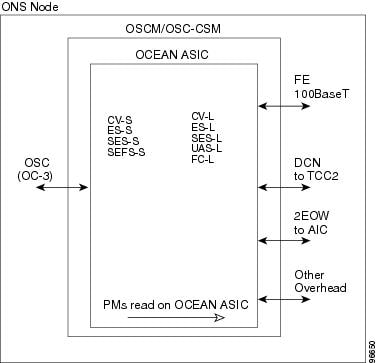
The PM parameters for the OSCM and OSC-CSM cards are described in Table 5-30.
Table 5-30 OSCM/OSC-CSM (OC3) Card PMs
|
|
|
|
CV-S ES-S SES-S SEF-S
|
CV-L ES-L SES-L UAS-L FC-L
|
OPWR
|