Guest

Support

Implementing Layer 2 Tunnel Protocol Version 3 on Cisco IOS XR Software

 Feedback

Table Of Contents

Implementing Layer 2 Tunnel Protocol Version 3 on Cisco IOS XR Software

Contents

Prerequisites for Layer 2 Tunnel Protocol Version 3

Information About Layer 2 Tunnel Protocol Version 3

L2TPv3 Operation

L2TPv3 Benefits

L2TPv3 Features

Static L2TPv3 Sessions

Dynamic L2TPv3 Sessions

Sequencing

Local Switching

Local Switching: Quality of Service

L2TPv3 Pseudowire Manager

L2TPv3 Type of Service Marking

Keepalive

Maximum Transmission Unit Handling

How to Implement Layer 2 Tunnel Protocol Version 3

Configuring a Pseudowire Class

Configuring L2TP Control-Channel Parameters

Configuring L2TP Control-Channel Timing Parameters

Configuring L2TPv3 Control-Channel Authentication Parameters

Configuring L2TP Control-Channel Maintenance Parameters

Configuring L2TPv3 Pseudowires

Configuring a Dynamic L2TPv3 Pseudowire

Configuring a Static L2TPv3 Pseudowire

Configuring the Cross-connect Attachment Circuit

Configuration Examples for Layer 2 Tunnel Protocol Version 3

Configuring an L2TP Class for L2TPv3-based L2VPN PE Routers: Example

Configuring a Pseudowire Class: Example

Configuring L2TPv3 Control Channel Parameters: Example

Configuring the Cross-Connect Group: Example

Configuring an Interface for Layer 2 Transport Mode: Example

Additional References

Related Documents

Standards

MIBs

RFCs

Technical Assistance


Implementing Layer 2 Tunnel Protocol Version 3 on Cisco IOS XR Software


Layer 2 Tunnel Protocol Version 3 (L2TPv3) is an Internet Engineering Task Force (IETF) working group draft that provides several enhancements to L2TP, including the ability to tunnel any Layer 2 (L2) payload over L2TP. Specifically, L2TPv3 defines the L2TP protocol for tunneling Layer 2 payloads over an IP core network using L2 virtual private networks (VPNs).

For additional information about L2TPv3, see Implementing MPLS VPNs over IP Tunnels on Cisco IOS XR Software.

Feature History for Implementing Layer 2 Tunnel Protocol Version 3 on Cisco IOS XR Software

Release
Modification

Release 3.7.0

This feature was introduced on the Cisco XR 12000 Series Router.


Contents

Prerequisites for Layer 2 Tunnel Protocol Version 3

Information About Layer 2 Tunnel Protocol Version 3

How to Implement Layer 2 Tunnel Protocol Version 3

Configuration Examples for Layer 2 Tunnel Protocol Version 3

Additional References

Prerequisites for Layer 2 Tunnel Protocol Version 3

The following prerequisites are required to implement L2TPv3:

You must enable Cisco Express Forwarding (CEF) before you configure an cross-connect attachment circuit (AC) for a customer edge (CE) device.

You must configure a Loopback interface on the router for originating and terminating the L2TPv3 traffic. The Loopback interface must have an IP address that is reachable from the remote provider edge (PE) device at the other end of an L2TPv3 control-channel.


Note A cross-connection is expressed as xconnect in the CLI.


Information About Layer 2 Tunnel Protocol Version 3

To configure the L2TPv3 feature, you should understand the following concepts:

L2TPv3 Operation

L2TPv3 Benefits

L2TPv3 Features

L2TPv3 Operation

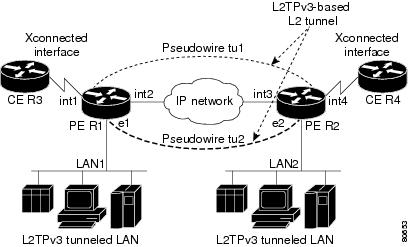
Figure 23 shows how the L2TPv3 feature is used to set up VPNs using Layer 2 tunneling over an IP network. All traffic between two customer network sites is encapsulated in IP packets carrying L2TP data messages and sent across an IP network. The backbone routers of the IP network treat the traffic as any other IP traffic and does not need to know anything about the customer networks.

Both PE routers R1 and R2 provide L2TPv3 services. The R1 and R2 routers communicate with each other using a pseudowire over the IP backbone network through a path comprising the interfaces int1 and int2, the IP network, and interfaces int3 and int4. The CE routers R3 and R4 communicate through a pair of cross-connected Ethernet or 802.1q VLAN interfaces using an L2TPv3 session. The L2TPv3 session tu1 is a pseudowire configured between interface int1 on R1 and interface int4 on R2. Any packet arriving on interface int1 on R1 is encapsulated and sent through the pseudowire (tu1) to R2. R2 decapsulates the packet and sends it on interface int4 to R4. When R4 needs to send a packet to R3, the packet follows the same path in reverse.

Figure 23 L2TPv3 Operation
L2TPv3 Benefits

L2TPv3 provides the following benefits:

Simplifies deployment of VPNs—L2TPv3 is an industry-standard L2 tunneling protocol that ensures interoperability among vendors, increasing customer flexibility and service availability.

Does not require MPLS—Service providers need not deploy MPLS in the core IP backbone to set up VPNs using L2TPv3 over the IP backbone; this will result in operational savings and increased revenue.

Supports L2 tunneling over IP for any payload—L2TPv3 provides enhancements to L2TP to support L2 tunneling of any payload over an IP core network. L2TPv3 defines the base L2TP protocol as being separate from the L2 payload that is tunneled.

L2TPv3 Features

L2TPv3 provides cross-connect support for Ethernet, 802.1q (VLAN), and Frame Relay, using the sessions described in the following sections:

Static L2TPv3 Sessions

Dynamic L2TPv3 Sessions

L2TPv3 also supports:

Sequencing

Local Switching

Local Switching: Quality of Service

L2TPv3 Pseudowire Manager

L2TPv3 Type of Service Marking

Keepalive

Maximum Transmission Unit Handling

Distributed switching

L2TPv3 control message hashing

L2TPv3 control message rate limiting

L2TPv3 digest secret graceful switchover

Manual clearing of L2TPv3 tunnels

L2TPv3 tunnel management

Static L2TPv3 Sessions

Typically, the L2TP control plane is responsible for negotiating session parameters (such as the session ID or the cookie) to set up the session; however, some IP networks require sessions to be configured so that no signaling is required for session establishment. Therefore, you can set up static L2TPv3 sessions for a PE router by configuring fixed values for the fields in the L2TP data header. A static L2TPv3 session allows the PE to tunnel L2 traffic as soon as the AC to which the session is bound comes up.


Note In an L2TPv3 static session, you can still run the L2TP control-channel to perform peer authentication and dead-peer detection. If the L2TP control-channel cannot be established or is torn down because of a hello failure, the static session is also torn down.


When you use a static L2TPv3 session, you cannot perform circuit interworking (for example, LMI) because there is no facility to exchange control messages. To perform circuit interworking, you must use a dynamic session.

Dynamic L2TPv3 Sessions

A dynamic L2TP session is established through the exchange of control messages containing attribute-value pair (AVP). Each AVP contains information about the nature of the L2 link being forwarded: including the payload type, virtual circuit (VC) ID, and so on.

Multiple L2TP sessions can exist between a pair of PEs, and can be maintained by a single control-channel. Session IDs and cookies are dynamically generated and exchanged as part of a dynamic session setup. Sequencing configuration is also exchanged and circuit state changes are conveyed using the set link info (SLI) message.

Sequencing

Although the correct sequence of received L2 frames is guaranteed by some L2 technologies (by the nature of the link, such as a serial line) or the protocol itself, forwarded L2 frames may be lost, duplicated, or reordered when they traverse a network as IP packets. If the L2 protocol does not provide an explicit sequencing mechanism, you can configure L2TP to sequence its data packets according to the data channel sequencing mechanism described in the L2TPv3 IETF l2tpext working group draft.

A receiver of L2TP data packets mandates sequencing through the sequencing required AVP when the session is being negotiated. A sender that receives this AVP (or that is manually configured to send sequenced packets) uses the L2-specific pseudowire control encapsulation defined in L2TPv3.

Currently, you can configure L2TP only to drop out-of-order packets; you cannot configure L2TP to deliver the packets out-of-order. No reordering mechanism is available.

Local Switching

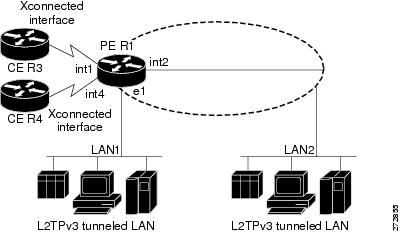
An AC to AC cross-connect, also called local switching, is a building block of L2VPN that allows frames to switch between two different ACs on the same PE (see Figure 24). Local switching is supported for both static and dynamic sessions.

You must configure separate IP addresses for each cross-connect statement.


Note The Cisco CRS-1 router plays the role of a PE router at the edge of a provider network, where CE devices are connected to Cisco CRS-1 PE routers using Layer 2 LAN services.


The following configurations are supported for local switching:

Port-to-Port

VLAN-to-VLAN

Port-to-VLAN

VLAN-to-Port


Note VLAN-to-VLAN options do not require interworking. Port-to-VLAN and VLAN-to-port do, and it is locally managed by the L2VPN application. If both interfaces are Ethernet VLAN, each reside on a single physical interface. By definition, local switching is not a pseudowire technology, because signaling protocols (such as LDP or L2TPv3) are not involved.


Figure 24 Local Switching Operation

Local Switching: Quality of Service

The following quality of service (QoS) requirements apply to local switching:

QoS service policies can be applied to any L2 AC (port or VLAN, or both) and can be applied to any interworking mode (port-to-port, vlan-to-port, port-to-vlan, vlan-to-vlan). The AC can be cross-connected to a pseudowire (EoL2TPv3) or to another AC (local switching).

QoS service policies can be attached directly to the AC.

QoS service policies can be attached to the main interface using match vlan on L2 VLAN ACs.

QoS service policies attached to the main interface can be inherited by all L2 VLANs.

QoS service policies cannot be attached to a main interface when there are service policies already attached to its L3VLANs or L2VLAN ACs.

QoS service policies already attached to the main interface are not permitted on L3 VLAN or L2 VLAN ACs.

L2TPv3 Pseudowire Manager

The pseudowire manager is a client library provided by the pseudowire signaling module that runs in the context of the L2VPN process. This client library implements interface to pseudo-wire signaling protocol for specific pseudowire type.

L2TPv3 Type of Service Marking

When L2 traffic is tunneled across an IP network, information contained in the type of service (ToS) bits may be transferred to the L2TP-encapsulated IP packets in one of the following ways:

If the tunneled L2 frames encapsulate IP packets themselves, it may be desirable to simply copy the ToS bytes of the inner IP packets to the outer IP packet headers. This action is known as "ToS byte reflection."

Static ToS byte configuration. You specify the ToS byte value used by all packets sent across the pseudowire.

Keepalive

The keepalive mechanism for L2TPv3 extends only to the endpoints of the tunneling protocol. L2TP has a reliable control message delivery mechanism that serves as the basis for the keepalive mechanism. The keepalive mechanism consists of an exchange of L2TP hello messages.

If a keepalive mechanism is required, the control plane is used, although it may not be used to bring up sessions. You can manually configure sessions.

In the case of static L2TPv3 sessions, a control channel between the two L2TP peers is negotiated through the exchange of start control channel request (SCCRQ), start control channel replay (SCCRP), and start control channel connected (SCCCN) control messages. The control channel is responsible only for maintaining the keepalive mechanism through the exchange of hello messages.

The interval between hello messages is configurable per control channel. If one peer detects that the other has gone down through the keepalive mechanism, it sends a StopCCN control message and then notifies all of the pseudowires to the peer about the event. This notification results in the teardown of both manually configured and dynamic sessions.

Maximum Transmission Unit Handling

It is important that you configure an maximum transmission unit (MTU) appropriate for each L2TPv3 tunneled link. The configured MTU size ensures the following:

The lengths of the tunneled L2 frames fall below the MTU of the destination AC.

The tunneled packets are not fragmented, which forces the receiving PE to reassemble them.

L2TPv3 handles the MTU as follows:

The default behavior is to fragment packets that are larger than the session MTU.

How to Implement Layer 2 Tunnel Protocol Version 3

This section includes the tasks required to implement L2TPv3, as follows:

Configuring a Pseudowire Class (required)

Configuring L2TP Control-Channel Parameters (required)

Configuring L2TPv3 Pseudowires (required)

Configuring the Cross-connect Attachment Circuit (required)

Configuring a Pseudowire Class

Perform this task to configure a pseudowire class or template.

SUMMARY STEPS

1. configure

2. l2vpn

3. pw-class class name

4. encapsulation {mpls | l2tpv3}

5. sequencing {both}

6. protocol l2tpv3 [class class name]

7. ipv4 source ip-address

8. end
or
commit

DETAILED STEPS

 
Command or Action
Purpose

Step 1 

configure

Example:

RP/0/0/CPU0:router# configure

Enters global configuration mode.

Step 2 

l2vpn

Example:

RP/0/0/CPU0:router(config)# l2vpn

Enters L2VPN configure submode.

Step 3 

pw-class class name

Example:

RP/0/0/CPU0:router(config-l2vpn)# pw-class wkg

Enters a pseudowire-class name.

Step 4 

encapsulation {l2tpv3 | mpls}

Example:

RP/0/0/CPU0:router(config-l2vpn-pwc)# encapsulation l2tpv3

Configures pseudowire encapsulation. The options are:

L2TPv3—Sets pseudowire encapsulation to L2TPV3.

MPLS—Sets pseudowire encapsulation to MPLS.

Step 5 

sequencing {both}

Example:

RP/0/0/CPU0:router(config-l2vpn-pwc-encap-l2tpv3) # sequencing both

Configures pseudowire class sequencing.

Step 6 

protocol l2tpv3 [class class name]

Example:

RP/0/0/CPU0:router(config-l2vpn-pwc-encap-l2tpv3) # protocol l2tpv3

Configures the dynamic pseudowire signaling protocol. If the class is not specified, the default class is used.

Step 7 

ipv4 source ip-address

Example:

RP/0/0/CPU0:router(config-l2vpn-pwc-encap-l2tpv3) # ipv4 source 127.0.0.1

Configures the local source IPv4 address.

Step 8 

end

or

commit

Example:

RP/0/0/CPU0:router(config-l2vpn-pwc-encap-l2tpv3) # end

or

RP/0/0/CPU0:router(config-l2vpn-pwc-encap-l2tpv3) # commit

Saves configuration changes.

When you issue the end command, the system prompts you to commit changes:

Uncommitted changes found, commit them before 
exiting(yes/no/cancel)? 
[cancel]:

Entering yes saves configuration changes to the running configuration file, exits the configuration session, and returns the router to EXEC mode.

Entering no exits the configuration session and returns the router to EXEC mode without committing the configuration changes.

Entering cancel leaves the router in the current configuration session without exiting or committing the configuration changes.

Use the commit command to save the configuration changes to the running configuration file and remain within the configuration session.

Configuring L2TP Control-Channel Parameters

This section describes the tasks to create a template of L2TP control-channel parameters that can be inherited by different pseudowire classes. The three main parameters described are:

Timing parameters

Authentication parameters

Maintenance parameters

L2TP control-channel parameters are used in control-channel authentication, keepalive messages, and control-channel negotiation. In an L2TPv3 session, the same L2TP class must be specified in the pseudowire configured on the PE router at each end of the control-channel.


NoteThe L2TP class must be configured before it is associated with a pseudowire class (see Configuring a Pseudowire Class).

These tasks are supported only on the Cisco XR 12000 Series Router.


The three main groups of L2TP control-channel parameters that you can configure in an L2TP class are described in the following subsections:

Configuring L2TP Control-Channel Timing Parameters

Configuring L2TPv3 Control-Channel Authentication Parameters

Configuring L2TP Control-Channel Maintenance Parameters


Note When you enter L2TP class configuration mode, you can configure L2TP control-channel parameters in any order. If you have multiple authentication requirements you can configure multiple sets of L2TP class control-channel parameters with different L2TP class names. However, only one set of L2TP class control-channel parameters can be applied to a connection between any pair of IP addresses.


Configuring L2TP Control-Channel Timing Parameters

The following L2TP control-channel timing parameters can be configured in L2TP class configuration mode:

Packet size of the receive window used for the control-channel.

Retransmission parameters used for control messages.

Timeout parameters used for the control-channel.


Note This task configures a set of timing control-channel parameters in an L2TP class. All timing control-channel parameter configurations can be configured in any order. If not configured, the default values are applied.


SUMMARY STEPS

1. configure

2. l2tp-class l2tp-class-name

3. receive-window size

4. retransmit {initial retries initial-retries | retries retries | timeout {max | min} timeout}

5. timeout setup seconds

DETAILED STEPS

 
Command or Action
Purpose

Step 1 

configure

Example:

RP/0/0/CPU0:router# configure

Enters global configuration mode.

Step 2 

l2tp-class l2tp-class-name

Example:

RP/0/0/CPU0:router(config)# l2tp-class cisco

Specifies the L2TP class name and enters L2TP class configuration mode.

Step 3 

receive-window size

Example:

RP/0/0/CPU0:router(config-l2tp-class)# receive-window 30

Configures the number of packets that can be received by the remote peer before backoff queueing occurs.

The valid values range from 1 to the upper limit the peer has for receiving packets. The default value is 512.

Step 4 

retransmit {initial retries initial-retries | retries retries | timeout {max | min} timeout}

Example:

RP/0/0/CPU0:router(config-l2tp-class)# retransmit retries 10

Configures parameters that affect the retransmission of control packets.

initial retries—Specifies how many SCCRQs are re-sent before giving up on the session. Range is 1 to 1000. The default is 2.

retries—Specifies how many retransmission cycles occur before determining that the peer PE router does not respond. Range is 1 to 1000. The default is 15.

timeout {max | min}—Specifies maximum and minimum retransmission intervals (in seconds) for resending control packets. Range is 1 to 8. The default maximum interval is 8; the default minimum interval is 1.

Step 5 

timeout setup seconds

Example:

RP/0/0/CPU0:router(config-l2tp-class)# timeout setup 400

Configures the amount of time, in seconds, allowed to set up a control-channel.

Range is 60 to 6000. Default value is 300.

Configuring L2TPv3 Control-Channel Authentication Parameters

Two methods of control-channel message authentication are available:

L2TP Control-Channel (see Configuring Authentication for the L2TP Control-Channel)

L2TPv3 Control Message Hashing (see Configuring L2TPv3 Control Message Hashing)

You can enable both methods of authentication to ensure interoperability with peers that support only one of these methods of authentication, but this configuration will yield control of which authentication method is used to the peer PE router. Enabling both methods of authentication should be considered an interim solution to solve backward-compatibility issues during software upgrades.

The principal difference between the L2TPv3 Control Message Hashing feature and CHAP-style L2TP control-channel authentication is that, instead of computing the hash over selected contents of a received control message, the L2TPv3 Control Message Hashing feature uses the entire message in the hash. In addition, instead of including the hash digest in only the SCCRP and SCCCN messages, it includes it in all messages.

This section also describes how to configure L2TPv3 digest secret graceful switchover (see Configuring L2TPv3 Digest Secret Graceful Switchover,) which lets you make the transition from an old L2TPv3 control-channel authentication password to a new L2TPv3 control-channel authentication password without disrupting established L2TPv3 tunnels.


Note Support for L2TP control-channel authentication is maintained for backward compatibility. Either or both authentication methods can be enabled to allow interoperability with peers supporting only one of the authentication methods.


Configuring Authentication for the L2TP Control-Channel

The L2TP control-channel method of authentication is the older, CHAP-like authentication system inherited from L2TPv2.

The following L2TP control-channel authentication parameters can be configured in L2TP class configuration mode:

Authentication for the L2TP control-channel

Password used for L2TP control-channel authentication

Local hostname used for authenticating the control-channel

This task configures a set of authentication control-channel parameters in an L2TP class. All of the authentication control-channel parameter configurations may be configured in any order. If these parameters are not configured, the default values are applied.

SUMMARY STEPS

1. configure

2. l2tp-class word

3. authentication

4. password {0 | 7} password

5. hostname name

DETAILED STEPS

 
Command or Action
Purpose

Step 1 

configure

Example:

RP/0/0/CPU0:router# configure

Enters global configuration mode.

Step 2 

l2tp-class word

Example:

RP/0/0/CPU0:router(config)# l2tp-class class1

Specifies the L2TP class name and enters L2TP class configuration mode.

Step 3 

authentication

Example:

RP/0/0/CPU0:router(config-l2tp-class)# authentication

Enables authentication for the control-channel between PE routers.

Step 4 

password {0 | 7} password

Example:

RP/0/0/CPU0:router(config-l2tp-class)# password 7 cisco

Configures the password used for control-channel authentication.

[0 | 7]—Specifies the input format of the shared secret. The default value is 0.

0—Specifies an encrypted password will follow.

7—Specifies an unencrypted password will follow.

password—Defines the shared password between peer routers.

Step 5 

hostname name

Example:

RP/0/0/CPU0:router(config-l2tp-class)# hostname yb2

Specifies a hostname used to identify the router during L2TP control-channel authentication.

If you do not use this command, the default hostname of the router is used.

Configuring L2TPv3 Control Message Hashing

Perform this task to configure L2TPv3 Control Message Hashing feature for an L2TP class.

L2TPv3 control message hashing incorporates authentication or integrity check for all control messages. This per-message authentication is designed to guard against control message spoofing and replay attacks that would otherwise be trivial to mount against the network.

Enabling the L2TPv3Control Message Hashing feature will impact performance during control-channel and session establishment because additional digest calculation of the full message content is required for each sent and received control message. This is an expected trade-off for the additional security afforded by this feature. In addition, network congestion may occur if the receive window size is too small. If the L2TPv3 Control Message Hashing feature is enabled, message digest validation must be enabled. Message digest validation deactivates the data path received sequence number update and restricts the minimum local receive window size to 35.

You can configure control-channel authentication or control message integrity checking; however, control-channel authentication requires participation by both peers, and a shared secret must be configured on both routers. Control message integrity check is unidirectional, and requires configuration on only one of the peers.

SUMMARY STEPS

1. configure

2. l2tp-class word

3. digest {check disable | hash {MD5 | SHA1}] | secret {0 | 7} password]

4. hidden

DETAILED STEPS

 
Command or Action
Purpose

Step 1 

configure

Example:

RP/0/0/CPU0:router# configure

Enters global configuration mode.

Step 2 

l2tp-class word

Example:

RP/0/0/CPU0:router(config)# l2tp-class class1

Specifies the L2TP class name and enters L2TP class configuration mode.

Step 3 

digest {check disable | hash {MD5 | SHA1}] | secret {0 | 7} password]

Example:

RP/0/0/CPU0:router(config-l2tp-class)# digest secret cisco hash sha

Enables L2TPv3 control-channel authentication or integrity checking.

secret—Enables L2TPv3 control-channel authentication.

Note If the digest command is issued without the secret keyword option, L2TPv3 integrity checking is enabled.

{0 | 7}—Specifies the input format of the shared secret. The default value is 0.

0—Specifies that a plain-text secret is entered.

7—Specifies that an encrypted secret is entered.

password—Defines the shared secret between peer routers. The value entered for the password argument must be in the format that matches the input format specified by the {0 | 7} keyword option.

hash {MD5 | SHA1}—Specifies the hash function to be used in per-message digest calculations.

MD5—Specifies HMAC-MD5 hashing (default value).

SHA1—Specifies HMAC-SHA-1 hashing.

Step 4 

hidden

Example:

RP/0/0/CPU0:router(config-l2tp-class)# hidden

Enables AVP hiding when sending control messages to an L2TPv3 peer.

Configuring L2TPv3 Digest Secret Graceful Switchover

Perform this task to make the transition from an old L2TPv3 control-channel authentication password to a new L2TPv3 control-channel authentication password without disrupting established L2TPv3 tunnels.


Note This task is not compatible with authentication passwords configured with the older, CHAP-like control-channel authentication system.


L2TPv3 control-channel authentication occurs using a password that is configured on all participating peer PE routers. The L2TPv3 Digest Secret Graceful Switchover feature allows a transition from an old control-channel authentication password to a new control-channel authentication password without disrupting established L2TPv3 tunnels.

Before performing this task, you must enable control-channel authentication (see Configuring L2TPv3 Control Message Hashing).


Note During the period when both a new and an old password are configured, authentication can occur only with the new password if the attempt to authenticate using the old password fails.


SUMMARY STEPS

1. configure

2. l2tp-class word

3. digest {check disable | hash {MD5 | SHA1}] | secret {0 | 7} password]

4. end
or
commit

5. show l2tp tunnel all

6. configure

7. l2tp-class word

8. no digest [secret [0 | 7] password] [hash {md5 | sha}]

9. end
or
commit

10. show l2tp tunnel all

DETAILED STEPS

 
Command or Action
Purpose

Step 1 

configure

Example:

RP/0/0/CPU0:router# configure

Enters global configuration mode.

Step 2 

l2tp-class word

Example:

RP/0/0/CPU0:router(config)# l2tp-class class1

Specifies the L2TP class name and enters L2TP class configuration mode.

Step 3 

digest {check disable | hash {MD5 | SHA1}] | secret {0 | 7} password]

Example:

RP/0/0/CPU0:router(config-l2tp-class)# digest secret cisco hash sha

Enables L2TPv3 control-channel authentication or integrity checking.

secret—Enables L2TPv3 control-channel authentication.

Note If the digest command is issued without the secret keyword option, L2TPv3 integrity checking is enabled.

{0 | 7}—Specifies the input format of the shared secret. The default value is 0.

0—Specifies that a plain-text secret is entered.

7—Specifies that an encrypted secret is entered.

password—Defines the shared secret between peer routers. The value entered for the password argument must be in the format that matches the input format specified by the {0 | 7} keyword option.

hash {MD5 | SHA1}—Specifies the hash function to be used in per-message digest calculations.

MD5—Specifies HMAC-MD5 hashing (default value).

SHA1—Specifies HMAC-SHA-1 hashing.

Step 4 

end

or

commit

Example:

RP/0/0/CPU0:router(config-l2tp-class)# end

or

RP/0/0/CPU0:router(config-l2tp-class)# commit

Saves configuration changes.

When you enter the end command, the system prompts you to commit changes:
Uncommitted changes found, commit them before exiting (yes/no/cancel)? [cancel]:

Entering yes saves configuration changes to the running configuration file, exits the configuration session, and returns the router to EXEC mode.

Entering no exits the configuration session and returns the router to EXEC mode without committing the configuration changes.

Entering cancel leaves the router in the current configuration session without exiting or committing the configuration changes.

When you enter the commit command, the system saves the configuration changes to the running configuration file and remains within the configuration session.

Step 5 

show l2tp tunnel all

Example:

RP/0/0/CPU0:router# show l2tun tunnel all

Displays the current state of L2 tunnels and information about configured tunnels, including local and remote L2 Tunneling Protocol (L2TP) hostnames, aggregate packet counts, and control-channel information.

Note Use this command to determine if any tunnels are not using the new password for control-channel authentication. The output displayed for each tunnel in the specified L2TP class should show that two secrets are configured.

Step 6 

configure

Example:

RP/0/0/CPU0:router# configure

Enters global configuration mode.

Step 7 

l2tp-class word

Example:

RP/0/0/CPU0:router(config)# l2tp-class class1

Specifies the L2TP class name and enters L2TP class configuration mode.

Step 8 

no digest {check disable | hash {MD5 | SHA1}] | secret {0 | 7} password]

Example:

RP/0/0/CPU0:router(config-l2tp-class)# no digest secret cisco hash sha1

Disables L2TPv3 control-channel authentication or integrity checking.

Step 9 

end

or

commit

Example:

RP/0/0/CPU0:router(config-l2tp-class)# end

or

RP/0/0/CPU0:router(config-l2tp-class)# commit

Saves configuration changes.

When you issue the end command, the system prompts you to commit changes:

Uncommitted changes found, commit them before 
exiting(yes/no/cancel)? 
[cancel]:

Entering yes saves configuration changes to the running configuration file, exits the configuration session, and returns the router to EXEC mode.

Entering no exits the configuration session and returns the router to EXEC mode without committing the configuration changes.

Entering cancel leaves the router in the current configuration session without exiting or committing the configuration changes.

Use the commit command to save the configuration changes to the running configuration file and remain within the configuration session.

Step 10 

show l2tp tunnel all

Example:

RP/0/0/CPU0:router# show l2tun tunnel all

Displays the current state of L2 tunnels and information about configured tunnels, including local and remote L2 Tunneling Protocol (L2TP) hostnames, aggregate packet counts, and control-channel information.

Tunnels should no longer be using the old control-channel authentication password. If a tunnel does not update to show that only one secret is configured after several minutes have passed, that tunnel can be manually cleared and a defect report should be filed with TAC.

Note Issue this command to ensure that all tunnels are using only the new password for control-channel authentication. The output displayed for each tunnel in the specified L2TP class should show that one secret is configured.

Configuring L2TP Control-Channel Maintenance Parameters

Perform this task to configure the interval used for hello messages in an L2TP class.

SUMMARY STEPS

1. configure

2. l2tp-class word

3. hello-interval interval

DETAILED STEPS

 
Command or Action
Purpose

Step 1 

configure

Example:

RP/0/0/CPU0:router# configure

Enters global configuration mode.

Step 2 

l2tp-class word

Example:

RP/0/0/CPU0:router(config)# l2tp-class class1

Specifies the L2TP class name and enters L2TP class configuration mode.

Step 3 

hello-interval interval

Example:

RP/0/0/CPU0:router(config-l2tp-class)# hello-interval 100

Specifies the exchange interval (in seconds) used between L2TP hello packets.

Valid values for the interval argument range from 0 to 1000. The default value is 60.

Configuring L2TPv3 Pseudowires

Perform the following tasks to configure static and dynamic L2TPv3 pseudowires:

Configuring a Dynamic L2TPv3 Pseudowire

Configuring a Static L2TPv3 Pseudowire

Configuring a Dynamic L2TPv3 Pseudowire

Perform this task to configure a dynamic L2TPv3 pseudowire.

SUMMARY STEPS

1. configure

2. l2vpn

3. xconnect group name

4. p2p name

5. neighbor ip-address pw-id number

6. pw-class pw-class-name

7. end
or
commit

8. pw-class pw-class-name

9. encapsulation l2tpv3

10. ipv4 source ip-address

11. end
or
commit

DETAILED STEPS

 
Command or Action
Purpose

Step 1 

configure

Example:

RP/0/0/CPU0:router# configure

Enters global configuration mode.

Step 2 

l2vpn

Example:

RP/0/0/CPU0:router(config)# l2vpn

Enter L2VPN configure submode.

Step 3 

xconnect group name

Example:

RP/0/0/CPU0:router(config-l2vpn)# xconnect group grp_01

Enter a name for the cross-connect group.

Step 4 

p2p name

Example:

RP/0/0/CPU0:router(config-l2vpn-xc)# p2p AC1_to_PW1

Enters p2p configuration submode to configure point-to-point cross-connects.

Step 5 

neighbor ip-address pw-id number

Example:

RP/0/0/CPU0:router(config-l2vpn-xc-p2p)# neighbor 10.1.1.1 pw-id 665

Configures a pseudowire for a cross-connect.

Step 6 

pw-class pw-class-name

Example:

RP/0/0/CPU0:router(config-l2vpn-xc-p2p-pw)# pw-class class100

Enters pseudowire class submode to define a name for the cross-connect.

Step 7 

end

or

commit

Example:

RP/0/0/CPU0:router(config-l2vpn-xc-p2p-pw)# end

or

RP/0/0/CPU0:router(config-l2vpn-xc-p2p-pw)# commit

Saves configuration changes.

When you issue the end command, the system prompts you to commit changes:

Uncommitted changes found, commit them before 
exiting(yes/no/cancel)? 
[cancel]:

Entering yes saves configuration changes to the running configuration file, exits the configuration session, and returns the router to EXEC mode.

Entering no exits the configuration session and returns the router to EXEC mode without committing the configuration changes.

Entering cancel leaves the router in the current configuration session without exiting or committing the configuration changes.

Use the commit command to save the configuration changes to the running configuration file and remain within the configuration session.

Step 8 

pw-class pw-class-name

Example:

RP/0/0/CPU0:router(config-l2vpn)# pw-class class100

Enters pseudowire class submode to define a pseudowire class template.

Step 9 

encapsulation l2tpv3

Example:

RP/0/0/CPU0:router(config-l2vpn-pwc)# encapsulation l2tpv3

Configures L2TPv3 pseudowire encapsulation.

Step 10 

ipv4 source ip-address

Example:

RP/0/0/CPU0:router(config-l2vpn-pwc-encap-l2tpv3) # ipv4 source 127.0.0.1

Configures the local source IPv4 address.

Step 11 

end

or

commit

Example:

RP/0/0/CPU0:router(config-l2vpn-pwc-encap-l2tpv3) # end

or

RP/0/0/CPU0:router(config-l2vpn-pwc-encap-l2tpv3) # commit

Saves configuration changes.

When you enter the end command, the system prompts you to commit changes:
Uncommitted changes found, commit them before exiting (yes/no/cancel)? [cancel]:

Entering yes saves configuration changes to the running configuration file, exits the configuration session, and returns the router to EXEC mode.

Entering no exits the configuration session and returns the router to EXEC mode without committing the configuration changes.

Entering cancel leaves the router in the current configuration session without exiting or committing the configuration changes.

When you enter the commit command, the system saves the configuration changes to the running configuration file and remains within the configuration session.

Configuring a Static L2TPv3 Pseudowire

Perform this task to configure a static L2TPv3 pseudowire.

SUMMARY STEPS

1. configure

2. l2vpn

3. xconnect group name

4. p2p name

5. neighbor ip-address pw-id number

6. l2tp static local session {session-id}

7. l2tp static local cookie size {0 | 4 | 8} [value {low-value} [{high-value}]]

8. l2tp static remote session {session-id}

9. l2tp static remote cookie size {0 | 4 | 8} [value {low-value} [{high-value}]]

10. pw-class name

11. end
or
commit

12. pw-class name

13. encapsulation l2tpv3

14. ipv4 source ip-address

15. end
or
commit

DETAILED STEPS

 
Command or Action
Purpose

Step 1 

configure

Example:

RP/0/0/CPU0:router# configure

Enters global configuration mode.

Step 2 

l2vpn

Example:

RP/0/0/CPU0:router(config)# l2vpn

Enters L2VPN configure submode.

Step 3 

xconnect group name

Example:

RP/0/0/CPU0:router(config-l2vpn)# xconnect group customer_X

Enters a name for the cross-connect group.

Step 4 

p2p name

Example:

RP/0/0/CPU0:router(config-l2vpn-xc)# p2p AC1_to_PW1

Enters p2p configuration submode to configure point-to-point cross-connects.

Step 5 

neighbor ip-address pw-id number

Example:

RP/0/0/CPU0:router(config-l2vpn-xc-p2p)# neighbor 10.1.1.1 pw-id 666

Configures a pseudowire for a cross-connect.

Step 6 

l2tp static local session {session-id}

Example:

RP/0/0/CPU0:router(config-l2vpn-xc-p2p-pw)# l2tp static local session 147

Configures a L2TP pseudowire static session ID.

Step 7 

l2tp static local cookie size {0 | 4 | 8} [value {low-value} [{high-value}]]

Example:

RP/0/0/CPU0:router(config-l2vpn-xc-p2p-pw)# l2tp static local cookie size 4 value 0xbeef

Configures a L2TP pseudowire static session cookie.

Step 8 

l2tp static remote session {session-id}

Example:

RP/0/0/CPU0:router(config-l2vpn-xc-p2p-pw)# l2tp static remote session 123

Configures a L2TP pseudowire remote session ID.

Step 9 

l2tp static remote cookie size {0 | 4 | 8} [value {low-value} [{high-value}]]

Example:

RP/0/0/CPU0:router(config-l2vpn-xc-p2p-pw)# l2tp static remote cookie size 8 value 0x456 0xFFB

Configures a L2TP pseudowire remote session cookie.

Step 10 

pw-class name

Example:

RP/0/0/CPU0:router(config-l2vpn-xc-p2p-pw)# pw-class class100

Enters pseudowire class submode to define a pseudowire class template.

Step 11 

end

or

commit

Example:

RP/0/0/CPU0:router(config-l2vpn-xc-p2p-pw)# end

or

RP/0/0/CPU0:router(config-l2vpn-xc-p2p-pw)# commit

Saves configuration changes.

When you issue the end command, the system prompts you to commit changes:

Uncommitted changes found, commit them before 
exiting(yes/no/cancel)? 
[cancel]:

Entering yes saves configuration changes to the running configuration file, exits the configuration session, and returns the router to EXEC mode.

Entering no exits the configuration session and returns the router to EXEC mode without committing the configuration changes.

Entering cancel leaves the router in the current configuration session without exiting or committing the configuration changes.

Use the commit command to save the configuration changes to the running configuration file and remain within the configuration session.

Step 12 

pw-class name

Example:

RP/0/0/CPU0:router(config-l2vpn)# pw-class class100

Enters pseudowire class submode to define a pseudowire class template.

Step 13 

encapsulation l2tpv3

Example:

RP/0/0/CPU0:router(config-l2vpn-pwc)# encapsulation l2tpv3

Configures L2TPv3 pseudowire encapsulation.

Step 14 

ipv4 source ip-address

Example:

RP/0/0/CPU0:router(config-l2vpn-pwc-encap-l2tpv3) # ipv4 source 127.0.0.1

Configures the local source IPv4 address.

Step 15 

end

or

commit

Example:

RP/0/0/CPU0:router(config-l2vpn-pwc-encap-l2tpv3) # end

or

RP/0/0/CPU0:router(config-l2vpn-pwc-encap-l2tpv3) # commit

Saves configuration changes.

When you issue the end command, the system prompts you to commit changes:

Uncommitted changes found, commit them before 
exiting(yes/no/cancel)? 
[cancel]:

Entering yes saves configuration changes to the running configuration file, exits the configuration session, and returns the router to EXEC mode.

Entering no exits the configuration session and returns the router to EXEC mode without committing the configuration changes.

Entering cancel leaves the router in the current configuration session without exiting or committing the configuration changes.

Use the commit command to save the configuration changes to the running configuration file and remain within the configuration session.

Configuring the Cross-connect Attachment Circuit

This configuration procedure binds an Ethernet 802.1q VLAN, or Frame Relay AC to an L2TPv3 pseudowire for cross-connect service. The virtual circuit identifier that you configure creates the binding between a pseudowire configured on a PE router and an AC in a CE device. The virtual circuit identifier configured on the PE router at one end of the L2TPv3 control-channel must also be configured on the peer PE router at the other end.

SUMMARY STEPS

1. configure

2. l2vpn

3. xconnect group free_format_string

4. p2p name

5. interface interface_name

6. neighbor ip-address pw-id number

7. pw-class name

8. end
or
commit

9. pw-class name

10. encapsulation l2tpv3

11. ipv4 source ip-address

12. end
or
commit

DETAILED STEPS

 
Command or Action
Purpose

Step 1 

configure

Example:

RP/0/0/CPU0:router# configure

Enters global configuration mode.

Step 2 

l2vpn

Example:

RP/0/0/CPU0:router(config)# l2vpn

Enter L2VPN configure submode.

Step 3 

xconnect group free_format_string

Example:

RP/0/0/CPU0:router(config-l2vpn)# xconnect group customer_X

Configures a cross-connect group.

Step 4 

p2p xconnect_id

Example:

RP/0/0/CPU0:router(config-l2vpn-xc)# p2p AC1_to_PW1

Enters p2p configuration submode to configure point-to-point cross-connects.

Step 5 

interface interface_name

Example:

RP/0/0/CPU0:router(config-l2vpn-xc-p2p)# interface pos 1/1/1/1

Enters interface configuration mode.

Step 6 

neighbor ip-address pw-id number

Example:

RP/0/0/CPU0:router(config-l2vpn-xc-p2p)# neighbor 10.1.1.1 pw-id 665

RP/0/0/CPU0:router(config-l2vpn-xc-p2p-pw)

Configures a pseudowire for a cross-connect.

Step 7 

pw-class name

Example:

RP/0/0/CPU0:router(config-l2vpn-xc-p2p-pw) pw-class l2tpv3-encap

Enters pseudowire class submode to define a pseudowire class template.

Step 8 

end

or

commit

Example:

RP/0/0/CPU0:router(config-l2vpn-xc-p2p-pw)# end

or

RP/0/0/CPU0:router(config-l2vpn-xc-p2p-pw)# commit

Saves configuration changes.

When you issue the end command, the system prompts you to commit changes:

Uncommitted changes found, commit them before 
exiting(yes/no/cancel)? 
[cancel]:

Entering yes saves configuration changes to the running configuration file, exits the configuration session, and returns the router to EXEC mode.

Entering no exits the configuration session and returns the router to EXEC mode without committing the configuration changes.

Entering cancel leaves the router in the current configuration session without exiting or committing the configuration changes.

Use the commit command to save the configuration changes to the running configuration file and remain within the configuration session.

Step 9 

pw-class name

Example:

RP/0/0/CPU0:router(config-l2vpn)# pw-class l2tpv3-encap

Enters pseudowire class submode to define a pseudowire class template.

Step 10 

encapsulation l2tpv3

Example:

RP/0/0/CPU0:router(config-l2vpn-pwc)# encapsulation l2tpv3

Configures L2TPv3 pseudowire encapsulation.

Step 11 

ipv4 source ip-address

Example:

RP/0/0/CPU0:router(config-l2vpn-pwc-encap-l2tpv3) # ipv4 source 127.0.0.1

Configures the local source IPv4 address.

Step 12 

end

or

commit

Example:

RP/0/0/CPU0:router(config-l2vpn-pwc-encap-l2tpv3) # end

or

RP/0/0/CPU0:router(config-l2vpn-pwc-encap-l2tpv3) # commit

Saves configuration changes.

When you issue the end command, the system prompts you to commit changes:

Uncommitted changes found, commit them before 
exiting(yes/no/cancel)? 
[cancel]:

Entering yes saves configuration changes to the running configuration file, exits the configuration session, and returns the router to EXEC mode.

Entering no exits the configuration session and returns the router to EXEC mode without committing the configuration changes.

Entering cancel leaves the router in the current configuration session without exiting or committing the configuration changes.

Use the commit command to save the configuration changes to the running configuration file and remain within the configuration session.

Configuration Examples for Layer 2 Tunnel Protocol Version 3

This section provides the following configuration examples:

Configuring an L2TP Class for L2TPv3-based L2VPN PE Routers: Example

Configuring a Pseudowire Class: Example

Configuring L2TPv3 Control Channel Parameters: Example

Configuring the Cross-Connect Group: Example

Configuring an Interface for Layer 2 Transport Mode: Example

Configuring an L2TP Class for L2TPv3-based L2VPN PE Routers: Example

The following example shows how to configure a L2TP class with L2TPv3 based L2VPN for a PE router.

configure
  l2tp-class l2tptest
    receive-window 256
    retransmit retries 8
    retransmit initial retries 10
    retransmit initial timeout max 4
    retransmit initial timeout min 2
    timeout setup 90
    hostname PE1
    hello-interval 100
    digest secret cisco hash MD5
  end

Configuring a Pseudowire Class: Example

The following example shows a pseudowire class configuration on a PE router:

configure
 l2vpn
  pw-class FR1
   encapsulation l2tpv3
    protocol l2tpv3 class FR-l2tp
    tos value 100 reflect
    ttl 50
    ipv4 source 127.0.0.1
    cookie size 4
    sequencing both resync 150

Configuring L2TPv3 Control Channel Parameters: Example

The following example shows a typical L2TPv3 control-channel configuration:

configure
 l2tp-class FR-l2tp
  authentication
  hostname R2-PE1
  password 7 121A0C041104
  hello-interval 10
  digest secret 7 02050D480809

Configuring the Cross-Connect Group: Example

The following example shows how to group all cross -connects for FR1:

configure
 l2vpn
  xconnect group FR1
   p2p FR1
    interface Serial0/3/3/0/3/1:0.101
    neighbor 10.1.1.1 pw-id 2001
     pw-class FR1

Configuring an Interface for Layer 2 Transport Mode: Example

The following example shows how to configure an interface to operate in Layer 2 transport mode:

configure
 interface Serial0/3/3/0/3/1:0
  encapsulation frame-relay
  frame-relay lmi-type ansi
  exit
 interface Serial0/3/3/0/3/1:0.101 l2transport
  pvc 101

Additional References

The following sections provide additional information related to L2TPv3.

Related Documents

Related Topic
Document Title

MPLS VPN-related commands

MPLS Virtual Private Network Commands on Cisco IOS XR Software module in Cisco IOS XR MPLS Command Reference

MPLS Layer 2 VPNs

Implementing MPLS Layer 2 VPNs on Cisco IOS XR Software module in Cisco IOS XR MPLS Configuration Guide

MPLS Layer 3 VPNs

Implementing MPLS Layer 3 VPNs on Cisco IOS XR Software module in Cisco IOS XR MPLS Configuration Guide

MPLS VPNs over IP Tunnels

MPLS VPNs over IP Tunnels on Cisco IOS XR Software module in Cisco IOS XR MPLS Configuration Guide

Getting started material

Cisco IOS XR Getting Started Guide

Information about user groups and task IDs

Configuring AAA Services on Cisco IOS XR Software module of the Cisco IOS XR System Security Configuration Guide


Standards

Standards
Title

draft-ietf-l2tpext-l2tp-base-03.txt

Layer Two Tunneling Protocol (Version 3) L2TPv3


MIBs

MIBs
MIBs Link

To locate and download MIBs using Cisco IOS XR software, use the Cisco MIB Locator found at the following URL and choose a platform under the Cisco Access Products menu: http://cisco.com/public/sw-center/netmgmt/cmtk/mibs.shtml


RFCs

RFCs
Title

RFC 1321

The MD5 Message Digest Algorithm

RFC 2104

HMAC-Keyed Hashing for Message Authentication

RFC 2661

Layer Two Tunneling Protocol "L2TP"

RFC 3931

Layer Two Tunneling Protocol Version 3 "L2TPv3


Technical Assistance

Description
Link

The Cisco Technical Support website contains thousands of pages of searchable technical content, including links to products, technologies, solutions, technical tips, and tools. Registered Cisco.com users can log in from this page to access even more content.

http://www.cisco.com/techsupport