-
- IP Access List Features Roadmap
- IP Access List Overview
- Creating an IP Access List and Applying It to an Interface
- Creating an IP Access List to Filter IP Options TCP Flags Noncontiguous Ports or TTL Values
- Refining an IP Access List
- Displaying and Clearing IP Access List Data Using ACL Manageability
- Controlling Access to a Virtual Terminal Line
- Access List-Based RBSCP
- ACL IP Options Selective Drop
- ACL Authentication of Incoming rsh and rcp Requests
- Configuring Lock-and-Key Security for Dynamic Access Lists
- Configuring IP Session Filtering of Reflexive Access Lists
- Configuring TCP Intercept and Preventing Denial-of-Service Attacks
-
- Configuring Context-based Access Control
- Application Firewall - Instant Message Traffic Enforcement
- Cisco IOS Firewall MIB
- Cisco IOS Firewall Performance Improvements
- Cisco IOS Firewall Stateful Failover
- Cisco IOS Firewall Support for TRP
- Email Inspection Engine
- ESMTP Support for Cisco IOS Firewall
- Firewall ACL Bypass
- Firewall N2H2 Support
- Firewall Stateful Inspection of ICMP
- Firewall Support for SIP
- Firewall Support of Skinny Client Control Protocol
- Firewall Websense URL Filtering
- Granular Protocol Inspection
- HTTP Inspection Engine
- Inspection of Router-Generated Traffic
- TCP Out-of-Order Packet Support for Cisco IOS Firewall and Cisco IOS IPS
- Transparent Cisco IOS Firewall
- Virtual Fragmentation Reassembly
- VRF Aware Cisco IOS Firewall
- Configuring Port to Application Mapping
- Configuring Cisco IOS Intrusion Prevention System (IPS)
- Configuring IP Security Options
Firewall Support for SIP
The Firewall Support for SIP feature integrates Cisco IOS firewalls, Voice over IP (VoIP) protocol, and Session Initiation Protocol (SIP) within a Cisco IOS-based platform, enabling better network convergence.

Note  Some Cisco IOS versions earlier than 12.2(11)YU and 12.2(15)T may accept the configuration commands for SIP that are shown in this document; however, those earlier versions will not function properly.
Finding Feature Information
Your software release may not support all the features documented in this module. For the latest feature information and caveats, see the release notes for your platform and software release. To find information about the features documented in this module, and to see a list of the releases in which each feature is supported, see the "Feature Information for Firewall SIP Support" section.
Use Cisco Feature Navigator to find information about platform support and Cisco software image support. To access Cisco Feature Navigator, go to http://www.cisco.com/go/cfn. An account on Cisco.com is not required.
Contents
•Restrictions for Firewall Support for SIP
•Information About Firewall Support for SIP
•How to Configure Your Firewall for SIP
•Configuration Examples for Firewall SIP Support
•Feature Information for Firewall SIP Support
Restrictions for Firewall Support for SIP
DNS Name Resolution
Although SIP methods can have Domain Name System (DNS) names instead of raw IP addresses, this feature currently does not support DNS names.
SIP UDP Support Only
This feature supports only the SIP User Datagram Protocol (UDP) format for signaling; the TCP format is not supported.
SIP Abbreviated Header
This feature does not support the compact form of SIP header fields.
Earlier Versions of Cisco IOS
Some Cisco IOS versions earlier than 12.2(11)YU and 12.2(15)T may accept the configuration commands for SIP that are shown in this document; however, those earlier versions will not function properly.
Information About Firewall Support for SIP
•SIP (Session Initiation Protocol)
•Firewall for SIP Functionality Description
•SIP Message Treatment by the Firewall
•SIP (Session Initiation Protocol)
Cisco IOS Firewall
The Cisco IOS firewall extends the concept of static access control lists (ACLs) by introducing dynamic ACL entries that open on the basis of the necessary application ports on a specific application and close these ports at the end of the application session. The Cisco IOS firewall achieves this functionality by inspecting the application data, checking for conformance of the application protocol, extracting the relevant port information to create the dynamic ACL entries, and closing these ports at the end of the session. The Cisco IOS firewall is designed to easily allow a new application inspection whenever support is needed.
SIP (Session Initiation Protocol)
SIP is an ASCII-based, application-layer control protocol that can be used to establish, maintain, and terminate calls between two or more endpoints. Like other VoIP protocols, SIP is designed to address the functions of signaling and session management within a packet telephony network. Signaling allows call information to be carried across network boundaries. Session management provides the ability to control the attributes of an end-to-end call.
SIP Messages
SIP has two types of messages—requests and responses—that have the following generic structure:
generic-message = Request-Line | Status-Line
* ( general-header | request-header
| response-header | entity-header )
CRLF
[ message-body]
Note Any of these message components may contain embedded IP addresses.
Table 1 identifies the six available SIP request messages.
Table 2 identifies the available SIP response methods.
Firewall for SIP Functionality Description
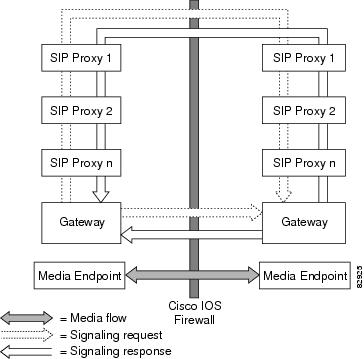
The Firewall for SIP Support feature allows SIP signaling requests to traverse directly between gateways or through a series of proxies to the destination gateway or phone. After the initial request, if the Record-Route header field is not used, subsequent requests can traverse directly to the destination gateway address as specified in the Contact header field. Thus, the Cisco IOS firewall is aware of all surrounding proxies and gateways and allows the following functionality:
•SIP signaling responses can travel the same path as SIP signaling requests.
•Subsequent signaling requests can travel directly to the endpoint (destination gateway).
•Media endpoints can exchange data between each other.
See Figure 1 for a sample topology that displays these functionalities.
Figure 1 Cisco IOS Firewall for SIP Awareness Sample Topology
SIP Message Treatment by the Firewall
See Table 3 for information on the treatment of SIP methods by the Cisco IOS firewall.
Call Database
A call database, which contains the details of a call leg, is maintained for all call flows. A call database is created and maintained because there can be numerous signaling sessions for each call. Table 4 identifies the information available in the call database.
How to Configure Your Firewall for SIP
•Configuring Firewall for SIP Support (required)
•Verifying Firewall for SIP Support (optional)
•Monitoring Firewall for SIP Support (optional)
Configuring Firewall for SIP Support
To enable a firewall to support SIP, use the following commands.
Prerequisite
Before you configure Cisco IOS firewall support for SIP on your router, you first need to configure access lists, whose purpose normally is to block SIP traffic from unprotected networks for which the firewall will create temporary openings for specific traffic.
SUMMARY STEPS
1. enable
2. configure terminal
3. ip inspect name inspection-name sip [alert {on | off}] [audit-trail {on | off}] [timeout seconds]
4. interface type number
5. ip inspect inspection-name {in | out}
6. Repeat Steps 3 through 5 (Optional)
DETAILED STEPS
Verifying Firewall for SIP Support
To verify Cisco IOS firewall session information, perform the following optional steps:
SUMMARY STEPS
1. enable
2. show ip inspect name inspection-name
3. show ip inspect session [detail]
4. show ip access-list
DETAILED STEPS
Monitoring Firewall for SIP Support
To monitor firewall events, perform the following optional steps:
Note Effective with Cisco IOS Release 12.4(20)T, the debug ip inspect command is replaced by the debug policy-firewall command. See the Cisco IOS Debug Command Reference for more information.
SUMMARY STEPS
1. enable
2. debug ip inspect sip
DETAILED STEPS
Configuration Examples for Firewall SIP Support
•Example: Firewall and SIP Configuration
Example: Firewall and SIP Configuration
The following example shows how to allow outside initiated calls and internal calls. For outside initiated calls, an ACL needs to be punched to allow for the traffic from the initial signaling packet from outside. Subsequent signaling and media channels will be allowed by the inspection module.
ip inspect name voip sip
interface FastEthernet0/0
ip inspect voip in
!
!
interface FastEthernet0/1
ip inspect voip in
ip access-group 100 in
!
!
access-list 100 permit udp host <gw ip> any eq 5060
access-list 100 permit udp host <proxy ip> any eq 5060
access-list deny ip any any
Additional References
Related Documents
|
|
|
|---|---|
Cisco IOS firewall information and configuration tasks |
"Configuring Context-Based Access Control" |
Cisco IOS firewall commands |
Standards
|
|
|
|---|---|
None |
— |
MIBs
|
|
|
|---|---|
None |
To locate and download MIBs for selected platforms, Cisco IOS releases, and feature sets, use Cisco MIB Locator found at the following URL: |
RFCs
|
|
|
|---|---|
RFC 2543 |
SIP: Session Initiation Protocol |
1 Not all supported RFCs are listed. |
Technical Assistance
Feature Information for Firewall SIP Support
Table 5 lists the features in this module and provides links to specific configuration information.
Use Cisco Feature Navigator to find information about platform support and software image support. Cisco Feature Navigator enables you to determine which software images support a specific software release, feature set, or platform. To access Cisco Feature Navigator, go to http://www.cisco.com/go/cfn. An account on Cisco.com is not required.
Note Table 5 lists only the software release that introduced support for a given feature in a given software release train. Unless noted otherwise, subsequent releases of that software release train also support that feature.
Cisco and the Cisco Logo are trademarks of Cisco Systems, Inc. and/or its affiliates in the U.S. and other countries. A listing of Cisco's trademarks can be found at www.cisco.com/go/trademarks. Third party trademarks mentioned are the property of their respective owners. The use of the word partner does not imply a partnership relationship between Cisco and any other company. (1005R)
Any Internet Protocol (IP) addresses and phone numbers used in this document are not intended to be actual addresses and phone numbers. Any examples, command display output, network topology diagrams, and other figures included in the document are shown for illustrative purposes only. Any use of actual IP addresses or phone numbers in illustrative content is unintentional and coincidental.
© 2007 Cisco Systems, Inc. All rights reserved.
 Feedback