- MPLS LDP Graceful Restart
- NSF/SSO - MPLS LDP and LDP Graceful Restart
- ISSU MPLS Clients
- MPLS Traffic Engineering�RSVP Graceful Restart
- NSF/SSO�MPLS TE and RSVP Graceful Restart
- Configuring NSF/SSO�MPLS VPN
- SSO and ISSU - MPLS VPN 6VPE and 6PE
- AToM Graceful Restart
- NSF/SSO�Any Transport over MPLS and AToM Graceful Restart
- L2VPN Pseudowire Redundancy
- Finding Feature Information
- Contents
- Prerequisites for MPLS LDP Graceful Restart
- Restrictions for MPLS LDP Graceful Restart
- Information About MPLS LDP Graceful Restart
- How to Configure MPLS LDP Graceful Restart
- Configuration Examples for MPLS LDP Graceful Restart
- Additional References
- Feature Information for MPLS LDP Graceful Restart
MPLS LDP Graceful Restart
When a router is configured with Multiprotocol Label Switching (MPLS) Label Distribution Protocol (LDP) Graceful Restart (GR), it assists a neighboring router that has MPLS LDP Stateful Switchover/Nonstop Forwarding (SSO/NSF) Support and Graceful Restart to recover gracefully from an interruption in service. MPLS LDP GR functions strictly in helper mode, which means it can only help other routers that are enabled with MPLS SSO/NSF and GR to recover. If the router with LDP GR fails, its peer routers cannot help the router recover.
For brevity, the following are used in this document:
• MPLS LDP SSO/NSF Support and Graceful Restart is called LDP SSO/NSF.
•The MPLS LDP GR feature described in this document refers to helper mode.
When you enable MPLS LDP GR on a router that peers with an MPLS LDP SSO/NSF-enabled router, the SSO/NSF-enabled router can maintain its forwarding state when the LDP session between them is interrupted. While the SSO/NSF-enabled router recovers, the peer router forwards packets using stale information. This enables the SSO/NSF-enabled router to become operational more quickly.
Finding Feature Information
For the latest feature information and caveats, see the release notes for your platform and software release. To find information about the features documented in this module, and to see a list of the releases in which each feature is supported, see the "Feature Information for MPLS LDP Graceful Restart" section.
Use Cisco Feature Navigator to find information about platform support and Cisco IOS XE software image support. To access Cisco Feature Navigator, go to http://www.cisco.com/go/cfn. An account on Cisco.com is not required.
Contents
•Prerequisites for MPLS LDP Graceful Restart
•Restrictions for MPLS LDP Graceful Restart
•Information About MPLS LDP Graceful Restart
•How to Configure MPLS LDP Graceful Restart
•Configuration Examples for MPLS LDP Graceful Restart
•Feature Information for MPLS LDP Graceful Restart
Prerequisites for MPLS LDP Graceful Restart
You must enable MPLS LDP GR on all route processors for an LDP session to be preserved during an interruption in service.
Restrictions for MPLS LDP Graceful Restart
•MPLS LDP GR is supported in strict helper mode.
•MPLS LDP GR cannot be configured on label-controlled ATM (LC-ATM) interfaces.
Information About MPLS LDP Graceful Restart
To configure MPLS LDP GR, you need to understand the following concepts:
•How MPLS LDP Graceful Restart Works
•How a Route Processor Advertises That It Supports MPLS LDP Graceful Restart
•What Happens If a Route Processor Does Not Have MPLS LDP Graceful Restart
How MPLS LDP Graceful Restart Works
MPLS LDP GR works in strict helper mode, which means it helps a neighboring route processor that has MPLS LDP SSO/NSF to recover from disruption in service without losing its MPLS forwarding state. The disruption in service could be the result of a TCP or UDP event or the stateful switchover of a route processor. When the neighboring router establishes a new session, the LDP bindings and MPLS forwarding states are recovered.
In the topology shown in Figure 1, the following elements have been configured:
•LDP sessions are established between Router 1 and Router 2, as well as between Router 2 and Router 3.
•Router 2 has been configured with MPLS LDP SSO/NSF. Routers 1 and 3 have been configured with MPLS LDP GR.
•A label switched path (LSP) has been established between Router 1 and Router 3.
Figure 1 Example of a Network Using LDP Graceful Restart

The following process shows how Routers 1 and 3, which have been configured with MPLS LDP GR, help Router 2, which has been configured with LDP SSO/NSF, recover from a disruption in service:
1. Router 1 notices an interruption in service with Router 2. (Router 3 also performs the same actions in this process.)
2. Router 1 marks all the label bindings from Router 2 as stale, but it continues to use the bindings for MPLS forwarding.
Router 1 reestablishes an LDP session with Router 2, but keeps its stale label bindings. If you issue a show mpls ldp neighbor command with the graceful-restart keyword, the command output displays the recovering LDP sessions.
3. Both routers readvertise their label binding information. If Router 1 relearns a label from Router 2 after the session has been established, the stale flags are removed. The show mpls forwarding-table command displays the information in the MPLS forwarding table, including the local label, outgoing label or VC, prefix, label-switched bytes, outgoing interface, and next hop.
You can set various graceful restart timers. See the following commands for more information:
•mpls ldp graceful-restart timers neighbor-liveness
•mpls ldp graceful-restart timers max-recovery
How a Route Processor Advertises That It Supports MPLS LDP Graceful Restart
A Route Processor (RP) that is configured to perform MPLS LDP GR includes the Fault Tolerant (FT) Type Length Value (TLV) in the LDP initialization message. The RP sends the LDP initialization message to a neighbor to establish an LDP session.
The FT session TLV includes the following information:
•The Learn from Network (L) flag is set to 1, which indicates that the route processor is configured to perform MPLS LDP GR.
•The Reconnect Timeout field shows the time (in milliseconds) that the neighbor should wait for a reconnection if the LDP session is lost. In this release, the timer is set to 0, which indicates that if the local router fails, its peers should not wait for it to recover. The timer setting indicates that the local router is working in helper mode.
•The Recovery Time field shows the time (in milliseconds) that the neighbor should retain the MPLS forwarding state during a recovery. If a neighbor did not preserve the MPLS forwarding state before the restart of the control plane, the neighbor sets the recovery time to 0.
What Happens If a Route Processor Does Not Have MPLS LDP Graceful Restart
If two route processors establish an LDP session and one route processor is not configured for MPLS LDP GR, the two route processors create a normal LDP session but do not have the ability to perform MPLS LDP GR. Both route processors must be configured for MPLS LDP GR.
How to Configure MPLS LDP Graceful Restart
This section contains the following procedures:
•Configuring MPLS LDP Graceful Restart (required)
•Verifying the MPLS LDP Graceful Restart Configuration (optional)
Configuring MPLS LDP Graceful Restart
To configure MPLS LDP Graceful Restart, perform the following task.
You must enable MPLS LDP GR on all route processors for an LDP session to be preserved during an interruption in service.
MPLS LDP GR is enabled globally. When you enable MPLS LDP GR, it has no effect on existing LDP sessions. New LDP sessions that are established can perform MPLS LDP GR.

Note You can also issue the mpls label protocol ldp command in global configuration mode, which enables LDP on all interfaces configured for MPLS.
SUMMARY STEPS
1. enable
2. configure terminal
3. ip cef distributed
4. mpls ldp graceful-restart
5. interface type slot/subslot/port[.subinterface-number]
6. mpls ip
7. mpls label protocol ldp
8. exit
9. exit
DETAILED STEPS
Verifying the MPLS LDP Graceful Restart Configuration
To verify that MPLS LDP Graceful Restart is configured correctly, perform the following task.
SUMMARY STEPS
1. enable
2. show mpls ldp neighbor graceful-restart
3. show mpls ldp graceful restart
4. exit
Step 1 enable
Use this command to enable privileged ECEC mode. Enter your password if prompted. For example:
Router>? enable
Router#
Step 2 show mpls ldp neighbor graceful restart
Use this command to display graceful restart information for LDP sessions. For example:
Router# show mpls ldp neighbor graceful restart
Peer LDP Ident: 10.20.20.20:0; Local LDP Ident 10.17.17.17:0
TCP connection: 10.20.20.20.16510 - 10.17.17.17.646
State: Oper; Msgs sent/rcvd: 8/18; Downstream
Up time: 00:04:39
Graceful Restart enabled; Peer reconnect time (msecs): 120000
Peer LDP Ident: 10.19.19.19:0; Local LDP Ident 10.17.17.17:0
TCP connection: 10.19.19.19.11007 - 10.17.17.17.646
State: Oper; Msgs sent/rcvd: 8/38; Downstream
Up time: 00:04:30
Graceful Restart enabled; Peer reconnect time (msecs): 120000
Step 3 show mpls ldp graceful-restart
Use this command to display graceful restart sessions and session parameters. For example:
Router# show mpls ldp graceful-restart
LDP Graceful Restart is enabled
Neighbor Liveness Timer: 5 seconds
Max Recovery Time: 200 seconds
Down Neighbor Database (0 records):
Graceful Restart-enabled Sessions:
VRF default:
Peer LDP Ident: 10.18.18.18:0, State: estab
Peer LDP Ident: 10.17.17.17:0, State: estab
Step 4 exit
Use this command to exit to user EXEC mode. For example:
Router# exit
Router>
Configuration Examples for MPLS LDP Graceful Restart
This section contains the following example for configuring the MPLS LDP Graceful Restart feature:
•Configuring MPLS LDP Graceful Restart: Example
Configuring MPLS LDP Graceful Restart: Example
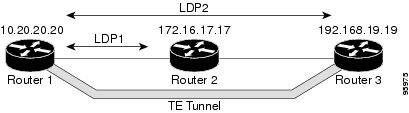
Figure 2 shows a configuration where MPLS LDP GR is enabled on Router 1 and MPLS LDP SSO/NSF is enabled on Routers 2 and 3. In this configuration example, Router 1 creates an LDP session with Router 2. Router 1 also creates a targeted session with Router 3 through a traffic engineering tunnel using Router 2.
Figure 2 MPLS LDP Graceful Restart Configuration Example
Router 1 configured with LDP GR:
!
ip subnet-zero
ip cef
mpls label range 16 10000 static 10001 1048575
mpls label protocol ldp
mpls ldp logging neighbor-changes
mpls ldp graceful-restart
mpls traffic-eng tunnels
no mpls traffic-eng auto-bw timers frequency 0
mpls ldp router-id Loopback0 force
!
interface Loopback0
ip address 20.20.20.20 255.255.255.255
no ip directed-broadcast
no ip mroute-cache
!
interface Tunnel1
ip unnumbered Loopback0
no ip directed-broadcast
mpls label protocol ldp
mpls ip
tunnel destination 19.19.19.19
tunnel mode mpls traffic-eng
tunnel mpls traffic-eng autoroute announce
tunnel mpls traffic-eng priority 7 7
tunnel mpls traffic-eng bandwidth 500
tunnel mpls traffic-eng path-option 1 dynamic
!
interface ATM5/1/0
no ip address
no ip directed-broadcast
atm clock INTERNAL
no atm enable-ilmi-trap
no atm ilmi-keepalive
!
interface ATM5/1/0.5 point-to-point
ip address 10.12.0.2 255.0.0.0
no ip directed-broadcast
no atm enable-ilmi-trap
pvc 6/100
encapsulation aal5snap
mpls label protocol ldp
mpls traffic-eng tunnels
mpls ip
ip rsvp bandwidth 1000
!
router ospf 100
log-adjacency-changes
redistribute connected
network 10.12.0.0 0.255.255.255 area 100
network 10.20.20.20 0.0.0.0 area 100
mpls traffic-eng router-id Loopback0
mpls traffic-eng area 100
Router 2 configured with LDP SSO/NSF:
!
redundancy
mode sso
!
ip cef
no ip domain-lookup
mpls label range 17 10000 static 10001 1048575
mpls label protocol ldp
mpls ldp logging neighbor-changes
mpls ldp graceful-restart
mpls traffic-eng tunnels
no mpls traffic-eng auto-bw timers frequency 0
no mpls advertise-labels
mpls ldp router-id Loopback0 force
!
interface Loopback0
ip address 10.17.17.17 255.255.255.255
no ip directed-broadcast
!
interface ATM4/0/0
no ip address
no ip directed-broadcast
no ip mroute-cache
atm clock INTERNAL
atm sonet stm-1
no atm enable-ilmi-trap
no atm ilmi-keepalive
!
interface ATM4/0/0.5 point-to-point
ip address 10.12.0.1 255.0.0.0
no ip directed-broadcast
no atm enable-ilmi-trap
pvc 6/100
encapsulation aal5snap
mpls label protocol ldp
mpls traffic-eng tunnels
mpls ip
ip rsvp bandwidth 1000
!
interface POS5/1/0
ip address 10.11.0.1 255.0.0.0
no ip directed-broadcast
encapsulation ppp
mpls label protocol ldp
mpls traffic-eng tunnels
mpls ip
no peer neighbor-route
clock source internal
ip rsvp bandwidth 1000
!
router ospf 100
log-adjacency-changes
redistribute connected
nsf enforce global
network 10.11.0.0 0.255.255.255 area 100
network 10.12.0.0 0.255.255.255 area 100
network 10.17.17.17 0.0.0.0 area 100
mpls traffic-eng router-id Loopback0
mpls traffic-eng area 100
!
ip classless
Router 3 configured with LDP SSO/NSF:
!
redundancy
mode sso
!
ip subnet-zero
ip cef
!
no ip finger
no ip domain-lookup
mpls label protocol ldp
mpls ldp neighbor 10.11.11.11 targeted ldp
mpls ldp logging neighbor-changes
mpls ldp graceful-restart
mpls traffic-eng tunnels
no mpls traffic-eng auto-bw timers frequency 0
mpls ldp discovery directed-hello interval 12
mpls ldp discovery directed-hello holdtime 130
mpls ldp discovery directed-hello accept
mpls ldp router-id Loopback0 force
!
interface Loopback0
ip address 10.19.19.19 255.255.255.255
no ip directed-broadcast
!
interface POS1/0
ip address 10.11.0.2 255.0.0.0
no ip directed-broadcast
encapsulation ppp
mpls label protocol ldp
mpls traffic-eng tunnels
mpls ip
no peer neighbor-route
clock source internal
ip rsvp bandwidth 1000
!
router ospf 100
log-adjacency-changes
redistribute connected
nsf enforce global
network 10.11.0.0 0.255.255.255 area 100
network 10.19.19.19 0.0.0.0 area 100
mpls traffic-eng router-id Loopback0
mpls traffic-eng area 100
!
ip classless
Additional References
The following sections provide references related to MPLS LDP GR.
Related Documents
|
|
|
|---|---|
MPLS Label Distribution Protocol |
|
LDP commands |
Standards
|
|
|
|---|---|
No new or modified standards are supported by this feature, and support for existing standards has not been modified by this feature. |
— |
MIBs
RFCs
|
|
|
|---|---|
RFC 3036 |
LDP Specification |
RFC 3478 |
Graceful Restart Mechanism for Label Distribution |
Technical Assistance
Feature Information for MPLS LDP Graceful Restart
Table 1 lists the features in this module and provides links to specific configuration information.
Use Cisco Feature Navigator to find information about platform support and software image support. Cisco Feature Navigator enables you to determine which Cisco IOS XE software images support a specific software release, feature set, or platform. To access Cisco Feature Navigator, go to http://www.cisco.com/go/cfn. An account on Cisco.com is not required.
Note Table 1 lists only the Cisco IOS XE software release that introduced support for a given feature in a given Cisco IOS XE software release train. Unless noted otherwise, subsequent releases of that Cisco IOS XE software release train also support that feature.
|
|
|
|
|---|---|---|
MPLS LDP Graceful Restart |
Cisco IOS XE Release 2.1 |
When a router is configured with Multiprotocol Label Switching (MPLS) Label Distribution Protocol (LDP) Graceful Restart (GR), it assists a neighboring router that has MPLS LDP Stateful Switchover/Nonstop Forwarding (SSO/NSF) Support and Graceful Restart to recover gracefully from an interruption in service. MPLS LDP GR functions strictly in helper mode, which means it can only help other routers that are enabled with MPLS SSO/NSF and GR to recover. If the router with LDP GR fails, its peer routers cannot help the router recover. In Cisco IOS XE Release 2.1, this feature was introduced on the Cisco ASR 1000 Series Aggregation Services Routers. The following sections provide information about this feature: • • • • • The following commands were introduced or modified: debug mpls ldp graceful-restart, mpls ldp graceful-restart, mpls ldp graceful-restart timers max-recovery, mpls ldp graceful-restart timers neighbor-liveness, show mpls ip binding, show mpls ldp bindings, show mpls ldp graceful-restart, show mpls ldp neighbor. |
 Feedback