Enabling Ethernet Local Management Interface
Available Languages
Table Of Contents
Enabling Ethernet Local Management Interface
Prerequisites for Enabling Ethernet Local Management Interface
Restrictions for Enabling Ethernet Local Management Interface
Information About Enabling Ethernet Local Management Interface
How to Enable Ethernet Local Management Interface
Enabling Ethernet LMI on All Supported Interfaces
Enabling Ethernet LMI on a Single Supported Interface
Configuration Examples for Ethernet Local Management Interface
Example: Enabling Ethernet LMI on All Supported Interfaces
Example: Enabling Ethernet LMI on a Single Supported Interface
Feature Information for Enabling Ethernet Local Management Interface
Enabling Ethernet Local Management Interface
First Published: June 19, 2006Last Updated: February 7, 2011Ethernet Local Management Interface (LMI) is an Ethernet layer operation, administration, and management (OAM) protocol. It provides information that enables autoconfiguration of customer edge (CE) devices and provides the status of Ethernet virtual connections (EVCs) for large Ethernet metropolitan-area networks (MANs) and WANs. Specifically, Ethernet LMI notifies a CE device of the operating state of an EVC and the time when an EVC is added or deleted. Ethernet LMI also communicates the attributes of an EVC and a user-network interface (UNI) to a CE device.
The advent of Ethernet as a MAN and WAN technology imposes a new set of OAM requirements on Ethernet's traditional operations, which were centered on enterprise networks only. The expansion of Ethernet technology into the domain of service providers, where networks are substantially larger and more complex than enterprise networks and the user-base is wider, makes operational management of link uptime crucial. More importantly, the timeliness in isolating and responding to a failure becomes mandatory for normal day-to-day operations, and OAM translates directly to the competitiveness of the service provider.
Finding Feature Information
Your software release may not support all the features documented in this module. For the latest feature information and caveats, see the release notes for your platform and software release. To find information about the features documented in this module, and to see a list of the releases in which each feature is supported, see the "Feature Information for Enabling Ethernet Local Management Interface" section.
Use Cisco Feature Navigator to find information about platform support and Cisco software image support. To access Cisco Feature Navigator, go to http://www.cisco.com/go/cfn. An account on Cisco.com is not required.
Contents
•
Prerequisites for Enabling Ethernet Local Management Interface
•
•
•
•
•
Prerequisites for Enabling Ethernet Local Management Interface
Business Requirements
•
Restrictions for Enabling Ethernet Local Management Interface
•
•
•
Information About Enabling Ethernet Local Management Interface
•
EVC
An EVC as defined by the Metro Ethernet Forum could be a port level point-to-point or multipoint-to-multipoint Layer 2 circuit. EVC status can be used by the CE device to find an alternative path in to the service provider network or in some cases, fall back to a backup path over Ethernet or another alternative service such as Frame Relay or ATM.
Ethernet LMI
Ethernet LMI is an Ethernet layer OAM protocol between a CE device and the PE in large Ethernet MANs and WANs. It provides information that enables service providers to autoconfigure CE devices with service parameters and parameter changes from a user provider edge (UPE) device.
Figure 1 shows where in a network Ethernet LMI functions.
Figure 1
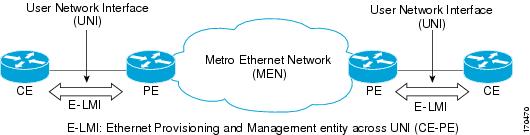
Position in the Network Where Ethernet LMI Functions
LMI also provides the status of Ethernet EVCs in large Ethernet MANs and WANs to the CE. Specifically, Ethernet LMI notifies a CE device of the operating state of an EVC and the time when an EVC is added or deleted. Ethernet LMI also communicates EVC and UNI attributes to a CE device.
The Ethernet LMI protocol includes the following procedures, as defined by the MEF 16 Technical Specification:
•
•
•
•
Benefits of Ethernet LMI
•
•
•
How to Enable Ethernet Local Management Interface
•
•
Enabling Ethernet LMI on All Supported Interfaces
Perform this task to enable Ethernet LMI on all supported interfaces on a device.
SUMMARY STEPS
1.
2.
3.
4.
DETAILED STEPS
Enabling Ethernet LMI on a Single Supported Interface
Perform the steps in this task to enable Ethernet LMI on a specific supported interface.
SUMMARY STEPS
1.
2.
3.
4.
5.
DETAILED STEPS
Configuration Examples for Ethernet Local Management Interface
The examples in this section show the configurations that enable Ethernet LMI on all interfaces on a CE device (globally) and on a specific interface on a CE device.
•
•
Example: Enabling Ethernet LMI on All Supported Interfaces
enableconfigure terminalEnter configuration commands, one per line. End with CNTL/Z.ethernet lmi globalend00:06:33: %LINEPROTO-5-UPDOWN: Line protocol on Interface Ethernet0/0, changed pExample: Enabling Ethernet LMI on a Single Supported Interface
enableconfigure terminalEnter configuration commands, one per line. End with CNTL/Z.interface ethernet 0/0ethernet lmi interfaceend00:05:51: %SYS-5-CONFIG_I: Configured from console by consoleAdditional References
Related Documents
Ethernet Connectivity Fault Management
"Configuring Ethernet Connectivity Fault Management in a Service Provider Network" in the Cisco IOS Carrier Ethernet Configuration Guide
Configuring CFM and E-LMI in a service provider network
Cisco ME 3400 Switch Software Configuration Guide, Rel. 12.2(25)SEG
Commands used for configuring Ethernet LMI in a service provider network
Ethernet LMI at a provider edge
"Configuring Ethernet Local Management Interface at a Provider Edge" in the Cisco IOS Carrier Ethernet Configuration Guide
Carrier Ethernet commands: complete command syntax, command mode, command history, defaults, usage guidelines, and examples
Cisco IOS commands: master list of commands with complete command syntax, command mode, command history, defaults, usage guidelines, and examples
Standards
Metro Ethernet Forum 16 Technical Specification
Technical Specification MEF 16- Ethernet Local Management Interface
IEEE P802.1ag/D5.2
Draft Standard for Local and Metropolitan Area Networks
ITU-T Q.3/13
Liaison statement on Ethernet OAM (Y.17ethoam)
IETF VPLS OAM
L2VPN OAM Requirements and Framework
MIBs
RFCs
No new or modified RFCs are supported by this feature, and support for existing RFCs has not been modified by this feature.
—
Technical Assistance
Feature Information for Enabling Ethernet Local Management Interface
Table 1 lists the feature release history for this feature.
Use Cisco Feature Navigator to find information about platform support and software image support. Cisco Feature Navigator enables you to determine which software images support a specific software release, feature set, or platform. To access Cisco Feature Navigator, go to http://www.cisco.com/go/cfn. An account on Cisco.com is not required.

Note
Glossary
CE—customer edge. Edge equipment on the customer side of a user-network interface (UNI).
CE-VLAN ID—Identifier of a CE-VLAN.
E-LMI—Ethernet Local Management Interface. An Ethernet layer OAM protocol. It provides information that enables autoconfiguration of CE devices and provides the status of Ethernet virtual connections (EVCs) for large Ethernet MANs and WANs.
EVC—Ethernet virtual connection. An association of two or more user-network interfaces.
OAM—operations, administration, and maintenance. A term used by several standards bodies to describe protocols and procedures for operating, administrating, and maintaining networks. Examples are ATM OAM and IEEE Std. 802.3ah OAM.
PE—provider edge. Edge equipment on the service provider side of a user-network interface (UNI).
UNI—user-network interface. A common term for the connection point between an operator's bridge and customer equipment. A UNI often includes a C-VLAN-aware bridge component. The term UNI is used broadly in the IEEE P802.1ag/D5.2 standard when the purpose for various features of LMI are explained.
Cisco and the Cisco Logo are trademarks of Cisco Systems, Inc. and/or its affiliates in the U.S. and other countries. A listing of Cisco's trademarks can be found at www.cisco.com/go/trademarks. Third party trademarks mentioned are the property of their respective owners. The use of the word partner does not imply a partnership relationship between Cisco and any other company. (1005R)
Any Internet Protocol (IP) addresses and phone numbers used in this document are not intended to be actual addresses and phone numbers. Any examples, command display output, network topology diagrams, and other figures included in the document are shown for illustrative purposes only. Any use of actual IP addresses or phone numbers in illustrative content is unintentional and coincidental.
© 2006-2011 Cisco Systems, Inc. All rights reserved.
 Feedback