CFM CCM Extensions to Support the NSN Microwave 1+1 Hot Standby Protocol
Available Languages
Table Of Contents
CFM CCM Extensions to Support the NSN Microwave 1+1 Hot Standby Protocol
Restrictions for CFM CCM Extensions to Support the NSN Microwave 1+1 HSBY Protocol
Information About CFM CCM Extensions to Support the NSN Microwave 1+1 HSBY Protocol
NSN Microwave 1+1 HSBY and CFM Integration
Monitoring Devices and Suspending CFM Traffic
NSN Microwave 1+1 HSBY Protocol Monitoring of Maintenance Associations
Microwave 1+1 HSBY Configuration
How to Configure CFM CCM Extensions to Support the NSN Microwave 1+1 HSBY Protocol
Configuring NSN Microwave 1+1 HSBY Protocol and CFM CCM Extensions
Configuration Examples for CFM CCM Extensions to Support the NSN Microwave 1+1 HSBY Protocol
Example: CFM Domain and MEP Configuration
Example: 1+1 HSBY Protocol Configuration
Feature Information for CFM CCM Extensions to Support the NSN Microwave 1+1 HSBY Protocol
CFM CCM Extensions to Support the NSN Microwave 1+1 Hot Standby Protocol
First Published: March 28, 2011Last Updated: March 28, 2011The Nokia Siemens Networks (NSN) Microwave 1+1 Hot Standby (HSBY) protocol is a link-protection protocol that extends connectivity fault management (CFM) continuity check messages (CCMs) to enable 1:1 link redundancy in microwave devices. NSN Microwave 1+1 HSBY provides link-protection support for both indoor units (IDUs) and outdoor units (ODUs).
This document describes the extensions to the IEEE 802.1ag CFM component in Cisco IOS software that enable the detection and handling of microwave outdoor unit hardware failures.
Finding Feature Information
Your software release may not support all the features documented in this module. For the latest feature information and caveats, see the release notes for your platform and software release. To find information about the features documented in this module, and to see a list of the releases in which each feature is supported, see the "Feature Information for CFM CCM Extensions to Support the NSN Microwave 1+1 HSBY Protocol" section.
Use Cisco Feature Navigator to find information about platform support and Cisco software image support. To access Cisco Feature Navigator, go to http://www.cisco.com/go/cfn. An account on Cisco.com is not required.
Contents
•
Restrictions for CFM CCM Extensions to Support the NSN Microwave 1+1 HSBY Protocol
•
•
•
•
Restrictions for CFM CCM Extensions to Support the NSN Microwave 1+1 HSBY Protocol
•
•
•
Information About CFM CCM Extensions to Support the NSN Microwave 1+1 HSBY Protocol
•
•
NSN Microwave 1+1 HSBY and CFM Integration
•
•
•
CFM Continuity Check Messages
CFM CCMs are heartbeat messages exchanged periodically between maintenance association endpoints (MEPs). CCMs allow MEPs to discover each other within a maintenance association, and allow maintenance association intermediate points (MIPs) to discover MEPs. CCMs provide a means for detecting connectivity failures in a maintenance domain. CCMs are transmitted frequently enough so that consecutive messages can be lost without causing the information to time out in any of the receiving MEPs.
For detailed information about CFM, MEPs, MIPs, and maintenance associations, see Configuring IEEE Standard-Compliant Ethernet CFM in a Service Provider Network.
Monitoring Devices and Suspending CFM Traffic
The NSN Microwave 1+1 HSBY Protocol has specified a proprietary time-to-live (TLV) field in CCMs for monitoring active and standby ODUs, and a flag to temporarily suspend CCM monitoring. Identified by an Organizational Unique Identifier (OUI) value of 0x000FBB, the TLV is attached to CCMs as an organization-specific TLV.
An IDU or an ODU may need to temporarily halt transmitting traffic, including CCMs, in circumstances such as a software upgrade or a reload. An IDU or ODUs can set the Suspend CC Monitor flag to signal a temporary pause in CFM traffic if a suspension is needed. Using this flag prevents the other two devices from triggering an unnecessary link-protection action. The Suspend CC Monitor time interval field, in conjunction with the flag, indicates the maximum amount of time the two devices must wait before expecting CCMs to resume from the suspended device.
NSN Microwave 1+1 HSBY Protocol Monitoring of Maintenance Associations
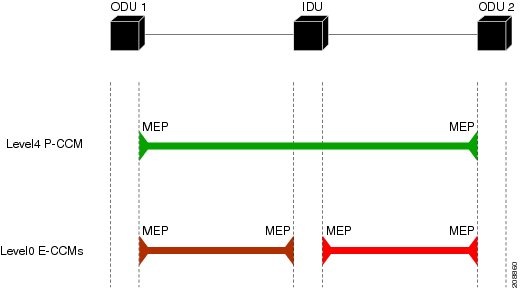
The NSN Microwave 1+1 HSBY protocol monitors three maintenance associations. One maintenance association is at Ethernet CFM level 4 and is called the ODU-to-ODU CCM (P-CCM) session, and two maintenance associations are at Ethernet CFM level 0 and are called the IDU-to-ODU CCM (E-CCM) sessions. The IDU is associated with only the two E-CCM sessions and has an outward-facing MEP configured in each session. The IDU is required to pass CFM traffic between the ODUs only in the P-CCM session; no additional monitoring of this maintenance association is needed.
The HSBY configuration shown in Figure 1 supports four separate traffic flows:
•
•
•
•
Figure 1 HSBY Protocol and CFM Maintenance Associations
Microwave 1+1 HSBY Configuration
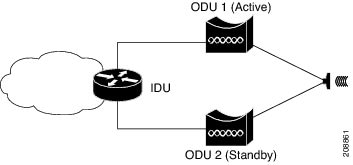
The NSN Microwave 1+1 HSBY link-protection function within the scope of CFM CCM extensions is provided through configuration of a single IDU connected to two ODUs for redundancy. The Cisco IOS device acts as the IDU. At a given time only one ODU is actively handling data traffic, but both the active and standby ODUs are processing and transmitting CFM traffic. The CFM traffic is composed of CCMs with NSN proprietary TLV fields that extend the CCMs' detection of connectivity failures to IDUs and ODUs. Additionally, these extended CCMs passed between the IDU and ODUs are used to indicate which ODU is active and handling the data traffic. If a failure occurs, the standby ODU assumes the role of the active ODU. Figure 2 shows a sample physical topology.
Figure 2 HSBY Link Protection Physical Topology
IDU Configuration Values
The HSBY Protocol specifies that some IDU parameters are configurable and others are fixed values. Table 1 summarizes the permitted values for an IDU using the HSBY Protocol.

Note
ODU Configuration Values
The HSBY Protocol specifies that some ODU parameters are configurable and others are fixed values. Table 2 summarizes the permitted values for an ODU using the HSBY Protocol.
Note
Table 2 HSBY ODU Configuration Parameters
MA VLAN-ID (E-CCM)
None
16-50
MPID
2
Fixed
Short MA Name
Learned
0-65535
How to Configure CFM CCM Extensions to Support the NSN Microwave 1+1 HSBY Protocol
•
Configuring NSN Microwave 1+1 HSBY Protocol and CFM CCM Extensions
Perform this task to configure the NSN Microwave 1+1 HSBY Protocol and the CFM CCM extensions to support it.
Summary Steps
1.
2.
3.
4.
5.
6.
7.
8.
9.
10.
11.
12.
13.
14.
15.
16.
17.
18.
19.
20.
21.
22.
23.
24.
25.
26.
27.
28.
29.
30.
31.
32.
33.
34.
35.
DETAILED STEPS
Configuration Examples for CFM CCM Extensions to Support the NSN Microwave 1+1 HSBY Protocol
•
•
Example: CFM Domain and MEP Configuration
This example is a sample CFM domain and MEP configuration that follows the NSN requirements for monitoring ODUs. The link-protection command for configuring NSN-specific parameters is included. CFM configuration parameters for an IDU are shown within angle brackets (<>):
link-protection suspend-interval <80s, 160s, 240s, 320s>
link-protection management vlan <51-4094>
link-protection pccm vlan <16-50>
!
ethernet cfm ieee ethernet cfm global !ethernet cfm domain <Domain for ODU1> level 0 id null service number <number> vlan <1-15> direction down continuity-check continuity-check interval <10, 100, 1000ms>!ethernet cfm domain <Domain for ODU2> level 0 id null service number <number> vlan <1-15> direction down continuity-check continuity-check interval <10, 100, 1000ms> !interface GigabitEthernet 0/3 ethernet cfm mep domain <Domain for ODU1> mpid 1 vlan <1-15> link-protection group <group #>!interface GigabitEthernet 0/4 ethernet cfm mep domain <Domain for ODU2> mpid 1 vlan <1-15> link-protection group <group #> !Example: 1+1 HSBY Protocol Configuration
The following example shows a 1+1 HSBY protocol configuration on the Cisco 7600 series router:
Router> enableRouter# configure terminalRouter(config)# ethernet cfm globalRouter(config)# link-protection enableRouter(config)# link-protection group management vlan 51Router(config)# link-protection group 2 pccm vlan 16Router(config)# ethernet cfm domain eccm1 level 0Router(config-ecfm)# id nullRouter(config-ecfm)# service 1 vlan 14 direction downRouter(config-ecfm-srv)# mep mpid 1Router(config-ecfm-srv)# mep mpid 2Router(config-ecfm-srv)# continuity-check interval 100msRouter(config-ecfm-srv)# exitRouter(config-ecfm)# exitRouter(config)# ethernet cfm domain eccm2 level 0Router(config-ecfm)# id nullRouter(config-ecfm)# service 2 vlan 15 direction downRouter(config-ecfm-srv)# mep mpid 1Router(config-ecfm-srv)# mep mpid 2Router(config-ecfm-srv)# continuity-check interval 100msRouter(config-ecfm-srv)# exitRouter(config-ecfm)# exitRouter(config)# interface gigabitethernet 1/1Router(config-if)# switchport mode trunkRouter(config-if)# spanning-tree portfast trunkRouter(config-if)# ethernet cfm mep domain eccm1 mpid 1 vlan 14Router(config-if)# link-protection group 1Router(config-if)# exitRouter(config)# interface GigabitEthernet 3/2Router(config-if)# switchport mode trunkRouter(config-if)# spanning-tree portfast trunkRouter(config-if)# ethernet cfm mep domain eccm2 mpid 1 vlan 15Router(config-if)# link-protection group 1Router(config-if)# endRouter# show ethernet cfm maintenance-points remote detailAdditional References
Related Documents
Cisco IOS commands: master list of commands with complete command syntax, command mode, command history, defaults, usage guidelines, and examples
Carrier Ethernet commands: complete command syntax, command mode, command history, defaults, usage guidelines, and examples
Configuring IEEE Standard-Compliant Ethernet CFM
Configuring IEEE Standard-Compliant Ethernet CFM in a Service Provider Network
Configurations for Carrier Ethernet networks
Carrier Ethernet Configuration Guide, Cisco IOS Release 15.1S
Understanding and configuring Microwave 1+1 HSBY on the Cisco MWR 2941 Mobile Wireless Edge Router
"Configuring Ethernet Link Operations, Administration, and Maintenance" chapter of the Cisco MWR 2941 Mobile Wireless Edge Router Software Configuration Guide, Release 15.0(1)MR
Standards
MIBs
None
To locate and download MIBs for selected platforms, Cisco software releases, and feature sets, use Cisco MIB Locator found at the following URL:
RFCs
Technical Assistance
Feature Information for CFM CCM Extensions to Support the NSN Microwave 1+1 HSBY Protocol
Table 3 lists the release history for this feature.
Use Cisco Feature Navigator to find information about platform support and software image support. Cisco Feature Navigator enables you to determine which software images support a specific software release, feature set, or platform. To access Cisco Feature Navigator, go to http://www.cisco.com/go/cfn. An account on Cisco.com is not required.
Note
Cisco and the Cisco Logo are trademarks of Cisco Systems, Inc. and/or its affiliates in the U.S. and other countries. A listing of Cisco's trademarks can be found at www.cisco.com/go/trademarks. Third party trademarks mentioned are the property of their respective owners. The use of the word partner does not imply a partnership relationship between Cisco and any other company. (1005R)
Any Internet Protocol (IP) addresses and phone numbers used in this document are not intended to be actual addresses and phone numbers. Any examples, command display output, network topology diagrams, and other figures included in the document are shown for illustrative purposes only. Any use of actual IP addresses or phone numbers in illustrative content is unintentional and coincidental.
© 2011 Cisco Systems, Inc. All rights reserved.
 Feedback