PPPoE Agent Remote-ID and DSL Line Characteristics Enhancement
Available Languages
Table Of Contents
PPPoE Agent Remote-ID and DSL Line Characteristics Enhancement
Prerequisites for the PPPoE Agent Remote-ID and DSL Line Characteristics Enhancement
Information About the PPPoE Agent Remote-ID and DSL Line Characteristics Enhancement
Differences Between ATM- and Ethernet-Based Broadband Access Networks
DSL Forum 2004-71: Solution for Remote-ID in PPPoE Discovery Phase
Remote-ID Tag in Ethernet-Based Broadband Access Networks
Benefits of the PPPoE Agent Remote-ID and DSL Line Characteristics Enhancement
How to Configure the PPPoE Agent Remote-ID and DSL Line Characteristics Enhancement
Configuring the PPPoE Agent Remote-ID and DSL Line Characteristics Enhancement Feature
Stripping Vendor-Specific Tags
Configuration Examples for the PPPoE Agent Remote-ID and DSL Line Characteristics Enhancement
Configuring PPPoE Agent Remote-ID and DSL Line Characteristics Enhancement: Example
Stripping Vendor-Specific Tags: Example
Feature Information for PPPoE Agent Remote-ID and DSL Line Characteristics Enhancement
PPPoE Agent Remote-ID and DSL Line Characteristics Enhancement
First Published: December 4, 2006Last Updated: October 2, 2009The PPPoE Agent Remote-ID and DSL Line Characteristics Enhancement feature provides a method by which the digital subscriber line access multiplexer (DSLAM) sends the DSL Remote-ID tag in the discovery phase as an identifier for the authentication, authorization, and accounting (AAA) access request on an Ethernet interface, thereby simulating ATM-based broadband access, but using cost-effective Ethernet instead. This Remote-ID tag is useful for troubleshooting, authentication, and accounting.
Finding Feature Information
Your software release may not support all the features documented in this module. For the latest feature information and caveats, see the release notes for your platform and software release. To find information about the features documented in this module, and to see a list of the releases in which each feature is supported, see the "Feature Information for PPPoE Agent Remote-ID and DSL Line Characteristics Enhancement" section.
Use Cisco Feature Navigator to find information about platform support and Cisco IOS and Catalyst OS software image support. To access Cisco Feature Navigator, go to http://www.cisco.com/go/cfn. An account on Cisco.com is not required.
Contents
•
Prerequisites for the PPPoE Agent Remote-ID and DSL Line Characteristics Enhancement
•
•
•
•
Prerequisites for the PPPoE Agent Remote-ID and DSL Line Characteristics Enhancement
It is recommended that you be familiar with the following documents before configuring this feature:
•
•
See the "Additional References" section for more information.
Information About the PPPoE Agent Remote-ID and DSL Line Characteristics Enhancement
To configure the PPPoE Agent Remote-ID and DSL Line Characteristics Enhancement feature, you should understand the following concepts:
•
•
•
•
Differences Between ATM- and Ethernet-Based Broadband Access Networks
Broadband DSLAM and Broadband Remote Access Server (BRAS) vendors need to provide Ethernet-based networks as an alternative to an ATM access network, with a DSLAM bridging the ATM-DSL local loop to the Ethernet-based broadband access network and allowing Ethernet-based connectivity to the BRAS. There is no unique mapping between the subscriber Line-ID tag and the interface in an Ethernet broadband access network, as there is in an ATM-based broadband network, where the ATM VC is associated to a subscriber line. During the authentication phase that initiates the PPP access and AAA accounting requests, the BRAS includes a NAS-Port-ID attribute in RADIUS authentication packets that identifies the DSL for the subscriber.
DSL Forum 2004-71: Solution for Remote-ID in PPPoE Discovery Phase
DSL Forum 2004-71 defines a method whereby the DSLAM sends the DSL Remote-ID tag in the PPP over Ethernet (PPPoE) discovery phase to apply the same subscriber mapping capability to Ethernet interfaces that is possible on ATM interfaces. This method adds support for the PPPoE server acting as a BRAS to report the Remote-ID tag as a new vendor specific attribute (VSA) (AAA_AT_REMOTE_ID) in AAA authentication and accounting requests. If the radius-server attribute 31 remote-id command is configured on the BRAS, the Remote-ID tag will be sent to a RADIUS server as the Calling Station-ID tag (attribute 31).
Remote-ID Tag in Ethernet-Based Broadband Access Networks
Traditional ATM-based DSL broadband access networks have the topology shown in Figure 1.
Figure 1 ATM-Based DSL Broadband Access Network

In terms of logical connectivity, there is a one-to-one mapping of the DSL subscriber line to the end user and the ATM virtual circuit (VC) used to carry the PPP session through the DSLAM and to the BRAS, where this VC information is converted into a NAS-Port-ID tag for use in RADIUS packets.
The simple mapping available from an ATM-based broadband network between the physical line in the DSL local loop to the end user and a virtual circuit (from DSLAM to BRAS) is not available for an Ethernet-based network. To solve this problem, the PPPoE Remote-ID Tag Processing feature uses a PPPoE intermediate agent function on the DSLAM to attach a tag to the PPPoE discovery packets. The BRAS then receives the tagged packet, decodes the tag, and inserts the line identifier into RADIUS packets destined for the RADIUS server.
The DSLAM intercepts PPPoE discovery frames from the client or initiates a discovery frame if the PPPoE Active Discovery (PAD) client is a legacy PPP over ATM (PPPoA) device. The DSLAM inserts a unique Remote-ID tag and DSL sync rate tag using the PPPoE vendor-specific tag (0x0105) to PPPoE Active Discovery Initiation (PADI) and PPPoE Active Discovery Request (PADR) packets; see Figure 2. The DSLAM forwards these packets upstream to the BRAS after the insertion. The tag contains the identification of the DSL line on which the PADI or PADR packet was received, in the access node where the intermediate agent resides.
Figure 2 PPPoE Remote-ID Tag Processing Solution
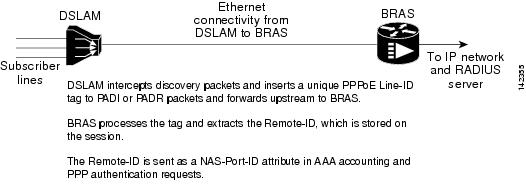
When the vendor-tag remote-id service command is configured in broadband access (BBA) group configuration mode, the BRAS processes the received PPPoE vendor-specific tag in the PADR frame and extracts the Remote-ID tag, which is sent to the remote AAA server as a VSA in all AAA access and accounting requests. When the radius-server attribute 31 remote-id global configuration command is also configured on the BRAS, the Remote-ID value is inserted into attribute 31.
Outgoing PAD Offer (PADO) and PAD Session-Confirmation (PADS) packets from the BRAS have the DSLAM-inserted Remote-ID tag. The DSLAM should strip the tag out of PADO and PADS frames. If the DSLAM cannot strip off the tag, the BRAS must remove the tag before sending the frames out. This is accomplished using the vendor-tag strip BBA group configuration mode command. If this command is configured under the BBA group, the BRAS strips the incoming Remote-ID tag (and any other vendor tag) off of the outgoing PADO and PADS frames. This action complies with DSL Forum Technical Report 101.
Benefits of the PPPoE Agent Remote-ID and DSL Line Characteristics Enhancement
The shift toward Ethernet-based DSLAMs offers the following benefits:
•
•
•
•
How to Configure the PPPoE Agent Remote-ID and DSL Line Characteristics Enhancement
This section contains the following procedures:
•
•
Configuring the PPPoE Agent Remote-ID and DSL Line Characteristics Enhancement Feature
This task describes how to configure the PPPoE Agent Remote-ID and DSL Line Characteristics Enhancement feature. When this feature is configured, BRAS will process the incoming PADR frames and send the Remote-ID field of the incoming tag to the RADIUS server as a VSA.
For DSL-Sync-Rate tags, you must enter the vendor-tag dsl-sync-rate service command under a BBA group. When this command is entered, the BRAS will process incoming PADR frames and send the DSL-Sync-Rate tags to the RADIUS server as VSAs.
An Access-Accept message is sent by the RADIUS server and vendor-tag attributes sent in the Access-Request message will be present in the Access-Accept message if the RADIUS server echoes it back.
SUMMARY STEPS
1.
2.
3.
4.
5.
6.
7.
8.
DETAILED STEPS
Step 1
enable
Example:Router> enable
Enables privileged EXEC mode.
•
Step 2
configure terminal
Example:Router# configure terminal
Enters global configuration mode.
Step 3
aaa new-model
Example:Router(config)# aaa new-model
(Optional) Enables the AAA access control model.
Step 4
radius-server attribute 31 remote-id
Example:Router(config)# radius-server attribute 31 remote-id
(Optional) Sends the Remote-ID tag to the RADIUS server via a new VSA (AAA_AT_REMOTE_ID) and in attribute 31—Calling Station ID.
•
Step 5
bba-group pppoe {group-name | global}
Example:Router(config)# bba-group pppoe pppoe-group
Defines a PPPoE profile and enters BBA group configuration mode.
Step 6
vendor-tag remote-id service
Example:Router(config-bba-group)# vendor-tag remote-id service
Enables the BRAS to process incoming PADR frames and send the Remote-ID field of the incoming tag to the RADIUS server as a VSA.
Step 7
vendor-tag dsl-sync-rate service
Example:Router(config-bba-group)# vendor-tag dsl-sync-rate service
Enables the BRAS to process the incoming PADR frames and send the DSL-Sync-Rate tags to the RADIUS server as VSAs.
Step 8
nas-port-id format c
Example:Router(config-bba-group)# nas-port-id format c
Specifies a format for broadband subscriber access line identification coding.
•
NAS_PORT_ID=atm 31/31/7:255.65535 example001/0/31/63/31/127
•
The Circuit-ID/Remote-ID tag is example001/0/31/63/31/127.
Stripping Vendor-Specific Tags
Outgoing PADO and PADS packets will have the DSLAM-inserted Remote-ID and DSL-Sync-Rate tags, and the DSLAM must strip these tags from the packets. If the DSLAM cannot strip the tag, the BRAS must remove it before sending out the packets. This task is accomplished through configuration of the vendor-tag strip command in BBA group configuration mode. Note that the vendor-tag strip command also removes the Circuit-ID tag.
SUMMARY STEPS
1.
2.
3.
4.
DETAILED STEPS
Troubleshooting Tips
When the radius-server attribute 31 remote-id global configuration command is entered in the PPPoE Agent Remote-ID Tag and DSL Line Characteristics Enhancement feature configuration on the BRAS, the debug radius privileged EXEC command can be used to generate a report that includes information about the incoming access interface, where discovery frames are received, and about the session being established in PPPoE extended NAS-Port format (format d).
Configuration Examples for the PPPoE Agent Remote-ID and DSL Line Characteristics Enhancement
This section contains the following examples:
•
•
Configuring PPPoE Agent Remote-ID and DSL Line Characteristics Enhancement: Example
In the following example, outgoing PADO and PADS packets will retain the incoming Vendor-Specific Circuit-ID tag:
radius-server attribute 31 remote-id!bba-group pppoe rmt-id-tagvendor-tag remote-id servicevendor-tag dsl-sync-rate servicenas-port-id format c!interface FastEthernet0/0.1encapsulation dot1Q 120pppoe enable group rmt-id-tagStripping Vendor-Specific Tags: Example
In the following example, the BRAS will strip off incoming Vendor-Specific Circuit-ID tags from outgoing PADO and PADS packets:
bba-group pppoe rmt-id-tagvendor-tag remote-id servicevendor-tag stripinterface FastEthernet0/0.1encapsulation dot1Q 120pppoe enable group rmt-id-tagAdditional References
The following sections provide references related to the PPPoE Agent Remote-ID and DSL Line Characteristics Enhancement feature.
Related Documents
Configuring broadband and DSL
Cisco IOS Broadband and DSL Configuration Guide
RADIUS attributes
Cisco IOS Security Configuration Guide
DSL Line-ID tag solution
DSL Forum 2004-71: Solution for Remote-ID in PPPoE Discovery Phase
Migration to Ethernet-based DSL aggregation
Standards
MIBs
RFCs
Technical Assistance
Feature Information for PPPoE Agent Remote-ID and DSL Line Characteristics Enhancement
Table 1 lists the release history for this feature.
Not all commands may be available in your Cisco IOS software release. For release information about a specific command, see the command reference documentation.
Use Cisco Feature Navigator to find information about platform support and software image support. Cisco Feature Navigator enables you to determine which Cisco IOS and Catalyst OS software images support a specific software release, feature set, or platform. To access Cisco Feature Navigator, go to http://www.cisco.com/go/cfn. An account on Cisco.com is not required.

Note
Glossary
AAA—authentication, authorization, and accounting.
ATM—Asynchronous Transfer Mode.
BBA—broadband access.
BRAS—Broadband Remote Access Server.
DSLAM—digital subscriber line access multiplexer. A device that connects many digital subscriber lines to a network by multiplexing the DSL traffic onto one or more network trunk lines.
PADO—PPPoE Active Discovery Offer.
PADR—PPPoE Active Discovery Request.
PADS—PPPoE Active Discovery Session-Confirmation.
PPPoE—Point-to-Point Protocol over Ethernet.
RADIUS—Remote Authentication Dial-In User Service. Database for authenticating modem and ISDN connections and for tracking connection time.
VCI—virtual circuit identifier.
VLAN—virtual local-area network.
VPI—virtual path identifier.
VSA—vendor specific attribute. An attribute that has been implemented by a particular vendor. It uses the attribute Vendor-Specific to encapsulate the resulting AV pair: essentially, Vendor-Specific = protocol:attribute = value.
CCDE, CCENT, CCSI, Cisco Eos, Cisco HealthPresence, Cisco IronPort, the Cisco logo, Cisco Lumin, Cisco Nexus, Cisco Nurse Connect, Cisco Pulse, Cisco StackPower, Cisco StadiumVision, Cisco TelePresence, Cisco Unified Computing System, Cisco WebEx, DCE, Flip Channels, Flip for Good, Flip Mino, Flipshare (Design), Flip Ultra, Flip Video, Flip Video (Design), Instant Broadband, and Welcome to the Human Network are trademarks; Changing the Way We Work, Live, Play, and Learn, Cisco Capital, Cisco Capital (Design), Cisco:Financed (Stylized), Cisco Store, and Flip Gift Card are service marks; and Access Registrar, Aironet, AllTouch, AsyncOS, Bringing the Meeting To You, Catalyst, CCDA, CCDP, CCIE, CCIP, CCNA, CCNP, CCSP, CCVP, Cisco, the Cisco Certified Internetwork Expert logo, Cisco IOS, Cisco Press, Cisco Systems, Cisco Systems Capital, the Cisco Systems logo, Cisco Unity, Collaboration Without Limitation, Continuum, EtherFast, EtherSwitch, Event Center, Explorer, Fast Step, Follow Me Browsing, FormShare, GainMaker, GigaDrive, HomeLink, iLYNX, Internet Quotient, IOS, iPhone, iQuick Study, IronPort, the IronPort logo, Laser Link, LightStream, Linksys, MediaTone, MeetingPlace, MeetingPlace Chime Sound, MGX, Networkers, Networking Academy, Network Registrar, PCNow, PIX, PowerKEY, PowerPanels, PowerTV, PowerTV (Design), PowerVu, Prisma, ProConnect, ROSA, ScriptShare, SenderBase, SMARTnet, Spectrum Expert, StackWise, The Fastest Way to Increase Your Internet Quotient, TransPath, WebEx, and the WebEx logo are registered trademarks of Cisco Systems, Inc. and/or its affiliates in the United States and certain other countries.
All other trademarks mentioned in this document or website are the property of their respective owners. The use of the word partner does not imply a partnership relationship between Cisco and any other company. (0908R)
Any Internet Protocol (IP) addresses and phone numbers used in this document are not intended to be actual addresses and phone numbers. Any examples, command display output, network topology diagrams, and other figures included in the document are shown for illustrative purposes only. Any use of actual IP addresses or phone numbers in illustrative content is unintentional and coincidental.
© 2006-2009 Cisco Systems, Inc. All rights reserved.
 Feedback