PPPoE - Session Limiting on Inner QinQ VLAN
Available Languages
Table Of Contents
PPPoE Session Limiting on Inner QinQ VLAN
Prerequisites for PPPoE Session Limiting on Inner QinQ VLAN
Restrictions for PPPoE Session Limiting on Inner QinQ VLAN
Information About PPPoE Session Limiting on Inner QinQ VLAN
Benefits of PPPoE Session Limiting on Inner QinQ VLAN
Feature Design of PPPoE Session Limiting on Inner QinQ VLAN
How to Configure PPPoE Session Limiting on Inner QinQ VLAN
Configuring PPPoE Session Limiting on Inner QinQ VLAN
Configuration Examples for PPPoE Session Limiting on Inner QinQ VLAN
PPPoE Session Limiting on Inner QinQ VLAN: Example
Feature Information for PPPoE Session Limiting on Inner QinQ VLAN
PPPoE Session Limiting on Inner QinQ VLAN
First Published: December 4, 2006Last Updated: October 2, 2009The PPPoE Session Limiting on Inner QinQ VLAN feature allows a service provider to limit each customer to one PPP over Ethernet (PPPoE) client in use by providing the ability to limit the number of PPPoE over QinQ (IEEE 802.1Q VLAN tunnel) sessions based on the inner VLAN ID configured under a subinterface. This capability eliminates the need to configure large numbers of subinterfaces.
Finding Feature Information
Your software release may not support all the features documented in this module. For the latest feature information and caveats, see the release notes for your platform and software release. To find information about the features documented in this module, and to see a list of the releases in which each feature is supported, see the "Feature Information for PPPoE Session Limiting on Inner QinQ VLAN" section.
Use Cisco Feature Navigator to find information about platform support and Cisco IOS and Catalyst OS software image support. To access Cisco Feature Navigator, go to http://www.cisco.com/go/cfn. An account on Cisco.com is not required.
Contents
•
Prerequisites for PPPoE Session Limiting on Inner QinQ VLAN
•
•
•
•
•
Prerequisites for PPPoE Session Limiting on Inner QinQ VLAN
•
•
Restrictions for PPPoE Session Limiting on Inner QinQ VLAN
•
Information About PPPoE Session Limiting on Inner QinQ VLAN
To configure the PPPoE Session Limiting on Inner QinQ VLAN feature, you should understand the following concepts:
•
•
Benefits of PPPoE Session Limiting on Inner QinQ VLAN
•
•
Feature Design of PPPoE Session Limiting on Inner QinQ VLAN
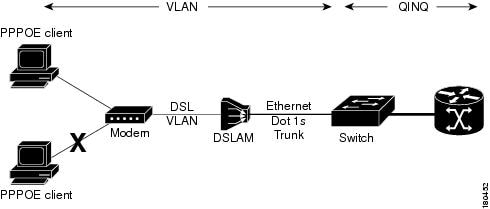
Prior to the PPPoE Session Limiting on Inner QinQ VLAN feature, PPPoE session limiting required a QinQ subinterface to be configured for each QinQ inner VLAN to be session limited, resulting in configuration requirements that did not scale to large numbers of QinQ VLAN ID pairs. The PPPoE Session Limiting on Inner QinQ VLAN feature adds broadband remote access server (BRAS) capability for configuring a single subinterface for all the unique inner VLAN IDs per outer VLAN while limiting one session per inner VLAN.
Figure 1 shows a typical implementation of the PPPoE Session Limiting on Inner QinQ VLAN feature.
Figure 1 PPPoE over QinQ Session Limiting
How to Configure PPPoE Session Limiting on Inner QinQ VLAN
This section contains the following procedure:
•
Configuring PPPoE Session Limiting on Inner QinQ VLAN
Perform this task to configure PPPoE over QinQ session limiting, which allows you to limit the number of QinQ inner VLAN connections for each customer.
SUMMARY STEPS
1.
2.
3.
4.
5.
6.
7.
DETAILED STEPS
Examples
The following is a sample output from the show pppoe session command:
Router# show pppoe session1 session in FORWARDED (FWDED) State1 session total
The following is a sample output from the show pppoe summary command:
Router# show pppoe summaryPTA : Locally terminated sessionsFWDED: Forwarded sessionsTRANS: All other sessions (in transient state)TOTAL PTA FWDED TRANSTOTAL 20434 20434 0 0GigabitEthernet2/0/0 4096 4096 0 0ATM3/0/0 16247 16247 0 0Troubleshooting Tips
The following commands can help troubleshoot PPPoE session limiting:
•
•
•
Configuration Examples for PPPoE Session Limiting on Inner QinQ VLAN
This section provides the following configuration example:
•
PPPoE Session Limiting on Inner QinQ VLAN: Example
The following example shows how to enable PPPoE over QinQ session limiting on Ethernet interface 3/1.1 with outer VLAN ID 10 and a unique inner VLAN ID for each session.
bba-group pppoe group1virtual-template 1sessions per-vlan limit 1000 inner 65interface ethernet3/1.1encapsulation dot1q 10 second-dot1q anyenable group group1
The following example shows how to configure the PPPoE Session Limiting on Inner QinQ VLAN feature on the Cisco 10000:
bba-group pppoe PPPOE-LIMITvirtual-template 1sessions per-mac limit 1000 inner 65!interface FastEthernet1/1.201description connected to Cat Switchencapsulation dot1Q 201pppoe enable group PPPOE-LIMIT!interface FastEthernet1/1.202description connected to Cat Switchencapsulation dot1Q 202pppoe enable group PPPOE-LIMIT!interface Virtual-Template1ip address negotiatedno logging event link-statusppp chap hostname pppoeuserppp chap password 0 cisco!endThe following example shows how to configure a Catalyst switch (see Figure 1) to transport PPPoE over inner QinQ:
interface FastEthernet0/1description connected to UUTswitchport trunk encapsulation dot1qswitchport trunk allowed vlan 301switchport mode trunk!interface FastEthernet0/2description connected to Clientswitchport access vlan 301switchport mode dot1q-tunnel
Additional References
The following sections provide references related to the PPPoE Session Limiting on Inner QinQ VLAN feature.
Related Documents
Broadband access aggregation concepts
Cisco IOS Broadband and DSL Configuration Guide
Broadband access commands
Cisco IOS Broadband Access Aggregation and DSL Command Reference
Standards
MIBs
RFCs
Technical Assistance
Feature Information for PPPoE Session Limiting on Inner QinQ VLAN
Table 1 lists the release history for this feature.
Not all commands may be available in your Cisco IOS software release. For release information about a specific command, see the command reference documentation.
Use Cisco Feature Navigator to find information about platform support and software image support. Cisco Feature Navigator enables you to determine which Cisco IOS and Catalyst OS software images support a specific software release, feature set, or platform. To access Cisco Feature Navigator, go to http://www.cisco.com/go/cfn. An account on Cisco.com is not required.

Note
CCDE, CCENT, CCSI, Cisco Eos, Cisco HealthPresence, Cisco IronPort, the Cisco logo, Cisco Lumin, Cisco Nexus, Cisco Nurse Connect, Cisco Pulse, Cisco StackPower, Cisco StadiumVision, Cisco TelePresence, Cisco Unified Computing System, Cisco WebEx, DCE, Flip Channels, Flip for Good, Flip Mino, Flipshare (Design), Flip Ultra, Flip Video, Flip Video (Design), Instant Broadband, and Welcome to the Human Network are trademarks; Changing the Way We Work, Live, Play, and Learn, Cisco Capital, Cisco Capital (Design), Cisco:Financed (Stylized), Cisco Store, and Flip Gift Card are service marks; and Access Registrar, Aironet, AllTouch, AsyncOS, Bringing the Meeting To You, Catalyst, CCDA, CCDP, CCIE, CCIP, CCNA, CCNP, CCSP, CCVP, Cisco, the Cisco Certified Internetwork Expert logo, Cisco IOS, Cisco Press, Cisco Systems, Cisco Systems Capital, the Cisco Systems logo, Cisco Unity, Collaboration Without Limitation, Continuum, EtherFast, EtherSwitch, Event Center, Explorer, Fast Step, Follow Me Browsing, FormShare, GainMaker, GigaDrive, HomeLink, iLYNX, Internet Quotient, IOS, iPhone, iQuick Study, IronPort, the IronPort logo, Laser Link, LightStream, Linksys, MediaTone, MeetingPlace, MeetingPlace Chime Sound, MGX, Networkers, Networking Academy, Network Registrar, PCNow, PIX, PowerKEY, PowerPanels, PowerTV, PowerTV (Design), PowerVu, Prisma, ProConnect, ROSA, ScriptShare, SenderBase, SMARTnet, Spectrum Expert, StackWise, The Fastest Way to Increase Your Internet Quotient, TransPath, WebEx, and the WebEx logo are registered trademarks of Cisco Systems, Inc. and/or its affiliates in the United States and certain other countries.
All other trademarks mentioned in this document or website are the property of their respective owners. The use of the word partner does not imply a partnership relationship between Cisco and any other company. (0908R)
Any Internet Protocol (IP) addresses and phone numbers used in this document are not intended to be actual addresses and phone numbers. Any examples, command display output, network topology diagrams, and other figures included in the document are shown for illustrative purposes only. Any use of actual IP addresses or phone numbers in illustrative content is unintentional and coincidental.
© 2006-2009 Cisco Systems, Inc. All rights reserved.
 Feedback