Certificate to ISAKMP Profile Mapping
Available Languages
Table Of Contents
Certificate to ISAKMP Profile Mapping
Prerequisites for Certificate to ISAKMP Profile Mapping
Restrictions for Certificate to ISAKMP Profile Mapping
Information About Certificate to ISAKMP Profile Mapping
Certificate to ISAKMP Profile Mapping Overview
How Certificate to ISAKMP Profile Mapping Works
Assigning an ISAKMP Profile and Group Name to a Peer
How to Configure Certificate to ISAKMP Profile Mapping
Mapping the Certificate to the ISAKMP Profile
Verifying That the Certificate Has Been Mapped
Assigning the Group Name to the Peer
Monitoring and Maintaining Your Certificate to ISAKMP Profile Mapping
Configuration Examples for Certificate to ISAKMP Profile Mapping
Certificates Mapped to the ISAKMP Profile on the Basis of Arbitary Fields: Example
Group Name Assigned to a Peer That Is Associated with an ISAKMP Profile: Example
Mapping a Certificate to an ISAKMP Profile Verification: Example
Group Name Assigned to a Peer Verfication: Example
Certificate to ISAKMP Profile Mapping
The Certificate to ISAKMP Profile Mapping feature enables you to assign an Internet Security Association and Key Management Protocol (ISAKMP) profile to a peer on the basis of the contents of arbitrary fields in the certificate. In addition, this feature allows you to assign a group name to those peers that are assigned an ISAKMP profile.
Feature History for Certificate to ISAKMP Profile Mapping
Finding Support Information for Platforms and Cisco IOS Software Images
Use Cisco Feature Navigator to find information about platform support and Cisco IOS software image support. Access Cisco Feature Navigator at http://www.cisco.com/go/fn. You must have an account on Cisco.com. If you do not have an account or have forgotten your username or password, click Cancel at the login dialog box and follow the instructions that appear.
Contents
•
Prerequisites for Certificate to ISAKMP Profile Mapping
•
•
•
•
Prerequisites for Certificate to ISAKMP Profile Mapping
•
•
Restrictions for Certificate to ISAKMP Profile Mapping
This feature will not be applicable if you use Rivest, Shamir, and Adelman- (RSA-) signature or RSA-encryption authentication without certificate exchange. ISAKMP peers must be configured to do RSA-signature or RSA-encryption authentication using certificates.
Information About Certificate to ISAKMP Profile Mapping
To configure the Certificate to ISAKMP Profile Mapping feature, you should understand the following concepts:
•
•
•
Certificate to ISAKMP Profile Mapping Overview
Prior to Cisco IOS Release 12.3(8)T, the only way to map a peer to an ISAKMP profile was as follows. The ISAKMP identity field in the ISAKMP exchange was used for mapping a peer to an ISAKMP profile. When certificates were used for authentication, the ISAKMP identity payload contained the subject name from the certificate. If a certificate authority (CA) did not provide the required group value in the first Organizational Unit (OU) field of a certificate, an ISAKMP profile could not be assigned to a peer.
Effective with Cisco IOS Release 12.3(8)T, a peer can still be mapped as explained above. However, the Certificate to ISAKMP Profile Mapping feature enables you to assign an ISAKMP profile to a peer on the basis of the contents of arbitrary fields in the certificate. You are no longer limited to assigning an ISAKMP profile on the basis of the subject name of the certificate. In addition, this feature allows you to assign a group to a peer to which an ISAKMP profile has been assigned.
How Certificate to ISAKMP Profile Mapping Works
Figure 53 illustrates how certificate maps may be attached to ISAKMP profiles and assigned group names.
Figure 53 Certificate Maps Mapped for Profile Group Assignment
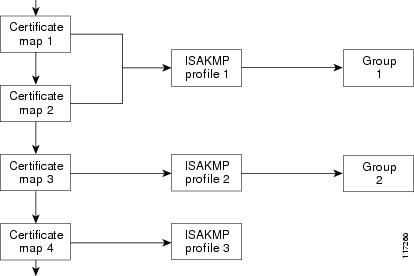
A certificate map can be attached to only one ISAKMP profile although an ISAKMP profile can have several certificate maps attached to it.
Certificate maps provide the ability for a certificate to be matched with a given set of criteria. ISAKMP profiles can bind themselves to certificate maps, and if the presented certificate matches the certificate map present in an ISAKMP profile, the peer will be assigned the ISAKMP profile. If the ISAKMP profile contains a client configuration group name, the same group name will be assigned to the peer. This ISAKMP profile information will override the information in the ID_KEY_ID identity or in the first OU field of the certificate.
Assigning an ISAKMP Profile and Group Name to a Peer
To assign an ISAKMP profile to a peer on the basis of arbitrary fields in the certificate, use the match certificate command after the ISAKMP profile has been defined.
To associate a group name with an ISAKMP profile that will be assigned to a peer, use the client configuration group command, also after the ISAKMP profile has been defined.
How to Configure Certificate to ISAKMP Profile Mapping
This section contains the following procedures:
•
•
•
•
Mapping the Certificate to the ISAKMP Profile
To map the certificate to the ISAKMP profile, perform the following steps. This configuration will enable you to assign the ISAKMP profile to a peer on the basis of the contents of arbitrary fields in the certificate.
SUMMARY STEPS
1.
2.
3.
4.
DETAILED STEPS
Verifying That the Certificate Has Been Mapped
The following show command may be used to verify that the subject name of the certificate map has been properly configured.
SUMMARY
1.
2.
DETAILED STEPS
Assigning the Group Name to the Peer
To associate a group name with a peer when the peer is mapped to an ISAKMP profile, perform the following steps.
SUMMARY STEPS
1.
2.
3.
4.
DETAILED STEPS
Monitoring and Maintaining Your Certificate to ISAKMP Profile Mapping
To monitor and maintain your certificate to ISAKMP profile mapping, you may use the following debug command.
SUMMARY STEPS
1.
2.
DETAILED STEPS
Configuration Examples for Certificate to ISAKMP Profile Mapping
This section contains the following configuration examples:
•
•
•
•
Certificates Mapped to the ISAKMP Profile on the Basis of Arbitary Fields: Example
The following configuration example shows that whenever a certificate contains "ou = green," the ISAKMP profile "cert_pro" will be assigned to the peer:
crypto pki certificate map cert_map 10subject-name co ou = green!!crypto isakmp identity dncrypto isakmp profile cert_proca trust-point 2315ca trust-point LaBcAinitiate mode aggressivematch certificate cert_mapGroup Name Assigned to a Peer That Is Associated with an ISAKMP Profile: Example
The following example shows that the group "some_group" is to be associated with a peer that has been assigned an ISAKMP profile:
crypto isakmp profile id_profileca trust-point 2315match identity host domain cisco.comclient configuration group some_group
Mapping a Certificate to an ISAKMP Profile Verification: Example
The following examples show that a certificate has been mapped to an ISAKMP profile. The examples include the configurations for the responder and initiator, show command output verifying that the subject name of the certificate map has been configured, and debug command output showing that the certificate has gone through certificate map matching and been matched to the ISAKMP profile.
Responder Configuration
crypto pki certificate map cert_map 10! The above line is the certificate map definition.subject-name co ou = green! The above line shows that the subject name must have "ou = green."!crypto isakmp profile certpro! The above line shows that this is the ISAKMP profile that will match if the certificate of the peer matches cert_map (shown on third line below).ca trust-point 2315ca trust-point LaBcAmatch certificate cert_mapinitiate mode aggressiveInitiator Configuration
crypto ca trustpoint LaBcAenrollment url http://10.76.82.20:80/cgi-bin/openscepsubject-name ou=green,c=IN! The above line ensures that the subject name "ou = green" is set.revocation-check noneshow crypto ca certificates Command Output for the Initiator
Router# show crypto ca certificatesCertificateStatus: AvailableCertificate Serial Number: 21Certificate Usage: General PurposeIssuer:cn=blue-lab CAo=CISCOc=INSubject:Name: Router1.cisco.comc=INou=green! The above line is a double check that "ou = green" has been set as the subject name.hostname=Router1.cisco.comValidity Date:start date: 14:34:30 UTC Mar 31 2004end date: 14:34:30 UTC Apr 1 2009renew date: 00:00:00 UTC Jan 1 1970Associated Trustpoints: LaBcAdebug crypto isakmp Command Output for the Responder
Router# debug crypto isakmp6d23h: ISAKMP (0:268435460): received packet from 192.0.0.2 dport 500 sport 500 Global (R) MM_KEY_EXCH6d23h: ISAKMP: Main Mode packet contents (flags 1, len 892):6d23h: ID payload6d23h: FQDN <Router1.cisco.com> port 500 protocol 176d23h: CERT payload6d23h: SIG payload6d23h: KEEPALIVE payload6d23h: NOTIFY payload6d23h: ISAKMP:(0:4:HW:2):Input = IKE_MESG_FROM_PEER, IKE_MM_EXCH6d23h: ISAKMP:(0:4:HW:2):Old State = IKE_R_MM4 New State = IKE_R_MM56d23h: ISAKMP:(0:4:HW:2): processing ID payload. message ID = 06d23h: ISAKMP (0:268435460): ID payloadnext-payload : 6type : 2FQDN name : Router1.cisco.comprotocol : 17port : 500length : 286d23h: ISAKMP:(0:4:HW:2):: peer matches *none* of the profiles6d23h: ISAKMP:(0:4:HW:2): processing CERT payload. message ID = 06d23h: ISAKMP:(0:4:HW:2): processing a CT_X509_SIGNATURE cert6d23h: ISAKMP:(0:4:HW:2): peer's pubkey isn't cached6d23h: ISAKMP:(0:4:HW:2): OU = green6d23h: ISAKMP:(0:4:HW:2): certificate map matches certpro profile! The above line shows that the certificate has gone through certificate map matching and that it matches the "certpro" profile.6d23h: ISAKMP:(0:4:HW:2): Trying to re-validate CERT using new profile6d23h: ISAKMP:(0:4:HW:2): Creating CERT validation list: 2315, LaBcA,6d23h: ISAKMP:(0:4:HW:2): CERT validity confirmed.Group Name Assigned to a Peer Verfication: Example
The following configuration and debug output show that a group has been assigned to a peer.
Initiator Configuration
crypto isakmp profile certproca trust-point 2315ca trust-point LaBcAmatch certificate cert_mapclient configuration group new_group! The statement on the above line will assign the group "new_group" to any peer that matches the ISAKMP profile "certpro."initiate mode aggressive!
debug crypto isakmp profile Command Output for the Responder
The following debug output example shows that the peer has been matched to the ISAKMP profile named "certpro" and that it has been assigned a group named "new_group."
Router# debug crypto isakmp profile6d23h: ISAKMP (0:268435461): received packet from 192.0.0.2 dport 500 sport 500 Global (R) MM_KEY_EXCH6d23h: ISAKMP: Main Mode packet contents (flags 1, len 892):6d23h: ID payload6d23h: FQDN <Router1.cisco.com> port 500 protocol 176d23h: CERT payload6d23h: SIG payload6d23h: KEEPALIVE payload6d23h: NOTIFY payload6d23h: ISAKMP:(0:5:HW:2):Input = IKE_MESG_FROM_PEER, IKE_MM_EXCH6d23h: ISAKMP:(0:5:HW:2):Old State = IKE_R_MM4 New State = IKE_R_MM56d23h: ISAKMP:(0:5:HW:2): processing ID payload. message ID = 06d23h: ISAKMP (0:268435461): ID payloadnext-payload : 6type : 2FQDN name : Router1.cisco.comprotocol : 17port : 500length : 286d23h: ISAKMP:(0:5:HW:2):: peer matches *none* of the profiles6d23h: ISAKMP:(0:5:HW:2): processing CERT payload. message ID = 06d23h: ISAKMP:(0:5:HW:2): processing a CT_X509_SIGNATURE cert6d23h: ISAKMP:(0:5:HW:2): peer's pubkey isn't cached6d23h: ISAKMP:(0:5:HW:2): OU = green6d23h: ISAKMP:(0:5:HW:2): certificate map matches certpro profile6d23h: ISAKMP:(0:5:HW:2): Trying to re-validate CERT using new profile6d23h: ISAKMP:(0:5:HW:2): Creating CERT validation list: 2315, LaBcA,6d23h: ISAKMP:(0:5:HW:2): CERT validity confirmed.6d23h: ISAKMP:(0:5:HW:2):Profile has no keyring, aborting key search6d23h: ISAKMP:(0:5:HW:2): Profile certpro assigned peer the group named new_groupAdditional References
The following sections provide references related to Certificate to ISAKMP Profile Mapping.
Related Documents
Configuring certificate maps
"Certificate Security Attribute-Based Access Control," Release 12.2 T
Configuring ISAKMP profiles
"VRF-Aware IPSec," Release 12.2 T
Security commands
Standards
MIBs
RFCs
Technical Assistance
Command Reference
The following new commands are pertinent to this feature. To see the command pages for these commands and other commands used with this feature, go to the Cisco IOS Master Commands List, Release 12.4, at http://www.cisco.com/univercd/cc/td/doc/product/software/ios124/124mindx/
124index.htm.•
•

© 2004 Cisco Systems, Inc. All rights reserved.
 Feedback