IP SLAs - LSP Health Monitor with LSP Discovery
Available Languages
Table Of Contents
IP SLAs—LSP Health Monitor with LSP Discovery
Prerequisites for the LSP Health Monitor
Restrictions for the LSP Health Monitor
Information About the LSP Health Monitor
Benefits of the LSP Health Monitor
How the LSP Health Monitor Works
Discovery of Neighboring PE Routers
IP SLAs LSP Ping and LSP Traceroute Operations
Proactive Threshold Monitoring for the LSP Health Monitor
Multioperation Scheduling for the LSP Health Monitor
How to Use the LSP Health Monitor
Configuring the LSP Health Monitor Without LSP Discovery
Configuring the LSP Health Monitor with LSP Discovery
Manually Configuring an IP SLAs LSP Ping or LSP Traceroute Operation
Verifying and Troubleshooting the LSP Health Monitor
Configuration Examples for the LSP Health Monitor
Configuring and Verifying the LSP Health Monitor Without LSP Discovery: Example
Configuring and Verifying the LSP Health Monitor with LSP Discovery: Example
Manually Configuring an IP SLAs LSP Ping Operation: Example
auto ip sla mpls-lsp-monitor reaction-configuration
auto ip sla mpls-lsp-monitor reset
auto ip sla mpls-lsp-monitor schedule
hours-of-statistics-kept (LSP discovery)
session-timeout (LSP discovery)
show ip sla mpls-lsp-monitor collection-statistics
show ip sla mpls-lsp-monitor configuration
show ip sla mpls-lsp-monitor lpd operational-state
show ip sla mpls-lsp-monitor neighbors
show ip sla mpls-lsp-monitor scan-queue
show ip sla mpls-lsp-monitor summary
Feature Information for the LSP Health Monitor
IP SLAs—LSP Health Monitor with LSP Discovery
First Published: February 27, 2007Last Updated: February 27, 2007The Cisco IOS IP Service Level Agreements (SLAs) label switched path (LSP) Health Monitor with LSP Discovery feature provides the capability to proactively monitor Layer 3 Multiprotocol Label Switching (MPLS) Virtual Private Networks (VPNs). This feature provides automated end-to-end verification in the control plane and data plane for all LSPs between the participating Provider Edge (PE) routers. This end-to-end (PE-to-PE router) approach ensures that LSP connectivity is verified along the paths that customer traffic is sent. Consequently, customer-impacting network connectivity issues that occur within the MPLS core will be detected by the LSP Health Monitor.
Once configured, the LSP Health Monitor will automatically create and delete IP SLAs LSP ping or LSP traceroute operations based on network topology. The LSP Health Monitor feature also allows you to perform multioperation scheduling of IP SLAs operations and supports proactive threshold monitoring through SNMP trap notifications and syslog messages.
Finding Feature Information in This Module
Your Cisco IOS software release may not support all of the features documented in this module. To reach links to specific feature documentation in this module and to see a list of the releases in which each feature is supported, use the "Feature Information for the LSP Health Monitor" section.
Finding Support Information for Platforms and Cisco IOS and Catalyst OS Software Images
Use Cisco Feature Navigator to find information about platform support and Cisco IOS and Catalyst OS software image support. To access Cisco Feature Navigator, go to http://www.cisco.com/go/cfn. An account on Cisco.com is not required.
Contents
•
Prerequisites for the LSP Health Monitor
•
•
•
•
•
Prerequisites for the LSP Health Monitor
•
•

Note
Restrictions for the LSP Health Monitor
•
•
•
•
Information About the LSP Health Monitor
To use the LSP Health Monitor feature, you should understand the following concepts:
•
•
•
•
•
•
Benefits of the LSP Health Monitor
•
•
•
•
•
•
•
How the LSP Health Monitor Works
The LSP Health Monitor feature provides the capability to proactively monitor Layer 3 MPLS VPNs. The general process for how the LSP Health Monitor works is as follows:
1.
Configuring an LSP Health Monitor operation is similar to configuring a standard IP SLAs operation. To illustrate, all operation parameters for an LSP Health Monitor operation are configured after an identification number for the operation is specified. However, unlike standard IP SLAs operations, these configured parameters are then used as the base configuration for the individual IP SLAs LSP ping and LSP traceroute operations that will be created by the LSP Health Monitor. For more information on how to configure the LSP Health Monitor, see the "Configuring the LSP Health Monitor Without LSP Discovery" section and "Configuring the LSP Health Monitor with LSP Discovery" section.
Note
When the BGP next hop neighbor discovery process is enabled, a database of BGP next hop neighbors in use by any VRF associated with the source PE router is generated based on information from the local VRF and global routing tables. For more information about the BGP next hop neighbor discovery process, see the "Discovery of Neighboring PE Routers" section.
Note
2.
Depending on the proactive threshold monitoring configuration options chosen, SNMP trap notifications or syslog messages will be generated as threshold violations are met.
3.
Once the LSP Health Monitor operation is started, a single IP SLAs operation is automatically created (based on parameters configured in Step 1) for each applicable PE (BGP next hop) neighbor. The IP SLAs operations will measure network connectivity between the source PE router and the discovered destination PE router. The start time and frequency of each measurement is based on the multioperation scheduling parameters defined by the user.
Addition and Deletion of IP SLAs Operations
The LSP Health Monitor receives periodic notifications about BGP next hop neighbors that have been added to or removed from a particular VPN. This information is stored in a queue maintained by the LSP Health Monitor. Based on the information in the queue and user-specified time intervals, new IP SLAs operations are automatically created for newly discovered PE routers and existing IP SLAs operations are automatically deleted for any PE routers that are no longer valid. The automatic deletion of operations can be disabled. However, disabling this function is not recommended because these operations would then need to be deleted manually.
If the LSP discovery option is enabled, creation of LSP discovery groups for newly discovered BGP next hop neighbors will follow the same process as described in the "The LSP Discovery Process" section. If a BGP next hop neighbor is removed from a particular VPN, all the corresponding LSP discovery groups and their associated individual IP SLAs operations and statistics are removed from the LSP discovery group database.
Access Lists for Filtering BGP Next Hop Neighbors
Standard IP access lists can be configured (using the access-list [IP standard] command in global configuration mode) to restrict the number of IP SLAs operations that are automatically created by the LSP Health Monitor. When the IP SLAs access list parameter is configured, the list of BGP next hop neighbors discovered by the LSP Health Monitor is filtered based on the conditions defined by the associated standard IP access list. In other words, the LSP Health Monitor will automatically create IP SLAs operations only for those BGP next hop neighbors with source addresses that satisfy the criteria permitted by the standard IP access list.
For more information about configuring standard IP access lists, see the "Related Documents" section.
Unique Identifier for Each Automatically Created IP SLAs Operation
The IP SLAs operations automatically created by the LSP Health Monitor are uniquely identified by their owner field. The owner field of an operation is generated using all the parameters that can be configured for that particular operation. If the length of the owner field is longer than 255 characters, it will be truncated.
Discovery of Neighboring PE Routers
A BGP next hop neighbor discovery process is used to find the BGP next hop neighbors in use by any VRF associated with the source PE router. In most cases, these neighbors will be PE routers.
When the BGP next hop neighbor discovery process is enabled, a database of BGP next hop neighbors in use by any VRF associated with the source PE router is generated based on information from the local VRF and global routing tables. As routing updates are received, new BGP next hop neighbors are added to and deleted from the database immediately.
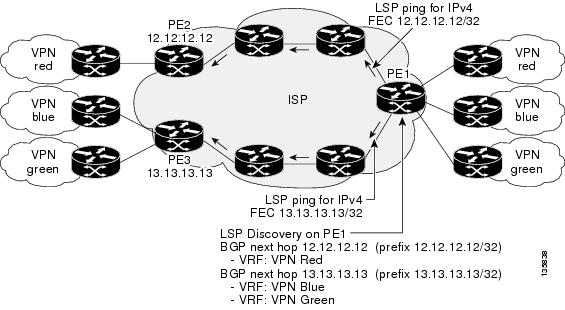
Figure 1 shows how the BGP next hop neighbor discovery process works for a simple VPN scenario for an Internet service provider (ISP). In this example, there are three VPNs associated with router PE1: red, blue, and green. From the perspective of router PE1, these VPNs are reachable remotely through BGP next hop neighbors PE2 (router ID: 12.12.12.12) and PE3 (router ID: 13.13.13.13). When the BGP next hop neighbor discovery process is enabled on router PE1, a database is generated based on the local VRF and global routing tables. The database in this example contains two BGP next hop router entries: PE2 12.12.12.12 and PE3 13.13.13.13. The routing entries are maintained per next hop router to distinguish which next hop routers belong within which particular VRF. For each next hop router entry, the IPv4 Forward Equivalence Class (FEC) of the BGP next hop router in the global routing table is provided so that it can be used by the MPLS LSP ping operation. For more information about the MPLS LSP Ping feature, see the "Related Documents" section.
Figure 1 BGP Next Hop Neighbor Discovery for a Simple VPN
The LSP Discovery Process
The LSP discovery option of an LSP Health Monitor operation provides the capability to discover the equal-cost multipaths for carrying MPLS traffic between the source and destination PE routers. Network connectivity measurements can then be performed for each of the paths that were discovered.
The general process for LSP discovery is as follows:
1.
Once the LSP Health Monitor operation is started, a single IP SLAs operation is automatically created for each applicable PE (BGP next hop) neighbor. Only a single path to each applicable PE neighbor is discovered during this initial step of the LSP discovery process. For each next hop neighbor, the LSP Health Monitor creates an LSP discovery group (that initially consists of only the one discovered path) and assigns the group with a unique identification number. For more information about LSP discovery groups, see the "LSP Discovery Groups" section.
2.
Note
3.
For information about proactive threshold monitoring and multioperation scheduling of IP SLAs operations created through the LSP discovery process, see the "Proactive Threshold Monitoring for the LSP Health Monitor" section and "Multioperation Scheduling for the LSP Health Monitor" section.
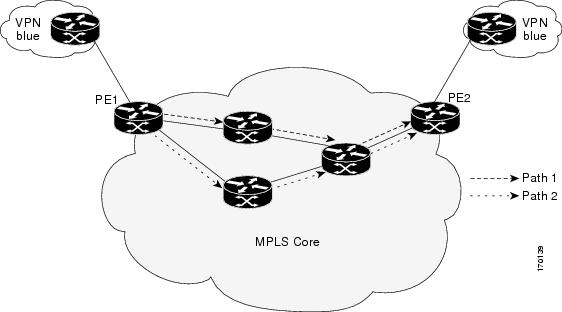
Figure 2 illustrates a simple VPN scenario. This network consists of a core MPLS VPN with two PE routers (router PE1 and router PE2) belonging to the VRF named VPN blue. Suppose router PE1 is the source PE router for an LSP Health Monitor operation with the LSP discovery option enabled and that router PE2 is discovered by the BGP discovery process as a BGP next hop neighbor to router PE1. If path 1 and path 2 are equal-cost multipaths between router PE1 to router PE2, then the LSP discovery process would create an LSP discovery group consisting of path 1 and path 2. An IP SLAs LSP ping superoperation would also be created to monitor network availability across each path.
Figure 2 LSP Discovery for a Simple VPN
LSP Discovery Groups
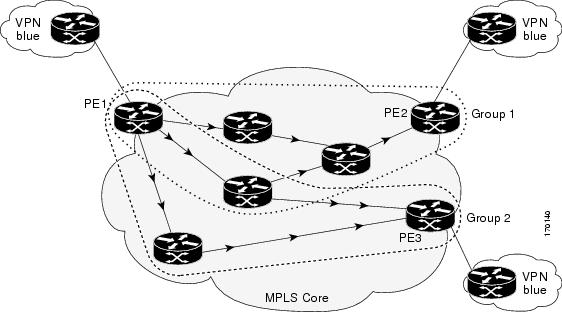
A single LSP Health Monitor operation can be comprised of several LSP discovery groups depending on the number of BGP next hop neighbors discovered by the BGP next hop neighbor discovery process. Each LSP discovery group corresponds to one BGP next hop neighbor and is assigned a unique identification number (starting with the number 1). Figure 3 illustrates a simple VPN scenario. This network consists of a core MPLS VPN with three PE routers (router PE1, PE2, and PE3) belonging to the VRF named VPN blue. Suppose router PE1 is the source PE router for an LSP Health Monitor operation with the LSP discovery option enabled and that router PE2 and PE3 are discovered by the BGP discovery process as BGP next hop neighbors to router PE1. LSP discovery group 1 is created for the equal-cost multipaths between router PE1 to router PE2 and LSP discovery group 2 is created for the equal-cost multipaths between router PE1 to router PE3.
Figure 3 LSP Discovery Groups for a Simple VPN
Once the LSP Health Monitor operation is started, a single IP SLAs operation is automatically created for each applicable PE (BGP next hop) neighbor. Each IP SLAs operation (created for each applicable PE neighbor) uses an IP SLAs LSP ping superoperation to measure network connectivity across all equal-cost multipaths between the source PE router and discovered destination PE router. Each LSP ping superoperation corresponds to a single LSP discovery group.
The LSP ping superoperation operates by sending an LSP ping packet to the destination PE router and adjusting the LSP ping 127/8 LSP selector IP address for each discovered equal-cost multipath. The network connectivity statistics collected by each equal-cost multipath is aggregated and stored in one-hour increments (data can be collected for a maximum of two hours). Results are stored as group averages representative of all the equal-cost multipaths within the LSP discovery group for a given one-hour increment.
Each equal-cost multipath discovered between the source PE router and a BGP next hop neighbor is uniquely identified with the following parameters:
•
•
The database for an LSP discovery group is updated if any of the following events occur:
•
•
•
IP SLAs LSP Ping and LSP Traceroute Operations
This feature introduces support for the IP SLAs LSP ping and IP SLAs LSP traceroute operations. These operations are useful for troubleshooting network connectivity issues and determining network availability in an MPLS VPN. When using the LSP Health Monitor, IP SLAs LSP ping and LSP traceroute operations are automatically created to measure network connectivity between the source PE router and the discovered destination PE routers. Individual IP SLAs LSP ping and LSP traceroute operations can also be manually configured. Manual configuration of these operations can be useful for troubleshooting a connectivity issue.
For more information on how to configure IP SLAs operations using the LSP Health Monitor, see the "Configuring the LSP Health Monitor Without LSP Discovery" section and the "Configuring the LSP Health Monitor with LSP Discovery" section. For more information on how to manually configure an individual IP SLAs LSP ping or LSP traceroute operation, see the "Manually Configuring an IP SLAs LSP Ping or LSP Traceroute Operation" section.
The IP SLAs LSP ping and IP SLAs LSP traceroute operations are based on the same infrastructure used by the MPLS LSP Ping and MPLS LSP Traceroute features, respectively, for sending and receiving echo reply and request packets to test LSPs. For more information about the MPLS LSP Ping and MPLS LSP Traceroute management tools, see the "Related Documents" section.
Note
Proactive Threshold Monitoring for the LSP Health Monitor
Proactive threshold monitoring support for the LSP Health Monitor feature provides the capability for triggering SNMP trap notifications and syslog messages when user-defined reaction conditions (such as a connection loss or timeout) are met. Configuring threshold monitoring for an LSP Health Monitor operation is similar to configuring threshold monitoring for a standard IP SLAs operation. For more information about proactive threshold monitoring for Cisco IOS IP SLAs, see the "Related Documents" section.
LSP Discovery Option Enabled
If the LSP discovery option for an LSP Health Monitor operation is enabled, SNMP trap notifications can be generated when one of the following events occurs:
•
•
Possible reasons for which LSP discovery can fail for a particular BGP next hop neighbor are as follows:
•
•
Table 1 describes the conditions for which the operational status of an LSP discovery group can change. Whenever an individual IP SLAs LSP ping operation of an LSP discovery group is executed, a return code is generated. Depending on the value of the return code and the current status of the LSP discovery group, the group status can change.
The return code for an individual IP SLAs LSP ping operation can be one of the following:
•
•
•
The status of an LSP discovery group can be one of the following:
•
•
•
•
Secondary Frequency Option
With the introduction of the LSP Health Monitor feature, a new threshold monitoring parameter has been added that allows you to specify a secondary frequency. If the secondary frequency option is configured and a failure (such as a connection loss or timeout) is detected for a particular path, the frequency at which the path is remeasured will increase to the secondary frequency value (testing at a faster rate). When the configured reaction condition is met (such as N consecutive connection losses or N consecutive timeouts), an SNMP trap and syslog message can be sent and the measurement frequency will return to its original frequency value.
Multioperation Scheduling for the LSP Health Monitor
Multioperation scheduling support for the LSP Health Monitor feature provides the capability to easily schedule the automatically created IP SLAs operations (for a given LSP Health Monitor operation) to begin at intervals equally distributed over a specified duration of time (schedule period) and to restart at a specified frequency. Multioperation scheduling is particularly useful in cases where the LSP Health Monitor is enabled on a source PE router that has a large number of PE neighbors and, therefore, a large number of IP SLAs operations running at the same time.
Note
Configuring a multioperation schedule for the LSP Health Monitor is similar to configuring a standard multioperation schedule for a group of individual IP SLAs operations. For more information about scheduling a group of standard IP SLAs operations, see the "Related Documents" section.
LSP Discovery Option Enabled
When a multioperation schedule for an LSP Health Monitor operation with LSP discovery is started, the BGP next hop neighbors are discovered, and network connectivity to each applicable neighbor is monitored using only a single LSP. In other words, initially, network connectivity between the source PE router and discovered destination PE router is measured across only a single path. This initial condition is the same as if an LSP Health Monitor operation was performed without LSP discovery.
Specific information about the IP SLAs LSP ping operations that are created for newly discovered equal-cost paths during the succeeding iterations of the LSP discovery process are stored in the LSP discovery group database. These newly created IP SLAs LSP ping operations will start collecting data at the next iteration of network connectivity measurements for their associated LSP discovery group.
The start times for the individual IP SLAs LSP ping operations for each LSP discovery group is based on the number of LSP discovery groups and the schedule period of the multioperation schedule. For example, if three LSP discovery groups (Group 1, Group 2, and Group 3) are scheduled to run over a period of 60 seconds, the first LSP ping operation of Group 1 will start at 0 seconds, the first LSP ping operation of Group 2 will start at 20 seconds, and the first LSP ping operation of Group 3 will start at 40 seconds. The remaining individual IP SLAs LSP ping operations for each LSP discovery group will run sequentially after completion of the first LSP ping operation. For each LSP discovery group, only one LSP ping operation runs at a time.
Note
How to Use the LSP Health Monitor
This section contains the following tasks:
•
•
•
•
Configuring the LSP Health Monitor Without LSP Discovery
Perform this task to configure the operation parameters, reaction conditions, and scheduling options for an LSP Health Monitor operation without LSP discovery. If the LSP discovery option is disabled, only a single path between the source PE router and each BGP next hop neighbor is discovered. The LSP discovery option is disabled by default. The IP SLAs measurement statistics are stored on the source PE router.
Prerequisites
The LSP Health Monitor must be configured on a PE router.
SUMMARY STEPS
1.
2.
3.
4.
5.
6.
or
type pathEcho [ipsla-vrf-all | vrf vpn-name]7.
8.
9.
10.
11.
12.
13.
14.
15.
16.
17.
18.
19.
20.
21.
22.
23.
24.
DETAILED STEPS
Troubleshooting Tips
Use the debug ip sla trace and debug ip sla error commands to help troubleshoot issues with an individual IP SLAs LSP ping or LSP traceroute operation. Use the debug ip sla mpls-lsp-monitor command to help troubleshoot issues with an IP SLAs LSP Health Monitor operation.
What to Do Next
To display the results of an individual IP SLAs operation use the show ip sla statistics and show ip sla statistics aggregated commands. Checking the output for fields that correspond to criteria in your service level agreement will help you determine whether the service metrics are acceptable.
Configuring the LSP Health Monitor with LSP Discovery
Perform this task to configure the operation parameters, reaction conditions, and scheduling options for an LSP Health Monitor operation with LSP discovery. If the LSP discovery option is enabled, the equal-cost multipaths between the source PE router and each BGP next hop neighbor are discovered. If the LSP discovery option is disabled, only a single path between the source PE router and each BGP next hop neighbor is discovered. The LSP discovery option is disabled by default. The IP SLAs measurement statistics are stored on the source PE router.
Prerequisites
The LSP Health Monitor must be configured on a PE router.
SUMMARY STEPS
1.
2.
3.
4.
5.
6.
7.
8.
9.
10.
11.
12.
13.
14.
15.
16.
17.
18.
19.
20.
21.
22.
DETAILED STEPS
Step 1
enable
Example:Router> enable
Enables privileged EXEC mode.
•
Step 2
configure terminal
Example:Router# configure terminal
Enters global configuration mode.
Step 3
mpls discovery vpn next-hop
Example:Router(config)# mpls discovery vpn next-hop
(Optional) Enables the MPLS VPN BGP next hop neighbor discovery process.
Note
Step 4
mpls discovery vpn interval seconds
Example:Router(config)# mpls discovery vpn interval 120
(Optional) Specifies the time interval at which routing entries that are no longer valid are removed from the BGP next hop neighbor discovery database of an MPLS VPN. The default time interval is 300 seconds.
Step 5
auto ip sla mpls-lsp-monitor operation-number
Example:Router(config)# auto ip sla mpls-lsp-monitor 1
Begins configuration for an LSP Health Monitor operation and enters auto IP SLAs MPLS configuration mode.
Note
Step 6
type echo [ipsla-vrf-all | vrf vpn-name]
Example:Router(config-auto-ip-sla-mpls)# type echo ipsla-vrf-all
Enters MPLS parameters configuration mode and allows the user to configure the parameters for an IP SLAs LSP ping operation using the LSP Health Monitor.
Step 7
Configure optional parameters for the IP SLAs LSP echo operation. See Steps 7 through 21 in the "Configuring the LSP Health Monitor Without LSP Discovery" section.
(Optional) Configures optional parameters for an IP SLAs LSP echo operation.
Step 8
path-discover
Example:Router(config-auto-ip-sla-mpls-params)# path-discover
Enables the LSP discovery option for an IP SLAs LSP Health Monitor operation and enters LSP discovery parameters configuration submode.
Step 9
hours-of-statistics-kept hours
Example:Router(config-auto-ip-sla-mpls-lpd-params)# hours-of-statistics-kept 1
(Optional) Sets the number of hours for which LSP discovery group statistics are maintained for an LSP Health Monitor operation.
Step 10
force-explicit-null
Example:Router(config-auto-ip-sla-mpls-lpd-params)# force-explicit-null
(Optional) Adds an explicit null label to all echo request packets of an LSP Health Monitor operation.
Step 11
interval milliseconds
Example:Router(config-auto-ip-sla-mpls-lpd-params)# interval 2
(Optional) Specifies the time interval between MPLS echo requests that are sent as part of the LSP discovery process for an LSP Health Monitor operation.
Step 12
lsp-selector-base ip-address
Example:Router(config-auto-ip-sla-mpls-lpd-params)# lsp-selector-base 127.0.0.2
(Optional) Specifies the base IP address used to select the LSPs belonging to the LSP discovery groups of an LSP Health Monitor operation.
Step 13
maximum-sessions number
Example:Router(config-auto-ip-sla-mpls-lpd-params)# maximum-sessions 2
(Optional) Specifies the maximum number of BGP next hop neighbors that can be concurrently undergoing LSP discovery for a single LSP Health Monitor operation.
Note
Step 14
scan-period minutes
Example:Router(config-auto-ip-sla-mpls-lpd-params)# scan-period 30
(Optional) Sets the amount of time after which the LSP discovery process can restart for an LSP Health Monitor operation.
Step 15
session-timeout seconds
Example:Router(config-auto-ip-sla-mpls-lpd-params)# session-timeout 60
(Optional) Sets the amount of time the LSP discovery process for an LSP Health Monitor operation waits for a response to its LSP discovery request for a particular BGP next hop neighbor.
Step 16
timeout seconds
Example:Router(config-auto-ip-sla-mpls-lpd-params)# timeout 4
(Optional) Sets the amount of time the LSP discovery process for an LSP Health Monitor operation waits for a response to its echo request packets.
Note
Step 17
exit
Example:Router(config-auto-ip-sla-mpls-lpd-params)# exit
Exits LSP discovery parameters configuration submode and returns to MPLS parameters configuration mode.
Step 18
exit
Example:Router(config-auto-ip-sla-mpls-params)# exit
Exits MPLS parameters configuration mode and returns to global configuration mode.
Step 19
auto ip sla mpls-lsp-monitor reaction-configuration operation-number react lpd {lpd-group [retry number] | tree-trace} [action-type trapOnly]
Example:Router(config)# auto ip sla mpls-lsp-monitor reaction-configuration 1 react lpd lpd-group retry 3 action-type trapOnly
(Optional) Configures the proactive threshold monitoring parameters for an LSP Health Monitor operation with LSP discovery enabled.
Step 20
ip sla logging traps
Example:Router(config)# ip sla logging traps
(Optional) Enables the generation of SNMP system logging messages specific to IP SLAs trap notifications.
Step 21
auto ip sla mpls-lsp-monitor schedule operation-number schedule-period seconds [frequency [seconds]] [start-time {after hh:mm:ss | hh:mm[:ss] [month day | day month] | now | pending}]
Example:Router(config)# auto ip sla mpls-lsp-monitor schedule 1 schedule-period 60 start-time now
Configures the scheduling parameters for an LSP Health Monitor operation.
Step 22
exit
Example:Router(config)# exit
Exits global configuration submode and returns to privileged EXEC mode.
Troubleshooting Tips
Use the debug ip sla trace and debug ip sla error commands to help troubleshoot issues with an individual IP SLAs LSP ping or LSP traceroute operation. Use the debug ip sla mpls-lsp-monitor command to help troubleshoot issues with an IP SLAs LSP Health Monitor operation.
What to Do Next
To display the results of an individual IP SLAs operation use the show ip sla statistics and show ip sla statistics aggregated commands. Checking the output for fields that correspond to criteria in your service level agreement will help you determine whether the service metrics are acceptable.
Manually Configuring an IP SLAs LSP Ping or LSP Traceroute Operation
Perform this task to manually configure an IP SLAs LSP ping or LSP traceroute operation.
SUMMARY STEPS
1.
2.
3.
4.
or
mpls lsp trace ipv4 destination-address destination-mask [force-explicit-null] [lsp-selector ip-address] [src-ip-addr source-address] [reply {dscp dscp-value | mode {ipv4 | router-alert}}]5.
6.
7.
8.
9.
10.
11.
12.
13.
14.
15.
16.
DETAILED STEPS
Troubleshooting Tips
Use the debug ip sla trace and debug ip sla error commands to help troubleshoot issues with an individual IP SLAs LSP ping or LSP traceroute operation.
What to Do Next
To display the results of an individual IP SLAs operation use the show ip sla statistics and show ip sla statistics aggregated commands. Checking the output for fields that correspond to criteria in your service level agreement will help you determine whether the service metrics are acceptable.
Verifying and Troubleshooting the LSP Health Monitor
Perform this task to verify and troubleshoot the LSP Health Monitor.
SUMMARY STEPS
1.
2.
3.
4.
5.
6.
7.
8.
9.
10.
11.
12.
DETAILED STEPS
Configuration Examples for the LSP Health Monitor
This section provides the following configuration examples:
•
•
•
Configuring and Verifying the LSP Health Monitor Without LSP Discovery: Example
Figure 4 illustrates a simple VPN scenario for an ISP. This network consists of a core MPLS VPN with four PE routers belonging to three VPNs: red, blue, and green. From the perspective of router PE1, these VPNs are reachable remotely through BGP next hop routers PE2 (router ID: 10.10.10.5), PE3 (router ID: 10.10.10.7), and PE4 (router ID: 10.10.10.8).
Figure 4 Network Used for LSP Health Monitor Example
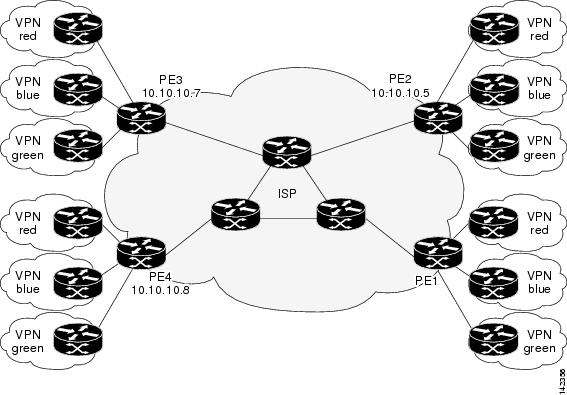
The following example shows how to configure operation parameters, proactive threshold monitoring, and scheduling options on router PE1 (see Figure 4) using the LSP Health Monitor. In this example, the LSP discovery option is enabled for LSP Health Monitor operation 1. Operation 1 is configured to automatically create IP SLAs LSP ping operations for all BGP next hop neighbors (PE2, PE3, and PE4) in use by all VRFs (red, blue, and green) associated with router PE1. The BGP next hop neighbor process is enabled, and the time interval at which routing entries that are no longer valid are removed from the BGP next hop neighbor discovery database is set to 60 seconds. The time interval at which the LSP Health Monitor checks the scan queue for BGP next hop neighbor updates is set to 1 minute. The secondary frequency option is enabled for both connection loss and timeout events, and the secondary frequency is set to 10 seconds. As specified by the proactive threshold monitoring configuration, when three consecutive connection loss or timeout events occur, an SNMP trap notification is sent. Multioperation scheduling and the generation of IP SLAs SNMP system logging messages are enabled.
Router PE1 Configuration
mpls discovery vpn interval 60mpls discovery vpn next-hop!auto ip sla mpls-lsp-monitor 1type echo ipsla-vrf-alltimeout 1000scan-interval 1secondary-frequency both 10!auto ip sla mpls-lsp-monitor reaction-configuration 1 react connectionLoss threshold-type consecutive 3 action-type trapOnlyauto ip sla mpls-lsp-monitor reaction-configuration 1 react timeout threshold-type consecutive 3 action-type trapOnlyip sla trapssnmp-server enable traps rtr!auto ip sla mpls-lsp-monitor schedule 1 schedule-period 60 start-time nowThe following is sample output from the show ip sla mpls-lsp-monitor configuration command for router PE1:
PE1# show ip sla mpls-lsp-monitor configuration 1Entry Number : 1Modification time : *12:18:21.830 PDT Fri Aug 19 2005Operation Type : echoVrf Name : ipsla-vrf-allTag :EXP Value : 0Timeout(ms) : 1000Threshold(ms) : 5000Frequency(sec) : Equals schedule periodLSP Selector : 127.0.0.1ScanInterval(min) : 1Delete Scan Factor : 1Operations List : 100001-100003Schedule Period(sec): 60Request size : 100Start Time : Start Time already passedSNMP RowStatus : ActiveTTL value : 255Reply Mode : ipv4Reply Dscp Bits :Secondary Frequency : Enabled on TimeoutValue(sec) : 10Reaction Configs :Reaction : connectionLossThreshold Type : ConsecutiveThreshold Count : 3Action Type : Trap OnlyReaction : timeoutThreshold Type : ConsecutiveThreshold Count : 3Action Type : Trap OnlyThe following is sample output from the show mpls discovery vpn command for router PE1:
PE1# show mpls discovery vpnRefresh interval set to 60 seconds.Next refresh in 46 secondsNext hop 10.10.10.5 (Prefix: 10.10.10.5/32)in use by: red, blue, greenNext hop 10.10.10.7 (Prefix: 10.10.10.7/32)in use by: red, blue, greenNext hop 10.10.10.8 (Prefix: 10.10.10.8/32)in use by: red, blue, greenThe following is sample output from the show ip sla mpls-lsp-monitor neighbors command for router PE1:
PE1# show ip sla mpls-lsp-monitor neighborsIP SLA MPLS LSP Monitor Database : 1BGP Next hop 10.10.10.5 (Prefix: 10.10.10.5/32) OKProbeID: 100001 (red, blue, green)BGP Next hop 10.10.10.7 (Prefix: 10.10.10.7/32) OKProbeID: 100002 (red, blue, green)BGP Next hop 10.10.10.8 (Prefix: 10.10.10.8/32) OKProbeID: 100003 (red, blue, green)The following is sample output from the show ip sla mpls-lsp-monitor scan-queue 1 and debug ip sla mpls-lsp-monitor commands when IP connectivity from router PE1 to router PE4 is lost. This output shows that connection loss to each of the VPNs associated with router PE4 (red, blue, and green) was detected and that this information was added to the LSP Health Monitor scan queue. Also, since router PE4 is no longer a valid BGP next hop neighbor, the IP SLAs operation for router PE4 (Probe 10003) is being deleted.
PE1# show ip sla mpls-lsp-monitor scan-queue 1Next scan Time after: 20 SecsNext Delete scan Time after: 20 SecsBGP Next hop Prefix vrf Add/Delete?10.10.10.8 0.0.0.0/0 red Del(100003)10.10.10.8 0.0.0.0/0 blue Del(100003)10.10.10.8 0.0.0.0/0 green Del(100003)PE1# debug ip sla mpls-lsp-monitorIP SLAs MPLSLM debugging for all entries is on*Aug 19 19:48: IP SLAs MPLSLM(1):Next hop 10.10.10.8 added in DeleteQ(1)*Aug 19 19:49: IP SLAs MPLSLM(1):Removing vrf red from tree entry 10.10.10.8*Aug 19 19:56: IP SLAs MPLSLM(1):Next hop 10.10.10.8 added in DeleteQ(1)*Aug 19 19:56: IP SLAs MPLSLM(1):Next hop 10.10.10.8 added in DeleteQ(1)*Aug 19 19:49: IP SLAs MPLSLM(1):Removing vrf blue from tree entry 10.10.10.8*Aug 19 19:49: IP SLAs MPLSLM(1):Removing vrf green from tree entry 10.10.10.8*Aug 19 19:49: IP SLAs MPLSLM(1):Removing Probe 100003The following is sample output from the show ip sla mpls-lsp-monitor scan-queue 1 and debug ip sla mpls-lsp-monitor commands when IP connectivity from router PE1 to router PE4 is restored. This output shows that each of the VPNs associated with router PE4 (red, blue, and green) were discovered and that this information was added to the LSP Health Monitor scan queue. Also, since router PE4 is a newly discovered BGP next hop neighbor, a new IP SLAs operation for router PE4 (Probe 100005) is being created and added to the LSP Health Monitor multioperation schedule. Even though router PE4 belongs to three VPNs, only one IP SLAs operation is being created.
PE1# show ip sla mpls-lsp-monitor scan-queue 1Next scan Time after: 23 SecsNext Delete scan Time after: 23 SecsBGP Next hop Prefix vrf Add/Delete?10.10.10.8 10.10.10.8/32 red Add10.10.10.8 10.10.10.8/32 blue Add10.10.10.8 10.10.10.8/32 green AddPE1# debug ip sla mpls-lsp-monitorIP SLAs MPLSLM debugging for all entries is on*Aug 19 19:59: IP SLAs MPLSLM(1):Next hop 10.10.10.8 added in AddQ*Aug 19 19:59: IP SLAs MPLSLM(1):Next hop 10.10.10.8 added in AddQ*Aug 19 19:59: IP SLAs MPLSLM(1):Next hop 10.10.10.8 added in AddQ*Aug 19 19:59: IP SLAs MPLSLM(1):Adding vrf red into tree entry 10.10.10.8*Aug 19 19:59: IP SLAs MPLSLM(1):Adding Probe 100005*Aug 19 19:59: IP SLAs MPLSLM(1):Adding ProbeID 100005 to tree entry 10.10.10.8 (1)*Aug 19 19:59: IP SLAs MPLSLM(1):Adding vrf blue into tree entry 10.10.10.8*Aug 19 19:59: IP SLAs MPLSLM(1):Duplicate in AddQ 10.10.10.8*Aug 19 19:59: IP SLAs MPLSLM(1):Adding vrf green into tree entry 10.10.10.8*Aug 19 19:59: IP SLAs MPLSLM(1):Duplicate in AddQ 10.10.10.8*Aug 19 19:59: IP SLAs MPLSLM(1):Added Probe(s) 100005 will be scheduled after 26 secs over schedule period 60Configuring and Verifying the LSP Health Monitor with LSP Discovery: Example
Figure 5 illustrates a simple VPN scenario for an ISP. This network consists of a core MPLS VPN with two PE routers belonging to a VPN named red. From the perspective of router PE1, there are three equal-cost multipaths available to reach router PE2.
Figure 5 Network Used for LSP Health Monitor with LSP Discovery Example
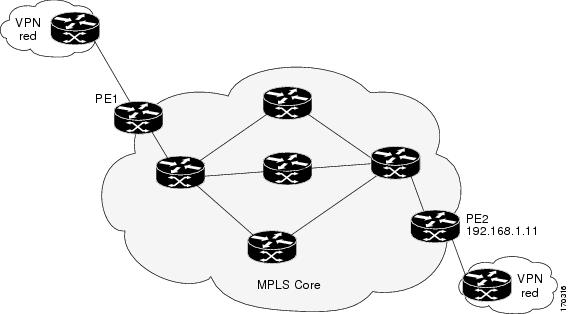
The following example shows how to configure operation parameters, proactive threshold monitoring, and scheduling options on router PE1 (see Figure 5) using the LSP Health Monitor. In this example, the LSP discovery option is enabled for LSP Health Monitor operation 100. Operation 100 is configured to automatically create IP SLAs LSP ping operations for all equal-cost multipaths between router PE1 and router PE2. The BGP next hop neighbor process is enabled, and the time interval at which routing entries that are no longer valid are removed from the BGP next hop neighbor discovery database is set to 30 seconds. The time interval at which the LSP Health Monitor checks the scan queue for BGP next hop neighbor updates is set to 1 minute. The secondary frequency option is enabled for both connection loss and timeout events, and the secondary frequency is set to 5 seconds. The explicit null label option for echo request packets is enabled. The LSP rediscovery time period is set to 3 minutes. As specified by the proactive threshold monitoring configuration, an SNMP trap notification will be sent when an LSP discovery group status changes occurs. Multioperation scheduling and the generation of IP SLAs SNMP system logging messages are enabled.
Router PE1 Configuration
mpls discovery vpn next-hopmpls discovery vpn interval 30!auto ip sla mpls-lsp-monitor 100type echo ipsla-vrf-allscan-interval 1secondary-frequency both 5!path-discoverforce-explicit-nullscan-period 3!auto ip sla mpls-lsp-monitor reaction-configuration 100 react lpd-group retry 3 action-type trapOnly!auto ip sla mpls-lsp-monitor schedule 100 schedule-period 30 start-time now!ip sla logging trapssnmp-server enable traps rtrThe following is sample output from the show ip sla mpls-lsp-monitor configuration command for router PE1:
PE1# show ip sla mpls-lsp-monitor configurationEntry Number : 100Modification time : *21:50:16.411 GMT Tue Jun 20 2006Operation Type : echoVrf Name : ipsla-vrf-allTag :EXP Value : 0Timeout(ms) : 5000Threshold(ms) : 50Frequency(sec) : Equals schedule periodScanInterval(min) : 1Delete Scan Factor : 1Operations List : 100002Schedule Period(sec): 30Request size : 100Start Time : Start Time already passedSNMP RowStatus : ActiveTTL value : 255Reply Mode : ipv4Reply Dscp Bits :Path Discover : EnableMaximum sessions : 1Session Timeout(seconds) : 120Base LSP Selector : 127.0.0.0Echo Timeout(seconds) : 5Send Interval(msec) : 0Label Shimming Mode : force-explicit-nullNumber of Stats Hours : 2Scan Period(minutes) : 3Secondary Frequency : Enabled on Connection Loss and TimeoutValue(sec) : 5Reaction Configs :Reaction : Lpd GroupRetry Number : 3Action Type : Trap OnlyThe following is sample output from the show mpls discovery vpn command for router PE1:
PE1# show mpls discovery vpnRefresh interval set to 30 seconds.Next refresh in 4 secondsNext hop 192.168.1.11 (Prefix: 192.168.1.11/32)in use by: redThe following is sample output from the show ip sla mpls-lsp-monitor neighbors command for router PE1:
PE1# show ip sla mpls-lsp-monitor neighborsIP SLA MPLS LSP Monitor Database : 100BGP Next hop 192.168.1.11 (Prefix: 192.168.1.11/32) OK Paths: 3ProbeID: 100001 (red)The following is sample output from the show ip sla mpls-lsp-monitor lpd operational-state command for LSP discovery group 100001:
PE1# show ip sla mpls-lsp-monitor lpd operational-stateEntry number: 100001MPLSLM Entry Number: 100Target FEC Type: LDP IPv4 prefixTarget Address: 192.168.1.11Number of Statistic Hours Kept: 2Last time LPD Stats were reset: *21:21:18.239 GMT Tue Jun 20 2006Traps Type: 3Latest Path Discovery Mode: rediscovery completeLatest Path Discovery Start Time: *21:59:04.475 GMT Tue Jun 20 2006Latest Path Discovery Return Code: OKLatest Path Discovery Completion Time(ms): 3092Number of Paths Discovered: 3Path Information :Path Outgoing Lsp Link Conn Adj DownstreamIndex Interface Selector Type Id Addr Label Stack Status1 Et0/0 127.0.0.8 90 0 10.10.18.30 21 OK2 Et0/0 127.0.0.2 90 0 10.10.18.30 21 OK3 Et0/0 127.0.0.1 90 0 10.10.18.30 21 OKThe following is sample output from the show ip sla mpls-lsp-monitor collection-statistics command for LSP discovery group 100001:
PE1# show ip sla mpls-lsp-monitor collection-statisticsEntry number: 100001Start Time Index: *21:52:59.795 GMT Tue Jun 20 2006Path Discovery Start Time: *22:08:04.507 GMT Tue Jun 20 2006Target Destination IP address: 192.168.1.11Path Discovery Status: OKPath Discovery Completion Time: 3052Path Discovery Minimum Paths: 3Path Discovery Maximum Paths: 3LSP Group Index: 100002LSP Group Status: upTotal Pass: 36Total Timeout: 0 Total Fail: 0Latest Probe Status: 'up,up,up'Latest Path Identifier: '127.0.0.8-Et0/0-21,127.0.0.2-Et0/0-21,127.0.0.1-Et0/0-21'Minimum RTT: 280 Maximum RTT: 324 Average RTT: 290The following is sample output from the show ip sla mpls-lsp-monitor summary command for LSP Health Monitor operation 100:
PE1# show ip sla mpls-lsp-monitor summary 100Index - MPLS LSP Monitor probe indexDestination - Target IP address of the BGP next hopStatus - LPD group statusLPD Group ID - Unique index to identify the LPD groupLast Operation Time - Last time an operation was attempted bya particular probe in the LPD GroupIndex Destination Status LPD Group ID Last Operation Time100 192.168.1.11 up 100001 *22:20:29.471 GMT Tue Jun 20 2006The following is sample output from the show ip sla mpls-lsp-monitor summary command for LSP discovery group 100001:
PE1#show ip sla mpls-lsp-monitor summary 100 group 100001Group ID - unique number to identify a LPD groupLsp-selector - Unique 127/8 address used to identify a LPDLast Operation status - Latest probe statusLast RTT - Latest Round Trip TimeLast Operation Time - Time when the last operation was attemptedGroup ID Lsp-Selector Status Failures Successes RTT Last Operation Time100001 127.0.0.8 up 0 55 320 *22:20:29.471 GMT Tue Jun 20 2006100001 127.0.0.2 up 0 55 376 *22:20:29.851 GMT Tue Jun 20 2006100001 127.0.0.1 up 0 55 300 *22:20:30.531 GMT Tue Jun 20 2006Manually Configuring an IP SLAs LSP Ping Operation: Example
The following example shows how to manually configure and schedule an individual IP SLAs LSP ping operation:
ip sla 1mpls lsp ping ipv4 192.168.1.4 255.255.255.255 lsp-selector 127.1.1.1frequency 120secondary-frequency connection-loss 30secondary-frequency timeout 30!ip sla reaction-configuration 1 react connectionLoss threshold-type consecutive 3 action-type trapOnlyip sla reaction-configuration 1 react timeout threshold-type consecutive 3 action-type trapOnlyip sla logging traps!ip sla schedule 1 start-time now life foreverAdditional References
The following sections provide references related to the LSP Health Monitor with LSP Discovery feature.
Related Documents
MPLS LSP ping and LSP traceroute management tools
MPLS LSP Ping/Traceroute for LDP/TE, and LSP Ping for VCCV, Cisco IOS feature module, Release 12.2(33)SRB
MPLS LSP discovery management tool
MPLS EM—MPLS LSP Multipath Tree Trace, Cisco IOS feature module, Release 12.2(33)SRB
Configuring standard IP access lists
"IP Access Lists" chapter of the Cisco IOS IP Application Services Configuration Guide, Release 12.4
Multioperation scheduling for Cisco IOS IP SLAs
"IP SLAs—Multioperation Scheduling of IP SLAs Operations" chapter of the IP SLAs Configuration Guide, Release 12.4T
Proactive threshold monitoring for Cisco IOS IP SLAs
"IP SLAs—Proactive Threshold Monitoring of IP SLAs Operations" chapter of the IP SLAs Configuration Guide, Release 12.4T
Cisco IOS IP SLAs command line interface enhancements
Cisco IOS IP Service Level Agreements Command Line Interface, Cisco white paper
Cisco IOS IP SLAs configuration tasks
Cisco IOS IP SLAs Configuration Guide, Release 12.4T
Cisco IOS IP SLAs commands
Cisco IOS IP SLAs Command Reference, Release 12.2SR
Standards
MIBs
CISCO-RTTMON-MIB
To locate and download MIBs for selected platforms, Cisco IOS releases, and feature sets, use Cisco MIB Locator found at the following URL:
RFCs
No new or modified RFCs are supported by this feature, and support for existing RFCs has not been modified by this feature.
—
Technical Assistance
Command Reference
This section documents only commands that are new or modified.
•
•
•
•
•
•
•
•
•
•
•
•
access-list (IP SLA)
To specify the access list to apply to a Cisco IOS IP Service Level Agreements (SLAs) label switched path (LSP) Health Monitor operation, use the access-list command in auto IP SLA MPLS parameters configuration mode. To remove the access list, use the no form of this command.
access-list access-list-number
no access-list access-list-number
Syntax Description
access-list-number
Number of an access list. This value is a decimal number from 1 to 99 or from 1300 to 1999.
Command Default
No access list is specified.
Command Modes
Auto IP SLA MPLS parameters configuration (config-auto-ip-sla-mpls-params)
Command History
Usage Guidelines
Standard IP access lists can be configured (using the access-list [IP standard] command in global configuration mode) to restrict the number of IP SLAs operations that are automatically created by the IP SLAs LSP Health Monitor. When the IP SLAs access list parameter is configured, the list of Border Gateway Protocol (BGP) next hop neighbors discovered by the LSP Health Monitor is filtered based on the conditions defined by the associated standard IP access list. In other words, the LSP Health Monitor will automatically create IP SLAs operations only for those BGP next hop neighbors with source addresses that satisfy the criteria permitted by the standard IP access list.
Examples
The following example shows how to configure operation parameters, proactive threshold monitoring, and scheduling options using the LSP Health Monitor. In this example, LSP Health Monitor operation 1 is configured to automatically create IP SLAs LSP ping operations for all BGP next hop neighbors in use by all VPN routing or forwarding instances (VRFs) associated with the source Provider Edge (PE) router. Standard IP access list 10 is specified to restrict the number of IP SLAs operations to be created by LSP Health Monitor operation 1.
!Configure standard IP access list in global configuration modeaccess-list 10 permit 10.10.10.8!mpls discovery vpn interval 60mpls discovery vpn next-hop!auto ip sla mpls-lsp-monitor 1type echo ipsla-vrf-alltimeout 1000scan-interval 1secondary-frequency connection-loss 10secondary-frequency timeout 10access-list 10!auto ip sla mpls-lsp-monitor reaction-configuration 1 react connectionLoss threshold-type consecutive 3 action-type trapOnlyauto ip sla mpls-lsp-monitor reaction-configuration 1 react timeout threshold-type consecutive 3 action-type trapOnlyip sla logging traps!auto ip sla mpls-lsp-monitor schedule 1 schedule-period 60 start-time nowRelated Commands
auto ip sla mpls-lsp-monitor
To begin configuration for an IP Service Level Agreements (SLAs) label switched path (LSP) Health Monitor operation and enter auto IP SLA MPLS configuration mode, use the auto ip sla mpls-lsp-monitor command in global configuration mode. To remove all configuration information for an LSP Health Monitor operation, use the no form of this command.
auto ip sla mpls-lsp-monitor operation-number
no auto ip sla mpls-lsp-monitor operation-number
Syntax Description
operation-number
Number used for the identification of the LSP Health Monitor operation you wish to configure.
Command Default
No LSP Health Monitor operation is configured.
Command Modes
Global configuration
Command History
Usage Guidelines
Entering this command automatically enables the mpls discovery vpn next-hop command.
After you configure an LSP Health Monitor operation, you must schedule the operation. To schedule an LSP Health Monitor operation, use the auto ip sla mpls-lsp-monitor schedule command in global configuration mode. You can also optionally set reaction configuration for the operation (see the auto ip sla mpls-lsp-monitor reaction-configuration command).
To display the current configuration settings of an LSP Health Monitor operation, use the show ip sla mpls-lsp-monitor configuration command in EXEC mode.
Examples
The following example shows how to configure operation parameters, proactive threshold monitoring, and scheduling options using the LSP Health Monitor. In this example, LSP Health Monitor operation 1 is configured to automatically create IP SLAs LSP ping operations for all Border Gateway Protocol (BGP) next hop neighbors in use by all VPN routing or forwarding instances (VRFs) associated with the source Provider Edge (PE) router.
mpls discovery vpn interval 60mpls discovery vpn next-hop!auto ip sla mpls-lsp-monitor 1type echo ipsla-vrf-alltimeout 1000scan-interval 1secondary-frequency connection-loss 10secondary-frequency timeout 10!auto ip sla mpls-lsp-monitor reaction-configuration 1 react connectionLoss threshold-type consecutive 3 action-type trapOnlyauto ip sla mpls-lsp-monitor reaction-configuration 1 react timeout threshold-type consecutive 3 action-type trapOnlyip sla logging traps!auto ip sla mpls-lsp-monitor schedule 1 schedule-period 60 start-time nowRelated Commands
auto ip sla mpls-lsp-monitor reaction-configuration
To configure proactive threshold monitoring parameters for a Cisco IOS IP Service Level Agreements (SLAs) label switched path (LSP) Health Monitor operation, use the auto ip sla mpls-lsp-monitor reaction-configuration command in global configuration mode. To clear all threshold monitoring configuration for a specified LSP Health Monitor operation, use the no form of this command.
LSP Health Monitor Without LSP Discovery
auto ip sla mpls-lsp-monitor reaction-configuration operation-number react {connectionLoss | timeout} [action-type option] [threshold-type {consecutive [occurrences] | immediate | never}]
no auto ip sla mpls-lsp-monitor reaction-configuration operation-number
LSP Health Monitor with LSP Discovery
auto ip sla mpls-lsp-monitor reaction-configuration operation-number react lpd {lpd-group [retry number] | tree-trace} [action-type trapOnly]
no auto ip sla mpls-lsp-monitor reaction-configuration operation-number
Syntax Description
Command Default
IP SLAs proactive threshold monitoring is disabled.
Command Modes
Global configuration
Command History
Usage Guidelines
You can configure the auto ip sla mpls-lsp-monitor reaction-configuration command multiple times to enable proactive threshold monitoring for multiple elements for the same operation. However, disabling of individual monitored elements is not supported. In other words, the no auto ip sla mpls-lsp-monitor reaction-configuration command will disable all proactive threshold monitoring configuration for the specified IP SLAs operation.
SNMP traps for IP SLAs are supported by the CISCO-RTTMON-MIB and CISCO-SYSLOG-MIB. Depending on the Cisco IOS software release that you are running, use the ip sla logging traps or ip sla monitor logging traps command to enable the generation of SNMP system logging messages specific to IP SLAs trap notifications. Use the snmp-server enable traps rtr command to enable the sending of IP SLAs SNMP trap notifications.
To display the current threshold monitoring configuration settings for an LSP Health Monitor operation, use the show ip sla mpls-lsp-monitor configuration command.
Examples
The following example shows how to configure operation parameters, proactive threshold monitoring, and scheduling options using the LSP Health Monitor. In this example, LSP Health Monitor operation 1 is configured to automatically create IP SLAs LSP ping operations for all Border Gateway Protocol (BGP) next hop neighbors in use by all VPN routing or forwarding instances (VRFs) associated with the source Provider Edge (PE) router. As specified by the proactive threshold monitoring configuration, when three consecutive connection loss or timeout events occur, an SNMP trap notification is sent.
mpls discovery vpn interval 60mpls discovery vpn next-hop!auto ip sla mpls-lsp-monitor 1type echo ipsla-vrf-alltimeout 1000scan-interval 1secondary-frequency connection-loss 10secondary-frequency timeout 10!auto ip sla mpls-lsp-monitor reaction-configuration 1 react connectionLoss threshold-type consecutive 3 action-type trapOnlyauto ip sla mpls-lsp-monitor reaction-configuration 1 react timeout threshold-type consecutive 3 action-type trapOnlyip sla logging trapsauto ip sla mpls-lsp-monitor schedule 1 schedule-period 60 start-time nowRelated Commands
auto ip sla mpls-lsp-monitor reset
To remove all IP Service Level Agreements (SLAs) label switched path (LSP) Health Monitor configuration from the running configuration, use the auto ip sla mpls-lsp-monitor reset command in global configuration mode.
auto ip sla mpls-lsp-monitor reset [lpd group-number]
Syntax Description
lpd group-number
(Optional) Specifies the number used to identify the LSP discovery group you wish to configure.
Command Default
None
Command Modes
Global configuration
Command History
Usage Guidelines
Use the auto ip sla mpls-lsp-monitor reset lpd group-number command to remove all the stored network connectivity statistics for the specified LSP discovery group from the LSP discovery group database. The non-statistical LSP discovery group data will be set to default values or zero. However, the IP address of the associated Border Gateway Protocol (BGP) next hop neighbor, the list of LSP discovery group IP SLAs operations, and the list of LSP selector IP addresses will be preserved. After the auto ip sla mpls-lsp-monitor reset lpd group-number command is entered, statistical data for the group will start aggregating again with new data only.
To clear IP SLAs configuration information (not including IP SLAs LSP Health Monitor configuration) from the running configuration, use the ip sla reset command in global configuration mode.
Examples
The following example shows how to remove all the LSP Health Monitor configurations from the running configuration:
auto ip sla mpls-lsp-monitor resetRelated Commands
ip sla reset
Stops all IP SLAs operations, clears IP SLAs configuration information, and returns the IP SLAs feature to the startup condition.
auto ip sla mpls-lsp-monitor schedule
To configure the scheduling parameters for an IP Service Level Agreements (SLAs) label switched path (LSP) Health Monitor operation, use the auto ip sla mpls-lsp-monitor schedule command in global configuration mode. To stop the operation and place it in the default state (pending), use the no form of this command.
auto ip sla mpls-lsp-monitor schedule operation-number schedule-period seconds [frequency [seconds]] [start-time {after hh:mm:ss | hh:mm[:ss] [month day | day month] | now | pending}]
no auto ip sla mpls-lsp-monitor schedule operation-number
Syntax Description
Command Default
The LSP Health Monitor operation is placed in a pending state (that is, the operation is enabled but is not actively collecting information).
Command Modes
Global configuration
Command History
Usage Guidelines
After you schedule an LSP Health Monitor operation with the auto ip sla mpls-lsp-monitor schedule command, you cannot change the configuration of the operation. To change the configuration of the operation, use the no auto ip sla mpls-lsp-monitor operation-number command in global configuration mode and then enter the new configuration information.
To display the current configuration settings of an LSP Health Monitor operation, use the show ip sla mpls-lsp-monitor configuration command in user EXEC or privileged EXEC mode.
Examples
The following example shows how to configure operation parameters, proactive threshold monitoring, and scheduling options using the LSP Health Monitor. In this example, LSP Health Monitor operation 1 is configured to automatically create IP SLAs LSP ping operations for all Border Gateway Protocol (BGP) next hop neighbors in use by all VPN routing or forwarding instances (VRFs) associated with the source Provider Edge (PE) router. The schedule period for LSP Health Monitor operation 1 is set to 60 seconds and the operation is scheduled to start immediately.
mpls discovery vpn interval 60mpls discovery vpn next-hop!auto ip sla mpls-lsp-monitor 1type echo ipsla-vrf-alltimeout 1000scan-interval 1secondary-frequency connection-loss 10secondary-frequency timeout 10!auto ip sla mpls-lsp-monitor reaction-configuration 1 react connectionLoss threshold-type consecutive 3 action-type trapOnlyauto ip sla mpls-lsp-monitor reaction-configuration 1 react timeout threshold-type consecutive 3 action-type trapOnlyip sla logging traps!auto ip sla mpls-lsp-monitor schedule 1 schedule-period 60 start-time nowRelated Commands
debug ip sla mpls-lsp-monitor
To enable debugging output for the IP Service Level Agreements (SLAs) label switched path (LSP) Health Monitor, use the debug ip sla mpls-lsp-monitor command in privileged EXEC mode. To disable debugging output, use the no form of this command.
debug ip sla mpls-lsp-monitor [operation-number]
no debug ip sla mpls-lsp-monitor [operation-number]
Syntax Description
operation-number
(Optional) Number of the LSP Health Monitor operation for which the debugging output will be displayed.
Command Default
Debug is not enabled.
Command Modes
Privileged EXEC
Command History
Examples
The following is sample output from the debug ip sla mpls-lsp-monitor command:
Router# debug ip sla mpls-lsp-monitorIP SLAs MPLSLM debugging for all entries is on*Aug 19 19:59: IP SLAs MPLSLM(1):Next hop 10.10.10.8 added in AddQ*Aug 19 19:59: IP SLAs MPLSLM(1):Next hop 10.10.10.8 added in AddQ*Aug 19 19:59: IP SLAs MPLSLM(1):Next hop 10.10.10.8 added in AddQ*Aug 19 19:59: IP SLAs MPLSLM(1):Adding vrf red into tree entry 10.10.10.8*Aug 19 19:59: IP SLAs MPLSLM(1):Adding Probe 100005*Aug 19 19:59: IP SLAs MPLSLM(1):Adding ProbeID 100005 to tree entry 10.10.10.8 (1)*Aug 19 19:59: IP SLAs MPLSLM(1):Adding vrf blue into tree entry 10.10.10.8*Aug 19 19:59: IP SLAs MPLSLM(1):Duplicate in AddQ 10.10.10.8*Aug 19 19:59: IP SLAs MPLSLM(1):Adding vrf green into tree entry 10.10.10.8*Aug 19 19:59: IP SLAs MPLSLM(1):Duplicate in AddQ 10.10.10.8*Aug 19 19:59: IP SLAs MPLSLM(1):Added Probe(s) 100005 will be scheduled after 26 secs over schedule period 60Related Commands
auto ip sla mpls-lsp-monitor
Begins configuration for an IP SLAs LSP Health Monitor operation and enters auto IP SLA MPLS configuration mode.
delete-scan-factor
To specify the number of times the IP Service Level Agreements (SLAs) label switched path (LSP) Health Monitor should check the scan queue before automatically deleting IP SLAs operations for Border Gateway Protocol (BGP) next hop neighbors that are no longer valid, use the delete-scan-factor command in auto IP SLA MPLS parameters configuration mode. To return to the default value, use the no form of this command.
delete-scan-factor factor
no delete-scan-factor
Syntax Description
factor
Specifies the number of times the LSP Health Monitor should check the scan queue before automatically deleting IP SLAs operations for BGP next hop neighbors that are no longer valid.
Command Default
The default scan factor is 1. In other words, each time the LSP Health Monitor checks the scan queue for updates, it deletes IP SLAs operations for BGP next hop neighbors that are no longer valid.
Command Modes
Auto IP SLA MPLS parameters configuration (config-auto-ip-sla-mpls-params)
Command History
Usage Guidelines
This command must be used with the scan-interval command. Use the scan-interval command to specify the time interval at which the LSP Health Monitor checks the scan queue for BGP next hop neighbor updates.
Note
Examples
The following example shows how to configure operation parameters, proactive threshold monitoring, and scheduling options using the LSP Health Monitor. In this example, LSP Health Monitor operation 1 is configured to automatically create IP SLAs LSP ping operations for all Border Gateway Protocol (BGP) next hop neighbors in use by all VPN routing or forwarding instances (VRFs) associated with the source Provider Edge (PE) router. The delete scan factor is set to 2. In other words, every other time the LSP Health Monitor checks the scan queue for updates, it deletes IP SLAs operations for BGP next hop neighbors that are no longer valid.
mpls discovery vpn interval 60mpls discovery vpn next-hop!auto ip sla mpls-lsp-monitor 1type echo ipsla-vrf-alltimeout 1000scan-interval 1secondary-frequency connection-loss 10secondary-frequency timeout 10delete-scan-factor 2!auto ip sla mpls-lsp-monitor reaction-configuration 1 react connectionLoss threshold-type consecutive 3 action-type trapOnlyauto ip sla mpls-lsp-monitor reaction-configuration 1 react timeout threshold-type consecutive 3 action-type trapOnlyip sla logging traps!auto ip sla mpls-lsp-monitor schedule 1 schedule-period 60 start-time nowRelated Commands
exp (IP SLA)
To specify the experimental field value in the header for an echo request packet of a Cisco IOS IP Service Level Agreements (SLAs) operation, use the exp command in the appropriate submode of auto IP SLA MPLS configuration or IP SLA configuration mode. To return to the default value, use the no form of this command.
exp exp-bits
no exp
Syntax Description
exp-bits
Specifies the experimental field value in the header for an echo request packet. Valid values are from 0 to 7. Default is 0.
Command Default
The experimental field value is set to 0.
Command Modes
Auto IP SLA MPLS Configuration
MPLS parameters configuration (config-auto-ip-sla-mpls-params)
IP SLA Configuration and IP SLA Monitor Configuration
LSP ping configuration (config-sla-monitor-lspPing)
LSP trace configuration (config-sla-monitor-lspTrace)
Note
Command History
Usage Guidelines
IP SLAs Operation Configuration Dependence on Cisco IOS Release
The Cisco IOS command used to begin configuration for an IP SLAs operation varies depending on the Cisco IOS release you are running (see Table 2). Note that if you are configuring an IP SLAs LSP Health Monitor operation, see Table 3 for information on Cisco IOS release dependencies. You must configure the type of IP SLAs operation (such as LSP ping) before you can configure any of the other parameters of the operation.
The configuration mode for the exp (IP SLA) command varies depending on the Cisco IOS release you are running and the operation type configured. For example, if you are running Cisco IOS Release 12.4(6)T and the LSP ping operation type is configured (without using the LSP Health Monitor), you would enter the exp (IP SLA) command in LSP ping configuration mode (config-sla-monitor-lspPing) within IP SLA configuration mode.
Examples
The following example shows how to configure operation parameters, proactive threshold monitoring, and scheduling options using the LSP Health Monitor. In this example, LSP Health Monitor operation 1 is configured to automatically create IP SLAs LSP ping operations for all Border Gateway Protocol (BGP) next hop neighbors in use by all VPN routing or forwarding instances (VRFs) associated with the source Provider Edge (PE) router. The experimental field value for each IP SLAs operations created by LSP Health Monitor operation 1 is set to 5.
mpls discovery vpn interval 60mpls discovery vpn next-hop!auto ip sla mpls-lsp-monitor 1type echo ipsla-vrf-alltimeout 1000scan-interval 1secondary-frequency connection-loss 10secondary-frequency timeout 10delete-scan-factor 2exp 5!auto ip sla mpls-lsp-monitor reaction-configuration 1 react connectionLoss threshold-type consecutive 3 action-type trapOnlyauto ip sla mpls-lsp-monitor reaction-configuration 1 react timeout threshold-type consecutive 3 action-type trapOnlyip sla logging traps!auto ip sla mpls-lsp-monitor schedule 1 schedule-period 60 start-time nowRelated Commands
force-explicit-null
To add an explicit null label to all echo request packets of a Cisco IOS IP Service Level Agreements (SLAs) LSP Health Monitor operation, use the force-explicit-null command in the appropriate submode of auto IP SLA MPLS configuration mode. To return to the default value, use the no form of this command.
force-explicit-null
no force-explicit-null
Syntax Description
This command has no arguments or keywords.
Command Default
An explicit null label is not added.
Command Modes
Auto IP SLA MPLS Configuration
MPLS parameters configuration (config-auto-ip-sla-mpls-params)
LSP discovery parameters configuration (config-auto-ip-sla-mpls-lpd-params)Command History
Usage Guidelines
You must configure the type of LSP Health Monitor operation (such as LSP ping) before you can configure any of the other parameters of the operation.
Examples
The following example shows how to configure operation parameters, proactive threshold monitoring, and scheduling options using the LSP Health Monitor. In this example, LSP Health Monitor operation 1 is configured to automatically create IP SLAs LSP ping operations for all Border Gateway Protocol (BGP) next hop neighbors in use by all VPN routing or forwarding instances (VRFs) associated with the source PE router. In this example, an explicit null label will be added to all the echo request packets of IP SLAs operations created by LSP Health Monitor operation 1.
mpls discovery vpn interval 60mpls discovery vpn next-hop!auto ip sla mpls-lsp-monitor 1type echo ipsla-vrf-allforce-explicit-nulltimeout 1000scan-interval 1secondary-frequency connection-loss 10secondary-frequency timeout 10delete-scan-factor 2!auto ip sla mpls-lsp-monitor reaction-configuration 1 react connectionLoss threshold-type consecutive 3 action-type trapOnlyauto ip sla mpls-lsp-monitor reaction-configuration 1 react timeout threshold-type consecutive 3 action-type trapOnlyip sla logging traps!auto ip sla mpls-lsp-monitor schedule 1 schedule-period 60 start-time nowRelated Commands
auto ip sla mpls-lsp-monitor
Begins configuration for an IP SLAs LSP Health Monitor operation and enters auto IP SLA MPLS configuration mode.
hours-of-statistics-kept (LSP discovery)
To set the number of hours for which label switched path (LSP) discovery group statistics are maintained for a Cisco IOS IP Service Level Agreements (SLAs) LSP Health Monitor operation, use the hours-of-statistics-kept command in auto IP SLA MPLS LSP discovery parameters configuration mode. To return to the default value, use the no form of this command.
hours-of-statistics-kept hours
no hours-of-statistics-kept
Syntax Description
Command Default
2 hours
Command Modes
Auto IP SLA MPLS LSP discovery parameters configuration (config-auto-ip-sla-mpls-lpd-params)
Command History
12.2(31)SB2
This command was introduced.
12.2(33)SRB
This command was integrated into Cisco IOS Release 12.2(33)SRB.
Usage Guidelines
The LSP discovery group statistics are distributed in one-hour increments. Since the number of LSP discovery groups for a single LSP Health Monitor operation can be significantly large, the collection of group statistics is restricted to a maximum of 2 hours. If the number argument is set to zero, no LSP discovery group statistics are maintained.
Use the path-discover command to enable the LSP discovery option for an IP SLAs LSP Health Monitor operation and enter auto IP SLA MPLS LSP discovery parameters configuration mode.
Examples
The following example shows how to configure operation parameters, proactive threshold monitoring, and scheduling options using the LSP Health Monitor. In this example, the LSP discovery option is enabled for LSP Health Monitor operation 1. Operation 1 is configured to automatically create IP SLAs LSP ping operations for the equal-cost multipaths to all Border Gateway Protocol (BGP) next hop neighbors in use by all VPN routing or forwarding instances (VRFs) associated with the source Provider Edge (PE) router. LSP discovery group statistics are collected every 1 hour.
auto ip sla mpls-lsp-monitor 1type echo ipsla-vrf-allpath-discover!maximum-sessions 2session-timeout 60interval 2timeout 4force-explicit-nullhours-of-statistics-kept 1scan-period 30!auto ip sla mpls-lsp-monitor schedule 1 schedule-period 60 frequency 100 start-time now!auto ip sla mpls-lsp-monitor reaction-configuration 1 react lpd tree-trace action-type trapOnlyauto ip sla mpls-lsp-monitor reaction-configuration 1 react lpd lpd-group retry 3 action-type trapOnlyRelated Commands
interval (LSP discovery)
To specify the time interval between Multiprotocol Label Switching (MPLS) echo requests that are sent as part of the label switched path (LSP) discovery process for a Cisco IOS IP Service Level Agreements (SLAs) LSP Health Monitor operation, use the interval command in auto IP SLA MPLS LSP discovery parameters configuration mode. To return to the default value, use the no form of this command.
interval milliseconds
no interval
Syntax Description
Command Default
0 milliseconds
Command Modes
Auto IP SLA MPLS LSP discovery parameters configuration (config-auto-ip-sla-mpls-lpd-params)
Command History
12.2(31)SB2
This command was introduced.
12.2(33)SRB
This command was integrated into Cisco IOS Release 12.2(33)SRB.
Usage Guidelines
Use the path-discover command to enable the LSP discovery option for an IP SLAs LSP Health Monitor operation and enter auto IP SLA MPLS LSP discovery parameters configuration mode.
Examples
The following example shows how to configure operation parameters, proactive threshold monitoring, and scheduling options using the LSP Health Monitor. In this example, the LSP discovery option is enabled for LSP Health Monitor operation 1. Operation 1 is configured to automatically create IP SLAs LSP ping operations for the equal-cost multipaths to all Border Gateway Protocol (BGP) next hop neighbors in use by all VPN routing or forwarding instances (VRFs) associated with the source Provider Edge (PE) router. To discover the equal cost multipaths per BGP next hop neighbor, MPLS echo requests are sent every 2 milliseconds.
auto ip sla mpls-lsp-monitor 1type echo ipsla-vrf-allpath-discover!maximum-sessions 2session-timeout 60interval 2timeout 4force-explicit-nullhours-of-statistics-kept 1scan-period 30!auto ip sla mpls-lsp-monitor schedule 1 schedule-period 60 frequency 100 start-time now!auto ip sla mpls-lsp-monitor reaction-configuration 1 react lpd tree-trace action-type trapOnlyauto ip sla mpls-lsp-monitor reaction-configuration 1 react lpd lpd-group retry 3 action-type trapOnlyRelated Commands
lsp-selector
To specify the local host IP address used to select the label switched path (LSP) for a Cisco IOS IP Service Level Agreements (SLAs) LSP Health Monitor operation, use the lsp-selector command in auto IP SLA MPLS parameters configuration mode. To return to the default value, use the no form of this command.
lsp-selector ip-address
no lsp-selector ip-address
Syntax Description
Command Default
The local host IP address used to select the LSP is 127.0.0.0.
Command Modes
Auto IP SLA MPLS parameters configuration (config-auto-ip-sla-mpls-params)
Command History
Usage Guidelines
This command is used to force an IP SLAs operation to use a specific LSP to obtain its response time measurement. This option is useful if there are equal-cost multipaths between the source Provider Edge (PE) router and the Border Gateway Protocol (BGP) next hop neighbor.
You must configure the type of LSP Health Monitor operation (such as LSP ping) before you can configure any of the other parameters of the operation.
Examples
The following example shows how to configure operation parameters, proactive threshold monitoring, and scheduling options using the LSP Health Monitor. In this example, LSP Health Monitor operation 1 is configured to automatically create IP SLAs LSP ping operations for all Border Gateway Protocol (BGP) next hop neighbors in use by all VPN routing or forwarding instances (VRFs) associated with the source PE router. As specified in the example configuration, IP address 127.0.0.1 is the local host IP address chosen to select the LSP for obtaining response time measurements.
mpls discovery vpn interval 60mpls discovery vpn next-hop!auto ip sla mpls-lsp-monitor 1type echo ipsla-vrf-alltimeout 1000scan-interval 1secondary-frequency connection-loss 10secondary-frequency timeout 10delete-scan-factor 2lsp-selector 127.0.0.1!auto ip sla mpls-lsp-monitor reaction-configuration 1 react connectionLoss threshold-type consecutive 3 action-type trapOnlyauto ip sla mpls-lsp-monitor reaction-configuration 1 react timeout threshold-type consecutive 3 action-type trapOnlyip sla logging traps!auto ip sla mpls-lsp-monitor schedule 1 schedule-period 60 start-time nowRelated Commands
auto ip sla mpls-lsp-monitor
Begins configuration for an IP SLAs LSP Health Monitor operation and enters auto IP SLA MPLS configuration mode.
lsp-selector-base
To specify the base IP address used to select the label switched paths (LSPs) belonging to the LSP discovery groups of a Cisco IOS IP Service Level Agreements (SLAs) LSP Health Monitor operation, use the lsp-selector-base command in auto IP SLA MPLS LSP discovery parameters configuration mode. To return to the default value, use the no form of this command.
lsp-selector-base ip-address
no lsp-selector-base
Syntax Description
ip-address
Base IP address used to select the LSPs within an LSP discovery group. The default IP address is 127.0.0.0.
Command Default
The default base IP address is 127.0.0.0.
Command Modes
Auto IP SLA MPLS LSP discovery parameters configuration (config-auto-ip-sla-mpls-lpd-params)
Command History
12.2(31)SB2
This command was introduced.
12.2(33)SRB
This command was integrated into Cisco IOS Release 12.2(33)SRB.
Usage Guidelines
Each equal-cost multipath belonging to an LSP discovery group is uniquely identified by the following three parameters:
•
•
•
Use the path-discover command to enable the LSP discovery option for an IP SLAs LSP Health Monitor operation and enter auto IP SLA MPLS LSP discovery parameters configuration mode.
Examples
The following example shows how to configure operation parameters, proactive threshold monitoring, and scheduling options using the LSP Health Monitor. In this example, the LSP discovery option is enabled for LSP Health Monitor operation 1. Operation 1 is configured to automatically create IP SLAs LSP ping operations for the equal-cost multipaths to all Border Gateway Protocol (BGP) next hop neighbors in use by all VPN routing or forwarding instances (VRFs) associated with the source Provider Edge (PE) router. The base IP address used to select the LSPs within the LSP discovery groups is set to 127.0.0.2.
auto ip sla mpls-lsp-monitor 1type echo ipsla-vrf-allpath-discover!maximum-sessions 2session-timeout 60lsp-selector-base 127.0.0.2interval 2timeout 4force-explicit-nullhours-of-statistics-kept 1scan-period 30!auto ip sla mpls-lsp-monitor schedule 1 schedule-period 60 frequency 100 start-time nowauto ip sla mpls-lsp-monitor reaction-configuration 1 react lpd tree-trace action-type trapOnlyauto ip sla mpls-lsp-monitor reaction-configuration 1 react lpd lpd-group retry 3 action-type trapOnlyRelated Commands
maximum-sessions
To specify the maximum number of Border Gateway Protocol (BGP) next hop neighbors that can be concurrently undergoing label switched path (LSP) discovery for a single Cisco IOS IP Service Level Agreements (SLAs) LSP Health Monitor operation, use the maximum-sessions command in auto IP SLA MPLS LSP discovery parameters configuration mode. To return to the default value, use the no form of this command.
maximum-sessions number
no maximum-sessions
Syntax Description
number
Maximum number of BGP next hop neighbors that can be concurrently undergoing LSP discovery. The default is 1.
Command Default
By default, the number argument is set to 1.
Command Modes
Auto IP SLA MPLS LSP discovery parameters configuration (config-auto-ip-sla-mpls-lpd-params)
Command History
12.2(31)SB2
This command was introduced.
12.2(33)SRB
This command was integrated into Cisco IOS Release 12.2(33)SRB.
Usage Guidelines
Use the path-discover command to enable the LSP discovery option for an IP SLAs LSP Health Monitor operation and enter auto IP SLA MPLS LSP discovery parameters configuration mode.
Examples
The following example shows how to configure operation parameters, proactive threshold monitoring, and scheduling options using the LSP Health Monitor. In this example, the LSP discovery option is enabled for LSP Health Monitor operation 1. Operation 1 is configured to automatically create IP SLAs LSP ping operations for the equal-cost multipaths to all Border Gateway Protocol (BGP) next hop neighbors in use by all VPN routing or forwarding instances (VRFs) associated with the source Provider Edge (PE) router. The maximum number of LSP discovery processes allowed to run concurrently is set to 2.
auto ip sla mpls-lsp-monitor 1type echo ipsla-vrf-allpath-discover!maximum-sessions 2session-timeout 60interval 2timeout 4force-explicit-nullhours-of-statistics-kept 1scan-period 30!auto ip sla mpls-lsp-monitor schedule 1 schedule-period 60 frequency 100 start-time now!auto ip sla mpls-lsp-monitor reaction-configuration 1 react lpd tree-trace action-type trapOnlyauto ip sla mpls-lsp-monitor reaction-configuration 1 react lpd lpd-group retry 3 action-type trapOnlyRelated Commands
mpls discovery vpn interval
To specify the time interval at which routing entries that are no longer valid are removed from the Border Gateway Protocol (BGP) next hop neighbor discovery database of a Multiprotocol Label Switching (MPLS) Virtual Private Network (VPN), use the mpls discovery vpn interval command in global configuration mode. To return to the default scan interval, use the no form of this command.
mpls discovery vpn interval seconds
no mpls discovery vpn interval
Syntax Description
Command Default
The default time interval is 300 seconds.
Command Modes
Global configuration
Command History
Usage Guidelines
When the BGP next hop neighbor discovery process is enabled (using the mpls discovery vpn next-hop command), a database of BGP next hop neighbors in use by any VPN routing or forwarding instance (VRF) associated with the source Provider Edge (PE) router is generated based on information from the local VRF and global routing tables. As routing updates are received, new BGP next hop neighbors are added immediately to the database. However, BGP next hop neighbors (that are no longer valid) are only removed from the database periodically as defined by the user (using the mpls discovery vpn interval command).
The BGP next hop neighbor discovery process is used by the Cisco IOS IP Service Level Agreements (SLAs) LSP Health Monitor feature.
Examples
The following example shows how to enable the MPLS VPN BGP next hop neighbor discovery process and specify 60 seconds as the time interval at which routing entries that are no longer valid are removed from the BGP next hop neighbor discovery database of an MPLS VPN:
mpls discovery vpn interval 60mpls discovery vpn next-hopRelated Commands
mpls discovery vpn next-hop
To enable the Multiprotocol Label Switching (MPLS) Virtual Private Network (VPN) Border Gateway Protocol (BGP) next hop neighbor discovery process, use the mpls discovery vpn next-hop command in global configuration mode. To disable the discovery process, use the no form of this command.
mpls discovery vpn next-hop
no mpls discovery vpn next-hop
Syntax Description
This command has no arguments or keywords.
Command Default
The BGP next hop neighbor discovery process is disabled.
Command Modes
Global configuration
Command History
Usage Guidelines
When the BGP next hop neighbor discovery process is enabled, a database of BGP next hop neighbors in use by any VPN routing or forwarding instance (VRF) associated with the source Provider Edge (PE) router is generated based on information from the local VRF and global routing tables. As routing updates are received, new BGP next hop neighbors are added immediately to the database. However, BGP next hop neighbors (that are no longer valid) are only removed from the database periodically as defined by the user (using the mpls discovery vpn interval command in global configuration mode).
The mpls discovery vpn next-hop command is automatically enabled when an IP Service Level Agreements (SLAs) LSP Health Monitor operation is enabled. However, to disable the BGP next hop neighbor discovery process, you must use the no form of this command.
Examples
The following example shows how to enable the MPLS VPN BGP next hop neighbor discovery process and specify 60 seconds as the time interval at which routing entries that are no longer valid are removed from the BGP next hop neighbor discovery database of an MPLS VPN:
mpls discovery vpn interval 60mpls discovery vpn next-hopRelated Commands
mpls lsp ping ipv4
To manually configure an individual Cisco IOS IP Service Level Agreements (SLAs) label switched path (LSP) ping IPv4 operation, use the mpls lsp ping ipv4 command in IP SLA configuration mode.
mpls lsp ping ipv4 destination-address destination-mask [force-explicit-null] [lsp-selector ip-address] [src-ip-addr source-address] [reply {dscp dscp-value | mode {ipv4 | router-alert}}]
Syntax Description
Command Default
No IP SLAs operation type is configured for the operation being configured.
Command Modes
IP SLA configuration
Command History
Usage Guidelines
You must configure the type of IP SLAs operation (such as LSP ping) before you can configure any of the other parameters of the operation. To change the operation type of an existing IP SLAs operation, you must first delete the IP SLAs operation (using the no ip sla global configuration command) and then reconfigure the operation with the new operation type.
The lsp-selector keyword is used to force an IP SLAs operation to use a specific LSP to obtain its response time measurement. This option is useful if there are multiple equal cost paths between Provider Edge (PE) routers.
Examples
The following example shows how to manually configure operation parameters, reaction conditions, and scheduling options for IP SLAs LSP ping operation 1:
ip sla 1mpls lsp ping ipv4 192.168.1.4 255.255.255.255 lsp-selector 127.1.1.1frequency 120secondary-frequency connection-loss 30secondary-frequency timeout 30!ip sla reaction-configuration 1 react connectionLoss threshold-type consecutive 3 action-type trapOnlyip sla reaction-configuration 1 react timeout threshold-type consecutive 3 action-type trapOnlyip sla logging traps!ip sla schedule 1 start-time now life foreverRelated Commands
ip sla
Begins configuration for an IP SLAs operation and enters IP SLA configuration mode.
mpls lsp trace ipv4
To manually configure an individual Cisco IOS IP Service Level Agreements (SLAs) label switched path (LSP) traceroute IPv4 operation, use the mpls lsp trace ipv4 command in IP SLA configuration mode.
mpls lsp trace ipv4 destination-address destination-mask [force-explicit-null] [lsp-selector ip-address] [src-ip-addr source-address] [reply {dscp dscp-value | mode {ipv4 | router-alert}}]
Syntax Description
Command Default
No IP SLAs operation type is configured for the operation being configured.
Command Modes
IP SLA configuration
Command History
Usage Guidelines
You must configure the type of IP SLAs operation (such as LSP trace) before you can configure any of the other parameters of the operation. To change the operation type of an existing IP SLAs operation, you must first delete the IP SLAs operation (using the no ip sla global configuration command) and then reconfigure the operation with the new operation type.
Note
The lsp-selector keyword is used to force an IP SLAs operation to use a specific LSP to obtain its response time measurement. This option is useful if there are multiple equal cost paths between provider edge (PE) routers.
Examples
The following example shows how to manually configure operation parameters, reaction conditions, and scheduling options for IP SLAs LSP traceroute operation 1:
ip sla 1mpls lsp trace ipv4 192.168.1.4 255.255.255.255 lsp-selector 127.1.1.1frequency 120secondary-frequency connection-loss 30secondary-frequency timeout 30!ip sla reaction-configuration 1 react connectionLoss threshold-type consecutive 3 action-type trapOnlyip sla reaction-configuration 1 react timeout threshold-type consecutive 3 action-type trapOnlyip sla logging traps!ip sla schedule 1 start-time now life foreverRelated Commands
ip sla
Begins configuration for an IP SLAs operation and enters IP SLA configuration mode.
path-discover
To enable the label switched path (LSP) discovery option for a Cisco IOS IP Service Level Agreements (SLAs) LSP Health Monitor operation and enter auto IP SLA MPLS LSP discovery parameters configuration mode, use the path-discover command in auto IP SLA MPLS parameters configuration mode. To disable the LSP discovery option, use the no form of this command.
path-discover
no path-discover
Syntax Description
This command has no arguments or keywords.
Command Default
The LSP discovery option is disabled.
Command Modes
Auto IP SLA MPLS parameters configuration (config-auto-ip-sla-mpls-params)
Command History
12.2(31)SB2
This command was introduced.
12.2(33)SRB
This command was integrated into Cisco IOS Release 12.2(33)SRB.
Examples
The following example shows how to enable the LSP discovery option of IP SLAs LSP Health Monitor operation 1:
auto ip sla mpls-lsp-monitor 1type echo ipsla-vrf-allpath-discoverRelated Commands
auto ip sla mpls-lsp-monitor
Begins configuration for an IP SLAs LSP Health Monitor operation and enters auto IP SLA MPLS configuration mode.
reply-dscp-bits
To specify the differentiated services codepoint (DSCP) value for an echo reply packet of a Cisco IOS IP Service Level Agreements (SLAs) label switched path (LSP) Health Monitor operation, use the reply-dscp-bits command in auto IP SLA MPLS parameters configuration mode. To return to the default value, use the no form of this command.
reply-dscp-bits dscp-value
no reply-dscp-bits dscp-value
Syntax Description
Command Default
The DSCP value is 0.
Command Modes
Auto IP SLA MPLS parameters configuration (config-auto-ip-sla-mpls-params)
Command History
Usage Guidelines
You must configure the type of LSP Health Monitor operation (such as LSP ping) before you can configure any of the other parameters of the operation.
Examples
The following example shows how to configure operation parameters, proactive threshold monitoring, and scheduling options using the LSP Health Monitor. In this example, LSP Health Monitor operation 1 is configured to automatically create IP SLAs LSP ping operations for all Border Gateway Protocol (BGP) next hop neighbors in use by all VPN routing or forwarding instances (VRFs) associated with the source Provider Edge (PE) router. The DSCP value for the echo reply packets of IP SLAs operations created by LSP Health Monitor operation 1 is set to 5.
mpls discovery vpn interval 60mpls discovery vpn next-hop!auto ip sla mpls-lsp-monitor 1type echo ipsla-vrf-alltimeout 1000scan-interval 1secondary-frequency connection-loss 10secondary-frequency timeout 10delete-scan-factor 2reply-dscp-bits 5!auto ip sla mpls-lsp-monitor reaction-configuration 1 react connectionLoss threshold-type consecutive 3 action-type trapOnlyauto ip sla mpls-lsp-monitor reaction-configuration 1 react timeout threshold-type consecutive 3 action-type trapOnlyip sla logging traps!auto ip sla mpls-lsp-monitor schedule 1 schedule-period 60 start-time nowRelated Commands
auto ip sla mpls-lsp-monitor
Begins configuration for an IP SLAs LSP Health Monitor operation and enters auto IP SLA MPLS configuration mode.
reply-mode
To specify the reply mode for an echo request packet of a Cisco IOS IP Service Level Agreements (SLAs) label switched path (LSP) Health Monitor operation, use the reply-mode command in auto IP SLA MPLS parameters configuration mode. To return to the default value, use the no form of this command.
reply-mode {ipv4 | router-alert}
no reply-mode {ipv4 | router-alert}
Syntax Description
ipv4
Replies with an IPv4 User Datagram Protocol (UDP) packet (default).
router-alert
Replies with an IPv4 UDP packet with router alert.
Command Default
The reply mode for an echo request packet is an IPv4 UDP packet by default.
Command Modes
Auto IP SLA MPLS parameters configuration (config-auto-ip-sla-mpls-params)
Command History
Usage Guidelines
You must configure the type of LSP Health Monitor operation (such as LSP ping) before you can configure any of the other parameters of the operation.
Examples
The following example shows how to configure operation parameters, proactive threshold monitoring, and scheduling options using the LSP Health Monitor. In this example, LSP Health Monitor operation 1 is configured to automatically create IP SLAs LSP ping operations for all Border Gateway Protocol (BGP) next hop neighbors in use by all VPN routing or forwarding instances (VRFs) associated with the source Provider Edge (PE) router. The reply mode of an echo request packet for IP SLAs operations created by LSP Health Monitor operation 1 is an IPv4 UDP packet with router alert.
mpls discovery vpn interval 60mpls discovery vpn next-hop!auto ip sla mpls-lsp-monitor 1type echo ipsla-vrf-alltimeout 1000scan-interval 1secondary-frequency connection-loss 10secondary-frequency timeout 10delete-scan-factor 2reply-mode router-alert!auto ip sla mpls-lsp-monitor reaction-configuration 1 react connectionLoss threshold-type consecutive 3 action-type trapOnlyauto ip sla mpls-lsp-monitor reaction-configuration 1 react timeout threshold-type consecutive 3 action-type trapOnlyip sla logging traps!auto ip sla mpls-lsp-monitor schedule 1 schedule-period 60 start-time nowRelated Commands
auto ip sla mpls-lsp-monitor
Begins configuration for an IP SLAs LSP Health Monitor operation and enters auto IP SLA MPLS configuration mode.
scan-interval
To specify the time interval at which the IP Service Level Agreements (SLAs) label switched path (LSP) Health Monitor checks the scan queue for Border Gateway Protocol (BGP) next hop neighbor updates, use the scan-interval command in auto IP SLA MPLS parameters configuration mode. To return to the default value, use the no form of this command.
scan-interval minutes
no scan-interval
Syntax Description
minutes
Specifies the time interval (in minutes) at which the LSP Health Monitor checks the scan queue for BGP next hop neighbor updates.
Command Default
Scan interval is 240 minutes.
Command Modes
Auto IP SLA MPLS parameters configuration (config-auto-ip-sla-mpls-params)
Command History
Usage Guidelines
At each scan interval, a new IP SLA operation is automatically created for each newly discovered BGP next hop neighbor listed in the LSP Health Monitor scan queue. If there is more than one IP SLAs operation created at a specific scan interval, the start time for each newly created IP SLAs operation is randomly distributed to avoid having all of the operations start at the same time.
Use the delete-scan-factor command in IP SLA monitor configuration mode to specify the number of times the LSP Health Monitor should check the scan queue before automatically deleting IP SLAs operations for BGP next hop neighbors that are no longer valid.
You must configure the type of LSP Health Monitor operation (such as LSP ping) before you can configure any of the other parameters of the operation.
Examples
The following example shows how to configure operation parameters, proactive threshold monitoring, and scheduling options using the LSP Health Monitor. In this example, LSP Health Monitor operation 1 is configured to automatically create IP SLAs LSP ping operations for all Border Gateway Protocol (BGP) next hop neighbors in use by all VPN routing or forwarding instances (VRFs) associated with the source Provider Edge (PE) router. The time interval at which the LSP Health Monitor checks the scan queue for BGP next hop neighbor updates is set to 1 minute.
mpls discovery vpn interval 60mpls discovery vpn next-hop!auto ip sla mpls-lsp-monitor 1type echo ipsla-vrf-alltimeout 1000scan-interval 1secondary-frequency connection-loss 10secondary-frequency timeout 10delete-scan-factor 2!auto ip sla mpls-lsp-monitor reaction-configuration 1 react connectionLoss threshold-type consecutive 3 action-type trapOnlyauto ip sla mpls-lsp-monitor reaction-configuration 1 react timeout threshold-type consecutive 3 action-type trapOnlyip sla logging traps!auto ip sla mpls-lsp-monitor schedule 1 schedule-period 60 start-time nowRelated Commands
scan-period
To set the amount of time after which the label switched path (LSP) discovery process can restart for a Cisco IOS IP Service Level Agreements (SLAs) LSP Health Monitor operation, use the scan-period command in auto IP SLA MPLS LSP discovery parameters configuration mode. To return to the default value, use the no form of this command.
scan-period minutes
no scan-period
Syntax Description
minutes
The amount of time (in minutes) after which the LSP discovery process can restart. The default is 1 minute.
Command Default
1 minute
Command Modes
Auto IP SLA MPLS LSP discovery parameters configuration (config-auto-ip-sla-mpls-lpd-params)
Command History
12.2(31)SB2
This command was introduced.
12.2(33)SRB
This command was integrated into Cisco IOS Release 12.2(33)SRB.
Usage Guidelines
When the LSP discovery process has completed one iteration of discovering the equal-cost multipaths for each applicable Border Gateway Protocol (BGP) next hop neighbors associated with a single LSP Health Monitor operation, the next iteration of the LSP discovery process will start immediately if the time period set by the scan-period command has expired. If this rediscovery time period has not yet expired, then the next iteration of the LSP discovery process will not start until the time period has expired.
Setting the LSP rediscovery time period to 0 will cause the LSP discovery process to always restart immediately after completing one iteration of discovering the equal-cost multipaths for each applicable BGP next hop neighbor associated with a single LSP Health Monitor operation.
Use the path-discover command to enable the LSP discovery option for an IP SLAs LSP Health Monitor operation and enter auto IP SLA MPLS LSP discovery parameters configuration mode.
Examples
The following example shows how to configure operation parameters, proactive threshold monitoring, and scheduling options using the LSP Health Monitor. In this example, the LSP discovery option is enabled for LSP Health Monitor operation 1. Operation 1 is configured to automatically create IP SLAs LSP ping operations for the equal-cost multipaths to all Border Gateway Protocol (BGP) next hop neighbors in use by all VPN routing or forwarding instances (VRFs) associated with the source Provider Edge (PE) router. The LSP rediscovery time period is set to 30 minutes.
auto ip sla mpls-lsp-monitor 1type echo ipsla-vrf-allpath-discover!maximum-sessions 2session-timeout 60interval 2timeout 4force-explicit-nullhours-of-statistics-kept 1scan-period 30!auto ip sla mpls-lsp-monitor schedule 1 schedule-period 60 frequency 100 start-time now!auto ip sla mpls-lsp-monitor reaction-configuration 1 react lpd tree-trace action-type trapOnlyauto ip sla mpls-lsp-monitor reaction-configuration 1 react lpd lpd-group retry 3 action-type trapOnlyRelated Commands
secondary-frequency
To set a faster measurement frequency (secondary frequency) to which a Cisco IOS IP Service Level Agreements (SLAs) operation should change when a reaction condition occurs, use the secondary-frequency command in the appropriate submode of auto IP SLA MPLS configuration or IP SLA configuration mode. To disable the secondary frequency, use the no form of this command.
secondary-frequency {both | connection-loss | timeout} frequency
no secondary-frequency {connection-loss | timeout}
Syntax Description
Command Default
The secondary frequency option is disabled.
Command Modes
Auto IP SLA MPLS Configuration
MPLS parameters configuration (config-auto-ip-sla-mpls-params)
IP SLA Configuration and IP SLA Monitor Configuration
LSP ping configuration (config-sla-monitor-lspPing)
LSP trace configuration (config-sla-monitor-lspTrace)
Note
Command History
Usage Guidelines
This command provides the capability to specify a secondary frequency for an IP SLAs operation. If the secondary frequency option is configured and a failure (such as a connection loss or timeout) is detected for a particular path, the frequency at which the path is remeasured will increase to the secondary frequency value (testing at a faster rate). When the configured reaction condition is met (such as N consecutive connection losses or N consecutive timeouts), an SNMP trap and syslog message can be sent and the measurement frequency will return to its original frequency value.
Note
IP SLAs Operation Configuration Dependence on Cisco IOS Release
The Cisco IOS command used to begin configuration for an IP SLAs operation varies depending on the Cisco IOS release you are running (see Table 4). Note that if you are configuring an IP SLAs LSP Health Monitor operation, see Table 5 for information on Cisco IOS release dependencies. You must configure the type of IP SLAs operation (such as LSP ping) before you can configure any of the other parameters of the operation.
The configuration mode for the secondary-frequency command varies depending on the Cisco IOS release you are running and the operation type configured. For example, if you are running Cisco IOS Release 12.4(6)T and the LSP ping operation type is configured (without using the LSP Health Monitor), you would enter the secondary-frequency command in LSP ping configuration mode (config-sla-monitor-lspPing) within IP SLA configuration mode.
Examples
The following example shows how to configure operation parameters, proactive threshold monitoring, and scheduling options using the LSP Health Monitor. In this example, LSP Health Monitor operation 1 is configured to automatically create IP SLAs LSP ping operations for all Border Gateway Protocol (BGP) next hop neighbors in use by all VPN routing or forwarding instances (VRFs) associated with the source Provider Edge (PE) router. The secondary frequency option is enabled for both connection loss and timeout events, and the secondary frequency is set to 10 seconds.
mpls discovery vpn interval 60mpls discovery vpn next-hop!auto ip sla mpls-lsp-monitor 1type echo ipsla-vrf-alltimeout 1000scan-interval 1secondary-frequency both 10delete-scan-factor 2!auto ip sla mpls-lsp-monitor reaction-configuration 1 react connectionLoss threshold-type consecutive 3 action-type trapOnlyauto ip sla mpls-lsp-monitor reaction-configuration 1 react timeout threshold-type consecutive 3 action-type trapOnlyip sla logging traps!auto ip sla mpls-lsp-monitor schedule 1 schedule-period 60 start-time nowRelated Commands
session-timeout (LSP discovery)
To set the amount of time the label switched path (LSP) discovery process for a Cisco IOS IP Service Level Agreements (SLAs) LSP Health Monitor operation waits for a response to its LSP discovery request for a particular Border Gateway Protocol (BGP) next hop neighbor, use the session-timeout command in auto IP SLA MPLS LSP discovery parameters configuration mode. To return to the default value, use the no form of this command.
session-timeout seconds
no session-timeout
Syntax Description
seconds
The amount of time (in seconds) an LSP Health Monitor operation waits for a response to its LSP discovery request. The default value is 120 seconds.
Command Default
120 seconds
Command Modes
Auto IP SLA MPLS LSP discovery parameters configuration (config-auto-ip-sla-mpls-lpd-params)
Command History
12.2(31)SB2
This command was introduced.
12.2(33)SRB
This command was integrated into Cisco IOS Release 12.2(33)SRB.
Usage Guidelines
Before an LSP discovery group is created for a particular BGP next hop neighbor, the LSP Health Monitor must receive a response to its LSP discovery request for that BGP next hop neighbor. If no response is received within the specified time limit, the LSP discovery process is not performed for that particular BGP next hop neighbor.
Use the path-discover command to enable the LSP discovery option for an IP SLAs LSP Health Monitor operation and enter auto IP SLA MPLS LSP discovery parameters configuration mode.
Examples
The following example shows how to configure operation parameters, proactive threshold monitoring, and scheduling options using the LSP Health Monitor. In this example, the LSP discovery option is enabled for LSP Health Monitor operation 1. Operation 1 is configured to automatically create IP SLAs LSP ping operations for the equal-cost multipaths to all Border Gateway Protocol (BGP) next hop neighbors in use by all VPN routing or forwarding instances (VRFs) associated with the source Provider Edge (PE) router. The timeout value for the LSP discovery requests is set to 60 seconds.
auto ip sla mpls-lsp-monitor 1type echo ipsla-vrf-allpath-discover!maximum-sessions 2session-timeout 60interval 2timeout 4force-explicit-nullhours-of-statistics-kept 1scan-period 30!auto ip sla mpls-lsp-monitor schedule 1 schedule-period 60 frequency 100 start-time now!auto ip sla mpls-lsp-monitor reaction-configuration 1 react lpd tree-trace action-type trapOnlyauto ip sla mpls-lsp-monitor reaction-configuration 1 react lpd lpd-group retry 3 action-type trapOnlyRelated Commands
show ip sla mpls-lsp-monitor collection-statistics
To display the statistics for Cisco IOS IP Service Level Agreements (SLAs) operations belonging to a label switched path (LSP) discovery group of an LSP Health Monitor operation, use the show ip sla mpls-lsp-monitor collection-statistics command in user EXEC or privileged EXEC mode.
show ip sla mpls-lsp-monitor collection-statistics [group-id]
Syntax Description
group-id
(Optional) Identification number of the LSP discovery group for which the details will be displayed.
Command Modes
User EXEC
Privileged EXECCommand History
Usage Guidelines
Use the show ip sla mpls-lsp-monitor collection-statistics command if the LSP discovery option is enabled for an LSP Health Monitor operation. This command is not applicable if the LSP discovery option is disabled.
When the LSP discovery option is enabled, an individual IP SLAs operation is created by the LSP Health Monitor for each equal-cost multipath belonging to an LSP discovery group of a particular LSP Health Monitor operation. The network connectivity statistics collected by each individual IP SLAs operation are aggregated and stored in one-hour increments (data can be collected for a maximum of two hours). Results are stored as group averages representative of all the equal-cost multipaths within the group for a given one-hour increment.
Examples
The following is sample output from the show ip sla mpls-lsp-monitor collection-statistics command:
Router# show ip sla mpls-lsp-monitor collection-statistics 100001Entry number: 100001Start Time Index: *19:32:37.995 EST Mon Feb 28 2005Path Discovery Start Time: *20:23:43.919 EST Mon Feb 28 2005Target destination IP address: 10.131.161.251Path Discovery Status: OKPath Discovery Completion Time: 1772Path Discovery Minimum Paths: 12Path Discovery Maximum Paths: 12LSP Group Index: 100001LSP Group Status: upTotal Pass: 1225Total Timeout: 0 Total Fail: 0Latest probe status: 'up,up,up,up,up,up,up,up,up,up,up,up'Latest Path Identifier: '127.0.0.13-Se3/0-38,127.0.0.6-Se3/0-38,127.0.0.1-Se3/0-38,127.0.0.2-Se3/0-38,127.0.0.4-Se 3/0-38,127.0.0.5-Se3/0-38,127.0.0.13-Se4/0-38,127.0.0.6-Se4/0-38,127.0.0.1-Se4/0-38,127.0. 0.2-Se4/0-38,127.0.0.4-Se4/0-38,127.0.0.5-Se4/0-38'Minimum RTT: 24 Maximum RTT: 100 Average RTT: 42Table 6 describes the significant fields shown in the display.
Related Commands
auto ip sla mpls-lsp-monitor
Begins configuration for an IP SLAs LSP Health Monitor operation and enters auto IP SLA MPLS configuration mode.
show ip sla mpls-lsp-monitor configuration
To display configuration settings for IP Service Level Agreements (SLAs) label switched path (LSP) Health Monitor operations, use the show ip sla mpls-lsp-monitor configuration command in user EXEC or privileged EXEC mode.
show ip sla mpls-lsp-monitor configuration [operation-number]
Syntax Description
operation-number
(Optional) Number of the LSP Health Monitor operation for which the details will be displayed.
Command Modes
User EXEC
Privileged EXECCommand History
Usage Guidelines
If the identification number of an LSP Health Monitor operation is not specified, configuration values for all the configured LSP Health Monitor operations will be displayed.
Examples
The following is sample output from the show ip sla mpls-lsp-monitor configuration command:
Router# show ip sla mpls-lsp-monitor configuration 1Entry Number : 1Modification time : *12:18:21.830 PDT Fri Aug 19 2005Operation Type : echoVrf Name : ipsla-vrf-allTag :EXP Value : 0Timeout(ms) : 1000Threshold(ms) : 5000Frequency(sec) : Equals schedule periodLSP Selector : 127.0.0.1ScanInterval(min) : 1Delete Scan Factor : 1Operations List : 100001-100003Schedule Period(sec): 60Request size : 100Start Time : Start Time already passedSNMP RowStatus : ActiveTTL value : 255Reply Mode : ipv4Reply Dscp Bits :Secondary Frequency : Enabled on TimeoutValue(sec) : 10Reaction Configs :Reaction : connectionLossThreshold Type : ConsecutiveThreshold Count : 3Action Type : Trap OnlyReaction : timeoutThreshold Type : ConsecutiveThreshold Count : 3Action Type : Trap OnlyTable 7 describes the significant fields shown in the display.
Related Commands
show ip sla mpls-lsp-monitor lpd operational-state
To display the operational status of the label switched path (LSP) discovery groups belonging to an IP Service Level Agreements (SLAs) LSP Health Monitor operation, use the show ip sla mpls-lsp-monitor lpd operational-state command in user EXEC or privileged EXEC mode.
show ip sla mpls-lsp-monitor lpd operational-state [group-id]
Syntax Description
group-id
(Optional) Identification number of the LSP discovery group for which the details will be displayed.
Command Modes
User EXEC
Privileged EXECCommand History
Usage Guidelines
Use the show ip sla mpls-lsp-monitor lpd operational-state command if the LSP discovery option is enabled for an LSP Health Monitor operation. This command is not applicable if the LSP discovery option is disabled.
Examples
The following is sample output from the show ip sla mpls-lsp-monitor lpd operational-state command:
Router# show ip sla mpls-lsp-monitor lpd operational-state 100001Entry number: 100001MPLSLM Entry Number: 1Target FEC Type: LDP IPv4 prefixTarget Address: 192.168.1.11Number of Statistic Hours Kept: 2Last time LPD Stats were reset: *21:21:18.239 GMT Tue Jun 20 2006Traps Type: 3Latest Path Discovery Mode: rediscovery completeLatest Path Discovery Start Time: *21:59:04.475 GMT Tue Jun 20 2006Latest Path Discovery Return Code: OKLatest Path Discovery Completion Time(ms): 3092Number of Paths Discovered: 3Path Information :Path Outgoing Lsp Link Conn Adj DownstreamIndex Interface Selector Type Id Addr Label Stack Status1 Et0/0 127.0.0.8 90 0 10.10.18.30 21 OK2 Et0/0 127.0.0.2 90 0 10.10.18.30 21 OK3 Et0/0 127.0.0.1 90 0 10.10.18.30 21 OKTable 8 describes the significant fields shown in the display.
Related Commands
auto ip sla mpls-lsp-monitor
Begins configuration for an IP SLAs LSP Health Monitor operation and enters auto IP SLA MPLS configuration mode.
show ip sla mpls-lsp-monitor neighbors
To display routing and connectivity information about Multiprotocol Label Switching (MPLS) Virtual Private Network (VPN) Border Gateway Protocol (BGP) next hop neighbors discovered by the IP Service Level Agreements (SLAs) label switched path (LSP) Health Monitor, use the show ip sla mpls-lsp-monitor neighbors command in user EXEC or privileged EXEC mode.
show ip sla mpls-lsp-monitor neighbors
Syntax Description
This command has no arguments or keywords.
Command Modes
User EXEC
Privileged EXECCommand History
Examples
The following is sample output from the show ip sla mpls-lsp-monitor neighbors command:
Router# show ip sla mpls-lsp-monitor neighborsIP SLA MPLS LSP Monitor Database : 1BGP Next hop 10.10.10.5 (Prefix: 10.10.10.5/32) OKProbeID: 100001 (red, blue, green)BGP Next hop 10.10.10.7 (Prefix: 10.10.10.7/32) OKProbeID: 100002 (red, blue, green)BGP Next hop 10.10.10.8 (Prefix: 10.10.10.8/32) OKProbeID: 100003 (red, blue, green)Table 9 describes the significant fields shown in the display.
Related Commands
auto ip sla mpls-lsp-monitor
Begins configuration for an IP SLAs LSP Health Monitor operation and enters auto IP SLA MPLS configuration mode.
show ip sla mpls-lsp-monitor scan-queue
To display information about adding or deleting Border Gateway Protocol (BGP) next hop neighbors from a particular Multiprotocol Label Switching (MPLS) Virtual Private Network (VPN) of an IP Service Level Agreements (SLAs) LSP Health Monitor operation, use the show ip sla mpls-lsp-monitor scan-queue command in user EXEC or privileged EXEC mode.
show ip sla mpls-lsp-monitor scan-queue operation-number
Syntax Description
operation-number
Number of the LSP Health Monitor operation for which the details will be displayed.
Command Modes
User EXEC
Privileged EXECCommand History
Examples
The following is sample output from the show ip sla mpls-lsp-monitor scan-queue command:
Router# show ip sla mpls-lsp-monitor scan-queue 1Next scan Time after: 23 SecsNext Delete scan Time after: 83 SecsBGP Next hop Prefix vrf Add/Delete?10.10.10.8 10.10.10.8/32 red Add10.10.10.8 10.10.10.8/32 blue Add10.10.10.8 10.10.10.8/32 green AddTable 10 describes the significant fields shown in the display.
Related Commands
show ip sla mpls-lsp-monitor summary
To display Border Gateway Protocol (BGP) next hop neighbor and label switched path (LSP) discovery group information for IP Service Level Agreements (SLAs) LSP Health Monitor operations, use the show ip sla mpls-lsp-monitor summary command in user EXEC or privileged EXEC mode.
show ip sla mpls-lsp-monitor summary [operation-number [group [group-id]]]
Syntax Description
Command Modes
User EXEC
Privileged EXECCommand History
Usage Guidelines
Use the show ip sla mpls-lsp-monitor summary command if the LSP discovery option is enabled for an LSP Health Monitor operation. This command is not applicable if the LSP discovery option is disabled.
Examples
The following is sample output from the show ip sla mpls-lsp-monitor summary operation-number command:
Router# show ip sla mpls-lsp-monitor summary 1Index - MPLS LSP Monitor probe index.Destination - Target IP address of the BGP Next Hop.Status - LPD Group Status.LPD Group ID - Unique index to identify the LPD Group.Last Operation Time - Last time an operation was attempted by a particular probe in the LPD group.Index Destination Status LPD Group ID Last Operation Time1 100.1.1.1 up 100001 19:33:37.915 EST Mon Feb 28 20052 100.1.1.2 down 100002 19:33:47.915 EST Mon Feb 28 20053 100.1.1.3 retry 100003 19:33:57.915 EST Mon Feb 28 20054 100.1.1.4 partial 100004 19:34:07.915 EST Mon Feb 28 2005The following is sample output from the show ip sla mpls-lsp-monitor summary operation-number group group-id command:
Router# show ip sla mpls-lsp-monitor summary 1 group 100001Group ID - Unique number to identify a LPD groupLsp-selector - Unique 127/8 address used to identify an LPD.Latest operation status - Latest probe status.Last Operation time - Time when the last operation was attempted.Group ID Lsp-Selector Status Failures Successes RTT Last Operation Time100001 127.0.0.13 up 0 78 32 *20:11:37.895 EST Mon Feb 28 2005100001 127.0.0.15 up 0 78 32 *20:11:37.995 EST Mon Feb 28 2005100001 127.0.0.16 up 0 78 32 *20:11:38.067 EST Mon Feb 28 2005100001 127.0.0.26 up 0 78 32 *20:11:38.175 EST Mon Feb 28 2005Table 11 describes the significant fields shown in the display.
Related Commands
auto ip sla mpls-lsp-monitor
Begins configuration for an IP SLAs LSP Health Monitor operation and enters auto IP SLA MPLS configuration mode.
show mpls discovery vpn
To display routing information relating to the Multiprotocol Label Switching (MPLS) Virtual Private Network (VPN) Border Gateway Protocol (BGP) next hop neighbor discovery process, use the show mpls discovery vpn command in user EXEC or privileged EXEC mode.
show mpls discovery vpn
Syntax Description
This command has no arguments or keywords.
Command Modes
User EXEC
Privileged EXEC
Command History
Examples
The following is sample output from the show mpls discovery vpn command:
Router# show mpls discovery vpnRefresh interval set to 60 seconds.Next refresh in 46 secondsNext hop 10.10.10.5 (Prefix: 10.10.10.5/32)in use by: red, blue, greenNext hop 10.10.10.7 (Prefix: 10.10.10.7/32)in use by: red, blue, greenNext hop 10.10.10.8 (Prefix: 10.10.10.8/32)in use by: red, blue, greenTable 12 describes the fields shown in the display.
Related Commands
timeout (LSP discovery)
To set the amount of time the label switched path (LSP) discovery process for a Cisco IOS IP Service Level Agreements (SLAs) LSP Health Monitor operation waits for a response to its echo request packets, use the timeout command in auto IP SLA MPLS LSP discovery parameters configuration mode. To return to the default value, use the no form of this command.
timeout seconds
no timeout
Syntax Description
seconds
The amount of time (in seconds) the LSP discovery process waits for a response to its echo request packets. The default value is 5 seconds.
Command Default
5 seconds
Command Modes
Auto IP SLA MPLS LSP discovery parameters configuration (config-auto-ip-sla-mpls-lpd-params)
Command History
12.2(31)SB2
This command was introduced.
12.2(33)SRB
This command was integrated into Cisco IOS Release 12.2(33)SRB.
Usage Guidelines
If no response is received for echo request packets sent along a particular LSP within the specified time limit, the LSP is considered to have had an operation failure.
Use the path-discover command to enable the LSP discovery option for an IP SLAs LSP Health Monitor operation and enter auto IP SLA MPLS LSP discovery parameters configuration mode.
Examples
The following example shows how to configure operation parameters, proactive threshold monitoring, and scheduling options using the LSP Health Monitor. In this example, the LSP discovery option is enabled for LSP Health Monitor operation 1. Operation 1 is configured to automatically create IP SLAs LSP ping operations for the equal-cost multipaths to all Border Gateway Protocol (BGP) next hop neighbors in use by all VPN routing or forwarding instances (VRFs) associated with the source Provider Edge (PE) router. The timeout value for the echo request packets sent during the LSP discovery process is 4 seconds.
auto ip sla mpls-lsp-monitor 1type echo ipsla-vrf-allpath-discover!maximum-sessions 2session-timeout 60interval 2timeout 4force-explicit-nullhours-of-statistics-kept 1scan-period 30!auto ip sla mpls-lsp-monitor schedule 1 schedule-period 60 frequency 100 start-time now!auto ip sla mpls-lsp-monitor reaction-configuration 1 react lpd tree-trace action-type trapOnlyauto ip sla mpls-lsp-monitor reaction-configuration 1 react lpd lpd-group retry 3 action-type trapOnlyRelated Commands
ttl (IP SLA)
To specify the maximum hop count for an echo request packet of a Cisco IOS IP Service Level Agreements (SLAs) operation, use the ttl command in the appropriate submode of auto IP SLA MPLS configuration or IP SLA configuration mode. To return to the default value, use the no form of this command.
ttl time-to-live
no ttl
Syntax Description
Command Default
For IP SLAs LSP ping operations, the default time-to-live value is 255.
For IP SLAs LSP traceroute operations, the default time-to-live value is 30.Command Modes
Auto IP SLA MPLS Configuration
MPLS parameters configuration (config-auto-ip-sla-mpls-params)
IP SLA Configuration and IP SLA Monitor Configuration
LSP ping configuration (config-sla-monitor-lspPing)
LSP trace configuration (config-sla-monitor-lspTrace)
Note
Command History
Usage Guidelines
IP SLAs Operation Configuration Dependence on Cisco IOS Release
The Cisco IOS command used to begin configuration for an IP SLAs operation varies depending on the Cisco IOS release you are running (see Table 13). Note that if you are configuring an IP SLAs LSP Health Monitor operation, see Table 14 for information on Cisco IOS release dependencies. You must configure the type of IP SLAs operation (such as LSP ping) before you can configure any of the other parameters of the operation.
The configuration mode for the ttl command varies depending on the Cisco IOS release you are running and the operation type configured. For example, if you are running Cisco IOS Release 12.4(6)T and the LSP ping operation type is configured (without using the LSP Health Monitor), you would enter the ttl command in LSP ping configuration mode (config-sla-monitor-lspPing) within IP SLA configuration mode.
Examples
The following example shows how to configure operation parameters, proactive threshold monitoring, and scheduling options using the LSP Health Monitor. In this example, LSP Health Monitor operation 1 is configured to automatically create IP SLAs LSP ping operations for all Border Gateway Protocol (BGP) next hop neighbors in use by all VPN routing or forwarding instances (VRFs) associated with the source Provider Edge (PE) router. The maximum hop count for echo request packets of IP SLAs operations created by LSP Health Monitor operation 1 is set to 200 hops.
mpls discovery vpn interval 60mpls discovery vpn next-hop!auto ip sla mpls-lsp-monitor 1type echo ipsla-vrf-alltimeout 1000scan-interval 1secondary-frequency connection-loss 10secondary-frequency timeout 10delete-scan-factor 2ttl 200!auto ip sla mpls-lsp-monitor reaction-configuration 1 react connectionLoss threshold-type consecutive 3 action-type trapOnlyauto ip sla mpls-lsp-monitor reaction-configuration 1 react timeout threshold-type consecutive 3 action-type trapOnlyip sla logging traps!auto ip sla mpls-lsp-monitor schedule 1 schedule-period 60 start-time nowRelated Commands
type echo (MPLS)
To configure Cisco IOS IP Service Level Agreements (SLAs) label switched path (LSP) ping operations using the LSP Health Monitor, use the type echo command in auto IP SLA MPLS configuration mode.
type echo [ipsla-vrf-all | vrf vpn-name]
Syntax Description
Command Default
No IP SLAs operation type is configured for the operation being configured.
Command Modes
Auto IP SLA MPLS configuration (config-auto-ip-sla-mpls)
Command History
Usage Guidelines
You must configure the type of LSP Health Monitor operation (such as LSP ping) before you can configure any of the other parameters of the operation.
Note
Examples
The following example shows how to configure operation parameters, proactive threshold monitoring, and scheduling options using the LSP Health Monitor. In this example, LSP Health Monitor operation 1 is configured to automatically create IP SLAs LSP ping operations for all Border Gateway Protocol (BGP) next hop neighbors in use by all VPN routing or forwarding instances (VRFs) associated with the source PE router.
mpls discovery vpn interval 60mpls discovery vpn next-hop!auto ip sla mpls-lsp-monitor 1type echo ipsla-vrf-alltimeout 1000scan-interval 1secondary-frequency connection-loss 10secondary-frequency timeout 10delete-scan-factor 2!auto ip sla mpls-lsp-monitor reaction-configuration 1 react connectionLoss threshold-type consecutive 3 action-type trapOnlyauto ip sla mpls-lsp-monitor reaction-configuration 1 react timeout threshold-type consecutive 3 action-type trapOnlyip sla logging traps!auto ip sla mpls-lsp-monitor schedule 1 schedule-period 60 start-time nowRelated Commands
auto ip sla mpls-lsp-monitor
Begins configuration for an IP SLAs LSP Health Monitor operation and enters auto IP SLA MPLS configuration mode.
type pathEcho (MPLS)
To configure Cisco IOS IP Service Level Agreements (SLAs) label switched path (LSP) LSP traceroute operations using the LSP Health Monitor, use the type pathEcho command in auto IP SLA MPLS configuration mode.
type pathEcho [ipsla-vrf-all | vrf vpn-name]
Syntax Description
Command Default
No IP SLAs operation type is configured for the operation being configured.
Command Modes
Auto IP SLA MPLS configuration (config-auto-ip-sla-mpls)
Command History
Usage Guidelines
You must configure the type of LSP Health Monitor operation (such as LSP ping) before you can configure any of the other parameters of the operation.
You must configure the type of IP SLAs operation (such as LSP ping) before you can configure any of the other parameters of the operation. To change the operation type of an existing LSP Health Monitor operation, you must first delete the operation (using the no auto ip sla mpls-lsp-monitor global configuration command) and then reconfigure the operation with the new operation type.
Note
Note
Examples
The following example shows how to configure operation parameters, proactive threshold monitoring, and scheduling options using the LSP Health Monitor. In this example, LSP Health Monitor operation 1 is configured to automatically create IP SLAs LSP traceroute operations for all BGP next hop neighbors in use by all VRFs associated with the source PE router.
mpls discovery vpn interval 60mpls discovery vpn next-hop!auto ip sla mpls-lsp-monitor 1type pathEcho ipsla-vrf-alltimeout 1000scan-interval 1secondary-frequency connection-loss 10secondary-frequency timeout 10!auto ip sla mpls-lsp-monitor reaction-configuration 1 react connectionLoss threshold-type consecutive 3 action-type trapOnlyauto ip sla mpls-lsp-monitor reaction-configuration 1 react timeout threshold-type consecutive 3 action-type trapOnlyip sla logging traps!auto ip sla mpls-lsp-monitor schedule 1 schedule-period 60 start-time nowRelated Commands
auto ip sla mpls-lsp-monitor
Begins configuration for an IP SLAs LSP Health Monitor operation and enters auto IP SLA MPLS configuration mode.
Feature Information for the LSP Health Monitor
Table 15 lists the release history for this feature.
Not all commands may be available in your Cisco IOS software release. For release information about a specific command, see the command reference documentation.
Use Cisco Feature Navigator to find information about platform support and software image support. Cisco Feature Navigator enables you to determine which Cisco IOS and Catalyst OS software images support a specific software release, feature set, or platform. To access Cisco Feature Navigator, go to http://www.cisco.com/go/cfn. An account on Cisco.com is not required.
Note

Any Internet Protocol (IP) addresses used in this document are not intended to be actual addresses. Any examples, command display output, and figures included in the document are shown for illustrative purposes only. Any use of actual IP addresses in illustrative content is unintentional and coincidental.
© 2007 Cisco Systems, Inc. All rights reserved.
 Feedback
Contact Cisco
- Open a Support Case

- (Requires a Cisco Service Contract)
This Document Applies to These Products
- Collaboration Endpoints - Retired Products
- Conferencing - Retired Products
- Contact Center - Retired Products
- Optical Networking - Retired Products
- Routers - Retired Products
- Security - Retired Products
- Servers - Unified Computing (UCS) Retired Products
- Storage Networking Retired Products
- Switches - Retired Products
- Video - Retired Products
- Wireless - Retired Products