BGP Support for the L2VPN Address Family
Available Languages
Table Of Contents
BGP Support for the L2VPN Address Family
Prerequisites for BGP Support for the L2VPN Address Family
Restrictions for BGP Support for the L2VPN Address Family
Information About BGP Support for the L2VPN Address Family
How to Configure BGP Support for the L2VPN Address Family
Configuring VPLS Autodiscovery Using BGP and the L2VPN Address Family
Configuration Examples for BGP Support for the L2VPN Address Family
Configuring VPLS Autodiscovery Using BGP and the L2VPN Address Family: Example
Feature Information for BGP Support for the L2VPN Address Family
BGP Support for the L2VPN Address Family
First Published: February 23, 2007Last Updated: February 23, 2007BGP support for the L2VPN address family introduces a BGP-based autodiscovery mechanism to distribute Layer 2 Virtual Private Network (L2VPN) endpoint provisioning information. BGP uses a separate L2VPN routing information base (RIB) to store endpoint provisioning information, which is updated each time any Layer 2 virtual forwarding instance (VFI) is configured. When BGP distributes the endpoint provisioning information in an update message to all its BGP neighbors, the endpoint information is used to set up a pseudowire mesh to support L2VPN-based services.
Finding Feature Information in This Module
Your Cisco IOS software release may not support all of the features documented in this module. To reach links to specific feature documentation in this module and to see a list of the releases in which each feature is supported, use the "Feature Information for BGP Support for the L2VPN Address Family" section.
Finding Support Information for Platforms and Cisco IOS and Catalyst OS Software Images
Use Cisco Feature Navigator to find information about platform support and Cisco IOS and Catalyst OS software image support. To access Cisco Feature Navigator, go to http://www.cisco.com/go/cfn. An account on Cisco.com is not required.
Contents
•
Prerequisites for BGP Support for the L2VPN Address Family
•
•
•
•
•
Prerequisites for BGP Support for the L2VPN Address Family
This feature assumes prior knowledge of Virtual Private Network (VPN), Virtual Private LAN Service (VPLS), and Multiprotocol Layer Switching (MPLS) technologies.
Restrictions for BGP Support for the L2VPN Address Family
•
•
Information About BGP Support for the L2VPN Address Family
To configure BGP support for the L2VPN address family, you should understand the following concept.
L2VPN Address Family
In Cisco IOS Release 12.2(33)SRB and later releases, support for the L2VPN address family is introduced. L2VPN is defined as a secure network that operates inside an unsecured network by using an encryption technology such as IP security (IPsec) or Generic Routing Encapsulation (GRE). The L2VPN address family is configured under BGP routing configuration mode, and within the L2VPN address family the VPLS subsequent address family identifier (SAFI) is supported.
BGP support for the L2VPN address family introduces a BGP-based autodiscovery mechanism to distribute L2VPN endpoint provisioning information. BGP uses a separate L2VPN routing information base (RIB) to store endpoint provisioning information, which is updated each time any Layer 2 VFI is configured. Prefix and path information is stored in the L2VPN database, allowing BGP to make best-path decisions. When BGP distributes the endpoint provisioning information in an update message to all its BGP neighbors, the endpoint information is used to set up a pseudowire mesh to support L2VPN-based services.
The BGP autodiscovery mechanism facilitates the setting up of L2VPN services, which are an integral part of the Cisco IOS Virtual Private LAN Service (VPLS) feature. VPLS enables flexibility in deploying services by connecting geographically dispersed sites as a large LAN over high-speed Ethernet in a robust and scalable IP MPLS network. For more details about VPLS, see the VPLS Autodiscovery: BGP Based feature.
Under L2VPN address family, the following BGP command-line interface (CLI) commands are supported:
•
•
•
•
•
•
•
•
•
•
•
•
•
•
•
•
•
•

Note
For route maps used within BGP, all commands related to prefix processing, tag processing, and automated tag processing are ignored when used under L2VPN address family configuration. All other route map commands are supported.
BGP multipaths and confederations are not supported under the L2VPN address family.
How to Configure BGP Support for the L2VPN Address Family
This section contains the following task:
•
Configuring VPLS Autodiscovery Using BGP and the L2VPN Address Family
Perform this task to implement VPLS autodiscovery of each provider edge (PE) router that is a member of a specific VPLS. In Cisco IOS Release 12.2(33)SRB, the BGP L2VPN address family was introduced with a separate L2VPN routing information base (RIB) that contains endpoint provisioning information. BGP learns the endpoint provisioning information from the L2VPN database, which is updated each time any Layer 2 (L2) virtual forwarding instance (VFI) is configured. When BGP distributes the endpoint provisioning information in an update message to all its BGP neighbors, the endpoint information is used to set up a pseudowire (PW) mesh to support L2VPN-based services.
BGP-based VPLS autodiscovery eliminates the need to manually provision a VPLS neighbor. After a PE router configures itself to be a member of a particular VPLS, information needed to set up connections to remote routers in the same VPLS is distributed by a discovery process. When the discovery process is complete, each member of the VPLS will have the information needed to set up VPLS PWs to form the full mesh of PWs needed for the VPLS.
This task is configured at router N-PE3 in Figure 1 and must be repeated at routers N-PE1 and N-PE2 with the appropriate changes such as different IP addresses. For a full configuration of these routers, see the "Configuring VPLS Autodiscovery Using BGP and the L2VPN Address Family: Example" section.
Figure 1 Network Diagram for BGP Autodiscovery Using the L2VPN Address Family
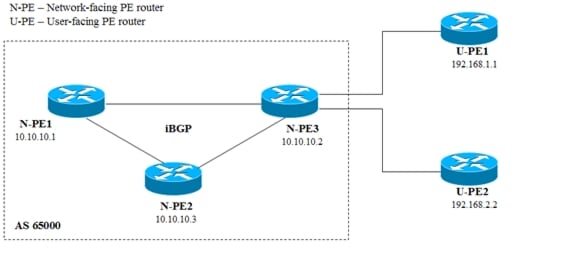
In this task, the PE router N-PE3 in Figure 1 is configured with a Layer 2 router ID, a VPN ID, a VPLS ID, and enabled to automatically discover other PE routers that are part of the same VPLS domain. A BGP session is created to activate BGP neighbors under the L2VPN address family. Finally, two optional show commands are entered to verify the steps in the task.
VPLS ID
A VPLS ID is a BGP extended community value that identifies the VPLS domain. Manual configuration of this ID is optional because a default VPLS ID is generated using the BGP autonomous system number and the configured VPN ID. A VPLS ID can be composed in one of two ways: with an autonomous system number and an arbitrary number or with an IP address and an arbitrary number.
You can enter a VPLS ID in either of these formats:
•
45000:3
•
192.168.10.15:1
Prerequisites
This task assumes that MPLS is configured with VPLS options. For more details, see the VPLS Autodiscovery: BGP Based feature.
SUMMARY STEPS
1.
2.
3.
4.
5.
6.
7.
8.
9.
10.
11.
12.
13.
14.
15.
16.
17.
18.
19.
20.
21.
22.
DETAILED STEPS
Step 1
enable
Example:Router> enable
Enables privileged EXEC mode.
•
Step 2
configure terminal
Example:Router# configure terminal
Enters global configuration mode.
Step 3
l2 router-id ip-address
Example:Router(config)# l2 router-id 10.1.1.3
Specifies a router ID (in IP address format) for the provider edge (PE) router to use with Virtual Private LAN Services (VPLS) autodiscovery pseudowires.
•
Step 4
l2 vfi vfi-name autodiscovery
Example:Router(config)# l2 vfi customerA autodiscovery
Creates an L2 VFI, enables the VPLS PE router to automatically discover other PE routers that are part of the same VPLS domain, and enters L2 VFI autodiscovery configuration mode.
•
Step 5
vpn id vpn-id
Example:Router(config-vfi)# vpn id 100
Specifies a VPN ID.
•
•
•
Step 6
vpls-id vpls-id
Example:Router(config-vfi)# vpls-id 65000:100
(Optional) Specifies a VPLS ID.
•
•
Step 7
exit
Example:Router(config-vfi)# exit
Exits L2 VFI autodiscovery configuration mode and returns to global configuration mode.
Step 8
Repeat Step 4 through Step 6 to configure other L2 VFIs and associated VPN and VPLS IDs.
—
Step 9
router bgp autonomous-system-number
Example:Router(config)# router bgp 65000
Enters router configuration mode for the specified routing process.
Step 10
no bgp default ipv4-unicast
Example:Router(config-router)# no bgp default ipv4-unicast
Disables the IPv4 unicast address family for the BGP routing process.
Note
Step 11
bgp log-neighbor-changes
Example:Router(config-router)# bgp log-neighbor-changes
Enables logging of BGP neighbor resets.
Step 12
bgp update-delay seconds
Example:Router(config-router)# bgp update-delay 1
Sets the maximum initial delay period before a BGP-speaking networking device sends its first updates.
•
Step 13
neighbor {ip-address | peer-group-name} remote-as autonomous-system-number
Example:Router(config-router)# neighbor 10.10.10.1 remote-as 65000
Adds the IP address or peer group name of the neighbor in the specified autonomous system to the IPv4 multiprotocol BGP neighbor table of the local router.
•
•
•
Step 14
neighbor {ip-address | peer-group-name} update-source interface-type interface-number
Example:Router(config-router)# neighbor 10.10.10.1 update-source loopback1
(Optional) Configures a router to select a specific source or interface to receive routing table updates.
•
Step 15
Repeat Step 13 and Step 14 to configure other BGP neighbors.
—
Step 16
address-family l2vpn [vpls]
Example:Router(config-router)# address-family l2vpn vpls
Specifies the L2VPN address family and enters address family configuration mode.
•
•
Step 17
neighbor ip-address activate
Example:Router(config-router-af)# neighbor 10.10.10.1 activate
Enables the neighbor to exchange information for the L2VPN VPLS address family with the local router.
Note
Step 18
neighbor {ip-address | peer-group-name} send-community [both | standard | extended]
Example:Router(config-router-af)# neighbor 10.10.10.1 send-community extended
Specifies that a communities attribute should be sent to a BGP neighbor.
•
Step 19
Repeat Step 17 and Step 18 to activate other BGP neighbors under L2VPN address family.
—
Step 20
end
Example:Router(config-router-af)# end
Exits address family configuration mode and returns to privileged EXEC mode.
Step 21
show vfi
Example:Router# show vfi
(Optional) Displays information about the configured VFI instances.
Step 22
show ip bgp l2vpn vpls {all | rd vpn-rd}
Example:Router# show ip bgp l2vpn vpls all
(Optional) Displays information about the L2 VPN VPLS address family.
Examples
The following is example output from the show vfi command that shows two VFIs, CustomerA and CustomerB, with their associated VPN and VPLS IDs:
Router# show vfiLegend: RT=Route-target, S=Split-horizon, Y=Yes, N=NoVFI name: customerA, state: down, type: multipointVPN ID: 100, VPLS-ID: 65000:100RD: 65000:100, RT: 65000:100Local attachment circuits:Neighbors connected via pseudowires:Peer Address VC ID Discovered Router ID S10.10.10.1 100 10.10.10.99 YVFI name: customerB, state: down, type: multipointVPN ID: 200, VPLS-ID: 65000:200RD: 65000:200, RT: 65000:200Local attachment circuits:Neighbors connected via pseudowires:Peer Address VC ID Discovered Router ID S10.10.10.3 200 10.10.10.98 YThe following is example output from the show ip bgp l2vpn vpls all command that shows two VFIs identified by their VPN route distinguisher:
Router# show ip bgp l2vpn vpls allBGP table version is 5, local router ID is 10.10.10.2Status codes: s suppressed, d damped, h history, * valid, > best, i - internal,r RIB-failure, S StaleOrigin codes: i - IGP, e - EGP, ? - incompleteNetwork Next Hop Metric LocPrf Weight PathRoute Distinguisher: 65000:100*> 65000:100:10.10.10.1/960.0.0.0 32768 ?*>i65000:100:192.168.1.1/9610.10.10.2 0 100 0 ?Route Distinguisher: 65000:200*> 65000:200:10.10.10.3/960.0.0.0 32768 ?*>i65000:200:192.168.2.2/9610.10.10.2 0 100 0 ?What to Do Next
To configure more VPLS features, see the main VPLS documentation in the VPLS Autodiscovery: BGP Based feature.
Configuration Examples for BGP Support for the L2VPN Address Family
This section contains the following configuration example:
•
Configuring VPLS Autodiscovery Using BGP and the L2VPN Address Family: Example
In this configuration example, all the routers in autonomous system 65000 in Figure 2 are configured to provide BGP support for the L2VPN address family. VPLS autodiscovery is enabled and L2 VFI and VPN IDs are configured. BGP neighbors are configured and activated under L2VPN address family to ensure that the VPLS endpoint provisioning information is saved to a separate L2VPN RIB and then distributed to the other BGP peers in BGP update messages. When the endpoint information is received by the BGP peers, a pseudowire mesh is set up to support L2VPN-based services.
Figure 2 Network Diagram for VPLS Autodiscovery Using BGP and the L2VPN Address Family

Router N-PE1
ip subnet-zeroip cefno ip dhcp use vrf connected!no mpls traffic-eng auto-bw timers frequency 0mpls label range 1000 2000mpls label protocol ldpl2 router-id 10.1.1.1l2 vfi auto autodiscoveryvpn id 100!pseudowire-class mplsencapsulation mpls!interface Loopback1ip address 10.1.1.1 255.255.255.255!interface Ethernet0/0description Backbone interfaceip address 10.0.0.1 255.255.255.0mpls ip!router ospf 1log-adjacency-changesnetwork 10.10.1.0 0.0.0.255 area 0network 192.168.0.0 0.0.0.255 area 0!router bgp 65000no bgp default ipv4-unicastbgp log-neighbor-changesbgp update-delay 1neighbor 10.10.10.2 remote-as 65000neighbor 10.10.10.2 update-source Loopback1neighbor 10.10.10.3 remote-as 65000neighbor 10.10.10.3 update-source Loopback1!address-family l2vpn vplsneighbor 10.10.10.2 activateneighbor 10.10.10.2 send-community extendedneighbor 10.10.10.3 activateneighbor 10.10.10.3 send-community extendedexit-address-family!ip classlessRouter N-PE2
ip subnet-zeroip cefno ip dhcp use vrf connected!no mpls traffic-eng auto-bw timers frequency 0mpls label range 2000 3000mpls label protocol ldpl2 router-id 10.1.1.2l2 vfi auto autodiscoveryvpn id 100!pseudowire-class mplsencapsulation mpls!interface Loopback1ip address 10.1.1.2 255.255.255.255!interface Ethernet0/0description Backbone interfaceip address 10.0.0.2 255.255.255.0mpls ip!router ospf 1log-adjacency-changesnetwork 10.10.1.0 0.0.0.255 area 0network 192.168.0.0 0.0.0.255 area 0!router bgp 65000no bgp default ipv4-unicastbgp log-neighbor-changesbgp update-delay 1neighbor 10.10.10.1 remote-as 65000neighbor 10.10.10.1 update-source Loopback1neighbor 10.10.10.3 remote-as 65000neighbor 10.10.10.3 update-source Loopback1!address-family l2vpn vplsneighbor 10.10.10.1 activateneighbor 10.10.10.1 send-community extendedneighbor 10.10.10.3 activateneighbor 10.10.10.3 send-community extendedexit-address-family!ip classlessRouter N-PE3
ip subnet-zeroip cefno ip dhcp use vrf connected!no mpls traffic-eng auto-bw timers frequency 0mpls label range 2000 3000mpls label protocol ldpl2 router-id 10.1.1.3l2 vfi auto autodiscoveryvpn id 100!pseudowire-class mplsencapsulation mpls!interface Loopback1ip address 10.1.1.3 255.255.255.255!interface Ethernet0/0description Backbone interfaceip address 10.0.0.3 255.255.255.0mpls ip!router ospf 1log-adjacency-changesnetwork 10.10.1.0 0.0.0.255 area 0network 192.168.0.0 0.0.0.255 area 0!router bgp 65000no bgp default ipv4-unicastbgp log-neighbor-changesbgp update-delay 1neighbor 10.10.10.1 remote-as 65000neighbor 10.10.10.1 update-source Loopback1neighbor 10.10.10.2 remote-as 65000neighbor 10.10.10.2 update-source Loopback1!address-family l2vpn vplsneighbor 10.10.10.1 activateneighbor 10.10.10.1 send-community extendedneighbor 10.10.10.2 activateneighbor 10.10.10.2 send-community extendedexit-address-family!ip classlessWhere to Go Next
For more details about configuring VPLS autodiscovery, see the VPLS Autodiscovery: BGP Based feature.
Additional References
The following sections provide references related to the BGP Support for the L2VPN Address Family feature.
Related Documents
BGP commands: complete command syntax, command mode, defaults, command history, usage guidelines, and examples
Cisco IOS IP Routing Protocols Command Reference, Release 12.2SR
BGP overview
"Cisco BGP Overview" module
Configuring basic BGP tasks
Standards
No new or modified standards are supported by this feature, and support for existing standards has not been modified by this feature.
—
MIBs
RFCs
No new or modified RFCs are supported by this feature, and support for existing RFCs has not been modified by this feature.
—
Technical Assistance
Command Reference
This section documents only commands that are new or modified.
address-family l2vpn
To enter address family configuration mode to configure a routing session using Layer 2 Virtual Private Network (L2VPN) endpoint provisioning address information, use the address-family l2vpn command in router configuration mode. To remove the L2VPN address family configuration from the running configuration, use the no form of this command.
address-family l2vpn [vpls]
no address-family l2vpn [vpls]
Syntax Description
vpls
(Optional) Specifies L2VPN Virtual Private LAN Service (VPLS) endpoint provisioning address information.
Command Default
No L2VPN endpoint provisioning support is enabled.
Command Modes
Router configuration
Command History
Usage Guidelines
The address-family l2vpn command places the router in address family configuration mode (prompt:
config-router-af), from which you can configure routing sessions that support L2VPN endpoint provisioning.BGP support for the L2VPN address family introduces a BGP-based autodiscovery mechanism to distribute L2VPN endpoint provisioning information. BGP uses a separate L2VPN routing information base (RIB) to store endpoint provisioning information, which is updated each time any Layer 2 (L2) virtual forwarding instance (VFI) is configured. Prefix and path information is stored in the L2VPN database, allowing BGP to make best-path decisions. When BGP distributes the endpoint provisioning information in an update message to all its BGP neighbors, the endpoint information is used to set up a pseudowire mesh to support L2VPN-based services.
The BGP autodiscovery mechanism facilitates the setting up of L2VPN services, which are an integral part of the Cisco IOS Virtual Private LAN Service (VPLS) feature. VPLS enables flexibility in deploying services by connecting geographically dispersed sites as a large LAN over high-speed Ethernet in a robust and scalable IP MPLS network.
Note
Examples
In this example, two provider edge (PE) routers are configured with VPLS endpoint provisioning information that includes L2 VFI, VPN, and VPLS IDs. BGP neighbors are configured and activated under L2VPN address family to ensure that the VPLS endpoint provisioning information is saved to a separate L2VPN RIB and then distributed to other BGP peers in BGP update messages. When the endpoint information is received by the BGP peers, a pseudowire mesh is set up to support L2VPN-based services.
Router A
enableconfigure terminall2 vfi customerA autodiscoveryvpn id 100vpls-id 45000:100exitl2 vfi customerB autodiscoveryvpn id 200vpls-id 45000:200exitrouter bgp 45000no bgp default ipv4-unicastbgp log-neighbor-changesneighbor 172.16.1.2 remote-as 45000neighbor 172.21.1.2 remote-as 45000address-family l2vpn vplsneighbor 172.16.1.2 activateneighbor 172.16.1.2 send-community extendedneighbor 172.21.1.2 activateneighbor 172.21.1.2 send-community extendedendRouter B
enableconfigure terminall2 vfi customerA autodiscoveryvpn id 100vpls-id 45000:100exitl2 vfi customerB autodiscoveryvpn id 200vpls-id 45000:200exitrouter bgp 45000no bgp default ipv4-unicastbgp log-neighbor-changesneighbor 172.16.1.1 remote-as 45000neighbor 172.22.1.1 remote-as 45000address-family l2vpn vplsneighbor 172.16.1.1 activateneighbor 172.16.1.1 send-community extendedneighbor 172.22.1.1 activateneighbor 172.22.1.1 send-community extendedendRelated Commands
neighbor activate
Enables the exchange of information with a BGP neighboring router.
show ip bgp l2vpn
Displays L2VPN address family information.
clear ip bgp l2vpn
To reset Border Gateway Protocol (BGP) neighbor session information for Layer 2 Virtual Private Network (L2VPN) address family, use the clear ip bgp l2vpn command in privileged EXEC mode.
clear ip bgp l2vpn vpls {autonomous-system-number | peer-group peer-group-name | update-group [number | ip-address]} [in [prefix-filter] | out | soft [in [prefix-filter] | out]]
Syntax Description
Command Default
If no arguments or keywords are specified, all BGP L2VPN VPLS neighbor session information is cleared.
Command Modes
Privileged EXEC
Command History
Usage Guidelines
The clear ip bgp l2vpn command clears BGP session information for the L2VPN address family and VPLS SAFI. This command can be used to initiate a hard reset or soft reconfiguration. A hard reset tears down and rebuilds the specified peering sessions and rebuilds the BGP routing tables. A soft reconfiguration uses stored prefix information to reconfigure and activate BGP routing tables without tearing down existing peering sessions. Soft reconfiguration uses stored update information, at the cost of additional memory for storing the updates, to allow you to apply new BGP policy without disrupting the network. Soft reconfiguration can be configured for inbound or outbound sessions.
Generating Updates from Stored Information
To generate new inbound updates from stored update information (rather than dynamically) without resetting the BGP session, you must preconfigure the local BGP router using the neighbor soft-reconfiguration inbound command. This preconfiguration causes the software to store all received updates without modification regardless of whether an update is accepted by the inbound policy. Storing updates is memory intensive and should be avoided if possible.
Outbound BGP soft configuration has no memory overhead and does not require any preconfiguration. You can trigger an outbound reconfiguration on the other side of the BGP session to make the new inbound policy take effect.
Use the clear ip bgp l2vpn command whenever any of the following changes occur:
•
•
•
•
Dynamic Inbound Soft Reset
The route refresh capability, as defined in RFC 2918, allows the local router to reset inbound routing tables dynamically by exchanging route refresh requests to supporting peers. The route refresh capability does not store update information locally for non-disruptive policy changes. It instead relies on dynamic exchange with supporting peers. Route refresh is advertised through BGP capability negotiation. All BGP routers must support the route refresh capability.
To determine if a BGP router supports this capability, use the show ip bgp neighbors command. The following message is displayed in the output when the router supports the route refresh capability:
Received route refresh capability from peer.If all BGP routers support the route refresh capability, use the clear ip bgp l2vpn vpls {autonomous-system-number | peer-group peer-group-name | update-group [number | ip-address]} in command. You need not use the soft keyword, because soft reset is automatically assumed when the route refresh capability is supported.
Note
Examples
The following example configures soft reconfiguration for the inbound session with BGP L2VPN peers in the 45000 autonomous system. The outbound session is unaffected:
Router#clear ip bgp l2vpn vpls 45000 soft inRelated Commands
show ip bgp l2vpn
To display Layer 2 Virtual Private Network (L2VPN) address family information from the Border Gateway Protocol (BGP) table, use the show ip bgp l2vpn command in user EXEC or privileged EXEC mode.
With BGP show Command Argument
show ip bgp l2vp vpls {all | rd route-distinguisher} [bgp-keyword]
With IP Prefix and Mask Length Syntax
show ip bgp l2vp vpls {all | rd route-distinguisher} [ip-prefix/length [bestpath] [longer-prefixes [injected]] [multipaths] [shorter-prefixes [mask-length]] [subnets]]
With Network Address Syntax
show ip bgp l2vp vpls {all | rd route-distinguisher} [network-address [mask | bestpath | multipaths] [bestpath] [longer-prefixes [injected]] [multipaths] [shorter-prefixes [mask-length]] [subnets]]
Syntax Description
vpls
Displays L2VPN address family database information for the Virtual Private LAN Service (VPLS) subsequent address family identifier (SAFI).
all
Displays the complete L2VPN database.
rd route-distinguisher
Displays prefixes that match the specified route distinguisher.
bgp-keyword
(Optional) Argument representing a show ip bgp command keyword that can be added to this command. See Table 1.
ip-prefix/length
(Optional) The IP prefix address (in dotted decimal format) and the length of the mask (0 to 32). The slash mark must be included.
network-address
(Optional) The IP address of a network in the BGP routing table.
mask
(Optional) The mask of the network address, in dotted decimal format.
bestpath
(Optional) Displays the best path for the specified prefix.
longer-prefixes
(Optional) Displays the route and more specific routes.
injected
(Optional) Displays more specific routes that were injected because of the specified prefix.
multipaths
(Optional) Displays the multipaths for the specified prefix.
shorter-prefixes
(Optional) Displays the less specific routes.
mask-length
(Optional) The length of the mask as a number in the range from 0 to 32. Prefixes longer than the specified mask length are displayed.
subnets
(Optional) Displays the subnet routes for the specified prefix.
Command Default
If no arguments or keywords are specified, this command displays the complete L2VPN database.
Command Modes
User EXEC
Privileged EXECCommand History
Usage Guidelines
Table 1 displays optional show ip bgp command keywords that can be configured with the show ip bgp l2vpn command. Replace the bgp-keyword argument with the appropriate keyword from the table. For more details about each command in its show ip bgp bgp-keyword form, see the Cisco IOS IP Routing Protocols Command Reference, Release 12.2SR.
Examples
The following example shows output for the show ip bgp l2vpn command when the vpls and all keywords are used to display the complete L2VPN database:
Router# show ip bgp l2vpn vpls allBGP table version is 5, local router ID is 192.168.3.1Status codes: s suppressed, d damped, h history, * valid, > best, i - internal,r RIB-failure, S StaleOrigin codes: i - IGP, e - EGP, ? - incompleteNetwork Next Hop Metric LocPrf Weight PathRoute Distinguisher: 45000:100*> 45000:100:172.17.1.1/960.0.0.0 32768 ?*>i45000:100:172.18.2.2/96172.16.1.2 0 100 0 ?Route Distinguisher: 45000:200*> 45000:200:172.17.1.1/960.0.0.0 32768 ?*>i45000:200:172.18.2.2/96172.16.1.2 0 100 0 ?Table 2 describes the significant fields shown in the display.
The following example shows output for the show ip bgp l2vpn command when the vpls and rd keywords are used to display the L2VPN information that matches the route distinguisher 45000:100. Note that the information displayed is a subset of the information displayed using the all keyword.
Router# show ip bgp l2vpn vpls rd 45000:100BGP table version is 5, local router ID is 192.168.3.1Status codes: s suppressed, d damped, h history, * valid, > best, i - internal,r RIB-failure, S StaleOrigin codes: i - IGP, e - EGP, ? - incompleteNetwork Next Hop Metric LocPrf Weight PathRoute Distinguisher: 45000:100*> 45000:100:172.17.1.1/960.0.0.0 32768 ?*>i45000:100:172.18.2.2/96172.16.1.2 0 100 0 ?Related Commands
address-family l2vpn
Enters address family configuration mode to configure a routing session using L2VPN endpoint provisioning information.
Feature Information for BGP Support for the L2VPN Address Family
Table 3 lists the release history for this feature.
Not all commands may be available in your Cisco IOS software release. For release information about a specific command, see the command reference documentation.
Use Cisco Feature Navigator to find information about platform support and software image support. Cisco Feature Navigator enables you to determine which Cisco IOS and Catalyst OS software images support a specific software release, feature set, or platform. To access Cisco Feature Navigator, go to http://www.cisco.com/go/cfn. An account on Cisco.com is not required.
Note

Any Internet Protocol (IP) addresses used in this document are not intended to be actual addresses. Any examples, command display output, and figures included in the document are shown for illustrative purposes only. Any use of actual IP addresses in illustrative content is unintentional and coincidental.
© 2007 Cisco Systems, Inc. All rights reserved.
 Feedback
Contact Cisco
- Open a Support Case

- (Requires a Cisco Service Contract)
This Document Applies to These Products
- Collaboration Endpoints - Retired Products
- Conferencing - Retired Products
- Contact Center - Retired Products
- Optical Networking - Retired Products
- Routers - Retired Products
- Security - Retired Products
- Servers - Unified Computing (UCS) Retired Products
- Storage Networking Retired Products
- Switches - Retired Products
- Video - Retired Products
- Wireless - Retired Products