RSVP Fast Local Repair
Available Languages
Table Of Contents
Configuring the RSVP FLR Wait Time
Configuring the RSVP FLR Repair Rate
Configuring the RSVP FLR Notifications
Verifying the RSVP FLR Configuration
Configuration Examples for RSVP FLR
Verifying the RSVP FLR Configuration: Example
clear ip rsvp signalling fast-local-repair statistics
ip rsvp signalling fast-local-repair notifications
ip rsvp signalling fast-local-repair rate
ip rsvp signalling fast-local-repair wait-time
show ip rsvp signalling fast-local-repair
Feature Information for RSVP FLR
RSVP Fast Local Repair
First Published: February 19, 2007Last Updated: February 19, 2007The RSVP Fast Local Repair feature provides quick adaptation to routing changes without the overhead of the refresh period to guarantee the quality of service (QoS) for data flows. With fast local repair (FLR), Resource Reservation Protocol (RSVP) speeds up its response to routing changes from 30 seconds to a few seconds.
Finding Feature Information in This Module
Your Cisco IOS software release may not support all of the features documented in this module. To reach links to specific feature documentation in this module and to see a list of the releases in which each feature is supported, use the "Feature Information for RSVP FLR" section.
Finding Support Information for Platforms and Cisco IOS and Catalyst OS Software Images
Use Cisco Feature Navigator to find information about platform support and Cisco IOS and Catalyst OS software image support. To access Cisco Feature Navigator, go to http://www.cisco.com/go/cfn. An account on Cisco.com is not required.
Contents
•
Configuration Examples for RSVP FLR
•
Prerequisites for RSVP FLR
You must configure RSVP on one or more interfaces on at least two neighboring routers that share a link within the network.
Restrictions for RSVP FLR
•
•
•
Information About RSVP FLR
To use the RSVP FLR feature, you should understand the following concepts:
Feature Overview of RSVP FLR
RSVP FLR provides for dynamic adaptation when routing changes occur. When a route changes, the next PATH and RESV message refreshes establish path and reservation states along the new route. Depending on the configured refresh interval, this reroute happens in tens of seconds. However, during this time, the QoS of flows is not guaranteed because congestion may occur while data packets travel over links where reservations are not yet in place.
In order to provide faster adaptation to routing changes, without the overhead of a refresh period, RSVP registers with the routing information base (RIB) and receives notifications when routes change, thereby triggering state refreshes for the affected destinations. These triggered refreshes use the new route information and, as a result, install reservations over the new path.
When routes change, RSVP has to reroute all affected paths and reservations. Without FLR, the reroute happens when refresh timers expire for the path states. With real time applications such as VoIP and VoD, the requirement changes and the reroute must happen quickly, within three seconds from the triggering event such as link down or link up.
Figure 1 illustrates the FLR process.
Figure 1 Overview of RSVP FLR
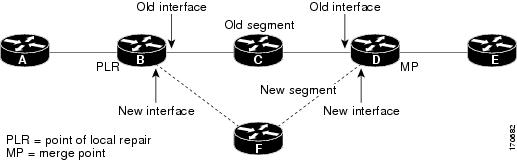
Initial RSVP states are installed for an IPv4 unicast flow over Routers A, B, C, D, and E. Router A is the source or headend, while Router E is the destination or tailend. The data packets are destined to an address of Router E. Assume that a route change occurs, and the new path taken by the data packets is from Router A to Router B to Router F to Router D to Router E; therefore, the old and new paths differ on the segments between Routers B and D. The Router B to Router C to Router D segment is the old segment, while the Router B to Router F to Router D segment is the new segment.
A route may change because of a link or node failure, or if a better path becomes available.
RSVP at Router B detects that the route change affects the RSVP flow and initiates the FLR procedure. The node that initiates an FLR repair procedure, Router B in Figure 1, is the point of local repair (PLR). The node where the new and old segments meet, Router D in Figure 1, is the merge point (MP). The interfaces at the PLR and the MP that are part of the old segment are the old interfaces, while the interfaces that are part of the new segment are the new interfaces.
If a route has changed because of a failure, the PLR may not be the node that detects the failure. For example, it is possible that the link from Router C to Router D fails, and although Router C detects the failure, the route change at Router B is the trigger for the FLR procedure. Router C, in this case, is also referred to as the node that detects the failure.
Benefits of RSVP FLR
Faster Response Time to Routing Changes
FLR reduces the time that it takes for RSVP to determine that a physical link has gone down and that the data packets have been rerouted. Without FLR, RSVP may not recognize the link failure for 30 seconds when all of the sessions are impacted by having too much traffic for the available bandwidth. With FLR, this time can be significantly reduced to a few seconds.
After detecting the failure, RSVP recomputes the admission control across the new link. If the rerouted traffic fits on the new link, RSVP reserves the bandwidth and guarantees the QoS of the new traffic.
If admission control fails on the new route, RSVP does not explictly tear down the flow, but instead sends a RESVERROR message towards the receiver. If a proxy receiver is running, then RSVP sends a PATHERROR message towards the headend, in response to the RESVERROR message, indicating the admission failure. In both cases, with and without a proxy receiver, the application tears down the failed session either at the headend or at the final destination.
Until this happens, the data packets belonging to this session still flow over the rerouted segment although admission has failed and QoS is affected.
How to Configure RSVP FLR
You can configure the RSVP FLR parameters in any order that you want.
This section contains the following procedures:
•
•
•
•
Configuring the RSVP FLR Wait Time
Perform this task to configure the RSVP FLR wait time.
SUMMARY STEPS
1.
2.
3.
4.
5.
6.
DETAILED STEPS
Configuring the RSVP FLR Repair Rate
Perform this task to configure the RSVP FLR repair rate.
SUMMARY STEPS
1.
2.
3.
4.
DETAILED STEPS
Step 1
enable
Example:Router> enable
Enables privileged EXEC mode.
•
Step 2
configure terminal
Example:Router# configure terminal
Enters global configuration mode.
Step 3
ip rsvp signalling fast-local-repair rate rate
Example:Router(config)# ip rsvp signalling fast-local-repair rate 100Configures the repair rate that RSVP uses for an FLR procedure.
•
Note
Step 4
exit
Example:Router(config)# exit(Optional) Returns to privileged EXEC mode.
Configuring the RSVP FLR Notifications
Perform this task to configure the number of RSVP FLR notifications.
SUMMARY STEPS
1.
2.
3.
4.
DETAILED STEPS
Verifying the RSVP FLR Configuration
Perform this task to verify the configuration.

Note
SUMMARY STEPS
1.
2.
3.
4.
5.
6.
DETAILED STEPS
Configuration Examples for RSVP FLR
This section provides configuration examples for the RSVP FLR feature.
•
•
Configuring RSVP FLR: Example
The configuration options for RSVP FLR are the following:
•
•
•
Note
Configuring the Wait Time
The following example configures Ethernet interface 1/0 with a bandwidth of 200 kbps and a wait time of 1000 msec:
Router# configure terminalEnter configuration commands, one per line. End with CNTL/Z.Router(config)# interface ethernet1/0Router(config-if)# ip rsvp bandwidth 200Router(config-if)# ip rsvp signalling fast-local-repair wait-time 1000Router(config-if)# end
Configuring the Number of Notifications
The following example configures the number of flows that are repaired before suspending to 100:
Router# configure terminalEnter configuration commands, one per line. End with CNTL/Z.Router(config)# ip rsvp signalling fast-local-repair notifications 100Router(config)# end
Configuring the Repair Rate
The following example configures a repair rate of 100 messages per second:
Router# configure terminalEnter configuration commands, one per line. End with CNTL/Z.Router(config)# ip rsvp signalling fast-local-repair rate 100Router(config)# end
Verifying the RSVP FLR Configuration: Example
This section contains the following examples:
•
•
•
Verifying the Details for FLR Procedures
The following example displays detailed information about FLR procedures:
Router# show ip rsvp signalling fast-local-repair statistics detailFast Local Repair: enabledMax repair rate (paths/sec): 1000Max processed (paths/run): 1000FLR Statistics:FLR 1: DONEStart Time: 15:16:32 MET Wed Oct 25 2006Number of PSBs repaired: 2496Used Repair Rate (msgs/sec): 1000RIB notification processing time: 91(ms)Time of last PSB refresh: 3111(ms)Time of last Resv received: 4355(ms)Time of last Perr received: 0(us)Suspend count: 2Run Number Started DurationID of ntf. (time from Start)2 498 81(ms) 10(ms)1 998 49(ms) 21(ms)0 1000 0(us) 22(ms)FLR Pacing Unit: 1 msecAffected neighbors:Nbr Address Relative Delay Values (msec)10.1.0.70 [500 ,..., 2995 ]Verifying Configuration Details for a Specific Interface
The following example from the show ip rsvp interface detail command displays detailed information, including FLR, for the Ethernet 1/0 interface:
Router# show ip rsvp interface detail ethernet1/0Et1/0:RSVP: EnabledInterface State: UpBandwidth:Curr allocated: 9K bits/secMax. allowed (total): 300K bits/secMax. allowed (per flow): 300K bits/secMax. allowed for LSP tunnels using sub-pools (pool 1): 0 bits/secSet aside by policy (total): 0 bits/secTraffic Control:RSVP Data Packet Classification is ON via CEF callbacksSignalling:DSCP value used in RSVP msgs: 0x30Number of refresh intervals to enforce blockade state: 4FLR Wait Time (IPv4 flows):Repair is delayed by 1000 msec.Authentication: disabledKey chain: <none>Type: md5Window size: 1Challenge: disabledHello Extension:State: DisabledVerifying Configuration Details Before, During, and After an FLR Procedure
The following is sample output from the show ip rsvp sender detail command before an FLR procedure has occurred:
Router# show ip rsvp sender detailPATH:Destination 192.168.101.21, Protocol_Id 17, Don't Police , DstPort 1Sender address: 10.10.10.10, port: 1Path refreshes:arriving: from PHOP 172.3.31.34 on Et0/0 every 30000 msecsTraffic params - Rate: 9K bits/sec, Max. burst: 9K bytesMin Policed Unit: 0 bytes, Max Pkt Size 2147483647 bytesPath ID handle: 01000401.Incoming policy: Accepted. Policy source(s): DefaultStatus:Output on Ethernet1/0. Policy status: Forwarding. Handle: 02000400Policy source(s): DefaultPath FLR: Never repairedThe following is sample output from the show ip rsvp sender detail command at the PLR during an FLR procedure:
Router# show ip rsvp sender detailPATH:Destination 192.168.101.21, Protocol_Id 17, Don't Police , DstPort 1Sender address: 10.10.10.10, port: 1Path refreshes:arriving: from PHOP 172.16.31.34 on Et0/0 every 30000 msecsTraffic params - Rate: 9K bits/sec, Max. burst: 9K bytesMin Policed Unit: 0 bytes, Max Pkt Size 2147483647 bytesPath ID handle: 01000401.Incoming policy: Accepted. Policy source(s): DefaultStatus:Path FLR: PSB is currently being repaired...try laterPLR - Old Segments: 1Output on Ethernet1/0, nhop 172.5.36.34Time before expiry: 2 refreshesPolicy status: Forwarding. Handle: 02000400Policy source(s): DefaultThe following is sample output from the show ip rsvp sender detail command at the MP during an FLR procedure:
Router# show ip rsvp sender detailPATH:Destination 192.168.101.21, Protocol_Id 17, Don't Police , DstPort 1Sender address: 10.10.10.10, port: 1Path refreshes:arriving: from PHOP 172.16.37.35 on Et1/0 every 30000 msecsTraffic params - Rate: 9K bits/sec, Max. burst: 9K bytesMin Policed Unit: 0 bytes, Max Pkt Size 2147483647 bytesPath ID handle: 09000406.Incoming policy: Accepted. Policy source(s): DefaultStatus: Proxy-terminatedPath FLR: Never repairedMP - Old Segments: 1Input on Serial2/0, phop 172.16.36.35Time before expiry: 9 refreshesThe following is sample output from the show ip rsvp sender detail command at the PLR after an FLR procedure:
Router# show ip rsvp sender detailPATH:Destination 192.168.101.21, Protocol_Id 17, Don't Police , DstPort 1Sender address: 10.10.10.10, port: 1Path refreshes:arriving: from PHOP 172.16.31.34 on Et0/0 every 30000 msecsTraffic params - Rate: 9K bits/sec, Max. burst: 9K bytesMin Policed Unit: 0 bytes, Max Pkt Size 2147483647 bytesPath ID handle: 05000401.Incoming policy: Accepted. Policy source(s): DefaultStatus:Output on Serial3/0. Policy status: Forwarding. Handle: 3B000406Policy source(s): DefaultPath FLR: Started 12:56:16 EST Thu Nov 16 2006, PSB repaired 532(ms) after.Resv/Perr: Received 992(ms) after.
Additional References
The following sections provide references related to the RSVP FLR feature.
Related Documents
RSVP commands: complete command syntax, command mode, defaults, usage guidelines, and examples
Cisco IOS Quality of Service Solutions Command Reference, Release 12.2SR
QoS features including signaling, classification, and congestion management
Cisco IOS Quality of Service Solutions Configuration Guide, Release 12.4
Standards
No new or modified standards are supported by this feature, and support for existing standards has not been modified by this feature.
—
MIBs
RFCs
RFC 2205
Resource ReSerVation Protocol (RSVP)—Version 1 Functional Specification
RFC 2209
Resource ReSerVation Protocol (RSVP)—Version 1 Messaging Processing Rules
Technical Assistance
Command Reference
This section documents only commands that are new or modified.
New Commands
•
•
•
•
•
Modified Commands
clear ip rsvp signalling fast-local-repair statistics
To clear (set to zero) the Resource Reservation Protocol (RSVP) fast local repair (FLR) counters, use the clear ip rsvp signalling fast-local-repair statistics command in user EXEC or privileged EXEC mode.
clear ip rsvp signalling fast-local-repair statistics
Syntax Description
This command has no keywords or arguments.
Command Default
The default is to clear all the RSVP FLR counters.
Command Modes
User EXEC
Privileged EXECCommand History
Usage Guidelines
Use the clear ip rsvp signalling fast-local-repair statistics command to set all the RSVP FLR counters to zero. The statistics include information about FLR procedures such as the current state, the start time, and the repair rate.
Examples
The following example clears all the RSVP FLR counters being maintained in the database:
Router# clear ip rsvp signalling fast-local-repair statisticsRelated Commands
ip rsvp signalling fast-local-repair notifications
To configure the number of per flow notifications that Resource Reservation Protocol (RSVP) processes during a fast local repair (FLR) procedure before suspending, use the ip rsvp signalling fast-local-repair notifications command in global configuration mode. To set the number of notifications to its default, use the no form of this command.
ip rsvp signalling fast-local-repair notifications number
no ip rsvp signalling fast-local-repair notifications
Syntax Description
Command Default
There are always notifications sent by the routing information base (RIB) and processed by RSVP. If this command is not configured, RSVP processes 1000 notifications, suspends, then resumes processing of another 1000 notifications, and so on.
Command Modes
Global configuration
Command History
Usage Guidelines
Upon a route change, RIB builds a list of notifications, one per affected flow, and notifies RSVP by sending an event including these notifications. Therefore, these events can contain thousands of elements depending on the number of path state blocks (PSBs) affected.
RSVP processes, by default, 1000 notifications at a time and then suspends if required, to prevent the CPU from being overwhelmed. However, you can configure this number using the ip rsvp signalling fast-local-repair notifications command.
Examples
The following example configures the number of flows that are repaired before RSVP suspends to 100:
Router(config)# ip rsvp signalling fast-local-repair notifications 100Related Commands
ip rsvp signalling fast-local-repair rate
To configure the repair rate that Resource Reservation Protocol (RSVP) uses for a fast local repair (FLR) procedure, use the ip rsvp signalling fast-local-repair rate command in global configuration mode. To set the repair rate to its default, use the no form of this command.
ip rsvp signalling fast-local-repair rate rate
no ip rsvp signalling fast-local-repair rate
Syntax Description
rate
FLR rate for PATH state refresh and repair, in messages per second (msg/sec). The range is 0 to 5000. The default is 400.
Command Default
If this command is not configured, the RSVP message pacing rate is used.
Note
Command Modes
Global configuration
Command History
Usage Guidelines
The default repair rate is based on the RSVP message pacing rate.
If you configure the FLR rate by using the ip rsvp signalling fast-local-repair rate command, and RSVP message pacing is enabled, the minimum between the FLR rate and the RSVP message pacing rate takes effect. If you disable the RSVP rate limit by using the no ip rsvp signalling rate-limit command, then the FLR rate is used. However, if you disable the RSVP rate limit and do not configure an FLR rate, then RSVP performs no message pacing and messages are sent back-to-back. This action is not recommended because the point of local repair (PLR) may flood the downstream node with PATH messages causing some of them to be dropped.
The repair rate is determined at notification time, and this same rate is used during the time of the repair even if you change either the RSVP message pacing rate or the FLR rate during this time.
Examples
The following example configures a repair rate of 100 messages per second:
Router(config)# ip rsvp signalling fast-local-repair rate 100Related Commands
ip rsvp signalling fast-local-repair wait-time
To configure the delay that Resource Reservation Protocol (RSVP) uses before starting a fast local repair (FLR) procedure, use the ip rsvp signalling fast-local-repair wait-time command in interface configuration mode. To set the delay to its default, use the no form of this command.
ip rsvp signalling fast-local-repair wait-time interval
no ip rsvp signalling fast-local-repair wait-time
Syntax Description
interval
Amount of time before an FLR procedure begins, in milliseconds (ms). The range is 0 to 5000 ms. The default is 0.
Command Default
This command is disabled by default; therefore, no delay is configured.
Command Modes
Interface configuration
Command History
Usage Guidelines
Use the ip rsvp signalling fast-local-repair wait-time command to configure the delay desired in starting an FLR procedure. If you do not configure a delay, then path refreshes are triggered immediately after RSVP receives a route change notification from the routing information base (RIB).
Examples
The following example configures a delay of 100 ms:
Router(config-if)# ip rsvp signalling fast-local-repair wait-time 100Related Commands
show ip rsvp
To display specific information for Resource Reservation Protocol (RSVP) categories, use the show ip rsvp command in user EXEC or privileged EXEC mode.
show ip rsvp [atm-peak-rate-limit | counters | host | installed | interface | listeners | neighbor | policy | precedence | request | reservation | sbm | sender | signalling | tos]
Syntax Description
Command Modes
User EXEC
Privileged EXECCommand History
Examples
The following example includes FLR information:
Router# show ip rsvpRSVP: enabled (on 4 interface(s))Signalling:Refresh interval (msec): 30000Refresh misses: 4Rate Limiting: enabledBurst: 8Limit: 37Maxsize: 2000Period (msec): 20Max rate (msgs/sec): 400Refresh Reduction: disabledACK delay (msec): 250Initial retransmit delay (msec): 1000Local epoch: 0x7C11BEMessage IDs: in use 0, total allocated 0, total freed 0Neighbors: 2Raw IP encap: 2 UDP encap: 0 Raw IP, UDP encap: 0Hello:Fast-Reroute/Reroute: DisabledStatistics: DisabledGraceful Restart: DisabledGraceful Restart: DisabledRefresh interval: 10000 msecsRefresh misses: 4DSCP: 0x30Advertised restart time: 5 msecsAdvertised recovery time: 0 msecsMaximum wait for recovery: 3600000 msecsFast-Reroute:PSBs w/ Local protection desiredYes: 0No: 0Fast Local Repair: enabledMax repair rate (paths/sec): 400Max processed (paths/run): 1000Local policy:COPS:Generic policy settings:Default policy: Accept allPreemption: DisabledTable 1 describes the significant fields shown in the display.
Related Commands
show ip rsvp interface
To display Resource Reservation Protocol (RSVP)-related information, use the show ip rsvp interface command in user EXEC or privileged EXEC mode.
show ip rsvp interface [interface-type interface-number] [detail]
Syntax Description
interface-type
(Optional) Type of the interface.
interface-number
(Optional) Number of the interface.
detail
(Optional) Displays additional information about interfaces.
Command Modes
User EXEC
Privileged EXECCommand History
Usage Guidelines
Use the show ip rsvp interface command to display information about interfaces on which RSVP is enabled, including the current allocation budget and maximum available bandwidth. Enter the optional detail keyword for additional information, including bandwidth and signaling parameters and blockade state.
Use the show ip rsvp interface detail command to display information about the RSVP parameters associated with an interface. These parameters include the following:
•
•
•
•
•
Examples
The following command shows information for each interface on which RSVP is enabled:
Router# show ip rsvp interfaceinterface allocated i/f max flow max sub maxPO0/0 0 200M 200M 0PO1/0 0 50M 50M 0PO1/1 0 50M 50M 0PO1/2 0 50M 50M 0PO1/3 0 50M 50M 0Lo0 0 200M 200M 0Table 2 describes the fields shown in the display.
Detailed RSVP Information Example
The following command shows detailed RSVP information for each interface on which RSVP is enabled:
Router# show ip rsvp interface detailPO0/0:Bandwidth:Curr allocated:0 bits/secMax. allowed (total):200M bits/secMax. allowed (per flow):200M bits/secMax. allowed for LSP tunnels using sub-pools:0 bits/secSet aside by policy (total):0 bits/secSignalling:DSCP value used in RSVP msgs:0x3FNumber of refresh intervals to enforce blockade state:4Number of missed refresh messages:4Refresh interval:30PO1/0:Bandwidth:Curr allocated:0 bits/secMax. allowed (total):50M bits/secMax. allowed (per flow):50M bits/secMax. allowed for LSP tunnels using sub-pools:0 bits/secSet aside by policy (total):0 bits/secSignalling:DSCP value used in RSVP msgs:0x3FNumber of refresh intervals to enforce blockade state:4Number of missed refresh messages:4Refresh interval:30PO1/1:Bandwidth:Curr allocated:0 bits/secMax. allowed (total):50M bits/secMax. allowed (per flow):50M bits/secMax. allowed for LSP tunnels using sub-pools:0 bits/secSet aside by policy (total):0 bits/secSignalling:DSCP value used in RSVP msgs:0x3FNumber of refresh intervals to enforce blockade state:4Number of missed refresh messages:4Refresh interval:30PO1/2:Bandwidth:Curr allocated:0 bits/secMax. allowed (total):50M bits/secMax. allowed (per flow):50M bits/secMax. allowed for LSP tunnels using sub-pools:0 bits/secSet aside by policy (total):0 bits/secSignalling:DSCP value used in RSVP msgs:0x3FNumber of refresh intervals to enforce blockade state:4Number of missed refresh messages:4Refresh interval:30PO1/3:Bandwidth:Curr allocated:0 bits/secMax. allowed (total):50M bits/secMax. allowed (per flow):50M bits/secMax. allowed for LSP tunnels using sub-pools:0 bits/secSet aside by policy (total):0 bits/secSignalling:DSCP value used in RSVP msgs:0x3FNumber of refresh intervals to enforce blockade state:4Number of missed refresh messages:4Refresh interval:30Lo0:Bandwidth:Curr allocated:0 bits/secMax. allowed (total):200M bits/secMax. allowed (per flow):200M bits/secMax. allowed for LSP tunnels using sub-pools:0 bits/secSet aside by policy (total):0 bits/secSignalling:DSCP value used in RSVP msgs:0x3FNumber of refresh intervals to enforce blockade state:4Number of missed refresh messages:4Refresh interval:30Table 3 describes the significant fields shown in the detailed display for interface PO0/0. The fields for the other interfaces are similar.
RSVP Compression Method Prediction Example
The following example from the show ip rsvp interface detail command shows the RSVP compression method prediction configuration for each interface on which RSVP is configured:
Router# show ip rsvp interface detailEt2/1:Bandwidth:Curr allocated:0 bits/secMax. allowed (total):1158K bits/secMax. allowed (per flow):128K bits/secMax. allowed for LSP tunnels using sub-pools:0 bits/secSet aside by policy (total):0 bits/secAdmission Control:Header Compression methods supported:rtp (36 bytes-saved), udp (20 bytes-saved)Neighbors:Using IP encap:0. Using UDP encap:0Signalling:Refresh reduction:disabledAuthentication:disabledSe3/0:Bandwidth:Curr allocated:0 bits/secMax. allowed (total):1158K bits/secMax. allowed (per flow):128K bits/secMax. allowed for LSP tunnels using sub-pools:0 bits/secSet aside by policy (total):0 bits/secAdmission Control:Header Compression methods supported:rtp (36 bytes-saved), udp (20 bytes-saved)Neighbors:Using IP encap:1. Using UDP encap:0Signalling:Refresh reduction:disabledAuthentication:disabledTable 4 describes the significant fields shown in the display for Ethernet interface 2/1. The fields for serial interface 3/0 are similar.
Cryptographic Authentication Example
The following example from the show ip rsvp interface detail command displays detailed information, including the cryptographic authentication parameters, for all RSVP-configured interfaces on the router:
Router# show ip rsvp interface detailEt0/0:Bandwidth:Curr allocated: 0 bits/secMax. allowed (total): 7500K bits/secMax. allowed (per flow): 7500K bits/secMax. allowed for LSP tunnels using sub-pools: 0 bits/secSet aside by policy (total):0 bits/secNeighbors:Using IP encap: 0. Using UDP encap: 0Signalling:Refresh reduction: disabledAuthentication: enabledKey: 11223344Type: sha-1Window size: 2Challenge: enabledTable 5 describes the significant fields shown in the display.
RSVP FLR Example
The following example from the show ip rsvp interface detail command displays detailed information, including FLR, for Ethernet interface 1/0:
Router# show ip rsvp interface detail ethernet 1/0Et1/0:RSVP: EnabledInterface State: UpBandwidth:Curr allocated: 9K bits/secMax. allowed (total): 300K bits/secMax. allowed (per flow): 300K bits/secMax. allowed for LSP tunnels using sub-pools (pool 1): 0 bits/secSet aside by policy (total): 0 bits/secTraffic Control:RSVP Data Packet Classification is ON via CEF callbacksSignalling:DSCP value used in RSVP msgs: 0x30Number of refresh intervals to enforce blockade state: 4FLR Wait Time (IPv4 flows):Repair is delayed by 500 msec.Authentication: disabledKey chain: <none>Type: md5Window size: 1Challenge: disabledHello Extension:State: DisabledTable 6 describes the significant fields shown in the display.
Related Commands
show ip rsvp installed
Displays RSVP-related installed filters and corresponding bandwidth information.
show ip rsvp neighbor
Displays current RSVP neighbors.
show ip rsvp sender
To display Resource Reservation Protocol (RSVP) PATH-related sender information currently in the database, use the show ip rsvp sender command in user EXEC or privileged EXEC mode.
Syntax for T Releases
show ip rsvp sender [ip-address | hostname] [detail]
Syntax for 12.0S and 12.2S Releases
show ip rsvp sender [detail] [filter [destination ip-address | hostname] [dst-port port-number] [source ip-address | hostname] [src-port port-number]]
Syntax Description
Command Modes
User EXEC
Privileged EXECCommand History
Usage Guidelines
Use the show ip rsvp sender command to display the RSVP sender (PATH) information currently in the database for a specified interface or for all interfaces.
The show ip rsvp sender command is very useful for determining the state of RSVP signaling both before and after a label-switched packet (LSP) has been fast rerouted. The show ip rsvp sender command is especially useful when used at the point of local repair (PLR) or at the merge point (MP).
Limiting the Display
When hundreds or thousands of tunnels exist and you are interested in only a few, you can display output for only a single tunnel or a subset of tunnels. To request a limited display, enter the show ip rsvp sender command with the appropriate keyword (called an output filter): destination, dst-port, source, and src-port. You can enter any or all of the output filters, and you can enter them whether or not you specify the detail keyword.
Fast Local Repair (FLR) Statistics
Use the show ip rsvp sender detail command to display FLR statistics before, during, and after an FLR procedure. This command shows when a path state block (PSB) was repaired and can be used to determine when the cleanup began after the FLR procedure has finished. However, this command does not display old PLR or MP segments.
Examples
show ip rsvp sender Example
The following is sample output from the show ip rsvp sender command:
Router# show ip rsvp senderTo From Pro DPort Sport Prev Hop I/F172.16.1.49 172.16.4.53 1 0 0 172.16.3.53 Et1172.16.2.51 172.16.5.54 1 0 0 172.16.3.54 Et1Table 7 describes the significant fields shown in the display.
show ip rsvp sender detail with Application ID Example
The following is sample output from the show ip rsvp sender detail command with application IDs configured:
Router# show ip rsvp sender detailPATH Session address: 192.168.104.3, port: 4444. Protocol: UDPSender address: 192.168.104.1, port: 4444Inbound from: 192.168.104.1 on interface:Traffic params - Rate: 5K bits/sec, Max. burst: 1K bytesMin Policed Unit: 0 bytes, Max Pkt Size 4294967295 bytesPath ID handle: 09000408.Incoming policy: Accepted. Policy source(s): DefaultPriorities - preempt: 5, defend: 2Application ID: 'GUID=www.cisco.com, VER=10.1.1.2, APP=voice, SAPP=h323''/usr/local/bin/CallManager'Status: ProxiedOutput on ATM1/0.1. Policy status: Forwarding. Handle: 04000409Policy source(s): DefaultTable 8 describes the significant fields shown in the display.
show ip rsvp sender detail Before FLR Example
The following is sample output from the show ip rsvp sender detail command before FLR has occurred:
Router# show ip rsvp sender detailPATH:Destination 192.168.101.21, Protocol_Id 17, Don't Police , DstPort 1Sender address: 10.10.10.10, port: 1Path refreshes:arriving: from PHOP 172.16.31.34 on Et0/0 every 30000 msecsTraffic params - Rate: 9K bits/sec, Max. burst: 9K bytesMin Policed Unit: 0 bytes, Max Pkt Size 2147483647 bytesPath ID handle: 01000401.Incoming policy: Accepted. Policy source(s): DefaultStatus:Output on Ethernet1/0. Policy status: Forwarding. Handle: 02000400Policy source(s): DefaultPath FLR: Never repairedTable 9 describes the significant fields shown in the display.
show ip rsvp sender detail at the PLR During FLR Example
Note
The following is sample output from the show ip rsvp sender detail command at the PLR during an FLR procedure:
Router# show ip rsvp sender detailPATH:Destination 192.168.101.21, Protocol_Id 17, Don't Police , DstPort 1Sender address: 10.10.10.10, port: 1Path refreshes:arriving: from PHOP 172.16.31.34 on Et0/0 every 30000 msecsTraffic params - Rate: 9K bits/sec, Max. burst: 9K bytesMin Policed Unit: 0 bytes, Max Pkt Size 2147483647 bytesPath ID handle: 01000401.Incoming policy: Accepted. Policy source(s): DefaultStatus:Path FLR: PSB is currently being repaired...try laterPLR - Old Segments: 1Output on Ethernet1/0, nhop 172.16.36.34Time before expiry: 2 refreshesPolicy status: Forwarding. Handle: 02000400Policy source(s): DefaultTable 10 describes the significant fields shown in the display.
show ip rsvp sender detail at the MP During an FLR Example
Note
The following is sample output from the show ip rsvp sender detail command at the MP during an FLR procedure:
Router# show ip rsvp sender detailPATH:Destination 192.168.101.21, Protocol_Id 17, Don't Police , DstPort 1Sender address: 10.10.10.10, port: 1Path refreshes:arriving: from PHOP 172.16.37.35 on Et1/0 every 30000 msecsTraffic params - Rate: 9K bits/sec, Max. burst: 9K bytesMin Policed Unit: 0 bytes, Max Pkt Size 2147483647 bytesPath ID handle: 09000406.Incoming policy: Accepted. Policy source(s): DefaultStatus: Proxy-terminatedPath FLR: Never repairedMP - Old Segments: 1Input on Serial2/0, phop 172.16.36.35Time before expiry: 9 refreshesTable 11 describes the significant fields shown in the display.
show ip rsvp sender detail at the PLR After an FLR Example
The following is sample output from the show ip rsvp sender detail command at the PLR after an FLR procedure:
Router# show ip rsvp sender detailPATH:Destination 192.168.101.21, Protocol_Id 17, Don't Police , DstPort 1Sender address: 10.10.10.10, port: 1Path refreshes:arriving: from PHOP 172.16.31.34 on Et0/0 every 30000 msecsTraffic params - Rate: 9K bits/sec, Max. burst: 9K bytesMin Policed Unit: 0 bytes, Max Pkt Size 2147483647 bytesPath ID handle: 05000401.Incoming policy: Accepted. Policy source(s): DefaultStatus:Output on Serial3/0. Policy status: Forwarding. Handle: 3B000406Policy source(s): DefaultPath FLR: Started 12:56:16 EST Thu Nov 16 2006, PSB repaired 532(ms) after.Resv/Perr: Received 992(ms) after.Table 12 describes the significant fields shown in the display.
show ip rsvp sender detail with PLR and MP Examples
The following is sample output from the show ip rsvp sender detail command under these circumstances:
•
•
•
•
•
•
•
Figure 2 illustrates the network topology for the RSVP configuration example.
Figure 2 Network Topology for the RSVP Configuration Example
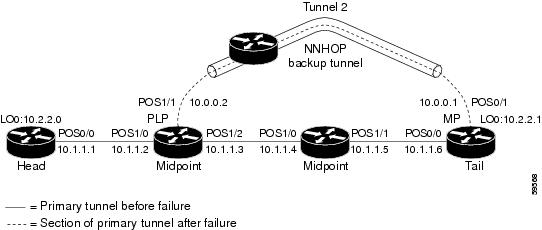
Example 1: The command is entered at the PLR before a failure.
The following is sample output from the show ip rsvp sender detail command when it is entered at the PLR before a failure:
Router# show ip rsvp sender detailPATH:Tun Dest: 10.2.2.1 Tun ID: 1 Ext Tun ID: 10.2.2.0Tun Sender: 10.2.2.0, LSP ID: 126Path refreshes arriving on POS1/0 from PHOP 10.1.1.1Path refreshes being sent to NHOP 10.1.1.4 on POS1/1Session Attr::Setup Prio: 0, Holding Prio: 0Flags: Local Prot desired, Label Recording, SE StyleSession Name:tagsw4500-23_t1ERO:10.1.1.4 (Strict IPv4 Prefix, 8 bytes, /32)10.1.1.5 (Strict IPv4 Prefix, 8 bytes, /32)10.1.1.6 (Strict IPv4 Prefix, 8 bytes, /32)10.2.2.1 (Strict IPv4 Prefix, 8 bytes, /32)Traffic params - Rate: 0G bits/sec, Max. burst: 1K bytesFast-Reroute Backup info:Inbound FRR: Not activeOutbound FRR: Ready -- backup tunnel selectedBackup Tunnel: Tu2 (label 0)Bkup Sender Template:Tun Sender: 10.0.0.0, LSP ID: 126Bkup FilerSpec:Tun Sender: 10.0.0.0, LSP ID 126Table 13 describes the significant fields shown in the display.
Note
Example 2: The command is entered at the PLR after a failure.
If the LSP begins actively using the backup tunnel and the command is entered at the PLR after a failure, the display changes as shown below.
Router# show ip rsvp sender detailPATH:Tun Dest: 10.2.2.1 Tun ID: 1 Ext Tun ID: 10.2.2.0Tun Sender: 10.2.2.0, LSP ID: 126Path refreshes arriving on POS1/0 from PHOP 10.1.1.1Path refreshes being sent to NHOP 10.2.2.1 on Tunnel2Session Attr::Setup Prio: 0, Holding Prio: 0Flags: Local Prot desired, Label Recording, SE StyleSession Name:tagsw4500-23_t1ERO:10.2.2.1 (Strict IPv4 Prefix, 8 bytes, /32)10.2.2.1 (Strict IPv4 Prefix, 8 bytes, /32)Traffic params - Rate: 0G bits/sec, Max. burst: 1K bytesFast-Reroute Backup info:Inbound FRR: Not activeOutbound FRR: Active -- using backup tunnelBackup Tunnel: Tu2 (label 0)Bkup Sender Template:Tun Sender: 10.0.0.0, LSP ID: 126Bkup FilerSpec:Tun Sender: 10.0.0.0, LSP ID 126Orig Output I/F: Et2Orig Output ERO:10.1.1.4 (Strict IPv4 Prefix, 8 bytes, /32)10.1.1.5 (Strict IPv4 Prefix, 8 bytes, /32)10.1.1.6 (Strict IPv4 Prefix, 8 bytes, /32)10.2.2.1 (Strict IPv4 Prefix, 8 bytes, /32)Once an LSP is actively using a backup tunnel, the following changes occur:
•
•
•
•
Example 3: The command is entered at the MP before a failure.
If the same show ip rsvp sender command is entered at the merge point (the backup tunnel tail), the display changes from before to after the failure. The following is sample output before a failure:
Router# show ip rsvp sender detailPATH:Tun Dest: 10.2.2.1 Tun ID: 1 Ext Tun ID: 10.2.2.0Tun Sender: 10.2.2.0, LSP ID: 126Path refreshes arriving on POS0/0 from PHOP 10.1.1.5Session Attr::Setup Prio: 0, Holding Prio: 0Flags: Local Prot desired, Label Recording, SE StyleSession Name:tagsw4500-23_t1Traffic params - Rate: 0G bits/sec, Max. burst: 1K bytesFast-Reroute Backup info:Inbound FRR: Not activeOutbound FRR: No backup tunnel selectedExample 4: The command is entered at the MP after a failure.
After a failure, the following changes occur:
•
•
•
The following is sample output after a failure:
Router# show ip rsvp sender detailPATH:Tun Dest: 10.2.2.1 Tun ID: 1 Ext Tun ID: 10.2.2.0Tun Sender: 10.2.2.0, LSP ID: 126Path refreshes arriving on POS0/1 from PHOP 10.0.0.0 on Loopback0Session Attr::Setup Prio: 0, Holding Prio: 0Flags: Local Prot desired, Label Recording, SE StyleSession Name:tagsw4500-23_t1Traffic params - Rate: 0G bits/sec, Max. burst: 1K bytesFast-Reroute Backup info:Inbound FRR: ActiveOrig Input I/F: POS0/0Orig PHOP: 10.1.1.5Now using Bkup Filterspec w/ sender: 10.0.0.0 LSP ID: 126Outbound FRR: No backup tunnel selectedNotice the following changes:
•
•
Example 5: The command output shows all senders.
In the following example, information about all senders is displayed.
Router# show ip rsvp senderTo From Pro DPort Sport Prev Hop I/F BPS Bytes10.2.2.1 10.2.2.0 1 1 59 10.1.1.1 Et1 0G 1K10.2.2.1 172.31.255.255 1 2 9 0G 1K10.2.2.1 10.2.2.0 1 3 12 10.1.1.1 Et1 0G 1K10.2.2.1 172.31.255.255 1 3 20 0G 1K172.16.0.0 172.31.255.255 1 0 23 0G 1K172.16.0.0 172.31.255.255 1 1 22 0G 1K172.16.0.0 172.31.255.255 1 1000 22 0G 1KTable 14 describes the significant fields shown in the display.
Example 6: The command output shows only senders having a specific destination.
To show only information about senders having a specific destination, specify the destination filter as shown below. In this example, the destination is 172.16.0.0.
Router# show ip rsvp sender filter destination 172.16.0.0To From Pro DPort Sport Prev Hop I/F BPS Bytes172.16.0.0 172.31.255 1 0 23 0G 1K172.16.0.0 172.31.255 1 1 22 0G 1K172.16.0.0 172.31.255 1 1000 22 0G 1KExample 7: Show more detail about a sender having a specific destination.
To show more detail about the sender whose destination port is 1000 (as shown in Example 6), specify the command with the destination port filter:
Router# show ip rsvp sender filter detail dst-port 1000PATH:Tun Dest 172.16.0.0 Tun ID 1000 Ext Tun ID 172.31.255.255Tun Sender: 172.31.255.255, LSP ID: 22Path refreshes being sent to NHOP 10.1.1.4 on Ethernet2Session Attr::Setup Prio: 7, Holding Prio: 7Flags: SE StyleSession Name:tagsw4500-25_t1000ERO:10.1.1.4 (Strict IPv4 Prefix, 8 bytes, /32)172.16.0.0 (Strict IPv4 Prefix, 8 bytes, /32)Traffic params - Rate: 0G bits/sec, Max. burst: 1K bytesFast-Reroute Backup info:Inbound FRR: Not activeOutbound FRR: No backup tunnel selectedRelated Commands
show ip rsvp signalling fast-local-repair
To display fast-local-repair (FLR)-specific information maintained by Resource Reservation Protocol (RSVP), use the show ip rsvp signalling fast-local-repair command in user EXEC or privileged EXEC mode.
show ip rsvp signalling fast-local-repair
[statistics [detail]]
Syntax Description
statistics
(Optional) Displays information about FLR procedures.
detail
(Optional) Displays additional information about FLR procedures.
Command Default
Information for the FLR and RSVP message pacing displays.
Command Modes
User EXEC
Privileged EXECCommand History
Usage Guidelines
Use the show ip rsvp signalling fast-local-repair command to display the FLR and RSVP message pacing rates that are configured.
Use the show ip rsvp signalling fast-local-repair statistics command to display the FLR procedures and related information including the following:
•
•
•
•
•
•
•
Use the show ip rsvp signalling fast-local-repair statistics detail command to display detailed information about FLR procedures including the following:
•
•
•
•
•
For each run, the following information appears:
•
•
•
For each neighbor, the following information appears:
•
•
Examples
show ip rsvp signalling fast-local-repair Example
The following example displays information about the FLR rate:
Router# show ip rsvp signalling fast-local-repairFast Local Repair: enabledMax repair rate (paths/sec): 400Max processed (paths/run): 1000Table 15 describes the significant fields shown in the display.
show ip rsvp signalling fast-local-repair statistics Example
The following example displays information about FLR procedures:
Router# show ip rsvp signalling fast-local-repair statisticsFast Local Repair: enabledMax repair rate (paths/sec): 1000Max processed (paths/run): 1000FLR Statistics:FLR State Start #PSB Repair RIB Proc LastProc. Time Repair Rate Time PSB1 DONE 15:16:32 MET Wed Oct 25 2006 2496 1000 91(ms) 3111(ms)Table 16 describes the significant fields shown in the display.
show ip rsvp signalling fast-local-repair statistics detail Example
The following example displays detailed information about FLR procedures:
Router# show ip rsvp signalling fast-local-repair statistics detailFast Local Repair: enabledMax repair rate (paths/sec): 1000Max processed (paths/run): 1000FLR Statistics:FLR 1: DONEStart Time: 15:16:32 MET Wed Oct 25 2006Number of PSBs repaired: 2496Used Repair Rate (msgs/sec): 1000RIB notification processing time: 91(ms)Time of last PSB refresh: 3111(ms)Time of last Resv received: 4355(ms)Time of last Perr received: 0(us)Suspend count: 2Run Number Started DurationID of ntf. (time from Start)2 498 81(ms) 10(ms)1 998 49(ms) 21(ms)0 1000 0(us) 22(ms)FLR Pacing Unit: 1 msecAffected neighbors:Nbr Address Relative Delay Values (msec)10.1.0.70 [500 ,..., 2995 ]Table 17 describes the significant fields shown in the display.
Related Commands
Feature Information for RSVP FLR
Table 18 lists the release history for this feature.
Not all commands may be available in your Cisco IOS software release. For release information about a specific command, see the command reference documentation.
Use Cisco Feature Navigator to find information about platform support and software image support. Cisco Feature Navigator enables you to determine which Cisco IOS and Catalyst OS software images support a specific software release, feature set, or platform. To access Cisco Feature Navigator, go to http://www.cisco.com/go/cfn. An account on Cisco.com is not required.
Note
Glossary
admission control—The process by which an RSVP reservation is accepted or rejected on the basis of end-to-end available network resources.
bandwidth—The difference between the highest and lowest frequencies available for network signals. The term is also used to describe the rated throughput capacity of a given network medium or protocol.
message pacing—A system for managing volume and timing that permits messages from multiple sources to be spaced apart over time. RSVP message pacing maintains, on an outgoing basis, a count of the messages that it has been forced to drop because the output queue for the interface used for the message pacing was full.
MP—merge point. The node where the new and old FLR segments meet.
PLR—point of local repair. The node that initiates an FLR procedure.
QoS—quality of service. A measure of performance for a transmission system that reflects its transmission quality and service availability.
RSVP—Resource Reservation Protocol. A protocol that supports the reservation of resources across an IP network. Applications running on IP end systems can use RSVP to indicate to other nodes the nature (bandwidth, jitter, maximum burst, and so on) of the packet streams that they want to receive.
Note

Any Internet Protocol (IP) addresses used in this document are not intended to be actual addresses. Any examples, command display output, and figures included in the document are shown for illustrative purposes only. Any use of actual IP addresses in illustrative content is unintentional and coincidental.
© 2007 Cisco Systems, Inc. All rights reserved.
 Feedback