- Configuring Authentication
- RADIUS Change of Authorization
- Message Banners for AAA Authentication
- AAA-Domain Stripping at Server Group Level
- AAA Double Authentication Secured by Absolute Timeout
- Throttling of AAA RADIUS Records
- RADIUS Packet of Disconnect
- AAA Authorization and Authentication Cache
- Configuring Authorization
- Configuring Accounting
- AAA-SERVER-MIB Set Operation
- Per VRF AAA
- AAA Support for IPv6
- TACACS+ over IPv6
- AAA Dead-Server Detection
- Login Password Retry Lockout
- MSCHAP Version 2
- AAA Broadcast Accounting-Mandatory Response Support
- Finding Feature Information
- Prerequisites for Configuring Accounting
- Restrictions for Configuring Accounting
- Information About Configuring Accounting
- AAA Accounting Types
- Configuring AAA Accounting Using Named Method Lists
- Suppressing Generation of Accounting Records for Null Username Sessions
- Generating Interim Accounting Records
- Configuring an Alternate Method to Enable Periodic Accounting Records
- Generating Interim Service Accounting Records
- Generating Accounting Records for a Failed Login or Session
- Specifying Accounting NETWORK-Stop Records Before EXEC-Stop Records
- Suppressing System Accounting Records over Switchover
- Configuring AAA Resource Failure Stop Accounting
- Configuring AAA Resource Accounting for Start-Stop Records
- Configuring AAA Broadcast Accounting
- Configuring per-DNIS AAA Broadcast Accounting
- Configuring the AAA Session MIB
- Establishing a Session with a Router if the AAA Server Is Unreachable
- Monitoring Accounting
- Troubleshooting Accounting
Configuring Accounting
The AAA accounting feature allows the services that users are accessing and the amount of network resources that users are consuming to be tracked. When AAA accounting is enabled, the network access server reports user activity to the TACACS+ or RADIUS security server (depending on which security method is implemented) in the form of accounting records. Each accounting record contains accounting attribute-value (AV) pairs and is stored on the security server. This data can then be analyzed for network management, client billing, and auditing.
- Finding Feature Information
- Prerequisites for Configuring Accounting
- Restrictions for Configuring Accounting
- Information About Configuring Accounting
- How to Configure AAA Accounting
- Configuration Examples for AAA Accounting
- Additional References
- Feature Information for Configuring Accounting
Finding Feature Information
Your software release may not support all the features documented in this module. For the latest caveats and feature information, see Bug Search Tool and the release notes for your platform and software release. To find information about the features documented in this module, and to see a list of the releases in which each feature is supported, see the feature information table at the end of this module.
Use Cisco Feature Navigator to find information about platform support and Cisco software image support. To access Cisco Feature Navigator, go to www.cisco.com/go/cfn. An account on Cisco.com is not required.
Prerequisites for Configuring Accounting
The following tasks must be performed before configuring accounting using named method lists:
Enable AAA on the network access server.
Define the characteristics of the RADIUS or TACACS+ security server if RADIUS or TACACS+ authorization is issued. For more information about configuring the Cisco network access server to communicate with the RADIUS security server, see the chapter Configuring RADIUS. For more information about configuring the Cisco network access server to communicate with the TACACS+ security server, see the chapter Configuring TACACS+.
Restrictions for Configuring Accounting
The AAA Accounting feature has the following restrictions:
Accounting information can be sent simultaneously to a maximum of four AAA servers.
Service Selection Gateway (SSG) restriction--For SSG systems, the aaa accounting network broadcast command broadcasts only start-stop accounting records. If interim accounting records are configured using thessg accounting interval command, the interim accounting records are sent only to the configured default RADIUS server.
Information About Configuring Accounting
- Named Method Lists for Accounting
- AAA Accounting Types
- AAA Accounting Enhancements
- Accounting Attribute-Value Pairs
Named Method Lists for Accounting
Like authentication and authorization method lists, method lists for accounting define the way accounting is performed and the sequence in which these methods are performed.
Named accounting method lists allow a particular security protocol to be designated and used on specific lines or interfaces for accounting services. The only exception is the default method list (which, by coincidence, is named “default”). The default method list is automatically applied to all interfaces except those that have a named method list explicitly defined. A defined method list overrides the default method list.
A method list is a named list describing the accounting methods to be queried (such as RADIUS or TACACS+), in sequence. Method lists allow one or more security protocols to be designated and used for accounting, thus ensuring a backup system for accounting if the initial method fails. Cisco IOS XE software uses the first method listed to support accounting; if that method fails to respond, the Cisco IOS XE software selects the next accounting method listed in the method list. This process continues until there is successful communication with a listed accounting method, or all methods defined are exhausted.
 Note | The Cisco IOS XE software attempts accounting with the next listed accounting method only when there is no response from the previous method. If accounting fails at any point in this cycle--meaning that the security server responds by denying the user access--the accounting process stops and no other accounting methods are attempted. |
Accounting method lists are specific to the type of accounting being requested. AAA supports six different types of accounting:
Network--Provides information for all PPP, SLIP, or ARAP sessions, including packet and byte counts.
EXEC--Provides information about user EXEC terminal sessions of the network access server.
Command--Provides information about the EXEC mode commands that a user issues. Command accounting generates accounting records for all EXEC mode commands, including global configuration commands, associated with a specific privilege level.
Connection--Provides information about all outbound connections made from the network access server, such as Telnet, local-area transport (LAT), TN3270, packet assembler/disassembler (PAD), and rlogin.
System--Provides information about system-level events.
Resource--Provides “start” and “stop” records for calls that have passed user authentication, and provides “stop” records for calls that fail to authenticate.
Note | System accounting does not use named accounting lists; only the default list for system accounting can be defined. |
When a named method list is created, a particular list of accounting methods for the indicated accounting type are defined.
Accounting method lists must be applied to specific lines or interfaces before any of the defined methods are performed. The only exception is the default method list (which is named “default”). If the aaa accounting command for a particular accounting type is issued without a named method list specified, the default method list is automatically applied to all interfaces or lines except those that have a named method list explicitly defined. (A defined method list overrides the default method list.) If no default method list is defined, then no accounting takes place.
This section includes the following subsections:
Method Lists and Server Groups
A server group is a way to group existing RADIUS or TACACS+ server hosts for use in method lists. The figure below shows a typical AAA network configuration that includes four security servers: R1 and R2 are RADIUS servers, and T1 and T2 are TACACS+ servers. R1 and R2 comprise the group of RADIUS servers. T1 and T2 comprise the group of TACACS+ servers.
In Cisco IOS XE software, RADIUS and TACACS+ server configurations are global. A subset of the configured server hosts can be specified using server groups. These server groups can be used for a particular service. For example, server groups allow R1 and R2 to be defined as separate server groups (SG1 and SG2), and T1 and T2 as separate server groups (SG3 and SG4). This means either R1 and T1 (SG1 and SG3) can be specified in the method list or R2 and T2 (SG2 and SG4) in the method list, which provides more flexibility in the way that RADIUS and TACACS+ resources are assigned.
Server groups also can include multiple host entries for the same server, as long as each entry has a unique identifier. The combination of an IP address and a UDP port number creates a unique identifier, allowing different ports to be individually defined as RADIUS hosts providing a specific AAA service. In other words, this unique identifier enables RADIUS requests to be sent to different UDP ports on a server at the same IP address. If two different host entries on the same RADIUS server are configured for the same service--for example, accounting--the second host entry configured acts as failover backup to the first one. Using this example, if the first host entry fails to provide accounting services, the network access server tries the second host entry configured on the same device for accounting services. (The RADIUS host entries are tried in the order in which they are configured.)
For more information about configuring server groups and about configuring server groups based on DNIS numbers, see Configuring RADIUS module or Configuring TACACS+ module in the Cisco IOS XE Security Configuration Guide: Securing User Services Release 2.
AAA Accounting Methods
Cisco IOS XE supports the following two methods for accounting:
-
TACACS+—The network access server reports user activity to the TACACS+ security server in the form of accounting records. Each accounting record contains accounting attribute-value (AV) pairs and is stored on the security server.
-
RADIUS—The network access server reports user activity to the RADIUS security server in the form of accounting records. Each accounting record contains accounting attribute-value (AV) pairs and is stored on the security server.
Note | With CSCuc32663, passwords and accounting logs are masked before being sent to the TACACS+ or RADIUS security servers. Use the aaa accounting commands visible-keys command to send unmasked information to the TACACS+ or RADIUS security servers. |
Accounting Record Types
For minimal accounting, use the stop-only keyword, which instructs the specified method (RADIUS or TACACS+) to send a stop record accounting notice at the end of the requested user process. For more accounting information, use the start-stop keyword to send a start accounting notice at the beginning of the requested event and a stop accounting notice at the end of the event. To stop all accounting activities on this line or interface, use the none keyword.
Accounting Methods
The table below lists the supported accounting keywords.
|
Keyword |
Description |
|---|---|
|
group radius |
Uses the list of all RADIUS servers for accounting. |
|
group tacacs+ |
Uses the list of all TACACS+ servers for accounting. |
|
group group-name |
Uses a subset of RADIUS or TACACS+ servers for accounting as defined by the server group group-name. |
The method argument refers to the actual method the authentication algorithm tries. Additional methods of authentication are used only if the previous method returns an error, not if it fails. To specify that the authentication should succeed even if all other methods return an error, specify additional methods in the command. For example, to create a method list named acct_tac1 that specifies RADIUS as the backup method of authentication in the event that TACACS+ authentication returns an error, enter the following command:
aaa accounting network acct_tac1 stop-only group tacacs+ group radius
To create a default list that is used when a named list is not specified in the aaa accountingcommand, use the default keyword followed by the methods that are wanted to be used in default situations. The default method list is automatically applied to all interfaces.
For example, to specify RADIUS as the default method for user authentication during login, enter the following command:
aaa accounting network default stop-only group radius
AAA accounting supports the following methods:
group tacacs --To have the network access server send accounting information to a TACACS+ security server, use the group tacacs+ method keyword.
group radius --To have the network access server send accounting information to a RADIUS security server, use the group radius method keyword.
Note | Accounting method lists for SLIP follow whatever is configured for PPP on the relevant interface. If no lists are defined and applied to a particular interface (or no PPP settings are configured), the default setting for accounting applies. |
group group-name --To specify a subset of RADIUS or TACACS+ servers to use as the accounting method, use the aaa accountingcommand with the group group-name method. To specify and define the group name and the members of the group, use the aaa group server command. For example, use the aaa group server command to first define the members of group loginrad:
aaa group server radius loginrad
 server 172.16.2.3
 server 172.16.2 17
 server 172.16.2.32
This command specifies RADIUS servers 172.16.2.3, 172.16.2.17, and 172.16.2.32 as members of the group loginrad.
To specify group loginrad as the method of network accounting when no other method list has been defined, enter the following command:
aaa accounting network default start-stop group loginrad
Before a group name can be used as the accounting method, communication with the RADIUS or TACACS+ security server must be enabled.
AAA Accounting Types
Named accounting method lists are specific to the indicated type of accounting.
network --To create a method list to enable authorization for all network-related service requests (including SLIP, PPP, PPP NCPs, and ARAP protocols), use the network keyword. For example, to create a method list that provides accounting information for ARAP (network) sessions, use the arap keyword.
exec --To create a method list that provides accounting records about user EXEC terminal sessions on the network access server, including username, date, start and stop times, use the exec keyword.
commands --To create a method list that provides accounting information about specific, individual EXEC commands associated with a specific privilege level, use the commandskeyword.
connection --To create a method list that provides accounting information about all outbound connections made from the network access server, use the connection keyword.
resource --To creates a method list to provide accounting records for calls that have passed user authentication or calls that failed to be authenticated.
Note | System accounting does not support named method lists. |
- Network Accounting
- EXEC Accounting
- Command Accounting
- Connection Accounting
- System Accounting
- Resource Accounting
Network Accounting
Network accounting provides information for all PPP, SLIP, or ARAP sessions, including packet and byte counts.
The following example shows the information contained in a RADIUS network accounting record for a PPP user who comes in through an EXEC session:
Wed Jun 27 04:44:45 2001
        NAS-IP-Address = “172.16.25.15”
        NAS-Port = 5
        User-Name = “username1”
        Client-Port-DNIS = “4327528”
        Caller-ID = “562”
        Acct-Status-Type = Start
        Acct-Authentic = RADIUS
        Service-Type = Exec-User
        Acct-Session-Id = “0000000D”
        Acct-Delay-Time = 0
        User-Id = “username1”
        NAS-Identifier = “172.16.25.15”

Wed Jun 27 04:45:00 2001
        NAS-IP-Address = “172.16.25.15”
        NAS-Port = 5
        User-Name = “username1”
        Client-Port-DNIS = “4327528”
        Caller-ID = “562”
        Acct-Status-Type = Start
        Acct-Authentic = RADIUS
        Service-Type = Framed
        Acct-Session-Id = “0000000E”
        Framed-IP-Address = “10.1.1.2”
        Framed-Protocol = PPP
        Acct-Delay-Time = 0
        User-Id = “username1”
        NAS-Identifier = “172.16.25.15”
Wed Jun 27 04:47:46 2001
        NAS-IP-Address = “172.16.25.15”
        NAS-Port = 5
        User-Name = “username1”
        Client-Port-DNIS = “4327528”
        Caller-ID = “562”
        Acct-Status-Type = Stop
        Acct-Authentic = RADIUS
        Service-Type = Framed
        Acct-Session-Id = “0000000E”
        Framed-IP-Address = “10.1.1.2”
        Framed-Protocol = PPP
        Acct-Input-Octets = 3075
        Acct-Output-Octets = 167
        Acct-Input-Packets = 39
        Acct-Output-Packets = 9
        Acct-Session-Time = 171
        Acct-Delay-Time = 0
        User-Id = “username1”
        NAS-Identifier = “172.16.25.15”
Wed Jun 27 04:48:45 2001
        NAS-IP-Address = “172.16.25.15”
        NAS-Port = 5
        User-Name = “username1”
        Client-Port-DNIS = “4327528”
        Caller-ID = “408”
        Acct-Status-Type = Stop
        Acct-Authentic = RADIUS
        Service-Type = Exec-User
        Acct-Session-Id = “0000000D”
        Acct-Delay-Time = 0
        User-Id = “username1”
        NAS-Identifier = “172.16.25.15”
The following example shows the information contained in a TACACS+ network accounting record for a PPP user who first started an EXEC session:
Wed Jun 27 04:00:35 2001 172.16.25.15    username1   tty4    562/4327528     starttask_id=28      service=shell
Wed Jun 27 04:00:46 2001 172.16.25.15    username1   tty4 562/4327528     starttask_id=30      addr=10.1.1.1   service=ppp
Wed Jun 27 04:00:49 2001 172.16.25.15    username1   tty4    408/4327528     update       task_id=30      addr=10.1.1.1   service=ppp     protocol=ip     addr=10.1.1.1
Wed Jun 27 04:01:31 2001 172.16.25.15    username1   tty4    562/4327528     stoptask_id=30       addr=10.1.1.1   service=ppp     protocol=ip     addr=10.1.1.1   bytes_in=2844        bytes_out=1682  paks_in=36      paks_out=24     elapsed_time=51
Wed Jun 27 04:01:32 2001 172.16.25.15    username1   tty4    562/4327528     stoptask_id=28       service=shell   elapsed_time=57
Note | The precise format of accounting packets records may vary depending on the security server daemon. |
The following example shows the information contained in a RADIUS network accounting record for a PPP user who comes in through autoselect:
Wed Jun 27 04:30:52 2001
        NAS-IP-Address = “172.16.25.15”
        NAS-Port = 3
        User-Name = “username1”
        Client-Port-DNIS = “4327528”
        Caller-ID = “562”
        Acct-Status-Type = Start
        Acct-Authentic = RADIUS
        Service-Type = Framed
        Acct-Session-Id = “0000000B”
        Framed-Protocol = PPP
        Acct-Delay-Time = 0
        User-Id = “username1”
        NAS-Identifier = “172.16.25.15”

Wed Jun 27 04:36:49 2001
        NAS-IP-Address = “172.16.25.15”
        NAS-Port = 3
        User-Name = “username1”
        Client-Port-DNIS = “4327528”
        Caller-ID = “562”
        Acct-Status-Type = Stop
        Acct-Authentic = RADIUS
        Service-Type = Framed
        Acct-Session-Id = “0000000B”
        Framed-Protocol = PPP
        Framed-IP-Address = “10.1.1.1”
        Acct-Input-Octets = 8630
        Acct-Output-Octets = 5722
        Acct-Input-Packets = 94
        Acct-Output-Packets = 64
        Acct-Session-Time = 357
        Acct-Delay-Time = 0
        User-Id = “username1”
        NAS-Identifier = “172.16.25.15”
The following example shows the information contained in a TACACS+ network accounting record for a PPP user who comes in through autoselect:
Wed Jun 27 04:02:19 2001 172.16.25.15    username1   Async5  562/4327528     starttask_id=35      service=ppp
Wed Jun 27 04:02:25 2001 172.16.25.15    username1   Async5  562/4327528     update       task_id=35      service=ppp     protocol=ip     addr=10.1.1.2
Wed Jun 27 04:05:03 2001 172.16.25.15    username1   Async5  562/4327528     stoptask_id=35       service=ppp     protocol=ip     addr=10.1.1.2   bytes_in=3366   bytes_out=2149       paks_in=42      paks_out=28     elapsed_time=164
EXEC Accounting
EXEC accounting provides information about user EXEC terminal sessions (user shells) on the network access server, including username, date, start and stop times, the access server IP address, and (for dial-in users) the telephone number the call originated from.
The following example shows the information contained in a RADIUS EXEC accounting record for a dial-in user:
Wed Jun 27 04:26:23 2001
        NAS-IP-Address = “172.16.25.15”
        NAS-Port = 1
        User-Name = “username1”
        Client-Port-DNIS = “4327528”
        Caller-ID = “5622329483”
        Acct-Status-Type = Start
        Acct-Authentic = RADIUS
        Service-Type = Exec-User
        Acct-Session-Id = “00000006”
        Acct-Delay-Time = 0
        User-Id = “username1”
        NAS-Identifier = “172.16.25.15”
Wed Jun 27 04:27:25 2001
        NAS-IP-Address = “172.16.25.15”
        NAS-Port = 1
        User-Name = “username1”
        Client-Port-DNIS = “4327528”
        Caller-ID = “5622329483”
        Acct-Status-Type = Stop
        Acct-Authentic = RADIUS
        Service-Type = Exec-User
        Acct-Session-Id = “00000006”
        Acct-Session-Time = 62
        Acct-Delay-Time = 0
        User-Id = “username1”
        NAS-Identifier = “172.16.25.15”
The following example shows the information contained in a TACACS+ EXEC accounting record for a dial-in user:
Wed Jun 27 03:46:21 2001        172.16.25.15    username1   tty3    5622329430/4327528  start    task_id=2       service=shell
Wed Jun 27 04:08:55 2001        172.16.25.15    username1   tty3    5622329430/4327528  stop     task_id=2       service=shell   elapsed_time=1354
The following example shows the information contained in a RADIUS EXEC accounting record for a Telnet user:
Wed Jun 27 04:48:32 2001
        NAS-IP-Address = “172.16.25.15”
        NAS-Port = 26
        User-Name = “username1”
        Caller-ID = “10.68.202.158”
        Acct-Status-Type = Start
        Acct-Authentic = RADIUS
        Service-Type = Exec-User
        Acct-Session-Id = “00000010”
        Acct-Delay-Time = 0
        User-Id = “username1”
        NAS-Identifier = “172.16.25.15”

Wed Jun 27 04:48:46 2001
        NAS-IP-Address = “172.16.25.15”
        NAS-Port = 26
        User-Name = “username1”
        Caller-ID = “10.68.202.158”
        Acct-Status-Type = Stop
        Acct-Authentic = RADIUS
        Service-Type = Exec-User
        Acct-Session-Id = “00000010”
        Acct-Session-Time = 14
        Acct-Delay-Time = 0
        User-Id = “username1”
        NAS-Identifier = “172.16.25.15”
The following example shows the information contained in a TACACS+ EXEC accounting record for a Telnet user:
Wed Jun 27 04:06:53 2001        172.16.25.15    username1   tty26   10.68.202.158  starttask_id=41      service=shell
Wed Jun 27 04:07:02 2001        172.16.25.15    username1   tty26   10.68.202.158  stoptask_id=41       service=shell   elapsed_time=9
Command Accounting
Command accounting provides information about the EXEC shell commands for a specified privilege level that are being executed on a network access server. Each command accounting record includes a list of the commands executed for that privilege level, as well as the date and time each command was executed, and the user who executed it.
The following example shows the information contained in a TACACS+ command accounting record for privilege level 1:
Wed Jun 27 03:46:47 2001        172.16.25.15    username1   tty3    5622329430/4327528  stop     task_id=3       service=shell   priv-lvl=1      cmd=show version <cr>
Wed Jun 27 03:46:58 2001        172.16.25.15    username1   tty3    5622329430/4327528  stop     task_id=4       service=shell   priv-lvl=1      cmd=show interfaces <cr>
Wed Jun 27 03:47:03 2001        172.16.25.15    username1   tty3    5622329430/4327528  stop     task_id=5       service=shell   priv-lvl=1      cmd=show ip route <cr>
The following example shows the information contained in a TACACS+ command accounting record for privilege level 15:
Wed Jun 27 03:47:17 2001        172.16.25.15    username1   tty3    5622329430/4327528  stop     task_id=6       service=shell   priv-lvl=15     cmd=configure terminal <cr>
Wed Jun 27 03:47:21 2001        172.16.25.15    username1   tty3    5622329430/4327528  stop     task_id=7       service=shell   priv-lvl=15     cmd=interface GigabitEthernet0/0/0 <cr>
Wed Jun 27 03:47:29 2001        172.16.25.15    username1   tty3    56223294304327528  stop     task_id=8       service=shell   priv-lvl=15     cmd=ip address 10.1.1.1 255.255.255.0 <cr>
Note | The Cisco Systems implementation of RADIUS does not support command accounting. |
Connection Accounting
Connection accounting provides information about all outbound connections made from the network access server, such as Telnet, LAT, TN3270, PAD, and rlogin.
The following example shows the information contained in a RADIUS connection accounting record for an outbound Telnet connection:
Wed Jun 27 04:28:00 2001
        NAS-IP-Address = “172.16.25.15”
        NAS-Port = 2
        User-Name = “username1”
        Client-Port-DNIS = “4327528”
        Caller-ID = “5622329477”
        Acct-Status-Type = Start
        Acct-Authentic = RADIUS
        Service-Type = Login
        Acct-Session-Id = “00000008”
        Login-Service = Telnet
        Login-IP-Host = “10.68.202.158”
        Acct-Delay-Time = 0
        User-Id = “username1”
        NAS-Identifier = “172.16.25.15”

Wed Jun 27 04:28:39 2001
        NAS-IP-Address = “172.16.25.15”
        NAS-Port = 2
        User-Name = “username1”
        Client-Port-DNIS = “4327528”
        Caller-ID = “5622329477”
        Acct-Status-Type = Stop
        Acct-Authentic = RADIUS
        Service-Type = Login
        Acct-Session-Id = “00000008”
        Login-Service = Telnet
        Login-IP-Host = “10.68.202.158”
        Acct-Input-Octets = 10774
        Acct-Output-Octets = 112
        Acct-Input-Packets = 91
        Acct-Output-Packets = 99
        Acct-Session-Time = 39
        Acct-Delay-Time = 0
        User-Id = “username1”
        NAS-Identifier = “172.16.25.15”
The following example shows the information contained in a TACACS+ connection accounting record for an outbound Telnet connection:
Wed Jun 27 03:47:43 2001        172.16.25.15    username1   tty3    5622329430/4327528  start    task_id=10      service=connection      protocol=telnet addr=10.68.202.158 cmd=telnet username1-sun
Wed Jun 27 03:48:38 2001        172.16.25.15    username1   tty3    5622329430/4327528  stop     task_id=10      service=connection      protocol=telnet addr=10.68.202.158 cmd=telnet username1-sun     bytes_in=4467   bytes_out=96    paks_in=61      paks_out=72 elapsed_time=55
The following example shows the information contained in a RADIUS connection accounting record for an outbound rlogin connection:
Wed Jun 27 04:29:48 2001
        NAS-IP-Address = “172.16.25.15”
        NAS-Port = 2
        User-Name = “username1”
        Client-Port-DNIS = “4327528”
        Caller-ID = “5622329477”
        Acct-Status-Type = Start
        Acct-Authentic = RADIUS
        Service-Type = Login
        Acct-Session-Id = “0000000A”
        Login-Service = Rlogin
        Login-IP-Host = “10.68.202.158”
        Acct-Delay-Time = 0
        User-Id = “username1”
        NAS-Identifier = “172.16.25.15”

Wed Jun 27 04:30:09 2001
        NAS-IP-Address = “172.16.25.15”
        NAS-Port = 2
        User-Name = “username1”
        Client-Port-DNIS = “4327528”
        Caller-ID = “5622329477”
        Acct-Status-Type = Stop
        Acct-Authentic = RADIUS
        Service-Type = Login
        Acct-Session-Id = “0000000A”
        Login-Service = Rlogin
        Login-IP-Host = “10.68.202.158”
        Acct-Input-Octets = 18686
        Acct-Output-Octets = 86
        Acct-Input-Packets = 90
        Acct-Output-Packets = 68
        Acct-Session-Time = 22
        Acct-Delay-Time = 0
        User-Id = “username1”
        NAS-Identifier = “172.16.25.15”
The following example shows the information contained in a TACACS+ connection accounting record for an outbound rlogin connection:
Wed Jun 27 03:48:46 2001        172.16.25.15    username1   tty3    5622329430/4327528  start    task_id=12      service=connection      protocol=rlogin addr=10.68.202.158 cmd=rlogin username1-sun /user username1
Wed Jun 27 03:51:37 2001        172.16.25.15    username1   tty3    5622329430/4327528  stop     task_id=12      service=connection      protocol=rlogin addr=10.68.202.158 cmd=rlogin username1-sun /user username1 bytes_in=659926 bytes_out=138   paks_in=2378    paks_
out=1251        elapsed_time=171
The following example shows the information contained in a TACACS+ connection accounting record for an outbound LAT connection:
Wed Jun 27 03:53:06 2001        172.16.25.15    username1   tty3    5622329430/4327528  start    task_id=18      service=connection      protocol=lat    addr=VAX        cmd=lat VAX
Wed Jun 27 03:54:15 2001        172.16.25.15    username1   tty3    5622329430/4327528  stop     task_id=18      service=connection      protocol=lat    addr=VAX        cmd=lat VAX  bytes_in=0      bytes_out=0     paks_in=0      paks_out=0      elapsed_time=6
System Accounting
System accounting provides information about all system-level events (for example, when the system reboots or when accounting is turned on or off).
The following accounting record shows a typical TACACS+ system accounting record server indicating that AAA accounting has been turned off:
Wed Jun 27 03:55:32 2001 172.16.25.15 unknown unknown unknown start task_id=25 service=system event=sys_acct reason=reconfigure
Note | The precise format of accounting packets records may vary depending on the TACACS+ daemon. |
The following accounting record shows a TACACS+ system accounting record indicating that AAA accounting has been turned on:
Wed Jun 27 03:55:22 2001 172.16.25.15 unknown unknown unknown stop task_id=23 service=system event=sys_acct reason=reconfigure
Additional tasks for measuring system resources are covered in the Cisco IOS XE software configuration guides. For example, IP accounting tasks are described in the Configuring IP Services chapter in the CiscoIOS XE Application Services Configuration Guide, Release 2.
Resource Accounting
The Cisco implementation of AAA accounting provides “start” and “stop” record support for calls that have passed user authentication. The additional feature of generating “stop” records for calls that fail to authenticate as part of user authentication is also supported. Such records are necessary for users employing accounting records to manage and monitor their networks.
This section includes the following subsections:
AAA Resource Failure Stop Accounting
Before AAA resource failure stop accounting, there was no method of providing accounting records for calls that failed to reach the user authentication stage of a call setup sequence. Such records are necessary for users employing accounting records to manage and monitor their networks and their wholesale customers.
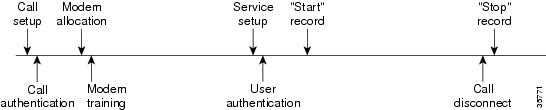
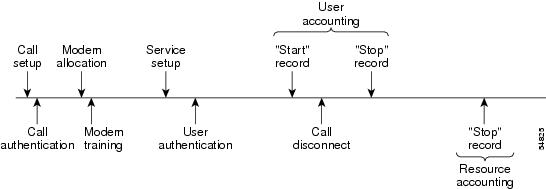
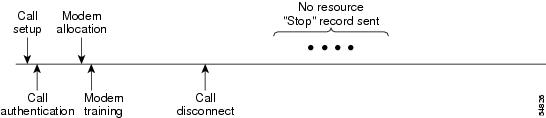
This functionality generates a “stop” accounting record for any calls that do not reach user authentication; “stop” records are generated from the moment of call setup. All calls that pass user authentication behave as they did before; that is, no additional accounting records are seen.
The figure below illustrates a call setup sequence with normal call flow (no disconnect) and without AAA resource failure stop accounting enabled.
The figure below illustrates a call setup sequence with normal call flow (no disconnect) and with AAA resource failure stop accounting enabled.
The figure below illustrates a call setup sequence with call disconnect occurring before user authentication and with AAA resource failure stop accounting enabled.
The figure below illustrates a call setup sequence with call disconnect occurring before user authentication and without AAA resource failure stop accounting enabled.
AAA Resource Accounting for Start-Stop Records
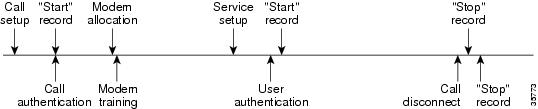
AAA resource accounting for start-stop records supports the ability to send a “start” record at each call setup, followed by a corresponding “stop” record at the call disconnect. This functionality can be used to manage and monitor wholesale customers from one source of data reporting, such as accounting records.
With this feature, a call setup and call disconnect “start-stop” accounting record tracks the progress of the resource connection to the device. A separate user authentication “start-stop” accounting record tracks the user management progress. These two sets of accounting records are interlinked by using a unique session ID for the call.
The figure below illustrates a call setup sequence with AAA resource start-stop accounting enabled.
AAA Accounting Enhancements
AAA Broadcast Accounting
AAA broadcast accounting allows accounting information to be sent to multiple AAA servers at the same time; that is, accounting information can be broadcast to one or more AAA servers simultaneously. This functionality allows service providers to send accounting information to their own private AAA servers and to the AAA servers of their end customers. It also provides redundant billing information for voice applications.
Broadcasting is allowed among groups of RADIUS or TACACS+ servers, and each server group can define its backup servers for failover independently of other groups.
Thus, service providers and their end customers can use different protocols (RADIUS or TACACS+) for the accounting server. Service providers and their end customers can also specify their backup servers independently. As for voice applications, redundant accounting information can be managed independently through a separate group with its own failover sequence.
AAA Session MIB
The AAA session MIB feature allows customers to monitor and terminate their authenticated client connections using Simple Network Management Protocol (SNMP). The data of the client is presented so that it correlates directly to the AAA accounting information reported by either the RADIUS or the TACACS+ server. AAA session MIB provides the following information:
Statistics for each AAA function (when used in conjunction with the show radius statistics command)
Status of servers providing AAA functions
Identities of external AAA servers
Real-time information (such as idle times), providing additional criteria for use by SNMP networks for assessing whether to terminate an active call
The table below shows the SNMP user-end data objects that can be used to monitor and terminate authenticated client connections with the AAA session MIB feature.
|
Field |
Descriptions |
|
SessionId |
The session identification used by the AAA accounting protocol (same value as reported by RADIUS attribute 44 (Acct-Session-ID)). |
|
UserId |
The user login ID or zero-length string if a login is unavailable. |
|
IpAddr |
The IP address of the session or 0.0.0.0 if an IP address is not applicable or unavailable. |
|
IdleTime |
The elapsed time in seconds that the session has been idle. |
|
Disconnect |
The session termination object used to disconnect the given client. |
|
CallId |
The entry index corresponding to this accounting session that the Call Tracker record stored. |
The table below describes the AAA summary information provided by the AAA session MIB feature using SNMP on a per-system basis.
|
Field |
Descriptions |
|
ActiveTableEntries |
Number of sessions currently active. |
|
ActiveTableHighWaterMark |
Maximum number of sessions present since last system reinstallation. |
|
TotalSessions |
Total number of sessions since the last system reinstallation. |
|
DisconnectedSessions |
Total number of sessions that have been disconnected since the last system reinstallation. |
Accounting Attribute-Value Pairs
The network access server monitors the accounting functions defined in either TACACS+ attribute-value (AV) pairs or RADIUS attributes, depending on which security method is implemented.
How to Configure AAA Accounting
- Configuring AAA Accounting Using Named Method Lists
- Suppressing Generation of Accounting Records for Null Username Sessions
- Generating Interim Accounting Records
- Configuring an Alternate Method to Enable Periodic Accounting Records
- Generating Interim Service Accounting Records
- Generating Accounting Records for a Failed Login or Session
- Specifying Accounting NETWORK-Stop Records Before EXEC-Stop Records
- Suppressing System Accounting Records over Switchover
- Configuring AAA Resource Failure Stop Accounting
- Configuring AAA Resource Accounting for Start-Stop Records
- Configuring AAA Broadcast Accounting
- Configuring per-DNIS AAA Broadcast Accounting
- Configuring the AAA Session MIB
- Establishing a Session with a Router if the AAA Server Is Unreachable
- Monitoring Accounting
- Troubleshooting Accounting
Configuring AAA Accounting Using Named Method Lists
To configure AAA accounting using named method lists, use the following commands beginning in global configuration mode:
- Router(config)# line [aux | console | tty | vty] line-number [ending-line-number]
- Router(config-line)# accounting {arap | commands level | connection | exec} {default | list-name}
1. Router(config)# aaa accounting {system | network | exec | connection | commands level} {default | list-name} {start-stop | stop-only | none} [method1 [method2...]]
2.
Do one of the following:
3.
Do one of the following:
DETAILED STEPS
System accounting does not use named method lists. For system accounting, define only the default method list.
Note
Suppressing Generation of Accounting Records for Null Username Sessions
When AAA accounting is activated, the Cisco IOS XE software issues accounting records for all users on the system, including users whose username string, because of protocol translation, is NULL. An example of this is users who come in on lines where the aaa authentication login method-list none command is applied. To prevent accounting records from being generated for sessions that do not have usernames associated with them, use the following command in global configuration mode:
|
Command or Action |
Purpose |
|---|---|
Router(config)# aaa accounting suppress null-username
|
Prevents accounting records from being generated for users whose username string is NULL. |
Generating Interim Accounting Records
To enable periodic interim accounting records to be sent to the accounting server, use the following command in global configuration mode:
|
Command or Action |
Purpose |
|---|---|
Router(config)# aaa accounting update [newinfo] [periodic] number |
Enables periodic interim accounting records to be sent to the accounting server. |
When the aaa accounting updatecommandis activated, the Cisco IOS XE software issues interim accounting records for all users on the system. If the newinfo keyword is used, interim accounting records are sent to the accounting server every time there is new accounting information to report. An example of this would be when Internet Protocol Control Protocol (IPCP) completes IP address negotiation with the remote peer. The interim accounting record includes the negotiated IP address used by the remote peer.
When aaa accounting updatecommand is used with the keyword periodic, interim accounting records are sent periodically as defined by the argument number. The interim accounting record contains all of the accounting information recorded for that user up to the time the interim accounting record is sent.
 Caution | Using the aaa accounting update periodic command can cause heavy congestion when many users are logged in to the network. |
Configuring an Alternate Method to Enable Periodic Accounting Records
You can use the following alternative method to enable periodic interim accounting records to be sent to the accounting server.
1.
enable
2.
configure
terminal
3.
aaa
accounting
network
default
4.
action-type
{none | start-stop [periodic {disable | interval minutes}] | stop-only}
5.
exit
DETAILED STEPS
Generating Interim Service Accounting Records
Perform this task to enable the generation of interim service accounting records at periodic intervals for subscribers.
RADIUS Attribute 85 in the user service profile always takes precedence over the configured interim-interval value. RADIUS Attribute 85 must be in the user service profile. See the RADIUS Attributes Overview and RADIUS IETF Attributes feature document for more information.
Note | If RADIUS Attribute 85 is not in the user service profile, then the interim-interval value configured in Generating Interim Accounting Records is used for service interim accounting records. |
1.
enable
2.
configure
terminal
3.
subscriber
service
accounting
interim-interval
minutes
DETAILED STEPS
Generating Accounting Records for a Failed Login or Session
When AAA accounting is activated, the Cisco IOS XE software does not generate accounting records for system users who fail login authentication, or who succeed in login authentication but fail PPP negotiation for some reason.
To specify that accounting stop records be generated for users who fail to authenticate at login or during session negotiation, use the following command in global configuration mode:
|
Command or Action |
Purpose |
|---|---|
Router(config)# aaa accounting send stop-record authentication failure
|
Generates “stop” records for users who fail to authenticate at login or during session negotiation using PPP. |
Specifying Accounting NETWORK-Stop Records Before EXEC-Stop Records
For PPP users who start EXEC terminal sessions, it can be specified that NETWORK records be generated before EXEC-stop records. In some cases, such as billing customers for specific services, is can be desirable to keep network start and stop records together, essentially “nesting” them within the framework of the EXEC start and stop messages. For example, a user dialing in using PPP can create the following records: EXEC-start, NETWORK-start, EXEC-stop, NETWORK-stop. By nesting the network accounting records, NETWORK-stop records follow NETWORK-start messages: EXEC-start, NETWORK-start, NETWORK-stop, EXEC-stop.
To nest accounting records for user sessions, use the following command in global configuration mode:
|
Command or Action |
Purpose |
|---|---|
Router(config)# aaa accounting nested
|
Nests network accounting records. |
Suppressing System Accounting Records over Switchover
To suppress the system accounting-on and accounting-off messages during switchover, use the following command in global configuration mode:
|
Command or Action |
Purpose |
|---|---|
Router(config)# aaa accounting redundancy suppress system-records |
Suppresses the system accounting messages during switchover. |
Configuring AAA Resource Failure Stop Accounting
To enable resource failure stop accounting, use the following command in global configuration:
|
Command or Action |
Purpose |
||
|---|---|---|---|
Router(config)# aaa accounting resource method-list stop-failure group server-group |
Generates a “stop” record for any calls that do not reach user authentication.
|
Configuring AAA Resource Accounting for Start-Stop Records
To enable full resource accounting for start-stop records, use the following command in global configuration mode:
|
Command or Action |
Purpose |
||
|---|---|---|---|
Router(config)# aaa accounting resource method-list start-stop group server-group |
Supports the ability to send a “start” record at each call setup. followed with a corresponding “stop” record at the call disconnect.
|
Configuring AAA Broadcast Accounting
To configure AAA broadcast accounting, use the aaa accounting command in global configuration mode. This command has been modified to allow the broadcast keyword.
|
Command or Action |
Purpose |
|---|---|
Router(config)# aaa accounting {system | network | exec | connection | commands level} {default | list-name} {start-stop | stop-only | none} [broadcast] method1 [method2...] |
Enables sending accounting records to multiple AAA servers. Simultaneously sends accounting records to the first server in each group. If the first server is unavailable, failover occurs using the backup servers defined within that group. |
Configuring per-DNIS AAA Broadcast Accounting
To configure AAA broadcast accounting per DNIS, use the aaa dnis map accounting networkcommand in global configuration mode. This command has been modified to allow the broadcast keyword and multiple server groups.
|
Command or Action |
Purpose |
|---|---|
Router(config)# aaa dnis map dnis-number accounting network [start-stop | stop-only | none] [broadcast] method1 [method2...] |
Allows per-DNIS accounting configuration. This command has precedence over the global aaa accounting command. Enables sending accounting records to multiple AAA servers. Simultaneously sends accounting records to the first server in each group. If the first server is unavailable, failover occurs using the backup servers defined within that group. |
Configuring the AAA Session MIB
The following tasks must be performed before configuring the AAA session MIB feature:
Configure SNMP. For information on SNMP, see the Configuring SNMP Support chapter in the Cisco IOS XE Network Management Configuration Guide.
Configure AAA.
Define the RADIUS or TACACS+ server characteristics.
Note | Overusing SNMP can affect the overall system performance; therefore, normal network management performance must be considered when this feature is used. |
To configure the AAA session MIB, use the following command in global configuration mode:
|
Command or Action |
Purpose |
|---|---|
Router(config)# aaa session-mib disconnect
|
Monitors and terminates authenticated client connections using SNMP. To terminate the call,use the disconnect keyword . |
Establishing a Session with a Router if the AAA Server Is Unreachable
To establish a console session with a router if the AAA server is unreachable, use the following command in global configuration mode:
|
Command or Action |
Purpose |
|---|---|
Router(config)# no aaa accounting system guarantee-first
|
The aaa accounting system guarantee-first command guarantees system accounting as the first record, which is the default condition. In some situations, users may be prevented from starting a session on the console or terminal connection until after the system reloads, which can take more than three minutes. To resolve this problem, use the no aaa accounting system guarantee-first command. |
Monitoring Accounting
No specific show command exists for either RADIUS or TACACS+ accounting. To obtain accounting records displaying information about users logged in, use the following command in privileged EXEC mode:
|
Command or Action |
Purpose |
|---|---|
Router# show accounting
|
Allows display of the active accountable events on the network and helps collect information in the event of a data loss on the accounting server. |
Troubleshooting Accounting
To troubleshoot accounting information, use the following command in privileged EXEC mode:
|
Command or Action |
Purpose |
|---|---|
Router# debug aaa accounting
|
Displays information on accountable events as they occur. |
Configuration Examples for AAA Accounting
- Configuring a Named Method List Example
- Configuring AAA Resource Accounting Example
- Configuring AAA Broadcast Accounting Example
- Configuring per-DNIS AAA Broadcast Accounting Example
- AAA Session MIB Example
Configuring a Named Method List Example
The following example shows how to configure a Cisco AS5200 (enabled for AAA and communication with a RADIUS security server) in order for AAA services to be provided by the RADIUS server. If the RADIUS server fails to respond, then the local database is queried for authentication and authorization information, and accounting services are handled by a TACACS+ server.
aaa new-model
aaa authentication login admins local
aaa authentication ppp dialins group radius local
aaa authorization network network1 group radius local
aaa accounting network network2 start-stop group radius group tacacs+
username root password ALongPassword
tacacs-server host 172.31.255.0
tacacs-server key goaway
radius-server host 172.16.2.7
radius-server key myRaDiUSpassWoRd
interface group-async 1
 group-range 1 16
 encapsulation ppp
 ppp authentication chap dialins
 ppp authorization network1
 ppp accounting network2
line 1 16
 autoselect ppp
 autoselect during-login
 login authentication admins
 modem dialin
The lines in this sample RADIUS AAA configuration are defined as follows:
The aaa new-model command enables AAA network security services.
The aaa authentication login admins local command defines a method list, “admins”, for login authentication.
The aaa authentication ppp dialins group radius local command defines the authentication method list “dialins”, which specifies that first RADIUS authentication and then (if the RADIUS server does not respond) local authentication is used on serial lines using PPP.
The aaa authorization network network1 group radius local command defines the network authorization method list named “network1”, which specifies that RADIUS authorization is used on serial lines using PPP. If the RADIUS server fails to respond, then local network authorization is performed.
The aaa accounting network network2 start-stop group radius group tacacs+command defines the network accounting method list named “network2”, which specifies that RADIUS accounting services (in this case, start and stop records for specific events) are used on serial lines using PPP. If the RADIUS server fails to respond, accounting services are handled by a TACACS+ server.
The username command defines the username and password to be used for the PPP Password Authentication Protocol (PAP) caller identification.
The tacacs-server host command defines the name of the TACACS+ server host.
The tacacs-server key command defines the shared secret text string between the network access server and the TACACS+ server host.
The radius-server host command defines the name of the RADIUS server host.
The radius-server key command defines the shared secret text string between the network access server and the RADIUS server host.
The interface group-async command selects and defines an asynchronous interface group.
The group-range command defines the member asynchronous interfaces in the interface group.
The encapsulation ppp command sets PPP as the encapsulation method used on the specified interfaces.
The ppp authentication chap dialinscommand selects Challenge Handshake Authentication Protocol (CHAP) as the method of PPP authentication and applies the “dialins” method list to the specified interfaces.
The ppp authorization network1command applies the blue1 network authorization method list to the specified interfaces.
The ppp accounting network2command applies the red1 network accounting method list to the specified interfaces.
The line command switches the configuration mode from global configuration to line configuration and identifies the specific lines being configured.
The autoselect ppp command configures the Cisco IOS XE software to allow a PPP session to start up automatically on these selected lines.
The autoselect during-login command is used to display the username and password prompt without pressing the Return key. After the user logs in, the autoselect function (in this case, PPP) begins.
The login authentication admins command applies the admins method list for login authentication.
The modem dialin command configures modems attached to the selected lines to accept only incoming calls.
The show accountingcommand yields the following output for the preceding configuration:
Active Accounted actions on tty1, User username2 Priv 1
 Task ID 5, Network Accounting record, 00:00:52 Elapsed
 task_id=5 service=ppp protocol=ip address=10.0.0.98
The table below describes the fields contained in the preceding output.
|
Field |
Description |
|---|---|
|
Active Accounted actions on |
Terminal line or interface name user with which the user logged in. |
|
User |
User’s ID. |
|
Priv |
User’s privilege level. |
|
Task ID |
Unique identifier for each accounting session. |
|
Accounting Record |
Type of accounting session. |
|
Elapsed |
Length of time (hh:mm:ss) for this session type. |
|
attribute=value |
AV pairs associated with this accounting session. |
Configuring AAA Resource Accounting Example
The following example shows how to configure the resource failure stop accounting and resource accounting for start-stop records functions:
!Enable AAA on your network access server.
aaa new-model
!Enable authentication at login and list the AOL string name to use for login authentication.
aaa authentication login AOL group radius local
!Enable authentication for ppp and list the default method to use for PPP authentication.
aaa authentication ppp default group radius local
!Enable authorization for all exec sessions and list the AOL string name to use for authorization.
aaa authorization exec AOL group radius if-authenticated
!Enable authorization for all network-related service requests and list the default method to use for all network-related authorizations.
aaa authorization network default group radius if-authenticated
!Enable accounting for all exec sessions and list the default method to use for all start-stop accounting services.
aaa accounting exec default start-stop group radius
!Enable accounting for all network-related service requests and list the default method to use for all start-stop accounting services.
aaa accounting network default start-stop group radius
!Enable failure stop accounting.
aaa accounting resource default stop-failure group radius
!Enable resource accounting for start-stop records.
aaa accounting resource default start-stop group radius
Configuring AAA Broadcast Accounting Example
The following example shows how to turn on broadcast accounting using the global aaa accounting command:
aaa group server radius isp
 server 10.0.0.1
 server 10.0.0.2
aaa group server tacacs+ isp_customer
 server 172.0.0.1
aaa accounting network default start-stop broadcast group isp group isp_customer
radius-server host 10.0.0.1
radius-server host 10.0.0.2
radius-server key key1
tacacs-server host 172.0.0.1 key key2
The broadcast keyword causes “start” and “stop” accounting records for network connections to be sent simultaneously to server 10.0.0.1 in the group isp and to server 172.0.0.1 in the group isp_customer. If server 10.0.0.1 is unavailable, failover to server 10.0.0.2 occurs. If server 172.0.0.1 is unavailable, no failover occurs because backup servers are not configured for the group isp_customer.
Configuring per-DNIS AAA Broadcast Accounting Example
The following example shows how to turn on per-DNIS broadcast accounting using the global aaa dnis map accounting networkcommand:
aaa group server radius isp
 server 10.0.0.1
 server 10.0.0.2
aaa group server tacacs+ isp_customer
 server 172.0.0.1
aaa dnis map enable
aaa dnis map 7777 accounting network start-stop broadcast group isp group isp_customer
radius-server host 10.0.0.1
radius-server host 10.0.0.2
radius-server key key_1
tacacs-server host 172.0.0.1 key key_2
The broadcast keyword causes “start” and “stop” accounting records for network connection calls having DNIS number 7777 to be sent simultaneously to server 10.0.0.1 in the group isp and to server 172.0.0.1 in the group isp_customer. If server 10.0.0.1 is unavailable, failover to server 10.0.0.2 occurs. If server 172.0.0.1 is unavailable, no failover occurs because backup servers are not configured for the group isp_customer.
AAA Session MIB Example
The following example shows how to set up the AAA session MIB feature to disconnect authenticated client connections for PPP users:
aaa new-model
aaa authentication ppp default group radius
aaa authorization network default group radius
aaa accounting network default start-stop group radius
aaa session-mib disconnect
Additional References
The following sections provide references related to the Configuring Accounting feature.
Related Documents
|
Related Topic |
Document Title |
|---|---|
|
Configuring SNMP |
Cisco IOS XE Network Management Configuration Guide |
|
SNMP commands |
Cisco IOS Network Management Command Reference |
|
Security commands |
Cisco IOS Security Command Reference |
|
Configuring Radius |
Configuring RADIUS |
|
Configuring TACACS+ |
Configuring TACACS+ |
|
Configuring IP Services |
Cisco IOS XE Application Services Configuration Guide |
Standards
|
Standard |
Title |
|---|---|
|
No new or modified standards are supported by this feature, and support for existing standards has not been modified by this feature. |
-- |
MIBs
|
MIB |
MIBs Link |
|---|---|
|
To locate and download MIBs for selected platforms, Cisco IOS XE software releases , and feature sets, use Cisco MIB Locator found at the following URL: |
RFCs
|
RFC |
Title |
|---|---|
|
No new or modified RFCs are supported by this feature, and support for existing RFCs has not been modified by this feature. |
-- |
Technical Assistance
|
Description |
Link |
|---|---|
|
The Cisco Support website provides extensive online resources, including documentation and tools for troubleshooting and resolving technical issues with Cisco products and technologies. To receive security and technical information about your products, you can subscribe to various services, such as the Product Alert Tool (accessed from Field Notices), the Cisco Technical Services Newsletter, and Really Simple Syndication (RSS) Feeds. Access to most tools on the Cisco Support website requires a Cisco.com user ID and password. |
Feature Information for Configuring Accounting
The following table provides release information about the feature or features described in this module. This table lists only the software release that introduced support for a given feature in a given software release train. Unless noted otherwise, subsequent releases of that software release train also support that feature.
Use Cisco Feature Navigator to find information about platform support and Cisco software image support. To access Cisco Feature Navigator, go to www.cisco.com/go/cfn. An account on Cisco.com is not required.
|
Feature Name |
Releases |
Feature Information |
|---|---|---|
|
AAA Broadcast Accounting |
Cisco IOS XE Release 2.1 |
AAA broadcast accounting allows accounting information to be sent to multiple AAA servers at the same time; that is, accounting information can be broadcast to one or more AAA servers simultaneously. In Cisco IOS XE Release 2.1, this feature was introduced on the Cisco ASR 1000 Series Aggregation Services Routers. The following commands were introduced or modified: aaa accounting. |
|
AAA Session MIB |
Cisco IOS XE Release 2.1 |
The AAA session MIB feature allows customers to monitor and terminate their authenticated client connections using Simple Network Management Protocol (SNMP). In Cisco IOS XE Release 2.1, this feature was introduced on the Cisco ASR 1000 Series Aggregation Services Routers. The following commands were introduced or modified: aaa session-mib disconnect. |
|
Connection Accounting |
Cisco IOS XE Release 2.1 |
Connection accounting provides information about all outbound connections made from the network access server, such as Telnet, local-area transport (LAT), TN3270, packet assembler/disassembler (PAD), and rlogin. In Cisco IOS XE Release 2.1, this feature was introduced on the Cisco ASR 1000 Series Aggregation Services Routers. |
|
AAA Interim Accounting |
Cisco IOS XE Release 2.4 |
AAA interim accounting allows accounting records to be sent to the accounting server every time there is new accounting information to report, or on a periodic basis. In Cisco IOS XE Release 2.4, this feature was introduced on the Cisco ASR 1000 Series Aggregation Services Routers. The following commands were introduced or modified: aaa accounting update and subscriber service accounting interim-interval. |
 Feedback