Your software release may not support all the features documented in this module. For the latest caveats and feature information, see
Bug Search Tool and the release notes for your platform and software release. To find information about the features documented in this module, and to see a list of the releases in which each feature is supported, see the feature information table at the end of this module.
Use Cisco Feature Navigator to find information about platform support and Cisco software image support. To access Cisco Feature Navigator, go to
www.cisco.com/go/cfn. An account on Cisco.com is not required.
Restrictions for iBGP Multipath Load Sharing
Route Reflector Limitation—With multiple iBGP paths installed in a routing table, a route reflector will advertise only one of the paths (one next hop).
Memory Consumption Restriction—Each IP routing table entry for a BGP prefix that has multiple iBGP paths uses approximately 350 bytes of additional memory. We recommend not using this feature on a router with a low amount of available memory and especially when the router is carrying a full Internet routing table.
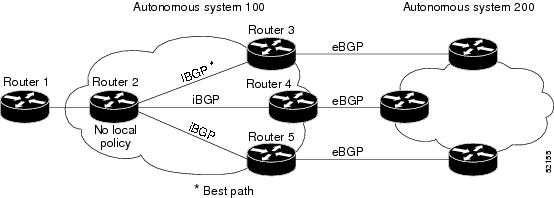
When a Border Gateway Protocol (BGP) speaking router with no local policy configured receives multiple network layer reachability information (NLRI) from the internal BGP (iBGP) for the same destination, the router will choose one iBGP path as the best path. The best path is then installed in the IP routing table of the router. For example, in the figure below, although there are three paths to autonomous system 200, Router 2 determines that one of the paths to autonomous system 200 is the best path and uses this path only to reach autonomous system 200.
Figure 1. Non-MPLS Topology with One Best Path
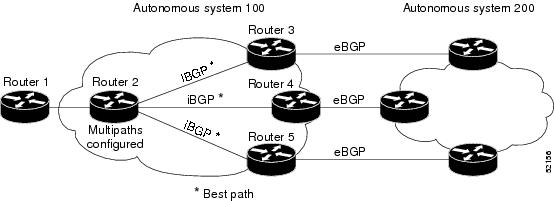
The iBGP Multipath Load Sharing feature enables the BGP speaking router to select multiple iBGP paths as the best paths to a destination. The best paths or multipaths are then installed in the IP routing table of the router. For example, on router 2 in the figure below, the paths to routers 3, 4, and 5 are configured as multipaths and can be used to reach autonomous system 200, thereby equally sharing the load to autonomous system 200.
Figure 2. Non-MPLS Topology with Three Multipaths
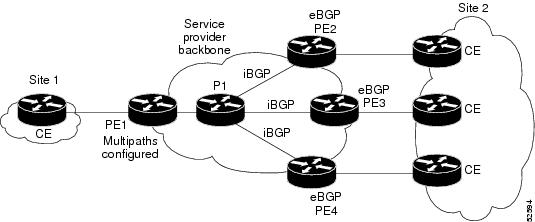
The iBGP Multipath Load Sharing feature functions similarly in a Multiprotocol Label Switching (MPLS) Virtual Private Network (VPN) with a service provider backbone. For example, on router PE1 in the figure below, the paths to routers PE2, PE3, and PE4 can be selected as multipaths and can be used to equally share the load to site 2.
Figure 3. MPLS VPN with Three Multipaths
For multiple paths to the same destination to be considered as multipaths, the following criteria must be met:
All attributes must be the same. The attributes include weight, local preference, autonomous system path (entire attribute and not just length), origin code, Multi Exit Discriminator (MED), and Interior Gateway Protocol (IGP) distance.
The next hop router for each multipath must be different.
Even if the criteria are met and multiple paths are considered multipaths, the BGP speaking router will still designate one of the multipaths as the best path and advertise this best path to its neighbors.
The iBGP Multipath Load Sharing feature is similar to BGP multipath support for external BGP (eBGP) paths; however, the iBGP Multipath Load Sharing feature is applied to internal rather than eBGP paths.
Benefits of iBGP Multipath Load Sharing
Configuring multiple iBGP best paths enables a router to evenly share the traffic destined for a particular site.
How to Configure IBGP Multipath Load Sharing
Configuring iBGP Multipath Load Sharing
To configure the iBGP Multipath Load Sharing feature, use the following command in router configuration mode:
Controls the maximum number of parallel iBGP routes that can be installed in a routing table.
Verifying iBGP Multipath Load Sharing
To verify that the iBGP Multipath Load Sharing feature is configured correctly, perform the following steps:
SUMMARY STEPS
1. Enter the
showipbgpnetwork-number EXEC command to display attributes for a network in a non-MPLS topology, or the
showipbgpvpnv4allip-prefix EXEC command to display attributes for a network in an MPLS VPN:
2. In the display resulting from the
showipbgpnetwork-number EXEC command or the
showipbgpvpnv4allip-prefix EXEC command, verify that the intended multipaths are marked as “multipaths." Notice that one of the multipaths is marked as “best.”
3. Enter the
showiprouteip-address EXEC command to display routing information for a network in a non-MPLS topology or the
showiproutevrfvrf-nameip-prefix EXEC command to display routing information for a network in an MPLS VPN:
4. Verify that the paths marked as "multipath” in the display resulting from the
showipbgpip-prefix EXEC command or the
showipbgpvpnv4allip-prefix EXEC command are included in the routing information. (The routing information is displayed after performing Step 3.)
DETAILED STEPS
Step 1
Enter the
showipbgpnetwork-number EXEC command to display attributes for a network in a non-MPLS topology, or the
showipbgpvpnv4allip-prefix EXEC command to display attributes for a network in an MPLS VPN:
Example:
Device# show ip bgp 10.22.22.0
BGP routing table entry for 10.22.22.0/24, version 119
Paths:(6 available, best #1)
Multipath:iBGP
Flag:0x820
Advertised to non peer-group peers:
10.1.12.12
22
10.2.3.8 (metric 11) from 10.1.3.4 (100.0.0.5)
Origin IGP, metric 0, localpref 100, valid, internal, multipath, best
Originator:100.0.0.5, Cluster list:100.0.0.4
22
10.2.1.9 (metric 11) from 10.1.1.2 (100.0.0.9)
Origin IGP, metric 0, localpref 100, valid, internal, multipath
Originator:100.0.0.9, Cluster list:100.0.0.2
22
10.2.5.10 (metric 11) from 10.1.5.6 (100.0.0.10)
Origin IGP, metric 0, localpref 100, valid, internal, multipath
Originator:100.0.0.10, Cluster list:100.0.0.6
22
10.2.4.10 (metric 11) from 10.1.4.5 (100.0.0.10)
Origin IGP, metric 0, localpref 100, valid, internal, multipath
Originator:100.0.0.10, Cluster list:100.0.0.5
22
10.2.6.10 (metric 11) from 10.1.6.7 (100.0.0.10)
Origin IGP, metric 0, localpref 100, valid, internal, multipath
Originator:100.0.0.10, Cluster list:100.0.0.7
Device# show ip bgp vpnv4 all 10.22.22.0
BGP routing table entry for 100:1:10.22.22.0/24, version 50
Paths:(6 available, best #1)
Multipath:iBGP
Advertised to non peer-group peers:
200.1.12.12
22
10.22.7.8 (metric 11) from 10.11.3.4 (100.0.0.8)
Origin IGP, metric 0, localpref 100, valid, internal, multipath, best
Extended Community:RT:100:1
Originator:100.0.0.8, Cluster list:100.1.1.44
22
10.22.1.9 (metric 11) from 10.11.1.2 (100.0.0.9)
Origin IGP, metric 0, localpref 100, valid, internal, multipath
Extended Community:RT:100:1
Originator:100.0.0.9, Cluster list:100.1.1.22
22
10.22.6.10 (metric 11) from 10.11.6.7 (100.0.0.10)
Origin IGP, metric 0, localpref 100, valid, internal, multipath
Extended Community:RT:100:1
Originator:100.0.0.10, Cluster list:100.0.0.7
22
10.22.4.10 (metric 11) from 10.11.4.5 (100.0.0.10)
Origin IGP, metric 0, localpref 100, valid, internal, multipath
Extended Community:RT:100:1
Originator:100.0.0.10, Cluster list:100.0.0.5
22
10.22.5.10 (metric 11) from 10.11.5.6 (100.0.0.10)
Origin IGP, metric 0, localpref 100, valid, internal, multipath
Extended Community:RT:100:1
Originator:100.0.0.10, Cluster list:100.0.0.6
Step 2
In the display resulting from the
showipbgpnetwork-number EXEC command or the
showipbgpvpnv4allip-prefix EXEC command, verify that the intended multipaths are marked as “multipaths." Notice that one of the multipaths is marked as “best.”
Step 3
Enter the
showiprouteip-address EXEC command to display routing information for a network in a non-MPLS topology or the
showiproutevrfvrf-nameip-prefix EXEC command to display routing information for a network in an MPLS VPN:
Example:
Device# show ip route 10.22.22.0
Routing entry for 10.22.22.0/24
Known via "bgp 1", distance 200, metric 0
Tag 22, type internal
Last update from 10.2.6.10 00:00:03 ago
Routing Descriptor Blocks:
* 10.2.3.8, from 10.1.3.4, 00:00:03 ago
Route metric is 0, traffic share count is 1
AS Hops 1
10.2.1.9, from 10.1.1.2, 00:00:03 ago
Route metric is 0, traffic share count is 1
AS Hops 1
10.2.5.10, from 10.1.5.6, 00:00:03 ago
Route metric is 0, traffic share count is 1
AS Hops 1
10.2.4.10, from 10.1.4.5, 00:00:03 ago
Route metric is 0, traffic share count is 1
AS Hops 1
10.2.6.10, from 10.1.6.7, 00:00:03 ago
Route metric is 0, traffic share count is 1
AS Hops 1
Device# show ip route vrf PATH 10.22.22.0
Routing entry for 10.22.22.0/24
Known via "bgp 1", distance 200, metric 0
Tag 22, type internal
Last update from 10.22.5.10 00:01:07 ago
Routing Descriptor Blocks:
* 10.22.7.8 (Default-IP-Routing-Table), from 10.11.3.4, 00:01:07 ago
Route metric is 0, traffic share count is 1
AS Hops 1
10.22.1.9 (Default-IP-Routing-Table), from 10.11.1.2, 00:01:07 ago
Route metric is 0, traffic share count is 1
AS Hops 1
10.22.6.10 (Default-IP-Routing-Table), from 10.11.6.7, 00:01:07 ago
Route metric is 0, traffic share count is 1
AS Hops 1
10.22.4.10 (Default-IP-Routing-Table), from 10.11.4.5, 00:01:07 ago
Route metric is 0, traffic share count is 1
AS Hops 1
10.22.5.10 (Default-IP-Routing-Table), from 10.11.5.6, 00:01:07 ago
Route metric is 0, traffic share count is 1
AS Hops 1
Step 4
Verify that the paths marked as "multipath” in the display resulting from the
showipbgpip-prefix EXEC command or the
showipbgpvpnv4allip-prefix EXEC command are included in the routing information. (The routing information is displayed after performing Step 3.)
Monitoring and Maintaining iBGP Multipath Load Sharing
To display iBGP Multipath Load Sharing information, use the following commands in EXEC mode, as needed:
Command
Purpose
Device# showipbgpip-prefix
Displays attributes and multipaths for a network in a non-MPLS topology.
Device# show ip bgp vpnv4 all ip-prefix
Displays attributes and multipaths for a network in an MPLS VPN.
Device# showiprouteip-prefix
Displays routing information for a network in a non-MPLS topology.
Device# show ip route vrf vrf-nameip-prefix
Displays routing information for a network in an MPLS VPN.
Configuration Examples for iBGP Multipath Load Sharing
Example: iBGP Multipath Load Sharing in a Non-MPLS Topology
Both examples assume that the appropriate attributes for each path are equal and that the next hop router for each multipath is different.
The following example shows how to set up the iBGP Multipath Load Sharing feature in a non-MPLS topology (see the figure below).
Figure 4. Non-MPLS Topology Example
Router 2 Configuration
router bgp 100
maximum-paths ibgp 3
Example: iBGP Multipath Load Sharing in an MPLS VPN Topology
The following example shows how to set up the iBGP Multipath Load Sharing feature in an MPLS VPN topology (see the figure below).
BGP multipath load sharing for both eBGP and iBGP in an MPLS-VPN
“BGP Multipath Load Sharing for Both eBGP and iBGP in an MPLS-VPN” module in the IP Routing: BGP Configuration Guide
Advertising the bandwidth of an autonomous system exit link as an extended community
“BGP Link Bandwidth” module in the IP Routing: BGP Configuration Guide
Standards
Standard
Title
No new or modified standards are supported by this feature, and support for existing standards has not been modified by this feature.
—
MIBs
MIBs
MIBs Link
No new or modified MIBs are supported by this feature, and support for existing MIBs has not been modified by this feature.
To locate and download MIBs for selected platforms, Cisco IOS XE software releases, and feature sets, use Cisco MIB Locator found at the following URL:
No new or modified RFCs are supported by this feature, and support for existing RFCs has not been modified by this feature.
—
Technical Assistance
Description
Link
The Cisco Support and Documentation website provides online resources to download documentation, software, and tools. Use these resources to install and configure the software and to troubleshoot and resolve technical issues with Cisco products and technologies. Access to most tools on the Cisco Support and Documentation website requires a Cisco.com user ID and password.
Feature Information for iBGP Multipath Load Sharing
The following table provides release information about the feature or features described in this module. This table lists only the software release that introduced support for a given feature in a given software release train. Unless noted otherwise, subsequent releases of that software release train also support that feature.
Use Cisco Feature Navigator to find information about platform support and Cisco software image support. To access Cisco Feature Navigator, go to
www.cisco.com/go/cfn. An account on Cisco.com is not required.
Table 1 Feature Information for iBGP Multipath Load Sharing
Feature Name
Releases
Feature Information
iBGP Multipath Load Sharing
12.2(14)S
12.2(2)T
The iBGP Multipath Load Sharing feature enables the BGP speaking router to select multiple iBGP paths as the best paths to a destination.
The following command was introduced:
maximum-pathsibgp
The following commands were modified:
showipbgp,
showipbgpvpnv4,
showiproute, and
showiproutevrf.